#aec-visualization
1 messages · Page 10 of 1
 mild oxide
went a little overboard with the post
fix it tomorrow
and some missing materials
any tips?
 tall sluice
sharper shadows, they seem to be floating a bit
mild oxide
intentional
id like them to be a bit sharper around the edges
but i want that area shadow effect
apparently its one or the other
but yeah ik wym with the chair legs
bugging me too
 honest temple
@mild oxide maybe less roughness on the lamp. And maybe just me, but there is maybe a little to much specular on the wood desk!? Just a tiny bit
 amber tendon
Most of you guys use GPU Lightmass + custom HDRI via Skylight and then if appropriate a directionalLight, right?
 forest depot
Yep :)
mild oxide
anyone ever get this error?
pops up right after a datasmith import
tried importing in a new project
still happens
tried re exporting the datasmith file
and apparently only an issue with this specific scene
other datasmiths work as intended
Hmm i suppose its time to do some copy pasting
Oh well
mild oxide
amber tendon
Cheers, Electric
Looks quite nice, agent
Sharp shadows have been mentioned but you pointed out that was intentional
mild oxide
Yaya
This my first serious work so
Sure I'll get better with practice
Possibly raytracing
Thanks 😊
 digital wasp
I am trying to create the material preview UI for selecting the material for the flooe at runtime. do yo guys have any idea how to create something like having some material preview spheres in the scene which will have the "OptionMaterial" applied to them and "OptionMaterial" is the array varible which can be selected for each actor blueprint while creating the level
I tried creating the preview for each material if option materials are available at event begin play using the scene capture 2d and setting their target texture to the dynamically created render targets but those scene capture components are rendering all black
 solemn hawk
You can apply the material to a sphere and have it on a separate lighting channel so it’s only affected by the lights you want
 pearl maple
Can you point to any doc or tut on sperate light channel? Not sure how that works.
amber tendon
Lighting Channels ia a rendering feature that enables you to choose what renderable surfaces are lit by specific lights.
basically each object and each light has a lighting channel
you can mix and match between them
pearl maple
How would one go about creating replaceable models with baked lighting for VR exp.
For example I have one scenario where all lighting is baked now I have to give an option to show different kinds of models at the same place. Can this be done with baked lighting? maybe pre baked using this https://docs.unrealengine.com/en-US/Engine/Content/Tools/RenderToTextureTools/Setup/index.html
 dusty gyro
you can try lighting scenarios
This page provides an overview of Precomputed Lighting Scenarios in UE4.
pearl maple
But those are for complete scenes, I only have to change one model with the same lighting.
mild oxide
One model also constitutes a scene
dusty gyro
you cant edit your scene lightmap at runtime
so you can either :
1 - Use lighting scenarios (swap the whole level lightmap)
2 - Use dynamic lighting (wont look as good)
3- Use Distance Field dynamic lighting on objects you want to change (will look at tad better)
 tidal prairie
Have You guys seen Minecraft?
https://www.youtube.com/watch?v=k1zxxyjo6gE

◾ RESOURCE PACK: My own PBR Textures. If you like my work you can support me on Patreon, to download and play it yourself: https://www.patreon.com/umsoea ◾ S...
digital wasp
How to get rid of that weird non existing lighting thingy?
 mystic lynx
If your whites are under 0.5 that shouldn't happen
 amber tendon
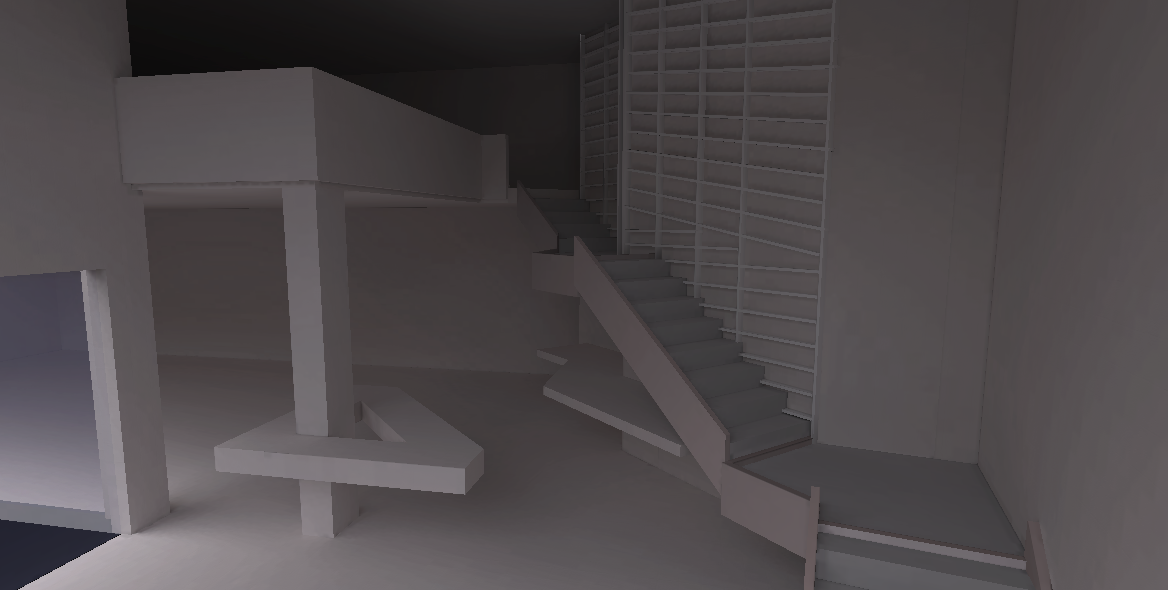
stairs+wall looking cool!
dusty gyro
thanks ! Another perspective
I'm doing it for a friend who's restoring a farm barn into a massive house
that wall is intended to be used as a library
dusty gyro
And a video recording of it, straight out of the Quest
solemn hawk
@dusty gyro that Lightmap res looks pretty good, I’ve had issues porting to mobile with high quality light maps in the past they always got compressed pretty terribly , what settings did you use?
amber tendon
What's people's view on motion sickness with instant-teleportation in VR?
Also I wonder about performance with UE4
dusty gyro
@solemn hawk my default archviz settings, ie somewhere between 128 and 1024 I guess
I can check tomorrow
I'm baking with GPULM at insane quality
 marsh dragon
@amber tendon Ive had the vive for a year and a half now, and teleportation is like 5 times more disorienting than traditional movement
i don't know why people think teleportation is better, you loose spatial awareness by teleporting
marsh dragon
dashing sucks too honeslty
best to give players complete freedom in movement
just good ol' classic movement, with no added weird mechanics like dashing and teleportation is best
 cyan ether
doesnt that cause nausea
dusty gyro
I really like Teleportation for that exact reason
every other movement (dash is a bit of a mix between solutions) brings up dissonance between the brain and the body (acceleration mostly)
cyan ether
im hoping 170+ hz is the key to solving all nausea
but im not sure if thats the root cause
dusty gyro
some way to negate internal ear problems would be the solution
stuff like micro impulsions in the internal ear to simulate movement
marsh dragon
Nah you really do get use to standard movement, you overcome any motion sickness fairly quickly
I cant even imagine pavlov or onward being fun with teleportation
mild oxide
@dusty gyro not unreal related but look at this madlad https://www.youtube.com/watch?v=oFzt-3sRExI

www.IllusiveImages.com https://www.facebook.com/illusiveimagesSE/ Original inspiration and design from http://entrancemakleri.se MAKING OF: https://www.youtu...
actual art

www.IllusiveImages.com https://www.facebook.com/illusiveimagesSE/ Rendered with FStorm Sound effects by Christian Stenlund Music "Pierce Fulton - As You Were"
19 days to render
dusty gyro
Damn
mild oxide
insane work tho
dusty gyro

Unity Technologies Blog
Announcing Unity Reflect, a new product for architects, building designers, and engineers to transfer multiple BIM models into real-time 3D in one click. U...
mild oxide
That one click language makes me think of enscape
Still think it's a scam
Also this is pretty cool
dusty gyro
haha yeah you will never get good results in one click
being able to live link at runtime is sweet tho
dusty gyro
gonna try to push live linking at epic once I'm there
but it comes with a lot of drawbacks imo
dusty gyro
well for once you need to make a massive database
if you want your materials, props and the likes to be replaced correctly

you cant optimize like you'd want since its all automatized
mild oxide
Oh yeah fair
dusty gyro
ie some assets might not be converted correctly and look like crap at runtime
mild oxide
Ig that's what the ds guys be working around now
dusty gyro
its good to see game engines work to make the simplest UX possible for architects tho
dusty gyro
really ?
mild oxide
But then I saw zbrush
dusty gyro
I use Unity for VRChat
and damn I forgot Unity had this weak, small UI
with buttons that wont work unless you have the precision of a cyborg
mild oxide
Lmao
That's true they do have small buttons
Used to Unreal though
Those are kinda big
I like houdini and c4d ui
C4d primarily
Sweetspot between ease and functionality
Ig it's all subjective
dusty gyro
yeah
mild oxide
Lmao so i got this new game today
Yesterday*
And i just kept looking at the textures
"hmm nice walls"
dusty gyro
yep
working in the game industry and archviz
you're walking in the street
"damn thats a nice wall/puddle/reflection"
colleagues be like "wtf bruh"
happens all the time 😬
mild oxide
Hah
😭
I just wanna enjoy my games
I was working on this project once and got kinda into it. Came up after a few hours and saw some real life. First thought that pops into my head is hmm thats hella photoreal
Then i realised its just real
Lmao
pearl maple
anyone using vray for Unreal here? How do you think it compares to the default unreal path tracer?
solemn hawk
It’ll give you a better result than the unreal path tracer, because the ue4 path tracer isn’t setup to give final images yet
solemn hawk
Last time I tried it it crashed on almost everyone of my scenes, has it gotten better?
solemn hawk
Have you tested it on large scenes?
mystic lynx
wtf @dusty gyro oculus quest is that smooth?
dusty gyro
Yeah @mystic lynx
Running at 72hz capped in both the tests I did
The new mesh renderer does wonders
forest depot
havnt had any success with vray for unreal
 hallow arrow
meanwhile has anybody tried to use vray bake? how is it compared to my GPULightmass?
forest depot
same story for me, i think i need to spend more time with vray
pretty hard to beat gpulm atm
vray didnt work straight out of the box, which is a problem
compared to GPUlm you just swap it over and it just works
 dusk pelican
I don't see any gpu option
mild oxide
It's wizardry
 sharp vessel
hi guys! any tips on how to apply a "override material" to all the objects in the scene so I can adjust the lighting faster and more efficiently?
mild oxide
Change mode to lighting only (or detail lighting if you want reflections)
@sharp vessel
Its in the top left of your editor window
sharp vessel
oh its just that my light building is taking forever, even after I applied a clay material to all the objects, and set quality to preview
any tips on how to do fast drafts for lighting?
sharp vessel
Thanks mate! I´m just downloading it and will do some tests later
mild oxide
Nw :D
sharp vessel
any documents related to how to set it up inside the UE editor?
or how do I confirm that it is using the gpu?
mild oxide
It's on the forums. Use the bat file installer
Does everything for you
Unreal Engine Forums
Click image for larger version Name: image_138398.jpg Views: 1 Size: 82.0 KB ID: 1478783
Disclaimer:
This is a very simple and early version of my GPU lightmap
mild oxide

GitHub
I have created this addons for export asset from Blender to Unreal Engine 4 - xavier150/Blender-For-UnrealEngine-Addons
 cosmic mural
Unreal Studio question: Any one know why I don't have any of the mesh editing tools in the mesh editor?
honest temple
The true power of Unreal Engine :)
https://www.youtube.com/watch?v=kF5kzJSgMN8
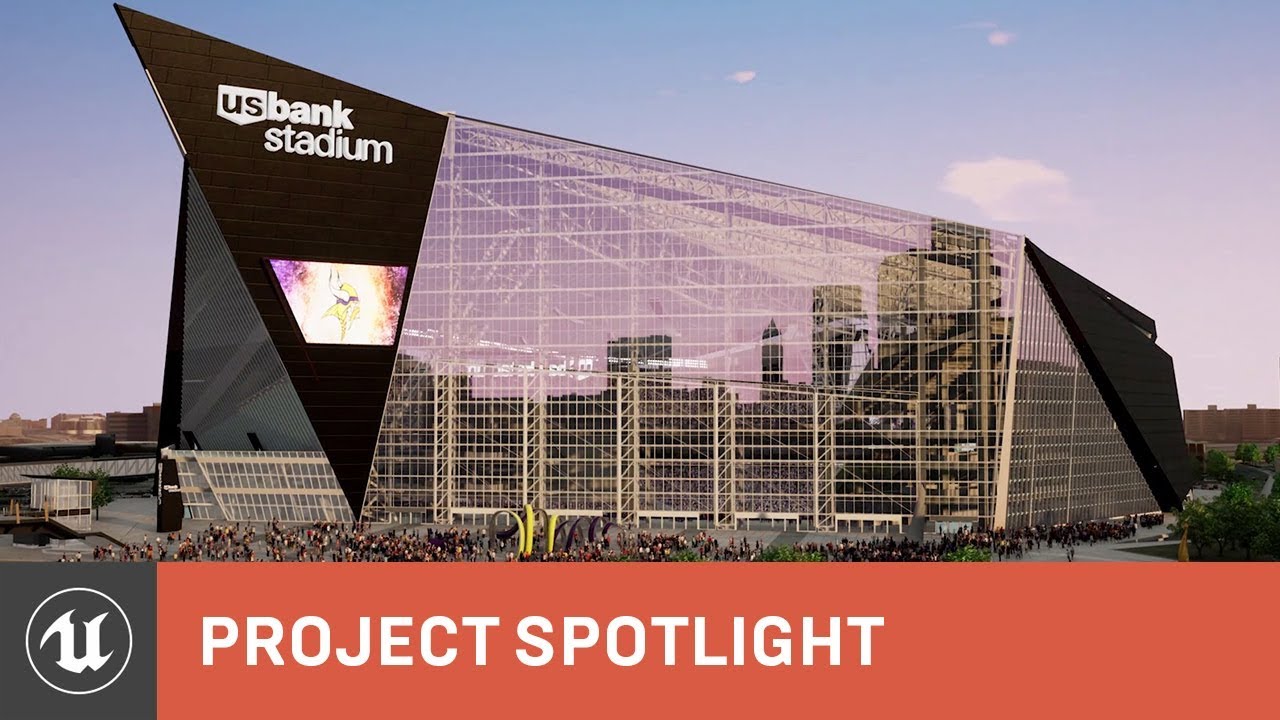
Sports stadiums are huge and complex. But in just a few hours, global architecture firm HKS can deliver detailed, ray-traced interactive presentations—, comp...
 left garden
HKS (and Pat Carmichael) have been doing this kind of work since at least 2004, with their UE2-based "ARCHengine," later upgraded to UE3
 rocky sand
wait did thy say efficient? and they put tons of scanned humans into the stadium? ^^, is that going to be a walking simulator or just lvl design, they could cheat alot and still get same look.
 half knot
going through some relearning pains.... is there a way to turn off the highlight when selecting an object
oh its doing the highlight in Lightmass density.... still anyway to disable that. Makes it difficult to see
makes the object pink...

 ember notch
is it a good idea to make an arch viz project in unreal studio and use datasmith to build for android? does it even build?
 tulip whale
Hello there.
Not sure if this is the right place to ask but let me know if i should put this somewhere else. So, I'm working on a Third person perspective shooter project and I'm facing an issue of "Screen Tearing".
On "Full Screen Mode", Tearing is quite easily noticeable which is making this feel way weird.
On "Windowed Borderless Mode", Tearing is minimal but then the mouse sensitivity starts behaving awkwardly while aiming.
So here is the question - "Is there anyway to reduce screen tearing without using V-Sync?".
Here is my system configuration :-
Processor - i7-4770K
GPU - Nvidia GTX 1070
RAM - 16 GB
Monitor Refresh Rate - 60 Hz
Unreal Editor version is use - 4.22.2
 frozen plinth

ArtStation
This i a project that i did for ImmersionVR company.
I did this with dariusz mróz. He`ve done all models of buildings, and i take care of exterior and rendering.
It run smoothly on 45 fps with 1080 ti
frozen plinth

ArtStation
This i a project that i did for ImmersionVR company.
I did this with dariusz mróz. He`ve done all models of buildings, and i take care of exterior and rendering.
It run smoothly on 60 fps with 1080 ti
forest depot
really nice
 zinc siren
Hi all, I'm having a strange issue with light build on large surfaces not generating full shadows. Right side is a scale of 1 with a 2048 res lightmap, left side is same geometry with scale .5 and with a 128 lightmap. I want to make it look like the left but with a scale of 1, and I cannot figure out why this is happening 😭
 brisk jewel
@forest depot GPULM? is that the GPU based lightmass I've heard so much aboot?
@zinc siren presumably it's your lightmap size, I'm guessing at .5 scale a lightmap of 128 is equal to 256? however I have no idea if that's right, lightmaps might be affected by scale?
zinc siren
The lightmap for the surface that wasn’t working was 2048. But I didn’t realize my scene lighting scale was at 1. Brought it down and now it’s working
forest depot
Yes it is
cyan ether
whenwhenwhenwhen
dusty gyro
soon™
cyan ether
i hope for one day an xref equivalent for uassets, some of my assets could do with being pooled from a central location across projects
dusty gyro
Nah
brisk jewel
am I right in thinking that the gpu lightmass only works on binary versions of the installation?
mild oxide
No
brisk jewel
oh lovely! so is there an installer for the launcher version? sorry I was looking at the forum post about it and not quite sure what to follow.
mild oxide
Yes there's a bat file. Should be mentioned in the forum post
brisk jewel
Many thanks man. I think I saw it but wasn’t sure.
mild oxide
Nw
 worthy loom
hi, what is the best setting for glass in archviz. i have the advance glass pack on the marketplace. but when every i use it , it has very weird reflect like this,
i try to set fresnel falloff highest as i can, but seem like the effect stuck at 10.
i heard it has something to do with how UE4 caculator reflection and opacity ?
dusty gyro
@worthy loom most of the time I just use a very low reflexion/ioR value
brisk jewel
Hey all. I've just started using GPU lightmass, it's super fast but my scene looks very different from the old bakes, reflections seems much harsher
I did have two sided materials and emissives acting as static lights but I've turned them off now, they shouldn't have been doing much to the lighting anyway but any general pointers?
 lethal vigil

tested distance field indirect shadow on dynamic objects with raytraced reflection.
tested distance field indirect shadow on dynamic objects with raytraced reflection.
dusty gyro
:rubs hands: nice another video :)
brisk jewel
directional light seems a lot harsher in GPU Lightmass, or less secondary bounces GI at least.
lethal vigil
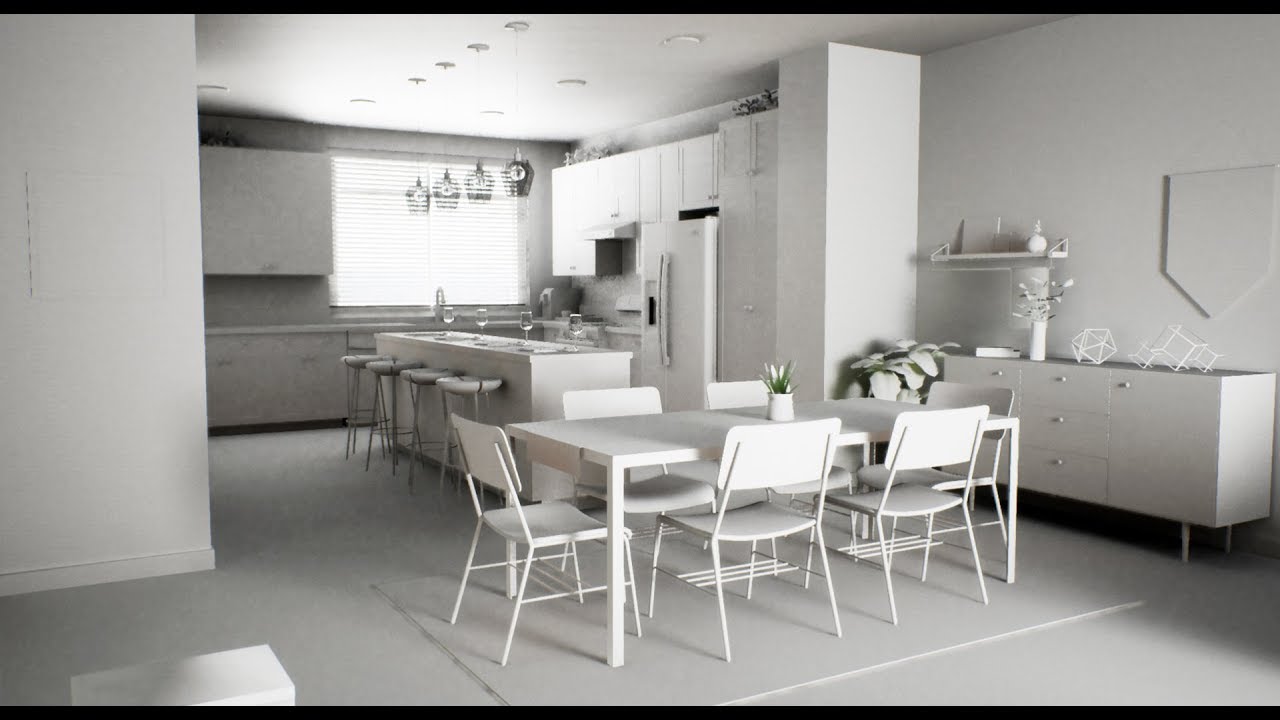
This time all objects fully dynamic and no bake. Realtime GI, Shadow and reflection activated. Raytraced translucency disabled. (cant manage refract/ior)
 fiery warren
Hello everyone. Do you guys manage to export ForestPack from 3dsmax to UE4?
Everytime I try it crashes 3dsmax
Using datasmith
lethal vigil
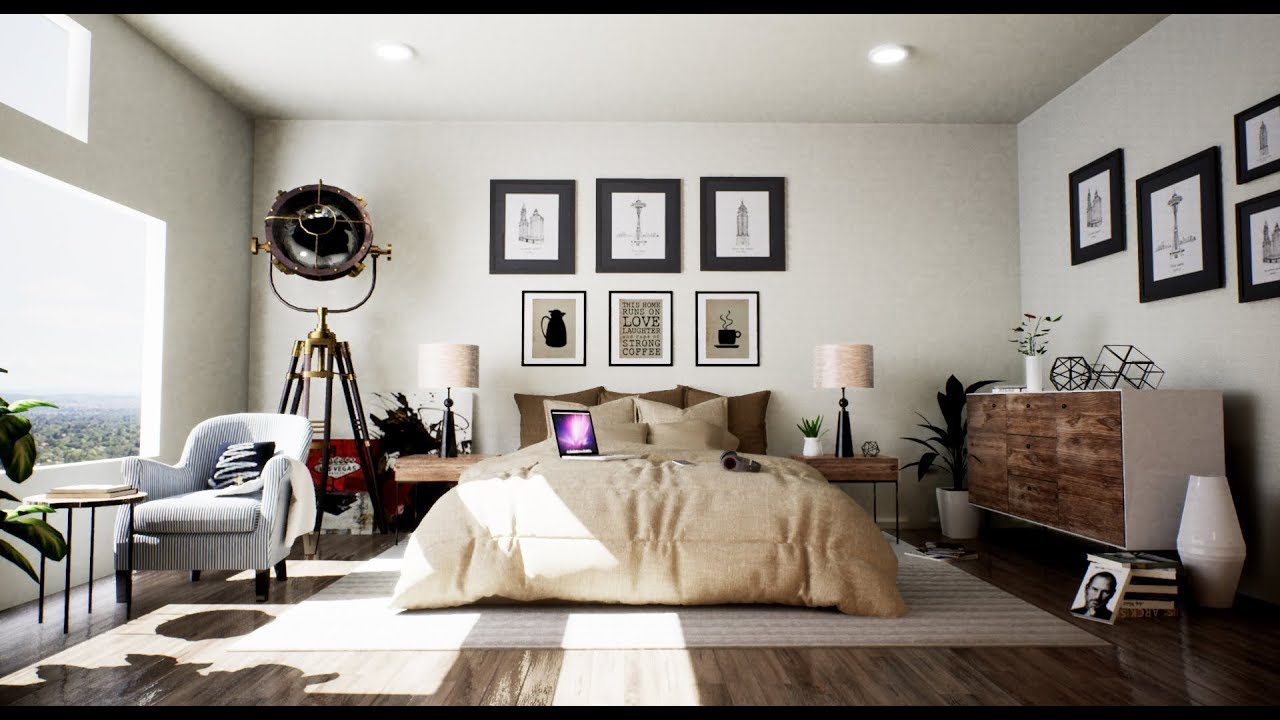
Testing day & night level on UE4 with RTGI. model : https://www.cgtrader.com/free-3d-models/interior/bedroom/bedroom-minimalist-356222b46d95b7fb1215f652ea9fd2f3
 sweet fossil
@fiery warren Don't export forest pack to UE4. Use the built in foliage tools.
lethal vigil

All features enabled.(no bake full dynamic)
dusty gyro
Unreal Engine Forums
PREVIEW
We have released a preview of Unreal Studio 4.23. The notes below are for updates related to Unreal Studio.
(general details about the 4.23 engine preview
some good stuff in here, new template refactor, HDRi backdrop actor
workflow improvements
lots of performance refactors too
mild oxide
hdri finally???
dusty gyro
New HDRI Backdrop Actor:
With the new HDRI Backdrop Actor, it’s faster and easier to create a realistic background and lighting environment for your Level from a single HDRI image
Simply drop the Actor into your Level and assign it the HDRI texture you want. You’ll get your texture projected onto a backdrop, a Sky Light automatically set up to provide ambient light drawn from the texture, and a floor surface that captures the shadows from your Level
sounds a lot easier
dusty gyro
😃
dusty gyro
sure thing
lethal vigil
hi guys just first try 4.23.0 p1
i think hdribackdrop must have brightness and contrast settings for hdr. The desired lighting mode seems difficult to capture without these settings.(compared with 4.22.3 level)

i think hdribackdrop must have brightness and contrast settings for hdr. The desired lighting mode seems difficult to capture without these settings.(compare...
cyan ether
oh wow new preview
are you sertac @lethal vigil ?
absolute beast if yes
dusty gyro
yeah he is @cyan ether
hallow arrow
has anyone here tested 4.23 lightmass?
just want to know if my dark corner tricks & lightmap padding fixes have caused unexpected problems
dusty gyro
@hallow arrow I can give it a go what kind of mesh shape do I need to use ?
hallow arrow
you can use any
dusty gyro
will take a couple assets from packs then
hallow arrow
for lightmap padding fixes, there are some additional steps to activate them as we don't want to break existing lighting builds
- select all the mesh assets you'd like to apply the fix (the meshes should have 'auto generate lightmap uvs' checked as this fix is for that)
- bulk edit with property matrix
- change 'lightmap resolution' to any value. this step will freeze the editor for a while as the lightmap uvs of all the selected meshes will be regenerated
- press ctrl+z to revert the resolution number change. now the fix is applied.
hallow arrow
or you can also reimport all the meshes you want to fix 😅
dusty gyro
nah I'll just user the matrix
woopsie
crashed @hallow arrow
while trying to use the edit property matrix on one asset
Assertion failed: SerializeNum >= 0 [File:D:\Build\++UE4\Sync\Engine\Source\Runtime\Core\Public\Containers/Array.h] [Line: 1082]
lots of MeshDescription and MeshBuilder references in the crash report
does editing in the mesh editor directly apply your fix for padding ?
holy hecc
getting loads of crashes just by opening the mesh editor/changing stuff in it
same error
hallow arrow
🤔 looks like our mesh editing code is bugged
dusty gyro
yeah
hallow arrow
does editing in the mesh editor directly apply your fix for padding ?
yes, so you can just try it on one mesh
and observe if the generated lightmap uvs has shifted a lil
dusty gyro
do you have access to the logs with client ids ?
I can PM you my IDs if you want to check the crash reports
before fix
hallow arrow
yes
dusty gyro
after fix (new res at 256 instead of 64)
hasnt changed a bit
(I did press apply changes)
dusty gyro
oh the other one
hallow arrow
when you change the number the lightmap uv will be permanently modified
even if you change it back
dusty gyro
doesnt change anything
hallow arrow
this mesh wasnt using generated lightmap uvs 😃
hallow arrow
all newly generated lightmap uvs will use the new fixed algorithm
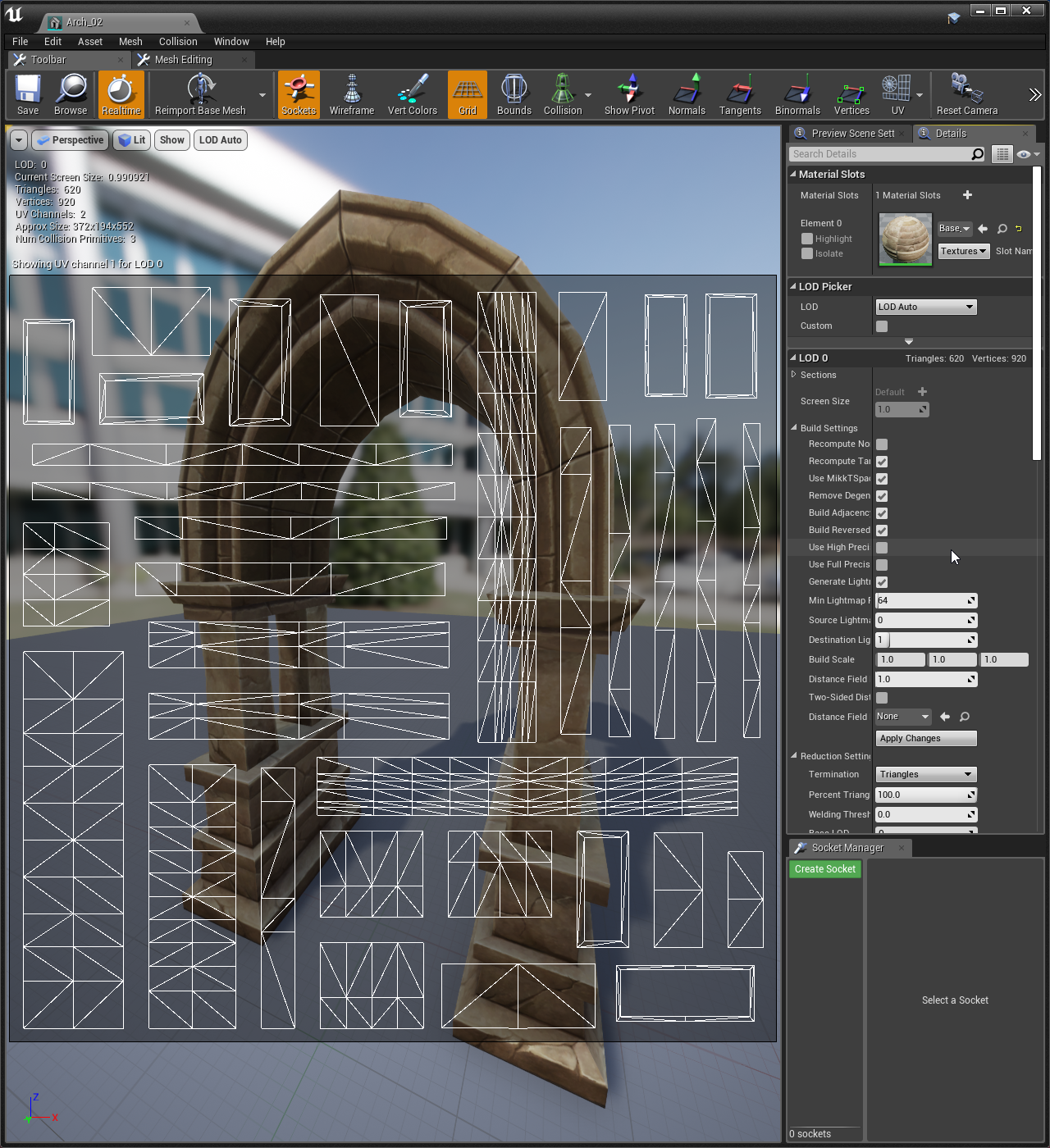 hallow arrow
so this one was using generated lightmap uvs?
hallow arrow
basically it will fix the dark corner problem that this guy was raging about 😄
dusty gyro
😄
hallow arrow
the problem was, our documentation was also bugged
so even if you follow it precisely, you're still going to get dark corners which is very frustrating
hallow arrow
it is now fixed after i talked to them
dusty gyro
will it have the padding fix already ?
hallow arrow
yes, all newly imported meshes are generated using the fixed algo
hallow arrow
for all existing content, you need to apply the bulk editing trick
dusty gyro
yeah
cyan ether
nice, seems this new hdribackdrop was modelled on vray's
forest depot
By any chance would the lm fix also be applied to gpulm
hallow arrow
@forest depot have you tested it ? does the lm fix indeed look better?
it is actually a reduced form of a new technique in the Prometheus fork of GPULightmass (which is frozen now): https://forums.unrealengine.com/development-discussion/rendering/1460002-luoshuang-s-gpulightmass?p=1595479#post1595479
Unreal Engine Forums
Click image for larger version Name: image_138398.jpg Views: 1 Size: 82.0 KB ID: 1478783
Disclaimer:
This is a very simple and early version of my GPU lightmap
mild oxide
@lethal vigil i was following your rtx setup tutorial
And i can't find the new dof algo in the project settings
They removed it or something?
Oh nvm its still available in 4.22
 frail bluff
Is it good to use modular house sets for Archviz?
Wondering and analyzing for next project - I'm considering the benefit for optimization and the same scale for textures
mild oxide
You mean from the ue4 store?
Not really unless youre using them for far off/low lod purposes
Theyre optimized for games but most of them dont fit well in photorealistic settings
frail bluff
So how do you deal with the same texture size for each wall?
Let’s say we have a conocerte texture and we want to have the same size of it and our walls have different sizes. Good uv maps preparation for the same size?
@mild oxide I mean modular set of a house that you prepare in dcc before exporting to UE
mild oxide
Id say yeah just resize the uvs if thats the way you want to go. Or a procedural material from substance designer
Resizing uvs might be bad for your texture though
Also do you mean like a kitbash? That should be good yeah
frail bluff
Ok thanks @mild oxide
mild oxide
:D
pearl maple
@frail bluff You could also use world space UV's for static meshes.
 livid harness
Do you guys use datasmith a lot?
mild oxide
Yup
livid harness
Are you using it from Revit and if so, how good is unreal at determine materials and mesh UVs
mild oxide
3ds
I believe life for life uses itbwith revit
From what ive seen though its pretty good with a basic setup regarding materials. But you always have to optimize/tweak them for realism
But it gives you a good starting point
And uvs is just enhhh. Generates good lightmap uvs. But the 0 channel it messes up 3 quarters of the time
For me anyway
dusty gyro
@livid harness Revit for datasmith will translate meshes, material IDs and texture UVs well
you definetly dont want to use Revit materials in your end product tho
there's tools available to swap materials corresponding to a string for example
.ie "replace original materials with 'glass' by this material I made within UE4"
the great thing is that once your equivalence tables or string lists are done, you can reuse the scripts for all your projects (granted you use the same material names in revit between projects)
livid harness
tools for revit or ue4?
livid harness
Yeah Im currently developing a plugin for UE4 that does exactly that but it can also replace static mesh actors
because some of our prop models in Revit are not the best looking models
livid harness
I remember in the ue4 stream showcasing revit and datasmith the presenter was using a python script to replace the revit materials with substance materials
dusty gyro
Data Prep
livid harness
ah its blueprints
dusty gyro
either BPs
livid harness
that is very interesting
dusty gyro
or you can use Python
livid harness
yeah we are still getting used to ue4 and they haven't touched blueprints too much so they wanted me to just develop and easy to use tool that has the same functionality in only a couple clicks
hopefully I can showcase it here once its done since I think lots of people can benefit from it
but thanks for showing me that i didn't know it existed until now
dusty gyro
the dataprep tool is still in its infancy
but you can still do some pretty good preparation of your meshes
I used it a lot to generate LODs (to save performance), swap materials, adjust lightmap resolution
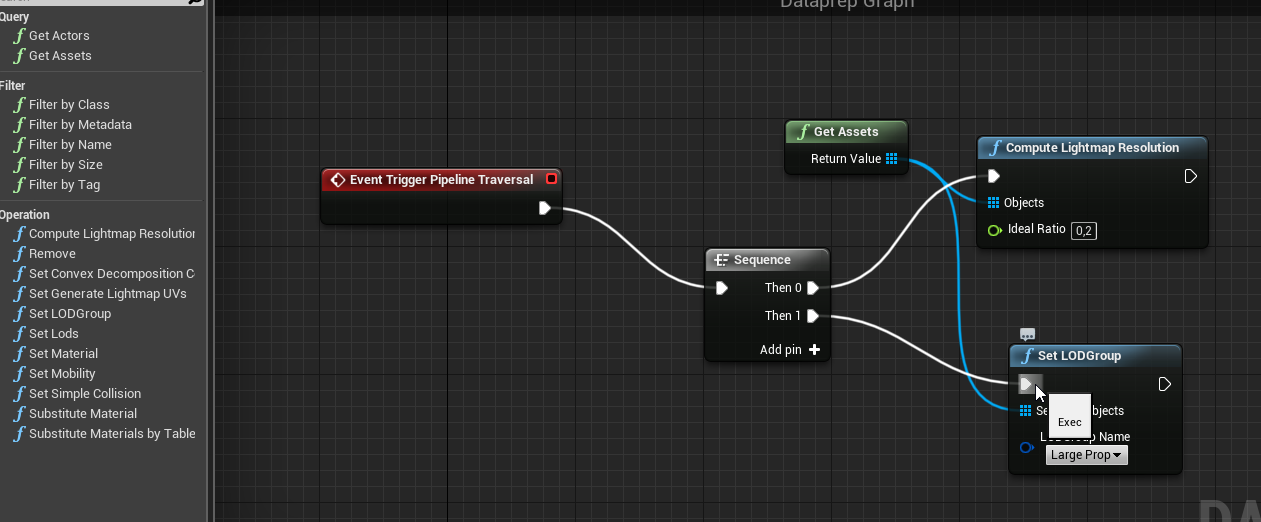 livid harness
very nice
dusty gyro
this is from 4.22 tho
might have changed in the new preview of 4.23, havent checked yet
worthy loom
hi. can anybody help me out, this error is killing me
 eternal walrus
can anyone help me out? I can't figure out how to switch which lod model im using in the foliage tool (quixel megascans grass assets)
half knot
Anyone using Lumion and or know of a good discord for it?
 prisma saffron
Are there recommended tutorials or playlists for Archviz
prisma saffron
does it also have guides for making game environments
dusty gyro
Mostly about how to translate data from cad to unreal
Some good bits of info on multiple matters of realtime rendering and scene composition too
 jovial arch
So im new to UE and could use some help with lighting. Im in the support chat for a while, come say hi 😃
dusty gyro
support chat ? what support chat ? 
mild oxide
Its one of those things
Great mysteries of life
I think he meant the voice chat tho
dusty gyro
aah
 jovial coral
Hey discord, I am new here. I work doing Arch Viz both using Vray and Unreal. I hope to learn a lot more while I am here
dusty gyro
welcome home @jovial coral 😃
mild oxide

Unreal Engine
Introducing support for Maxon’s Cinema 4D in the release of Unreal Engine 4.23, available now in preview.
hallelujah
blessed be
mild oxide
What the hell was that
dusty gyro
🙁
mild oxide
Deleted ig
amber tendon
Do people actually use the ambient occlusion from Lightmass? Or is it usually left disabled?
dusty gyro
Depends how you like your lights baked
sometimes it looks better with AO, sometimes good baked GI is enough
amber tendon
fair
jovial coral
how do I improve the quality of shadows on a moveable object?
jovial coral
how do I add more cascades? does the light need to be stationary?
 inland viper
Was wondering if anyone uses the manual exposure settings with real world lighting intensity values or do most use EV?
jovial coral
I use manual exposure settings
inland viper
Hi Chris do you have a workflow in 4.22+ for calculating intensity of directional light and skylight intensity? Ideally I would like a solid realistic result as a base and tweak from there .
here is the option to increase dynamic shadow cascades found by clicking on the light and searching in the details panel. I think it is scene wide though so quite expensive
jovial coral
@inland viper the workflow I use is generally: Add skylight using either a grey cubemap or HDRI map. I do a lightbuild and make sure that the global illumination is good enough, if its dark I increase the skylight intensity. Then Ill add a directional light, and do the same thing. I will then use a post process volume to control burn, contrast and color etc to get the right final look
mild oxide
Use the path tracer to get an idea of accurate lighting
jovial coral
Agent, thats an new RTX feature?
mild oxide
Yeah
 vernal pecan
Gathering some feedback from Unreal Studio users : who here is using the HDRi Backdrop introduced in 4.23 preview ?
vernal pecan
@mild oxide have you used it yet ?
forest depot
Yeah I just paused in the middle of the day to play with it for a bit haha
mild oxide
Is it on the octane site or marketplace?
mild oxide
Oh rip i dont have a sub
hallow arrow
can it bake lightmaps?
forest depot
Looks like there's a baking camera
mild oxide
@forest depot dude this is way more refined than the vray plugin
Like
Waaaaaaay
Fucking love it
forest depot
Yeah its the real deal
forest depot
Nah just played around with it
I'll probably just implement it as a small part of my next real project as freebies
It's not exactly stable atm
Tried to activate it on 2 live projects but it crashed
Worked fine when I just migrated a whole bunch of assets to a test project tho
forest depot
hm i wonder what is in my actual projects that are causing it to crash
it gets through most of the assets when activating, just not all of them
mild oxide
@forest depot it crashed when i used substance mats
solemn hawk
Substance need to add a way to bake their texture maps directly to unreal
mild oxide
they already do that
its just controlled by the substance factory instance
you could take the textures and put them in your own material
never really needed to before this tbh
solemn hawk
Well they’re not true texture maps though, vray for unreal has the same issue that octane has
forest depot
haha i just opened the same scene
vernal pecan
@hallow arrow I might be coming to visit you earlier than I anticipated 😄
lethal vigil
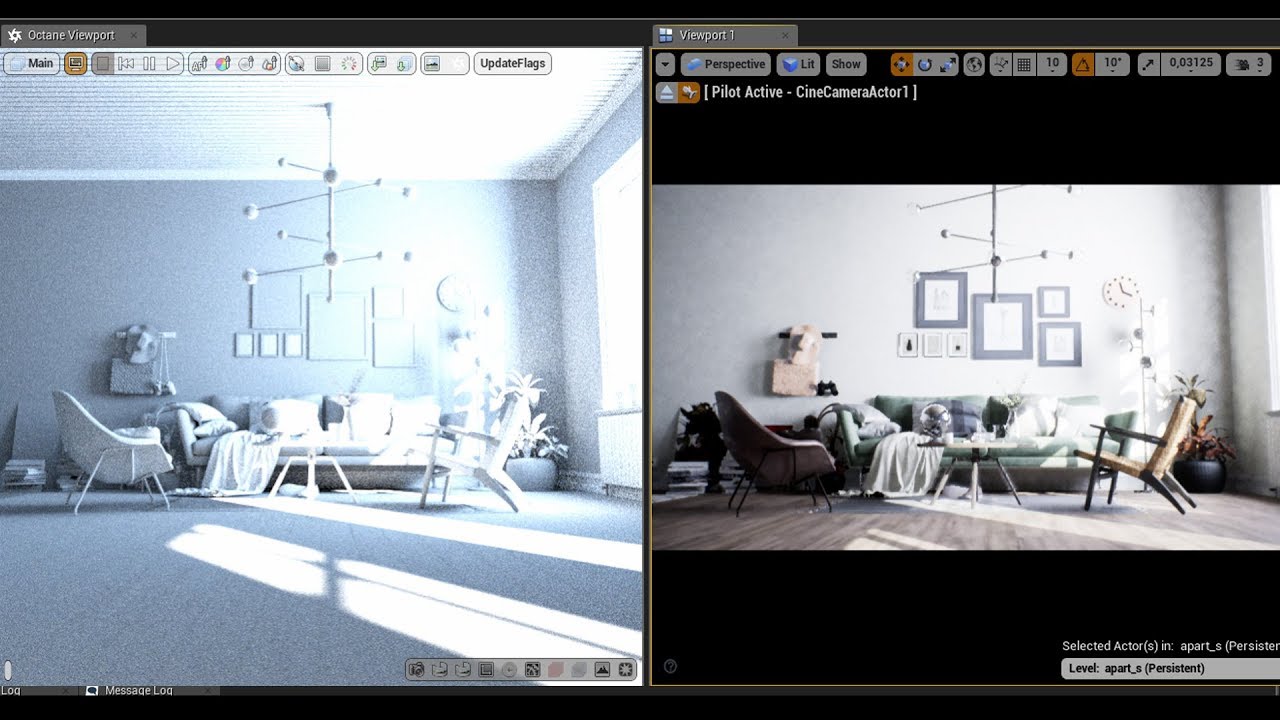
translucent materials seems converted not correctly.
hi guys just fast comparison. seems like material coversion fail on translucent shaders.( or i cant figure it out) and light intesity really different.
forest depot
can always trust you to be using the latest thing released 😉
yeah im having trouble also trying to get glass to work properly
mild oxide
In octane?
mild oxide
Ah i didnt pay much attention to glass. Could be a beta bug
vernal pecan
Awesome @lethal vigil !
honest temple
@lethal vigil I have also issues with getting translucent materials, or reflective surfaces to show in PathTracing view..
Perhaps the path tracing is just not including this traces, or just don't visualize the results back in the view?!
mild oxide
Anyone use cgaxis/poliigon textures?
The poliigon normal maps need to have their normals flipped right
Is it the same for cgaxis?
 gilded pulsar
Hey all, I am trying to convert this entire shop that I have made in 3ds max a few months back. It contains 68 spots - when I import it to Unreal, all spots are pointlights, then I replace them with spotlights, but they all point the wrong direction. If I rotate them all in local mode it is only local for one spot I seem to be missing something here. In 3ds max when I rotate many objects at once I use local axis combined with "use pivot point center" is there anything like this in Unreal, or is it even the solution?
frail bluff
@mild oxide the best option is just previewing - if sth looks odd - just invert and done : )
Guys, I'm having problem with custom tree export form blender to UE. I use mTree add-on and I created the whole tree. Now i want to join the leaves (they're instanced) and when I do that I have 16x more vertices. Anyone knows how can I properly export my tree?
Before joining/merging in Blender:
After merging (huge vert number)
vernal pecan
@gilded pulsar which max revision are you using and datasmith for max plugin versions ?
gilded pulsar
Max 2017 and newest datasmith
worthy loom
Hi veryone, can you help me out
how to make good subsurface light for object
every thing is fine with simple lantern or table lamp
but when it come to complex mesh like animal, the subsurface light look so bad in side view.
because of its bad look i had to move the light outside of the mesh, its good for 1 camera view. but not for multi
vernal pecan
@gilded pulsar do you have a datasmith revision number ?
when you install the plugin there's a rev number on the bottom left
if you can send me the file with just the lights that would be great too
 harsh oyster
Hi, how to optimize VR rendering performance if I have a lot of video on the walls in my game ?
gilded pulsar
@vernal pecan Well now I have it installed and cant remember the number. But it says it supports Max 2016-2020 and engine version 4.19 to 4.23 and I have 4.22.3 installed.
@vernal pecan It is as if I can turn them all 90 degrees they line very well up to the original scene. But I cant seem to be able to do it to all of them at once. And In in scene I got 68 spots, in others I got a few hundred. So it could become alot of work.
brisk jewel
Hey all,
I've been toying around with Vray for Unreal, but there's part of me wondering if the lightbake method is rather pointless... Can't I just do that in 3Ds Max and render all the (presumably) Total Lighting passes there and use them in Unreal later?
We use non linear workflow and all our materials don't import because of plugin use, so the whole thing feels a bit superfilous to me.
superfluous*
forest depot
you cant import lightmaps afaik
or rather, you can import the textures but theres no way to apply them
brisk jewel
well I can import them as textures and apply them in the material.
have the material as unlit but reflections should still work and all
forest depot
would be very interested in seeing how it looks
brisk jewel
I was happy with the normal Unreal lightbaking but work is consumed with Vray thinking it's one click solution
forest depot
ah
brisk jewel
just sat here with two Vray for Unreal licenses, slowly baking away or a farm of 60 vray for Max licenses...
brisk jewel
in fact, has anybody used Vray for Unreal?
forest depot
i tried it for a few minutes and gave up
octane for unreal seemed way less temperamental
brisk jewel
heard great things about Octane but always been using Vray and a little Corona, love the idea of Redshift but outside of Unreal
general archvis question, should it take hours to do quick draft lightbuilds?
in a rather detailed lobby sized scene
mild oxide
Yeah my work is also obsessed with vray
I can never get it to work right
Octane hella gucci
brisk jewel
I was using GPULM, got a 2080 here but was still taking a long time.
we do have a lot of lights in the scene and some lightmaps are 1024
but it is very slow still. We must be messing up right at the start
@mild oxide if only they'd look at other render engines but it's a VRay cult here, old hands and set in their ways, but obviously i'm doing things wrong too
mild oxide
Thankfully mine look at other engines. I showed them the octane render and they seem agreeable to buy me a sub
brisk jewel
my work place wants their Vray quality renders right in Unreal but they don't use linear workflow and 3rd party plugins like color correct and multitexture so nothing imports over
mild oxide
And good thing is it should work fine with datasmith translated vray mats
Yeah color correct is a bitch
Did you watch the latest webinar of vray for unreal?
Shows u a workaround
forest depot
most people here use vray
but it makes sense for traditional archviz
@brisk jewel i also us a 2080 annd dont shy away from 2k lightmaps at all
use*
how many 1k lightmaps are we talking?
brisk jewel
Not that many. About 10 or so at most?
some stuff tends to be high poly but I don't see that affecting the actual rendering
forest depot
yeah something is wrong
i can have easily 20+ 1k and 10 more 2k maps
and itll be fine
brisk jewel
and render fast for draft?
brisk jewel
think I'm stuck with VRay anyway, the company demands it
brisk jewel
yeah (Visualisation One) about 25 people
don't quite understand their obsession really, I did good scenes with the same old Unreal lightmass
also I just realised I was baking with high settings so that explains something
forest depot
high in engine?
brisk jewel
yeah, the vray lightbake has quality settings I'd set to high this morning without thinking
brisk jewel
2k atlass was rendering in 5 mins on draft, and 60mins on high...
I was having fun with GPULM
mild oxide
I think i follow u guys on ig lol
brisk jewel
IG?
mild oxide
mild oxide
Part of the nice scenes
brisk jewel
for I am a lowly modeller and all the visualisers can't model
brisk jewel
likewise man, and I'm stupid enough to sit here doing it getting paid about 4/6k less
but TBH I don't really like arch vis rendering, I like all the things around it ut not pressing F9 to render
mild oxide
If you don't mind me asking, how much is the median salary for archviz jobs there?
Like how much can one expect to make
brisk jewel
you start at 18K, get to around 22 when you start visualising and can make near 30K and then 35K if you are a senior and lucky
forest depot
is this gbp?
mild oxide
Is that good? Compared to thr cost of living and stuff
forest depot
whats the cost of living compared to london?
brisk jewel
I can own and run a house alone on 24K and I do make bonuses(total was 28K last year
forest depot
its a bit low compared to auckland
brisk jewel
3 bedroom semi detatched around 130K
brisk jewel
I have a friend in DNeg NZ who is on 85K NZD and he's still in a tiny place
yeah to buy, it's not a great area but I can walk/cycle to work.
mild oxide
Wtf
brisk jewel
it's just the whole National Average is 25K or so and you get a bit bitter seeing people make so much when they need you to do really simple poly work
brisk jewel
but I also get it, any kid can model in their bedroom, we have two freelancers in Bulgaria that make 500USD a week modelling for us
on and off.
mild oxide
Best way to save lol
forest depot
auckland is pretty fucked for home owning
mild oxide
500k gbp
forest depot
median home is 9x higher than median salary
mild oxide
Id say
brisk jewel
need that bubble to burst
mild oxide
What does that mean
brisk jewel
yeah, sad to think the best you can get in life these days is a house lol
forest depot
bought 3 years ago
mild oxide
Bit the bullet
Oh ok
That's a good thing though right
Property is always a solid investment
Or so i hear
forest depot
for very long term yeah
brisk jewel
yeah it is, it'd just be nice to also be like... well off 😛
mild oxide
Still a faraway dream for me
brisk jewel
Arch Vis, All the architechture and none of the architech money
TBH I have been tempted to mode to Bulgaria, open up a modelling company or just myself and buy the country slowly
mild oxide
Architecture has money??? Ok maybe i should switch back
Design field is in the shiiter here
Any creative job and you get paid peanuts
brisk jewel
as in an architect has money
brisk jewel
Brexit is looming remember
brisk jewel
well TBH if you can do a mean ass Unreal scene and other things then I think V1 would be stupid not to look at your portfolio as we really need someone who knows what they're doing in UE4 and we've got so many high end luxury jobs to work on
forest depot
i need to check out your guys portfolio
brisk jewel
please do, we do great work but nooooo linear workflow if that's your thing and you have to work to the companys style
forest depot
thats real strange...
wait your guys website is your IG?
is there a way to just see the unreal stuff?
brisk jewel
nah we don't have any Unreal up yet
clients are real interested in the virtual camera ipad thing, and have VR
hate vr*
forest depot
i see
mild oxide
Its the same here
forest depot
our stuff 90% of the time goes public very quickly
mild oxide
Lots of old projects up on the website
forest depot
as we're rushing for our clients so they can get to the market
mild oxide
New ones just go into permanent backup
brisk jewel
yeah, things are so old on our public here that one of few images I did 9 years ago is still online
mild oxide
Noice
forest depot
actually ill share one that just went live today
mild oxide
Do
forest depot
we just finished it today and the website went live
its the clients website but all the content is ours
brisk jewel
that's some mad turn around
forest depot
its the largest unreal project we've done
brisk jewel
that on the website is it?
forest depot
?
brisk jewel
oh the video is unreal
brisk jewel
do you rely on unreal generating lightmaps?
forest depot
yep
brisk jewel
lol fuckin' Technogym
forest depot
but yeah the project isnt just for using unreal to spam video and stills content, we also setup 2 PCs that run the project with our product
yeah...
mild oxide
Hella nice
forest depot
i made gym assets then was told
you have to use these exact models from technogym
ahahah
mild oxide
Riperoni
brisk jewel
tbh I've had enough of doing Gym assets
I'm either not as good as I thought or just really hate it now
forest depot
thats weird its my first time haha
ive actually never done a gym at all in archviz before
brisk jewel
how long you been in the industry?
forest depot
also.. never heard of technogym before this project
3.5 years for archviz
9 years for 3d
brisk jewel
they're just everywhere because they have an "okay" model library
ah so same as me just 9 solid years in this shit
brisk jewel
quite lucky here, for a long time we have done the models the client wants and had the freedom to model them but now with 3D Sky my talents are worthless
forest depot
😦
yeah i was a bit surprised hwen you said you were a modeller, we dont have specific roles like that here
brisk jewel
scary really, not 9 years and my job is not so important, should have been a compositor
brisk jewel
yeah we did have a bigger modelling team but they were told they'd not get paid more than 18K so they've all jumped to visualising and I'm letf here managing the shit storm
forest depot
ouch
mild oxide
Yikes
brisk jewel
tbh I should have been visualising years ago, I can do so much, camera tracking, compositing, etc but don't get to do it as a modeller
forest depot
i had a pretty different path
started 3d as a lighting artist at an animation studio
then worked on games
then archviz
brisk jewel
wouldn't they have paid well? I've been tempted by games
forest depot
it was ok
but both the animation studio and games studio was the largest in auckland at the time
150 people
the animation studio closed down
so i went to games
then that closed
and i was 25... so i was like fuck the entertainment industry
forest depot
you got plenty of time : D
mild oxide
Yeah plenty of time to grind you mean 😔
dusty gyro
@gilded pulsar will try on my end with your file and report back on the problem as soon as I can today, thanks a lot !
brisk jewel
31 here
brisk jewel
you on Max 2018?
brisk jewel
yeah I have 2018 at home and that fucker crashes if I change edit poly too fast.
mild oxide
Hah 🤣
vernal pecan
@gilded pulsar getting these warnings on export btw
gilded pulsar
@vernal pecan Does Unreal not support VrayIES?
vernal pecan
hmm thats a very good question
I can check that with the team as soon as they arrive
gilded pulsar
Great
vernal pecan
there may have been an unwanted regression at some point
I cant get the lights in unreal on my end somehow
just the meshes and the target dummies
gilded pulsar
I get the lights in but they import as pointlightcomponent so i replace them with target spots
vernal pecan
alright
gilded pulsar
gilded pulsar
ok
vernal pecan
you definetly can change em to spotlights tho
in fact this will give you a better quality on light bakes
gilded pulsar
I do that but as said, they point in the wrong direction
vernal pecan
can you send me a zipped project with that scene ?
gilded pulsar
sec
vernal pecan
I might need some plugin to get the lights working on my end
all I get in max are "Luminaires" instead of light entities
uh yeah I do need Vray 🤦
gilded pulsar
cant send you that 😃
vernal pecan
haha yeah I'm installing it right now
alright now I have the spots in max
Alright so good news @gilded pulsar
I'm getting what I imagine is a good export on my end ?
vernal pecan
they do point to their respective targets
gilded pulsar
you get PointLightComponent at first right and then you replace them with spotlight right?
vernal pecan
yep
but tell you what
this is on 4.23pre
and I do remember having the same problem as you on 4.22
gilded pulsar
aaaah sounds really good
vernal pecan
hang on gonna check if it was part of the fixes in 4.23
gilded pulsar
installing right now to test
vernal pecan
@gilded pulsar yeah thats a fix done on 4.23
gilded pulsar
Great news, thanks alot for your help Antoine. I am 2/3 into installing to test it on my system.
vernal pecan
Do report back when you get your first result with 4.23 😃
gilded pulsar
nope didnt think there was a new as the old one said it work until 4.23
vernal pecan
each time there is a new release of unreal, do reinstall the exporter too with the latest version from the studio website
gilded pulsar
ok
vernal pecan
yeah it works, but doesnt have the new fixes 😃
gilded pulsar
vernal pecan
nah the exporter
hang on
Create stunning real-time visuals for architecture, product design and manufacturing. Unreal Studio drastically reduces iteration time through efficient transfer of CAD and 3ds Max data into Unreal Engine.
here @gilded pulsar
gilded pulsar
gotta go now, but will look into it and let you know how it went. thanks for now 😃
vernal pecan
no probs 😃
brisk jewel
this Vray for Unreal is quite smart, you can rebuild only specific lightmaps,
forest depot
Ooo
jovial coral
anyone have experience with swarm distributed lightbuilds?
jovial coral
@forest depot on my setup at work, the stability of the remote connections seems to always be really weak, they tend to dissconnect and reconnect all the time, really slowing down the process. did u ever witness this?
forest depot
Never, we have a solid network so it wasn't a factor
jovial coral
damn, ok thanks
dusty gyro
Check for firewalls @jovial coral
jovial coral
sometimes the remote computers connect and run no problem, can firewalls cause issues intermittently?
the remote comptuers have 128GB or ram
of*
 dusky marsh
This isn't arch-viz but it's product-viz and it feels as if I'm almost seeing more artifacts in dynamic shadows in 4.23... 😦
there really should be a #datasmith channel....
arch-viz is all about baking, while product-viz is all about realtime
hey @dusty gyro or @vernal pecan you could do something about that now 😛
vernal pecan
@dusky marsh heya, do you mean the shadow acne ?
which one is 4.23 in these two shots ?
worthy loom
https://www.youtube.com/watch?v=82ZWrI7iZoQ
Hello, any recommend online course for leaning stuff like this ( not the modeling texturing part the but creating UI, function button for each apt, viewing with style ...... ) ?
thank alot
 vernal pecan
@worthy loom you might be able to find what you want right here 😃 https://learn.unrealengine.com
its all about learning how blueprints work, then building your own tools
dusky marsh
@vernal pecan both are, the meshes are just different tesselation levels... but I'm seeing more diagonal lines in 4.23 than before
I submitted a bug report about the very visual grid on the lower tesselation object, and Epic told me to "just bake it"... but I can't
prod-viz is dynamic 😛
datasmith team hasn't really fully understood that yet, I think...
vernal pecan
what software is that data coming from @dusky marsh ?
I do think thats a core rendering issue btw, that shadow acne
dusky marsh
yes, I bet it is (so next answer is going to be "use rtx", but then VR) 😛
low tesselation is step import into max and then datasmith into unreal
high tesselation is rhino to max and then datasmith
rhino is currently the king of tesselation, imo
vernal pecan
have you tried the retesselate feature ?
dusky marsh
no
dusky marsh
I don't think rhino is at fault, it's a core thing as you said
but I'll try the retesselate thing when I get back into the office
(although I'm extremely happy with the rhino tesselation... minimum edge length and polygon aspect ratio is amazing)
never seen any other app do that
vernal pecan
rhino does have a very good tesselator
vernal pecan
@dusky marsh can you send me the files for that flower vase ? (step/rhino)
looks like normals are wrong or something
that could be why your lighting isnt really good
also are you using MAX for your scene composition ?
dusky marsh
I can't give you CAD data for that, but I can give you a reference to some bug reports I attached files to.
vernal pecan
sure thing
worthy loom
hello. can you help me withthis crash. my mesh import from 3dsmax usign datasmith. and its has some strange invisible face which i cant add material into it. its crash every time i try.
when i exit edit mode,. the blank part gone. . but when ever i turn on edit mode, its happen again
some how. element 2 and 3 are the same face.
mild oxide
Did u try flipping the normals
worthy loom
no i havent. i reimport that mesh
and everything seems good.
i notice something wrong ưith my datas mith workflow
so normally, i model everything in 3dsmax, then i create face element 1 2 3 ... for the mesh, but i didnt add the final material , i simply put 1 multi sub material with 3-4 different material go from white to black. then i export import everything into UE4 via datasmith. and then add final material in UE4. ( because i get used to material editor in UE4 more than 3dsmax)
the thing is. everything is fine until some mesh i forgot to add that multisub material for it, then after importing into UE4. it has element with "worldgrid bla bla...." as material element slot. And that is when problem comes, if i draw material into those slot, worked, but if i select edit mode and asign selected material for the face i want, sometime it create blank and overlapping wierd element.
i know my workflow is not the most perfect way to do, but i just want to know what really cause the problem.
mild oxide
Worldgrid material is the default ue material thats placed on a mesh without a material. Best i can tell your mesh has overlapping polygons
Or you're trying to add two different materials in different places and theyre zfighting
Do it from only one place and should be fine
 deft schooner
I've ran into trouble with rtx, changed all the settings so that it activates, it does noticeably change the scene however its telling me to build lighting?? Why
 mild oxide
Change lights to movable from static and stationary
gilded pulsar
@vernal pecan Hi Antoine, im back at work now and is testing the 4.23 preview. When I import and select the lights it seem to be working - but when I replace them with spot lights they point in every direction.
vernal pecan
@gilded pulsar you mean they point in a direction they should not be pointing at ?
gilded pulsar
yes its like this after https://cdn.discordapp.com/attachments/375019569804345347/606485883411103767/unknown.png
 gilded pulsar
maybe I shouldnt convert them, because it keeps all the good settings just after import like power/IES/Temperature but not after I replace them with spots
strange I must be doing something wrong
vernal pecan
hmm lets see
huh you're right
looks like that workflow doesnt use the datasmith properties correctly
gilded pulsar
is there a different way to do it?
vernal pecan
yep
select your lights
and in the details panel
go to the Actor category
at the bottom
then use the drop down "convert actor"
and select your desired light type
this'll keep the right values
vernal pecan
😃
gilded pulsar
is it a bug that it doesent work in the right click menu?
gilded pulsar
hehe
vernal pecan
need to check with the engine guys
gilded pulsar
Thanks alot, this saves me alot of workaround time
gilded pulsar
I use "Select relevant lights" that works just fine.
gilded pulsar
super
vernal pecan
also somehow the 3Dicon disappears when you change from a point to a spotlight actor using the right click menu
weird
gilded pulsar
is that a way to select lights that is exactly alike? When I use "select relevant lights" it also choose the ones with different power.
vernal pecan
it should select the lights with the same type I think
gilded pulsar
wich makes convert actor grey
vernal pecan
hmm
gilded pulsar
instance from 3ds max does not work with lights right?
vernal pecan
not sure on that
gilded pulsar
I mean lights in unreal
vernal pecan
try with "select all type of object"
in the actor category of your contextual select menu
light translation to unreal is still wip with datasmith
its an ongoing work
gilded pulsar
Ok got it working
Dont know where you sit in the world but this is the end of my working hours 😃 Thanks again, cya.
gilded pulsar
4PM here in denmark
vernal pecan
😃
hang on @gilded pulsar , I think I found why its doing that behaviour
"Replace actor with" uses the default parameters to spawn a new actor
gilded pulsar
aaaah
vernal pecan
thats why all its parameters are not matching the datasmith light
soo I dont think thats a bug in the end
more like an unexpected behaviour :p
gilded pulsar
Sounds right
vernal pecan
but in some other situations spawning defaults is expected
in all cases, do use the Convert actor instead, and it should go as you wanted 😃
gilded pulsar
well I learned somethinw new today so its a good day 😃
 fallen geyser
@deft schooner I had a similar problem today. I believe you'll have to turn off the other static features as well as if it were a dark scene without ray tracing
nevermind, I see you had your question answered in another topic
 feral field


 worthy loom
Hi, how can i fix this problem
my mesh is gone, it doesnt link into staic mesh folder, if i draw the mesh into detail panel, its fine, but its too many mesh
when i open project. it go like this
it happen when i decide to change folder name in content folder.
fallen geyser
Looks like the references didn't change when you altered the name of the folder... or something
worthy loom
yes. i change the name again. and problem gone
so i should change folder name inside project, not by file explorer
dusty gyro
never change the name of your folders outside of UE
mild oxide
Been there
honest temple
Speed level with modular cliff pack, and landfill pack in 4.22
First render! Test build
mild oxide
That's not really archviz tho 
worthy loom
hello, how can i increase number of volumetric lightmap by using density volume, i set Mip min max 0 - 0 . but i dont see any change
vernal pecan
hey @gilded pulsar , your max is infected by this virus btw https://forums.autodesk.com/t5/3ds-max-programming/what-is-this-y-u-th-u/td-p/7991084
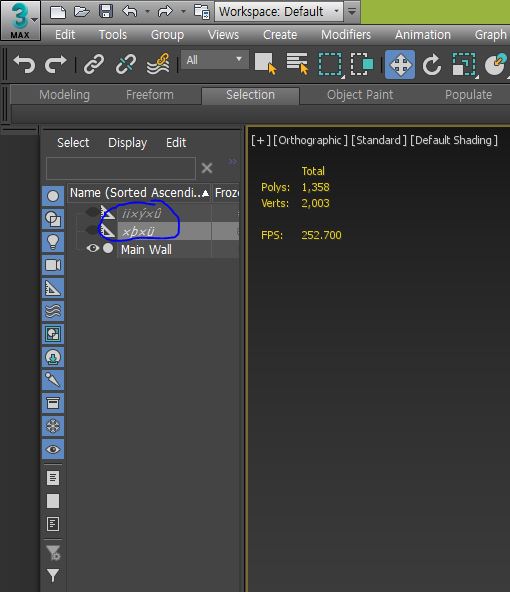
These have been created since using the 2018 version. It is not possible to delete it, and it is not possible to unhide it. I do not have any trouble in my work, but I keep getting nervous. For reference, I am using the 2017 version at the same time. I explained using a tr...
And you gave it to me with the spotlight MAX files 😄
not really a bad or dangerous virus, just annoying since it creates undeletable dummies in all your scenes
vernal pecan
The Security Tools will protect and clean systems that are already infected, and allow you to safely use scene files shared from other machines.
 vast wadi
Today I learn that Max has its own virus
 static vapor
@vast wadi Max IS a virus...sometimes
amber tendon
Any lightmass experts here by any chance :D?
gilded pulsar
@vernal pecan I dont get these dummies in my scenes and I dont work in 3ds max 2018 I use 2017 as said earlier.
vernal pecan
@gilded pulsar hmm alright, maybe it came from another file then... lesson learned, everyone should install that security tool anyways 😃
 little star
Hello, can anyone help me with this problem? The ceiling is in my opinion way to bright. I've already placed LightmassPortals on the two right windws and the left one.
hallow arrow
@amber tendon 😄 what would you like to ask?
amber tendon
@hallow arrow I am blending static meshes with landscape via a shader (modifying albedo and normal).
It works perfectly fine with movable SMs.
However static SMs cause lightmaps to not respect the new normal and thus create shadowing, creating a seam.
Is there any way to fix this?
Looking perfect here with movable and no lightmass
Static Version does not blend
hallow arrow
unfortunately no :( lightmass does not respect most of the shader effects when exporting materials
 coarse kelp
btw is there any good gpu baker for unreal yet? seen those posts about the intermediate but it says "do not run in your important projects" xD
forest depot
ive been using gpu lightmass for 'important projects' ever since it came out
and havnt gone back since
mild oxide
Nah its v good