#aec-visualization
1 messages · Page 7 of 1
 dusty gyro
 mystic lynx
oh boo
dusty gyro
still beta after all
dusty gyro
also there would be some licencing issues afaik
mystic lynx
yeah i figured
dusty gyro
made your own HLOD improvements ?
mystic lynx
i just made it faster
dusty gyro
@mystic lynx ask for a merge on the main branch of epic :p
 sullen crown
Hi everyone- REINVR is launching a second brand and we are looking for some feedback on our logos- could you please vote and let us know what you think is the best fit? https://99designs.ca/contests/poll/ef42ffd616

99designs
I’m running a logo contest on 99designs. Designers have submitted 253 designs so far. Please vote on your favorite as I’d love to receive your feedback.
 robust meteor
Hi guys, I was wondering if anyone could provide some suggestions on how to tackle this LED lighting. Im happy with the upper area around the door however the floor is too dark :/
Currently using a Spotlight with IES profile within a blueprint.
Also, when i turn the lights off. This is the result which is incorrect as it should be a lot darker.
 turbid lotus
hey devs! Any idea what to figure out if my level is loaded without lightmaps or any shadows ?
 balmy mango
I have the same problem as this guy :
 pale prairie
 glossy creek
Has anyone here messed with vray for unreal?
 unreal cliff
Hello everyone. I just had a question quick about modeling interiors. I'm trying to figure out the best practice for modeling them. If I wanted to make 1 room, would I make 6 cubes and fit them together? Or do I make the walls 1 mesh? I've also tried making the room a cube that I make hollow.
The problem i'm having is the age old lighting artifacts and leaks issue. I also run into the issue that if I have a larger interior with multiple rooms, the floor will have shadow seams if it's composed of separate meshes. But If I make it one mesh, then the shadows will be wrong and I have to bump the lightmap resolution wayyyy the eff up.
Just wondering how other people solve these issues
The light artifacts seem to be caused by the skylight most of all
dusty gyro
@unreal cliff first things first, for your seam problems, use GPU lightmass
Unreal Engine Forums
Click image for larger version Name: image_138398.jpg Views: 1 Size: 82.0 KB ID: 1478783
Disclaimer:
This is a very simple and early version of my GPU lightmap
try to separate your walls as much as possible (dont use a single mesh for a whole room) if you want to do archviz
a thing I do on some projects is to split as much as possible visible walls and floors (to get as much lightmap density as possible), and make a single mesh for the exterior/not visible parts of the walls. That way you can avoid light leaks and the usual double sided meshes woes

and you make an outer shell to block light
👌
 dusky marsh
can anyone tell me what the topic of the first post in the unreal arch viz forum is?
I just posted a new topic and I can't see it...
or rather, can anyone see a topic that asks about distance fields?
dusty gyro
@dusky marsh https://i.imgur.com/zWNeAfo.png
 dusky marsh
weird... am I blocked from posting?
dusky marsh
Distance Field AO & Shadows for large scale architectural visualisation?
I can still see it by going to my profile
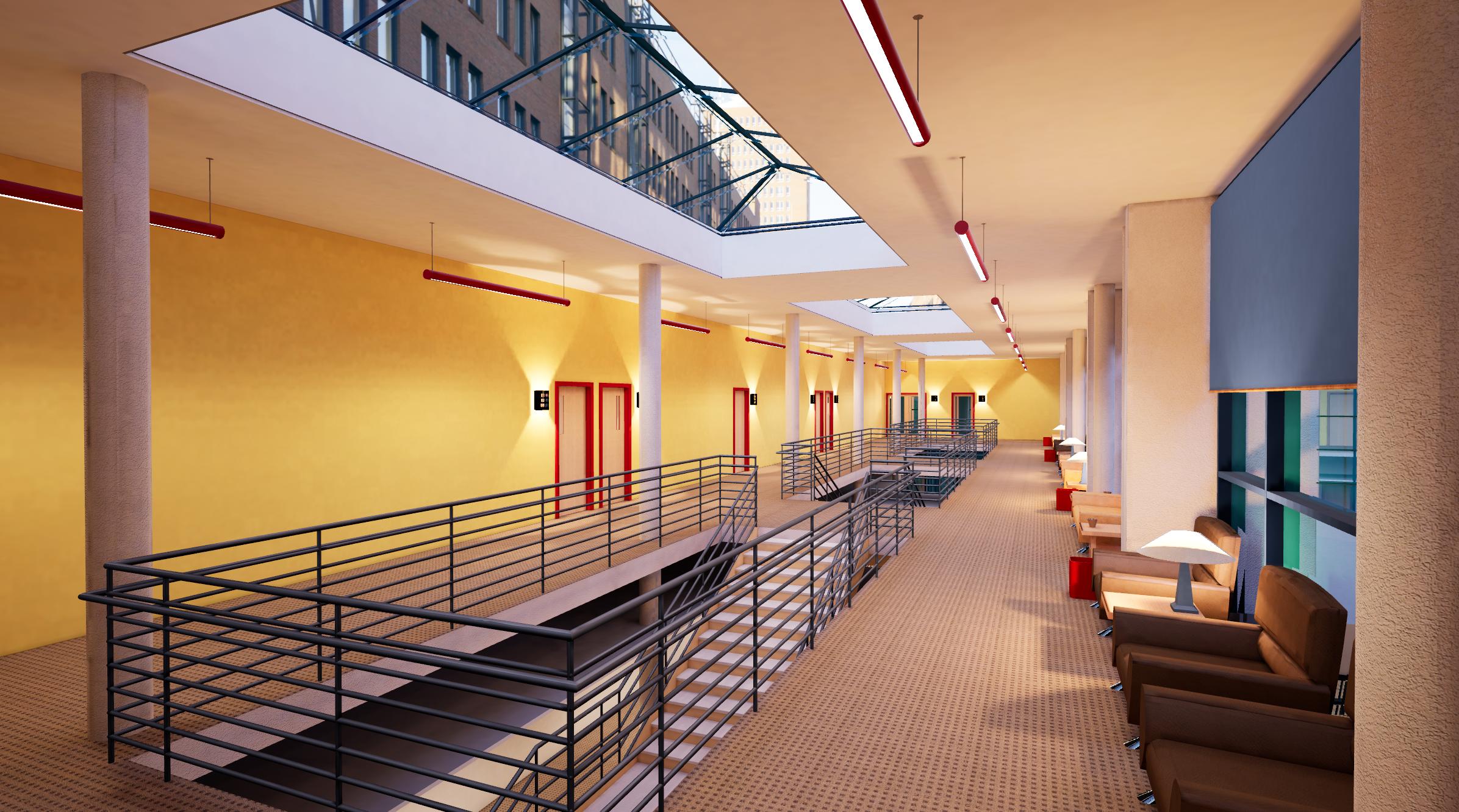
 south oxide
Hey, can someone give me a hand please
Having an issue with an FBX import in which my normals are flipped when I get it into engine, strange because they're fine in Max, and in other software I've tried to view them in
Tried some solutions on the web, like flipping the normals in Max and then exporting it in hope they'll flip to the normal way when in engine, which they do, but when I bake the whole object goes black so that doesn't seem like an optimal solution
Any ideas?
It stopped working after I changed some UVs in Max and then re-exported it, if that's any help. The object imported fine before that
glossy creek
@south oxide - I've only used DataSmith for 3DS Max to > Unreal. Which isn't perfect. Since you mentioned UVW's, why don't you convert to mesh, reset all UVW's, then re-do the proper UVW's on channel one, and then use steam roller script to flatten and pack the UVWS for lightmass on UVW channel 2
south oxide
I'll try it, thanks!
glossy creek
I have had issues with inverted normals as well, with data smith and Vray for Unreal. Hard to say, "why" - sometimes my meshes are perfectly normal, so it must come down to UVW sillyness. Don't know!
 solemn hawk
Reset x form and collapse the objects to a new edit poly modifier
 winter geyser
@dusty gyro dat Advanced Sample Project. Looks great btw.
dusty gyro
@winter geyser thanks 😃
 half knot
can anyone share some thoughts to why this is.
the frame is so bright but it has the same material as the walls
hmm not sure why the image isn't previewing
there we go any thoughts
dusty gyro
@half knot if its baked lighting, (looks like it), your lightmap resolution is way too low
you need to tweak it
this wiki page covers lighting very extensively
second part is on static lighting
half knot
@dusty gyro hmm okay let me try adjusting the resolution.
@dusty gyro okay so i made adjustments to the lightmap density and I'm still getting the same result
dusty gyro
what are your lightmass settings in world settings @half knot ?
 signal narwhal
@dusty gyro Hello , I am facing a problem , one of my texture is showing in editor ,standalone mode but after building (packaging) the application , it is showing as a world grid material . I have tried using the "used with instance static mesh " in the material slot but it doesnt solve the problem . I even tried changing the name of the material and textures yet the problem still stays.Help !
dusty gyro
are you sure it isnt a problem with your material rather than the texture @signal narwhal ?
signal narwhal
it is a normal material , connected through substance
dusty gyro
when you compile your project and package it, do you get any warning or errors regarding that material ?
signal narwhal
no errors
signal narwhal
will a screenshot of the material work ?
dusty gyro
yeah that will help a lot 😃
dusty gyro
hmm nothing out of the ordinary
is it doing it on only one substance material ?
or all of em
signal narwhal
@dusty gyro got the solution.. in the material option -use with instance static meshes was of-
Thank you.
dusty gyro
ah 😄
signal narwhal
😇
half knot
@dusty gyro - for the most part default. I change the num indirect lightmass bounces to 5. What should I be looking for?
dusty gyro
My settings are .1 scale, 10 for both bounces values and 10 for indirect lighting quality. Also, production quality on the lightmass build
Be ready for your bake times to jump up quite a lot with CPU lightmass though
dusty gyro
Unreal Engine Forums
Until we launch a proper feature request system, let's use this thread to keep track of requests.
Regarding lightmap UV density at import not being really well assigned
Yep, we have been putting thoughts into this and we get way better results in internal builds. (everything is turning more less the same color in the lightmap density viz mode now). Stay tuned!
 sleek cove
Hmm. Is there a way to center pivot to each object when exporting to .udatasmith? I am using Revit and there are many objects which has Pivot somewhere very far away, but the objects themself are in correct position. I would want the Pivot to be center of each object
dusty gyro
@sleek cove within the datasmith file ?
hmm not that i know
I'm using revit too btw, and I just...make do with these far pivots :p
since datasmith is replicating what revit does, you'll have to change your coordinates in revit to be at 0 (which is very, very bothersome, I've been here too)
sleek cove
Yes. with datasmith file. I can overcome it, by exporting model as IFC and then convert IFC to OBJ. When importing OBJ to 3Ds Max, it has settings to reset every mesh pivot to relative 0.0.0. Then export .udatasmith from 3Ds max :D. But it really time consuming and really not worth it in most cases.
And of course, if metadata is needed then this is out of question.
dusty gyro
yeaaaaah that's not a really good workflow 😄
you "could" keep meta data by using the sync revit file function in max
but then you'd loose the revit advantages
half knot
So I understand that there isn't one solution when it comes to lightmass settings but, Is there a general start setup for low quality and high quality someone could share?
dusty gyro
low quality > dont touch anything, bake in preview quality (will look like crap but fast to bake, dont use too much high resolutions though)
high quality > production quality setting + lots of bounces, small value for level scale and high value (I use 10) for indirect lighting quality
@half knot you can also have a look at the GPULightMass alternative for all your seam and bakes taking too long problems (requires a beefy GPU)
trial and error will lead you to the best setting possible 😃
 feral field
Iknow I asked this before sometime, but does Light Bounces (inderect/skylight) and static level scale affect performance beside build times ?
more directly gameplay performance
 coral edge
has anyone gotten unreal studio to work with solidworks assemblies
dusty gyro
@feral field talking about static lighting ? Nah, once its baked its baked
doesnt matter if you have your lightmaps baked in ultra quality or preview
what matters for performance is the lightmap resolution and quantity
feral field
@dusty gyro Thanks, so lets say I have 8 walls all of them with res of 256 will that affect performance drastically ?
dusty gyro
Nah, you just want to avoid having resolutions of 2048 and +
because it takes a lot of memory to bake, and a lot of VRAM at runtime
you can check how much VRAM your lightmaps will take in the statistics window
feral field
Is it 309mb ? or is this millions ? haha
i mean is it mb or gigabytes cause I dont get the dot at the end there
dusty gyro
hmm
I'd say 309kb
mine says 67 719,148KB
without the dot
soo 67 719KB > 67,719MB
feral field
Yeah so mine 309 mb ? not gigabytes right ?
dusty gyro
nah
I'm not sure what the dot is supposed to qualify for
there should be a debug to display that at runtime
maybe in stat scenerendering or stat rhi
feral field
Damn hopefully the dot is nothing
 lucid orbit
hey guys, it's been more than half year since i've used ue4 last time, was there any large changes to lightning for archviz use? Gpu lightmass baker, improvements to lightmass, added layer blending for mats for landscape support etc?
dusty gyro
hey @lucid orbit ! GPU Lightmass has been slightly improved, CPU lightmass hasnt changed yet
no idea for landscape stuff though
lucid orbit
is gpu lightmass still a personal project of Luoshang, or is it already native in ue4?
dusty gyro
still personal
but he's working full steam on RTX for UE4 now
and this is official stuff, he works for Epic now (surely because they wanted his knowledge for raytracing stuff)
lucid orbit
oh man, rtx sounds its going to take a lot of time off gpu baking, thanks
lucid orbit
sounds high end, but probably not many users is going to have rtx cards for some time
dusty gyro
well if its baked its baked
realtime raytracing is still high end
but for devs raytracing lightbaking will be awesome
lucid orbit
to be clear, is rtx/progressive gpu baking/raytracing lighbaking same?
dusty gyro
well
there's CPU lightmass
GPU lightmass
RTX for realtime
RTX for lightmass
GPU lightmass is a temporary solution, and not much worked on these days (but awesome nonetheless)
RTX realtime is gonna be for everyone, but high end
lucid orbit
ouch
dusty gyro
RTX for lightmass is gonna be for devs, and will allow progressive baking of static lighting
lucid orbit
so do you think gpu lightmass is going to be dumped eventually for rtx favor?
dusty gyro
yeah defo
gpu lightmass isnt an official tool
see it as a placeholder for RTX lightmass
or DXR lightmass, depending on how they do it and if they want it open for every GPU
lucid orbit
im bummed to hear it, was hoping my gtx1080 would be helpful in future, but thanks for clarification
lucid orbit
haha
dusty gyro
performance is probably gonna be like GPU lightmass
lucid orbit
amazing how technology progress fast and sad for users
dusty gyro
thats how tech is
last year I bought my brand new Note 8
bam
Note 9 gets announced an released a few months later
I was bummed
welp gotta
bounce
dont be down @lucid orbit , I'm pretty sure the next few months will be bright for archviz makers 😃
lucid orbit
meaning?
dusty gyro
RTX stuff, 4.22 improvements with studio
lucid orbit
oh, improvs with studio sounds pretty nice 😃
dusty gyro
@lucid orbit what are you using to make your models ? Max/Revit/Sketchup ?
lucid orbit
sketchup and blender for cleanup
right.. just remembered theres no plugin for free version of sketchup 😦
lucid orbit
is there any plugin for blender?
dusty gyro
nope
 lethal vigil
 dusty gyro
@lethal vigil sadly no, but they improved the plugin a lot for 4.22 and you will not have to tinker with the lightmap resolution as much 😃
dusty gyro
To all the archviz people coming from the Webinar, this is our turf 😃
Some of the latest experiments with reflections and lighting
 earnest coral
Hey Antoine!.. nice stuff!.. It's been a while since I was on discord, I'm MartinC from the webinar. I think it's time I gave UE4 another go for large exterior projects, I use Lumion just because it's so bloody easy and I know I can meet a deadline but it's not exactly pushing the boundaries
dusty gyro
hey Martin !
I mean @earnest coral 😄
yeah lumion seems nice, but it isnt as powerful as Unreal in terms of features imo
also their UI is 🤢
earnest coral
nope, it's nowhere near - I work for landscape architects so the ease of choosing trees etc makes life easier.. but the scattering of them is hellish, you can only plant up to 100 at one time and I have scenes with over 50,000!!... UE4 has a great scattering/painting system, though it's all the optimisation that causes me grief
dusty gyro
well vegetation optimization sure is a pain to setup 😄
I did some experiments with terrain materials a while ago, it was awesome not having to paint anything and let UE do the scattering of grass, rocks and all
earnest coral
What sort of work do you do?.. is it all arch-viz?
dusty gyro
I'm kind of a multitool
working officially as a "VR Designer" for the company "Groupe Legendre"
which is a french building engineering and construction biz
doing everything VR and Rendering related, from coding to art to optimization, videos, demos on events and at the client's
earnest coral
Did you say you were kind of a one-man-band there on UE4?
earnest coral
The problem a little is I don't have time to get UE4 going, they are keeping me too busy!.. just when I get some down-time I can get into UE4
dusty gyro
yeah UE is such a massive tool
so much stuff to learn and master just to render projects
but its worth it 😄
Unreal Studio helps a lot too
earnest coral
It is massive, I wish they'd bring out a stream-lined version for arch-viz!.. I remember seeing that twinmotion were trying to do that, they have some of the UE4 tech but not enough
earnest coral
We often have Rhino models, even with unreal studio it's difficult to get the models out for UE4, normally I have to bring them through 3ds Max
dusty gyro
you guys arent working with revit or sketchup ?
 mellow crater
EI!!... Its me... David B
dusty gyro
aha there you are David 😃
earnest coral
yep, twinmotion is limited, Lumion also only has 20 layers!!!... wtf!??.. after every release I ask why they can't stick on more layers!
mellow crater
such a a great channel by the way
earnest coral
We use revit and sketchup too but most stuff comes through Rhino
dusty gyro
we did a phasing video a while ago on TM, and DAMN was it a pain to do it
the actor management is horrible
asset management too
its like they wanted to make it as dumb as possible to use 😦
@earnest coral well the revit plugin is going along really well
all the stuff I post here was made using revit imports through datasmith
mellow crater
im trying to import large revit scenes and its crazy....
dusty gyro
mellow crater
but again... my problem is with lighning... i can't get the results that i get on lumion
dusty gyro
you guys might recognize this one 😄
earnest coral
I try to steer clear of Revit, I hate the UI, maybe just something you get used to.. I don't particularly need it though
dusty gyro
well autodesk stuff is always flacky at best
our whole engineering section uses revit, so I have to make do with it (I'd rather work with max + vray projects...)
earnest coral
nice clean render, like BERMS I also have issue with lighting outdoor scenes even if in theory it should be relatively simple
earnest coral
My renders lack clarity, I'll have to go back to have a look, I'm pretty sure I had dynamic lighting, I have too many plants/trees to use static
dusty gyro
you will never get perfect lighting with dynamic stuff, at least not until realtime raytracing comes to the engine
ah you might have to tinker with anti aliasing too
the default AA is TXAA, and it blurs scenes a lot
for VR stuff (and in general) I favor Forward shading and MSAA (plus supersampling when rendering videos or images)
earnest coral
that's interesting, didn't know that
mellow crater
hummm... i agree...
the only way to great results is HDRI
but then...... you need to go to 2048 on floor lightning textures resolution
or the shadows are not going to look properly
and.... you need a BIG machine
dusty gyro
well
GPU lightmass 😄
Unreal Engine Forums
Click image for larger version Name: image_138398.jpg Views: 1 Size: 82.0 KB ID: 1478783
Disclaimer:
This is a very simple and early version of my GPU lightmap
mellow crater
out of memory
dusty gyro
then you need more VRAM 😄
dusty gyro
we ordered a titan RTX specially for that
mellow crater
yeah... i already use this piece of software and is wonderfull
dusty gyro
optimizing your scenes come a long way too
mellow crater
luoshuang is an angel
dusty gyro
instancing, reducing polycount with mesh reduction, LODs
yeah for sure
cannot wait to see what he's worked on for the new lightmass and DXR stuff
mellow crater
its a matter of time
this is going to be the way an engine works
what about VRAY on unreal
?
dusty gyro
havent tried it
mellow crater
me neither
mellow crater
and... for saying the truth .... vray is soooooooooooooooo slow
compare with luoshuang solution
dusty gyro
yeah
mellow crater
so... MAYBE... if we use HDRI + GPU Calculation + A proper Postprocessing config..... Exteriors in unreal are possible¿
earnest coral
I think I'll have to check out this luoshuang solution you're speaking of
dusty gyro
no doubt @mellow crater
it all comes down to a proper terrain and vegetation configuration
and lighting
dusty gyro
hmm
best thing would be to download and go around the kite demo scene
its on the learn tab of UE's launcher
but its massive
mellow crater
one second
Unreal Engine Forums
Architectural and product design visualization, pointers, tips and tricks.
this is and old post... but so cool
dusty gyro
yeah this thread was pretty interesting too
right I've gotta bounce, I'm rebuilding an old ford and the workshop is a bit far from work 😄
dont wanna get caught in traffic
dusty gyro
catch yall later !
mellow crater
perfect
earnest coral
@dusty gyro @mellow crater - thanks both for the info!.. see you around!
 random fjord
Hey Friends! Has anyone tried pixel streaming?
 uncut jolt
hello everyone,
i'm trying the Variantmanager out but i'm stuck on the collions of my objects.
i have set the properties on all my object with the visibility i want to chang in the variantmanager.
http://prntscr.com/mdyhzg
but when i'm testen my scene, the collisions of Variant02 are still active (walls, doors and floors)
http://prntscr.com/mdyim0
is there a workaround to turn those of when there not visibile through the variantmanager?
thanks in advance

 dusty gyro
@uncut jolt hmm I just tested out your problem and... Bugreport time :p Indeed the collision settings are not available within the variant actor properties.
this feature is pretty much in its early testing phase
uncut jolt
@dusty gyro thanks for your response, is there another way to estimate something similar? I was thinking about levelstreaming and then switching the level streams on and off via a widget.
dusty gyro
yeah you can absolutely do that
use levels as your variants, the oldschool way 😃
kinda like lighting scenarios
@uncut jolt can you report that to https://unrealstudiohelp.epicgames.com/s/ ? 😃
they can keep track of bugs with this tracker and give you feedback about its resolution
uncut jolt
okey cool i wil do that 😃 thanks for the feedback i will google on the sublevel things 😃
dusty gyro
👌
uncut jolt
when using DataSmith and sublevel do you need to load the contect directly in the sublevel or can i import it in the presistent level and then move it to the sublevel of my choice
using Revit as my main drawing tool btw 😃
dusty gyro
I tend to create a sublevel, import datasmith stuff inside it, and then link it to a persistent level
aight thats what we use too 😃
uncut jolt
awsome 😃 trying to find out what the best workflow is to use unreal with Revit
dusty gyro
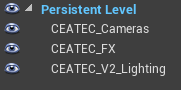
this is how I build my levels
a persistent level with the datasmith scene (the tools I use only get models from the main scene)
a scene for camera / cinematic cameras for renders
an FX scene with the Post Process volume and reflection probes
and one or more lighting scenario scenes
there's currently a bug where if you import your datasmith scene in a level, then select a sublevel, the scene update spills in your sublevel instead of the level where the datasmith actor is located
 obtuse tiger
Hey Guys, I want to texture a sketchup-building in UE4 but the textures of UE4 don't really mix good together with the house. Any ideas how I can texture the sketchup-building to use it for UE4?
obtuse tiger
I have not tried to texture it in Sketchup because I thought it wouldn't work together with the lighting in UE4
dusty gyro
you need to at least define the materials in sketchup
you can do a very rough texturing in sktechup first
then swap materials in UE
obtuse tiger
But if I swap the materials in UE4 you will get the same effect, right?
dusty gyro
you need to assign your materials correctly
your model has materials slots (glass, walls, roof, etc...)
I have no clue how sketchup works though so I cant help much more
obtuse tiger
Thd for trying anyway @dusty gyro
@uncut jolt I was looking at the substance plugin on the onreal engine forum. Do you think it will work?
Or can I maybe use Vray from sketchup?
uncut jolt
@obtuse tiger it depends on how you have assigned your textures in sketchup. he memorizes these settings in Unreal. did you do this? as you can see everything has only 1 default texture / material
@obtuse tiger i don't know how unreal handels vray in sketchup
obtuse tiger
I tried to understand you etienneboy0 but I didn't put textures on my house in sketchup so sketchup can't have memorized anything for the texture settings.
uncut jolt
all the walls u want the bricks on you need to apply a texture (doesnt matter what collor u have) to all the faces you want to have bricks.
all the faces which need to be a rooftile give it a other collor
hope you understand 😃
brb
obtuse tiger
O thanks for making that clear etienneboy0 😅
If I do that in sketchup. Sketchup will mermorize the settings for Unreal. Where you can texture the building by color in Unreal.
dusty gyro
you'll swap the colors for better materials in unreal yes
obtuse tiger
I will try it
uncut jolt
@obtuse tiger how is it going so far?
obtuse tiger
Well what you said about the color recognition was right. But now the problem is that the texture from UE4 becomes blend on a sketchup model.
uncut jolt
@obtuse tiger https://academy.unrealengine.com/Class-Viewer/AECSketchUp maybe this helps
obtuse tiger
I will look into that. Thanks for your help @uncut jolt I really appreciate it. 😉
uncut jolt
you're welcome 😃
uncut jolt
does some one has some experience with the multiuser template ?
uncut jolt
@dusty gyro i'm olmost done with all my sublevels and controlling them through a widget with a blueprint system, but i'm running in a little issue and i hoped u could give me some feedback.
how do i manage the lighting of the sun for all my sublevels?
i got 2 main designs with diferend exteriors
1 main design has 3 diferend interieurs.
or do i need to make a sub level of every senerio i have?
i hope you could help me out with this one 😃
http://prntscr.com/mef5qo
 dusty gyro
@uncut jolt heya ! So there's a very handy feature with sublevels called lighting scenarios
Basically you put all the lights in that sublevel, change its type to lighting scenario
And when you bake your level (or not), it saves a snapshot of your lighting
And you can do multiple scenarios and switch between them as much as you want at runtime
Here's the doc
For the variants of your scene
You can mix your sublevels
You can only use one lighting scenario at a time though
Say a "daytime" one, a "dusk" one and a "night" one
You can't load all of them at once :p
uncut jolt
@dusty gyro thanks wil try i out 😃
@dusty gyro so for example i have my main_01 level with my content and place the light that i only want to effect that level, then in the level windows i change main_01 level to a light senerio level, am i correct?
dusty gyro
@uncut jolt wrong :D
uncut jolt
aah 😛
dusty gyro
Think of the lighting scenarios as layers on top of your actual level
I only put lighting related stuff in these
(you can add some other stuff if you want though)
It's kinda like separating your level geometry and your lightmap
uncut jolt
hmm its hard to understand this for a noob like myself XD
dusty gyro
Haha no worries :p
Try for yourself
Create a new scene
Put some geo in it, like a room with a chair or something
Or a cube
Then add a sublevel to it
Add lights to that sublevel, check them to be static or stationary
Change that sublevel to be a lighting scenario
Copy that sublevel
Move the lights around, change their colours, stuff like that
uncut jolt
ahh i thinks i get it 😃
dusty gyro
And add it as a sublevel like the first one
Then with both sublevels active, start a light bake
It will bake both lighting scenarios
And you will be able to switch between them through the editor or at runtime with code or blueprints :)
uncut jolt
hmm well this is how i got my levels set up
master level: MultiUserViewer
sublevels: design option 1, design option 2, design option 3, design option 4
my player start are at the master level and the geo are at the sublevels
do i need to make a sub level in my design options for the light?
is it okey if i call you ?:P
dusty gyro
Close enough :p
uncut jolt
haha
dusty gyro
Saw some french slips up here, that's why I asked :D
uncut jolt
let me know when you're ready going to get something to drink sec
dusty gyro
Alright
uncut jolt
back
half knot
Question:
I have watched a number of video for lighting and after the light build the instructor has the ability to go into the SkyLight and adjust the intensity and in Realtime the scene will get brighter or dark. When i try to do this it doesn't work. Am I doing something wrong?
The same thing for the Post Process Volume I do not see chances I make to the exposure min and max brightness.
The video I'm referencing to is https://www.youtube.com/watch?v=XNhwt3iIWTE&t=173s
you can see when he makes changes to the min and max exposure brightness the scene changes same from the SkyLight

♥ Don't forget you can help support the channel to create more tutorials by becoming a patreon! https://www.patreon.com/3darchstuffs Hello, friends in this r...
Also and sorry for the over load of questions but any advice on getting darker materials to show up better?
half knot
so I increased the difuss boost to 2.5 and tweaked the skylight intensity as well as the brightness on the material and go the cabinets to look better
uncut jolt
i can't help you out with that @half knot i'm also trying how the lighting works 😃
dusty gyro
Hey, can't help today either, I'm doing VR demos the whole day, maybe tomorrow or Monday :)
half knot
Okay don’t forget about me haha I’ll keep testing to see if I stumble on a solution.
dusky marsh
@half knot roughness texture tweaking will make any dark material show up
but it looks as if your spotlights in the ceiling aren't spreading very much light (and no reflections)
dusty gyro
alright lets do it @half knot
have you added some reflection captures in your scene ? What is your material parameters ? How is your ceiling light configured ?
also this looks a lot like its not been baked yet
half knot
Yes! lets do this haha - But i have a bigger issue....
No clue what happened but i get this when i try to build my scene
😩
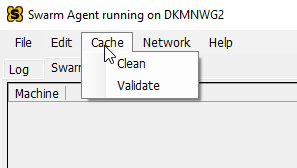 half knot
Okay - i just restarted haha let me try that
YES its working!
The build should take a few minutes and then I can share some more
dusty gyro
😃
half knot
okay so that is a birds eye
the other reflection icons are sphere capture
here is the material
I lighten the texture map a lot so it would show up in the level
dusty gyro
no normals/proper roughness texture ?
half knot
no i was trying to keep it simple
that is the lighting I have a IES map in all the down lights
dusty gyro
is it static ?
half knot
yes
dusty gyro
ies intensity checked or custom intensity ?
dusty gyro
looks like your lightmap resolution is very low too
half knot
everything is red lol
dusty gyro
and a lot of lights have not been baked (I see preview everywhere)
half knot
yeah im rebaking
dusty gyro
ah alright
half knot
the bake was taking to long so i'm doing it on preview
dusty gyro
ah
preview gives very blurry shadows
not much rays used to bake
I cant remember, you're using CPU or GPU lightmass ?
dusty gyro
yeah
Unreal Engine Forums
Click image for larger version Name: image_138398.jpg Views: 1 Size: 82.0 KB ID: 1478783
Disclaimer:
This is a very simple and early version of my GPU lightmap
this should be a sticky here 😄
half knot
haha
dusty gyro
also if you are using an HDRI skylight its gonna boost visual quality a lot
compared to CPU
dusty gyro
are you sure about your UVs and lightmap res ?
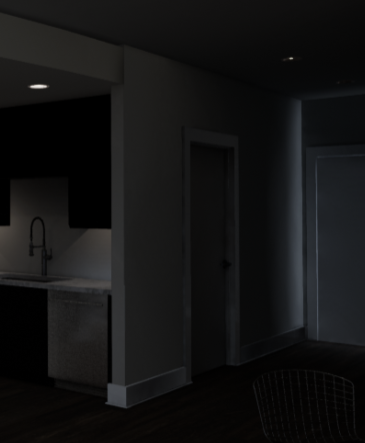
that looks a lot like leaking rays
on the right
GPU lightmass is gonna boost your production time AND visual quality and accuracy
half knot
yeah thats the first time that has happened...
dusty gyro
you can bake a scene like that in production settings in...
a couple minutes maybe, depending on your GPU
a scene that small should be done in less than a minute
half knot
really? so i have a gtx780
dusty gyro
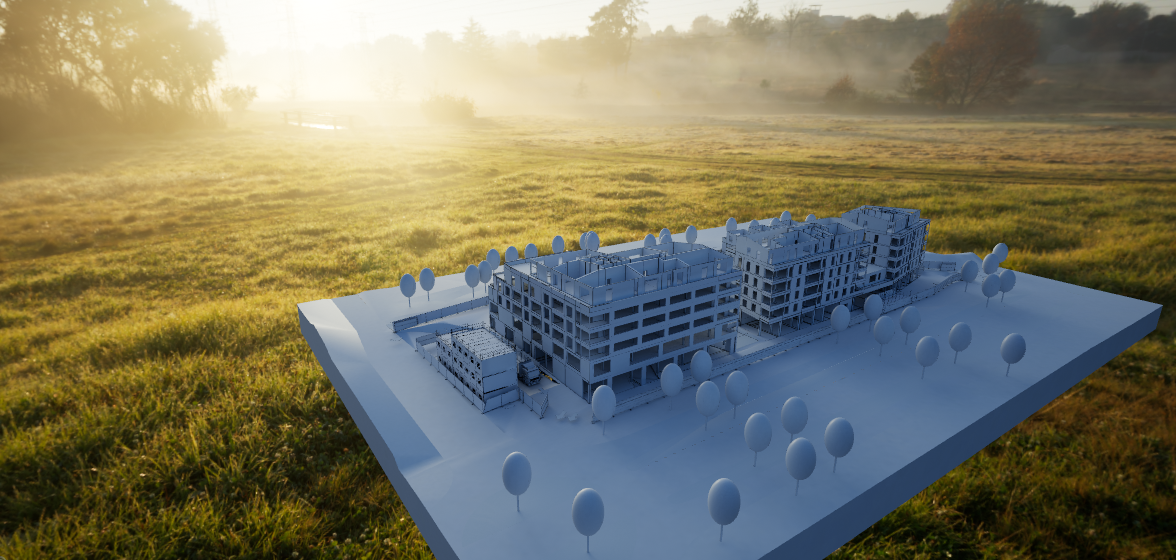
this scene took 15mn or so to bake
on a GTX1080
in medium high ish GPU lightmass settings, 10 bounces
dusty gyro
😃
half knot
the door was a few units lower
dusty gyro
yeah happens a lot to us too
floors being a tad too low and not connecting with walls
half knot
okay so its rebaking but with increased of Gi bounced and skylight bounces this is what im getting
half knot
ok
dusty gyro
then put it in black
half knot
yeah! so originally i baked my scene all white and it was looking good
then i put all the materials in
and realized i forgot a object so i imported and rebaked....
then all this happened
what is the correct workflow bake before applying materials
dusty gyro
well
I use a custom blueprint to replace every material to a white, fully rough material
bake the scene
see if everything looks alright
then reapply the materials
if some surfaces must bounce colors I rebake with the right materials
there's not really a "correct" workflow
half knot
haha
dusty gyro
the good workflow is the workflow that gives results you like 😃
dusty gyro
you can also bake your lighting
then change the viewmode to lighting only
or detail lighting
light leaks I had on a project
there's a 2cm gap between the wall and floor 😄
half knot
yeah in thoses views the lighting is still dark I think i need to bump up my HDRI
dusty gyro
its enough to fuck up
dont unless your scene doesnt have enough artificial light
you can also increase the bounces
half knot
dusty gyro
I get good results with 10 bounces
try with GPU lightmass
this is where your HDRI will give its maximum
half knot
so i plan to read that article you sent but for time how do i change the bake setting 😅
dusty gyro
world settings
lightmass section
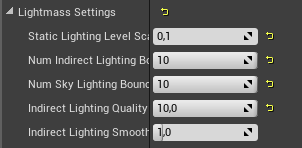
this is my goto setting with GPU lightmass
baked in production, GPU lightmass quality set to medium/high with the installer they mention in the forum post
dusty gyro
sounds alright
right, gotta go
ping me if you need more help with GPU lightmass 😃
I'll try to answer asap
half knot
okay awesome thanks
half knot
Starting to wrap my head around the basic concepts of Lightmass settings. I'm getting better results, with that I'm still getting very thin black lines in my corners. I turned of AO and Exposure - Baked at Production and settings are good.
Lightmaps are also set to 1024
haha Life for life you rock haha
half knot
lol
dusty gyro
I'm lurking a lot
dusty gyro
hmm good question
half knot
i'm useing .01
dusty gyro
depends the resolution you use
half knot
yeah
half knot
Yeah
dusty gyro
also dont make your rooms like this (one big mesh for every wall)
better to split your walls
dusty gyro
if you look at this pic
everything is a different mesh

lightmap densities arent even high
half knot
hmm okay i see
 tidal skiff
looking into houdini and ue4
cant you do what houdini does thru construction script/other proc mesh tools?
 dark oriole
Technically you can use notepad to write out the verts, edges, and faces in an obj file manually, but that doesn't make it a good idea. Houdini has much more powerful features than Unreal's procedural mesh tools have, along with a better workflow.
tidal skiff
how would it go with vr?
as in is it common to have houdini created assets be heavy on performance
dark oriole
Well both would be heavy, but at least with houdini you get the chance to optimize it by hand properly, which would make it run better
 fiery warren
Hi everyone. Is it normal to have a really hard time to export a ForestPack grass with datasmith from 3dsmax for UE4?
dusty gyro
I think forestpack has yet to be fully integrated in the datasmith process
@dusky marsh you're gonna be happy with the next release of datasmith I think 😉
sleek cove
Morning. How are you handling scene where is over 20000 meshes? I got a School wing that has little over 20000 meshes. Most of them are very small pieces (like pipe bends etc). I already put a Culling Volume inside level that will cull lot of the small stuff when it isn't near playr, but still when I turn quickly to certain place there is s spike where FPS goes somewhere 40fps then comes back to 90fps.
dusty gyro
@sleek cove do you need to have all these meshes as separate entity ? (for BIM maybe ?)
if not, you can merge meshes afterhand with the merge tool
sleek cove
Yes. They come from revit and their bim-data can be checked with certain tool
dusty gyro
ah alright
by culling volume do you mean precomputed culling or distance culling ?
one could try HLOD too, but with a scene that big it will take a lot of time to bake the HLODs...
sleek cove
I think it was the precomputed culling. Where you can specify the size and distance when it's culled. And yes. I tried HLOD and it took 8 hours to get to 10% with only LOD 1
and there was 3 lods.. So that is way too much..
fiery warren
@dusty gyro so, the only way to export a forestpack to ue4 is by exporting it as an fbx file?
dusty gyro
yeah I figured @sleek cove 😄
also if you set distance and size its a distance culling volume
precomputed is mostly used for mobile stuff
but can be handy if you seek performance
@fiery warren sadly I dont know much about it, we're using revit here and I never used ForestPack 😦
@dusky marsh might be able to help since he uses it
fiery warren
@dusty gyro no problem ty
@dusty gyro you create grass and vegetation directly in ue4?
dusty gyro
ofc
UE4 is fitted with very good vegetation painting tools
and its a lot more optimized than just placing bits of grass through FBX or by hand
sleek cove
@dusty gyro Does merge actors merge actors the way that they only use one draw call?
So If I have 6000 pipe bends that aren't so important I can merge them to one to save all the calls?
sleek cove
ok.. thats... thats.. something 😄
sleek cove
aah yes.. Unfortunately, this is not the case
dusty gyro
ah 😄
yeah merge is the solution then
dont merge too much together though
- it will give you a very shitty UV for lightmaps
- it wont get culled properly
sleek cove
In this case, there is no shadows at all
sleek cove
Yes, I keep that in mind. In this case, we are talking a bends under the floor, so I think it's safe to cull the whole 6000? When it's only one mesh, it should not be so tought to be visible without culling? Yeaah, well, there isn't much of the textures anywhere, just a construction stuff in this case.. But yah, your right :D.. Shadows are quite nice to have!
dusty gyro
30mn job including light bakes :p
from revit to UE
yeah if its fully hidden, you can merge it together and it should be culled
you can still use the "freezerendering" console command while playing to check if its culled correctly
sleek cove
@dusty gyro What does the "Harvest geometry from selected actors and merge grouping them byn materials mean compared to "Harvest geometry from selected actors and merge the into single mesh"
There are those options in merge mesh settings
""Harvest geometry from selected actors and merge grouping them by materials" <-- that was the first one
sleek cove
I tried both and the second one seems to create somekind of proxy mesh
sleek cove
Aah! I think if you are far away, it combines them to single mesh and if close enough they are sepeare
default screensize was 300
sleek cove
I think it's defined by that screensize. It calculated them from bounding box size I think.
Oh, he is melting
dusty gyro
@sleek cove that building you're talking about must be super big if it has 20k entities :[
sleek cove
@dusty gyro I see that most of the meshes are the Pipes :/.. Not too much "main geometry", just huge amount of pipes. But merging is working.
It's so amazing that I can merge thousand actors in 5 second or less.. Makes me wonder why it's so quick. I tested in empty map and it indeed combines the draw calls, so I guess i shouldn't complain 😄
sleek cove
I'm so glad they are all layered properly
sleek cove
Great. Now it's stable 90fps. Thanks alot @dusty gyro for pointing out the mesh merging
dusty gyro
👌 pleasure
sleek cove
Hmm. When merging, the "merge materials" will increase build time like 1000%. But If there is something lik 10 materials overall, then It should not too much when not merging them.. for what I know, one material equals one draw call.
dusky marsh
@sleek cove I bought an "auto instance" tool from the marketplace
4.22 will apparently take care of that by itself, but currently, you need to do it manually
sleek cove
Does that create Static mesh instances automatically? Would not the meshes need to be same with same materials?
Only location, rotation, scale can change with instances I think
dusky marsh
yes, but does each pipe bend have a unique material? if so, that would mean 10000 draw calls and unreal doesn't like that 😛
anyway, try it. it was only 5 bucks
very basic, but did a quick and dirty job for me (warning, it destroys naming, though, so make a duplicate of your scene first)
or wait for 4.22 😉
dusty gyro
instances need to be the same mesh
same material(s)
but can have different transform properties
and it will destroy meta data too
at least until done natively
dusty gyro
@sleek cove alright I'm starting to feel your pain now 😂
just opened an 11k actor model
 steep ridge
is there an easy way to export a datasmith to a version of unreal without unrealstudio?
put it in an empty map?
sleek cove
@dusty gyro Did you manage with it :D?
dusty gyro
@sleek cove I've launched a light bake before leaving work, answer tomorrow :)
sleek cove
What resolutuon you used?
dusty gyro
kind of a mix

this was the first export
then I updated with linked models

@sleek cove
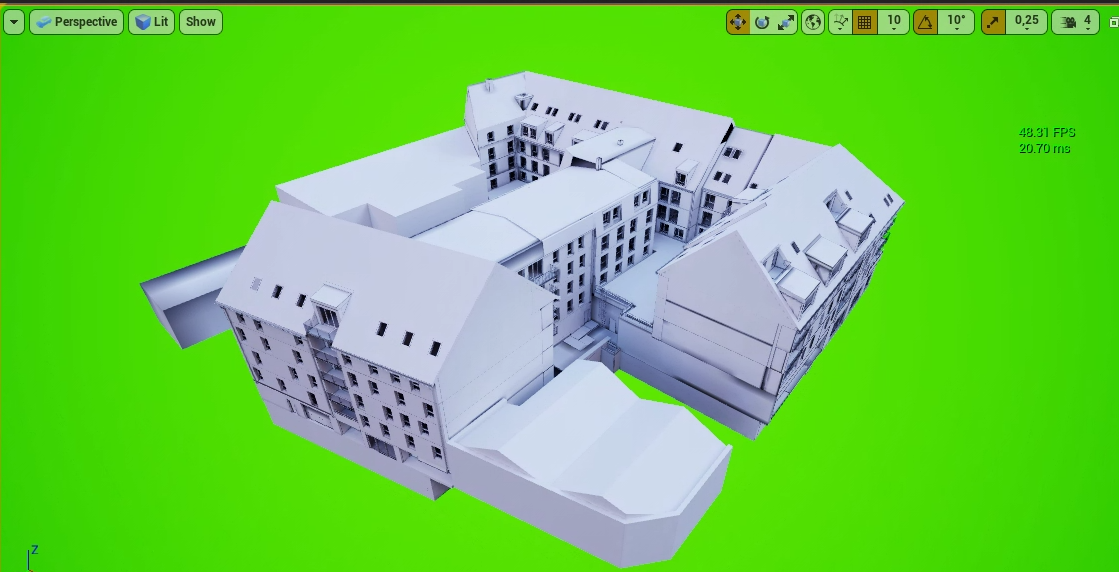
baked
sleek cove
So what kind of job you are doing if I may ask?
sleek cove
@dusty gyro Nice. Doing the same thing then I see 😃
Have you been fighting with the IFC? Our current pipeline is to use IFCOpenShell to convert geo and metadata.
dusty gyro
ifc 🤢
We have some models coming from our partners in IFC
we just straight import them in Revit
@sleek cove works out most of the time, and if its not I know our modellers have softwares to cleanup the models
sleek cove
Aah, I see. You have that luxury. IFC is pain in the ass. It's so shame that Datasmith doesn't support it!
dusty gyro
you dont use revit ?
sleek cove
I have it, but I don't personally use it. Our partners have Revit though. We are building the common platform that makes the building interactive and you can live inside model and test stuff in there. And some models are coming as IFC and those are the hardest
dusty gyro
oh alright
this is a pretty nice project
and it runs really well considering how much entities it has loaded
sleek cove
Looks nice! What place is that?
dusty gyro
hmm somewhere in France 😄
havent checked where
north I think
the model is quite good, arch did a great job
lots of small details
even has "detailed" interiors
 rocky turtle
hi! everyone!!! happy to announce the Align Tool and Array Tool, for all 3d guys and Level Designers, that tired to align by hand )
https://www.unrealengine.com/marketplace/assetbuilder-tools

Align Actors in Editor using tools like in 3ds max
half knot
I think this is a material question or a lighting question so i'm not sure. I'm trying to replicate this
The light bleeding out
this is what i have currently
i have an emissive material for the light source but i cant get it to look like its bleed out
haha in vray this is easy but what should i do in this situation
the "light" should bounce and reflect on the metal surface - I tried a point light and adjusted the surface length but that did yield any results
sleek cove
have you tried reflection captures?
and increase bounce amount from world settings. default is very very small amount
half knot
hmm i have not
@sleek cove - Where do I find the Reflection bounce amount in the world settings?
half knot
ohhh
i was looking for reflection bounces - Yeah I have mine at 10
but i put a reflection capture on the mesh and rebuild reflection and getting better results
haha but if i turn up the brigthness I start to get a circle on the ceiling
would a box reflection capture be better to use of is there a way to have a reflection capture focus to one object
sleek cove
you can adjust the radius. If there are multiple reflections, the inner one gets priority for it's objects
half knot
Got it this is working good
half knot
new question:
So I added in a planar reflection and when i'm in "play" mode to test i get this circle which im assuming is the camera as it follows my movement. How do i get rid of this?
 gentle osprey
Would anyone happen to know why when I place my nav mesh bounds volumes they are invisible in the editor? Shows up in outliner.
seems to only be one map which is affected
dusty gyro
@gentle osprey you can't see the bounds ? Navy mesh debug is N afaik, or Navigation in the "show" drop down
lucid orbit
i've been wondering about lack of studio plugin for blender, is it because of awkward blender licensing, or? I've noticed blender doesn't have plugins to some popular 3d apps, seems to be a pattern
dusty gyro
There's not much blender users in the AEC and industrial industry @lucid orbit
No money to make here
gentle osprey
@dusty gyro It has something to do with this map I'm working with. It' the Realistic Rendering project on the epic store.
It is using Blocking Volumes and continues to place a RecastNavMesh even after deleting it
I'm just not sure what it's using to get to that point
and when I drag a NavMesh Bounds Volume to the canvas, it shows it in grey and then disappears when it's placed.
Tested on a new map in the same project and the navmesh shows up fine
gentle osprey
like this: https://youtu.be/R7twvbdBQ4I?t=3017
 vocal stump
I’ve always had a HUGE hurdle regarding Unreal Engine Level design…. For the kind of work, I do (big construction projects visualization) the terrains are ALL the time a point cloud, generated by a topographic survey… that means, the information ends up being an FBX terrain with the precise elevation data. This is the way construction industry works by default, and there’s no way around as it is required by law, in my country at least. So, if I import that huge FBX file, I can’t have grass or trees generated in a landscape fashion, but it has to be a manual ordeal, with not so good looks, optimization and time efficiency. This huge terrains (in some cases 10km by 10km in average) are meant to be residential, commercial and industrial developments in a very uneven terrain, which is normal in my country. Those big spaces require by lay to have huge forest patches for the people to walk, relax, etc… This makes unreal engine high end graphics a good solution, but without the possibility of converting those FBX terrains to unreal terrain data I’ve had poor results and traumatic experiences… Is there a way around this??
dusty gyro
I've seen some terrain to mesh conversion plugins, but can't remember any mesh to terrain one 
@gentle osprey that's why I've given up for a raycast solution that doesn't need any navmesh :p
lucid orbit
is 4.12.0 gpu lightmass working for anyone's ue4 4.12.2? I've just installed it today, but so far I can't get lightning from skylight/directional light, it shows black lightmaps. So far only point/spot lights are working
dark oriole
Pretty sure 4.12.0 gpu lightmass isn't a thing. Do you mean 4.21?
I don't have an answer, just wanted to check you aren't using it on the wrong version 😛
lucid orbit
sorry, i meant 21, haha
 pearl maple
Hey Guys! I am wondering if anyone buys their assets from Unity/Unreal store or do you make them yourself? I have a big library of models for 3ds max/vray. I convert models for real time use when needed now, Do you think it would help to put them on store? Would you anyone be interested in buying them? (Not self promoting just wondering if thats a good idea or not).
I am thinking of doing collections like evermotion?
lucid orbit
looks like a ssao? you can tone it down via post process
fiery warren
Hey all. Anyone knows a good outdoor lighting tutorial for archviz? I looked around and all but between set sun 3.14 Pi, activate or not auto expo and other stuff my head hurts like hell.
gentle osprey
Kabeleth, look in academy.unrealengine.com for some great archvis tutorials including an exterior one.
 quasi marlin
Is there a workaround to exclude an object from receiving sphere/box reflection capture information?
feral field
@round bramble That could also be your Lightmap res
 round bramble
@feral field Currently it's 256 res
feral field
Are you generating AO ? @round bramble Through the lightmap settings
round bramble
Dunno where I can check that
feral field
World Settings
And at the lightmap section
scroll down to the check box where it says generate AO
feral field
Ah I ment "Use Ambient Occlusion"
I would use that instead of post process AO
Maybe lower the static lighting level scale aswell or bump the res on the walls with high ao to 512
I had a the similar problem and my lightmap texels was just to big I think for the AO the be accurate
round bramble
I think what might be causing this is the size of the object
I brought this from autocad and it's huge
I hate autocad units
It's so confusing
feral field
Yeah it is
round bramble
Hey guys, I've got another question
The more objects I put into my scene the worse AO gets. (those black ugly shadows)
Is there a way to prevent that?
fiery warren
@rkitect ya saw that one but doesn't really answers all my demands.
lucid orbit
4.22 preview 1 is out, with ray tracing features, has anyone tried it for archviz?
(rtx only 😦 )
dusty gyro
I wish I could, but uuh, IT gotta update our Windows build first
lucid orbit
oh right, its exclusive to windows 10/dx12
dusty gyro
windows 10 1809 at that
 granite vine
@round bramble add more spheres
 reef bolt
Hi c: ahaha
dusty gyro
@reef bolt you might want to try GPU lightmass
and HDRis
Unreal Engine Forums
Click image for larger version Name: image_138398.jpg Views: 1 Size: 82.0 KB ID: 1478783
Disclaimer:
This is a very simple and early version of my GPU lightmap
dusty gyro
 reef bolt
I have a i5 4690, gtx 1060 6gb and 16gb RAM DDR3... Is better for me building lights in the classic way of unreal or I can try the GPU lightmass?
@dusty gyro wow, they look very nice
reef bolt
Uhm, ok... In my case i use this world settings, and i modify the lightmass.ini (NumShadowRays and NumPenumbraShadowRays 32 instead 8, numhemispheresamples 128 instead 16 and NumIrradianceCalculationPhotons 2048 instead 400)
♥ Don't forget you can help support the channel to create more tutorials by becoming a patreon! https://www.patreon.com/3darchstuffs Hello, friends in this r...
It's the method of this famous youtube video for archviz
Do you know if it's a good method?
dusty gyro
never went that far with CPU lightmass
all I know is that GPU lightmass gives better results, faster, and with lower quality settings
you can force some pretty high sampling values through the installer though
reef bolt
Uhm ok... Ah, one thing
I have a big problem
I have all the lights (sky and directional) in stationnary, and i have a simple blueprint for an opening door
(the door is on movable obviously)
Ta daaaa hahaha
dusty gyro
you can force the door to use multiple light samples instead of the closest
"Indirect Lighting Cache Quality" variable
by default its using ILCQ Point (which is the closest point)
reef bolt
The door begin so dark when i open it, and the baked shadows remain on the floor due to the fact that the skylight and directiona light are in stationnary, sooo... There is a solution? I see that there are the dynamic lights, but i don't know that part of ue4
ouch
so complicated ahaha
dusty gyro
change the door to not be affected by static lighting
should be in your door mesh component parameters
under the lighting part
reef bolt
i try it"
So what i have to set in the variable indirect cache quality?
"off"?
(ah, for the door my lightmap type variable is not on default but in "force surface", is it good?)
dusty gyro
indirect cache, use the other option
there's point and another one, can't remember the name
no clue for the force surface stuff
dusty gyro
you need to restart UE if you installed GPU lightmass btw
reef bolt
Ah no, now i haven't the time to install the gpu lightmass ahah, i try after
i use the classic way
dusty gyro
alright
reef bolt
where is the variable to uncheck "affect to static shadow"?
in the details of the mesh?
reef bolt
uhm
reef bolt
Ahn, sorry
dusty gyro
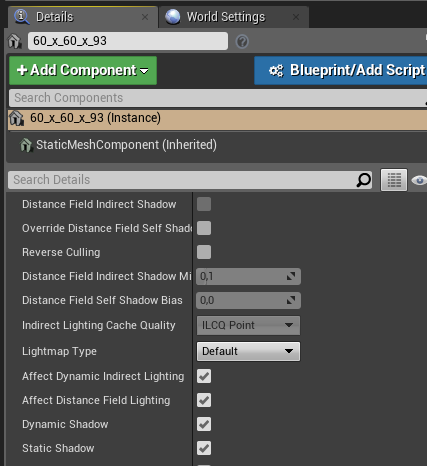 reef bolt
i was checking on the mesh details, not in the blueprint detai
dusty gyro
yeah its in the bp details
reef bolt
This is the parameters that I have put but i have this strange colour in the viewport
dusty gyro
thats because you dont have enough samples in your scene
this should help you understand how it works
reef bolt
thanks you!
But, using the volumetric lightmaps i'll need more consumption of performances?
what I ask is, if it is useful to use this method only for the opening of a door, and if this impacts much more on the consumption of resources
dusty gyro
nah not really
it'll be longer to bake
but performance impact at runtime for the user is minimal
keep in mind that you will never get a lighting as good as static on a movable object
but you can get close enough that its not too noticeable
reef bolt
I was just referring to the baking times hahaah
Ok, so i have to choose: use static lights (more details, low baking times) or volumetric lightmaps (less details, high baking time)?
And i would choose volumetric lightmaps only for the interaction of doors or windows?
dusty gyro
when you bake your lights
it bakes a volumetric lightmap
its not 1 or 2
its 1 AND 2
its just a matter of tweaking both for good enough results
and yeah
dont force movable objects to have static lightmaps
it'll look odd if these objects move
interactive objects, use movable + vol lightmap
reef bolt
Ahn, cool! So i can use an entire project with skylight and directional light that are statics, and all the meshes uses "static shadows", but some objects (like a door) can use this volumetric lightmaps, right?
reef bolt
I have not yet understood the difference between static and stationary, I read the unreal documentation but I did not understand much ... so I used only the stationary lights for skylight and directional light
dusty gyro
static = fully baked
stationary = baked bounces and AO, but dynamic shadows
BUT
you can change the baked shadows and light's color and intensity
reef bolt
So i will have "low" quality shadows only near the door, while in the entire project will have perfect and beautiful static shadows, right?
Uhm, so if i'm not interested to change intesity or color for the lights, i can use static?
reef bolt
Ok... So i can't use only static shadows in my case, since I have to use a door that changes the shadows on the moment
reef bolt
and I am obliged to use the skilight and directional light in stationnay mode
Oks
Ah, only one thing, where i can see the number of triangles of my project?
Only to understand how big is my project and understand what method of approach i can use to do all in a efficent way
is in statistic?
dusty gyro
yeah
in the statistic windows you can see how much triangles you have
and filter meshes by triangle amount
reef bolt
:C
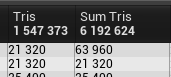 reef bolt
In my case i have 12-14 hours of baking times
dusty gyro
right well
reef bolt
Ouch
reef bolt
WHAT
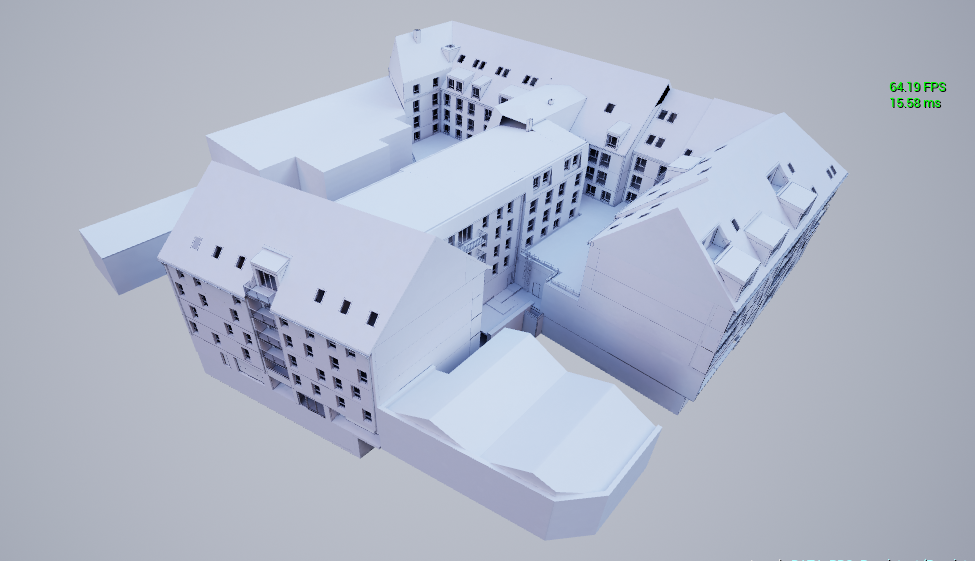 reef bolt
I'll create a religion for you
dusty gyro
this one was baked in around half an hour
reef bolt
Me too, i WAS atheist until now
dusty gyro
eh
reef bolt
BIM with unreal? 👀
dusty gyro
yup
reef bolt
w a t
dusty gyro
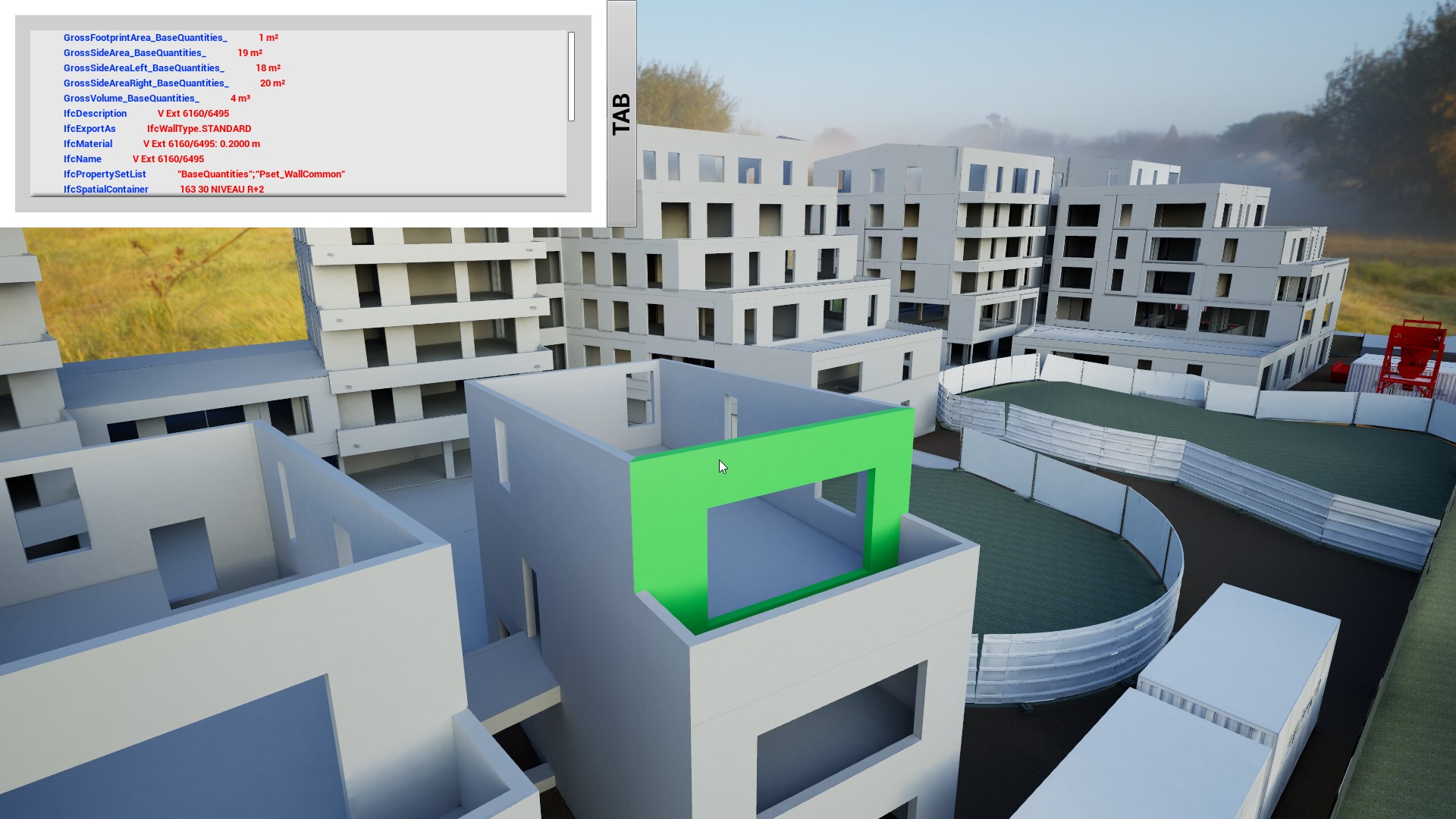


 reef bolt
You live in 3019
reef bolt
can I ask you what nationality are you?
dusty gyro
France
reef bolt
pizza pasta mandolino
Not a good nation in this period hahaah
I'm italian but not "so italian", I live in the border between France and Switzerlanf
dusty gyro
eh 😄
dusty gyro
nah I work for a big AEC company
Groupe Legendre
we're mostly on the west of France and in Paris
reef bolt
Ahn, that's so cool
I would not have imagined that unreal could be use like a BIM, compliments
reef bolt
And why use a software so difficult like this and not a software like revit or archicad?
I heard that in France you use a lot Archicad, is it true?
dusty gyro
oh we do use Revit
UE4 is just a visualization tool for us
everything is modelled in Revit
we kinda loathe Archicad here 😅
reef bolt
Yeah obvious, but isn't complicated setting the entire "bim" logic in unreal?
reef bolt
ahn ahhahaah ok i understand
dusty gyro
then its just a matter of developping the right tools around BIM needs
reef bolt
So it's a big company if your manager is a revit influencer ahaha
It is a long time that you use unreal?
dusty gyro
I've used it since it was available
back when you had to pay 20 bucks a month
but I've been using it for work for a bit more than 2 year
reef bolt
I guess you know how to use it very well then hahaha I understand like the 1% of unreal i think, but I'm afraid that when I finish studying I will not have more time to learn it
dusty gyro
I was a Unity user during the whole time I studied 😉
learned UE from scratch
trial and error, lots of tutorials
reef bolt
I'm in the exact situation haha, many tests, lots of mistakes, and after 10 hours in front of the pc i get better by 0.1%
reef bolt
I believe that if I did not give up learning unreal now after all my failures, I have the potential to learn any software on earth. I do not think there can be a more painful software to learn than unreal 😂
dusty gyro
hmm
unreal is quite simple actually
now try learning stuff like houdini
you'll be a magician if you succeed (lol)
reef bolt
that of unreal users is a bad life
dusty gyro
but damn is the road gonna be hard and long