#source-control
1 messages · Page 49 of 1
 pale glade
Hi,
I'm running a Plastic server. Even though I have the plugin Plastic detects and wants to push things from Intermediate and Saved, how do I prevent this?
I have the ignore file in my workspace root
 steady void
ok so now I need to figure out how to push from my project to the new gitea repo
I have no clue how to do this, so any help would be appreciated
not sure what I need to set up
steady void
aha I had to go into my windows credentials and change my git username and password
 fringe abyss
i want to create a separate branch of my project for ue4.25 in turtoise svn(and keep my 4.24 version)... do i create a branch folder as a subfolder of that original repo and then use that as the new base for the new branch? and then on my local machine i can create a separate folder(anywhere) and pull from that repo/branch folder and commit there...
does that sound about right?
 plucky arch
SVN doesn't have true branches
A branch is just a folder created with SVN copy operation - this ensures that the second set of files is properly de-duplicated and it doesn't take up any extra space in the repo
So yeah, it sounds about right, but SVN isn't really the version control system you wanna do a lot of branch stuff with
fringe abyss
yeah honestly, i just want the .uproject and the config file to be different, the rest of th eproejct will be the same/almost the same...
 dawn pewter
@fringe abyss Newer Engine Versions update all the UAssets to the newer version. You won‘t be able to open the Project in 4.24 anymore even if you have the config and uproject file from the 4.24 version. To have different Engine Versions working on the same project is not really feasible (would work for c++ stuff only).
Just reread you message and realized I‘m not quite sure that‘s what you intended.. So I‘ll just leave it here just in case.
 brave plank
Hello, when I try and build my project I keep getting an Access denied I think it's due to Perfoce any help would be great thanks.
fringe abyss
@dawn pewter ah. i see.. i didn't know that. Thanks for the info
 analog lodge
I´currently looking into online hosting solutions for my perforce setup.
I´m still in the process of setting things up locally, but I´m collaborating with a bunch of people online and my internet connection isn´t good enough to use my local workstation for that.
What about something like this (sorry, german link):

STRATO AG
Sie möchten für Ihr Internetprojekt einen zuverlässigen & schnellen Server? STRATOs günstige Linux V-Server vereinen SSD-Speed mit Ausfallsicherheit.
Seems a lot cheaper for the amount of storage it comes with than other solutions that are recommended like digital ocean.
I found this tutorial I´m sure I could follow, if I knew what the requirements for a cloud server are for perforce...
Allar's Blog
A common question with Unreal Engine 4 (UE4) is "how do you set up version control?" I think this is a very important question and if you have never used version control for your projects you are crippling yourself from the start. I won't go into details about
 burnt shadow
dawn pewter
burnt shadow
dawn pewter
@brave plank
You can test whether it‘s a Perforce Problem by checking out the entire project folder. This way the write protection enforced by perforce will be lifted.
IMPORTANT: Do not submit! After the build run revert unchanged files on the folder. This way only files that were really modified will be left in the changelist.
If the build succeeds, you have folders and files source controlled that UE4 changes or replaces during a build (Intermediate and Saved folders are prime candidates here I guess).
dawn pewter
@analog lodge You can get the official recommendations here: https://www.perforce.com/perforce/r16.2/manuals/p4sag/chapter.performance.html#performance.cpu
I know someone who runs it for a small company with 4 people on a 2-bay synology nas with 2gb ram and a 2core 1.6ish ghz processor. It can work on lower specs then recommended. One thing to consider is, that cpu performance is not garantued with vservers. Would need a desicated server if you want consistent performance. But you could easily test with a vserver. It should work.
I don‘t know the german hosting providers, you might wanna look for benchmarks of different vps providers to make a good call.
analog lodge
Yeah, I don´t think performance will be an issue. Apart from the initial setup, there will not be much traffic or many overlapping users on a day to day basis.
I just wasn´t sure if what they offer is even what I need.
I mean, compared to what for example digital oceans offers, it just seems to good to be true (more cpu, more ram, WAY more ssd storage).
don't bother with allar's blog
@burnt shadow Can you elaborate on that?
dawn pewter
@analog lodge I am actually also a bit surprised by their pricing. But they do state traffic is included, ram garantued, vcores are always variable regarding performance so it is a bit luck based, but other than that it actually doesn't look that bad. 9 to 15 € a month for up to 1.2tb source control server seems reasonable.
analog lodge
Yeah, compared to the 50GB you get for the same price over at digital ocean.
They do have a 30 day money back guarantee, so I´m just gonna get it and try to set it up based on the other tutorials.
Not looking forward to it to be honest, but probably good to learn some new stuff..:)
 iron quest
looking for tips on getting up source control when working remotely
 wintry garden
quick question about tracking binary files (such as PNG) in Git repository; should you do it at all and if you should, should you keep all "source art" in single folder or "next to" the .uasset in directory structure?
I can imagine pushing high res textures to repository will quickly bloat it to unpleasant size
 rotund bobcat
use LFS for your source files
wintry garden
does LFS store the raw source file in repo or how does it do it?
rotund bobcat
stores it in a separate LFS storage
you should also add uassets and umaps to LFS storage
wintry garden
and the file in repo is reference to that storage file yeah?
rotund bobcat
we even have the source files for assets themselves on a different SVN
the file in the repo is like a pointer that points to the file in LFS
wintry garden
when updating the image it will overwrite the raw file in storage and update the reference in repo?
wintry garden
That seems to be the case now that I read about it. Thanks for the help Dieter 👍
wintry garden
Sounds cool 👍 I'm using service to host my repository and they have limit on the size so that's why I'm trying to figure things out before running into those limitations
I was thinking about using a hook that downloads art assets (such as textures and audio). Still figuring out which hook and where to store the assets but in theory it should work
analog lodge
hey there,
Still trying to figure out what kind of server I actually need for running perforce, following allars blogpost...
I´m just missing some crucial keywords here...
Do I need a "dedicated linux server", or is a "V-server" fine?
Do I need "root access"?
Do I need to be able to "make kernel changes"?
Is it ok if the vserver is "container based"?
Doe sthe number of CPUs count for a small team?
dawn pewter
@analog lodge VServer should also work. Dedicated means it's ressources are all garantued, VServer just means it's a virtual Server that shares some resources like ram and CPU with other virtual Servers
Root Access -> You want to be able to install Perforce, so you need access to the linux itself (via ssh/console). So Yes! (Don't mix up with Root Server, that's when you have full control over the hardware resources)
Kernel Changes -> Nope, not needed
If by Container based you mean Docker -> Yes, it can work. It's just a different approach that can or can not be more complicated to setup (depending on prior experience) -> https://www.perforce.com/blog/vcs/benchmarking-docker-helix-server
As vcpus performance isn't guaranteed anyway, you would probably be better of with 6-8 Vcpu. But it's really hard to make a good prediction because it depends on the provider. Dedicated 4 cores with 2ghz +/- should work fine for small teams

Perforce Software
A theme of our recent MERGE conference in San Francisco was how DevOps is taking over the world. Related to that theme is the use of container technology, specifically Docker.
analog lodge
Thanks again for the answers!
Maybe I should try installing perforce on a free AWS EC2 instance first to get to know the process a bit better, before diving into unknown terrain.
Like I said, I know nothing about all of that, I could follow a step by step tutorial, but if there are additional steps required, or the setup is slightly different I´d probably be lost pretty quickly and the provider I was looking into didn´t even know perforce, so I´m not expecting any support from them..
 random gate
Hi all. I'm looking for some help here with source control (I've been reading through this channel and whilst lots of useful information, I can't quite find the definitive answer I need).
I'm working on an editor tool (so no game content, models, textures, blueprints etc.) and I want to get the code into perforce (already set up, so no worries there) and in my mind this is going to be just the cpp/h files, project/sln + the various Unreal config files.
- Is there a definitive guide to the minimal files needed under source control for someone else to grab them and build from source. These are the files I want to get into perforce.
- It looks like you cannot just move projects around (hard coded references to build scripts in the vcxproj files) so how do people handle that for multiple users? Just as simple as identical UE installs on all machines, or via macros/envvars for the endpoints?
- If you want to build this source via CI (Jenkins) is there a set of minimal files needed to compile it (ie, the Unreal compiler, headers, libs etc) or do you have do install everything onto the build machine from the EpicGames Launcher? If there's a minimal set, where would these files need to live (or how can you configure the solution to look to a specific location to find them - I guess this ties to my earlier question really).
- When created from the wizard initially, you get your plugin under "games", but you also get the "Engine" project as well. Is this actually required in the solution for just a plugin project? It seems just to be examples etc.
Thanks in advance for your help - I know there's quite a few questions here but I might as well get them all out in one go I guess!
 merry zodiac
is it possible to upload an ue4 project directly on github? i've tried but never managed to
could you show me an example repository?
dawn pewter
@random gate
- If you are working on an editor tool you probably created a plugin and put your code into that module? In this case you only really need to share the plugin folder. You could ignore any binaries/debug files if you want. Just the uplugin file, as well as config, content, resources and source folder should be enough to be able to build it on another machine.
- No, it's not simple if you work with hard references. We simply create a new partition (X as an example) on each devs machine where all Source Controlled content is placed (Workspaces). This way the paths stay the same on each machine.
random gate
Thanks @dawn pewter for the clarifications - I thought a set partition might be the way to go (we do that for other things too).
 cold orchid
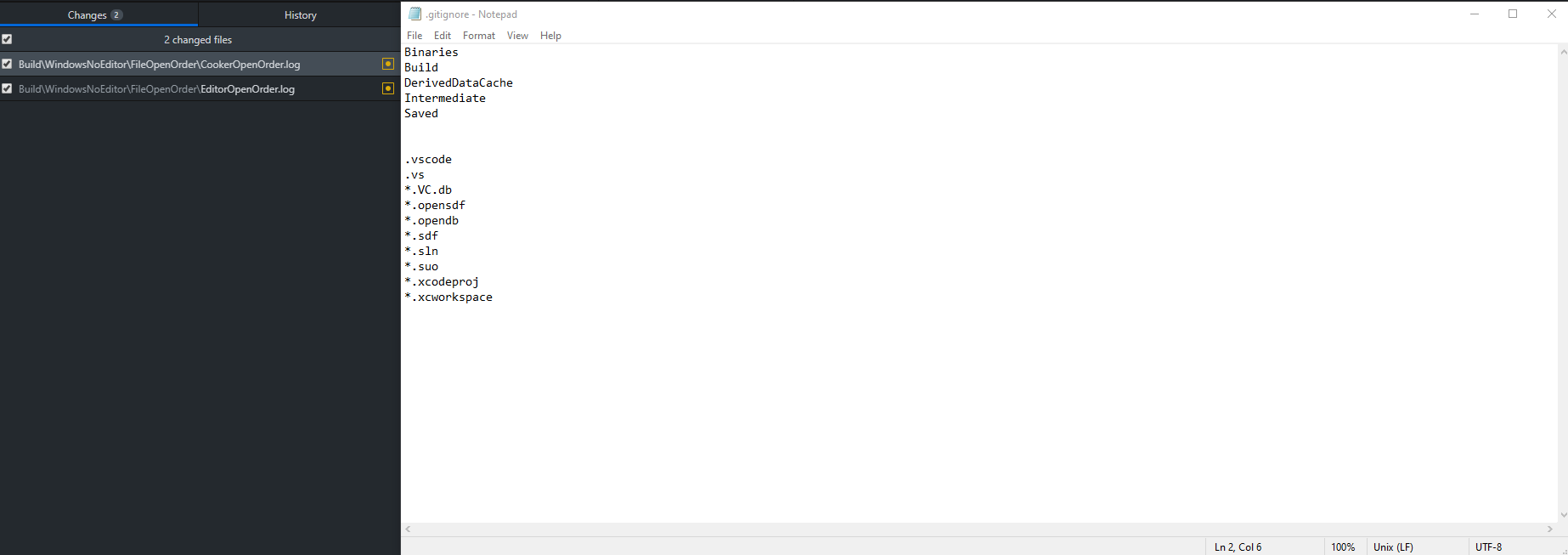
Hey guys I'm trying to ignore the Build folder, as you can see it's listed on the gitignore but that doesn't prevent the cooking logs to pop
 cold orchid
A friend help me find the solution, so the line was actually working, what happen is that the repo was already tracking the file so I had to deleted in order to ignore it, thank @candid sedge
analog lodge
Argh, I will probably cancel my plans to move to unreal, if I can´t figure this out soon...
The perforce website is incredibly unhelpful, the manual is only made with IT specialists in mind, its like learning a new language by just staring at the words...
Everytime I´m trying to figure out something super basic, I´m down a rabbithole with no answer two hours later...
Like.
How do you just delete some files you don´t need anymore.
Or, thinking "Great, perforce offers a partnership with AWS", clicking on the link where I´m supposed to register, but I already registered so what now.
Or...how is perforce actually dealing with changes in versions of the same asset?
Lets say I have a 1 GB megascans highpoly asset.
I make a change to the asset, I submit the change...now I have two 1GV versions on the server.
I make 10 more changes, now I have 10 GB storage on the server and I´m almost out of capacity...?
dawn pewter
@analog lodge From the documentation:
”File revisions of binary files are normally stored in full within the depot, but only changes made to text files since the previous revision are normally stored. This approach is called delta storage, and Perforce uses RCS format to store its deltas. The file's type determines whether full file or delta storage is used.
Some file types are compressed to gzip format when stored in the depot. The compression occurs when you submit the file, and decompression happens when you sync (copy the file from the depot to your workspace). The client workspace always contains the file as it was submitted.”
so yes, binary files are stored in full for each version, but can get compressed which could reduce storage usage quite a bit.
@analog lodge You can delete files inside P4V, but it will keep the versions on your server in case you want to ”undelete” them. There is a way to permanently delete files however.
analog lodge
Yeah, I glanced over both infos.
Still gives me the cold sweats not knowing how to best control my project from blowing up my server space.
 woven sluice
you can also set up rules to only keep X revisions of a given file extension
documentation is a little sparse, I don't know it off the top of my head
perforce is quite complicated and when I was first learning it I just launched a server instance on my local PC and played around with it for quite a while. I still do it once in a while to learn new stuff like this
 dusk dove
that's pretty useful for Map_BuiltData files for example that you probably want to sync but are pointless to keep history for
woven sluice
keyword is "typemap" ... search "p4 typemap" or "perforce limit revisions" should find some info
@analog lodge
 pallid ledge
Why will my github desktop not let me upload my UE repo (I already submitted it to the github)
 ancient oxide
Why will my github desktop not let me upload my UE repo (I already submitted it to the github)
@pallid ledge
Are you trying to upload those files on the left? If so you need to commit them first.
pallid ledge
Ok. I'm really new to git desktop. Where do I commit?
I see commit to master but it's greyed out
ancient oxide
in the bottom left corner.. just write a commit message where it says "summary".. something like "adding assets" would work as a commit message. you can write a description if you want more documentation.
then the blue button will let you click
pallid ledge
Ok. Thank you for the help to a noob question
ancient oxide
no worries!
analog lodge
keyword is "typemap" ... search "p4 typemap" or "perforce limit revisions" should find some info
@woven sluice Thanks man. I think I can wrap my head around perforce eventually, I´m already playing around with it locally.
My problem is mostly, that I already have a team waiting to work and since my internet connection isn´t fast enough to host it locally, I gotta figure out how to set this up in the cloud and thats where I´m just meeting darkness and despair, lol.
that's pretty useful for Map_BuiltData files for example that you probably want to sync but are pointless to keep history for
@dusk dove Why would I wanna sync these in the first place? Does anything speak agains my collaborators just building that themselves?
dusk dove
building lightmaps takes forever
analog lodge
building lightmaps takes forever
@dusk dove Well, not in my early tests, lol. I haven´t finished a full environment yet, but even then, I think its not crucial to sync, if they can just do it themselves.
 slate pulsar
I'm using github and github desktop for my ue4 source control. I am working with one other person. We have 3 branches, 1 is master, 2 are dev branches. I was pulling from one branch to my own and got merge conflicts. How do you resolve this conflict. I would like to keep the files from the branch I am pulling from.
I simply want to know what I delete and what I keep
And I need to know how to not get merge conflicts when pulling from one dev branch to another. @ me or dm me if you have any tips or useful information please.
One software dev says working in ONE single dev branch is best, less conflicts. Another software dev says that's a terrible idea and to use separate branches and merge them. I personally want to work out of separate branches but I 100% need to know how to properly solve merge conflicts so I don't accidentally delete 2 hours worth of work like I did last night.
dusk dove
you can not solve merge conflicts in binary assets
choose one version and trash the other
slate pulsar
Indeed so in this instance above, which lines do I delete
And thanks for answering man @dusk dove , I just want to know which lines I need to scrap safely
dusk dove
looks like this git client has no proper support for conflicts in lfs
slate pulsar
I don't even know what that would look like haha
dusk dove
try keeping lines 1, 3 and 4
slate pulsar
I already burned this branch to the ground but for next time I think I should keep 1,3 and 4
slate pulsar
So def keep that haha
I know the <<<<< ==== and >>>> lines can be tossed, they are just highlighting what need to focus on
Cool, thank. So next time I when pulling from one dev branch into my own dev branch, if a merge conflict comes up. I will keep his updated version and toss my own.
slate pulsar
Last question, what do you prefer, working in separate branches and pulling from them when needed OR work out of one single dev branch? He will be programming and I will be doing art
dusk dove
so actually just use perforce instead so you get proper locking
 dusk dove
it's free for up to 20 workspaces as long as you provide the server yourself
slate pulsar
Aye, I don't have a serverrrrrr. Though I'm sure I could make my PC the "server" and my own client.
Last time I used perforce I clogged up the space and had NO clue how to delete previous versions.
dusk dove
multiple branches are only useful if you can actually merge things
slate pulsar
So let's say you were to only use github with ue4, how would you and your small team work
dusk dove
currently we use perforce and a single branch
slate pulsar
Yeah the ability to check in and out, locking folders is monumental
Im on the perforce website. Im not opposed to using it, just need to figure out how to clean out the back end
It's all command prompt nonsense last time I used it
dusk dove
you can use P4V
slate pulsar
YEAH that's what I was using
Perforce is just confusing out of the gate haha. Helix Core is what I need and I guess Hansoft is for planning. No pricing upfront either. Tisk. tisk
woven sluice
P4V is not command prompt
(Also... Did I miss something? The "long line" above is a file hash, along with a file size, isn't that dialog actually asking you which binary file you want to keep? Not lines in files?)
(Or does uasset file actually contain a hash and size line in text. Lol)
@analog lodge if you're already playing around with it locally than your only major challenge, technically speaking, should be learning how to use l00nix through ssh... Rent a VPS, learn how to SSH into it, learn how to navigate around the server with Linux command line, learn how to install perforce server on Linux
analog lodge
Well, the first challenge for me is to learn what kind of vps I need...
There are dozens of options with dozens of different names on AWS alone.
dusk dove
@woven sluice it's a git lfs descriptor or whatever they call it
this particular git client has no lfs integration so it failed to display the diff in a more sensible way
woven sluice
Ah, I see. LFS sounds like such a hack... Anyhoo
analog lodge
But I´m working my way towards it first by trying to figure out how to set things up locally.
woven sluice
@analog lodge 😂 yeah AWS is really confusing. Just don't give Jeff your money and use linode or gandi or some other vps provider with simpler options instead 
analog lodge
While we´re at it...
I´m trying to figure out how to create an ignore list.
Or lets put it differently...
Lets say I´m adding a unreal folder to my depot.
Now I´m adding a map in Unreal, put stuff in it etc.
I´m not gonna know at the beginning, what I wanna ignore, before I create that stuff.
How do I deal with this?
Lets say, I create a testlevel I just wanna play around with locally.
Map_Test.uasset.
analog lodge
I feel like I still don´t get some very basic stuff.
- I have a Folder on my drive, lets say its located here P:/UNREAL/myproject
- I create a workspace in P4V in an EMPTY folder Q:/PERFORCE/myproject
- I copy all the files I want perforce to control from my P Folder to my Q folder.
- In P4V I mark all the files in Q:/PERFORCE/myproject for add and submit the changes.
Now for my questions:
- If my Perforce depot is set up locally (I don´t quite remember the steps I went through when I installed it)...
A) Do I now have 3 copies? One in P:/UNREAL/myproject, one in Q:/PERFORCE/myproject and one in a local folder somewhere else...?
B) With which unreal file do I now keep working? The one in P or the one in Q?
woven sluice
After you do what you just described, you would then delete your first UNREAL folder and forget about it. You've moved your project into a p4-controlled workspace and work on it there.
analog lodge
Ok, thanks for clearing that up.
But what about the folders I didn´t copy in the first place?
I´m currently trying to follow along a youtube tutorial:
Are they going to be rebuild, when I start the project in my new, perforce controlled workspace?
If so....Do I put the p4ignore file in that folders root? (Q:/PERFORCE/myproject)
woven sluice
Yeah all those blank folders (and yellow) are all generated data. There's some stuff in Saved that controls things like your editor layout but generally you don't bother with them
The perforce ignore file can go anywhere. It affects the current folder and all subfolders until it finds a new ignore file
analog lodge
And just a quick one more...
Lets say, I open the project, I create a new testleve, I don´t want that to be submitted...Is there an option in Unreal to ignore that file from being synced right away?
Or do I have to check it in, then close unreal and add it manually to the ignore list?
woven sluice
You would want to add it in the ignore list before you check it in, I don't do anything in unreal or with levels much so not sure about the specifics of that one
Probably have to add it to the ignore list before you make it since UE may try to add it to a change list immediately
analog lodge
Aight, back with one more...
Still triyng to set up an ignore list.
following this:
https://community.perforce.com/s/article/1282
Keep getting an error stating the path isn´t correct or the folder doesn´t exist...
Here is what I put in:
"P:\PERFORCE\TEST" p4 set P4IGNORE=P:\PERFORCE\TEST\p4ignore.txt
At step 5 it simply says "Set the P4IGNORE variable", so thats what I put in the "Start in:" field in the shortcuts properties.
Also tried copying the p4ignore.txt file to the install location of perforcem didn´t help wither
analog lodge
There is also some confusion here, another tutorial says to simply add a textfile named ".p4ignore" in the workspace root folder.
Not sure if that only applies, if you install the depot on a server instead of having it locally.
 willow obsidian
how to download specific commit from unreal engine
woven sluice
@analog lodge
- set up P4CONFIG environment variable https://i.gyazo.com/4167da8fe9240dcac1ad0bd08a2d69a8.png
- make a new
.p4configfile (or whatever you chose for your filename) in your workspace root - set up your P4IGNORE file name in it https://i.gyazo.com/ab84c4aa31145f0dac5895af0e5193c9.png
- set up any number of
.ignorefiles and put them wherever you want. here's mine currently https://hastebin.com/wohiqojane.shell

 analog lodge
Thanks, but where do I set the environment variable? somewhere in perforce or in windows?
nevermind, must be windows. thanks, i`ll try that.
analog lodge
Nope. Still not working.
Here are my steps:
- Create Workspace "TEST"
- Create .p4config file (inlcuding *_BuiltData.uasset´) , save in that folder.
- Create environment variable as you said.
- Copy files from test project to folder "TEST".
- Open P4V, switch to workplace "TEST", mark all files for add (including test_builtdata.uasset), submit to depot.
- Open testproject with unreal.
- Connect to Perforce.
- Build map, so test_BuiltData.uasset gets created.
- Sourcecontrol asks me to add file/check out file, check in file etc.
- Close unreal, go to P4V. Check folder. Voila. There is the supposedly ignored file...
Speaking of checking out...I´m checking out for today, bin at this for the last 12 hours on and off...:(
 cosmic hamlet
Anyone happen to know if there is an automated build pipeline for azure devops?
 frank night
@cosmic hamlet i have an automated pipeline working in jenkins, sure it would work fine on azure devops, as long as its on prem. might have some issues getting the dependencies built in the cloud, though never tried.
 elder shell
when pushing engine source into p4v what files should i not push into the depot?
when i download engine source its like 1 gb or something after extraction
but after i download dependencies... it became 85 gb
even with the engine intermediate and binary folder excludes its at 50 gb
Anyone happen to know if there is an automated build pipeline for azure devops?
@cosmic hamlet make a python script and then run it on jenkins to deploy 😛
 mystic prism
Is there a way to edit my UE4 git options? I forgot to check the LFS box, and now I cant figure out how to get it active in my Azure repo
pallid ledge
Do you have to make a new git repo each time you make a copy of the project for a new UE4 release?
 quaint obsidian
just upgrade in place
mystic prism
I am struggling here and could really use some help.
UE4.25.1 / UE4GitPluygin 2.16
Microsoft Azure Repository
Using GitHub Desktop locally
Git Installed
LFS Installed, and Initialized
.gitignore and .gitattributes in project directory with applicable LFS tagged extensions.
initial commit to local master repo and then pushed to origin with a few small test files, went well, items on the origin repo and be cloned
When I try to push the bulk of my project, assets, levels etc. I get this as a prompt.
It is committed to my local master repo fine.
Enumerating objects: 14102, done.
Counting objects: 0% (1/14102)
//Removed the progress report for message length//
Counting objects: 100% (14102/14102), done.
Delta compression using up to 16 threads
Compressing objects: 0% (1/13487)
//Removed the progress report for message length//
Compressing objects: 100% (13487/13487), done.
Writing objects: 0% (1/14051)
//Removed the progress report for message length//
Writing objects: 6% (884/14051), 486.37 MiB | 2.21 MiB/s
Writing objects: 6% (884/14051), 488.77 MiB | 2.21 MiB/s
error: RPC failed; HTTP 503 curl 22 The requested URL returned error: 503
Writing objects: 6% (884/14051), 491.14 MiB | 472.00 KiB/s
fatal: the remote end hung up unexpectedly
Writing objects: 6% (884/14051), 803.27 MiB | 14.76 MiB/s
//Removed the progress report for message length//
Writing objects: 100% (14051/14051), 10.82 GiB | 323.91 MiB/s
Writing objects: 100% (14051/14051), 10.89 GiB | 43.17 MiB/s, done.
Total 14051 (delta 463), reused 13997 (delta 409)
fatal: the remote end hung up unexpectedly
Everything up-to-date
But when I check the Azure repo, nothing appears to have been pushed...
And in GitHub Desktop it shows the commit as not being pushed.
Any help would be amazing.
quaint obsidian
that seems like wayy too much for it to be using LFS
make sure all your files are migrated to LFS
not just .gitattributes which will do it for new ones
mystic prism
Hmm, my Git ignorance is showing then, I need to figure out how to do that.
fuuuuuuu I think I know what I did wrong, when I reset my local repo, I think I forgot to initialize LFS in the repo directory..
 hidden ibex
Go on @blazing tapir
 blazing tapir
Hey
SO uhhh... I solved my issue by just uninstalling and reinstalling perforce from scratch
Source / Version Control:
This playlist will cover multiple ways to work with source control with UE4.
This Video:
In this video, we install the P4D server and the P4V client app. We then bring it all together to get a perforce repository integrated with Unreal.
Links:
(FR...
I was following this video, but I accidently set my depot root as my project root.
There's a setup wizard for adding files to the server that I couldn't seem to figure out how to access, so I just ended up reinstalling everything from scratch so i could get that window again.
Ofcourse for future reference, if i were to run into this issue again, how would I set the files onto the server?
hidden ibex
wdym by adding files to the server?
blazing tapir
when setting up the first project there's a little wizard that shows up like this
i should mention I'm using p4v
hidden ibex
Ahh, got you
 inland marsh
hello , where i can find a tutorial for github source control with video from server and client ?
 graceful blade
Hello,
has anyone experienced issue of not being able to connect to perforce through a vpn after switching routers?
Before was fine, than switching routers caused issues. the only thing I could find on the subject was this page: http://maillist.perforce.com/pipermail/perforce-user/2001-March/041343.html, which mentions VPN NAT table being full, but I dunno how to clear that.
I've also tried all 14 points in this article https://community.perforce.com/s/article/2960
any help would be very appreciated, thanks!
 fallen geyser
Ofcourse for future reference, if i were to run into this issue again, how would I set the files onto the server?
@blazing tapir this is totally optional wizard and I've never used in a decade with P4 😉
simply find your files/folder in the Workspace, right-click on it, use Mark for Add option
analog lodge
Hey everyone, I´m still working on a concept of how to set up Perforce for an Unreal movie project.
If you have more experience than me with unreal and Perforce, you can help me with it on this google doc, by commenting about any questions I have posted there.
https://docs.google.com/document/d/1XbKduei0pX5VJmLmQAVUEWHA-DfpnDNE1_dSTlJRnfs/edit?usp=sharing
Once all questions are answered, I want to make this into a proper free guide for others struggling with it as I have so far...
I am also willing to pay for a one on one session to help me figure this out, as it has already cost me several days of research and not finding definitive answers...
If you feel you are expert enough for that, please contact me via dm...

Google Docs
GUIDE To Unreal for Film makers: Disclaimer: I want to use the P4V client for all tasks if possible, as I´m more familiar with a GUI than a commandline environment. If something is not possible with the P4V client and needs to be done with the command line, please mention tha...
dusk dove
you don't necessarily have to use a remote server, if you have a computer that can run whenever someone needs to work and reasonable upload then you can just run it locally
it is possible for users to limit their workspace to specific folders entirely (when setting it up) and you can also sync a specific subfolder only rather than the entire workspace (click the folder you want before clicking get latest in P4V)
plan a workflow seems like a disaster so I would choose b for that reason alone
analog lodge
If someone could just tell me what kind of VPS I need to get, I would gladly forget everything about Plan A.
But one of the few providers that has dedicated tutorials for using perforce is digital ocean.
For a 640GB VPS I´m supposed to fork over 160 bucks every month. Thats way too much for my zero-budget shortfilm...
On the other hand I found other providers offering VPS or V-Servers with 1400GB for 13 bucks a month.
I have no idea, if those are just different prices in my country (those providers are all german) or if the VPS they offer isn´t suited for perforce.
Here is the comparison:
Digital ocean;:

DigitalOcean
Contabo (german provider)
vServer Hosting: Leistungsstarke VPS mit Rootserver Power. SSD Speicher, Snapshots, 1 Gbit/s unbegrenzter Traffic, bereits ab günstigen 3,99 EUR/Monat.
And yes, a movie project consisting of alembic files and numerous hipoly assets and 8k textures could easily run several hundred GBs in size...
fallen geyser
@analog lodge if you got decent internet connections, the most cost efficient solution for you would be to set up server at home
analog lodge
I don´t...:)
fallen geyser
than I'm not really sure, cloud would be always uber-expensive when it comes to terabyte repositories
there are unlimited size repos on Azure, but that's only for Git AFAIK
optionally you could store source assets - if you can live without versioning it - on Google Drive File Stream
that's basically unlimited FTP for like $10/month
analog lodge
Well, we´re not gonna use terabytes.
400-1000 GBs is what I´m looking for, and the above provider has affordable offers for that.
fallen geyser
and only store Unreal project on the repository
analog lodge
I´m just not completely sure they offer what I actually need.
But I´m pretty sure by now they do.
fallen geyser
oh, I didn't catch the other provided, but it might be pretty sure
Digital Ocean is awesome, but no cheap, tru dat 😄
analog lodge
VPS, some cores, some GB ram, Linux. What else would I need...?
Digital ocean is the only one I found a dedicated step by step tutorial for.
But thats not worth 160 bucks a month...
Unless I´m missing something...
 noble knoll
@analog lodge hyperpoor mode is raspi + hard disk
i had that setup
bit slow... but it actually worked and was super cheap
but you need to have good internet and static IP for it to work best
analog lodge
Yeah. I don´t. The drawback of having a lot of nice nature around...:)
woven sluice
dunno what your budget is... I use gandi.net, it costs about $0.07 USD per GB of storage per month. so $28 USD/mo for 400 GB. plus the server itself is about $10 USD/mo. with something like this you can always start with like a 50 GB volume and expand it to fit growing storage needs, you don't have to buy a 1TB server and pay the full rate from day 1
[Also, I just discovered Gandi offers a 15% discount if you purchase ~$180 worth of credits at a time... so if you can prepay for a year or two at a time, that price could reduce to about $33/mo for 400 GB of storage with a simple 1-core 512 MB server]
@analog lodge
 stuck depot
This might be a really dumb question, but does anyone know how to save a map in UE4 without also saving the builtdata file? For us, the latter takes a really long time to the point that it's of great inconvenience to workflow. One known workaround is to alt+f4 the editor and then uncheck builtdata when choosing what to save, but then you have to restart the editor, which takes almost as long.
iron quest
can anyone help explain why my terrain material is showing a hard edge in certain areas? and how to fix it?
sorry wrong channel
blazing tapir
Nvm I took care of that
blazing tapir
So I'm a little bit confused... Am I supposed to creating a new workspace for each individual user?
I tried getting my files onto my laptop but it's saying "Client"..."Can only be used from host"...
dawn pewter
Every Workstation needs a new workspace. A workspace is bound to a specific user and client
you can also create multiple workspaces on the same machine
blazing tapir
Right ok
If I have multiple users at different workstations working on the same project will Perforce still prevent them from opening files that have been checked out elsewhere?
Also how do I add a depot to a new workspace?
dawn pewter
binary files should use file locking per default. You can change how perforce handles file types in the typemap on the server.
If you create a workspace, you need to select which depot(s) you want to sync within it. That's why you can create multiple workspaces... You might not want all projects to be visible in the same workspace but rather keep them seperated
of course you can also simply work with one workspace per PC
blazing tapir
Right ok thanks so much
 alpine beacon
Does anyone know how to get an Unreal stream from the perforce licensee server? Or has a document
fallen geyser
@alpine beacon this something you should ask Epic, your licensee support 😉
 neat grotto
In 4.25 projects with Perforce, I'm seeing a different behavior when submitting changelists. The editor now completely locks up until the changelist submits, whereas previously there was a basic dialogue that said "Submitting changes to source control" and occasionally said "this is taking a long time". Anyone else encounter this?
dusk dove
does this actually make a difference in practice?
now a progress bar, that would be real innovation
neat grotto
It's not a big difference in practice because the editor becomes responsive again when the "changelist submitted" notification pops up. It just seems like a regression.
I was mostly interested in figuring out whether it was just me or not.
alpine beacon
@fallen geyser You are right! Thanks
dawn pewter
@neat grotto I‘ll check later today. Can‘t remember seeing that behaviour in 4.25, but because I almost always use p4v instead of the integration I might have missed that. Inside UE4 I only make use of the automatic checkout feature and sometimes BP diff/rev history.
 young prawn
Is it possible to use a local Perforce depot in Unreal, without localhost:1666 but rather the "Personal server" you can create in p4v?
young prawn
(or, alternatively, to expose that personal server on localhost)
young prawn
Ah nevermind, got it to work by installing P4S
 winged vessel
anyone had used a Raspberry Pi as Git Server??
 barren gorge
I realize this may be a fundamentally beginner question. So I am coming largely from a Unity background where there isn't really a clear distinction that is visible to the user between a source asset and the asset Unity shows you. Like if I go into my hierarchy of content in Unity in my file explorer, I will see the literal source asset. But in something like Unreal, they make a pretty clear distinction between the source asset and the imported .uasset representation. Am I right in assuming that there is no reason that source assets should actually exist in Content folder hierachy? I am asking this for the purpose of better understanding the asset import workflow so I know what I should be tracking or not in Gitlab repo. Like in theory, should all source assets be outside the project and I should only have to worry about tracking .uassets and other Unreal specific files?
neat grotto
@barren gorge You're right to assume that source assets aren't stored in the Content directory. That directory is meant to store imported content, ie. .uasset files - and content generated by Unreal, such as .umap files.
How you version your source assets is a matter of preference. I've seen teams version them separately from the Unreal project, but I've also seen teams that store them in a SourceContent directory alongside the Content directory.
barren gorge
@neat grotto I may consider those options as well. I hadn't really thought about the idea of managing source assets in a separate fashion than imported ones. I guess as a last question that I am pretty sure I can assume the answer is yes to, so when I track .uassets I am completely safe in assuming that even if someone else doesn't have access to the source file, the .uasset itself is still an accurate representation of it within Unreal. For example, I push a static mesh .uasset, I don't need to worry necessarily that another use has access to the source .fbx.
neat grotto
@barren gorge That’s right. You don’t need access to the source asset in order to utilize the imported asset in Unreal. Only team members that want to edit and reimport the source asset will need access.
 fallow ocean
which software i can use to store backup for my entire game ? from code to textures, mesh , node and everything
 somber kraken
hey Guys, If you were to upgrade your UE version what would you do in Perforce? Republish the whole thing or update the files ?
 pale bolt
Hey does anyone know if there are any free versions of source control to use for small teams? That would be with free server hosting that has a good enough size (at least over 2gb). Also, does anyone know whats happening with the ue4 assembla jam server? It's still active and usable so how long will that remain active?
 humble monolith
@pale bolt I'm not sure but I think it could remain like that because Unity has their own collab stuff so Epic probably has their own too
 frosty mural
@pale bolt perforce is free for up to 5 seats I think, Plastic also has a free version but check their licensing first. Git is of course free but I would not use that for anything but code. I know many people have had success with Git-LFS but also many that have not 🙂
pale bolt
@frosty mural thanks but do you know if perforce requires you to host your own server or if its provided
frosty mural
@pale bolt oh sorry i missed that part of your question... i can't remember off the top of my head, but my gut says no
plastic has cloud setup though... i quite like it myself, not without its painpoints though but then again what is
plastic's cloud is not free though
pale bolt
How much is it?
frosty mural
Plastic SCM offers different licensing and pricing options: free editions (for Personal and Community use), and commercial editions (for small or great teams, and Cloud edition for teams who only need a cloud server)
oh perforce+aws have some kind of a deal that seems pretty sweet https://www.perforce.com/perforce-and-cloud
Deploying Perforce products in cloud helps you build an infrastructure to support growing teams and complex development environments. Perforce can works on AWS, Microsoft Azure, and Google Cloud Platform (GCP).
still up to 5 users though
frosty mural
np
quaint obsidian
@somber kraken you can upgrade in place. sure it is useful to use resave commandlet to update the data version but it isnt required
somber kraken
Thanks
 brazen mantle
@pale bolt Perforce is free for up to 5 people. We're running our instance on our own AWS micro-EC2 server, costs about $6/month right now. I don't know what their pricing is for over 5people as we have a free EDU license
dusk dove
it's 5 users, not 5 people
multiple persons can use the same user and you can have 20 workspaces
the pricing above that is 40/user/month (and you must immediately pay for the 5 free users too)
new companies will get a 50% discount for the first 2 (?) years
woven sluice
I'll just say with P4 Streams/Stream switching it's really nice to use a one workspace per computer model. Make logins like Coders, Artists, Designers, Misc, Admin. Perforce has a steep learning curve though, especially if you're setting it up on a VPS for the first time and don't know Linux, but I really doubt there's any better system (I haven't tried Plastic, it sounds like it's trying to contend)
 boreal pilot
<Redacted for my incompetence>. The workspace limit tends to be the limiting factor in my experience.
dusk dove
but I said that it's limited to 20 workspaces?
boreal pilot
Sorry. IDK how I missed that.
dusk dove
if streams make you use too many workspaces you could always not use streams
can't have a free lunch I suppose
boreal pilot
Would say that paying for P4 is definitely worth it in my eyes.
dusk dove
only if you can't use the free version and can actually afford it..
woven sluice
Why would streams ever force you to need more workspaces though
If anything I feel like they reduce the number of workspaces anyone would need. Unless you're manually editing your workspace constantly to change your view or something
dusk dove
you could have multiple workspaces to work on multiple streams
woven sluice
could be beneficial if the streams are very different and you don't want to wait a long time to change between them. just feel like that's not something that is worsened by using streams over a standard depot, but I haven't done any branching at all in a standard depot to know what it's like
(I've actually only just learned how to use streams recently and am pissed that I never did this sooner, but not sure what pitfalls I might still run into)
dusk dove
enabling streams requires re-creating the depot so that is garbage
woven sluice
yeah may not be worth it on a small project in late dev already. otherwise i doubt i'll ever use standard depots again
dusk dove
how do you use streams?
 violet spindle
Anyone using GitHub as vcs ?
I've setup everything from the editor and than pushed the files to the repo
But than after clone in a new folder the project doesn't run?
It's a sample project - could it be for missing LFS and is it always a requirment ?
 bright moss
hello freinds ! when i try open my .sln file of my unreal project the vs 2017 splash screen start but IDE of vs not open and in the task manager i see vs run on the backrgoud process
woven sluice
@dusk dove not sure if you're asking how to "turn them on" or how am I personally making use of them... if the latter, stuff like this
dusk dove
how do you deal with the fact that many code changes require related changes to blueprints, which then need a global lock, blocking everyone else, making the stream useless?
dusk dove
yeah but still, only one person can ever edit a blueprint at a time
and it needs to remain locked until that stream is merged into main since you can't merge the blueprint itself
woven sluice
oh, sorry, I misinterpreted - basically we're doing 99% of our stuff in the mainline & virtual streams. you are right, there's no way around that thanks to Unreal being Unreal
as a small team the goal would be "good practice" - if a coder makes a task stream it's down to user error whether or not they start editing BP's and muck themselves up
designers (in our team) probably will never bother making task streams but we'll see when we get there
hopefully one day our lord savior Tim will finally fkng give us the ability to use ascii for some uassets 
dusk dove
not like that will help
.utextasset is not mergable
that's probably why they pretty much just abandoned that idea
woven sluice

quaint obsidian
weren't they planning on making it mergeable
woven sluice
I think the answer to that is yes, but planning is a rather vague word in the grand timeline of things
neat grotto
They were still discussing the future of asset formats as of late last year. They talked about it briefly during a presentation at Unreal Indie Dev Days 2019.
 primal dragon
@violet spindle https://youtu.be/FXMTHrLWFKQ
Source / Version Control:
This playlist will cover multiple ways to work with source control with UE4.
This Video:
In this video, we cover all of the steps required to get a GitHub repository and the Git desktop app working with the Unreal Engine. As an extra, I also cover s...
alpine beacon
@woven sluice That Streamgraph you've posted, that is pretty cool, is there a document that would describe how to set that up?
woven sluice
• Streams Overview https://www.perforce.com/perforce/r13.1/manuals/p4v/streams_overview.html
• What Is Perforce Streams? (5 mins) https://www.perforce.com/video-tutorials/vcs/what-perforce-streams
• Perforce Streams Quickstart (5 mins) https://www.perforce.com/video-tutorials/vcs/perforce-streams-quickstart
@alpine beacon
What is Perforce Streams? It's how branching and merging is done with Helix Core version control. It provides a better way to manage concurrent development, dependencies, and other common branching and release activities.
Perforce Streams allows you to quickly visualize and manage the flow of changes between codelines. Review its simple "merge down, copy up" workflow, and easily configure and manage workspaces.
alpine beacon
I had actually watched these, but I had the feeling it's too theoretical, was wondering if there is a walkthrough for Unreal Projects. 🙂 If there is no one, you should write one up! Thanks for the links
woven sluice
It all operates exactly the same but you do have to be aware of the uasset merging restriction as zeblote mentioned. I'm mostly using them to make what is in my opinion a nice continuous integration setup. Coders "just work" in their stream, artists "just work" in their stream. No-one has to worry about syncing binaries. I also have a "TestingBuild" release stream coming off of mainline, if anyone syncs the mainline stream into it then Jenkins will package and distribute the test build... Stuff like this. And coders/people could still use task streams for safely experimenting with things, again subject to the uasset merging limits
Whenever I get it done and have figured out the kinks I may blog or wiki about it. Hard to find time always!
blazing tapir
I think I may have messed up
I was following this:
It's thrown me a bunch of issues in the terminal and now I can't connect to my perforce project
 fallen jay
anyone understand how rider's perforce integration works? I put complete garbage in the config and it claims my connection was successful

 mental stirrup
hmm i made a perforce workspace with root .. f:\depot
put an engine build in there with git ignore and stuff
did submit and it tried to write 60 gig to my c: drive
C:\Program Files\Perforce\Server
blazing tapir
How can I add a depot to a workspace?
I'm setting up a project and the depot files are not getting copied to his workspace
 limpid obsidian
anyone setup the UGS metadata service before? the docs are a little light on this part
 dry garnet
Does anyone know how to resolve issues with setting up typemap (for perforce)? It throws a "You don't have permission for this operation." when I try to do so.
hidden ibex
@dry garnet you're probably not an admin user. Ask your team to set you as an admin
On that note, does every individual client have to setup a typemap?
dusk dove
no, the type map is on the server
every client has to set up the path to the p4ignore file, though
hidden ibex
thank you
@dusk dove on that note, we accidentally committed our Binaries and Saved files to the depo, is it possible we can revert back?
Without creating a new depo 😛
dusk dove
you could obliterate the folder in p4 admin
hidden ibex
hmm, there are a lot of individual files too that are meant to be on the p4ignore
i don't think it's a good idea to go around manually obliterating these individual files right
 shell pelican
Ok, I
Too big an enter button on this keyboard:
I tried cloning an lfs repo using following reference:
https://stackoverflow.com/questions/56283415/how-do-i-clone-a-repository-that-includes-git-lfs-files
But it simply doesnt work. Anyone has any idea what is going on?
git lfs clone
seemingly works, but I wanted to make it work the correct way

Stack Overflow
On my Ubuntu system, I installed Git LFS as well as Git, and cloned a repo that has some of its files managed by Git LFS. But those files didn't download, other than a marker file. (I didn't realiz...
The result of doing a git clone is an 1kb pointer file for each lfs file
 river tinsel
@dusk dove shifting priorities
and it was actually bigger change, that needs to be rolled all or nothing
pallid ledge
Why would certain c++ files be on the github for my ue4 project. but others are not
I have been having trouble, as I belive only files that were on the project since UE4.24 are being updated. The ones from 4.25 are not showing up
quaint obsidian
@shell pelican did you run git lfs install before hand?
shell pelican
@shell pelican did you run
git lfs installbefore hand?
@quaint obsidian I actually realised i had out-commented the lacking asset types in my .gitattributes, so it was my own dang fault.
But thanks for the reply
alpine beacon
I always find it interesting that people keep trying git with lfs it's a pain!
quaint obsidian
i mean there's plenty of perforce help requests here too :)
source control just sucks in general!
mental stirrup
well in the epic steam aboutt source controll fundementals they tell Allar to update his blog, that basically sums up the state of their docs on it 😛
they actually say, we based this stream on this guys outdated blogpost 😄
 still obsidian
I always find it interesting that people keep trying git with
lfsit's a pain!
@alpine beacon Can you (or someone else) expand on this? Or link to a description of what the issues and/or workarounds are? We have a GitLab based setup and recently started our first Unreal project so the git+lfs option made a lot of sense to us.
rotund bobcat
we use git+lfs, and it's working pretty good
¯_(ツ)_/¯
I think the biggest issue is that it's not central and with a lot of implementations you can't do file locking
so it's easy to have a conflict and lose work on binary files such as uassets
still obsidian
Yeah, that's what worries me the most. I've seen that the git plugin for Unreal Editor has some diffing/merging capability but we haven't gotten into a situation yet where we had to use it. I have no idea what the limitations might be.
rotund bobcat
never used that tool
I don't use any source control in engine, I find external tools and command line to better suit my needs
still obsidian
This webinar shows what a history diff looks like: https://www.youtube.com/watch?v=faYmvw_Pd-A&feature=youtu.be&t=2184 Used with Perforce but I assume it would look the same with a git repository.
Don't know how it handles merge conflicts, if at all.

In this presentation, you'll dive into source control options in the Unreal Editor that reduce risk and improve collaboration between developers on Unreal Engine projects. Learn the fundamentals of source control to manage versioning of Levels, Materials, Blueprints, C++ code,...
quaint obsidian
the git lfs and git plugins dont support that due to a bug :)
also i dont mean source control aucks enough to not use it!
it's unfortunate that our options for source control are so bad
but thats just how most things are in this world
humans suck at most things
 gray cliff
I just did an initial commit of everything in Content/ and Source/ and maybe a handful of other files; why does github think this project is mostly written in C#? Weird.
quaint obsidian
Target.cs and Build.cs
 umbral violet
Hey, newbie question, I get how code can be source controlled, but what about blueprints, or other classes defined directly from the editor, such as particle systems or sound classes? Are they saved in an easily accessed folder? Can I add those to git somehow, or is something else recommended?
rotund bobcat
you should add them to git LFS if you're using git for source control
umbral violet
LFS?
rotund bobcat
large file system

Git Large File Storage
Git Large File Storage (LFS) replaces large files such as audio samples, videos, datasets, and graphics with text pointers inside Git, while storing the file contents on a remote server like GitHub.com or GitHub Enterprise.
umbral violet
Oh, thanks
rotund bobcat
just don't enable source control in the engine?
ah
yeah, I do it completely outside the editor, works fine for me
It does help
all them threads are great for compiling
analog lodge
Quick question...probably a dumb one, but I´m trying to build a folder structure for my shortfilm project, so I can use Perforce ideally for my needs.
I have a folder for each shot, each shot consists of one persistent level with several sublevels (geo, light etc) and one level sequence.
All assets for each shot are in a subset of folders in each shot folder.
This way every artist working on this shortfilm will only have to sync the folder for the shot they are working on.
BUT...
What happens with the ".uproject" file...? How is that being source controlled? Doesn´t it get locked everytime an artist works on any of the levels/assets inside the content folder?
Do I have to create one project per shot then, if I wanna avoid this?
 graceful bobcat
@analog lodge As long as you don't change the following, it won't change the .uproject, so you won't encounter issues
File Version
Engine Association
Category
Description
Plugins
analog lodge
Then its probably best to lock it for all other team members, right?
But still have it source controlled by perforce for me (admin)?
dusk dove
no one would be checking it out since they're not changing those things
so no need to do anything about it really
analog lodge
ok, cool. Thanks!
dusk dove
it'd just be a writeable file
 stable cargo
How am I supposed to maintain my project's repo if the bandwidth is so low?
Only two people have cloned the repo and lfs is already complaining that I have used 100% of my bandwidth
Any alternative to lfs?
Or perhaps we should switch to perforce? (The project is at a very very early stage, so the switch won't really break anything)
winged vessel
So IDK but how about a VPS[or low tier EC2] running Gitlab or Gitea ?
humble monolith
guys I have a question. Does some of u know if ue4 spring jam server will be running until the next jam?
Cuz it's still on so I don't know how long it's gonna last since usually they announce with a bit of antecedence when they will shut it down
And I'm referring to the perforce one from assembla
quaint obsidian
@stable cargo #source-control message
rotund bobcat
but an ssh key is specific to the service you're using? or at least you have to register it with that service
haven't used azure devops myself so can't help you, but I've heard of people here using it successfully
I use bitbucket myself, works pretty good
but you use LFS separate storage
store code source assets in the git directly, store uassets on git lfs
the lfs storage is expandable if you pay, dno if it has an upper limit
idk about the free stuff though, we use paid model
no one's holding you back
¯_(ツ)_/¯
humble monolith
guys I have a question. Does some of u know if ue4 spring jam server will be running until the next jam?
Cuz it's still on so I don't know how long it's gonna last since usually they announce with a bit of antecedence when they will shut it down
And I'm referring to the perforce one from assembla
 cyan egret
there is something wrong with my github https://github.com/rubiksmaster02
 wild fjord
Hi there fellow devs, till now i still never had to use source with big projects, but now im dealing with a 10GB ue4 project and i dunno how to deal with it in terms of source control, can i just go for it? what is the limit? what can i pay to extend it? all i see around are features about Large files, but mine ones are only a lot of average size, i don't have anything over 100MB. It's just a really big project. Can someone gimme a hint? ❤️ thx
(if someone answers, please tag me)
rotund bobcat
what source control do you use
wild fjord
github and bitbucket for another project, same situation
but i can start with the github one @rotund bobcat
rotund bobcat
you should use LFS to store any uassets really if you use git
wild fjord
but that it's about large files, isn't it?
i have a shit ton of 1 to 4 MB models or textures
All i saw around about LFS speaks about single big files @rotund bobcat 🤔
rotund bobcat
we use a separate SVN server for all souce assets, use LFS for the .uasset files and normal git repo for code and whatever remains
woven sluice
If you're on the cheap operating solo or tiny team... there's really no alternative to perforce (except maybe Plastic?...). Set up a local server, set up whatever backups you need to/can afford (hopefully at least one off site backup of your project itself, if not the whole perforce server)
humble monolith
I have a question. Does some of u know if ue4 spring jam server will be running until the next jam?
Cuz it's still on so I don't know how long it's gonna last since usually they announce with a bit of antecedence when they will shut it down
And I'm referring to the perforce one from assembla
humble monolith
hopefully they'll live it on
 runic trail
if I have an plugin from the market place on my project, how do I share that with my team in perforce?
or do we all have to buy the plug in?
runic trail
do you know how?
when they try to open the project it says they are missing the plugin
 fierce bone
@runic trail the Plugins need to be in the project /Plugins folder and of course u need to add them to ur repo
runic trail
i tried that but it constantly says New Plugins and we have to enable it each time
 jolly fog
Guys I migrated some map to another project and it is all dark and i have to reassign all static meshes. How do I import properly?
 distant thicket
Do p4 typemaps need to be configured on each user's workspace, or are they a repository wide setting?
Also our ini files seem to be getting corrupted with different line endings. Originally there was Chinese writing mixed in with English, but I've changed line endings to Unix and now everything just has spaces between it. Readable now, but still useless to the engine.
analog lodge
Do p4 typemaps need to be configured on each user's workspace, or are they a repository wide setting?
@distant thicket I wanna know as well....:)
 pure oak
can anyone help me with a problem, i have downloaded git lfs and went through the set up, but when i type in git lfs install it doesn't recognize the "git" command, any opinions?
rotund bobcat
need to add git to your environment variable PATH
Stack Overflow
How do I install Git in my PATH when using the GitHub client for Windows?
I'm running into errors because apparently Git is not installed in PATH. For example, using Atom, trying to install the Li...
pure oak
@rotund bobcat git is kinda getting unorganized, any source control suggestions?
just asking because its hard to push a file without an error
pure oak
@rotund bobcat btw what is the <guid> where do i find it?
rotund bobcat
basically just add the path to git.exe to the PATH environment varialbe
didn't see the question was specifically for the github client, my bad
quaint obsidian
"just asking because its hard to push a file without an error"
if you use LFS, this shouldn't be happening
rotund bobcat
well, errors should never happen
quaint obsidian
errors are to be expected when the server tries to repack a very large diff from binary files from within git
if it's LFS, those errors shouldn't happen
pure oak
@quaint obsidian what do these red boxes mean, an error?\
rotund bobcat
probably means you removed the files
rotund bobcat
just a guess though, I know in sourcetree the red minus means removal
idk which GUI you're using
quaint obsidian
can you show us the diff for one of those
pure oak
diff?
rotund bobcat
if you already pushed files with extensions that you're going to add to lfs, they're not going to be added to lfs btw cause they're in your history already
pure oak
i didnt push it yet
rotund bobcat
just saying
rotund bobcat
what do you mean
pure oak
sorry for the repeat but, i just put the file path for the game in the guid?
rotund bobcat
you press your windows key to open the start menu
you search "environment variables"
the system properties will open
you click environment variables in the bottom right
in the top box there is probably a Path variable, if there's not, create one
double click it
and add the path to you git exe folder (not the exe itself)
on a new line
press ok 3 times
restart pc
pure oak
environment variables is in the control panel is that ok?
pure oak
this one?
rotund bobcat
yes
pure oak
wdym by add the path to my git exe folder?
i double clicked the path
which git folder
pure oak
ok
the git lfs or the regular git
sorry for the stupid questions, just dont want to mess up
rotund bobcat
git
pure oak
ok
woven sluice
@analog lodge @distant thicket as the docs for them suggest, typemaps are a server side setting. If you're baffled trying to set them up: right click on any file in P4V and click "change file type". The options in this dialog are reflected exactly in the typemap entries
analog lodge
@analog lodge @distant thicket as the docs for them suggest, typemaps are a server side setting. If you're baffled trying to set them up: right click on any file in P4V and click "change file type". The options in this dialog are reflected exactly in the typemap entries
@woven sluice Ok, thanks.
pure oak
@rotund bobcat it didnt work
rotund bobcat
still saying git is an unknown command?
pure oak
yes, here is what i did
do i open up the .git folder and add it to the path, i only added where it was located
rotund bobcat
and your git.exe is at C:/Github/git.exe?
quaint obsidian
why are you installing a portable version?
rotund bobcat
I don't see a git.exe there btw
quaint obsidian
also you can just do git-lfs install
pure oak
i have a .git
quaint obsidian
if you've installed git lfs
rotund bobcat
yeah, that's still not git though
rotund bobcat
that's the source control info for the project
rotund bobcat
idk how it works with github desktop
if you install raw git, the folder looks like this
pure oak
searching for git
i dont think i installed the raw version
@rotund bobcat i dont have it i think
how do i install the raw version?
pure oak
i installed the 32 bit but the 64 bit installed as well
setting it up rn
thanks btw
@rotund bobcat , correct file path?
humble monolith
I'm trying to delete some folders but no success because they are marked to submit the updates
is there a way to revert and not submit this stuff
?
pure oak
It initialized @rotund bobcat sorry for the spam
 thick belfry
https://www.youtube.com/watch?v=GsdS71tdGj8&t=263s This is the tutorial I followed. The problem I am encountering is when I go to use putty to login I consistently get "access denied". Also DigitalOcean no longer sends passwords through email but I know Ive copy and pasted the password before entering it into putty to make sure it is correct and it still fails to work.
Digital Ocean link: https://m.do.co/c/9c32421cec91
Perforce docs: https://www.perforce.com/manuals/p4sag/Content/P4SAG/install.linux.packages.install.html?fbclid=IwAR0meqmgIgK4Ic3eewVv-vpm7EQGJl0uKTNQmDc99Jx9s0wTQ12ByiYvRkY
Try my C++ Survival Game Course:
http://bit.ly/unrea...
pure oak
anyone know how to remove a repository on git
rotund bobcat
git remote remove <name> ?
pure oak
thanks
quaint obsidian
thats because of you not using LFS
you committed files without LFS, and so all your binary files are in git itself
you need to use git lfs migrate import --fixup
then git push --force-with-lease
pure oak
what would a errno 1005 be?
@quaint obsidian i think i put in the wrong link, i think i was supposed to put in the ssl one, i put in the https one
will that do it?
i need a key
oof
wait nvm
i messed up
quaint obsidian
i mean i already said what you should try
you uploaded 2.43GB through git
that's going to cause those issues
pure oak
Yea
I’m trying it
confused on what they mean by this?
Which files would be good to track @quaint obsidian ?
I got so many different types I don’t know where to start
Jk, so would .umap, .txt, .uasset, and .sln be ok?
neat grotto
.umap and .uasset are the only Unreal asset formats you should track with LFS. Any text-based formats can just be tracked with git as normal.
If you're versioning source assets, like .fbx or .wav, those should be tracked with LFS, too. Anything that is binary and not text-based, generally speaking.
pure oak
thanks @neat grotto, i got a better fell for git but what about this, what would you suggest i do? on my github desktop there is a lock file thats preventing me to commit. any suggestions?
neat grotto
I believe that warning means your remote repo has commits that your local repo doesn't have, and you need to pull those down before you can push your local changes up.
pure oak
Ok I’ll give you an update if something happens, first time doing this, so if you can be patient that would be appreciated
neat grotto
Believe me, I understand. I only know how to use source control because I have years of experience. When I was new to it, it was very confusing and I seemed to hit obstacles at every turn.
quaint obsidian
@pure oak did you use the migrate command?
pure oak
@quaint obsidian I got git lfs Installed I just need to pull first I think
noble knoll
git lfs is still terrible for unreal
only use as absolute last resort
(for unreal engine itself is ok, i mean for game projects)
git lfs is about the single worst system you can use for unreal projects
of the source control systems people actually use
rotund bobcat
idk man, it's been working pretty good for us
noble knoll
it works slightly better on unity. In unreal is a worst case adversarial scenario for how lfs works
but its nowhere near as bad on p4 or svn
the biggest issue with LFS is thats its a hack
and relies on hooks and similar. If you try to commit something like 1000 LFS files in one commit, that will likely crash the server
or take forever
havent ever seen a medium sized or bigger unreal project using LFS without a super well made system run by git experts
partial clone is useful for places like having a Source Assets folder
where programmers dont care about it for example
i find it real funny people spending a shit ton of man hours and expensive servers to get lfs running, when SVN is basically zero effort
yes, you can grab gitlab and it will work
it will also choke to death if you try to commit a medium sized project to it in one go
on what hardware?
all my SVC system testing was done on a raspi
SVN worked like a charm
perforce did too
git choked to death
even moving the git into a stronger server i still found it choking to death
and using much more disk space than svn and perforce
in my experience, the best source control for small teams (think indie team of sub 5 people) is SVN on a raspi
works like a charm, super cheap
and super easy to use
svn is significantly faster than lfs tho
and much easier to use
the issue with SVN is doing branches
havent had many problems with commits and updates
merges on the other hand...
quaint obsidian
raw git is still not viable
packing still chokes on large files
partial clone solves the problem of many files, but not the packing algorithm efficiency problem you encounter with large files
analog lodge
Hey guys, I´m finally starting to setup source control with perforce.
took me a looong time trying to figure out a way around storage restrictions, but now I found a VPS provider where storage space is a non-issue, so I could actually start working things out practically.
I basically just followed the tutorial on allars blog, took me ten minutes to set up and now its running.
I´m still trying to figure out a couple of things, I hope someone can shed some light on these.
- I already learned how to use p4ignore to prevent certain files and folders from being synced ("Saved" folder or *builtData.uasset" files)
But now I learned, thats just a client side setting, but I need a global setting that applies for all users.
So I looked into p4 protect.
While I managed to type some perforce commandline commands via windows commandline shell, I don´t know how to use it on my new linux vps, so I´m trying to stay withing the perforce GUI tools as much as possible.
Could someone tell me if this would work instead of p4ignore, to prevent these types or folders or files from being source controlled on the remote server?
- I don´t know how to add a p4typemap to the VPS server.
I wanna tell perforce to only keep 3 revisions of all .uasset files (mostly to save server space for highpoly assets, which we´ll use a lot, but don´t need to keep many revisions online).
Can I also do this using the graphical perforce admin tool?
I know I can just right click on any existing asset and set the +S flag, but how can I add a typemap that does that automatically for all new files of a certain type?
- As this is a purely cinematic project with no coding involved and no nead to merge stuff...is there any reason to use a stream depot instead of a standard depot?
analog lodge
- Some utterly basic question...but once I installed perforce on the VPS server...how can I type in command line commands (if I absolutely can´t do something via the GUI tools)?
Like I said, I basically just followed allars tutorial step by step, i have no idea how to operate outside of these instructions.
I tried just logging in via Putty and start typing p4 commands, but all I get is "command not found"...
analog lodge
- Can I protect the main unreal project file (project.uproject), using the permissions above? SO noone can accidentally delete it etc? Or can other users not work within it properly then?
runic trail
I have my blueprint only project added to perforce, but i just converted it to c++. Do i need to do anything to connect visual studio to perforce now?
dawn pewter
@analog lodge 1. p4ignore just needs to be setup on any client PC, but it is not meant to restrict access in anyway in case that’s intended. If your tram members install p4 (cmd line tool) during install, they can simple start the cmd line and type p4 set P4IGNORE=.p4ignore (or however you want to name all your ignore files). This will deal with the client side part of ihnoring unneeded (for Source Control) files.
analog lodge
Yeah, I don´t trust my collaborators to do any of that, so I just wanna control it globally...:)
dawn pewter
- Connect to your server using SSH and then use a cmd line text editor to create and place the typemap file in the specified location. It also works with P4 cmd line you installed on your Pc once you set up a connection with your super user/admin acc. See: https://docs.unrealengine.com/en-US/Engine/Basics/SourceControl/Perforce/index.html
How to setup Perforce so that you can share assets with other on your team.
@analog lodge I created a bat file that setups the ignore file and I add it to the depot at the start. This way they only have to execute the script (dbl click) and it will work.
@analog lodge 3. No not really. If you don’t plan on doing branching anyway just go for default depot type.
@analog lodge 4. Most interactions should be possible using p4 cmd line tool. If not like before -> ssh onto server and execute cmd lines locally.
There is also a p4admin tool for user access, depot creation and so on.
If the commands are not found using putty/ssh, you may not have installed p4 on the server but only p4d (server executable).
analog lodge
- Well, in theory, p4 protect, or rather the protection table should do the same thing. I´ll have to just try it out.
dawn pewter
@analog lodge 5. You could setup the permission table in a way that only allows them read access instead if write. But that’s probably quite a lot of work. Might consider just creating two depots (one with the project where they can get read only access and one where they can drop their assets.
analog lodge
As I already created a p4ignore locally, before setting up the vps server, the files I specified are already being ignored. So I´ll just have to add some other filetypes/folders to the protection table, so I can see if that works as intended.
woven sluice
Streams depots are easier to set up IMO (especially for client) and should allow you to achieve #5 from an admin standpoint I think
analog lodge
Well, I haven´t managed to set them up via commandline, since commandline isn´t working here.
dawn pewter
@analog lodge Like I said, the ignore file isn’t meant as a permission file but rather which files to ignore. Some files are auto generated by UE4 and if the other users do not have the ignore file setup they will add them to the server.
analog lodge
I understand now, that I should be able to control perforce through my local workstation, once connected to the vps server, I´m just getting error messages.
@analog lodge Like I said, the ignore file isn’t meant as a permission file but rather which files to ignore. Some files are auto generated by UE4 and if the other users do not have the ignore file setup they will add them to the server.
@dawn pewter And using p4 protect to make those files not accessible doesn´t prevent them from the files being added?
dawn pewter
@analog lodge Yah, you need to first set the P4PORT= to sever IP:Port
Then your username and optionally Password. Then it should connect like p4v
analog lodge
Yeah, I´m just getting an error still:
Perforce client error: Connect to server failed; check $P4PORT. Execution Failed: p4d.exe -i -J off -r "c:Users\samue\.p4root": The system cannot find the file specified
dawn pewter
@analog lodge it probably would, not quite sure to be honest. It seems a bit of an abuse of the settings and not the way it is intended
analog lodge
Yeah, again, I just wanna keep my crew from having to deal with any of that, also my crew is changing constantly, so I´d constantly be setting these things up for new members.
analog lodge
I´ve been recommened to use streams for that a couple of times already, but I don´t quite get how to set up the ignores.
I can set up a stream in p4V, but those other settings seem to be a command line only thing.
dawn pewter
@analog lodge First, I guess the IP:Port is still somewhat wrong.. might need to set that up again, could also be a problem of closed port or firewall.
- you tried to execute a command using p4d. That only works on the server because p4d is only installed there. You are only able to use commands known by p4 from your pc (p4d needs ssh/putty)
analog lodge
Well, I can connect to the vps via p4V using the same settings.
just not via PC commandline.
dawn pewter
Well, I can connect to the vps via p4V using the same settings.
@analog lodge huh.. that’s weird then. If the settings are correct p4 cmd line should work too
I got to admit I never used Streams much, so in that regard I’d trust @woven sluice
woven sluice
i feel really icky saying this but... i mean if you want to just exclude/lock the basic temp folders and one or two specific files from streams you might not need the ignore set at all. stream mappings can't include wildcards though (you could ignore "entire Saved directory" and "MyProject.uproject" but not "*.tmp"). feels like a bad idea still though
not sure if it would work, I think I have files set in my ignore that I also have excluded/included from streams... never tried "just" doing it from a stream setting yet
best not to half-ass this stuff as much as possible 😄
analog lodge
i mean if you want to just exclude/lock the basic temp folders and one or two specific files from streams you might not need the ignore set at all. stream mappings can't include wildcards though (you could ignore "entire Saved directory" and "MyProject.uproject" but not "*.tmp") If I can´t have wildcars, then it would work. If I have 50 maps with different names and I wanna ignore all of their .builtData files...
woven sluice
yeah you'll need an ignore file for sure
analog lodge
But Why? Why not just use protection table?
But more importantly...why can´t I connect to my server in commandline...?
Or how can I check that even?
p4 set p4port=your.vps.host:1666
p4 set p4user=your.user.name p4 set p4client=your.workspace.name
Thats what I tried.
analog lodge
Ok.
woven sluice
you can also try specifying them manually p4 -u username -P password -p serverip:port
if running that line with them all hand typed gives you a response then the env variables are not set
analog lodge
Ah...damn, I think I skipped that part in allars tutorial....
Let me try to find that.
woven sluice
in general: first just p4 to make sure your current PATH env variable is set to allow you to run p4.exe from anywhere, then try p4 with credentials to see if it can connect to the server, then try running actual commands (or figure out what env variables aren't set)
analog lodge
Hm, no those were actually already set as it seems:
Ok, just typing in p4 also gives me an error.
in general: first just
p4to make sure your current PATH env variable is set to allow you to run p4.exe from anywhere, then try p4 with credentials to see if it can connect to the server, then try running actual commands (or figure out what env variables aren't set)
@woven sluice So, how do I remedy this?
dawn pewter
@analog lodge wait.. does p4 help return an error?
analog lodge
Yep
woven sluice
well what error is it giving you? file not found?
dawn pewter
Yah.. then it’s definitly either not installed or it did not correctly setup so you’d need to add it to env variables manually
analog lodge
same as before
Perforce client error:
Connect to server failed; check $P4PORT.
Execution Failed: p4d.exe -i -J off -r "c:Users\samue.p4root": The system cannot find the file specified
dawn pewter
Wait no Oo
woven sluice
ok so your PATH is set and you can run P4
dawn pewter
Yah^^ I thought help was able to run without connection.. such a weird design choice by perforce xD
woven sluice
so what do you get if you just run p4 with flags specified manually (my message above 8 minutes ago)
if you just use p4 -p serverip:port you should be able to connect to it but it may give some kind of error about invalid login
dawn pewter
"c:Users\samue.p4root" I mean.. that looks broken on many levels. Or am I just confused now? Missing a \ ?
analog lodge
if you just use
p4 -p serverip:portyou should be able to connect to it but it may give some kind of error about invalid login
@woven sluice If I type that in I get a list with available commands. But if I type in any of the commands, I get the eorror above.
woven sluice
also I might be getting my P and p mixed up. Am I? Lol
analog lodge
I just checked the Windows environment variables, there are no perforce entries, if that helps.
But I probably need to just try and do a clean install.
I started with the p4v client, played around it a bunch and added stuff like the p4ignore file, then someone mentioned I need a different download if I wanna use commandline.
dawn pewter
Thing is I understand the connection error, but the Execution failed talks about p4d which is sever side.. so that’s weird
woven sluice
Is this a windows or Linux vps btw? Windows I guess?
analog lodge
nope, linux.
Again, I followed allars tutorial and everything seemed to be working fine.
Can connect via p4V, can connect via unreal, can doo all those things, just can´t command line anywhere.
dawn pewter
Hmm :S Trying a clean re-install on your pc might be worth it.. something seems very strange indeed
analog lodge
But I don´t need to reinstall anything on the VPS server then, do I?
dawn pewter
No, if p4v,etc works it shouldn’t be necessary I guess.
woven sluice
I feel like it's worth solving and is probably just a user permissions issue or something. I'm not a Linux expert unfortunately, just learned it well enough to do this
analog lodge
Yeah, I can only follow step by step tutorials for linux...:)
dawn pewter
It sounds more like a local client problem at the moment imho.
analog lodge
Yeah, hopefully.
But thats territory I´m mostly familiar with, the VPS server side was much scarier, but that went flawlessly...(well, apart from some typos...:)
Aight.
Thanks a lot for the continued support, @dawn pewter and @woven sluice !
I´ll be back next week....enjoy the rest of your weekend!
dawn pewter
@analog lodge No problem.. keep us updated. I am Currently sketching out a tutorial series for perforce and UE4 so your problems are actually great reference material xD
analog lodge
What the...
Wait a second, I´m back.
I just went back to p4v, taking a last look.
Right click on the depot and there is an option to "open command line here".
Just typed in p4 typemap and voila...it opens a texteditor with the typemap.
dawn pewter
@pure oak yes.. pull, merge if needed reolve conflicts. Then you will be able to push.
pure oak
@dawn pewter i tried to pull but i thought i set up a branch?
dawn pewter
@analog lodge didn’t know that one tbh xD But that means p4 really was/is broken somehow^^
analog lodge
Hm, yeah, if it should work by just opening a commandline via "Windows+r" "cmd" and then typing in the p4 commands...
Then I guess something is set up wrong and I should still do a clean reinstallation.
pure oak
anyone know why i cant pull from a branch
analog lodge
Soo....
Sorry, but I have to add this.
When I opened commandline from within windows I´m starting out in my user folder, aka:
C:\user\myusername
typing in any p4 commands here gives me the above error.
So, first I need to do
cd \
Which brings me to
C:\
When I type in p4 commands here, like "p4 typemap", it actually works.
You think thats the missing part?
dawn pewter
@pure oak Is this an existing git repo with a newly created github repo?
pure oak
existing i just did this but now im lost 😦
dawn pewter
@analog lodge tbh it should work from anywhere as far as I know.
analog lodge
@analog lodge tbh it should work from anywhere as far as I know.
@dawn pewter Hm, ok. I´m doing a clean install anyways, so I can check again once I´ve done that, if it makes a difference at all.
dawn pewter
@pure oak Weird..
Anyway.. regarding the error with pull.. try git pull SecondSonRepo master
Or try to properly setup the remote (https://git-scm.com/docs/git-remote)
pure oak
wdym by remote
nvm
i thought i did, i set it up then i added the https link @dawn pewter
i tried, same message
@dawn pewter i just committed the files and tried again, i think it worked
i got brought to this message,
any suggestions
dawn pewter
@pure oak It sounds likeyou do not have a default remote branch setup, so it needs a specific branch in order to pull/push.
Regarding your new screenshot.. that’s just the merge message. Like the commit message in case you did not use -m “blabla commit text blabla”
pure oak
what do i do?
dawn pewter
Enter the reason and then exit it 🙂
runic trail
How do i delete a workspace in perforce?
pure oak
@runic trail i think you go to workspaces and idk
dawn pewter
@pure oak ah sorry.. esc should take you out of input and then ctrl x if i remember correctly
analog lodge
@analog lodge tbh it should work from anywhere as far as I know.
@dawn pewter Ok, since I was at the forum at the same time...
If you use p4 set, it shows the settings.
So, in the user directory I was by default when opening the cmd, I got no IP info.
If I go to the C root directory and use p4 set, I can see all the vps server info, client setting etc.
This problem probably happend, because I first installed the p4V client on a local:1666 server to test it out, so those settings must have still been "in the system".
So, I´m still gonna do a clean install, out of paranoia, but I think thats good to know for your guide.
I think a lot of first timers might face that issue, trying to test it out locally first.
pure oak
nothing is happening
dawn pewter
@analog lodge Thanks for letting me know. Appreciate that.
@pure oak found it on SO: “On Windows GIT Bash Ctrl+X would do nothing and found out it works quite like vi/vim. Press i to enter inline insert mode. Type the description at the very top, press esc to exit insert mode, then type :x! (now the cursor is at the bottom) and hit enter to save and exit.
If typing :q! instead, will exit the editor without saving (and commit will be aborted)”
Not tested though. I always use -m “text” when I run a commit cmd (append to the git commit)
I guess you could setup git to use notepad++ or editor, VS, etc. for commit messages if you like a visual text editor
pure oak
:x! type this or just x!
i think i got it
thanks
now let me see if the git lfs worked
quaint obsidian
this wouldn't have happened had you followed my instructions a day or so ago about force pushing with lease :)
pure oak
i asked for help, and typed in the cmds and nothing worked and you didnt respond @quaint obsidian
quaint obsidian
someone else answered the specific question you were asking about but then i asked again if you had done the commands and you ignored that, which made me feel discouraged
quaint obsidian
it's alright, hopefully it's all fixed now ^^
pure oak
except for one thing
it uploaded on git but im trying to upload it on guthub desktop after i got git lfs configured to a couple of files , @quaint obsidian
i got git lfs installed and followed the setup instructions
quaint obsidian
yoi should remove those from git
add them to .gitignore:
.vs
Intermediate
Saved
Binaries
wdym
quaint obsidian
those are build files
quaint obsidian
yeah you weren't supposed to
the error is saying theyre not in git LFS
but they are in git
they shouldn't be in git or LFS at all
pure oak
ok
quaint obsidian
now, just adding to the gitignore is not enough
you need to remove them from the repo
quaint obsidian
once you add those to the .gitignore,
git ls-files -z --ignored --exclude-standard | xargs -0 git rm --cached
quaint obsidian
yeah it should be a file called .gitignore
you put those in there:
.vs
Intermediate
Saved
Binaries
quaint obsidian
then run these 3 commands
git ls-files -z --ignored --exclude-standard | xargs -0 git rm --cached
git commit -am "remove ignored"
git filter-branch --tree-filter 'git ls-files -z --ignored --exclude-standard | xargs -0 git rm -f --ignore-unmatch' --prune-empty --tag-name-filter cat -- --all
yeah
these 3 commands will remove from git
pure oak
so run them right now?
quaint obsidian
yeah now that you have .gitignore edited
pure oak
in my .git ignore do i just do this ?
quaint obsidian
yes
pure oak
let me do a git status
quaint obsidian
how many commits do you have in your repo?
pure oak
44
me and another guy are working on a small project, then i ran into a file error that told me i needed to use git lfs
quaint obsidian
ok
so this whole time were you committing intermediate, saved, etc?
or did you accidentally commit it
pure oak
yea
quaint obsidian
ok
pure oak
but it was on github desktop
quaint obsidian
yeah then you'll have to use those commands
pure oak
i just downloaded git yesterday
quaint obsidian
make sure you make a back up of your repo
pure oak
wdym
quaint obsidian
because filter branch can be fucky sometimes so just make a copy of it
if you can
pure oak
ok, just added the gitignore and i will add the files in red
quaint obsidian
yeah
pure oak
then run these 3 commands
git ls-files -z --ignored --exclude-standard | xargs -0 git rm --cached
git commit -am "remove ignored"
git filter-branch --tree-filter 'git ls-files -z --ignored --exclude-standard | xargs -0 git rm -f --ignore-unmatch' --prune-empty --tag-name-filter cat -- --all
@quaint obsidian what do you mean in the second cmd
type it exactly out?
the -am
@quaint obsidian cat filter?
didnt work
quaint obsidian
@pure oak each command should be pasted exactly
quaint obsidian
git ls-files -z --ignored --exclude-standard
pure oak
i did
quaint obsidian
could you show me the output of this
pure oak
quaint obsidian
i mean just the part i said above
quaint obsidian
you added another thing to it
pure oak
wdym
pure oak
i thought the | was some cmd
@quaint obsidian trying again
@quaint obsidian why the ' in the third cmd
taking to long so i just ctr c
quaint obsidian
the quotes are there to do the filter command
the problem is that your first commit does not have any files which are ignored
pure oak
so this will fix the git lfs problem
@quaint obsidian
xargs -0 git rm --cached isnt doing anything
pure oak
nvm i see your busy, sorry for the bother
thick belfry
Anyone else struggle setting up perforce?
Every time I have to set it up there is always a different problem that arises
“sudo apt-get install helix-p4d” doesnt download anything but gives an error
I’m using this video as my tutorial since it is the most recent I have seen on YouTube https://m.youtube.com/watch?v=GsdS71tdGj8
Digital Ocean link: https://m.do.co/c/9c32421cec91
Perforce docs: https://www.perforce.com/manuals/p4sag/Content/P4SAG/install.linux.packages.install.html?fbclid=IwAR0meqmgIgK4Ic3eewVv-vpm7EQGJl0uKTNQmDc99Jx9s0wTQ12ByiYvRkY
Try my C++ Survival Game Course:
http://bit.ly/unrea...
thick belfry
https://gyazo.com/52965f66d3741f461a0bdd308e708fdb It has all of the files it keeps saying are missing the directory

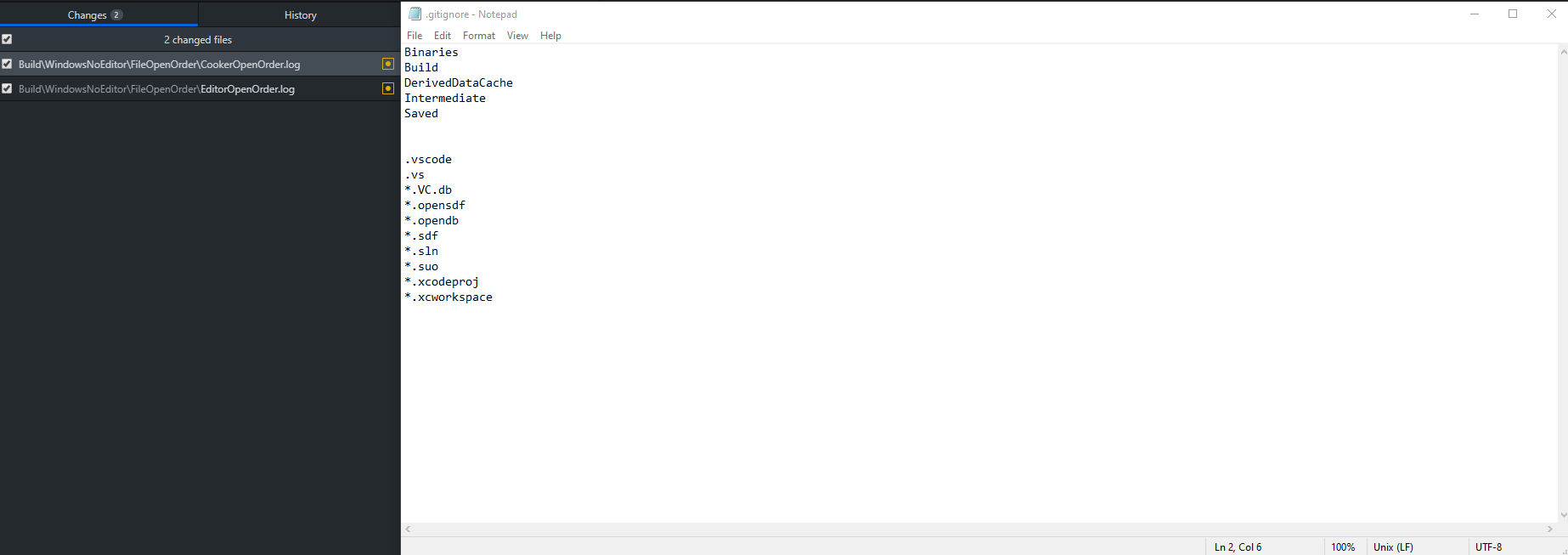
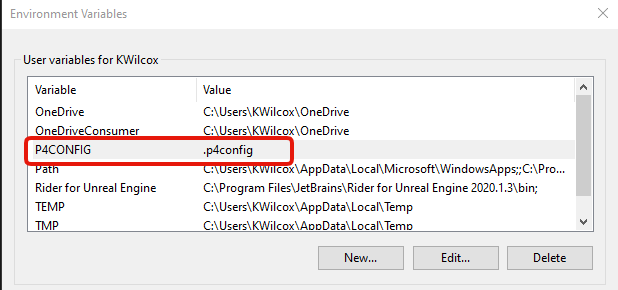
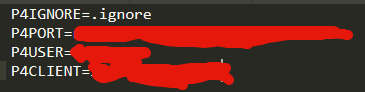
 analog lodge
Allar's Blog
A common question with Unreal Engine 4 (UE4) is "how do you set up version control?" I think this is a very important question and if you have never used version control for your projects you are crippling yourself from the start. I won't go into details about
I used this step by step for the first time and it just worked.
thick belfry
Thanks you for the link insertmesh
quaint obsidian
@pure oak try using bfg instead
A simpler, faster alternative to git-filter-branch for deleting big files and removing passwords from Git history.
bfg --delete-folders Intermediate .vs Saved Binaries
dawn pewter
@thick belfry Maybe you missed importing the signing key. See: https://www.perforce.com/perforce/r16.2/manuals/p4sag/chapter.install.html Scroll down to installation. This has a guide for the most common linux OS.
analog lodge
@dawn pewter I´m getting closer step by step. I managed to get the protection table working (getting the syntax right and case sensitivity were key here).
I also managed to get the commandline working from anywhere, not by uninstalling, as that would not have gotten rid of the config files, but by manually deleting all the perforce files from the localhost folder.
I have a really good conversation going on on the official forums, you should check that out. Learned a couple more things there, that might be common pitfalls for beginners/people without coding background:
https://forums.perforce.com/index.php?/topic/6594-basic-setup-considerations/

Perforce Forums
Page 1 of 2 - Basic setup considerations - posted in General: hey,
I´m a very new perforce user and while I´m trying to follow various youtube tutorials and I already managed to get the basics working locally, I have several questions regarding how to set it all up for my pur...
analog lodge
About case insensitivity...apparently there is an option to start the perforce server in case insensitive mode, by adding a "-C1" flag...
Since I only followed allars tutorial step by step, when setting it up...how can I change that script, AFTER setup?
I could probably also just change the script offline with notepad, upload it somewhere else and use that during installation.
But then I need to figure out first how to uninstall perforce from the VPS, which is probably not much easier than changing the script thats already there using putty...
pure oak
@quaint obsidian I think this was why it wouldn’t work
 warm oyster
Source Control rookie here. Is there anything wrong with using a machine's drive (which I already connect to through VPN) as my server host for Perforce?
I.e. I have a remote, physical drive I already store files on day-to-day. Can I set up the Perforce Server on that drive without harming anything else on there?
limpid obsidian
If you plan on using UGS, you'll want a case insensitive server
 forest kraken
I am trying to compile the UE 4.25 Source with Visual Studio 2019 and getting that error, anyone know a link or the solution to that please ?
MSB3073
The command "chcp 65001 >NUL && ..\..\Build\BatchFiles\Rebuild.bat -Target="UE4Editor Win64 Development" -Target="ShaderCompileWorker Win64 Development" -WaitMutex -FromMsBuild" exited with code -1.
UE4 C:\Program Files (x86)\Microsoft Visual Studio\2019\Community\MSBuild\Microsoft\VC\v160\Microsoft.MakeFile.Targets line 54``` true sandal
getting this error in p4 trying to obliterate depot
woven sluice
best go hunting for 143MB of files to delete  😩
😩
PS you're still using the standard port 22 for SSH (I just tried to connect to it via putty to check). how long has this box been alive? have you checked your system log files for login attempts? @true sandal
true sandal
@woven sluice im still navigating the whole p4 thing.
Can you guide me step by step?
can you join vc here?
woven sluice
no not right now sorry. basically perforce will "lock up" once this happens until you free up space I think. it's kind of stupid. I'm hoping that you might have gotten brute force attacked enough to build up a couple hundred MB of log files lol
unless there's other stuff on the server you know you can delete
true sandal
where can I delete the log files at?
woven sluice
is it l00nix or winblows? if linux I think it's cd /var/log and look for auth.log or check if there's any big log files in there... (run ls -l and see if there's any massive files)
mine was only 7.5 GB after about a year on standard SSH port 22 
roughly 10 million failed brute force login attempts
if you're "lucky" and it's big enough to get you some free disk space, there's a certain procedure to erase it because it's always opened for write - have to google how to do it
(and do put it on your to-do list to figure out how to switch SSH to another port no matter what)
true sandal
Thanks got it sorted out
(and do put it on your to-do list to figure out how to switch SSH to another port no matter what)
@woven sluice which one is optimal?
analog lodge
Thanks got it sorted out
@true sandal Was it the log files? That would be good to know...
analog lodge
Damn. So I´l put that on my to do list right away as well...
About case insensitivity...apparently there is an option to start the perforce server in case insensitive mode, by adding a "-C1" flag...
Since I only followed allars tutorial step by step, when setting it up...how can I change that script, AFTER setup?
I could probably also just change the script offline with notepad, upload it somewhere else and use that during installation.
But then I need to figure out first how to uninstall perforce from the VPS, which is probably not much easier than changing the script thats already there using putty...
@analog lodge I found the solution for this. you have to change the start script for p4d. What I did is to simply reformat/reinstall my whole server (because I didn´t have anything of importance on there yet and didn´t know how to just uninstall perforce in a linux environment).
Then I created a github account, copied over Allars start script from his step by step instructions and changed the line:
p4d -d
to
p4d -d -C1
Then I started the whole setup process all over, switching out the link to allars start script to my modified one and voila.
Once setup is done, opened up command line on my client, typed inp4 infoand in the last line I get the info, that the server is now case insensitive.
There might be a way of doing this post installation, there are some vague instructions on the perforce site, but you need to know way more linux and coding than I do to understand that.
dawn pewter
@analog lodge There would have been a way without reinstalling the server.. But I guess some practice will come in handy anyway 😄 The start script get's run when the server boots up, so you could have navigated there (probably in systemd on Linux) and modified the file, then restart the server.
analog lodge
Yep, I´m sure. I just don´t know my way around linux yet and reinstalling it was still alot faster for me than figuring that out...:)
dawn pewter
sure 😄 When I think I installed perforce server more than 20 times already but only two instances (private & work) were actually required. It's just faster and less error prone if there isn't any data on it anyway.
stable cargo
is it worth it to self a host a gitlab repo?
also is there a limit to the repository size if I host it on my own hardware? I couldn't find an answer online
 white blade
Everytime I log in to P4V and switch to my workspace i'm getting this. Can anyone help me figure out what might be the problem
dawn pewter
@stable cargo There is no limit on the repo or team size as far as I know.. It's only limited in it's advanced capabilities and of course community support only. (See Core: https://about.gitlab.com/pricing/self-managed/feature-comparison/)
@white blade This error could have multiple sources.. 1. The operation results in a server error which resets / breaks the connections, 2. Your PC or current Network does not allow communication through port 1666 3. See: https://community.perforce.com/s/article/2968
white blade
@dawn pewter thanks, i'll have a look
stable cargo
Thanks!
 opaque yoke
Hi! Does anyone know if it's possible to version control blueprints?
I'm kinda new to UE itself, I know cpp files can be easily added to git but what about blueprints and .uasset files
Suppose you're working on a team, how will you compare your blueprint vs another team member blueprint too see where and which changes were done?
rotund bobcat
there are some diffing tools to compare against depot with perforce
but it's pretty minimal
you should mostly just avoid working on the same blueprint
it's a binary file so it's really hard to diff
opaque yoke
problem is, they're using a custom package (marketplace) which soon will receive an update and until then, some manual modifications were required
dawn pewter
You can actually dif between any revision of a Blueprint. But it is correct that it is still very limited and won't allow you to merge. So you'd have to manually write down what you changed and then change it back or completly revert the BP to a previous version
opaque yoke
I was concerned if the only way to solve this out would be taking notes and redo every changes once the update is released or if any tool could help on this process
what's that BP diff tool called?
dawn pewter
It's integrated in UE4.. You should be able to right click on any BP that is tracked by perforce and then use diff against
opaque yoke
ooh, so it only works on perforce? no git integration there for this
dawn pewter
this should allow you to diff against depot.. But there is a second option around which allows you to select the version.. Can't remember where without looking it up
rotund bobcat
ngl, the git integration is engine is pretty shit
there is a plugin that improves on it though
but even that I've never used
dawn pewter
tbh not sure.. Didn't use it with git.. But afaik the integration is worse than p4.
dawn pewter
It would be nice if epic games could give us an asci version of BP's but I guess they have some noise with identifiers etc. otherwise they would probably have been able to do that in a few days.
opaque yoke
I haven't tried yet manually copying ctrl c ctrl v BPs yet, but if that works out, it helps already I guess
rotund bobcat
even then it would probably need specific diffing tools
cause like if you have a node, and you move it, and it would be adjusted in the text file with the new position, with basic merging tools it would probably just add both nodes and you'd have duplicates
I think at least
dawn pewter
@opaque yoke Yah you can copy paste node networks as they are in text format
opaque yoke
hmm, interesting, have to search that out
maybe versioning the text version should be helpful already
dawn pewter
Thing is.. this is also prone to breaking. If they change some info on a node, this node will no longer be pastable.
opaque yoke
😬 tricky
I'd rather do everything cpp if possible, but some things I don't know if that's a possibility
for instance, creating Animation Montages, seems like it needs a physical file for this
if it could be done procedurally, then we could version control the cpp files for that
stable cargo
You can't do everything in c++
The engine simply wasn't made to be like that
Also perforce supports file locking iirc
So you can avoid having multiple people work on the same file at the same time
opaque yoke
okay, so in the case of custom packages receiving updates (marketplace) where we had to manually make new nodes, we still have to take notes of each change and apply at each update then...
stable cargo
Consider if you really need this update, it might be better to just not update if it isn't going to be changing much for you
dawn pewter
Yah.. I don't know of a workaround.. Except if they provided source code and you could actually change it there. I mean you could also create your own nodes that directly use their functionality and then when you need to update, you only have to adapt your c++ code if needed. But that's still quite a bit of overhead
opaque yoke
makes sense
alright, you guys gave some ideas to try working this out, thanks for that 😉
 storm horizon
Hey guys I'm a unreal noob
What's the best way to collaborate on a project?
I have tried git and I'm very familiar with it but not lfs and I see they don't offer a lot of bandwidth
quaint obsidian
git one works fine, as well as perforce
rotund bobcat
anyone know if it's possible for a git lfs file to ignore history and just exist in one state
e.g. our compiled binaries of the game don't really need versioning, but they're on git anyway to share with artists and designers, but they can easily be regenerated
woven sluice
switch to perrrforrce 
quaint obsidian
@rotund bobcat probably sparse checkout
Git 2.25.0 includes a new experimental git sparse-checkout command that makes the existing feature easier to use, along with some important performance benefits for large repositories.
but you need partial clones supported by your git server if you want to save bandwidth on the LFS pointer files (which are very minimal)
woven sluice
I don't think that's what they were asking about at all
runic trail
Does anyone know how to ignore a folder in Perforce? I have a folder of assets in my project that i don't want to have to check out or add to the main project, but i can't find a way to ignore them in P4V or any other part of Perforce
dawn pewter
runic trail
perfect ty
 pulsar parcel
someone on reddit said their project doesn't need source control, oh-oh
pulsar parcel
i don't know if that was the context of what i said, but to so confidently say that you don't need source control even for a solo project boggles the mind a little bit
woven sluice
all you have to do is post a screenshot of Indie Stone's tweets from when they claimed to have gotten burgled and explained that they didn't have backups of most of their stuff, literally were just dev'ing zomboid on a couple of laptops
pulsar parcel
well they do want backups, indie stone didn't have any kind of backup solution
but backups without revision history can result in some pitfalls too
woven sluice
Clearly the optimum solution is a series of cascading dropbox accounts with an intelligent system copying data from one to the next each day
blazing tapir
Hi so all of a sudden Perforce has been acting up for my friend who is working off of my server
This is the error he's been recieving
neat grotto
@blazing tapir That error usually means the server is not running.
blazing tapir
@neat grotto weird it seems to be working from my end.
And when I checked the task manager, the perforce server was listed as running.
neat grotto
Oh, are you running the server on a local PC in your home?
blazing tapir
Yeah
I had turned on and off my VPN over the last few days, but that shouldn't have affected his ability to connect.
neat grotto
No firewall or router settings changed recently?
blazing tapir
I did have something bling up a while ago (using Kaspersky)
But I skimmed through the Firewall settings and it seemed like it wasn't blocking it
neat grotto
Hm. I'm not sure what else it could be. 😦