#source-control
1 messages · Page 36 of 1
 neat grotto
I don't think you need .txt... 🤔
 tame lion
okay good cause that bothers me a bit lol
don't i need to like p4 set ignore=
or something
command
neat grotto
An easy way to verify it's working: in P4V, files that are versioned have a little icon over them displaying their status.
Ignored ones don't.
I should have annotated that... but anyway, in that screenshot, Binaries is ignored, Config is not.
tame lion
buttttttt
they were like that before
like when i open a new workspace there is no special icons to begin with
on ANY files
cause i haven't added anything yet so that doesn't necessisarly tell me if the ignore file is working
neat grotto
Oh shit, yeah. My method only works once you've submitted files to the depot.
tame lion
🤔
neat grotto
There's some other obscure thing you can do. Trying to remember...
tame lion
🤣
neat grotto
Did you tell Perforce to use the ignore file, btw?
tame lion
maybe it automatically detects it by default
i did previously
but i just renamed it and took of the .txt
how do i tell perforce to use the ignore file
p4 set P4IGNORE=.p4ignore
?
neat grotto
If you run p4 set with no arguments, it should return your config.
tame lion
FFS
neat grotto
If the p4ignore is being used, it'll show there.
neat grotto
lol
tame lion

should i not use my super user
in p4v i'm logged in with the user "mark-rodgers"
in p4admin i'm logged in with super cause admin rights
i created a user for myself for just a regular user
but looking at my config it says i'm logged in with super
so i'm thinking i should fix that in the config...
not sure if the config is project specific like git or global
tame lion
just config
set stuff
i've been doing everything in p4v and p4admin
which is funny cause git it's the opposite i'm like CLI only for git lol
neat grotto
Hm, OK never mind. My user is set the same globally it seems.
I popped open a blank prompt and ran p4 set outside the workspace root and it still shows the same user logged in.
So I think you do want to set that.
How confusing!
tame lion
but i mean i should set it to mark-rodgers
neat grotto
Especially if P4V is logged in via your normal user, not super.
tame lion
the normal user
not the admin user
p4v is logged in with normal user
so I THINK i would want the global config and p4v using the same user
and p4admin it just remembers my super user
so i think that doesn't use the p4 config
neat grotto
I think you're fine as long as you're logged into the correct user in P4V.
tame lion
# Ignore VS stuff
.vs/


# Ignore generated folders
Binaries/*
Build/*
Intermediate/*
DerivedDataCache/*
Saved/*
But I don't interact with Perforce on the command line often. Might need a second opinion on that.
tame lion
should i also ignore RPG.sln, RPG.VC.db ?

i should only upload what i have select here and ignore everything else right?
neat grotto
That's a good question! I don't use Visual Studio for any of my games so I'm uncertain.
neat grotto
I know a guy with a good tutorial on submitting source builds to Perforce, but I don't know if p4ignore should differ much between source/non-source builds.
Otherwise I'd say take a look at his.
tame lion
i debated using a source build
but i figured i don't need to waste time on that lolol
cause i doubt i'll make any changes to engine source
neat grotto
Hm... GitHub has a good gitignore for UE4 projects. Perhaps that would be a good template? I can't think of a good reason why it would be different for Perforce.
It's all version control.

Seems like a solid ignore file.
I don't remember how much if the syntax translates.
neat grotto
This is the thing that got me learning Perforce for UE4 projects: many small, nuanced differences in terminology and syntax from Git.
tame lion
yea so far i've noticed
revisions / commits
depots / repots
*repos
lol
I blame perforce for my poor spelling tonight
yea imma try this gitignore into my p4ignore
and see what happens lol
i've spent all night messing with perforce and 0 time working lol
so if i do an add on my whole project
it shouldn't upload anything from my ignore
i hope
yessssssss
neat grotto
Nice! Success.
Been there, man. Setting Perforce usually means a day of no progress on the project itself. lol
Setting up Perforce is like the first night of a D&D campaign where everyone creates their characters.
It basically takes the whole night and it's assumed you won't actually play until the next time.
😆
tame lion
😂😂
Sad fact I bought all the core 5e books and have never played dnd
The 3 main books, not the addons
neat grotto
I still haven't played 5th edition. Sounds pretty cool, though.
tame lion
Can’t find friends who are interested in playing and don’t flake lolol
I haven’t played any edition
neat grotto
It's fun if you get a good group going.
tame lion
I bought the books WANTING to play
neat grotto
But as you've discovered, that's easier said than done.
tame lion
Yea my brother in-law has been playin dnd for like 10 years
But he doesn’t play anymore. Group differences haha
#adultLifestyleDifferences
neat grotto
Agh, figures.
Anyway, good luck with Perforce! If I'm around I'll try to help when I can.
tame lion
thanks!
man i got soooo lucky i backed up my project before doing this perforce stuff
for some reason my whole src directory is empty in the workspace XD
man and all my .uassets inside my Content folder was gone, SO GLAD I MADE A BACKUP. literally almost just lost all my assets, blueprints, and code lol
 shut rain
Hey, it's been a while since I last used Perforce, and I'm wondering how to go about adding a new depot? It seems like I'm missing something obvious, but I just can't figure out how to do it...
(I'd preferably do it through the P4V/P4Admin visual tools instead of through command prompt, but either way would be fine)
Finally figured it out, in P4Admin you have to right-click an already existing depot to create a new one, just right clicking anywhere else in the depot list view gives no menu
 dusk dove
interesting, how did you manage to empty the folders? that didn't happen when I set up ours
 buoyant ice
Shouldn't happen unless you accidentally obliterate something or perhaps didn't add the source to the repo then moved the repo directory?
 south plover
hey guys, i am currently trying to setup perforce on a 16.04 ubuntu server. I have access via putty and now i have to install the perforce server on it. perforce directs me to this site:
dusk dove
what is the problem?
south plover
but i dont know why i have to create i file and stuff, why is there no wget link to get the installation i need
south plover
for example if i do this command "deb http://package.perforce.com/apt/ubuntu/ xenial release"
it does not work
deb: command not found
dusk dove
you're not meant to run a command
you're meant to create a file with that line as the content
south plover
... ok so i have to look how to create file first?
wait, so i have to create the directories first, then the file, and then somehow open the file and put that line in??
dusk dove
I'm not very good with linux stuff but you should be able to just do sth like echo "deb http://package.perforce.com/apt/ubuntu/ xenial release" > /etc/apt/sources.list.d/perforce.list
south plover
ok, its working now, thanks guys 😃
tame lion

GitHub
perforce-commit-discord-bot - Posts the most recent commit messages from a Perforce version control server to a Discord channel. 🗒️
definitely gonna check this out for my teams private discord
dusk dove
interesting
 winged tiger
Anyone have any luck with setting up read only users in perforce?
When I set the permissions for the user to only read it still shows them as having write level access
hmm I guess write overrides only read. Kind of thought it would be the other way around.
I will just use no write instead
 lean stratus
So, sorry to bother whomever responds to this, but I have perforce set up, but the person trying to connect cannot apparently see the source control in the editor, despite being able to download files, and i can see him with the admin, he has “write”. Am i doing something wrong or is he? Thanks very much!
tame lion
did he create a local workspace and map it to the depot and his local project dir?
and tell the editor to use that workspace, and username
he can type p4 set in his command line and it should hope diagnose issues, he should have his login and all that configured in p4
*help diagnose
@lean stratus
tame lion
What’s the error?
 buoyant ice
Make sure you are logged into p4
lean stratus
We both were, is there maybe an issue with the game files?
 halcyon reef
has anyone here tried running a Git VCS outside of the editor itself?
I am not a huge fan of the workflow you gotta get used to within the editor, and it still demands that you do the pushes manually, so I was thinking about making a few scripts to automate the commit and push cycle and completely circumvent the editor itself
I heard about people doing that over at the Borealis project, just adding all the .uasset files and foler structure, as well as some project necessary files
wanted to hear your thoughts on it
also for some advice. I know I need to commit the entire Content folder and the project file itself, but I am unsure about the Saved and Config folders?
Pretty sure the Intermediate one is unnecessary
 brittle raft
@halcyon reef Intermediary, Saved should never be saved
Source, Content, Config should
halcyon reef
Alright, thank you @brittle raft 😄
buoyant ice
Anyone who has successfully used UGS gotten the binary client zip to work?
er binary editor distribution? Seems to always want to compile and not seeing the binary. Maybe it needs the meta data server to work?
 prisma dock
I have just setup my first Unreal project under source control, realized that "Source" and "Contents" folders are not included... Any idea why this happens?
 jolly fog
the version 4.19.2 works with visual studio 2015
i can´t generate my code to use visual studio 2017
prisma dock
Ok never mind, stupid me the folders are included...
 wooden tapir
@halcyon reef I always use git outside of my projects. It's fine ( but lacks the ability to merge binaries like uassets...) And I have a pretty .gitignore that'll get only the necessary files .
And also I love typing "git push " in a terminal
neat grotto
I use GitHub Desktop when I use Git for UE4 projects.
It's streamlined, easy to use, and makes it easy to pop into a terminal when you need to do more advanced operations.
 indigo gazelle
you don't get street cred if you don't use terminals
 fiery prism
I thought that was only if you preferred terminals
 dawn kindle
Hi all, anyone using Plastic plugin with 4.20 yet? Not compiling for me,
shut rain
I'm trying to install P4V on a new computer, but keep getting this error even after restarting multiple times... Anyone know why/how I can fix this?
halcyon reef
@wooden tapir I'm aware of the lack of binary merging (not that that will ever be a thing?). How do you generally handle that when working with other people? Do you make sure not to touch the same assets or always overwrite? I kind of want to not use the built-in Git tools of the unreal engine, not a big fan of the way the checkout fiddlyness with each asset is. Hard to get into
@indigo gazelle @fiery prism nobody gets any street cred until you build your games in assembly 😉
 iron bronze
@halcyon reef locking files (which can be set automatically each type you check out with perforce) prevents other users from editing the same file as you. They can still overwrite but they'll lose their changes once you submit.
halcyon reef
Thanks for the tip @iron bronze , but :"I kind of want to not use the built-in Git tools of the unreal engine"
also, I'm using git
iron bronze
oh sorry my bad, you can't lock files with git (but AFAIK with Git LFS you may be able to do so)
 halcyon reef
😉 . Also I had the impression git LFS was simply to quickly transfer large files?
dusk dove
don't use lfs locks if you want to keep your sanity
that shit will lock 1 file at a time and spend 5 seconds on each command
halcyon reef
oh boy, strict work-regime will be employed then
halcyon reef
but a pain to set up... and a little bit too expensive to pay for simple hosting for
at least when it comes to hobby projects
dusk dove
meh you can put it on a $5 linode server and it works
halcyon reef
I'm proficient with git in general, use it in my everyday job
halcyon reef
indeed, that is what it is meant for
dusk dove
but 🤷 lfs is so terrible compared to perforce that it's not really an option for an unreal project with 1000 binary files
halcyon reef
well no, and that starts costing money too when you want anything more than like 1 gig of storage
how much of a hassle is setting up a perforce server on linode?
one click install?
😛
dusk dove
not a one click install but won't take you more than a few hours either
basically you install the package, set some config variables, start it, create a user, set some security commands
halcyon reef
hm, might be better than risk letting my terminal-shy designer corrupt the git repo...
dusk dove
you also need to worry about backups
halcyon reef
with perforce? Or git?
halcyon reef
shouldn't be too bad
I was gonna do it manually in the git anyway, take care of all branching
dusk dove
also have to keep in mind that perforce gets ridiculous expensive past 5 users
halcyon reef
we're only 3 so that won't be an issue
dusk dove
up to 5 is free
dusk dove
then it becomes $400/user/year which is like wat level pricing
halcyon reef
well if you have a successful-ish company making games that's a small cost to swallow :T
dusk dove
I guess
halcyon reef
I just wish it was as simple as with Unity. Slap it in dropbox and sync, have yet to have a project that breaks because of it
dusk dove
I mean you can do that with unreal too if you're working alone
dusk dove
but using that with more than one person is a terrible idea for any project regardless of what engine
halcyon reef
of course it's a terrible idea, but it worked so far 🤷
dusk dove
no locks, so your changes may randomly get overwritten by someone else, no way to merge code, ...
it's really no replacement for proper version control
halcyon reef
lol no, but for little game jams that could work
dropbox does create lock files though, so you can't work simultaneously
halcyon reef
I mean sure there's a corner case if you both open up at the same time
but then one of you will be kicked off
yeah it creates a filename.lock that gets synced, and prevents changes to the file it matches
rudimentary, but works
I guess asset pipeline work is different though. We tended to have a designer to sprites while I wrote code and built levels meanwhile. Changes would appear instantly
but in Unreal you gotta re-import, or so I understand
dusk dove
yeah unreal doesn't like when you modify its stuff while it runs
halcyon reef
indeed it does not
makes rapid development like that not really work. Takes AAAGES to open up
halcyon reef
yes but $$$, that's a lot of money per gigabyte
though I think keeping it on the 5400rpm disk drive maybe wasn't the smartest....
dusk dove
I think epic just have so much money everyone working there has the best workstation pc they can build, so they don't care/notice how poorly it runs on slower systems
halcyon reef
probably not. I mean I don't run a bad system, but I also don't have a lot of SSD's. I suppose that is why Unreal engine really doesn't accommodate well for budget VCS
dusk dove
yeah
they just use perforce for everything
so all the workflows in unreal are designed for perforce
and the integration actually works well
halcyon reef
is there a lot of fiddling around with perforce for file control?
dusk dove
wym by file control?
halcyon reef
locking assets and such
dusk dove
the editor integration does that automatically when you edit stuff
you can also submit asset changes from the editor
halcyon reef
it pushes it to the server automatically?
dusk dove
well it can if you click the button to do that
it's not meant to work like real time sync
halcyon reef
That's what I hated about the git integration, having to right-click the folders/files to "checkout" and lock, make changes and then commit. Only to make the push to repo outside the engine
dusk dove
yeah the git integration is somewhat 🚮 in comparison
dusk dove
basically if you edit an asset and save it
it will automatically check it out
and prevent others from editing it
then when you're done you click submit at the top
and it automatically submits all assets you checked out
halcyon reef
right, cool
what about simultaneous work? What happens with conflicts?
does it pull down changes while you work?
dusk dove
locking prevents conflicts from happening
halcyon reef
but it's still a manual thing?
dusk dove
c++ code you gotta handle manually with p4 commands or p4v
it can merge and resolve those just like git
halcyon reef
right
But you do have to lock the files manually?
Or will it do that when it checks out the file
dusk dove
oh
halcyon reef
asset, I should say
dusk dove
checking out file = locks it so only you can edit it and makes it writable
halcyon reef
ohhhh
ok, great
hey, thanks a lot for answering my barriage of questions
very helpful to talk to someone directly ^^
wooden tapir
@halcyon reef to avoid conflict we extensively use submodules and branches.
dusk dove
how would that help you prevent conflicts in binary assets?
dusk dove
not sure what you mean
 manic surge
how should we handle a custom source build engine with perforce? what files do we need to distribute to others? is engine\source and engine\plugins enough?
neat grotto
@manic surge I recommend taking a look at this guide: https://allarsblog.com/2017/04/05/populating-perforce-with-an-unreal-engine-source-build/
Allar's Blog
This document covers how to set up a new Perforce server and populate it with an Unreal Engine source build alongside your projects. This is the most basic setup for 'beginner' Perforce pipelines and does not cover things like streams. Please note that you should only do thi...
manic surge
@neat grotto thanks
winged tiger
How do you guys handle perforce branching with jenkins? I'm looking to create a qa/prod setup. Do you create 2 separate jenkins jobs? How do you point the jenkins jobs to different perforce branches?
jolly fog
i switched from git to perforce, but i cannot get the P4IGNORE working. Has anyone set up a ignorefile for perforce?
iron bronze
@winged tiger My guess is you'll need to setup 2 jobs, with 2 different workspaces mappings for your jenkins p4 user
winged tiger
Okay, that is what I have been thinking too 😃
So right now I don't have any perforce branches. I want to setup a qa and production branch. Would I just create 1 branch for qa by right clicking the root and doing branch files? Or would it be better to create a new qa branch for every version?
Just hoping to see how someone else has their qa/prod branches setup
iron bronze
Nowadays people prefer using Streams in Perforce instead of Branches
Use streams to quickly visualize and manage the flow of changes between codelines. Employ a simple "merge down copy up" workflow and easily configure and manage workspaces.
winged tiger
Ahh I've heard of those, but they sounded complicated. I'll give them a read now ❤
winged tiger
@iron bronze So you create a new dev stream for every version? And your artists/etc. have to be trained to change over and submit to the correct stream?
jolly fog
Is there a way to filter assets by "mark for add" when using p4? It would be great for asset reviews before a submit.
winged tiger
You can sort by pending action. But idk how to filter by that.
dusk dove
damn reverting 800 assets sure is taking its time
how can it be this slow though
it's taking far longer than syncing those assets would have taken
winged tiger
Does the unreal perforce integration support streams?
jolly fog
@winged tiger this is my ignore file https://gyazo.com/a8858b438af16f67af389a1d8d58ef47

im using p4 set P4IGNORE=.p4ignore to set the file
but when i Reconcile Offline Work, it wants to add all files, even the ones to be ignored
as far as i know there should be a popup saying "There are no files that need to be reconciled."
winged tiger
Ahh yeah you are right, I'm seeing that same behavior when I do a reconcile
jolly fog
is this expected? i dont want to submit 110000 files 😮
dusk dove
🤔
reconcile is respecting the ignore file for me
like that's obviously what it's for
# Ignore VS stuff
.vs/
Brickadia.sln

# Ignore generated folders
Binaries/*
Build/*
Intermediate/*
DerivedDataCache/*
Saved/*

# Ignore the same things for plugins
Plugins/**/Binaries/*
Plugins/**/Build/*
Plugins/**/Intermediate/*
Plugins/**/DerivedDataCache/*
Plugins/**/Saved/*

# Don't ignore icon files in Build
!Build/Linux
!Build/Windows
yours are missing the * at the end of folders
jolly fog
thank you! that was the problem, now its working
winged tiger
Awesome, I'll update mine too 😃
Are you using streams Zeblote?
@dusk dove So why don't you have the * at the end of the .vs folder?
dusk dove
🤔
that is a good question...
no, I don't know what a stream is tbh
it's like a branch right?
winged tiger
ahh okay, it's an alternative branching method
dusk dove
now it makes me wonder why it works for hiding the .vs file without the *
winged tiger
right ^ hmmm
iron bronze
@winged tiger Usually (depending on your team size) you'll need one "dev" stream for programmers and one "main" stream for artists & designers
qa get builds from the CIS (Jenkins, Teamcity) and promotes them if stable enough
they push the build to the production floor
and integrate the changes from dev stream to main stream
that way artists always have the most stable code to work from
and devs can submit experimental stuff without any nasty side effect for the rest of the team
winged tiger
That makes a ton of sense 😃 So the UE4 editor perforce integration works okay with the main stream?
iron bronze
yup, since the mapping is done at workspace level you're good to go 😃
winged tiger
So you don't actually create "release" streams? Or do you have those as well?
iron bronze
you're right it's a good habit to have release stream as well
so your team can work on non critical fixes for the main stream
winged tiger
Do you create a new release stream per version or just use a single one for all of them?
iron bronze
and also fix critical bugs in the release stream
(qa will later integrate those critical fixes to the main stream)
up to you 😃
winged tiger
ahh okay tbh I like to keep things more simple. I'm the only coder on my project right now but we have artists, sound designers, etc. that also make changes. But we are running an alpha so I need to get a proper QA environment in place so everything isn't just getting pushed to prod right away.
Thank you for taking the time to explain this to me ❤
neat grotto
My game is still using a legacy depot. 😓
I would have migrated by now, but I'm not sure the benefits of streams are worthwhile. There's only two of us working on the project.
winged tiger
okay so do it from the command line instead? I haven't been able to get it working with copy or brach/integrate from p4v
Okay yeah p4 populate //depot/... //omniwar/main/... looks to have worked
winged tiger
Do all of my devs have to re-sync the entire repo now that I switched over to streams? Or is there a way to attach their existing workspace to the new stream instead?
iron bronze
They can just edit their workspace (or you can do it for them) to map it to the new stream. Make sure they shelved or reverted any opened file.
winged tiger
Thank you! 😃
 willow crescent
for anyone using perforce: how do I create a workspace using an existing project directory without creating a brand new duplicate? I tried setting it to my existing project and it just re-created the root folder inside the root folder, doubling the size of the whole thing
iron bronze
Check your workspace mappings @willow crescent you might have an extra folder set
willow crescent
@iron bronze
I'm trying to host it locally, basically take my existing engine folder (source) with the project in it
And let others access it
I tried setting that 4.19PC folder as the root (which is the engine root)
And the structure I ended up with after 2-3 hours was "4.19PC\4.19PC"
@lucid plaza Perforce
iron bronze
@sinn show me your workspace mapping
iron bronze
Looks good to me
willow crescent
iron bronze
Click no
And it should work as intended
I reckon this dialog is quite scary though 😁
willow crescent
Yeah 😂
@iron bronze I actually did click No yesterday
Went through a few more prompts and clicked "Start"
iron bronze
Start?
willow crescent
Took a few hours for it to 'upload' everything to the 'server' but really it was just making a new folder
Inside the folder
Yeah
This is what happens next
So I added the 4.19 folder here as well
"Number of files to copy" increased to match the size of the engine root and everything in it
Then after this, it created a new 4.19 folder inside the 4.19 folder I set as my workspace, duplicating 115gb for no reason (which I assume doesn't need to happen)
willow crescent
Yeah, everything. I assumed someone could connect to the workspace and use the same engine I'm using with the same modifications
so the workspace = the engine root with the project in it (not a blank project)
dusk dove
you don't need to sync everything though
there is a looooot of garbage in the intermediate folder that noone but you can use
syncing everything might not even work because it likes to write to those files
willow crescent
Fair enough, I can delete the temp files in the engine + project folders but I'm still stuck with a duplicate of the engine folder inside the engine folder
4.19PC\4.19PC
A 115gb engine root and project inside with a 115gb engine root inside the engine root and a project inside that as well, everything duplicated
Is it not possible to just use an existing directory as the server / workspace?
dusk dove
when I set it up I just made a workspace somewhere, set up the ignore and typemap, then moved the project contents back in there and used reconcile to pick everything up
willow crescent
hmm
so you set up a blank workspace and then populated it with your project files?
dusk dove
yeah
just rename the project something else
make workspace in same location
delete blank folder it made, rename project back
reconcile
done
willow crescent
I can do this with the engine root instead of the project root?
dusk dove
I mean sure why not
willow crescent
you said you set up the ignore and typemap, I was told about this briefly
to ignore certain folders that might break the process later on
dusk dove
I don't have the engine in perforce so idk what your ignore should look like for that part
I vaguely remember someone having a guide up somewhere
I think it was this https://allarsblog.com/2017/04/05/populating-perforce-with-an-unreal-engine-source-build/
Allar's Blog
This document covers how to set up a new Perforce server and populate it with an Unreal Engine source build alongside your projects. This is the most basic setup for 'beginner' Perforce pipelines and does not cover things like streams. Please note that you should only do thi...
willow crescent
Perfect, thank you
 simple pivot
Hello, can someone recommend me a good gitignore? Right now im using this one but idk if its correct
dusk dove
that one is bad and has a ton of crap in it noone needs anymore
simple pivot
I'm not using git with unreal, i do it the classic way
Can you recommend me a good one?
dusk dove
# Ignore VS stuff
.vs/
Brickadia.sln

# Ignore generated folders
Binaries/*
Build/*
Intermediate/*
DerivedDataCache/*
Saved/*

# Ignore the same things for plugins
Plugins/**/Binaries/*
Plugins/**/Build/*
Plugins/**/Intermediate/*
Plugins/**/DerivedDataCache/*
Plugins/**/Saved/*

# Don't ignore icon files in Build
!Build/Linux
!Build/Windows
ours
dusk dove
if you use more platforms than linux and windows you'll need to figure out what other folders to un-ignore for the icons
simple pivot
Also why mine is bad?
dusk dove
it has things in it like this
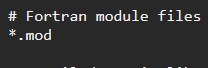
(what)
and completely ignores all binaries, instead of just the folders where unreal keeps them
which might not be the intention - i.e. we have thirdparty folders with .libs in them that must be kept
simple pivot
thankyou, let me put it and commit
may i delete all the folders that are ignored
?
dusk dove
you can delete all of the ignored folders
they only contain generated data
that can be re-generated
dusk dove
keep in mind you need that data to actually work with the project so it will just re-generate it now
simple pivot
yes, yes but i wanted to push a clean repo
dusk dove
I mean
with the ignore file it will still do that
regardless of if you have that stuff locally
 sweet jay
Having issues with perforce thinking that some files are ignored, although they are clearly not in the ignore file. We're running a custom engine build and the folder Engine/Plugins/MovieScene/ refuses to add the UE4Editor-* binaries. Every other plugin in the Plugins/ folder works fine, but this MovieScene plugin in particular is causing issues. I tried manually overriding the ignore for these files with !UE4Editor.* !UE4Editor-*.dll !UE4Editor-*.lib
but am having no luck. I can force add as a last resort, but I would rather find the cause of this strange behavior.
sweet jay
Found it, there's a .p4ignore in MovieScene/ that ignores the Binaries/ folder.
willow crescent
Is this an actual performance issue I should be worried about in-engine?
(Using perforce)
 smoky trench
Not P4 related, that's about having a shared DDC
mostly as a hint that you're working in a team so it's advised to use one
 lilac aspen
there's a setting in the Editor Preferences to turn that warning off
willow crescent
@smoky trench I wasn't able to find anything on how to enable shared DDC, can you point me in the right direction?
simple pivot
Hi, this is not exactly a source control question but its somehow related. Yesterday I changed my gitignore to the one i attach in this message, since i'm new to git i decided to delete all the local folders that gitignore ignores (since they can be regenerated) and all works as expected but every time i open the project i receive this error: "... Can't find file for asset. /Script/EnvironmentQueryEditor", thats a EQS related error
I have EQS activated on the project settings and all the game seems to be using it, also i tried to package the game and its working
but i would want to stop receiving this error since idk whats wrong... I've tried to regenerate the VS project file but nothing changes
 runic bay
I have a question to ask. I'm looking for the best way to utilize Unreal Engine 4.19 source control. The only thing I have to add is that I need to have it setup by the first of August. I've been trying to get Git setup for this process but, I'm hit with my files being too big to upload even in a public domain. In addition the LFS doesn't seem to work on my project. I was hoping to get advice on what the best approach to this problem is. I have a budget of $100 for about 3 of us working on the project in total. Thank you for reading this.
simple pivot
@runic bay I run my own remote server. I can clone the full project in minutes (+30GB) and i dont need to care about private repositories etc..
 haughty ember
@lilac aspen please do tell everyone how to turn it off
Definitely should be a PSA
Actually. Shouldn't even be on by default
(or turns off forever after you hit dismiss)
Who's used both the old 20/20 servers and the newest Perforce edition servers?
How big of a difference in performance/usability are we talking about here?
 faint copper
is there anyone willing to walk me through how to set up source control?
iron bronze
@haughty ember I've used both, in terms of performance it's very similar. There are a couple of vulnerabilities fixed since though.
haughty ember
Mehm not too worried about vulnerabilities @iron bronze
More about $$$ and speed at this point
Trash Assembla is well trash
It was fine until release because easy to setup and stuff. But time to move to greener pastures
iron bronze
If you could get ahold of a 20/20 server then just do it :)
You can protect it behind a vpn anyway
Or a ssh tunnel
 earnest snow
Does anyone have any tutorials or anything on enabling Git LFS for an Unreal project with a repo on Gitlab?
 waxen yew
Yeah, it's one command. One sec
Err maybe that's gitlab. https://github.com/git-lfs/git-lfs/wiki/Tutorial
 drowsy marsh
LOL same costume for $14 on ebay
 haughty vault
wrong channel
 elder shell
what do you guys use for source control for projects as big as 40 gb
dusk dove
perforce can handle that easily
 trail ridge
Curious how 70+ UE4 devs have voted?
runic bay
@simple pivot we would be constant pulling from one of each other we are preparing for a 48HR animation JAM. So it would be in constant use
simple pivot
no problem. you can run a local git server from a separate computer or even one of the computers you are going to use. Its pretty efficient (more than github)
elder shell
@dusk dove that would be local perforce... correct? What solutions are there for cloud based perforce?
dusk dove
get a server somewhere and put a perforce on it
there are no pre-made solutions for it
smoky trench
Assembla has perforce support but I don't recommend them. Very expensive, better off hosting your own
https://www.assembla.com/perforce
dusk dove
assembla is a scam
runic bay
would this just be a regular computer wired up to the net?
dusk dove
that'd work
but unless you got a really solid internet connection it would be fairly slow for everyone else
you can use any vps for it
as long as it got enough space
jolly fog
@trail ridge nice poll. i googled it to view results 😛
trail ridge
@jolly fog Thanks, it's from my post here https://www.sondergames.com/single-post/2017/07/19/Game-Dev-Version-Control-Overview

Sonder Games | Home
Sonder Games is an independent video game studio based out of Denver. Our goal is to mix the best of proceduraly generated gameplay with linear storytelling.
 noble knoll
@dusk dove sadly, lately most VPS use a ssd, and they have super low disk space
i remember getting much more space per dollar of VPS a few years ago
 desert willow
hey anyone know with SVN tortoise how to force your local copy over the server copy?
sweet jay
How do I force p4 to update my file permissions after changing the typemap to make a specific extension writable?
dusk dove
the typemap thing is only a template to use for files being newly added
you gotta update the filetype on all already existing ones
sweet jay
Ugh that's a pain, thanks for the info @dusk dove
 midnight zodiac
I created an open-source graphical menu, if anyone wants to see the link, that's it ^^
https://github.com/thesmigol/Settings-Menu-UE4

GitHub
Settings-Menu-UE4 - A simple settings menu for your unreal engine project
iron bronze
wrong channel @midnight zodiac ;p
 red gazelle
Is there some place where I can read about setting up a github project with Unreal Engine 4, without downloading source? Because when I search for it I only get the source code instructions.
What I want to know is just what I should include in a github project so others can download it and also work with it, without extensive setup.
I imagine I can put the assets somewhere else, but at least a setup where I can code with one other developer would be nice 😃
So I make a project through the launcher.
I want to make the initial commit. What should I include?
iron bronze
@red gazelle YourProject/Source + YourProject/Config + YourProject.uproject should be enough
brittle raft
Not to mention Content obviously, PLugins if you have some
iron bronze
@brittle raft he'd like to store content elsewhere if I'm not mistaken
red gazelle
Like
Wouldn't it make sense to keep models and materials and such separate?
From the source?
Or should I just dump all of it on one repo?
I could imagine it growing in size
Quite fast
@brittle raft What do you think?
 uneven coral
does anyone do Perforce hosting for souce control?
our team is all across the country and not one of us has great upload speeds
dusk dove
just rent a vps somewhere and put the perforce server on it
you basically only have to worry about disk space and bandwidth for the server, perforce is very efficient
 long mural
how can i setup Perforce so that artists don't need to compile any source code changes?
cause atm even including the compiled DLL's tells them they need to recompile
neat grotto
@long mural Not sure if it's the right solution for you, but might be worth looking at UnrealGameSync: https://docs.unrealengine.com/en-us/Programming/Development/UnrealGameSync
I think it only works with source builds of the engine, though.
long mural
yeah thats fine, i tried using it but i couldn't get it towkr
to work*
i am using the source version of the engine
red gazelle
See I was thinking maybe getting perforce purely for the content folder
and then the rest from Github
I heard that PlasticSCM is supposed to be the mix of the two
but I haven't used it before
smoky trench
Don't do that to yourself that would be horrible to work with. Just use one or the other.
RE: Plastic, I haven't heard great things about it. I think?? a few people here have tried it and they walked to away hating the product. I will note that I haven't used it myself tho, so that's all hearsay
 rose wave
I’ve never done it with Unreal, but I have worked with multiple SCM systems for a single project with other engines (perforce + SVN usually). Personally I don’t recommend it other than as a last resort or there is a very logical separation of files (I.e, source file for 3D assets, psd’s, audio sessions etc that are used to create content for the project, but are not actually content).
Perforce handles everything and these days Git plus LFS means that large binary files are less of an issue, so I’d just pick a single system and use it.
sweet jay
@long mural I managed to get what you're asking for working within my team without UGS, the key is to setup your typemap correctly to make binaries writable, then once the programmer is finished compiling you reconcile offline work and submit changed. I can't show you my exact setup right now but it shouldn't be too hard to find something similar online
long mural
that's what i did, but it still asks them to compile saying modules changed
must be missing something
sweet jay
I bet your .modules are not being submitted. Those files identify file versions
 red gazelle
@smoky trench @rose wave Alright.
But then, how do you suggest keeping code and art separate? If I, a programmer, want to add some changes but I don't want to sit through Hundreds of Megabytes of art updates to do that, then what should I do?
Is that just how things are done? Suck it up kind of deal?
Also just a matter of making sure someone doesn't take the whole repo and run with it. I wouldn't really have money to follow through with legal action :c
iron bronze
@red gazelle you can deal with permissions at server level for that.
red gazelle
On the github server?
red gazelle
Well I trust the people I work with right now, but I've been with them for years now
But it isn't unreasonable to believe we might bring on more people
People I don't know very well
iron bronze
Gotcha
So yes you can setup permissions so artists won't be able to sync the source code
And vice-versa
red gazelle
But only on perforce?
iron bronze
Yes, with Perforce (I've never tried that with Git, so I'll let someone else chime in)
neat grotto
@red gazelle If I understand your situation correctly, Perforce has a great solution in something called Virtual Streams.
A virtual stream allows you access to a designated subset of a repository, but commits are automatically pushed directly to the parent repository.
For example: I once set up a client with Unreal and Photoshop streams. If I'm just working on the Unreal project, I don't care about the huge Photoshop files the artists are working on. They would only slow me down.
So I create a workspace for the Unreal stream. I only ever see the Unreal project, but my work and the guy using the Photoshop stream both automatically commit up to the same repository.
It's a really nice system.
 grizzled ginkgo
I agree, and the even if it is limit to 5 users on the free version, it still offers alot, but it can be a pain, to learn, but over all it saves alot of time in the end
neat grotto
The biggest pain is when your team grows. The free license only allows up to 20 workspaces to be created. Using virtual streams, you can go through those pretty quickly.
red gazelle
We are few so the free license should work
neat grotto
5 users, 20 workspaces. @noble knoll.
grizzled ginkgo
actaully some people did get the 20 users free account
noble knoll
ah
grizzled ginkgo
but that was a couple a years back
neat grotto
I believe it used to be 20 users or 1,000 files, whichever comes first.
grizzled ginkgo
yeah that is right, that was me, who was wrong on that part... my bad
neat grotto
Well, wait. More specifically it was a choice between:
- 20 users and 20 workspaces, or
- Unlimited users with up to 1,000 versioned files
Something like that. 😄
grizzled ginkgo
yep
neat grotto
Perforce is a robust and reliable product, but UI and UX have never been their strength.
grizzled ginkgo
you got a point there
neat grotto
But for many people, Git LFS just isn't there yet, so Perforce continues to dominate the game industry.
I would love to use GitHub to version my main game project, but right now the caveats aren't worth it.
I do use it for small projects like game jams, though.
dusk dove
and development of lfs is going slower than snail pace
I don't really understand why lfs should be a separate thing at all
it needs to be a core component of git to really work
none of this hooks nonsense
smoky trench
@red gazelle way i did it with perforce was set up a seperate stream for art assets. Then id make a virtual stream off of our mainline and used import+ to import the art assets into that virtual stream.
What this meant was artists would have their own mainline that allowed them to sync all core art assets and the project without requiring to have all those art files in the actual mainline.
Additionally because source art assets were in a seperate stream if developers wanted to work on art assets without syncing the project they could just create a workspace based on that source art stream and be good to go.
 fierce flame
Heyhey, I have a gitignore set up to ignore files in Intermediate and Saved folders (and others but the gitignroe works fine there), yet whenever I open the project, Sourcetree (git client) shows I have these uncommitted changes:
I've tried adding dummy text files into the intermediate and saved folders and those are properly ignroed. I'm pretty new to source control so it may be something simple I just don't know
fierce flame
Fixed it, had to first remove tracking of those directories by using git rm -r --cached Intermediate/ and git rm -r --cached Saved/
rose wave
@red gazelle If your concern is about not allowing users to have access to some files then you can lock down permissions in Perforce. You can also setup views and streams as others have suggested which can limit what someone pulls when they get latest (perforce also allows you to selectively pull folders, so you could grab source but not content for example).
When I’ve worked with larger teams, we’ve either just used a single repo or have asked artists to use SVN. My current project is only a 2 person team and it makes sense for us to commit into a single repo. Partially because we both want access to all resources but also as part of ensuring backups. If we both have a full copy of the project, plus the remote repo plus our regular automated backups, there is only a very small chance we’ll ever have major data loss in case of disaster at any one point.
You need to decide what’s right for you. Maybe you need several repos which contractors can commit their own work to (which you have full access to a pull / clone regularly), but only contain the minimal resources required for them to do their role (I.e you’re not giving them full access to everything by virtue of them not having any visibility on it).
Basically, figure out what you feel happy doing for security, smooth pipelines and time to manage the process and use that. There is no one-rule that fits all teams and projects.
elder shell
I am geting a warning everytime i get latest on perforce... saying cant clober writable file and it takes forever to pull because of this
any idea how to fix this?
 lucid chasm
hey guys
how do i commit a local file manually?
ive tried using git bash (right click and open git bash, and type git commit) but that didnt work

this is what i end up and i cant do anything after that
long mural
what files need to be sent to allow designers to load the UE4 Editor without compiling source code
 molten marsh
They need the project binaries
smoky trench
@elder shell Means you have your local files set to writeable. Check them out rather then changing their read/write settings locally
@lucid chasm You're in VIM. Wants you to type a commit message. You can skip opening vim by passing -m
e.g. git commit -m "My first commit"
lucid chasm
Thanks jack, that worked!
smoky trench
No worries 😃
 snow obsidian
Hello, all. Just so I can cut to the chase: is the Blueprint git merge tool still unusably broken? I'm using 4.19 and it still seems completely fubar. Does anyone have any insight into this that I haven't found? Thanks!
brittle raft
@long mural So, this is not super simple to do, especially if you're going to work together. The best course of action is to compile your work regularly, and push the compiled editor on the repo
Making sure it wasn't a hot reload build, or a debug build, or a non-editor build, etc
brittle raft
It should work then. As long as they have the same engine etc
long mural
might be missing something i will double check, i only need to send the Binaries folder?
brittle raft
You don't even need all of that
Should have something like Binaries/Win64/UE4Editor-MyProject.dll
Just this one file should be enough
Might do the MyProject.exe too, if they want to run without editor
What's the issue when they try it ?


 brittle raft
Do you have plugins ?
brittle raft
And which specific modules are missing ?
Should print the list
Your game module ?
brittle raft
Might look at the logs in Saved/Logs to check if something's off
I didn't test this myself so maybe there's something specific you need, but I really don't believe anything outside Binaries/<Platform> is useful
 vague whale
hi i need some advice, i've somehow managed to create a content directory that is now 118gb which is a bit big 😃
i was using a github with gitlfs
dusk dove
lfs will store every version of every file uncompressed
haughty ember
Viva Perforce
fiery prism
/\
dusk dove
*/*
brittle raft
↑
fiery prism
↓n't
brittle raft
Though Git is fine.
 fallen geyser
Git is fine if your game contains only the source code 😉
P4 is free up to... 20 workspaces? 😃
😛
molten marsh
5 Users 20 Workspaces
 wheat patrol
Or 20 users, 20 workspaces on a version from 3 years ago if you reach back
molten marsh
Yeah if your happy doing that its certainly an option.
smoky trench
Didn't it also have a data limit tho?
molten marsh
Isnt that only if you exceed the free user limit?
smoky trench
Not sure IIRC it was just a set limit but could absolutely be wrong on that
jolly fog
hello guys
I downloaded xampp for phpmyadmin and I will cretae new data base for my register and login widgets in unreal but can you recomend me a video to watc-because I watched tis video but he use other program: https://www.youtube.com/watch?v=24NX8tBWKKM&ab_channel=CGGameDesign&MotionPictures=

Unreal Engine Forum Thread: https://forums.unrealengine.com/showthread.php?94421-FREE-VaRest-Login-System-With-PHP-and-MySQL Bitnami Wamp: https://bitnami.co...
dusk dove
that has nothing to do with source control
and, uh, you might not want to try making a login system while clearly having no idea what's going on
jolly fog
I have idea what to do but I want to look some videos
what is source control i thoung that this that I search is for here
jolly fog
source control that I ca understan frm the documentation is files for mods??
brittle raft
Source control is software like Git, Perforce, SVN etc - to store every change you make to your project, so that you can look at the full history even years later
It's how you work on software with other people
(It's how you work on software even alone really)
jolly fog
a and when you make a problem you can return??
brittle raft
Yeah
brittle raft
Probably a web development forum
jolly fog
okay I will write them
 hexed sandal
hey everyone - not a lot of experience with git etc, I just use github desktop to upload my stuff, but now I need to use LFS. I couldn't find anything about using it in GitHub desktop itself, so I tried using cmd prompt to install lfs and track *.uasset and *. umap and add gitatributes. but then I tried to publish the repository in github desktop again since it seemed that it would suplement each other. Basically I published it, and I see a bunch of uploaded stuff on my github repository, exept at least one file. But on my github desktop it just shows all the files as changed and I have absolutely no idea what to do anymore. I should maybe use just the cmd for all of it or?
Thanks for the patience for reading this 😃
I have copied the error message from github desktop if that would help
vague whale
i use github with lfs it works just fine once you add in your assets
problem is now my project has 120gb of assets
 indigo relic
hey
I have Build/* added to my .gitignore
but Build\Windows\FileOpenOrder\CookerOpenOrder.log is still being added
 clever storm
Does anyone have a ton of experience with perforce AND git? I'd like to bounce a question off you.
dusk dove
just post your question
clever storm
I'm currently using perforce internally, and pushing some open source files to github, but it's a pretty manual process atm. I'm wondering what would be the best automation process to do this? I was going to look into perforce triggers to see if thats what i need to push content to git.
Basically i'm working on a workflow to update github from perforce
And i'm not sure what would be the "easy button" for this
vague whale
how to handle gigs of assets?
vague whale
i feel like i want to keep the code separated from the assets, but that also seems broken
iron bronze
@clever storm have you looked at https://www.perforce.com/perforce/doc.current/manuals/helix-for-git/#Helix4Git/chapter.mirroring.html ?
clever storm
I am now. thanks, assuming I can use their other software(forgot name) to mirror P4 to Git and then use GitHelix
 split ferry
Anyone know why a submitted file would lose all its vars
or why sometimes the engine stops submitting
clever storm
What source control are you using?
Usually BP's that have C++ base classes, and header files change, it wipes the config of said BP
 granite narwhal
I dont suppose it's possible to use both SVN and Git at the same time inside the editor?
fiery prism
nah
clever storm
Use git locally, and create triggers to push to svn
granite narwhal
that wont really save time, as I can just svn push instead of git push using tortoise svn
i dont use git in UE for commits, only for diffs
but SVN in editor would make it easier for updating assets, which I dont care much about
 rotund fiber
Hello. I have a question about 2K-4K textures. I have a 60mb material (png's and uasset files). Do I have to keep png's in the content folder after I use them in the material and engine creates uasset files? Also even if I have no file size limit on my VCS, with my upload speed it is impossible to work with these large files. What are you guys doing to overcome this problem? Not using 2K-4K textures?
rose wave
60mb seems very large even for 4K. You might want to check the compression settings if your png.
For VCS, can you just work with them offline or in a local repo? It’ll mean having to reconcile and/or push to the origin eventually, but at least you can do it when convenient without having slow processes whilst your working with those files.
dusk dove
unreal stores an uncompressed copy of the texture in the project
 white shadow
I would have a question im thinking about going with the Perforce solution for source control. Can anybody recommend me any hosting site i could host the server on ?
 wooden sinew
@white shadow Take a look at pinned messages in this chat, there are some options there
white shadow
oh diddnt see that thanks samuel
dusk dove
linode is good aswell
their servers are faster than digitalocean and vultr yet for some reason it's not as popular
 stray palm
Is it common to use source control even with I dono graphic assets?
dusk dove
what?
white shadow
so i never used ubunto before with perfoce and im quite not sure what to do anymore(unexperienced in general with linux)
anybody can give me some closure how i would go about doing this ?
dusk dove
echo "deb http://package.perforce.com/apt/ubuntu/ xenial release" > /etc/apt/sources.list.d/perforce.list
white shadow
thank you so much!
just doing exactly as the installation guide on perforce says i should do it. Am i doing anything wrong directly ?
white shadow
so just everything after the $
dusk dove
it's just some notation for "the stuff after this is a command"
 slate pulsar
I need 5 min of someones time to walk me through github setup
I can screenshare and be done with this stinkin issue
 median heart
I think you'll find your best bet is to just ask any questions you have here 🙂
slate pulsar
Fair enough
It's a longer process to type it all out then to be asked and shown
But I will do my best @median heart
Soooo, I made a repo on githubs website. I installed git lfs and am using git bash to install it there as well and to make sure it's pointed in the right direction
So far I have source control working in UE4...but it's not pointed to the right folder
And now I fucked up my git bash by following a tutorial but now I can't get access to my stinkin right folder
I am frustrated so I must cool my jets haha
median heart
When you say "but it's not pointed to the right folder", you're going to have to be a bit more specific.
What are you expecting, what is it like currently?
slate pulsar
I will provide screen shots
I need it to be pointed to Scary-Game-2018 not ScaryGame2018
The game is made as ScaryGame2018 but the repo is in Scary-Game-2018
median heart
So the folder structure is simply D:\Unreal Projects\Scary-Game-2018?
slate pulsar
In order to pair with the git repo online I would think it needs to be connected to the Scary-Game-2018 folder?
median heart
You can name your local copy whatever you want.
Where is the .uproject in that folder?
It doesn't really seem like that's a full project folder, which is why I'm a bit confused.
slate pulsar
The .uproject file is in ScaryGame2018
median heart
Then that's the project folder, no?
median heart
So you're trying to open a project in one folder and store it in another?
I'm not really following.
slate pulsar
SaveGame2018 is the main game project
I created a repo on github and am trying to connect it with project
And use gitdesktop to make sure it's working correctly
The repo in the git desktop is pointed to Scary-Game-2018 which is connected to the git online (where is stores the files)
median heart
Here's what I would do.
It sounds like ScaryGame2018 already has existing things in it, correct?
slate pulsar
Yes, its the project
median heart
Okay, then those two files in the remote repo are going to complicate things.
I would scrap that repo, and create a new, empty one. (without README)
You can name it whatever you'd like; it doesn't matter.
slate pulsar
I was thinking of that too
Source control seems easy but it's always a fuckin pain
Git bash is another weird ass nightmare. I follow tutorials and I don't get the same results
median heart
Did you go ahead and create the new repo?
slate pulsar
Not yet, Ill do it now
Okay, new project and repo started
Well I didn't start a new project yet BUT the repo made a folder in my unreal projects
slate pulsar
Yes
median heart
😦
slate pulsar
To the desktop
median heart
I just meant make it, hehe.
slate pulsar
I deleted ScaryGame2018's project and its repo
median heart
...lol
slate pulsar
Yeha man, starting fresh
So what next? I know I have to do something in git bash right?
median heart
Well, now you can pretty just make the project in that folder.
I was going to have you add the remote repo as a remote to your existing SaveGame2018 folder, but it looks like that's not happening anymore.
median heart
Yeah.
slate pulsar
Okay, before I do, is there anything I have to do in git bash?
Fuck it, im making the project haha, stand by for details
While it's loading I have to thank you for helping me
Y'know when you are trying to get stuff to work and it either half ass does or you follow many long tutorials and still not working
Okay, project is made, now what? @median heart
median heart
At this point you should just be able to add your files and commit.
slate pulsar
So do I connect to it via source control in unreal?
median heart
You can, but I find that doesn't always work super well.
It might be a good idea to throw a .gitignore in there at this point, as well.
There are templates for UE4 on the internet that you can find pretty easily.
median heart
Either work.
slate pulsar
?
median heart
What's the question?
slate pulsar
I copied and pasted some ignores, is this the right format?
median heart
That looks fine, sure.
slate pulsar
lol
Last question, there is 460 files that need to be pushed to the master branch. Does this sound about right?
median heart
I dunno...sure.
If that's what it's telling you, I don't see any reason why it'd be wrong
 untold skiff
Make sure you only push the content, config, and source folders along with the uproject file!
slate pulsar
Yeah! I just want to make sure thats all I push
median heart
The .gitignore they used should catch most else.
median heart
Then you didn't correctly add your .gitignore.
slate pulsar
Agreed
median heart
I've never used the desktop app; I don't know how it deals with it.
Make sure the change is added as well.
slate pulsar
Thanks again!
@untold skiff Im having a hard time getting into my directory
D:\Unreal Projects\Scare2018
Am I doing this wrong?
median heart
cd "D:\Unreal Projects\Scare2018"
slate pulsar
LOL
lol I thought quotes were just an example haa
It worked!
OK so here I can put in the git ignore
I pasted a git ignore in here
untold skiff
If you want to do it purely from there then you can do something like:
echo "Intermediate" >> .gitignore
Just add Intermediate onto its own line somewhere and youre good
untold skiff
Look everything in the gitignore is removed from eligible things to stage & commit. Just save the dumb file and try to stage and commit again
That was unneeded because it was already in there you said
slate pulsar
lol cool. I appreciate your help man. I really do
untold skiff
That command just puts intermediate at the end of the file
slate pulsar
Dumb question, can I even save a git bash operation? Or just close the window?
untold skiff
Yes there are ways but it makes you have to learn a bunch of bash stuff and imo it's not worth the trouble
slate pulsar
Soooo just close the window?
untold skiff
Yup
slate pulsar
OKay, so I went from 460 files to this. I don't see any intermediate cash files anymore which is good!
Just content, config, save and .uproject
@untold skiff
I think im doing good thanks to you guys!
untold skiff
Congrats 🎉
untold skiff
Too broad of a question sadly
 deft moss
🎉
untold skiff
Brush your teeth, change your underwear every day so you don't smell like farts
willow crescent
every time my colleague and I get the latest revision in Perforce, we're forced to re-compile the project. we only want to share project updates and we have an ignore list set up. why are so many extra files making it through forcing plugin re-compiles?
haughty ember
@willow crescent Are you submitting plugin files after compile the project?
 errant bear
Hello, devs, i have not interacted with servers for a long time, i come from the database analysis, i'm familiar with putty and others process but it's been a while.
Im starting the first setup of Perforce on DigitalOcean, it base on the pinned tutorial of Allar Blog, and im worry to screw this up on the first try. I found that version he get of Perforce do not exist anymore so, if I get this line up to date im good to go? Sorry my English, thanks in advance
https://github.com/Allar/linux-perforce-installer/issues/9
ftp://ftp.perforce.com/perforce/r16.2/bin.linux26x86_64/p4d

GitHub
Attempted to be lazy and use your installer. Ran into a problem though where a required directory wasn't able to be found which happens to be the directory where all the Perforce files are down...
dusk dove
perforce can be installed using the package manager now, so you no longer need to do that
just go on their site and select linux platform
errant bear
thank you
so now i only need to do is set up the server? and follow this https://www.perforce.com/perforce-packages
Simplify the process of installing Perforce products and product updates by following these easy steps to configure APT and YUM repositories.
sorry, i see now on documentation
dusk dove
I've only done it the old way myself, but it should be much easier now
errant bear
and the process of Boot Daemon still up to date?
dusk dove
lol, just reading through those pages now, turns out I've been updating the server all wrong
 burnt shadow
I'm actually re-doing that tutorial right now
because its outdated as fuck
Also
Is anyone here a pro at ue4 git lfs setups
and/or is there an 'iconic' or 'must have' git lfs ue4 tutorial?
buoyant ice
@burnt shadow I think its called perforce 🤔
The documentation ive found is sparse at best. Which is to bed because I love git, and while perforce is reliable and the UE4 integration is solid it's still a clunky beast.
burnt shadow
Every time I say Perforce
100s of people say git
And you're saying there is no master git doc?
Maaaan
brittle raft
There's one - it just so happens that LFS is not part of Git, but an extension developed for it
noble knoll
@burnt shadow thanks for your perforce setup article
have you tried git + lfs?
my findings with it were extremelly negative. The huge amount of small binary files with unreal (material/blueprint files) made it baloon out of control very very fast
burnt shadow
I want to try git + lfs
And do some benchmarks
But ive found literally 0 material for it
I'd want to set it up the way people are currently using it
But again, zero reference
Or I'm blind as shit
haughty ember

Set up versioning for a new project and use Git LFS to handle large assets which don't fit the normal flow of Git versioning. Important pages: GitHub: https:...
Only decent one that actually covers anything outside just using the plugin
burnt shadow
Thanks
This some bullshit though
Not the video, just the lack of people preaching Git through action
Yet Git is the vocal majority
haughty ember
rofl
I don't disagree. But that's why I always preach Perforce
If Git+LFS was so good, I agree, there would be more documentation on it
noble knoll
i just have my absolutely fucking terrible experience with git
where i essentially broke it after 1 week
haughty ember
Yeah, I only tried it once and gave up
haughty ember
I do use regular Git for local backups though
noble knoll
becouse it would crash every single client
haughty ember
But Perforce has and always will be #1 in my book for Source Control
noble knoll
i really, really like git for code
haughty ember
SVN is alright, except for the archaic interface
noble knoll
GIT is just way over the head of the artists
"wtf branching"
"wtf local server"
meanwhile SVN
with tortoise SVN
is easy as fuck
click folder -> commit
done
haughty ember
Aye
 inner linden
For the upcoming UE4Jam, if I wanted to do source control, do you guys have any advice on a guide for starting with UE4 and source control?
Preferably a way that makes it easier for non-tech people like artists to get involved easily
 patent scarab
@inner linden if you haven't used any source control before I will suggest SVN.
As vblanco already said it's pretty simple for non-programmers. The only problem will be is to find a hosting.
burnt shadow
Is there anyone in here who maintains an active github repo that contains an engine build from source + a game project using git + lfs that isn't a direct fork from Epic Games?
buoyant ice
The problem is that guy is designed around text based commits and has no good handling for binary versioning. The fix in theory is LFS but that is really not the most stable or reliable system as yet, and how it integrated into git branching is supper clunky. Some day it may work but at this time it's just not great. I wish I could safely and easily make it so my source was all git and my binaries all perforce but even that is wonky.
burnt shadow
The more I look into making a tutorial for git lfs
The more I wanna say fuck this shit
molten marsh
Perforce is love, perforce is life.
uneven coral
I'm trying to figure out perforce. Lol
We need cloud storage and direct UE4 integration. Assembla seems to do that but at $25/user/mo.
The guy from Perforce called me today and said I can use AWS and then pay for my own hosting. Anyone have experience with that or feel like giving me a few tips on setting it up?! :) It's the helix software.
molten marsh
I host my own Server in my garage.
Perforce on the current version has a free 5 user 20 workspace license.
After that you either get datalimited or you have to purchase extra licences
uneven coral
I would do that but I have 2 other team members across the country and only 15Mb upload. :(
uneven coral
Yeah but we need about 25-30Gb of storage. :)
molten marsh
If your within the 5 user limit you have no storage limits
uneven coral
You mean for hosting locally.
molten marsh
If you plan on hosting yourself yes, whether its on a paid hosting service or on your own machine.
uneven coral
Yeah I know. :) My issue is a 15Mb upload speed to the other guys.
Or I would host it here.
molten marsh
I dont understand? Your bandwidth is not part of the equation
uneven coral
If I host it here at my house on my server.
The upload speed from here to my team to sync changes.
molten marsh
Oh i see your issue
uneven coral
Yeah. :)
molten marsh
Honeestly man, i used to run my Perforce server with an 500kb upload. It was shit but it did the job.
uneven coral
Yeah if I had Gig internet I would have no issues. :)
molten marsh
15Mb is going to be fine.