#ue4-general
1 messages · Page 876 of 1
 lapis vine
 grim ore
depends on what you want to do, but yes generically it should be ok
 sick patio
ok what about this or is it too expensive for what you get
yes no?
wow @grim ore replied to me. i'm fanboying
grim ore
not really the right channel for that, there are plenty of subreddits like buildapc that might give you more accurate advice or #lounge here
sick patio
I asked at the very beginning if I should ask here and they saidd yes
I guess they left
grim ore
well nothing stopping you from asking, just saying this channel is not really oriented for that topic
 weary basalt
@trim steeple Do not post Server links unless cleared by a Moderator.
If you have an issue you would like to bring up, DM a Moderator first.
Please read the #old-rules
 trim steeple
@weary basalt I wanted to prevent people from getting scam.
I, personally don't have an issue.
weary basalt
That does not exempt you from the rules.
trim steeple
But sorry for not having doing the correct thing. Will remember
trim steeple
I did, and thought it didn't apply to this case.
Have a great day
hahaha for real?
like everything in bold
with scam alert
Then I can't fix you 😦
 maiden swift
That's how fake chain letters are usually formatted.
trim steeple
At least I found the piracy@unrealengine.com to report
 thorn vector
🤔
 grim fog
Hey i have a question about exporting collision from blender, i cant seem to get this to work, i duplicated my mesh, put the name UCX_ on the duplication, parented the duplication and exported but i keep getting the default box around the mesh collision, any ideas?
 scarlet birch
Can you show a pic of the outliner?
grim fog
Yup
scarlet birch
*_01
grim fog
Im getting a screenshot of the outliner i took from google drive, not near my laptop right now
Ill try that as a solution when i get the chance
trim steeple
the _## is not an obligation if I remember well
 radiant fable
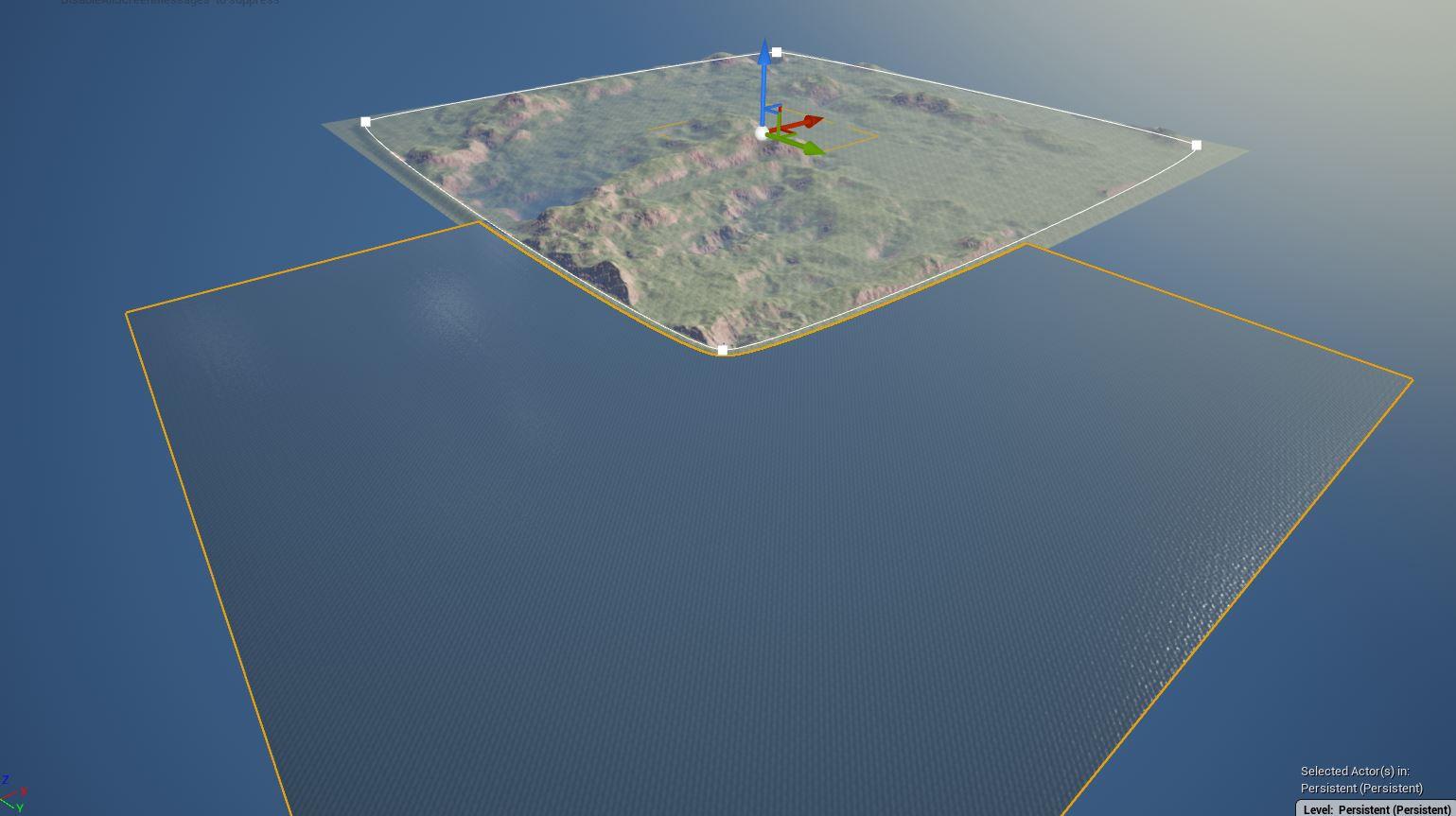
https://i.imgur.com/ZEIEma5.jpg
waterbodyocean not big enough lol
 grim fog
Sorry, not a 3D modeler, just giving level design ideas
scarlet birch
I've never parented it to the mesh like that. Not sure if that could cause an issue or not.
 wintry silo
how do we fix a bad reference in a parent BP ?
scarlet birch
I usually have the collision and mesh have same parent, select both and export. If you're using the pipeline script it doesn't work with UCX, unless it's been fixed since I last used it.
grim fog
I read a solution to parent the meshes thats why i parented them, both ways werent working for me
Idk of this helps but i would also get this in UE4 when i place the player inside a free area in the mesh
Ill come back to and update when i get the chance to try again, its more than likely user error but im not were, thanks everyone!
 zinc shore
i keep having to restart the editor after doing a color select operation because it prevent me from going into PIE even after i close it how can i prevent this
grim ore
save the map
 plush yew
I was looking to see if someone could help me on my 2D game ?
I am trying to it so I can fight a AI, but when my character hits the enemy he swings the sword over and over non stop
I am really un sure and what to do 😦
grim ore
why does he swing it over and over? what causes him to swing it
plush yew
when you ( the player) presses LMB he is supposed to attack but when I make contact with the AI it constantly attacks non stop
I'm a beginner so I really have no clue what to do 😦
 shell surge
guys, can anyone help me with distance field ao/shadows. Im stuck
wintry silo
The Reference Dwig from CH_human BP is not passing over into the Dialog Actor BP.
grim ore
so when you press LMB he starts to attack, what makes him stop attacking?
wintry silo
so I'm getting none access errors from Dialog Actor BP. because for some unknown reason CH_Human is blocking DWIG from accessing Dialog Actor BP.
plush yew
When you press LMB my character swings 1 time and you press LMB he swings again so on so fourth, but when 1 of the swings hits the AI he swings constantly non stop
grim ore
and when you debug it what does it show is he value for when you are trying to access it? @wintry silo
@plush yew show your code for your swinging
wintry silo
i don't have debug installed, only been using print screen.
grim ore
you always have debug installed
F9 to add a breakpoint on the node and it will stop when it hits it
 agile thistle
hey are you that dude from youtube?
lol, just randomly seeing that picture
thanks for your videos 🙂
helped me alot
wintry silo
All I know is I created the widget in CH_Human and set the Dwig reference there and trying to access Dwig from CH_human from the Dialog Actor BP but for some reason it can;'t access CH_Human BP even though Char Ref is a CH_human Reference whichis linked to Dwig..............
grim ore
your going to have to walk thru your code step by step and see where it breaks. go to the node that doesnt work and set a breakpoint on it. see what the reference is (should be null since its giving that error), then walk backwards and see why its not correct
unless you show us exactly all of your code and the flow and how it's all set up there is no way we can guess where the code is broken
grim ore
so set a breakpoint and walk backwards
plush yew
My code is to big to fit all in one picture
wintry silo
what makes this tricky is the widget is being created in another BP and not in the dialog actor BP. So when you step into the dialog trigger it just unhides it.
grim ore
is char ref valid?
wintry silo
yes. But Dwig is not valid.
grim ore
are you sure char ref is valid?
wintry silo
char ref is set ti instance editable.
in dialog actor bp
and the ref is pointing to CH_Human
grim ore
yep, still doesnt mean you verified its valid. you need to breakpoint and debug
wintry silo
i don't know how to use that breakpoint stuff. I only know print string.
 steel bridge
Hello, I'm new to UE4, a noob and I need a little help with this little concept that I made. as you can see there's a sphere which represents a bulb, and there's an orange button on the floor which is the switch to turn the bulb on/off when I step on it. I want to make this work using Boolean variable. Now the switch animation works (which is the timeline) but the I don't know how to trigger the bulb when I step on the switch.
wintry silo
Mattthew, Is Valid dosen't fix it if its invalid, it just halts the code to stop it from executing on the branch.
that's what is valid does if the variable or reference is bad. then the code does nothing it just hides the error.
grim ore
shrug you can try debugging and track down the issue or you can keep asking for help, it's up to you now
@plush yew so when you attack your flipbook turns to the attack flipook but what stops it and turns it back to normal?
wintry silo
well the dwig reference is bad. Putting a breakpoint on it does nothing but just halts the game to point out where the breakpoint is.
 regal mulch
So you have a Pointer Variable that is InstanceEditable and you assigned a Character that is placed in your level to that variable, on the instance that is also placed in the level?
grim ore
@steel bridge when you stop on the switch you would probably have a collision box above it and use that boxes overlap event. When that overlap event fires you would play the timeline for animation you want. You could then use the on overlap end to fire off the other animation
wintry silo
so the reference is bad, Invalid, But I don't know where that starts in the code except for CH_Human where I set the reference to create the widget............
 abstract prism
would love it if i could switch the animation without having to re add the logic every time
grim ore
@steel bridge I just saw the second screenshot lol, that looks like the right idea
plush yew
Yeah, I am not sure at all
I'm new and really have no clue what half the stuff means xD
grim ore
@steel bridge ugh sorry brain not function, question was clear but not to me. So the light is separate from the switch?
wintry silo
strange, i set the breakpoint on the set dwig variable in create widget and it dosen't even halt the game to take me to the breakpoint that time.
steel bridge
@grim ore First, thank you for responding! And yes! That's exactly what I did, but I just don't know what to to get the lights triggered when I step on the button.
grim ore
@steel bridge it looks like you have a instance editable variable for the bulb already set up in the switch, is this set up to the bulb in the level?
steel bridge
yes the light is seperate, it's just an emissive material not a real light attached to the sphere
yes i think so, is this what you mean?
plush yew
YES!!!! I did it 🙂 I fixed my problem
grim ore
yes it looks like you have it 99% of the way. You are communicating and setting the variable but you dont have anything acting on that change. Make a custom event in the light bulb, call it something like SetLight and have it take in a boolean as an input.
plush yew
OMG I'm so happy lol
grim ore
then you can call the custom event and pass in the boolean to turn it on or off, and the set light custom event in the light bulb will then do whatever
wintry silo
we got a problem in CH_Human The Breakpoints are not working on all the code.
steel bridge
umm.. I'm really new to this, just started yesterday, give me a second
grim ore
start with making a custom event in the light bulb and call it what you want. (right click -> add custom event), then in the details panel give it an input of boolean type and maybe call it IsOn or someting similar
this would give you an event you can call when you talk to your light bulb to do whatever (change your material in this case)
wintry silo
so that has told me volumes already about what is wrong, parts of the Blueprint are not working....
Right well now I know that half the nodes in CH_human have become corrupted
for the breakpoints don't even work with them.
the nodes are dead.
regal mulch
Breakpoints not breaking doesn't mean the nodes are corrupted
It's means your code isn't calling or you have your debug scope set on a different instance
steel bridge
@grim ore Like this?
wintry silo
well there is something wrong I enter into the dialog trigger set a breakpointon on create widget, and its not breaking me to the breakpoint of that widget.
regal mulch
I don't think you ever showed your code. So no idea.
wintry silo
the widget is not responding even though I stepped inside of the trigger and set the breakpoint on that widget..
and I knew something was wrong when I created a new widget and set it on the event begin play and it wouldnt even open that one up on the event begin play execution line, but it would open it up if I attached the code to a keypress..
grim ore
@steel bridge sort of, the goal of the boolean is to determine what to do and to use less code.
then in your trigger you call the ChangeLight function on the light bulb and tell it true or false depending on if you want it on or off
 tulip sparrow
Sorry mind if i post a picture with a question??
wintry silo
that CH_Human BP widget has not been going right ever since the video memory crash.
regal mulch
Go ahead. Better than a question without one :D
steel bridge
ok, give me a min, i'll try
tulip sparrow
Is there an easy way to add fade to door way shadows?
its a bit intense and too specific
 sweet relic
@tulip sparrow Use area shadows on the light
Light type that can change its color and brightness at runtime but cannot move, rotate or change influence size.
sweet relic
and change the source radius
wintry silo
I will show where I set the widget reference that's giving me all the trouble
regal mulch
The Casts are 100% pointless.
steel bridge
ok
grim ore
@steel bridge no need for the cast since you dont need to talk to the switch, correct. no need to store the boolean in the light bulb unless you want to (you could set that based on the boolean that comes in from the custom event if yo uwant). You are just having the trigger go "hey light, I want you to call this custom event and I want to pass along this boolean which represents the state of the light" then your light bulb acts on it and doesnt need to even care who called it
wintry silo
and this is where I set the Widget Reference also in the Dialog Widget.
grim ore
you know you could have a race condition depending on when all of this is created, but thats the point of debugging to see what is broke and when
wintry silo
should I have set the Dwig reference on the Construct of the widget?
grim ore
but that code above wouldnt cause your issue since thats a variable in the widget blueprint and your code above that is failing that you showed us comes right from the othre bp
it's just confusing on your path here. what is the Dwig variable supposed to be?
wintry silo
This Dwig Variable is the Dialog Widget itself
regal mulch
When you create the Widget and set the Variable, it's already enough.
The code in EventConstruct is totally unneeded.
wintry silo
theni don't need to set it in the construct ok I'll removeit.
grim ore
i think he needed the code, he is trying to tell the other BP about itself when it is created
but he is setting it wrong
regal mulch
Also the AccessedNone error you should come from somewhere else than what you showed. @wintry silo
He's already creating the widget in the Character
Or whatever CH_Human is
grim ore
ah didnt see that screenshot
wintry silo
CH Human is the Character Blueprint of my Commanding Pawn.
the none access is coming from update dialogs function.
regal mulch
Neither of those two did you show to us
steel bridge
@steel bridge But what if i want my character to be the only one who can call the light, doesn't mean i need the cast node?
grim ore
he did earlier. based on what you had him do it might fix the issue tho he was probably settings it correctly then incorrectly with that construct thing
regal mulch
Is it the Widget Variable that is null or the CharacterRef?
steel bridge
@grim ore sry i mentioned myself xd
wintry silo
its reading Dwig as being invalid.
regal mulch
It says "AccessedNone trying to read property Dwig"
Doesn't that mean the CharRef variable is null
Which it's trying to read the property from?
wintry silo
i have got Char Ref set in the construction script in the dialog master bp
wintry silo
regal mulch
That's not setting it
You are setting it with itself
The CharRef is invalid
Where is your Overlap event? Show that to me
wintry silo
if char ref is invalid, why does it say only dwig is invalid.
regal mulch
It doesn't say Dwig is invalid
Is says it accessed "none" while trying to get Dwig
It accessed the NULL CharRef while trying read Dwig
Again, where is your overlap?
wintry silo
but it didn't say in the error message that null was char ref, it only said it couldn't access dwig.
so I thought it was dwig that was the problem
ok the overlap hold on
where's that place you paste the blueprints in so I can give you the whole code
grim ore
steel bridge
@grim ore how can i tell ue4 to leave the light off without assign a material? Like tell it to get the bulb to it's original state when i step down from the switch?
regal mulch
@wintry silo When your Overlap calls, it's because you ran into it, right? So the "OtherActor" pin on it will be the Character you used.
So you can cast OtherActor to your Character and set the variable.
grim ore
@steel bridge what was the original material on it before you changed it? change it back to that
wintry silo
I will get the overlap event so you can see what i done
steel bridge
isn't there another way without assigning the material?
grim ore
maybe but your changing the material right?
technically what you want to do is your material has a parameter for the emissive value and you just change that
wintry silo
grim ore
so your item has 1 material you dont change, you just change the emissive value in it based on on or off
regal mulch
@wintry silo Yeah, so this is Singleplayer, right?
wintry silo
single player party group system.
regal mulch
If you Print or Breakpoint the DoOnce, does that trigger?
wintry silo
Here's the code to the Dialog Actor Trigger
https://blueprintue.com/blueprint/jrcsdfek/
BlueprintUE
regal mulch
@wintry silo Yeah so if that triggers then you can just cast OTherActor to your character class and get the reference like that
And that should then also allow you to access Dwig
Just make sure you don't access the variable prior to this overlap
wintry silo
I found how to use pastebin now for the blueprints. so you can take a look at the whole blueprint.
steel bridge
so your item has 1 material you dont change, you just change the emissive value in it based on on or off
@grim ore If it's okay with you, I'd like to know how to do this.
grim ore
it's material parameters https://docs.unrealengine.com/en-US/Engine/Rendering/Materials/HowTo/Making_Parameters/index.html
wintry silo
do you mean like this ? Or don't I need to set dwig.
grim ore
wintry silo
ah now the problem is coming up with all Char Ref
regal mulch
No, I said cast the "OtherActor" pin to your Character and set the CharRef
No GetPlayerCharacter and no setting of Dwig
wintry silo
oh you mean before the do once right at the start of the on overlap event., do you want me to remove that other cast in the second screenshot above.
regal mulch
Yeah, you won't need any other cast or set
steel bridge
@grim ore I think that's a little bit advanced for me right now, but thank you anyway!
grim ore
well all the code was right there so 😉
wintry silo
i'm not sureof these instructions becaus I don't see the nodes to interpret but here's what I have done.
is this what you mean by cast to OtherActor Pin to Your Character?
maybe is valid should go after the cast
regal mulch
You don't need the IsValid there
regal mulch
If you can run into that Overlap but you have no PlayerController, you have bigger problems
wintry silo
what do you mean, I do have the player controller in there
regal mulch
"Have" as in being valid
wintry silo
is this correct?
regal mulch
No
That BP has a CharRef variable
You need to set that one
Right now you are setting the "CharRef" variable of "CH_Human" to "None".
wintry silo
or do you have to drag it instead from the cast. for I just dragged it instead out of the variable list.
regal mulch
steel bridge
@grim ore ik, but when i tried to copy it, i didn't find that emissive parameter:
wintry silo
ok so why is that set node wrong.
grim ore
any of your basic nodes, the 1 2 3 values for example, can be a static or parameter type. So for example right now you probably have a single value (float 1 or constant 1) into your emissive and its static. Right click on it and convert to parameter and it will be come a parameter version of that node @steel bridge
wintry silo
I dragged it from the cast
grim ore
in my case i named mine Emissive so it was easier to remember when I needed to change it, you can call it banannas if you wanted
regal mulch
@wintry silo Okay, stop dragging from the cast. Set the one from DialogUriTanis
wintry silo
well I got dialog working with the parent BP now
ok
oh i see now, so for each world I do dialog in I have to use that particlar ref in that Actor Trigger. Can't just use the main ref from my commander.
regal mulch
I have no idea what you are doing there. All i'm trying to tell you use how you get a valid character ref in your DialogUriTanis
wintry silo
char ref its working for the commander.
its working also for the other pawns as well.
well whatever you did it worked, it fixed the Uri Tanis Dialog Trigger. Thank you.
now I will load up blackhell and see how it behaves in that world.
steel bridge
@grim ore Oh, but first i need to make a Scalar Parameter and then rename it to emissive right?
grim ore
yep you can do that in the menu or make a normal constant (1 value) and convert it to the parameter
 royal crest
its at 100% for a very long time
wintry silo
what its not supposed to be 100% for long time unless its a mesh
wintry silo
unreal engine takes a long time to import in certain meshes depending on how much detail that the mesh has, how many polys and triangles, ect. and it looks like the editor freezes because its still calculating itself.
grim ore
yep depending on your machine it could take a while, could also be hard drive related
wintry silo
HDD that's a good point
royal crest
mesh is from hdd, ue4 is on m2 ssd
wintry silo
that could also be why its slower depending on speed on SSD
royal crest
but its using %0 disk
wintry silo
i know that flash drive is slow when transferring files.
royal crest
is this too much to import at one time
regal mulch
Close your Editor. Open your project in Visual Studio. Hit F5.
 boreal niche
ooff 12 errors
regal mulch
Ignore the Error Tab
Use the Output Tab
And go from top to bottom through the errors
(also link those error message sfrom the output tab if you need help)
Also #cpp :D
boreal niche
im trying to find output tab rn D:
I only see error log
Couldn't find output log
in vs
okay wait i found it...
 proper quiver
Not sure where to ask this. I've installed quixel bridge and signed in, but when I press download, bridge opens a page to Pricing. Am I correct that it's supposed to be free for unreal users? I have the accounts linked correctly.
boreal niche
I think I know where the problem is, if I had any issues later ill ask for help thx
proper quiver
ah nvm I had to quit and restart Bridge
grim ore
that looks like its getting axis values from input events, do you have input events for up and down?
plush yew
Hello, i need a little help with a main menu. It wont take that long.
When I click new game on the menu I made it doesn't load and it stays on my picture
Could anyone help
?
It would be appreciated xD
grim ore
what does the error log say, or the output log
plush yew
How do I find that ?
grim ore
at the top menu, window output log or window -> developer options
plush yew
Ok I will check now
grim ore
if no error what does your code look like for the open level
plush yew
LogWorld: Bringing World /Game/Levels/UEDPIE_0_Level1.Level1 up for play (max tick rate 60) at 2020.11.14-00.01.59
LogWorld: Bringing up level for play took: 0.001732
LogLoad: Took 0.041308 seconds to LoadMap(/Game/Levels/UEDPIE_0_Level1)\
Thats it
When I click new game its just the picture stays there
 median hound
for axis event how will i make it control up and down?
grim ore
what does the event look like for when you click new game?
plush yew
I read some comments on the video and I think it is because I put the logic in the new map.
I will come back to you on it
1 second
grim ore
ah
plush yew
Yay! That was the reason.
Thanks for the help bro
I was able to fix it
xD
Good luck with your future projects 🙂
 late verge
is there a way to limit the fps of the viewport? trying to accurately get an idea of what my cinematic camera settings will look like before i render.
 light thunder
what should I examine here to make this more visible, this tire decal is almost undetectable -
plush yew
are there decent niagara tutorials? theyr all outdated or useless
ive been doing that but tbh its all pretty useless so far
 inner cloak
Is it possible to change the origin of an imported mesh ?
 limber mesa
Quick question, anyone know how I can change the camera angle of my 2d platformer game to make the character to walk on a different axis, only pertaining to that specific level
scarlet birch
Setup a different camera and then use set view target
For the walking change what is called in the player controller
limber mesa
He currently walks on the x plane
Hmmm
@scarlet birch see
i want the view to rotate 90 degrees and walk the other way
scarlet birch
Just use a branch or enum & switch to call a different move function, or use a select node to change the value going into the movement input. There's a bunch of simple solutions.
limber mesa
ok
scarlet birch
With something like that you probably could use a select vector and have it switch between (1,0,0) and (0,1,0)
limber mesa
wdym mike
scarlet birch
@limber mesa
 left terrace
Im on my phone and not on pc so i cant show pictures but ive imported a blood particles pack for my project and all the textures are there but the particles and the materials dont want to assign the textures if you know what i mean
I dont wanna sound lazy that i dont wanna do it myself
But its a lil too complex to do it by hand
However my friend tried importing this particle pack into his project and all the textures and materials all where pre created and where ready to use
So what am i doing wrong
grim ore
try importing it into a different new project, it sounds like it didnt come in right or you imported a different version
grim ore
shrug unless you can show us the issue i dont know how we can help
you know it works, so its something specific to your machine
left terrace
Thats what im thinking its prolly my pc
Its worked in my older projects fine hmm
Like 1 month ago
Ill probs sleep it out and sort it out tomorrow
 dire ingot
guys there is AI bots and actors and characters.
i managed to move a cube from point to point using the three diffrent kinds.
so the question is which one is the best? lets say u want to make an army consist of 300 enemy. which one will use less resorces, or perfrom better or easier to handle etc etc.
i used actors. now someone suggested me to use character and blackborad and behavior tree
ping me
grim ore
there is no right answer, you need to figure out what works best for your project
each has plusses and minuses
dire ingot
that why im asking
how im able to know which is best for my project when im here asking which one is better?
that not an answer
i gave the state above, an enemy consist of 300 enemies
that will be heavy task for sure
idk which is the best way to handle it between that three diffrent kinds
grim ore
you have to test
we dont know your exact systems or setup or design goals, all we could give is some generic answers and 1 think you didnt tell us causes it to be wrong
like I could say for 300 enemies you should look at using vertex animations instead of skeletal to save on cpu usage
but that could be wrong if you need something specific that SKM gives you
grim ore
your best bet is to see if any game that uses ue4, or any similar engine, that is near what you want has done a deep dive or something about their systems and try and see what they ran into and did
 next nebula

so here I have a mini bp so that when the actor overlaps a sphere, it gets attached to a component, snaps in place, and is supposed to scale in size. However, the scale doesn't give me any compiler errors but it won't scale to the child actor's size. Any reason why this may be happening?
plush yew
can anyone tell me why when i use a cel shader material the atmospheric fog goes black, im new to making shaders and i dont have a clew on why its turning things black its not only the atmosphere its also some objects in the scene except the character
everything besides the character turns black by the way when i use the custom depth path in rendering but the atmosphere doesnt have anything i can do to turn it off for it and i cant find any reason why its turning balck
do i have to make a sky sphere?
plush yew
yeah i know but the atmosphere should still be there right?
wintry silo
the fog should not be that dense.
plush yew
what do you mean? its all default
wintry silo
it should not be jet black
plush yew
in the details? or the scene
wintry silo
scene
plush yew
yeah, im not sure how to fix it
wintry silo
i'm not sure what happened to it, can you zoom out of the map, what happens.
plush yew
is there a way to make the atmosphere not be affected by the cel shader? i make it so the shader only effects certain objects but for some reason its still effecting the atmosphere
wintry silo
is this post processing effect
plush yew
what do you mean?
wintry silo
post processing is an visual screen effect we put it in a volume box.
plush yew
i know what post processing is lol, just cant find out why the shader is effecting the atmosphere when it shouldnt
wintry silo
someone else in here might know about the shaders why its doing that.
 foggy briar
is it possible to have fog top and bottom where only the center of the world is clear?
next nebula
late verge
@grim ore i can, but i don't think the playback rate changes the FPS of the viewport?
i could be wrong, but i can't say i notice a difference between display rates
grim ore
gotcha, then yes t.maxfps limits the viewport fps
 exotic thicket
Anyone know if there's some way to have UE4 ignore a directory under Content? I'm loading some image assets at runtime as textures, so I'd rather it didn't ask me about importing the files in that dir as assets every time
(The reason the stuff is under Content is so I can use the packaging settings to automatically copy it to the packaged builds, didn't really see any other way of doing that)
 void mirage
Yes My VR game is coming to gether slowly
median hound
there a particle system group or no, only niagra?
void mirage
patrical system group? u need help on particale?
median hound
yeah im trying to get the stuff to stay ingame but like move away from character rn its just stuck on him
i made something like that but cant figure out what i did to do that
void mirage
umm there i not to sure on that subject yet but i beleave there is a check box that says show in game on what ever partical u got in details i think
median hound
i want it like this..
void mirage
i still new to unreal
 void mirage
the blue lines ? or green smoke from chest ?
void mirage
partiacal end node i have no clue brother
ummm i think i know someone who might be able to help
 sturdy trench
What do you guys think about the idea "do not care about optimization until it becomes a problem"
I hear this a lot but I dont think this is a good way to develop games
 crude echo
Is any body here testing out 4.26?
void mirage
sorry im waiting for release of 4.26
an incomplete software is not worth testing till stable
crude echo
its okay
im just wondering if anybody knows why ray tracing shadow is not working in ue 4.26. Or is it just me :/
void mirage
it is on preview 7 in is incomplete
incomplete software
nguyen u know anything about particles
?
crude echo
nope sorry 😄
 stable gulch
hey how is everyone doing ?
stable gulch
I am doing pretty great, I was actually curious as to if any of you were interested in chatting about toolkits ?
void mirage
love toolkits
but im broke to buy any but i would love to talk about toolkits what are you thinking about
stable gulch
I recently got the CCG toolkit and was curious as to how to play around with it. would it be legal/feesable to share the project with you ? it would give you a bit more access to help with my questions. if you know the answers. hecc. you might spot something i dont see lol
void mirage
ummm if u explain the ccg tool i cant better understand it and might be able to help with the answer u seek
cant not cant*
can not cant**
stable gulch
it is a cardgame framework. it has multiplayer functionality built in. a card editor. and the entire project is modular. it is built with a simple template that has prebuilt abilities, and tables that populate all of the card assets in hand and on the board.
void mirage
@next nebula my vr game?
next nebula
yeah
stable gulch
so yeah. it has a lot. i just dont know how to go about changing the mana system. or adding my own elements to cards. like giving them natural armor as well as health.
oooooo i would like to hear ??
void mirage
panacea so you are making a card based game like pokemon ? or yugioh
stable gulch
more yugioh. but i have a few elements that i dont know how to convert to code.
void mirage
@next nebula the VR game i am going for is a open world survival based off a few game i love but needed more content thats what started me on this path and there isnt alot of good vr games out there right now. lvl and money will be set to items u can unlock in the world and to be honest right now this is my first game creation seeing as i am so new to unreal and people have a lot of experience. but one step at a time and it shall be a master peace to me after some extensive video watching doc reading and more it shall get there
panace what kind of elements i might be able to shearch up a vid for you if that helps
stable gulch
sounds really interesting and i would love to play test and give feed back.
next nebula
you alone?
next nebula
😦
@stable gulch so far we only have simple holster system, advanced movement and a few nature assets and interactions
we skipped a couple months of work
now were dedicated again
void mirage
not very intelligent on game creation so i started with unreal and learning blender as well
how do i screen shot ill show u what i barly got done
i fell asleep
stable gulch
so the mechanics. In my game, at the start of the match each player can choose to put a minion in a "Cell" on a row behind the player portrait. while in the gain, each turn players generate plus one mana. the the minion escapes after a set time.
the next issue is how to add class types. like tribes and faction types.
for sorting.
void mirage
are u haveing trubble with mana
stable gulch
yeah. like i wanted to have two types of resourse, Mana and Influence. but i dont know how to add those elements to the game scene.
next nebula
@void mirage Windows key + Shift + S for a snippet
stable gulch
there is a mana code that comes with the tool kit, i could share it here ?
void mirage
sure i dont see nothing wrong with doing that this community if for helping in all departments
plush yew
Hi
It's my first day starting Unreal Engine
Any tips where to start?
P.s I have 3 years experience with Unity
next nebula
why the switch @plush yew
void mirage
my insperation is the forest popultaion one walking dead and a few others
void mirage
yes very
next nebula
Im going for a low poly styled multiplayer survival
plush yew
@next nebula I just want to explore everything
stable gulch
this is the documentation
void mirage
for vr does it have to be low poly?
plush yew
this is the documentation
@stable gulch thanks!
stable gulch
i figured the documentation would help you answer my questions. and no problemo
next nebula
quest isnt all that powerful
void mirage
ty panacea let me take a look
next nebula
I make it low poly to fit the general feel of VR
stable gulch
no thank you for helping me. i am going to try to find the blueprints i need to screenshot
void mirage
hell yeah dude i know nothing but im good at finding answers 🙂
im using the windows mixed reality from samsung oddessy +
and i like pavlovs charater set up
next nebula
hey @void mirage you knew to blender or prior experience?
void mirage
blender is a new exp for me as well im folling around with importing the ue4 mannican over and messing it all up lol
next nebula
hahaha its all about the learning curve
plush yew
Blender's Cool and easy to learn
next nebula
^^^
void mirage
btw blender is a very use full tool idk know unreal doesnt have that part of there system
stable gulch
this is the draw card ability. and i am wondering how it is put together so i can make my own. the tutorial in the documentation is either outdated, or i messed up the project.
plush yew
Also, it's open source and highly flexible
stable gulch
Blender is what i am learning. would you happen to know how i could transfer a project from unreal to unity ?
if that is even possible.
void mirage
i havent used unity at all i was thinking of trying it out but i got scared cause i already learned a bit from unreal lol
next nebula
thats not possible
plush yew
And I guess C# and C++ are Similar, so the coding won't be a problem
Also, this Blueprint business is something new for me
void mirage
export ur meshes as fbx
plush yew
^^^
void mirage
my vr game works with blueprints
plush yew
What exactly are blueprints?
void mirage
C# and c++ i herd not sure the c# is ez to learn compared to c++ is this true?
plush yew
@void mirage yes it's true
void mirage
shash
Start learning about making blueprints and adding code to them with this beginner's tutorial. In this mini-guide, we introduce the basics concepts of blueprints, components, and blueprint scripting. We'll make a counter script that tracks how long has occurred since the game s...
plush yew
@marsh swallow ohh cool, also there are some really cool textures and models on Megascans
Is it okay to use them? Do people use them usually?
https://www.youtube.com/watch?v=28_gQi3DWfY&ab_channel=Chris'Tutorials
@void mirage thanks 🙏🏻🙏🏻
Start learning about making blueprints and adding code to them with this beginner's tutorial. In this mini-guide, we introduce the basics concepts of blueprints, components, and blueprint scripting. We'll make a counter script that tracks how long has occurred since the game s...
void mirage
❤️
 marsh swallow
yes lots of folks use megascans
void mirage
@next nebula hey what kind of VR player setup u going for ?
plush yew
They look pretty sweet
void mirage
if u dont mind me asking
mega scans is awsome as hell
really give your creation a feel of realistic
and simplicity
plush yew
Yes
One of the main reasons I switched
Unity takes a lot of hard work to make our work look photorealistic
void mirage
yeah unreal spoon feed that realistic part pretty good
i think i need a new gfx card lol
 true ridge
I've had a 3080 in my shopping chart three times now.
stable gulch
so might you know why the cd card objects isnt compatible with bools ?
plush yew
My Card Sucks
Real Bad
Real Bad
Radeon R9 Integrated M290X
true ridge
big oof
void mirage
msi 1050 ti nividea
plush yew
To add on top of that I'm not even running a PC
I run Windows Bootcamp on a Mac
So the Drivers are shit
true ridge
970 gang, who needs VRAM.
stable gulch
bit of a silly question, but if i jus learn the node language would that make this process easier ?
void mirage
panacea give me one sec im looking into the docs
ummm codeing is still a hard thing for me to learn tbh
in a way u still are codeing visually
with blueprints
next nebula
blueprints makes it a bit easier
void mirage
a bit
true ridge
@stable gulch It's like working with a translator rather than speaking the language directly. You know how a system in particular is supposed to work, you just have the nodes tell the engine to do it.
void mirage
@next nebula are u good are VR thried person character rigging and stuff like that sort?
@stable gulch u are right there all out of date videos on this subject
@stable gulch i think u need page 24 not sure
next nebula
@void mirage no Im not good at that at all 0 experience
void mirage
dang
im trying to do full body third person
but it is hard 😦
im not understanding it
next nebula
just follow an online tutorial

In this video I explain my process in creating an IK body for VR in unreal engine. You can follow along or skip to any of the chapters if you're simply curious about how I've tackled a specific component:
00:00 Introduction
00:17 1.0 Setup
02:47 2.0 Body - Pawn Setup
04:03 2....
stable gulch
last question. how would i convert a jpg to a dtx1 for unreal.
next nebula
find an online converter
This tool is for converting from JPG to DXT1 online without damaging the quality of resultant image.Our JPG to DXT1 converter tool is free for use and very easy to use with a very good interface.
stable gulch
thank you so much. i dont know why i didnt think of that.
next nebula
hhaahha np 🙂
 plain pagoda
is it possible to animate the hand bones (of my skeleton) in such a way that the gun being held always points towards a vector location?
plain pagoda
fps
next nebula
yeah so Im pretty sure you would use sockets
plain pagoda
plush yew
How To Set Up and Use Sockets
plain pagoda
here's my current set up
plush yew
This will help you
plain pagoda
the gun is currently vertical, it's a fixed animation. I just want the gun to point along the lines of the pink ray
void mirage
socket the gun to hand and the rotate it to where u want it faceing i think
plain pagoda
that's all good. I have done it already
void mirage
oh 😛
plain pagoda
but I want the socket to always rotate towards a vector location
so suppose I put a gun on my character, I don't want to use my mouse, I just want the gun to point towards a vector even when the character is moving around
 rich spoke
How can I add this thing?
 grim juniper
Double click a wire
rich spoke
LOL thank you
void mirage
monke im having trubble understanding this is the item a pick up able gun or a gun u spawn with ?
 storm vapor
Hey my ue4 crashed
And when i re-open
I pressed skip restore wrongly
Is there a way to get back ?
 void mirage
i usally save alot cause unreal does that some time
free softwear it gonna crash at times
void mirage
sorry friend
void mirage
does anyone know how to blend the bottem of grass with the ground?
even the bottem of trees?
plain pagoda
monke im having trubble understanding this is the item a pick up able gun or a gun u spawn with ?
@void mirage https://www.youtube.com/watch?v=XGowdT9wjAA

Blueprints only, tutorial coming soon on reddit and youtube.
https://www.reddit.com/r/unrealengine/comments/elxm5h/made_a_grapplinghook_tutorial_coming_soon/
ue4
something like this
the gun always points to a vector location
void mirage
thats reminds me of a vr game i seen i think vr jet pack
the point of hit is where it needs a rotation i think for the gun
not entirely sure
that looks fun tho
next nebula
@void mirage are you going for realism survival?
next nebula
nice
void mirage
and i wanna make it pc friendly as well so it doesnt use alot of resources
VR is going to Be a big game changer 🙂
btw my sniping tool isnt working right?
@next nebula the things vr games lack is content 😦
void mirage
yes so much at the cost of dampining gfx a bit
next nebula
think you can help me here?
next nebula
so here I have a mini bp so that when the actor overlaps a sphere, it gets attached to a component, snaps in place, and is supposed to scale in size. However, the scale doesn't give me any compiler errors but it won't scale to the child actor's size. Any reason why this may be happening?
just copypasta
void mirage
snap to what target location?
next nebula
thats not the problem
that works fine
it goes to world transform
of the child actor
but the thing is scale factor
literally same reference but it doesnt work.
next nebula
so heres the thing
I have a child actor locked into the same place on the vrpawn and its scale is larger. so I want to get the scale of the child actor and cast it to the rock
same thing, not working
void mirage
i going to be honest with you i dont know nothing about child actors and that stuff yet
void mirage
if my snip tool worked i can show u what i got in my lvl
next nebula
so others know
yeah
you dont have to know anything about child actors for this it sjust annoying that its the same functions but for scale factor and its just not working
the world transform is
void mirage
maybe try reconnecting the rock child from the top attach to bottem run it off 1 node
void mirage
i dont know if it will work but it is a solutions that has a 1% of being right
next nebula
actually no its needed in order to hook up both
next nebula
yeah
void mirage
i think my unreal just crashed
void mirage
gn
 flat scroll
I'm trying to use the forward rendering, but I'm unable to load any projects if I turn it on. The loading is stuck at 39%. It happens even on completely empty projects without any content. I really wanted to experiment with NPR shading and for that I need the forward renderer.
Does anybody know how to fix it?
I'm on 4.25
 dusky epoch
Hello. Im getting a crash after i respawn the 3rd or 4th time or restart the game 3rd or 4th time.
It's a simple Paper 2D game, light weight with flipbook only. On earlier versions it didn't happen, it's happening in 4.25.4
void mirage
taro it is compileing shaders
@flat scroll if u open ur task manager and see what is eating ur cpu is should be a shaders
flat scroll
for few hours?
void mirage
shouldnt be a few houses should be like 10 mins maybe 15 mins
@dusky epoch ur frame work need to be updated i think
dusky epoch
How to do that frame work update ?
dusky epoch
im using windows 8.1
void mirage
oh well check for updates for ur pc
dusky epoch
okay thanks
void mirage
if that doesnt wrk enter the error code in google
and u should find some sort of help maybe
dusky epoch
Alright thank you
 queen wasp
Still having some mad issues with Niagara particlesystems https://imgur.com/a/8EBAwuw

Hmm, might be an unknown SpawnCount ..
(user param)
void mirage
sorry @queen wasp i know nothing about niagara
queen wasp
Crazy 83 second freeze activating a particle system hehe, well I'm adding some clamps and checks to make sure parameters are good..
void mirage
dubble check it just to make sure u done it right just as a safe guard
queen wasp
Yah, always have to recheck a few times, debug prints and whatnot. Can't have that kind of freezes in a published game
void mirage
ture i know nothing about niagara
 sinful mesa
Hello all, anyone had this error when enabling Terrain tesselation ?
[SM5] /Engine/Private/Tessellation.ush(178,3-12): error X3004: undeclared identifier 'Tangent0_U'
UE 4.26 preview 7
void mirage
that version is not stable expect alot of errors
sinful mesa
I know, just asking if anyone seen something similar so its not something i do wrong 🙂
void mirage
🙂 i feel u
 patent cave
anyone here free to help a newcomer to unreal?
queen wasp
So the bug I am experiencing is likely fixed in 4.26.. https://issues.unrealengine.com/issue/UE-94675

Unreal Engine
Welcome to the Unreal Engine Issue and Bug Tracker. You can check the status of an issue and search for existing bugs. See latest bug fixes too.
dusky epoch
After updating .Net and VS Redis to latest it's showing this error
Before updating to the latest, it used to work fine till 3rd or 4th restart now it's crashing on the 2nd restart level
void mirage
@dusky epoch https://docs.unrealengine.com/en-US/API/Runtime/Engine/Engine/UWorld/MarkActorComponentForNeededEndOf-/index.html
Mark a component as needing an end of frame update
idk if that is what u need
 lucid grove
heya
I have just updated from 4.24 to 4.25 and noticed that when i sculpt\paint landscape i got freeze after end of interaction (releasing mouse button)
Anyone had this problem?
 austere pelican
Is anyone out there who can help me to fix the issue about enemy health bar
dusky epoch
Is anyone out there who can help me to fix the issue about enemy health bar
@austere pelican
What help you need
austere pelican
actually i had already set up the health bar but health is not showing full(max health) on enemy widget
so if anyone can checkout
where ia the prob
dusky epoch
Did you do like this in your characters or did all the programming in your Widget UI BP ?
If you do like this in this image, all your characters in your Map will show the hp or your screen
austere pelican
See why its empty
dusky epoch
Because default hp percentage is from 0.0 to 1.0 in your Widget BP. You have to remove all the nodes in your Widget and do like that in that image that i shown you, it should be inside your characters
austere pelican
Here is my logic
dusky epoch
Is that inside your Character or Widget UI BP ?
austere pelican
inside the charcter bp..i just collasp all of them to funtion and connect to event begin play
dusky epoch
Also you have to remove any Progress percent bar bindings. Is the Bind thing empty and removed ?
austere pelican
Yeas i have done a binding as well
dusky epoch
remove that one
 lament barn
Any good tutorials for making a simple top down vehicle game using blueprints?
dusky epoch
remove that nodes also remove the bindings
austere pelican
remove that one
@dusky epoch mate it still results same😫
dusky epoch
Delete all the codes/Bp's inside Widget UI and Check if the binding is like this empty
For me it's working and im using event tick instead of event begin play inside my character
 dusky grove
I've been using unreal for some time, but would scripting be better than blueprints??
dusky epoch
I don't know scripting and you can make anything using blueprints. C++ is a little faster in performance than Blueprint if you are using many event ticks with loops (100 characters with event tick and loops). But you can Nativizing Blueprints and convert your BP to C++ for faster performence in settings.
dusky grove
oh thank you
dusky epoch
@dusky epoch mate it still results same😫
@austere pelican Did it work ? Did you delete the things inside your Widget UI ? Did it work now ?
austere pelican
@dusky epoch mate can we have a call after a while ..cuz im not understanding actually whats going on
dusky epoch
Sorry can't voice call at the moment. Check if your current HP and Max HP are the same amount
austere pelican
ohh mate it fixed..actually i get the same current health variable in the current health set funtion as condition..
Thanks for your time mate
dusky epoch
No problem
Any good tutorials for making a simple top down vehicle game using blueprints?
@lament barn https://www.youtube.com/watch?v=ZKP0heuQdVY You can check this tutor out and just change the camera to bird eye view top down after making the vehicle
 lament barn
Thank you
plush yew
Silly Question:
How to Install the Megascans Plugin on Unreal Engine on Mac
And how can I use all these Normal, Displacement and Roughness Maos
*Maps
 wooden forge
is there anyway to reference a soundwave file from path in runtime?
 potent bridge
Would anyone know why I can't move my camera anymore? I need it to be in the same position as the line.
wooden forge
Would anyone know why I can't move my camera anymore? I need it to be in the same position as the line.
@potent bridge select the camera and reset it's position to 0,0,0
potent bridge
Lifesaver, ty
wooden forge
u welcome bro
austere pelican
i want that the health will dcrease if any other actor overlap this box component..not matter who overlapped...what to do
wooden forge
i want that the health will dcrease if any other actor overlap this box component..not matter who overlapped...what to do
@austere pelican just connect the OnComponentBeginOverlap, what's the problem?
zinc shore
@austere pelican you would just hook up the execution's pins and any actor that overlaps will trigger it if they can overlap
austere pelican
@austere pelican you would just hook up the execution's pins and any actor that overlaps will trigger it if they can overlap
@zinc shore yeah but i cant do multiple casting like this..i want that if any actor overlap this box, this box containg character will get damage
zinc shore
is the box apart of your character
austere pelican
yeah
 fierce forge
is there a way to see how destroyed is a destructible mesh ?
austere pelican
like in fighting game one damages each other..so no permanent or master character there who cn deal damge..evryone can deal damge there...my matter is just like this
zinc shore
when an actor dose overlap the box dose anything happen
austere pelican
No nothing happens..i want that the health bar will decrease if anyone overlaps
zinc shore
from you screen shot you don't have anything hooked up to the execution pin but if you do have something hooked to it dose it trigger
austere pelican
The box im taking about is the component of the player who is in T pose...i want that the player will take damge if any other character overlap it...hopefully you understand the matter..now how can i do this
zinc shore
check to see dose your box component have collision and if so dose it overlap the right collision channels
austere pelican
@zinc shore kindly can we have a call with my screenshare..u have to just check everything is ok or not..as im a begginer so it could be taff for me to understand by just chat
zinc shore
i cant really do a screen share but i would recommend looking at this to see if this can help you https://www.youtube.com/watch?v=GhYfrAZkL-k

What are the Box Overlap Actors/Components Nodes in Unreal Engine 4
Source Files: https://github.com/MWadstein/UnrealEngineProjects/tree/WTF-Examples
Note: You will need to be logged into your Epic approved GitHub account to access these examples files.
proper quiver
Hey all, I'm trying to find a landscape material that is already configured to work with Quixel megascans. Anyone got any tips on where to find something like this? I looked all over youtube which has outdated tutorials, and all over the marketplace which has materials not set up to use megascan displacements correctly. Any help would be appreciated.
 quick kelp
Why do C++ actors not update when you implement a change in their code? i tried recompiling, switching levels, adding another copy of the actor into the level, but it still doesn't update. the only time it updates is when i restart the editor
exotic thicket
Unfortunately that's just how it works
light thunder
I want to make a drone camera that pipes a video feed (like a render target) to the player - but this is for VR, so to save performance, I was thinking of using pre-rendered video instead of a 2D Render Target (the scene video won't be that dynamic so pre-rendered could work) - Can I use the sequencer to actually pre-render video this way? Is that the system I need to research more?
 upper heart
yes you can use sequencer to render out a video file
Describes the options available to you when rendering out your cinematic sequences.
plush yew
Hey, is there any method for load / unload or hide static mesh from code?
 hybrid light
plush yew
hybrid light
plush yew
Why AI is not shooting player but when I play it in standalone mode it works perfectly
Please help me
Here is my first but Dumb game V-gon.itch.io
I mean when I packaged game for windows AI is not shooting player
I use behaviour tree
 vague scaffold
New Plugins Are Available Message?
When I opened up ABoyAndHisKite, I noticed this message. Does this mean I need those plugins to run the scene? Or are they optional for the Engine in general?
 tired lynx
New Plugins Are Available Message?
When I opened up ABoyAndHisKite, I noticed this message. Does this mean I need those plugins to run the scene? Or are they optional for the Engine in general?
@vague scaffold i believe you can just close the message, no need to do anything/worry about it
vague scaffold
Thx!
tired lynx
i'm having a hella issue with megascans right now if anybody can help? i'm working on my first new project since the plugin update and am encountering an issue with displacement where it appears to not be lining up with the tiling of the other texture maps
or isn't high enough resolution on the mesh
or something weird at least
this is an image of the asset in the material instance window, and it looks great:
this is the asset on a basic plane inside the world:
it was working flawlessly before the update so i'm not sure what i'm doing wrong/what's changed
 worn mirage
Super noob question. How do I download an asset from marketplace without adding it to a project?
tired lynx
same asset with increased tiling:
light thunder
What do I search for to find how to make a puddle or something that is slowly traveling down hill ? (like gas leaking from a tanker down a road) what am I looking for to learn how to do that? (or a cheap asset to buy)
worn mirage
@light thunder https://80.lv/articles/guide-blob-effect-in-ue4/

Have a look at a step-by-step video guide to creating a Blob Effect in Unreal Engine.
light thunder
I was hoping for maybe a material that slide/drew liquid on a plane slowly, (it's just a surface layer like a small puddle or gasoline pouring on ground @worn mirage but this is pretty cool but I wish I could understand his accent better
potent bridge
I made some modifications to the camera and then decided to revert them, but now my camera keeps clipping inside walls. I'm trying to revert them to thirdperson defualt, anyone know what the issue might be?
 merry canopy
Hey, where can I post a little log of a crash? Having lots of crashes since some days and I dont know why.
Maybe someone can see, whats the problem maybe in that log?
 bleak raven
Hi Guys, Im stuck on a spring arm issue. I want the camera to move around the character without the character moving, as shown after locking off. However I'm unsure how to spawn with that setup. Any ideas how i can fix this?
potent bridge
@bleak raven What do you mean by that? I'm pretty sure the ThirdPerson template allows for that so long as the player isn't pressing a movement input at the time.
Maybe look into that for reference?
bleak raven
@potent bridge Thanks Ill Check it out
Everything seems to be the same. Still unsure what the issue could be
Found it!
@potent bridge Thanks!
 dense hatch
I have a project that uses the "Fixed Frame Rate" option at 60fps, and I want to be able to change that 60 frame rate at runtime. How might I do that?
I have tried using "Set Framerate" nodes but none of them work. Maybe I need to expose a different c++ property somewhere?
lucid grove
Heya
I created simple fire light, but real light is also moving shadows
the first way i did for moving shadows is moving light source a little in 0.01 tick
but that blows performance much
is there a way to make it look real without performance problems?
 sinful wedge
is anyone here command savvy with UE4?
 frozen pond
should physic thruster be connected to static mesh, or static mesh connected to thruster?
dense hatch
@frozen pond I believe they can both go on a scene component
median hound
Is Niagra better than particle system?
dense hatch
@median hound Niagara is a particle system, the old one is named Cascade, I would recommend Niagara but Cascade is just fine as well
royal crest
can i add component to multiple objects at the same time?
plush yew
what nodes do I use to do something x amount of times then stop?
 wispy comet
Hey guys
I just upgraded to an RTX 3070 GPU, and i'm suddenly getting some weird issues with UE4
Whenever I have G-Sync enabled for my primary display the engine stutters like crazy despite showing a smooth framerate
that framerate also never passes 60fps, despite my GPU sitting at 30-40% utilization in Task Manager
Anyone experienced anything similar before?
fierce forge
is there a way to see how destroyed is a destructible mesh ?
plush yew
@plush yew where do i plug it in? loop body?
 barren lintel
how does the paint work next to the models? when i search on how to use the paint feature all it shows up is terrain, but i want to paint the unreal engine default model. or is it that the paint feature doesnt paint models
plush yew
oh it doesnt work cause theres a delay after the for loop
hmm
yeah i got it but it doesnt like the delay lol
 fleet niche
i'm having a hella issue with megascans right now if anybody can help? i'm working on my first new project since the plugin update and am encountering an issue with displacement where it appears to not be lining up with the tiling of the other texture maps
@tired lynx I'm having the same issue, I've been trying to figure it out for days and I still haven't found the right solution. Did you manage to figure it out yet?
 serene birch
is it me or is 4.26 a lot more horrible on shader compilation? like launching a new project takes ages compiling shaders
like 4.26 preview 7 crashing at shader compile time when you enable GPU Lightmass it seems 😄
well I'll wait for preview 8 I guess
plush yew
anyone know how to add random spread to fired projectiles?
this is what I have so far

carefull its loud haha
i guess you stuff here to add randomnes but im not sure how
 scenic owl
@plush yew you should use " Random Unit Vector in Cone " node
scenic owl
that would work too XD
that's the node
you put " ForwardVector " in " Cone Dir "
and for " Cone Half Angle Degrees " you put any random value, the bigger the value, the bigger the random degree
plush yew
how big is the cone?
scenic owl
it depends the degree you put
plush yew
ah
plush yew
makes sense 😄
scenic owl
like if you put 45, the cone will be 90, which means it will make half a sphere
for the length, it depends on the linetrace/boxtrace or any trace node you're using
scenic owl
send a pic of your code XD
I used this method to add randomness when shooting with a shotgun
scenic owl
I think in " programming "? XD
 main wagon
ty
scenic owl
you're welcome 
 dense knoll
packaging keeps failing
scenic owl
you should check the errors you get
 errant venture
anyone know how i could have a 2d image that sorta spins around like minecraft items for my item system
plush yew
@scenic owl i got it nvm 😄
scenic owl
the yellow and red
@scenic owl i got it nvm 😄
nice
@dense knoll send pics of errors you got XD
plush yew
thanks man! nice node 😄
scenic owl
really? 
dense knoll
no context
dense knoll
there are some
but they dont really affect anything
before the same warnings apeared
marsh swallow
This is really gonna be pushing for something, and pretty sure I already know, but is there any way to lerp between 2 color curves at the same value? I know that probably makes no sense considering you cant lerp between variables. But i do know that TrueSky figured how to lerp between their curves for sky lighting.
scenic owl

dense knoll
and its mostly just something not connecting properly because its in editor
scenic owl
@marsh swallow you can use " timeline " node 
and its mostly just something not connecting properly because its in editor
ye it's weird, I never had this problem before so no idea what's the reason
did you try verifying the engine files?
scenic owl
ouch 
try deleting " saved " folder and " intermediate " folder from your project
then try again
dense knoll
kk
scenic owl
@marsh swallow you can read the RGB values and then use a timeline to lerp between them
dense knoll
aparently that folder is 10 gb
scenic owl
yea saved and intemediate are always big xD
but they're always generated by the projct itself
if you're not sure about deleting them
copy them somewhere else
marsh swallow
yes but thats not the issue. the issue that there is a tick that tracks current value using an external color curve. so its literally swapping the values. Honestly i dont see a way around it. I will just have to disable the color curve, get last known value and lerp to new value.
scenic owl
then try delete them in the project
scenic owl
ye you shouldn't when you delete these files 
dense knoll
oh
scenic owl
so unreal will be re building these files for you when you open the project again
dense knoll
still failed
scenic owl
and still no errors given? 
median hound

 vestal parcel
Quick question, can you make a mobile game on unreal 4 for both android and IOS at the same time? I.e, without effectively making two copy's of the game?
 vestal parcel
A Jude ruled against a ban on all unreal engine games on iOS. So they're safe for now it seems
scenic owl
ah
dense knoll
it was the plugin
vestal parcel
Thankyou though 😁

 dense knoll
Aparently unreal 4.25.4 hates 3d pathfinding
plush yew
@vestal parcel huh why?
vestal parcel
I'm just thinking about making a simple game, but would like it to be able to run in both android and iPhone/iPad. But wanted to know before hand weather it's a case of making two seperate copies or if its just a case of exporting out of UE4 in a different way for each platform


 vestal parcel
I did think about that, but am also unsure if the UE4 will fully emulate it running on an iOS device, or weather it just simulates resolution and controls. And I don't have an iOS device of my own 🤣
scenic owl
 burnt ether
Hey uhm... I'm trying to load up the ARPG Sample Project but it always get's stuck at 45%
scenic owl
keep it running, some projects takes forever to open 
burnt ether
I like the way you're always attaching a panda btw 
 shut glen
clear accumulated force?
that doesnt do anything
for me
i want my player like when i attack on the air stop moving and play an animation
scenic owl
Pandas are luv 
@shut glen nah it was a node related to " player character "
stops all physics for it
so if you turn it on in midair he will stuck in air but I forgot the name of it
I think it was " Character Movement " node
you put it to disabled and then nothing can cause the capsule to move as I remember
median hound
disable movement worked for me
median hound
well it will play whatever idle anim you got but it shouldnt move x y z
scenic owl
according to google, the node is called " Set Movement Mode "
shut glen
well it will play whatever idle anim you got but it shouldnt move x y z
@median hound IT WORKED
but how do i enable it?
scenic owl
using " set movement mode "
scenic owl

shut glen