#ue4-general
1 messages · Page 872 of 1
 plush yew
plush yew
plush yew
I made a game that consists of three levels and I need to convert it into a 360 video in order to show it on a webvr platform (mozilla hubs). Do you know if its possible to make something like a walkthrough of the game but as a 360 video ?
 left epoch
i mean it's just a video
i mean the batch of images can compile into a video
it's how people do 360 captures for vr videos
so it should suffice
plush yew
ok, the plugin looks interesting. not exactly what im looking for (idk if its even possible to do it the way i envisioned it) Thank you for the recommendation 🙂
yea ill def try it out ! 🙂
left epoch
what else do you need it to do,except capture the gameplay in 360?
now i need to throw my very nonspecific question:
i'm getting very weird stutters even in new projects
my pc is not under stress
and it just does this stutter
 upbeat tendon
I've just packaged my game, it says successful, but there a lot of warnings that it can't find assets, which is odd as i get a fatal error when starting the binary. I get the same error when starting in standalone mode, the log file shows an access violation, but even in debug mode i don't get a useful stack trace of what made the calls to cause the error
left epoch
i have good enough of specs to run the editor,but i'm kinda loosing my mind
can you post your logs @upbeat tendon
upbeat tendon
Pastebin
Pastebin.com is the number one paste tool since 2002. Pastebin is a website where you can store text online for a set period of time.
i am sure it is my code as i am able to run other projects in standalone mode
i've got no errors in PIE
and no errors when i compile
ah i think i've figured out the problem
thanks for listening 😄
 restive eagle
@plush yew https://www.youtube.com/watch?v=902Ti6XQNp8&feature=emb_logo&ab_channel=Archiact like so?

FREEDIVER: Triton Down is a submersive VR adventure game coming to Oculus and Steam VR in May 2019.
Wishlist FREEDIVER on Steam: https://store.steampowered.com/app/995230
Watch this trailer in non-360: https://youtu.be/zOkQzcL_IQc
Plunge into a capsizing research ship, the...
left epoch
huh
upbeat tendon
the error was right at the start of the log 🙂 it can't find a map
left epoch
@upbeat tendon you using pathtracing?
upbeat tendon
[2020.11.07-22.56.31:481][ 1]LogUObjectGlobals: Warning: Failed to load '/Game/Ares/Maps/Test/Test': Can't find file.
left epoch
oh
upbeat tendon
no idea where it has this map configured
left epoch
well the error happens
on
if (bForcePathTracing)
{
EngineShowFlags.SetPathTracing(true);
ViewModeIndex = VMI_PathTracing;
}
upbeat tendon
When i started coding i only had a project name which was some what meaningless, now i've thought up a name i would like to change the output binary's name to something else, is that possible?
plush yew
@left epoch Im actually trying to do exactly what is done in the video @restive eagle posted (thank you so much:)) but i have no idea how to implement it (especially with including spacial sound)
restive eagle

Unreal Engine
Developer Archiact explains how to create 360 degree game trailers for VR titles using Unreal Engine.
first you should google, was pretty easy to find
plush yew
And then I want to upload it to mozilla hubs ( for an online exhibition) so it is accessible for not only ppl having a vr headset but also for mobile and destop users
restive eagle
you could try packaging for HTML, but no idea if that would work or not
or just make it into a video and upload to youtube, then will work on any device (i assume thats what you want to do it anyways)
 woven bay
YESSSSS
FINALLY GOT MEGASCANS WORKING WITH UE4
I imported a rock
However
It has no colliders by default.
But after referring to the documentary
I got the colliders working
YAY
 queen wasp
Now what.. ```
2020.11.08-17.00.21 [DESKTOP-4GMKMDL-18928] 10352.518: LogOutputDevice: === Handled ensure: ===
2020.11.08-17.00.21 [DESKTOP-4GMKMDL-18928] 10352.518: LogOutputDevice:
2020.11.08-17.00.21 [DESKTOP-4GMKMDL-18928] 10352.518: LogOutputDevice: Ensure condition failed: FMemory::Memcmp(ActualData, OverrideValue.GetBytes(), Key.GetSizeInBytes()) == 0 [File:D:/Build/++UE4+Licensee/Sync/Engine/Plugins/FX/Niagara/Source/Niagara/Private/NiagaraComponent.cpp] [Line: 2046]
2020.11.08-17.00.21 [DESKTOP-4GMKMDL-18928] 10352.518: LogOutputDevice:
2020.11.08-17.00.21 [DESKTOP-4GMKMDL-18928] 10352.518: LogOutputDevice: Stack:
2020.11.08-17.00.21 [DESKTOP-4GMKMDL-18928] 10352.518: LogOutputDevice: [Callstack] 0x00007fffe26c7f30 UE4Editor-Niagara.dll!UnknownFunction []
2020.11.08-17.00.21 [DESKTOP-4GMKMDL-18928] 10352.518: LogOutputDevice: [Callstack] 0x00007ff80d8c1fd8 UE4Editor-Engine.dll!UnknownFunction []
2020.11.08-17.00.21 [DESKTOP-4GMKMDL-18928] 10352.519: LogOutputDevice: [Callstack] 0x00007ff810c00ae4 UE4Editor-CoreUObject.dll!UnknownFunction []
2020.11.08-17.00.21 [DESKTOP-4GMKMDL-18928] 10352.519: LogOutputDevice: [Callstack] 0x00007ff80c62a025 UE4Editor-Engine.dll!UnknownFunction []
The D: drive is faulty, nothing should reference it anyhow, how come. UE4.25 is installed on the F: drive now.. but it is an old project, renewed/cloned many times.. 1000s. How can I remove the reference to D: ?
 grim ore
[File:D:/Build/++UE4+Licensee/Sync/Engine/Plugins/FX/Niagara/Source/Niagara/Private/NiagaraComponent.cpp] [Line: 2046] is where the binary was compiled from
queen wasp
The project is also on the F: drive
yeah, seems so, it is weird.. where could the reference to D: be though, where to look..
grim ore
Engine/Plugins/FX/Niagara/Source/Niagara/Private/NiagaraComponent.cpp] [Line: 2046]
queen wasp
Settings but what file?
grim ore
you need to ignore the d: part, this means nothing to you
queen wasp
It should come from the F: drive, but yeah @grim ore should look at what it is too
grim ore
no it should not unless YOU compiled this binary?
queen wasp
Well, if it tries accessing D: it might fail to do so, dodgy old stripe raid I will remove soon, getting an SSD.. Anyway yeah I'll look at that file too
grim ore
its.... not.... doing.... anything.... with.... the.... D.... drive....
It's not doing anything with your D drive
grim ore
** It's not doing anything with your D drive**
That is the location where the binary was compiled at
queen wasp
Which is maybe not the error, I know, but a dodgy old drive where it shouldn't have been compiled hmm..
grim ore
did you compile it?
queen wasp
I frankly don't know other than that I am using the F: install of UE4.25 but with an old project that have recided on D: before so, maybe
grim ore
so you used visual studio and the github source of the engine and compiled your engine and editor?
queen wasp
nope, just plain Editor download/install
grim ore
then that location means nothing to you, the person who compiled the engine for your use (let's call him bob) compiled it using that location from his local machine
grim ore
if you want to see the actual code of the error you can go into your engine install into the Engine/Plugins/FX/Niagara/Source/Niagara/Private/NiagaraComponent.cpp] [Line: 2046] part and look at the C++ code
as to how to fix it, something in niagara is crashing. Its possible to install the debugging symbols from the launcher and get a more details crash log or you can try and guess at what you changed recently using niagara to cause this
queen wasp
it is in void UNiagaraComponent::EnsureOverrideParametersConsistent() and is some kind of ensurance obviously. I reckon Niagara has had a good few updates with the newest versions, I might have to recompile some particles
Thanks @grim ore 🙂
 wicked frigate
how can i change thumbnail of project?
 plain pagoda
is C++ worth learning over blueprints?
 versed spear
Any marketplace sellers read marketplace thx.
plain pagoda
I'm making games like first person shooter
queen wasp
I've been experiencing a lot of performance drain with a few Niagara systems, not a lot of particles, ribbon systems, might be due to above errors I've had.. I tried making it GPU but ribbon can't be GPU? fixed bounds and all, says not supported..
Also wonder where I could set pool size or something, to ensure a buffer, the activate is what makes hits in performance (it is a laser)
restive eagle
@wicked frigate open project settings, type thumbnail
people should google more often...
wicked frigate
people should google more often...
@restive eagle here is faster in giving my answer often 😁 😅
restive eagle
out of respect for other people's time i would never ask a question without doing some investigation work myself
but thats just me
wicked frigate
out of respect for other people's time i would never ask a question without doing some investigation work myself
@restive eagle
Oh Ok I'm sorry
restive eagle
not trying to be rude but thats just my opinion
wicked frigate
not trying to be rude but thats just my opinion
@restive eagle
No you are right ... I admit my fault
restive eagle
nah its good, no hate
wicked frigate
nah its good, no hate
@restive eagle I love you man ... thanks🙂
 next badger

 round tangle
That's grest
Great*
Buts it's not more of a city like square would work well with hills
 devout swift
In the Static Mesh Preview tab, is there a way to move the location of the floor's location? or move the mesh's location?
The mesh I'm trying to see is a floor but it's inside the preview's floor. Only workaround I found is to turn off the preview floor completely.
round tangle
You can change the mesh you imported from "import translation" it kind of would be like moving the floor
next badger
it will also move the mesh pivot, which sometimes is undesirable
round tangle
Then hit trumpet base mesh too
it will also move the mesh pivot, which sometimes is undesirable
@next badger change that in the pivot changer in mesh editing
Mode
Shift + 6
Then hit trumpet base mesh too
@round tangle dry it's reimport
Sry*
Shift + 6
@round tangle enable mesh editing tools mode plugin for that
next badger
@round tangle um...have you actually tried that? =)))
round tangle
Yes
devout swift
I see thanks guys.
Shift + 6
@round tangle shift + 6 doesnt seem to do anything for me. Is there a button/menu to enter mesh editing mode?
round tangle
Enable the plugin
Search mesh editing tools mode
Then change the pivot I think it's in the second tab
next badger
@round tangle so...when you move the pivot it does not affect the mesh floor preview?
next badger
devout swift
this one?
round tangle
Yep that one
So it does change the preview!
Then there's just one way to change it
In 3d mesh editor like blender or something
next badger
it does, and that's the problem imo (sometimes you need the pivot to be at specific point, but floor stands in the way)
round tangle
Just move the mesh
In blender
That would do
I think there's a button on the toolbar to disable the floor
I guess it's for the grid
Just move the mesh
@round tangle that wouldn't too I just tried
devout swift
i see, it seems like changing the import settings doesnt move the mesh up anyway... this is not how it's supposed to work right? 🤔
round tangle
It should not work that way
grim ore
the import settings only apply when you import, if you have the original mesh you can change those settings then click reimport
devout swift
i see, and if I got the mesh through an unreal marketplace asset and dont have the original mesh?
can you apply import settings without the original mesh?
restive eagle
export that mesh to fbx (right click - asset actions - export)
and set the file path

this should match with the fbx that you have exported
then your reimport button should work if i remember correctly
devout swift
oh cool, thanks everyone!
 meager frigate
I've got my hands connected to a full body skeletal mesh in VR, should I just "layer blend per bone" in the animBP on each finger for pointing/grabbing whatever? does that sound silly?
so each finger does its own thing
plush yew
0
Hi there, so I get issues with my UE4, like let's say i decide to click a asset or maybe an edit option or anything, I get a black screen. buggy screen. I have reinstalled UE4 multiple times and on different drives. My hardware is 8GB RAM, GTX 1650 SUPER, R5 2600X. It worked fine up until 3 months ago.
 lucid grove
Is there a way to make displacement on landscape and add collision to this displacement? When I'm using tesselation with displacement (for puddles and road for example) character legs is under texture.
 cyan summit
Hey guys, i am verry new to UE4 and i am following some tutorials while i run into a problem, is this the right place to ask for help ?
grim ore
@lucid grove displacement, if doing it in the material, is a visual effect only so no
@cyan summit you can ask in here or the appropriate #channel
cyan summit
Okay thanks, i followed that Open World Game tutorial that how to creat an AI controlled Character, i followed all the instructions and when i runed it it worked. But now after some days, my NPC start shaking like crazy sometimes, as if they are recalculation theyre path every mill second.
This is the blueprint:
can anyone see what might be the problem ? I can also post aa video of how the character is shaking if you want.
cyan summit
Timer insted of delay ?
 wanton lotus
Best way is to actually use a behavior tree, but with what you got, you can use a timer to prevent the shaking.
@cyan summit
This snippet won't do anything, but just an example. Need to do your random point in radius for the location.
 wanton lotus
@cyan summit Behavior tree is the best route for AI. The unreal engine documentation has a short guide on making AI roam/patrol.
I believe it is the EQS guide.
cyan summit
Okay thanks for that. Ill take a look into it, i just wanted to know were the shaking was coming from sinc i cant explain it and sinc i am new to UE4 i want to understand what i do 🙂
wanton lotus
I'm guessing it is starting multiple infinite loops with that delay.
Add a print string in with that delay node and see how often it prints.
Or maybe AI Move To node doesn't wait for the AI to get to the location before executing the success?
cyan summit
Well i tryed that aswell. The Loop is only triggerd if i have reached the target location to search for a new one, and the shaking occured while the npc is walking to the target
 tight prawn
anyone knows if there is a documentation for the marketplace API ?
I'm willing to create a client for linux to handle purchased assets etc but the information i can gather is few and scarse
 barren flume
 exotic thicket
Unexpected X usually means that there was supposed to be something else than X, so the problem is usually before that line
Would be easier to answer if you can show some more source code for it than just that bit
wanton lotus
plush yew
I have a collision sphere around my level to prevent the character from falling off.. but then the character just spawns on top of the sphere
 lusty lance
ubern00ber q here - how to slow camera rotate speed in viewport?
not movement speed, just rotate
with RMB
wanton lotus
@lusty lance move your hand slower
lusty lance
lol
tight prawn
yes I have found that, but its not enough, i'm looking into login and creating projects/ adding files to projects
like what is available through Epic Launcher
I found something for linux and as far as the author claims, Epic was fine with that
restive eagle
https://prnt.sc/vfov2h @lusty lance or ctrl+mousewheel, i doubt there is a setting for rotation speed. change your mouse DPI
 wanton lotus
Ah, not sure about that. This is the only API I have been able to find regarding the marketplace. It is what I use for the spreadsheet that keeps track of asset prices.
wanton lotus
@lusty lance on a serious note. I am not sure if you can change it within the editor, but you can definitely change the sensitivity of your mouse if needed.
 glacial pecan
I don't understand why the HUD class is separate from the widget... I need a HUD thing, and that thing needs to talk to the widget that actually does something... super annoying! 😕
 dire ingot
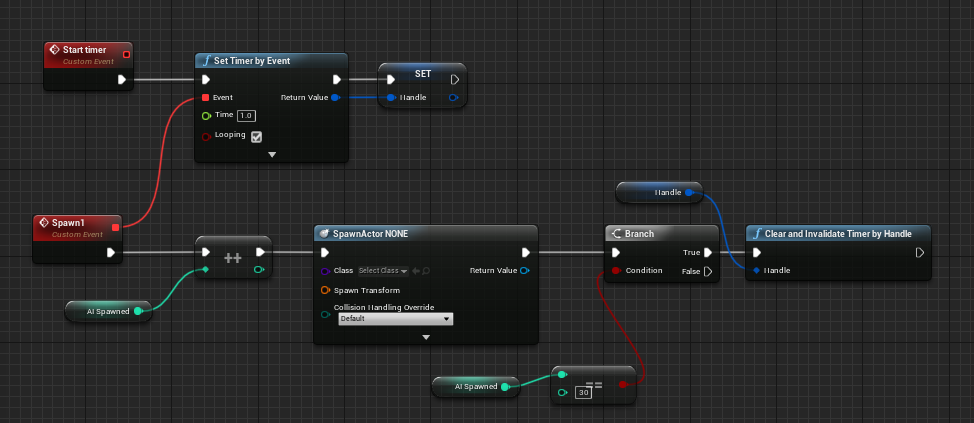
guys im using the loop here, but it make infinty spwans, i want only 30 enemy, how to do that?
restive eagle
increment int on each spawn and when its = 30, stop
dire ingot
how to do that?
lusty lance
ok ty
wanton lotus
@tight prawn That is all I have been able to find with that API. You can only search 100 assets at a time and the queries are very limited. Limited to what the marketplace allows for general use.
restive eagle
make an integer variable, get it and type "++" @dire ingot , that way on each spawn it will add +1 to integer, when you reach 30 then invalidate and clear the timer
wanton lotus
@dire ingot why even use a timer for that? You can just use a regular loop node.
restive eagle
with for loop he would have to make a delay, unless he wants them all be spawned at the same time
restive eagle
he needs a delay between spawns as i understand correctly
 narrow mauve
restive eagle
narrow mauve
restive eagle
this will loop without any delays
narrow mauve
PIEEEEE
narrow mauve
..what?
plush yew
or plain for the stalk and flower head?
narrow mauve
You mean like the actual mesH/
plush yew
yeah like small flowers in a field
wanton lotus
@dire ingot If you want to continue to use the timer, check the looping checkbox.
narrow mauve
depends what you can get away with..do you have the budget for more detailed mesh..also if you just do a flat plane you might have way less polys but youll probably get overdraw from all the translucency
wanton lotus
@dire ingot you use one or the other, not both.
narrow mauve
yeah like small flowers in a field
@plush yew Are you making the foliage meshes yourself
wanton lotus
@dire ingot you are trying to create multiple timers? In that case, you can do that if you want.
restive eagle
 plush yew
@narrow mauve i am
im its all wip but just trying to figure out how things work 😛
grass took me like a week not kidding
narrow mauve
Well foliage can be very tricky to get right..it's a class of its own
plush yew
fucking normals man
narrow mauve
When you do the normals for foliage you'll want them bent in the direction of the leafs
or the lighting will be fucked in ue
narrow mauve
ohhhh okay
yea stylized is so much simpler and free
I mean like when you try to do something realistic ..if it's off even a bit it's EH
wanton lotus
@dire ingot Something like this is what you are looking for.
restive eagle
already showed him the exact same one 😄
wanton lotus
Ah, lol
plush yew
btw having a 3d package, photoshop and unreal AND firefox is not fun haha
at the same time
narrow mauve
What is your spec?
 hidden niche
Would you guys happen to know how to solve an access none coming from the character movement.
restive eagle
but you can use >= as Slashin showed, it wont change anything just a precaution
narrow mauve
access none mean its not working
whatever you're doing
it's trying to find something
and it's getting no valuye
hidden niche
to simplfy things
hidden niche
I'll show you this example
narrow mauve
it still wont work because if its accesses none..it..accesses none
hidden niche
oddly this has worked many times in the past for me seamlessly
but now its pulling an access none and I can't wrap my mind around it
narrow mauve
hmm
hidden niche
alright ill try that
restive eagle
delete walk speed, compile. then add them again and compile
narrow mauve
Speaking of things breaking...widgets are so broken in 4.26 preview
bindings constantly break
restive eagle
dont use widget bindings in general
wanton lotus
Yep, what @restive eagle said. You want everything event driven.
restive eagle
regular actor tick is even better than an UMG bind
restive eagle
its very performance heavy, atleast thats what other people were talking about. i never used them and never will
narrow mauve
Interesting
wanton lotus
The only time I would even consider using UMG binds (I'd still go event driven) is if the widget is shown only when game is paused.
restive eagle
when you bind it means that it will run every frame, if your health for example doesnt change you dont want to keep it updating with the same value, update only when you receive damage, as Slashin said make it event driven
wanton lotus
You should already know exactly when anything changes (since you did program it) and at only those times you run events/functions to make the changes necessary.
narrow mauve
I had noidea that was run on every frame
 loud knoll
@grim ore Why would the engine send data to Epic when packaging? Is it for signing packages? Or crypto?
plush yew
Does anyone know what this is, and how to fix it?
loud knoll
looks like he clicked the create sequence button maybe on streaming level and is trying to access it when he is not in the level where it was created?
plush yew
I have two levels, one is the actually game, one is the main menu, both have sequences, to create the main menu level, I just copied and pasted the main level...
loud knoll
are you spawning anything in the sequence?
plush yew
And then a crash
Not spawning anything, but I am calling upon functions
via event track
loud knoll
well if you copy the sequence did it retain the proper name?
did everything retain the proper name?
plush yew
I deleted all the sequencers in the menu level, problem still persists
loud knoll
you don't need to copy sequences into the level regardless you can access them via blueprints
plush yew
I know, I just copied the level which had sequences in it.
loud knoll
does the level bp haven't reference to the sequences? play events or anything?
does any actor that spawns have an references to the sequences?
I am just guessing
plush yew
It did, but I deleted all them, and still no fix
loud knoll
when you click build on the level you get no errors?
plush yew
Shall, i just backup the other level, delete it, see if it still happens, and then re-build it?
loud knoll
the other level works?
loud knoll
I would delete the broken level and try again by copying parts over in small groups and testing it each time until breaks again then narrow it down
loud knoll
create a fresh level and copy a few things over at a time
plush yew
Will do, thank you
loud knoll
I do cheat in the same way I will copy a level over but then created a "template" of a min spec level that has everything it needs to not break the game, then use that as a starting point then start filling it with content
lusty lance
reee
any reason why the teeth and eyes here are going super dark?
or is it the harsh lighting that causes strong shadowing?
loud knoll
they creating self shadows?
lusty lance
@loud knoll I'm not sure tbh only just started using UE
but wondered if it was a setting that I had enabled
loud knoll
select the model parts and during off create dynamic shadows which will have them cast shadows on themselves
then you can see if that is the issue
do a small test
loud knoll
then if you hit it with lights each tooth might be creating a shadow which might not be what you want
loud knoll
yeah the default is to have it on
also it could missing materials or shaders
it looks like the materials are working and there but you can also do a test where you shine a light at the mouth and see if you can get the light to hit all the teeth
the head is blocking the light if it is the default settings
@lusty lance the light settings will be on the placed actor
loud knoll
is that from painter or unreal?
loud knoll
yeah so you are getting a general purpose lighting which is giving every surface enough light
loud knoll
you just need to play with the lights in unreal more and you will get it to look better and fine
lusty lance
but will try tweak that
hidden niche
Can anyone help me getting an access none on the character movement component.
lusty lance
thank you!
loud knoll
@lusty lance the default settings will give you a (directional Sun) and sky light
loud knoll
yeah much better already
lusty lance
I've never done any lighting or engine work really other than unity, so all new to me
but thank you for the help
loud knoll
put that light inside the skull and turn it red see if you can give his mouth a red glow through the teeth
chain is going through the body around the chest you could make that a physics object and it would look cool
 runic fern
Guys is it possible to use the Showcase map of CityParkEnviromental Pack in a game with few changes ?
lusty lance
ahh good idea, cheers!
 dawn gull
How would I pull off an effect like "The Shadow Man" or "The Thing" in Hello Neighbor?
They look like this, and it's constantly changing. I have seen nothing that would help me with this so far.
 reef jetty
Guys is it possible to use the Showcase map of CityParkEnviromental Pack in a game with few changes ?
@runic fern I believe it is, just keep in mind that they own it and perhaps didn’t approve its use for commercialized games, as opposed to f2p
However I don’t think it’s properly optimized
runic fern
Yes i also sent them a question i will change alot just need to use the block of the map and the Small lakes they have did
plush yew
@gleaming narwhal - An idea for your YouTube weekly: YouTube channel of the week, where you introduce tutorial makers and Unreal focused YouTube channels. There are so many great creators out there whom have dug into the cores of the Engine and put it forth for the rest of us to learn from.
 wild cobalt
Does anyone have a tutorial for setting up animal AI?
 median hound
yep
 strange spire
Where should I go to ask for free asset packs? I'm looking for a dungeon asset pack that's pretty good.
 dense knoll
and idea how to fade out the background? i want to add a horizon like effect
the red line represents what should fog out
 light thunder
What did I do wrong here?
I am using a 1080ti and while I am working with some maps and moving them to setup streaming levels, i've worked with much bigger than this and not had an issue...
plush yew
@loud knoll I deleted the whole other level, and the problem still occurs!
 proud verge
What did I do wrong here?
@light thunder It mean your PC runned out of memmory... maybe your scene is too demanding for your graphic card or... your RAM
or... you had othr stuff working at the same time and it consumed your memory too
dense knoll
that also happens to me
proud verge
so, UE crashed
dense knoll
and sometimes its on a level without anything
light thunder
Yeah, it doesn't seem like it's the actual GPU running out, I think Unreal has a memory leak somewhere
proud verge
I dont think so, in my case I only happens when ram reaches high values, wich means Im running UE, maybe playing in a different window... and running other stuff... or my PC has too many time working on that scene, then UE crashes
Your PC does get tired... dude
light thunder
I want to move this sublevel and position it in an "area level" - what's a good practice for doing it - dragging it manually is cumbersome and leads to problems - the best thing I can come up with is to use a low-detail shader model
mind you, that's like 7k worth of actors in there (static meshes, etc)
when I go to optimize I will obviously build HLOD and even merge actors if I need to
proud verge
----- LOL of course it is going to crash....
light thunder
I've done things like this before - a lot actually
 normal temple
@dense knoll have you tried volumetric fog or something like that?
Or maybe you could draw some sort of effect that is around the player
dense knoll
ill try volumetric fog, i cant do the seccond onebecause that would look odd in a fighter jet
normal temple
Oh yeah haha
light thunder
maybe a blutilty that would add an offset to all selected actors? I'd have to get the difference between the world location of the right click that accesses the blutility menu and the farthest actor away
Am I missing something here? how the heck do I have a level positioned so that someone running through a streaming volume would spawn the level next to that streaming volume? there's no way to do it without first positioning the streaming level to be next to the other level's streaming volume
plush yew
does this grass seem optimized enough?
or is grass like that just terrible to use cause of all the alpha?
looks damn good in unreal tho
 frozen pond
is there any good way of making animations for characters ? No kinect or mocap set ofc.
light thunder
Btw, this is how you MOVE and POSITION streaming levels - really wish someone had told me about this years ago -
I'd love to know more about this though -
I guess it's the level bounds maybe?
 thick herald
Only if you tell us what in Gods name that mess is meant to be doing.
 versed jay
A general question: How does UBT actually find and execute build/target cs files that are used for each part of the engine? I've been scouring the source code and documentation for both the engine and C# but I can't figure out how it actually finds them to compile.
 charred portal
@thick herald it supposed to be a Cel Shader doing something like this
this is simplified
and i wanted to do it more complex but in some way it doesn't work
 quasi star
It was today I found out I know nothing about math. I'm just looking to have an actor bounce off anything it hits whilst keeping it's velocity (pong ball hitting wall or paddle). I found a formula on stack overflow 𝑟=𝑑−2(𝑑⋅𝑛)𝑛 where d is the original velocity and n is the hit normal. I understand the dot product in the brackets but I'm unsure what the 2 and the n either side of the brackets mean, I've no idea what to google to find out more, could anyone point me in the right direction here please
From what I think I read, they are to be multiplied? 2 x dot product * n 🤔
 digital anchor
 shadow ermine
Hey does anyone know if there is a way to stop the cameras from fading out things that are near to it or at least make the distance to the camera that's needed for this smaller?
restive eagle
clip plane?
go to project settings and look for that option, not really sure if thats what you want. @shadow ermine
shadow ermine
Thx I will try it out
quasi star
@digital anchor Wow I did look but i searched for reverse/inverse, thanks for the heads up. That function works perfectly https://s3.eu-west-2.amazonaws.com/hendore.com/videos/bounce.mp4
shadow ermine
@restive eagle works thx
dense knoll
how do i lighten up the shadows?
plush yew
@dense knoll thats very cool i love the navy ship is it navy? idk lol
dense knoll
its a nimitz Aircraft Carrier
light thunder
what's the simplest way to put a wall/fence here that is no longer visible when the sublevel (the dark road that leads off) when that level loaded....is there a OnLevelLoadedEVent?
 shrewd axle
Been out of the loop on UE as of late, is it possible to raytrace with emissives yet? I heard it was potentially coming in 4.26
light thunder
check your particle emitters Rain and see what the color/light settings are on them
 limber mesa
can you use enums to determine if you can play montages, for some reason mines not firing
 idle goblet
I have a question about the cost, I know it costs 5% when your game succeeds, but what if it doesn’t?
 ivory furnace
free
idle goblet
Ok thx
ivory furnace
and the 5% is only after 1mil
 dim narwhal
Hey
median hound
when you use the 3d default character he has arms legs head and you can attach the camera to the head or anything its a socket, if you import a character from blender with a head for a bone will it reconize it auto?
dim narwhal
I wanna make a multiplayer game on unreal engine for android, but i do not know where to start. I know how to make singleplayer games but I just wanna take it to the next level. Can someone point me at the right direction?
 novel rover
How would I check whether I have the publishing or creators license?
 autumn grail
Hello, i change skeletal mesh InGame running but it have no animation however i set the anim class
Please help
idle goblet
So I was trying to install it, but it says epic games launcher is open, but it isn’t, what’s wrong
restive eagle
@autumn grail just tested the same code you have and it works, your new mesh has a different skeleton than the animbp
autumn grail
ok i search
restive eagle
you need to have a different animbp for that mesh because it uses a different skeleton as i explained before
or retarget that mesh to use the same skeleton as your initial mesh
autumn grail
It says there are missing bones , and it ask me if i want to regenerate the skeleton
but the skeleton i use is the same
i dont understand
restive eagle
are you trying to add like an armor piece maybe?
or just changing the whole character mesh
autumn grail
i was trying to add an armor , but i anbandonned that and i try to change the entire skeletal mesh with the armor
i think its not the best way to do it
restive eagle

How do you get swappable, full body, armor to perfectly animate in synch with your characters? The answer is the Master Pose Component. Let's learn about it.
watch this then
autumn grail
thank you
restive eagle
np
autumn grail
@restive eagle When i export my skeletal mesh and import it to blender it does this:
restive eagle
i dont work with blender so cant really help you in this case
 short thunder
anyone have any idea why this would not be identifying the UHealthComponent class in the delegate?
exotic thicket
Pretty sure you have to declare things in order in C++, so it doesn't exist at that point
 weary basalt
Or its just a false positive, compile your code.
short thunder
it does compile
exotic thicket
Sounds like a false then :D
weary basalt
Then its a false positive, or Rider has something else to say about it.
short thunder
having delegate issues though thought this might be it
weary basalt
What does the tooltip actually say about it?
short thunder
Cannot resolve symbol 'UHealthComponent'
exotic thicket
You probably could try using a forward declaration for UHealthComponent above that... But not sure if that'll sort it out
short thunder
ok that fixed it, feels odd putting a forward delegate for the class ur in haha
thanks
median hound
no the value just wont go above 100
weary basalt
If you put the Delegate at the bottom of your Header it will probably also fix it.
Since your Class is being declared below the Delegate currently, its most likely complaining because of that.
Which is why zomg said to Forward Declare it.
short thunder
yeah makes sense
 icy egret
hi someone plz teach me
how to run events to enemies in radius?
not only apply damage, but also stop their logic, make them invisible or something...
median hound
setvisible?
plush yew
How capable is Python scripting in UE4 for game development? And does it use Python 3?
 arctic horizon
Python is only for scripting the editor, not for writing game code.
plush yew
Hmm yeah, I knew it was that way in Unity, but couldn't fully solidify it with UE4.
Thanks for the info. ^^
plush yew
when my player dies I want him to instantly be in a different zone, do I make a new level for that or do i put the zone into every level that i already have?
 gloomy gull
@plush yew it depends on ur preference, is it a single or multiplayer game?
hi someone plz teach me
how to run events to enemies in radius?
not only apply damage, but also stop their logic, make them invisible or something...
@icy egret Destroy()
icy egret
destory...?
plush yew
@gloomy gull single player
gloomy gull
@plush yew same map would be easier since with many maps u would need persistence
destory...?
@icy egret there is a destroy function in ue4 blueprints and cpp
plush yew
so i should teleport my player to a new level?
gloomy gull
No just teleport them to different locations in the same map
It saves a lot of time and work for persistence
plush yew
aight will do thanks
gloomy gull
Np glad I can help :D
 lyric sundial
Hey guys, I'm building a game for Oculus Quest 2 (~ Android), the Megascan decals I placed in the scene don't show up on the device.
I'm getting a lot of warnings like this:
Material: /Game/MSPresets/Decal_MasterMaterial/Decal_MasterMaterial.Decal_MasterMaterial
StaticMesh:/Engine/EditorMeshes/EditorSphere.EditorSphere
LogStaticMesh: Warning: Adjacency information not built for static mesh with a material that requires it. Using default material instead..
However, I'm using DecalActors and the only static mesh of a decal is the engine's default sphere, and I've double checked it has Build Adjacency Buffer ticked. I've checked literally every other static mesh in my scene, all have Build Adjacency Buffer ticked. I've also tried turning on/off Forward Rendering, and I've tried to set the master decal material (from Megascans) to Translucent and DBuffer Translucent Color (+/ Normal), none of which solved the problem.
Anyone else encountered a similar issue?
 lapis plover
I have been having dreams about working on my game.
Happy, happy dreams.
 rare axle
Hey anybody know how I could set up my UE4 project to automatically upload or email a high res shot to someone?
Is that possible via BP or would I need to go into code? If anybody has a plugin that could do that or knows a way, please LMK.
 naive crescent
Hi, I have problem with post on forum, 4 day ago, i post, and i receive message "Admin need approuve your post" and Today nothing... Anyone say how to solve this problem ?
rare axle
Also If the aforementioned is a complicated setup, I'll be interested in comissioning someone for the work, and will likely have many more UE4 work requirements for the viz industry in future if somebody has good knowledge of the engine
 abstract bramble
I need a small but urgent help in 3ds max. Anyone willing to help me in private chat?
plush yew
Can anyone tell my why this is happening or like help me fix it, i turned off cast shadows for the grass but im still getting shadows on the object i dont know how to get rid of it i dont normally do shadow stuff like lighting ect cause its a pain but im not sure if you can see but the grass still has shadows on it even when cast shadow is off is there way of turning off all the shadows on the object? i havent found anything yet that will help me
plush yew
i tried that just turned the material black also tried a few other methods
rare axle
If you set to unlit, connect up diffuse to emissive.
plush yew
ohh ok thanks, i have no idea what i was doing in the material kept playing with the settings instead of that
rare axle
👍
 low vortex
Hey yall so, im trying to make a building system, where the player can adjust the distance the building item is away from the player based on the pitch of the camera, however and the camera pitch value goes negative and im stuck on what to do? The image is what it currently looks like but im stuck as to what to put to make it so the object is only infront of the player and the distance is based on where abouts the camera is looking
rare axle
Wouldn't a line trace work better for this? And you can split the vector into a float and clamp for Min and Max distance values?
Unless I'm misinterpreting what you're trying to do. Just thinking with doing a line trace, then setting the actors location to the hit object/actor location or the surface normal. Would always place it on top of geometry and adjust to your view.
light thunder
so this means what? is there any performance gain if they retain 100%? HLOD question
low vortex
Unless I'm misinterpreting what you're trying to do. Just thinking with doing a line trace, then setting the actors location to the hit object/actor location or the surface normal. Would always place it on top of geometry and adjust to your view.
@rare axle Ill give it a try
 leaden dust
Hello everyone
How do I light a level that is supposed to be a man-made tunnel underground
since there is supposed to be no sun
but the problem is I also require some ambient lighting
so parts of level aren't completely dark
because of shadows
low vortex
@rare axle appreciate it, honestly dont know why i didnt even think of doing that
 supple cove
How do I light a level that is supposed to be a man-made tunnel underground
@leaden dust Be experimental maybe using movable pointlights could do the trick, at least i do my levels like that.
rare axle
@low vortex No problem, hope it helped 🙂
leaden dust
@supple cove yeah sorry I am kinda new to this and quite confused
supple cove
Hey everyone, i need some help with unreal engine crashing alot and i cant fix it. :/
leaden dust
@supple cove aren't are metric ton of pointlights expensive though?
supple cove
@supple cove yeah sorry I am kinda new to this and quite confused
@leaden dust its fine haha dont be sorry
rare axle
If you crash a lot on fresh projects, look to your PC setup. Software/hardware.
supple cove
@supple cove aren't are metric ton of pointlights expensive though?
@leaden dust Dont overdo it but i dont think if you have a decent system it wont be that expensive. But as i said, experimenting with lights is the best way to learn how they work
make a copy of your level and name them like, experiment 1, 2, 3 or sth like that. And use different techniques on each one, compare them based on fps and how they look and voila. After spending some time im sure you will get great results
If you crash a lot on fresh projects, look to your PC setup. Software/hardware.
@rare axle i had a ton of issues with my system and i did a clean installation of windows recently. I still have some problems that i cant fix because i cant find the cause of it but i believe it also affects unreal engine
leaden dust
@supple cove Thanks for the advice mate
supple cove
@supple cove Thanks for the advice mate
@leaden dust If you need any more advices or even support on your level just tag me 🙂 Im inlove with designing a level from 0 to 100
including lighting
leaden dust
@supple cove Sure, I am more on a technical guy
never had any talent in anything that requires creativity or a fine hand
Even in junior school
supple cove
The opposite for me, im never the technical guy when it comes to games. i really cant realate with coding but im inlove with things that require creativity
leaden dust
Aye
supple cove
But also i think being a coder requires some kind of creativity 🙂 They all balance each other
leaden dust
The problem with me is I am left-handed and write with a 890 degree bend of a wrist
90*
not 890
supple cove
oh
leaden dust
I haven't been able to get rid of this habit ever
supple cove
i really hope it is not 890, that could be painful
leaden dust
so it makes it impossible to make straight lines or good circles
or even just good handwriting
Everybody I have met with the same writing posture has a god-forsaken terrible handwriting too
supple cove
haha
my mother is left handed too. and even with both hands her writing still looks better than mine
plush yew
ok finally some good news
leaden dust
left-handed does not make writing bad
plush yew
I got like 80% of all my main assets made for the game environment.
leaden dust
the bend of the wrist does
It also hurts because it makes the hand tire out quickly while writing
supple cove
i ment her rght hand is better than my writing
leaden dust
since you are only using the wrist
supple cove
my writing just is terrible
leaden dust
and not the fingers
My handwriting is pretty bad but not unreadable
it is comprehensible at least
supple cove
I got like 80% of all my main assets made for the game environment.
@plush yew uuu sounds cool, what u working on?
it is comprehensible at least
@leaden dust mine looks like a bug randomly walked around a paper and accidentally painted it
leaden dust
@supple cove I write like that in my native tongue
even I have trouble reading that sometimes
On a side note, any advice on making jumping better for platformers
it seems a bit floaty
I think I am gonna mess with the gravity
supple cove
increasing the mass maybe?
supple cove
Or you can raycast to detect the player's height and make a fake extra gravity effect to make it faster
making them fall faster
newlifestudios.co.uk
@plush yew i'll check it out, good luck on the project
@leaden dust ah and also maybe making the game time faster can help, maybe. Making the time dialation 1.2 wont make the player notice much but still it can make it less floaty
plush yew
@Tumon how long did it take you? i get bored in like 30 mins after making one model
leaden dust
@supple cove nah I am not gonna mess with the dilation
will need to tweak a lotta default values otherwise
Is anyone on that has worked with the 'Jump max hold time' setting?
What have you found the sweet spot to be?
supple cove
Sorry, i dont really remember much. It's been so long since i did some coding and stuff
 thin flume
 unreal comet
Anyone know why when I'm playing coop with my friend on my game (listen server) We both start at 200+ FPS, but later in the game the FPS slowly decreases until about 30min into the game we are both at 30 FPS???
supple cove
you need to explain more about when exactly the framerate is at its highest and when it starts to drop, is your pc similar with your friends pc in terms of performance and hardware?
My packaging faild i dont know what to do? Some one please help me
@thin flume Can you send me the log file it created? I might be able to help with it
leaden dust
@supple cove could you recommend something to make small GIFs (small enough to be sent on discord)
supple cove
from a video?
supple cove
I use obs to record videos and then use giphy to create what i want, i dont really create many gifs so i didnt look for any apps that are easy to use and downloadable
 rich spoke
Anybody know how to reset one animation when another one started playing?
supple cove
Anybody know how to reset one animation when another one started playing?
@rich spoke you mean you want to stop the first animation before playing the second one?
rich spoke
When I'm pressing the fire button fire animation plays and then it goes to idle animation
leaden dust
@rich spoke what else you want to happen
rich spoke
But when I'm pressing fire button again is starts from position where it just paused
leaden dust
@rich spoke ah you are using a anim montage?
rich spoke
No, only Animation Blueprint
leaden dust
@rich spoke try animation montage
that is better suited for fire animations
firing in state machine will cause this
supple cove
can you show it on stream?
rich spoke
firing in state machine will cause this
uh, I don't really need a state machine right now, because there's only two animations and Blend Poses by bool will fit too
leaden dust
how do I make this jumping better?
(Ignore the animation)
animation is bugging, nvm tht
just the jump
also this is double jumping
supple cove
which part do you want to enhance?
leaden dust
the feel
supple cove
The animation or the feeling of it
maybe adding a super small delay to the jump and a more detailed jumping animation can do the trick
leaden dust
@supple cove got it
there is one thing that is not feeling good
and that is the height of the double jump
the second one covers only minimal height
I might need to increase the z velocity for the second one
plush yew
@leaden dust how did you make that shader? ive looked everywhere but couldnt find anything im not a material person sooo, like the outline for the material
leaden dust
@plush yew 1 sec

raywenderlich.com
In this Unreal Engine 4 tutorial, you will learn how to creating toon outlines using inverted meshes and post processing.
this one
extremely simple to follow
and if you want explanation that is there too
plush yew
ok thanks, ive looked everywhere really and couldnt find it
leaden dust
also if the outlines seem to be noisy
you need to change a setting in the material to make them work
rich spoke
 leaden dust
@plush yew for noise fix
change this setting in the material
to 'before tonemapping'
plush yew
ok thanks
rich spoke
There is anim graph
leaden dust
@rich spoke convert animation to montage
and play the montage from the player blueprint
or whatever you are using to fire the gun
right click on the shoot animation
->Create -> Anim Montage
supple cove
Is there anyone who can help me fix the crashes i get from unreal engine? At least identifying the cause would be amazing, this is driving me crazy over time
leaden dust
@supple cove any details?
or just straight crashing from start
so many things cause unreal to crash its kinda absurd
supple cove
I can tell you exactly how and when it happens and i also have a log text of the crash happening.
Are you available to join voice?
leaden dust
@supple cove Not right now
plush yew
could you send the log?
leaden dust
Also chatting with someone knowledgeable would be better serving your time
supple cove
This is the part where it starts to go wrong in the log
I dont need to create a level with high detail
it can just crash on a empty level too
it is too random
happens between 5 to 15 minutes after i launch a project or create one
plush yew
For my pirate game I cannot wait for 4.26 and see the amazing new wave system for water and Gerstner waves.
it could be many things really from maybe your drivers need to be updated, to ue4 might have some problems running it might need to be updated i mean i dont see why it would be a problem not updating it but if its a really old version then you should, or you could always reinstall ue3 and see what happens it might be a bug tho, the list goes on
ue4*
supple cove
this started after a failed windows update. I was able to do so much hardwork on ue4 before
All my drivers are up to date right now
Also ue4 is the latest version available and i did a clean installation of windows
i dont see why this is still happening
i tested the beep out of my pc with benchmarks and stress tests and it didnt fail at all
plush yew
i think you should take your pc to get looked at by where ever you got it from but it also might be your graphics card if its not letting you go into detailed levels or crashing right as you open a level
supple cove
i left the gpu to suffer in a endless benchmark test with 4k, the gpu could barely give 20 30 frames per second and i left it running for 2 days no break
plush yew
hm, it could be alot of things really, you should probably trouble shoot it
leaden dust
@supple cove are you on a laptop by any chance?
leaden dust
@supple cove eh I was looking up similar error logs on google
a few solutions state power saving settings
supple cove
i saw a weird setting on my power settings
it was set to turn off hard drives after 20 minutes
why would it do that
leaden dust
@supple cove also if you can work with it, try switching rendering API to Vulkan
it isn't possible always
but if it is
try it
supple cove
I have a better idea that will probably end up destroying my pc
the issue with ue is probably related to the issues i have with my pc
 wary wave
don't suppose anyone has a smart algorithm for finding the greatest distance between any two points within an array of points?
tried using the MinimumAreaRectangle math function but it doesn't seem to be useable in this case
bah, think I'll just average it and get the distances to the centre point the sum the two greatest values, should be close enough
 shut glen
Pin Players in Game is specified as an array, but does not have a valid array property.
what does that mean/
?
leaden dust
@wary wave what about you find the point farthest from the origin, and then you find the point which is farthest from it
pretty sure that should be the longest line
wary wave
nah, that's not going to work, the two points farthest from one another might not be on opposite sides of the origin
it might be good enough for an approximation though
light thunder
Even though I've retained 100% of triangles, this HLOD should STILL reduce draw calls, RIGHT???!!!
wary wave
possibly
if they all have differing materials, the number of drawcalls may not be reduced that much
light thunder
Is there a way to check?
I keep having crashes when I try to build HLODS
it's become a very tedious and frustrating process and I cannot find any more literature on the subject besides the live streams and the paltry information on the docs
And I thought it worked by combining all the materials into one material?
wary wave
I don't know if there's a way to check specific assets
materials with different shading models can't be merged
hence why 'may' not be reduced that much
light thunder
So this one - has one material after being built -
wary wave
yeah, seems reasonable
light thunder
wary wave
I'd expect the engine tries to group things together based on shading models where appropriate
light thunder
Am I wrong in the way I'm interpreting this?
Because of each one of those is a separate item at the bare minimum that list is like 20 draw calls down to one
wary wave
if it's all merged into a single mesh with a single material, it'll be a dramatic reduction in draw calls, yeah
light thunder
Other than the live stream in the official docs do you know where I can find more information about the system?
wary wave
I'm afraid not
light thunder
I feel like even though they built fortnite using this Tech they don't want us to all know about it or something unless we're big boy developers lol
wary wave
the documents were more than sufficient each time I've used it, but I guess I didn't have the same questions
light thunder
My biggest problem is that it crashes inexplicably I can't just reliably set it to build the proxy meshes overnight every time I do in the morning the computer has crashed
There's no way to somehow get it to manage its memory better I'm using a 1080 TI and my machine has 32 gigs of RAM
Just crashed now when I tried to build about 30 in a row
Should I increase my page file maybe?
It's not the memory that's the problem in this case, when I watch the crash, nothing is maxed out
but I'll do that just in case
the HLOD systems failure is so incomprehensible
leaden dust
@wary wave what is your current solution for the greatest distance between two points problem?
light thunder
@plush yew it crashes EVERY TIME on this particular proxy mesh - WHY?
and why can't I KNOW the reason? where would I find that information - I have plenty of other HLOD's built from those models
 worn peak
how do I keep my sound cue ''playing'' after leave the falloff radius and comeback ?
wary wave
@wary wave what is your current solution for the greatest distance between two points problem?
changed tac slightly and am just using greatest distance from the average location of all points, which gives me a cheap & decent approximation for what I need
I only need a radius that neatly encompasses a set of points, so doing it the cheapest / easiest way isn't really a problem - just makes it harder to offset it to give it a bit of randomisation
light thunder
@plush yew What should I search for in the minidump?
leaden dust
@wary wave does that even give a good approximation?
light thunder
[2020.11.09-12.19.42:174][855]LogTexture: Display: Building textures: T_Scenario4_0_HLOD_0_SM_Outer_Wall_Column_23_Diffuse (BGRA8, 1024X1024)
[2020.11.09-12.19.42:234][855]LogTexture: Display: Building textures: T_Scenario4_0_HLOD_0_SM_Outer_Wall_Column_23_Normal (BGRA8, 1024X1024)
[2020.11.09-12.19.42:759][855]LogStaticMesh: Building static mesh Scenario4_0_HLOD_0_SM_Outer_Wall_Column_23...
[2020.11.09-12.19.42:759][855]LogOutputDevice: Warning:
``` hmmm@wary wave does that even give a good approximation?
@leaden dust for a radius that covers all the points it's guaranteed, it's just larger than it necessarily needs to be
leaden dust
ah ok
wary wave
it was obviously going to be solved, just didn't know what to call it when looking for a solution
such is life, but that has certainly helped the google search 😂
UE4 has a 'smallest rectangle' math node, but it didn't seem to actually output what I expected
 merry canopy
Hey, can I change the RMB in the mat editor to search for something, to TAB? Or is there a preset to set keybindings to Houdini? I could find lots of other key settings, but not the Material RMB.
light thunder
    check(Height <= MAX_uint16);```
```Unhandled exception at 0x00007FFB995368E0 (UE4Editor-MeshUtilitiesCommon.dll) in UE4Editor.exe: 0xC0000005: Access violation reading location 0xFFFFFFFFFFFFFFC8. occurred```

That seems to be it @plush yew lusty carbon
 smoky sonnet
hey does anyone know some tutorials for a pc build simulator? [vr]
leaden dust
@smoky sonnet I don't think there are tutorials for a full game
try to look it up concept by concept
rare axle
Because it got buried before, I'll shout here again. Not sure how to use the job channel/bot; still looking for some more experienced UE4 devs / programmers for some commission work. DM me if interested.
 thorny perch
is there a setting in UE4 editor to make the vr-preview window exand to fill the monitor?
so I can record in editor and then the vr-preview fullscreen
plush yew
guys im getting a error
@thorny perch vr games should be full screen when you press play... idk
it says no compiler was found
install visual studio 2013
@plush yew send a pic of the error plz
plush yew
Umm
i had the same problem 3 months ago i havent touched it since then
You have a C++ code in your project but you don’t have visual studio
Installing visual studio should fix it @plush yew
Installing visual studio should fix it @plush yew
@plush yew bruh? i have latest viisual studio with unreal engine c++ support installed
Are you sure that version is supported?
yes
its 2019
it also has unreal support
ah
Ummm
I’ve never had this problem... I think it’s impossible that the 2019 version doesn’t work and the 2013 version work... idk you could try installing that
Idk
shut glen
how can i open the graph?
plush yew
@wild kestrel any help?
me?
no?
its the 4. something version
its that i dunno what comes after 4.
 honest vale
why 4.0.2? O_o
wary wave
4.0.2, whut
honest vale
that was released like.... six years ago
wary wave
4.0.2 is from 2014
shut glen
why not upgrade to 4.25 or 4.24
plush yew
how do i updatet engine
shut glen
just wait for 5.0
wary wave
literally pick the new version from the launcher
shut glen
or 4.26
wary wave
yeah, 4.25 will do just fine
shut glen
4.25 gang
wary wave
(and won't be an unstable, buggy version of the engine from six years ago, lol)
wary wave
yup
shut glen
yes
plush yew
ok
plush yew
i use vs 2019
shut glen
Can you help me open the event graph? cause i dont know how?
honest vale
@plush yew you need an older VS if you want to use UE 4.0.2
plush yew
4.25 is 11 gb
my internet speed is bad
im using unity from 2 years
wanted to try out unreal
honest vale
listen here you whippersnapper
honest vale
in 2000's I downloaded a UT 99 mod that was like 40 MB and it took me six hours
plush yew
2 mb/s
honest vale
56k modem ftw
I don't remember the actual time
I just remember I let it DL over night
plush yew
my father wont let me turn on my pc for the whole night
im just 16
its 6:22 PM right now
i have a holiday tomoirrow
il be up for like 6 hours more
5 actually
8 on mobile
my pc will be on till 11 pm
and i will stay awake till 1
 warm hornet
How do you guys handle memory management in the editor? When I enter Play my landscape disappears! (And yes I checked to make sure it is visible in game mode)
leaden dust
How do I make a camera for a side scroller that is fixed in one place that it shows the whole level
I want the camera in the pawn class
but the camera keeps following the pawn root
 ember quest
anyone know how to remove this weird outline around object that's in front of surface with DBuffer decal?
dense knoll
SHAder issue?
ember quest
any idea what I can do about it?
ember quest
yeah, on the floor behind this item there are decals, I changed decals to DBuffer translucent
but I remember using dbuffer decals before many times without issues like that
plush yew
idk
 arctic compass
Can you have multiple StaticMeshComponents for an actor? The engine started crashing when I tried to add a second one, so either code or assumption is wrong.
Ah! yup! I tried to give both components the same name
smoky sonnet
hey i have 3 seperate meshes one is my mainboard, 1 is the handle at the cpu and the third one is the cover ( dont know the real names), my question is if someone knows what the best method would be to create the animation if you move the handle so you can put in the cpu? should i just work with the method that if you click on the handle the rotation just changes and so on or is there a better method/option?
plush yew
wassup
 wind gate
Well, I build the lighting and this monstrosity of brightness came up! What happened?? How do I start to figure out. The sun is only at 5.0 and I tried removed almost all light sources and building again but nothing changed! What else could it be? Help pls? 😬
 cursive estuary

In this game art episode I go over how to use the world position offset to make a mesh animate a rotation that is efficient and optimised. I also show how to combine this with vertex colours to isolate sections of a mesh.
Support me on Patreon and get access to videos early, ...
U can use this instead
@smoky sonnet
 earnest violet
hello
I just bought a top down space shooter pack similar to space invaders but it won't move. I have packaged it for android and am using vitual joysticks. My question is what's the input I have to use for movement in axis mode for android plz?
meager frigate
is there an option that makes the rotation of these constraints matter? on the UE4 mannequin it seems to affect where the calf is able to bend to, but on my homemade dude, I feel like i have it set up exactly the same way but my rotation doesn't affect it.
my knees keep buckling inward and the 65degrees is straight down so it can bend a little to the back and a little forward. On the UE4 mannequin the calf only bends to the rear and if I rotate the constraint i can make it bend forward and backwards just like my character, but if i rotate the constraint on my character no matter what it acts like its straight down and bends 32 forward and 32 backwards
 gilded plinth
@meager frigate sorry it's been a while since i been in the physics asset, so forgive if i'm misspeaking, but there are two visuals that appear to be constraints and it's possible you are only limiting the range of one. There's some non obvious hotkey (maybe control) that you hold while rotating to add another kind of limitation
i know some tutorials on youtube floating around cover this
earnest violet
Can anyone help I losin' my mind
how do I set android controls?
I bought a top down shooter and I can't control with virtual sticks! =/
Anyone?
grim ore
did it come with any documentation?
if not did you enable the touch controls in the input settings in project settings
earnest violet
I don't think so m8
How do I enable touch controls
Sorry if this seems baic
basic
Can't I just set up input controls for android?
 zinc shore
Is there a way to se a minimal window size
earnest violet
What r the input I would use to move left right, up and down using vitual sticks
grim ore
it depends on how this shooter is created. it came without any documentation?
it seems weird the sample map would not be working unless it was not designed to support mobile
earnest violet
I got itmoving left and right now but not forward and backwards. All Ineed to know is what the inputs r that I select to use virtual sticks? THX! 🙂
I had to turn off "Fly with mouse"
grim ore
what do you mean "what the inputs are" ?
earnest violet
You know, which ones to select for mobile under Input in project settings 🙂
grim ore
nope
earnest violet
????
grim ore
no I dont know or understand.
are your virtual joysticks working right now? are they showing on the screen
earnest violet
ok
earnest violet
That's what I'm asking friend. I got the virtual joysticks working well the left one but I don't know what input I select to move forward or backwards using virtual sticks you know like "W" for keyboard but I need to know which one is applicable for virtual joysticks. Is it simply gamepad?
Above is my current input config
earnest violet
Where is it located plz m8? the touch controls interface. What's in the secod pic how do i get there m8?
I know basic but t I am still learning
plush yew
go to details
earnest violet
ok
plush yew
then touch interface
grim ore
its in the screenshot you sent under mobile
earnest violet
I must be the stoopidest fuck on the planet I can't find it
grim ore
go to your input settings which you show in that screenshot
go to the mobile section which you can see at the bottom of that screenshot
there might be a drop down arrow for more content but that default touch interface is there. that is the object that holds the touch controls
earnest violet
Yeah there fine but when I come to set the forwarward and back movement what is the gamepad control I need You know like left stck x axis or sumthing
Thx
 quick kelp
hey might be a stupid question, but can anyone tell me how to use this function in C++:
Parse
(
const FString & AddressString,
FIPv4Address & OutAddress
)
found it in documentation and im a bit new to UE4 c++
its supposed to convert a string to an IPV4 address
so if i have FString& X , should i do X.parse() to use the function?
plush yew
What are you trying to do?
quick kelp
i have a FString variable, i want it to convert to FIPv4Address then store it in an FIPv4Address variable
there is already a function for that inside UE4 but i dont know how to use the syntax for it
Converts a string to an IPv4 address.
earnest violet
I tried to setup just one left virtual stick and it does not show up?
in game
I don't know y I bother anymore
The engine just givesme the runaround =/
How do I set up just one virtual joystick?
grim ore
change the image and the inputs to nothing on the 2nd joystick in the touch interface object
earnest violet
ok thx
 wild kestrel
@plush yew sry for late reply help with what?
plush yew
@plush yew sry for late reply help with what?
@wild kestrel fixed already
grim ore
@earnest violet depending on what stick you want you can also use the included left joystick only asset
 unborn wolf
Hey there everyone, I don't know what other channels this would go in, but is there a quick way to randomly spawn static meshes on another mesh that is limited by a material? Could this be done with Niagra particles? This would be a lot like what we can already do with grass or painting meshes on a landscape, but with a pre-determined count of meshes.
earnest violet
Got it workin' now thx a million
median hound
a pawn is a character 2 right
median hound
so if i ignore pawn collision it ignores characters and pawns
cursive estuary
Yes
tight prawn
anyone knows where the UE4Editor icon resides ?
 meager frigate
@gilded plinth marco helped me! It was alt! Thank you for your time!
It works beautiful now!
meager frigate
Yes! I looked everywhere for options. I think ive been using unreal enough to know there was a way to do it but the only hint seems to be some small text in the very bottom left. I was looking for options to turn on some kind of visualization for the the rotation that mattered if there was one but i dont think it exists. You have to use the snap option to make sure its at the original rotation before you hold alt too or itl still be wrong i think.
I kept going back to it over probably a month trying different stuff lol. I dont think i can forget it
gilded plinth
nice, i remember staring at the mannequin physics asset for a long time and i eventually did get my behavior to be identical
meager frigate
I kept putting it off because i knew it wasnt too important but i have my character set up to make a bone cracking sound and ragdoll if he hits the ground too hard and pretty much everytime i test something i end my test by jumping off something cause its hilarious. I probably waste a lot of time though :/ worth it
Looks good!! I might post one in a little to show off mine
grim ore
no
grim ore
technically it's possible but it's not practical
plush yew
exactly
restive eagle

I've created a small code editor node where we can write code in it, compile, then the node will "morph" into the functions written inside itself.
Nothing serious, I did this just for fun, Visual Studio will always be better :)
But it's interesting sometimes to just write a ...
saw this some time ago
there should be a plugin on the marketplace for that
 remote mist
Why is this happening? It shows green but then I go to click and drag it in and it turns grey
 kindred dagger
had a quick question for someone who knows... its been a while since i used unreal and I forgot how to fix this, but my mesh shows up even in total dark. something with the lightmap ?? I used to know this lol https://gyazo.com/2cece42873b5c6c7f367b4c3c7467deb

 grim ore
@remote mist what are you trying to do, that screenshot doesnt have much context
kindred dagger
@remote mist a lot of times when you import a static mesh it doesnt tie the material to the mesh
@grim ore his foliage mesh is coming up grey after pulling it from the browser. preview is green
remote mist
Trying to drag a tree into the Foliage panel so that I can paint some trees into the landscape
It's green when imported
kindred dagger
open the static mesh itself and make sure its got a material
 rugged heron
Hey everyone! If I'm using PoolSizeVRAMPercentage, why would I use PoolSize? And what happens if I also set it?
kindred dagger
@rugged heron I believe thats the texture pool memory %
like how much RAM is allocated to streaming the texture pool?
remote mist
This is what I got when I open the mesh
kindred dagger
top right, see the two grey spheres
its supposed to be composed of two different materials
probably the leaves and the bark
you're missing those 2 in those slots
remote mist
Even changing that the material still turns out grey. Maybe this Asset library is outdated..
rugged heron
@kindred dagger yeah but it seems that PoolSize controls the absolute value and PoolSizeVRAMPercentage controls the value dynamically and relative to the total VRAM available
so I'm wondering what happens when you set both
kindred dagger
I would assume one would take priority