#ue4-general
1 messages · Page 867 of 1
 nova spruce
 radiant fable
cheers guys, most likely solution would be real world heightmaps, but a tidy and smart and accurate way to get a square, then move exactly onto the next 100km square f ex
 dense gate
I still don't know if you want to make it procedural or not
 median hound
im trying to show health for a object to be on my screen like barricade
what would be my objectg?
radiant fable
sorry i meant world composition instead of levels
dense gate
Ah
 neat galleon
This may seem silly but after 6+ years of using ue4 and BP script I am just now realizing how good macros are 🤦♂️
nova spruce
@median hound I believe you'd want to create a blueprint widget to display that
median hound
ya thats a bp widget
nova spruce
@radiant fable how much experience do you have with landscapes in general?

 radiant fable
i've made a few, world composition is new to me
 sterile tulip
Wth are macros
 storm venture
hey so my particle effects are running at realtime during a sequence recording, despite the sequencer rendering at about 1 frame per second, so in essence, my particles are jumping 1 second at a time, what gives?
 spice canopy
@plush yew Did you ever figure out how to zipalign or if you need to?
median hound
do i make these cubes roam at the last location they seen me in? https://streamable.com/c0wt9k they get stuck and wont get me'

nvm the problem is they keep colliding with eachother
 frail coyote
Hey guys, I know that I am probably just missing something small but, I am using the side scroller template, just messing around, but I swapped out the default mani with the Gothic knight from the free download this month, but I can't seem to get it to take the animations
 plush yew
New Radeon cards are going to support ray tracing or not in unreal?
 dark depot
@plush yew they support DXR and that is what unreal looks for as it is made to be platform indipendent so yes it should work as long as drivers are setup correctly
radiant fable
thanks all, i found this which was the best to get me started
https://youtu.be/hzrwu_HHZcI

This video was voted for by my Patrons and youtube Members. If you want to cast your vote in the next poll, sign up to be a Patron at Patreon.com/ryanlaley
In this video we go through the world composition tool and why you would use it, and how.
Support me on Patreon and get...
radiant fable
last time i had to convert to wav
median hound
when i added a file like wav can i delete it like the download? can i delete a file if its in the game or is it like after effects it still has to be on the system while making
 gloomy gull
WOW @median hound how’d you make those cubes so cute 😆
does unreal take in mp3?
@median hound it only takes wav and ogg as of 4.25 I believe
when i added a file like wav can i delete it like the download? can i delete a file if its in the game or is it like after effects it still has to be on the system while making
@median hound It depends on how u imported the asset
As long as what u delete isn’t in the project file everything should work fine
 plush yew
Blender and Unreal Engine 4 keep playing with me.
I recently made this in Blender
collision problems
It won't let me ho to certain places
go
 wild cobalt
thought I might post this here, and not looking for talent because I am not needing someone experienced. I am looking to see if anyone wants to partner on a hobby/learning rpg project. I would do most of the programming stuff which I am intermediate at(2 years of UE4 experience on and off. All together about 1.5 years of actually using it). So ideally I would like to team up with someone looking to practice/learn modeling and animating while I do the programming. If they want they can do whatever programming too but they do not need too.
Reason I am looking for this is learning to model and create animations is a beast of its on so I figured it could be good to partner with an artist that wants to do modeling and they can have someone to implement the programming part.
plush yew
@wild cobalt As in everything from character design to architecture modeling? I think I may be interested.
wild cobalt
@plush yew Awesome! DM me and we can chat more
and yes I mean an interest in character design is a must, wanting to model architecture is preferable but I have a lot of environtment assets we could use for levels if you didnt want to model archetecture.
 robust spoke
Hiho, I'm looking for a way to create a single multiplayer RPG in Unreal without having to buy any complete packages. So far, I'm a modder, so I'm new to this area.
What do I have to look out for to begin?
How do I create a kind of PrimalGameData in which character, NPC, item and structure information are given?
It would be perfect to have an experienced developer here who can help me with the first steps with tips. Preferably in German ^^
 atomic hull
how do I register a source build or installed build to the epic launcher ?
I want to download a plugin from marketplace but It needs a installed engine. damn just couldn't they let us downlead 😦
 oblique tangle
Might be a dumb question, but would changing a cubemap interior to a static texture/colour at a distance improve performance? Or would it be the same, since it's essentially the same amount of draw calls, if not more draw calls as it's another texture being called
Are cubemap interiors expensive on performance or equally the same as a reflective material?
 surreal steppe
Hello, which UE4.25(source) version that has stable GPULightmass inside?
 ember fiber
@robust spoke thats a fairly complecated question. There are many ways to approach an RPG project. You could take a look at the Action RPG example project. There are also tutorials about that one explaining a lot.
You would not use a singular data structure for everything. UE is not really data driven. You would instead use objects, in many cases actors. You can still use data structures. But usualy aitem ends up being an object, which not only represents data but also contains logic.
Now in a RPG it can get very complex how everything works together, so your question cant really be answered shortly.
But if you are interessted to join a project in progress and learn that way. We are always looking for talent to join. Its a top down ARPG, we are working on.
 spare sun
isnt gpulightmass part of 4.26
 glad siren
Hi, I’m trying to make a time-traveling something. It’s mostly architecture based (historical city reconstructions) I would like to dissolve the buildings and let them reappear in a different time version.. any suggestions on tackling this?
 vagrant nexus
So, trying to launch my game demo, and I keep running into a missing binary issue. Help?
 woven bronze
Whats the best way to have consistent skill shot pathing? Currently I set pawn actor rotation and fire a skill shot projectile in a straight line on the forward vector of pawn. However because of natural lag, the perceived angle is different on the client vs server causing my local predicted skillshot to be way off the server skillshot. MOBA skillshot btw
 regal mulch
Guess that is similar to normal movement. You simulate on the client and tell the Server where you wanted to fire at.
Server will check if Client Rotation is within threshold and perfom the ability with their data.
Otherwise Server corrects client or what not.
 untold swallow
hey can anyone help me with lighting in my game?
 lucid grove
Heya, is there a way no put navmesh with some sort of spline tool?
I want to place modifier on roads so AI use them, but with standart tool its pain in the ass 🙂
plush yew
@lucid grove i use way point lol not spline so they can walk where we command him and after all patrol he cameback again
lucid grove
There is a several ways i found to make AI in combat use all NavMesh and in walking - get back to roads. With navmesh modifier.
plush yew
its patrol system and waypoint and if he see the player/us he will start to shooting
lucid grove
And yeah waypoints\splines system
lucid grove
navmesh modifers tell AI expensiveness of certain landscapes and force them to find other route
plush yew
ohhh
lucid grove
Like forest is bad, roads are good. In combat they have to move to target, but in just walking - use roads
Problem is - modifiers can be placed as simple box collisions which is time expensive
plush yew
hahaah yes
 honest vale
you could do a separate navigation system for that
plush yew
thats waste so many time putting my waypoint for the enemy lol
lucid grove
you could do a separate navigation system for that
@honest vale basic navmesh doesn't have any options to make it simpler.
plush yew
i wish i have waypoint splines lol
lucid grove
Probably waypoints is the only way do it
Use whole navmesh for whole navigation and WP splines for walking movement
Shit
plush yew
yeah
lucid grove
Every few weeks when i think i know all the basics i need for now something new appears
 dire coral
so im playing around in the ue4 2.26 prev5 and i cant get the water bodys to effect the terrain any fix??
i got it to work, just needed to enable layers in the landscape. don't know why it doesn't just come standard with that
 hearty walrus
how do I light up this scene? It's a debug map, and using a skylight + BP_Sky_Sphere.
there's also an unbound post processing volume, set to 2 on min and max exposure
plush yew
@hearty walrus use directional light
 zinc shore
how can i add right click functionality to a button i looked on the forums and the reason UE didn't add it was because its a bad UX design but that makes no since because every desktop OS has right click on there button even discord but anyway how would i be able to detect if a button is right clicked
 honest arch
hi all, noob here. i have these lines and not sure how to get rid of it. I already googled and followed the instructions to change the lightings from static to movable but it didn't work 😦 anyone can help?
 thick herald
Looks like artefacts from the texture as it tiles. You'll probably want to look up how to remove tiling, UE recently got a new node to do that so it shouldn't be hard.
honest arch
@thick herald i'll look into it 🙂 thanks a bunch!
plush yew
@honest arch are you using quixel ?
honest arch
@honest arch are you using quixel ?
@plush yew yes I am
plush yew
there settings called tile you might wanna check taht
my maps is not tiled
but before you imprt your texture you need to enabled displacement in megascans icon in ue4
and can someone help im trying to make the sky more blue in BP sky pls
plush yew
Any tips to reduce foot sliding?
Playing around with maxwalkspeed and blendspace numbers dont seem to work
zinc shore
you would probably want to look into you animation BP and if you really don't want foot sliding then look into using root motion
 proper moat
hello guys, i need help on making a git that is actually working
 winged crypt
This is weird stuff .. same view both sides, on the left is during Play, the right is not. I'm able to walk through this area, even though there's a collider there with correct collision settings.
What's going on? Why would the box disappear on Play?
When I hit Stop, the box doesn't come back into view. I have to toggle the "Player Collision" view off and back on to see it re-appear. 🤔
I'm not simulating physics on it or anything
 supple totem
theres an editor only property for actors, maybe that is checked?
winged crypt
got it -- I was using "navmesh walking" for the player, and had tweaked the navmesh volume settings a while ago
that cube was set to not affect navmesh
 verbal citrus
Is there a way to resize a multiple actors at once other than dragging the gizmo? I want to rescale all of them in uniform but have them keep their relative positions
relative to eachother, that is
 kind dew
When I'm packaging my game for non-desktop platforms (android, ios, etc) , i get Unresolved symbols errors for the steam module. How can I completely just ignore Steamworks or the entire OnlineSubsystemSteam if I'm not on a desktop platform?
 spare steeple
does this mean that if i purchase marketplace assets like meshes or materials, that i am allowed to distribute them in uasset form within a user level editor for my game?
plush yew
Hello guys I have problem with the placing a building system
I follow this tutorial: https://www.youtube.com/watch?v=Gfd6-OJNX4I

Fix for pending kill error and placing building at 0,0,0.
https://www.youtube.com/watch?v=JnqG_zR0NRM
A simple way to place building RTS style. You can use this as a foundation to build the more complicated one that involves money and building timer. I recommend watching the ...
and when I place an object it doesn't show collusion
this is for the buttons
this is in the bp actor
 maiden sundial
Can anyone tell me the name of the company which epic bought ?
Like the one which has tons of assets which are free to use now
maiden sundial
It was quixel, thanks ^^
 covert hedge
Oh thats why they are free ? 
 teal pebble
Hi. What would be the best practice for creating modular objects? Like customizable weapons or vehicles? So the player could choose a base item and then add components on top of that. Like choose a tank, then select a turret, then select the cannon. All of these components would have their own meshes, functions and animations. I'm new to game development, so I'd appreciate a detailed explanation.
 frozen pond
hi, i want to slide down my character when its standing on some angle, but only when theres no movemen input, any idea how?
covert hedge
#work-in-progress
plush yew
Thank you
plush yew
If I spawn two seperate widgets, are they spawned one on top of the other?
Or do they overlay eachother?
 abstract plank
@teal pebble for modular things you should heavily consider everything you want to significantly change, details such as engraving and things like that can be handled through textures and stuff without needing modular assets, however changing the physical dimensions of the item would require either scaling, great rigging/animation, or modular assets.
I don't think there's ever any one solid practice for exactly where to make them modular or how to break them apart, you need to determine that through your project goals and needs and list it in your GDD
For example, say you want a modular character system, base character meshes but you want them modifiable, such as adding or removing a prosthetic arm, if you have 2 types of prosthetic arm, one from shoulder down and one from elbow down, would it make more sense to have it broken into 3 spots, chest to shoulder, shoulder to elbow, and elbow down? Or would it make more sense to just break it at the shoulder and design the prosthetic that stops at the elbow to include a normal looking upper arm up to the shoulder?
plush yew
Hey everyone, how do you import materials as well from Blender to Unreal?
abstract plank
-.-
@plush yew if you are entirely new and completely starting out, I highly recommend following basic starter tutorials first. Regardless of what your focus or role in the industry is, you should learn how to at least navigate and use your software. As well as its limitations.

Unreal Engine tutorial for beginners! In this free tutorial we will go over everything you need to know to get started in Unreal Engine 4. You will learn how to install Unreal Engine, navigate the 3D viewport, create materials and worlds, sculpt landscapes, paint foliage, prog...
plush yew
Hey everyone, how do you import materials as well from Blender to Unreal?
@plush yew or simply put: you can't unfortunately.
plush yew
I use Brave, gave up on google : )
Thank you tho.
Giving me a headache.
It's supposed to look like this.
 whole quarry
@plush yew materoals from blender dont convert well to ue4
You have to remake them in ue4 manually
Also, they both have different render engines, the results will vary between the 2
plush yew
I tried, but when I applied it, the materials made a mess on the wall.
whole quarry
And it helps to build lightinf in ue4 when using static lights
If shadows are being funky, create lightmaps with higher resolution
 harsh tiger
i have a very bizarre issue with a particle system. it won't loop unless it's near 0, 0, 0 in the world. i've looked into it and seen someone mention the bounds in the particle system. but even setting it to 1,000,000 on the x, y, z doesn't fix it. does anyone happen to have any ideas?
it will play once and then disappear rather than looping
covert hedge
harsh tiger
i fixed it! the LOD value was set to 4000 so i increased it and it fixed it
 stable orbit
@covert hedge Thanks somehow I missed it
covert hedge

 ornate forge
Haven't encountered these issues before, weird
The mesh itself is really simple, just a slightly modified cylinder
What could even cause any issues there
 quick kelp
can anyone guide me to the best place to look if i want to make a server model similar to clash of clans type of server model? everything i search about unreal multiplayer shows me session based server model, i want one where all players have their own levels but communicate with a server to provide them with information and perform calculations.
thick herald
Haven't encountered these issues before, weird
@ornate forge Been seeing those a lot recently myself. With 4.24
 dire sentinel
https://cdn.discordapp.com/attachments/660585049896386604/772189034737958922/unknown.png
anyone know how I should be going arround fixing these seams in unreal engine? vertex paint where they meet and use that to blend it in some way or something?
 kind dew
if my game is using steamworks, how do I tell the game not to package with steamworks when I am packaging for mobile? When i try to package for mobile I get undefined symbol errors
 hot canopy
@ornate forge I think what you want is some fog
Like this
@dire sentinel If the roots are always at the same position in regards to the trunk you shouldn't use vertex color, but rather fix it in you 3d package of choice
In the modeling phase or using some UV trick
thick herald
perhaps distance blending or use virtual textures with similar technique.
 pastel geyser
where is better include libraries in .h or in .cpp?
covert hedge
includes usually go in headers
plush yew
when will .26 come?
frozen pond
looking for help in stuff that i can't find on google/yt -> i want my character do ride on pipes (pipes made on spline)
can't find any idea how to do that
not in how-to way but more like concept of this
covert hedge
uh?.
thick herald
check if the character is on the spline and just use the spline for the location.
frozen pond
yeah but there are at least 2 problems:
- Direction of move -> character is floating in air
- Falling -> character is still falling what causes animations bugs (and other mechanics)
plush yew
Does anyone know how to make the shootergame template to blueprint instead of c++?
frozen pond
@plush yew do c++, you can still code in blueprint
plush yew
Oh I thought it was only one strictly, thanks!
frozen pond
@plush yew allways do c++, many plugins need c++ to work, still are usable in blueprints

Unreal Engine
This plugin provides you with blueprints that add general functionality and improvements.
plush yew
Ok, I’ll learn a little bit of c++ just in case I need it
pastel geyser
What i need for beginning of c++ for UE4 i means can some1 suggest someome steps so i can follow them/ i will appreciate it
 low bobcat
@pastel geyser Free resources or..? Do you have experience with C++ ?
 still moat
I pretty much just went into it, at first it was a bit of a pain but over time I managed.
Generic C++ tutorials won't be of much use in my experience, maybe here and there. IMO the challenge is just learning the syntax and all the things unreal offers that you can use.
So I would recommend watching youtube videos and just get a feel for it. The Ue4 c++ documentation imo isn't really that great so not much of help.
pastel geyser
I know C# and im learning c++ rn
 grim ore
there are free tutorials linked in the pinned message in this channel, there is also some c++ stuff on the youtube channel
pastel geyser
yep but i need some plan what i should do at each level of my progress
like separate c++ for UE4 to parts and cansome1 tell few basic parts
dire sentinel
@hot canopy the trunk is a photoscan so i cant change the geometry or uv map of it much
it will still have a seam
grim ore
the plan is whatever you want, everyone learns differently. Break down your project into goals and do that. What more do you need?
if you NEED some sort of teaching then look at the udemy ue4 C++ course its structured
low bobcat
yeah udemy is good idea , they have often price reduction , to 10$ .. 11$
plush yew
Does anyone know how to make a lobby (like Fortnite, Apex Legends, pubg, etc.)? It will be for my steam game I am making
or is there any tutorial?
ornate forge
@plush yew Maybe this will help you: https://partner.steamgames.com/doc/features/multiplayer/matchmaking
An overview of Online Subsystem Steam, including how to set up your project for distribution on Valve's Steam platform.
 lethal bison
I have a general question with level streaming. What advantage would level streaming have in performance if occlusion culling already culls meshes (assuming there are no actors or ticking components in the level)
grim ore
it would give you complete control instead of automated control, but looking at it from just culling its going to be similar performance. Having nothing loaded is better than something tho if you look at it that way. also level streaming has the advantage of allowing multiple people to work in an area at once (atleast until one file per actor is live)
 dawn bloom
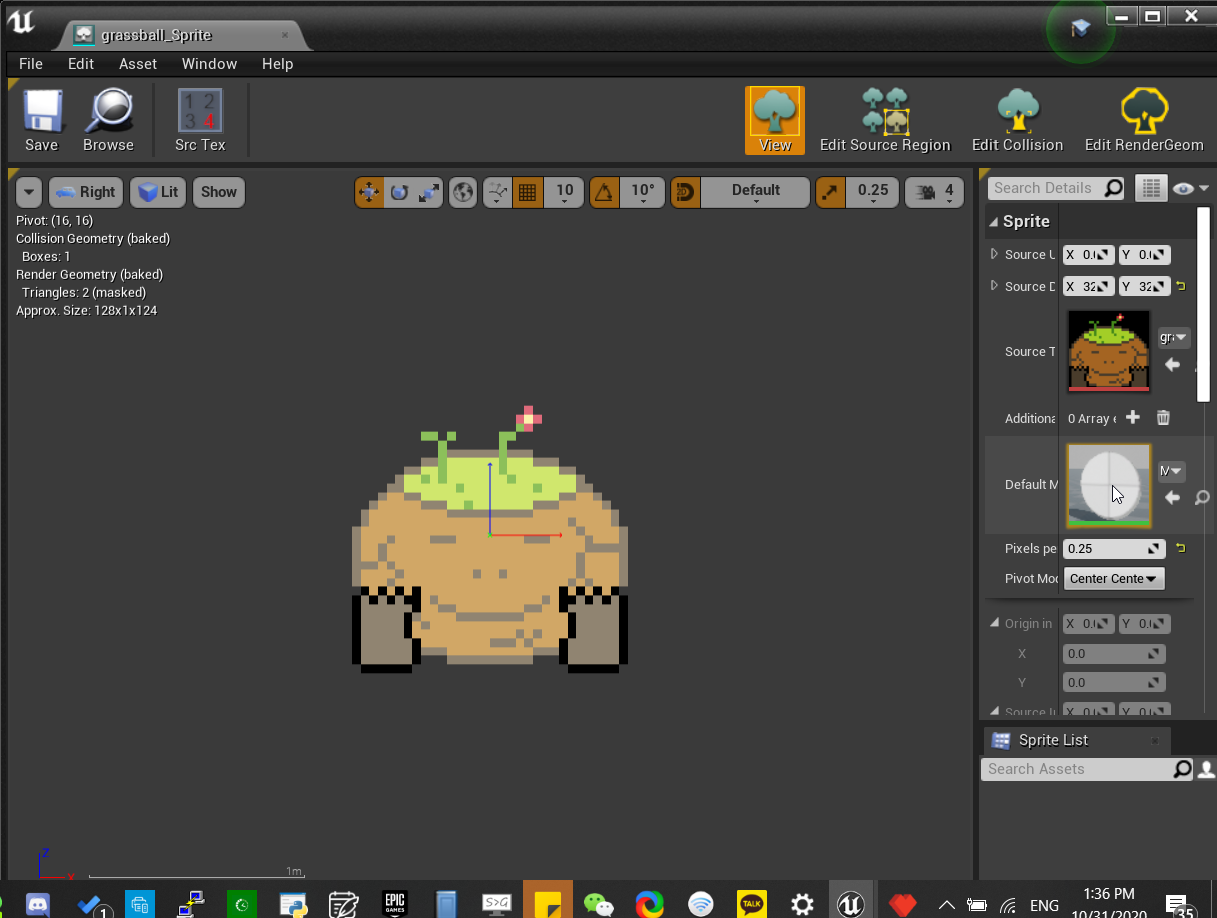
im going nuts
like my sprites keep on changing color when converted from image to sprite
like you can see this is really light compared to what the actual image is
plush yew
Question: What is the diference between GameState and GameStateBase?
And if I use one GamemodeBase for one level, then another GameModeBase for another level, are they still use the same GateState/GameStateBase?
grim ore
game mode/ game state was the original vesions of the classes when UE4 first came out, at some point they made "base" versions of them that removed alot of the FPS specific stuff so you have more of a generic version now
each level has a unique instance of the game mode or state class if that is what you are asking
plush yew
So here's a scenario, let's say there's a lobby and the lobby decides which player is on which team. And that information is stored in the game state.
Is that information lost when the players travel from lobby to the level map?
 idle needle
Hi everyone, does someone know any good survival animations pack? Searching one for a while but can't find a good one.
 twilit pagoda
Can i disable Message Log window from showing up everytime i end play in editor ?
grim ore
@dawn bloom go into your texture itself, the one you imported not the sprite, and look at the sRGB settings
@twilit pagoda dock it, otherwise fix the issues making it show up
@plush yew if you are going from one map to another, yes the game state is cleared
there are ways of passing data between map loads such as player travel and level streaming and game instance
grim ore
correct
plush yew
Ah so maybe I could store that information in the game instance, then when they travel, I can put that information back into the game state.
grim ore
that is a way yes. There are also ways to pass data using open level and ways to keep the player state intact if using C++
plush yew
I am using C++ yes.
 solemn wraith
Yo guys, I have a question about modding UE games
solemn wraith
Especially the "Set" console command
when I try to enter any "Set" console command, it doesnt works, and when I quit to main menu I see this: Console commands were used which are disallowed in netplay. You must restart the game to create a match.
so, is there any way to enable "set" or something that could work?
 autumn elbow
Is there anyway that a MAP can have 2 keys? Or 2 MAPs that point to the same struct?
 haughty bear
you can make a map of <key: to struct that has key type 1 .. and key type2> then your value type
autumn elbow
So 2 maps that store the key to a third map?
haughty bear
my example is if you want to make a single map that have multiple keys
you can do that using structts
haughty bear
you doing it c++ or blueprint ?
autumn elbow
Bp
So the key is a struct
With 2 strings
Ok I think I get it .. lol
I'll try it. Thank you!
solemn wraith
And is mine question answerable?
solemn wraith
Alright no problem
 proven cradle
@solemn wraith is this your game?
twilit pagoda
@solemn wraith the error answered your question i think
the console commands are disabled in netplay
solemn wraith
No
Yeah they are, but is there any way to enable them? The servers of the game are shutdown so idk
twilit pagoda
that can be done only from editor as far as i know
twilit pagoda
if the game is packaged for shipping i don't think console commands should work
proven cradle
Btw which game is it @solemn wraith ?
solemn wraith
Transformers fall of cybertron
proven cradle
Okay
solemn wraith
Isn’t this weird that the “set” still isn’t working? The servers are shutdown for this game so it shouldn’t work? I mean, there is no multiplayer anymore
Btw this game requires steam, I don’t know if this matter
plush yew
when will .26 come?
dense gate
Soon(TM)
 plush yew
oh really james
dense gate
But results won't be guaranteed
I moved to 4.26 for my projects, been a solid ride so far
plush yew
bridge?
plush yew
hm ok
 royal oar
this is probably a really stupid question but I booted up my project and everything looks like this
even if I make a new level it still looks like this
plush yew
lol
royal oar
how do I fix this?
dense gate
Do you have fog in your levels?
royal oar
I have an atmospheric fog volume yeah, but everything is set to the default
dense gate
Looking at the SS, seems like you do
Try disabling it to see if that causes it
Or delete and Ctrl-Z if it does nothing
royal oar
that did not fix it
since this persists when I make a new level maybe it has something to do with my project settings?
royal oar
yeah I just rebuilt the lighting, and I'm pretty sure I didn't edit the blueprint
dense gate
Is that 4.26 or .25
royal oar
4.25
dense gate
Default RHI?
royal oar
it's just set to default
if I load a different project it's not like this, which is really odd
dense gate
If you set the viewport to unlit, does that fix anything?
Or at least can you see stuff
royal oar
yes it does, it looks like if there was no light
 royal oar
I turned off auto exposure, and turned up the bias a little, but when I reset that it didn't seem to fix the issue
dense gate
If you remove the post-process volume, does that fix anything?
royal oar
I'm trying that now, but if I turn off the post processing > eye adjustment in the viewport it seems to fix it a bit, but in game it's still pretty bad
deleting the post-process volume did not fix it
dense gate
Having manual exposure doesn't do much unless you really know what you're doing
royal oar
ok thank you for your help @dense gate turning on auto exposure seemed to fix it, I thought I had already tried it but we're all good now!
thanks again
dense gate

 narrow mauve
Anyone ever run into extremely slow painting of landscapes?
dense gate
I believe that depends on your CPU
Back when I was on laptop it was incredibly slow on brushes that were bigger than 512
 chilly loom
Anyone have experience with UT2004 mapping?
dense gate
Now that's one I haven't seen mentioned in a long while
I have some but have forgotten it at this point
Depends on what you need
chilly loom
Well, lemme copy and paste what I got here. XD
I am relatively new to UT2004 scripting. My Dad played a UT99 church map by VSKClan back in the day, and I am in the process of converting it from UT99 to UT2004 with success! I get pretty much how everything works, but the one thing I can not get is how to make a visible teleporter. In the "Actor Classes" I can see a normal teleporter, however, spawning one just makes an invisible teleporter. Any help on how to make a visible teleporter is encouraged! 😄
dense gate
Add a static mesh under it and set collision to None
I don't remember which collection they were in, generally I just loaded every usx file I could find
chilly loom
Honestly, that's about what I think I'm gonna have to do.
dense gate
I believe that's how they did teleporters too
chilly loom
I'm used to 3d modeling and scripting in 3dsmax, java, and different game engines, but I'm still trying to get used to how easy Epic made the Unreal Engine. XD
dense gate
In the teleporter itself, check if there's a static mesh property somewhere
I know pickups do, but don't remember if teleporters did
chilly loom
Doesn't look like it. :/
dense gate
Static mesh it is then
You should be able to find a teleporter they used in the official maps
You can open them in the editor so you can see how they're done and that's pretty neat
chilly loom
Yeah, cause I got the actor in there, think i just need the mesh. Now to track it down. XD
dense gate
Save map, open official map, see how thing is done, go back to your own map
Rarely you have the chance to see how something is done in a game
chilly loom
True. I'll use HyperBlast2 as a base with the teleporters in the corner. That'll probably be the best way. Thank you for your help!
median hound
☹️
 pseudo star
when i try launch the engine i keep getting this error and sometimes it crashes my engine
thats the error log
plush yew
we installed the new version from ue4 but when i start to rebuild my game than come a error
 open wadi
Hi everyone, question - I have two arrays. Array 1, "posts", is a custom struct that contains a param, "post_id", which is unique for each entry. Array 2 is a different custom struct, "comments", which also contains a "post_id" related to entries from Array 1. There can be multiple "comments" that have a post_id related to "posts".
When looping through Array 1, on each iteration I want to find all the entries in "comments" that have the current post_id. How can I do this?
 storm terrace
what is the easiest way to add starter content to a game that does not have it?
just found it
and from there you can add the starter content
 tall iris
https://forums.unrealengine.com/community/general-discussion/1828097-pirate-websites-giving-ue4-marketplace-content-stop-this <@&213101288538374145> i guess?
Unreal Engine Forums
So someone randomly popped up in my discord pasting this link (mods remove this pls) - http://leakforums.co/threads/full-224-gbs-epic-games-launcher-manifests-only-57-mb.10702/
i like to open this stuff as i know it's fake but it turnt out to be true, this guy is giving out ar...
 snow crown
the mods here don't work for Epic
snow crown
I've also heard of people finding success contacting Epic's legal department but I don't know how to contact them
tall iris
right
isnt it illegal to put paid stuff like that?
or do they not put it down easily?.
tall iris
yeah
 worthy fox
See you in hell ^^
untold swallow
heyy
 nova harbor
 quartz grotto
Error
plush yew
hi all
is the UE4 mannequin supposed to twist at the hip by default? or am i going insane
lethal bison
it would give you complete control instead of automated control, but looking at it from just culling its going to be similar performance. Having nothing loaded is better than something tho if you look at it that way. also level streaming has the advantage of allowing multiple people to work in an area at once (atleast until one file per actor is live)
@grim ore interesting so the difference is subtle but important in the big picture correct?
untold swallow
UATHelper: Packaging (Android (Multi:ASTC,DXT,ETC2)): ERROR: Stage Failed. OBB D:\Unreal\Final_Destiny\Saved\StagedBuilds\Android_Multi.obb exceeds 2 GiB limit)
Error
What shall I do?
 shut glen
Blueprint Runtime Error: "Attempted to access BEAN_BP_C_0 via property P1, but BEAN_BP_C_0 is pending kill". Blueprint: Camera_BP Function: Set Arm Length P4 Graph: Set Arm Length P4 Node: Set TargetArmLength
what does this error mean?
untold swallow
data above 2 gigs, gotta reduce your obb file size
@tall iris howww?
 runic fern
Goodday guys ...
is it possible to divide a wall into 4 parts and draw outline and edit just one of the parts ?
runic fern
like when i linetrace the object i want to interact just with small part
 tawdry quail
Should I look at random read speed or sequential read speed when purchasing an ssd for working on large UE4 projects?
shut glen
yes @tawdry quail
tawdry quail
Yes --> which one, sequential read or random read? 😆
I'm considering an intel optane
solemn wraith
how to enable cheats in game made in UE3? Anyone knows?
Doesn't matter if I use "EnableCheats" binding or anything, game still keeps showing me this
Anyone would have enough knowledge to help me?
 daring gust
hi everyone, do we have any more news on how nanite will work in unreal engine 5? i've been out of the loop since the video came out
anything about these etc
i'm also curious if "non rigid deformation, skeletal animation etc" basically means 3d characters?
covert hedge
 each map will be 5GB
honest vale
@daring gust yes, and stuff like moving foliage
thought in the next part is says "do not use with grass, foliage"
so I guess it means world position offset (vertex anims) in general
spare sun
@solemn wraith cheats are game-specific, no? And also, if you developed a game and decided to leave them out - wouldn't you just leave them out?
pastel geyser
How can I turn on autocomplete in vs for unreal engine
solemn wraith
so, is there any way I can use the cheat?
daring gust
@honest vale so we can assume for now, nanite might be used for character art (minus hair) and environment art (minus flora etc)?
awesome
honest vale
well it does say rigid geometry
zinc shore
how do i make an object move in a direction for a certain amount of time
nova spruce
make a transform blueprint, add a timer so that it runs for a certain amount of seconds and then delete itself
if you're new to blueprints, it's best to learn the basics super quick before trying to make anything too crazy https://www.youtube.com/watch?v=EFXMW_UEDco

This video gives us an overview of the Introduction to Blueprints video series as well as jumps into a high-level overview of the concepts behind Unreal Engine 4’s Blueprint Visual Scripting system.
lots of good stuff on how to do basics like timers and basics of moving/rotating
 vestal goblet
Um, i don't really know where else to ask, but how difficult would it be to create an fps style game with unreal? I've had some ideas for one in my head for a while and would like to start getting it from thought and paper to function
I'm still incredibly new to game development as a whole, but plan to make a career of it someday
plush yew
will 4.26 support android studio 4 and out of the box ads ? 
nova spruce
you can download the preview of 4.26 to check now!
frozen pond
hi, i got spline mesh component, is there a way to make spline go on upper part of mesh?
nova spruce
@vestal goblet if you're still incredibly new to gamedev then it might be best to start with something like a platformer. then add a gun and work on raycasting/shooting
alternatively you could download an fps gamemode off of the unreal store
vestal goblet
I suppose, most of the work would be fairly similar at least for the basic first person 3d enviroment stuff
 robust needle
Error loading editor on laptop:
Log file open, 01/11/20 20:27:29
LogWindows: Failed to load 'aqProf.dll' (GetLastError = 126)
LogWindows: File 'aqProf.dll' does not exist
LogWindows: Failed to load 'VtuneApi.dll' (GetLastError = 126)
LogWindows: File 'VtuneApi.dll' does not exist
LogWindows: Failed to load 'VtuneApi32e.dll' (GetLastError = 126)
LogWindows: File 'VtuneApi32e.dll' does not exist
LogInit: Display: Running engine without a game
LogPlatformFile: Not using cached read wrapper
This error is repeated with editors from version 4.19 to 4.22 (I have not tested any other). Versions 4.23 through 4.25 do not have this error and everything works fine.
No error on desktop PC - checked on version 4.20, editor works.
On my desktop computer PC I have a mod for the game Insurgency: Sandstorm installed. I think that's why everything works, because they posted on Steam how you can solve the problem https://steamcommunity.com/app/58132...2454822184054/
https://support.steampowered.com/kb_...2037-QEUH-3335
Where can I download these pre-installed libraries?
I found 3 files in total on the Internet and it didn't work for me. Also Windows stopped working!
I tried Windows 10 2018 (the version writes 2016) with the update until February 2018. And I installed the latest version 2020 - the problem remains!

Community Hubs are collections of all the best community and official game content as rated by users.
vestal goblet
What i had in mind as a starting point was basically an empty room with a target or something, just so i could functionality test some of my ideas
Though i guess being able to set up and get a player character moving is still kind of important for that
nova spruce
@robust needle sounds like the problem is clearly above unrela engine's scope, sounds more like a laptop problem
worst case just redownload epic games launcher and reinstall engines
vestal goblet
And by incredibly new, i mean i've basically only worked in stencyl before this, a little godot but nothing special
nova spruce
@vestal goblet yeah! That's a good goal to start. The best thing to do would probably start with either a blank project and learn about movement, https://www.amazon.com/Unreal-Engine-Development-Hours-Yourself-ebook/dp/B01GCZFLEQ is a really good book and teaches you how to make a shooty kinda game

Udemy
Epic Games-Approved: learn the Unreal Editor, master the gameplay framework, and use Blueprint to program without coding
this is a great course on making a survival kinda game with attacks.
vestal goblet
Its sort of like a passion project of mine, i've been thinking and coming up with ideas for about 2 years now,
nova spruce
best to learn the basics before you jump into something and get overwhelmed
vestal goblet
I just have no idea where to begin taking it from an idea to a game
nova spruce
if your 1st project is your dream project, slow down. Take a breath and think about all the things that go into it. modelling the characters, animating the characters, scripting, raycasting, physics, level design
I think you should begin with learning the basics of blueprints, i posted a link a little bit further up in the chat. it teaches you how to turn lights on and off, character blueprints, UI
vestal goblet
I taught myself some basic coding in C# and python, i tried html but it hurt my brain
vestal goblet
I also played around with modding a game i play Terraria,
I never got super into it, but it was a good way to look into some of what you need to make things tick
Maybe i should slow down first though, since its bound ti be a massive project, and start with something simple like you said
Maybe like something i work on on the side
Especially since unreal is the first real engine i'm going to work with
nova spruce
definitely. make something basic, honestly copy another project to learn how it works
robust needle
@nova spruce Versions: 4.23, 4.24 and 4.25 - work. And I need 4.19 and 4.20 - to check old plugins, since they do not support other versions. I've been trying to fix it for a week now and nothing works. 10 times Windows reinstalled and all sorts of libraries and drivers updated. As a result, the error remained!
nova spruce
my 1st game was tic tac toe, then I made a text adventure
@robust needle why do you need 4.19 and 4.2 to work?
vestal goblet
I think i'll start like u suggested, with a platformer, move jump etc and use the stuff i learn there to eventually build up to that test room i mentioned earlier
nova spruce
totally!
vestal goblet
Can't make a game if you don't even have ground to stand on after all
robust needle
@nova spruce https://www.opaque.media/kinect-4-unreal
 nova spruce
@robust needle what is this
robust needle
I only have a laptop that supports USB3.0 kinect
nova spruce
after 4.21 doesnt support usb 3.0 kinect?
robust needle
plugin for kinect
nova spruce
like the old xbox camera?
robust needle
Yes
nova spruce
its required for a new project?
robust needle
Kinect v2
dense gate
Tbh I think it's more useful for virtual production at this point
vestal goblet
So i just started watching this video you sent about blueprint. It sounds like its kind of like blockly, would i be correct in that assesment?
robust needle
Yes. I bought a paid plugin for 4.25, but the documentation for it is poor and the developer has no time and does not know when he will respond (I have been waiting for a response for a week). The old version has good examples and normal documentation.
nova spruce
blocky?
vestal goblet
It was a more visual style of coding used on a website i used to learn python, GrokLearning
nova spruce
@robust needle so you don't know about what you're working with, you just bought a plugin instead of learning how it works yourself? it sounds like you've skipped a few steps and should learn what you're using thoroughly
vestal goblet
It looks something like this
nova spruce
use can learn C++ if you want @vestal goblet but it gets complicated quickly.
robust needle
I use for a narrow circle of people.
vestal goblet
I learned C# how similar is it to C++?
nova spruce
if you already have coding experience @vestal goblet then i'd say learn C++, but blueprints is super beginner friendly if you're new to the engine
vestal goblet
Well, i say "learned" but really, i know how to use basic logic functions
nova spruce
it's kind of similar, but C++ is better in my opinion, gives you a bit more control over things, BUT the trade off is that it is a bit more complicated
my personal advice would be to learn blueprints, learn all of the logic concepts, and slowly work your way into C++ coding
vestal goblet
I don't know the first thing about AI but i can usually read code and be able to tell what its telling what to do
pastel geyser
I need help/ how i can turn on autocomplete for Unreal Engine in Visual Studio cuz it doesnt work at all
nova spruce
https://www.udemy.com/course/unrealcourse/ this is a good one to learn how to code in unreal @vestal goblet

Udemy
Created in collaboration with Epic Games. Learn C++ from basics while making your first 4 video games in Unreal
@pastel geyser I had the same problem, sometimes it just has a hard time reading C++, but you can try
Goto => Tools >> Options >> Text Editor >> C/C++ >> Advanced >> IntelliSense
Change => Member List Commit Aggressive to True
ok i will try
kind dew
Can someone answer this pls:
https://answers.unrealengine.com/questions/993383/unable-to-package-mobile-platforms-undefined-symbo.html
plush yew
@vestal goblet @nova spruce Do not learn c++ .. Learn blueprint first when you get it and if you want to do expert things you will learn c++ but maybe we will not need c++ in ue 5 so you do not have to learn it first
vestal goblet
I'll probably start with bp anyways, since its the more begginner friendly option
nova spruce
@plush yew what language are they changing to?
vestal goblet
Thanks for the advice guys, if nothing else i atleast have somewhere to start now
nova spruce
no prob man
plush yew
@nova spruce i do not know. I heard something about new language but they can use python too so who knows.. by the way new language wont be fast as much as c++ but we will see. If you do not work in big projects you do not have to learn c++ actually. You will get almost same performance in mid games with blueprint
nova spruce
alright, but you can still learn c++ after blueprints and it will not be depreciated in UE5
pastel geyser
THis?
plush yew
@nova spruce yep but c++ is OLD to write something meh..
pastel geyser
It still dont show me libraries
nova spruce
@plush yew alright, but C# is old but still updated and supported
do you have a lot of experience writing in C++ @plush yew
 frank escarp
C# is a terrible choice for ue4 and will never happen
plush yew
@nova spruce to be honest no. I am working as .net developer but my point is c# is more user friendly. More functionality, easier to code and you can get execution like c++ with bigger size.. I coded c++ in UE, it is using c++14 with ue's garbage collector which is nice but to write c++ code is getting more time than other languages. You have to worry about pointer things (GC is handling as much as it can) and working with big data things arrays etc. you have to use long way .. I do not liek to use BP too
@frank escarp did you code any c# ?
frank escarp
yes
plush yew
it is better option that c++
frank escarp
did you code any C# for playstation?
nova spruce
oy yoy yoy
frank escarp
or for nintendo switch
nova spruce
thethe, then stop
frank escarp
C# literally only runs on PCs
ue4 targets a lot of consoles
which do not support C#
and no, not even mono
nova spruce
it's fine dude, people can learn the language, it runs across all platforms and gives more control
plush yew
@frank escarp c# runs in micro systems dude
nova spruce
I just think telling people NOT to do something is kinda lame
frank escarp
unity can get it to work because unity doesnt use normal C#. they have their own compilers
plush yew
@nova spruce my point is hard to coding. It takes more times than others
nova spruce
and if you have very little experience in the language, giving people advice on it isn't best
once you learn it it's not that bad
plush yew
@nova spruce I used Clang in mid projects not that much beginner
nova spruce
things aren't as automated like in C#, but it'll definitely make you a better programmer if you learn it
alright.
plush yew
by the way you can handle stuitions in c# like pointers etc. If you do not want to give it to GC
frank escarp
yeah and when you do that its jankier than C++
plush yew
@frank escarp I know unity sucks by the way i am not defending it but c# is better option for c++ but this engine can not fully support it
hearty walrus
nova spruce
but unreal uses C++
hearty walrus
What's causing the cast to fail?
frank escarp
if you wanta high level thing you just run blueprint
C# cant make engines
for maaany reasons
nova spruce
C# is alright, C++ is better
plush yew
@nova spruce yeah with old version of c++
hearty walrus
The variable exists in the DebugChar, but the text always falls back to ERR, the fallback
nova spruce
we'd have to see all the other blueprints hawk
plush yew
@frank escarp you can disable GC and do almost anything like c++ with c#
frank escarp
and then its a worse Cpp that only runs on PC and not consoles
nova spruce
and what are you casting too @hearty walrus
plush yew
UE needs python or another scripting language
nova spruce
no
nova spruce
can't ue5 already use python?
frank escarp
not for gameplay
nova spruce
ue4*
hearty walrus
@nova spruce DebugChar
plush yew
there is python experimental in ue4
frank escarp
unreal has python, but its only for editor plugins
plush yew
is there a way to select the last mesh automatically with a button?
frank escarp
they specifically dont want to make it work on gameplay because its a terrible idea
python is a really, really bad language (for this sort of thing)
frank escarp
python is for scripts and pipeline type stuff (high level)
nova spruce
so it's casting to itself?
hearty walrus
no, it's a widget
plush yew
@frank escarp i agree with you. We need to scripting language like in ue3
nova spruce
awesome!
hearty walrus
loaded into another level, it did exist
nova spruce
ooooooooooh, awesome
hearty walrus
(note to self, fix the UI it's tiny)
plush yew
@hearty walrus you got it boi !
hearty walrus
like for some reason
the UMG renders really small
wrapping it in a scale box worked
plush yew
@nova spruce @frank escarp to be honest, i love unreal engine community you can ask or talk about anything here. Unity does not have area like this. I am working on mobile game in unity now because i could not handle admob reward ads in ue4. Plugins are expensive and could not find the way in c++ so unity :/
nova spruce
alright, well we hope to see you back soon, good luck 🙂
plush yew
have a nice day !
 neon cargo
can someone tell me why the light is not effecting the wall at the back?
googling this since an hour now
started tinkering with this engine for a few days but I made like 0.1% progress🥲
frozen pond
rebuild lightning
neon cargo
didn't work
frozen pond
lightning direction ?
neon cargo
idk i just dragged and dropped it in the middle
pastel geyser
Visual studio or vs code is better for unreal? Cuz idk how to get autocomplete in first one
covert hedge
visual studio will allow you to open the solution etc, while vs code will probably not unless you install plugins and shit 
supple totem
Resharper is king imo
pastel geyser
I just stuck in IntelliSense and can't find a way to make it work
I'm not familiar with UE API and it will be good to have it works at first
 thick prawn
Hello, I'm having problems on finding any solution to this:
I have a game where enemies hit with SphereTracing, but sometimes they can cast spheres and hit each other, and i want them to only deal dmg to the player. But comparing objects of hit actor did not work for me.
You have any other suggestion of what will be good to compare? Or if this is the better way, any suggestions of why does not work? Thank you so much ^^^
(I've also think about of having diferent damage types that doesnt allow them to get dmg, but i want them to ignore all actors if they hit the player, jus tdeal dmg to the player)
 north badger
Anyone knows how to fix this spikes ? tried erasing them, didnt work
 lean moth
@thick prawn how do you compare hits? and what are you comparing it with? generally speaking, just casting your hit actor to your player class should give you definitive result
 ashen drum
@north badger looks like the spike is coming from, underneath the map? is there anything there?
also try flattening it rather than erasing it
 digital badger
What's the proper way to save user settings( e.g Accessibility settings)?
I've seen people recommend using a Save Game Object, but this is not a good approach for various reasons
So there must be a way to do it without using the SGO?
royal oar
hey this might be another dumb question but what's going on with my lighting here?
 nimble moat
@neon cargo you need watertight geometry and good lightmap uvs
neon cargo
I just used cubes and there are no leaks
this is the first day of using unreal engine so sorry if I sound too noobish
nimble moat
if you google ue4 lightleak you will find plenty of info
neon cargo
alright thank you : D
nimble moat
Is anyone familiar with this error using advanced steam sessions?
I have tried googling but found nothing
plush yew
@lean fractal what course is dis
 deep viper
How can I make a line break / new line in a "Text" variable in blueprints?
 exotic thicket
might be shift+enter, not sure tho
 lean fractal
@plush yew it’s on Epics learning content
plush yew
@lean fractal name of course....
lean fractal
Unreal Engine Kickstart for Developers
plush yew
found it 😄
lean fractal
A little, but looks better from a distance
 grave osprey
I have question
 cosmic matrix
Hi, Anyone know the method who generate the navigable area by tracing on the world etc i want to check the algo
grave osprey
Why skeletal mesh shade different from static ones
The skeletal mesh shading is worse than static ones
plush yew
What is the role of the HUD class when widgets can be added to the viewports.
Does the HUD class really do anything
Is it even necessary to have one when I can store the information on widgets and add them to viewport?
 foggy berry
guys does anyone have any idea why raytraced shadows work incorrectly with glass material?
like, if i have raytraced shadows on, it looks like this
and without them it looks like this
 summer matrix
wdym
 limber mesa
From what I know
summer matrix
when i rotate it makes it fat
limber mesa
In the z
summer matrix
im confused
limber mesa
If you want to move the other side or the cable do it in blender
summer matrix
oof
quick kelp
Are you trying to make a rope or just a solid mesh that looks like rope ?
limber mesa
Idk, I would use blender to make that model the. Import it
hot canopy
Is it a Cable Component or a static mesh?
quick kelp
https://youtu.be/hEMcr98cDJE if you are making a rope, here is a great tutorial on how to make a realistic one. I used it to make a dog leash in a previous project.

In this free step by step Unreal Engine 4 and Blender tutorial video (UE4 how to) you will learn how to create a rope using physics constraints and bones. This shows also how to rig it in Blender.
Rope tutorial using Cable Component: https://youtu.be/BT0jFArPtGM
All my UE4 tu...
north badger
Is there a way to automate Landscape Materials ? Like not having to add every single texture from every material you want to paint with, instead just make a general 3 spaces and change those materials constantly ?
plush yew
a object is 2cm small in RL but I make it 2m big in blender. does it matter for ue4 that it's so big?. so, the human is 180m tall in ue4
will lightmass create correct gi?
north badger
@plush yew You using the blender to unreal add on ?
north badger
You should use that add-on it fixes isues like that when importing
north badger
It shouldnt be, as long as you scale it down
you should be fine once you rebuilt light
plush yew
i dont scale anything, the lighting looks fine, but nothing compared to gpu lightmass which makes 10x better gi
north badger
The thing is when having objects that big you need to tell the engine where to focus, using a lightmass importance volume
 rough knoll
can i somehow access the opposite of this?
i want it to fire when the pawn is out of range
plush yew
@north badger yes i use it
 cerulean sandal
sorry for the newbie question , but how do i move the other side of the cable?
@summer matrix in the details panel on the bottom right (default layout) change the X Y and Z component of the Cable End
ofc only change the ones you need but you can change all
median hound
are you simulating physics @crisp thicket ?
 crisp thicket
yup
median hound
screenshot the whole thing i need to uncheck something
vestal goblet
Just to verify, 4.25.4 is the latest version of ue4 right?
pastel geyser
yes
vestal goblet
Cool
limber mesa
Stupid question but I’m making a main menu for my project, how can make the character not spawn in that level, my game mode is set to none
 old sonnet
What models can I import from maya? I read I can use .ma models but my project won't let me
 grim juniper
@summer matrix If it's a cable component, then in the details panel is where you set it
rough knoll
median hound
jayleaf i said in dms is that possible or no
 dense knoll
how do you do fast replication?, its annoying to re write everyhting
 prisma seal
Anyone know when 4.26 comes out of testing?
dense gate
Soon(TM)
plush yew
how i can add image to the start of my game i have added movie but i dont reealy like it
prisma seal
@dense gate Before the end of the year?
prisma seal
ok thanks
prisma seal
?
 celest vapor
I know I already asked this but can you attach a component to a socket and only inherit location and rotation not scale?
plush yew
@celest vapor i think you can attach commponent to socket
i use that for pick weapon to my socket
celest vapor
@plush yew thats what i'm doing but when I attach a component to a socket it inherits the socket's scale as well and I want the original scale of my weapon
 vital jackal
jesus christ Unreal is such a doozy sometimes
plush yew
hey @vital jackal
vital jackal
hey
celest vapor
just a second. i'm loading my project rn
vital jackal
literally just moved the cylinder shape to a folder and now I can't save my entire project
plush yew
ok me too im making backup
vital jackal
I'm not sure what the thought process behind letting you drag basic shapes and then giving you this error is
celest vapor
@vital jackal you dont have 2 editors open at the same time right?
i've done that before and couldnt save
vital jackal
by editors you mean 2 projects?
plush yew
hmmmmmmmmm
vital jackal
good catch, might be that
celest vapor
2 of the same projects that is
Ive accidentally opened my project twice and didnt notice and couldnt save
plush yew
is it works
celest vapor
tips fadora
plush yew
this settings lake
celest vapor
ahh I see you too watch dani
plush yew
hahahah yeah dani gonna be stream minecraft!!
median hound
everytime i export him unreal just gives me his cutoff limbs and wants me to merge him together myself
celest vapor
@median hound are you exporting with leaf bones?
@plush yew Thank you as I was just setting parent socket
median hound
i dont even know how im suppose to export that cubey shit right
celest vapor
but that fixed it
plush yew
yeah np
can someone help i want to play my blender video when the player winss the end of the game
its movie
i did it when start of the game but i want to make it when the game end too
 late verge
am i crazy or would TrackIR support for virtual cameras be amazing?
median hound
finally got this fucker in
median hound
best character design ive made ever
narrow mauve
Does anyone know what is causing this insanely slow painting on the landscape? It's practically unworkable and I am pulling my hair
median hound
cant you just increase brush size
 edgy gulch
is anyone good here in react by any chance?
median hound
or radius whatever that makes the circle better
narrow mauve
That is clearly not even the issue if you watched the video..it's horrendously laggy
narrow mauve
no
 eternal rain
why's UE gotta be so whiny about adding new items to existing structs?
plush yew
i have no idea lol i never use paintting ground except foliage and scultp
narrow mauve
I thought it might have been all the distance blends I had in my material functions so I removed them all and that wasn't it. I only have 1 tile open. All the textures are 2k and just an albedo, normal and roughness for each layer. I just don't get it...it's been driving me mad..
I was using AO and displacement maps and height blending so Ive been removing everything
but absolutely no difference
and I am about to break something..It's totally unworkable 🙂
Never had this problem before
plush yew
lol sorry to hear that ☹️
median hound
i mean if its not a graphics problem break something
your chair might come up with a solution if you hit it enough
deep viper
Anyone know how one would go about implementing a system where one can keep track of the entire text history? (Or at least a somewhat long text history)? (Something you might see in a visual novel, for when you want to reference past events). I am unsure what is the best tool ue4 has for keeping track of long lines/paragraphs of text.
narrow mauve
The issue is my GPU memory is running out. Somehow it's maxing out at 8gb in the level....removing all the assets, setting the landscape to a single texture material...nothing...I try another project and import the samwe tiled landscape...everything is fine..so there's a memory leak somewhere
 pure cliff
So hey, I have a bit of a problem with the Epic Games Launcher that I haven't quite been able to find a solution to just yet.
Week or so ago, Win10 & the BIOS both absolutely crapped themselves on my laptop. My dad was able to get the laptop functioning again, but as part of Win10 crapping itself some registry stuff got deleted. He made a backup of the Epic Games folder, but it isn't recognizing the versions I have installed or the projects I created. I figured adding an older version, maybe even creating a new project, would force the Launcher to go "Oh! You do have other stuff here!"
Is that the case? Or do I have to tediously force it to re-discover all the versions and projects?
 radiant cedar
@deep viper I may be misunderstanding the requirements, but can't you just add the messages to a vector the first time they're displayed? And then just go through that vector when you open message history
dense knoll
How do I make a self updating game?
deep viper
@radiant cedar Thanks. I'll start with your suggestion. My main concern was that the vector storing the text might get so long at some point that it would eat an excessive amount of memory. (Then again, it's just text, it might be hard for it to take up memory).
 narrow meteor
 woven bay
hi guys
can someone say a way to improve the performance of ue4 on my pc
intel i5 7400
8gb ram 2400 mhz
geforce gt 710
exotic thicket
isn't that gpu pretty dated in comparison to the cpu?
autumn elbow
Gpu and Ram
8gb is kinda the line.. I feel at least 16gb will let both unreal, and Windows breath a little better.
a gpu with 6gb memory is also good.
I have 4gb and my laptop struggles. I occasionally get Out of Video Memory
Compiling and building material and lighting is CPU...
If it takes an unbearable amount of time, then maybe consider a better CPU.
@woven bay
@narrow meteor lookup Multiuser Unreal
woven bay
thanks @autumn elbow
isn't that gpu pretty dated in comparison to the cpu?
@exotic thicket yea i think
autumn elbow
@plush yew bug? Show Only Compatible Skeleton
 frank pagoda
Hi guys, don't know where to ask this one so here it goes. Anyone here have had any luck setting pixel streaming from a AWS virtual PC? i have succesfully set it up localy and on the server i can see the stream, but remotelly i havent been able to see any stream (already opened ports 80 and 8888 and i do can connect to the http server just no luck seeing anything from the stream)
@maiden spade
Hi, I've been away from discord a while. Did a pixel streaming hashtag search to see if any of my questions got answered. I stubbled over yours and I have some insight there. Use developer tools in chrome when trying to connect. Most likely you are not getting any valid ICE candidates and must set up a TURN server to be able to sneak through any NAT's or firewalls. 30% of all WebRTC traffic normally goes through a TURN. You must then add this TURN to the startup script provided in the same folder as the .bat files for starting stun and turn. I would go with a coTurn server (google it) since it is open source and well built. It also has stun server by default.
However, you say you have opened 80 and 8888. For WebRTC to function properly, open ports 40000-65535 UDP. You don't have any way for the UDP traffic to reach your browser. Port 80 is only the webserver port and Websocket for interaction. WebRTC then cycles all available UDP port to see if it can gather "ICE" candidates (open ports for direct connection with client). Once it find a few candidates, it will establish the connection.
pure cliff
So hey, I have a bit of a problem with the Epic Games Launcher that I haven't quite been able to find a solution to just yet.
Week or so ago, Win10 & the BIOS both absolutely crapped themselves on my laptop. My dad was able to get the laptop functioning again, but as part of Win10 crapping itself some registry stuff got deleted. He made a backup of the Epic Games folder, but it isn't recognizing the versions I have installed or the projects I created. I figured adding an older version, maybe even creating a new project, would force the Launcher to go "Oh! You do have other stuff here!"
Is that the case? Or do I have to tediously force it to re-discover all the versions and projects?
Welp, answer seems to be "nope, it still doesn't recognize the other engine folders or the project folders"
Is there an easy way to make the Launcher realize that the other engine folders & the project folders are there?
 steady bronze
umm
hello everyone
I am fairly new to unreal engine but can anyon tell me why i m getting this issue
the texture is fine in substance and in blender but is causing issue once i hit build in ue 4
the uvs r fine as well
i am not sure if its the help channel
let me know if its breaking rule
steady bronze
haha
 silent remnant
i dont think there would be enough of a punishment for an "at everyone" on here
the bearing in my mouse wheel has actually found a use tho, how many people is that?
10,000?
5,000?
 tawdry plinth
Hello everyone! I'm new in this channel so, first of all, hello! 🙂 I hope anyone can help me with this problem: I'm testing a material who must have two different effects overlapping at the same time. For that, I've create two complex materials that works only with emissive color and opacity: one reproduce an electric dynamic effect, the other one is a dissolve effect for the firt one. I've tried to create a layered material with functions, but I'm not be able to get the desired effect. Anyone have some idea? Thanks in advance 🙂 Here the incriminate materials
untold swallow
can anyone tell me how do i reduce my obb size?
 civic lance
guys I want to change the material of my landscape during runtime on button press. It works with every static mesh object but not the landscape
What are the workarounds?
tawdry plinth
Hello everyone! I'm new in this channel so, first of all, hello! 🙂 I hope anyone can help me with this problem: I'm testing a material who must have two different effects overlapping at the same time. For that, I've create two complex materials that works only with emissive color and opacity: one reproduce an electric dynamic effect, the other one is a dissolve effect for the firt one. I've tried to create a layered material with functions, but I'm not be able to get the desired effect. Anyone have some idea? Thanks in advance 🙂 Here the incriminate materials
@tawdry plinth
foggy berry
cant you just create 2 spheres?:D
i mean thats a shitty solution but it might even be less computationnally demanging than blending the two
 glacial totem
has there been any new information of UE5 since may?
tawdry plinth
cant you just create 2 spheres?:D
@foggy berry Yes of course and with this solution it works, but I've another problem: this material is for a mobile app (so it could have cheap cost) and it must work on a complex mesh, with a lot of polygons. Probably creating an instance mesh it could be work... I've to try 😄
foggy berry
oh well yeah if you are going to use it on a higher poly mesh thats a problem
 safe bluff
Good morning all,
I am currently in the process of kicking off a roll out of UE4 across several remote locations. The project we are working on has a strict set of effects, textures sizes etc, is there a way to set up a UE4 config file of some sort containing everything I wish to set, restrict enable and disable etc, that can be downloaded and pugged in to another users copy of UE4?
pastel geyser
i have problem with jumping

PlayerInputComponent->BindAction("Jump", IE_Pressed, this, &ACharacter::Jump);
PlayerInputComponent->BindAction("Jump", IE_Released, this, &ACharacter::StopJumping);
Animation is working but jump itself not
pastel geyser
c++
 lilac crescent
Oh
Sorry
I think you could attach the camera to the head socket and give it an offset of however you like
Then the camera would follow the head
Try that
 thick knoll
is it possible in UE4 for a movable object to give a static shadow bake?
pastel geyser
it can work but i need that player can jump on smthing
i means that when he is jumping he will change y position
pastel geyser
np i will try to find smthing thxx for help
foggy berry
guys i think unrea has an issue with raytraced shadows
or i might be alone but tried raytraced shadows 2 different computers and both has the same issue
pastel geyser
@lilac crescent Read i fixed it just needed add more velocity by Z axis
im just dumb
 sinful bone
Hey guys, I've created a sprite burst with niagara and I'm trying to get shadows to work for it. I've gone through the documentation and did the steps (enable shadows in the emitter, enable transparent shadow casting in light and also in the material itself). It is working for masked materials but not for transparent ones. What else do I have to do to make it work?
plush yew
Hello, I'm new on this of unreal. Is there a way to optimize and create complete games like with 100 mb 😅
woven bay
Hello, I'm new on this of unreal. Is there a way to optimize and create complete games like with 100 mb 😅
@plush yew
Hello !! Are you developing for mobile ??
Or pc??
Or console ??
plush yew
Mainly pc
plush yew
XD
woven bay
bro if I may ask what's your pc build ??
plush yew
Haha
woven bay
Is +200 mb
@plush yew yea lol
The storage space it takes is "Unreal"
plush yew
bro if I may ask what's your pc build ??
@woven bay very bad haha
woven bay
Omg rly
then you are my friend loll
woven bay
so are you 14 ????
because iam 😅😅
plush yew
Not for living
woven bay
haha


 plush yew
Free
Introduction to basic tools and design
And last section is create a game with everything learned
But it's in spanish my friend
 fervent sigil
anyone ran 4.26 by any chance? I got the chaos plugin enabled, but I don't have the "fracture" mode under "Modes".
Can anyone check? Is it just my installation?
dense knoll
anyone know how to make a self updating game?
 wary wave
...what is a "self-updating" game?
 fallen flower
@dense knoll Self patching depends on your platform I'd assume
dense knoll
im making on win64
wary wave
most games don't patch themselves, they have a separate launcher
robust spoke
Hiho i try to include shortcuts.
Press ...
i to open the inventory
space to jump,
s for skills
and so on
How i create this shortcuts and implement into the Game Mode Base???
wary wave
said launcher being a fairly thin client that exists almost entirely to manage said patching process, etc
fallen flower
@wary wave Doesn't steam and epic handle deployment anyway?
wary wave
yeah, their launchers have their own ways to handle updates
fallen flower
So, if I open a static mesh, change the UV channel view to channel 1, I see an flattened map that I'd expect (a generated Lightmap). If I go overe to "Mesh Editing", click on "Edit mode" then immediately disable and go back to the first tab, I see that channel 1 is now identical to UV channel 0.
Is this a bug?
dense knoll
The way i want it to work is on launch the game checks a server for a update, then it will download the updated game, after that it will Replace all the current files and then run a BAT file that copys the EXE, then the game restarts
 lusty carbon
Hey! I am looking for a way to incorporate both an environmental cubemap in my project but keep the unreal sky sphere for the sun position and godrays
Right now I have a sphere mesh with inverted normals around my scene so I can have the environment background but it hides the sky BP
 tiny badge
Hey does anyone know how to change the default unreal sun to something else?
I have a low poly sun already done and I'm looking to swap that out
lusty carbon
Is it possible to bake a scene with GPU lighmass and move it over to a larger project that uses CPU lightmass?
as a separate level?
lucid grove
Heya guys, few days ago i wanted to check whats causeing huge fps drops in one location but had to do other stuff.
Today i changed videocard from 1070 to 3070 and now i cant find this drops place.
Before changing video i was mostly looked at FPS and MS inside logger, now its showing me 8ms everywhere and now i dont know where to look.
grim ore
here or if there is a channel that is better
 dire remnant
not sure the best place to ask this but my desktop needs a proper reset and clean so I will reinstall OS, will simply backing up my project folder be all I need to save my project and load it back up after the clean install?
grim ore
it should yes, projects are self contained in a folder. At the worst you might have to reinstall any engine plugins
dire remnant
OK thanks I might even copy the project and try and open it just to test
plush yew
4,25 constantly crashing on my pc even though it was working perfectly fine before
dire remnant
I'm on 4.25 and it's stable
plush yew
i have no idea what this means
i can use 4.24 fine
i was able to use 4.25 fine until recently
dire remnant
yes but
there is some trouble shooting
dev build vs ship build
can you open it in visual studio
if you're running a C++ project
plush yew
theres no coding in it
steady bronze
can u tell me why my pillar has some black stuff in it .I am extremely new to ue4 and this is bugging me
dire remnant
hmmm
plush yew
what do your lightmaps look like
steady bronze
lightmap? yah i have heard this but I still cant figure out how to make lightmap
my normal uv is more or less fine
dire remnant
and changing from lighting only to lit?
steady bronze
plush yew
maybe need some padding ?
grim ore
@steady bronze if this is after building lighting you probably need to increase the lightmap resolution on that mesh
steady bronze
@grim ore yah it is after building light
it has 128 lightmap
this is with lit @dire remnant
another issue that i am having is this .the lighting goes nicely through this stuff in preview mod but messes up once i build
grim ore
and increasing the lightmap resolution on the meshes does what?
steady bronze
and increasing the lightmap resolution on the meshes does what?
@grim ore to 128?
nothing
this is how u increase it am i right
grim ore
change it from 128 to 512 then rebuild lighting
on the meshes with the bad lightmap shadows, so the floor in that case as well as that pillar
grim ore
try it and see what happens first, see if it helps
steady bronze
alright wait
also 1 more thing is there any good tutorial series for ue4 that u can recommend for completely beginner like me
i will mostly do environment building and rendering no coding or whatsoever
grim ore
there are a ton of free content linked in the pinned message in this channel above
and for art stuff 80.lvl is really good
steady bronze
oh i didnot check the pin thanks for the info
okay
512 took a lot long than i expected
it fixed the black issue
but it didnot fix this
@swift basin dont know the programming side but for asset yes u need other programs
I would suggest blender
but choose any 3d modeling program can do the stuff
i suggested blender cause its free and powerful and it has a really huge content on youtube so u can get almost all the help by yourself
 ue4 is pretty powerful for terrain as i was told by a ue4 user

Redwood Forest assets created by MAWI which can be found here - https://www.mawiunited.com/store/store_rw.php
Music by Larian Studios - Divinity Original Sin 2 Main Menu Song and Mirror of Truth.
I used Geoglyph by Quadspinner for the World Machine Macros.
Other assets c...
but i might be wrong
i am really new to ue4
😅
i am learning ue4
i am basically learning ue4 to do some game environment and learn a bit more about game asset
 forest tree
Has anyone had an issue with Camera Rotation Lag on the SpringArm, where it jerks/seemingly hits an invisible wall if you spin around the camera to a direction, then midway through throw it back around to your origin?
Whenever I make camera movements in the opposite direction to where the camera is already moving, it stops hard and jerks.
I find some threads like the one below, but not solution yet. https://answers.unrealengine.com/questions/859567/camera-jerks-with-springarm-and-rotation-lag-enabl.html
kind dew
How would you go about creating a shooting mechanic in basketball? Just the ball flying toward the hoop part.
dire remnant
@forest tree there is a setting in the spring arm to simulate collision or something
untick it
forest tree
Collision test?
dire remnant
ok so is it doing that behaviour when you are near landscape?
dire remnant
oh then i don't know enough about that setting
 split grail
Hello Guys? can`t find where to put it, but i have a question about Magic Leap.
So i just made a Industrial Building project. and now i wanna put it on a table. So is there any this kind of Tutorials, Links available?
 sleek spear
what does invert X mean? 1-X or multiply X with -1
wary wave
the latter
sleek spear
i want to invert red and/or green channel. what do i do? latter means values range from 0 to -1 right?
should i add something?@wary wave
grim ore
so you want to change 0.5 to -0.5 for example? if so multiply the output by -1 or use the one minus node if in the material graph
wary wave
the one minus node doesn't do the same thing
multiply by -1
inverted channels however is something else
if it's a normal map you probably do want to use one minus
 royal trail
Hello, how's everyone?
I have a very very odd issue with UE4.
The engine, and the game, both run like absolute garbage even though my system is decent if not very good
It also almost looks like the engine only uses the CPU to do stuff, and not at all the GPU
Any clues?
wary wave
basically it might be that the normal map was generated with 'Z' coming out of the screen, but you need to reverse the coordinates to have it going 'into' the screen