#ue4-general
1 messages · Page 866 of 1
 thick knoll
 covert hedge
@sinful bone i dont think you can promote things to variables in materials no. I might be rwong tho
 sinful bone
@covert hedge I see thanks. I used a material function for now
My team gave me this mesh, which seems to come with a collision plane in it. I wanted to exchange the mesh to increase the vertices, but my mesh is now missing this information and the player falls through the ground. How do I add this information to my mesh?
Mine just says 0 and I can't seem to add it in the editor here.
Ah, there's a dropdown menu to add collision. Nevermind 🙂
 rose quartz
I want to check my map with Play from here but some how the player always go to x=0, y=0 and i dont have player start or pawn or something on my map
 plush yew
hmmm
guys i am packaging a game in unreal engine 4 and its taking to long can some one help i can stream and show
 storm vapor
Hey i packaged my game
But i want to change the name
How can i do ? It packaged with my project name for example if my project name was "A", then packaged like a.exe
Is there a way to change ?
please help
rose quartz
Damn why it always happen when im trying to move a forlder or rename it the liks are gone in blueprints
 versed spear
Everyone jump on the Paper3D hype train! Ride it till release!
Anyone else excited about bringing 2D into 3D worlds. You don't see to much of that around here. https://youtu.be/z3fj-VNZfOI

Evil Eye Interactive LLC is working on something special for the 2.5D fans!
sinful bone
Anybody know how I can get the CollisionWorldPosition in a niagara module? The dropdown doesn't find this?
Am I missing some kind of setting or something?
 rough knoll
what did i do wrong here?
success should be "set" here, but it still goes as not set
 sturdy trench
My friend got a plugin from marketplace and we've used it for a freelance job before, I still have the plugin located on my HDD, can I use it on my own project?
Without any problems with author of plugin and Epic lol
Plugin does not exists on my account I just have the plugins folder
versed spear
Well there is no issue in using it. Possession is 9/10ths the law j/k but I would use it and when I go to release anything I would pay for it.
I am sure if something was released and the developer was that hard up for cash there would be ways to prove that A you do not own that plugin on your any account related to the game you released and B it would be easy to look at assembly and see that you are using the plugin by searching regexe matches
 supple totem
@marble pollen you might have more luck with Insights if stat isn't helping
 regal hollow
quick question guys
can i split an object texture into RGB? so if I use a packed texture i only have one output but can I break that output/
 surreal laurel
@regal hollow I think you're looking for the component mask node
regal hollow
thanks man ❤️
 digital anchor
just clarifying, a texture object is a reference to a texture, its not yet sampled, so colors dont exist yet
regal hollow
but if you pack a texture you should be able to output it correct?
digital anchor
once you sample it with a texture sampler yes
regal hollow
but texture samplers can't work with world aligned textures, it needs to be a 2d texture object/
digital anchor
because the function samples it many times inside, not once
check if the function asks for which channel to sample, then you can choose which channel you want
else you would need to modify the function if you want a different behavior
 slender moss
why is my mesh exporting on the wrong z axis in ue4 (from blender) but all other meshes are fine??
digital anchor
but you can just split after the function, if it returns all channels
 abstract plank
@rough knoll looks like you're trying to set a boolean value but the boolean your setting isn't plugged in so it's not setting anything
Your boolean should be a red node, plug it into that empty node on your script and it should start working fine
digital anchor
@slender moss you mean wrong yaw? i always export with -90 yaw as blender is +Y front and UE4 is +X front
slender moss
if i go into edit mode the mesh rotates 180 degrees? how do i correct? I tried applying rotation but didnt work
it is rotated 180 degrees in ue4 so it must be something to do with that
sturdy trench
@versed spear so Epic checks the regex for plugins?
slender moss
sturdy trench
so the problem is this, we brought the plugin together, but used the card on his acc. due country-restriction issues..
slender moss
plush yew
slender moss
how to correct?
plush yew
how can i make collision ? my character just to true the mesh haha xD
 serene birch
as long as your uproject doesn't use the plugin it should be perfectly fine
 marble pollen
@supple totem I think that's for 4.25 only, I'm using 4.20 at the moment. =/
 lusty carbon
Hi! Baking lighting in my scene results in UE4 freezing for a very long time after finished the bake
which results in having to end the process and crash unreal
what could be the reason for that?
sturdy trench
have you look into output log while building? might give an idea
also crash log can give idea too
 drifting geode
hew folks, have three products (actors with severel static mesh components) and i would like cycle thorugh these products with a trigger...
is there an option to add all my product actors to an array cycle through it by index?
i did something like this a while ago, but back then i had just several static meshes (each one a different product)
lusty carbon
have you look into output log while building? might give an idea
@sturdy trench I'll try.
also crash log can give idea too
@sturdy trench no crash log cause it won't crash just freeze. I then end the task actively to crash it
plush yew
is there a site which sorts all unreal engine videos?
sturdy trench
hew folks, have three products (actors with severel static mesh components) and i would like cycle thorugh these products with a trigger...
is there an option to add all my product actors to an array cycle through it by index?
i did something like this a while ago, but back then i had just several static meshes (each one a different product)
for loop... if i understand correctly @drifting geode
plush yew
dont wanna scroll thru twitch
drifting geode
@sturdy trenchyes but how can i add my actors to an array?
sturdy trench
first you need to get them through reference
"get all actors of class" .. or by overlapping, or hit result
depens on the gameplay
then you create an "Actor" array, which can contain any type of array
then you can do a for loop from get all actors of class or directly add from other options not sure which one you gonna use
add the actors to your actor array
sturdy trench
well not that way
plush yew
thanks
drifting geode
if i chose static mesh array, i can pick from the content browser
plush yew
got it i had to set collision
sturdy trench
you wanna choose from content browser? sorry if i missed that part 😅
drifting geode
sorry, forgot to mention that 🙂
sturdy trench
as far as i know, you can only choose classes from content browser
not objects
actors are objects
classes are different.. not spawned on level, they point something on memory --- "as far as i know"
take these things with grain of salt
drifting geode
oh!
sturdy trench
you might wanna ask in #blueprint about choosing objects/actors from content browser
but normally, to spawn or manipulate actors first you need to spawn them or somehow refer them
then you can access them
if this is for spawning actors or for similiar action, classes are good to go
but if its a gameplay action or about changing variables inside actor etc. etc. you shouldnt use classes in this case
 gleaming agate
anyone know how to call other files from a {Plugin}.Target.cs file?
 spice canopy
Hey when I create a shipping build, I can't find the Save folder. I need to remove the Save game before I submit my app to the store so it starts in a clean, unused state without any of the settings changed.
Ah, quick google search gave an answer. I'm surprised. Usually I can't find stuff about Unreal just by googling:
A game packaged in Shipping configuration saves its stuff to C:\Users\UserName\AppData\Local\GameName
Well I guess that means my save data won't carry over into the package I publish anyway. Neat 🙂 No need to delete
lusty carbon
Help! stuck like this forever after bake
 fading hull
Since I'm a complete newbie in UE4, then I'm gonna ask, what is better for making games in Uneral Engine, C++ or Blueprints
 wanton lotus
@drifting geode this is fairly easy to accomplish. First you need to make sure your actor array can easily be referenced, so put it somewhere globally accessible like game instance, player controller, game mode, etc. Then you can edit your actor blueprint and have it add itself to that array on construct.
This will work if all the actors are spawned in the same world. If not, you make an array of classes so you can spawn the actors as needed.
@fading hull when used correctly, C++ will be more efficient. However, both are just as bad if used wrong. For instance, a function coded in C++ could be less efficient than using a blueprint alternative if the C++ code was written inefficiently. To sum it all up, only use C++ if you are well versed in programming, otherwise stick to blueprints.
fading hull
Alright, thank you for the advice! 🙂
plush yew
🙂
i float on the mesh 🙂
dam thats not good xD
so how can i fix it ? 🙂
the first 2 screen is 1 actor
the third is the mesh
got it
right upper
ow didnt got it xD
help xD
 inner cloak
Anyone who could help me in #source-control ?
 latent moth
I've got the launcher stuck on this, can't do anything, can't download anything else. Any ideas?
does someone know how to clear the download queue?
 earnest junco
 pastel geyser
im new at ue and looking to find good channels where i can get basic information / i will appreciate that
 idle needle
Hi everyone, is there a way to get the materials of a PostProcessVolume by blueprint? 🤔
 supple crag
Is there a way to set the width of a ComboBox to it's widest option? I don't want it to fill vertically but i don't want it to change its size when i select a different option
Nvm figured it out myself 😅
 sturdy elbow
I have a question, what is the point of using pointers, isnt easier to just use normal variables?
supple crag
Ok nvm the nvm. I just made a workaround by using a size box and estimating the width. It works but if there is a way to make this without a sizebox i would be glad to hear about it 😄
latent moth
thank you @earnest junco, i already did that. I had to empty all data in \AppData\Local\EpichGamesLaunches
 short onyx
Hi, i have a render problem/glitch, where can i post it please ?
 void swan
Hi, İ made steam multiplayer game. I have a problem. Problem is if create game player ( host, server ) click start game, game is starting widget only looks server, how can i show it all players?
 magic fern
Hey guys, how can I make a call to a function to a specific client?
 autumn grail
I need to set the particles On the skeletal mesh with Niagara system
when the character move , the sprites go out of the character
I'm sure its a very simple thing to setup but i dont know niagara
 median hound
is that spam ad or just a notification
 summer zealot
Anyone knows if it's possible to capture a motion blur? doesn't matter how. I try to figure out if I can get long exposure effect in ue4. Lets say there is a cliff with water fall. Cliff should be in a focus, bet water should be blurred.. and basically every single moving object.
plush yew
 compact plover
Good day All!
plush yew
how do i export from blender properly?
I just get this lol
seems the textures didnt go trough
 boreal mauve
whats causing the ugly circle shadows on the door?
inner cloak
I'm having an issue building 4.20, when its start to build i get the following error:
I did follow the instructions properly
abstract plank
@boreal mauve your lighting resolution is too low
In your editor click the button that's set to "lit" by default, click optimization view modes, click light map density. Then click the door and change its density
In the details of the object that will be under lighting, the static lighting resolution value is what you are looking for
inner cloak
Is there a better channel for building UE4 issues ?
median hound
packaging?
plush yew
i see nothing gets answered here lmao
what is this ?
ow u dont see it
in this section i got tesselation
i dont know how to fix it
 bold swift
Hey I am new in Unreal and started playing with Third Person template....but I am confuse if the motion blur is on or not and if it is then how do I disable it
inner cloak
Its getting more answer here than responses for me !! heheh
median hound
anyone know how to increase weight or power for a bullet
covert hedge
wdym

 grim ore
@bold swift
 lucid grove
@bold swift
@grim ore Heya Mathew! I have a little question. Is there a way to force update AIPerception?
plush yew
why is my grass so fucked up? lol
versed spear
because its on fire
median hound
whats wrong wit the gras
plush yew
idk its i can see trough the stuff im not supposed to
median hound
get better grass
inner cloak
do you mean the orange box ?
inner cloak
its not double sided ?
digital anchor
plush yew
in the node editor?
plush yew
thanks 😄
inner cloak
Is there anyone that could help me with building the engine manually ... on an older version of UE4 ?
grim ore
it should compile out of the box if you are using the correct version of the tools
wanton lotus
@inner cloak An easy to follow guide is contained within the readme file of the repository. I literally just got done following it with no problems. All to just expose a single function, haha.
 rich furnace
can I use pixel streaming to output the contents of a media texture (dynamic animation) to the cloud
grim ore
we know you want .20, do you have the correct tools installed for it?
wanton lotus
@inner cloak so you just pull from the 4.20 branch then, all the other versions are there.
grim ore
Visual Studio: Visual Studio 2017 v15.6.3 toolchain (14.13.26128) and Windows 10 SDK (10.0.12699.0)```this is from the .20 release notes
inner cloak
I followed instruction from official source and still not working
grim ore
make sure your tools are correct first
wanton lotus
Hah, I just noticed that 4.26 exposes the function I need in 4.25. I think I may just wait for the release instead of making a custom build of 4.25.
supple totem
hi all, my stat memory outputs way less than this example from the docs
is there a different command to show that?
thanks
inner cloak
does this look ok ?
grim ore
based on the requirements from the docs, no
go to the individual tools and install the versions they mention
inner cloak
can you paste me the link of the instructions ? i failed to find it
grim ore
its the versions I mentioned above
rich furnace
how can I stream a specific media texture to the internet using pixel streaming? or is there another method?
 ionic gyro
hey guys. trying to do a fake orthographic camera by reducing FOV to a tiny number but it seems to mess up shadows. is there a fix for this? or should i not go below 5 degrees?
wanton lotus
@inner cloak Windows 10 SDK (10.0.12699.0) might have been referring to 10.0.16299.0 instead? I'm guessing small typo in release notes.
rich furnace
https://docs.unrealengine.com/en-US/Platforms/PixelStreaming/index.html looks like this allows broadcasting to the internet but the UE4 game instance has to run on teh cloud first? can it be local?
Run your Unreal Engine application on a server in the cloud, and stream its rendered frames and audio to browsers and mobile devices over WebRTC.
grim ore
the pixel streaming system can be run on any machine, local or internet connected depending on who you want to connect to it
rich furnace
@grim ore is it possible to stream only a specific media texture, and not the entire game screen? ex. a screen monitor
grim ore
@supple totem you just might not have anything using those memory groups, like mine did not show volumetric memory use
rich furnace
say there is a 3d object that has a media texture playing a video. I would like to stream this to the internet
grim ore
@rich furnace it streams the entire application
rich furnace
okay in that case is it possible to capture the video output of a media texture somehow
I think its beocming clear that I cannot do this
grim ore
out of the box i dont think you can do what you want
ionic gyro
so maybe i worded my question wrong. i think the real question i want to ask is what do you guys suggest is the best solution to the fact that the orthographic camera doesnt support shading? i want to do a 2.5D game but the perspective projection kind of screws up the look. especially since its an isometric game
covert hedge
uh does somebody remember the unreal marketplace item that would help with starting building a server/client project? I remember someone mentionning it as well as the replicated thing compendium
inner cloak
That is what i have so far:
grim ore
if you go into individual components you can see the toolchain versions and see if you have the one they recommend
inner cloak
just to be sure, what is the toolchain ?
grim ore
 fossil phoenix
Hey folks! :)
I have a git patch that I want developers to apply to the Unreal Engine source in order to be able to develop with a plugin that I'm working on...
The problem is that this requires to build the Unreal Engine from source... which takes plenty of time, while the patch is just a few lines... Is there a better way to do this?
The git patch disables WebGL
tldr: is there a faster way to apply minimal changes to the unreal engine source without having to build for several hours?
grim ore
just depends on how much you change, if its a smaller change then it will just rebuild what is needed
inner cloak
@grim ore i dont have those MSVC build tools in my list, is this normal ?
grim ore
which versions does it list?
inner cloak
i dont see any MSVC entries
inner cloak
is the only place i see 14
inner cloak
oh, so 15,6 ?
 rare axle
Hey all, had to reinstall my OS, now am getting a 'Packaging Failed: Unknown Error' on a project that I've packaged many times before.
Any help with troubleshooting vastly appreciated
Also wow, I did not know you were here @grim ore , assuming it's you. You're awesome. Your videos have helped me a bunch in the past! Whether you can help with this or not; thank you for all you've done for this community 🙂
inner cloak
Dod Gammit, still not working 😦
rare axle
Assuming my issue would be to do with VS also, MSVC v142 is installed as shown in your screenshot.
I don't know if it is, though.
inner cloak
Well, i'm trying to build for 4.20 ... what about you @rare axle ?
rare axle
4.25.4 here
Just getting 'packaging failed, unknown error', which is helpful.. I've searched the full log for clues, but no dice
inner cloak
this is the error i get: Severity Code Description Project File Line Suppression State
Error C4668 'NDIS_MINIPORT_MAJOR_VERSION' is not defined as a preprocessor macro, replacing with '0' for '#if/#elif' UE4 C:\Program Files (x86)\Windows Kits\10\include\10.0.18362.0\shared\ndis\version.h 7
rare axle
UATHelper: Packaging (Windows (64-bit)): AutomationTool exiting with ExitCode=6 (6)
UATHelper: Packaging (Windows (64-bit)): BUILD FAILED
PackagingResults: Error: Unknown Error
😅
Okay... Just made a fresh project and hit package, that works fine. So it's the project itself that's not packaging for some reason.
As I said though I've packaged this before and It's worked fine. It's a Blueprint only project and haven't really messed with anything that could interfere with it to my knowledge 🤔
grim ore
@inner cloak uninstall that version of the windows 10 sdk
and install just the correct one
rare axle
Anybody know how you'd go about figuring out what's causing the package to fail?
As I said, I've built this project before, and other projects package, so I have no idea why it'd be failing
 dawn gull
How can I program my own OnLand event? I can't use the default one because it's not a character class
 queen mural
hello everyone
I have a source compiled version of the UE engine, however I am confused by how marketplace plugins that want to install to engine should be used with this
In my preliminary playing with the binary launcher installed UE4 editor it was as simple as clicking install to engine to get the plugin
but now my launcher is not aware of the source compiled version and thus won't install anywhere
I could install a source version with the same (rough) version number and then manually copy over
but that seems like it would not be the right way to do this
grim ore
that would probably be the right way to do it
unless you have another way to get the plugins
with that said you can use the unreal version selector program to identify a folder (the source binaries folder) as a UE4 install but I dont know if that would "work" with the launcher for plugins
queen mural
hmm, where would this tool reside normally?
oh nevermind
I found it
interestingly that is part of both the launcher as well as my sources
thanks I think this might be it
grim ore
it is part of the launcher and source yep, it used to be in the binaries folder then they moved it to the launcher folder
queen mural
hmm
it does not seem to show up
I'll mess around a little longer but otherwise since you blessed it I'll go the semi-reasonable way of having two engine copies and manually installing plugins from one tree to the other
grim ore
it should work, mechanically the source and launcher versions are compatible
 open wadi
Does anyone have a proper guide for compiling a project on MacOS? I can't find an article on it besides this medium.com article that has me git cloning the Unreal source.
Not sure if that's actually required. Where are the actual instructions for compiling an unreal project on MacOS?
queen mural
hmm
@grim ore I actually noticed before that it did show me the projects belonging to the source engine examples
so it already knew of the engine
it just doesn't show them
and, more importantly probably in the context of installing engine plugins; the project compatible version is said to be "Unreal Engine Other"
so I guess it just doesn't know the proper (compatible) version number for that engine
@open wadi you probbly won't need to install from source to compile a random project without explicit source dependencies. Just install the engine through the Epic launcher and then open the project from there. Once you have it open you can run it through there, it drives XCode ('s compiler) so you'll have to find the right signing settings in the project settings of the editor when that becomes a thing
 stark marsh
help my grass only shows shaded looking at it from on side
from the other angles they're not their
grim ore
you cant see the other side at all? or it looks different
open wadi
@queen mural Oh, so I can install the Epic launcher on MacOS?
Very nice, wasn't aware.
stark marsh
queen mural
my advice would be pretty useless if it wasn't 🙂
open wadi
Now I have some plugins I've purchased.
grim ore
are you using the foliage shading model? also do you have 2 sides material on
stark marsh
yes
open wadi
But I ensured they support MacOS, I guess just download those too.
Or, if I'm copying the project from a machine that has the plugins installed, do I need to re-download them at the engine level?
I suppose so, since they're engine based.
Yeah, disregard.
queen mural
that depends on the plugin
open wadi
Right.
queen mural
(I believe)
open wadi
I mean the ones I'm using I made sure they support MacOS, so I should be good there.
Thank you for the help.
queen mural
No problem. UE is a beast to start up in without prior experience
open wadi
For sure.
grim ore
@stark marsh so is it the side of the material having the issue or the lighting? if you rotate the mesh does the shadow move with it (stuck to that one "side")?
open wadi
I have a question: I have a loop that is dynamically creating widgets and adding them as children to a vertical box in another parent widget. This is working, except for the fact that the widgets being created have an image with them that is potentially downloaded from a remote API.
I can use the download image node fine, but it is async, so I need to be able to first create the child widgets, then go back and reference the images within them individually as the download image operations complete.
How does one individually reference an element (such as an image or text box) within a dynamically-created child widget that has already been added as child?
grim ore
@stark marsh so it sounds like its your material setup then?
stark marsh
maybe
grim ore
@open wadi get the children, then get the elements from the children?
open wadi
@grim ore Thank you. So you're saying after a widget is created, then added as child, you can go back and get the children widgets from the parent widget again?
grim ore
yep, no reason why you can't. Once you add a child to a parent it's part of it's hierarchy
 peak vigil
in 4.25 do you still need an engine from github to make a dedicated server?
grim ore
yes
peak vigil
😦
open wadi
Thank you much.
open wadi
I want to create a widget, then call a function within that widget to set up elements within it - I presume this can be done, how does one do it?
Do I need to create the widget, then cast to it, then call the function? Any time I try to do this UE4 adds a "get display name" node which seems to make it incompatible
Never mind, I got it.
 vivid hearth
Does anyone know why fire doesn't blur?
 grave pollen
Anyone know Ryan Laley's discord?
I followed his AI tut to a tee and I just cant seem to the red team AI to move correctly...
its literally identical so my mind is blown >.<
 dark depot
@vivid hearth if i have to guess i would say its because its transparent and depth sorting doesnt work on it
someone in #graphics might know more im just guessing based on what i know about the engine
vivid hearth
@dark depot that makes sense🤷♂️
 dense knoll
Anyone know how to intigrate Steam with UE4.25?
its not working for me, even if i package the game
im using the epic games version without C
this is what my DefaultEngine.ini file looks like
[OnlineSubsystem]
DefaultPlatformService=Steam
[OnlineSubsystemSteam]
bEnabled=true
SteamDevAppId=480
OnlineSubsystemSteam.binitServerOnClient=true
[/Script/OnlineSubsystemSteam.SteamNetDriver]
NetConnectionClassName="OnlineSubsystemSteam.SteamNetConnection"
yet it still wont initialize
im currently using SteamAPI 157
Im done, ive been asking for help with this for about a month now
plush yew
https://www.youtube.com/watch?v=zNJEvAGiw7w hello everyone, i would like to have help on something, i followed this tutorial perfectly (and i verified many times) but the AI is still not moving ( i refreshed the navmesh and navrecap a lot of time too)
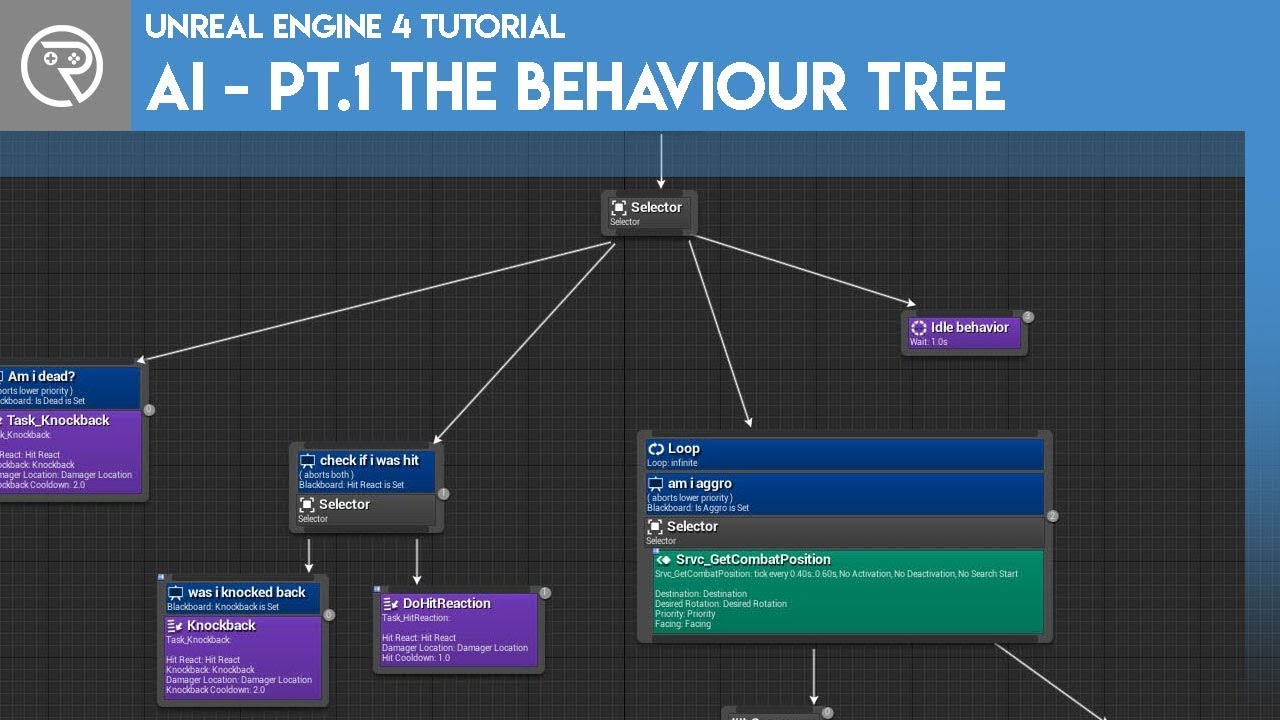
Welcome to the start of a brand new series. This time we are diving into AI for games. This episode introduces the concepts being used in AI design and in particular, the behaviour tree. In this episode we add an NPC that can randomly roam around the level.
Support me on Patr...
 dreamy ermine
Hey all, I'm trying to package my game for iOS. I have successfully set up my provision and certificate in the editor and they are valid. I'm trying to use iphonePackager.exe to create an IPA, but I get the dreaded UE4Game-Info.plist not found error.
Is it necessary to launch the project on an iOS device using the engine so that this file can be created or am I missing something?
I noticed the package project -> iOS has been removed and simply redirects to the unrealengine docs
 dawn bloom
how do I make it so that an object can't move in a certain direction
like lets say it gets pushed at a 45 degree angle
but it only reads the input from one direction of the force
dreamy ermine
For the record my problem was I didn't have iTunes installed, would have been nice to read about it in any of the doc pages
 bleak raven
Ran across an issue when trying to retarget animations. is there a way i can just ignore or disable the bone like other bones in the hierarchy
 dire sentinel
https://cdn.discordapp.com/attachments/371740260607983616/771566661106139146/unknown.png
anyone know how to change the grass wind size? im trying to use it to make a tree sway, but the... i guess the frequency is way too small if that makes sence. I guess you can see it in the screenshot, the waves are way too small, i want them to be quite bigger than that

 dim axle
open wadi
dim axle
open wadi
Delete them?
I delete my logs from time to time, just delete them.
Does anyone happen to know why, when I dynamically add these widgets (via add child) to a border > scroll box > vertical box within a parent widget, they might appear greyed out like this?
You can see, the text itself is set up just like the white text you see on the left. And for some reason, a tiny little spec in the upper left corner is appearing properly.
Perhaps a z-ordering thing? I don't see where that might be set.
 pseudo star
does anyone know what might be causing this build error or any steps i can take to find out what is causing it
open wadi
Winter: Going to have to look at more of the logs than that.
Can't even read the logs you provided in full.
 fresh iron
somebody knows for why my shadows disappear when i'm far of the scene? im try build the light but nothing.
dawn bloom
I just STARTED making my game and the file size is 500 MB
how do you guys shrink your game file size
 sterile tulip
All you can do is to delete unused assets
 arctic horizon
- Compressed size will be smaller
- According to this page, using butler increases the limit to 32GB (uncompressed) https://itch.io/t/46291/uploading-large-games-faq
itch.io
Q: Why is web upload limited to 500MB (or 2GB on demand) whereas butler will let you upload a 32GB game? There's a technical side to it: our web uploader will only accept files as large as 2GB (which
 dreamy sleet
what can i use for a capture the flag map
median hound
flags
arctic horizon
probably a floor
open wadi
No one has ever seen a child widget, when created via "add child" to another parent widget (with the palette structure border > scroll box > vertical box, child is added to vertical box) have the text in the child appeared "greyed out" like this?
Why might that be occurring?
Any theories?
plush yew
@plush yew i have that problem to lol but suddenly its gone lol
What did u do
idk just copy the failed one and open try to package and BOOOM done
Ok
Check #blueprint
try it out
Plz help
ok
open wadi
lol
lucid grove
Show us
 tame bane
Hey guys!
Don't know if this is a very basic question, but is it possible to animate cascade particle events?
I have a demo scene that only needs to play once and I'm trying to create some timing between different particle systems firing.
So far the only thing I have found is in the spawn - burst setting but I cant seem to delay it more than 1x the lift time and for some events I'd like some more control.
Is there a way to achieve this?
 scenic fox
@lucid grove
please help
my ai just goes dark in this area
the lights are static
i still don;t know what's causing this
scenic fox
yes
just this one
it might be other locations to but i haven't checked
im so confused on why he just goes dark
lucid grove
The basic advices just in case:
- Rebuild Lights
- Check if there is nothing that blocks light (some hidden collisions or objects maybe?)
Btw restarting editor is also a thing
Sometimes lights have this issues fixed when editor restarted
Is all of these didnt helped
lucid grove
Place some light source on your character
scenic fox
i also did close the engine and reopen it
lucid grove
And check if it becomes also black on this area
scenic fox
why is it going black tho
i did make the light stationary later and that some how lit up the player
lucid grove
Could be: PostProcess trigger, reflection sphere bug, light source problem, some BP issues
Lots of stuff
scenic fox
btw i have a lightmass
lucid grove
Start with attaching some light source to your AI character
lucid grove
You might try ofcourse
Im mostly working with dynamic lightning
But blackout character mostly caused by PostProcess or SkyLight
scenic fox
no i didn't
lucid grove
Start from this and see if it gets blacked too
scenic fox
ok so he is lit up when i put a light in his character
but idk why he is not lit up when it goes to that area
the only time he lits up with the light i put in the level is when i set the light to be stationary or moveable
open wadi
Anyone know how to convert a datetime variable to a string so I can use print string to view the contents?
Normally variable types that aren't strings, when you drag them to a print string, UE4 detects them and offers up some "convert to string" node, but not with datetime
scenic fox
@lucid grove my walls are BSPS
lucid grove
it doesnt matter 🙂 just move them away and we will see how that affects particular place
scenic fox
alright
open wadi
Brandy got blacked
 honest vale
the lights are static
@scenic fox you'll want to use stationary lights
and bake them
honest vale
because they're 100% static
they don't affect dynamic movable objects at all, except via indirect lighting
open wadi
By some act of god, has anyone currently awake ever taken created_at or updated_at responses from a Postgres DB and converted them to a datetime var via the "datetime from string" node?
scenic fox
@honest vale I actually put it to stationary and when my character goes in the light he lights up but when he leaves he becomes more dark again. Not pitch black like in the picture but he becomes more dark
scenic fox
okay
open wadi
Hi everyone, I have a question: I have a datetime that is returned from my Postgres DB as UTC (0 UTC offset) as the format: 2020-09-05T04:58:55.970Z. I tried simply using the "As Datetime (UTC)" node and, when I attempt to use the nodes to interpret the result, it returns January 1st every time for the date, meaning it's not interpreting that string correctly.
I thought that format: 2020-09-05T04:58:55.970Z - was a standardized format. Why would Unreal not be able to interpret this?
honest vale
what's wrong?
scenic fox
@honest vale just making sure is this normal, the character kinda goes dark cause of something but idk what it is
is it normal?
 fallen marten
Just looks like it's walking through shadows
scenic fox
yeah why?
fallen marten
Why? Lol idk man, play with the lighting and see if it makes a difference
Or maybe the the way the material is reacting
scenic fox
my lighting is just a stationary point light
fallen marten
Are there reflection captures active?
fallen marten
Add one there and have it fill the hallway - see if it makes any difference. Lighting isn't my speciality so there's only so much I can suggest
scenic fox
Wait how do i make it fill the hallway?
fallen marten
Add one as a box and then scale it
fallen marten
It should help in some capacity with making the point lights rays less defined if that makes sense
If that doesn't help much, maybe increase the attenuation radius of the lights (I think that's the right one from memory?)
Seperate note - can someone point me in the right direction setting up a material to be able to use the DON mesh effects ? A sample project that uses the plugin (that I can open things up and see how to set it up) would be awesome
autumn grail
I have a problem with my niagara emitter , LocalSpace make disappear the emitter
anyone?
fallen marten
It's hard to tell. Question is, do YOU think it's better? It looks like there's a pretty hard shadow right at the end but I think it's cos the lights are so dim and have a small radius
scenic fox
i mean at the beginning it was fine right?
fallen marten
I'm looking at it on a phone screen while I'm making dinner so 🤷♂️ Dude at the beginning I couldn't even see the character
Just watched again, I'm assuming when it disappears, it walking back toward the other end of the hall. I do think that reflection capture smoothed out the lighting a bit tho which is good
fallen marten
I guess so... Honestly I was just guessing as to what it was you thought was wrong
plush yew
Hello guys I did this with the outline but there is little bug, when I start the game the object is with enalbled coutline, I want to enable collusion when I hover the mouse over the mesh
fallen marten
So no one can help me out the don mesh stuff?
fallen marten
Get Hit Result Under Cursor for Objects
 tepid veldt
@plush yew probably you toggle the outline, but you need to set the outline to be disabled by default and only be enabled when you hover your mouse over it
fallen marten
The hit result, drag off the actor and set collision
tepid veldt
Show me the outline graph, @plush yew
tepid veldt
Ok so what you need to do is on BeginPlay you set a boolean. Default value is false.
Remove your Scalar connections to the cursor events.
Then between your On Begin Mouse Over and Set Scalar (...) set the boolean to true.
Then OnEndCursor you set the value of the boolean to false.
Then event tick a branch with the boolean as condition. Drag off the true pin to set your Scalar param of what needs to happen when you hover over the object, and the other way around.
I gtg now but I can make the blueprints for you later today, if you're unable to figure it out
plush yew
okay
will try to do it now and send picture here
ops
I sent you the wrong code of the wrong actor
it is for here
will try to do it here
 glad stone
is Nvidia RayTracing worth it to justify a 3070RTX above a 6800RTX (who has double the VRAM and is allot faster but atm lacks raytracing)
 sullen rain
How can i avoid tearing of that material ? it looks all blotchy as i move my camera.
 worthy fox
Anyone else who can’t login or register at PlayFab?
plush yew
I'm trying to select the particle system in the default value on the right but it's not appearing
@ebon linden
Have you created the particle system in the content browser?
 gilded lichen
Hello, I'm trying to make some AI that will stay on a line and just go straight on the line. I dont want the AI to move off the line. As I'm making a tower defence template for uni and have five lanes, like in 'Plants vs Zombies', at the moment I have two target points, one for spawning and then the other for where the AI will go, but sometimes the AI move off center. So how would I make the ai stay in a straight line?
covert hedge
well if you use the AI move to node it's probably trying to use the navmesh to get the straigthest traject possible
plush yew
Hey, I'm working on a game, where we have multiple levels with an steam leaderboard for each. The plan is that the main menu will be having a list of all levels and the personal score on each. what would be the best practice for this. saving the personal scores locally so i can just read them or getting 50-100 leaderboards at start from steam pulling just the data from the user?
dire sentinel
https://cdn.discordapp.com/attachments/660585049896386604/771687997443014676/unknown.png
anyone know how i can parameterise the time node in unreal engine? in any way that i can controll it when i convert the material to a material instance?

 regal mulch
Does anyone know of how shaped sweep traces rank in performance?
I assume Sphere > Capsule > Box? :<
 timid frost
I made a object that thrown byit self when my third person character reach that point but when that even over it didn't fall down properly it in mid of air how to fix
 zinc shore
Anyone know where to start on creating a simple marching cubes algorithm for UE I’ve seen tons of unity tutorials but none for UE
lucid grove
is there a way to save current state of world and load it in UE4?
For now i can save simple variables but it doesn't really help with animation state (for example if enemy half-way attacked me) or some delays that gets ignored by load.
The cheapest way i found is doesn't allow save game while in combat
covert hedge
which is what a lot of AAA games do anyway
lucid grove
They block that when player in combat, but rest of the "world" around keep working fine.
So i wonder whats the trick
 vocal herald
How to add a socket to a static mesh with blueprints?
dire sentinel

anyone know why only one rotate about axis works?
if i plug in any other ones or simple grass wind nothing happens?
https://cdn.discordapp.com/attachments/660585049896386604/771704523710267432/unknown.png
https://cdn.discordapp.com/attachments/660585049896386604/771704177356570624/unknown.png
https://cdn.discordapp.com/attachments/660585049896386604/771704667095826472/unknown.png
this is what the gradients are supposed to do
where there's more blue the wind should move it more
where it's dark it should do it less
blue is supposed to make the entire tree sway
green moves branches
and then red is supposed to move individual twigs
but only the blue one works


 abstract plank
@lucid grove its not that hard of a trick, no different than any other boolean
Set booleans for if something is able to be saved, when something happens that you would not want it to save during for a specific thing, like attack animation, set it to false during that for that object, then return it to true afterwards. Then make your save program check if something can be saved before it saves it, if not just don't save that thing and continue to the next
You can even separate player objects individually, for example allow the players location to be saved but disable animation state
tepid veldt
@plush yew nice :)
lucid grove
I have encountered two problems with that:
-
At this point i dont know how to get current animation time. Like when i want to load game and play this animation i want to play it from exact same moment.
-
The other problem that troubles me - AI BB seems like continue playing from the place it was before. Its not restarting. And moreover its not continue from place it was before.
For Animation time i can atleast use notify, but have no idea what to do with AI
abstract plank
Ai BB will take a bit setup to get into a save ready state, animation time shouldn't be hard though, animations work on key frames, key frames are specific measures of time, when an animation plays its got a duration length, you can get and set that duration length, so storing that duration length as a save variable isn't hard, just make sure it loads after your character fully loads
For ai you'll need to create a function that runs right after your load function that systematically recreates the conditions that created your bt state. So you can get the current state of any bt simply by checking the active state of all the conditions it's under and checking the current active task it has, that info can tell you exactly what bt node the ai was on, then after everything that needs saved gets saved, you load the ai in, initialize it, keep the game state paused, and feed all the data back to the ai in order so that it's bt navigates to the same node. Then allow gameplay to resume
At least, that's how I'd handle it
This can all be going on during a load screen to, so the player doesn't see what's going on
lucid grove
Aha, so i had to get rid of all my "Delay" nodes
At least from most of them
And use timer's instead
abstract plank
Yea you will want to disable them at least temporarily when you do that, or you'll be getting crazy long load times
abstract plank
I would think as long as the controls mapping and everything are set properly, that it should be handled mostly automatically on the instanced players as part of the player character
 shut glen
Its just that only one player receives input
abstract plank
You need to instance them then
They need to run on their individual instances based on spawn order, then match the characters to their associated controller
lucid grove
Yea you will want to disable them at least temporarily when you do that, or you'll be getting crazy long load times
@abstract plank Ok, for example i recreate conditions from start. But can i Restart AI BB with some command?
abstract plank
Abort
lucid grove
Like there is Wait 4s selector that had to be ended to move to the next section
abstract plank
You can forcefully abort and reset the behavior tree
I assume you mean behavior tree when you say bb, bb or blackboard is mostly just a bunch of variables @lucid grove
shut glen
me?
abstract plank
No, Jake, sorry
I'm not at my computer right now, so I can't open that blueprint
@lucid grove you might need to use cpp to do it, there's a function I think it's called StopTree() but I might be wrong
And just make sure you have all the necessary flow control in place
zinc shore
when i make a pop up widget and set the user focus to be one of the buttons on the pop up if the gamepad starts navigating it it just focuses on the buttons on the widget behind the pop up widget making it impossible for the gamepad to navigate my inventory why is it doing this and how do i fix it
vocal herald
I need a way to automatically create sockets in static meshes. Don't wanna manually add them. How to do it with blueprints? Cant find any answers
rare axle
Hey everybody, still having issues packaging a project, if anybody could help me troubleshoot that'd be great. I'm really stumped by it, as it's a project I've packaged before, and I can package other/new projects just fine.
fallen marten
@vocal herald you can't
 potent prism
Hi guys,
Does this ring a bell ?
Ensure condition failed: ScissorRect.left >= (LONG)Viewport.TopLeftX [File:D:/Build/++UE4/Sync/Engine/Source/Runtime/Windows/D3D11RHI/Private/D3D11Commands.cpp] [Line: 259]
engine just freeze in a packed game. Attach visual studio to it just give me this.
I think is something related to UMG, but i can't pinpoint the issue. Does anyone know how I can investigate this further ? I'm out of ideas.
 midnight gate


 plush yew
sure i will see
 molten cairn
Why Foliage is so taxing on the GPU?
 spare sun
why not
serene birch
overdraw, even for skipped fragments
vocal herald
@potent prism hard to tell without more info. You can try changing D3D11Commands.cpp. RHISetScissorRect(true, MinX, MinY, MaxX, MaxY) change true to false. Or remove If-else if (bEnable)
{
ScissorRect.left = MinX;
ScissorRect.top = MinY;
ScissorRect.right = MaxX;
ScissorRect.bottom = MaxY;
}
else
{
ScissorRect.left = (LONG) Viewport.TopLeftX;
ScissorRect.top = (LONG) Viewport.TopLeftY;
ScissorRect.right = (LONG) Viewport.TopLeftX + (LONG) Viewport.Width;
ScissorRect.bottom = (LONG) Viewport.TopLeftY + (LONG) Viewport.Height;
}
and just leave ScissorRect.left = (LONG) Viewport.TopLeftX;
ScissorRect.top = (LONG) Viewport.TopLeftY;
ScissorRect.right = (LONG) Viewport.TopLeftX + (LONG) Viewport.Width;
ScissorRect.bottom = (LONG) Viewport.TopLeftY + (LONG) Viewport.Height; instead
atleast you wont get Ensure condition failed 🙂
probably wont fix anything tho
potent prism
Thanks @vocal herald , I'll dig deeper.
 unreal palm
Hi, does anyone ever stuck on engine compile process? mine seems to be stuck at Running UnrealHeaderTool UE4Editor
it's been there for so long
 slate basalt
i'm running insight to profile my project. it does detect the session, it does create a trace file but then when i open the trace file, it shows no performance metrics.
am i missing something?
i'm on 4.25 and i know some improvements were done in 4.26 but i would hope the basics to work?
thick knoll
Does having an objects visibility set to hidden have any frame overhead?
lucid grove
Have anyone experienced that problem? When im loading game for some reason on BT cooldown timer instead of 0.1s becomes 60 seconds!
Thats UE4 basic "Cooldown" decorator, i didnt touch it or change it in any ways possible.
its even showing that cooldown will stop in X seconds which is random from 15 to 60
wtf?
When timer reach its end - it works ok again
 mortal cedar
My enemies bounce each other upwards when they clump up haha. Anyone got any suggestions as to how I could fix that. I can't just lock them to one Z location as they will need to be able to path to different height locations
 grim beacon
"This is often because the same item is in the list more than once" What? I can't add the same type of items to my widget list?
[2020.10.30-15.02.23:713][283]LogSlate: Warning: WidgetMapToItem length (1) does not match ItemsWithGeneratedWidgets length (2). This is often because the same item is in the list more than once in ListViewT<ItemType> [ListViewBase.h(229)]. Diagnostics follow.
[2020.10.30-15.02.23:713][283]LogSlate: Warning:
[2020.10.30-15.02.23:713][283]LogSlate: Warning: ItemToWidgetMap :
[2020.10.30-15.02.23:730][283]LogSlate: Warning: 0xbbe2cf00 [WB_PlayerInvite] -> 0x24c6f210 @ ObjectTableRowT [ListViewBase.h(602)]
[2020.10.30-15.02.23:730][283]LogSlate: Warning:
[2020.10.30-15.02.23:730][283]LogSlate: Warning: WidgetMapToItem:
[2020.10.30-15.02.23:730][283]LogSlate: Warning: 0x24c6f620 -> 0xbbe2cf00 [WB_PlayerInvite]
[2020.10.30-15.02.23:730][283]LogSlate: Warning:
[2020.10.30-15.02.23:730][283]LogSlate: Warning: ItemsWithGeneratedWidgets:
[2020.10.30-15.02.23:730][283]LogSlate: Warning: [0] 0xbbe2cf00 [WB_PlayerInvite]
[2020.10.30-15.02.23:730][283]LogSlate: Warning: [1] 0xbbe2cf00 [WB_PlayerInvite]
[2020.10.30-15.02.23:743][283]LogOutputDevice: Warning:
grim beacon
How can I make the items distinct?
inner cloak
Create a new instance?
grim beacon
Got it working thank you, I had a whole different idea of how it worked.
 toxic quest
Hi guys, for some reason we need to send movement information for our character from a specific actor that is not a controller.
Do a Character absolutely needs a controller associated?
Because when we call Jump, movement and rotation, the character doesn't move
Maybe we should use a AI Controller? What do you think? Thank in advance
covert hedge
@mortal cedar they look like the silence from doctor who 
 tawdry cliff
yo i need some help
i was making a tree for my landscape
but then when i treid to make the billboard it had no effect
idek y
 full sandal
Should i start my main project as a blueprint project or a C++ project

I am good at C++ and actually can get stuff done in it but ive heard that blueprints are the better way to do things in some cases like for animations
this is a somewhat production project that will grow over time so i wanna make the choice now before just picking C++ and having to change it up
 charred stirrup
Hello! I need you to help with importing the character to UE4. First I take the standard mannequin UE4 from the Third Person Example map and set to export him. Then I import him in Maya2019, then export all of it and import it to UE4. And I get that type of error, but if I import an exported file in UE4 without putting it in Maya, it imported very well. How to properly export a character from Maya to UE4, via the FBX format? Thanks!
full sandal
so the starting template difference between C++ and bp is?
so i should prob pick C++?
if im planning to use it later?
got it
Ive used both and ive generally seen that the C++ API in unreal is similar-ish to blueprints

in terms of naming anyway
pastel geyser
Hey i want to know if there some good YT channels where u can start ur journey?
full sandal
oh also, someone told me unreal C++ is different than regular C++ and said it has a GC? Does this mean that it has RAII or an unreal object collector?
 and if its an object collector, is it scope based or is it a flag based one?
so its a flag based one
i made my own toy engine before and i found that a lot of my decisions are similar to C++ unreal api so im a little more familiar this than i would be if i started out here
yeah im for sure going to research it
also i need to figure out 3d animation because i have never done any of that before
 celest hill
I don't suppose anyone knows of an easy way of merging skeletal meshes together in editor? (I'm an artist and so the C++ answers on the internet are way over my head 😄 )
celest hill
The mesh is being stored in a data table so adding it to a BP doesn't work unfortunately
I need to physically merge three meshes into one
 carmine lily
Hello everyone, I'm facing a possible issue on the unreal engine 4.25, I'm using the same materials and lights from UE4.21 but the lights is not detecting the "Contact Shadow Lenght", the effect looks like is working just on solid materials and is not working with Hair Materials. (All the hair was creates using hair cards).
Anyone have any suggestion about what is going on?
Thanks
 marsh swallow
@carmine lily are u using the new Hair Shader in UE4?
full sandal
https://i.kawaii.sh/IazJXar.png i hate visual studio lmao

 grim ore
it should work the same as making any dedicated server assuming you can compile the server on linux
full sandal
you just need to change your build target to linux
if it wont let you do it you might need to compile unreal from source on linux
grim ore
for a dedicated server yes, they need source
https://docs.unrealengine.com/en-US/Gameplay/Networking/HowTo/DedicatedServers/index.html the dedicated server docs should apply
dawn gull
Is there a way to get full lighting everywhere, without making the character/object look all weird?
 wide cloak
Hi everyone my navmesh has created barriers between level objects but the barrier is huge. Does anyone know how to shrink this?
dawn gull
Maybe check the properties of the NavMesh?
wide cloak
Maybe check the properties of the NavMesh?
@dawn gull Which properties would affect size because I see a ton?
dawn gull
Just look at the names
wide cloak
Ok thanks I'll take a look
abstract plank
That barrier between your objects is based on the boundaries of your trees
Basically, the nav mesh checked that location, returned that it had an obstacle there, determined that obstacle was to steep to move up, and didn't generate navigation data on it
So unless you want your npcs and stuff running up the trees, it's probably fine, there's pathing between them they can follow to not walk into the tree and get stuck on its collision body @wide cloak
wide cloak
So unless you want your npcs and stuff running up the trees, it's probably fine, there's pathing between them they can follow to not walk into the tree and get stuck on its collision body @wide cloak
@abstract plank Awesome, thanks for explaining. I'm still new to NavMesh. I've noticed that the bounds affect me as well. Is this because of the navmesh or the collider on the tree?
abstract plank
I would put down a character model for reference, if 2 trees are close enough together that no nav mesh generates between them, can your character even fit between them? If not, call it good because if your character can't fit between them but you change settings and generate nav mesh between them, then you'll have the character trying to walk between them when it can't, and it will get stuck
The nav mesh doesn't affect player, that's the collider on the tree
wide cloak
I would put down a character model for reference, if 2 trees are close enough together that no nav mesh generates between them, can your character even fit between them? If not, call it good because if your character can't fit between them but you change settings and generate nav mesh between them, then you'll have the character trying to walk between them when it can't, and it will get stuck
@abstract plank Ok thanks, I guessed as much., since I used the foliage tool to paint on the trees, is there a way to decrease the size of the colliders or do I just make an object blueprint and put a custom collider on the tree?
abstract plank
When you set up the foliage tool, you had to choose a mesh to use for the tree to paint them in using the foliage tool, find that mesh and there's probably something in that you can adjust
In the screenshot you sent I can even see the edge of a collision sphere around your tree
 hearty dagger
Anyone know why my project is running at 60 frames per minute. A few hours ago everything was working completely fine.
grim ore
have you restarted it?
abstract plank
With that limited amount of information, I dont think anybody could troubleshoot the issue in any reasonable amount of time
But I would say the age old, tried and true method of, restart it, would be where I would start too. Maybe even restart your entire computer
wide cloak
When you set up the foliage tool, you had to choose a mesh to use for the tree to paint them in using the foliage tool, find that mesh and there's probably something in that you can adjust
@abstract plank Awesome, thanks so much for your help. I'll take a look at the mesh
median hound
anyone do destructable meshes?
lucid grove
Have anyone experienced that problem? When im loading game for some reason on BT cooldown timer instead of 0.1s becomes 60 seconds!
Thats UE4 basic "Cooldown" decorator, i didnt touch it or change it in any ways possible.
its even showing that cooldown will stop in X seconds which is random from 15 to 60
 robust acorn
is there a way to open an auto saved file
I fucked up some shit and would like to get back to a few days ago
grim ore
auto saves are basically copies of the existing assets, so you would copy the one from the auto save folder. delete the one you dont want anymore, and rename the autosave to the correct name
robust acorn
this is the only thing in the autosaves folder
grim ore
and in the game folder?
robust acorn
grim ore
yep.... so you need to find your save you want
if you mean you want to go back a bunch of files, you might not be able to. You should be using source control for that
robust acorn
source control like?
robust acorn
oh there are only 3 or less save files in each folder
only changed since a day ago and thats when I made that mistake so im going to rewatch the lecture I watched and redo it
 sleek karma
hello i have a question, how can i change the length of a slider in ue4?
when i try to change the scale it just gets stretched i can not change the slider length when its in a box for example a horizontal box
robust acorn
It is fixed by the way for if you wanted to know I was debugging some and found out why the ai wasnt roaming
grim ore
@sleek karma can you show the screenshot of the issue?
grim ore
parents control children in UMG
sleek karma
yes
grim ore
so you need to adjust your parent, there is no fixed size unless you wrap it with a size box
grim ore
if you do that you can now set an override for the height and width
but its not going to get any larger than the parent allows it so keep that in mind
grim beacon
Tomatoes?
grim ore
your slider is in a horizontal box, what is the horizontal box in? what is the horizontal box set to for sizing
grim beacon
Not sure but maybe a scale box would do the job?
sleek karma
no i tried already
grim ore
isnt your horizontal box in a canvas panel?
sleek karma
it is
grim ore
so size the horizontal box to the size you want all of the contents including the slider
sleek karma
nothing changes
grim ore
the horizontal box just lays out the contents to the max its allowed, the contents inside you set to fill evenly or unevenly
what are the settings for the right side options menu
sleek karma
grim ore
nope
your in the completely wrong section
you should not really mess with those
the top of the details panel when you have a widget selected are the settings relevant to the parent
grim ore
yep
thats where you adjust the size of the item, or scaling or fill, depending on the parent. in this case you can set a fixed size since the parent is a canvas panel
it seems like you are trying to do something like this?
 stark cipher
At this obj. why is it like this?
 mental apex
does anyone know any good animating fps hand tutorials?I cant seem to do the run animations
stark cipher
And when I place it on the level,its invisible. Can somebody help me please?
grim ore
use print screen, we cant see anything
stark cipher
stark cipher
Yeah,an object exported from Blender
Now I can see it,but on the level its invisible
grim ore
well if you hit F and then can see it, I have a feeling its super small
it could also be a bad material, or bad UV's. we cant see what this looks like
put it in the level and hit F to focus when its in the level
grim ore
you might have the pivot point in the wrong spot in blender
if you are using blender the 0,0,0 point in the world is the pivot point for the item when you export it so make sure you move your item to the world origin (0,0,0) in blender
stark cipher
K,i'll check that out. Thanks.
 limber mesa
can anyone help me out, i have a sphere that overlaps an enemy which happens, i made it so that if it overlaps an enemy within that class it checks to see if its that particular enemy, but the false gets executed,any suggestions?
covert hedge
so a lot of random stuff that if find weird in your blueprint
what's the matter exactly, you want to detect a collision with a particular actor right?
@limber mesa
limber mesa
yes within that class
 hearty walrus
is there a way to make more fine-tuneable settings?
Say, with anti aliasing, you can only change the fidelity
is there a way to change the type?
or other stuff
shut glen
How can i connect my ps4 controller to ue4.25?
sleek karma
hello can anyone hellp?
this is in my character blueprint :
this in my widget binded with a progressbar:
this is in my character blueprint :
@sleek karma and this is event tick------>delay 3,0--------->{Screenshot}
and why does the first screenshot not work
and now i realised the second one doesnt work either
 limber lynx
hello all , should I install UE4 on SSD or HDD
or UE4 can be on HDD and projects on SSD ?
what's the best practice
 worn peak
should I create the materials on external programs or import just the mesh and create the materials inside unreal ?
covert hedge
you should find a lot of plugins to import materials from external programs, but the choice is yours
worthy fox
How can I make my AI's play turn in place animations? To get the speed the AI is moving at I get the Vector Length of the Velocity.. that's all I know for now. But how do I know when he is rotating?
worn peak
@covert hedge do u know if theres a plugin for blender~unreal
I tried to export some glow materials but didnt work pretty well
the nodes are differents so it came to mind that maybe its better to work with materials only inside unreal
covert hedge
you might end up just extract every texture you used to create material and recreate in UE4 then.. 
i had no trouble creating somes with textures from substance painter
plush yew
Hey I got a question hopefully someone can help
I made this bush, but the lighting makes it look bad..
does anyone know whats up?
worn peak
@covert hedge so I learned materials on blender for almost nothing pepesad
@plush yew maybe I do, I guess the lightning its making it look bad
jk, have no ideia
covert hedge
nah i mean materials are probably the same in blender
plush yew
its roughly the same in blender yes
you call the same shit like specular and roughness etc
worn peak
nop its not
covert hedge
with the channels albedo etc, UV map, roughness etc etc
covert hedge
there are probably couples of guide around to "translate" the non-corresponding nodes
worn peak
it seems quixel works better for materials when comes to unreal than blender
guess I'll learn quixel and uses blender for modelling only
covert hedge
i have yet to test their mixer or whatever they call it
but the default materials you can import from bridge are cool
and free 
worn peak
no, the quixel
oh
yes
its called mixer actlly
quixel its the company
or whatever
covert hedge
if only i had a sharpen creativity  all those free assets and i do nothing
quixel bridge is their asset downloader
mixer is to mix textures i think
covert hedge

worn peak
pogimon maybe
no
dikemon its better
how do u got those twitch emots
dont keep them to yourself
 tropic pilot
anyone know of any good free Honeycomb Texture ? 🙂
worn peak
that hexagonal thing ? @tropic pilot
unreal has a hexagonal material on the start content i guess, it would work if u play with the colors ?
 proper stump
Trying to create a sqeuencer cut scene, i've got a skeletal mesh that's set to run some idle animation. it's not running when I play the sequence (if i hit the play button to execute the game it will) .. what am I missing?
dawn bloom
is there a way to change grid snapping to a number you want?
instead of like
1 5 10
maybe like
7 12 17
plush yew
how would I make a flower sway in the wind like you can do with simplegrasswind?
should I not model the stem?
I want the whole flower to sway. stem head and leaves
Does that make sense?
spare sun
simplegrasswind makes the whole thing sway no?
plush yew
just the texture, not the actual model
spare sun
you wanna make the texture sway?
plush yew
like what if you have a rose, it has a stem, the rose, and maybe like 2 leafs right?
but its not on a plane
spare sun
well yea you'll have to tweak the parameters. simplegrasswind isn't anything bound to physics, it's simply visually displacing the vertices
plush yew
ah yeah one parameters was off
it works now
didnt know it worked with models thats cool
thanks 😄
spare sun
np (:
plush yew
Does anyone know how to make a game lobby(like Fortnite, apex, etc)?
Or is there a tutorial
It’s gonna be for my steam FPS game
covert hedge
hmm i think the network compendium mentions lobbys and stuff, but idk if it explains in-depth
pastel geyser
is there a way i can place objects in the scene like in level design i think it will be faster that move each other mesh multiple times
 tender granite
Anyone can help me with the volumetric water stuff? I created a landscape with layers from a heightmap and dragged a lake and a river onto it, but the water bodies are not showing up, and i cant figure out why. Can anyone help me out? Im probably ignoring some basic stuff i should know.
fresh iron
hi! somebody know for why my shadows are too dark?
abstract plank
How dark should it be? Is the texture itself dark or is it only dark when put in? Have you set your exposure settings? What's your lighting settings? Need a bit more information to answer that than just a picture please
 cerulean lotus
theres a very strange hole appearing in one of my models, but only this version? and im not entirely sure why?
ive got an almost identical version of this model where the issue isnt appearing
in blender itself, the model doesnt appear to have any issues
any ideas? i'm super confused by this
 urban vigil
Bit new to this stuff but are the normals facing the right way?
fresh iron
How dark should it be? Is the texture itself dark or is it only dark when put in? Have you set your exposure settings? What's your lighting settings? Need a bit more information to answer that than just a picture please
@abstract plank i think the ambient oclussion its too high, but in my ppv the ao its to low, i need the lees dark , how i can make it? increased the sky light?
abstract plank
Do you have a exposure volume placed on the map?
If so, you can go into its details, go to the exposure tab in its settings, and change the minimum and maximum both to "1"
If you don't have one placed you can place it and do that.
If you have already done that and it's still dark you can play with your scene lighting, check all the values to make sure they're right, and even change exposure level although I'd recommend keeping it at 1 and finding out why it's dark at 1 it should be plenty bright enough
I won't be much help past that but maybe someone in #graphics can help you further
 hot canopy
@fresh iron Two questions: is the material in your foliage set to two sided foliage? Do you have a skylight?
@cerulean lotus Almost certain your normal is inverted in that single face.
cerulean lotus
thank you! i thought i had already tried recalculating the normal, but i guess not. thanks for the help!
it works fine now
 next badger
@gentle trout in editor?
next badger
select it an hit H
 gentle trout
i did it but if i do that the caracter hide together
 kind dew
also the camera will dissapear when you hit play
but select in and in the details panel uncheck Visible
next badger
there is not Visibility setting for camera components
gentle trout
oh ok
next badger
you can replace camera to some empty mesh
plush yew
anyone know some good lighting guides??
next badger
@plush yew Lighting Academy
plush yew
from 51deadalus?
kind dew
Are there any animations out there on the marketplace or anything of one character carrying another character over his shoulder?
next badger
@plush yew yes
plush yew
thanks! thats a lot of material omg haha
does that include shaders? or is that totally different?
next badger
@plush yew iirc just the lighting and color grading (LUT tables, exposure etc)
plush yew
ah so no postprocessing then?
next badger
LUT and exposure is PP
plush yew
hahah okay 😄
 narrow mauve
What in the bleep do I send here as the object? parent class is wheeled vehicle
open wadi
Question: I have a dynamic amount of data ("posts") returned from my API, and for each post, I have an "individual post" widget - I have a for each loop and loop through my array of posts, create individual posts widgets for each, and insert them via "add child" into the Scroll Box > Vertical Box in my parent "All Posts" widget.
The issue is, despite cycling through the results in order, the "individual post" widgets are appearing in my Vertical Box in random order, likely due to Unreal simply inserting each of them once they get done being generated.
What is the best approach to ensure my posts appear in the correct order (the order in which they are in the array) in my Scroll Box > Vertical Box?
I suppose, I need a way to divide my Vertical Box into numbered segments, and ensure when I "add child" it goes into the proper slot - keeping in mind that I have a varying number of "posts" at any given time, and the posts themselves can vary in size.
Is this even possible?
next badger
@narrow mauve well, you send there an object reference you going to cast to this class
 restive zinc
I have a question for anybody working on a third person shooter i have a aim offset all set and ready to go and all the code is set also Now how do i make the player look at where the camera is or rotate towards it anybody get what I'm saying do i use "Use Controller Yaw" or what???
or look where the gun is pointing
@plush yew have you tried restarting your pc
 celest vapor
is it possible to attach a component to a socket only inheriting the location and rotation but not scale?
restive zinc
huh
you have a backup
if not
start all over
n
no
using UE Version 4.25.4
what happened that made your project crash before
no backup
limber mesa
Anyone have any ideas on what they would use if they wanted a magic ability to damage an enemy, besides use a collision sphere or box?
abstract plank
Same methods as any weapon, it being magic ability doesn't matter too much, you just need a damage method and function
open wadi
lol
 neat current
I've a question.
I'm creating my first scene in Unreal. Added a 2K texture in the scene and Unreal gave me the "Texture streaming pool over 20.43mb budget" warning. My streaming pool size is 1000.
So, I opened up an Archviz sample project. It has 2K textures as well and it's streaming pool size is 1000 too but I don't see the same warning in the scene.
So why I get this warning in my project, but other project is all good?
abstract plank
You can even just have it be a hit scan if you wanted
(Check targets location, check that they would take damage from the source given a set of parameters, then just subtract the damage amount from their health value)
open wadi
Is it possible to add items to a List View at a specific index?
abstract plank
Unreal Engine Forums
I am creating this guide since I had trouble grasping the listview at first, seeing many have the same struggle and there not being any good information about them in a blueprint context.
The listview should be pretty straight forward to use once you got the basic grasp of it....
@open wadi
median hound
anyone know how to fix when i put my ai on nav mesh bounds it greens out everything except where the ai is
arctic horizon
make sure physics components (mesh, collision boxes, etc) on your actor don't have "can ever affect navigation" checked
otherwise they're blocking the navmesh
actually, that might be a setting on the actor itself as well
median hound
alright ima check it out
open wadi
@abstract plank I found that guide already, perhaps I missed something, let me re-read it.
Ok so out of the gate: Note!:If a widget is generated for one instance more than once, the engine will crash. So any instance should only be in the listview once.
So in my case, I'm building something akin to a simplistic FB wall.
So I have an "all posts" widget, and an "individual post" widget. I pull all my posts from my API, I load them into a local array, then I loop through them and with each one, generate an "individual post" widget, then add it as a child to a vertical box within my "all posts" widget.
abstract plank
Oof
open wadi
The issue I'm having is they are appearing in random order, as the "create widget" function is async, so they're appearing in random order within the Vertical Box.
Otherwise it works fine.
So I need to be able to have them appear in the proper order.
Also, if one were to say be, deleted by an admin, and that information broadcasted to my UE4 clients via WebSockets, I need to be able to reference that "individual post" and delete it
So for example, when I first pull and create all the individual post widgets, I simply need to be able to say "Ok this is individual post 2, put it at index 2 (or 1 if starting at 0) within my All Posts" widget.
abstract plank
Getting a bit outside my experience
open wadi
Ok.
Well disregard then, I appreciate the help just the same.
The root of the issue is simply this: I just have a dynamic list of widgets that can vary in both physical size and number of entries, and I need to be able to "add child" them to a parent widget at a specific index.
That's the TL;DR
abstract plank
You can't set them in the array then pull then in order?
open wadi
I mean
abstract plank
I'm confused why its randomizing
open wadi
Like I was saying, "create widget" is async, so they're getting created at varying times by split seconds based on the amount of data involved.
Or if, for example, the individual post widget has to pull the "profile image" for the user from the web instead of the local cache
So they're ending up in the parent widget not in order.
And also, I need to be able to reference them individually anyway.
So I can delete one if needed.
abstract plank
Set a wait or delay on one then, would that not fix it?
open wadi
Will that help with being able to later reference them individually? I suppose so if I wrote a "get all widgets" node.
Or used, rather, I could go find the individual widget somehow within the list, if I needed to delete one later.
Or add a comment to one.
abstract plank
Should be able too
open wadi
Hmm
abstract plank
I can't see why not, but I've never tried
open wadi
I mean I suppose I could fake it, but some of the images are a bit large, so there could be quite the delay, and there can eventually be many posts.
I'd rather just have what should be insanely basic functionality to have a grid of some kind and be able to insert things at specific positions, or in order, like an array.
Instead of forcing users to sit there for extended periods.
But if that's all that's available.
We do what we must.
abstract plank
My extent of that system is a basic global chat
abstract plank
Sorry 😅 I'm an ai programmer not ui
dreamy sleet
what is a good map to for a capture the flag i need like 3 maps
abstract plank
Sorry I wasn't much help
open wadi
No worries bro, at this point I just enjoy any conversation.
About 60% of the time I just ask and my question floats away as random people going "I HAVE ENGINE CRASH WHAT DO" push it off into the night.
So thank you for at least considering options.
abstract plank
Lol I feel that, been on this server over a year now I think and am pretty sure most my comments went unnoticed until recently
bleak raven
Hey guys Id like anyone's opinion on if they think this cover system is still efficient. https://www.youtube.com/watch?v=FMcW7t5ivEg&t=187s

In this video we give our player the ability to take cover behind an object and allow them to move around while in cover. This is a longer video as there is a lot to cover, but it will get all that is necessary to begin hiding in cover.
In this video I'm a bit sick so my voi...
 radiant fable
i'm looking for a tutorial that will help me create an extensive landscape, no sculpting, because i want miles and miles and to use the 'levels' system, anyone know a good tutorial?
 nova spruce

Announce Post: https://forums.unrealengine.com/showthread.php?133824
Andrew's Materials/Resources: https://cdn2.unrealengine.com/HostForForums/2017/Landscape-Twitch-Stream-20170118T165040Z-f60e197f28668f8a14ecdd021d6d598672404573.zip
Creating an environment in UE4 is easy! I...
this is the original @radiant fable
https://www.youtube.com/watch?v=PDlGKZ1c3Zc&list=WL&index=34 and then they updated it

Announce Post: https://forums.unrealengine.com/showthread.php?136549
Andrew Hurley is back and ready to continue exploring landscape development in this follow-up to his Getting Started with Landscapes guide. As he builds his materials and places foliage, you can expect to he...
 dense gate
The lad said no sculpting, keep in mind
nova spruce
no sculpting landscape? like importing heightmaps or just flat ground?>
dense gate
I think the objective is to find a sort of procedural generator for a landscape
nova spruce
oh, like generating from a random seed?
dense gate
I guess
nova spruce
seems like skipping a step before learning about sculpting
dense gate
Because miles and miles of landscape done by hand will be pain
nova spruce
broadstrokes I suppose, I could see that being annoying
miles and miles of any landscape would be impressive
especially for someone just beginning to learn about the tool
dense gate
I think what the lad needs is a procedural mesh generator but that'll still be a pain to do