#ue4-general
1 messages · Page 863 of 1
 brittle adder
 plush yew
like this?
@brittle adder
this actually works but didn't create the shader and then to remove it, idk why
 open breach
can anyone help me figure out how the auto exposure works. I have my viewport set to Game Settings but nothing I do in the Lens panel is affecting the washed out light I see in the viewport
 barren flume
I can't create any c++ classes
 glad ferry
I have this 15-20 second delay with switching to PIE from editor. Is there some way I can speed this up?
 fierce forge
any update log for the new update ?
 dusty marlin
Hello guys, I would like to ask you a question. Do you have a method to merge materials in UE4 without losing quality? At the moment I have used the Merge Tool, but to reach a great quality I have to put 4k textures and this is not well optimized. Do you have any suggestions about this topic? Thank you very much!
 rare axle
Hey all, I had a scene with Ray Tracing GI switched on, but the performance hit was too hard so I've turned it off, for some reason I still get this weird sort of light jittering as if it's not been completely turned off? Am I allowed to post links to this channel for demonstration of what I mean?
glad ferry
Light jittering? Like shadow lines?
rare axle
 glad ferry
try turning up your shadow bias on your light.
 glad ferry
No, point light.
Not a point light?
You can also try building your light at a higher quality.
rare axle
No point light here. Currently lit with a HDRI and directional light.
glad ferry
Ahh, well, I guess try the other thing. Beyond that, no idea. Sorry I wasn't more helpful.
rare axle
Ah figured it out. It was ray traced Ambient Occlusion still turned on.
glad ferry
Nice 🙂
rare axle
Completely missed that one. Samples were set to 1 so it was just muddy as heck.
Knew it wasn't the light build because they were moving, it looked like I had worms in my materials 😅
Thanks for the help @glad ferry
glad ferry
haha, sure, maybe I did help you figure it out by accident! lol
rare axle
Helped put me back in the right mindset of knowing what it isn't and to 'take a step back and actually look at your settings'. Sometimes good to just have the outside perspective to help re-evaluate. 🙂
 mortal cedar
The unreal wiki has a legacy section for all the old articles. I dont understand why they dont just forward you to the relevant article instead of sending you to their post explaining that the old wiki has been decommissioned
 exotic thicket
It's kind of a pain when the website seems to be set up so poorly that google isn't even indexing it properly
Sites which have literally cloned the old wiki from the internet archive rank better :P
rare axle
Do have something else though @glad ferry if you care to cast your opinion, maybe accidentally or intentionally help me figure it out again 😁
I have one object in my scene, that's fine when viewed from above

But at an angle, I get weird banding
glad ferry
hmm
I've seen that before.
the video, I mean. I've seen that issue.
try changing the texture size?
or just straight up try changing the texture to see if it's a texture related issue.
rare axle
No texture. Flat material with roughness and metallic values.
glad ferry
remove roughness and see if the issue remains.
rare axle
Already tried. It remains regardless of those two settings
glad ferry
it looks like it's meant to be decking?
glad ferry
What is the object? Some sort of mesh or geometry?
rare axle
Where can I find the setting for that?
 leaden dust
Eh I don't use unreal nowadays probably in the graphics settings
rare axle
@glad ferry it's a mesh with grooves. Need to be able to get up close to it to see shape detail
That's not textured, the grooves are physical.
I think the small scale of the grooves is what's causing the issue honestly.
glad ferry
That's what's causing it. The mesh. Altering anisotropic filtering could help I suppose? Like cool said.
 serene birch
anisotropic filtering only applies to textures, not to meshes
glad ferry
You are trying to fit a lot of detail into a small space.
So you get a bending visual.
serene birch
moire patterns
serene birch
you basically cannot do that and expect it to render well unless you render to a super high resolution and downscale back
glad ferry
I thought anisotropic filtering affected what is visible?
serene birch
if you made that mesh into a texture, you could benefit from mipmaps and anisotropic filtering
anisotropic filtering is an advanced mipmap trick
rare axle
So you think a texture would be better Stof? I just figured when viewing really close up it'd be better for lighting and detail
serene birch
basic mipmaps work better when you need the same mipmap in X and in Y (in screen coordinates)
glad ferry
Are you going to be viewing the mesh up close?
serene birch
anisotropic filtering is your GPU mixing multiple mipmaps to overcome that limitation
glad ferry
I have this 15-20 second delay with switching to PIE from editor. Is there some way I can speed this up?
That's what's bugging me right now.
rare axle
Do you think it could be your computer? What drive is UE4 running on?
glad ferry
Nope, it doesnt do this in any other project. SSD.
barely using CPU and RAM use is also low.
 robust spoke
Hiho, I'm a modder so far and after finishing my current mod, I want to deal with game development. I've seen many tutorials and tried it out, but I miss the PrimalGameData.
How can I create this?
exotic thicket
What is PrimalGameData?
rare axle
Only thing could be too much happening on construct I guess?
Have you tried the other options on the play dropdown like new editor window etc?
@glad ferry
glad ferry
I only use "selected viewport" I guess I could try simulate.
Simulate is the same speed.
rare axle
Try pop out PIE window
plush yew
If I change the location of the UE4 Editor/installation directory, how do I fix the directory in my projects?
Because then my projects are unable to launch since I don't believe it can find the UE4 editor.
 sterile tulip
I wonder if the projects will get buggy once they are moved from UE4 to UE5
 wary wave
I would really not migrate a project from one engine to the other
'buggy' is likely to be an understatement
exotic thicket
UE5 is supposed to be "easy to migrate to" based on what I've heard so far
but I suspect 5.0 is going to be buggy :P
it seems nearly all 4.x releases have been a bit buggy at the .0 version
rare axle
It'll have issues. Just make backups and don't expect to main UE5 until a little while into its development. Would be silly to go all in and forget UE4 the moment it drops.
plush yew
Hi all, good evening
does anyone know why my character is rotating like this instead of at the hip like usual?
wary wave
UE5 is supposed to be "easy to migrate to" based on what I've heard so far
@exotic thicket they said the same thing about UE3 to UE4 - but it was totally not the case
also, if it really is that easy to port, then there's probably no reason to migrate to UE5 in the first place
since that implies it's largely the same, just less developed :/
exotic thicket
frankly probably not unless you need the new features
or your project is in such a phase that it wouldn't be complicated to migrate
 thick gazelle
anybody else having trouble with standalone window size in 4.26 preview?
 kind pumice
@rare axle You hold my beer
jk my projects are crap. Wouldn't make a bit of sense 😆
has anyone noticed that if you update the speed of the SkySphereBlueprint during runtime, a slower speed will cause it to run backward instead of simply slowing down?
I mean it doesn't keep you from doing crazy shit and obliterating any system's specs. There really is no max afaik
but yeah you can run it like a champ
 pallid swallow
@pallid swallow go to history and google the site and click every link
@robust acorn done I had to go through 300 pages and write the names of the every each creator took 2 hours
 charred stirrup
Hello. I am trying to create an animation sequence for the character's animation presentation, how I can add a fire effect from the weapon in time when the shooting?
 light thunder
@charred stirrup you are looking for animation notifies @charred stirrup
Notifies are a system for setting up and receiving events in Animation Sequences to perform external actions.
 next badger
@plush yew 16gr ram is low...you need 24gb just to open some scenes
people tend to suggest 64Gb is ok
plush yew
When I import a mixamo animation into unreal with the default unreal engine skeleton I get the error "Mesh contains root bone as root but animation dosen't contain the root track" What should I do?
next badger
@sterile tulip 32 is Ok-ish
i have 32...it's not super smooth i'd say
but you will be able to open any map that was made by Epic so far
sterile tulip
How much gb does the editor alone use?
next badger
empty?
sterile tulip
Lets say my game uses 12gb ram in standalone as .exe, how much would it use within the editor?
next badger
no clue...i don't think it's related
ue4 uses not cooked content withing editor
i.e. no ram alignment etc
sterile tulip
The game cant use over 16gb anyway, since consumers should be able to run it, so I dont think it will use more than 32gb if you make a consumer game
light thunder
How do I get the current active SUBLEVEL name? "Get Current Level" gives me the name of the persistent level
next badger
@sterile tulip that's a bold statement
 fathom sequoia
Hey, I have an issue with the EpicGamesLauncher. I have a folder where all my projects are stored, but my main project is not displayed anymore in the my projects section and thus I can't add any market place assets to my project. since it's in the same folder as my other projects I have no idea why the launcher is not listing it. Does anyone of you experienced smth similar and has found a solution for this? If I start the engine it can detect my project. Also have to add I use a source build of the engine.
charred stirrup
@charred stirrup you are looking for animation notifies @charred stirrup
@light thunder Thank you! I made some particle in notifying but for some reason the particle duplicate in 0.0.0 position.
but in animation, it has no duplicate particle in the original position
light thunder
watch some videos on using animation notifies @charred stirrup I've only played with them a few times - you might need to attach them to a socket, but again, if you watch those videos it should help you
charred stirrup
@light thunder the first video in the animation sequence used this fiery notification animation. yes, I know about socket usage, but I can't figure out why the particle has its own duplicate under the character's feet in the sequence animation when it's not in the second video from the animation itself.
 rotund yew
so i have a problem, i dont know for the system i want to do if i should have 1 blueprint with 2 skeletal meshes working together, or 2 seperate blueprint that contain one skeletal mesh that works together
when i move, this thing moves 100% with it (the gold guy not the purple guy)
is there a way to have him gradually move to a spacific set point smoothly
cuz when i climb and crouch, it snaps
 robust acorn
Hello there, just a quick question. In the end of this clip you see the ai doing a weird bug/i dont know what it is, does anyone know how to fix this all the animations that are used (4 in total) are in rootmotion: https://gyazo.com/9e32ab1005f3af0a671a0e2d7afce35d
rotund yew
if not should i make a separate blueprint to follo whim
 azure reef
Guys, I'm having a problem when trying to simulate ragdoll on a character. When simulating the ragdoll in the physics panel it's working but inside the game the arms are streched and the foots are moving like crazy. Why is not working like in the physics blueprint?
robust acorn
the capsule component isnt moving with the body
robust acorn
enable it
azure reef
But I'm simulating physics to the mesh, so it's going outside the capsule
robust acorn
oh
azure reef
I've disabled the collision because the char is down and I still can hit the collision
robust acorn
oh very true
 upbeat rampart
is there a diffrence betwean building a game from scratch or with blueprints with unreal engine
talking about commercially selling the game
upbeat rampart
dunno as in like you code the game
robust acorn
you new?
upbeat rampart
yes
upbeat rampart
i am asking is the license diffrent
upbeat rampart
when u make a game with unreal and sell it
 worn anvil
5% royalty after 1 million in gross
robust acorn
no it shouldnt make a difference
upbeat rampart
does it matter if you build it with blueprints or from scratch
so basicly the license dont change
worn anvil
blueprints is the same as c++ just compiled into nodes and with a minor performance difference depending on what you do.
upbeat rampart
yeah but blueprints you simply program, you dont code
robust acorn
its not simply
whether I coded this or did it with blueprints I still would've got the bug
https://gyazo.com/9e32ab1005f3af0a671a0e2d7afce35d
worn anvil
you essentially still use the same logic you do when coding except you don’t type in your keyboard as much 😆
upbeat rampart
cool
worn anvil
I mean you can use C ++ if you want the licensing of the engine doesnt change depending on how you make your game
upbeat rampart
thats great
upbeat rampart
yeah ofc
worn anvil
credit unreal engine?
worn anvil
really? I never knew that
robust acorn
atleast I think so, rocket league is a big game so they have enough money to buy a license
why credit unreal then?
robust acorn
btw one tip
worn anvil
Unreal says you can use it for free as long as you pay your 5% royalty after 1 Million
worn anvil
i never saw anything about credit
upbeat rampart
what do u mean rion
 worn anvil
I switched over from Unity last year after working on the same game for 2 years 🙃
robust acorn
yes I switched too
upbeat rampart
game maker is good for sprite based games
robust acorn
unity is more for fun dumb games
upbeat rampart
otherwise its bad
i wanted to make a top down game
and i have to render actors in 8dirs
robust acorn
what sucks about 8dirs
worn anvil
I like Unity I just felt that it was in a bad place right now and had a lot of issues, plus, they don’t have procedural meshes and so making voxel games with them is very difficult especially when trying to make it run well.
upbeat rampart
the sucking part is that i have to export 3d animatons to sprites
robust acorn
I just didnt like how the unity stuff looked and wanted to start off simple so after 5 months I quit and like a year ago I started unreal
upbeat rampart
and the texture pages become so meny its hell
worn anvil
I know they’re IPO is doing good but Unreal 5 is a sign Unreal is focusing on the future. Unity is still trying to catch up.
upbeat rampart
game maker is just a small stepping stone nothng more
and you have to code in collisions and everything
 tidal heart
guys how to change audio device
can be changed
not able to hear audi
upbeat rampart
so just making a prototype it takes you alot of time
worn anvil
I also thought you know, this next gen a lot of players will have better hardware and consoles so using Unity just to please potato machines is kind of stupid 😂
upbeat rampart
and its sprite based, so thats very bs
worn anvil
also some people think Unreal 5 requires a beast of computer to run its games but they say its as costly as running Fortnite. The point of UE5 is to get these amazing graphics and algorithms to run more efficiently so it doesn’t require more beef.
exotic thicket
Just gonna require a gigantic SSD :D
mortal cedar
When you're enquiring about freelance work on artstation, do you find you get more responses by dming people on artstation or by emailing them?
robust acorn
so you are an freelancer or you need one?
robust acorn
try fiverr, big freelance discord servers and emailing
just contact people
in the discord server just ask "does anyone do (what you want), if so dm me"
mortal cedar
yeah but I'm wondering about art station specifically, because its nice seeing portfolios to get a sense of what they can do. I've used fiverr but it can often be difficult to get a sense of what people can do
robust acorn
you could try to contact them and ask do you make this and this and send pictures
 void swan
Hi
i have problem
my english is not good, i try to make multiplayer game. When a user enter the game, user select a material red or blue. And this is multicast all player but problem enter aftering choosing, last user can not see materials that selected before him entering the game. My question is how can i multicast to new entering user
robust acorn
yes that sucks with multicasts
 dense bay
You could use a replicated variable instead, setup "OnReplicated" to update the client
 iron wadi
I acidentally clicked the Dont ask again in "Reopen last opened tabs" dialog
is there a way to get it back?
I could only find an option to always reopen, but i want to always ask
 buoyant tide
Hey guys, does anyone know a good course for mobile game development using unreal engine blueprint. I got a course but does not cover anything about mobile and how to use touches and gestures
 cosmic matrix
hi,
i made a animation that need to loop but once inside the engine the effect is really bad
anyone know why this happen?
 narrow mauve
I don't see what Unity can possibly offer to compete with Unreal Engine 5..not anytime soon
cosmic matrix
C#
 analog dock
@cosmic matrix could you use the Do Once node
set up a boolean to ask if its still play and trigger a reset
cosmic matrix
@analog dock i don t see why i should use this node????
analog dock
if youre using paper2D theres also setlooping
cosmic matrix
it a 3d idle pose
analog dock
oh idk then just what ive been going off for the past few weeks
analog dock
just joined bc I needed help with Paper2D which theres little guides for really
just offering what I got, ive only been using UE4 for a few weeks and im trying to get this level done for a deadline
charred stirrup
Anybody know how i can change initial rotation of the particle system in the engine?
analog dock
has anyone got any wise ideas for my struggle in #paper-2d ?
I would super appreciate some advice
 tiny eagle
Thank you @worn anvil , i see that the upgrades in UE4 are amazing, and given there's a lot to compile and gather (on epic's end) along side the advances, it makes sense to simply re-release the entire engine in a new release... logical and wise choice
plush yew
Sorry to bother you guys, can someone tell me where I can find the BP_LightControl?
charred stirrup
*90
@robust acorn it didn't work) i decided to change the geometry rotation in maya, lol. I think, somehow it is possible to change the rotation parameter in the engine, but in particle mode this is not possible
robust acorn
oh glad you fixed it\
tiny eagle
mhmm, it helps to have a 3d app
 slate basalt
is there a good way to create an async task that gets executed "on the next frame" or "in n frames"?
tiny eagle
i think you can select in top left list, the child or item, and simply use rotate like a static mesh, unless it is depedant on the parent's rotation
@charred stirrup ^
charred stirrup
@tiny eagleit doesn't work, the particles always have the same direction no matter how I rotate the parent mesh. it pisses me off)
tiny eagle
select p[arrticle system itself and rotate, see if it holds, but would test-run it in game before release
also on network, don;t want server to be different from players' view and see they complain in you r forums that the flash is sideways but you released it as normal
charred stirrup
sorry, but it doesn't rotate(
and for some reason, the particle in the blueprint view and in the main viewport has a different direction, but it is the same blueprint, where did I go wrong?
charred stirrup
I did this and all work fine)
open breach
anyone know how to rename a project?
 queen wasp
https://forums.unrealengine.com/unreal-engine/feedback-for-epic/1615481-feature-get-parent-class-in-blueprint ..sort of what I need, I tried "getParentActor" and then "getClass" but Name turns out blank in print string
Unreal Engine Forums
I've tested this in standalone, and not using single process, and using pie
UE4Editor_7Z66EagakB.png
UClass* UMyBlueprintFunctionLibrary::GetObjectParentClass(UOb
 thick herald
Library
@sterile tulip Nope.
queen wasp
Say I have a Mine, of a certain type, BP_Mine_001, it inherits from BP_Mine, I have a criteria system that checks for class match to BP_Mine, but yeah.. How to figure out that BP_Mine_001 is a BP_Mine when getParentActor doesn't seem to give me the class info.
 covert hedge
well that's polymorphism, you don't need to figure out Mine_001 is a BP_Mine
it is a BP_Mine
cast it to BP_Mine
if it works, it is either a BP_Mine or a child of BP_Mine
if the cast failed, it's not
queen wasp
yeah.. I understand, but it is not what I'm after, I don't know what to cast it to, I can't cast with a parameter of a class type.
covert hedge
then i didn't get the question 
queen wasp
I could hardcode a variable in each BP_Mine_001 saying the parent class is BP_Mine but its a bit hacky
thick herald
Cast to the parent, if it's a child it will work, as devo said..
covert hedge
are you trying to get whichever the parent is in a generic stuff where anything could go in? (like any instance of any blueprint i mean)
thick herald
Normally you'd just right click and make a child, or you could go into class settings and reparent it there.
queen wasp
I have BP_Criteria which has a BP_Criteria_PlaceableActive inheriting from it, which has a PlaceableClass variable, and the class is in this case "BP_Mine", and I am in the "setActive" in a Placeable and getClass == GetParentActor.GetClass doesn't seem to work
I know @thick herald that's what I've done, the latter
 jade mango
Does anyone know that this means:
returned 2, if you'rre a coder, find the engine's return value of 2, that is your issue
?
open breach
From epic launcher
@sterile tulip I dont see my projects in there. What should I do ?
covert hedge
can you provide a picture of your blueprint and where you want to test the parent
jade mango
Just want to play test unreal PT for friend
thick herald
What is unreal PT?
queen wasp
@covert hedge I'll see if I can do that..
jade mango
What is unreal PT?
@thick herald
Its a reword version of PT in the unreal engine
Basically a really good horror demo game
This is el problemo
thick herald
No idea mate.
jade mango
Damm
covert hedge
DNS_PROBE_FINISHED_NXDOMAIN  i can't view your image
open breach
anyone know where I can find:
Importers > Datasmith Importer Plugin for your Project
queen wasp
hmmz, yeah it usually pops in here, I have a server on a VM it is a bit tricky.. sorry
open breach
where is this 'Importers' located?
queen wasp
Last time I PMed someone and posted a link just like this, the image got uploaded into the chat, well well..
covert hedge
put the img on imgur
covert hedge
this is pretty much it, you can get more scpeific in the dedicated programming or UI channels i guess?
queen wasp
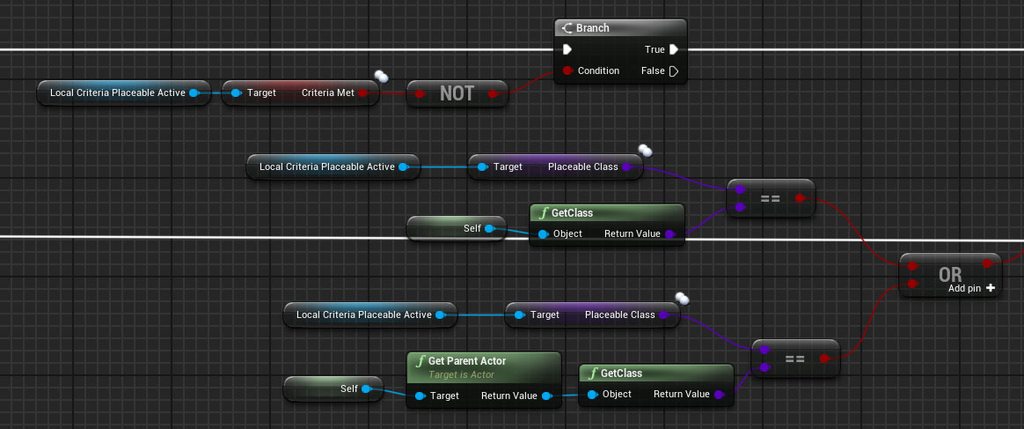 plush yew
I'm getting this weird error when attempting to package Error: HOTRELOADED_LobbySessionGameInstance_0 has an inappropriate outermost, it was probably saved with a deprecated outer
Does anyone know what that means?
Something to do with my Widget..
covert hedge
all your placeable objects derives from the same base class? @queen wasp
queen wasp
@covert hedge yup, placeable->placeable_construct->Mine->Mine_001, placeable->placeable_construct->ColonyBase->ColonyBase_001 ..using it to filter different sphereoverlapactors etc
covert hedge
what is "criteria target" in your thing?
seems to return a class
just trying to understand what you wanna achieve so i can try and help, it looks like build zones or smth but im not sure
queen wasp
yeah the first test works. say I add a Criteria_PlaceableActive with PlaceableClass "BP_Mine_001" it works, when self is one. But I wanted to make it general as in if I have other Mines.. maybe Mine is a bad sample, but the idea is when f.ex. you build a ColonyBase, no matter if big or small or other faction/origin or style, it triggered the availability of other buildings. It works but not with parent class it seems.
covert hedge
if you have other mine, they'll derive from Mine
queen wasp
@covert hedge yup
covert hedge
so if you only wants mines to be placeable there, put the criterion on Mine and not Mine_001, then cast the overlapping actor to criterion, so
Mine_001 cast will work because it derives from Mine
Mine_Claymore cast to Mine will work as well
i don't really get where is the problem
 fathom glade
Anyone else know why there are two epic games folders? One in my programfiles and the other in my programfiles(x86)? There's an Engine folder in each directory, what's that about?
 finite kiln
Can anyone help my friends and I share assets with each other? We’ve set up a git hub thing and cloned a repository but even then we aren’t sure what’s supposed to be going on.
queen wasp
I can't hardcode casting, it is a general in PlaceableConstruct that checks for all Criteria_PlaceableActive if it is the superclass
and sets it to Met so the UI instantly updates with new buildings available, f.ex.
I just wanted the superclass in the criteria
casting can't be done with a parameter for which class
 queen wasp
Mmm, you might be on to something, lemme test
covert hedge
which accepts inputs, as opposed to casts
 frail portal
I was told that I didnt cast to game instance yet I did?
covert hedge
??
frail portal
Nvm I mean in my problem
queen wasp
@covert hedge it worked! Thanks a bunch man
covert hedge
 👍
👍
charred stirrup
tell me why there is a duplication of the particle system under the character when I made the display of particles through the animation notification by attaching them to the socket on the weapon, but can't understand why it duplicates under the feet.
 indigo anvil
If i add a new plugin, do i need to Rebuild my project on visual studio?
queen wasp
Another issue that might be hard to figure out, I am streaming in a level in the background through blueprint and I have a particle system running as a loader screen, it freezes for 10 seconds mid-loading, and looking at the profiler I see a lot of 1-5sec cpu stalls
plush yew
So I migrated my project to 4.26.0 (preview) tonight from 4.25.3. Same level, assets, settings, everything the same. My frame rate is completely tanking, and the level takes ages for PIE to load ... Anybody else seen anything similar with 4.26?
queen wasp
@covert hedge no worries, I got to debug it more, figure out if I can find something else that explains it..
 chrome swallow
Any one know why my navigation mesh seems to work in the sublevels of my world maps on World comp, but not on the primary level?
 static ingot
I can't create Blueprint or Materials
 bleak raven
Hey guys I'm running into an issue with animations. I want to press z and a cover animation begins, the animation works but the problem is the animation only activates after I move (Press W,A,S,D). I suspect it has something to do with update animation blueprint but I cant figure out what. Any Ideas?
sorry if its small
Heres the whole thing
The second other condition is time remaining >.4
the other condition*
This is the object im trying to take cover i
I was following this tutorial https://www.youtube.com/watch?v=FMcW7t5ivEg got to 28min

In this video we give our player the ability to take cover behind an object and allow them to move around while in cover. This is a longer video as there is a lot to cover, but it will get all that is necessary to begin hiding in cover.
In this video I'm a bit sick so my voi...
 wanton lotus
@bleak raven open up TakeCover and CoverRight and show those too. Just want to verify that is correct.
 sullen zodiac
 bleak raven
@plush yew will this also work for moving the character after Im in that state? like in the tutorial i posted
@plush yew Ok ill give that a try thanks.
 fallen marten
@plush yew I'd suggest using an event dispatcher in your enemy that is called when he dies. That dispatcher when fired, can/will call an event in the level BP to open the door
 brisk spire
 maiden sundial
Is this here normal when importing something from Blender to UE ?
Blender:
UE:
I somehow have much more verts and such when using this asset in UE
 dense gate
When you import a model into UE, it makes all polygons into triangles
Blender doesn't show how separated they are by triangles by default, so it looks like 1 face
 fervent sigil
@maiden sundial Make sure it's extra faces and not extra vertices though. You can see the count on the static mesh window
dense gate
But that 1 face can be as many triangles as you can imagine
maiden sundial
Those are the stats in Blender
dense gate
A "circle" with 16 edges will be made into about 12 triangles
maiden sundial
And those are the one in UE
fervent sigil
mm doesn't seem right
dense gate
Tri count is the same
maiden sundial
But the verts are like *4
fervent sigil
@dense gate But he got more than double the verts. I don't see why it should happen
@maiden sundial I'm thinking perhaps it has something to do with the collision primitive, which has to be convex. Try to change it to complex (or disable it if there's an option, I don't remember by memory)
fervent sigil
@maiden sundial Things I found from google (unreal forums):
Due to hard edges between faces, vertices are duplicated. So that is expected.
maiden sundial
oof
fervent sigil
have you used hard edges?
maiden sundial
Not sure 😅
open breach
im totally new here. I need help. My sky light istn working in a default project. Changing the intensity doestn work
fervent sigil
@maiden sundial If you don't know you probably didn't use it. I doubt you used some by mistake. But few solutions mentioned online:
- This actually sounds a bit "fishy". I would try #2 first
I finally found out how to do that : instead of exporting to FBX (which splits edges), I have to export to OBJ (whoch does not). That's strange, but that's apparently the way to do it. Thanks !
- Different issue, check it out as well
If you have wrong settings in calculate tangents/normals engine might have to split all edges. This is real problem and can lower performance and make generated LOD's much worse.

Settings that works for us is to import normals from Blender and recalculate tangents on engine. Also we use MikkTSpace tangent space
I can tell so far that number 1 doesn't work out :s
import normals from Blender and recalculate tangents on engine. Also we use MikkTSpace tangent space
Not sure if that's what he's talking about
fervent sigil
it is
fervent sigil
you need to reimport, or just select "import" if it's not imported yet
maiden sundial
Damn, still the same after reimport :/
fervent sigil
You can try to look for the hard edges in blender: https://docs.blender.org/manual/en/latest/modeling/meshes/selecting/sharp_edges.html
robust acorn
unreal engine thinks its fun to close out of nowhere
maiden sundial
Uhm, i guess this is a really bad sign
If i select all sharp edges with a sharpness of 30°(default) i'm literally selecting everything
fervent sigil
@maiden sundial Honestly I'm not too expert at blender, but from what I understand the select sharp edges tool can select more than just hard edges.
maiden sundial
I feel like i just got 2 options left.
1- Make a whole new mesh
2- Keep it as it is
xD
fervent sigil
I would just leave it as it is, since we're not really sure what the actual issue even is so recreating can recreate the issue as well
If you really want to now, you can go over the blender discord server and ask about hard edges. Or even better, learn about them online
maiden sundial
Guess i gonna take option 2 then.
But thanks for the help 😄
fervent sigil
@maiden sundial You can also try reading online. Many people suggest it can be caused by other things, which are fine (e.g. separated uvs)
dense gate
Generally when I make my own static mesh models I use Wings3D and export to obj
That hasn't caused any additional edges, tris, vertices or whatever
I don't recommend learning a new program if you don't know your current one however
I like that one since it's really simple, runs on a potato and has pretty much all the options I need
fervent sigil
Blender ftw.
dense gate
Absolutely, I just like Wings more for simple stuff since it can be exported for Source engine too
I think it had some things for UE2 as well and that's when I really picked it up
Not like Blender can't do it, but Blender on a 1.6 Ghz single core simply wasn't cash money
open breach
Can anyone tell me why my character seems to crawling on the floor instead of being at the right height?
i moved the spawn point by moving the 'NetworkPlayerStart' but that didn't do anything so I moved the 'FirstPersonCharacter' and that seemed to work. The character falls a little at the start of launching the game until it hits the collision but it seems to bury the player too far down. I'm walking around and it seems like the player is 2 feet tall or something.
i didnt make any changes to the Character BP
 hollow ridge
I have 2 of the same physics actor, how do I make them bounce off each other more. I tried changing the massInKG but It's not working.
open breach
Its so hard to learn anything with no one answering any questions, seriously outdated and poorly written documentation, forums with outdated answers, .. this is beyond frustrating. HOw do people learn anything? Is there a course I can take or something? I cant be waiting 15 hours for every simple question I have. I really need to know where I can learn about this
hollow ridge
@open breach wdym unreal docs are amazing
also is your project just the default project?
open breach
many docs I have come across are incomplete, lacking information, or are outdated.
its been nothing but a week of problems trying to learn very basic stuff, and when there is no support, no one asnwering forums its just me sitting there waiting wasting time when I should be learning
hollow ridge
don't use forums those r pretty bad
open breach
their god awful.
and its all peers, no staff.
3dsMax has dedicated staff who follow up on all unanswered questions.
 lunar latch
@open breach This is all true. And not going to change anytime soon. Part of the work of learning is to find better resources. (I've done this over the last 6 months.) My game club really got traction once we started taking courses on Udemy. They go on sale for $15 all the time.
 wet spire
I just switched from Unity to UE4 mid-project and have found tons of amazing write ups, C++ and Blueprint, full walkthroughs for issues, heck even people that will walk you through entire game creation start to finish. It shouldn't be that hard to find the info you need but its all a matter of where you're looking I suppose. I'm not sure why a "free engine" also needs full free 24/7 staff support to answer every devs question.
Udemy is an amazing place for info
lunar latch
This isn't 3dsMax. It's a game engine marketed to teenagers as hip. It's a totally different world of programming.
hollow ridge
also isnt 3dsMax like 2k a year or somethin
open breach
all some of the problems that I am trying to figure out go as far back as 2014 which still arent resolved. Its really making me wonder how anyone gets good at doing this and whether I should invest the next few years of my life learning this if its going to be this painfully slow
lunar latch
I came from web development where everything is documented because giant monopolies push fauxpen source to get mind-share. This is not that.
open breach
heck even people that will walk you through entire game creation start to finish.
@wet spire Lucky you. I have had to spam random stragers to get random info
lunar latch
@open breach I just told you how I did it. Courses on Udemy. Start with Blueprints. You can't make a game w/o Blueprints. You can make one w/o c++
hollow ridge
@open breach its not like this 1 on 1 thing there are so many things on youtube

YouTube
This channel is dedicated to exploring Unreal Engine 4 and the Blueprint programming language that it uses. You can think of it as a companion to the API doc...
he has stuff on pretty much everything
open breach
Mathew is one of the kind people who actually took the time to help me.
lunar latch
LOL, I love that guy. He nails how I feel everytime I find one of his videos. HTF! WTF!
hollow ridge
oh dam he has 814 HTF and WTF do is
open breach
i just keep hitting these walls and when I hit them I cant do much else. I come here asking for help, but usually no one answers... like real simple stuff
like why my character seems to be 2 feet tall with all default settings.
lol
hollow ridge
send me a pic of the veiwport of your character
lunar latch
Dude, take some classes already.
open breach
I cant .. I nuked ,my project and gave up in a rage quit.
hollow ridge
bruh
wet spire

Udemy
Udemy is the world's largest destination for online courses. Discover an online course on Udemy.com and start learning a new skill today.
hollow ridge
u rage quit because no one answered your question in 30 minutes
open breach
which courses did you guys take?
wet spire
If you want "teachers" that will answer your questions, Udemy is your ticket. IF you want everyone else to help for free, it may be a bit more of a struggle
open breach
good advice.
so the Courses on Udemy.. there is teacher support to answer questions?
wet spire
Yes
open breach
which courses did you guys take?
hollow ridge
before you go to udemy just get the basics from youtube
this is a good place to start

In this episode, we'll cover how to make and open a new project, how to move around in 3D space (it's really fundamental to everything you'll learn later!) and how to navigate UE4's editor to find what you need.
Get Unreal Engine 4 here!
https://www.unrealengine.com/en-US/g...
wet spire
I mean, I didnt take many I just took a couple to quickly get me up to speed on the switch from C# over to C++ and Unreal and a quick run through on Blueprints
I can give you the list that looked good with decent teachers from "the industry"
open breach
great
wet spire
Youtube is great for people like me that can pick things up without asking questions
If you need someone to reach out to then a structured class may be the best approach
open breach
how does it work.. Do you have to sign in a t a particular time?
every student has cam/mic etc?
liek what is the platform like?
wet spire
Nah, its all at your own pace but you can message the "teachers" anytime
 austere viper
It's video lessons, at your own pace. Depending on the instructor, there may be a discord, forums or messaging via udemy support.
wet spire
Yeah, there is a Q&A section and a messenger program but most of the "teachers" have communities setup elsewhere as well
austere viper
Honestly, it's normal to get frustrated with UE if you are learning on your own.
wet spire
Its normal to get frustrated learning any new skill at first
austere viper
There's at least a half dozen skill sets it supports that people make whole careers out of.
wet spire
I mean I decided to learn C#, C++, Unity and UE along with 3d modeling and animation all in the same year...including VR implementation
I know the feeling lol
lunar latch
@open breach You are definitely going to have to try out a bunch of things that don't work. This is the most challenging programming I've done. You really have to pull it to you. I have 10 courses I bought on Udemy ($150) and have finished 3. Worth every penny.
open breach
@lunar latch @wet spire you guys are getting me stoked!
wet spire
Honestly the thing i get most frustrated with is.....Trying to remember which keys on the keyboard do what when moving around in the viewspace lmao
Im constantly going up or down when I mean to tilt the view etc....so i mean you'll get there
open breach
thats been a huge part of my frsutration too is the viewport navigation. I cant seem to get it set up like I have it in 3ds Max,,,
wet spire
I mean, things aren't always going to be the same....Hell, I bought a graphic tablet for 3d modeling just because I hated using the mouse and keyboard to get around....you just have to make adjustments and move on
 faint roost
At least you aren't used to zbrush! 🙃
open breach
im using a bloody keyboard with built in trackpad, but with the modifier keys in 3dsMax I made it work. Im really hoping I can do this with UE4 too because I need to work in bed (have disability)
wet spire
Right, Blender is enough of a nightmare...Im thinking of jumping over to Reallusion 3d character creator 3 and iclone 7 just to speed up the workflow
austere viper
I use the Right click and fly with mouse + WASD because my game playing relfexes run deep. I switch back and forth to Blender and that can break my brain a little.
wet spire
Yeah, my issue is the addition of VR to the project, having to keep popping on the HMD is a pain lol Everytime I finish something and model then import to UE or Unity I gotta jump in the HMD to check it out
open breach
I have my controls almost the way I like them, I just need one more option to be able to scrub the viewport in Perspective mode like we can in the Othograhic modes
no one has been able to tell me if this is possible
faint roost
Question: why is UMG so bad? I'm serious.
wet spire
Eh, can't answer that one yet, haven't ran into the issues but I have seen enough "UMG sucks, that is all" comments to worry lol
austere viper
Middle mouse and drag should pan. Is that what you are looking for? I know it's right click and drag in ortho.
faint roost
Why has literally every other aspect of this engine felt so natural to learn and use except this and this alone
wet spire
Im just looking at the feature list for 4.26 like.....this seems like a lot of additions before UE5, but i'll take it....especially the added VR QOL additions
faint roost
Nothing about umg, the one damn thing I was hoping they improved
austere viper
On UMG: Because, honestly, and I say this as someone who has developed UI's on at least 10 platforms, no-one has made 2d layout with any degree of automation work well.
wet spire
Probably right
faint roost
What does automation have to do with that? Sorry, I don’t follow
open breach
what is UMG?
austere viper
For, me, the reason UMG frustrates me is tries to help you lay out buttons and text, but doesn't do a great job of it, and the way to tweak it is arcane and frustrating.
wet spire
Unreal Motion Graphics for UI
austere viper
But I've run into the same issues on Android, iOS, TK, Windows, MacOS in different ways.
wet spire
A guide to using Unreal Motion Graphics to create UI elements.
austere viper
It's the ways they try to automate the task of putting things where you expect that go wrong when things get real.
faint roost
That document is less than worthless
wet spire
Of course it is, I just wanted to show him lol
faint roost
I’m sorry y’all, I’m just in a real damn bad mood about this stuff today. It’s really starting to get under my skin.😞
open breach
see what I mean? more people saying the documentation is lame
austere viper
Honestly, nothing wrong with a little venting 🙂
wet spire
Yeah I mean the basic UE docs aren't going to be the best place to learn, they are more about explaining "what should be" done or what features are "possible"
austere viper
The documentation is incomplete and bad.
wet spire
not the best ways to LEARN how to implement things
open breach
The documentation is incomplete and bad.
@austere viper thats exactly what I said!
faint roost
I definitely get that, but even the so-called great YouTube tutorial people are awful at this stuff. The things they make wouldn’t pass muster in a free to play mobile game to say the very least.
austere viper
If you start getting into the C++ side, most people will tell you to just read the engine code to figure out how it works.
wet spire
Pretty much
faint roost
I would pay $500 for a udemy course at this point… But there isn’t one!
open breach
No UMG course?
wet spire

GameDev.tv Blog - Learning to Code through Video Game Development
Learn about the basic set up of C++ to drive the Unreal Engine UI logic. Learn how to create a Blueprint Widget from C++ and other cool UI staff
faint roost
Not one that’s been made in the last few years, or doesn’t have tons of reviews saying that for the most part the person only went over blueprints and stayed out of the UMG system entirely… For whatever reason
austere viper
Gamedev.tv's blender course was honestly great. That might be good.
faint roost
Yeah cpp is a non starter for me at this point. There’s no reason that you should have to get into that level of the engine just to make a UI
wet spire
Yeah, their UE4 VR course on Udemy was pretty solid too
faint roost
Using C++ isn’t going to solve issues like aliasing, and focus stealing, and total lack of documentation, and the 3D widget train wreck, etc. etc.
The lack of gamepad support
Scaling issues
austere viper
Scaling issues 😦
wet spire
Ehhhhh, I mean, I dunno, it is what it is at this point. As they always say "It's all about problem solving" lol
faint roost
It’s just odd to me. The rest of the engine feels so intuitive and right. Cannot get my head around why they nodded off for something that literally every single game that’s ever existed has (ui)
open breach
ok now that I have some attention is it ok for someone to look at my screen for one sec to help me determine why my player actor is litterally on the floor?
wet spire
I mean....yeah....but coming off of building 1/4 of this current project in Unity before changing my mind....I cant really complain if thats the only thing that falls flat lol
 fresh iron
hi everyone! i have a problem with the sequencer in ue4 the video see its to fast, somebody can help me please? its for a big project
austere viper
Sure thing @open breach
faint roost
I mean yeah I agree, unity is a nonstop shit show. It’s just odd that unreal follows its lead in this regard
wet spire
Yeah, i agree with yah, just saying, for what else you get with UE, I don't mind having to fight around the UI issue for the time being
Not saying its not a huge problem
lol
faint roost
That’s not a bad way of looking at it tbh. I do have more time to mess with it since everything else makes so much sense. Just wish we didn’t have to!
wet spire
Coming off of Unity and not even being able to get lighting correct.....yeah Ill take UI issues for now
the HDRP alone is enough to give some leeway on the UI
faint roost
You mean you had issues choosing which of unity’s twelve shader’s to use??😂
wet spire
Exactly....lol
dense gate
People complaining about UMG haven't had the "pleasure" of working with Slate tbh 
UI will always be problematic to do in a game engine
faint roost
Man tell me it’s not THIS bad though ☹️
wet spire
I went with Unity because it was ahead in "VR integration" but when trying to build an atmospheric game and you cant get lighting or volumetric fog correct...it kind of kills the project
Sigh, thank god for 4.26 and UE finally adding more OpenVR integration
(counting down to non-preview release)
dense gate
A lot of UMG comes down to scalability
Being able to drag your window up, down, left, right, flip it on its head and the UI staying intact, that's pretty good
wet spire
Yeah, I mean and sometimes you may just have to adjust your ideas for the UI, sometimes that's the easier fix lol
dense gate
There are ways to make things work with UMG
Learning the ways of the spacer in preconstruct will help
faint roost
What problem does that solve?
dense gate
Depends on your issue
For me it was mostly equal spacing in a box
I still find it hard to find something UMG can't do and I don't really understand the hate for it
As long as you anchor your stuff correctly, nothing should be a problem
faint roost
What kind of menus/interfaces do you typically make?
dense gate
I tend to stick to simple since I'm a man of prototypes, but I've done a number of different ones
It really depends on your idea first and foremost
faint roost
I can’t stand the “tutorial” vibe that umg steers us down. I’ve never seen a shipped game look anything like that
From epic’s official tutorial
 slim idol
faint roost
slim idol
faint roost
But they don’t explain anything
faint roost
None of them do. It’s just do this, then that, get this. Even the bigger Youtubers like Laley and all of them are just awful at this sort of thing. They clearly have no idea what any of the stuff in UMG actually does
They just throw it in there because it “works” And tell their viewers to just copy it
dense gate
I can see that being an issue, I'm more on the self-learner side, I don't think I've watched any tutorials
Though I have been with UE since the days of UT'99
faint roost
I get that. I eventually just stopped because they were hurting more than helping
dense gate
I've been itching to start doing a tutorial series for my project since I plan to release with a full modding SDK
And trying to think as someone new to the engine is a pain
faint roost
If you made modding in UE accessibille I bet it’d be a hit
dense gate
That's actually done already
Biggest surprise was when I got it working with blueprints only
That was a bitch and a half to debug, I'll tell you that
I'm ready to share the knowledge so someone doesn't lose as much hair as I did
wet spire
Thats the only downside with BPs, debugging can turn into a nightmare
Well that and you kind of limit some of what you COULD be doing
faint roost
It’s not so bad with break points in my experience
dense gate
I'm not sure how you can really debug what folders and files the engine loads even with C++
Particularly in a packaged project
The thing that helped me was actually process monitor
 arctic horizon
it's pretty bad when the engine itself is causing blueprints to screw up.
Don't ever write a custom latent action in C++ that doesn't take any additional arguments...
in general, debugging across the blueprint/C++ boundary is a pain
wet spire
Yeah, that's where it tends to get a bit more murky
dense gate
I was avoiding C++ for my project since I started it on a laptop I can call glorified buttcheeks
8 GB RAM ain't enough to have VS and UE running together
hollow ridge
can someone help me? I have 2 of the same physics actor, how do I make them bounce off each other more. I tried changing the massInKG but It's not working.'
dense gate
Have you tried setting a custom physics material?
hollow ridge
I think its not working because if you change the weight of both of them its still the same force
yeah It didnt work
Ill try again
what settings should I change in the material?
I think it will give the same result at massInKG
dense gate
I haven't touched physics for years now, particularly because I just migrated to Chaos, I'm rather unfamiliar
hollow ridge
ah
dense gate
I remember some setting there helping for bounciness
But my PC is off and I'm going by memory right now
dense gate

The thing that goes on my mind right now is really overkill and most probably won't work for your situation
hollow ridge
create my own physics?
dense gate
I've made my own projectile system and in that I can control bounces
Pretty much
But that's really overkill if you're just starting
dense gate
One way you could do it is detect hit between those actors and apply an impulse
wet spire
I mean aren't we talking about standard Newtonian Physics here...
hollow ridge
yeah
dense gate
I tend to not rely on the engine physics for my project since I need reliability and a ton of blueprint level customization, so I'm out of ideas
You might get some help in #legacy-physics
hollow ridge
hm
I think I might do that
because this game is pretty physics based
this system feels a bit odd, Is this how I should be doing it?
dense gate
If your objects block each other it should be component hit, not overlap
hollow ridge
k
hm hit isnt working but im using a capsule thats perfectly fit around the ball so its pretty much the same thing
hollow ridge
cuz its a character
and it comes with capsule and I have no clue how to change inherited stuff
dense gate
Ah
hollow ridge
eh imma just setup local multiplayer and see how it feels with 2 people
 analog grail
Anyone have lag issues in UE4 at the moment? I've checked my drivers, windows updates and task manager
 hearty dagger
what are your specs? @analog grail
hearty dagger
ok yeah thats not the problem them
analog grail
i should be able to run it like a piece of cake. I mean moving around in the actual space is no problem, it just lags in the editor parts
 autumn elbow
How would I go about finding Unreal tuts in other languages? (Japanese, Russian, Indian)
Nothing specific..just to browse
brittle adder
udemy has language filter
wet spire
9700k and 2080 super with 32gb ram lol Thats my specs on this PC i just built like 7 months ago along with this 49" 144hrz monitor... @analog grail Sadly this is going to wind up my 3rd PC since Im already working on building a new one, just waiting on the Benchmarks to roll in on the new intel/amd amd/nvidia lines since I cancelled my 3080 preorder when they leaked the 3080 20gb version and now they cancelled its release....ruined my plans and pushed my new build back a bit longer
I haven't ran into any lag that ive noticed lately though, is it just spikes or actually running slow constantly?
analog grail
I've got a little bit of like screen flickering it looks like, my cursor is stuttering and jittery, and it takes a second as well to hover over something when I move my mouse to it. Had this problem with Unity
wet spire
Hmmmm, that's odd, Unity I def didn't have any of those issues. It sounds like it might be coming from something running in the background. I know there were issues with some Razer apps like Cortex and whatnot causing some odd issues for people. It def sounds like something on the PC though, you shouldn't be having that issue in both engine editors specifically and nothing else though.
analog grail
is avast possibly really bad to have in the background?
wet spire
I know HDR settings in Windows were also causing some issues with cursors acting funny but shouldn't be an issue here, although the screen flickering along with the lag leads me to believe something running in the background is tying things up.
I mean, I dunno if Avast would be the culprit unless it's actively running a scan in the background
 lucid grove
Heya guys. What instrument should i use to force AI using certain paths? Like a when i want it to move from point A to B it uses only roads, but when in combat whole navmesh?
plush yew
Hey guys i wanna make that if a sphere hits a triggerbox it will teleport to an empty actor on the middle of my map, how can i do that ? Im using drag and drop btw
queen wasp
What's the difference really between AddLocalRotation and AddRelativeRotation? on a subobject within a scene in a blueprint..
nvm figured it out...
lucid grove
Anyone experienced this? AI perception looking at different point, but still managed to detect my character
 white ice
your AI perception peripheral is just set wide isnt it?
the character is within the view range
lucid grove
your AI perception peripheral is just set wide isnt it?
@white ice No, its only 45 degree.
You can see its sight range in screenshot
For some reason it sense player for a second even not looking at it
He stays there
and then boom
looking at different spot
I have no idea whats wrong with him, like he is doing not-visible 360 no-scope sensing
plush yew
Whats the difference between "Do N" and "For Loop"
 restive cove
looks like Do N is more of a gate, so the N number is how many times it can execute before it closes
reset opens the gate again
 storm terrace
for some reason my F2 key is not rename but undo.
In my editor preferences the only undo I have is ctrl+z no F2 as an alternate, any idea what is going on?
exotic thicket
Do you have one of those fancy keyboards that bind actions to function keys?
 vague shale
trying to install a fork of 4.24 but its complaining about .net framework for some reason, I already have the version it wants installed along with the devpack, I dunno whats up
open breach
can someone tell me quickly (I am new), how to hide an object from being rendered at game? I think its in teh edit mesh properties
vague shale
Actor Hidden in Game
open breach
Actor Hidden in Game
@vague shale thanks . where can i find that ?
vague shale
One sec, I'll grab a screenshot
vague shale
no prob!
open breach
noobie question. Does UE4 make copies of textures and models once they are imported to a project? Like can I delete the original textures?
vague shale
I think so long as you have the uasset file your fine, having the source files around in case you need to edit them is handy but I dont think they are required
trying to install a fork of 4.24 but its complaining about .net framework for some reason, I already have the version it wants installed along with the devpack, I dunno whats up
@vague shale turns out .net framework 4.6.2 sdk is a completely separate install from .net framework 4.6.2
lucid grove
How do i get AI character rotation? For player its kinda easy with using Axis, but how to do that with AI?
By rotation i mean its turn rate
from -1 to 1
plush yew
Hey quick question. I am fairly new still to unreal engine but I was wandering if there was a plugin or how I'd be able to set up a full body calibration or at least start with mapping trackers and rotation to body
lucid grove
For Mockup Animation you mean?
plush yew
Sorry forgot to mention, real time and over server so others can see
I thought mocap on unreal was great but there isn't much documentation that I can you use to have almost a familiar affect. Plus where others can see over on their end
vr social platform game
indigo anvil
I use one plugin on my project, I built my project on Visual Studio and did a packaging test - everything went well.
Now I wonder if I will add another plugin, i will need to build the project again? 🙂
 tame cosmos
Hi all, I've tried googling this but not had much success. Just as on overview, how do you work with dynamic objects in cutscenes? Take for example character clothing in games which can be changed/upgraded with armour sets. How can you allow a cutscene to load the correct clothing on the character.
exotic thicket
if it's an in-engine cutscene then you'd probably need to check what clothing the character is currently wearing and apply those to the actor used in the cutscene
tame cosmos
ah, so it would be possible to load them dynamically. I was just watching the Cinematics and Sequencer videos from UE4, sadly they dont cover this. I'll try making a sequence in the editor and see where the logic can go for that. Thanks
wary wave
We just use the actor directly in the cutscene
tame cosmos
Hi Ambershee, but what about if your character has player defined armour, is this something you've had to deal with?
wary wave
you're literally grabbing the player character, so in this instance I don't actually understand where your problem lies?
if you're using the character in the cutscene, then it'll look exactly as it does in game, it's the same actor
tame cosmos
Ah I think I understand. I had only seen as far as people dragging in skeletal meshes and applying animations. But you can actually load the object for your character, so the data would come from that (providing you're saving those variables)
wary wave
you can use anything in the world inside Sequencer, so long as you can get a reference to it
plush yew
hello everyone, I need some help solving a situation
I'm creating a helicopter arcadeish movement, but I cant seem to fix a small issue
wary wave
you don't even need to "load" the object for your character, it already exists, just use it
plush yew
so I in order to rotate the cube to face the location of the mouse, Im using get hit result under cursorand thats ok, until I go outside the ground area...
so imagine I have an enemy flying in the sky, if I point the mouse to the enemy - that bp wont work because is not touching the ground anymore
any ideas?
tame cosmos
Rightioh, I think in this case I just need to pratice with the sequencer now then. I'll give it a go. Thank you
kind pumice
Anyone happen to know why the clouds move backward if I feed the parameter a lower value than it was previously? Shit's making no sense lol
I've debugged it and I never feed it a value that actually goes in the reverse direction..... it just starts reversing if the new values are lower than the previous ones (like if you were to try to slow the clouds down, they'd go backward for a bit, then go the new slower speed)
hmmm seems to be a straight up issue with the BP_Sky_Sphere. If I simulate and eject and manually move the cloud speed value from say, 100 to 45, it moves backward while I'm changing the value instead of just slowing down as I move it to a slower speed
lucid grove
How do i get random intger from choosen numbers? Like 3, 7 or 10?
or random integer from array
 glacial pecan
@lucid grove make an array of ints with the numbers in them, and then randomly choose an index from it?
lucid grove
Did it just after posted question. Works at 90% cases 😄
glacial pecan
haha, same for me actually 😄
lucid grove
Is there a way to set blending inside anim montage?
I have two animation sections for a combo but they seems to not blending
fresh iron
hi everyone! i have a problem with the sequencer in ue4 the video see its to fast, somebody can help me please? its for a big project
 surreal viper
any idea how could I reset the editor camera? unfortunately I went to nan land and now it is black, can't start PIE from it and of course it is saved to the level
nvm I got my viewport back via piloting an actor 🤦♂️

 dim merlin
Hi, so this document, like a proof of concept to change terrain at runtime:
https://www.diva-portal.org/smash/get/diva2:1440337/FULLTEXT01.pdf
He's removing some #if WITH_EDITOR, but its not allowed right?
exotic thicket
What do you mean not allowed?
dim merlin
by using it in a shipped game..
exotic thicket
I don't think there's anything that says you can't modify the engine source for a shipped game
dim merlin
i think it is, because its including engine code that is not allowed to ship
exotic thicket
It means you can't share the engine source code
 worthy widget
dont know if I am right here but...
https://youtu.be/vLCc4rQsZP8

Since I am a very Impatiant, I upgraded my 8 Core i7 7820x to a 16 core i9 7960x (thank you ebay :D)
I know its not the newest CPU on the market bit still kinda head to head with the Ryzen 16 Core CPUs
(also I dont have to money to switch my complete platform to a new expensiv...
 quick kelp
I finished packaging my game for andriod, now I have the packaged files, I wanna turn it into an unofficial app that my friends can download and use it on their andriod phone, anyone can recommend me what’s the best way to do this ?
 shy rover
is there any place i find "homework" to do, like doing given exercises with solutions in them. it can help me learn better blueprints and all of that as a beginner, kind of like the "on your own" tasks at the end in the learning dashboard of ue site
 north monolith
Are there any updates to the road system in UE4? I am creating something with intersections, and I had some problems with that last time. Was also a bit of a problem finding any good tutorials on it. Any suggestions on how to tackle this is appreciated.
@plush yew To certain degree I would agree with you, but at a certain stage I usually find better results getting referenced by people in the industry to resources that are much higher quality and which the algorithm doesn't pick up as easily. depends a bit on the topic though.
@plush yew You are indeed correct. Been using different search strings, and there are no real information on how to best tackle road intersection, so I guess I gotta put on my thinking hat.
 silk lintel
Anyone know how I could create an effect of text being written rather than it just appearing or fading in?
My first thought was with a material but it might actually be best in niagra. I'm not that experienced with particles, though.
north monolith
@silk lintel Thinking using a blueprint widget might be the way to go? Something like this maybe, if I understood you correctly. https://www.youtube.com/watch?v=hn-qNCEmuvQ

Unreal Engine 4 - Self writing text tutorial in Blueprints.
This was my first ever tutorial.
Feel free to make a tutorial request in the comments :). (I prefer the ones that doesn't exist yet).
wanton lotus
@silk lintel Depends on how you want it "written". For example, if you need to show a pencil drawing the text stroke by stroke, then that becomes a bit more difficult. Otherwise, here you will find multiple examples (one of the simplest being add a single character at a time with a short delay): https://answers.unrealengine.com/questions/674808/how-to-animate-individual-letters-in-a-text-block.html
 runic fern
Hey Guys can i make a 3D UI Using Material im using 3D widget but its too low in Resolution
the main menu is too dark and the color is too weak
exotic thicket
@runic fern I don't know about the colors, but if you reduce the widget scale and increase the widget size, this will improve the resolution
runic fern
you mean the Scale into the Actor i have to Reduce it
about the colors yes its poor there is a game Called House Flipper or Streamer Life simulator its also have 3D widgets but its colorful idk if they are using a Material to change the Resolution or idk
Also your Solution Could work thanks ❤️ ❤️
silk lintel
@wanton lotus Sorry for the late reply. Yeah, I wanted a pencil drawing effect rather than a typewritten effect.
 harsh tiger
what would be the best approach for me to get one character out of a word? so if the word is "dog" and i say 3. how can i get it to return just G?
 spice canopy
How do we report bugs in the engine? The bug reporting page on unrealengine.com always gives me error 500 for the past several months.
robust acorn
d
spice canopy
I am trying to get them to fix the bug that breaks android LAN
covert hedge
@plush yew 4K textures weight a lot
silk lintel
@harsh tiger 1. #cpp question, 2. Can't you just use brackets? For example, "dog"[2]? That's how it's done in python and I'm pretty sure it's the same in c++. Arrays are start at zero btw, so the third element would be index 2.
covert hedge
array[index] yes
depending on which container you're using like std::vector and such, they also overloaded operator[] so you can access a vector element like a plain array element
harsh tiger
i'm doing this in BP. this is what i have atm
covert hedge
@plush yew i do not know, i don't work in the industry sadly. But i'm pretty sure you could start with lower res textures if you find some, there's not point going full 4k texture at the start of a project
harsh tiger
i was hoping to use the array index to get the character of the word from the "get"
covert hedge
word list wont return a character, it will return a string
you need to substring that if you want a single character i guess
harsh tiger
this?
covert hedge
Get Substring
harsh tiger
actually, this looks more like it
harsh tiger
thank you, i think im going in the right direction now 👍
covert hedge
tbh you could just put the whole world list into a single string
instead of iterating on it
oh unless you want words to be displayed randomly and not the whole sentence
nevermind
harsh tiger
oh unless you want words to be displayed randomly and not the whole sentence
@covert hedge
this is the one mate haha
does a node exist that counts how many characters are in a piece of text?
 tepid veldt
@plush yew solved it already?
covert hedge
no, just append the whole text in a huge ass string and use length
plush yew
I'm trying to run my packaged game inside a hyper-v VM to test networking, and it keeps throwing this error.
@tepid veldt hi, not really; i'm still stuck in this, tried many different ways... but... no success
Anyone ahve experience with this?
harsh tiger
@covert hedge any idea what would be causing the extra text at the end? the for loop is only running 4 times which is right
i'll clean it up later i promise 😂
ahhh, i see whats happening
 restive eagle
for the for loop -1 length probably
harsh tiger
the Get substring node isn't doing what i thought it would
restive eagle
or yeah the length of a string
doesnt make sens
probably you have easy, which is 4 letters
harsh tiger
at index 1 it removes the first letter so easy is asy and then for index 2 i get sy
covert hedge
string is basically array of char. String length does make sense..
harsh tiger
the string length is perfect mate. its the "Get substring" thats my issue now
restive eagle
you are just trying to add difficulty options?
harsh tiger
it's returning the full string after the index inputted. rather than the single char at that index in the word
harsh tiger
nope, it's like a english spelling game in umg
harsh tiger
yes
covert hedge
right now you're doing substr(string, i, stringSize)
so the first time i = 0
you get full word
second time i = 1
you get from index 1 to last index, so you get "asy"
then from index 2 to last indexx
so you get "sy"
substr returns the given character(s) between start index and end index
harsh tiger
yeahhh thats what happening. but i want index 1 to return "A" for example
covert hedge
if you only want ONE character
you do something like
substr(string, index, index+1)
or wait
no sorry
this one takes into account the lenght of the sub str, not the last index
so it would be substr(string, index, 1)
just unpin the "length" part of the substr node
and put 1
covert hedge
just read the nodes thoroughly when you wanna use them that'll make you realize often where you're wrong
i mean on the unreal documentation
the parameters are usually well described
harsh tiger
it makes so much sense now that you've explained it. the "length" input being the string length explains why i was geting asy and sy etc
thank you again! much appreciated
covert hedge
np
plush yew
does unreal still package to HTML5 in 4.25? cant find the option
I'm looking for people to program the battlefront game (2015) since the company stopped releasing updates and the community is happy that we create the game to launch the updates, I already have everyone's textures, physics and more
 elfin bolt
@plush yew HTML5 removed
 digital anchor
it still exists as a plugin, somewhere on github...
plush yew
for real? deprecated?
 stable ore
can anyone check out #level-design? I need help
plush yew
I have got a camera shake on my player.
When I cross my trigger box (going into a cutscene). There is the same camera shake from my player. Can anyone help me?
bleak raven
Hey guys I posted yesterday posting about a cover system using state machine. Apparently montages are more efficient but i havent found a way to make it work yet. This pic is of the Character BP. Im trying to press "R" and get the character to go to cover and move left and right when in cover.
runic fern
@exotic thicket Thanks mate its worked but still the content size when i change the Text Size from Widget BP its wont change still on this size
 vagrant nexus
I need help with setting up saving a game after possessing a character, and upon loading the game, it loads as the character that was possessed at time of save. I looked everywhere, and even had people try to explain it to me, I just can't seem to wrap my head around it. Can anyone help with a visual setup of how to blueprint it?
Please?
Basically, how do I save the possession of the character so it loads back up as that character? Lol
 outer ocean

 neat fractal
Hello guys I need some help how can I run UE4 in DX10?
plush yew
anyone know if sunsky can be made to update with the CTRL+L directional light hotkey motions? It only seems to update by the blueprint parameter sliders
 tame river
Hi. Any one know how to export texture to disk as PNG tro blueprint? I can export it but not as PNG and just GIMP can read the picture... After small search on google I founded that was a possible unser but is not working for me
OS: Windows 10 x64
UE: 4.25.3
Is work with Export Render Target, but on unknow format... I can open it with Gimp so is fine but if some one don have it windows can not read the file do not mater if i change extension in JPG, JPEG, PNG, HDR...
sterile tulip
Who wanna teach me everything about unreal engine
neat fractal
@plush yew Thank you so much, I wasn't expecting a reply..
neat fractal
Roger that
 cloud lynx
Hi 👋 I’m looking for someone that can mod the Unreal Engine 4️⃣ game „Darksiders 3“. To replace Fury the main character with another model and also face rigging for facial animation as well. Is there someone that could help me and do this for me? Of course I’m gonna pay for it. Thanks in advance. ⚠️
 dense knoll
how do you intigrate steam with ue4.25
?
im dumb, i did not know it meant to put it in the engine folder and not the project folder
cloud lynx
I can’t post a comment at #looking-for-talent 🤔
thick herald
Read the pinned messages in #looking-for-talent 🙂
cloud lynx
Thank you! 😊
 stark fox
Sorry to come out of nothing and ask for help, but I'm really desperate by now
Im quite losing it here, I was working on 4.25 on a cascade FX an I need to get it to a project 4.22. But it doesnt work, it doesnt apear on the content folder and if I try to switchv ersions of the project that has the fx running, it breaks and doesn open
has somebody dealed with this before?
I really need to make this fx work on
spice canopy
Hey all, I'm trying to log in to vote up an issue that's killing my game, but I can't log in. I get a server 500 error when I try to log in:
Am I the only one with this problem?
(of not being able to log in on the issues.unrealengine.com site?)
 zinc shore
what causing this to happen when i move my project to a new location
 frosty acorn
Hi, everybody, I am new here, if I have some questions about blueprint, which channel should I be asking?
 patent cobalt
@frosty acorn #blueprint
 hidden aurora
I´ve been trying to packacge my game and sent one copy to my friend and he told me that avast recognised the .exe as a virus. I already ran several tests on my pc and its clean. Also sent the .exe to virus total and saw this. Is there any way to solve this virust alert, thx
 late verge
first time animating within ue4. is there a shortcut that allows me to go to the exact time of a keyframe? i'm trying to override it.
spice canopy
@hidden aurora I get the same problem. I think it is because your friend gets the file from you instead of getting it from a game store that code-signs it as a recognized publisher or something like that. The antivirus companies have no idea who you are.
Of course what I said only makes sense for "Unrecognized publisher" warnings, not for actual "Virus detected" warnings. Find out which one the warning is about.
hidden aurora
Yep, im almost sure its a certificate thing. My pc is completly clean. ty
 dawn bloom
Hey guys I want a spike to move in and out of a hole
what BP nodes would you guys normally use
for this
wary wave
Hello guys I need some help how can I run UE4 in DX10?
@neat fractal You can't. UE4 requires Dx11 at a minimum
narrow mauve
Anyone here use quixel
Quixel Mixer is sooooooooooooooooooooooooooooooooooooooooooooooooooo poorly optimimzed. I am in utter awe at how terribly it performs
you get 4 or 5 layers in there everything you do takes 5 seconds
its hilarius
fervent sigil
@narrow mauve I do. and yes
 deep viper
I am trying to add a "custom log channel" for testing. I clicked the "new" button 3 times, and the number of items increased by 3, but I don't see any "new" channels to modify.
narrow mauve
@narrow mauve I do. and yes
@fervent sigil I am broke so I can't afford to pay for substance painter..but when I used the trial it runs flawlessly..you can have dozens of layers and multitudes of complex overlays and it doesn't even hitch a second. Going to quixel mixer is such a downgrade...it's borderline unworkable at times
fervent sigil
Never tried substance painter, I'm all for free stuff. It's great compared to.. well, nothing else.
plush yew
How should I project be managed on git? Should I track essentially all project files except for things like Saved,Derived Data, Build?
fervent sigil

GitHub
A collection of useful .gitignore templates. Contribute to github/gitignore development by creating an account on GitHub.
You should also add .idea if you're using Rider
plush yew
Oh thank you!
 proud verge
Hi guys, my PC is overheating with UE, especially with niagara FX, and I was thinking about limit the FPS to 60....But, I do not want to use a console comand like t.maxfps.... because using this commands sometimes I cant "undo" them, what else can I try to lower heat
Just testing someting, I created an empty scene, added 1 strong niagara FX (it had to be this way since there is nothing else in the scene.... in a matter of 2 mnutes, my pc is boiling...
late verge
first time animating within ue4. is there a shortcut that allows me to go to the exact time of a keyframe? i'm trying to override it.
 chrome sky
question regarding casting to game instance
wet spire
Was that announcing that a question is incoming? That's a nice way to prepare everyone....I suppose the proper response would then be, "What is the question?"? 🙂
chrome sky
LOL sorry i was distracted working on something
when casting to game instance and changing the variables in a game instance how to prevent lost changes when u are making changes in the level blueprint?
like for instance if i had a boolean i wanted to switch to true in a specific map and i made that boolean true i the level blueprint but then that true never shows up when i do a check for it in another fuction
what could be the cause of that
dense gate
So, variables reset between levels?
Weird, that hasn't happened for me
Are you sure you aren't setting that bool somewhere?
wet spire
Wait, I thought I read that this was an issue but only in the 4.26 preview, I thought it was a known bug, if this is in 4.25 then I'm not sure what the cause would be but then again Im half asleep right now...lol Not sure any of my thoughts can be kept straight at this point.
 civic socket
Best way to study unreal engine n shit?
wet spire
Nevermind I was thinking of this listed bug in 4.26: "Adjusting properties of a Blueprint instance's components in the level does not update references to the properties in the BP's Construction Script
Adjusting properties of a Blueprint instance's components in the level does not update references to the properties in the BP's Construction Script."
@civic socket Uhhh, if you want like a teacher but can also learn on your own then Id suggest Udemy courses
civic socket
Does teaching cost?
wet spire
I mean, courses cost like $15 or less right now
wet spire
Udemy
Udemy is the world's largest destination for online courses. Discover an online course on Udemy.com and start learning a new skill today.
I mean, yeah, UE has a "Learning" Section too...
I mean, some of it clearly is...Not if you know the people teaching the courses
and not for "absolute beginners"
If someone has never even seen C++/C#/Blueprints/Unity/UE they can probably pick a lot up from some of those teachers. You just dont want to go in there paying for courses with 2 hours of content. You should probably do a bit of research on who or what group is teaching the course and make sure the course has a ton of reviews. Then again, for $15, if you don't want to go get a Degree from a University and you're lost on your own without direction, its not a bad way to go.
civic socket
learn.unrealengine.com is a nice place to start
@plush yew Does it cost any money?
wet spire
You can use the courses in UE for free
There's a literal full section in the Epic Launcher for UE Learning too
But again, lots of people here aren't fans of a lot of the Epic documentation. The videos are a bit better than the write-ups but if you're coming in with NO BACKGROUND in coding or game dev it might be a struggle lol
civic socket
does roblox count lmfao
wet spire
I mean, if you've built a world in Minecraft....you've done more than....some people lol
Hell, I started level design back in the Duke Nukem 3d, Jedi Knight Dark Forces 2 days
civic socket
well im 14 with 2+ years of roblox lua scripting and 4 months of unreal development with big ass games before i quit and forgot how to do this shit
wet spire
C++ and Blueprints, 3d modeling and animation, lighting, world design, UI, game theory, sound design, etc I mean, it's not like building a game is a point and click adventure
Yeah I mean, anyone can learn it that wants to.
civic socket
would you say coding is better then visual scripting/blueprints?
wet spire
I mean Blueprints are built on C++, C++ gives you more control and options so an understanding of C++ at least is best, I mean you can design an entire game with Blueprints but Id always suggest people at least understand C++ so they can troubleshoot issues.
civic socket
hm. which is easier to learn?
wet spire
I always tell people to either watch videos or take some of the classes on C++ specifically for game design as for a lot of people applying the coding directly to game design helps them understand it's uses and make connections mentally easier than just learning coding in the traditional sense and then taking it over to UE or Unity but at the end of the day as long as you learn it, it will help.
I mean, Blueprints will technically be easier to pick up as the coding is done in the background for you but it all depends on how much control you want to have over your own project.
 thorn vector
@civic socket I recommend learning blueprint first so you can understand the workflow working with it..once you really comfortable with bp by building small game,try learning ue4 cpp
wet spire
Workflow is the first thing no matter what lol If you don't know the steps you need to take to get to the finish line, nothing else really matters.
thorn vector
Epic recommend using both in development
Build functinality in cpp and exposed it to bp for easier usage
But if you wanna go full cpp,just ignore the bp and dive right in...try reuben ward tutorial on yt
wet spire
Yeah the only thing I don't like telling completely new people is to use both because debugging issues between BPs and C++ could easily overwhelm and crush someone's spirits. So for a first project, I always tell people to do one of those "follow along" projects where they can learn the workflow from start to finish on a simple game project and then take that into their own project once they have gone through all the steps from beginning to end one time to get comfortable with the basics of the entire process.
Find one of those "Build Your First FPS or Action RPG" follow along things if you're completely new and just get a feel for the process.
chrome sky
sorry i was away this is 4.25
and thats the weirdest part
this isnt resetting variables between levels
this is in a level between level bp and a widget @dense gate @wet spire also sorry for the ping T>T and ill send images in a second
dawn bloom
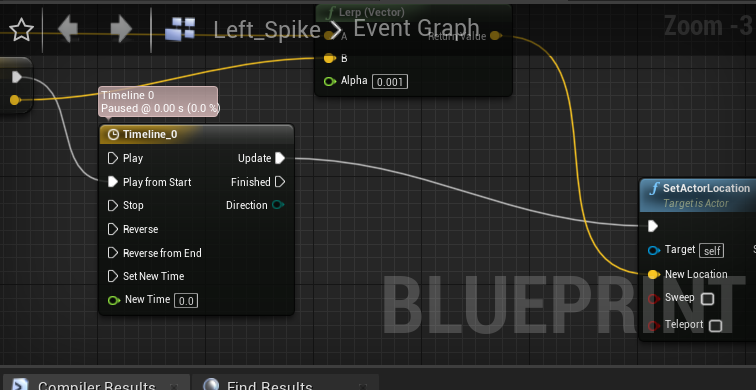
I'm curious why my timeline does have a 4th notch on the right
doesn't*
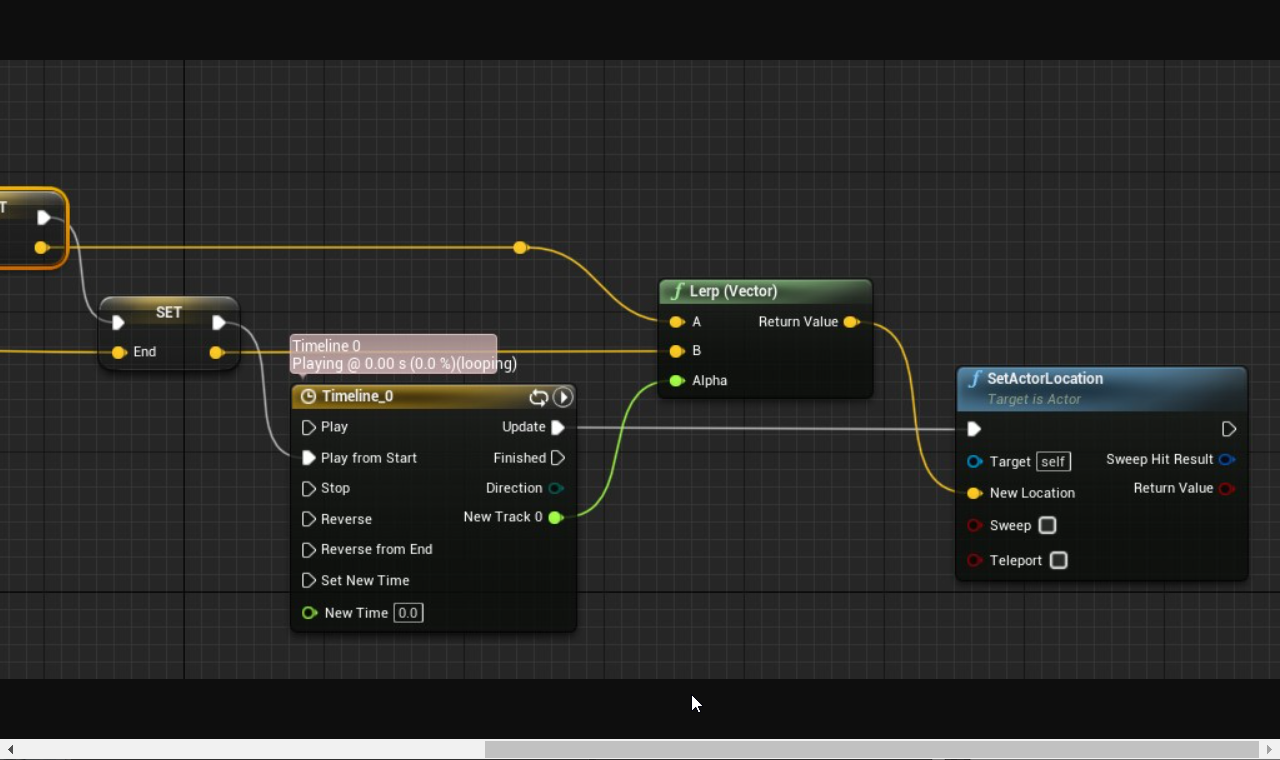
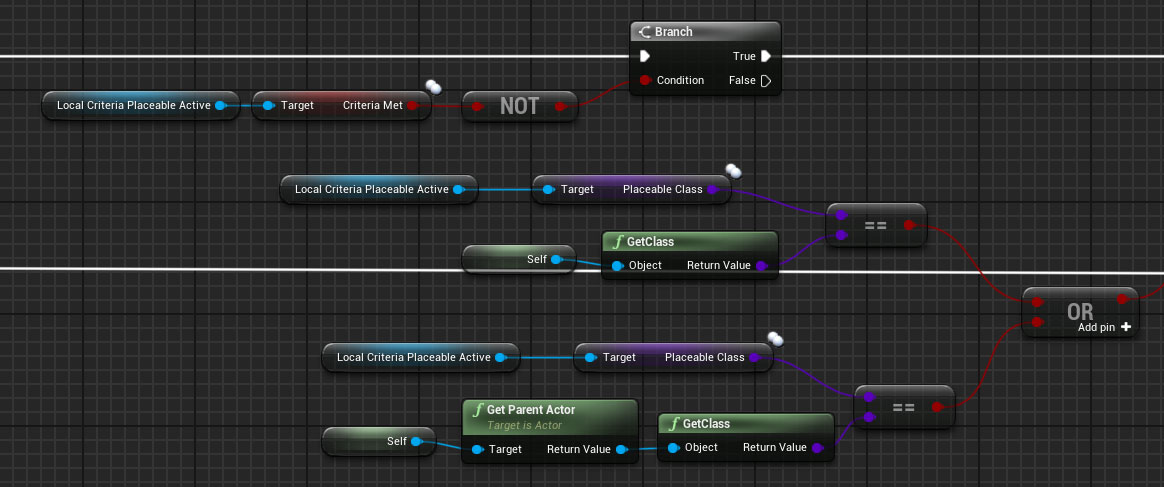


but this one does
chrome sky
when i did a print string check to see what the boolean was
and between this map bp and then the widget's bp something gets lost
 lapis plover
I need help learning. If I watch a tutorial I get nothing from it.
 royal oar
so I'm trying to use learn.unrealengine.com but I am not sure which courses to follow past the base two you start out with, most of them are pretty specific, and I'm still not sure how to ever start what I want to do, what courses do you recommend?
chrome sky
@royal oar what i would reccomend is choose one that closely fits the project you want to create
@lapis plover im not sure what to tell u, what are u watching and what is your experience with it
 torpid notch
I have an AI that is a tank, but he doesn't have any collision besides the capsule component. Is there anyway to make it so the entire tank has collision?
 winter zenith
How would I go about making a map, (like press M and a picture of the map shows up on the screen with a player icon updated to the location you are at)
royal oar
@chrome sky see I'm still trying to just figure out how to use the engine, like learn how the programming and physics stuff in it works
chrome sky
@royal oar how much coding knowledge do u have
royal oar
I know how to code in c++ just not in the context of unreal
chrome sky
are u a visual learner or can connect things easily without seeing them in pictures
royal oar
I guess it depends on context, if you're referring to blueprints I think c++ code will make more sense to me