#ue4-general
1 messages · Page 857 of 1
 crisp thicket
I dont want the player mesh going throught the gauntlet walls
anyone know how to stop the player mesh from going through the gauntlet walls?
 marsh swallow
To my question from Earlier, after playing around a bit i figured out the issue. Steam changed the way the Builder looks at content root in the update from yesterday on SteamCMD. the App_Build is now what MUST have the directory set for ContentRoot. It can no longer be set in the depot_build under LocalPath
 plush yew
If I execute logic on event tick, will that logic definitely all get executed before the next tick?
 torn herald
Yeah if it isn't somehow running as async. It can't do another tick function call until it has finished.
 queen wasp
@plush yew I think you can develop in 4.25+ and rest assured it will work in UE5, but some things might get deprecated IDK, I wouldn't worry too much. I have 3 years of work invested in a game now in 4.25 and I feel pretty safe that it will continue to work in UE5
 mint sequoia
 fervent sigil
@queen wasp If you're not seeing any difference between sync and async, sounds like something isn't right there
queen wasp
@fervent sigil Yeah. also struggle with a lot of hiccups in playing my game here, framerates down to 11-15 fps haha, well I know I have a job optimizing ahead of me 🙂 I did have it running at around 50fps steady before but have added new things.... Got to find the bottlenecks..
But yeah, async should've in how I gather it is supposed to work, give the main thread enough room to at least run the Niagara GPU particles
The game is all blueprints sigh and I am a c++ programmer with decades of programming experience, I just fell for blueprints 3-4 years ago. Sort of hoping nativization will help, that is if I can manage to package the thing.
Sort of nuts to make a multiplayer RTS in all blueprints maybe? I keep trying, love blueprints.
 brazen crow
hey im trying to import this png
into unreal
but when i do
it does some weird shit
..what??
it looks like its inverting it?
but also where did the outline go lol
oh i see
queen wasp
@brazen crow if you look in the editor at images with alpha, the color of the alpha pixel is shown instead of transparent, you can on the top-left choose which channels to display
So when used in-game it might be fine
brazen crow
that is in game
i think i see what u mean, its just changing the background from clear to.. black
queen wasp
using slate/umg?
brazen crow
but why
 sterile tulip
Good tutorials for learning and understanding blueprint nodes?
queen wasp
Yup, If you click "view" in the top left corner and uncheck all but the alpha, it should show what is transparent, but if you get no transparency in-game I guess it depends how you're using the image
queen wasp
Maybe you forgot to check "transparency" in export of the PNG from f.ex. photoshop?
queen wasp
Yeah.. hmm.. if it is an 8 bit PNG and of some reason it doesn't import the alpha. Could try convert it to PNG24
In that editor if the alpha imports correctly you should've gotten a grid pattern where it is transparent
 indigo cloak
Sorry im very new, how do you create these variables,
brazen crow
@queen wasp it was the images fault lol i used some only tool and it worked :/
@indigo cloak wdym by create
queen wasp
@brazen crow good 🙂
 knotty vessel
in unreal my normal map comes out like this
it looks like this in blender
lemme sc my nodes
how do i fix it to look like the one in blender?
 atomic viper
would anyone know why when I replace an AI with another mesh? Or if possible make them function like how I already setup my enemies in game?
 ornate forge
How do I prevent physics-simulated actors from freaking out when the player character stands on them?
queen wasp
@ornate forge change the weight of the player character? just an idea
or change the damping of the physics actor
plush yew
IMPOOPMENTS(masterlayer)
bruno mars is monetizing this so its time to ebeg https://www.patreon.com/sorenova
i can, i cant. baby beans
also i know its not baby beans its baby jeans but baby beans sounds funnier to me so succ it leave me alone
( not me )
 autumn elbow
There is a stat command for showing you what is currently loaded into memory, and how much memory is being used. anyone know those commands? I knew them, but now when I need them, I can't remember what they were. 😂
 rocky radish
There is a stat command for showing you what is currently loaded into memory, and how much memory is being used. anyone know those commands? I knew them, but now when I need them, I can't remember what they were. 😂
stat Memory i think
autumn elbow
Hmm... wasn't memory
Unreal Engine
When a game reaches a certain stage of development, it becomes critical to figure out what exactly it’s loading into memory and why. As new assets are built, games tend to become larger and larger until load times slow to a crawl and the game starts to run out of memory. Luck...
Found it
Obj list
 alpine laurel
ok so i am trying to figure out how to make a spinning portal effect with my material and i am not sure how to go about that. I have tried using a rotator, which does work, but the problem is i have to scale the texture down because the mesh the material is on is small.
This is what ends up happening. Any ideas?
knotty vessel
oh ok thank you
 unreal comet
How do I disable collision on painted static meshes that I painted onto my landscape?
plush yew
Hello, i am doing a skeletal mesh switch at runtime using 'set skeletal mesh', the problem is there is a slight jitter just before the meshes swap out. It's not like the pose changes as both meshes are almost identical, just that the replacement mesh animates extremely for a frame and then snaps back to its rest pose. Can anyone think of any possible causes and ways to smooth out the transition? Am willing to go into more detail if needed.
 ionic gyro
hey guys. ive been on this problem all day. so i have a scroll box widget with child buttons inside of it. im making a game with gamepad input only. i can move my focus up and down the buttons in the scroll bar normally. but when i try to click on the buttons, they don't activate. i either have to click on them with my mouse first or move the selection all the way to the top or bottom and only then can i click the buttons with the gamepad
ive gone through my code over and over. i tried to make it based off of some tutorials i found on Ryan Laley's youtube channel. but i cant find the problem. most of the code is practically copied and pasted. i just modified it a bit to fit my menu.
 dense knoll
how to fix translucent materails hiding truesky clouds?
 radiant jasper
so i downloaded the linux toolchain thing, how do i use it now
like how do i package with it
 silk lintel
I want my actor to store a render target so that each instance can write to its own individual texture. I thought this would be simple, just add a render target variable. That would just be a reference to a render target, though, not an actual render target. Any thoughts?
Because you haven't set anything to preview.
 austere bay
@silk lintel yeah, I fixed it by removing the 0 constant
 dawn bloom
how do you set an object's direction?
like which way is forward for the object, right for the object
dawn bloom
is that what you use to set it up in the viewport?
silk lintel
@dawn bloom Technically there is no real 'forward' or 'right', but the default 'forward' axis for an actor is x and the default 'right' axis for an actor is y, both being positive.
silk lintel
@dawn bloom I think you might be able to do that in editor settings, but I'm not 100% sure. You can't rotate the viewport, no.
silk lintel
I'm not sure what you're talking about
dawn bloom
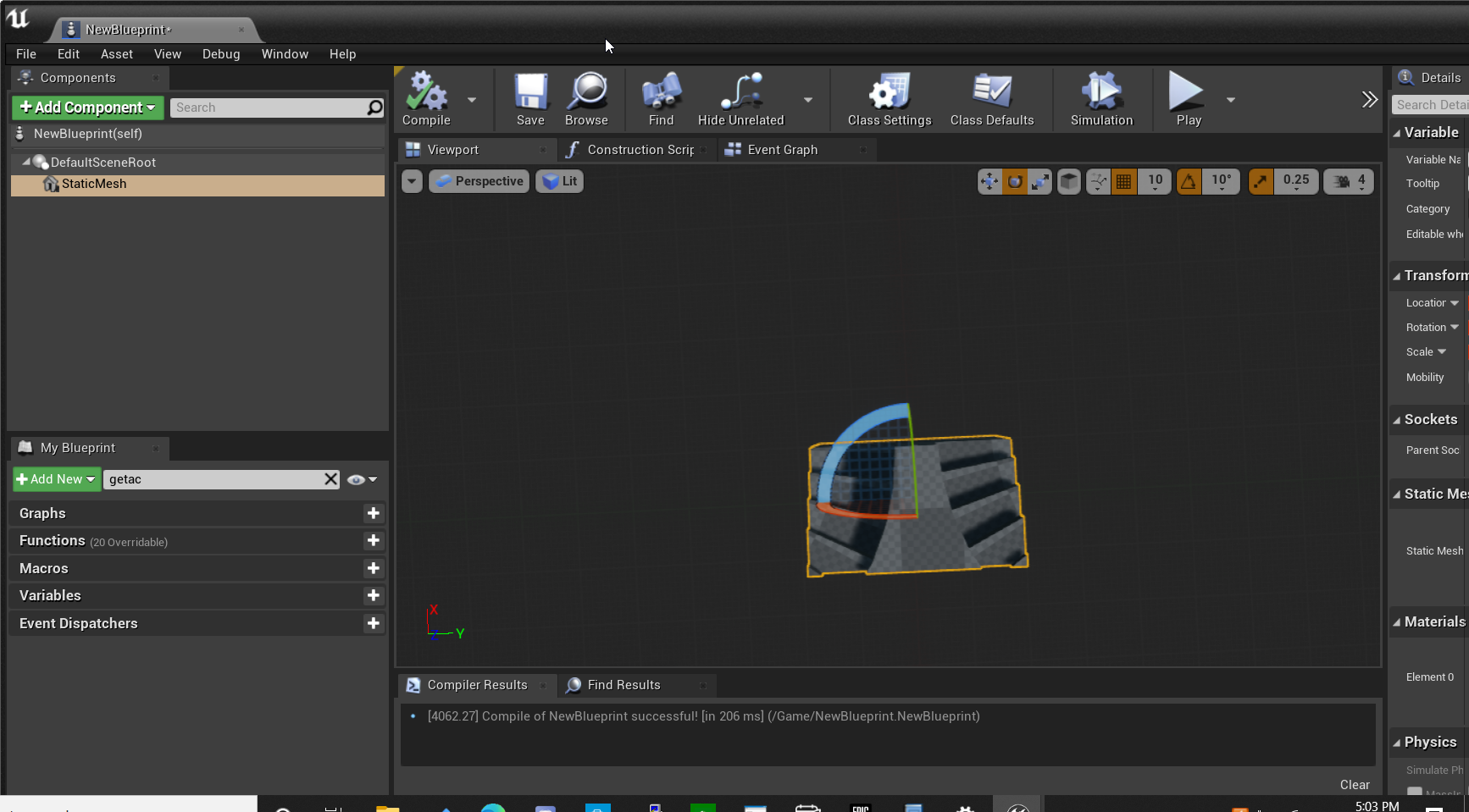 austere bay
You mean, your mesh isn't correct direction?
silk lintel
No, that's the rotation gizmo
dawn bloom
@austere bay I think thats my problem?
silk lintel
Wait, show it in transform
austere bay
Okay, well, then just rotate it. Blue is Z axis, green is Y axis, red is X axis.
But beware, in UE4 Y is forward
and Z is up
silk lintel
If your mesh isn't in the correct direction you can't rotate it and change the axis
That makes no sense
dawn bloom
hmm why not
austere bay
And if you're really bothered by it, go to Blender or Maya and change your mesh's direction 😛
silk lintel
Because that's editor code, not something that changes per mesh...
I'm not sure what the problem is
dawn bloom
hmm no I think I understand now
I don't need to change the vector
or like the mesh direction
silk lintel
If it's something as simple as the mesh not facing the correct direction, you'll have to fix that in blender/maya like @austere bay and reimport or fix that in import build settings
dawn bloom
thanks!
austere bay
How can I scale my canvas to screen size?
silk lintel
@austere bay Do you mean in a widget blueprint?
austere bay
Yeah. Basically a placement of my image changes based on screen (viewport) scale.
In Unity I can set the entire canvas to scale with screen size, can I do something similar here?
silk lintel
@austere bay The outer-most element of a widget blueprint will always be the full size of that widget blueprint. This is the canvas by default, but you can set it to anything. When a widget blueprint is directly added to the viewport (without its scale being altered by, for instance, making it an element of another widget blueprint) the widget blueprint will always be the same as the viewport scale. In other words, if you add an unaltered widget blueprint to the viewport without changing scaling, the canvas size be the same as viewport size. If you want an image to scale to screen size then either make it the outer most element in the widget blueprint, set it to fill horizontally and vertically, or manually change the scale (but I would never suggest that).
 subtle sage
Hey uhm.. Can anyone tell me where the hell I can find a vertex position/transform node in the material editor?
or geometry node.. something
silk lintel
@subtle sage World Position
silk lintel
@subtle sage Wait, let me double check
@subtle sage I don't think there's any way to get vertex position currently, but world position would be the closest option
austere bay
Setting my widget to this seems to be working
silk lintel
you can use vertex painting
but that's in editor, not material editor
@austere bay That's the anchor, which basically controls where the center points of the widget are located. If you want an image to fully cover the screen you should set anchor to full (the square in the bottom right) and set alignment to fill (the far right) in horizontal and vertical.
austere bay
Nah, I want the image to scale properly.
silk lintel
Wait
Are you asking how to uniformly scale the image?
So that it will keep aspect ratio?
austere bay
Yes. So regardless if I'll play in 800x600 or 1920x1080 it will always stay in bottom right hand corner.
silk lintel
Ohhhh
Sorry, I misunderstood the question. There are two good options. One is to a scale box widget and set it to horizontal right and vertical fill (like you have it), then put the image inside the scale box. You can also set the horizontal alignment on the scale box to right. Another option is to use a horizontal or vertical box, but if you only have one element (the image), then a scale box would probably be your best bet.
austere bay
So what I did is okay?
silk lintel
Well, I'd recommend putting the image in a scale box so that it keeps the same size. That's what you want, right?
Then you set the anchoring the way you have it on the scale box rather than the image
austere bay
You mean this, right?
Sorry, I am unfamiliar with UE4 terminology so trying to figure out what a "scale box" is.
silk lintel
No, the way you had it. The anchors on the bottom and right are for fill. You want the scale box to fill horizontally but not vertically, and you want it to snap to the right. You should use the one right under where you marked.
silk lintel
@austere bay The scale box is a widget you can find in the palette and drag-and-drop into whatever widget blueprint you're working on
ionic gyro
nevermind guys. i fixed my problem by replacing on clicked event with an on key down override function
 lusty spruce
Hey Can i have some help, i dont know if anyone understands this, but im working with Unreal Engine, and im currently working on a first person shooter game, i was creating some code that were text block widget code binds, and it says "unsupported type of bind" when clearly it is the same bind and says the same bind, any ideas whats the issue?
 rancid lynx
what are the differences between set HIDDEN and set VISIBLE ? during gameplay, i understand the difference during edit mode.
dawn bloom
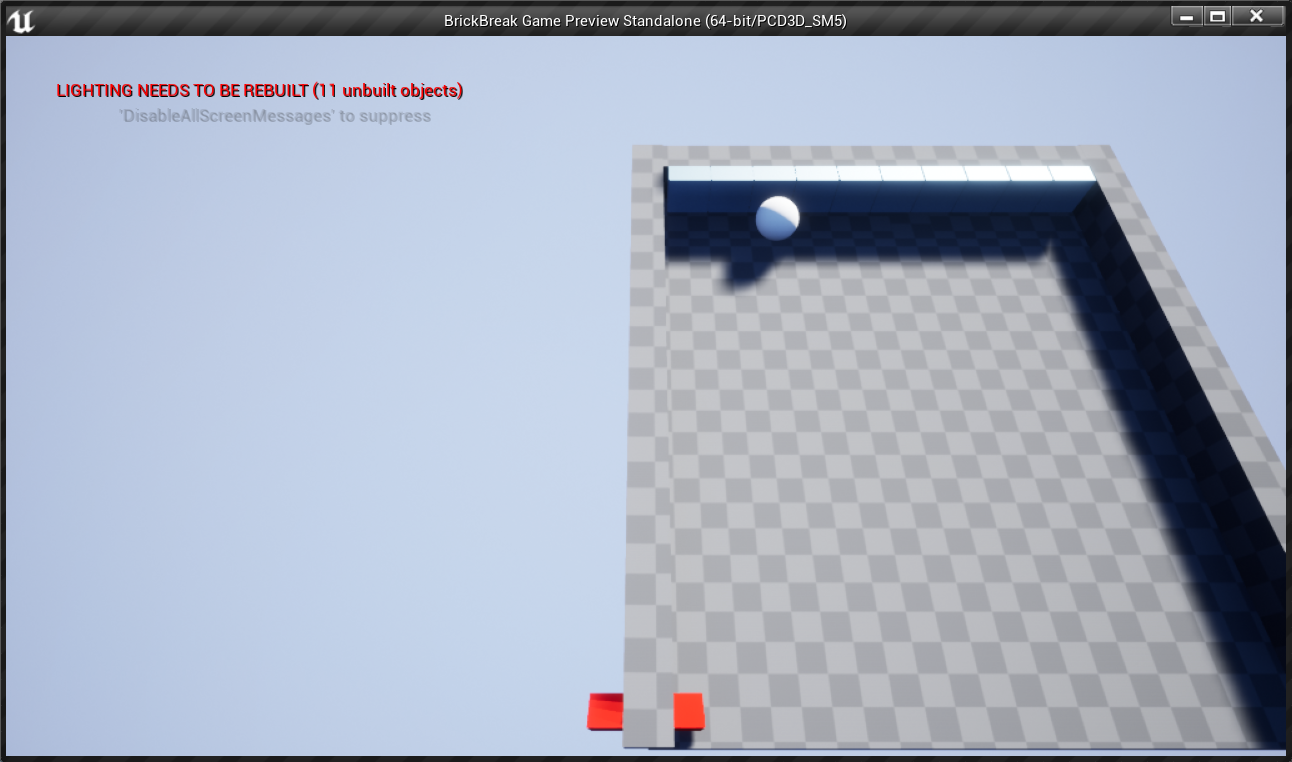
my object goes through walls
I have sweep checked in blue prints
the red object has a collision bix
box*
the static mesh is at the root of the blueprint
not sure what else could be wrong
ah I think the actual grey platform itself doesn't have any collisions boxes, let me check
 grim beacon
Ue4 source first build taking unsual amount of time. Is two-three hours normal with a ryzen 3600x? I've had far smaller times while building the oculus branch
 oblique tangle
any1 know whats wrong with this material? just set up parallax occlusion on it
and it's getting this weird lighting issue
 brisk nimbus
Is there a known reason why unreal crashes after exporting a level sequence?
Can´t figure it out...
 winter gale
Some more tips
https://twitter.com/RyanJon2040/status/1314811650759970816?s=19
https://twitter.com/RyanJon2040/status/1315174038726234114?s=19
https://twitter.com/RyanJon2040/status/1315536426549694465?s=19

Quick #UE4 Tip number 3.
Editor is lagging when in background? Uncheck "Use Less CPU when in Background"
#unreal #unrealengine #unrealtips #unrealdev #indiegamedev #gamedev #indiedev

 Twitter
Quick #UE4 Tip number 4.
Prefer C++ names for your variables and functions? Uncheck "Show Friendly Variable Names" from Editor Preferences.
#unreal #unrealengine #unrealtips #unrealdev #indiegamedev #gamedev #indiedev
 Twitter
Quick #UE4 Tip number 5.
Making a game with fully dynamic lighting? Make sure to uncheck "Allow Static Lighting" and "Support Stationary Skylight".
#unreal #unrealengine #unrealtips #unrealdev #indiegamedev #gamedev #indiedev
 Twitter
brisk nimbus
Twitter
brisk nimbus
Maybe I should add its a VR Project, it seems like I´m getting a steam VR error popup after the export.
 deep spade
Vehicle component doesnt have engine stats exposed with realtime editing why is this?
 reef kite
Hey does anyone know how to implant a run and stamina using a onscreen button as the toggle run and walk?
For mobile dev
 thorny perch
I have ue4 installed from the epic launcher, if I install from source, will they merge or will it be a new instance of ue4?
 runic wyvern
thorny perch
runic wyvern
thorny perch
so I should remove the binaries one to only have one then
just interested in getting quest 2 packaging available
it should eventually be in the released versions, but who knows when 🙂
 safe dock
Hey guys, I am trying to figure out how to have football like control of a ball. I can't find anything helpful on the internet and I have even purchased the ball control asset from ue market place but still nothing. The asset name is misleading. Any suggestions?
 sinful bone
Is there a way to see, if an asset is used in the scene? Like in Unity where you can just rightclick and say "Find in Scene"?
thorny perch
I just finnished installing visual studio 2019 yet I cant generate project files due to it "missing"
what am I doing wrong? 😄
plush yew
wdym @safe dock
you can just mess around with physics until you get a ball that you think is football-like
safe dock
@plush yew i want to be able to run around with a ball, not to fly instantly after touching regardless of the physics being changed dramatically. Because as soon as the character touches the ball in flies
safe dock
@plush yew i currently have a mass of 50 kg and a friction of 5000
The thing is the ball is still running faster than me and it no longer bounces
plush yew
well footballs don't bounce really do they
increase friction more
Also your surface might need some friction
safe dock
Footballs bounce a bit... Don't they?
plush yew
A little yeah
But seems like your problem now is just friction. Whether the ball bounces depends on the point of contact, you want it to be just below the centre probably
 scenic fox
my animation looks like its sliding
it's not in-sync with the movement
can anybody help
im using a blend space 1d
 summer yew
Hi, not sure if this is the correct place, but what's the best VR set for Unreal or TM?, asking as I have no clue regarding VR atm. Thanks
 wet relic
Em bustzee I'm still kinda new but I once had the same issue , what fixed it for me was my animation speed. Check your animation speed
Hello guys please how do I set my ue4 project to use api 29 as requested by Google play. Ue4.25
scenic fox
i fixed it
another question: how do i make it so that if my character is far away it plays it's footstep sounds but its not as loud
i did this
im really confused on how to do this sort of thing
okay found it out but
how tf do i make a Attenuation preset?
 fallen marten
@safe dock for physics to work effectively, both objects that collide have to be simulating. If one is and one isnt, the one that's not will bounce off the one that is
fallen marten
@scenic fox drag off the attenuation and promote to variable
Or, I think you should be able to make an attenuation class
 thick knoll
I have a weird issue where I have baked Lightmaps but when I go into standalone it tells me the lightmaps are not baked and the lighting is different.
Does anyone know why the lightmap is not going through to the standalone version of the editor?
Doing a test package, and I get this in the errors. I Feel that this is why the lightbake isn't working but I don't know what it means by data not matching
 tall tundra
Hi all. Anybody able to advise on how I can use the job bot to post in the Looking For Talent board? Thanks.
sinful bone
Guys, is there a way to get back files I just deleted?
 wary wave
define 'deleted'?
sinful bone
I renamed a folder and after a bit unreal crashed. When I opened unreal again it kind of crashed again right away so I force closed it. When I opened it up again I had the renamed folder and the old folder as well. I deleted the new/renamed folder with force delete and now realized that the old folder is just empty folders.
So all my files are gone basically
plush yew
_is looking for a marketplace tool where players can create their own maps with the game assets from the game.

Unreal Engine
Easy Building System. Easy to use. Works Out Of Box. This is an advanced modular multiplayer building system for Unreal Engine 4.
but im not sure if i can make this work in free-fly-camera sytem, so not in 1st or 3rd person camera system
 exotic thicket
A free fly camera is just a flying first person camera
@sinful bone they're probably gone for good if you can't find the files in the file browser... You should look into using source control like Git, it can help with issues like these
 chilly token
Does anyone know how to fix this, ( it's filkring when i move character left or right )
 surreal laurel
whats the shortcut in the material editor to quickly make a constant node?
 thick herald
1+left click
plush yew
@chilly token https://i.imgur.com/w8z3quX.png holy shit
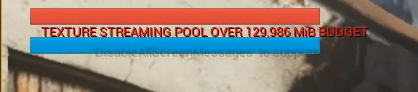 thick herald
streaming pool isn't a big deal. Default values are 1 GiB.
sinful bone
@exotic thicket there a few uassets, which fail to load when I open unreal
is there absolutely no backup system for UE?
surreal laurel
If I have a material function with parameters, and I pull in multiple copies of that function in a material graph, is there a way to control those parameters separately for each function instance?
Because at the moment all of those functions are controlled by the same set of parameters, which makes sense, but i'm hoping theres a way to have each function act on it's own, and each one's parameters to be separated out, as if in groups or something
thick herald
@sinful bone check your saved folder for back ups
sinful bone
@thick herald yeah, I just did. There are some assets, mostly material instances, but not the materials themselves, which is the part that hurts most
also some niagara systems, which is better than nothing I guess, but all materials are gone
sinful bone
yeah a hard lesson coming from unity where this stuff can't happen that easily since deleted stuff will be in the recycle bin
 woven bay
Hiya
thick herald
Loha
chilly token
Does anyone know how to fix this, ( it's filkring when i move character left or right )
@chilly token Hey can anyone know why it's happening?
sinful bone
Sure that I cannot recover the files somehow? I didn't delete them in windows, just in the editor
Well, the uassets that exist match with the stuff I have in my backup folders, which means no materials.
Guess that answers my question
wary wave
they are most likely gone - but today you learnt a lesson about the value of version control 😉
sinful bone
thanks, very cool
 languid flax
I'm making a game with conveyor belts and lots of items. I have a system where every static mesh / item is grouped in its corresponding HISM and just dynamically works to be added / removed / used etc. I'm wondering what the most performant way to make them move on a conveyor would be. Some options would be:
- Keep system as is and let the conveyor tell the HISM transforms to move (I've done this in a test but ran into performance problems at CPU level at like 600+ items)
- Move items that are being handled by conveyor belts into their separate HISM local to the conveyor belt, then update their transform less frequently depending on distance to the player. This means I would probably have a max length for a conveyor belt (currently unlimited), so that I can piece it up. But it sounds like a pain to get working without visual glitches when an item moves from one conveyor belt end to the start of another (which would visually look like the same belt)
- ?
 spiral flint
wary wave
spiral flint
wary wave
if you're getting spam DMs, talk to a moderator
 dim merlin
Hi, so it seems randomly that all assets in editor gets blurry (like low quality textures) anyone knows why?
sometimes they got back loaded again, but mostly i need to restart the editor
 slim kestrel
Hi Guys
Hi guys, Wanna ask.
since SpiralBlur on material is not working when raytracing is turned on ( https://issues.unrealengine.com/issue/UE-92949 )
Is there any other alternative recommended for bluring out refraction in ue4 ? thankyou
 hollow compass
blendspace 1d
only problem is looking down is 360 and below'
it wraps because it is a pitch
is there a way to convert this with out a bunch of nodes
whats the most effective way to deal with this
hollow compass
answered it on my own
i need the delta of two rotations to get the number in a range from -90 to 90 instead of pitch from 0 to 360
 opal carbon
changing the player controller to a movable car
go
idk what to do lol
I need help
can somebody join general vc?
hm
nevermind
thorny perch
trying to rebuild lights but getting this error https://cdn.discordapp.com/attachments/660903177239003138/765215140093624360/unknown.png

i know it need to be rebuilt, thats what im trying to do 😄
thorny perch
where can i find it then?
opal carbon
also you can just build lighting by pressing the "build" button, or you can scroll the options on "build" and pick "lighting", but in my experience, casting shadows really fucks up the way the objects look
hold on
select the light source in your level
 grim ore
it will give that error when you are building lighting as well, perhaps you are building and it's not done?
opal carbon
look for the "cast shadows" box there in your light source on your level in the "details" tab when you select it and make sure that "cast shadows" box is unchecked
thorny perch
I have many lights
thorny perch
worked fine in 4.25.1 for me
opal carbon
you might just have to add different lights :p
grim ore
when you build lights what happens?
thorny perch
gets that error after trying to send to swarm
grim ore
ok so what does the output log say, that error is just the end result not the actual message
thorny perch
where is the full log?
Cmd: MAP CHECK DONTDISPLAYDIALOG
MapCheck: New page: Main - 12 okt. 2020 18:20:02
MapCheck: Error: WorldSettings_1 Maps need lighting rebuilt
MapCheck: Map check complete: 1 Error(s), 0 Warning(s), took 2,106ms to complete.
LogEditorBuildUtils: Build time 0:08
LogUObjectHash: Compacting FUObjectHashTables data took 0.66ms
Error, fatal in BeginJobSpecification
Error, fatal in EndJobSpecification
LogStaticLightingSystem: Warning: Failed to build lighting!!! Lighting build failed. Swarm failed to kick off. Compile Unreal Lightmass.
grim ore
is this a launcher version or a source build?
thorny perch
source
grim ore
so then you need to build unreal lightmass from VS
grim ore
same way you compiled the editor itself, open up the solution and scroll down the programs list in VS and find unreal lightmass and compile it
thorny perch
ahhaaaa
makes sense
now its building lighting so yeey
thanks 🙂
what have i done here? 😄
its a single object
no idea where this border is from
added new floor, same defect
grim ore
Completely odd question but has anyone worked with the Screen Reader support in UMG?
sterile tulip
Should I make buildings inside UE4 or make them in blender and import them?
grim ore
you can do both, most of the time you can do a mockup for scale and layout in UE4 then export it out and work in it in blender.
 honest vale
@thorny perch some funkiness with vertex normals or something?
grim ore
if you know what you want, do it in blender. In the end a proper FBX file outside of UE4 and brought in is "better"
thorny perch
joni i made a plane in the editor same thing there
not sure what is happening there
sterile tulip
Thanks ✌️
plush yew
How are aim down sight systems made in today games? Are they using animations or some code?
 sweet flume
@grim ore dude love your unreal engine tutorials! A couple of them have saved my butt dude!
 worldly comet

Facebook:
✅Присоединяйся к нам на Facebook:
https://www.facebook.com/groups/Indievision/
✅Запишись на курс на нашем сайте:
https://www.indievision.net/
✅Посмотри много полезных видео н...
@oblique tangle it's in Russian, but you should be able to visually follow along.
 severe gorge
Where is the best section to go to ask questions about unreal's test automation system?
There's no channel for testing sadly.
exotic thicket
#editor-scripting perhaps
 hard quarry
Is there a blueprint event which registers if I deleted something inside the editor?
 tacit onyx
Are there any mentions of when we'll be able to try out the water stuff in the 4.26 preview?
 arctic horizon
You can right now if you build from source
so probably the next preview version if you want to wait for a launcher version
 light thunder
WHERE is my visual studio solution for my project? i need to step through some engine crashes but it's blank when I open my solution up?
thorny perch
is there better FBX exporter for 3dsmax than the built in one?
seems to crash on me all the time
 pulsar flume
I really like UE4 and can't see myself going back to Unity, but it seems like every time I need to refactor a struct the whole engine shits itself and crashes.
Is there any alternative to structs? Preferably a BP solution but honestly I'll migrate to cpp if there's a better option.
I mostly use structs for data like game items, player/npc stats etc
I fear if I keep going this way the whole project will go to hell at some point.
Also - if there's an option for data management like that but with inheritance or composition I'd love to know
worldly comet
I really like UE4 and can't see myself going back to Unity, but it seems like every time I need to refactor a struct the whole engine shits itself and crashes.
@pulsar flume
Lol so true, yeah I feel you, just trying to get the very basic stuff working well and looking amazing or even close to how it does in UE4 out of the box takes days to weeks of tricks, mental gymnastics, and a manual for deciphering cryptic bs.
grim ore
I have heard that C++ structs don't run into that issue. It's weird it has existed this long so I wonder if there is something simple being missed
alpine laurel
ok so i am trying to figure out how to make a spinning portal effect with my material and i am not sure how to go about that. I have tried using a rotator, which does work, but the problem is i have to scale the texture down because the mesh the material is on is small.
This is what ends up happening. Any ideas?
ornate forge
For some reason I can move every component in my blueprint except the spot light components, strange
pulsar flume
@plush yew @grim ore
What would you use for Item / Stat / misc data instead of structs? I've been looking at class and object but it's not obvious how they can be configured like in a data table
sweet flume
@alpine laurel youtube animated materials with flipbooks
there is a video showing how to do it that litterally makes a spinning portal
Its pretty basic make a texture with your sprite animations in a sheet, use it as a source texture, in the material, feed it into a flipbook node, and out to your material... adjust as needed
sweet flume
the video explains the gotchas a lot better then what i did, but unreal engine handles the pipe line for animated materials pretty well imho
pulsar flume
If you don't mind sharing, how do you handle different item types that have different properties?
Do you cram them all in the same struct like me? 😅
alpine laurel
Its pretty basic make a texture with your sprite animations in a sheet, use it as a source texture, in the material, feed it into a flipbook node, and out to your material... adjust as needed
@sweet flume and its one image, not multiple
sweet flume
@pulsar flume you could make a base item class, inherit from it for each class, and hold the classes ID in an Enum for drop tables.
@alpine laurel you have to use a sprite sheet for an animated material in unreal engine.
grim ore
@pulsar flume there isnt much you can substitute a struct for if you need it 😦 data table for data that you dont need to change and imported from an external file and beyond that probably C++ backing classes for data so you dont have this issue
alpine laurel
i just need to spin the texture. is there another way?
sweet flume
@ripe meteor it moves your items from data based items to more object based which many would argue bad (even myself in some cases) but it would by pass the struct
@alpine laurel no.. you need to make a sprite sheet with each frame of the texture
there are other ways but they are very resource intensive and arent the "right" way to do it
pulsar flume
Yeah, but it still doesn't solve the main issue which is the lack of inheritance. Shame
sweet flume
@grim ore ever think about doing a video on "BindJumpApex" event? Some of us would reallllyyyy love to see it 😉
@pulsar flume why not just make a base item class and create a blueprint for each item?
then you could easy just use a select statement for drop tables and stuff
Ok so in item design for games there are two main ideals, one is what is called the "spec oracle idea" which basically says all items should only be data that is fed into an item class that constructs the item, and adding new items is done by adding new data the item class understands
pulsar flume
That's the way I'm leaning towards
sweet flume
then there is the "items are living idea" which basically says each item should be its own class and should be instanced in the world or inventory or whatever when its "spawned or exists"
Each method has its up and downs
sweet flume
for instance in the spec oracle design your item class has to know what the data values are given to it, this creates less flexbility if you want to make unique items it causes your base class to have logic for only a few items in your game
but it makes adding items extremely easy
with the second one items are living, so each of them can run their own code, which makes making turely unique and customizable weapons easy at the expensive of requiring more resources for your overall item system
THe more actiony you want your combat system to be the more you will want to lean on the ideal of living items.
pulsar flume
The main issue I see with the 2nd method is that items have to be "spawned" to access their data
grim ore
@sweet flume it looks like it's a normal event in the character you can bind to, what is the issue with using it?
sweet flume
@grim ore I dont know just cant seem to get it to work, or maybe i expect it to work differently, i am trying to use it for animations to get the peak jump to change animation to falling, but it seems to just never fire off
pulsar flume
THe more actiony you want your combat system to be the more you will want to lean on the ideal of living items.
@sweet flume in this game specifically I'm going for a simple click to attack. Most gameplay revolves around building and crafting a ton of different items
Which is why I'd rather avoid creating a bp for every item
sweet flume
@pulsar flume if there is a lot of item construction it gets hard with spec orcle system.
pulsar flume
They're all very similar
sweet flume
Also you dont have to instance the class to check its values unless you expect them to be different from the class defaults you set
and if they are different then defaults should already be instanced
pulsar flume
I'll have to look into it. I just feel like hundreds of lines in a json -> data table is easier to handle than hundreds of bp files
grim ore
@sweet flume I dont think its really going to give what you want, it basically triggers the event when the "Falling" movement mode triggers but you can already check for that in an anim bp if using one. If not, this screenshot is the basics of it (this is in the third person BP). The key is you have to activate the notify apex boolean whenever you want it to be usable and whenever it fires it disables itself until you enable it again. Since I only want it to fire when jumping I enable it when I jump (if I did not, and it was always on, it would trigger when walking off a ledge since that triggers "falling)
sweet flume
ahhhhhhhh
yeah i already got a working solution
just thought the apex thing was the "right way"
I just was not understanding the way it worked
grim ore
I could see it being useful if you wanted to do something like check the distance to the ground when you hit the apex and then XXXX
sweet flume
yeah i see
I am just checking velocity z value right now to know if the player is going up or falling down
grim ore
or even maybe allow some custom code to fire off like "I hit the apex, now we want to enable gliding mode"
yep that makes sense for what you need
sweet flume
@pulsar flume there are lots of good white papers written up about coding and managing game item systems. Lots of really good coders from tons of great games have really put a lot of brain power into this stuff
grim ore
lots of the code is weird since its like super custom case lol
sweet flume
yeah gliding mode is a great idea case for that
pulsar flume
I'll have to read up then. Thanks!!
 ancient fiber
i've already asked this in plugins, but does anyone here have expereince with VaRest and knows how to use the 'load json from file' node properly? I'm lost on how to get it to work
 lucid grove
Heya
I have never used Splines inside actors
How are they work? Ordinary splines just placed with a pressed button
And those one?
sweet flume
Various How-To's for Blueprint Spline Components and Blueprint Spline Mesh Components.
@ancient fiber I havent used that plugin but im gonna start now that i know about it, it wont be for a bit but ill let you know later if i figure it out
 shell hamlet
Have a problem with a material setup, following this video https://www.youtube.com/watch?v=yCRzOdo4b68 about 3:50 into it

Part Two Auto Material:
https://www.youtube.com/watch?v=mP8eHwVEA0o&feature=youtu.be
Learn in 4 tips how to hide nasty texture repetition on all of your Unreal Engine landscapes! Texture repetitions are the number one reason why your landscapes look bad so in this tutorial we...
where he copy some nodes from the gold material and use in the landscape material setup, he get variation in the grass, I gets only silver
 hushed cedar
@ancient fiber can you send a screenshot of your setup
 tight prawn
can someone please tell me what is that "3" node?
ancient fiber
sure TMK, one sec
grim ore
That would just be a vector/constant 3 node, 3 values or a color without Alpha
hold down 3 and left click in the graph to make one, or left click and press 3. its one of the two lol
ancient fiber
@hushed cedar i can confirm that the file path is correct, because I can write to it, no problem. I've tried a few different ways of getting* the return value, each of them suggest that it returns with nothing from the file
tight prawn
i'm trying to follow this tutorial
https://ue4community.wiki/legacy/ribbon-particle-(tutorial)-9tyv6kh4
Overview Adding the Ribbon TypeData module will cause your particles to be connected together by a polygon ribbon. The ribbon connects particles in the order of their birth. Setup The first step in...
however i'm unable to replicate that gradient result
grim ore
lol

 weary hull
should ue4 work with VS 2019 free?
sterile tulip
I changed quality from epic to low and now its compiling everything, does this only compile in the first time or everytime I change my quality setting
hushed cedar
ok
@ancient fiber i think figured it out
set the bool to false "is relative to content dir"
tight prawn
I changed quality from epic to low and now its compiling everything, does this only compile in the first time or everytime I change my quality setting
@sterile tulip if you do not delete the DerivedDataCache, it will not recompile everytime
hushed cedar
let me know if it fixes the problem
tight prawn
i'm not 100% sure though
ancient fiber
the 'encode to string' still doesn't return anything when printed
sterile tulip
so I have to let all quality settings compile once
hushed cedar
@ancient fiber how big is your project?
ancient fiber
like, file size? .. 8 gigs woah lol i was not expecting that
 ashen coral
The SkyAtmosphere system is used to create physically-based sky and atmosphere rendering with time-of-day features and ground-to-space view transitions featuring aerial perspective.
ancient fiber
i will, ty for your help!! one mo
ashen coral
This is a feature available for unreal 4.25. Can I use it on 4.21
Any help would really be appreciated
hushed cedar
@ancient fiber and also did you import the json to ue4?
ancient fiber
I didn't import it
crisp thicket
Hi anybody good with Collision?
Ive set my actors static meshes to Block all, as well a my player meshes to block all, but still they dont block
hushed cedar
@ancient fiber ok try this, set the bool to true but delete the \content\ from the path
hushed cedar
fixed?
hushed cedar
cool, happy to help😀
crisp thicket


both actors collision is set to "block all"
for tghe corresponding static meshes and skeletal mesh
but still my player mesh goes through each wall
alpine laurel
so in my fps i have set up my rifle to attach to the right hand via a socket on begin play in my character. the arms are "static" and are just in one position, but will move for animations like reloading.
How would i go about making it so the arms would change if i were to say equip a pistol?
hushed cedar
@crisp thicket when playing in the editor open the console with ` key and type show Collision and check the collision for both the wall and player
crisp thicket
you can see the collision in the video I took
i think I have to enable simple or complex collision for the walls
stay tuned
hushed cedar
the video is low quality, is the capsule collision with the player?
crisp thicket
yes but Im using the static meshes collision
hushed cedar
@alpine laurel if i understood correctly, you have to set up an state machine for that
crisp thicket
the capsule Component doesnt move
 hybrid light
why am I getting this error every time
 grand walrus
hey, everyone.
sorry for the minute long video, but this is bugging me and I just can't find the cause after toying around with it.
I have a melee combat system set up that is a component, the AI and player both use the same exact combat input system.
The player can hit the AI seemingly 100% of the time and get a hit, meaning that contact was made, an animation fires, and HP is lost to the AI.
The AI can hit the player fairly regularly and get a hit, but even as the exec fires through my code, the animation doesn't always play on the player, even if HP is lost (contact was made).
Here is a video demonstrating what happens, and here is a big picture with a step by step of what happens in the combat system (the part that is having trouble).
https://streamable.com/ac1lvw
 crisp thicket
when I type "show collision" in the console, my walls actor has no collision
grand walrus
The trace gets performed on an event tick basis, btw.
It's gated by a branch that is triggered by an anim notify state.
crisp thicket
how do I check if im using rigid body physics
hushed cedar
if you didn't set it up then you're not
crisp thicket
what is it
hushed cedar
try moving the capsule with the player
alpine laurel
@alpine laurel if i understood correctly, you have to set up an state machine for that
@hushed cedar yeah i just figured that out. would it be more effective if i attached the pistol to seperate arms and switched or just keep using a socket to spawn the weapons?
hushed cedar
socket is fine
crisp thicket
still doesnt work
alpine laurel
ok. im jsut worried that while the socket works fine for my rifle, what if when i switch and the hands go into the position for pistol, but the pistol ends up out of alignment. i would have to move the socket, but that would effect the rifle. what would i do in that situation
hushed cedar
@alpine laurel there is a tutorial series about making fps games in ue4 on Youtube
grand walrus
can't you make 2 sockets?
hushed cedar

If you've ever wanted to create a first person shooter game but weren't sure where to start, this is the tutorial series for you. You'll learn everything you need to create an FPS from scratch using Unreal Engine 4.
You'll learn everything ranging from creating characters to ...
alpine laurel
yeah i have watched that tutorial. its the one i used, but it only covers rifles and he doesnt move the sockets or anything for it
hushed cedar
this is what i watched
grand walrus
idk what you're trying to do, but if you can use sockets for rifle
why not just have more sockets for pistol
or
do a bit of math to move the socket manually on a switch based on what weapon you're holding
so if the alignment is messed up while using pistol
just offset in bp only while pistol is equipped
if that makes sense
hushed cedar
@grand walrus what are the errors about simulating physics? is it irrelevant to the player?
alpine laurel
im not that good yet. so im not really sure how i would do that
grand walrus
uhm, you know, i don't know, let me take a look
it should be irrelevant, because whatever it is it is applying to both my player and the AI
hushed cedar
and also is the AI also using the masculine option you changed at the beginning ?
grand walrus
I think it has to do with where I messed with some CCD setting
it's not, but that is also irrelevant, there are no overlay checks
i could be in any overlay, default overlay, which is what the AI is in
i am making a detailed reddit post about it with a huge picture list of all the inner workings of the code, will link it when done if you need more info
hushed cedar
maybe try to understand why the AI works and see what's different between them
grand walrus
they both use the same animBP and BP, as well as combat BP
hushed cedar
maybe the player controller is preventing something to trigger but the AI isn't
grand walrus
it's weird, too, because sometimes the hit reaction works on the player
lemme check
nope, player controller only does widget / input stuff
and in my case, actually doesn't even handle combat input
only handles ui inputs for the ALS system i use
hushed cedar
your only hope is to fix the errors that you know what they are and see what remains
@alpine laurel i just remembered, you can check out Advanced Locomotion System V4 to learn how it handles guns and it's animations
alpine laurel
thanks
hushed cedar
in the epic marketplace
grand walrus
yeah, it's way easier than doing it yourself
see here
custom character of mine, using all the out of the box animations that came with ALS v4 free

if you need tutorials on how to get als v4 going head over to the ALS v4 discord
 slender moss
why is my grass darker than my terrain when they are using the exact same material?
 rich furnace
Unreal's web browser is ancient Chromium 59 from 3 years ago
is there anyway to package the latest Chromium
slender moss
fixed it using subsurf, opacity and basecolor scalars
https://answers.unrealengine.com/questions/296890/grass-is-too-dark-gappy.html used this thread for anyone who might need it
 rough knoll
how do i stop this culling
no matter what i change in my landscape grass layer bp or the foliage settings i cant get it to stop
this changes nothing as well
sterile tulip
do these quality settings also apply on the finished game? Or is it just for the editor and for the devs?
thick herald
Only for the Editor
@rough knoll Look in the foliage type details panel, scroll down until you find Culling min /max, you can adjust cull distances there.
rough knoll
i've tried, it changes nothing
thick herald
what distances have you tried?
Have you checked your engine scalability settings, like Blubblub has conveniently shown?
rough knoll
thick herald
Cool, what distance did you set for max cull?
sterile tulip
thats gonna take a long time
 blissful trail
scary
sterile tulip
what hardware part does the engine use to compile shaders? Which part would I need to upgrade to make compiling shaders faster?
ornate forge
CPU
thick herald
coughs
ionic gyro
hey guys. so i have a pause menu that displays the character through a scene capture 2d. i want to be able to pause the game without freezing the animation on the scene capture actor. any ideas on how i could go about doing that?
sterile tulip
time to buy I 9 999999K then
thick herald
AMD FTW
rough knoll
@thick herald 100,000 lol
shell hamlet
what is normally the problem with a material setup when the different materials dont show up under layers?
hmm strange to came up when I messed around a little with paint, manage and paint. BUG !
 quiet finch
like s makes me go back
 frozen compass
has anyone ever converted or exported redshift materials into unreal? is it possible?
 obsidian wasp
How do I unlink two nodes in a behaviour tree?
Seems like something that should be obvious, but right-clicking the link doesn't bring up a relevant menu, and I can't seem to select the link either...
 trim silo
Any ideas on how i can interact with grass foliagetype that is placed automatically in a landscape material?
for some reason overlaps don't triggerr at all i dunno if foliagetype grass is treates as mesh or what
😦
 open wadi
Question: anyone here work with a websockets-based API?
quiet finch
I have a camera, and i want to posess it whenever the game starts
and it does, but instantly goes to my character view
 covert hedge
@obsidian wasp alt click my dude
quiet finch
How could i use variables in different blueprints
I want to deal damage to a player
Like how could i get damage from something like a gun to minus the health on the player
grim ore
lots of ways, all depends on who handles what and where what is
find the gun -> ask for its damage -> tell the player the damage amount -> let player do whatever
find the gun and pass the player -> have the gun apply damage directly to player
Projectile? have the projectile tell what it hits the damage amount and let the whatever do whatever
etc.. etc.. bacon
 vapid bronze
before
after build
Could anyone help me figure out why AFTER I build my lighting on this scene, there appears to be an obstruction causing a shadow in the doorway?
It's just merely a scene with a room, there is nothing outside the door. (except for Light Source)
I'm new to Unreal. I'm only modifying Light Source, not touching SkyLight
obsidian wasp
Thanks, devoluti0n.
vapid bronze
To add, the doorframe is made by using a subtraction BSP
thick knoll
how do I remove the crosshair from the first person template? There is no code to manipulate
it's all inhereted
grim ore
The first person template HUD has the crosshair in it @thick knoll
@vapid bronze its either the lightmap resolution on your floor or your on lower shadow quality or both
 light oriole
Why Is This Green??
When I Change The Metallic, It Goes From Black To Green
grim ore
might need to ask in the Unity channel @light oriole
thick knoll
if I try to open the HUD it goes into C++
grim ore
@thick knoll which hud file are you editing?
grim ore
yep you created a C++ version of the project then. So either remove the lines from the cpp file or if you wanted BP project start over
thick knoll
yea starting over isn't an option, so the hack method will have to do
thanks for the help
grim ore
don't have to hack anything, just set the default maps and mode -> game mode -> default HUD to the blank HUD class
thick knoll
my selected gamemode stuff is greyed out, not seen that before
grim ore
its due to you having a C++ game mode
plush yew
hi guys do you know some video tutorials, where it explains the creation of the datatable and also the operation on the weapons ?? No vacancy??
grim ore
so create a new BP game mode
sterile tulip
I painted alot of foliage and it got laggy, and then I removed the foliage but its still laggy where I had the foliage before? Why is that?
grim ore
@quiet finch the game mode and the controller have events that fire off when a player is trying to spawn or being possessed by a controller
otherwise the begin play for the player can be used
 grim juniper
@vapid bronze What MathewW said. Also, the reason the door shadow looks more accurate before building is because it's using dynamic shadows as a preview compared to the baked lightmap textures from afterwards
quiet finch
And i want to be an mutiplayer game
grim ore
then use the game mode
thick knoll
awesome, thanks!
grim ore
it depends on what you are doing, we dont know what you are doing
quiet finch
An FPS multiplayer
grim ore
but thats not really a thing you are doing, why do you need to know when a player spawns
grim ore
UI is client only so you have to do it on the client side
quiet finch
Yeah but its appering on top of it
rough knoll
i need some tips for the optimization of grass
the demo's field grass looks nice but when i need to use it on a large scale i always get performance issues
every low poly grass i find looks pretty bad
sterile tulip
I walk on my landscape and suddenly my character disappears and I cant control anything anymore
Why could that happen? Its not falling down im on the surface
grim ore
your character might be too low, -Z kill
rough knoll
grim ore
^^
sterile tulip
Oh so I increase the number further into minus?
grim ore
or click the advanced drop down below it and disable it like above
rough knoll
i think you should turn it off
i have mine off but i can't quite remember why it is off
grim ore
uncheck the Enable World Bounds Check checkbox
rough knoll
i never changed the damage type
just set the kill zone to a really big negative value
sterile tulip
Thanks so much mate
vapid bronze
@grim ore @grim juniper How exactly do I adjust the lightmap resolution? I just ended up removing the material from the floor to test it. Same problem.
Funny enough, I removed the wall and the subtraction BSP from it, and this happened:
 autumn grail
i have a problem with a media texture material
vapid bronze
autumn grail
the texture is correct but the material is white
vapid bronze
The light went AROUND the open door after building without the wall/substraction doorhole
grim ore
@vapid bronze click on the mesh you want to adjust the lightmap on and search for lightmap, there is a checbox to override the default lightmap resolution and set it to something higher that is power of 2. so if its like 32 by default try 64 or 128
autumn grail
i imported a mp4 video , and created a media from it , and created a media texture from it , and created a material from it
only the material is full white
grim ore
are you playing back the item on the material? playing the media
its going to be white as you have no media playing, when you play it the texture should update
autumn grail
It work
i just checked the auto clear checkbox
ty
Oh no it works at preview but it is white in game
autumn grail
i want it to play on the background image of the UI
i sont understand sorry
don't *
grim ore
did you read the documentation
autumn grail
yes but the doc explain how to play the media on a plane
me , i want to play it in the image background of the UI
grim ore
it explains how to play it anywhere, the bottom part tells you what to do
autumn grail
i look ty
grim ore
you need to open the media source so it will auto play, or you need to open it and tell it to play
grim ore
you dont, you can open it from anywhere
the example was just showing the level blueprint as it's the basic example
 storm terrace
LogNavigation: Warning: NavData RegistrationFailed_DataPendingKill.
any of you know what the issue is here?
I have no nav-mesh by the way
no AI or anything like that
I just found the issue, I was configured for network play instead of offline and I have not configured online play yet
autumn grail
@grim ore what is the node to close it (when i click on play game button) please
vapid bronze
Yes, it does.
I tried lowering the walls into the floor to no avail.
I kind of chalked it up to the fact that its BSPs.. but I'm not sure
sterile tulip
you should prob do it in a 3d modelling software and import it in the game @vapid bronze
vapid bronze
I'm thinking you're spot on with the idea
 dim crescent
May I ask question here?
dense knoll
any way to fix ue4s default water mat?
dawn bloom
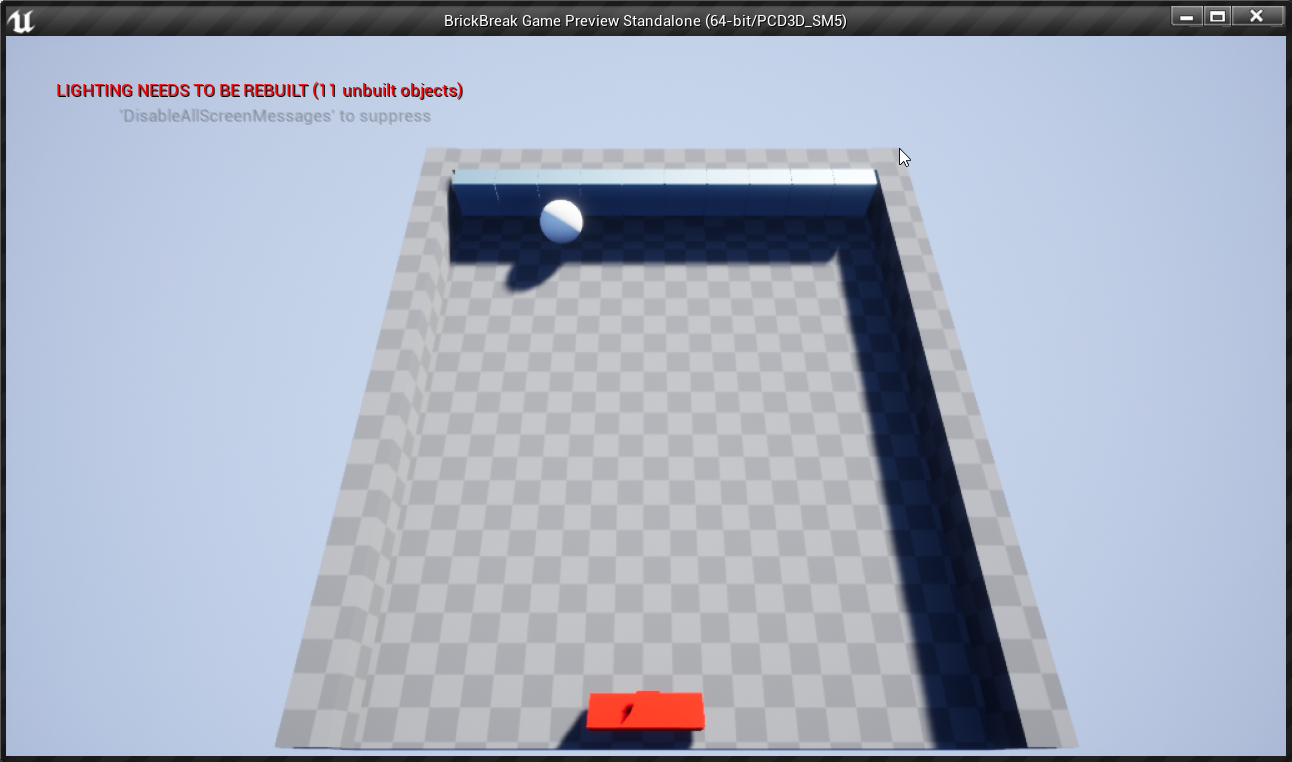
I'm trying to make a ball spawn on the platform below
and launch when I press space
like brick breaker
what BP nodes can I use for this?
I found emitter guides for like shooting bullets from guns but thats not quite what I want
 brittle adder
add impulse/force
dawn bloom
oooh thanks
autumn grail
i can't complete a while loop , i have a while loop in my thrid person character
and i set the condition to leave it from the play button of my main menu
the loop dont stop when i click the button
Help
plush yew
are you trying to remove and show a new widget?
 delicate atlas
how do i add a coin?
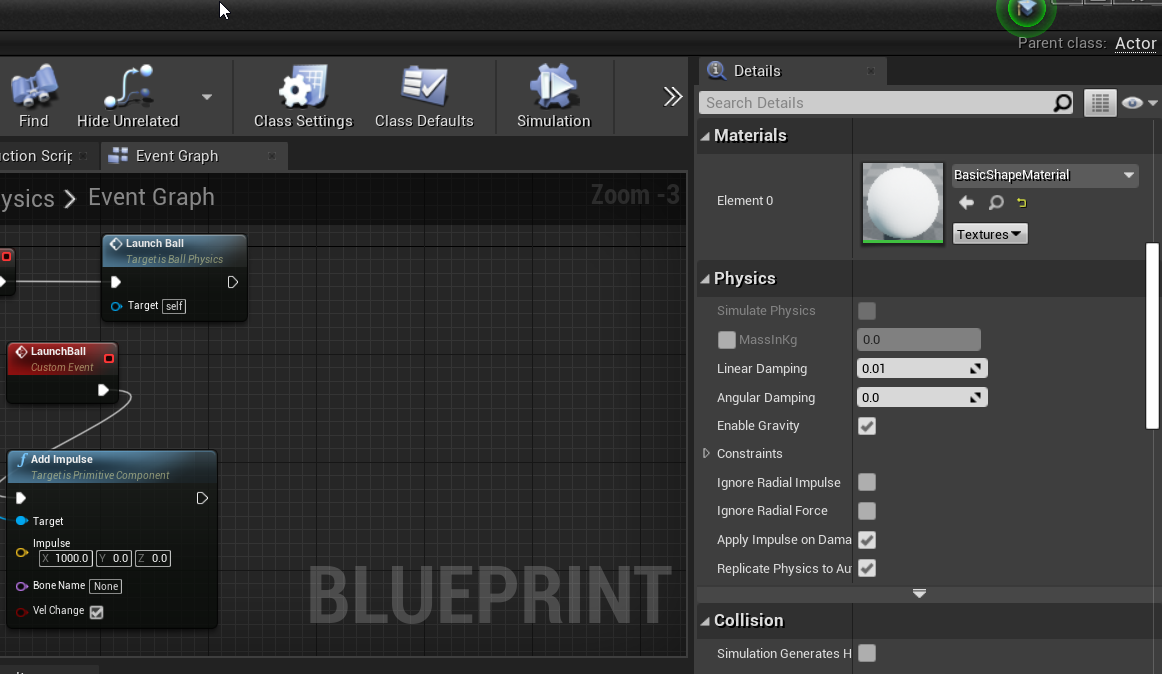 exotic thicket
What type of component is it?
dawn bloom
uh static mesh
exotic thicket
oh I think the checkbox is unavailable if you haven't actually selected a mesh for it
exotic thicket
at least for me if I selected for example the default cube mesh the checkbox becomes available 🤔
if I don't select anything then it's grayed out... never seen it grayed out with anything else
maybe if the mesh doesn't contain any collision geometry? not sure tbh
dawn bloom
it worked after I added a collision sphere
sterile tulip
Do high res textrues use RAM or VRAM?
dim crescent
from my gaming experience, it's VRAM
woven bay
Do high res textrues use RAM or VRAM?
@sterile tulip
They use VRAM mate
sterile tulip
Then what uses RAM?
dim crescent
game object in the active scene
 minor fiber
Anyone know why this is randomly transparent?
I cant select it
There's some railing that also went transparent
A bit confused
Alright looks like I randomly made it a decal
dawn bloom
when I add impulse to a ball and it bounces on wall
it loses some momentum
How do I make it maintain its momentum?
every time it hits a wall?
oblique tangle
Anyone know how I can setup random cubemaps in every texture repeat?
So, for instance, I have 3 different cubemaps, and my material randomly selects from those 3 and places them in each texture repeat
 blissful sorrel
hey guys, does anyone know why when I build my fps demo game to android the lighting goes super dark
I'm trying to figure out how to fix the lighting but I'm still kinda new to all of this
how do I make it as bright or slightly bright like my pc builds?
plush yew
ue4 auto fits the graphics and stuff to the phone so it runs smoother you could try using a post processing box and mess with it or try to work around with the shadows ect there are lots of tutorials to help tho
 glad basin
Why not just remove virtual keyword instead of add final keyword?
AController::Possess
 hollow crescent
Hi, is it possible to create independent VR overlays in UE4?
 vestal raptor
If I want to move my entire unreal folder from hdd to ssd is it as easy as ctrl+c - ctrl+v? I'm asking because once I messed around with folders, I lost all references
surreal laurel
I think if you copy the entire project folder over you'll be fine
fervent sigil
if you move the entire directory you should be fine; from what I've experienced the reference are relative, so you'll lose them if you copy only part of the project or to different relative path
surreal laurel
What's the easiest way to check if a line trace is hitting the player?
nvm figured it out
 robust oar
do u know any tutorials for health regeneration system
Idk how to search for it but here's what I want to do:
I have an ice cube and I want to have a temperature meter(health meter) that goes higher each second, but if u eat the ice pickup it goes lower
use timeline color change
 stone dragon
Hello every one, I’m trying to connect multi User connection by using LogMeIn
I’m unable to ping the tether user matching
Can any on help how to connect multiuser using LogMeIn (Hamachi)
plush yew
how do i get a list of all levels (even not loaded ones) using python?
How do we turn off the input lag? When I press WASD, there is ca. 0.5 seconds input lag until the character moves.
 rare sorrel
Hi all,
I'm still trying to learn UE4 and I have question related to my first project. I've been trying to fix my landscape material for 2 weeks. I have 15 blended material functions and all my textures are set to Shared:Wrap. I'm using feature switch as well. In stats texture samplers count is shown as 2/16. Landscape material works as intended in SM5 preview.
First problem I've faced is when I try to paint 3 different layers in the same landscape component. In ES3.1 preview those components have three or more layers turns to grey and stay like that even after compling shaders. I had read that it's fix to maximum of 3 in the forums. But in my case I can paint each component with more than 2 different layers. I want to apply grass, sand and water materials in the same tile. After I decided to go along with this problem because I couldn't find the solution. I thought that I already can apply each material without using 3 of them in the same tile and use some foilage to compensate the missing grass material in coastal areas in the world later on.
But here is the second problem comes. I created new dummy level and new dummy landscape material but now with 4 layers in order not to touch anything already in the project. It didn't work at all. Now even with only grass material applied to whole landscape, everything is shown as grey in ES3.1 preview. Then I opened my old level to see if it's still working. The whole level is now grey in android preview even though I didn't changed anything including landscape material and its material functions.
Any idea how can I solve these two issues? thank you all in advance for your time and sorry for this long post.
lucid grove
Heya
Anyone have experience with materials? I recently purchased auto-landscape pack and now want to add material. There is a guide about adding basic material but know i want to add more complex one.
So eh master material have this output
And the one i like this one
Simply coping its nodes to MM doesnt work
 thorn dew
@rare sorrel Even on PC it does not perform well when the landscape has more than 5 different textures. You look at a texture performance and it starts getting pretty red. For maximum performance on android I'd say stick to 3 at most or better 1. To get more variation add in different geometry with a different texture on that geometry above the landscape. Some rocks and such can also change things up. Got to get creative when doing landscape design and keep it performant.
plush yew
i was just wondering if any of you have made 2d games using unreal
(stupid question , but just curious)
thorn dew
@rare sorrel @lucid grove This video might help both of you. https://youtu.be/gMKjIZMPJ0Q

Announce Post: https://forums.unrealengine.com/showthread.php?133824
Andrew's Materials/Resources: https://cdn2.unrealengine.com/HostForForums/2017/Landscape-Twitch-Stream-20170118T165040Z-f60e197f28668f8a14ecdd021d6d598672404573.zip
Creating an environment in UE4 is easy! I...
@plush yew I played with 2D elements in Unreal. It works pretty well. Didn't have a ton of sprites though so don't know how it would work with complex things.
plush yew
a lot of people seem to be against the idea of using unreal for 2d (obviosly 2d isnt the focus of unreal) but its good to know that 2d elements are nice in unreal
thorn dew
Unity people want to think their program is better, so they say it's better for mobile and 2d. It does have some 2d tools that unreal does not. Nothing I think is super needed. For mobile I saw a comparison between two people that knew their engine really well. Unreal was slightly faster. Not much though. They are both great for mobile.
plush yew
good to know that 🙂 i might try out unreal
rare sorrel
@thorn dew thank you so much
thorn dew
Does anyone know how to get something with velocity to stop right when it overlaps an object? I got something with velocity and even though I say on overlap set velocity to zero it still penetrates a bit between ticks before stopping.
What I'm actually trying to do is get something with velocity to smoothly avoid a circle. If anyone knows how to do that it would be best.
I had an idea. Maybe radial force?
I'm setting the velocity of the sphere every tick so the radial force doesn't seem to be working.
plush yew
whats is the difference between a LevelStreamingProxy and the level itself?
shell hamlet
after making my landscape material the layers will not show under Target Layers, could this be a bug?
Unreal 4.25.3
This have to be a "small" bug, I need to restart the engine to fix this
plush yew
i want ue4 with 100 dynamic lights in any frame
shell hamlet
Incredible powerful peice of software, but also buggy
robust oar
again: anybody knows how to make a sliding health bar?? like when your health gets reduced the health bar slides to the left
any tut or smth?
 upbeat rampart
so im installing urneal engine
4.25.3
but in options i didnt see desktop export
?
why is that
is it in by default?
upbeat rampart
i mean im installing it right now
it opens a tab that shows the directory and a button OPTIONS
and in that button you can choose wwhat you want it to install
and i saw only android ios linux
robust oar
can u show a screenshot?
upbeat rampart
no its curerntly installing
generally
can you export to desktop by default
with unreal engine
robust oar
I don't understand you. Are u asking if u can export a project to desktop from Unreal engine?
If so then yes
robust oar
oh,
upbeat rampart
and you want to share it with people
robust oar
that's when u pack it together
upbeat rampart
yes
robust oar
I honestly didn't try that yet but yeah its in by default
https://www.youtube.com/watch?v=P878gUw9l-E You can watch that and get what u want

This is episode 60 of my unreal engine 4 beginner tutorial series, in today's episode we go over some of the settings associated with packaging so that we can make sure everything will run smoothly when creating an executable for our game on all platforms.
We also take a look...
upbeat rampart
great
plush yew
hi all - sorry my brain has died. how to extend the forward vector (i.e. for a hit trace). Really hate vector math
exotic thicket
Multiply it with a float
robust oar
oh godd finally
I found what I was looking for, https://www.youtube.com/watch?v=8-e2icfQrR8 a damage buffer.

I have made this tutorial based on a forum post and a youtube video tutorial. These two referral link are given below:
https://www.reddit.com/r/unrealengine/comments/4b9tgd/smoother_progress_bar/
 upper heart
Is there an easy way to test all spawns in a map to see which ones are in bad locations?
plush yew
thanks zomg, for some reason i thought multiply would really skew the Z, so stupid
robust oar
If they are generated procedurally then all u have to do is go to the bad places and do some kind of rule so that they cant spawn there
exotic thicket
@plush yew for unit vectors (eg. vectors which have a length of 1, which forward vectors and other direction vectors are), multiplying it with a float will effectively just make the vector "longer" without skew or anything :)
plush yew
ah got it! thanks for the clarification
 edgy gulch
Hi there
I am new to unreal
I had a question
Suppose I make a game
Can I use an external script to control the game?
exotic thicket
If you implement support for doing so, sure
 uneven robin
hi developers i need your help with a task where user can clear a layer of mud from a static mesh body , can any one help how can i do this task . pls do reply
plush yew
Hello guys, I imported one shop model that was made by 3d artist and when I import it and try to enter inside of it through the empty space for the door I can't enter-how I can fix this problem? I tried to play with the collusion settings, I added box collusion, used simple collusion as complex, used complex as simple and it stil doesn't work, my 3d artist sent me this: https://www.youtube.com/watch?v=3QwbhZ9dlL4
When I import the mesh I disabled the option "auto generate collusion" but unfortunatelly again doesn't work

Here I show you a quick tutorial on how to set a custom collision in Blender for Unreal Engine.
will be happy if you can help me fixing it
 deep prawn
When I start a new project with automotive visualization example scene and raytracing enabled, my loading freezes at 39%.
 worldly rose
I could be that it's compiling shaders. Can take a while.
deep prawn
I have noticed that others have faced this problem but there is no clear solution. I was wondering if anyone here can shed some light
@worldly rose thank you. it doesnt move forward at all even after an hour or more.
I have a RTX 2070 Super with latest drivers.
it is not using GPU at all at this stage anyway.
worldly rose
I usually start the editor from a terminal, then I can see the log output directly and that gives more information on what it's doing and what it may have stopped on.
deep prawn
ahan
sterile tulip
Are normal maps just adding brightness and darkness to the texture?
To create fake shadows?
plush yew
can someone help me ?
 bright arch
@sterile tulip Normal maps don't change the texture. You can imagine it as if they change the angle of the light that gets reflected from the surface. The angle between the view direction and the surface normal, as well as the angle between the light direction and the surface normal are two factors that change the final color of an object. The normal map changes the surface normal.
shell hamlet
I just wonder if it is Unreal or the computer that is struggling with 8k Landscape?
with 8K have have all kinds of graphics problem, with 4k these problems more or less dissapear
shell hamlet
it might be
I have a i7 coffee lake, 16 GB ram, Graphics card is a Nvidia GFX 2070 with 8Gb Ram
that area there is not updating
is there a way of force it to update?
@sterile tulip so no, this can't be the pc, I am down to 2k
sterile tulip
How do you add these small line details to make it look more realistic/mountainy?
shell hamlet
that is the greyscale
sterile tulip
Do you mean heightmap?
shell hamlet
yes
shell hamlet
there are many methods to make height maps
terrain.party is a source for maps
these can be imported in Unreal
sterile tulip
Do you add the heightmap on your brush or directly when creating the landscape?
shell hamlet
no
sterile tulip
Because when I do heightmap the resolution is low
I have 8k landscape
So I would need a 8k heightmap
shell hamlet
I am not sure if you need a 8k heightmap
yes you are right, you need a 8K heightmap
 white ridge
@shell hamlet this might help https://answers.unrealengine.com/questions/839866/materialtexture-not-updating-on-landscape.html
shell hamlet
@white ridge sweet, thank you
white ridge
did it work?
 subtle timber
Anyone in her knows if there is a Unreal Material for USD?
shell hamlet
@white ridge Yes indeed
ornate forge
What's the best way to pause a behavior tree from both Blueprints and C++ code?
shell hamlet
@subtle timber what is USD ?
subtle timber
Universal Scene Discription
 weak forge
So I am very new to ue and I have a question about arrays. I am spawning a bunch of the same actors and I want to be able to manipulate the UI on the actors individually and change variables on each separately. Right now I am using get all actors of class just to make the UI work but I really want to get basically an ItemID from an array so I can manipulate just that individual actor I am clicking on. Sorry if this isn't correct terminology!
subtle timber
a way to save all kind of files in one format to communicate between all differant softwares. It was developed by Pixar
shell hamlet
@subtle timber all Unreal textures can be used since they are PBR
all major graphics packages can use PBR textures
subtle timber
@shell hamlet I want to define my Material in a other graphic package so when I import it into Unreal I don't have to build my Materials again because they are already defined and asigned trough USD
sterile tulip
Is tessellation very expensive or could it be used in games?
tight prawn
is there a way to allow for the light to pass through a static mesh ?
I have a ceiling, I want the natural light to pass through it, while the mesh retains its visibility
shell hamlet
@subtle timber the unreal native material, only unreal can use, all the rest is just textures for the PBR workflow
subtle timber
@subtle timber the unreal native material, only unreal can use, all the rest is just textures for the PBR workflow
@shell hamlet Yes I know but maybe there is a Unreal USD Material which can be defind in USD and than be read out on import by unreal to genarate a Material with all proper inputs defined in USD
shell hamlet
doubt that very much
there might be a live plugin for USD that can read the material in Unreal
subtle timber
unreal can read the USD Material but this has only a really rough set of inputs. and Unreal can not interprte all of them. The only one which are reliable are the Albedo and the Normal map.
shell hamlet
have you read this: https://docs.unrealengine.com/en-US/Engine/Content/USDinUE4/index.html
Describes how to bring USD files into Unreal Engine 4 and work with their contents.
@tight prawn wouldn't you need a translucent material for that ?
subtle timber
have you read this: https://docs.unrealengine.com/en-US/Engine/Content/USDinUE4/index.html
@shell hamlet many times now yes
Describes how to bring USD files into Unreal Engine 4 and work with their contents.
 orchid hare
Anyone experienced in UE3?
subtle timber
thanks for yout help one last Question which kind of an input does the Roughness take? ist it a 3float or a 1float?
can not find the answer to this question in the docs
plush yew
is there any reason i can't rotate a capsulecollision?
shell hamlet
@subtle timber hope someone with more experienced than me can answer that
subtle timber
no worries helped me with other stuff cheers.
dense knoll
how do i create a flying AI that works properly
lucid grove
First you create AI, then make it works properly.
sterile tulip
Why do you wanna use UE3 @orchid hare
plush yew
why is ue4 so bad with light <--------------
orchid hare
If anyone sees this message and is familiar with UE3, please message me. It's worth the message I promise.
plush yew
2
 dim saddle
Hello
obsidian wasp
How would you guys go about making an NPC pick a target? Should this be done in the character blueprint or in a behaviour tree Service?
Doing a MultiSphereTrace in a BT service seems like it would allow reusing the service for multiple types of NPCs (without having them all inherit from a master NPC blueprint), but I've seen people online advice against using traces where components with begin/end overlap events would suffice.
 median surge
where can i ask a question about
ornate forge
I'm doing it in C++, getting new targets from AI Perception and assigning them to the BT blackboard
median surge
particle system
ornate forge

Documents the AI Perception Component and how it is used to generate awareness for AI.
@obsidian wasp
obsidian wasp
Thanks! AI Perception is probably the way to go. I'll look into it.
ornate forge
Just be aware that the hearing sense ignores teams (so every pawn is perceived as a Friendly) and the stimuli aging doesn't seem to make sense, I had to work around these issues in my code
Other than that, it seems to be working well enough
opal carbon
how do I save poses in an animation blueprint
I'm uhh making poses and it's not registering my input
:p
ornate forge
Cache them
The node is called cache something, I don't remember offhand
The editor's fuzzy search should be able to find it
opal carbon
hm
 idle needle
Hi everyone! Is there a way to have output log open when I start the project? I have to open it every single time 😞
 wind gate
hello guys, probably pretty simple, I just can't figure it out. How can I make a light rotate colours constantly? Change colours, like disco lights or smth.
 uneven raven
@wind gate my noob solution in the past has been to just stack a bunch of lights in the same place and have them turn on/off in a sequence lol. I'm 100% sure there is a better way though
 late verge
hey everyone! with a cine camera, how can i go about changing the shape of a bokeh to a more anamorphic style?
grim ore
@wind gate you would expose the color parameter in the material and then a blueprint can change it, alternately you can put a texture with colors in it and change the uv coords to swap between fixed colors. alternately you could look at using something like th UV coords themselves and drive the color from that. a sin or time or both node can be used in a material to make it stand alone and change without using an external BP. tons of ways
uh...
why not test that?
like your question is literally something you can determine by testing
and the answer to both is maybe depending on your code
 strong schooner
Are alembic costly to run in a scene?
grim ore
@wind gate I just realized you asked about lights directly and not a material lol, same concept tho. A blueprint can talk to the light and change it color randomly or in a fixed set of colors thru like a timeline
wind gate
thanks @grim ore , thing is that if I got with material it doesnt really emit anu lightning. I know, I can set "use emissive for static" but what I am looking for is more like a directional light change the color of the light it projects. In the past I did a function for flickering the light, I was trying to do the same for the change color but i cant figure it out
Nice synchronization @grim ore haha let me check what you wrote
Hmm. what you say makes sense. I will try it out. Been a while since I messed with timeline. I am thinking of using a sine for like the RGB table or smth. Will go with trial and error I guess. Thank you for the suggestion!
grim ore
it just depends on what you want in terms of colors and timing.
like does it pick from a color table every X seconds, or is it just rotating along a spectrum, or etc.
like this randomly picks a color every second
but you could make it transition smoothly between colors with a timeline and lerp. If you needed a fixed set of colors you could just program them in a vector track and change the color like that
wind gate
that's a great idea! thanks!
lucid grove
Hello again everyone. Just noticed my terrain have this red Shader Complexity. Is this normal? Or i should starts to worry?
I was recently purchased automaterial for landscape and added few layers on it
But just now randomly clicked on shader panel and found this red thing
wind gate
worked gracefully good. thx mate
obsidian wasp
Is there no event dispatcher for when the Max Age expires for perception? Should I be checking for updates in the tick event or something? I've set the Max Age for my AIController's Sight to 5 and was expecting OnPerceptionUpdated to be called again 5 seconds after moving out of the Lose Sight Radius, but it never happens.
 coral folio
has anyone experience weird color banding uing volumetric fog ?
open wadi
Anyone here work much with web sockets in unreal?
slender moss
wheres the best place to get royalty free sounds?
 spark turret
@plush yew you didn't have to block me, lol I was just ending my conversation with this
Ok no problem, you're just treating me like a scammer, so I wanted to make it clear I am not. I will not ask you further.
Didn't mean to scare the guy, just mentioned that I wanted a photo ID to join my project
ornate forge
@obsidian wasp I'm counting the age and handling its expiration in my own function that gets called every 0.5 second instead of relying on Max Age, as I never figured out how to make Max Age work the way I want


 golden niche
"cannot edit inherited components"
wat
 elfin bolt

 sacred swan
ive just opened my porject that ive been working on and my levels
have disappeared
D:
pls help
golden niche
how can I edit inherited content?
 old sonnet
Okay I know this is a dumb question, but I keep having issues opening levels. I've tried opening different viewports but that doesn't help, any suggestions?
grim ore
@golden niche you cant, its part of the parent so you would have to edit the parent. and i guess it depends on what you mean edit. You can change properties
grim ore
is that attaching the inherited component?