#ue4-general
1 messages · Page 849 of 1
 grim ore
 potent bridge
alright
 plush yew
i am deleting my unreal engine and
grim ore
if its not going where you want it, what is the values of where you wnt to go and the values of where you are clicking or moving or whatever
grim ore
plush yew
is it bad 😮
 honest vale
well at least ALS4 doesn't work with it 😄
play rates of animations are broken for some reason
plush yew
what version should i get?
 tired lynx
i've solved the mystery of the vanishing fog plates
they just.. don't render in 4.26
which really more fool me to be honest
grim ore
you should use the latest stable version if learning, 4.25.3
tired lynx
i have been seduced by pretty water dynamics
plush yew
ok thanks
tired lynx
ahh, but i really need that water for this project
grim ore
ugh so its a .26 bug for sure? it works in .25 ?
tired lynx
well
grim ore
possibly just a new setting
 deep viper
@tired lynx Don't worry, they haven't included water bodies yet. 😦
tired lynx
yeah, a new setting is what i'm thinking also
it's the same thing with the sky and atmosphere. they moved the used dynamic light as atmospheric sun toggle and it means that any 4.25 project with that loads in utter darkness
use*
@tired lynx Don't worry, they haven't included water bodies yet. 😦
@deep viper wait whattt
potent bridge
@grim ore Heres the recording with grid positions printed.
 thick herald
Preview 2 for the fancy water, probably
grim ore
@potent bridgeyour nav mesh looks super wrong for getting to the top
there isnt enough nav mesh up there, you can enable it during testing as well
potent bridge
for some reason, yes the navmesh does look wonk right now, but thats the default mesh in top down and I don't know how to edit the navmesh
grim ore
it might not be high enough, your character nav mesh agent radius might be too large, etc..
deep viper
@tired lynx They plan to release Water Bodies* in the next Preview of 1.26 (but is not necessarily fguaranteed)
potent bridge
How do I modify those?...
grim ore
look how much room here is below the ramp and above it, if you have that much on each side being blocked you dont have enough room to move to the top. Its under the project settings or in the navmesh itself
tired lynx
i feel like such a fool, honestly
plush yew
tired lynx
ok well i may as well just use my 4.25 version of the project then
plush yew
I have VS2019
potent bridge
yeah the navmesh is bad.
tired lynx
good thing the only difference between the two is that the 4.26 version is broken and the 4.25 isn't
lesson truly learnt
grim ore
in the rcast nav mesh
the agent radius and height detemine how much "room" you need to move around for your character
@plush yew do you have the C++ toolchain like its asking for?
 scarlet birch
Is it possible to use transparency in the splash screens? I'm not having any luck with it.
potent bridge
@grim ore Changing those does absolutely nothing to fix the problem though.
plush yew
this?
grim ore
@plush yew I thought you were using VS 2019 not VS Code?
plush yew
I have both
potent bridge
although, this still doesn't look right, does it?...
grim ore
@potent bridge all I can suggest is you play with it some more or you adjust where you are trying to get it to move to. Perhaps you are trying to move it to an area that is not valid for the nav mesh and thats why its going somewhere else. Your moving it on your "grid" sure but where is the actual location in the world its tring to get to and is the nav point valid there? you can check for valid point before moving and then debug from there
it looks as right as the preview will get, it acts odd on angles and goes thru them for some reason
@plush yew use your visual studio installer and install the VC++ 2019 toolset like it is asking for
potent bridge
The grid converts it to a position, which is the center of the tile, it worked perfectly when doing click movement.
grim ore
if your click movement is working and the manual is not, print out the locations and see if they are the same. not your grid but the actual location in the world
grim ore
welp start testing it with the actual coords then and compare it in the editor. where is it trying to go when playing and if you look at the location in the editor is it correct
potent bridge
well it works fine with anything thats not placed, so it'll work fine on the ground but as soon as it gets to edges it becomes a problem
grim ore
sounds about right, it cant get the center of your radius to that location safely
 limpid oracle
Does anyone know where to get the demonic character that was featured in the Unreal Engine 4 preview trailer?

3D Preview on Sketchfab: https://skfb.ly/6LYAq
Unreal market: https://www.unrealengine.com/marketplace/en-US/slug/4d7206f3f90a451082dc786d403f9ca5
Unity Market: https://assetstore.unity.com/packages/3d/characters/humanoids/ghostladys2-templar-knight-150710
--------------------...
It was showcased in that video, but I can't find the asset on the marketplace. Which free pack is it included in?
grim ore
did you.. not... even.... read
go to the video and read the description, the links are there
potent bridge
@grim ore The center positions are being read correctly, it just wont move there correctly.
grim ore
there is a node for checking if a point is in a navigable mesh, use that and see what it says
potent bridge
whats that node called?
limpid oracle
@grim ore Thanks. I meant if anyone has a link to the asset. I cannot find it on the marketplace.
grim ore
@limpid oracle if you are referring to this part of the video "Element Boss in video: Elemental Demo (can't found link)" which is in the description that is the name of the project (Elemental Demo) and it has been removed. IF you had it before it would be in your library, if not it has been removed
no one is legally able to redistribute it
potent bridge
So, whats that node called and what class should I put it in MathewW?
limpid oracle
Thanks!
grim ore
ProjectPointToNavigation might work for what you need
potent bridge
Okay
grim ore
You can also try Get Random Reachable Point in Radius with a small radius as that would tell you fail or pass
potent bridge
so somehow I've got to get my current position as a Vector, danmmit
@grim ore Noob has no idea how to set this up though.
grim ore
well you get the position you want to move to as the vector
which you should have since you are telling it to go there
 rapid sluice
Hello. I am making my own group. I’m hoping to be a full on game developer. I’m working on my new project. Project “ace”. If ur interested ill tell you the details about it. I personally self crafted the idea and the mechanics. 💡
grim ore
@rapid sluice post in #looking-for-talent , not in this channel. read the pinned message in there.
potent bridge
This is how I'm telling it to move to location
 hearty walrus
unreal after I do literally anything
potent bridge
You know what I'll try fixing this tomorrow, this is actually pissing me off.
hearty walrus
how do I make physics object react to wind?
 sterile tulip
can I have many save states on the same project?
plush yew
is anyone here experienced with normal maps in ue ? Im having a problem I cant solve ...
 proper stump
LogFbx: Warning: IMPORT TRANSFORM ERROR : Bone (foot_R:11)
Source Global Transform (-7.507909,-3.978761,6.091293|7.334366,180.000000,-31.527147|100.402390,100.402344,100.402344),
Converted Global Transform (-0.074778,-0.039628,0.060669|7.334366,179.999985,-31.527164|1.000000,1.000000,1.000000)
Any idea what's the issue here? when importing an animation that was created in Blender 2.9 ... what's the issue with the source values?
solved the issue by setting the unit scale to 0.1 and scaling up
but still, weird shit
tired lynx
hey so is there absolutely no version of the upcoming water/fluid system available currently?
grim ore
@potent bridge uh... so your telling it to try and get to 0 for the location.... not the actual height of your tile
potent bridge
What?
That shouldn’t matter.
@grim ore Tell you what, mind if I send you the project tomorrow? I’m not asking you to do my work for me, but visually showing you what the movements supposed to do is easier than me trying to explain it.
grim ore
why wouldnt it matter?
your telling it to go to say 100,100,0 when your cube top might be 100,100,200
it would explain why the other method worked since your hitting the top of the cube which would have a valid Z
so what you are seeing when it goes around it instead of to the top is it trying to get to that location which is below the top
potent bridge
True, it only seems to fail sometimes though. Makes sense. So now I’ve got to figure out a method of getting the Z position of the target X and Y
And yeah cube top would be Z:200... K think you’ve hit it on the nose there.
@grim ore
deep viper
Can construction script be used to snap actor's to a custom grid? I made one but it seems to simply not allow actors to be moved to begin with. (I also ticked to not run construction during [drag] )
 thorny quest
noob question
im copying and pasting a static mesh form a pack i bought
but when its pasted theres no texture, its just white
the material and its blueprint looks exactly the same
thick herald
don't C&P, use migrate and it will take the materials as well
thick herald
So you migrated everything?
thick herald
ah got you, it's already in your project and working but when you copy it it messes up?
thick herald
Hmm, not sure. Sorry.
thorny quest
damn. if i move them they turn white too
 woeful arrow
Anyone here have anything good/bad to say about DynamicNode? It is highly interesting me:

Unreal Engine
Animations and IK algorithms plugin. The plugin can do almost everything that you may need while you work on animations.
Considering moving away from ALS v4 and using this.
Wondering if anybody has any success/failure stories using this plugin yet.
 dire barn
Can anyone help me ive got some assets in a UASSET File put them over into the content folder of the project and yet they wont show. Any solutions?
grim ore
make sure they are in the correct version of the engine
dire barn
How would i be able to tell what version they require
grim ore
well they are your assets right?
dire barn
yes correct but i made them some time ago from an old project and deleted the project but copied the assets into a folder
grim ore
if they are from an older project they should be fine in a newer version of the engine
otherwise try and open them in that same version again and migrate them to the new project
dire barn
Mmm ok. ill give it a try thanks
grim ore
depending on how many assets it could take some time to re process them but when opening the project it should show them if compatible
dire barn
Ah ok thats great ill get them working. Thanks
 raven sand
any idea why are the lights on the walls so ugly after I build lighting? the walls have a flat color material that basically shoud look just like the floor
grim ore
bad lightmap uv, low resolution for the lightmap, preview build quality
raven sand
hmm, I generated the mesh from a box brush tho, I guess I kinda naively expected lightmap UVs to "work" on that hmm
grim ore
I dont beleive they do, you need to try and set them up before hand. box brushes are just for placeholders
check out the UV's in the static mesh editor for those walls and see what they look like
raven sand
huhm I guess this looks reasonable no?
I think I need to just read up more docs on this
grim ore
yep looks decent, if that hapens when you build then next I would check the lightmap resolution it might be too low
oh... yeah I bet thats it, i just tried it and the default for a box I scaled and turned into a mesh is 4..... 4 is.... not usable lol
raven sand
ehhh, increased it to 16 and it looks even worse 😄
grim ore
16 is low as well, try 64 or 128
also did you scale up the geometry brush or change its size
raven sand
no I just used the brush editor to make it bigger and then saved a static mesh, the mesh has scale 1,1,1
grim ore
yeah when you use the brush editor it has a scale and it has brush settings with X/Y/Z size
raven sand
hmm maybe it's my material though? it seems almost like if there's a texture rendered on it ... tho my material is just a flat color
ah I just selected faces and dragged them around
this is the material
grim ore
its probably using a bad lightmap index
yeah its messed up when you convert to static mesh, they work fine for dynamic and they are intended to be replaced
raven sand
ha, thanks for that video! changing it to lightmap index = 1 worked 🙂
tbh I'm using static because I was lazily just dragging lights into the scene to get something non-dark and it complained that I had more than 4 lights overlapping, so I switched them to static 😄
grim ore
well certain projects have to have static lighting, atleast on some items, it's just more performant when you need it
 cursive dagger
is chaos physics used for scene queries by default in 4.26?
deep viper
yay! I wrote my first c++ class (barely extended actor), now I just need to learn why [posteditmove] move only triggers every 5-8 seconds as opposed to all the time. I wrote my own snapping extension. (hmm my ray trace prob not shooting far enough)
 still hemlock
Hey real quick
How do I copy everything in the scene
I asked before but I haven't used ue4 in awhile so i forgot
Nevermind I figured it out
 bitter iris
for some reason what was on a tile is now way away from the tile?? what
what can cause this, if i click on an actor it says its over there still but its out of the map
deep viper
So many links to UE4 resources now point to the dead ue4 wiki thread, sigg, hard to follow up 😦
 manic pawn
ya it's Epic
 delicate coral
wat
O_O
You know I have to ask. When it comes down to uploading a robot hand that you plan to use in VR is it better to just do the whole thing is has a solid
plush yew
How do I add a wait time at location 1 and 2 that I can customize with a float
grim ore
@delicate coral look at how the vr template handles the hands
 copper pike
is there an off topic channel for pc help?
delicate coral
@grim ore this is just me importing a mesh mesh that all
plush yew
MathewW
grim ore
I dont know what you are trying to do, otm uch I can help with
plush yew
It's a platform
It's meant to move back and forth
I want to set a wait time at each point
grim ore
ok. so what happens when it gets to the point?
grim ore
ok, so where is the code that moves it from A to B to A
plush yew
grim ore
oh using interp to movement component
plush yew
yes
grim ore
the component has events you can use, the reverse one is called when it finishes and goes back. I am assuming you are using ping pong
if so when reverse is called you can pause/stop it for however long and then resume it
grim ore
set your event up in your event graph similar to this
all your doing in your construction script is setting the values for the locations
plush yew
Done
How can I get an actor reference from an array knowing its index using blueprints? I can find only get copy function
@grim ore
grim ore
there should be another Get, Get (a ref) @plush yew
 terse pawn
Hey all, quick Q. Working primarily in C++ and hot reload has stopped working for all of my projects. I recently moved some projects to an external hard drive, and I noticed hot reload stopped working earlier today. Tried another project on the external drive and doesn't work there, created a new project on the external, no hot reload, and created a new project on my main drive and still nothing. As far as I know nothing has really changed aside from moving a project to the external drive. If anyone has any thoughts, I'd really appreciate it
plush yew
Says it must have a connection
terse pawn
4.25 on macOS in VSCode
grim ore
@plush yew yes look at the nodes and see what you missed
plush yew
Ok, thank you!
 final dirge
Hey guys, when we start unreal with no level the vram is already at 14 GB, what does that mean?
grim ore
its asking to use as much as you have free?
 humble yacht
Is playerstate persistent across levels ?
 open wadi
Does anyone know if it's possible to remove the search bar from the the UMG web browser and prevent users from navigating to a different page?
 cosmic cove
poppa bear to baby bear , come in over. !
grim ore
@humble yacht it is not
humble yacht
Do you know how i achieve persistent data across levels in a multiplayer game, only on the server ?
grim ore
on the client side the game instance is persistent. I cant guarantee it is on the server
humble yacht
Game instance is independent to each game
How can i make it so it uses only the sever's game instance data
cosmic cove
ok first thing your gona need to do is clear 200 gigs of hard drive space
then download the source code. and compile a dedicated server
grim ore
it should work if that is what you want, the server has it's own game instance that is not the same as the clients
cosmic cove
most functions are cast by server
while client functions only request server for permission
humble yacht
So im guessing
If i want to store data for each client
I make an array in the game instance class to represent that
Then when i want to access anything
I use UFUNCTION(Server, Reliable)
open wadi
Does anyone know how, or have an example of, embedding a remotely-hosted video in a UMG widget with proper playback controls (that isn't hosted on YouTube)?
 rich furnace
also does a faster ram make difference (3600 CL16 for example)
 storm venture
im just trying to duplicate a level but the engine keeps crashing
rich furnace
should I invest in a higher core cpu? or more memory?
damn the 3700x still hasn't fallen in price
cosmic cove
you both need to buy new computers
problem solved
this is my new build https://newegg.io/566d657
rich furnace
AMD Ryzen Pro 4000 coming out on October 8th nvm
I guess I will wait until that comes out and hopefully it will push down prices .... or maybe buy that
Looks like I should hold off https://www.youtube.com/watch?v=VoL2QSauPYk makes a good case
storm venture
ive spent 2 hours trying to move a folder into another folder but apparently that's too big of a task for ue4.
cosmic cove
i have 14 character equipment slots. You think that's too many ?
 void kraken
 wispy garden
HOW TO MAKE BLOODY BRUTUAL FATALITY , TORN BODY ETC. LIKE IN MORTAL COMBAT IN UNREAL?
plush yew
helppppppppp pleaseeeeeeeeeeeeeeeeee
 hexed badger
@wispy garden i think you need a good 3d model and animation sequences, thats a lot of work
plush yew
HELPPP MEEE
rich furnace
wtf.... ASUS ROG Crosshair Hero VIII motherboard is so expensive??? 3900 is $600 and this mother board is $500????
wispy garden
@hexed badger i am quite good with blender , zbrush and rigging
i was looking for some kind of destruction modifier , that will just explode my caharcter body parts where it is applied
cosmic cove
there a many things that can cause you to break your project. what was the last thing you were doing before you broke it ?
plush yew
installing it
cosmic cove
so you have NO current projects ?
cosmic cove
well this is a good thing. because sometime you cant easily come back from that
are you using the binary version or source version.
im assuming binary
cosmic cove
so you got your files from github. or epic launcher. install
plush yew
epic lanucher
cosmic cove
ok so thats the binary version of ue4
plush yew
what
cosmic cove
so at this point its best to start over.
plush yew
i reinstalled it already
cosmic cove
do you have visual studio 2017+ installed with correct packages ?
cosmic cove
so after you do that . re-install from epic launcher and it will work
plush yew
ok
it's dosn't let me install it
when i open the install visual studio
it just
dosn't open
cosmic cove
this is most likely do to your out of date windows. so that will need to be updated with the latest .net framework and any other updates it gives you.
plush yew
how do i update it
cosmic cove
control panel/ windows update
plush yew
i don't find it
 gilded dove
project loading stuck here
cosmic cove
its not stuck
cosmic cove
and it will until its done loading. depending on your pc and what your loading could take 30minutes
gilded dove
its been like this for 5 hours though
cosmic cove
well. project is likely really big. and your pc is likely low end. and load times on that scenario i wouldnt know.
gilded dove
the .uproject is only 1kb
cosmic cove
if you feel its truly stuck then reboot the machine. and try opening after that
plush yew
help
why does the world hate me so much
i can't even install ONE PROGRAM
help
Hello, can anyone help me with materials and normal maps ? im really stuck for 2 days ...
honest vale
@plush yew impossible to say anything because I can't understand anything that happens in your screenshots
wispy garden
@plush yew what is the problem?
 hallow radish
yikes
hallow radish
i think the last 6 hours of people asking for help is literally just the fact that they need to upgrade their pc's...
but who am i to know LOLOLOL
honest vale
have you allowed swarm through your windows firewall?
windows should ask for that when it tries to connect
plush yew
what is swarm
honest vale
it's the program that handles lightmap baking
it's a separate program from the editor
plush yew
no it didn't ask me
honest vale
also, is that a source build of the editor or launcher build?
honest vale
how did you install your editor?
plush yew
קפןב עשצקד ךשמוביקר
epic games lanucher
from the website
but fucking epic games gived me A FUCKING ERROR!!!!!!!!! so i opend it from desktop
honest vale
I guess it's better if you ask on the forums instead, might get a response from epic staff
plush yew
what is forms
 random holly
honest vale
random holly
honest vale
@plush yew https://forums.unrealengine.com/
Unreal Engine Forums
Forum Description
sterile tulip
help
wheels are in ground
wheels can spin but dont push the car, car stays in position
wheels have no collision
 solid girder
Hello everyone, so I'm trying to export my project from Blender 2.90.1 to UE4.26, and every time I try to do that, the weird glitch you'll see in the video happens, I tried with an older versions of both UE and Blender, and the same problem occurs every time.
 rapid ridge
Hey guys, anybody knows an easy way to use transparent video files? Or is there a better way to make animated ui items, which need to be layered?
 inland leaf
i have a log output generated by a blueprint i would like to delete but i cant find it in my scripts. Is there an easy way to locate it ?
plush yew
anyone here used automotive materials ? :/
inland leaf
its in the output log btw, i found it 🙂
cosmic cove
epics city park map runs like poop
gilded dove
Ok my unreal engine is stuck loading at 39% when i load the project and it using up al my ram while loading
pls help
this worked before
cosmic cove
took 45 minutes for me to load city park
gilded dove
but except mine is only the third person starter thing for now so shouldnt take that long
cosmic cove
sounds like your pc is a potato
 wary wave
"Epic's city park map" - they don't have a city park map
there is a free city park map, but it isn't by Epic
 meager nimbus
Question: Is it better to split a repeating mesh (for example a corrugated metal sheet) into a single non-repeating mesh and recreate the final mesh in a blueprint?
wary wave
I don't quite understand the question?
meager nimbus

A repeating mesh like this sheet has multiple "highs and lows" that are exactly the same. Would it be better for memory and fps to separate one of "high and low" segment and reconstruct the final large repeated mesh in a blueprint?
wary wave
oh, no it would not, most likely
potentially a lot of draw calls
you need to find a decent balance
 potent jungle
hello, folks! I'm brand new here (both in unreal and this channel), however I'm pretty sure this question was asked thousands of times... a slow material update.
has anyone struggled this issue? it takes up to 15 seconds for the simple material to be updated. even in the empty scene with just 1 constant3vector
I've read the forums and tried the followings:
- updated the drivers
- gave the highest priority to the ue in the task manager
- set the highest performance for the ue in the nvidia control panel
- disabled the antivirus
I've also checked the minimum requirements and drums my pc quality is way lower, HOWEVER on the forums people complain that the same issue happens even on the high-end pc and, vice versa, other people are boasting about having the ue run flawlessly on their super old pc
meager nimbus
@wary wave Ok thanks for your input!
hearty walrus
is there a way to get the ue4 mannequin into blender to see how a gun would look
gilded dove
Are unreal engine projects stored on your account? as im about to reinstall windows and im having issues so when i restart ue4 on my epic account after that will project be there
hearty walrus
well good luck
potent jungle
hello, folks! I'm brand new here (both in unreal and this channel), however I'm pretty sure this question was asked thousands of times... a slow material update.
has anyone struggled this issue? it takes up to 15 seconds for the simple material to be updated. even in the empty scene with just 1 constant3vectorI've read the forums and tried the followings:
- updated the drivers
- gave the highest priority to the ue in the task manager
- set the highest performance for the ue in the nvidia control panel
- disabled the antivirus
I've also checked the minimum requirements and drums my pc quality is way lower, HOWEVER on the forums people complain that the same issue happens even on the high-end pc and, vice versa, other people are boasting about having the ue run flawlessly on their super old pc
@potent jungle crap, don't tell me I'm the only one that lucky 😅
hexed badger
@potent jungle invest in fast SSD disk, new ram gpu and cpu would also come in handy ;)\
potent jungle
@potent jungle invest in fast SSD disk, new ram gpu and cpu would also come in handy ;)
@hexed badger in other words: buy a new pc 😁
I'll try ti run ue on my friend's pc and check whether the problem is really in my notebook
hexed badger
UE4 is in itself sometimes slow, but if you want to manipulate projects thats not as small as one mesh you will need to buy a new pc for this
raven sand
is there any good way of selecting a face in brush editing trhrough some other mesh? like in this case I have a box that's cutting into the grey box (with subtractive mode) and I want to select the front face of the cutout, but if I click on it it selects the big black mesh it's cutting into
as in click where the mouse cursor is
potent jungle
UE4 is in itself sometimes slow, but if you want to manipulate projects thats not as small as one mesh you will need to buy a new pc for this
@hexed badger I wish I could manipulate at least 1 material without need of waiting for decades for the viewport to update 😅 I'm not planning to use UE heavily, just for portfolio renders of the assets
hexed badger
Whats wrong with rendering it in Blender/Maya?
 untold swallow
Hey guys
hexed badger
hi
untold swallow
How do I transfer my project from old pc to new one?
Could you help?@hexed badger
hexed badger
move your project folder to your Unreal Projects and in the ue editor choose Open project
and go on from there
potent jungle
Whats wrong with rendering it in Blender/Maya?
@hexed badger a lot of work positions that I find require the knowledge of the game engine, at least 1-2 renders from ue/unity in the portfolio and the test tasks are also based on it
potent jungle
@potent jungle oh i see. Good to know.
@hexed badger thank you for your advices, anyway )
I tested on another pc with 2.11 ghz (when by epic games min 2.50 are required) and material update takes less then 10 sec
a small progress 😅
hexed badger
Well you had your answer already before you acame here :D\
lol dont look at min req for engine 😄
they are outdated
potent jungle
Well you had your answer already before you acame here :D
@hexed badger I still had a hope that there is a workaround for old hardwares 😅
hexed badger
i recently overclocked my 3,4 ghz pc to 4,2
had a small bump in shaders compilation time 😉
potent jungle
I do hope that your suggested solution with ssd will work )
potent jungle
ok ) thank you
the last question
does anyone need a kidney? 😁
*I checked the ssd prices
 novel schooner
Hey Folks,
Does UE4 support PSO caching for D3D11 ?
The Pipeline State Object (PSO) caching tools help reduce the time it takes to reload an Unreal Engine 4 (UE4) level and it's content.
hexed badger
they are way cheaper than few years ago
 weak cypress
anyone to give a recommendation on hardware for unreal?
untold swallow
Can I publish a game with free version of unreal?
 hollow ridge
yeah
untold swallow
Dope almost made it haah
hollow ridge
pretty sure you start paying royalties once you make 1m
hollow ridge
@weak cypress https://pcpartpicker.com/list/rVMDCL
It is about 100 over your budget, but every Wednesday EVGA where you can get a bunch of stuff cheaper
also if you are patient you could wait until black friday
wary wave
if you want to work with UE4, you probably want a desktop
price/performance ratio aside, laptop hardware doesn't like being run at full-throttle for extended periods of time and won't live long
thick herald
$930 for a laptop isn't going to do you much good.
weak cypress
i want it because i am going to be working in uni with it and the uni computers are nowhere near capable
wary wave
if you pick up something with 16GB DDR3 memory, a GTX1070+ and a decent i5 quad you might be able to stay within your budget
but you will probably also want to invest in a cooling station
because anything with that hardware will run hot
we're talking 90C+ hot
weak cypress
it does have a gpu
hollow ridge
it doesnt.....
wary wave
4700u has a very low clockspeed
hollow ridge
send me a link
weak cypress
it has a vega gpu
wary wave
that doesn't mean anything without a model number
hollow ridge
pretty sure its just running integrated graphics
weak cypress
so i need to spend more for a laptop?
hollow ridge
no wait
wary wave
or to find a better alternative
but looking at it the 4700u doesn't have a vega graphics set
so I have no idea what you're looking at?
hollow ridge
look at some of acers laptops
thick herald
For those who use Send to Unreal got some info, James-Baber replied to my question in Git about sockets:
This is something we would like to add in. But when we add it in we want it to support both static and skeletal meshes. Currently Unreals Python API has a method for adding sockets on only static meshes. Our team is putting pressure on engine team to get this part of the API to be exposed by default in a future engine release. We want to avoid shipping another plugin for the unreal side to expose this, so were are waiting till this is a part of the default Unreal API then will add this as a feature in Send to Unreal.
wary wave
Vega 7 is hopeless
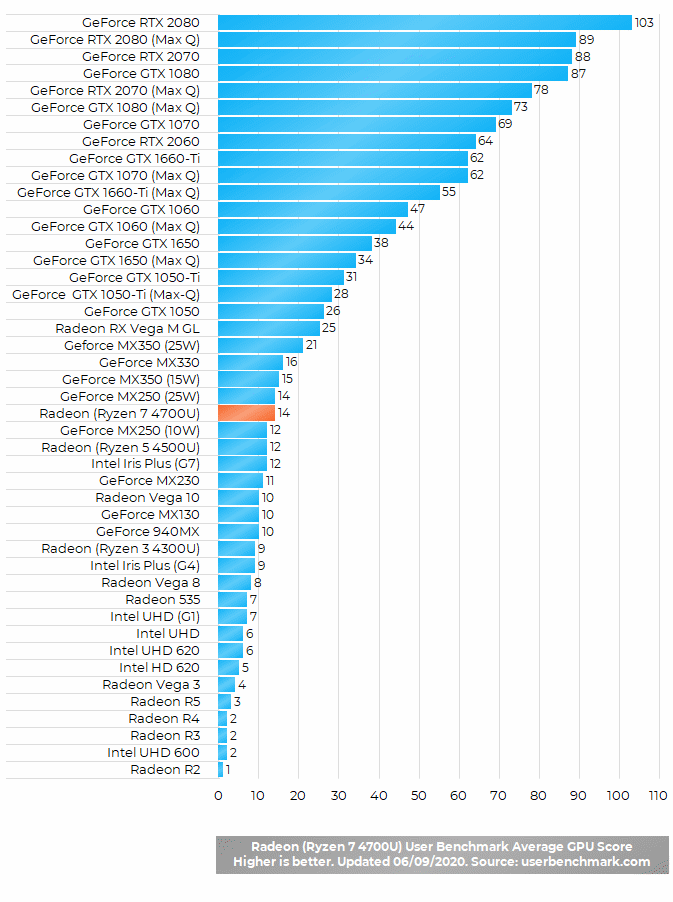
but to put things in performance perspective, this is where the 4700u's integrated graphics stand compared to other cards in benchmark
https://laptoping.com/gpus/wp-content/uploads/2020/06/AMD-Radeon-Graphics-Ryzen-7-4700U-Benchmark.gif
 wary wave
something comparable to a GTX 1060 / 1070
hollow ridge
look at the acer nitro 5
potent jungle
what do i need
@weak cypress expect to spend almost x2 more money on laptops for your work, heh )
weak cypress
cheapest nitro 5 is above my budget
 rain knot
Is there any way to smoothly segue all my players into a new level in multiplayer game? Open Level seems to disconnect everyone
wary wave
I have a cheap Nitro 5, and it isn't really good enough for UE4
thermal throttling is a huge problem for it
thick herald
@rain knot #multiplayer
rain knot
ok
wary wave
I also burnt out a lot of the internals in about ~2 years, and had to replace the HDD after just 18 months, it's not great
potent jungle
I also burnt out a lot of the internals in about ~2 years, and had to replace the HDD after just 18 months, it's not great
@wary wave I do hope the same will not happen to my dell 😳
weak cypress
so what other choice do i have
thick herald
Sell a kidney
potent jungle
so what other choice do i have
@weak cypress buy a decent desktop, make enough money, buy a good laptop
wary wave
From my perspective, if you can't afford a machine that'll do the job you can either save up until you can afford it, do without, or buy a desktop :/
wary wave
you can buy a cheaper machine if you really want, but ultimately you're going to find it's terrible to work with (if it really works at all) and you'll have to replace it sooner rather than later anyway
weak cypress
i dont want a desktop
i want something for uni
and i cant really carry a desktop to uni
thick herald
Buy a laptop then, but don't expect it to perform well. Manage your expectations, keep your projects simple and you can do it.
hollow ridge
or.... get a super cheap laptop and a good desktop and remote acsess to the desktop from uni
or do u have a tablet or something u could use at uni
wary wave
remote desktop is an option I guess, but it's horrible to use the editor that way
I have learnt this from experience this year 😄
wary wave
then either spend more money, or deal with hardware that is going to struggle
those are your two options
(that is assuming you can't find anything within your budget, which is probably out there)
scarlet birch
I couldn't imagine using Unreal with low end hardware. I mean I did at first and it was a nightmare. UE and the tools you need to work with it will use up every bit of GPU, Memory and CPU they can get.
thick herald
My old i7 with 24GiB RAM and a 770 card struggled a lot
 hasty wharf
 rocky radish
ue4 running on anything worse than a 770 is an absolute nightmare for me
potent jungle
ue4 running on anything worse than a 770 is a absolute nightmare for me
@rocky radish 750 card users left the room
._.
rocky radish
or at LEAST 750 ti
potent jungle
nope, just 750M 😅
thick herald
I still have my old rig, just need a case then I can have a little extra power networked to my main rig.
rocky radish
970 or better is what i recommend
 dusky crest
@rough knoll
 deep marten
Hey all QQ on epic launcher... is there a way to trigger download of vault items to local storage, without having to add to project / create project? UAssetBrowser addon has been fantastic but having to create a warehouse project for all new asset packs I get is counter productive as I have far over 3tb of assets and duplicating it doesn't make sense when I can just have the vault be a single location to find the assets from.
plush yew
Does anyone know a good way to switch between actors attached to player(like weapon switching, tool switching etc.) that work on multiplayer?
 supple totem
@weak cypress 900 is enough for a ue4 grade laptop, if you find like 4 year old used one that once was top of the line.

craigslist
Acer Predator ACER PREDATOR HELIOS 300 - 17" screen GTX 1060 Video i7 2.8 Ghz 32Gig Ram Has 2...
For example would run ue4 quite well
So watch local used listings and jump at a deal, used comes with a risk though of course
 cerulean sandal
hey epic people, can anybody help me? I'm trying to Launch the game, but im getting this error: LogPlayLevel: Error: ERROR: Stage Failed. Missing receipt 'C:\Users\----\Documents\Unreal Projects\Miner 4.25\Binaries\Win64\Miner.target'. Check that this target has been built.
rain knot
Guys, my UE4 project is stuck on loading at 75%
cerulean sandal
that just happens
rain knot
Ummm, what could be the reason
It's happening on 3 separate PCs XD
is a blueprint corrupt or something
 left arrow
Is there anyway to change the save location of U4 marktplace files? They always get auto downloaded on my C driver but I want them to get downloaded on my F driver
rain knot
So, 100% it's because of some asset or BP that is corrupt. How do I check what's failing to build when the editor is stuck??
weak cypress
@supple totem i am not from the US
 rough knoll
@dusky crest not a tab in skeletal mesh viewer, only static.
thick herald
Is it the first time you have loaded the project @rain knot ?
rain knot
no
ok it works when I remove this one specific blueprint
but I can't figure out what the problem with the blueprint is?? like it doesn't etll me anywhere wtf
 restive yarrow
Is it true that LOD's eat up ram?
grim ore
based on the internets and a ton of posts, yes LOD meshes are loaded in memory unless you use lod streaming
 lucid grove
Hey! Is there a way to check unused assets? I bought a landscape pack week ago, one of map completely fit my needs, but there also lots of assets from it that I don’t need.
And ofc they all inside one folder
thick herald
@rain knot I had a project that got stuck once, what I did was replace the offending asset with one of the autosaves versions of it.
rain knot
Okay guys, new bug!!!
If I use the console command node to run a console command in BP, when I close and try to reopen my project, the build gets stuckl at 75%. Basically the BP becomes corrupt
Yup, @thick herald read above
That node is causing the blueprint to break
thick herald
I just did the swap in Windows Explorer not in engine
rain knot
yeah, I did too
thick herald
Not sure what else to suggest, sorry
rain knot
no chill, it works now
grim ore
which console command?
and 75% when loading is compiling stuffs normally so its possible your blueprint is not finished loading all referenced assets
hexed badger
Is tehre something like Collision editor?
Where i would set what has to collide by hand?
i made a well and i'm dying to make the center part of it let me through
 reef jetty
Is it better to get gameplay nailed down before a level completed?
hexed badger
all these presets are useless, or im bad in this
grim ore
@hexed badgerif convex doesnt work, you will need to create your own in another program and bring it in
hexed badger
Thanks
lucid grove
And ofc they all inside one folder
@lucid grove anyone have solution? 🙂
grim ore
delete them one at a time and it will tell you if its used or not
which is hard because it might be used by stuff you arent using so its a weird loop
lucid grove
Oh shoot
grim ore
a couple options in here https://forums.unrealengine.com/unreal-engine/feedback-for-epic/103291-delete-all-unused-assets/page2 including migrating it out or migrating just what you want in or using a commandlet
lucid grove
Hm, thats interesting. Thank you!
 bright wharf
Farted
 plush plume
grim ore
plush plume
grim ore
check out the pinned message in this channel in the top right
learn.unrealengine.com is the official site as well and it has basics to advanced
restive yarrow
I have some big number of buildings and props in my level that have HLOD , But when my client joins the level in the dedicated server, I want all that level architecture to load slowly ( not all at once ) since this causes my game to crash ( or consume RAM badly )
 grave forge
so was just watching video on phone some guy using the land mass plugin and he was able to type in rock on the details part and all of a sudden he had a cliff not a grass hill how did he do that i can make the land mass using the splines but no idea how to put the material on the brush so to speak...
restive yarrow
Is there a way I can make it all load slowly?
grim ore
@grave forge chances are his material is using layers, you need to set up your material to use layers
grave forge
any good references videos?
grim ore
the documentation has a tutorial on it
grave forge
https://www.youtube.com/watch?v=gbj1qgPOl3E&t=241s 4.30 mins in is what im talking bout to make it easier to see what i mean lol

In this presentation by Epic’s Paulo Souza, we use the power of Quixel Megascans to build a natural looking environment in Unreal Engine. By relying on the latest world building tools in Unreal, we're able to quickly create a terrain leveraging its new Edit Layer functionality...
open wadi
Hi everyone - I want to be able to display remotely-hosted videos in a UMG widget with proper playback controls. What is the recommended hosting platform / solution to achieve this?
 viral fractal
why does the unreal editor only utilize ~50% of my GPU, while turning into a 15fps desaster, if i turn on raytracing ?
 exotic thicket
because your GPU can't handle raytracing at a decent framerate would be my assumption :D
You could try changing the viewport render mode to unlit or something and see if that helps
viral fractal
well its not even utilized properly, so i cant tell where the bottleneck is
its a 2080ti, id expect more than 15 frames in a small scene with only 5 Point lights and no RTGI
exotic thicket
Interesting, it does sound like it should yeah
My scene with more lights and raytraced GI enabled ran at about 13 fps on my 1080 Ti which doesn't even support RTX
viral fractal
meanwhile my CPU is at a cute 3% load
lucid grove
Newbie question: can i combine variables inside BP in some folder? Im almost sure i have seen some one did that.
grim ore
There is a category on each variable
deep viper
Any common reasons why an actor's mesh is not visible in the editor (when copy pasted), but is still visible ingame? I suspect this originates from creating a C++ class extending Actor, but I wouldn't know where to start correcting this issue.
 ember quest
how can i view through the camera palced in my level in viewport
I forgot how to do it
deep viper
I fixed my issue. I was overriding [PostEdit] methods in my C++ child class of [Actor] and I was not calling the method of the parent class with Super. After calling Super in my overriding functions the mesh is back.
 subtle gust
hi everyone, is it possible to move by Z skeletal mesh inside standard third person char blueprint, but root capsulecomponent leave as it is?
plush yew
i have now upgraded my pc to some brutal specs
rich furnace
@cosmic cove but you have 10 Intel cores!!!
@plush yew spill the beans you running 16 core threadripper?
I'm still wondering if more cores & threads is good for UE4 and can it utilize it all and what is the maximum # of threads and cores it can support?
as for Memory 2666mhz should be fine right? everybody is raving on about 3600mhz but it seems like it gives slight boost with frames
also I also want to fiddle around with Houdini here....thinking of getting 128gigs of ram but maybe that should be spent on more CPU cores?
it will be my first upgrade since 2009 LMAO
Unreal and C++ is way too slow to compile, I have to wait a few minutes just to see small code changes
maps like city park took an 1 hour and 20 minutes to load. WTF
AMD FX 4300 + 8 gigs of ram LOL
grim ore
@subtle gust you can move the children of the root component (capsule) yes, the default third person has the skeletal mesh moved down and rotated
@rich furnace the engine itself and editor are not high core use. lightmass and shader compiler and engine compilation use as much as you can give them
rich furnace
I would buy the 3600 or 3700....but not sure what an extra 2 cores will do and its an extra $150 CAD.....should wait till october 8th until 4000 series come out
@rich furnace ah okay. also for building too right? more cores = faster
oops pingged myself lol
plush yew
@rich furnace I now got:
i9 9900k
64GB 3200mhz Memory
Asus Z390-F
2TB SSD
2TB HDD
RTX 2070 Armor
thick herald
If you're doing 3d modelling you'll see the benefit of both increased CPU cores and /or GPU. If you do get a CPU with a high core count try and get more RAM, I've seen people quote 2GiB per thread.
subtle gust
@grim ore thank u! and how I can access to the needed component?
i did cast to the char blueprint
rich furnace
@plush yew how fast did the city park load for you
rich furnace
seems like the 9900k is pretty much the 3700X
rich furnace
well you get to run fluid simulator (maybe) on Houdini
could Unreal become like Houdini or nah?
seems like procedural is the latest rage
damn I guess I need to wait a month lol https://www.techradar.com/news/amd-ryzen-5800x-and-5900x-cpus-could-be-on-sale-and-gunning-for-intel-on-october-20
grim ore
@subtle gust what do you mean move? in blueprints at runtime or in the editor?
 celest vapor
quick question does 4.26 come with chaos destruction integrated?
grim ore
@celest vapor yes
celest vapor
Thank you!
subtle gust
@grim ore the problem is I'm moving my character along spline and by default it is align in the center in the pelvis, bacuse unreal take world coordinates of the root component, and it is capsule, but my skeletal mesh has local pivot in the feet. so I want while moving along spline root capsule, skeletal mesh will be offseted by Z up, so character will be moving on the feet, not in the middle in runtime
rich furnace
@weak cypress 8gig is the min 16gigs is recommended but you probably need 32GB
not sure about your laptop cpu as I dont know the clock speed and # of cores
im gonna wait for the 5900X....5GHZ guys 5!!!!!!
I assume that is PER core
grim ore
@subtle gust you can move the mesh inside the blueprint before you use it, or did you want to do it at runtime?
subtle gust
@grim ore if I move skeletal mesh inside blueprint by hand into the 0, 0, 0 position, it will fly on the ground by default... that's why I'm trying to force it in runtime when moving along spline
weak cypress
so could i get away with 8gb?
grim ore
then you can get the mesh component out of the character and move it when you are on the spline, every component has a variable the same as the name
subtle gust
but I think it's a pain in the a, because in all other same situations I will need to do it again 😦
grim ore
so get the character -> get the mesh component -> change its relative location
or adjust your character blueprint to be up higher when it is on the spline
hexed badger
i'm currently working on 16 gb and for ue4 alone its enough on my begginer nooby needs. But if i work with Blender Mixer Bridge and UE at the same time
subtle gust
ok thank you I'll try now
hexed badger
my ram goes full easily
grim ore
8gb for UE4? sure if your doing stuff that doesnt need much memory. It's all relative
I am at 6.7gb used right now with the default TPP project open and chrome with ~10 tabs.
weak cypress
i want to make a full project
weak cypress
3d TPS project
 ebon marlin
so I'm looking to give ballistic simulation for bullets, meaning they need to be stateful rather than an instantaneous casting of traces
I'd also like it for the bullet to have a tracer
is there a nice way to draw the tracer in the place of the bullet OTHER than having a bullet be an actor?
actor feels a bit bloated if all Im looking for is just a tracer effect
grim ore
particles can be used for that
hexed badger
@weak cypress do yourself a favor and if you can buy highend PC
for the future needs
ebon marlin
is there a way of making sure the particles are always on the position of the bullet, mathew?
weak cypress
i want a laptop
grim ore
depends on your goal, your particle emitter could be moved along your trace for example
ebon marlin
can I attach a particle emitter to the bullet?
weak cypress
what do you mean by high end pc? @hexed badger
ebon marlin
without the bullet being an actor?
grim ore
well if it's in the world it's an actor
grim ore
there are plenty of tutorials out there on tracer effects using particles
ebon marlin
I dont mind doing the tracer effect itself
I mind the constant spawning and despawning of actors should Bullet subclass AActor
grim ore
so dont do that, use pooling
hexed badger
Well if i would buy a PC for ue4 now, i would spend like 2000$ for parts
and that would buy me a nice rig
weak cypress
i want to spend a bit less than half for a laptop
ebon marlin
Fair call, thanks Mathew
hexed badger
even half of that spent on PC would easily run ue4 with no problem
grim ore
you can get a decent UE4 laptop for ~1000 if you want to compromise on certain parts. If you dont ~1300 is good nuff. ~600 gets you "it works". all in USD
weak cypress
ye i was looking to get a laptop with a 4700u
grim ore
that wont get you a good GPU tho
weak cypress
i cant afford anything better
grim ore
you can if you wait and look. There are plenty of decent 1050/1650 laptops around $600
weak cypress
cheapest laptop with a 1650 is 1050$
grim ore
again this is in USD, I dont know your price range or currency
weak cypress
ye usd
grim ore
yeah then you arent looking hard if that is the cheapest you can find a 1650. You can get a 4800h with 1660ti for $1k right now
go to slick deals and look at the computer section. Theres used refubished 9750h with 2060 machines that are excellent value for example at $920
grim ore
what country?
 rare sorrel
yoo mathew huge fan, used to watch ur tuts a lot when i was starting out, thanks for all the help : D
subtle gust
@grim ore holy cow thank u! but now I realized need to move my camera too... and relized that is will be so complicated to do it every time, are there any workarounds to move root's capsule local pivot down in the same position as feet of the character?
weak cypress
greece
grim ore
@subtle gust not really unless you make your own character. the issue is the capsules pivot is in the middle and thats the root object for a character 😦
subtle gust
oh understood... ok I'll deal with it then
grim ore
how are you doing the spline movement? why not just offset it by the capsule half height so the capsule bottom is your point to move it
rare sorrel
does anyone have any idea why my camera jitters like crazy whenever i loop setActorRotation while grappling? i can record a vid for reference if needed
grim ore
are you setting it on tick? are you using physics?
rare sorrel
no physics, set on timer by custom event
but it's looping every 0.03 seconds
should i increase the time
grim ore
well thats a tiny amount especially if you arent hiting 60fps but ignoring that try changing your tick group and see if it helps
perhaps to a later update its possible your moving it and the physics is ticking and fighting it
rare sorrel
alright, i'll see what I can do and update in a bit, thank you!!
 tight prawn
how do i solve these light artifacts ?
I switched from Rect Light to Spotlight (and now in Point Light) because it is not supported in mobile, however this is the result of building the light in the scene
subtle gust
@grim ore I'm using some kind of complicated method... in a loop I'm calculating for the overlapping actor (in my case actor) closest location to spline and after setActorLocation with the new locations... I tried to offset my capsule... but it is stop moving, because my loop is working only when overlapping occurs and when I move capsule up it seems collision stop working and my loop too
so I'm checking in a tick array from spline points and in a loop moving character along spline, so the speed is the same as char has right now
my default transforms for the mesh
oops I moved down my spline on the ground and everything stop working, because my capsule began colliding with the floor too... damn I need to rebuild everything lol
thorny quest
can anyone tell my why if moving a static mesh, or copying and pasting it, it turns white?
it loses all texture
rare sorrel
@grim ore i increased the loop time and tried every tick group, still the same problem :/
 teal moth
lucid grove
teal moth
lucid grove
heya
Another newbie question (what a day!): when i move (not copy) folders with files inside UE4 sometimes it keeps old folder
And when i try to delete it: sometimes it just not allow me to or telling that this folder have some references inside other BP
Which is weird, cause the main reason i move files (not copy them) to keep good order inside folders
And there is no files inside this old folders, just empty folders
Restarting editor doesn't help
rich furnace
hey guys I am running my uproject with the -game -log flag but nothing is outputting to the commandline....unless I use Powershell
lucid grove
fix up redirectors then delete the old folders
@plush yew and by fix you mean...?
I thought when you move files UE automaticly change redirectors
Found it
thick herald
UE4 is weird. Sometimes even after fixing redirectors it doesn't like deleting folders
 alpine laurel
so i have a system to pick up ammo, but after the actor is collided with it will give you ammo and destroy the actor. is there a way to make it destroy the actor then respawn after x seconds?
thick herald
Add a delay after you have destroyed it, then spawn it again or don't destroy it just make it invisible for 6 seconds
 peak crane
How correctly: 'Evil cloud" or 'Angry cloud"
thick herald
Yes
alpine laurel
Add a delay after you have destroyed it, then spawn it again or don't destroy it just make it invisible for 6 seconds
@thick herald tried invisible but if you run over the area its in it will still give you the ammo
how do i spawn it again?
 brave anchor
Super noob question here. I'm trying to call a custom event in one blueprint (an Editor Utility Widget) from an Actor blueprint (that's in the main scene). I can't for the life of me figure out how to reference that custom event from that separated Actor blueprint. I've tried casting but I just don't think I'm doing this right.
Could someone give me a few pointers on referencing remote custom events between blueprints? Or point me in a simple direction?
I've already been googling this, watching videos on the subject on YouTube, etc - for 2 days now. Either this is super simple for Unreal devs but not for me, and there's some disconnect in how I'm explaining what I'm trying to do and just not finding what should be an insanely simple procedure.
lucid grove
to that, i noticed that usually restarting editor helps. or if there is sub directiories, you have to go through all of them and delete separately 😄
@plush yew Well shit, just opened folder manually which showed empty. And there is files in there!
 normal nacelle
has anyone ever had a problem with the collision analyzer? I am not using it but if I run my game through vs, maybe after 2-5 replays it crashes and throws an access violation when realloc. I have no idea what is going on and clueless where to start debugging
hexed badger
How was it called, this case, when light hits your eyes and after a moment u dont see anything, where to find it in engine?
my character has too sensitive eyes
rare sorrel
if it’s eye adaptation u mean, u can change the auto exposure settings on either ur camera or a global post process volume to control the sensitivity
although i’m not really sure how to find the perfect balance, i just played around w the min and max until i got an okay result
hexed badger
k thanks, will do
 terse mauve
ima ask a weird question
 fiery fiber
Generic question : is there a way to find what actor in a scene is using a particular material? I'm trying to change all instances of an existing material, and the reference viewer only points me to the level, but not what in that level is actually using it
terse mauve
is there a way to import a psp game into ue4
im trying to remake a game but its not going as planned
plush yew
anyone experienced with automotive materials ?
 hidden aurora
@spare kernel Now we talking. It got as low as 8 ms.
hallow radish
day one developer anyone?
hidden aurora
Its at stable 100 fps | 7 ms
terse mauve
me @hallow radish
rare sorrel
Its at stable 100 fps | 7 ms
@hidden aurora what was it before
and what did u change
looking to boost my fps too lol
hidden aurora
It was at 18ms. I was playing at @1440p as I usually do, now at 1080p and i´m currently testing with a shipped build. Keep in mind it depends on the project because mine is full c++
rare sorrel
huh. would u say c++ projects are noticeably faster than blueprints? cause i might shift if the difference is a lot
hexed badger
@hallow radish your first day?
hidden aurora
It did for mine.
Tho you have to be careful with c++ because if the code isnt written good you can yeet perfm
hallow radish
prank sinatra hell no lol ive been using ue4 since it was a subscription model
i just have kinda been avoiding discord....
 open ermine
I have a question about spline meshes - I've been trying to make a tri-part IMM brush I have in zbrush in UE4 but it keeps messing things up. I get the idea of adding a single mesh to a spline - but what I'm looking for is some language in this blueprint that would state "if this is the first spline point - use this mesh" and "if this is the last spline point - use this other mesh". I have a chain of bones on a rope and I have a piece for the bottom with a knot - a piece for the middle that can be infinitely duplicated - and then an anchor bone and knot at the end. But when I drag out a spline sampling even just the center piece - it comes out squashed and also won't dupe along the spline when more points are dragged out?
this is the mesh in question that can be duplicated
and here's what it looks in on the spline (it doesn't seem to want to duplicate along points either)
Yup! doesn't need to go into anything
 ornate forge
hallow radish
ornate forge
hallow radish
is it bad that i dont have internet and instead had to bypass verizons throttling capabilities to get 3 - 4 MB/s downloads muahahaha
change default TTL packets to max of 65 and then use a vpn mushahahah
 fossil trellis

 rare sorrel
if anyone else faces the problem where setActorRotation on timer screws up the camera, i found the reason and a hack that unfortunately uses tick but a solution nonetheless
 spark turret
@fossil trellis imo every good game or film begins with research, watch a few documentaries and movies, gain ideas and insight, shoot go talk to a real detective, if an older genre is desired, find a retired detective that worked back in the day. The more detail you can put into the process of making your content the better. The more knowledgeable on the subject you or your team is, the easier it becomes to wow the player.
Unreal Beginner question. How does one alter the size of the parent mesh that is used for the FirstPersonProjectileMesh? is there a parent mesh this follows?
Or is it able to be resized?!
 harsh pike
i have no idea why its happening, but i seem to be constantly, accidentally keyframing objects in ue4 that i do not want to keyframe at all. does anyone have any insight into why this happens and what might be going on?
seems to happen maybe when im moving objects?
 stable needle
https://issues.unrealengine.com/issue/UE-21838
Absolutely crazy that this is still a bug in 4.26...
wary wave
there's even an associated pull request 😐
rare sorrel
if my ms is really high (40) does it have more to do with my laptop or the game’s optimisation
 graceful sky
Frame ms or ping ms ?
hallow radish
i need gray alien characters that are fucking terrifying excuse my french
Does Anyone know of a good open source video screen capture program for use with ue4??
grim ore
@quiet finch you did not set your class in your get all actors before you did the get. Unconnect the get node and connect it back up. the default is Actor out of the Get all Actors of class node and the get node defaulted to Actor since you connected it. once you chose your first person character the node will output a third person character object but its too later for the get node since it was already connected
 quiet finch
help
why is it broken
Its not supoosed to go through the ground
thats not a suspension spring
thats apart of the model
Its all one model
Thats why im wondering why its going through the ground
 vernal dock
hey guys i am using github desktop to create a repo for my UE4 project i am using LFS and after cloning the repo i cannot open the ue4 project file
ornate forge
@quiet finch Did you check your mesh's physics asset?
spark turret
@hallow radish You browse the free shit in the marketplace?
quiet finch
huh
hallow radish
yes none of them are scary enough
i seriously thinking of buying some Daz3d characters
@spark turret
spark turret
Do you use Blender or Maya at all?
Can always export and re-render/reconfigure them
I'm no good with eithr, but if you are, might be worth it, get something custom to your liking.
ornate forge
@hallow radish Does Anyone know of a good open source video screen capture program for use with ue4?? OBS is what you need https://obsproject.com/
OBS (Open Broadcaster Software) is free and open source software for video recording and live streaming. Stream to Twitch, YouTube and many other providers or record your own videos with high quality H264 / AAC encoding.
alpine laurel
how do you make a camera that is attached to the players gun not move with the idle animation in state machine?
grim ore
dont attach it to the gun
or manually move it in world space to a fixed position every frame but thats odd
grim ore
yep I gotcha but your asking to stop the item that is attached to something else to not act like its attached
alpine laurel
yeah
im limited in what i can do though so i figure do a zoom in scope would be easier in the meantime
 dusk apex
General question:
If I'm having an actor spawn anywhere from 1-20 static meshes as a property is adjusted in the editor, would it be more efficient to just spawn basic non-ticking actors with the mesh? Or to use 20 separate static mesh components?
alpine laurel
i tried that, but for some reason when i move forward and sprint (sprint deactivates the scope) you wil start sprinting, but with no animation
lowkey creeped me out when i say it from third person pov
grim ore
@dusk apex it would depend on what these static meshes are for and if they need to follow the parent actor
dusk apex
They're representing a stack of objects that will be picked up. So say it starts with a stack of 10, as a player grabs one, one disappears. If they add to the stack it reappears. It would never be moving.
grim ore
either one should work fine, that doesnt sound like a large difference. I personally dont see the need to use components unless you want them all to be "connected"
dusk apex
That was my thinking
alpine laurel
then your transition code was bugged
@plush yew thanks. I checked a function i made in my characters bp and i forgot to add the transition variable to it
ornate forge
What's the right way to trace melee damage?
exotic thicket
it depends on your definition of "right way" I guess :P
there's more than one way to do this and it really just depends on how you need it to work
ornate forge
I need it for a first person player character's weapon (a wrench) and for a hostile creature's attacks
Nothing as advanced as sword fighting
I guess I could just use the usual weapon trace for the wrench, just set a very short distance
exotic thicket
yeah, that's how I've done melee attacks in fps and it works just fine :)
depending on your animation you might want to have something like.. trigger the trace when the animation reaches a certain point
but that should be fairly easy to do
ornate forge
For the creature I could do box/sphere trace in front of it
exotic thicket
yeah
line/box/sphere mostly would factor into how precise the attack has to be to hit
grim ore
for my melee attacks, sword type weapons, they have collision around the weapon blade and on overlap I trigger an event that tells the player the weapon hit something.
ornate forge
Visual Studio's update broke my project, cool
grim ore
yep every one of my weapons have montages for the animation with notifies like this so we know when we are allowed to damage and if we want to auto combo to the next attack or not
 pseudo star
my files arent showing up in engine
even though they r in the directory
anyone know how to fix this
grim ore
how did the files get into the directory?
pseudo star
i mean the folder where the project is stored
grim ore
yep how did the files get in there
pseudo star
like if i go to the content folder in my file explorer
i see the files
oh
i imported them normally
most of them r just blueprints
that i created in engine
grim ore
did they show up when you imported them?
grim ore
try closing the project and re opening it
pseudo star
but i was messing around with my source control
and it broke my engine
all the assests are still there
grim ore
if the engine is broken, uninstall it and reinstall it
assets are version specific so did you try and open the project in an older version?
pseudo star
well im not sure the whole engine is broken
i saw online that u can delete the cashed asset registry
so it forces the engine to re populate the assets
but it didnt work
grim ore
welp again did you change the engine version some how?
pseudo star
nope
 austere viper
Probably a bit of a math-y problem: I am passing a spline component a list of points, using the default Curve property for each point. Sometimes this produces a nice smooth spline. Sometimes it produces really goofy results, with spline points looping in place. When I assemble spline meshes from this spline the meshes are completely broken.
I did some investigation, and found out that the tangents that are automatically generated are really long: so I've hidden the problem away a bit by normalizing them and multiplying by a small value which produces curved corners that are all the same.
My question is - does anyone know how to fix the tangents so that the resulting spline is a smooth curve from point to point?
grim ore
uninstall the engine and reinstall perhaps, or roll back your source control to a version that you did not break. Your messing with your source control should not have touched the engine tho
 light thunder
Anyone have any good HLOD settings ?
hidden aurora
Which channel is the appropriate one to discuss an issue about lighting ?
grim ore
#graphics - Meshes, materials, lighting, etc.
hidden aurora
thx!
quiet finch
how do i set something on its point
like how do i prevent this
how to i get the point on the model itself
 quick kelp
whats a good service to host your dedicated server for a game? and how much do they usually charge?
rare sorrel
Frame ms or ping ms ?
@graceful sky frame ms
alpine laurel
i have a muzzle flash effect set up on the muzzle socket of the gun, but i cant figure out how to adjust the time of it and make it so it stays attached to the muzzle even when moving
hasty wharf
is there a viewer i can use to look at blueprints outside of unreal?
raven sand
hey guys, I have a ragdoll that I'm throwing around the environment with "Simulation Generates Hit Events" turned on and I want to spawn a blood decal on every hit ... problem is, I get about 4000 hits every time the ragdoll bounces around
is there some easy "gate" or "throttle" thing that I can use to limit it so it spawns a decal say only every 100 events? (I know how to implement this with custom code, I'm really just asking if there are any good existing solutions)
grim ore
@alpine laurel use the spawn emitter attached node instead of location, location means..... location so it will stay there
grim ore
I have used UE4 yes
plush yew
would you be interested in helping me program my game?
grim ore
I would not, check out #looking-for-talent
plush yew
okay, ty
grim ore
@raven sand nothing really built in, there are gates that you can open after and Do Once nodes that you can open up again after a delay
hasty wharf
Thanks
How can I prevent this from flying out when I pick up the blue bin ?
i tried adding massin Kg to teh item but still flies out
raven sand
@grim ore thanks! I guess having a gate I can reset is good enough, I'll need to do some custom logic for when to reset it anyway
btw is there some builtin way of combining decals? or just in general a good solution for spawning a lot (thousands?) of blood splashes
seems that low thousands of decals don't impact my FPS, but as it gets around 10k it starts to get bad, and I bet this is a terrible solution anyway 😄
grim ore
@hasty wharf once it's inside the item why not attach it to it so it moves with it? or should it be moving around inside of it?
hasty wharf
well
whatever works easier mio
imo*. because ive been struggling on this for a while
im sure it would look 'cool' if it was moving inside while carrying the blue bin but at this point ill take any solution
ornate forge
I hate dealing with animation blending, such a headache
rich furnace
"E:/UE_4.25/Engine/Binaries/Win64/UE4Editor.exe" "C:/Users/me/Documents/Unreal Projects/Lesson1/Lesson1.uproject" "/Game/Maps/Lobby?listen" -game -log -windowed -resx=1028 -resy=768 doesn't seem to start. port 7777 does not show up in netstat
any ideas why this might be happening?
do I need to forward this port in my router? I am trying to run the game in standalone and join it via standalone
ornate forge
Let's say I have a character that uses an animation blueprint, can I somehow play an animation montage on top of it from my C++ code?
For example, my character is in the Idle animation state, and I want to play a weapon reload montage, can I do this?
 iron raptor
yes
ornate forge
Epic seems to do this in their Shooter sample, but I can't reproduce it in my own project
iron raptor
animation blending with your anim bp is made for this
ornate forge
Montages refuse to play, and I can't figure out why
My animation BP seems to match Epic's, yet it's just not working
iron raptor
you want to use blend bone layered
then only blend bones above the spine
cache your locomotion (movement)
ornate forge
"Layered blend per bone"?
iron raptor
yes thats the node you want
cache your locomotion, then feed the cache in as your base into the layered anim node, and your aiming gun node into the 2nd later
layer*
then blend using whatever means you deem neccesary
perhaps a "aiming" bool
hope that helps
grim ore
@rich furnace it just depends on how you are trying to connect to it with your 2nd client
rich furnace
@grim ore "E:/UE_4.25/Engine/Binaries/Win64/UE4Editor.exe" "C:/Users/me/Documents/Unreal Projects/Lesson1/Lesson1.uproject" 192.168.1.1 -game -log -windowed -resx=1028 -resy=768 like that
I tried all combos of IP address
127.0.0.1, 0.0.0.0, ran ipconfig and tried the ipv4 addresses....
grim ore
what is your actual IP? that looks like your routers IP not your machine
if using an IP you would need to open it in your router yes
if using localhost and its on the same machine you should be fine
rich furnace
even though its on my own computer?
I am running both the listener and client on the same computer
grim ore
it doesnt know its your computer if you are using the IP
and you can do all of this testing from the editor, no real reason to run it from the command line
you also have -log so it should show you the command line log window and let you know if it was listening (when you run the listen server)
sterile tulip
why is making a car work in ue4 so hard
since days I try to make a drivable car
no sucess
rich furnace
@grim ore [2020.10.01-01.41.37:788][505]LogGameMode: ProcessServerTravel: /Game/ThirdPersonBP/Maps/ThirdPersonExampleMap [2020.10.01-01.41.37:792][505]LogEngine: Server switch level: /Game/ThirdPersonBP/Maps/ThirdPersonExampleMap?Name=Player [2020.10.01-01.41.37:793][505]LogNet: Browse: /Game/ThirdPersonBP/Maps/ThirdPersonExampleMap?Name=Player There is no mention of server starting?
When I try to connect to it I get this log output from the client : https://pastebin.com/UAVBxdPB
Pastebin
Pastebin.com is the number one paste tool since 2002. Pastebin is a website where you can store text online for a set period of time.
really stumped on this I even opened up 7777 on my router too
https://forums.unrealengine.com/development-discussion/c-gameplay-programming/1790489-client-can-t-clienttravel-in-a-session-when-the-server-uses-servertravel-instead-of-openlevel seems relevant here....
Unreal Engine Forums
Hello !
I have a session based game fully in C++. When session create completed I want to servertravel to a waiting (lobby) room, and that is fine I can servertravel there. But when I find the session from another game and try to client travel there there is no response and fo...
ornate forge
Argh, why I didn't notice this option earlier
grim ore
I just tested and these are the commands I used and connected. Note I have this map set as the server default. "C:\Epic Games\UE_4.25/Engine/Binaries/Win64/UE4Editor.exe" "C:\Projects\tpp\tpp.uproject" ThirdPersonExampleMap?listen -game -log -windowed -resx=1028 -resy=768 this is for the server and "C:\Epic Games\UE_4.25/Engine/Binaries/Win64/UE4Editor.exe" "C:\Projects\tpp\tpp.uproject" 127.0.0.1 -game -log -windowed -resx=1028 -resy=768 this was for the client
and the log for the server shows it coming up and listening and the client connecting
I tested with the server default set to blank and it still worked, so the code above should work perhaps your loading up a bad map the way you are doing it
rich furnace
hmmmm
@grim ore Huzzah! so problem seems to be related to server travel
it works when I use ?listen in the url
but what I'm doing is following a C++ example so when you type Host in the console, server travels.
maybe the tutorial is outdated
as this person pretty much describes the same issue https://forums.unrealengine.com/development-discussion/c-gameplay-programming/1790489-client-can-t-clienttravel-in-a-session-when-the-server-uses-servertravel-instead-of-openlevel
thanks so much!
grim ore
ah
 cedar jetty
im having a issue where when i reload and fire at the same time it completley disables my firing on my gun and i cant shoot again until i start a new game i have 2 conditions that pass through here for reloading again but im not sure what to be looking for any suggestions?
grim ore
@cedar jetty debug it, find out why its stuck using print strings or F9 to breakpoint on the branches to see which bools are stuck. alternately dont allow firing if reloading?
@sterile tulip looks like your wheel colliders are not on the right axis
sterile tulip
but what do I have to do so its axis is right
grim ore
is your bone rotated on your skeletal mesh perhaps?
 gloomy oasis
hello everyone
vernal dock
hello
gloomy oasis
I was wondering if any of you had this warning in the past
LogSkinnedMeshComp: Warning: GetSocketName(): No SkeletalMesh for Component()
 rancid lynx
if i want to enable ocean sound while im close to ocean, but not while im further inland, what would be the easiest way to do that? other than spamming a few line traces every second
grim ore
@sterile tulip what does your physics asset look like for the vehicle?
hasty wharf
how much of a haul is it to convert a game, not a very complicated game, into vr
grim ore
yeah the physics looks fine, and i assume your wheel is set up correctly? the wheel asset
hasty wharf
its mainly picking up items and moving them around onto a scale
grim ore
its got to be your mesh then https://youtu.be/nJ2i_-vjV20 @sterile tulip
cedar jetty
anyone know how to get rid of this ive contacted epic games and they seem to not be able to do a payment reset
ive tried paypal and my card and i still cant buy stuff from the marketplace
grim ore
@hasty wharf there is no real answer, it depends on the game and the target platform.
hasty wharf
how long have you been working with UE? you seem to know a ton
grim ore
a long long time