#ue4-general
1 messages · Page 848 of 1
 unique kraken
 chrome pewter
hey my school is now doing a unreal engine course and its all online but I don't have a pc that can run it so need to buy one, any suggestions?
 quiet finch
You don't really need a powerful one
unique kraken
alright, thanks
 round hawk
Yeah no problem
unique kraken
been a while since i was in ue4 👌
chrome pewter
is a gtx1660 overkill then?
unique kraken
nothing is overkill beside a 3080ti i guess
 fossil trellis
@chrome pewter my gtx 1650 super has a hard time packaging a game
I recommend rtx 3070 + r7 4700x (when it comes out) and 32gb ram
just to glide in the unreal engine smoothly
 deep viper
Your GPU will dictate how many things you can draw/render in your editor. If its an introductory course in UE4, it likely won't demand very pretty / big projects.
deep viper
I have an Nvidia GTX 1050 Ti, which does just splendidly with Unreal projects. You'd get more expensive GPUs if you want to render really big maps or have lots of meshes/visible objects in your screen simultaneously.
@fossil trellis That shot looks really nice.
fossil trellis
tbh it's true because doing map creation is ez but rendering it will cause all fuck ups
thx but it's not about screenshots, it's about packaging it into an .exe build
deep viper
The nice thing about rendering is that you can "cull" or limit what is rendered by hiding your meshes with obstacles (that way you don't waste time trying to render meshes far away in the distance).
fossil trellis
yes
 dense gate
Dunno if anyone else has had trouble with the 4.26 preview
deep viper
@dense gate You looking for the water bodies?
deep viper
I have the Preview 1 for 4.26, I haven't had any crashes though. (GTX 1050 Ti )
dense gate
Crash in RenderGraphValidation
I just finished compiling so it's basically my first time launching the editor
Tho I did compile it against a 4.23 project
Stack trace mentions HZBOcclusion so I'll try disabling that
deep viper
Are you opening a project you started on a non preview build of UE4?
deep viper
If you intend to develop on Preview 4.26, you might be better off just waiting for the full release of 4.26 while playing /making small demos to learn the new features (4.26) in the meanwhile.
 hallow radish
how do i get the forward vector to determine the direction of the yaw?
like when i rotate mouse left or right
dense gate
It's a fork of my main project that I plan on upgrading the engine version of
deep viper
Right...I completely forgot about forking (i am so absent today).
dense gate
Sitting on 4.23 and some of the features I intend to use are upgraded in 4.26
Notably Chaos and Raytracing
Yeah, running a r.HZBOcclusion 0 seems to have fixed this instant crash and inputting r.HZBOcclusion 1 produces the same crash
Dunno if it's reproducible for everyone else on 4.26, but it's a thing to keep in mind
Also I get a weird error about HTML5 while launching, but it seems to only pause the startup
Not critical, but mildly annoying
deep viper
Man handling a camera in UE4 is hard. I have no idea how to get UE4 to use the camera component on my Pawn as my camera 9for a first person view) (so insanely frustrating)
 quick kelp
@deep viper possess the pawn
If you have multiple cameras , use deactivate and activate to switch between them
I used that when I made a game that u can switch between third and first person in
If that doesn’t work, you can try what they did here https://answers.unrealengine.com/questions/13312/how-to-temporarily-change-player-camera-to-externa.html
Hopefully that helps
 hot thistle
Trying to achieve a turn based combat system, but really not sure how to approach it.. And there are soo few tutorials about turn based rpgs..
(image for example)
quick kelp
I’d say have a game mode class that communicates between player character and enemies
deep viper
I possessed the pawn, but the camera didn't change, only one camera exists in this level. The BP reached the possess node.
quick kelp
Does the pawn blueprint class have a camera inside it ?
You don’t need to place camera manually in the level
Just add a camera to the pawn blueprint and it will automatically activate when possessed
quick kelp
Do you have any other cameras in the level ?
 grim ore
there is a node called "Set View Target with Blend" that you can use to swap camera. Otherwise possessing should swap to the new camera on the pawn assuming you unpossessed the prior pawn
deep viper
Then I must somehow be possessing something else which is stopping me from possessing my one pawn in the scene. I'll look for it (I only have my one pawn and my landscape atm)
I do have a spawn point (actor).
quick kelp
@deep viper check the game mode you are using , there is a default pawn drop box
Select the pawn you want to start with
Because it’s probably starting you as the default pawn and since you are not unpossesing that one , it says on it’s camera.
deep viper
Context: The pawn with the camera I want to use is "Walker". Maybe I'm possessing the camera but the camera is miles in the air without me being aware. But I also added movement controls and the camera doesn't move along with them. (forwards/backwards)
quiet finch
alright, how do i import my skeleton mesh from blender
its not importing for some reason
with the model
quick kelp
@deep viper try adding a player start object into your level and test it
deep viper
What is a player start object?
quick kelp
You know how in the editor on the left, you have lights, cubes , etc...?
Things you can place in the level
There is a player start there
grim ore
the player start object is a thingy that is used to determine where the default pawn can spawn during the spawning part of the game mode
if you dont have one it normally will spawn at the camera position if in the editor or the 0,0,0 of the map
quick kelp
@quiet finch make sure you are exporting the skeleton and the mesh from blender first, usually by opening the FBX file you are exporting using any 3D viewer program
 feral sierra
Substance plugin for Unreal convert into unreal material node or it's just using texture in an easier way
quick kelp
Then if it’s okay, import it into unreal and tick the mesh box in the import options
deep viper
I already had this BP setup prior to placing the PlayerStart object. (I had BP the function, unaware of the pre-made ) Adding the PlayerStart produced no change.
 lucid grove
Is there a way to check array for "not existing actors" and remove them from this array?
I have made simple alternative for aiperception with overlap and adding actors to this array. Problem is - when character is dead and removed from session its still inside this array.
grim ore
@deep viper yes you dont want to spawn it in by hand if you are using the default pawn in the game mode and a player start object in the level.
quick kelp
@deep viper maybe try getting player controller and plugging it into the other slot in the possess node ? Not sure it will fix it but something to try
deep viper
I think I might have nailed down what happened. Must iterate.
quick kelp
@haughty ledge directional light
Add it to the level from the tab you see on the left of the editor
 sterile tulip
Guys
Im having a problem with importing car model
The car body and wheels are merged in physics asset
Its just 1 part
In my 3 d application the wheels were separare objects from the body
quick kelp
@haughty ledge click on the directional light, in the details, there should be an arrow to expand more options and in there there is a checkbox with the word global next to it, tick the box
lucid grove
@lucid grove if its deleted actor, is valid check should take care or that
@plush yew That works when i made for each loop for example, but if i want to get just last index of that array?
quick kelp
Ah sorry @haughty ledge I think it’s called use atmosphere sunlight checkbox instead
Hmmm, what about intensity ?
Is it high enough ?
Not sure what your problem is then, but I remember using this guide to help me set up a day and night system , so it might help you https://youtu.be/SeNM9zBPLCA

This hands-on presentation by Epic's Sjoerd De Jong explores the Sky Atmosphere system in Unreal Engine. Starting off with the basics, viewers learn how to render a beautiful and fully dynamic sky within seconds. From there, the session showcases how to create alien, dusty, or...
The first 3 minutes is about setting up light
lucid grove
@lucid grove then remove last index. 🙂 but there might be a problem if your ai adds new enemy to that array after the dead one. then it removes wrong one
@plush yew The more i think about it, the more buggy it become.
quick kelp
You can use remove node and provide it with the object you want to remove which finds it in the array and removes it
Glad it helped
deep viper
Is there some (practical) way to access actors in a level from a controller BP? I can't really think of any. Maybe I should reroute the [pawn spawn] logic to the level blueprint...
quiet finch
I dont know where to ask, but either Blender isn't saving Armatures like its supposed to, or Unreal Engine isnt detecting them
 brave lark
if I run stat start file in a development build of my project, where does it get saved? It's not in any of the mentioned engine folders and I'm not seeing anything in the saved folder or in the appdata folder
grim ore
@deep viper you should never put code in the level blueprint if you can help it. What do you need to access from the controller?
 dire sentinel
anyone know why this material doesnt work with a tree made in speedtree? if i plug in the speedtree node into world position offset the tree doesnt sway in the wind, but if i use the materials created when importing it works, even tho it's exactly the same. I want to use custom materials so i can instance them instead of having a unique material for each tree that speedtree insists on importing
https://cdn.discordapp.com/attachments/371739852758319114/760243491044589689/unknown.png

 dusky crest
anyone here that using maya can help me make sure this is a limitation inside UE4.
i got unwanted rotation on last child bone (foot, hand, and head) when do stretch and squash animation
UE4
in Blender seem ok
can anyone test the animation file in maya, here the fbx file
 faint veldt
My material is only showing on the under-side of my procedural mesh, any ideas?
dire sentinel
anyone?
dusky crest
@faint veldt flip the UV or change the material for 2 sides
faint veldt
Got it, thankss
dusky crest
hot thistle
Why is there no 2d turn based combat tutorials.. ._.
 strong plank
When is the best time to publish a project? I'd like to get as many views as possible.
I can't decide between work time and non-work time. People seem to be either working, or taking a break.
 alpine laurel
im trying to hide the "inherited mesh" on my character when they right click to use the weapon scope. As you can see in the image both the normal and scope cameras are children of the mesh. any ideas?
lucid grove
Cant believe im facing this old problem again 😄 Play Anim Montage not playing animation.
- Its correctly targeted
- I have Default Slot inside AnimBP
- Its playing ok in preview window
What did i miss?
deep viper
@grim ore My goal is to be able to manually specify spawn coordinates in my level (using a gizmo in the viewport, so spawning on top of a "spawn point" actor). So that the player/NPCs can be spawned from other blueprints (e.g. spawning the player pawn from the PlayerController BP ).
lucid grove
Ha, thank, but i found it - its Blend In Time
0.25 by default with animation itself 0.25
 plush yew
How do I exchange a child's material texture?
 delicate coral
Hello everybody. With channels where do I go for blender characters to unreal. Bone structure and all that.
deep viper
@delicate coral This looks relevant.https://www.youtube.com/watch?v=AoiJ1xM1m9o

This video thoroughly describes the process of setting of a good rig for a character in Blender to be used in Unreal Engine 4. This includes everything from setting up the rig with IK and custom shape control as well as good methods for solving common problems with humanoid ri...
delicate coral
@deep viper
Thank you is there any side chats on this discord server I can use as well?
deep viper
I guess you could try the [animation] channel under [content creation]
delicate coral
Thanks
 autumn grail
hello, my fireball static mesh is not visible in game
only the niagara trail is visible
now i can see it , its far away in the mountain i dont know why
deep viper
Of course! I can make a BP actor that can contact and feed his own transform as a parameter to my Controller! Then I can easily place this "special actor" manually in my level.
@grim ore Thanks, I'm going to go with an actor-based solution. It's as easy as doing my blueprints on an actor that exists where I want my player pawn to start.
 sweet trout
how do i open a map in ue4 in another tab different to the one that you are currently viewing
 candid falcon
is there a general help?
we just uploaded to steam and I want to make it posible to run on windows 7
but this happens
is there a way to change the way it launches?
 raven sand
is there a way to keep the original camera position I had when I entered play mode? as in so that it restores the position when I exit
 open wadi
Question: How might one add standard play / pause / scrub controls to a video stream attached to a UMG widget? Can't find an example online.
Alternatively - since one can embed websites in a UMG widget, is it possible to simply embed the iFrame code for a hosted video, thus providing the necessary play / pause / scrub functionality?
 weary basalt
@open wadi You already posted this in #umg please read the #old-rules
 dreamy ermine
For your first question, you simply create a media texture that holds your video and then pass it to an image in your UMG
weary basalt
Do not post the same message across multiple channels.
dreamy ermine
Nevermind I didn't read your question appropiately, I thought it was the other way around
sterile tulip
do we need to rig the cars we want to import in UE beforehand in the 3d software?
 distant totem
Is it possible to paint static meshes with the foliage brush and then convert selected to static mesh? If I wanted to show rocks coming up through the ground in a sequence, I can't find a way to do this without needing to place each rock one by one and convert them there
or how can you split foliage instance and move it, theres some wording I didn't throw into google yet
dreamy ermine
But once you've successfully attached your video using a texture, that texture has a mediaplayer or something attached to it and you just make buttons in umg that call the appropiate functions of the mediaplayer
The scrub is a little more complex but I'm sure it's possible as well
open wadi
Hi @weary basalt - Sounds good, will do. The only issue is the subchannels get far less traffic, so often questions there will go unanswered for hours, even days at a time, but when they're eventually gotten to, one might get a better response than in the general channel, lost amongst the traffic.
I'll try one, wait, then the other moving forward.
If required.
weary basalt
If you read the #old-rules it recommends that you do that.
weary basalt
👍
 noble magnet
I dig the mustang tho
deep viper
Odd, when I move my pawn backwards, any further commands to move towards the front now invert (as if moving backwards also caused my pawn toratate 180 degrees which I did not explicitly instruct in my BP). I have two projects with similar blueprints, one where the players rotates without me telling it to, and the other where the player does not rotate when told to move backwards
hallow radish
working on a root motion TP controller
echo 9er fox trot
shots fired
need back up
dire sentinel
sorry for another ping, but does anyone know how to combine speedtree animations with simple grass wind? when i import speedtree to unreal it looks so bad compared to how it does in speedtree so im trying to give the leaves custom animations
https://www.dropbox.com/s/pvjjiezrq4pwmya/maVHJrTtuS.mp4?dl=0

 mental copper
Completely new to VR gamedev with UE4.
Trying to get it where when I go through a box trigger it triggers a door animation but UE4 doesn't think my VR camera is "MotionControllerPawn".
If I set it to "cast failed" the animation works. I don't know what I should be casting to
hallow radish
some one DM me please!!
im easy to work with i already have basic blueprints knowledge
 crimson vapor
hey guys, i am trying to upgrade a plugin in UE4, i dfollowed this post https://forums.unrealengine.com/development-discussion/c-gameplay-programming/1567116-recommended-way-to-replace-the-fhighresolutionscreenshotconfig-saveimage-in-4-21 (as saveImage method is now deprecated) but i get an error Severity Code Description Project Project Rank Path File Line Column Category Source Suppression State Tool
Error C2664 'TImagePixelData<FLinearColor>::TImagePixelData(TImagePixelData<FLinearColor> &&)': cannot convert argument 2 from 'T' to 'TArray<PixelType,FDefaultAllocator64> &&' t425_test 1 C:\Program Files\Epic Games\UE_4.25\Engine\Source\Runtime\Core\Public\Templates C:\Program Files\Epic Games\UE_4.25\Engine\Source\Runtime\Core\Public\Templates\UniquePtr.h 742 1 Build Exec
Unreal Engine Forums
Hi, I used to capture images from rendertargets using the FHighResolutionScreenshotConfig::SaveImage. Now in 4.21 the function has been removed and I struggle
an the error is happing in the unreal's header file
UE_4.25\Engine\Source\Runtime\Core\Public\Templates\UniquePtr.h
in my cpp file i think this line is causing the error : ImageTask->PixelData = MakeUnique<TImagePixelData<FLinearColor>>(DestSize, MoveTemp(OutBMP));
Unreal Engine Forums
Hi, I used to capture images from rendertargets using the FHighResolutionScreenshotConfig::SaveImage. Now in 4.21 the function has been removed and I struggle
weary basalt
@crimson vapor You already posted this in #cpp please read the #old-rules
Do not post the same message across multiple channels.
 vernal matrix
anyone else ever have issues when coming out of play mode you cant move objects?
alpine laurel
trying to set up aiming while scoped and i cant figure out how to pause the idle animation in my animation blueprint while they are scoping. is this possible and how?
 gilded breach
So I know what I'm trying to do, but I can't seem to get there. I want to spawn a projectile from my hand, I got that, it collides with walls and damages them, as I want them to, but it seems to mainly work when I have it set to ignore pawns, otherwise it just does it's collision effect in my hand, what I'm trying to figure out is how to I guess have it ignore my, so guessing something along lines of ignore owner, but I can't seem to get it right as i'm not sure if I'm doing it right or not because it still is colliding with my player
 hasty wharf
is there a way to actively work in the same project with someone that isnt on my lan
simultaneously
 lethal bison
is it just me or 4.24 and 25 are creahing very frequently (Direct 3d device lost in console)? I had to download 23 after some advice which is stable fortunately.
Any possible fixes or something?
hallow radish
im dowloading 4.25 meow
but yes 4.24 does seem to crash alot
especially everytime i close the editor and after it saves i even get a crash report LOL!
yes codekitty henrik?
mental copper
Can somene try looking at my problem? It should be super easy I'm just brand new to UE4.
lethal bison
for now using .23 is the only solution @mental copper which worked for me
mental copper
I had it already working though I just forget what I changed. It's detecting I'm in the trigger but when it checks if I'm a "MotionControllerPawn" it fails. I don't know what my VR avatar is called in UE4
@lethal bison
When I set it to "Cast Failed" it actually works
So it's the "Cast to MotionControllerPawn" node that is wrong
grim ore
open your avatar blueprint and look at the top right the class name will be there
lethal bison
When I set it to "Cast Failed" it actually works
@mental copper
I hope this cast is not being called repeatedly. Do it once at begin play I recommend you promote this to a variable and make referneces using that instead of cast
 cursive dagger
hey i have a question about chaos physics in 4.26 preview 1
is it used for basic simple scene queries by default?
and including complex collision scene queries?
deep viper
is the Event [End Play] usable as a clean up script for the editor? (e.g. say I have an actor that creates 100 nested children in its construction script, I would like [End Play] to function like a [Destruction] script that would destroy any remaining children of my actor when I delete the parent from the editor.
deep viper
I found this thread, but I could not comprehend it. Seems like cleaning up the children of an actor won't be as easy as I thought.
 loud knoll
Is there an error log for nativization failures?
lethal bison
I found this thread, but I could not comprehend it. Seems like cleaning up the children of an actor won't be as easy as I thought.
@deep viper
you could have like an expty object holding all your objects which you could delete getting rid of all the child objects
deep viper
I'm insecure about how this would work inside UE4. (I've read about some limitations) e.g. I heard actors cannot have actors as children.
grim ore
There is a child actor component.....
deep viper
As an example, if you spawn a new mesh in your construction script, and move it around, you'll have one new mesh in your level for every tick that you moved your actor!```Is this relevant today? I thought construction scripts only ran once when adding an actor/object to the viewport. gaunt pivot
what does this mean when i try to run unrealversionselector
welp guess I have to redownload then
grim ore
@deep viper construction scripts fire when moved as well unless you uncheck that option
they fire when compiled as well
vernal matrix
Has anyone had a issue were you cant select or move static meshes after using a lot of foliage or playing the level in viewport?
 crude robin
do anyone recommend any courses from udemy about lighting or a good channel about it? the video i find go through it really quickly with out explaining a whole lot
deep viper
Are 2D arrays supported in Blueprinht variables? Google searches keep implying they only suport 1 dimensional.* Just makiing sure before I start representing 2d arrays with a 1D array.
Thanks for the help today guys. Bedtime for me.
 vagrant burrow
@deep viper yep, only 1d arrays
 fathom glade
I spent 2 hours yesterday trying to figure out why my project wasn't working while testing features, some how my game instance class in the project settings changed to "none" instead of my actual class.... Anyone know why this happened? I literally never touched it!
vagrant burrow
@crude robin https://www.youtube.com/watch?v=jsN0LBgrj14&t=307s one of the best videos if you're already somewhat familiar with lighting
Free UE4 Lighting Presets + Tutorial: https://youtu.be/_bqpw5sOwr4
Follow Me on Artstation for more: https://www.artstation.com/pixelmasher
Lighting and fog are SUPER IMPORTANT to create compelling video game environments! Here are some tips to help you with your next scene!
...
Follow me @https://twitter.com/tillederdon
If you like this content, please consider supporting me on Patreon: https://www.patreon.com/Daedalus51
or with a donation via: paypal.me/Daedalus51
This is the first session for this little Unreal 4 Lighting community thing :) Sadly...
great for basics

The session by Lead Artist Jerome Platteaux will focus on the different ways to light a project in Unreal Engine and covers the basics of Physically Based Rendering and how to choose between the forward and the deferred render. The session also explains Baked Lighting with Lig...
^my absolute favorite and the one that helped me the most
 flat axle
Does anyone know how to make a custom on landed event for actors?
loud knoll
@fathom glade sounds like something that happens when you have a missing plugin or maybe you updated the engine and something is disabled or removed that used to be in the project by default.
 grand scarab
Anyone know if there is any noticeable performance difference between a C++ event dispatcher and a blueprint one?
I see loads and loads of examples of BP ones (I use them frequently) but... are they the same performance?
 lusty mural
what the correct words i must use in search for find tuts that explain let the boss attack the character only when all creatures enemy in the map die>?
 rough knoll
how do i stop this from waiting
it's interfering with my fire rate
i don't want it to wait until completion but i need it to be moved
fathom glade
@loud knoll There was a point I deleted my build data for the level that I was on.. Maybe that changed it? But I did that so long ago! Oh well
loud knoll
@fathom glade so is it fixed now?
fathom glade
Yeah, I just changed it back, seems to be staying. I was just confused as to why it changed in the first place :l
 dim arch
which camera does defaultpawn use?
it doesnt have one inside its class, and it doesnt use the cameraactor spawned when the map starts
 lusty carbon
GPU lightmass question. Can I revert back to CPU lightmass quickly? and how?
I've been getting out of memory messages when trying to gpu bake my big scene
 atomic mist
Hi guys, can somebody please tell me how to get rid or replace this thing that follows my cursor ?
 surreal laurel
@atomic mist Not without looking at your project and blueprint set up
you'll need to provide more info - try to reverse engineer and find out what's causing it. Maybe on your character bp?
atomic mist
you'll need to provide more info - try to reverse engineer and find out what's causing it. Maybe on your character bp?
@surreal laurel i've been told its a decal, but i can't find what is making it anywhere ... i looked in the topdownController, not there, not my character blueprint neither
surreal laurel
search your content folder for the graphic, check it's references and see where it's being used in the code
atomic mist
search your content folder for the graphic, check it's references and see where it's being used in the code
@surreal laurel will do, thank you
 hexed badger
Hi. Noob here. I've imported the Castle Stairs mesh from quixel. Placed in my scene, and im going right through it. Ive checked simple collision in that specific mesh window but still nothing
What maybe teh problem?
surreal laurel
@hexed badger open the static mesh in the editor, and select "Use Complex Collision As Simple" under the Collision Complexity drop down option
atomic mist
search your content folder for the graphic, check it's references and see where it's being used in the code
@surreal laurel
found it, its in main character BP, its a component called cursor to world
surreal laurel
@atomic mist Well there's yer problem
 true isle
Is there a way I can prevent the editor from collapsing entirely a structure variable each time I change a member variable ? Its kinda annoying when you have a lot of members and it keeps collapsing each time, specially when dealing with arrays of structures
hexed badger
still nothing :/ is it dependable on the PlayerCharacter? or this is something only related to the specific mesh? All the meshes i've used in the level previously havent had that problem but this seems to not accept any collision settings. Maybe it has to have some kind of collision component in the component tree? When i save settings on the mesh in the editor is doesnt save anything after i reoopen it and collision still doesnt work.
I tried it on a different project, its mesh dependant
Ok, solved it . I must use Auto Convex Collision, thanks!
 gilded dove
are particle effects like theese possible with nigara
 meager nimbus
@gilded dove Technically yes, it just depends how much work you put into it.
Is there a way to set materials on actors using sublevels?
My issue is the emissive texture of an actor is baked into the volumetric fog on a sublevel containing no lights.
I'm using an material parameter to switch the emissive texture on and off in-game using blueprint, but, I'd like to do that by the sublevel as then the proper volumetric fog lightmap will be baked.
Could I detect the load/unload of a sublevel using blueprint?
 wary wave
@gilded dove - looks like meshes, not particles.
Is there a way to set materials on actors using sublevels?
@meager nimbus I don't quite understand the question / problem?
Could I detect the load/unload of a sublevel using blueprint?
@meager nimbus No, not by default. You can do something like 'GetStreamingLevel' by name and query if it is loaded though.
gilded dove
@gilded dove - looks like meshes, not particles.
@wary wave well i wanna try and figure out how to make it lol
meager nimbus
@meager nimbus I don't quite understand the question / problem?
@wary wave I have an actor that has an emissive material, when baking the light the volumetric fog bakes the emissive - this is a problem as I have a separate day-night sublevel, and so the volumetric fog "glows" on the night level & the emissive material on the actors looks out-of-place, since there are no lights on the night level.
wary wave
are you not using lighting scenarios?
meager nimbus
I am
wary wave
in your streaming lighting levels, try having one version of your emissive meshes in the day version and one version in the night version
I'm not sure that'll work, but it makes a certain amount of sense to me
meager nimbus
I realize I can duplicate the actor and change its material, but this is teduois even with the propert matrix
It would work, but perhaps that is the only way
wary wave
it is a bit, yeah, but it has to be baked, so trying to do any kind of blueprint logic isn't going to save you because that's all runtime
meager nimbus
Alright, thanks for your input 🙂
gilded dove
wrong image
are particle effects like theese possible with nigara
@gilded dove would particles like this be hard?
 opal seal
A bit unsure where to ask this question.
Is there a way to snap Spline points to the grid (Ctrl+End does not work on Splines) or to nearest vertex?
These are the options I have in the right click menu
 terse snow
Firebase database with unreal is Good for backend or not?
how to integrate In unreal..Please help me?
 thick herald
Anyone know how to make sure sockets parented to a mesh in Blender get sent along with the mesh when using Send To Unreal?
 gray mesa
what engine version is the texture sample parameter volume enabled in? the docs page links to blog posts about 4.14, but the node isn't coming up on 4.23 😩
😋 I found it in 4.25.3, sorry
 cosmic cove
Anyone know where i could find some docs on patching/updating my game. or maybe some launcher stuff.
 thin tendon
So I have an idea for something but I'm just wondering if its even possible? Using like a global parameter collection or something similar to store a global variable. Then having all my materials use like an if statement inside their materials. So if its false use the base outputs and if its true use the emissive instead. Can something like this be done?
thick herald
Probably.
 exotic thicket
@thin tendon you'd use a float parameter which you set either to 0 or 1 depending on on/off state. Then you'd use it as a multiplier. Eg. emissive = your_param * actual_emissive
when it's 0 it would turn it off, when it's 1 it would leave the value as is
hexed badger
Anyone having trouble connecting blender to unreal ? I have a connection error probably something to do with socket programming i get OSError Winerror 100042 in GetSockOpt or SetSockOPt
thin tendon
Thanks this helps alot. And then I would probably do the same in reverse for the base color to switch it off. @exotic thicket legend.
hexed badger
like its using bad arguments in those calls and probably blender cant connect to unreal sockets
exotic thicket
yep :)
hexed badger
i've enabled all neceseray things in unreal engine regarding to python and enabled firewall exceptions on ue and blender
using blender 2.9 and ue 4.25.3
yep
restarted both programs already ofc
gilded dove
would i get sued or smthn if i released a game using fortnites actual assets and files
thick herald
Yes
gilded dove
k
i am allowed to make a project with their stuff just for fun and not to release it
?
am i
lol
thick herald
Read the EULA
gilded dove
others have
exotic thicket
It's most likely kind of a gray area, but if you're just doing it without ever releasing it, there's probably not a whole lot they could do to stop you
cosmic cove
Anyone know where i could find some docs on patching/updating my game. or maybe some launcher stuff.
thick herald
Other people have murdered people, that does not make legal or okay. 😉
hexed badger
anyone know how to quickly duplicate mesh n-times?
Like if i have a curb and want to duplicate it 10 times to make a road side quickly
is there something like an array modifier like in blender?
exotic thicket
I don't know if there's any builtins but I think there's some stuff on the marketplace which add tools to do that sorta things
You can also quite easily make your own blueprints to do this with a construction script
lusty carbon
How to fix this?
got a baked sun light bouncing up from the ground but creating this ugly gradient in my modules
as u can imagine these are different pieces and not a single mesh
hexed badger
using the same material?
lusty carbon
yes
 cedar jetty
im trying to figure out why my scene is so bright ik its not skylight or the skysphere but something is making it so bright that the sky is not visible
hexed badger
@lusty carbon maybe the meshes arent close enough
cosmic cove
This page describes how to create a patch for an existing project.
cedar jetty
I will check rn
thick herald
Possibly the lux setting of the directional light
 civic lance
probably the fog
cedar jetty
@cosmic cove it was postprocessvolumes fixed
cosmic cove
hehe. yea i spent like 6 hours yesterday tinkering with lighting. its gets pretty intense keeping track of all the moving parts.
cedar jetty
now the only thing i need is to duplicate the map and make a night version
cosmic cove
is that the cherno free pack map ? @cedar jetty
cosmic cove
200 acres yikes. that seems big
my pc prolly die of a stroke if i tried to plug that one in
cedar jetty
lol my pc loaded it in 10 min
cosmic cove
if its not tiled it would be a big paper weight
cedar jetty
im gonna use it as a multiplayer map for one of my projects i just need to use blocking volumes to block people from roaming too far lol
cosmic cove
yea im watching the video. it just keeps on going
flat axle
Does anyone know how to make an event that fires when a vector is equal to zero?
cosmic cove
it gona be troublesome multiplayer though if its one terrain. just a heads up
cedar jetty
theres gonna be multiple maps @cosmic cove this is not the only one
 heady dirge
can someone help i got a mesh and when i import it its a single mesh but when i import it as a skeleton mesh it just breaks into parts like mag and other how can i merge them so i can use the mesh? btw mesh isnt mine the mesh : https://cdn.discordapp.com/attachments/552891424593674261/760481469092200508/unknown.png

and this is when i import it as an skeleton mesh : https://cdn.discordapp.com/attachments/482526601289007104/760487877523013632/unknown.png
 flat axle
Not sure @heady dirge But if you figure it out let me know. Same thing happens to me XD
heady dirge
ok
 celest cairn
Is it possible to change the size and color of the font inside content browser
cosmic cove
view options bottom right.
flat axle
Anyone know why this wouldnt work?
cosmic cove
cedar jetty
@flat axle correct me if I’m wrong but that looks like a custom input action similar to if you had a custom keybind system going on make sure that’s actually set to a specific key
 oblique tangle
Yo, can I get some opinions? I wanna try and tackle a large open world city (albeit not super detailed, something akin to Spider-Man 2 or those early 2004-2008 open worlds) and I'm thinking of doing it through basic mesh prefabs made from essentially just materials with parallax occlusion for window facades - I'm planning on doing this by subdividing the city into multiple chunks and building each city block - Then afterwards, I'll come through and place in props such as fire escapes, watertowers etc.
I saw a blogpost detailing how they made the open world of Spider-Man 2 and they utilised a similar setup - http://jsa3d.blogspot.com/2011/04/spider-man-2-building-open-world.html?m=1

After the release of Spider-man: The Movie Game , I was pretty much fired up to do the sequel. And things won't be the same as it was. Metho...
Any opinions would be greatly appreciated, cheers!
cedar jetty
Or do what @cosmic cove did
cedar jetty
flat axle
@cedar jetty yes thats correct. its an input action. its not printing string though
oblique tangle
Send a screenshot of the input setup
cedar jetty
@flat axle you want that P i believe
flat axle
oblique tangle
Expand the print string node and send a screenshot?
Do you have any other bindings to P?
flat axle
nope
cedar jetty
@flat axle try renaming it to just PrintString chances are u cant have a space cause it worked for me
i literally just named it PrintString no space
oblique tangle
Why is he even trying to just print string an input? Seems pretty redundant to me
plush yew
I do it in blender as well lol
oblique tangle
Skip code and test different parts?
cosmic cove
@oblique tangle what was your thoughts on the spidey man map
oblique tangle
@cosmic cove Wdym
cosmic cove
you asked for our thought but not sure about what aspet
oblique tangle
Oh, like how to recreate something of a similar scale
Like what would be the best way to go about that
cedar jetty
would you guys know how i can achieve a sand like effect sorta like sandy dust effect in my enviroment?
oblique tangle
Making a base NYC mesh with a road layout and splitting it into chunks?
Like the blog post, or just doing it a different way
cosmic cove
yea. like i was telling levi before. before you do anything. your going to want to setup your 100 terrains.
plush yew
So another way to make NYC is with blender street OSM
But u won’t find as much quality
flat axle
yeah right in the middle of my code im trying to change something. I dont want to go through the whole sequence to test it each time
 sly spruce
Hello all,
I need to download an image from url and save it to location.
How can download and save image from url in ue4? Who can help share for me the sample this? Thanks you!
cosmic cove
and @cedar jetty you just need to whip up a particle effect
oblique tangle
Have you tried using a default key input?
flat axle
about to do that now
oblique tangle
Like an 'O' key input node
flat axle
yeah, not working
cedar jetty
@cosmic cove i literally know nothing about particle effects anywhere for a beginner to start?
flat axle
This is new...
oblique tangle
did you accidentally put in the disable all screen messages console command?
cedar jetty
i do have a ue4 add on purchased that makes particle effects but i dont know how to use it
cosmic cove
@cedar jetty just grab the free pack on the market. throw in like fireflys or leaves. and start working with it.
flat axle
nope, the other print strings work further down the code
oblique tangle
welp, you've obviously fat fingered something somewhere
cedar jetty
@cosmic cove this is what i have purchased any idea how to use it?
oblique tangle
can't really help you more than i have
cosmic cove
its 6.45 am way to early to be stuck on print string right now
oblique tangle
frfr
cosmic cove
@cedar jetty creating particles takes much patients. i can only suggest to pop a already made one into the scene. and start working with it. changing things learning how it works.
cedar jetty
@cosmic cove apperently that plugin is supposed to make it easy
 lusty carbon
Is there no way to batch migrate assets from viewport of one project to another project?
 left arrow
Hey guys, why is my pivot so off? In maya the pivot is perfect in the middle but when I export this as a obj file the pivot is off...
flat axle
@lusty carbon do you mean to just migrate the level? It will grab everything youve placed in the world
lusty carbon
no, specific assets from that level
cosmic cove
it has to be in a folder. right click migrate
flat axle
@left arrow Alt+Middlemouse to move the pivot, then right click actor and choose pivot> set as pivot offset, save
lusty carbon
But it won't sync ur outliner/viewport selection with the content browser. and u can only migrate from content browser selection. if that makes sense
flat axle
if you migrate a level it will only include the assets youve placed in the world
lusty carbon
But I don't want the entire lvl.
flat axle
Which things are you trying to migrate? a folder?
flat axle
group them all together and create a static mesh
lusty carbon
I want it intact as is, but in a different project. i dont wanna assemble it from scratch
cosmic cove
@cedar jetty my 5 minute sand storm o.0
flat axle
 cedar jetty
@cosmic cove bruh how u do that so fast
i bet you could benifit from this paid plugin
cosmic cove
yea, i only have free particles right now.
lusty carbon
@flat axle Yes if u have the static meshes migrated separately first, then u can copy paste it into the other project
flat axle
Looking for solution
lusty carbon
there must be a way
to batch migrate static meshes in there existing assembly without going through the content browser for each piece
flat axle
@lusty carbon I found a video that lets you merge and unmerge static meshes, but I dont know if you could merge, then migrate, then unmerge
flat axle
Unreal Engine Forums
This is the place to show, share, and link to your stuff!
 restive yarrow
what does this message mean? is it directing to my GPU, CPU or RAM?
Sorry couldnt screenshot cause the pc was hanged
message : "A FRender resource was deleted without being released first!"
flat axle
its on line 149 of your .cpp file inside of visual studio, not sure what it wants you to do though XD
restive yarrow
its a packaged game
so i dont think it wants me to go into visual studio and fix something there
flat axle
oh, not sure if you can fix it then if its already packaged
restive yarrow
This message pops up when i load and try to spawn into the level
when i do it on my other PC ( slightly more advanced ) it loads
flat axle
restive yarrow
this message pops up on the PC with these specs : AMD Fx 8370 CPU , Geforce GTX 1050 ti 2gb vram GPU, and 16 gb ddr3 memory
and I can successfully load into the level with these specs : AMD Ryzen 1600x CPU, Geforce GTX 1050 ti 4gb vram, and 16 gb memory
 strong schooner
Hey guys, why is my pivot so off? In maya the pivot is perfect in the middle but when I export this as a obj file the pivot is off...
@left arrow did you set it at 0,0,0 coordinates?
Also you can get the pivot tool at unreal marketplace
 ruby robin
Guys, how do I invert splines?
Somehow, a start of my spline became an end. Is it possible to invert it? I do not want to set it again
sterile tulip
does anyone know why my car wheels are spining sideways
instead of forward & backwards
 bitter iris
could anyone help me with my character scale in blender, visually looks the same but its not
sterile tulip
deep viper
@bitter iris For Blender to match Unreal units you must change the measurement in Blender to [Blender Units] (I believe)
So, it is likely the [None] units option. Here is an url one how to change em. https://www.katsbits.com/codex/units/
deep viper
Hopefully the scale should now match. (its been a while)
bitter iris
deep viper
I've been blindly tackling this challenge yesterday by googling, implementing, and asking when stuck. But I think there might (want there to be ;p ) be an easier solution that I am not aware of.
I want to make a [Grid] actor, in which I can manually paint [walkable tiles] when I am in the editor so I can design a grid based level by looking at my map/landscape in the viewport. So far I made an actor with a 2D array (its actually 1D) of child actor components. Also, I think I might have been better off choosing [mesh] instead of [child actor], unless [child actor] allows me to add editing functionality. This is a screenshot of an 8 x 180 grid, I can change its size ju8st by inputting different width/height using the construction script BP
bitter iris
looks like it did change something
deep viper
@bitter iris That is a much smaller change in size than I anticipated. 😮
bitter iris
still didnt work thats why just checked the mesh
 polar barn
bitter iris
polar barn
polar barn
bitter iris
polar barn
If I want to have a clickable button on interface rotate players camera sorta like these buttons what would be the best way to have on button click activated the players pawn camera rotation?
bitter iris
still way off
deep viper
@polar barn I'd recommend adding the rotation functionality on either the pawn (or the controller you use to control your pawn) and add a reference to your controller in your widget + use this reference to call your custom rotation event in your pawn/controller. (assuming your ui is contained within a widget)
My second recommendation is to implement rotation before trying to link it to your UI button. (map it to a key on ur keyboard temporarily) I predict you will struggle to get rotation to work on your first try.
polar barn
I already have camera rotation working on setup with keys, its just figuring out how to have them linked to button on widget I am trying to figure out.
deep viper
Is your rotation functionality inside a pawn?
polar barn
yes inside the pawn
deep viper
Then our first goal is to reference your pawn from the UI/widget/button.
polar barn
character controller
its inside the pawn character controller
here is screenshot for the move forward
and movement x macro
deep viper
You could try adding a [PawnCharacterController] reference variable inside your [Widget Blueprint].
deep viper
I was hoping we would be able to assign your controller to this variable as a default value. (but now I am unsure if this is possible)
Looks like you can access your "controlled pawn" from your widget. (googled)
polar barn
so I would do something like on on clicked get player controller and then set rotation?
deep viper
You would use this "hook" to manually call the event that handles your movement/rotation. (That is if it works, I am still unfamiliar with controllers and how they interact with pawns)
 burnt crescent
When I am trying to export I am only getting .copy and .t3d how to get fbx?
deep viper
@burnt crescent Which software r u exporting from? Blender?
burnt crescent
@deep viper I want to export from ue4 to 3ds max
cosmic cove
Does anyone have all the body parts to the UE4 manikin ? im in desperate need of them.
deep viper
@burnt crescent I did not watch the entire clip, but I think it's relevant to how to export an fbx from ue4.https://www.youtube.com/watch?v=k5B7UOAT51E&ab_channel=MetalGameStudios

How to export meshes, textures, sounds and landscape out of your UE4
burnt crescent
@cosmic cove u can just duplicate the mannequin files and then export as fbx
open wadi
Hi everyone - does anyone happen to know why the Web Browser widget is has been marked as "experimental" since 2014? I presume it will perpetually be classified as "experimental", why is this?
6 years of experiments.
burnt crescent
😁😁
 weak harness
Anyone here use insights?
hasty wharf
is there a way to make an item always stand up right side up when i click it? im trying to avoid this from happening and when i pick it up while on its side i can never turn it back to how it shuold be
grim ore
is the "right side up" its 0,0,0 rotation? if so rotate it when you click it then lock the rotation. or just lock the rotation if its in the normal position and you dont want it to change.
open wadi
Hi everyone, I have a question - I simply need to be able to play a hosted video and attach it to a UMG widget (which can easily be done with a locally-hosted video). The thing is, with the hosted video, I need to have standard play / pause / scrub functionality like basically any time anyone anywhere has viewed a hosted video.
I looked into the "video stream" widget type but I can't find an example with play / pause / scrub.
I'm looking into using the perpetually-experimental "web browser" widget, which does appear to load a hosted URL (where I could code a simple web page to embed the video iFrame that would include play / pause / scrub), although I'm having some issues with sound at the moment, not to mention the fact that I click "play" on the video and it just kind of sits there, not playing anything.
What's the best option here for simply embedding a hosted video in a widget with standard "video player" functionality?
flat axle
can anyone help? im running out of ideas...
Add impulse at location. But it starts from static, then it checks the velocity, but i guess it chest it too fast so the gate is automatically open by the time it checks.
checks*
 steady tree
anyone here working with landscapes that exceed 64km² ( split into tiles )? Im currently testing with 256 tiles and battle extreme loading/editing Issues - for instance applying a material to all of them takes at least an hour, editing this/making changes will be an horror - I'm wondering if there's a better workflow for this, because im about to apply 3+ Landscape Layers for a possible 1k+ Tiles each in the next few days and the possible time until the operation is done is horrifying.
cosmic cove
hmm
 scenic fox
@cosmic cove u help me
cosmic cove
maybe its setup wrong ? i run tiled and everythings fine
scenic fox
please?
 buoyant viper
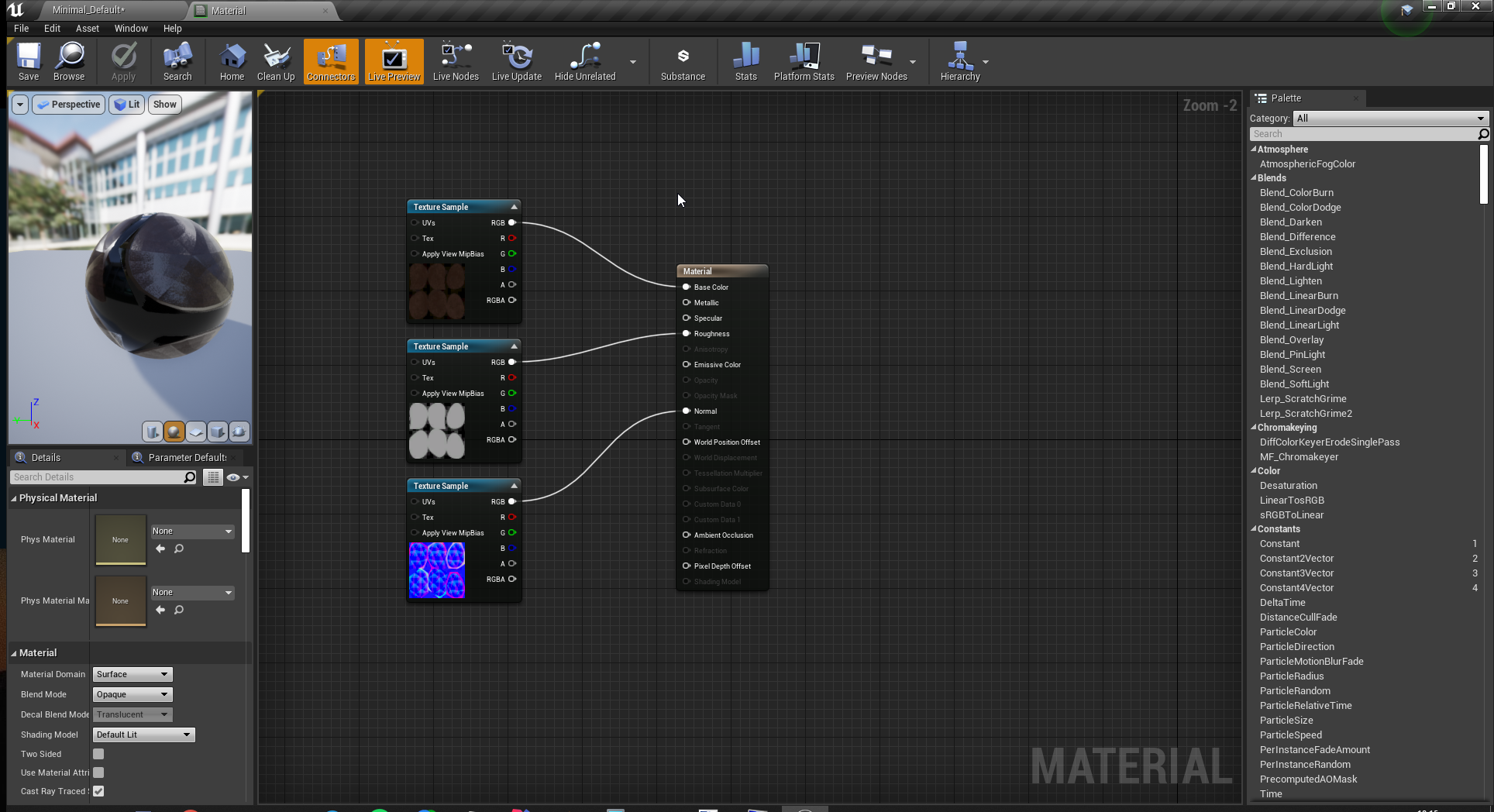
I'm trying to import my blender model into unreal, I can't get the baked textures to work https://i.imgur.com/TH35Raw.png
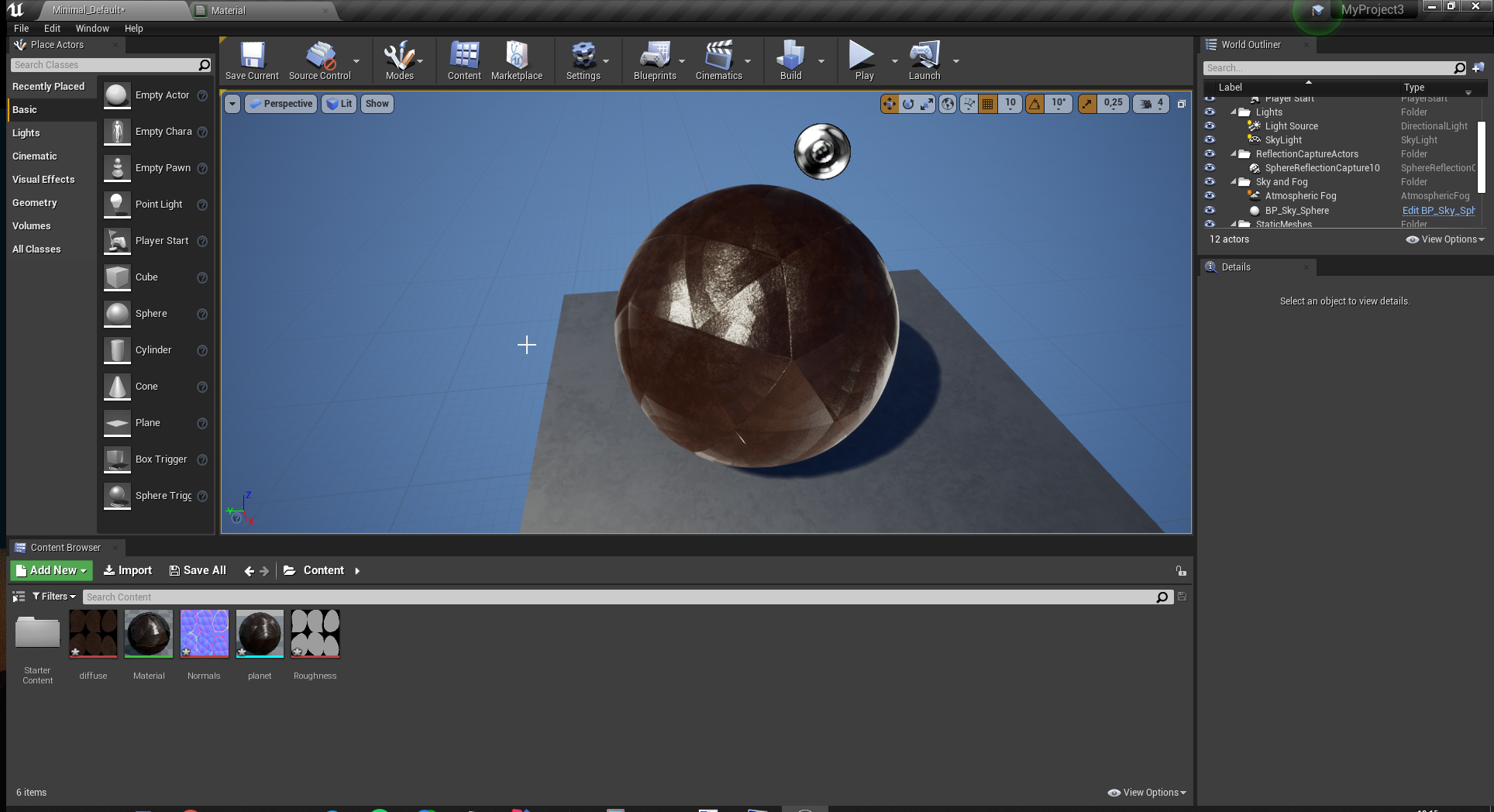
 buoyant viper
It's supposed to look like this
 elfin bolt
In normalmap texture try to click invert green
buoyant viper
Where?
elfin bolt
open the texture in content browser
buoyant viper
hm the baked texture itself misses some things o.0
 light thunder
So, apparently my project is building and compiling every material asset even though my maps don't references those...what did I forget to untick in settings?
 hearty walrus
is there a template for a custom splash screen?
elfin bolt
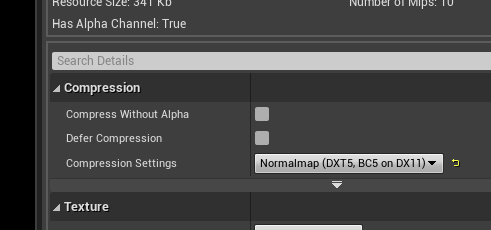
King_Jasper, change compression settings https://i.gyazo.com/cd0b4e6a5b49bbde1467ceecfad97a8a.png
 grim ore
your normal map has hard edges, are you expecting it not to look like that? if you unhook the normal what does it look like
elfin bolt
King_Jasper, in material, try invert rougness. Right-click and add "one minus" node
buoyant viper
I'm new to this
I just started to learn blender
I just wanted to know how the model looks in a 3d space
buoyant viper
inverting roughness didnt do anything
elfin bolt

grim ore
starting with the first issue, what is the first issue with your material lol?
like what is the actual problem, 1 of them at a time, that you have an issue with
cosmic cove
lol
buoyant viper
That it looks complete messy with roughness/normals
grim ore
unhook the normal and does it fix the normal issue?
and "messy" is not a good way to get a problem solved as we dont know what you want different
buoyant viper
normals break it yep.
grim ore
your normal in your DCC looks wrong, it has the hard edges. Is this not what you want?
 grave radish
is it legal to port a game that already exists to unreal without charging money for it?
buoyant viper
no soft
grim ore
if its not you need to fix your model or normal map in your DCC program. For the 2nd issue, I assume by roughness you mean its too shiny in UE4? I doubt that is roughness and more an issue with specular having 0.5 by default so set that to 0
buoyant viper
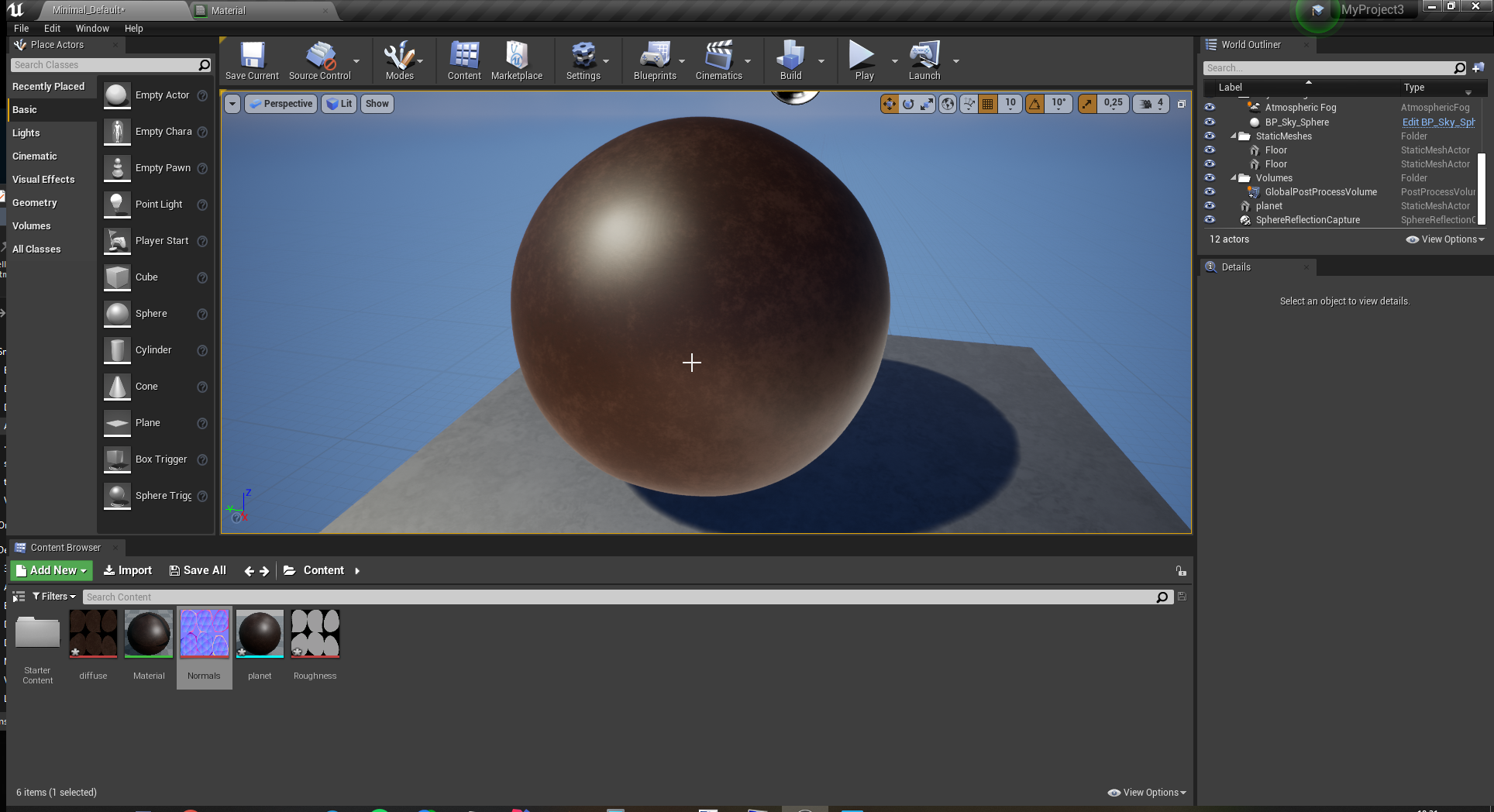
https://i.imgur.com/GtAHz9J.png Without roughness/normals it looks fine,
 light thunder
How can I insure my project doesn't build out assets that are not referenced in any map that appears in the game build?
I have certain maps that will load, and others that are never referenced by any code that gets executed to my knowledge, is there a project setting I didn't set correctly?
grim ore
yes your textures look bad, they have hard edges you can see it. Perhaps your not exporting the model or importing it properly using smoothing groups like UE4 wants so you dont have hard edges
its also possible your UV Wrap is bad but probably not
@light thunder you can in project settings under packaging specify specific maps to only build/package out, thats about the easiest way to start with. After that just checking the built package when done to see what might be going in that should not be.
@hearty walrus there is no template but you can see here where the default is if you want to use it
hearty walrus
what's the difference between game and editor splash
 hearty walrus
relevant gif lmao
grim ore
@hearty walrus one is used when the project is opened in the editor, the other when it is opened as a game
cosmic cove
platform/ windows
grim ore
Projects settigns -> platform -> whatever platform you want
open the folder your project is in, where the .uproject is, and double click to open it in the editor. You now get the editor splash screen. Right click the .uproject instead and launch game and you now get the game splash screen.
 hollow ridge
hey I have a big problem.. whenever I do anything in unreal I crash
grim ore
stop doing anything then and start doing specific things
hollow ridge
wise words
cosmic cove
we could start a long list if you would like
hollow ridge
hm wait I think the project is just corrupted
 cosmic cove
nice
flat axle
@grim ore how do I get the code to wait for this statement to be true before continuing?
flat axle
@hearty walrus I have an event that creates impulse, sends dice flying. I want to wait for it to stop moving before continuing the code
hearty walrus
the return value of vector is zero should go in a branch node, and whatever you want it to do after be true
grim ore
^^
cosmic cove
o.0
flat axle
if the code gets to it before it launches, it wont fire because it will be false
hearty walrus
cosmic cove
i mean the hawk has the vision
flat axle
hearty walrus
try this, it'll probably work
hold on
nevermind, code's good
what happens if you run it?
flat axle
it returns false
grim ore
oof ok so you need to separate your code a bit here
why is your tick code connected to something else
you want to throw dice, then check to see when the dice stops rolling and then do something right?
flat axle
I have a widget using an interface to activate the actor blueprint and start the execute
yew
yes
Ive been trying to figure it out for two days
cosmic cove
lol
grim ore
so throw the dice and start a timer that calls an event called "check if the damned dice stopped rolling" every 0.2 or 0.5 seconds. that event checks to see if the dice has stopped and if it has, you do whatever. If it has not stopped, you call the event again with the same time
 radiant sleet
its depressing how you cant make everything by yourself like in 2d engines
grim ore
this keeps everything separate and no need for a tick, you just have a lazy event checking every so often for the dice to stop rolling that is ONLY called after you toss the dice and keeps track of itself
radiant sleet
with unreal but you can do a lot
grim ore
what 2d engine can you do everything yourself in the engnie?
flat axle
how do I setup a timer to do that? I didnt even know you could do that
grim ore
look at the set time by function or event nodes, I would recommend function
cosmic cove
my timer
grim ore
its literally a node that says "do this after this time" and it will do this
radiant sleet
@grim ore gamemaker
Idk what im saying
I think im just complaining and hiding it in vauge statments
flat axle
@cosmic cove too small for me to see your timer lol
cosmic cove
yea, its also to big to understand either.
grim ore
I didnt know game maker had an art studio built into it but its been a while since I used it
radiant sleet
I cant wait until Im really comptent with unreal
It just hurts the narcisit in me how much work it takes to get any individual small thing to an exellent standard
Its prolly jsut a bad thought pattern I need to get rid of
cosmic cove
mine requires a tick. but heres the basic of it.
exotic thicket
Half-assing is the name of the game(dev) 
radiant sleet
When it comes to asset creation
Any tips youve guys discovered to save time
Idk what im saying actual
flat axle
@cosmic cove Yeah I've tried that variation like 100 times, wont work for mine XD
radiant sleet
this the problem when you feel overwhelemed so you complain and ask vauge questinos
exotic thicket
I'd say learn just enough tools to be dangerous :P
I can make a bunch of not-terrible-not-great assets in Blender which is entirely good enough for building my game
cosmic cove
id say get that wallet out
flat axle
Okay how do I put the check inside of the event dispatcher?
exotic thicket
Mixamo and Megascans are also great if you just need some assets to work with
radiant sleet
I need to stop complaining with enough work and smart allocation I could make anything I want and have it be original
cosmic cove
with a branch. and a IsReadyToRoll Bool you can put it anywhere
this technique is also used to debug things
grim ore
timerrrrrr byyyyy fuuuuncioooon
cosmic cove
by turning off and on your bool. you can stop and start code
so . after roll has come to a end. or dice stop. its gona be a set bool IsReadyToRoll to true
as user cast the throw . the IsReadyToRoll is Set to false
 cobalt blade
when will the 4.26 build be released?
flat axle
@cosmic cove Ive tried that but it wont work in conjunction with what I have
nvm
got it
grim ore
grim ore
@cobalt blade between 0 and 42 weeks from now
cosmic cove
4.26 - .... when we getin UE5
the vector is checking for zero. the branch can go in front
attached to accessible bool
radiant sleet
I hate that I like to talk about making gaems so much
prevents me from making games
cosmic cove
oh your one of those guys
radiant sleet
are you talking to me or ?
flat axle
omg it worked! Thank you so much @grim ore <333333
radiant sleet
Yes I am that guy I think
cosmic cove
yea, im just messign with ya though
radiant sleet
I defiently think I can improve
I dont think im born dumb but man its hard work learning
I just love complaining too much
Actually idk what im sayin
exotic thicket
It's easier to just talk than do lol
grim ore
its not hard work learning, its work learning lol
grim ore
its just work, its not hard unless you make it
grim ore
find a way to make it not hard, or fun and its even less work
radiant sleet
Maybe a fear of failure or something
cosmic cove
well dam
radiant sleet
Too true
😩
The weird thing with learning things is it always harder to learn than you expect
cosmic cove
go to hackNplan.com
grim ore
fail often so you can learn
radiant sleet
but its always feels better than you expect when you learn
 rain inlet
I hope UE4's assets will be compatible with UE5
This is my biggest fear actually, I bought so many of them, we got so many of them free
grim ore
@rain inlet UE4 is supposed to support forward compatibility with 5 so yes
rain inlet
Thanks for the heads up, sounds good
radiant sleet
Ima go bite the bullet and try and understand rigging and animation and how it works
grim ore
if you dont know how the engine works and you plan on using the engine why not start there
rain inlet
Animation isn't that hard but rigging is a pain
radiant sleet
Im kinda embarassed how I know nothing and have to resort to talking about
rain inlet
gotta start somewhere
grim ore
how embarassed can you be if you are talking about it
radiant sleet
Well I know how to do do a lot of things
cosmic cove
whelp rigging and animation isnt anywhere on beginner list
radiant sleet
and the amount of progress Ive made in like 2 weeks in incredibly
crazy
I just love talkign about unreal
I wish I was more introverted
Or idk what im saying
grim ore
nothign wrong with being social about something you like
flat axle
its done~! Thanks again @grim ore !!!
 viral herald
hey guys i got a question
unreal doesnt want to allow me to export anything
it worked for some but not others
and it seems to be doing this

 cerulean sandal
uhm i need some help real quick
i was messing around with settings, and turned on windows animation
and then my unreal engine broke and now i cant go back in that menu to disable it help
grim ore
can you click on the edit menu at all?
if you can you can click the editor menu, then use the arrows to go down to editor preferences
cerulean sandal
Ooh
i didnt even think of that lol... thanks!
Also one of my levels got a lot darker. Any idea why?
 woeful elbow
Does anyone know how to fix lighting issues? Auto-exposure is off however everytime I click Play mode, it's darker than what it is in the Editor
 potent bridge
Problem with UE4, How do I make the player walk to a location that doesn't use pathfinding? its incredibly bugged in my project.
just want the player to walk, in a straight line, to the position I specify.
 lone ridge
Heya, for whatever reason the animation end frame is greyed out. How would I modify it?

 vale silo
are we getting 4.25.4 or is 4.25.x done and done ?
bitter iris
ive got no idea tf is going on
grim ore
@potent bridge use a timeline to move them from point A to point B using the set actor location node and a lerp.
potent bridge
that wouldn't work with animations though, would it?
 left citrus
is it possible to modify bones in an animBP via a dynamic reference?
ie by an array of bone names
even just foreachbone
can you transform the bones / access the bones with C++ through UAnimBlueprint?
potent bridge
@grim ore Unfortunately "Set Actor Location" wont come up.
 random holly
Hey guys! Is anyone free to help me set up my punch and jump animation pleaseee? 🙏
grim ore
@potent bridge it would work with animations if your animations are based on velocity and direction. And the set actor location node might not come up automatically depending on where you are using it
 tired lynx
hey everybody! i'm experiencing a bit of a weird issue with lighting and decals. basically, i'd just finished set-dressing a scene whilst using the blank template default lighting setup. went to work on atmospherics next so deleted that starting set up and am instead using a directional light set to atmosphere sunlight with the sky & atmosphere actor. now, for whatever reason, when i turn my on my direction light on it turns many of the decals in my scene from this:
to this:
i imagine it's some kind of visibility setting that just isn't tweaked right to work with the sky & atmosphere system, but am still new and don't know what to look for
oh, my fog sheets have stopped working too (built off the ue fog sheet blueprint). they are no longer visible in this lighting setup.
grim ore
@potent bridge what is the class for the blueprint you are in, in the top right
potent bridge
Nah dw, figured it out, I was trying to create it in a function.
Would be great if it allowed me to but no.
grim ore
should still work in a function but the timeline wont
potent bridge
yeah I'll be doing it in event graph
 hidden grotto
Is there a performance difference between games built using blueprints versus pure c++? I wouldn't think the finished product would due to it all being compiled at runtime but I am still learning how things work under the hood.
grim ore
@hidden grotto there is, no there is no answer as to how much. no there is no right way to do it. yes you need to profile and test yourself.
potent bridge
I've figured it out, thanks for the help @grim ore
 grave forge
so if i make all my basics for character such as inventory and button lay out and stuff can i implement these into new project without much hassle? im totally new and after hours of making simple things like that to get basics of a game going i cannot do it straight out my head all on a new project because i prefer the level itself ??
hidden grotto
Thanks - pretty much what my expectation was before asking. Appreciate the quick answer
grim ore
@grave forge you can migrate assets from one project to another from inside the editor, assuming your code is well organized it should work without much trouble in the new project.
 grand lily
Im not sure if this is the right channel, but I'm looking for some general Unreal engine (C++) tutorial courses. I have a pretty good knowledge of C++ already but I'm new to UE. Any links or suggestions would be appreciated. I might even pay for a Udemy course or something but Idk what to choose yet
grim ore
if you know C++, have you looked at any of the C++ documentation or learning materials for the engine yet?
grand lily
I've looked at it. I've followed a few tutorials and Im using mostly documentation and help on this server to make a little POC game.
But I think I need to take some steps back and actually work through a comprehensive tutorial course
hidden grotto
@grand lily - I am currently taking this:
https://www.udemy.com/course/unrealcourse/
I am in the same boat as you - Experienced developer with little UE knowledge

Udemy
Created in collaboration with Epic Games. Learn C++ from basics while making your first 4 video games in Unreal
People without c++ say the course is a little fast in that department, so perfect for people like us
grand lily
Thanks a bunch
hidden grotto
No prob
grim ore
the old battery collection tutorial was a good start but with the changes to C++ and IWYU you have to stop every so often to fix the issues
grand lily
This looks really good, I especially like how they separate the course sections into games. Helps keep things
Yeah matthew I've used a few outdated tutorials like that recently and it can be kind of frustrating
grim ore
tom looman also has a networking based C++ course on udemy
grand lily
Id prefer to have something that works from the start that I can build out from there. It can be really frustrating when the starting code doesnt work
Yeah I was looking at that one too I'm not sure if it makes more sense to try the basic one first then do multiplayer after or just jump right into multiplayer
grim ore
both if you are just bored and want to absorb as much as you can. repetition and all for learning. They are always on sale and "relatively" cheap for what you get
I think tom has some free stuff on his site as well
grand lily
yeah I was talking to a friend about how useful these courses are and how they make tuition for certain masters programs look very overpriced '
Dont gotta go into debt to learn unreal
potent bridge
Also MathewW, when lerping this, how do I make it so it completely ignores the Z Value? I just want that to be defined by gravity.
grim ore
there are 2 kickstarts on the learn.unrealengine.com site that might help with the "basics" and it's free but there is no full course anymore unfortunately
grand lily
oh great thank you
fossil trellis
Bruh so confused about ue4. When it build lightning then it uses mostly of the cpu and ram but shouldn't it use the gpu because rn it's using 0
grim ore
@potent bridge well you have to have something to put in there, it could just be the original Z. An issue you are going to run into is if there are Z changes, you will have to do more work
@fossil trellis lightmass is 100% CPU drive, 0% GPU
potent bridge
The Z would only be affected by gravity, I just want the player to walk straight to the X and Y location, thats all.
Anyway, dinner.
fossil trellis
@grim ore ah shit
I'm doing a horror crime detective map
I will move later to game development
grim ore
well what do you mean by gravity? You have a location where the player is (x,y,z) and you want to move them to another. IF the (x,y) is the only difference then you just use the same Z the entire time or the destination Z. If you are going up and down on the Z you need to find the closests point above ground that you want your Z at and use that. You need all 3 to move to
fossil trellis
oh fuck
the build lightning made the shit go lighter
it went from this https://gyazo.com/2c5db26d705fabba25628655c347f94c to this


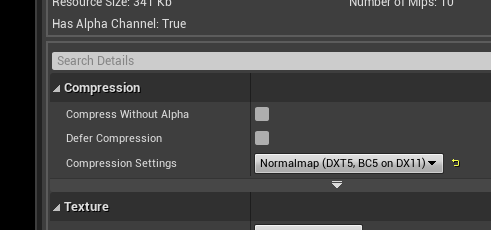


man wtf
how do I fix that?
hexed badger
I've made a landscape material using that tut https://www.youtube.com/watch?v=ozLevdUjr00 but after i've managed to get it with two materials blending i've addet third. But now i can only operate two of them. If i start with grass material and add rock i cant add soil. If i add soil and rock i cant add grass etc
Want to paint textures on your landscape? Want to do it easily and have those nice megascan displacements? This is the video for you.
If you are new to Megascans watch this first: https://youtu.be/MsU0-4btx0A
Here is a video on how to get the trees: https://youtu.be/yaZvyHaYk...
Anyone had the same issue? Anytime i try to paint with third it tries to compiles shaders, finish it and nothing changes
checkerboard is still checkerboard :/
plush yew
Could someone teach me how to use sequence recorder
 dense shore
hi unreal engine 4.25 no detail panel. I'm getting an error not opening. Anyone have an idea about this?
plush yew
Does anyone know how to get Sequence recorder to give me multiple camera points from a live play of the game
unique kraken
hey, im doing some planing, is 4.26 somewhere in sight already?
 slim idol
I have a student right now that's suffering from severe motion sickness by just using the Unreal Viewport. Is that something any of you have crossed before?
I'm not sure what to suggest or do in order to make it useful to her.
unique kraken
uhm that sounds intense
slim idol
yeah =/
hexed badger
Kinda weird 😄
slim idol
first time I heard of this happening
unique kraken
i know you can desensitise over a while by playing games etc
:/
maybe a different control could help too
hexed badger
Maybe its because she wants to control with her sight too many things at once
hexed badger
Ask her if she can focus only on few/one thing at the time
unique kraken
not sitting to close, not to focused to the screen is important
slim idol
someone suggested on another unreal channel. will also try these ones
slim idol
yeah good idea turning it off
unique kraken
back to my question anyone have a guess or something when 4.26 comes? im just doing some planing
cosmic cove
its out
cosmic cove
@unique kraken you have a wonderful day bud
unique kraken
<,<
plush yew
Does anyone know how to record gameplay through a sequence/ sequence recorder
unique kraken
id just like to know is it weeks month years?!
what time span might we talk about here
hexed badger
if ue5 comes in 2021 we can expect that 4.26 will come sooner than that
plush yew
Hello guys, i'm new here ! I would be really thankful, if any of you can help me resolve my issue. I have really weird shading going on on my mesh when applying a material. Even with applied normal map the shading is still bad. And this is only in Unreal. In substance painter or marmoset, there is no problem. I have tried so many things, I really need help.. Thanks
hexed badger
show us a picture of viewport and nodes
plush yew
Here is a pic of the shading. The normal map is applied here yet it still looks like that
I'm using an automotive material, but it's still the same for other materials too
Combined my normal map + normal map of the automotive material
btw, if I apply my textures from substance painter ( base color + normal map) there is no problem with shading
but if i apply unreal material + normal map = shading errors
 novel seal
hey guys, im new on the channel! I'm currently having some trouble with blotchy shadows in Archvis, does anyone have a good solution?
Ive already read most of this thread (https://forums.unrealengine.com/development-discussion/architectural-and-design-visualization/60547-lets-make-lightmass-epic-and-understandable/page10?88952-Lets-make-Lightmass-EPIC-(and-understandable)= ) where they go very indepth on changing values in the LightmassBase.ini, but now my head is just spinning and I'm none the wiser. I've tried higher Lightmap resolutions, but that only somewhat fixes the the issues while driving build times up into non-workable times. Also experimented with different lightmass settings, but didn't see much better results.
I cant show the whole scene due to NDA reasons, but it basically looks like this screenshot all over the place.
Unreal Engine Forums
Architectural and product design visualization, pointers, tips and tricks.
sorry for interrupting @plush yew , feel free to prioritize their problem first
grim ore
its whatever you tell it to be
if its the base parent panel then it's the size of your viewport
 supple crag
Hey everyone, i'm creating a little tower defense game and trying to add a range preview to my towers. Something like this
Right now I'm using a collision sphere just for testing. Can someone point me in the direction on what to use to make it look like in the picture?
plush yew
ima ask for the last time
Does anyone know how to get Sequence recorder to give me multiple camera points from a live play of the game
Gamemode recording basically
How do I record gamemode
I can add cameras in the sequence I assume
hexed badger
Have you tried just add another camera to the sequencer?
grim ore
@plush yew use the Get Viewport Size node
plush yew
Prank
I have to make the sequence first
But my character just tposes and nothing moves
I want everything to move inside the sequence as done in the gameplay
grim ore
@plush yew and you can change the new window size in the editor prefs
plush yew
???
grim ore
@supple crag you can use a decal to simulate the look of that. google something like "ue4 attack range indicator"
plush yew
could yuh help with my question 😉
Ive asked the same damn question in 10 differnt channels and not a single fucking person pays any mind to it
And google isn't helping
grim ore
did you look at this ? https://docs.unrealengine.com/en-US/Engine/Sequencer/Workflow/SequenceRecorder/index.html
and people might just not know the answer. Do you want 10000 people answering you with "no I cant help"
it also doesnt help your question is fragmented and all over the place.
plush yew
Yes I have
grim ore
so what is wrong with what is on that page
plush yew
I have followed it
animations/movement doesn't happend in the sequence
Other then the character Tposing and moving around through objects
grim ore
well it seems to work in the example on the page, is your character not set up to use a proper anim bp?
and if its not add in an animation track to go along with the movement
tired lynx
hey, i’ve fixed the decals but the fog plates in my scene still aren’t working with the sky and atmosphere lighting
grim ore
assuming you have a skeletal mesh on the sequence, animation will be one of the tracks under it
potent bridge
https://cdn.discordapp.com/attachments/714928089104122027/760589111735484446/2020-09-29_20-48-59.mp4 I actually do not understand this pathfinding bug
plush yew
im not understanding 😅 I am new to unreal in general
tired lynx
and this is how it looks with the lighting setup:
i'm really not sure what i'm doing wrong. i've been through every setting in the blueprint but cannot seem to bring them back
potent bridge
I'm fairly certain I know where that location is in real life @tired lynx
grim ore
@tired lynx yes built lighting and dynamic lighting do not look the same, if you need the same look swap it back to dynamic
tired lynx
@potent bridge ah! give us a guess :))
potent bridge
Brighton, maybe? Not 100% sure.
grim ore
@plush yew if you have a skeletal mesh in the sequence it will have an animation track as an option
tired lynx
mixed with a bit of the arches bc i wanted to bring the two best bits of the seafront together haha
plush yew
so if I add the animation tracks it will line them up?
potent bridge
Mathew, care to look at my pathfinding bug and see why its happening?
grim ore
well you said its a bug but didnt say what the problem was....
grim ore
i did, but all I saw was something moving to tiles
tired lynx
ah sorry forgot to reply to you matthew
the lighting in my scene is not currently built
potent bridge
Ok, in more detail, I stop on the stairs, and when I tried to press W to go up to the top tile, it goes around it for some reason.
tired lynx
i did build at one point but that isn't what broke my fog plates
grim ore
@tired lynx you didnt build the lighting for the 2nd picture, it just happend suddenly?
tired lynx
my fog plates just aren't playing with the sky and atmosphere system
if i bring back the default project lighting they work fine
grim ore
ah, are you using post processing?
grim ore
you might have an issue if you are using a stencil buffer for example
tired lynx
hmm
no dice
i'm thinking maybe there's some opacity setting that i'm missing?
like i know you have to do something to the colour values of the exponential height fog in order to get that working with the sky and atmosphere system properly
grim ore
@potent bridge so how are you moving them and does the top of the stairs have a valid path? if you pull up the nav mesh does it go to the top
tired lynx
so it could be a similar deal?
grim ore
sounds like it
potent bridge
@grim ore This might be a case I need to explain in DMs, its complicated.
grim ore
did you build the lighting? if so built lighting is not the same as dynamic
fossil trellis
yes this was after building lighting
grim ore
yep dynamic lighting and static lighting are not the same and you won't get the same results most of the time.
potent bridge
The method of moving is by getting the current grid location (theres a location to grid function), and using W/A/S/D to add 1 or subtract 1 to row and column
fossil trellis
idk what that's supposed to mean
plush yew
hi guys
u seem really good at unreal engine
any tips for tutorials?
Ok I added animation
Now what
fossil trellis
what is it supposed to be?
plush yew
fossil trellis
because I want it dark
grim ore
turn all of your lights back to movable
potent bridge
@grim ore NavMesh currently
fossil trellis
aight
grim ore
@plush yew when you play it back do the animations play?
plush yew
no
They play weirdly
@plush yew look at the pinned message in this channel
@grim ore i looked, what?
yes they play
grim ore
if they play whats the issue?
plush yew
is there a way to have it auto track animations when I record sequence
grim ore
@plush yew you asked for tips for tutorials, the pinned message has tutorials
plush yew
where
grim ore
@plush yew no, it will just do the things you tell it to record which is probably movement. You need to set up a proper animation blueprint if you want it to be automatic
plush yew
Any recommended videos on this ?
grim ore
actually.... the pinned messages appear to be gone from here lol wth
fossil trellis
@grim ore so after doing that, should I build lightning again?
grim ore
oh they were gone, internet might be borked for me lol
@fossil trellis movable/dynamic lighting does not use built lighting. If you dont want built lighting, dont use it.
grim ore
you switched all of the lights back to dynamic?
potent bridge
Sometimes it wont move to the center. I'm not sure how to explain this.
grim ore
try rebuilding lighting then, it should have switched back if all you did was build lighting
fossil trellis
aight
plush yew
I AM NOW OPENING UNREAL FOR THE FIRST TIME!!!!!! WOOOOOOWWWW
grim ore
@plush yew the docs for Unreal Engine have information on animation blueprints
@fossil trellis you can also Force No Precomputed Lighting in the world settings and rebuild and it should delete them
potent bridge
I think mats gotten tired of helping me, so I'll give fixing this a go, laters.
fossil trellis
@grim ore where did you get World settings from?
 worldly stump
4.26
grim ore
@plush yew it should have popped up another window asking you to install
@fossil trellis Window -> World Settings
grim ore
try to launch it again and pay attention
plush yew
does that mean i can't use unreal engine 😦
worldly stump
use 4.26 instead
plush yew
how
potent bridge
still can't think of how to fix this MathewW.
grim ore
print out the actual values of the places you want to go to