#ue4-general
1 messages · Page 845 of 1
 grim ore
 deep viper
@grim ore Thanks a million Mathew. I just got two killer tips today. Yay!
grim ore
@light thunder if it is crashing on that you should be able to mouse over the values and see which ones it is looking at specifically
or the current call stack should show it
 light thunder
let's see
 thick herald
Sorry @tired lynx no idea if that's possible. You could change your directional light to dynamic which would stop that, or go into world settings and tick 'Force no precomputed' light settings, at least temporarily so you don't get the preview text.
grim ore
because is it crashing in an infinite loop on the while? or is the Material not valid? or etc.
light thunder
UE4Editor-Core.dll!__report_gsfailure(unsigned __int64 stack_cookie) Line 220
at d:\agent_work\2\s\src\vctools\crt\vcstartup\src\gs\gs_report.c(220)
No idea, I can't step through execution order to find out
grim ore
if this is live you should be able to mouse over the variables in the code, like *UniqueName and such
 tired lynx
Sorry @tired lynx no idea if that's possible. You could change your directional light to dynamic which would stop that, or go into world settings and tick 'Force no precomputed' light settings, at least temporarily so you don't get the preview text.
@thick herald ahh, thanks for explaining! that sucks. guess i can just set dress my scene and then go 'select all descendants > moveable' once i'm done
light thunder
tired lynx
i guess another question then is
grim ore
well theres a variable name and jesus its stuck...
light thunder
well crap - Data = Num=1033 L"INST_Plywood_1_2_3_4_5_6_7_8_9_10_11_12_13_14_15_16_17_18_19_20_21_22_23_24_25_26_27_28_29_30_31_32_33_34_35_36_37_38_39_40_41_42_43_44_45_46_47_48_49_50_51_52_53_54_55_56_57_58_59_60_61_62_63_64_65_6...
grim ore
yeah its getting stuck trying to name it
but you have a material to look at, maybe move it out of the project and try again
light thunder
Are you sure you don't want to join the team and help first responders save lives....there's NO VR product in public safety, not really lol
tired lynx
when i drag an object into my scene from the content browser, it activates a movement mode that allows me to drag my object across the surface of my scene, however once placed it defaults to the traditional 3d gimbal movement system. i find that initial movement system really intuitive; is there a way to reactivate it after an object has been placed?
light thunder
what if it is with a bunch of materials?
grim ore
well you wont know until you try and remove that one material temporarily and see what happens.
it also should show above there somewehre perhaps which mesh it is trying to load and that might be a good candidate to move
it looks like its iterating over the material slots for a mesh
but I cant see all the code so perhaps is just loading up materials for the level. I dunno lol
light thunder
what am I looking for here
sure looks like a lot of instructions
or i guess that's the meshes it's applied to?
 rare spear
@rare spear short answer is yes. I don't have a long answer 😄
@thick herald That's unfortunate! 😄 but thanks than I continue searching
grim ore
no its the material itself
I would close the project, find that material, pull it out of the project temporarily (like put it on the desktop or something) then re open the project and see if the map loads
light thunder
what's weird, I cna't find the material that the instance is made from?
grim ore
it should be in the details panel for it, the parent
and there should be an eyeglass on it to navigate to it if you need to
light thunder
ah yes, I remember making this up in a few minutes, clearly
 coral folio
hey guys i incurred into a serious problem.... im triggering sequences via blueprint, and i'm having flicker issues on the reflections of my level; find an example video below... whenever i play a new sequence it seems as if the reflection takes up some times to update and thus the firs few milliseconds shows black/weird reflections.... can anybody help please ???? im going crazyyyy
the bp setup shown above is destroying the actor sequence before triggering a second on, i tried also placing it afterwards differently but the issue still persisted... it always happens whenever a new shot is played
 radiant sleet
Any tips for not forgetting everything you learn
light thunder
@grim ore Same errors, how do I find the static mesh name, it's giving me this - UniqueName = L"MaterialSlot_1_2_3_4_5_6_7_8_9_10_11_12_13_14_15_16_17_18_19_20_21_22_23_24_25_26_27_28_29_30_31_32_33_34_35_36_37_38_39_40_41_42_43_44_45_46_47_48_49_50_51_52_53_54_55_56_57_58_59_60_61_62_63_64_65_6...
radiant sleet
I feel like Ill learn concept and then realize I need to learn something else to advance further
and then Ill kinda forget first stuff
 ashen orbit
@radiant sleet Do exercises that really make you question your intelligence
ashen orbit
for instance, at uni they will often throw you something that just slightly out of your reach but you still manage to get it and then you feel like you traversed a great journey (without googling a lot)
grim ore
@light thunder I dont know which code you are in . which file and line is this?
light thunder
StaticMesh.cpp
radiant sleet
Ok so trying to do stuff without following tutorials
light thunder
line 4026
radiant sleet
just really seeing what you know and dont
ashen orbit
yeah no stop tutorials ASAP
grim ore
whats the path to the file?
 hardy berry
it seems thats its better for 3d
radiant sleet
Wait but shouldnt it be both
light thunder
E:\UE_4.24\Engine\Source\Runtime\Engine\Private\StaticMesh.cpp
radiant sleet
Or should I just start with a goal and try and do it without
hardy berry
you'll always need to use google
light thunder
I'm scrolling up trying to find names but they just highlight the variable names themselves
ashen orbit
@radiant sleet it's like elo hell in league of legends, you don't get out because you're not putting in the time
ashen orbit
the best would be to learn something through a tutorial, then ask someone more experienced for a challenging exercices revolving around those concepts
light thunder
grim ore
yeah mouse over the Material variable and what does it say its working on
grim ore
ok then 4008 the Material in there
grim ore
the one below that, unless its stuck on that line right now. The Material.ImportedMaterialSlotName , we want to know what Material its currently looking at in the loop
mousing over it if you are in the breakpoint should show it in a tooltip like before
light thunder
I mouse over "material" at the line and nothing happens
grim ore
or technically 4024 has Material as well that should work
if not maybe get it to crash again then check what Material is on 4024
grim ore
ugh... that makes no sense
light thunder
unreal engine? yes I agree
grim ore
yep but its grabbing that info from the material itself, so I am trying to find what material it has loaded that is causing this issue
 weary grove
Anyone noticed anything broken with Behavior Trees in 4.26?
grim ore
all of that code is getting it from the Material variable which is one of the materials in the StaticMaterials array as it loops over them
grim ore
its stuck on line 4026?
I would stop it and get it to crash again then check line 4024 to see what it shows for Material right after it crashes
grim ore
if this still doesnt work the only other thing I can think of is to actually compile source and run the editor in full debug mode so you can breakpoint above that. I dont know if you can breakpoint it now but I think you can? if so breakpoint it yeah earlier
light thunder
because technically that would get their before it crashes?
grim ore
I would breakpoint it at 4004 at the start of the function basically
and walk thru it
I dont attach debugger often so I dont know its limits
basically I am curious which material its crashing on, and if there is anything odd in the list of static materials. If its crashing on a certain material you can look at it or pull it out and see what happens is my thought but... its weird
grim ore
well material is not valid until atleast 4007
light thunder
grim ore
if you break on 24 and step to 25, does Uniquename now become valid?
and is it that weird MaterialSlot_0_1_2_3_etc ?
grim ore
I would be curious what is in StaticMaterials on 06
grim ore
well it has an S, and you should be able to break on that point and when it stops look at it live
FStaticMaterial is the variable class type, we want StaticMaterials which is the actual variable we are using
light thunder
grim ore
that line is saying "hey lets look at all of the items in StaticMaterials one at a time, while we look at them the current one will be called Material and it's class is FStaticMaterial
light thunder
num 4
grim ore
so we want to know what is in the StaticMaterials variable itself
yep there are 4 items in there, the little drop down arrow should open it up
light thunder
4 of them [0] = {MaterialInterface=0x0000020cd2b7ee80 (Name="INST_Sidewalk") MaterialSlotName="INST_Sidewalk" ImportedMaterialSlotName=...}
grim ore
there you go, one of them is null for some reason
grim ore
well thats just the interface so I guess that wont matter
do any of the other ones have weird ImportedMaterialSlotName
light thunder
other maps?
grim ore
those 4 values in there is what we care about
 autumn grail
Please I need help , i can't build lightning it crashes everytimes i have added a small lightmass importance volume just to test
grim ore
so like you opened #2 and the importedmaterialslotname is roadlines_mat
autumn grail
I can't continue my project please HELP
grim ore
what do the other 3 show for that variable, do any of them look weird
autumn grail
@light thunder i ll try
grim ore
those all look good. ok so... looking thru the source code this changed in .25 and .26... I think you are running into a weird bug with using .24 😦
if you move those 4 materials out of the project temporarily while its close then re open see if it crashes again or tries to load up different ones
light thunder
neat
light thunder
I mean build it in a brand new empty map that has like a cube in it @autumn grail
grim ore
check the crash log for lightmass and the project and see why it is crashing
autumn grail
the crash log says acces violation when trying to access to lightmap.cpp
i try building and gibve you the exact message
grim ore
it should show more than that yep
 frigid needle
I'm wanting to create a throttle for a space ship. Because it has to calculate the desired speed versus the current speed and interp to that level, I'm going to assume there's no way of doing this that doesn't involve Tick?
light thunder
move it out now, starting it up again
4 items took longer because two were same file name from marketplace content but different product, like 5 kb difference in filesize
grim ore
perhaps you ran into your issue
grim ore
well engine versions change stuff, I am curious if that code changed in .23 and .24
light thunder
are you saying if I just back everything up as it is and try upgrading to 4.25, it might fix it?
oh WTF i can't even load the project now wtf happened?
grim ore
it might. the code is the same in .23 and .24 for that part but keep in mind meshes took some HUGE changes in the last few versions and internally they changed quite a bit. might be some weird issue for sure
light thunder
apparantly breakpoint fires just loading up the project
grim ore
that function does change completely in .25 from what I can see and yes from what I can tell this all fires off after LODs
curious to see what happens now tho with those 4 materials moved out
grim ore
well what does it show for the static materials array this time?
same ones or different
light thunder
grim ore
well thats uh... a bit more static materials this time lol
light thunder
restarting it and setting break point at 4006
 vague scaffold
Is there a way to take attributes from inside an Alembic and route them to the material node? I basically want to colorize the points with the data contained inside the Alembic file.
light thunder
first break @grim ore
grim ore
yeah im starting to think this is just a red herring and something else is causing this
light thunder
crappy HLODs
how can I remove them and all references when I can't open a map
I'd like to try that
I'll rebuild them later
but that would explain all these instances if the HLOD has gotten corrupted and included them in all the HLOD static meshes
 plush yew
ay every1, i have an issue with meshes suddenly appearing in wrong place and flickering
is this a known bug?
imma go afk for a while so @ me if any of you guys know how to fix this
(adjusting the bound thing didn't work)
grim ore
@light thunder in the projet settings it has this, I wonder if there is a way to rebuild your HLOD without opening the map
grim ore
just the map? was it migrated or is it literally just the .umap file?
grim ore
oh yeah that wont help if one of the files is bad as well 😛
I was curious if just the ,umap would do anything lol
but that atleast lets you know its something in the map or assets and not the original project
maybe uh open that test project in .25 and see if it works/
so you dont have to try the entire project
light thunder
still downloading now
grim ore
10-4
 quartz tide
Afternoon all. So I'm looking to get into learning how to do some game development with Unreal, and wondered if there was a learning path that folks here would recommended. I have experience with multiple programming languages, although my C++ is rusty to be charitable.
light thunder
There's a good course on Udemy
grim ore
if you want to learn the engine, learn the engine and how it works. There is learn.unrealengine.com that has courses as well as the YT channel, the pinned message in here, and udemy, and other sites. Learn the engine and how it works, even if that is following guides and docs on using it with blueprints. Learn the engine and how it works before jumping into using it with C++.
vague scaffold
Can blue print read stored attributes inside of Alembic files?
light thunder
@grim ore What if I delete the HLOD folders in the content folder, outside of the engine
maybe throw a map error but once I can get the map to load, I can delete clusters and that should fix map error
 cedar wave
Starting with BP will help mitigate the compile times and let you focus on learning. Once you comfy with the workflow and how things interact, you'll be able to translate BP stuff to C++ fairly well. So then it doesn't matter if a tutorial is using BP (as most often do) - you can translate it. @quartz tide
grim ore
@light thunder at this point if you have a backup and this test project you can try anything
light thunder
well, you don't think it's blueprint related at this point do you?
grim ore
considering the crash, no
light thunder
basically all of my changes have been working on a different map with some blueprint foundations
because it works in 4.23
and if I upgrade it again to 4.24 and it still works, I should be able to bring those other blueprints back in
is there anything I should do in that process?
 wooden forge
light thunder
wooden forge
light thunder
like what happens when you copy a 4.21 blueprint into a 4.25 content folder for example and start up unreal
light thunder
I have, it's good, a bit dated but good
wooden forge
Oh
light thunder
todd looman makes one, i'd check that out too
wooden forge
My friend is new to UE4 he wants to buy it, would you recommend it for a beginner?
Oh cool, I'll check that out too
grim ore
@light thunder if its a forward version change, it should try and load it the first time you use it and if it opens it opens.
if you are new to UE4 I would NOT recommend trying to start learning C++ with it
take the time to learn UE4 and how it works with the basics, then move on to C++. it is just a giant headache asking to start learning UE4 with C++ or even learning C++ with UE4
quartz tide
Thanks all. You saved me from going down a path that would have been very painful (the C++ and Unreal at the same time)
 exotic thicket
yeah you can get really far with BP's :)
wooden forge
You have to thank me for opening this conversation
grim ore
every part of the engine has C++ behind it. this means that every blueprint node is just C++ with a pretty face. this means that if you do something in Blueprints you can literally see how it works in C++. this means......
exotic thicket
Unless the node is a special K2Node which are nigh impossible to understand lol
grim ore
its still there, just got to crack the code 😉
 honest vale
SpawnActor node is pretty wtf
grim ore
yep alot of it is weird but imagine seeing all of that without any knowledge of UE4 or C++..... 🤯
light thunder
Do you know how to delete hlods
grim ore
i do not but there is supposed to be a commandlet to rebuild them so maybe it can delete them?
light thunder
What about deleting the files from Windows explorer with the editor shut off
grim ore
it might work, I dont work with them often enough to know where or how they are stored
light thunder
Generally though in terms of I guess what you call execution order, wouldn't they first load the static meshes first and then the materials bound to those static meshes?
Because if I'm having problems with materials and those materials are being caused by those hlod meshes, then if those measures are gone those problem materials won't be loaded
grim ore
it looks like its the resave packaged commandlet and the checkbox in the project settings and it will force rebuild them
autumn grail
@light thunder @grim ore the building is very long with just one importance volume
light thunder
Checksworm.exe in task manager and lightmass.exe
grim ore
@autumn grail long is relative, we dont know what your project contains or how you are building it or our machine or your settings for lightmass or the settings in the project or
light thunder
I tried doing the resave package but I didn't do it without any arguments maybe you can walk me through it then
grim ore
did you check the checkbox in the project settings to rebuild the hlod?
light thunder
Like am I supposed to check out everything first from source control
grim ore
I wouldnt worry about source control right now if you have a copy of the map/project to just test stuff on you can work on that
 brazen crow
sorry to interrupt quick question mathewW does the integer/integer round up from 0.5
light thunder
No I mean if I'm going to use the resave commandlet
autumn grail
i 'll try it after the crash ( the checkbox)
grim ore
even if using the commandlet, it shouldnt matter if they are checked out or not for testing it. Just make a copy of the project to work with, it should have nothing to do with source control. The latest branch that is not working and just copy it somewhere and start working in there
@brazen crow I beleive integers do not round if doing division it just drops the remainder
brazen crow
thats what it should do ok thanks
grim ore
@light thunder based on the source code if you are using the resave commandlet and HLOD rebuild is turned on it should say so in the log when it is doing it so that is a way to check
light thunder
what about lightmass.exe
autumn grail
light thunder
basically, you want to load of one of epic's content examples and rebuild the lighting on them. If THEY don't work, you know it's nothing you are doing wrong on your end in terms of the map or your assets @autumn grail
grim ore
you have 1.3 million static mesh instances
watch the log and see if it gives a reason to the crash, but the # of stuffs in your level might be the problem
@crimson vapor that is the end of an error, something above it failed which caused that. You need the entire log, or the parts above that, with the actual error
@light thunder I just ran this on my project to get it to regenerate my HLODs on the maps in the directory I set up in project settings "C:\Epic Games\UE_4.25\Engine\Binaries\Win64\UE4Editor-Cmd.exe" c:\projects\tpp\tpp.uproject -run=resavepackages -BuildHLOD -AllowCommandletRendering
and it ran and did the basic settings
there are other switches based on what part of HLOD you want to enable
light thunder
lol I want to delete them first
 crimson vapor
@grim ore That is the end of the error, no more errors
or rather no errors before that
That is the only thing i see on the console
grim ore
well if you force the cluster generation the first thing it does is clear out the old ones @light thunder
@crimson vapor you need to look at the actual output log not the error list
light thunder
well crap, maybe this is the problem?
that's how it currently is
shouldn't I force the settings
grim ore
what I mean is if you use the commandlet and use the switch to ForceClusters it will clear out the old ones before rebuilding
grim ore
yep so those are the actual errors to fix
 rich rose
If I wanted to allow the player to drop any wav audio files into the project folder of Standalone Build, then once the build is open, it would read these as audio files and put them into UMG. Sorta like a music player of whatever file you put in. What exactly is this process called reading files in a folder? Im trying to go through UE4 documentation but cant find the correct term to search for?
 strong schooner
Can we use distance based tessellation/displacement on mesh materials like the one seen in landscape material tessellation? I was hoping for an object to get displacement only when I am near it. Thank you
grim ore
@rich rose you won't find that built in is why, that would be custom C++ code or a plugin that exposes that.
rich rose
Oh really? Damn thats surprising, alright thanks for the info
grim ore
unfortunately file operations are really not supported in blueprints directly or in the editor at this point
rich rose
I see. Thats a pity, oh well, I guess I might have to use another piece of software. thanks again for the instant response 👍
light thunder
check the marketplace @rich rose there might be a plugin
rich rose
check the marketplace @rich rose there might be a plugin
@light thunder will take a look. Was really wanting to do it myself as I didnt want to spend money but ya never know i guess 👍
grim ore
there are free ones for sure as well but it seems overkill to use UE4 for that, Unity does file operations fine if you just want something easy but if its just this a simple C# app would work as well
 bleak hound
Is there any free auto landscape material asset out there?
 covert hedge
c++ code to read files is relatively easy tho
light thunder
@grim ore where is the documentation to find those switches, so I don't have to keep asking how to use x switch (like force clusters)
grim ore
well the actual name of the switch is printed out to the screen, but there are no docs its in the source lol. /** determine if we are building lighting for the map packages on the pass. **/ bShouldBuildHLOD = Switches.Contains(TEXT("BuildHLOD")); FString HLODOptions; FParse::Value(*Params, TEXT("BuildOptions="), HLODOptions); bGenerateClusters = HLODOptions.Contains("Clusters"); bGenerateMeshProxies = HLODOptions.Contains("Proxies"); bForceClusterGeneration = HLODOptions.Contains("ForceClusters"); bForceProxyGeneration = HLODOptions.Contains("ForceProxies"); bForceEnableHLODForLevel = HLODOptions.Contains("ForceEnableHLOD"); bForceSingleClusterForLevel = HLODOptions.Contains("ForceSingleCluster"); which is inside of Engine/Source/Editor/UnrealEd/Private/Commandlets/ContentCommandlets.cpp
 fossil trellis
guys I think I fucked my gpu up
I was being stupid and put high res screenshot to 7.0
now it changed color for some reason???
ngl it kinda looks cool but idk
grim ore
did you restart the project?
fossil trellis
I restarted my pc
ue4 is really demanding since i use gtx 1650 super
the pc wasn't built for making maps but instead playing games
but it did spark up my interest
grim ore
yep super weird if you restarted it. high res screenshot shouldnt have rebuilt lighting
fossil trellis
well regardless it did make it better
grim ore
it seems like your lightmap was destroyed or it swapped to realtime lighting lol
fossil trellis
huhm
light thunder
Still waiting for the copied project folder to be, well, copied...it's about 48 gb but I'm also download 4.25 and trying to open a previous stable version (4.23)
and, um, it won't open on 4.23 now...wtf
was this EVER stable?
F%&% you windows -
grim ore
maybe something on your machine corrupted a file at some point 😦
light thunder
I spent all that time setting up source control because that's what good boys do
fossil trellis
rtx 3060 + r5 3600 is good setup for ue4?
grim ore
well thats what I dont understand on why an older version doesnt work when you try and use it, source control is good for that
@fossil trellis there is no way of knowing since we dont know what you want to do or how patient you are. With that said both of those are good middle/high end parts and should run UE4 fine
light thunder
i'm hoping it was just bvecause my machine was doing too much just now
fossil trellis
I mean when I turn 18, I'm gonna be a developer
and use ue5 when it comes out
idk how to code games
light thunder
Well, you can be a developer now, if you develop something, you are a developer
fossil trellis
just building map
light thunder
"C:\Epic Games\UE_4.25\Engine\Binaries\Win64\UE4Editor-Cmd.exe" c:\projects\tpp\tpp.uproject -run=resavepackages -BuildHLOD -ForceClusters -AllowCommandletRendering does that look good for forcing clusters? @grim ore
grim ore
based on this ? String HLODOptions; FParse::Value(*Params, TEXT("BuildOptions="), HLODOptions); bGenerateClusters = HLODOptions.Contains("Clusters"); I think it should have BuildOptions=ForceClusters in the middle there instead of the -ForceClusters
light thunder
I thought you substitute the "TEXT" for that
grim ore
my guess if it worked is when it runs that display will show a checkbox if you did it right, lets find out lol
light thunder
still waiting for copying
grim ore
oh also lol the first part is for my engine install and the 2nd is for my project location so you would need to adjust that
light thunder
going to go play with my kids, I've ignored them for too long today trying to fix this, thanks for your help, I'll let you know what the resave commandlet turns up
but it looks like my project was corrupted earlier than I thought
grim ore
yep "c:\epic games\ue_4.25\engine\binaries\win64\ue4editor-cmd.exe" c:\projects\tpp\tpp.uproject -run=resavepackages -BuildHLOD -BuildOptions=ForceClusters -AllowCommandletRendering gives me
so it is -BuildOptions=XXX for the options you want
light thunder
thank you, I'll let you know
grim ore
it failed on mine of course, my maps dont have HLOD turned on
light thunder
how would I turn it on my maps if I can load them to access world settings?
grim ore
light thunder
oh shit, I didn't test one variable, which is to try this with my VR unplugged
there's no real reason that should affect ANYTHING and god help me if it is the reason
but I seem to remember it working yesterday when I was working on it without myVR plugged in (I was at work with my machine but not VR kit)
grim ore
well your maps would have it turned on which is the issue isnt it?
light thunder
if that IS the issue, then yeah, but the world settings is for each map right?
grim ore
yep
this would atleast allow you to clear out the old once and force rebuild new ones
eliminate those as a possible issue sorta kinda
light thunder
Where is the engine face located?
grim ore
?
light thunder
I want to punch this engine in the face, so where is it located?
grim ore
lol
light thunder
christ jesus I'm trying to bring Unreal to the entirety of the Fire Service (NO ONE uses it) and I can't even get a grant to buy a new machine
"E:\ue_4.24\engine\binaries\win64\ue4editor-cmd.exe" "E:\LS Beta Version bugged424version\LiveSimulator.uproject" -run=resavepackages -BuildHLOD -BuildOptions=ForceClusters -AllowCommandletRendering
how long does is run before you see anything ?
 wispy leaf
How good is unreal engine for making a 3d platformer adventure game
grim ore
@light thunder it took me a few seconds if that before the log started working
 sterile tulip
The question is not how good is unreal engine, the question is how good are you
sterile tulip
You can do anything in UE
grim ore
try just the first part then, no options. so just up to the commandlet
so the ue4editor-cmd.exe part, see if it actually runs lol
grim ore
and I would rename the folder for your project to something without spaces and smaller like maybe just LS
wispy leaf
I have been wanting to move over to UE for awhile, I've been using Roblox for so long
Or unity
grim ore
check out the pinned message in here for learning material for UE4 @wispy leaf
sterile tulip
Roblox 
wispy leaf
I know it's not a really good platform
sterile tulip


wispy leaf
I believe I talked about switching over a few months ago but instead I just took a development break
grim ore
@light thunder the command looks right, maybe it just takes a bit due to the project size
wispy leaf
But now I'm back to developing and I started a new roblox project that I might just move to UE4
 tawny oar
@wispy leaf I'm pretty fresh to unreal also. Evryone is very helpful and there are just so many ways to do things! Plus seemingly ENDLESS resources. Welcome !
light thunder
it's working but it stopped here, maybe just hanging
grim ore
might just need to do its thing
plush yew
Im trying to use Vimeo OTT API to load videos into an Unreal Media Player playlist. Is there any way to add Authorization Headers to the Add URL node coming out of a Media Playlist?
light thunder
not sure what this tidbit is about
wow, it's done...i don't think that was even 5 minutes @grim ore
[2020.09.23-01.29.28:629][ 0]LogContentCommandlet: Display: No maps found to save when building HLODs, checking Project Settings for Directory or Asset Path(s)
 unborn quartz
are people generally aware of UDIMS messing up their order if you use a more than two vertical rows?
not sure which is the right channel to ask about this in
light thunder
maybe graphics
@grim ore I'm trying to get the config to save on the copied project and I"m getting this
grim ore
Yes need to go into the project sitting in the HLOD section and set up the directories for the maps
light thunder
I thought it copied it over and made a new one
I'm trying to set the directors in the HLOD section
but it doesn't act like it will save
HTW can this be checked out? I've opened the project out from an entirely copied project, there's no source control on it!
 elder pasture
can anybody please give me a good tutorial on a health bar?
light thunder
youtube is your friend @elder pasture
You probably want to search for "how do do a player UI"
grim ore
Control is generally tied to the project director yourself so it’s still going to import think it’s checked out
elder pasture
ok thx
grim ore
Your directories folder there needs to make sure points to where your maps are that are having the issues.
light thunder
I can't change anything it says it failed to find config file
elder pasture
gtg now bye thx for help 🙂
 steel shell
I have a heightmap and a satellite picture of the area. I successfully imported the heightmap as tiled landscape, but how do i add the satellite picture as texture?
light thunder
@steel shell make a new material and add texture to the material
Might need to do "New_Texture" in content browser too
steel shell
I did that already
 hollow ridge
Is there an easy way to place a large amount of meshes? I want to place grass all around my world
steel shell
But how do i add the texture to the tiled landscape @light thunder
 ornate forge
@hollow ridge Make an actor that spawns them automatically
light thunder
@hollow ridge look up "landscape brushes"
hollow ridge
K thanks
 regal mulch
You spawn them via foliage
hollow ridge
K I think Imma use foliage
light thunder
"E:\ue_4.24\engine\binaries\win64\ue4editor-cmd.exe" "E:\livesimbug\LiveSimulator.uproject" -run=resavepackages -BuildHLOD -BuildOptions=ForceClusters -AllowCommandletRendering
hollow ridge
I can’t seem to get the foliage paint to work. I’m in paint mode I click and nothing happens I don’t even see the blue sphere your supposed to see
light thunder
@grim ore I am....so sad....this just doesn't want to work nothing but pages of this
hollow ridge
Nvm I’m stupid
grim ore
well those are all pointing to the same material being an issue so maybe look into that? @light thunder
light thunder
I used UNDO and saw all the files I moved out, disappear. so they should have moved back to the original location
but yes, that isn't there for some reason
it's not in my current project folder, so I guess I'll have to grab it from the previous version
god knows what that fuckery will do
 harsh tiger
https://youtu.be/UeG6n9B9xkA?list=WL&t=25 can someone correct me if im wrong please, but is what he says around the 30 second mark. mean that if i already have a ue4 VR project. but want to use this feature, i will have to start again from scratch with the oculus source build

In this tutorial, I use an unofficial plugin to enable hand tracking in Unreal Engine 4 projects to keep us busy until the official plugin is released by Oculus.
Shout out to Ryan for developing this plugin. In this video, I show how to use Ryans plugin to enable hand tracki...
plush yew
does someone else know how to add a satellite image to a tiled landscape?
 cedar jetty
@grim ore hi again was just wondering why my damage system isint working like i want it to the zombies seem to only recieve damage at a close range medium and far ranges they dont seem to take damage even though the line is green only close range
grim ore
@cedar jetty your line has a distance, chances are its not hitting them
@harsh tiger last time I checked hand tracking is only in the source build, not the launcher, so yes you would need to use the oculus source build
but there is a good chance you can open that project in the oculus build
cedar jetty
any way to make the bullets travel farther?
grim ore
chance the distance on your line trace
cedar jetty
k
harsh tiger
so not all hope is lost then. do you think this will be added to the engine as a plugin at a later date to avoid the whole source build situation?
grim ore
chances are it would be at some point yes no one knows when. Since its still in beta they might be waiting?
harsh tiger
okay, i'm in no rush for the hand tracking stuff so i may just wait until then. don't feel confident enough to mess around with source builds on a 4 month old project 😂
feel like it could go really wrong
grim ore
it looks like there is an unnoficial plugin to try as well https://github.com/rfsheffer/QuestHands
harsh tiger
i'll book mark that. thanks mathew
an while your here, do you know when your next uploads will be?
grim ore
between never and sooner than then lol? I'm without my main machine right now and then I have a ton of upcoming content planned but I need my machine back first (hopefully soon)
light thunder
@grim ore can you DM me real fast to check something?
 autumn elbow
is it better to fetch data for a bp from the datatable when needed, or from the bp itself? (given the bp fetched that data and set it internally from the datatable OnBeginPlay)
grim ore
dont have DM's on, whats up
light thunder
isn't really relevant to unreal general chat but here https://www.youtube.com/watch?v=-EPUil6gcqE&t=132s

A Re-Uploaded of the video posted Sept 2017, that explains why it is so difficult to gain experience in Public Safety
Should probably rename it to "WTF Is Experience? lol
harsh tiger
tha sucks, hopefully you can get it sorted soon
grim ore
@autumn elbow if you already have all the data cached in the blueprint and that blueprint is using it then I would say use that. or do you want other stuff to access it?
autumn elbow
well, its storing data in the BP vs Fetching from DataTable
for example:
adding an item to a inventory list
things like name, icon, description, cost..
all this info is in the datatable.
so when I pickup the item, is there a difference between sending info to the slot from the Datatable or BP
grim ore
well I guess is it done like say once every so often or multiple times a second
light thunder
How do I TURN OFF hlod system for EVERY SINGLE MAP
14 hours of my life gone and cannot access 2 years of my life
autumn elbow
I would say once.. only when picking up an item
 wind gate
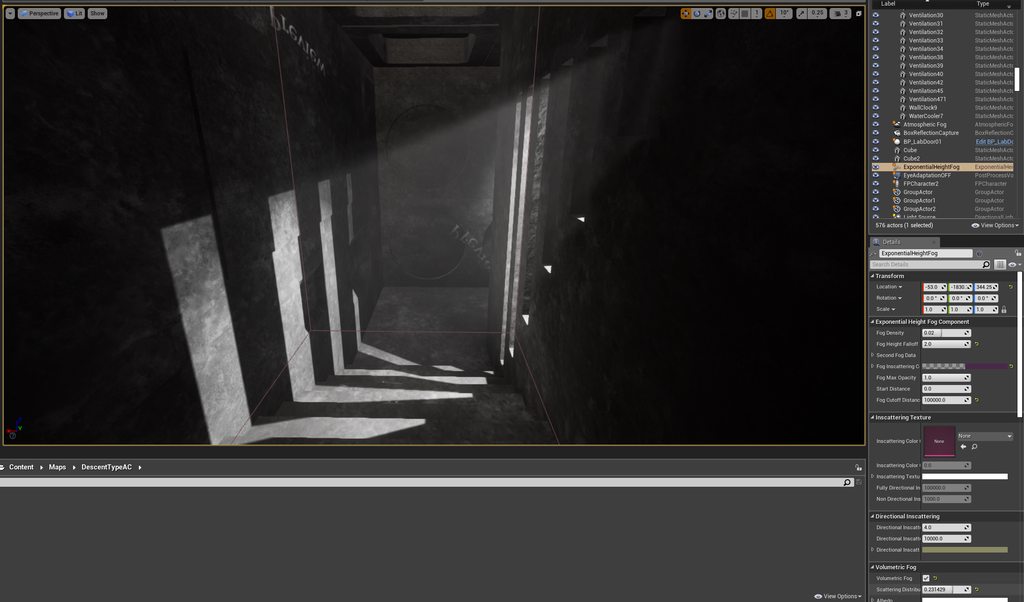
yo whats up fellow designers/developers, I am working on an archvizish scene and I wanted to give a great light ray from a wall geometry as you see in the first picture below. Since my scene is night, my light source doesn't produce any light, so to give this volumetric lighting I used the Exponential Height Fog and turned on "cast Vol. Shadows on the lights settings. It worked perfectly as you can see in the first pic. Thing is that the rest of my scene though becomes a foggy mess as it seems on the second screenshot. Is there a way to isolate the effect or maybe do it in another way rather than using the Exponential one?
Thank you in advance
https://imgur.com/a/oECNo54
 light thunder
This seems like ALOT of instructions for a material?
grim ore
it does seem like alot but not too many
 cosmic matrix
Hello,
I do have a conception question about the method to store data in unreal engine.
i get that there are 3 ways:
-DataTable
-DataAsset
-DataBP
Benefits:
->Data Assets you can read from defaults & are a lot easier to reference via they are visible as objects, while in Data Table you can refrence only entire table and you need to use keying to reference anything.
->BP classes, you can use benefits of inherence. If you don't override specific property in sub classes, if you change in it parent class all sub classes will automatically inherent that & are properly serialized to byte form of respective used types, so inherently they better for processing in UE4.
->DataTables have limited types while in properties you can use any type that UE4 has to offer.
Which one is better?
Only benefit for DataTable that i can think of and probably main reason why people use them so much is proper out of the box table editor for asset that stores data, while data asset just use generic property editor where data can be show as table.
Personnaly i found that bp is quite good but probably morememory consuming?
light thunder
loading one of the maps (not a problem map I think) but it asks me to save this, which I guess I should right?
@grim ore
@cosmic matrix Data tables let you import things like excel, so you can have an Unreal Data Table filled out from working with excel instead of inputting everything manually
cosmic matrix
Ok but you fill excel buy hand NO?
light thunder
you can fill it out whatever way you want
grim ore
@light thunder yeah thats weird if you did nothing that it needs to save but maybe thats a good sign
@autumn elbow yeah if its not done often then pulling from the DT might be better since you arent saving all that data in memory
grim ore
have you tried opening up that material instance and changing a value and saving it just to see if it helps 😦
light thunder
set manual break
is there a way to override these limitations, I know it's probably an infinite loop but maybe it's not, if I could JUST GET THE MAP TO LOAD I could fix it
I guess change the parent material?
I guess at this point, I shoujld just try upgrading to 4.25
 late verge
for anyone here who has experience with the cine camera, is there a way to smooth out the transition from not tracking to tracking? changing the interpolation speed isn't doing anything.
cedar jetty
@grim ore
is there any way to put sounds on animations
i did for the zombie attack but now i need to have it play a zombie walking or idle sound without it completley raping my ears
grim ore
not on the animation file but you can use animation notifies to trigger them
cedar jetty
i did that with the attack but what if i only want it playing once every so often so it dosent spam the sound
grim ore
then you need to code it possibly to do that
 random holly

 grim ore
you can use a generic anim notify in the BP and when it fires off randomly play the sound
random holly
Any idea guys??
cedar jetty
ah ok
grim ore
i dont think there is a weighted notify built into the anim notify system, like the generic play sound, so you would have to do something like this
oh wait....
the normal Play Sound notify event in the animation has a trigger settings -> notify trigger chances that might do what you want
grim ore
@cedar jetty yep the normal play sound notify can be adjusted in the details panel for the notify trigger chance to a percent to activate. you can use that.
also you can use a sound cue instead of a wav directly and set up a % in there
cedar jetty
ok
grim ore
@random holly you uh.. arent showing the error
but my guess would be due to you using the RGBA
random holly
[SM5] (Node LandscapeLayerBlend) Arithmetic between types float3 and float4 are undefined
grim ore
yep i dont think you want to use RGBA
wind gate
Thanks @plush yew ! I havent heard of Fog Sheets and didnt turn out in any of my searches. Seems promising. Will check it out! Thanks again!
cedar jetty
@grim ore can i have it so i can only hear it at a specific range cause rn i can hear it before they are even near me
grim ore
it depends on where you play it at
cedar jetty
i want to play it exactly where the zombies location is
light thunder
How do I replace that problematic material that keeps making maps refuse to load @grim ore
grim ore
@cedar jetty then you might need to use the anim notify event so you can get the pawns location and play the sound at that location
@light thunder I dont know if you can easily. I would try the easy way and pull out the old one and copy another one and rename it to the broken one? that might not work well but maybe pull out the old one from the project, open a new project in the same version, remake the material (even if its just a generic output), then migrate it out from the working project into the broken one
light thunder
@grim ore what about copying over from the original marketplace item? I still have it from a zip file
grim ore
that sounds like a smart idea
cedar jetty
@grim ore ive tried 2 methods of getting the location and i still hear it
grim ore
which node are you using
cedar jetty
getactorlocation @grim ore
grim ore
which node are you using to play sound
grim ore
and where are you getting the location from?
cedar jetty
@grim ore
grim ore
weird that should work, maybe its just too loud?
cedar jetty
hmm maybe
light thunder
play a 2d sound levi of the same one after a 2 second delay or whatever time the getlocation sound plays for
cedar jetty
yes the point was so if the zombies are near you it will play
brazen crow
when i have an object and i add it to an array, does it duplicate the object? because after adding it to an array i do "destroy actor" so i can pick up the item and have it disappear from the ground, but when i go to get data from the object it says pending kill so idk how to get data
 tardy depot
does anyone know a way where you can create produceral planets where there are random moutains terrain formed?
brazen crow
thats so broad
lmao

Trying to generate some simple little moons and planets to fly about and explore.
Inspired by the (incredible!) game Outer Wilds.
Project Files:
The Unity project is available on github here: https://github.com/SebLague/Solar-System/tree/Episode_02
If you'd like to support my...
its done in unity but u can derive the concepts
tardy depot
ok
 fast bronze
can someone point me to a tutorial on working with animations in unreal that DOESN'T involve character animations/skeletal meshes? I'm just trying to set up/activate some basic prop animations like doors, buttons, etc and everything I'm finding is for character animation
fast bronze
yeah, I did... and came up empty which is why I'm asking here lol
brazen crow
really?
fast bronze
yeah lol, for some reason every result was about character animation even though I didn't include it in my search. just asking lol
fast bronze
oh I don't doubt you, usually I'm good at finding what I'm looking for but for some reason I'm having trouble with this and I'm pretty new to unreal (but not new with animating meshes in general)
grim ore
@fast bronze it depends on what you want. skeletal animations or static animations?
grim ore
skeletal animations are generally shows in example form on people because well its a more complicated skeleton, but it can still apply to a button if you animate it with a skeleton in your DCC
ctrl-w or ctrl-d depending on the object, or right click for duplicate
fast bronze
non-skeletal animations. nothing involving mesh deformation. but I wouldn't call it static animation since I want to be able to make a series of keyframes and not mess around with a bunch of offset nodes
grim ore
you cant really duplicate
grim ore
you would spawn in a copy of the same class then change the values to match or you can make your own helper function to duplicate
brazen crow
bruh how do i ping jordan
@fast bronze
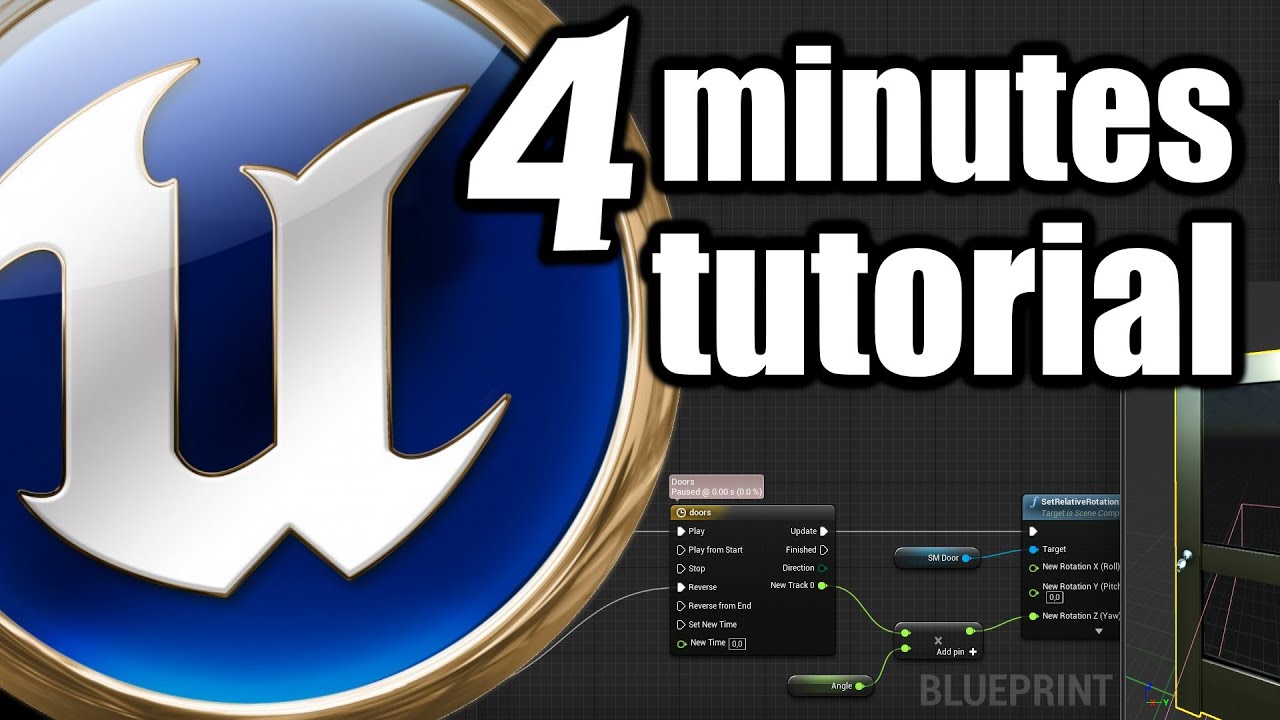
Support me on Patreon: https://www.patreon.com/bartkamski
Join me on discord: https://discord.gg/DgUTZwm
Check my UE4 marketplace assets: https://unrealengine.com/marketplace/en-US/profile/Bartosz+Kamol+Kaminski
Here is link to PART 2 where I show how to make doors openin...
grim ore
@fast bronze well I call it static animation as you are animating a static mesh right?
fast bronze
ah gotcha, yeah
grim ore
so you can use blueprints and timelines, or you can use sequencer and animate stuff, or you could uh use ticks to move stuff. there is also helper components to animation depending on what you want
wispy leaf
Is there any other place for assets besides the marketplace
fast bronze
@brazen crow awesome, I'll take a look at this, thanks!
grim ore
if you want to animate using keyframes then a sequence is what you want
 quiet token
LogUObjectArray: Warning: Empty slot
LogUObjectArray: Warning: Empty slot
LogUObjectBase: Warning: Object is not registered```

times infinity spammed in console.... why ?????what does it mean
grim ore
that video shows animating with timelines by changing values so that works as well if its simple like a door or a button changing values
quiet token
happens when an actor is destroyed
brazen crow
yea i remember following a unreal tutorial that used manitee which was discontinued so it gave me sooo much headache xD
cedar jetty
@grim ore how would i attach a soundattenuation to my zombie character
so when it moves the soundattenuation moves
grim ore
the soundattention is a setting on the sound itself , or the sound component if using one
fast bronze
ah ok, so I should search for sequence animations? because generally I'm used to doing animations via keyframes like you'd find in any standard 3D app
grim ore
@fast bronze look at using sequencer then, that is the animation system in engine. It's a bit more than you need for basic stuff but it works.
cedar jetty
hmmm i must of been looking at the wrong doc page lol
autumn grail
@grim ore where is the crash log file plz? to show you
grim ore
@cedar jetty you can see on your play sound at location it has an input for a sound attenuation object
fast bronze
@grim ore thanks! I'll definitely look into it
grim ore
@autumn grail which crash log? most are in the saved/logs folder in the project
autumn grail
the crash of building lighting
i think my 1.3 million of static meshes instances are the foliage
grim ore
when you select them in the drop down it should have create at the top, otherwise right click in your content browser and go to sounds
but I would recommend just using a sound cue for your sound and set it all up in there
cedar jetty
ok
grim ore
make a cue and go from there
by default cues are set up to use attenuation and you can override those settings and change the distance for example
cedar jetty
ok
grim ore
@autumn grail yes I mentioned that before, I beleive you have too many in that level and your machine is crashing probably due to memory
you can test it by making a sub level and moving some of the foliage in there and turning it off so you only build some of the foliage. or delete some and try again
grim ore
well lightmass is finishing, its crashing on bringing it back into the engine so yes it could definitely be memory related.
grim ore
https://forums.unrealengine.com/development-discussion/rendering/80951-assertion-when-encoding-lightmaps this is a post talking about the issue
For anyone wondering about this in the future: it seems meshes are required to be on the same lightmap if they were placed with the same Procedural Foliage System. So if you want a lot of meshes you will need to break them up into many PFS actors. Even though they all end up in the same Instanced Foliage Actor they will end up on different lightmaps if they were generated with different PFS actors.

Hope this helps anyone struggling with the same issue.```so its not memory related but you do have too many items
I have reduced the lightmap resolution for my static meshes considerably and my max lightmap size is 4096 so it seems like I should be able to get quite a few objects on one lightmap. Is there a way for me to break up the Instanced Foliage Actor into smaller actors so it doesn't all have to fit on one lightmap?

Will I have to resort to hand-placing static meshes instead of using an Instanced Mesh Actor?```your basically trying to fit too many stuffs into the lightmap texture size, reduce your stuffs or break your stuffs apart so they can all fit on their own lightmap texture. and the stuffs is your foliage would be my guess
 unreal comet
Is there a way to categorize information inside a data table into dropdown sections? Similar to categories for variables. It would be nice to clean up really big data tables.
 fervent nacelle
I would recommend setting the mobility of your foliage to movable so it is not considered in lightmass, and adjust dynamic shadowing based on mesh LODs changes to help with performance. Or switch to a fully dynamic solution. It's certainly doable in most current hardware at 60+ fps
Not counting switch and phones
cedar jetty
@grim ore im still having trouble getting the sound to work
when it does work it dosent do the location
plus with audio cues i dont think they have the play on a chance
grim ore
sounds cues can have random elements inside of them, plus if you are using the play sound notifier in the animation the animation notify chance can handle that
cedar jetty
ok
light thunder
Severity Code Description Project File Line Suppression State
Error MSB3073 The command "E:\UE_4.25\Engine\Build\BatchFiles\Build.bat MyProjectEditor Win64 Development -Project="E:\Dropbox\LIVES\Alpha Version\LS Beta Version SourceControl 4.25\LiveSimulator.uproject" -WaitMutex -FromMsBuild" exited with code 6. LiveSimulator C:\Program Files (x86)\Microsoft Visual Studio\2017\Community\Common7\IDE\VC\VCTargets\Microsoft.MakeFile.Targets 44
EVERY TIME ugh
cedar jetty
Ok so I finally figured out the audio now comes the hard part I think 🤔 how would I make a level system so like 1 level spawns X amount of zombies and once that amount is gone it would go to the next round with more zombies @grim ore how would I go about doing that
Assuming that would be server based
 empty dawn
I'm getting an error when trying to rebuild my source: ERROR: Unhandled exception: System.UnauthorizedAccessException: Access to the path '....csproj.References' is denied. Any ideas?
grim ore
@cedar jetty your game mode can keep track of spawning zombies and keep track of how many are alive. when one is defeated it can tell the game mode to lower than number and once its down to 0 or less you can do whatever
 barren flume
Is it possible to create a custom console command to spawn in character pawn's like "spawnpawn (PawnNameGoesHere)"?
 rich furnace
hey guys how do I get the player indices in a multiplayer environment?
how is it assigned?
late verge
posting again for visibility: to anyone who has used a cine camera, how can i make the transition from not tracking to tracking less snappy? i've tried changing around the interpolation values but they don't seem to function.
rich furnace
I need to access the camera manager of the player....in a multiplayer environment I 've tried Try Get Pawn Owner but it returns an Actor reference
 green sky
has anyone got "Physical Material Mask" in the material to work? Any help would be appreciated please!!!
rich furnace
wait ... try get pawn owner -> player state - > player id??? im gonna give it atry
nope didn' work
light thunder
@rich furnace it might be Get Player Camera or get player camera manager
light thunder
just untick the "context" and you can find the node you want, and follow up the inputs
which I think happens whenever you add a player you add their index to your stuff
rich furnace
where is the "context"?
light thunder
on the blueprint node
 outer yew
I'm trying to put a spherical cap on a guard rail, but something is happening to the brush. I don't know what's going on.
light thunder
when you are searching to add a new node on the blueprint graph
rich furnace
oh do you mean in the playerstart options?
get player camera doesn't have a context option
light thunder
@grim ore halleliuh, it loaded the map in 4.25.3, thanks for mentioning those engine updates, I might not have tried this for a lot longer
grim ore
any changes to the project or it just loaded?
light thunder
I'm in the map looking at it, and no, I took my original 4.24.3 project (before I copied it and messed around) and then just made a copy in 4.25.3
it's compiling 16k shaders now 🙂
grim ore
I really am curious on what broke
light thunder
I think the problem was it had ALL of those maps added and visible and loading it all at once (they are usually streamed it one at a time and unloaded)
Yes, I'd love to figure it out
I'm going to try to replace those materials still
grim ore
it could have been that I guess, weird tho
light thunder
Are you sure you don't want to look at what I've been doing 🙂
Think No Man's Sky or Minecraft but for medicine
grim ore
nah. was the map that was failing just empty but for the children or did it have more?
light thunder
what do you mean? it was never empty
well, actually only the main levels are visible on the persistent (the map that didn't load)
Now I get to re-learn how to make this new project my current depot and start source control from here
ughhhhhh
grim ore
sorry what I meant was you said you thought it had an issue since it had all of those maps added and visible
so was this map, the parent map, empty and just had children levels in it or did the parent map have stuff as well?
light thunder
it had some stuff that was needed inbetween loading
big empty field mostly, but it did have a large landscape material
grim ore
yep curious if you tried to recreate it in .24 in the other project if it would break again. make a new basic level, then add ina generic terrain, then start adding in your sub levels
light thunder
Do you recommend anything to ensure this doesn't happen again? I guess it probably won't since it seems like core engine files were the culprit
grim ore
maybe use blueprint loading and not have it all loaded at once, but even then we have no idea if that was an issue
light thunder
But what was the threshold for it break,ing ,just have those materials loaded? or loaded to a lot of items, and how many
grim ore
yep thats the question
I've never really heard of it having that issue but it could have been a transitionary thing with them updating the underlying mesh data in .24
 full stump
Ayo
 subtle hatch
Any learning resources on adding sound for ragdoll physics?
 mystic holly
Can anyone tell me how to make a looking for work post?
plush yew
Games are a pain in the strain of my main vain. The rain came in vane, but the sane crane had lain in the lane making him lame and without brain.
grim ore
@mystic holly read the pinned post in the channel
vague scaffold
I have an image sequence that I want to use. I have added a img media source and browse to the first image in the sequence. When I try to view the sequence in the related player, I get an error.
LogWmfMedia: Error: Failed to resolve URL img://S:/Unreal/Projects/AbandonedApartment/Content/Movies/hc_hyn: The parameter is incorrect.
If I use the same image in a texture sampler it works.
Why can't the media player read my .PNG files? (I also tried JPG and TIFF which also fail)
grim ore
have you tried following this tutorial to look for anything odd? https://docs.unrealengine.com/en-US/Engine/MediaFramework/HowTo/ImgMediaSource/index.html
vague scaffold
I have, and that image sequence works in a new project, but I need to use my sequence in another already constructed project.
grim ore
so then yes it supports png, the sample is png
does the sample work in your constructed project as a test?
vague scaffold
I just gave that a try and yes, it works in my new project, but not the Abandoned example project I downloaded from the Market place that I downgraded from DX12.
grim ore
so something is weird with the new project, is it a different engine version?
 humble yacht
Does anyone know how to use SwapPlayerControllers()
vague scaffold
It probably is a different engine version because I just updated to 4.25.3 to begin my adventure with Unreal.
Play image sequence has been around since 4.18, according to the URL tutorial.
grim ore
yep super weird it wouldnt work in that project
I asume this is the megascans abandonded apartment?
mystic holly
@grim ore I just want to thank you for helping people a lot
vague scaffold
It is the Megascans Abandoned Apartment. It's quite a heavy scene but does come up and perform ok on my system.
grim ore
wanted to try it out here but ugh this machine is no bueno for the heavy stuff lol
when does it crap out for you @vague scaffold
works fine here for me
so is it possible you dont have the windows media player foundation stuff? some versions of Windows from certain countries dont shop with it for example
quiet token
is there a way to find out the difference with numbers that wrap around?
the difference between 254 and 0 is 2 kind of deal
vague scaffold
It craps out when I try to preview it in the MediaPlayer. That's the odd thing, it's not even in the engine yet. I have the folder inside my Content/Movies like the tutorial suggests. I'm using a 512x512 image.
grim ore
well it doesnt get imported into the engine, it reads the raw files
and you said it failed for you with the samples as well, I just tested and the samples work fine
vague scaffold
I do see a message in RED Texture Streaming Over Budget. Is there a way to correct that?
grim ore
and yes I followed the tutorial exactly and opening the media player for preview worked fine, was just showing it off in the project in the editor simulating and working
thats a normal error
and can be ignored
vague scaffold
Thanks, for your help. Maybe I'll try a reboot.
quiet token
NewVal - OldVal % 255
barren flume
welp messed up my project
deleted the source folder on accident and can't open project anymore
grim ore
undo or source control. if not was anything important in there?
barren flume
I copied a source folder from a different project to the folder of the one I can't open and now when I tried opening it now it renamed all the files in that source folder to my project name on the uproject file but still can't open it
grim ore
not what I was checking on
barren flume
when I try to regen project files it doesn't do that either
grim ore
is there anything you actually had in source that mattered?
barren flume
No
grim ore
then you can remove the module from your .uproject
grim ore
open the .uproject with a text editor and remove the modules section
grim ore
should be fine
as long as you leave the comma after it or before it
and you left the one before it
grim ore
the module is the C++ code for your project basically
barren flume
Oh
 maiden quarry
hi, can enyone tell me what this means Fatal error: [File:D:/Build/++UE4+Licensee/Sync/Engine/Source/Runtime/Windows/D3D11RHI/Private/D3D11Util.cpp] [Line: 198] Unreal Engine is exiting due to D3D device being lost. (Error: 0x887A0020 - 'INTERNAL_ERROR')
grim ore
your machine is fubared. REinstall the latest driver, make sure all your other drivers are good, make sure your video card is not overheating or going bad, etc.
grim ore
then start looking at drivers
maiden quarry
iv done that eveythink says up todate
if i uninstall and reinstall ur4 will i lose my projects ? and will that help ?
 solemn siren
I'm not sure if it's a git issue so posting it here:
My Project Visual Studio solution explorer can't view the Plugins folder (submodule) even though those files are present in the windows explorer. What am I doing wrong?
grim ore
uninstalling Unreal will not remove a project unless you installed the project into the engine directory (not likely). It will probably not help.
grim ore
@solemn siren did you rebuild the solution after you added in your plugins folder and sub modules and are those in the correct build files to be found for the solution to be generated?
grim ore
once you removed the module from the project did you delete the source folder again before trying to re add C++?
sterile tulip
What benefit will UE5 have over UE4
barren flume
I didn't delete the source file
grim ore
remove module from .uproject, remove binaries/intermediate/source folders, remove .sln files, remove .vs folders. open uproject and try again
barren flume
@sterile tulip infinite polygons basically with nanite is a good feature that will be in it
that was one of the main things i remember
sterile tulip
What is the limit of polygons now?
barren flume
what's the binaries folder @grim ore
Infinite I guess
i don't think they ever said a limit

Unreal Engine 5 empowers artists to achieve unprecedented levels of detail and interactivity, and brings these capabilities within practical reach of teams of all sizes through highly productive tools and content libraries.
Join Technical Director of Graphics Brian Karis and...
this is a good video to look at
they explain it
barren flume
nanite i don't think so
sterile tulip
What is nanite
barren flume
nanite is the reason you should be able to run it with that many polygons from what i understand
Good part of the video is here https://youtu.be/qC5KtatMcUw?t=358
Unreal Engine 5 empowers artists to achieve unprecedented levels of detail and interactivity, and brings these capabilities within practical reach of teams of all sizes through highly productive tools and content libraries.
Join Technical Director of Graphics Brian Karis and...
ton of polys
solemn siren
@grim ore Sorry for the noob question: How do I check if those are in the correct build files to be found for the solution to be generated?
sterile tulip
Yeah looks nice, only question how many pcs will be able to run it 
barren flume
@grim ore Yeah I tried that but still get the same message
sterile tulip
Btw do you know how I can make a car jump in UE4
Or throw it controlled into the air
 fading pond
I need help. This has been happening ever since i first got ue4 on my new/current pc. Basically, when I try to build lighting, ue4 just crashes on the message "connecting to swarm agent" it's definitely not my pc I have a way better pc than my old laptop (which built fine)
thick herald
No idea really, but perhaps check to see if anything on your PC is blocking it?
fading pond
Would it help if I gave you a error log from swarm agent?
I doubt it's anything on my pc blocking it
thick herald
not in the slightest, sorry 🙂
thick herald
have you googled the error?
 grave spruce
@sterile tulip adding force
grave spruce
yes
sterile tulip
Your best
 dawn bloom
lets say I wanted to make a pinball machine simulator, would I make a model of a pinball machine using maya or blender then put it into ue4? or would I lob a pinball machine together inside UE4 using different sizes slabs for the sides of the machine and such
ornate forge
The former, though you should also separate it into pieces before importing into the engine
dawn bloom
is there any reason to separate it into pieces
ornate forge
So you can move flippers around, and whatever other parts that need to move
dawn bloom
ohh yah ok
oof 205 bucks a month
uh how well does blender experience transfer to maya haha
like would people care whether or not you made a games graphics in maya or blender in your resume
 rough knoll
can you view bone names in PIE like you can just bones?
 gleaming creek
@dawn bloom it shouldn't matter too much what you make things in, so long as you know your editor and can make high-quality things that import into the engine properly
If you're looking for a studio job, they may want their people to use specific software, though
 open wadi
Has anyone ever uploaded files (such as an image) to a remote API using Blueprints (via VaRest or another means)?
open wadi
Looks like there's a marketplace item, "HTTP Blueprint Web Communication", that is built for file uploads / downloads, which I"m happy to buy, but if I can do this with VaRest then I'd rather not include yet another plugin.
Has no one ever uploaded a file from UE4?
frigid needle
If my Player Controller gets a reference to the possessed pawn at Begin Play and stores it in a variable, does using that variable reduce the number of casts I have to make to send commands to the pawn?
As in, would it make a difference performance-wise?
 maiden spade
Hi guys, don't know where to ask this one so here it goes. Anyone here have had any luck setting pixel streaming from a AWS virtual PC? i have succesfully set it up localy and on the server i can see the stream, but remotelly i havent been able to see any stream (already opened ports 80 and 8888 and i do can connect to the http server just no luck seeing anything from the stream)
 fringe grail
Looks like there's a marketplace item, "HTTP Blueprint Web Communication", that is built for file uploads / downloads, which I"m happy to buy, but if I can do this with VaRest then I'd rather not include yet another plugin.
@open wadi
I did it using scripting for a project. I dont think vaREST can do it as its json
Can totally do it with InvokeWebRequest/wget or similar in a few seconds
rich furnace
"At this time, Level Blueprints and Blueprint Macros aren't supported by the Blueprint Nativization tool, and won't be converted into native C++ code." --> does this mean I'm screwed here trying to convert my blueprint project to c++? I have some level blueprints here....
radiant sleet
So for materials lighting mode
Does this paremeter just determine wether shadows are rendered per vertex and per pixel and directional and non directional
Do people usually use perpixel
Like it is most common or do people use per vertex a lot
I guess im confused when I should use each option
are there like examples of when I should use one of the other?
Does anyone know what surface transluceny light mode does
fringe grail
"At this time, Level Blueprints and Blueprint Macros aren't supported by the Blueprint Nativization tool, and won't be converted into native C++ code." --> does this mean I'm screwed here trying to convert my blueprint project to c++? I have some level blueprints here....
@rich furnace should be ok, it just means it runs in BP rather than being converted to cpp
 lime tide
gosh darn... i was following a kind of janky tutorial series and now the project settings can't be changed or unreal absolutely dies
 lusty carbon
Hi! If you were tasked with creating a huge residence area archviz project, with several buildings, each building has various apartments you can visit. So the project has exteriors and interiors. How would you approach that level streaming process? Using sublevels with Lvl Streaming Volumes? Perhaps each interior loads a whole different level without sublevel streaming? I need ideas. Thanks!
 thorn dew
HI Sparks. It depends. If the insides were repeated in some way some instancing could be done or kept in memory till loaded. For modern residences it is common to do a cookie cutter of a few housing designs. In that case the inside and out could be done for a single residence then instanced. Make it so the insides don't load till the player gets closer or opens the door to keep real time performance good. If they are all different with no repeating floor plan a modular wall approch could be done. That way walls can not be rendered when that section of the wall is not in view of the camera. Unreal automatically culls the stuff it can when not in view. If the whole room is one chunk though it can't be culled when in it because you are always looking at it. In pieces it can be. When inside most of the outside could be taken out. Got to try different things and see what works best. I also remember something special they made for the inside of building in fortnight to be more performant. I forget what that was or what it was call. Pretty spiffy though. For super advanced there is also a cubemap thingy that can be made of the insides when looking from the outside. I saw one of the Unreal programmers make this and it was crazy cool. I think it is used on the inside of the building for the Japanese Garden scene.
 grim flame
The japanese garden just has a weird bake on the inside walls, looks ok from outside tho.
cedar jetty
i have an issue where if i kill a zombie in my game the dead ragdoll takes away health and excutes the attack even though its dead therefor taking away health when you step over it anyway to stop the zombie from being active after its dead
here is a video to better understand
thorn dew
@cedar jetty Make sure to have a death bool so it turns on if the zombie in that zombie BP is dead. Connect that as one of the first nodes so the execution of everything else does not happen if the zombie is dead. I'm guessing the visible part of the zombie ragdolls, but other bits in there are still moving around giving damage and such.
When ragdolling with physics it kind of takes over all visual aspects of the character to the point of if you want that character to get back up you have to pull special tricks so it works right again. I just saw a video on such a thing like yesturday.
lusty carbon
@thorn dew Thanks!
thorn dew
@cedar jetty So at the start of whatever triggers the zombie actions in BP. Branch plug in is dead.
There is also a delete you can do, but then I think the zombie disappears
 torn sundial
Morning! I have a bunch of materials I need to change blend mode and attach opacity mask, is there a way of doing it in "bulk" or do I have to manually edit every material?
cedar jetty
it respawns and deletes itself after 5 seconds
i think something like this should work
thorn dew
@cedar jetty That should work so long as there are no other events that trigger anything. Like a tick, or event dispatcher, or etc.
I don't see how the zombie would do anything if it all worked off a BeginPlay. There has to be a tick or something else going on.
thorn dew
@torn sundial If the materials are all instances of a single material then you could change the master material and all the instances should change.
So long as it is not a parameter that can be changed individually for each instance.
torn sundial
So in this case the likely answer is no, thanks!
thorn dew
@torn sundial If you are good at programming there is also a script that could be written and run. How exactly this would work is beyond me though. It would take me much research to figure how to do that.
cedar jetty
@thorn dew so i think i found the culprit its because i was looping this this is what does the attack damage wise
how would i properly loop it though without death being a issue
torn sundial
Was just hoping for something as easy as copy parameters and apply.
thorn dew
@cedar jetty With what I see there you could check is dead before the cast even.
I'd probably put it even further up the event tree though.
cedar jetty
@thorn dew fixed it silly me had a pawnsensing node enabled
deleted that node and boom
now i guess the only other question i have is i have a score board on my hud and im trying to bring it to life i have a integer on my main character and when i kill a zombie on my weapon blueprint i tell it to increase the score but its not increasing
i also have it binded to a function that gets the current score
im even changing the value manually and its not reacting and ik i have the right variable because of the fact im getting it from my character reference
ok this is strange the refrence aint working
thorn dew
I'm trying to get a variable to go from a Character BP to a Animation BP. It does not seem to take the variable. I've tried both event dispatcher and a Interface. I set the AnimBP as a variable to stick in the Call event, but the variable doesn't seem to go through. I feel like I'm just not directing it to the right object. Any ideas on how to get the variable to go through?
cedar jetty
fixed by casting to character instead of making a refrence
but its strange because i thought making a refrence would work but i guess not
thorn dew
@cedar jetty When you cast to character what do you set as the object?
cedar jetty
@thorn dew i get player character
torn sundial
So correct me if I am wrong but.. I have around 40 different materials right now.
I want to change Roughness value for all of them.
Therefore I have to open every single material, create a ScalarParameter, connect it to Roughness, edit value.
And I have to do it 40 times, once for each material, because there is no solution to do it in bulk?
thorn dew
@torn sundial As far as I know yes. In the future if you plan to do this make an instance with the roughness as not a parameter. Then make instances of that material for everything the roughness will change on. Now change the roughness in the main material to get all of them to change. If you are changing the roughness during runtime you would have to make it a parameter and blueprint in each material individually. Say get material instance then replace old material with instance and I'm not sure that is even 100% correct. I had to do some trial and error to get material changes at runtime. Pretty sure only instances are able to be replaced though at runtime.
I was able to get the variable by doing a get all actors of class. I hear this is not a great workflow. It would be nice to have something more performant.
exotic thicket
It depends on what your goal is
If you're not doing it a lot then get all actors is okay. You can also do it once, and then save the result to a variable in your BP, depending on if that works in your scenario
Plenty of ways to go about it
grim flame
@torn sundial if all materials are to have the same roughness you can save a couple steps by using copy paste once you set up one. If you want to adjust them all afterwards then you should make a material function and plug that into the roughness.
thorn dew
@exotic thicket TY. I saved the actor with a do once. Is there a way to get the actor without doing get all actors of class. Maybe a cast, dispatcher, or interface? I can't seem to get those to work because they all want an object and I can't get the object without the get all actors of class.
exotic thicket
Is this relating to the Animation BP question you posted?
 civic charm
hello guys i need help in vehicle i am stuck
 surreal laurel
Heyo, quick question - How can I get my particles to behave more like billboards that keep their own rotation, rather than always face the player? I tried setting the Screen Alignment to PSA_Velocity, which works for some of the axis but as my player moves around the particles they still roll depending on my position. Any advice?
 scenic fox
Guys how do i make my AI hearing perception work on a bp actor?
surreal laurel
@civic charm What's your question
scenic fox
im sorry man im really new :(
thorn dew
@exotic thicket yes
civic charm
bones are correct but it still connected to base
this created in blender
and its custom
look at black one tire
that rim
torn sundial
@grim flame I am a graphics guy, while the first part I figured (just pasting param in blueprint and connecting), the second part is I think what I need but have no idea how to do. Can I ask for further help?
exotic thicket
@thorn dew if you want to get the character the anim bp is animating, there's a node called Try Get Pawn Owner, you can use that to get the correct pawn
civic charm
oof
torn sundial
I don't think I can make it work with instanced materials, since from what I see all instanced share same texture of parent. And I have 40 unique textures there.
scenic fox
Guys pls help me
my AI hearing perception isn't working with my BP Actor
Im using a tutorial
exotic thicket
you have to be more specific about what part is not working
scenic fox
Like it doesn't go after the sound
torn sundial
I need a "parent" control, group up the materials I have into say two groups - metallic, roughness - and edit just those two values.
civic charm
can someone help me ????
scenic fox
@exotic thicket I've been literally trying to think this out but i can't
civic charm
there are lot of question lol
exotic thicket
@scenic fox are you using report noise event nodes? have you checked if the perception update event is being triggered?
scenic fox
Yes i am using report noise event
It gets triggered when my AI sees me
but not when it comes from sound
exotic thicket
have you checked the AISense_Hearing settings?
scenic fox
Yes i checked everything
exotic thicket
well if the update perception isn't being triggered, the problem is either in the hearing configuration, or the report noise event is triggered incorrectly
exotic thicket
That looks like it should work within 30 meters of the pawn
how are you reporting the noise?
thorn dew
@exotic thicket I got the default sidescrollercharacter which I made a control rig for. In the control rig I made to controls to control an ik for the arms. I then made a sphere go back and forth in the sidescrollercharacter bp and want the controls in the control rig to follow the balls movement. So I'm trying to get the balls position to ThirdPerson_AnimBP so it can be plugged into the Control Rig node in the AnimGraph.
exotic thicket
@scenic fox looks correct to me... how did you check the perception event does not trigger for the noise?
exotic thicket
Maybe try putting a print node before the cast to see if it runs at all?
scenic fox
ok?
exotic thicket
@thorn dew yeah if you use the try get pawn owner node, you can then cast it to your BP and get the value
scenic fox
@exotic thicket when it played the sound it didn't print the string :(
thorn dew
@surreal laurel If you go under the Particle Emitter > Required > Details > Emitter Alignment it should have options there to have the particles any which way you might ever want.
actually it is Screen Alignment
surreal laurel
@thorn dew Thanks, I actually solved my problem by locking the orientation axis
scenic fox
ssomebody help please
exotic thicket
@scenic fox that's strange, it seems like it should work based on what you've showed me 🤔
scenic fox
I did make it so that the sound would only report if i pressed E
exotic thicket
the only thing I can think of is the location of the noise event is wrong, but if you used get actor location it shouldn't
thorn dew
@exotic thicket With the try get pawn owner it gets the owner at runtime. I'm not sure how to get the variable from the owner if I don't know the owner before runtime.
exotic thicket
well you do know which characters are using the animation bp, right?
so you should know what it could be at runtime, so you can just cast the pawn into that type
scenic fox
@exotic thicket dude i removed the Cast to third person character thing and it some how worked?
civic charm
can anyone help me now?
scenic fox
what the hell
civic charm
...
exotic thicket
@scenic fox Huh, that is pretty weird.. the print should have definitely worked if you had it before the cast in that case 🤔
thorn dew
@civic charm I have no idea what you are trying to do or what is wrong from the pictures. You are going to have to write stuff.
civic charm
wait let me brief
the bones i added the wheel bones are correct but it still connected to base
this created in blender
look at the black collision it is cantered it not in cantered it should be on wheels but it connected to base bone
got it?
thorn dew
@civic charm sounds like an export problem with blender. I recommend https://blendermarket.com/products/better-fbx-importer--exporter
 civic charm
ok let me have a look
 rocky pulsar
General question,
I've been importing rigs with the UE4 skeleton. Is it normal if the character is floating?
Know you can change it by changing the mesh location.
 serene birch
I think you are supposed to adjust the collision capsule to the mesh
or adjust the mesh to the collision capsule
rocky pulsar
Great, Thought so. Thank you
surreal laurel
hmm, i'm getting a weird bug where every once in a while when I play my project the lights/materials are super bright and glittering.
Sometimes it happens in the blueprint editor too. Is this a common thing? I've never encountered it before. If I hit play a couple of times it goes away
thorn dew
kind of looks like some spots from raytracing. you got raytracing on?
surreal laurel
No raytracing, all dynamic lighting
serene birch
looks like specular aliasing
if your material is very reflecting and has "sharp normals" you can sometimes have a pixel that is basically reflecting the sun towards the screen?
TAA should help mitigate that
thorn dew
@exotic thicket I think i found something. I could connect the try get pawn owner to a cast or something else and it might work. Have to experiment. Thank you for your help.
surreal laurel
I mean, this literally appeared out of no where in my project. Yesterday, fine. Today, the sun has come to earth
serene birch
there shouldn't be a "harsh" directional light in the materiel editor preview though, that I remember
surreal laurel
It appears on nearly all objects and materials, too
serene birch
check if everything is fine with SSR, reflection captures, autoexposure I guess
surreal laurel
Yeah, honestly I think this is a UE engine problem
thorn dew
It kind of looks like a video card incompatibility. Maybe you don't have the latest drivers or are running an AMD card?
Does it appear on all settings even low?
 worldly rose
or are running an AMD card
Is AMD really that bad?
surreal laurel
yeah I think you're onto something. Nvidia card so no problem there, but not sure about drivers
 lucid grove
Hey people! Little question here. I was wonder why all characters faces ingame are so blurry. When i near face inside editor it looks fine.
surreal laurel
maybe with the 3000 series out the driver updates have been weird, or rushed or something?
🤷♂️
thorn dew
@worldly rose AMD drivers can be bad. I hear they fixed them a lot so new drivers should be way better.
thorn dew
@lucid grove do you have depth of field on?
lucid grove
@lucid grove do you have depth of field on?
@thorn dew Only in dialogues, dont have anything on camera on player character
Thats how it looks ingame
light thunder
There are multiple series of Perforce tutorials on youtube....I'd like to get more comfortable using it, can anyone recommend a particular video or series?
surreal laurel
Turns out the glittering was happening from Screen Space GI...
It just sporadically decided to freak out? I guess the (Beta) tag is there for a reason
lucid grove
As far as i know camera settings took from player character cam right?
But if i unposses player for example, what camera settings take in charge?
thorn dew
Whatever you possess after unpossesing. If you don't possess anything I think it sticks in the old camera position not doing anything or starts to glitch. There is also the post process volume that can do things. It is always best to have something with a camera possessed.
torn sundial
Rebuilding lights takes forever on my old PC, doubled skylight intensity with no result. Any suggestion to make things visible in the "black" shadow? Afaik there is no shadow opacity per se in UE.
 half turtle
i am having a veyr strange issue, my game generates a random solar system, bunch of objects, and then places the players, but for some reason my game is not creating the player controller at all (i cannot even debug it because the object did not get created...)
plush yew
guys why when i attach it to a socket then it changes its location???
 obsidian nimbus
thats a worldspace localspace thing
 manic pawn
fix the pivot of your mesh
obsidian nimbus
next to the transforms u can also switch from local to absolute
if u set both to world it should pop back
plush yew
next to the transforms u can also switch from local to absolute
@obsidian nimbus where it is?
obsidian nimbus
top right under transform
plush yew
set both body and skirt to world but still not working
 lost niche
I'm trying to start my game with command line arguments to simulate a server and a client that connects to it. I'm trying to specify my gameMode with ?game=GameModeName but it doesn't seem like working. Is there something that I'm doing wrong? I'm trying to start the server as UE4Editor.exe MyGame.uproject /Game/Maps/Map?game=MyGameModeBP -server -log is this correct?
obsidian nimbus
you most like do have to change the pivot, this is not goin to rotate well