#ue4-general
1 messages · Page 844 of 1
 tired lynx
 storm venture
@warped tangle Yes! Nice! Your math is perfect.
And now I know how to convert a parameter to world location:
using the scene component seems like such a hack, i love this solution 😛
 grim ore
its like saying "lets figure out where the wheels are on the car based on an offset from the center of the car instead of using the actual location of the tires"
a scene component exists to literally be a transform in the project
storm venture
while the scene component is like "lets figure out where the wheels are by placing hub caps on them and figuring out where the hub caps are"
i can dig scene components usually but idk about this time
i admit the scene component works great
grim ore
to each their own 🙂
storm venture
but yeah, this particular instance needed to avoid them for a few reasons
thanks though, im glad its working 😄
grim ore
yep happy to see it work
 autumn grail
Hello, i have a problem for coordinate my displacement map on my mesh
 warped tangle
For leaning purposes, yes, it works. For practical purposes, I am completely in Mathews camp. Use the things the engine provides, rather than re-inventing the wheel. But yeah, glad it's working at least
grim ore
you can use that item as a preview mesh in the material viewport, the bottom right icon in the material viewport and if you scroll down in the details panel you can set it.
this would atleast let you play with it to determine why. Off the top of my head what does the mesh look like in terms of Verts and such? also does it have a good UV map and are the normals correctly facing
storm venture
@warped tangle i might look into switching it to the scenecomp version later but the BP the value is inside gets used in a lot of places, and im not sure if i want to add a scenecomp to the BP if its only helping in one place, idk, i just wanna keep it tidier. keep in mind, i agree with you, the scenecomp is definitely the more straightforward approach, lol
autumn grail
and i have added subdivision to have an homogene vertices
 plucky plinth
Hey all , doing some research into streaming levels vs opening and closing levels. If I were making a game somewhat like Slay the Spire, which do you all think would be better? Streaming levels would be useful since I wouldn't have to reload the player information repeatedly, but streaming levels also seems more geared towards large maps you travel through?
grim ore
streaming levels can be used for anything that you want to load and unload easily
You could be silly and even have just your UI in a streaming level if you wanted for example
so a streaming level setup would be fine for your game if you want to say just load in a combat area for a player and unload it when done
tired lynx
another texture bombing question. i've created a texture bomb by hand for one of the material functions that i'm using in my master landscape material, however now get this errors inside my landscape material and the material itself won't render:
[SM5] Function Rock_01: (Node DDY) Invalid node used in vertex/hull/domain shader input!
[SM5] Function Rock_01: (Node DDX) Invalid node used in vertex/hull/domain shader input!
[SM5] Function Rock_01: (Node DDX) Invalid node used in vertex/hull/domain shader input!
[SM5] Function Rock_01: (Node MakeMaterialAttributes) Error on property WorldDisplacement
here's an image of my master landscape material:
and here's an image of the texture bombing section of the rock 01 material function
grim ore
its half finished and half not working?
 static sparrow
Does anyone know under which conditions the Epic Games Launcher is triggered to open alongside the editor? I feel like sometimes it just opens for no reason. If I quit the launcher, the editor seems to be unaffected. Not that the launcher takes up a ton of resources, but it does take up some resources, and if it didn't automatically open alongside the editor from time to time, I'd usually never have it open.
tired lynx
narrowed the issue down it seems as though the texture bombing area is only affecting the displacement node tree
if i unplug displacement i get no errors
although i do need displacement so could anybody tell me why this is occuring?
i'm not alone either it seems https://forums.unrealengine.com/development-discussion/rendering/123061-texture-bombing-and-world-displacement
Unreal Engine Forums
For discussions about Materials, Textures, Lighting, Particle Systems, and Post Process Effects.
grim ore
@static sparrow pretty much it tries to show up if the editor is not, so if you do the launcher -> editor it will minimize the launcher then bring itself back up when you close the editor. If the editor was closed it will try and bring up the launcher. There are workaround to get around this by faking a source control with perforce, there is a guide out there but I dont know if it works anymore.
static sparrow
It tries to show up if the editor is not what
not showing up itself? i.e. not working?
tired lynx
oh, it seems like the problem is texture bomber outputting in rgb. is there a channel splitter node that i can use to just isolate one channel from the displacement?
grim ore
if the editor is not there, so if it closed itself when you launched the editor and then close the editor it tries to launch the launcher
 vague scaffold
I have a blank VP project and I added a single object to world origin. I have added a level sequence and animaed my camera. I don't want the checker floor to render so I turn off that object in the World Outliner. When I render myimage sequence, however, the visibility flag is turned on for the floor.
Why does the render section change my visible objects flag in the world outliner? I don't mind having the floor in my project, but I don't want to render it.
 ornate forge
How does the AI Perception's Max Age work? Can the component keep track of actors that were spotted but then left the vision cone for some time? Or do I need to implement my own perception memory somehow?
grim ore
@vague scaffold the visibility in the world outliner is just for the editor is why, you would go into the details on the item to make it not render or just delete if it you do not want it
@ornate forge have you checked out the learn AI course on learn.unrealengine.com ?
ornate forge
No, I haven't yet, does it cover that?
grim ore
I beleive it does, off the top of my head I beleive that is how long it keeps the item as a valid target before forgetting about it yes
@tired lynx I beleive you want the Component Mask node
vague scaffold
It's weird, the sky sphere does not have a render disable flag. It looks like Actor Hidden in Game is the RenderFlag for SkySphere, even though other objects have a separate Render flag.
grim ore
the sky sphere is a blueprint , you would disable the mesh on it
or yes hide the actor since its a blueprint
vague scaffold
Thanks, I've been watching tutorials all day. At some point you have to just dive in and play around with the settings.
 ornate ice
Hey people good afternoon, one question? If I got a datatable variable with "AllPlayerWeapons" but i need to update one of the rows the has the value of level = 1, can I update the row and this will update the asset?
tired lynx
but there is also component mask or something like that to mask out certain channels
@plush yew component mask is it yeah, thank you. cannot use texture sample in this instance for texture bomber.
does anybody know how to enable the vr editor? i don't have it in my toolbar and the auto-entry isn't working either
grim ore
@ornate ice how are you updating the data table? they are read only so if you update it directly or reimport a text file then you are fine. If you are trying to update it at runtime, then you cannot.
and since it is read only assets only get the data when they need it so it would be valid at that time with the new data
tired lynx
shift + v isn't putting me into the vr editor either
 sterile tulip
guys I need help
if it says I need to sign the document electronically
what does it exactly mean?
Do I press on a box? Do I take my mouse and draw my sign? Do I have to copy and paste my sign on the document? Do I have to scan my sign and put on the document?
ornate ice
@grim ore ok got it so it only works as a way to have a default value to start from?
and then I could save that into a variable, update it
and save it with Game Settings
 azure vault
Does anyone know if there is a library of quixel megascans based trees? I've tried creating my own with a TreeIt -> blender -> ue4 flow which works well except TreeIt doesn't seem to have the kind of support needed for quixel style leaf atlases (it looks like manually adjusting the tree atlas textures into something TreeIt likes is a loot of work and I'd probably do a bad job.) I know SpeedTree has a good workflow for it but if I am going to spend money I'd almost rather just buy some premade trees outright if the price comes out similar to a few months of speedtree.
tired lynx
okay well i got the vr editor started but now i have a black square covering my screens with barely visible lines of my scene available at the sides if i turn my head
grim ore
@ornate ice correct, data tables are default values basically.
 gleaming creek
@azure vault I don't think Megascans do full trees (correct me if I'm wrong)
I haven't seen any, and I'd imagine it would be very hard to make a photogrammetry scan of something so big
tired lynx
full trees is something they've said they are working on
azure vault
They don't, they offer piecemeal. I generated a tree in TreeIt and then cut the trunk/used a quixel trunk in blender. That all works, but getting the leaves to work correctly with their leave atlas assets is hard
tired lynx
i'm not sure how they'd do it but probably a combination of photogrammetry and manual assembly
gleaming creek
There a bunch of nice tree packs on the Marketplace that might be of use, including some that have been free or are permanently free
azure vault
OK, I'll take another look there. I'm probably being too picky because I really like the look of the quixel stuff but I don't think it really matters in the end I guess
tired lynx
has anybody here had any experience with the vr editor at all?
gleaming creek

Unreal Engine
Check out 20 curated packs selected by the staff at Epic Games.
Might be something of use there
Those are all in the permanently free collection IIRC
azure vault
Ah I have not come across that before, thanks.
I'm half tempted to figure out a way to do this just so i can create a tutorial to help other people out with it at this point though
 quick plover
Hi guys newb here, I want to make the "parent to a null" from blender in UE, with some skeletal meshes that I need to move, is there a simple way to do it?
I have like 10 meshes that I want to animate so they move in the same direction at the same time, etc
gleaming creek
10 skeletal meshes moving at the same time? Are they animated? Or are they something like corpses hung from a row of hooks and ragdolling?
quick plover
10 animated skeletal meshes
I want them to rotate around the center and move up and down
I guess I can do it with a Blueprint? but isn't there a simple way?
grim ore
a blueprint is a simple way, parent them all to the scene root (the root of the blueprint, a scene component) and you now have a central pivot to rotate and move them around
otherwse combine them and animate them all in your DCC program to do that
or uh... You could use sequencer I guess to do it, that would work as well
 fast berry
hey so how can i remove bones off of a skeleton. I have this gun imported as a skeleton and need to remove something. it is a bone, and i cant delete it nor move it. please help, thanks
grim ore
you cannot inside the editor, you need to do that in your DCC program and bring it back in
grim ore
to do what?
quick plover
@grim ore Thanks, but as they are Skeletal meshes I can't add them to an Actor Blueprint, which one could I use for that?
grim ore
I dont have artist skills so I cant, but if you know your DCC program it should be no problem
@quick plover why cant you add them to an actor blueprint?
fast berry
i dont know my dcc program at all, ill try looking it up but thank you
quick plover
ah sorry I was trying to drag and drop and didnt work, now I added it as a skeletal mesh lol
grim ore
yeppers, have to add components in the BP's
quick plover
u know that I did a cool bp to make the circular array
but it keeps crashing "d3ddebug"
it's like it eats all my vram at once
grim ore
maybe it keeps repeating on accident?
grim ore
you might need to clear out the current components before you add new ones
it runs every time you change a variable as well, might want it to only run when you tell it instead of on construct
If you look at the BP Sky Sphere it has a checkbox called "refresh material" that it uses to run the refresh instead of every construct
quick plover
ooh will look into it, thank you
I have to figure out how to rorate each element too hehe
grim ore
you could also expose a function as a blueprint and run it on command in the editor as well
quick plover
rn they are all facing the same direction
grim ore
and for that the "easiest" way is to use the find look at rotation node and have it look to the middle
 cedar jetty
Im Trying to figure out why when i click back from weapon selection it dosent go back to the zombies selection
grim ore
have it find the look at rotation between itself and the center root and use that as the new rotation as you add them in (after spawning of course)
@cedar jetty what does your code do when you press back
quick plover
thank you will look into it!
cedar jetty
@grim ore
grim ore
so where in there does it display the other menu?
cedar jetty
when it selects class Lobby
grim ore
where?
cedar jetty
grim ore
and what does that code do
ornate forge
The AI Perception's Max Age parameter doesn't seem to be working, it loses the actor that left the vision cone immediately even when Max Age is higher than 0
Unless age expiration is supposed to be handled somewhere other than in OnPerceptionUpdated
ornate forge
I see mentions of HandleExpiredStimulus in the AnswerHub
Looks like I need to override it
 rain inlet
Oh Matthew, hi! Your tutorials helped me so much when I started using unreal
 bitter iris
hey, so after a while fixing up a character i got custom made i retargeted it to ue4 skeleton, everything fine and poof https://gyazo.com/128022f7635d5f3a601aff0107020bee

could anyone throw a hand?
 plush yew
is it possible to make a game like BDO as an offline co-op game
or is that something only possible due to servers handling CPU load and whatnot
like can a game of that scale and gander only be possible due to server assistance or can something like that be completely plausible as an offline game
 devout swift
In the docs page for FHitResult, what is meant by "sweep"?
Structure containing information about one hit of a trace, such as point of impact and surface normal at that point.
autumn grail
hello my input F is not detected for pushing a button
are the key input reserved for the character?
events*
 restive eagle
you need to enable input for that actor
autumn grail
how plz
restive eagle

What are the Enable / Disable Input Nodes in Unreal Engine 4
Source Files: https://github.com/MWadstein/wtf-hdi-files
autumn grail
ty
autumn grail
I have two buttons
i set the input priority to 1 for both
but only one detect the input event
 strong schooner
any ETA for support on VDB? thank you
 radiant sleet
I feel so good cause I am finally starting to understand unreal
Somehow I just stopped stressing over it and have amde huge progress last week
 karmic moth
Does anyone know how to add a scenecomponent to a parent socket through c++
karmic moth
Nemo im there w u
 versed spear
anyone know the plugin that turns 3d objects into 2d during runtime?
 sacred sluice
Okay. I've got my huge open world map made. Now I guess the fun part. Blueprints
 hidden niche
@radiant sleet Good stuff man keep learning new things and it will stay fun for a long time. So many opportunities for fun to be had learning creating testing etc.
 somber crown
Could someone with experience with Editor Utility widgets take a look at this? https://discordapp.com/channels/187217643009212416/479798946793783307/757833158719963167
I want to modify some vars on a couple of blueprint assets through my editor widget but it isn't loading the asset from the content browser or fails to cast to my blueprintType.
 zenith flower
Have a strange error, that really doesn't make sense, as I am not using any DDC modules
Error: ERROR: Missing precompiled manifest for 'DerivedDataCache'. This module was most likely not flagged for being included in a precompiled build - set 'PrecompileForTargets = PrecompileTargetsType.Any;' in DerivedDataCache.build.cs to override.
4.25
 sudden zinc
@grim ore are you youtuber who makes those really good 5 minute video about each node?
 formal maple
why would you ping him like that
 scenic fox
guys why the heck is one of my textures dark in lit mode?
 bleak hound
Does anyone know How to get this?
restive eagle
drag that pin and type =
 silk pumice
Is there a way to destroy a blueprint so the meshes that were inside it would stay in the level? Basically collapse the so it would no longer be a blueprint and I could edit the content without changing the other instances of the blueprint.
 lusty carbon
where can I find those free dust particles from ue content
 foggy jetty
Went into our animation blueprint this morning, and found this 😄
actual morning wood
tired lynx
hey! i'm still having issues with the unreal engine vr editor that i'm finding impossible to solve
pleaaase can somebody help me
scenic fox
@tired lynx can you help me?
tired lynx
google has zero information on this bug
@tired lynx can you help me?
@scenic fox i'm pretty new to the engine myself, but you could open up the albedo texture and turn up the brightness?
or your lighting is too dark
scenic fox
but i have so many lights
tired lynx
then turn up the brightness of your albedo
scenic fox
how do i do that?
tired lynx
by finding whatever texture you used for the colour of that material, double clicking it to open it in the material editor, and then turning up the brightness
which material are you talking about, anyways?
the chequered squares?
tired lynx
are the grey squares supposed to be white?
scenic fox
@tired lynx yeah
tired lynx
are the grey squares white in the original colour texture?
tired lynx
right, then increase your lighting
even if it seems like you're using a lot, just turn up the power of one of your lights and see if that makes any difference whatsoever
scenic fox
it doesn;t
tired lynx
ok then, well i don't know
scenic fox
can somebody help me?
 sleek solar
make sure that normals on the mesh face the right direction and material is setup correctly
sleek solar
are they facing the wrong direction?
sleek solar
Don't ping me please
scenic fox
sorry
sleek solar
if they are facing the right direction, check the material
sleek solar
only base color?
scenic fox
no for the tiled squares its dark for some odd reason
i did import with "combine meshes" which could of have beenthe problem
autumn grail
can someone help me? i cant build lighting without crash , i have addes lightmass importance volumes
 analog prism
Hi all, not sure where to put this question to be honest. I am trying to help a user with performance issues, they're running a DebugGame build and I want to show CPU profiling information. Typing "stat GPU" in the console shows GPU timings, which is great, but "stat CPULoad" does nothing. Has this command been deprecated, and if so what is the new one? The UE4 documentation I found online doesn't mention this function being removed
 slender rover
Hello everyone!!! I asked yesterday about multi-GPU for Raytracing but i didn't get any replies. Anyway, today i have a new problem, i open a project that i work on and whenever i hover my mouse cursor above a menu or an item, the description box becomes huge and it's like a display issue. I have 2 2080Ti on my machine, i have the latest studio drivers installed and i have this issue only in UE4.
lusty carbon
How can I play media in sequencer?
I have a media source that plays a TV video in my archviz project when Begin Play. how can I make it play in the sequencer vid aswell?>
 spiral flint
Anyone got a list of the animations I need to make a dynamic movement system
slender rover
Here's how it looks when i hover my mouse cursor over an actor menu.
 cold vortex
So, I have a blueprint class that inherits from my C++ class. My C++ class inherits from ACharacter.
If I set "simulate physics" to true on my character's capsule component, I am no longer able to move/control my character.
Which is a problem, because I want to ensure this character is capable of swinging around and stuff, Attack on Titan style, but I want the player to be able to control the movement. Anyone know how I can deal with this?
 exotic thicket
@cold vortex you would need to change how your movement logic works. Actors which simulate physics are probably incompatible with the standard character movement component, so you'd need to build something of your own. Alternatively you can fake the physics which may be easier as you'd have more control over how it works
 rough knoll
how do i check if a static mesh is equal to something (or even has a value)
i have slots for scopes in my gun and i want to check if the slot has a static mesh assigned to it
if so do something if not do something else
exotic thicket
It kinda depends on how your slots are implemented
If it's just a variable to which you assign something, you can probably use "Is Valid"
rough knoll
well its a static mesh component
inside of the gun blueprint
based on whether the scope is equipped or not it either has a static mesh assigned or doesn't
exotic thicket
Ah, in that case you can probably do Get Mesh and check that using Is Valid
if there's no mesh assigned it should be null which should fail the Is Valid check
plush yew
Guys help I accidentally snorted monster energy and I think I saw god
rough knoll
@exotic thicket thank ya that worked
also for ref is this too much stuff to have in the event tick node?
ornate forge
Hot reloading in Visual Studio stopped working for some reason 😓
 mossy nymph
hot reloading in VS never worked for any reason
ornate forge
It worked for me until today
mossy nymph
just do a discord search for "never hot reload"
rough knoll
i've never really gotten a straight answer to this question: Why is it when i import a model as skeletal mesh each bone is divided into its own mesh?
why can't i import them as combined in one skeleton as i can a static mesh?
ornate forge
Am I supposed to reopen the project every time I change something in C++ code?
That's a lot less convenient
rough knoll
i figured out how to merge every mesh in a skeletal mesh together when importing once but i've forgotten how
exotic thicket
I almost never reopen after C++ recompile :P
Sometimes it causes UE to crash, sometimes it causes weird errors... but most of the time it works
I think it's just something you have to be aware of
 zinc shore
ornate forge
zinc shore
ornate forge
Bigger worlds need bigger drums?
exotic thicket
64bit precision might be the word?
sterile tulip
Is 16gb enough for big worlds or would you recommend 32gb ram
grim ore
if the world is empty and uses level streaming? sure. if its full and uses 1 large landscape? maybe. if it's both and neither? Schroedinger.
there is no way for anyone here to accurately answer it besides you trying it
 wary wave
grim ore
wary wave
grim ore
the starter animation does not but the content examples does contain a punch
 gray tundra
Hello. I've seen conflicting advice over the years about Macros vs Functions. These days, the only time I use a macro is when I need multiple Exec outputs. I've learned to shun them in every other circumstance. In particular, I've picked up on the sentiment that macro libraries are to be avoided.
Recently I saw some advice that says one should consider a macro if the functionality will never need to be called from an outside class. And a function if it will.
I'd just like to hear what this channel has the say on the subject. Any thoughts?
vague scaffold
Is there any way to insert keyed footage into a render, either as a material on a plane or in the sequencer, perhaps?
 pure maple
do we post here if we need help? just started unreal 3 days ago lmfao and have a question about render quality
tired lynx
@pure maple it seems that way. if it isn't then i've been doing it wrong for like a couple of months haha ^^
pure maple
Lmaoo, well here's my question. Again, I'm very new to ue and are probably doing a bajillion things wrong. Why does the cinecamera viewport look so much better than the rendered ver?
tired lynx
hmm
i haven't actually gotten to the point of rendering anything yet
but i suspect you've not set it to actually render from the cine camera?
again, not rendered anything so am unfamiliar with that area. i've just been using cine cameras for previewing so far
pure maple
Ahh ok. Same loss in quality happens when I go into the game mode.
tired lynx
interesting
i'm sure somebody here will have the answer!
i'm having an issue where i've baked out the normals of my landscape from gaea, and i am attempting to merge the normals of my landscape with the normals of my landscape materials for control over fine erosion detail, however as soon as i connect the BlendAngleConnectedNormals node my material completely stops rendering, can anybody tell me what i'm doing wrong??
this is my landscape before:
this is my landscape after:
and this is my node tree:
 stark marsh
i want to add a blast ability
where if i press a button it a force comes from my character
and it would have a cooldown
and would work with destructable meshes
vague scaffold
What does "LIGHINING NEEDS TO BE REBUILT MEAN"? Is there a rebuild lighting button like Apply?
tired lynx
@vague scaffold yes, it's just the 'build' button at the top of your screen
it's for calculating indirect lighting and means that you have static meshes that have been moved or added that have not had their lighting calculated yet
best thing is to just build after each large section of your scene is done and go grab a coffee whilst you wait
stark marsh
how would i send out a force
when i press a button i want a blast to come from my character
 serene birch
why what?
 scenic moon
The versions
serene birch
hmm I see
the launcher might have had difficulties downloading the list of updates
try restarting it, could have been a temporary network failure somewhere
scenic moon
Thanks
 raven bane
is there a package where it contains a melee animation for the mannequin
tired lynx
does anybody know if it's possible to convert a normal map into a displacement map?
stark marsh
my character keeps disapearing
warped tangle
thats the most vague statement meaning to be a question I've ever seen
 solid glade
Thank you @grim ore
that is a content pack, there are googles on information on how to do that. The 2nd one is a level template, same thing.
tried to find info about it, with no luck.
Also there is an official course coming out in the near future that covers both.
You're referring to the learn.unrealengine.com?
If so, what section should I keep my eyes on? You know any release date?
in your engine folder is Templates for... templates, and FeaturePacks for.... content and feature packs
I have been there.
I searched for the string "TimeOfDay" hoping to find an INI file I could learn from. It wasn't that simple.
So if you think the course will be out soon, I could better wait for it instead of collecting small bits here and there
grim ore
@solid glade I beleive in the first half of october for the course. The time of day is a level template, its found in the "UE_4.25\Engine\Content\Maps\Templates" folder based on your engine version. googling UE4 Level Template returned 2 videos, both by me so I know they exist, that cover new level templates and project templates. With that said Project templates changed slighty 2 versions ago but are very similar.
new levels are literally just the map and build data put into your folder
new project templates and content and feature packs are basically projects compressed into a .pak format and put in the correct folder for the engine to find
solid glade
@grim ore
So in those cases where for example TimeOfDay isnt listed, thats becaus ethe .pak file isn't in that particular template folder?
grim ore
look in the folder I just mentioned "UE_4.25\Engine\Content\Maps\Templates"
time of day is a new level template so it's in there
solid glade
I am in this folder now
whats the name of TimeOfDay folder? Am I blind or am I missing something?
grim ore
solid glade
Sorry, my fault. I read your path as another path
yes, there it is
these .umap files re levels, right?
probably pointing to engine-assets, eg the floor etc?
grim ore
they are levels yep. You can create a new level in a project and build the lighting and navigation. then copy those 2 files into this directory and restart the engine and it should show up. since its now in the engine folder all of the content needs to point to engine content
solid glade
🤩
whats this then?
Dont I need to play around with those too?
or will any .umap be found and provided as New level option?
grim ore
yes that is the 2nd thing you need to do
it also copies those .ini entries into the project folder so if you remove a template after making a new project it might be a ghost template
solid glade
and what would it mean then, the ghost template?
grim ore
your project would think it has a template to load but it would never load
solid glade
will it matter that the project was made with a template that I removed?
ah
So the templates get loaded every time or?
isnt it just the first time when you create a project?
grim ore
it will not, the template is just copied into your project for you to use.
solid glade
yes.
got you
And it also copies the ini entries, correct?
grim ore
in newer versions of the engine yes it copies those .ini entries into your local saved config file
solid glade
and what did you say would happen if I removed the template after the project (and the ini entiries) was created? Are there any consequences?
I am jus trying to think ahead
grim ore
once the project is created, if you use the template and save that map you are fine. you copied in the template from the engine and saved it locally. If you delete the templates from the engine but leave the .ini entries the new level window will basically show blank entries (nothing will happen when you try and use them)
solid glade
ah, now I think I understand
of course, they are linked together.
If I erase one, I must erase the second (or, adjust the ini, so that there is no reference to the template)
did I understand you correct?
So the project itself holds information of what templates to expect, right?
grim ore
in newer versions of the engine yes, there are new saved/config files
before it would just be in the engine but in i think .23 and later there is a saved/config/PLATFORM folder created with .ini files
so even if you remove a template from the engine AND remove it from the engine folder .ini files if you created a project with new templates at some point that project knows about those templates still and has to be updated
solid glade
And if I would send this project to someone who obviously doesnt have my custom setup, it would be confusing ...
... if that person would try to create a new level based on my custom template, that doesnt exist in their computer.
grim ore
yeah their project would think there was a tempate that doesnt exist so it would just show up as blank
but nothing stopping you from fixing the .ini file before sending it
solid glade
yes, I need to know this, so that I can know what to fix before sending 😄
**A question
**
Why are there only a few occurrences of "TemplateMapInfos" when there are so many templates?
Are they nested or something, reusing "parent settings" or so?
grim ore
well those templates are for the new project window basicaly, and the .ini files are all default so sometimes it has info they dont use
sometimes the use the same folder for the new project template and the feature pack and depending on if its a template or a feature pack it would use some of the .ini files
so like the project template might ignore the config.ini and use the template defs but the feature pack would use the config.ini and ignore the template defs. etc.
 grave forge
hello people... very new to pc world in general got one to play games without the problems im encountering on console..... however since ive had pc im not playing games realised unreal was free to use ... any ideas what sort of system will run this a little smoother im on i5 3700hz gtx 1060 16gb ram 120 sdd and 1tb hdd everytime i come to build the lighting i hit around 33% and it crashes this is after a few adjustments to the height map via sculpting and maybe a default base added ? any tips for example get better comp or change some settings etc? all help is useful thank you...
grim ore
@grave forge you need to find out why its crashing
your specs are fine for the basics. you might have a lightmap crash due to something you did wrong, not the pc
sterile tulip
when developing a game, what components increase the ram usage? Textures? Mesh polygons? Blueprints and scripts?
grave forge
@grim ore all i did was increase size of the level clicked fill and create then added some noise to the surface along with a ground base material then i clicked build lighting as had sign in top left saying lighting needed to be rebuilt 1,024 items to be rebuilt ?
grim ore
@sterile tulip yes, all of them when developing
@grave forge yep if it crashed check the crash logs. You could be running out of memory for example, or it could be something weird with your material
based on what you said your machine should have been fine, a bit slow on the build but fine otherwise
 worthy fox
I have been gifted something from the Marketplace.. how do I know when it’s ready to download? Will I get an email about it or will it just pop up in the Launcher when it’s done?
 scarlet birch
What's the deal with simplygon and World comp LODs. Is there an alternative for 4.25? anyone know what the terms are for the free addition or if it's useable commercially? I'm still reading but not quite sure.
grim ore
@worthy fox did you get a code to redeem or how did you get the gift?
worthy fox
@grim ore He told me he had contacted Epic Games about it and he thought it could take a couple of days. He never gave me a code or something. I don’t know how it works when being gifted something from the store 😁
 placid nova
I was wondering how big of a game could u make with blueprints? Compared to c++
worthy fox
@placid nova Fortnite initial release was BP only I think.
grim ore
@worthy fox ah you might want to wait for him then to let you know, you cant do normal gifiting which is why I was asking.
fornite has never been BP only
sterile tulip
Does anyone know how much RAM the new consoles will have? PS5 and XboxX
grim ore
and your skill and the BP limits are what would limit your game scope. Bueprints can handle most things but if you needed say 200000000 units in an RTS then you might need some custom C++ to handle that
the consoles all have different sizes and speeds and types of ram
16gb, 10gb, etc. some of it high speed, some of it lower speed.
scarlet birch
I'll just use billboards or something rather than mess with it.
worthy fox
I’m so looking forward trying to make a local multiplayer game with this together with the kids 😁

Available now on the Unreal Marketplace:
https://www.unrealengine.com/marketplace/en-US/product/low-poly-fps-pack
Demo download link (windows 64-bit): https://bit.ly/3hpWITC
Trailer for Low Poly FPS Pack version 1.0 on the Unreal Marketplace, shows off the main content of th...
solid glade
@grim ore
I managed to understand the principle here, a quick mishmash and then the Level template turned up.
However, since I added this TemplateMapInfo only to the AEC_blank template, it only shows up there...
scarlet birch
Is there a way to cull only a certain percentage of a foliage instance at certain distances? Maybe using PerInstanceFadeAmount or some math in the material with camera distance?
In order to replace some number of instances with a single larger sprite or mesh at certain distances.
 harsh tiger
does anyone know why my nav mesh isn't showing up when pressing P or turning on navigation under show?
restarting the editor didn't fix the issue
scarlet birch
Is there anything there for it to generate the nav mesh on? Collision channels.
harsh tiger
Is there anything there for it to generate the nav mesh on? Collision channels.
@scarlet birch yeah, it was showing it yesterday and earlier on today. but it stopped working randomly
i didn't even touch the nav mesh
scarlet birch
@plush yew Yeah, Maybe. I thought about using different instances for different distances, which I think is what you mean, but wanted to avoid that.
@harsh tiger I'd check the collision channels or maybe just move the nav mesh in the editor (which I'm sure you've tried).
@plush yew Thanks though, I'll give that video a watch.
harsh tiger
i've checked the collision and moved the nav mesh and nothing. really weird behaviour
grave forge
@grim ore stupid question but how do i check the log complete noob here sorry...
scarlet birch
Thanks again. After seeing him use it there I'm rethinking using different instances. That combined with some distance blending in the material will probably look pretty good. I tried using dithering but it seemed too heavy.
I'm trying to get as much optimization as I can so I can have some room for some other heavier eye candy.
Yeah, I see a lot of potential to do some cool things with it. Sjoerd de Jong has probably saved me more time than anyone else. Anytime I see him in something it gets added to the top of the watch list.
sterile tulip
for creating next gen games on UE5 I dont know if I should get 16gb of ram or 32gb ram
stark marsh
for uiws
how would i actually add it into my world
wait you need to enable it
in the plugins section
harsh tiger
how would i use the VR "World to meters" to scale the world correctly to the player?
https://youtu.be/tada4RU1bBs?t=64 would something like this solve the issue maybe
Beat Saber has added a new Automatic Player Height setting to help you have the correct block height for each player, without having to go into the Player Settings each time. I go over the new setting and how it works with Floor Height Adjust.
I'm playing the PSVR version of ...
scarlet birch
So can you use both vertex color and pivot painting separately on the same mesh? I thought pivot painting used vertex colors but I see now that might be wrong.
warped tangle
afaik you shouldn't really need to adjust the world to meters scale. Player height is something completely separate @harsh tiger
harsh tiger
my issue is say for example i can look at a table and everything is fine. but a child puts on the VR headset, they would be underneath the table. how would you recommend i fix this issue so the child would have the same experience as an adult?
 supple wyvern
You cant really do that especially not with multiplayer. Maybe with single player you could get player height and have one bp for the world and call the height from the character and set the scale based on that
warped tangle
interesting problem. I have found in VR development that changing the persons PoV to something that doesnt match real world can induce sickness etc.
fast berry
Im live streaming right now, me coding. if anyone sees any problems can you let me know. thank you https://www.youtube.com/watch?v=3gsqw-N2hwg&ab_channel=Lyphen

Hello, I am working on a FPS Battle Royale. It will be free to play in 2021. Please stay tuned!
warped tangle
This includes height. So if a child is used to having an eye line below a table, and all of the sudden they are 6 ft tall, that may be disorienting.
harsh tiger
hmmmm
the child becoming 6 foot tall all of a sudden does make sense to be disorienting
i think my understanding of World to meters is wrong. i was thinking if a child is playing then lower that number. an if its a tall player then increase it
warped tangle
no, in fact as you change that number you are going to start seeing some odd results when you walk around a play space
harsh tiger
glad i asked the question before the implementation then 😂
supple wyvern
I was thinking instead of adjusting the character you simply adjust the entire scale of the world
Get the height of the cam from the floor
harsh tiger
Get the height of the cam from the floor
@supple wyvern is this a built in function in ue4?
supple wyvern
Yeah
Im pretty sure theres a node that gets the player height
Of cam from floor
And then you call that in a bp for you world and adjust the scale accordingly
warped tangle
Having gone down this road, just be prepared. It's not as simple as it seems (to adjust the scale of all objects in the world). This will create issues with intended world bounds, gameplay elements not being where they are supposed to be, etc
supple wyvern
On event begin play —> call player height from child actor MC pawn or character —> set world scale, and the scale should be the float of the height or something like that, and you appropriately scale it in blender or maya or whatever
Thats why you have every world prop that doesnt move in one bp
warped tangle
I don't know that what you are suggesting is realistic in a dynamic sense
supple wyvern
It would be tedious to copy that to every bp yes
harsh tiger
most of the world is dynamic with spawnable actors that can be picked up etc. i get the concept, but even tedious is a bit of a stretch. sounds close to unmanageable 😄
warped tangle
It's doable, but agreed, unmanageable for a pretty extreme edge case (a child playing your VR game)
harsh tiger
i'll see what other methods i can find and push comes to shove i can revisit this method at a later date. thank you both for the help!
tired lynx
encountering this error when attempting to blend between two materials using a noise generator: [SM5] /Engine/Generated/Material.ush(2116,20-176): error X3017: 'MaterialExpressionNoise': cannot implicitly convert from 'float2' to 'float3'
how can i avoid this?
vague scaffold
Can anyone tell me how to invert a color? I have an image on black and I want to use the inverse of that image as a mask to remove the black in my material.
warped tangle
1 - x
ornate forge
I'm not supposed to remove an element in TMap while I'm iterating on it, right? What's the correct way to do this, mark the keys that need to be deleted in a separate container?
vague scaffold
I tried 1-x, but it doesn't work correctly. I don't get the inverse of my desaturated RGB
tired lynx
dangit. how can i get around the texture samplers limit? how are people able to layer many materials onto a terrain?
vague scaffold
How about a VectorFloat node? Does that exist in Unreal?
 rich furnace
I expected it to show up in the debug window
 harsh copper
If there's anyone out there who has WWE 2K Battlegrounds and can help me with some modding stuff (UE4.24), please DM me. I'm going mad trying to get some things to work.
grim ore
@rich furnace in that instance in the top you can see in the debug filter you have nothing selected, so you will not see the debug in that graph since you have nothing to debug. You should choose the instance you want to debug from that drop down
 fossil trellis
is it possible to make the camera actor take a screenshot?
worthy fox
@fossil trellis https://answers.unrealengine.com/questions/180407/view.html
grim ore
what does it show in your filter? I dont see what is selected
also are you running the project or just hitting simulate?
rich furnace
@grim ore I've set it to the preview window...now I can't change it after
grim ore
you should be able to change it on the fly, if you dont see it in the list then that blueprint is not active
grim ore
I dont know what to say, what does it show for your current debugging object when its running? I cant see it
also your first screenshot was a parent and the 2nd a child so ...
rich furnace
omg now its working
somehow I got the dropdown back and selected teh anim blueprint
thanks Mathew! love your youtube vids btw
grim ore
well the drop down is hiding in that little arrow in the top right next to skeleton
your screen isnt wide enough to show it is why
rich furnace
omg you are right its under the >>
 faint roost
Does anyone have an idea of why a point light doesn't save the intensity level I'm specifying every time I change it, save, and reload the level? It goes right back to what it was before even after saving the level
(also a big fan of your videos Mathew! I swear you're the only person I've seen on YT who explains things in a way that helps me actually get my head around it. Thanks for those, seriously 😄 )
rich furnace
god finally now I can see whats going on .... I have been printing out values to the screen and taking screenshot lmao to see what the values are before it disappears
grim ore
@faint roost is it setting to default or a different number? perhaps you are going over the limits. Id you change it a small amount, like add 0.05 or 0.5, does it do the same thing?
faint roost
It was at six originally, I change it to 0.05, save, reload the level and it's back to six 🤔
Other changes in the level (adding random cubes, etc) seem to persist on reloading it
There's nothing in the level blueprint that would be setting the value
rich furnace
Just want to confirm...if I modify the bones in the animation, I need to record a new animation right? There is no way to save the modifications directly?
also I notice a discrepancy between the socket location. for my example the ball shows attached to the hand but when I run it shows up clipping in front of the camera.
faint roost
@grim ore no change when incrementing smaller amounts, either
grim ore
@faint roost is it just that one light or all?
@rich furnace you can edit the animation directly yes, you move it to the play you want. hit add key to add a curve modifier to that spot in the animation and for the changed bones, then apply and it will save the new modifier track.
might be smarter to copy the animation first and edit the copy
faint roost
Other lights seem to save correctly. I guess I'll need to remake this one. Unfortunately it's the "sun" of the level, so I was hoping to avoid that, but it looks like something definitely bugged out with it, so that's what I'll do. Thank you for the help!
grim ore
is it linked to anything at all if its the sun of the level?
faint roost
Not that I can tell. There's nothing in the level blueprint, and it's not parented to anything in the level hierarchy.
rich furnace
any idea why the ball is in a different location between animation preview and the gameplay?
grim ore
@faint roost super duper weird 😦
faint roost
It's okay, I can just go ahead and re-create it, was just wondering if anyone else had seen this kinda strangeness before =)
grim ore
If it was part of say the sky sphere or the new time of day BP I could see it being weird but those are directional lights normally
@rich furnace nope going to have to debug or see whats going on. I assume in the preview its attached to the socket and you are doing the same in the game? perhaps its a collision issue in the game and its being pushed away
rich furnace
appreciate the help Matthew!
 narrow mauve
Is there no way to change the channel of the skylight or have certain meshes unaffected by it? It's ruining lighting on some meshes for me but I need it for my open world
 golden condor
So, I made an RPG projectile BP but somehow its not working with the current implementation that I have because I cant find it on the weapon
This is the only projectile type that shows up
grim ore
what do you mean you cant find it on the weapon?
golden condor
Its because in my parent I only have that setup
golden condor
Because all my guns inherit from the same parent
I was wondering if I should add another one to the parent.
grim ore
you might need to show us more on what you are trying? perhaps you are trying to add a blueprint instance to a blueprint and not the class itself
 crimson vapor
hi
How are you... I need some help with unreal
i would appreciate it if you could help
i have a plugin that works for unreal 4.17, and does not work with 4.25..... Any tips on how to do that.. i am not an unreal developer but i am a software engineer
grim ore
"doesnt work" is a broad description
sterile tulip
What does it mean to compile and why do we need to press on compile after changes? What does it do? What happens if I dont compile?
crimson vapor
then it says try to manually rebuild it
Can anyone guide on how to build the dll for Unreal 4.25
golden condor
So, all my guns inherit from the gun parent. I made a new gun and a new projectile type for it.
grim ore
did you try to rebuild from the source? did you look at the logs to tell you why it did not build?
there is no guide for updating, you fix the issues and you compile it
golden condor
Thing is, from the gun parent I set it up so it only used one projectile type
grim ore
its really hard to understand the issue here.
are you trying to change the variable in your children and it wont?
crimson vapor
versed spear
anyone know the plugin that makes 3d mesh look 2d?
 south ridge
@versed spear are you talking about cel shading
versed spear
Yea i saw a youtube video once. guy was using 3d character but it made it 2d pixelated at runtime
grim ore
@crimson vapor if this is a source plugin you need to install visual studio and compile the plugin. The issue is you need to read the log for the project to find out why its not compiling
you cant get around this part
@golden condor so the variable in the children only show the one projectile? did you make more and are they children of that one projectile or different? if different you probably are using the first projectiles class so of course it wont accept other ones. You can use something more generic like Actor if you want
harsh copper
If there's anyone out there who has WWE 2K Battlegrounds and can help me with some modding stuff (UE4.24), please DM me. I'm going mad trying to get some things to work.
@harsh copper for some reason my characters always have a bent knee. ive tried everything to fix. https://cdn.discordapp.com/attachments/747966596328456362/758060222433591368/WWE_2K_Battlegrounds_9_22_2020_4_20_15_PM.png
 golden condor
Should I do that on the parent?
crimson vapor
@grim ore It gives this error 'UnrealBuildTool.ModuleRules' does not contain a constructor that takes 0 arguments
I tried googling the solution but fix does not solve my issue
 cold condor
Might as well get a new MacBook Pro next year before starting college
 frigid needle
Maybe grab something other than a MacBook Pro, so you can have half-decent performance on a laptop without getting gouged on price.
scarlet birch
@harsh copper Do you need to set an IK joint target? That looks like maybe a bad joint target for an IK setup.
harsh copper
there is a bone called IK_foot in the skeleton but no clue how i'd utilize it from a modding perspective
im still new to UE
scarlet birch
Idk that it's the issue but if it was set to something like 0,0,0 it might end up looking about like what your screenshot does
Joint target is a location that IK uses to figure out how to bend a chain of bones.
plush yew
Got a question. I have a Ryzen 3 3200G, RTX 2060, and 16GB RAM. Why in the world does UE4 not load my project if i enable ray tracing? It gets stuck on 39%
grim ore
@crimson vapor I found one https://answers.unrealengine.com/questions/838458/unreal-build-tool-failed-modulerules.html and its due to changes in the build files over the years. the one you have is older and needs to be updated for the new engine
 stiff sail
anyone know the the event i should use when i want the player to look at an actor and press a button. instead of being in a large collision object, like all the tutorials ive watched have had me do. a youtube vid would perfect.
grim ore
@stiff sail so you want the camera to focus on something else and an animation to play or ? what does the collision have to do with that. or is it triggering an event you need
stiff sail
its the stop gap process starter
crimson vapor
@grim ore Yes i changed the constructor parameter, now it show me an error of "unresolved external symbol"
stiff sail
when the player is in the volume and press "q". a widget pops up or a door opens
grim ore
@crimson vapor your going to need to do more research on how they work or try #plugin-dev That normally means your plugin is missing a module reference in the build file
harsh copper
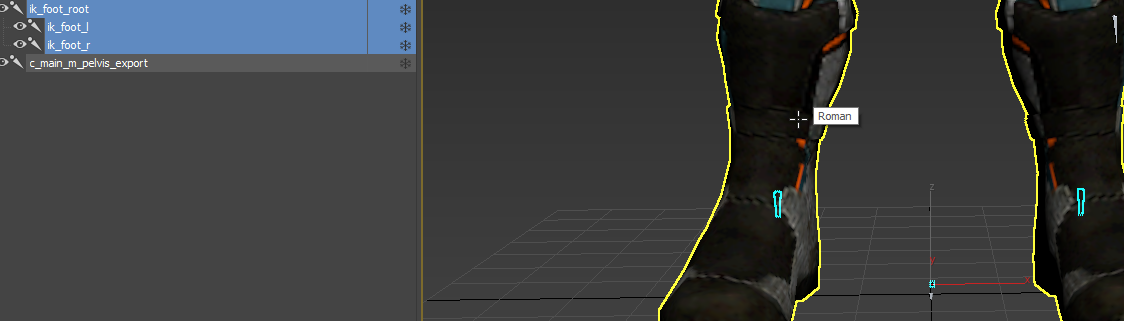
Idk that it's the issue but if it was set to something like 0,0,0 it might end up looking about like what your screenshot does
@scarlet birch yeah it seems umodel imports ik_root to 0,0,0, but i dont pak my cooked skeleton anyway https://i.imgur.com/ywRjtvg.png
could it have something to do with sockets?
 grim ore
@stiff sail that is what a volume would be for, why do you not want to use it?
scarlet birch
@harsh copper Do they have an official modding forum or something where you can ask about it?
crimson vapor
@grim ore Thanks for your help man. appreciate it
harsh copper
no the game just came out so im basically doing the discovering for it
stiff sail
@stiff sail that is what a volume would be for, why do you not want to use it?
@grim ore i dont want the player to use things though walls be facing the wrong way and activating them.
grim ore
@stiff sail then add conditions to the volume, such as if they are looking at the item (using the rotation and an dot product) or using a line trace to see if the player is looking at it with nothing in the way, etc.
otherwise add a collider to the front of the player that you use to determine if something is in front of it instead of a collider in the world. or uh put the collider in the world in the right spot so they have to be near it and not on the other side of a wall. etc..
scarlet birch
@harsh copper I'm just not sure if it supports moding or if you're ripping assets and trying to do it that way.
harsh copper
i ripped char model using umodel and replaced with my own, everything works except the knee lmao
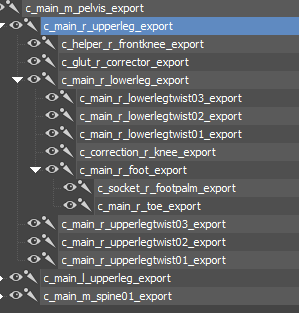
one of the weirdest skeletons ive encountered https://i.imgur.com/LCwbTrp.png
 scarlet birch
I'm not comfortable helping with that.
 exotic plover
hey everyone, I would like some advice and insight on obtaining the IP for an old game from a bankrupt games company? is it possible? how do i go about this?
I appreciate all the help i can get.
grim ore
pay a lawyer in that field
harsh copper
guess ill leave lmao
grim ore
well you are asking how to take work from an existing game and change it, its not really related to the engine itself which is what this discord is about.
exotic plover
I wasn't sure where to ask exactly, but i would build this IP in unreal
grim ore
yep find a lawyer who specializes in that subject and pay them to find out for you, thats about the only way you will get a real legal answer
other people might even have experience but that doesn't mean it will be the same with your ip
exotic plover
That is true
grim ore
I mean if you dont care about the law or legality do whatever you want, but if you do then lawyer up
frigid needle
Depends on each individual situation
exotic plover
Individuals who once worked there?
or does it fall into some kind of lost space, where the ip is unclaimed?
frigid needle
That is something you'll want to check with a lawyer about, as they'll be able to go through the legaleeze that speaks to that sort of thing
It, again, depends on each individual situation
and how their IP rights were setup, what agreements they entered, etc
exotic plover
It's also in a different country to my own. Thank you @frigid needle and @grim ore I do appreciate your input
 inland leaf
anyone has a clue why i cant add anything to this widget with the error "widget cant have children" ? I just want to add a text box to it ...
scarlet birch
because it can't have children. Try using an overlay
grim ore
it tells you in the error....
inland leaf
the error "cant have children" is not really explaining why or how to prevent that
grim ore
it cant have children, it has no womb. its a barren widget
scarlet birch
it is exactly stating the why
inland leaf
not used to that since you can stack everything atop on each other in unity 😦
grim ore
most widgets will tell you if they can have children, and how many in their tooltip in the top left in the widget browser. Some of them are the end of the line, they are not panels or containers
inland leaf
sorry for the dumb question
grim ore
welp the ue4 system is not the same as the unity system is not the same as the coherent ui system is not the same as the nGUI system is not the same as the immediate mode ui is not the same as XAML is not the same as QT is not the same as ....
inland leaf
yeah i got you
just didnt know that UE4 has specific containers that can have children
scarlet birch
Everything has a location in the layout. There's something like an overlay? can't recall the name that lets things stack.
grim ore
yep the overlay is a good one if you want to stack stuff, border is similar but can have 1 child and itself is an image
tired lynx
4.26 is majorly exciting
i've been using the early 4.25 volumetric clouds in the scene i'm currently working on and it's already fantastic. the finished version even moreso i imagine.
quick question
does rtxgi completely remove the need for light building?
i'm going to be getting a 3090 and am quite excited at the possibility of never having to sit through a build again, if that is the case
grim ore
rtxgi is run time I beleive so it doesnt replace the build if you are trying to use built lighting
there is a gpu lightmass replacement coming soon that does use the GPU and is much faster than CPU so it would help with that
 gaunt pivot
Is it feasible to make a naval warfare sim like world of warships on unreal engine? I know games like WoWs and Warthunder have their own dedicated game engine and I’m wondering if that idea is even possible.
tired lynx
there is a gpu lightmass replacement coming soon that does use the GPU and is much faster than CPU so it would help with that
@grim ore ah that'll do it. looking forward to that
does unreal engine have a notes feature built in?
just like
a place to jot down key figures and stuff inside a project
this project's starting to get a little 'math'y and i need a way to keep track
grim ore
nope but there are plugins to do that or uh plugsin or make your own lol
vague scaffold
How would I construct a command line to launch this project that was authored using DirectX12?
tired lynx
nope but there are plugins to do that or uh plugsin or make your own lol
@grim ore hm, shame
grim ore
@vague scaffold is this the compiled project or the raw project?
vague scaffold
It's the free demo MegascansAbandonedApartment.
grim ore
so.... its.... ?
vague scaffold
The file extension says .uproject.
grim ore
ok so raw project, you can edit the .ini file and set it back to dx11 if you want
vague scaffold
In the Config folder?
grim ore
yep and this file and remove the last line for the default graphics RHI, should be on DX12 like that
frigid needle
@gaunt pivot It should be feasible, yeah. Make a list of what it is you need in order to replicate the idea, and then start doing research on how to do that in Unreal
things like:
- Making an actor buoyant in water
- Creating a boat in Unreal
- etc
 green sky
Has anyone tried "Physical Material Mask" in the material in ue 4.25 has anyone got this working?
 light vigil
Hey everyone - my box collision on some of my actors gets incorrectly positioned if I set it to static instead of stationary/movable - anyone know why that may be? I'm not moving it during gameplay at all, it's just always wrong in editor if static
And could it be related to being a dynamic obstacle?
 light thunder
My project won't open up...it's crashing aroudn the 95% mark but I don't understand why - can't think of any crucial changes but my source control doesn't show any pending changes....what should I look for?
cedar jetty
anyone know how to fix this?
 winter zenith
How would I get a "You were killed by death screen"
Right now I just have a simple
"You died" screen
How would I get the player's name that killed the dead player?
golden condor
I am running into issues
All my weapons inherit from the same weapon parent
Problem is, I made a new weapon that I want to act like an RPG from Team Fortress 2 so when the player is in blast radius the player is launched up.
I thought changing the projectile and adding the code there would work but I can't change the projectile on my weapon
Because my weapons again, all inherit from the same parent.
And the parent takes one type of projectile.
tired lynx
hey so, is there no way to blend between materials procedurally using the noise node?
i've been scouring the internet for an example of it being done this way, but every example i've seen simply uses a static noise texture.
 fervent lake
Yo, I was wondering if anyone had a DCS and a Rpg inventory integrated already. I know how to do it myself, But Im at my third try now. (Each time was a fatal bug. )
Would be much easier with a already done engine
-w- until then
light thunder
What would cause a map to fail, especially if there is no version editing found in perforce
my main demo map keeps crashing upon load (took a while to figure out that was the problem) but I can't for the life of me think of anything that changed it
I simply "opened it yesterday" and saved project settings for it to be the demo map
i didn't even touch the level
vague scaffold
What node would I use to combine a RGB from a Texture Sampler with the RAW Comparison value from a ChromaKey? I need to integrate the alpha.
light thunder
I'm dead in the water until I can figure out why this map is crashing unreal:
1 - no revision history in perforce
2 - no autosaves I can find (opened the map yesterday and was looking through some blueprints)
 weary basalt
Does a Crash Reporter appear?
light thunder
Nope
weary basalt
So the Editor just closes?
weary basalt
You could run a Resave Packages commandlet that will tell you if your Map is corrupt.
Have you tried reverting to previous revision?
light thunder
last time the map was editor according to windows was months ago
I'm trying to think of the things I did in blueprint, if that messed it up, it should crash and give me a crash report
weary basalt
It may not be an issue with the Map, but potentially an issue with an Asset that is being used inside the Map.
Did you change any assets that the Map uses recently?
light thunder
Yes but why would it crash upon load, I could see upon starting the actual game
but there's very little pre-run execution going on
you didn't see anything in that log did you?
nothing that's a red flag to me
I could revert all my changes from perforce, I'd lose a few hours but my fear is somehow something else got changed and I'll lose the work and not fix it
I'm opening up the blueprints I was working yesterday but if they compile fine, what areas should I look for that would crash something before runtime?
AH
i remember now, thanks for walking me through it
I'm not sure why it actually is being a problem, I can't find any changes
Is there a way to open a map without any references to certain blueprint somehow? like a safe mode? @weary basalt
weary basalt
Running a Resave Packages commandlet will compile/save all of your assets to ensure they are valid.
light thunder
Unless I'm using perforce wrong (I'm using "Get Revision" when the editor is closed and going back like two revisions)
 rare spear
Hi, is there any way to access a generated noise texture via code/blueprint? Or somehow stream chunks of it into cpu memory?
light thunder
Where is that commandlet found? Sorry to bug you man, I keep finding older docs stuff that isn't clear on where to find it
weary basalt
Edit this so that you have the correct parameters
Replace the stuff with {XXX}
To apply to your project
weary basalt
If the commandlet is also crashing, then im not sure what else you can do mate.
Sorry.
light thunder
I was using an ineditor command
vague scaffold
I have a MediaPlayer playing a video @30fps. I have a Sequencer running @30fps. When I kick out my jpg frames, however, the video in the rendered output is way too fast.
Is there a fix for this?
Is there a game FPS I should be setting as well?
light thunder
I just don't understand how getting previous revisions didn't fix it
I guess this isn't the same command
Did I do something wrong here? I opens up the project but when I hit a key to turn off pause, it just exits the command prompt, did I parse it wrong? start /wait "E:\UE_4.24\Engine\Binaries\Win64\UE4Editor.exe" "E:\Dropbox\LIVES\Alpha Version\LS Beta Version SourceControl\LiveSimulator.uproject" -run=resavepackages > "E:\Dropbox\LIVES\Alpha Version\LS Beta Version SourceControl\Output\Output.txt" pause
@weary basalt
Last ping I swear
it opens up but just sits there
light thunder
yep
I think that did it
So what do I do if it finds a problem actually?
and what do I do about 'read-only files' - do I need to check out EVERY file in perforce
 manic pawn
it has -autocheckout option
light thunder
I haven't performed this type of operation in conjuction with using perforce - do I need to make a giant revision because of all those resaved files?
like this - "E:\UE_4.24\Engine\Binaries\Win64\UE4Editor.exe" "E:\Dropbox\LIVES\Alpha Version\LS Beta Version SourceControl\LiveSimulator.uproject" -run=resavepackages -autocheckout
@manic pawn
 marsh swallow
Scrollboxes, great for lists of items but not great for when you want to use Item Icons in rows and collumns. So, in this instance use GridPanel. However is there some easy method to get them to add child in order from left to right, top to bottom? I feel like the manual process I am setting up is just wrong.
manic pawn
what are you trying to achieve running resavepackages with no args? this will modify all content files in your project
light thunder
I have a map that WILL not load
manic pawn
crash on load?
light thunder
on map load, not map play
manic pawn
debug the crash and fix it
light thunder
I used 'get revision" on perforce and rolled back like two versions, when I knew it was working fine
there's no crash report
it crashes in the editor with no crash log
manic pawn
run the editor in debugger
marsh swallow
Also... dropbox locks files. Why are you running your project out of your Dropbox folder? or is that just your backup?
light thunder
I've not done that before, assuming it's an option in the actual editor
manic pawn
no, you do it from vs/rider/whatever you normally use to work on your project
light thunder
Because I work on multiple machines ...and my dropbox doesn't lock
and as to why, because I probably have no idea what I'm doing
www.thelivesimulator.com like 3 years running gentlemen, still don't know what I don't know ....
 tight birch
Does anyone know why visual studio 2019 would be constantly stuck at 100% disk use when automatically opening a UE project but not at any other time? Normally when I use it it's ok but when I created a new project and VS opened automatically from that it loaded the project but was pretty much constantly stuck at 100% disk for seemingly no reason until I killed it after a few minutes (since my laptop was pretty cheap since I didnt have much money at the time and is already 2 years old and has a mechanical hard drive so I didnt want to waste any more of the drives longevity than I really need to), despite not having much ram to work with the memory wasn't full at least not according to task manager (it was at 83% though :/) so I dont think it was trying to use swap/page file? If it was I imagine the editor would be effected too but it wasn't using much if any % of the disk at all, only VS was
light thunder
@manic pawn it's blueprint project
manic pawn
oof
tight birch
So I'm thinking to avoid this issue in the future maybe I could use VScode instead of visual studio
But idk how to do that
grim ore
@tight birch this is a C++ project and your talking about with the solution open? it could be intellisense building its database
tight birch
@grim ore Ye it was a c++ project, I'm pretty new to UE dev, is that normal for a UE4 C++ project
grim ore
@marsh swallow welp you pretty much have to specify the row and column which is basically a grid or an array you can loop thru. what is your manual process you are doing?
look on the bottom left of VS and see if it shows a moving icon and intellisense building
tight birch
Normally I use unity or godot since my laptops specs aren't very good but I decided to just test out ue4
light thunder
Okay, I ran this ResavePackages commandlet (but with no argument) because my main map won't load in the editor (crashes but no crash report) the log isn't helpful and the output text is like 5 mb, what am I looking for in terms of debugging it?
grim ore
marsh swallow
since its only 2 columns, i am just flip flopping and then adding 1 to the row on the flop, so the next flip is the next line down.
i mean with 2 rows not so bad but you would think this is kinda basic use enough to have a function/something built in that automatically does this. lol
grim ore
@marsh swallow sounds like a simple loop, nothing wrong with that
marsh swallow
it was just one of those "feelings" of doing something wrong. lol
grim ore
well you would make the function basically since it has no idea of knowing what you want to do with it, its just a container you set up
marsh swallow
sure but many games commonly use the whole collumn/row thing these days. i guess im just being picky. 😄
thanks Mathew! I shall continue on
grim ore
but no it sounds like you are doing fine and a flip flop seems like a novel way of doing a simple 2 item loop
light thunder
this IS the correct way to roll back changes right?
everything was working then but she dead now
grim ore
I assume the scrollbox didnt work out well since you wanted more than 1 item in the row?
marsh swallow
yeah pretty much
grim ore
yeah doing it your way might work well, or a uniform grid panel, assuming you dont want the items linked when you scroll
putting the entire grid panel in a scroll box should work and do what you want in the end if needed
marsh swallow
also... wait you have Perforce AND dropbox? You know you can use perforce to sync those multiple computers the same way and more efficiently. Also you would revert the submission however, you might just wanna pull the single map file. More likely than not however, chances are you deleted a dependency file somewhere that map used. We have had it happen from time to time. but we catch them pretty quickly so we only ever loose 1 revision
light thunder
The dropbox is before I moved to perforce, but I guess I can stop using it for that
manic pawn
no, the correct way to roll back is to right click the changelist above and select "undo changes"
light thunder
the map file has NO changes
hasn't changed since like, february according to last revision
manic pawn
at least if you want to actually submit that rollback
marsh swallow
sure the map hasnt, but did you delete something that map depended on and force fix redirectors?
light thunder
i've made that mistake a bunch but I would get crashes upon runtime, this isn't even loading the map
vague scaffold
I have gone to project settings and forced 30fps everywhere.
light thunder
@manic pawn I'm assuming I need to "submit" that undo?
 deep viper
Is it possible to pass variables/information from a [Material] to the [PostProcessMaterial] ? I'm trying to have the post-process treat meshes differently.
light thunder
that cascades or is recursive right? if I undo change 5 (and am currently on 10) will that undo all of 5,6,7,8,9,10, or do I need to manually do it?
 faint meadow
ue5 wen eta
light thunder
wtf this STILL crashes
 worn granite
@faint meadow I'm pushing the release back another 6 months now just for you
grim ore
@marsh swallow yep looks fine here, basically adding 2 items then going to the next row. its not like super extendable but looks good
 weary remnant
Is there a way to have the editor open the last map (or no map) when restarting?
Project Settings -> Maps & Modes -> Editor Startup Map?
grim ore
that will be the default map when it loads yes, but you cant set it to open the last map automatically
light thunder
How can I get more information when a map fails to load (the editor crashes) but there is no crash log?
the editor logs show me using the CMD to laod that map but no crash data
last few lines of editor log :```
ULevelStreaming::RequestLevel(/Game/Maps/Scenario24) is flushing async loading
[2020.09.23-02.48.04:222][529]LogStreaming: Display: ULevelStreaming::RequestLevel(/Game/Maps/Scenario10) is flushing async loading
[2020.09.23-02.48.05:186][529]LogMaterial: Display: Missing cached shader map for material M_TrafficLight, compiling.
[2020.09.23-02.48.05:236][529]LogMaterial: Display: Missing cached shader map for material M_SmokePuff1, compiling.
[2020.09.23-02.48.05:273][529]LogMaterial: Display: Missing cached shader map for material M_FlamePetal4, compiling.
[2020.09.23-02.48.05:299][529]LogMaterial: Display: Missing cached shader map for material M_Ember1, compiling.
[2020.09.23-02.48.05:342][529]LogMaterial: Display: Missing cached shader map for material M_FireLights1, compiling.
[2020.09.23-02.48.05:402][529]LogMaterial: Display: Missing cached shader map for material M_FlameDisperse1, compiling.
[2020.09.23-02.48.05:426][529]LogMaterial: Display: Missing cached shader map for material M_Smoke2_Trans_subUV_mobile, compiling.
So, how can I fix this map? is there a way to open it up and remove references to it?
well this is frustratingly opaque
grim ore
my only thought is attach a debugger to it or use the source build so when it crashes you can catch it
light thunder
Guess I need to learn how to do that, thanks
grim ore
so if you pull your repo out into a new folder at the latest and it crashes, can you just roll it back 1 at a time until it works and then see what changed?
cedar jetty
im having trouble with getting my progress bar to react to some AI damage the Number string beside it reacts just fine for health but the progress bar health does not react
this layout is what i have for stamina as well stamina is working health is not for whatever reason only the number string is
i feel like its a bug since when i take damage a diffrent way without the AI it reacts
grim ore
what is the value for health? what is the number
cedar jetty
@grim ore 100.0
grim ore
the value in a progress bar is between 0 and 1, so if you are telling it to use 100 it will not work
cedar jetty
gotcha
@grim ore worked only thing is is i want it to be 100 health because i wanna take varients of damage not just from 0.1 to 1.0
grim ore
then keep it at 100 health, you just need a value from 0 to 1 (0% to 100%) to put into the progress bar. Your current health divided by your max health gives you this value.
cedar jetty
@grim ore thank you man now i just have one more thing im stuck on
im trying to replicate bullet damage to the AI and i know there are multiple ways of doing it whats the recommended way?
grim ore
replicate is a specific thing dealing with multiplayer, do you mean that or something else?
cedar jetty
not replicate but like trying to make damage happen eventually though ill want to make it multiplayer based
grim ore
if you actually plan on making it networked you have to design it from the start. for now what are you trying to do?
cedar jetty
what do u mean design it from the start how far to the start are we talking?
 silk lintel
So I'm trying to create a paper-like material and I'm not quite sure how to deal with lighting. I want to be able to see the soft glow of a light through the paper, but I don't want emissive because that would be a constant light regardless of lighting on the other side, and I don't want translucency because I don't want the other side to be visible necessarily, just the light. Definitely not masked. 1) is there any way to do this, and 2) is there any way to do this and also be able to use pbr controls (metallic, roughness, specular)?
grim ore
are you just trying to damage something you hit? that depends on what you are hitting them with and how. it also depends on what you plan on hitting eventually and how and etc.
designing a single player game and systems then changing it to multiplayer is a nightmare. if you plan on doing multiplayer you do it from the start, you start the project and everything is done with multiplayer in mind.
dealing damage in single player and dealing damage in multiplayer are completely different especially once you consider if its a listen or dedicated server. then you add in stuff like UI and animation updating just from that one piece of damage.
@silk lintel you can look at something like the 2 sided foliage shading setup, its similar to that
cedar jetty
this system that i got i believe already has that in mind considering i got this system from the marketplace it even has a tutorial on how to run a deticated server on it
grim ore
then if you are using a system already how is it set up to deal damage
cedar jetty
@grim ore thats the function lemme find what calls it
grim ore
well that looks like a damage calculation function
cedar jetty
your right hold on lemme get the right thing
 shy sundial
what causes these shadow issues
grim ore
could be how far away you are for the shadow maps, that looks like dynamic lighting?
cedar jetty
@grim ore
grim ore
yep you just call the apply damage event to the character this is on and it should handle it. so how you apply the apply damage depends on how your weapon is designed. physical object, line trace, etc.
but you should basically just call the apply damage node with your value on the target and this would receive it and handle it
cedar jetty
@grim ore how can i have it tell if its being hit with my projectile?
grim ore
your projectile should have a collision event on it and when it hits something it can apply damage to it
cedar jetty
ok
grim ore
you could do it the other way as well and if something collides with the ai it checks for what it is and then applies damage but thats odd, doing it the projectile way it would know if it should damage something and how much and would be easier
cedar jetty
like add on to this i assume
grim ore
pretty much yep
cedar jetty
@grim ore i put 2 clips into it and no damage
grim ore
how are you checking for damage on it?
cedar jetty
just a thought could it be this?
grim ore
if the line traces are going from red to green they are hitting something
grim ore
so how do you know its not taking damage?
 coral nimbus
Sharing behind the scene story from Reallusion Pitch and Produce Program Winner: Ishan Shukla's "Schirkoa" (India). See how added iClone Unreal Pipeline into his new 2020 animated scenes for his Schirkoa universe.

https://magazine.reallusion.com/2020/09/01/pitch-produce-schirkoa-moving-from-traditional-animation-to-real-time-iclone-unreal-pipeline/
Ishan Shukla (India) “Schirkoa” / Film - Ishan is an Indian animation filmmaker. He graduated from the 3D Sense Media School in Singapore in...
cedar jetty
because i put a print string onto the projectile when it hits something
and no print string
grim ore
well for that your running single player, I have no idea if it will even call server code in single
cedar jetty
oh so i have to setup server first?
grim ore
put the print string on the event any damage before the server call
cedar jetty
ok
grim ore
make sure its being called first before checking the server stuff
cedar jetty
im assuming i did this wrong?
grim ore
yes, you should be calling apply damage on the actor you hit
apply damage will call the "event any damage" on the character and then it would do its custom code
you might want to see if there is an example with this pack or docs, I would think it would be covered in there
grim ore
your ai should not have been changed, it was set up to receive damage
cedar jetty
ohhhhhhh
grim ore
your projectile needed to call apply damage, not the svr damage event
silk lintel
Ok, for some reason my subsurface material isn't working. I must be doing something wrong, but I've looked at so many tutorials and followed them exactly. I want the glow from the light to be visible through the paper.
I've even tried setting everything to static lighting only and everything to dynamic lighting only. Not that that should make a difference.
grim ore
@cedar jetty then you need to start debugging to find out if its hitting the ai, and if the event is being called.
@silk lintel i dont think it works like that, I beleive it "fakes" it in the material
silk lintel
@grim ore I'm not sure what you mean. I know it fakes it, but why isn't it faking it?
It's just doing nothing.
grim ore
did you try changing your subsurface color to something other than white?
silk lintel
yup
the most it does is slightly change the tint of the entire material as if it were multiplying the base color
i can show u that
grim ore
did you try this material? <https://docs.unrealengine.com/en-US/Engine/Rendering/Materials/HowTo/Subsurface_Scattering/index.html
Guide for using the Sub-Surface Scattering shading model in your Materials.
grim ore
thats pretty much what it does as far as I know, there are 2 example shaders in the docs and a couple in the content examples
silk lintel
I didn't follow that tutorial, but I have it set up exactly like that
And I've tried with those settings
cedar jetty
@grim ore It works and deals damage to AI i just had to put it in the weapon blueprint where it spawns the projectile
grim ore
weird but good
@silk lintel #graphics would have smarter people who might be able to notice the issue, otherwise the content examples to pick apart is all I could think of
silk lintel
ok
 past gull
I am creating a fully 2d multiplayer card game in ue4. Quite a few people have told me that by using ue4 I cut out a large portion of systems that can run game from the get go. Considering game is going to be very labor unintensive is their anyway that I can cut out some of the editors more demanding capabilities on release (does that even help) or would I need to port to a lighter engine like game maker studio
radiant sleet
where can I find functions for character class
 rustic leaf
does unreal engine have an abstraction layer for arbitrary tcp socket connections or do i have to write target specific networking code for each target I want to support in unreal engine? For example, if i'm writing a chess game and want to connect to an internet chess server or something where i want to visualize things that appear in twitch chat?
Ultimately I landed here: https://docs.unrealengine.com/en-US/API/Runtime/Sockets/FSocket/index.html which seems to be what I wanted, though hard to search for.
 restive yarrow
Do you guys have paging file space enabled? does anyone use it?
 silk sleet
is there anyway to get information about the game's sound in a material?
i'm trying to make like, a vu-meter/spectrogram in ue
like, current volume
exotic thicket
you would probably have to feed that into it as parameters using a Material Instance Dynamic
it seems doable if you were to say have a float parameter for current volume or something like that
plush yew
Hey guys, how can I make a bullet shoot forward after spawning it?
I guess I could use actor forward vector but how do I setup the velocity?
exotic thicket
have you tried using projectile movement component?
plush yew
found it, there is this thing called projectile movement component'
exotic thicket
there you go :D
 small vault
Does anyone know if Virtual Textures work with POM? I know tesselation doesn't work but I would prefer to use POM anyway
 ebon marlin
Any recommended way for giving different bones of my character different damage values?
 late loom
guys how to load a sublevel when you load a persistent level. They dont seem to load together
plush yew
@ebon marlin do a check which bone collides and implement damage accordingly?
ebon marlin
Yeah, but like
plush yew
perhaps u can check bone name
ebon marlin
If there's a convenient way that involves giving every bone name an associated value
So I can just fetch it in runtime rather than check for the bone name in my code
Maybe with a data asset, etc?
ebon marlin
Yeah, that can also work
maybe a data asset containing a map :)
And it has functions that access this map
plush yew
good luck 
ebon marlin
Thanks 👍
late loom
guys how to load a sublevel when you load a persistent level. They dont seem to load together
analog prism
Hi all, I have a weird problem that I can't explain. I have a function for cycling through your inventory which is bound in the editor to Mouse Wheel Up and Down, but it doesn't work at all. Scrolling the mouse wheel does nothing. Here is how the input is handled in the editor and code:

The log never happens
Every other key binding works fine, and switch item up works fine if I rebind it to a different key in the editor
My mouse wheel isn't broken, it works fine
Any ideas on what's happened? It used to work fine, and sometime over the last month or so it just stopped and I don't know why
 open wadi
Hi everyone - does anyone have an example of uploading a file via blueprints to an external server? I"m using node as my API and I can deploy formidable or mutler for file uploads, and I can execute JSON requests fine throughout my UE4 project, but the issue is that these "file handler" modules for node require multipart forms, and I'm not sure how I would do that with VaRest or any existing Blueprint tools. Does anyone have any example of file upload to external server via Blueprints? If I could see one example of a file upload in any way from UE4 I could figure out the rest.
Thank you much in advance for any help.
analog prism
Just a follow up to my question above, I've determined that the problem is caused by assigning 3 bindings to mouse wheel up. I also have two other functions, one for zooming in when using a spyglass, and another to zoom the camera in when using an orbiting camera. For some reason, removing the binding to the spyglass zoom in fixed switching items and zooming the orbiting camera in
I looked at the spyglass zoom in function, I don't see anything special about it, is there some kind of limit to how many functions can be bound to a key in UE4?
Actually no, it's not the number of bindings. It's just binding that one function to zoom in the spyglass. WTF? Why would binding one function in particular to a key then stop all other functions bound to that key from registering?
 naive glacier
Hey guys, anyone succeed in making multi GPU work in Unreal ? We are a immersive event studio Working with quadro rtx8000 cards and facing frame rate issues with our ray traced scenes. Any help with improvement of performance would be amazing!
 safe plaza
@analog prism maybe your other binding is consuming the input event? you could try using an unbound key to check if this is the problem. I don't know how to disable consuming events in c++ but there has to be a way
 elder haven
hi!, do we have an idea when 4.26 will come out ?
 floral arrow
@naive glacier https://www.youtube.com/watch?v=e3VWv-GwXHE

If this video helped you, please watch an ad on the video to support me!
Hey guys, in this tutorial, I show you how to enable Raytracing, as well as how to optimize it, as well as the different raytracing settings that you can enable, such a raytraced AO, raytraced shadows, r...

With the advent of RTX and Realtime Raytracing in Unreal Engine 4, we'll cover the basics of how to get your projects up and running using Realtime Raytracing as well as the basics for customizing and debugging your scenes.
0:26 - Prerequisites
3:41 - Warning on Upgrading for...
 covert hedge
hmm provided i have a .obj without textures, what's the best software to actually create the textures/materials and see it as i do it? substance?
 errant basin
Question:
In brush wireframe mode most if not all of my static meshes are cyan in colour, but some are purple, what does that mean?
 lucid socket
Static / Movable I believe
errant basin
Did a bit of investigation, turns out if it's a blueprint with a static mesh it'll be purple
analog prism
@safe plaza That was my thought too, but the function isn't doing anything different to the other bindings that might block or consume the input
lucid socket
@errant basin Oh thanks 🙂
 hardy berry
Anyone know why I lag in my Unreal? I just got it and I'm sure I can run an empty project
It also shows like "Something Shaders (288)"
which im assuming is the problem
exotic thicket
it has to compile shaders to render stuff correctly, wait for it to finish and you should be good assuming your PC isn't a potato
light thunder
I can't load my main map anymore and despite reverting back in perforce, still can't.... someone suggested I open up project in VS and see what's happening in debugger.... looks like it breaked on this (finally have some information but I don't know what it means)
I can't seem to get out of the break, it keeps throwing it, but it looks like it's from the engine core - how do I see what crap that I did that's causing the issue? I'm loading a map and that causes the editor to crash, how can I see what's happening in VS when I load the map?
 last willow
Hi, I am Hrithik i want to start learning coding and a game engine what should i learn first
light thunder
Is there ANYWAY to open up a map in a safe-mode?
analog prism
@last willow You might find it quite challenging jumping straight into a game engine, as UE4's implementation of C++ has a lot of abstraction layers built on top of it which obscure a lot of the underlying complexity. If you're an absolute novice to programming, I would recommend looking up some beginners courses and creating some small applications so you get a grip of the basics before you start looking at UE4
But if you want, you can look at some introductory videos and get started with blueprints
Or, and I realise this is an Unreal Engine Discord, but Unity is quite user friendly and intuitive for beginners. The idea of writing scripts and attaching them to objects to make them do stuff is a bit easier to understand than creating a new Character class and overriding functions in C++
light thunder
What is the best way to delete all HLOD's?
I am suspecting they are causing my map to crash but I can't force delete them (it crashes the editor)
last willow
@analog prism thankyou so much it really helps
analog prism
@last willow You're welcome! Good luck, and remember that everyone on this Discord started as a novice 🙂
last willow
Ur cool
light thunder
     FString UniqueName = Material.ImportedMaterialSlotName.ToString();
        int32 UniqueIndex = 1;
while (UniqueMaterialSlotName.Contains(FName(*UniqueName)))```Or uncompiled shaders?
 arctic imp
not sure where to ask it but how do i do in Bp timeline of a wall that will go up and down?
light thunder
@arctic imp https://youtu.be/v7bdcvGlgIg

What is a Timeline in Unreal Engine 4.
Source Files: https://github.com/MWadstein/wtf-hdi-files
arctic imp
thanks
light thunder
You'd probably use something like AddOffset to the wall


 serene birch
- the link doesn't work
- did you consider waiting for the new clouds in 4.26?
autumn grail
ok but will this be true volumetric clouds we can go through?
or just a video showing in a sky sphere?

Gumroad
Beta version of volumetric clouds for Unreal Engine 4 update 2.0.Requiring UnrealEngine4 version 24.0+ Update 2.01Fixed a few bugs and added a new features.
this link works
 next ivy
So is there any actual reason to be excited for UE5? It seems to me like its not any larger than a normal release?
 dark rune
as long as they dont screw over the bp system im cool
 remote crown
heloo ...creating a game 3d for android and iphone mobiles game multi player card game ...you only need a programer ....the artist is availabel ...and an animation is availbel
plesae masage acount face book
Facebook
Log into Facebook to start sharing and connecting with your friends, family, and people you know.
light thunder
So, still trying to fix this, 5 hours running - I tried renaming it (clarity) and it won't let me clean up the redirectors
Um, the map is renamed, so it's not there anymore, and it can't be checked out
light thunder
But if I remove the references all on this map, then it "SHOULD" load or at least I'd have more information
vague scaffold
When I try to browse to an image sequence using the file image source, Unreal complains it can't read my file types. These are standard types like .jpg and .tiff. These file types work fine in other programs. The log has no helpful information, it just complains that it can't read them. These are JPGs cranked out from various render engines such as Mantra, 3Delight, After Effects, Eevee. I know they all can't be making invalid files.
Is there some other way to get an image sequence into Unreal?
radiant sleet
Whats difference between shader and material?
 thick herald
HLSL are the shaders, the code that tells the graphics card what to do. Materials tell the shaders what to do. Sort of.
radiant sleet
Hlsl?
thick herald
High Level Shading Language for DirectX
radiant sleet
When someone says there gonna make a new shader now does that usually mean there making a new material
Like are they technically different thing but there often used similarally?
thick herald
No idea, depends on the person and what they are talking about. Unless you are a Tech Artist it's unlikely you will need to learn the details of HLSL
rare spear
Hey, I want to create a terrain based on a noise function. Now I need to extract height and color information from the generated noise. Is it somehow possible to access the applied noise texture on a static mesh (plane). I thought about retrieving sample points from the texture to extract the needed information. Ideally something which streams those texture pieces from gpu to cpu or so.
thick herald
@rare spear short answer is yes. I don't have a long answer 😄
tired lynx
@autumn grail fly-through
i'm using the unoptimised 4.25 version but supposedly the 4.26 version will be a lot more performance-friendly
does anybody know how i can automatically place an asset into my scene as dynamic instead of static?
thick herald
What do you mean?
grim ore
@light thunder I know its weird but this crashes the project when you load the project or just when you try and load the map?
light thunder
just the map (though it obviously crashes when you have the map set as default, I had to change the ini file to even get it to load)
I could have sworn it loaded fine the other day but it is also possible it didn't survive the 4.23 to 4.24 update
it's a large map with about 24 sublevels, I'm opening up all of those and finding none of the shaders were compiled for them
normally that wouldn't matter I'd just have to compile like 10k shaders but it would crash
grim ore
thats what I am curious about, can you migrate out the map from in the editor? if not can you just move just the map to a new project and see what happens
light thunder
i'll try it now
grim ore
migrating out the map might be an issue, I assume it would try and load it then crash again on the same part (but this might give another chance to catch it in VS) but if not if you just move the .umap over to a new project and try and open it I wonder if will open in a broken state
sterile tulip
When I tile a texture I get blurred spots
tired lynx
What do you mean?
@thick herald i mean that when i add an asset into the scene it always imports as static and throws the 'lighting needs to rebuilt message'. i have to manually set each asset to moveable
light thunder
@grim ore It took a few different tries, normally I was getting overrun errors from some UnrealNames.cpp file, but in this case, It was the StasticMesh.cpp file (most recently) and it even fires on some of the sublevels -
        int32 UniqueIndex = 1;
while (UniqueMaterialSlotName.Contains(FName(*UniqueName)))```Is there a Blueprint node (for materials) that can invert values from zero to non-zero? e.g. I want to use a mask that is active whenever my value is non-zero so I'd use an invert function for that (if it even exists)
 versed lion
Hey guys, quick question, when i use the foliage tool i can't see my brush, any suggestion on how to fix it?