#ue4-general
1 messages · Page 840 of 1
 zinc ledge
 mossy nymph
anything with extensive loops, dealing with arrays/collections
one of the most suicidal things you can do is go and implement a pathfinding algorithm in blueprint, for example
the performance is abysmal
zinc ledge
ah okey ty
mossy nymph
added blueprint overhead is per execution wire
 naive marlin
hello everyone, just playing with grooming from Blender to UE 4.25 today
if anyone here ever happen the same issue like this?
 latent salmon
how do i put a post in seeking talent?
 ember star
I want my HUD to display a bunch of data about my players character. What's the best way to link the data? Have the HUD call get player controller? or store a reference in the HUD to the actor?
 pale forge
Anyone know how to fix this? All of a sudden I've got references in my BP to HOTRELOADED version of my objects. Can't build.
UATHelper: Packaging (Windows (64-bit)): LogLinker: Error: HOTRELOADED_SBCharacter_1 has an inappropriate outermost, it was probably saved with a deprecated outer (file: F:/Unreal/Speedball01/Speedball/Content/TeamChar01/Animations/AnimBP/TeamChar01Anim_BP.uasset)
 supple crag
Can someone help me with setting up a scrollable inventory? I can't seem to make the scroll box work :/
 harsh socket
hey, im trying to begin game developing. does someone have tips for me?
pale forge
Udemy... for $10 you can get hours of good instruction.
supple crag
I was just reading the unreal engine documentation on wrap boxes and found this line at the bottom, but i can't seem to get this to work in my project. Has someone used a wrap box with a scroll box and can help me out?
 inland leaf
working with an old tutorial. The node in the middle is a dot product, right ?
 lucid jetty
Yup
inland leaf
thanks 🙂
Hrm ... i wanted to turn my character towards my cursor. I watched a tutorial how it should work and there it workls fine, but at my end, my character doesnt turn 😦
is there something im doing wrong? Also i cant really debug the script since it doesnt seem to show anything in the EventTick ... do i need to activate it somewhere ?
okay my ticks work fine but somewhat my rotation never gets set ...
nvm
i got confused by the controller again ... "self" is not the controlling pawn
 vale silo
what's the downsize of scaling up or down skeletal meshes ?
I have a character already made and animated, and I'd like to scale it up a bit to make a mini-boss.
 restive eagle
if i had to guess i would say that it will only be rendered more frequently just because of its bounding size
i mean if the object is small it wont be on your screen as often as a big object
makes sense? but thats just my opinion, maybe someone could dive deeper into this
vale silo
well, it's hardly an issue - it would be the same if I modeled and rigged large character to begin with.
I am more concerned about physics and whatever else may get out of whack if I scale skeletal mesh in UE4.
restive eagle
the physics asset will be scaled as well, so i dont think thats an issue
 light thunder
I want an animation to be played for X seconds, (don't want to rely on notifies, don't care about fluid/blendspace) I set a transition rule that adds X time to the delta world time and saves that amount but how do I setup a comparison in the transition rules, I get this error
 plush yew
Is the boolean variable like an if else statement?
 covert hedge
is it expensive to trace on tick? 
 low brook
is there a magazine, or a youtuber that talks about CPU graphic cards and so on but not in a game context but rather unreal ?
 scenic fox
can somebody help me?
guys what are the weird ghost lines coming out my static mesh
covert hedge
hmm for a UI i think there's a better way but i can't find the correct way 
scenic fox
@plush yew i enabled TAA for the AA method but i still see it
covert hedge
i have the interactive component pointing wherever, but it doesn't seem to actually "interact" with my world widgets 
scenic fox
In TAA its less
in FXAA its more
what should i use
then?
im using a point light's default settings
people are saying its artificing but idk
Idk
but
another thing is
sometimes my levels goes white
when i look around with my camera
Hm i set that to a low value
its like
hold on my friend has a video
mind if you look?
its fixed
mind if i share the video though and you can decide

This is a BIG update/improvement!
Changelog: Fredbear added (No A.I yet)
Jumpscare added
Updated textures
Flare/Light tube added
More decorations
You can see where Springbo...
idk everytime he moves the camera it just goes white
idk why
so how do i fix that
also confused what lamp you talkin about
light thunder
My single spawned character (I am absolutely sure) has an animation blueprint that has FIVE instances. I think it has something to do with the modular components created by the character BP - should I be concerned at all, or just basically focus on the first instance
scenic fox
@plush yew are you talking about the lamp you can hold or are you talking about something else?
 glacial solar
@plush yew Made the plugin running, pm if you need it 🙂
inland leaf
i have a blueprint class for the Health in my game ... can blueprint classes not have custom events ?
i want to have an event in there that notifys interested components about a change in the health value ... but i somewhat cant add a custom event. Whats the UE4 way to solve this issue usually ?
 grim ore
are you in the main graph to add the event?
inland leaf
oh no i was in a function
but from what i gathered in my research, an Event in Unreal is not the same as it is in C# ... so it seems like when i want to notify others about a variable change i should do it with a event dispatcher ?
grim ore
if you want others to be notified of it sure, using an ED would let you set up an event that gets called and anyone listening for it would be notified yep
inland leaf
is this the way to go for UE4 to notify Widgets ?
grim ore
maybe? it depends on what you want to notify the widget of. For example if you are just updating health, which doesnt happen every frame, you could do the ED or you could just tell the widget to update itself with the new value when it changes
I prefer the 2nd way since you are not wasting cycles but even then it depends on where your widgets are being created, who stores references to them, and other stuff lol
 summer edge
Hi, I am packaging an Unreal game for my Android device, but it's showing a black screen. I can see main menu, but when I hit play, the screen goes dark. I can hear the background music though. I have tried clearing my saved games and Intermediate folders from my project dir before packaging. I am using Samsung S10 and UE4.25. Thanks.
inland leaf
as of now, its just a simple health bar i want to show above every target that has the Health Component from yesterday ^^
grim ore
@summer edge you need to use the ADB Logcat in either android studio or command prompt and see what errors are showing up
@inland leaf well if the same thing has both the health component and the umg widget then it could just update itself when itself changes if that makes sense?
inland leaf
that makes sense, yes ... im just not used to do it that way from my unity experience
grim ore
so like "I take damage" so in my "take damage" event I upate my health, then tell my umg widget the new health value which then updates itself as needed"
well what would you do for unity?
inland leaf
For unity, my health component would have an event that gets called whenever the health value changed. The UI would listen to that Event and change appropiatly
an event in unity is an ED in unreal it seems.
grim ore
yep that would be an event dispatcher
 near monolith
Hello lads and gents, i effed up hard time. I converted my project settings in my UE4 scene into a DirectX 12 compatible. Now i can't open it anymore, anyway i can revert it?
inland leaf
since unity is a single threat i know that my event gets worked through when it gets called. UE4 seems to use the cycles differently?
grim ore
it should be referred to as event dispatchers in Unity as well
@near monolith you can delete your config files in the project, or edit it and change the RHI
inland leaf
@grim ore to be honest, i heard that phrase before but never bothered looking it up ... at my work we simply call it "events" and it seems to work
grim ore
yep its the same concept
inland leaf
yeah the concept seems to be the same but the engine seems to handle them differently. Can you explain your comment about wasting cycles ?
grim ore
well in that case its not really wasted cycles if you use an ED, its meant more for polling or checking for updates manually
near monolith
@grim ore hmm, not so used to edit my config files, i mean the scene wont open, so i guess you mean i can do it without going into engine?
grim ore
an ED should be efficient if used correctly since it basically just uses a list and calls out to the people subscribing and lets them know
near monolith
in the config folder i guess
grim ore
I just prefer having changes themselves control updates (but if more than one thing needs to know it might be easier using an ED)
@near monolith yes inside of the Project/Config folder
inland leaf
yeah i think i will use the same ED for popping up damage numbers and combat log logs
near monolith
@grim ore worked like a charm thank you
inland leaf
just to keep it as clean as possible
MathewW really is a good helping hand in here 👍
near monolith
Indeed!
grim ore
yeah for things that might want to know about stuff, ED would work. Its similar with how world of warcraft handles its stuff you subscribe to channels as data is handled
near monolith
just sucks that i can't use RT in my scene with a rx 5700 xt.. damn you AMD
grim ore
its not really AMD, its more Nvidia is the only one with public RT out right now
near monolith
yeah, thinking of upgrading my gpu (again... in one year) just to be able to have RT baking in Substance and RT in UE.
[/Script/WindowsTargetPlatform.WindowsTargetSettings]
DefaultGraphicsRHI=DefaultGraphicsRHI_DX12 <-- what's the default after "DefaultGraphicsRHI=" usually?
just default=
?
grim ore
you can remove the entire line
near monolith
ah ok thanks
inland leaf
MathewW you have some ideas how WoW internally work ?
ever wondered how they solved a lot of their things ^^'
grim ore
nothing low level nope, just the ui stuff
near monolith
One last question, If i am running a AMD card, should i turn Vulkan oon or stay at Default? What's the pros /cons?
inland leaf
you worked on it ?
@near monolith im nowhere near an expert, but for a mobile project i worked on i had to turn off vulcan since it made some phones crash on bootup (low lvl crash like rebooting the device) the users werent amused about that ^^'
grim ore
@near monolith use DX11 for windows, use vulkan for android
grim ore
vulkan could work on windows but its not recommended
 flat axle
How do I do this without crossing wires?
grim ore
you dont
flat axle
So no possible way
grim ore
dont use the cast failed I guess
or uh you could move all of that failed code between the bottom wire
but thats weird, double click a wire to add a reroute node to move it if you want
flat axle
Ive been creating variables to get around it in the past, but cant for this one
grim ore
there is no real reason to do it unless it really bothers you, reroute around it or collapse the failed code into a collapsed graph or macro and put it in between
flat axle
can I duplicate cast to puzzle character?
grim ore
sure but uh where and why?
you could do one of these if you just want to not cross the streams
flat axle
inland leaf
Oof i thinjk im close to solving my programming problem for today :)
Just ... i have my Widget which has an Event that should get called when my Health Component ED triggers. But how
flat axle
will that work? ^
grim ore
yeah it would but its literally duplicating code for the sake of appearance
flat axle
Thanks ❤️
grim ore
if anyone else looked at the code they would have no idea why programatically you would be doing that
inland leaf
im really missing the right words for this ...
My Character has the health widget and the health component. The health widget has a function that updates the UI. The Health Component has an ED that gets triggered when the health changes.
Now ... how do i combine them in the Character ?
grim ore
ok this is super rough but this is the idea. this is in the UMG widget
and this is in the player
keep in mind this is just the concept. There is an ED called HealthChangedED on the player that you can see is called whenever I change my health (for testing purposes i can push the 8 key to lose health)
in the UMG widget on creation I bound to that health changed ED and set up a custom event to be ran that adjusts the health text in the widget
inland leaf
whats an UMG btw ?
grim ore
Unreal Motion Graphics, its the official name for the Widget/UI system
grim ore
I dont see why not
inland leaf
Health has the ED and Calls it.
The UMG has the Function to Change the display
The Character knows ED and UMG and should bind them together.
grim ore
so you dont want the character to have any idea it has health?
inland leaf
this is what i am trying to do. Yes.
or wait ...
i am stupid
the character doesnt need to know it ... i can bind all the stuff in the Health Component
brb
grim ore
assuming your health component can talk to the umg, or vice versa yep
inland leaf
uh, should i bind the event in the Constructin Script or in begin play?
 winter zenith
I am trying to setup a hitmarker sound although it is very delayed, any suggestions?
grim ore
begin play, construction can run in editor and I dont think you want that.
inland leaf
that sounds about right. Thanks Mathew for saving the day again! 🙂
grim ore
not saved until it works lol
winter zenith
@grim ore Do you have any suggestions for my hitmarkers, I am trying to maek them server replicated and play only for the player
grim ore
if you want them to only play for the player why run them on the server?
winter zenith
When I ran a sound as 2D it wasn't playing any audio
inland leaf
Is it possible to have my Widget know my Health Component from the get go and also to add the Widget to any Actor i add the Health component to ?
that would be neat
grim ore
technically on startup it could find it, they are both components so you should be able to get the component by class and reference it
I dont know if a component can create another component is about the only issue.
like in unity you can have required components for scripts but I never tried anything similar in ue4
is this just a simple actor component, the health one?
inland leaf
yeah health is an actorcomponent and healthbar is the widget
this is what is in the widget now. But i have no clue if this is correct or not
grim ore
well you would have to target the player that has the health component to make that work
and it doesnt look like you can spawn in anything as a component, so like the health component cant easily add in a widget on its owner
inland leaf
the widget is floating above the player, so it is on the same Pawn ... shouldnt "self" be enough there ?
covert hedge
is there a way to know which widget the user is pointing at using WidgetInteraction component?
Right now i have an actor with a widget attached to it, showing some stuff when i get close to it, but i can't find a way to know if the widget is "aimed at" by the user? 
grim ore
well if that is inside of the widget then self would be the widget no?
inland leaf
well .. okay, yeah thats right
it also didnt compile with "self" in it
wish me luck! 🙂
grim ore
well get PC probably wont work as well, I would try get owner (which is what I am testing lol)
inland leaf
Blueprint Runtime Error: "Accessed None trying to read property CallFunc_GetComponentByClass_ReturnValue". Blueprint: FloatingHealthBar Function: Execute Ubergraph Floating Health Bar Graph: EventGraph Node: Bind Event to Event Health Changed
get player character should work not controller
but I think get owner/parent might be safer
inland leaf
GetOwner doesnt work in a widget
grim ore
ah yeah so hmm.. since this is in the widget which doesnt know its on a player... lol
this might be horrible lol
grim ore
well you are trying to connect random stuff together without a way of connecting them. in unity where would you put the event that was being listened to and how would you connect them together?
covert hedge
hang on, you want overhead health bar basically?
inland leaf
in Unity the Health Component would have the event "HealthChanged", it would be public. So the UI only had to know the HealthComponent to subscribe to the public event HealthChanged
yes devolution
grim ore
its not that, they want everything in components
inland leaf
i have the bar working, its a software engineering problem
covert hedge
they have a widget component on their actor displaying the bar and they need to connect it up right?
grim ore
it needs to be connected to the health event dispatcher in the health component
covert hedge
the custom widget has a health event dispatcher ?
inland leaf
no, the HealthComponent has the ED
covert hedge
what class is the healthcomponent ?
inland leaf
its a blueprint component
the biggest problem i have is that i cant set up public variables in the editor ... or in the details window of my objects
im just super confused what i am doing wrong and how you usally would do this
covert hedge
uuh why can't you set the variables public?
inland leaf
well how do i set them ?
my Character knows both components, but i cannot reach the public variables in the editor, can i ?
plush yew
yo i got a question
covert hedge
if you click the closed eye it turns open, from private to public, and then whenever you get a reference to this object, you can get or set the variable
covert hedge
well you get a reference to whichever class is holding them, your object
and then you just access it, search for "set <whatever>" in the node list when you add a node
you might need to cast the object to the correct class if you have the parent class, if you get a Actor ref you need to downcast to YourCustomClass and then the editor will know it can use and acess those variables
inland leaf
no sure i could do that
grim ore
the issue is if you are not using an actor already in the world those public variables might not be valid
inland leaf
i would like to set it up in the blue print before any scripts run
grim ore
your not really going to be able to link any of that stuff at design time just due to them not really existing yet
inland leaf
unreal is so different from unity
i just wanted to build a stupid widget, now im on it for 3 hours and i am unable to get it working
sigh!
grim ore
an issue is you are trying to do it the way you did it before, its not the same
so forcing the unity method into UE4 can work but its work
like here
the top is in the health component, its the basics of what you tried but I am specifically telling the umg widget to bind when its time to bind
covert hedge
eh i was doing that 
grim ore
and in the umg widget I am waiting for that time and when i am told to bind I bind. I am using that event to pass along the reference to the health component to the umg widget
unity just makes a ton of stuff public which is why you can drag and drop references
inland leaf
yeah i was hoping this would work in UE4 aswell
covert hedge
why can't you set everything up in the player character that holds the widget/component tho
grim ore
I wouldn't even be doing it this way but thats just me. I could see using the health component but I would still have the actor the component is on handle "what" happen when a health change should occur even if its just passing it to the health component and at the same time it could handle the umg update if needed
inland leaf
because i want my health component to work as a stand alone and not being bound to the character
so i can simply drop the health component onto everything in the game that has health and it handles everything on it own
grim ore
well doing it the way above its still not bound to the character, you just bind the health component to the widget component
winter zenith
I am trying to setup hitmarker sound when a weapon trace hits a player that is network replicated, although it's only playing after the player dies
covert hedge
well i mean what i'd do is set this this way on a base actor and then inherit that class if you need to have those feature
grim ore
it doesnt, widgets are not component. widget components are components
and the widget component has a variable called User Widget Object which is the User Widget that it holds
inland leaf
im confused 😦
in your top screenshot
you get the widget component by class
but how ? what kind of black magic is your widget ?
grim ore
the widget component is the component on your character that displays your widget
inland leaf
i cant follow you 😭
covert hedge
it searches your 'self' for any component matching the specified class
grim ore
inland leaf
oh
grim ore
I assumed that is what you were using to display your health bar
inland leaf
widget component is a certain class ... not your custom widget ...
grim ore
yes, just like in your character you have a static mesh component or a capsule component or a camera component
covert hedge
rofl how to add a parent: begin play node i accidentaly erased?
grim ore
right click the begin play node
grim ore
going at learning UE4 in the same workflow as Unity can cause problems. They do not function the same. You can make it work but it doesnt mean you should
 brazen crow
can i set the length of an array or is it just growing to my demands
grim ore
UE4 arrays grow and shrink as needed
covert hedge
for loop and add empty elements i guess?
grim ore
you could always set the array element at X for your size if you want
inland leaf
mathew does the code compile you posted?
grim ore
the code compiles and works
inland leaf
mine doesnt ... the GetOwner fails
grim ore
that code is in my health component which is on the third person character in my example.
inland leaf
oh yeah fuck its a blueprint class not an actor
grim ore
delete the intermediate folder
covert hedge
 do you know a way i can use it to know which widget (on an actor, placed in world) the player is targetting?
inland leaf
i think i give up for now
im to stupid for the system to wrap my head around
thanks for the help anyways
covert hedge
tbh your problem of wanting the component to work on any actor can be resolved by making a base component work, with actor class, and subclassing when you need more features. So you don't code the component to work with everything, you code it to make it work with that specific actor you'll be subclassing
but you have to make it work once
inland leaf
i dont understand half the things you mean devo ... im to noobish in UE4
covert hedge
hmm
brazen crow
@grim ore i just set a blank at array[length i want] it worked thank u
covert hedge
when you create a blueprint it asks for a base class right?
that means everything in the new blueprint will have the same feature function etc as the base class
so if you make a general blueprint class based off actor, make it work there, then you can create blueprints with that class as base class, it will show a bunch of inherited component, already set up just like the base class
grim ore
@covert hedge you should be able to just use a line trace for that, get the component that was hit and go from there like this
winter zenith
 covert hedge
ye i was thinking of doing a trace  hopefully that aint too expensive
winter zenith
Only the player who is getting hit can hear the audio
grim ore
traces are cheap
covert hedge
but wait, do widget have a trace channel visibility set up 
grim ore
I just tested it and it worked fine
 thanks
grim ore
thanks
grim ore
@winter zenith is that event ran on the server?
winter zenith
Yes
 drifting geode
i have pretty heavy but already poly reduced CAD objects which I want to import in UE for VR...
I was thinking about:
- merging objects by same material
- merging objects by same object category eg. bolts, screws...
- not merging objects at all, but using instances for every duplicate object
Any recommendations on how to handle the geo in terms of merging/instancing regarding performance/draw calls?
grim ore
@winter zenith what does that event do?
winter zenith
It is the weapon trace event.
grim ore
run a print string inside the event and see which clients/server print it out so you can see if they all call it
winter zenith
It is only being called to the person receiving the damage
grim ore
is the entire event not firing off or just the multicast play sound?
winter zenith
It's firing off correctly, I just want the play sound to be called to the person who is shooting not the one receiving damage.
covert hedge
can we get an object to start ticking and stop ticking at will?
grim ore
@covert hedge yes there is an actor tick property
covert hedge
ah right, thanks
winter zenith
Matthew is there an easy way to play the sound specifically for the person who is shooting the gun?
inland leaf
okay calmed down a bit ... i will try again now 😦
grim ore
when the player fires the gun, which I would assume would be a local input event, play the sound
it will only play for the player who fires it as input is local
inland leaf
anyone of you has any idea how an ActorComponent can know the actor it is on ?
grim ore
get owner does that
covert hedge
or get owner
inland leaf
no ... get owner does not does that
getowner on an ActorComponent does not compile, it needs a proper target
but what is the target if self is wrong ?
grim ore
grim ore
it happens alot
normally if you drag off the pin and get the node you want that way it will be correct, most people just add the nodes then wire them up which can cause this issue
inland leaf
yeah ...
probably a work flow problem
i will get used to it
now i just need to figure out what the rest is you build there
grim ore
basically giving the widget the health component directly and then telling it to bind to the health ED like you wanted
rather than having the widget try and find the health component on its own the health component is telling the widget about itself and asking it to run the even to bind since it now knows how to talk to the health component
a widget component is weird in the way it works as I dont think a widget really knows it exists in the world when it exists in the world (since its supposed to be in viewport space in it's own space)
the widget component basically fakes a viewport and makes it exists in that area but the widget thinks its a normal viewport widget doing viewport things with no owner
inland leaf
yeah ... now i need to figure out why my character doesnt walk anymore ...
wtf ...
i have 2 clients connecting to my server, one works fine, the other drops through the floor ...
 zinc shore
is there a way to tell what key was pressed from action mapping if it has multiple keys bound to it like if it was a gamepad input or a keyboard input
grim ore
the event should have a key structure you can check
zinc shore
ok
inland leaf
okay, game starts again but my health bar doesnt get updated ... lets hope its something minor
covert hedge
hang on, we can't cast an array in blueprints?
inland leaf
@hearty rose i think so ... but for testing you can run it all in the editor
also ... i found my problem ... my health event update only gets called on the server and not on the client
plush yew
Sup
grim ore
that sounds right for the health event. The variable should probably be set to replicated then you let the server handle it
if you need something to run on the client when the value changes you can set the variable to on rep and it has a special event that can run when its updated on the server
or you could multicast the event and let the server and clients run the event
 glass egret
anyone have autorig willing to rig my player to ue4
covert hedge
am i really going to have to go through a foreach to cast that? 
inland leaf
im trying the rep event right now
but it still doesnt get updated, im looking for the error
glass egret
anyone have autorig willing to rig my player to ue4 <---- will suck ur peen for the help ❤️
grim ore
@covert hedge your overlap event returns generic actors so yes if you are trying to stuff their casted version into an array you need to cast them or change your array to be generic
inland leaf
@hearty rose yeah im trying to not do that too but in the next stage i need to upload everything to my server and see if it all works out ^^
covert hedge
pretty stoopid since it's easy af to implement in c++
inland leaf
this gets called on every client ... but my bars still dont change
grim ore
are they not changing or do they look like they are not changing? debug and print out the event in your UMG to see if its being called and what values
grim ore
did you add a delay like I had?
your health component might be created before the widget component for example which is why I delay before doing the bind
inland leaf
yeah added the delay now, i was hoping i wouldnt need it
but now the binding happens
my healthbar vanishes after the first hit ^^'
grim ore
your percent is not a percent is why, its a 0..1 range
inland leaf
 ancient lotus
anyone know why i get this issue when loading a specific level? it causes a freeze for 10-15 seconds when loading it for the first time, after that its fine and loads immediately. if i do a complete reimport of the level and such the issue goes away, but after a few saves/opening and closing UE4 and such i get the issue again and it freeze upon loading the level
[2020.09.16-18.52.40:351][  0]LogOutputDevice: Error: === Handled ensure: ===
[2020.09.16-18.52.40:351][  0]LogOutputDevice: Error:
[2020.09.16-18.52.40:351][  0]LogOutputDevice: Error: Ensure condition failed: FMath::IsFinite(TexelFactor) [File:C:\Program Files\Epic Games\UE_4.25.3Source\Engine\Source\Runtime\Engine\Classes\Engine/TextureStreamingTypes.h] [Line: 96]
this should be 0 to 1
grim ore
what is your max health? how does the UMG know what it is
grim ore
its why I passed in the max and current to the UMG, maybe I wanted to display them in text for example and the progress bar
i just let the umg widget handle it rather than pass in a % to the umg
inland leaf
okay it works now
grim ore
yay progress
inland leaf
now you saved the day
grim ore
whoo, enough for UE5 and megascans when its out next year!
inland leaf
not the most beautiful and not a finished thing at all, but it works ...
i wonder why they are not centered ...
inland leaf
yeah it wasnt set to 0 ... my bad
grim ore
well just meant if you wanted to try and make pretties in UE5 the size of the assets are going to be huuuuuuuuuuuuuuuuuuuuge
yeah at 8k its.... drive destroying
 sudden bridge
Is it possible to make it so that fog covers a particle system? I notice when I put in a particle system it goes right through my fog, thanks
inland leaf
okay last thing i want to do today
make the health bar always face the camera
sadly for that to work i need to know the position of my health bar in the world
grim ore
there are videos / docs on that but you can basically tell it to find the look at rotation between the bar and the camera and rotate to match that on tick
inland leaf
yeah thats what i was trying to do
but inside of a widget its hard to find the position of the widget
grim ore
ah yeah because you dont want to use the character
grim ore
well you would set the rotation of the widget component
but the issue is the widget doesnt know about the widget component
inland leaf
so it would be best to do it in the Health Component ?
grim ore
in theory no since that then couples the health component to the widget and what if you dont have a widget
grim ore
yep I just dont know which one is right lol
inland leaf
😄
plush yew
grim ore
like you could be using a blueprint actor instead of a blueprint component to handle the health bar and all of its stuff
 inland leaf
blueprint component seems to be the right object for it ... but i was considering to rework it
grim ore
theres just so much coupling going on but you cant really avoid it
inland leaf
it would be quite neat if the health bar just is a healthbar that handles its functions on its own
i mean, rotation to camera shouldnt be something that anything else BUT the health bar does
grim ore
well the actor that holds the widget should be doing it since its the one who is rotating its child
and thats the normal way, but we can get around that
inland leaf
this seems so unclean ?
i mean, i know WHY it wouldve been done like that
but i like it when components handle themselfes
grim ore
its not unclean but once something needs to rely on something else it gets messy but thats just the way stuff works
inland leaf
it was so easy in Unity to just write a script that rotates the object its on towards the camera ... just add it to your world UI and done.
grim ore
you can basically do that as well here
inland leaf
how ?
grim ore
you can have exposed variables the issue is components dont really allow that
it has a widget as the only component and a variable for a camera reference.
I put it on the character as a child actor and it handles itself
inland leaf
how do i set the variables ?
grim ore
oops forgo the first part
lol yeah the first part of the actor is it finds it parent, finds the camera, and sets it
so it handles itself automatically if there is a camera. This is not safe coding, you fail horibly if there is no camera but the theory is sound
no also, cant expose into a blueprint only an instance lol
grim ore
what I posted works fine
inland leaf
oh okay
grim ore
grim ore
its just the way unity does it by exposing everything to everything doesnt really work with ue4 due to blueprints and instancing
the character literally just has a child actor with the child actor class set to this actor, moved up a bit of course so I can see it
the other way if using components would be to have your character on begin play pass a reference to the character/camera/whatever to your umg widget itself and let the widget handle it
but this way like you want you just drop the actor onto it and move it where you want and the blueprint handles itself
obviously this doesnt work 100% with the code you have since it used a widget component directly but you could make it work almost the same just get the child actor first and go from there, or have the uh health bar actor in my case handle itself (it could ask for the health component for example and register itself instead of the other way around)
grim ore
this method basically moves the health bar into it's own actor (not using the widget component directly on the player) and lets it handle itself
so the health bar actor is on the player, and the health bar actor handles the umg widget and updating itself and binding and etc.
grim ore
if I had to do it this way this is what I might do in the end, sec
assuming I didnt just crash the editor lol
inland leaf
lol
grim ore
doing too much on this machine at once, its not happy heh
inland leaf
hehe poor machine
how do i set the rotation on a child actor ?
im still not 100% sure what blueprint is where on your solution
 haughty hound
Yo! Is there some site where i could find a 3D animated model of a flying animal? Ideally a bat
Free of course😊
grim ore
in my example the widget is inside the child actor as a component so you can set the rotation on the widget component directly in the actor
inland leaf
yeah but ... can you screenshot your components tab ?
grim ore
this is the health bar actor, its job is to display a health bar widget, update that widget when health changes, and to rotate that widget to face the camera
inland leaf
wtf?
grim ore
the health component, for me, now no longer sets up the binding since the health actor handles all of that automatically if it exists
inland leaf
now im even more confused than before
grim ore
ok ill break it down
inland leaf
what a great idea to start a big project in an engine that works totally different than anything ive known in the last couple of years
hooray 😄
grim ore
you have a health component that holds health and does health stuff and when health changes it has an event dispatcher that people can listen to right?
this is what you wanted so we leave that as is
this component is 100% self contained and not coupled to anything as far as I can tell
inland leaf
correct
grim ore
then I made a normal actor blueprint, the code you can see above
inside the player I added a Child Actor component and set the child actor class to this HeathBarActor I just made
inland leaf
a normal actor blueprint ... ?
grim ore
yep a normal blueprint
grim ore
inland leaf
actor ?
grim ore
yep, thats just a normal blueprint so we get all the neat features of a blueprint
and none of the component limitations
so we can add code to it easily and find parents and add other components (like the widget) to ourself
grim ore
to the health bar actor yep? just like you had it in the character before but now its in this separate blueprint
inland leaf
yeah i forgot how to add it
grim ore
top left, add component
grim ore
floating health bar is a widget?
inland leaf
yes
grim ore
you need a widget component to display it in the world
so add a widget component, then set that up as the widget class on it. it should be the same as your character right now
inland leaf
this should be a widget, right ?
grim ore
yep, if you mouse over it the class should be User Widget/Widget Blueprint
inland leaf
its just Widget Blueprint but yes
this might me a dumb question but why isnt DefaultSceneRoot in your code ?
grim ore
I replaced it with the widget, drag and drop it on it
grim ore
it would work either way but since we only want the widget no reason not to use it as root
I've had a couple years experience doing it for UE4 lol
inland leaf
choosing which widget it is was in the details window of the widget, right ?
grim ore
yep you could have also copy/pasted it from the character since it was already set up
inland leaf
yeah i couldve done that
but so i maybe learn a thing or two ... for example now i need to refind where to name what widget it is
grim ore
you had the right spot, its the widget class
inland leaf
yeah it should be in the details window but where ? ^^
grim ore
search for it at the top
inland leaf
oh, thats a good advice
njot used to all the serarch bars in UE4 yet
i will quickly copy the code you posted into the class, brb
grim ore
keep in mind the code is not safe, if there is no health component or camera it will fail gracefully but still fail
inland leaf
yeah i will worry about that later down the road
but ... uhm .. your camera ref is weird ?
since it is a healthbar that is on everything that has health, why should it use the camera on the parent ?
grim ore
its of type Camera Component
inland leaf
or does it ask in the scene root ?
grim ore
oh yeah good point lol
uh you want it to always face the player camera huh?
forgot this was multiplayer heh
then you can replace that with get player character instead of get parent actor
inland leaf
yeah dont worry about it. Its just something that came up
and yeah ... if it wasnt multiplayer i wouldnt have used unreal for it ^^'
oof ... this is really exhausting by now, i feel so empty headed, doing this for multiple hours without many successful things is chewing on my mood
grim ore
but yeah get player character should work
rotation will still be funky due to it not caring about the Z axis but thats easy, this was just a Proof of concept
tho having it not angle is also weird but it depends on the game lol
inland leaf
i guess once its setup i can tweak it so it fits what i really need
grim ore
yeah making your tick something like this results in no errors and a cleaner look imo
all about making it work then iterating 🙂
inland leaf
yup ... if it works in dirty, cleaning it up is the easy part (mostly)
grim ore
the fun part is this doesnt even touch on doing this in screen space which is a whole other way of handling this issue lol
grim ore
custom event? should be in the details panel
inland leaf
yeah buit only after it got compiled
learned something new again ^^'
i can delete all this out of my healthbar widget ... right ?
grim ore
you can but it cant hurt to keep it for now just in case
if you never call it, its just wasted space is all
inland leaf
yeah good point, just broke the input links to be sure
okay, so now i need to add my healthbarhandler back to my character ?
grim ore
your character should have a child actor component yep
 potent bridge
Is it possible to set a progress bar to an image?
instead of it being a solid color
grim ore
yep its in the style section @potent bridge
potent bridge
yeah I don't know man
inland leaf
fuck me ... i tought making a stupid floating UI was easy
restive eagle
@potent bridge first set draw as to be image, then import an image the same size as your progress bar to get the best outcome
ember star
When I detach my camera or spring arm and reattach it, it's not where I expect it, and seems to keep moving around. What am I doing wrong?
potent bridge
Alright, I made the health and background in the same document but okay
inland leaf
okay ... child actor are weird
my whole input system and everything goes crazy when my player has a child actor ... why ?
grim ore
it shouldnt 😦
inland leaf
they get throws against the wall, when i move everything stutters and they teleport everywhere
it feels like something that shouldnt happen
restive eagle
disable your widgets collision...
inland leaf
where ?
restive eagle
in details tab
potent bridge
And what about importing your UI in to the screen? as it doesn't seem to want to be dragged on
inland leaf
im searching for where to disable collsions ... brb
restive eagle
its under collision presets, set to no collision
 inner cloak
So, any of you succeeded to work using multi-user editing feature?
inland leaf
there is no collision anywhere to be found
restive eagle
you could also google, "ue4 how to disable widgets components collision"
inland leaf
i was looking in the widget itself
restive eagle
you shouldnt ask every single detail without doing any research yourself
most of the stuff will be on the internet
the sooner you learn how to use google, the better
 mighty dust
damn
inland leaf
oh yeah sorry, we where in a conversation so i tought it was easyer to ask in here.
restive eagle
well no one is stopping you and im not trying to be disrespectful
but most of the stuff is on the net, you are not the first one who is experiencing these issues
if you disabled the collision, you should be fine now
restive eagle
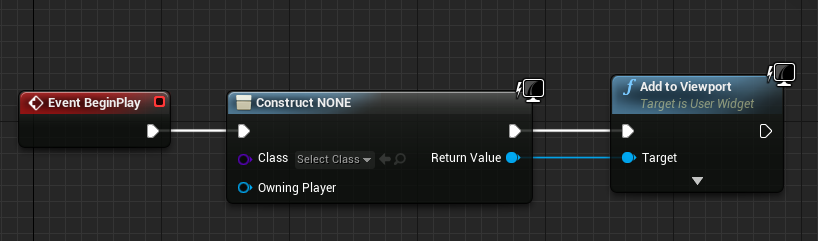
so I assume you have created a widget already, in order to add it you have to add some code to your controller or character bp
it should go like this, begin play - create widget - add to viewport
inland leaf
yes it works fine now after disabling the collision. I just didnt know WHERE it was to disable it, so i was searching in the widget itself where surely, there is no collision part.
restive eagle
if you need to access that widget later on, then on the return output right click and promote to variable
mighty dust
Lasko Portable Electric 42" Fan
potent bridge
I created it as a widget yes but it doesn't have a HP function yet, I'm using the starter asset scene
restive eagle
you asked how to add that widget to screen, so its just 2 nodes
and begin play event, assuming you want to add it when your game starts
ember star
When I attach a camera to a spring arm in blueprint, it doesnt put the camera where I expect, it seems to bring the spring arm closer to the camera?
mighty dust
f
restive eagle
oh, do that inside your character bp then (ideally you would add it inside your controller, but i think you dont have one)
one sec
potent bridge
Let me locate that blueprint.
 potent bridge
Yeah makes sense man
mighty dust
unreals taking way longer then usual to load is that just becuase i updated it?
restive eagle
that should only happen the first time you launch
and it will return to normal the next time
mighty dust
ok
potent bridge
urgh, cant find the player blueprint oof
restive eagle
if you are using a template then type in the search box, thirdperson or firstperson (depends on which template you have, if any)
dont actually remember how they named them
but should be something similar
restive eagle
or on your right try looking for "world settings", it should show which pawn class is being used
potent bridge
?
sudden bridge
trying to turn off "Render After DOF" on a material but it won't let me, anybody know why?
potent bridge
ok
restive eagle
@potent bridge but nevermind, you dont have any character bp.
restive eagle
its better if you get a template, it will have some default presets
which will help you a bit
but if you just want to add that widget, then do inside the Level blueprint, i wouldnt recommend doing this way but since you dont have anything set up yet its the easiest option

but ideally you would want to move that logic to a player controller when you learn how to make one
@potent bridge also when you have some free time, watch this https://www.youtube.com/watch?v=EM_HYqQdToE

Announce Post: https://forums.unrealengine.com/showthread.php?101051
This Training Stream takes a look at Blueprint Communication. We find that Unreal Developers of all levels can sometimes struggle through the concepts behind moving data between objects. So in this video we'...
 sudden bridge
I'd make a variable when the key is pressed it gets set to true, and when released it sets it to false, some delays and after each of them it tests if the variable is still true to continue
idk though, probably not the best way of doing it
grim ore
use the new enhanced input system in .26 or check for how long it has been since key pressed and released (use game time to check and store it when you press then compare on release
covert hedge
enhanced input system?
potent bridge
@restive eagle I'm going to make a Third Person and do the widget again, thanks for the help man.
grim ore
oh if just checking for if it has been down for X time? use a timer
potent bridge
I'll be doing more UE4 stuff with my tutor Tuesday anyway.
Only had one session thus far, this is just wider reading.
sudden bridge
Does anyone know how to make it so that particles / water are affected by fog?
I've had this issue for a while now
I tried setting the material to translucent and turning DOF off, but it just makes the material look weird
potent bridge
Man third person projects take a long hell time to boot.
Also it seems to be stuck at 39%
 narrow mauve
Anyone who does modeling know where to get interior blueprints for vehicles
I know where to get the outside of a vehicle but can not for the life of me find the interior
grim ore
@potent bridge its not stuck, its setting up shaders for the engine and project
potent bridge
And how long does that usually take?
Coming from Unity I got to get accustomed to these things.
grim ore
its the same in unity when pulling in a new asset store package that is big, it has to set it up
and it takes as long as your computer takes, no way to know
sudden bridge
Hmmm I think I know how to fix my issue but I can't get to the files, how can I find a material that's used in a plugin? Not a file that was installed?
potent bridge
nvm
grim ore
bottom right corner in the content browser is the options. in there is engine and plugin content options. you can then browse down to the plugin if it has content. If not you would hae to go into the engine or project directory for the plugin and get at it from there
sudden bridge
Ok, thank you!
potent bridge
How do I modify the jump function? I want the player to fall a lot faster than they are,
feels suuper floaty
grim ore
the character movement has jumping options, otherwise adjust the gravity
potent bridge
Thats cool and all, but wouldn't UE4 have like sub graphs where you can really tinker with the jumping?
found it
 quick silo
Hi,
what does this error means?
I checked my licence in the Unreal Launcher and everything seemed to be fine
but then when I try to compile my project I get this error
covert hedge
proximity interactions uuh
potent bridge
Also is there a way to import assets without them being crushed in size?
plush yew
Does anyone know why my rootmotion snaps back even though I have a root bone?
Is there anyone here that would help me with a project? depending on experience and amount of work, this could be paid.
grim ore
@quick silo you may have incredibuild installed
potent bridge
Also the fill seems to fill the bar completely at 0.8 rather than 1
so it seems to be empty at 0.2 and full at 0.8
 shy jetty
hey guys any ideas why i cant see this window when im importing? cant click and drag or anything
its on the left side
restive eagle
you can try clicking "window" and reset layout
but it might have been changed a bit in latest versions, still should be smth similar
 empty dawn
Hey guys, I have a component attached to a actor, that component fires a Apply point damage to the actor I want to, but for some reason the Event point damage is not being called. Any ideas?
plush yew
ok i have a serious question for those who have deep or notable knowledge about creating open worlds think to examples like final fantasy xiv, wow or other mmorpg's where there are huge lobbies sensationally called city states and or multiple regions in the same said game file, all interactable and such is it possible to create a game of that scale or bigger with probably less entire collections of region based maps but as an offline experience like a sand box whilst still keeping the entire maps connected with the events happening on them with or without a player interacting directly with those parts of the map to stay or be in sync if that makes sense
or is t5hat only possible on a server based game because servers can easily (maybe) keep entire seperate regions in sync without having to be on those playable parts of the game or map for the world to keep spinning on its normal axis or whatever of how things happens and work xD
 noble sentinel

 azure vault
I modeled a landscape in blender (it's basically a heightmap but modeled as polygons), now I need to somehow enable collision for this in unreal. Basic collisions won't really work since there is too much noise in the height to do box collision meshes, and the auto convex collision doesn't seem to work. Is there a good solution for this kind of issue?
 open wadi
Here's what should be an easy question: what is the proper node to use to simply set a string to a predefined value?
azure vault
probably a constant node
open wadi
I'm searching for nodes with the keyword "constant", nothing jumps out. Also "Set Value String" isn't relevant, etc. I can easily append to strings and the like, I just don't see a node to just set the value of a string to something.
azure vault
what kind of blueprint is it
open wadi
Would literally take 2 seconds in any written language.
It' s a widget.
It's just a string variable I want to set a value to in the event graph.
azure vault
"Make Literal Text" looks right
 random violet
is there a way to hide a bone and still cast a shadow?
without using a separate mesh? and if you do have to use a separate mesh, is there a way to disable sound notifications on just one mesh?
 limber mesa
anyone know how to delete keys in timelines?
empty dawn
Boys, really need your help on this one: I have a component attached to an actor, that component fires a Apply point damage to the actor on hit, on that actor event graph I have a Event point damage that should be triggered, but for some reason the Event point damage is not being called. Any ideas?
plush yew
I also asked this in #graphics but Idk if it goes here instead, Why when I use set vsync enabled node with get game user settings it fails to set the vsync? This is the setup
plush yew
How do you do that?
restive eagle
from get user settings return value drag and type apply settings
plush yew
It still isnt capped at 60 fps (my monitors refresh rate)
restive eagle
show your code
plush yew
The blueprint now looks like this
restive eagle
add a print string to see if it gets called
plush yew
It does get called when I watch the node. (Using f9 to insert a stopper or whatever its called)
 remote rivet
I'm not sure the best channel for this, but I'm looking for some suggestions on the best way to get started with something... I want a player of my game to be able to build a number of characters and save their settings, something like the sims where you create a new char, adjust some sliders, and save it to the library. My question is how to build that library... I could save the settings in a SaveGame... But what I'd really like to do is have a folder of "Saved Characters" where each character is viewable as a separate file. I'd like to build an editor extension to edit them. So the player can make them, or the game designer can edit them and tweak them from editor. What should I use to save those characters out? They are going to be a mesh and some variable settings... Anyone help me get started?
restive eagle
try setting any other settings and see if they are applied
plush yew
Set frame rate limit applies the correct framerate when I do it
restive eagle
what if you enter this in the console after the game has started
r.VSync 1
just to see if that works or not
also you can try running it as standalone, maybe the editor version doesnt like that for some reason
restive eagle
try running it as standalone first
to see if it works there or not
just with your previous setup, without console command
restive eagle
just with the game user settings, set vsync, apply settings
 dire sentinel
https://cdn.discordapp.com/attachments/371739852758319114/755942476434636851/unknown.png
anyone know why my speedtree tree is really dark after building light?
it was fine when I just imported it
https://cdn.discordapp.com/attachments/371739852758319114/755942766219100211/unknown.png
this is what it looks like if i build lighting before i drag it in


 restive eagle
@plush yew and disable "check for command line" inside the apply settings
plush yew
Yeah it seems to work (I will disable check for command line in a sec)
restive eagle
so everything good now?
plush yew
Lemme try packaging it and seeing if it is fixed
It still keeps jumping just over my refresh rate
At 4k its jumping up to 70 fps... my refresh rate is 60
restive eagle
you havent played with any of the settings were you set the target frame rate?
in worst case you could use "execute console command"
plush yew
No I set the target frame rate in blueprint to 0 so it was uncapped
restive eagle
and type the r.vsync 1 there
plush yew
And everything else is the same
open wadi
Ok everyone, I have a specific, interesting issue. I have an API that is returning a series of values in an array. I want to print them to the screen in a text box.
Because the number of items returned varies in length, I'm putting them through a For Each loop and using a temporary variable to hold the values, appending them to the temp var one by one, then at the end, write the temp variable to the text box.
So here is the presumed workflow: Response from API > Set the temp variable to a static value (to reset it if refreshed) > Loop through response array > Append individual properties of array to temp variable > Once loop is complete, write temporary variable to text box.
The issue is, it isn't working. And I have no idea why. And of course there are zero examples of performing this task I can find on the web. If I print the string at the end, the logs indicate it shows up as only containing the very first thing I set it to (right after the response), as if none of the append operations are actually executing. A screenshot is attached.
The only thing I can guess is that I need to extend the execution wire from the loop body "as object" node to some other node at the end of the append operations to ensure they execute, but the issue is, I have no need for such and no idea what to put there.
Is that correct? The append operations shown in the screenshot are not executing because the execution wire isn't extending past the "As Object" node in the loop body?
restive eagle
@plush yew not really sure why it doesnt work, you can try adding a small delay after begin play, maybe it doesnt have enough time to set everything. not really sure, but if nothing works use the "execute console command"
plush yew
I'm just going to use execute command line for now Idk why it would be doing what it's doing 🤔 (Exec command line works for now)
restive eagle
cant really help you more, as far as I remember it was working fine on my previous project
plush yew
Thanks for the help :)
 radiant sleet
As someone who is new is there a place where I can see all classes in unreal
And all variables and functions for those
The most important ones too not super complicated?
 supple totem
@radiant sleet

The Gameplay Framework of Unreal Engine 4 provides a powerful set of classes to build your game. Your game can be a shooter, farm simulator, a deep RPG, it doesn't matter, the framework is very flexible and does some heavy lifting and sets some standards. It has a pretty deep ...
Tom Looman giveth
radiant sleet
@supple totem thank you very much
 nimble warren
I don't think this is right channel to ask this, sorry if it isn't.
Every time I go into this area of the level and (i think, it might random) look at the lens flare this happens anyone know what this is? (If stuff looks familiar im recreating an old build of the game Hello Neighbour)
 rancid lynx
this lock node appears to happen faster than the copy node. even though there are no delays inside either.
lock seems to happen before copy. im not using any delay nodes. is it possible for nodes further down the line to execuse before copy would finish ?
copy spawns an object and enables its physics, lock disables the physics, but the lock happens faster, when both use a "Print" test
nm. i may have found a reference error.
restive eagle
@nimble warren do you want to disable lens flare in general?
nimble warren
I'm mainly trying to figure out how this happened
rancid lynx
yea. it was a target missmatch
restive eagle
ahh sorry, have no clue then :D. if you want to disable it look inside your post process for lens flare and set intensity to 0
nimble warren
I'll see if it still happens if i disable lens flare
 cobalt blade
hello
do you wnoe shy in myu blendspace the Z axis is not variating?
for example i have a running char
and istead of "bouncing, it goes on a straight line
thats the original blendspace
that is the retargeted one
 deep viper
I made a tesselation material (material with a displacement texture), but the material does not render at all when I enable tesselatio9n.
deep viper
i just needed to restart editor
 regal shard
Is there any way to have all the vertices follow a single vertex in an object (ex. grass blade) with world position offset? I want to apply a rotation to the top vertex in a grass blade mesh, and have the same rotation be applied to all other vertices in the mesh. Im using a vector field and it gets all stretched when I do it by each vertex.
 quaint island
i guess this is where i should post my issue lol as physics is programming related...
i also did some research an this could possibly be an unreal engine issue itself
our team has come into a major issue with collision "with ball movements" for instance we are creating a golf game, and when the ball goes up ramps, it constantly has different hit points that sends the ball flying in any which way you can think of..... making a small video for demo
an ive researched this issue an it seems to be an engine issue??? depending on which version your running?
grim ore
did you also try #legacy-physics ?
grim ore
ah yeah if you tried there then it might not hurt in here
quaint island
the research i found online, seems this is an issue with unreal, people stated to try reducing the min an max offset physics collision value, "we did" didnt fix
grim ore
does your ball have CCD turned on as well?
quaint island
also depending on the version you are running "they fixed in like 4.19? but broke again in 4.21?
will check an test ccd
we have tried many things an nothing seems to effect it but will double check
after some testing it seems the collision is fixed by removing CCD, BUT a new issue arises, that the ball "rarely" will just shoot through the object
but at least ramps behave like they are suppose to now... but now new issue of the ball just goes flying through the object "rarely"
believe ccd must have been turned on because of this issue
grim ore
yep thats what ccd is good for
quaint island
any tips on how to go about not allowing the ball to go through the objects then? haha
grim ore
might need to manually check for penetration like that and roll back the ball manually
quaint island
im sorry im not following
grim ore
tick -> compare current postion to last position with a trace and see if it hits something it shouldnt have like a wall, if so manually move the ball back to where it penetrated and then record that position as the last position
not saying its the best but without using ccd you need to manually check for collisions
im sure someone has a fix for CCD doing that tho, its definitely weird
quaint island
ok an how would we go about fixing it when we find the spots
grim ore
its nothing you fix, its you monitoring the ball as it moves and moving it back to a valid location if it goes somewhere it should not
you basically stop it from going thru a solid object during that frame if it shouldnt
quaint island
ok i understand now
but would still end up having the weird physics issues making the ball behave badly
 barren flume
I keep getting this message when I try to create a c++ class
seems to only be this that does it
plush yew
Are ya running any thing except UE4
plush yew
What GPU are ya using
plush yew
I have only gotten this error when I somehow overexerted my GPU, a 1050ti.
Like opening 20 animation tabs at once in Persona.
barren flume
I have task manager opened right now
not too much ram usage
or gpu usage
It just seems to stop at 86% every time then a little while after then I will get that message
there we go
open wadi
Is it possible to write to a different variable (based on name of variable) in a for each loop within a UE4 blueprint?
For example, if I'm in a for each loop, and I have 4 variables: rich text "call_time_1", rich text "call_time_2", so forth, would it be possible to leverage the loop counter variable and append it to the name of the variable to be written to? So, for example, on the third loop (since the loop starts at 0) I could write to "call_time_2"?
The workflow would be in for loop > counter variable at 0 > write text to "call_time_0" (call_time_<insert counter var>)
 exotic thicket
I don't think so and even if it was that sounds like a bad idea
Use an array if you need that type of functionality
since then you can access it by index like you describe
 nova harbor
Random question - If I put a BluePrint actor, inside of another BPactor, is that going to cause issues later? vs two BPactors stacked ontop of each other in the world? i'll send a pic if that doesnt make sense.
open wadi
@exotic thicket: Thank you. Well here's my issue. Right now I have an API call that returns "call_times", an array that can vary in length (from zero up to five). The call_times themselves, have several properties, but for discussion's sake let's say they have 3 properties: "DateTime", "Description", and "Link".
Right now to display them I am looping through the returned call_times and appending the values to a placeholder string var, and inserting carriage returns between entries, then when complete writing the string var to my text block so that it displays properly in my widget, as seen here. This works as expected:
The issue is, the "link" property, I want to make it clickable text, but based on everything I'm reading, you can't simply make text clickable, so I can turn the "link" property text into a hyperlink the user can click. All I can find is information on using "Launch URL" and setting a button to that value to allow the user to click on a link and launch a URL.
So the question becomes A) Is what I'm learning incorrect and once can in fact make text (to be inserted into a text block) a clickable URL, or B) If not, what's the best method to allow the user to click the link, considering that, if I do have to use buttons, I don't know ahead of time how many call_times I'm going to have, and I don't know exactly how I"m going to address them dynamically within the loop if I can't leverage the counter variable within the for loop as a reference to the name of the button to write to?
exotic thicket
I don't know about A but at least for B you can put your buttons or texts into an array and access by index with that
open wadi
For example, if I could leverage the counter var and preconfigure buttons such as "Call_Time_Link_0" and "Call_Time_Link_1" that I can hide or show as needed, I could dynamically show them if there is a relevant call_time entry. If the loop counter was at 1, and there is a call_time at index 1, I could then show the call_time_link_1 button and assign the returned URL to call_time_link_1
Oh really, ok.
Right, so there's a maximum of 5 potential returned call_times, so I could slam 5 buttons into an array, set them up in the designer ahead of time, hide them all by default, then if there's a call_time at index 1, I could unhide call_time_buttons[1] and assign the call_time_link to call_time_buttons[1]
Obviously this would take all of 30 seconds to write in normal code, just trying to decipher how best to do this in visual Blueprints.
exotic thicket
the same way as in code :)
you could also dynamically create buttons when you need them
they don't have to be created up front
open wadi
You don't say.
I did not know that.
Note that this is specifically in a UMG widget
Does that matter?
exotic thicket
no, you can use the create widget node to spawn custom umg widgets at runtime, or you can use the create object from class or whatever it was called node to spawn builtin umg widgets like buttons at runtime
you just need to attach them into some parent element in your widget and it'll work
open wadi
Hmm, ok.
Does that sound like it's the most logical course of action here based on what I'm describing?
Dynamically spawning buttons?
exotic thicket
yeah, if you don't know how many of something you have up front, then spawning them at runtime seems pretty reasonable to me
open wadi
I trust you can specify the XY coordinates and what not.
Ok, greatly appreciated zomg, I'm going to work on that now.
Well the other issue is I have these buttons normally
Within vertical boxes and what not.
For design purposes.
I wonder if I can dynamically slam them in a vertical box.
exotic thicket
sure
open wadi
Awesome.
exotic thicket
you need to tick the is variable box for your vertical box in the designer
open wadi
Right
exotic thicket
after that you can use it in the event graph side
then you can do something like MyVerticalBox->Add Child
open wadi
I found a forum thread on this, nice.
Well this is fan fucking tastic if I can just dynamically spawn the buttons for the hyperlinks then leverage launch URL for them.
That's the whole damn issue solved right there, been working on this for an hour and a half.
Thank you, really appreciate it.
exotic thicket
time to start a discord server for World Issues Slackers
open wadi
lol
Keeping the "we used to be on Slack before Discord got big" motif going, I like it
exotic thicket
I always assumed it was about slacking off and not about historically having been a Slack server but maybe that's it lol
open wadi
Yes, that's my understanding.
When I read the channel description one time they said they call it "Slackers" because it started on Slack and moved to Discord.
 atomic jolt
Hey all! So I'm using the console command "stat soundcues" to debug some SFX and I was wondering if there is any way to increase the size of the text showing up on the screen. I'm taking a vid capture because trying to see what sound cue is playing as they pop up and disappear can be frustrating. But also having the text size be bigger would also help a ton.
open wadi
Why the heck can't I find the "construct button" node like I'm seeing in these examples.
exotic thicket
because it's called construct object from class or something like that
open wadi
Weird, I'm looking at this: https://answers.unrealengine.com/questions/727126/how-to-add-button-in-to-vertical-box-dynamically.html
Dude busts out this at the end: https://answers.unrealengine.com/storage/temp/259722-immagine.png

 exotic thicket
yeah it's called construct object from class
the text on it just changes to say construct button when you choose the button as the class
open wadi
Ahhhh
So here's a fun little exercise.
Since this button is dynamically created, how do I access the onClicked event for it so I can leverage Launch URL
I'm researching this so I'll find the answer at some point, just thinking out loud since it's late and the channel is currently quiet.
exotic thicket
you can use "Bind Event To Pressed" or whatever it was called
it may be a bit tricky to set up with multiple buttons, so it might be easier to create a custom "URL Button" widget or whatever, which handles it internally (since you can't pass parameters to generic events in BP's at least I have never found a good way to do it)
open wadi
hmm, ok.
This is what I'm working with here:
So before, I was just printing the URL after a carriage return by appending it (along with the other properties) to my temporary string var that upon loop completion I write to my text box
So now, every loop iteration, instead of appending the link URL to the temp var string, I'm going to dynamically generate a button, assign the URL to it via launch URL, and somehow set the text on the button to say "Link to Call"
Those are the nodes in that screenshot in the upper-right, I"m attempting to figure that out now.
One thing that's a little confusing is, because I'm dynamically generating this button via "construct button", I'm determining how to assign properties to it as I would a normal already-created button in the variables section of the event graph.
And when I say "set the text on the button" I mean "Slam a text block on top of the button" presumably
The other thing is, I want it to be formatted correctly. Right now all I'm doing is using that append statement to write the call time, then carriage return, then description of call, then carriage return, then call link, then two carriage returns to separate those call elements from the next one in the loop, and that does work properly. I'll also need to determine how to ensure the dynamically generated button ends up in the correct location within the vertical box.
Anyway, I'm on it.
For my birthday I got a restaurant-class espresso machine, so now I can pull all-nighters to work on this project just wacked out of my skull on espresso.
I imagine this is taking a few years off my life but it's either this or corona.
@exotic thicket Question - I'm researching this and I'm reading that to do this properly (dynamically create button, as well as "Link to Call" text over the button) that I should dynamically create a widget and "call the appropriate placement function to add it as a child to the widget"
So should I be dynamically creating a widget first?
 jolly wigeon
why cant I select and edit any actor that's under untitled folder?
maybe because the type is set to world? (its a default level) how do I change the type?
 lusty carbon
What does r.raytracing.reflections.hybrid command do?
 placid elk
how do i change the background fog? to not be black so that its easier to see
this is my first time using ue4 or any game engine in general
 woeful arrow
Anyone have any suggestions for tutorials on best practices for:
NPC Interaction
- Determining when player is within range to interact (is camera or proximity or both used? looking for examples of this)
- Do you attach blueprint on the NPC for interaction logic or is that attached to the character typically?
Basically just looking for a video or tutorial of somebody doing this process beginning to end so I can pay attention. Suggestions for any sample projects to check out would be welcome, too!
open wadi
It's remarkable how few the examples are of this online, or on YouTube.
 wheat shore
Hello, might be dumb question, but why when I convert a BSP to Static Mesh, for some reason any applied material uses world alignment? I can't figure out how come created static mesh applied this on top of any assigned material.
lusty carbon
Setting exposure Max and Min to 1 makes my scene all extremely white and bright. Does that mean the light is too intense?>
 silk sleet
anyone ever have the problem where after a while whenever they do anything with a material instance (click on it, right click on it in content browser) it like shits the bed, unparents, and goes blank?
it's getting really annoying reimporting megascans over and over
silk sleet
would this happen if you moved the megascan folder w/ Explorer and not in-editor?
 versed peak
can someone explain why i'm not getting a smooth transision between colors?
[-1;1] /2 = [-.5;.5]

[-.5;.5] + 1 = [.5;1.5]
[.5;1.5] - .5 = [0;1]
so i have this strange behavior with a blueprint that randomly stops working, if i just add a print node at the end of execution flow, than it starts working again
anyone would know what can cause this?
if i just press compile on said blueprint it also works, without touching any nodes
ember star
I have a spring arm + camera. I want to detach (keep all world) component so I can freecam around, wwhich works, but when I try to reattach the positions are way off, regardless of settings. What am i doing wrong?
If I detach/attach, do I lose previous transform/attachment settings?
barren flume
The c++ classes folder isn't showing up for me?
I just finished trying to work on a pawn
ember star
did you umake a bluueprint based project?
barren flume
welp
lusty carbon
recommended LUX value for realistic sun light??
barren flume
yeah the pawn class
and a component
but haven't done much with the component class
I already have that enabled
 robust oar
yo bois
So I have a box as my main character
I want so that when I die the box fractures
How am I supposed to do that when the engine only accepts skeletal meshes?
plush yew
Fractures to what levels
robust oar
simple box fracture
plush yew
Like cracks, or full on destruction?
plush yew
Hmm for cracks you could use Decals to make it look cracked
plush yew
You can also use instanced Materials for cracks
robust oar
mm
plush yew
I don't know if this would be a good way to do this, make a destructible mesh, and switch it with your player when the Player dies
 worn oasis
Not specifically UE related but Any technology goons in here that know about tablets and processors and stuff like that?
plush yew
I'm a bit newbie to unreal engine. Anyone know how to destroy terrain inside in-game like Voxel games or Astroneer?
dire sentinel
https://cdn.discordapp.com/attachments/371739852758319114/755942476434636851/unknown.png
anyone know why my speedtree tree is really dark after building light?
it was fine when I just imported it
https://cdn.discordapp.com/attachments/371739852758319114/755942766219100211/unknown.png
this is what it looks like if i build lighting before i drag it in
 night socket
Hey everyone 👋 Unreal Engine noob here, I have a super simple question... If I'm looking to make a top down strategy game without a "playable character" (something like Sim City or Roller Coaster Tycoon), what is the recommended way to handle player input? Should I just create an Actor (instead of a Pawn) and attach a PlayerController + camera to it?
Or do PlayerControllers expect to be attached to something displayed in game (like a Pawn or Character)?
 fierce forge
how i can make this yellow too ? when i set the emission like at over 20 the square is white
 midnight gate
https://www.youtube.com/watch?v=2JbFZI1Zdc4 in this tutorial she made a new player controler bp and added code to it do i have to make a new player controler too? i already have alot of code thats using it to refrence things will i have to replace all of that?
User Interfaces are an essential part of any game, and they should be intuitive and simple to navigate. Celeste returns to delve further into UMG development to explain how to add gamepad support to your UMG widgets. She shows how to receive inputs, navigate menus, and visuali...
@fierce forge its overexposed ofc its gonna be white set it to 1 its gonna be yellow afk but you wont have the glow
 hasty wharf
GM, im having trouble making this simple colider box smaller. any tips on how to minimize the snaps?
latent salmon
REAL stupid question, how do i make my project...look better, i have a really good computer, but no matter what package i buy it alllll looks grainy as heck........
fierce forge
@midnight gate how i can get glow and the color at the same time ?
midnight gate
i think you would have to force the material not to get over exposured
latent salmon
i turned off the auto exposure, its jsut theres a visable grain in there that i dont like for some reason
covert hedge
we can tie an event in the animBP to call soundemitter on the character right?
latent salmon