#ue4-general
1 messages · Page 837 of 1
 fast verge
 honest rune
Type 'FFloatInterval' is not supported by blueprint. Seems kind of silly that wouldn't be supported since its just to contain a min and max value 😦
fast verge
@red prairie once again.. I really appriciate you helping me.. Thanks a lot
 bright wharf
i tried to open the first person gamemode controller and this happened
https://cdn.discordapp.com/attachments/225448446956404738/754387870789140560/unknown.png someone help pls

 near pine
how do i stop it going in the minuses
 grim ore
Use the clamp node or make sure your not subtracting below your minimum
near pine
ok
grim ore
@bright wharf close and re open it or go to window at the top and open the missing windows.
near pine
this?
grim ore
If you are using integers yes
near pine
ok
bright wharf
@grim ore closing it and re opening it doesnt change it
near pine
TY
 gilded lichen
Hello, I have this weird issue where I have to click on my buttons on my widget before I can hover over them. How can I solve this?
 summer verge
Every time I open the editor it sets the framerate to 120 fps, regardless of what I set last time
How do I permanently set the max framerate?
 worthy fox
?
summer verge
No, that doesn't let me set editor maximum (which defaults to 120)
worthy fox
@summer verge Maybe this thread on the forum could guide you in the right direction
https://forums.unrealengine.com/development-discussion/rendering/13260-lock-editor-fps-for-good
Unreal Engine Forums
For discussions about Materials, Textures, Lighting, Particle Systems, and Post Process Effects.
summer verge
Hmm, I'll check it out. Thanks!
 sly vine
 urban bear
Hey, I just started with Unreal Engine I haven't ever tried anything like this before, like unity or anything like that. So I'm betting this is gonna be pretty difficult for me to learn, but I was wondering if there was a good tutorial or something I can read on how to make a first person controller. No weapons or anything, just a normal player controller.
 honest vale
 serene birch
since ue4.26 is 'around the corner' (if I read the timings right) and ue5 is for earlyish next year, it feels like ue5 will basically take the spot of the 4.27 release yeah
 low bobcat
Hey guys I've pulled the UE4.26 I want to play a bit with water system. Do you know where is the ocean? I can't find it.
bright wharf
ive made a destructible mesh and i want it to be heavier, i cant find the gravity sliders and adjusting the mass scale doesnt seem to do anything
theres no mass in kg option underneath physics but theres the mass scale underneath second physics tab
also how do i make it so its effect by physics even after it fractures?
 grizzled condor
hello is any one know how to make the image to be able to scan and turn it to video ?Look like ROG phone 3 box
 wooden oyster
@plush yew I don't want something ready-made, I want to make it myself
 versed spear
I have successfully changed my players level in the game spark database through unreal engine. OMG what a pain it was. I had to rewrite cloud code from 2015 to work with game sparks 2020 api. What a joke that was...
bright wharf
trying to package my game, this happens
 plush salmon
Anyone else's Editor freeze (both cpu and memory wise) on Loading Referencing Packages when Clicking on Fixing Redirectors? should I be looking for a corrupted blueprint somewhere?
 versed peak
Hey people, I'm just picking up UE4 for fun / as a hobby.
This is the first professional game engine I've used and i was noticing something strange. If you look at this GIF, you'll see, that at some camera rotation the ground looks blurry and sometimes it doesn't.
Can someone explain this?
The ground material is 1 metallic and 0 roughness, so in my mind it should be a perfect mirror no matter the camera angle
 plush yew
its a great server for UE4 and other youtubers
 exotic thicket
I'm surprised you've managed to get that many members if you just go around spamming random servers with your invite link :p
exotic thicket
lol :)
plush yew
it helps small youtubers
it got me real and loyal subs
its a great way of promoting UE4 Work
 subtle gust
hi all, can anybody help me why my character isn't rotating while following the spline? thx
 snow crown
 rocky radish
bright wharf
rocky radish
bright wharf
u want me to pay 50 quid for a triple a game?? ill just make it myself!
 pliant rose
Rise Cyber Race, Final reconstruction of the Arc within the void
which axis is right from blender to unreal?
exotic thicket
anyone got any ideas on how to hide this gigantic icon an audio component is showing? :P
trying to position a mesh and it's kind of difficult because I can't see anything
(this is in the BP editor, not in the level editor view)
it did just occur to me I can just temporarily move the audio component so it's not there, but it feels like there's gotta be some less fiddly solution to this lol
 rancid lynx
what collision channel does folliage use ? can i make it a custom type ?
i cant find folliage collision anywhere in the details panel.
 late verge
if anyone is able to chip in, i'm having an issue with a cinematic i'm working on. what i'm seeing in the default and cinematic viewports looks nothing like what i see in the final render or when i hit "play". this issue has been bugging me for days and i still have no idea what's causing it. here are some pics for reference:
pic 1) this is the completely default viewport:
https://media.discordapp.net/attachments/131516273048682496/754484293211914301/unknown.png
pic 2) this is the cinematic viewport, which has some post processing stuff i've added to the camera:
https://media.discordapp.net/attachments/131516273048682496/754484445561487360/unknown.png
pic 3) this is what the final render of the cinematic looks like:
pic 4) this is what the scene looks like when i hit "play":
so basically, my issue is that the final render matches what the world looks like after hitting play, NOT what the cinematic viewport looks like
it should match what the cinematic viewport looks like, but it doesn't
i'm not sure why


 rough knoll
so remove from parent doesn't seem to be actually deleting the widget
i have an inventory thing that when opened removes everything and when closed readds everything
they stack ontop of eachother when readded
things that had a low opacity become solid
rancid lynx
Can I change InstanceFoliageActors Collision settings or type ? I cant find where or how.
I see where I can add a "Tag", I could just boolean test that I guess X_x
 dusky crest
Rise Cyber Race, Final reconstruction of the Arc within the void
which axis is right from blender to unreal?
@pliant rose in default export setting in blender Z is up and -Y is forward
pliant rose
Let the Light Guide you Right Emitting Bright @dusky crest
every time open google is ads ..(
dusky crest
google is not relevant anymore
pliant rose
money bt4
any alternative?
CxS_Thrad_2_Tech must aquire powerful addless searchengine, filtering clutter.. for pure infor..i would even decimate senceless text.. or encode info into picture sequences.. since mind converts text to images any way.. X
im friending any one that helps me, so if you dont mind, add me
@dusky crest
exotic thicket
Duck Duck Go is a decent alternative to google
pliant rose
duck duck can go where no goo can blow
plush yew
hey... I kinda need personalized help is there anyway someone could walk me through some terrain steps that are really messing up with my paint tool?
plush yew
working space?
pliant rose
https://www.youtube.com/watch?v=pbIKoYGrATs&ab_channel=GameDevAcademy ez question may be here

In this part of my Unreal Engine 4 Tutorial series I'll introduce you to the Landscape Tool and show you how to go about creating a new landscape in Unreal Engine 4.
To view this whole tutorial series in one video click here - https://youtu.be/a0qNO6_xPx0
Click here for more...
plush yew
I've watched that whole 4 hour course several times xD I love it. insanely useful. just something isn't working correctly and I think I need someone to look at it to figure out what's not working
 hollow frost
Hello
 still moat
Is Anyone experienced with the RuntimeMeshComponent Plugin ?
pliant rose
I have not progressed much sorry) @plush yew but what does seem to be faulty?
 peak hare
Rant Alert
Urghhh, why can't they make UI design to be doable in blueprint or designer then the code do it on C++??? Coding UI in C++ is aids and the documentation are near to non-existent
still moat
Welcome to c++
plush yew
well 2 things.
1:when I use my auto generated terrain material it freezes and loads and once done both in game and in viewer it shows the tile field again as if no texture is on.
2: when I load a singular texture and paint with it to (fill Layer) the tile shows up in game but not in viewer and causes loads of faulty shaders
 light thunder
I'm having a project that is taking a long time to save despite plenty of file size on project drive and the changes made are very small. (like editing a single comment on a small blueprint that has no references to other files) ...what should I examine?
 azure vault
Does anyone have experience with fixing repeated frame dropping in unreal engine? I have a brand new first person project open and in the editor and also in game I am seeing ~100 fps but every second or so it drops down to 60 and immediately climbs back up. It's really really frustrating but I can't find anything that explains it. (I've tried disabling nvidias in game overlay, made sure texture streaming and frame rate smoothing are off, tried setting the fps to a fix rated at 30 fps and it still happens (drops to ~22 fps and climbs back up), I've tried uninstalling and re-installing everything on a fresh 970 evo plus nvme drive, I've made sure no other programs are running, etc.) Any ideas at this point would be appreciated!
 manic pawn
use insights to find the issue
azure vault
OK, I will try
light thunder
Still haven't figured out why a simple save takes like 30 seconds....I haven't changed anything about this project that I can remember
azure vault
It looks like unreal is still building/loading from the other drive, is there a way to change this? I already uninstalled the launcher and the engines and reinstalled them on the fresh drive, I'm not sure why insights is showing me a build directory on the other drive
light thunder
I think it's my derived data cache
yeah this is blank
I'm not sure why, but I'm assuming that's what needs to get the data stored?
azure vault
OK, that appears to have fixed the files being on the wrong drive, sadly it didn't fix the issue. I have these frames that are spending ~100ms but it isn't giving any indication on what, any idea on how to dive deeper?
As far as I can tell insights is only profiling the CPU and loadtimes (using the flags -cpuprofilertrace -loadtimetrace) is there a way to capture more information?
manic pawn
if 4.25, use -trace=bookmark,log,frame,cpu -statnamedevents
 radiant jasper
I have a character bp placed in my level (ai, not controlled by player). It shows up in the map editor thing, but when I launch the game, it is missing
here it is in the map editor
does anyone know how to fix this
 jagged sand
hello, what is the best way to add lines so the text is seperate
radiant jasper
u can just add a grid png
radiant jasper
anyone know how to correctly add a character bp into a level tho
cuz i must be doing something wrong by dragging and dropping
 radiant sleet
As someone who is new to object oriented programing im confused on inheritance works in unreal
 terse cradle
Has anyone tried running unreal engine 4 on a external hard drive because my college doesn’t have it on there computer
radiant sleet
@terse cradle I have :D
Worked fine
I have a nitro 5 laptop and I use 1 TB external drive
Worked perfectly for me
azure vault
Well, relaunching is showing the wrong drive again for the Build directory, but also even with the more data in the insights I'm just seeing CPU stalls for ~100ms, is there a way to diagnose the root cause of a cpu stall?
radiant sleet
I just installed epic games launcher on hardrive
You might have trouble if you dont have permisisons on hardrive
Ive only used this hardrive with my laptop
terse cradle
Yeah try that on my portable ssd
radiant sleet
Are world settings and level settings the same thing?
IS the world the project
Project settings or level settings
 tawdry wren
Any idea why these randomly starting appearing?

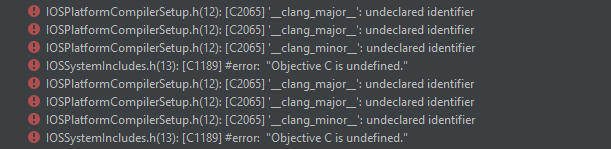
I can't build my project because of these errors, and i dont even do IOS / mobile development?
radiant jasper
does anyone know a fix to my issue
azure vault
Never mind about the build directory, I just realized the log messages inside of insights is probably using paths from the original computer that built the libraries.
tawdry wren
Idk whoever has had the similar issue i have, its an issue with Rider. Somewhere it adds the include #include "IOS/IOSSystemIncludes.h" and throws this error
plush yew
if someone is available to help a noob at a massive issue.. please come join me in support so I can show you everything that's going massively wrong
dusky crest
you can use border
radiant sleet
If I send in an image can someone confirm or deny if I have it right?
plush yew
I mean possible
dusky crest
@jagged sand something like this
jagged sand
hmm
bit scuffed for how i have it
basically i have a row
i add a child to a vertical box
and fill the values with server info
honestly its fine
thanks for showing me
actually
hm
radiant sleet
This is my second day on the engeine
plush yew
I just need help with painting xD it doesn't seem so hard but my terrain is massive and isn't working
radiant sleet
Im new and am confused
This is my understanding so far
Is world settings the project or level
plush yew
world settings? like Global settings?
Global settings are terrain and is an actor attributor. if you mean world settings it's a level design tool
radiant sleet
So a terrain actor is called a world?
plush yew
I'm not too far into to terms. sorry for not being able to associate certain terms
actor layout (will try to find more)
I build as I go. I spent 2 years on Cryengine... this is big change but I still understand it. just names are all odd to me
radiant sleet
@plush yew Thank you this kind of stuff I need
So root component is just something that keeps track of x y z rotation scale and stuff ike that
?
You dont know how useful this kind of thing is
IF you find more I will be so happy
plush yew
sure, Gameplay Framework is all the stuff built on top of the basic actors/components - https://docs.unrealengine.com/en-US/Gameplay/Framework/index.html
Core systems, such as game rules, player input and controls, cameras, and user interfaces.
radiant sleet
So I have another question related to this
How do you acess variables and functions of classes above in blueprint?
Here let me formulate my thought dang this is confusing
 covert pollen
radiant sleet
covert pollen
radiant sleet
@radiant jasper The function jump
plush yew
Just axis mapping
radiant sleet
thats like set x y z?
radiant jasper
huh
radiant sleet
Dont listen to me
plush yew
I mean animations come after setting up the movement anyways
radiant jasper
the tutorial wants me to use the animation as movement
but i dont wanna use any animation
plush yew
So don't
plush yew
what tut are you following
radiant jasper
idk how to set the speed
radiant sleet
Im confused on what casting is in blueprint?
radiant jasper
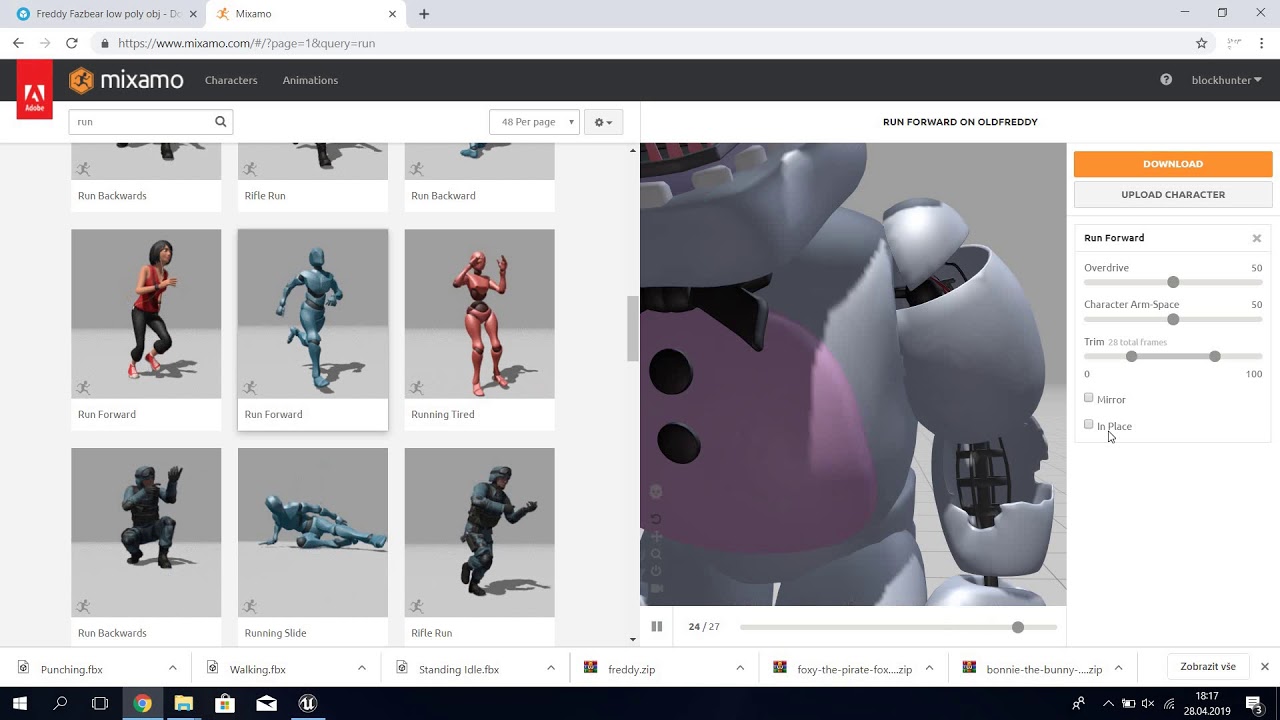
Today we are making complete animatronics, with a jumpscare, footsteps, door functions!
In the next part (Part 7) We will be making the functionality of the music box!
bp
it doesnt move
it just stands still
plush yew
Alright so this is about ai movement?
radiant sleet
do AI classes in unreal have built in pathfinding
 lilac wigeon
do you have any nav mesh where the ai can move?
radiant jasper
uh
plush yew
^
radiant jasper
man all i have is that bp i sent
radiant sleet
How long it take yall to learn unreal
radiant jasper
and some pawn sensing
lilac wigeon
in the level blueprint search for a navigation mesh
plush yew
In simpler words, is there a place where your AI is standing and can move around
lilac wigeon
plush yew
How long it take yall to learn unreal
@radiant sleet Still learning
lilac wigeon
place it in the world, and everything that is green is where your ai can move to
radiant jasper
it is standing on a floor but wont move
plush yew
I haven't messed with AI till now so not very knowledgeable about it yet
azure vault
OK.. So it turns out the stuttering I was getting was from having UDP Messaging - Enable Transport turned on. ?? I don't understand that but hey this issue has taken me two months to fix, glad it's fixed
radiant jasper
its just an invisible cube
radiant sleet
Whats the best way to learn
Just follow tutorials and overtime youll start to understand
radiant jasper
lilac wigeon
it has to collide with terrain
radiant sleet
Is map level and world all the same thing
plush yew
Depends on what you wish to do with the engine @radiant sleet , although yes watching tutorials and keeping on working towards self made stuff is the way to go.
lilac wigeon
oh sorry, you need to press 'p'
 loud knoll
anyone know a way of capturing APEX actor chunks so I can attach an emitter to them?
radiant sleet
ThirdPersonExampleMap (Level)
radiant jasper
can someone help me
radiant sleet
And then theres world settings under project settings
radiant jasper
what do i do with this invisible cube
lilac wigeon
should look something like this @radiant jasper
radiant sleet
@plush yew How long have you been using it?
radiant jasper
oh
radiant jasper
how do i click it
radiant sleet
You seem like an expert
plush yew
No I don't, but the name itself is pretty self explanatory
I don't know shit
But keeping on working is the only way to learn.
radiant sleet
Makes sense
lilac wigeon
@radiant jasper go to this discord server, https://discord.gg/3eUZGz it's from epic games, there are 5 workshop there that can help you a lot if you are new, they check all the basics
radiant jasper
ty
lilac wigeon
sorry i cant help you enough, it's like 2 am here and i'm hella tired
radiant jasper
ik the basic stuff
lilac wigeon
but basically you need a nav mesh, your character inside that nav mesh and your destination from function aiMoveTo to be inside that nav mesh
if one of those 3 things don't check, your ai wont walk
radiant jasper
ok
radiant sleet
Are component and asset basically the same thing
plush yew
No
radiant jasper
componenets r like variables and functions and stuff
assets r like models and textures
plush yew
Components are like special objects that you can connect to actors as sub parts
radiant sleet
So a component is jsut a variable basically right?
plush yew
Assets are any content, can be bp, models, sounds, vids, anything
lilac wigeon
inside a blueprint everyone of this (upper left) are components
radiant sleet
Yeah I was just confused why unreal said something that was an unbelivably stupid question
plush yew
Yes they are stuff you can add to the actors
lilac wigeon
it's every part of your blueprint that together create said blueprint
each component has it's own functionality
plush yew
They can be many things, like colliders, meshes, particle systems
radiant sleet
That makes sense
lilac wigeon
for example you can create the component for "health" and use it for your character but also for actors like boxes, or trees or everything that should have health
that way you only create the functionality for "health" once, but use it everywhere you need it
radiant sleet
Im confused by that
Why wouldnt I just create variable for each object names health?
plush yew
Because then you will be creating it multiple times
radiant sleet
IS this where object oriented ocmes in
plush yew
why make something 10,000 times, when you can make it once and share it.
radiant sleet
Hmmm
SO I could make class named health
and have it say once health is less than zero destory this instance
lilac wigeon
if you are new to programming i would say... don't overthink it, learn step by step, if you don't it will be overwhelming
plush yew
^
radiant sleet
Facts unreal got me whelemed
lilac wigeon
try to understand unreal first
radiant sleet
I understand moving around and placing things and stuff
plush yew
Because you are trying to do everything at once, break stuff down into different parts and learn them first.
Like I at the moment am focusing at animation montages
radiant sleet
That makes sense but heres my problem
I follow tutorial and I dont understand anything when it comes to when they start coding stuff
Wait lemme finish my thought
that sounds dumb so far
lmfao
plush yew
Do you know c++
radiant sleet
I know it except for when it gets to classes
and inheritence specifacally
I understand if statment
while loops all that jazz
I even understand a class is just like a custom variable
tyoe
plush yew
Well unreal coding is just c++, with a large library of headers and macros made for unreal.
radiant sleet
I just dont understand how unreal uses it
So a header file is just where they store function names right and variables?
plush yew
Yeah
Like in normal c++, you need to call the iostream file, that is #include <iostream> to do normal input and and output through cout and cin
radiant sleet
So theres one projects script and it creates a bunch of variables that are custom classes
See that makes sense to me
plush yew
In unreal projects there are similarly other header files that you need to call, and these files have their own unique functions.
radiant sleet
So like pawn instance could have an avalible function?
Like thispawn.makepawnjump?
and like variables like thispawn.mass
plush yew
Kinda like that yes
radiant sleet
@plush yew did you have object oriented experience before you used unreal?
like programming languages
plush yew
I had some java
radiant sleet
Wait so when I make a blueprint class in the content folder
plush yew
Although nothing extreme
radiant jasper
ok so now i got it working but the pawn sensing doesnt work
radiant sleet
thats like main project being like #include this class
and then I can create instances of that class because its included?
radiant jasper
plush yew
Yes
radiant jasper
what is problem
radiant sleet
Ashen you dont know how valuable you are lmfao
plush yew
what is problem
@radiant jasper What is the destination
radiant jasper
the player
plush yew
See this is some of the code from default unreal generated files
And this second one is the header file CoreMinimal that the first one calls
radiant jasper
its set to the target actor as third person character
plush yew
No its not
radiant sleet
So main project has like tick function and begin play functino and all that jazz
radiant jasper
i have the cast to thirdpersoncharacter connected tho
radiant sleet
where would you find that in blueprint editor
plush yew
Look at the destination in the AI move Node
radiant jasper
but is it not enough to be set as a target actor
plush yew
You need to get its location and feed it into the destination
Wait so is graph just a script
@radiant sleet Yes, it is visual scripting
As you can see the CoreMinimal.h file calls 143 other header files that the engine uses
radiant sleet
I feel like im making progess understanding concpetually
You are so awesome
the fact your using your precious time to help my dumb questions
Ill be back im gonna go experiment a little
plush yew
Teaching others help me understand things too
radiant sleet
I read somewhere that teaching something requires you to have like 10x knowledge than being able to practically use it
I think thats true the number might be off
plush yew
I always feel looking at others mistakes and trying to solve them like a puzzle to correct them is really fun.
radiant sleet
the concept is true
THats a great way to look at it
I guess it is a mutually benifical thing
jagged sand
how can i check how many items are in an array (blueprint)
radiant jasper
how do i make the ai automatically go to the player character when within a certain distance
@plush yew
jagged sand
figured it out
jagged sand
yeah
plush yew
how do i make the ai automatically go to the player character when within a certain distance
@radiant jasper Set up a collider on the enemy or the player, set up on overlap event. Set a AI move function to be triggered by the overlap event.
radiant jasper
huh
plush yew
That is how I would do it, unless ya want to keep it sight only
radiant jasper
i want it to be so when the ai reaches a certain point it automatically goes to the player
plush yew
@jagged sand It seems your array is either out of bounds, or you are calling a null reference.
i want it to be so when the ai reaches a certain point it automatically goes to the player
@radiant jasper In that case do what I said
jagged sand
its not the array ill show it
radiant sleet
Unrleated but yall wanna see a picture I made
plush yew
I do think you are doing stuff beyond your current abilities @radiant jasper , I recommend learning some basics first.
Yeah sure @radiant sleet
radiant sleet
radiant sleet
I wish coding was as simple as drawing
radiant sleet
See the thing about coding that scares me
radiant jasper
well i wanted to use pawn sensing but it didnt work
plush yew
@jagged sand Which node is throwing the error
radiant sleet
Well I know how to code in gamemaker
jagged sand
getplayer i think
radiant sleet
but thats way more simple
I think theres soemthing about unreal being object oriented
jagged sand
yeah but it still works
radiant sleet
that is so fundemental my brain is trying to understand workload
jagged sand
ohh btw
how do i animate my ui
instead of having it popup
i wanna have it slide in
plush yew
How to create animated UI elements in UMG.
jagged sand
ty
plush yew
I don't think I helped that much, but I won't say no to free credit.
radiant sleet
No you did
radiant sleet
My first code ever
radiant jasper
but the ai goes straight through it
radiant sleet
This should just make cube float right
jagged sand
tysm
radiant jasper
how do i make the door block the ai
jagged sand
animations so good
radiant sleet
OMG IT WORKED
jagged sand
gg
honest rune
This feels like an odd question but are UMaterialInstance something to consider using in TSoftObjectPtr<T> for late-loading? I always thought materials were just some weird graphics voodoo that is loaded on-demand anyway
radiant sleet
When you use SetActorLocation Does it ignore pysics
Or do you need to add physics component or something?
For physics
plush yew
how do i make the door block the ai
@radiant jasper set up a collider
plush yew
It is a component that you can add in the blueprint
plush yew
its called collider
radiant sleet
Wait so is collider a component that enables physics
and once you have that component you can change it to 1 of 3 physics types?
radiant jasper
event begin play?
radiant sleet
Like static and stuff
plush yew
No a collider is a component that bear with me, enables collision
radiant sleet
So does each actor already have stuff like mass and gravity
Or what component is for that
radiant jasper
how am i suppose to do this it doesnt show up
radiant sleet
Oh intresting so when I add box component to my class it comes with that already
So if I wanted just a cube with no physics Id have to add static mesh component?
Sorry if these questions stupid
plush yew
So does each actor already have stuff like mass and gravity
@radiant sleet Yes meshes have gravity and mass, that can be toggled and controlled
radiant sleet
Oh so meshes have the avalibility for all that
plush yew
how am i suppose to do this it doesnt show up
@radiant jasper This is why i say you should learn the basics from a Tut first
radiant sleet
But you can toggle on or off
radiant sleet
Wait so when I do SetActorPosition it doesnt do collision cause its doing it for all actor components
IS there like an AddForce node
Like whats its official name
radiant jasper
"At the top of the editor, there is a Collision drop down menu. If you click on it, you will see the options you need in order to add collision to your mesh."
its not there
plush yew
@radiant sleet It is called Add force
radiant sleet
@radiant jasper I think you can go into your characters blueprint class
plush yew
"At the top of the editor, there is a Collision drop down menu. If you click on it, you will see the options you need in order to add collision to your mesh."
@radiant jasper You are not adding collision to your mesh you are adding it to your BP
radiant sleet
select the character and then go into right
and that should be where all variables are
@plush yew No way I actually guessed it LMFAO
XD
radiant sleet
Click on the mesh component
radiant jasper
radiant sleet
And then on the right side you should see compile time variables
and I think thats where you check enable physics and stuff
radiant jasper
dont see shit
radiant jasper
yeah then what
radiant sleet
And then right side window should have variables
radiant jasper
yeah it doesnt show the menu i need
radiant sleet
screenshot again
plush yew
As I said @radiant jasper You are in BP editor
radiant sleet
Dont listen to me
plush yew
The window you are looking for is a mesh editor thing
radiant sleet
I htink you can select phy material right
radiant jasper
how do i get there
plush yew
Click on the green add component button in the top left @radiant jasper
radiant sleet
on the screen shot
radiant jasper
add what
radiant sleet
Yeah lsiten to him
plush yew
my animation is laggy?
@jagged sand Check your stats
jagged sand
where are the stats?
plush yew
Now add a collider
radiant jasper
not an option
plush yew
type collider in the search
honest rune
because its not called a collider
radiant sleet
Dont meshes come with collider component already?
honest rune
BoxComponent, SphereComponent, CapsuleComponent
jagged sand
nvm the lag is normal
radiant sleet
I may seem like an idiot atleast im learning
jagged sand
im running 4 things at once so yeah
honest rune
I think we have a Unity Stowaway here boys! Get him!
radiant jasper
ok i clicked on the box one
honest rune
lol
radiant sleet
Is collider unreal syntax?
plush yew
Dont meshes come with collider component already?
@radiant sleet Not all of them
radiant sleet
Or collider unity syntax? Lmfao
plush yew
I have sized it manually, there might be an automatic option
radiant sleet
@plush yew So does a box
honest rune
yeah, unity calls them Colliders. It is a widely accepted name
radiant sleet
Box component come with collision component automatically?
Doesnt a physics component need a hitbox to simulate physics?
plush yew
Collision components are called colliders, colloquially
honest rune
more a "hitshape"
radiant sleet
Lmfao true
radiant sleet
too much 2D
honest rune
use smaller screens lol :p jk
radiant sleet
So box component automatically has physics component but no collision component automatically
plush yew
Saw your screen in half
radiant sleet
so you have to create collision component to put in side physics hit shape?
jagged sand
no i fixed it
plush yew
BOO, saw your screen, or your game will never be as good as witcher 3.
honest rune
@radiant sleet yeah, unless you choose to use physics asset or import collision meshes with the mesh
radiant jasper
bruh i added the collision and now my door close animation doesnt work
honest rune
or complex collision
radiant sleet
Oh so a collision component can be any mesh
radiant sleet
Oh so only those 3?
honest rune
but the simple start would be using components. if you're new or learning, start with components
plush yew
But if your mesh is very detailed then it will lead to a very complex collision component
honest rune
no, ignore that, its only going to get confusing right now lol
radiant jasper
my door closing sequence doesnt work with collision
radiant sleet
Dont most games even with complex meshes use simple collision to save on performance or something
Like less pollygons
honest rune
yep
plush yew
Much better to set the whole hand as a single sphere of collision than to give collision that is mapped to the hand like a glove
plush yew
Dunno
radiant sleet
wich axis is green red and blue
Like is green always x red always y and blue always z
or whats the correct one
plush yew
Who knows, I don't
anyone know why when painting a texture I lose the texture?
@radiant jasper I would help you, but you lack a lot of basic skills that one can very easily learn by themselves on the net, I recommend you to go do a basic tutorial first.
radiant jasper
bruh i added the collision box
and the ai still goes straight through it
the fuck
plush yew
Does your ai have a mesh with collsion
radiant jasper
no
it has a mesh
how do i add collision to it
wait he does have collision
nvm
yeah it has capsulecomponent
plush yew
Check your collision channels
radiant jasper
both the doors and the ai have collision
the way my door opens/closes is with sequence, but idk if i have to add collision into the sequence or something
plush yew
depends on your collision channels
radiant jasper
how do i check that
plush yew
I am signing off for today, maybe someone will tell ya.
radiant jasper
bruh
plush yew
Do think about
@radiant jasper I would help you, but you lack a lot of basic skills that one can very easily learn by themselves on the net, I recommend you to go do a basic tutorial first.
radiant jasper
but i have the box and everything
dont make sense to me
ok figured it out yall were tellin me some bs
had to do sum completely different
my on fail doesnt execute
it just keeps trying to succeed
plush yew
😦 I don't get why everyone else with much more difficult questions seems to be getting answers quite quickly XP but my Questions go unanswered and seem trivial in comparison
plush yew
you said you have collision on the door, the floor, and the pawn?
does the pawn mesh have tabled collision as well as object? and is the door considered an object actor? or is it a part of geometry as just a terrain placement
radiant jasper
collision is working fine now
look at my recent issue
my on fail doenst execute, it just keeps trying to succeed
like it keeps trying to go to the player, even when it cant
itll just stand in front of the door waiting
but i want it to on fail when it stops moving collides with door
plush yew
ah. well do you have a code for the on fail?
radiant jasper
yeah
plush yew
let me see that
radiant jasper
plush yew
looking at that I see no technical errors. but the on fail doesn't have a dragged out connector. is this the whole thing drawn out from another (all move to) that is drawn from it's on fail?
radiant jasper
the delay node is connected to the on fail
plush yew
because if not then it doesn't have an on fail option. it'll just try to constantly succeed
ok just making usre
sure*
then that goes outside of my trial and error. as long as that delay is from an on fail then I'm not sure because mine worked so far
plush yew
so broadly speaking what are you wanting? on suceed open door? and on fail what?
radiant jasper
on fail go back to original location
on succeed enter room which works fine
succeed would be if the door was opened
fail if door is closed
idk how to define that tho
plush yew
sorry 😦 not sure
it looks fine to me
I was able to replicate the problem I'm having at a different zone
if I add more than 2 textures in the same square it fails to render
I'm trying to pain with blending and nothing seems to allow me to place more than 2
 worn granite
@plush yew your issue may seem simple (and the solution probably is), but getting an answer depends on whether the person viewing your question
1 knows the answer
2 wants to give the answer
In this case, I don't know the answer
worn granite
No, but I know how to ensure it doesn't become my problem
radiant jasper
huh
worn granite
You probably wanna go ask about nav areas in #gameplay-ai
and Sako should ask about the texture issue in #level-design
plush yew
appreciate it
jagged sand
i made an audio slider, when i change the volume of master to 0% it stops the audio playing. how can I fix this?
they are for different sound classes
music and sounds and children of master
ok its not just for master
setting any to 0 volume stops audio
worn granite
You probably need to make sure your sounds are virtualized
jagged sand
virtualized?
jagged sand
ahh
 marsh gull
Finally, after 4 long sleepless nights (4 or 5 don't even know anymore) I HAVE AN INVENTORYY
 winter zenith
Just as my game is finishing building I am getting this error
Does anyone know whats causing this
cont:
 runic fern
Goodday Guys ..
Can i use the Steam AppID Before Publishing or pushing any package ??
if anyone know please provide me
 topaz hamlet
Hi Everyone, I am new to the channel and hope anyone knows how to print the Enum value in my HUD
Currently, my setup is
get GameDate > get Array[1] = month > Tobyte(int) > Byte to Enum > Enum (month) > Enum to string > Totext(string) > Return value
but my HUD always shows JAN, doesn't matter what is the input as the month.
Could anyone know how could I print out the value in my ENUM for this matter?
I will post screenshots of my setup as below:
jagged sand
using advanced sessions how do i get the steam name?
 rich reef
Do you guys know of any software for previewing .tga files?
(Please ping on reply ❤️ )
 regal mulch
@jagged sand The SteamName is already available through the PlayerName of the PlayerState.
(Given your game properly starts up with Steam enabled)
jagged sand
hmm
oh shit thats why
my game doesn't launch steam
steam overlay doesn't popup
got the config done
hmm
any ideas?
it used to have the overlay
ahh
think i got it
nope
 merry gazelle
Does anyone know if Unreal Engine allows the the transform mode (rotation, move, scale) to be exposed ingame? I will create my own is necessary but it would be great if I could just use give the player the same controls as used in the editor
plush yew
@rich reef Try pictus
 orchid coral
does anyone know how to stop the root motion affecting to orientation of my character? i've searched for hours and can't find an answer. please help lol
 lusty carbon
Hi! I have a sequencer problem similar to this https://answers.unrealengine.com/questions/897871/view.html
Any ideas?
plush yew
I am so lost rn
light thunder
I'm having a project that is taking a long time to save despite plenty of file size on project drive and the changes made are very small. (like editing a single comment on a small blueprint that has no references to other files) ...what should I examine?
When I hit save, the editor freezes for about 30 seconds...the only thing I can think of is that the computer I normally am connected to through source control is offline, maybe that's causing the issue?
light thunder
Additional info - the project is a large one, however, I have opened one in a previous version of Unreal (4.23.3) and it saves fine, (even while compiling a large amount of shaders) versus in 4.24.3, I can't figure out why it is so slow)
 marsh ledge
I’m pretty sure that unreal just has slow build and save times
lusty carbon
Using BP to teleport my pawn to some triggerBox location, I end up high in the sky
What is going on?
 frosty copper
Think you need teleport checked (iirc, doesn't affect physics)
Other than that I'd check with some prints what the position of each actor is before and after the setActorLocation
Move the actor instantly to the specified location.
 ember star
Has anyone ever used Set Level Transform, or Load Level Instance in multiplayer?
lusty carbon
Is there a way to change ArchvizCharacter walk speed??
versed spear
it is a plugin. can you change the source?
plush yew
 warped silo
What is the best channel here to ask about UE4 related tooling and pipelines? Things outside of the editor itself, such as UAT, UBT and UGS? I'm trying to get more specific information related to reliably maintaining a modifiable, yet easily distributable source build of UE that can be deployed to both artists and engineers. (Preferably via UGS)
versed spear
using charactermovment component and floatingpawn component. I add forward movement and it will move based on rotation. Issue I am having is that the character will only be moving while touching the ground. It is like the floating component is not working. I have the same set up on a 2d character and it works great. Maybe it is a setting I am missing.
ok so narrowed it down to the character movment component
 marsh swallow
Is there a way to get landscape splines to ignore Cull Volumes?
they seem to get pretty jacked up when it comes to splines for things like fences and whatnot
 fringe pivot
Can we use UE5 already?
 sly spruce
Hello
I'm using UE 4.25 and using Webbrowser. Issues come from when I press some key when enable the IME option using another language different EN(Such as Ko,Jp,China..). IME allows input of Windows change status enables to be disabled. According to Release notes: https://docs.unrealengine.com/en-US/Support/Builds/ReleaseNotes/4_18/index.html
New: Chromium Embedded Framework (CEF) upgraded to branch 3071 Win32/Win64/Mac. Added web browser support for foreign language character input via IME.
But Webbrowser still occur issues when user input IME.
Release Notes for Unreal Engine 4.18
Who can help me this issue ?
 ember sigil
I'm facing same issues when try debug reason disable IME on WebUI
 frozen compass
I am starting to learn UE and am working on learning Landscapes. All the videos I see from importing my World Creator stuff show layers for grass and all. I am not seeing this on the latest version of UE, am I missing something? Thanks so much for any help.
 sudden bridge
I created a new landscape and used a grass material, but it's just black. There's a skylight and a directional light above it, and I tried building the lighting but it doesn't seem to work. Thanks
sly spruce
I'm using UE 4.25 and using Webbrowser. Issues come from when I press some key when enable the IME option using another language different EN(Such as Ko,Jp,China..). IME allows input of Windows change status enables to be disabled. According to Release notes: https://docs.unrealengine.com/en-US/Support/Builds/ReleaseNotes/4_18/index.html
New: Chromium Embedded Framework (CEF) upgraded to branch 3071 Win32/Win64/Mac. Added web browser support for foreign language character input via IME.
But Webbrowser still occur issues when user input IME.
@sly spruce
.
Release Notes for Unreal Engine 4.18
 scarlet birch
Will this work in a BP library as is or should I just feed in Delta Seconds as an input to the function?
 inland leaf
in all honesty, i dont get unreal ... i have a brutally hard time to wrap my head around some of the systems. When i build a blueprint of a slow moving bullet that should have range X, i would save the start coordinate and check in the update (or tick) if the range is higher than the given range X ... but do i use a special "move" thing in unreal ?
scarlet birch
It's two sperate things there. One, to get the distance is what you stated. Moving can be done a few ways, most of the time you'd probably use projectile movement.
inland leaf
there is projectile movement ?
sorry i am coming from unity and things work a lot different there ^^
exotic thicket
@scarlet birch that'll work in the library just fine at least when called from actors and such since they provide the necessary world context object automatically for that
scarlet birch
Thanks, I suspected that would be the case but didn't want to be caught by surprise since this won't be used for a while.
sudden bridge
anybody know how I can get this to look less...... ugly
 vale osprey
Sorry, I'm rather new to Unreal Engine. You may want to ask someone else.
 thick herald
@sudden bridge that's due to tiling. Search YT, there a several videos out there that show different ways of reducing that.
sudden bridge
Ok, thank you
 vital cosmos
How do most open world games handle different character faces? Do they randomise the morph targets in character to generate a unique face or is it just a a few faces repeated over
scarlet birch
Some combination of morph targets and separate head models
plush yew
can someone help me ith something dm me please
 crimson citrus
Does anyone know how to play in a selected level? I have multiple levels and its a pain to run through my whole game to test things in the current level
 harsh tiger
aside from the 'r.Streaming.PoolSize' method. what else can i do to resolve this issue? is setting the pool size to 2000 a bad idea for a VR game? any other resources aside from this https://docs.unrealengine.com/en-US/Engine/Content/Types/Textures/Streaming/index.html would be much appreciated!
System for loading and unloading textures into and out of memory during play.
crimson citrus
I'm trying to use the "play from here" button, and thats not working
 barren flume
so close
 dreamy sleet
Can someone please send me a video to move cars and how to move a person and how add money in
bright wharf
the gun suddenly went weak all of a sudden, the other guns ive made r normal but this one will still move objects but hardly, this is the blueprint for the projectile it shoots
 nova harbor
@dreamy sleet i might be wrong entirely, but Get Velocity seems to be set to 100, maybe if you increase that?
winter zenith
Just as my game is finishing building I am getting this error
Does anyone know whats causing this
cont:
https://media.discordapp.net/attachments/225448446956404738/754594530044674128/unknown.png?width=951&height=418 https://media.discordapp.net/attachments/225448446956404738/754594636596641862/unknown.png?width=951&height=130

 scarlet birch
@bright wharf
bright wharf
@scarlet birch that didnt do anything the the gun in problem but it made the other gun have the same problem
scarlet birch
Like the other person said, 100 is a fairly small force.
scarlet birch
Use impulse too
bright wharf
ill do it tommorow
scarlet birch
not force
radiant sleet
When I package my game
If I upload folder can freind play it
without downloading unreal 4?
harsh tiger
without downloading unreal 4?
@radiant sleet yes
scarlet birch
I'm almost done moving all my IK stuff to a component that just gets added to a character and does most of the stuff you need for basic foot Ik once you set a few config variables. Is that something that would be useful to others? Just want to know if it's worth putting on Gumroad or something for free.
harsh tiger
@scarlet birch sounds very useful
scarlet birch
I wasn't sure if they are better solutions now. I haven't been keeping up on things.
harsh tiger
i think having any component that can be dropped into something an tweaked a little is always something worth having
having one for IK stuff sounds like a real time saver
maybe put it on the marketplace?
winter zenith
Just as my game is finishing building I am getting this error
Does anyone know whats causing this
cont:
https://media.discordapp.net/attachments/225448446956404738/754594530044674128/unknown.png?width=951&height=418 https://media.discordapp.net/attachments/225448446956404738/754594636596641862/unknown.png?width=951&height=130
 open wadi
Hi everyone, question: Is there any way to copy / paste nodes from widget to widget? Event graph to event graph of two different widgets? If I highlight several nodes (none of which are widget-specific, such as a local variable), ctrl + c, then ctrl + v to another widget, I get nothing.
Is that possible or does UE4 simply not support this?
I realize if you copy nodes from an event graph and paste them to a text file, it will print out their descriptors, but I haven't a clue how to paste them into a different widget.
I see no paste option in any menu.
open wadi
Really stumped the room with that one I see.
 thick knoll
is ambient occlusion broken in UE4 4.25.3?
 iron raptor
anyone that wants help in unreal hit me up in chat - im the lead VFX artist in Systemshock Remake
in general at,
atm
 haughty wagon
So someone is making a mesh, baking textures, all the stuff... but they're trying to send it to me. And when he does, none of the textures are actually applied to the static mesh. But other people's meshes that you download do have it. Is there a particular reason why this would be happening? like maybe an export option or something stupid?
It's almost like on his machine the textures work fine, but when he sends them to me, it's not finding the reference to the texture maybe? like some serialization of the 'name' of it?
 glad ferry
I download packages full of static meshes from the epic launcher. So, shouldn't we j just be able to send static meshes to each other without needing to export to FBX?
exotic thicket
@iron raptor the dismemberment system you guys have looked real dope in the trailer that was shown in Realms Deep :)
iron raptor
cheers mate thats my entire system and assets glad you like it @exotic thicket
sly spruce
Hello @all
I'm using UE 4.25 and using Webbrowser. Issues come from when I press some key when enable the IME option using another language different EN(Such as Ko,Jp,China..). IME allows input of Windows change status enables to be disabled. According to Release notes: https://docs.unrealengine.com/en-US/Support/Builds/ReleaseNotes/4_18/index.html
New: Chromium Embedded Framework (CEF) upgraded to branch 3071 Win32/Win64/Mac. Added web browser support for foreign language character input via IME.
But Webbrowser still occur issues when user input IME.
In here, Who can help me this issue?
Release Notes for Unreal Engine 4.18
winter zenith
I am trying to port forward my dedicated server, it doesn't appear to be working is this correct?
 left citrus
does anybody know if changing the world to meters scale will change the physics?
or is it purely for HMD
winter zenith
Does anyone here use advanced steam sessions for their servers?
 ornate ice
People I've seen you can use Spaces in Variable names in UE4 is this not recommended? like on a Struct is it bad to have Use Ship Position As Spawn Point vs UseShipPositionAsSpawnPoint
scarlet birch
@open wadi It's not a problem to do so. I do it from project to project constantly let alone just from one BP to another.
use hot keys
scarlet birch
yeah
open wadi
I do that, nothing appears. It will paste to notepad fine.
scarlet birch
Weird.
open wadi
Yes, it simply pastes nothing.
scarlet birch
idk.
open wadi
Well holy fuck.
scarlet birch
i just click in the graph somewhere and then ctrl+v
open wadi
I just go it to to work by re-copying, then going back to the target blueprint, then specifically highlighting "event graph" in the left sidebar, then ctrl +v, then it pastes.
Who knows, well thank you @scarlet birch, much appreciated.
scarlet birch
🤷
 digital canyon
Hi everyone, does anybody know a way to protect ue4 assets? say I have a library of 3000 game assets (meshes, sounds, blueprints, etc) and I want to hire a developer to do a bit of work on a project. Is there any way to prevent this developer from copying all these assets?
exotic thicket
You have them sign a contract which allows you to sue the shit out of them if they do that
That's generally how it works. If you want a contractor to work on your project, they generally need access to your assets to be able to do so
 full goblet
Hi guys I’m looking to learn unreal. I have tried learning it once or twice before but never seriously but I want to give it another shot but the entire engine seems super overwhelming, what would be my best bet as to learning how everything works, doc? YouTube?
open wadi
@full goblet Have a project to build which will provide a clear end goal, then figure out how to do it.
Hi everyone, question. My node.js API returns table entries, the properties of which I am writing to a series of Rich Text variables. I need to be able to iterate through the results, which may vary in number of entries. I need to be able to iterate through the results, akin to a for (or, more accurately since the number of results can vary, a while / wend loop), and write them to individual RText variables.
Here's an example screenshot, which is not designed correctly at this point:
How might I properly iterate through this property, "call_times", to loop through it and set variables on an entry-by-entry basis?
Here is an example response from the API (in this example, there are 2 "call_times" entries, but there can be as many as 10): https://gist.github.com/TM818/2f5dabd6eb3da44a7493d42d47cb7e97

 hollow raven
Guys, anyone has a guide how to make squeezing through walls like how Outlast did?
open wadi
To be clear regarding the question above, writing to the variables is no issue, as I do it elsewhere. The issue is A) grabbing the full JSON object via VaRest, B) Decoding it (if necessary), C) Iterating through it . Also, since I likely won't be able to append a counter var to a variable name, I might need to write these entries to one single rich text block and use carriage returns to break lines between entries. However, research indicates it might be difficult or impossible to write carriage returns to a text block in UE4 / Slate, though if this is incorrect I would be thrilled.
 cold vortex
Why is my game always capped at 60 fps
how can i remove the fps limit
this is an insult to my 144hz monitor
radiant jasper
asked this last night but no one answered so ill ask it again

my ai does not do the on fail, he just keeps trying to go to the player
grim ore
does it ever fail to find the target? thats what fail is for
you would need to read the movement result
radiant jasper
yes it gets blocked by a door
like a closed door
but he just waits there
this is on fail btw
grim ore
print out the movement mode enum
see what it shows when it is waiting at the door
you need to print it on the success and the fail outputs
radiant jasper
testing now
it doesnt print either, but thats cuz on success is when he actually gets to the player
but the on fail doesnt print
huh, so it printed both success and fail when i let the ai get to the player
thats odd
@grim ore
rancid lynx
is it possible to have 2 different InstanceFoliageActor on a terrain ? I would like a Rock group and a Stone group.
full goblet
I have been following this guide https://docs.unrealengine.com/en-US/Programming/Tutorials/FirstPersonShooter/2/3/index.html
Learn how to implement movement functions for your First Person Shooter character.
 woeful arrow
Hi all, I'm relatively new to Unreal Engine and am having an issue with a blueprint that came free with an animation pack I purchased from the Unreal Marketplace. It is a relatively in-depth animation set (not ALS) and has zero issues in a blank project. However, in my project, I have odd issues such as the falling/airborne animation often sticks which can often be ended by pressing the jump button again but sometimes it sticks until a restart. I feel like I am just troubleshooting this the wrong way by looking at the eventgraph for the animation/character blueprint/controller. I just discovered the animation graph (lol at me) and this seems like it might be the right place to focus on , but was wondering if someone more experienced could nudge me in the direction that they might start in. Thanks.
(For context, I basically got this animation pack to learn animations better)
radiant jasper
Prob sticking on some actor
With a collision box that’s too big or something
my ai does not do the on fail, he just keeps trying to go to the player
The on fail only triggers when the ai reaches the player
And the success does the same thing (which it should)
But the on fail should execute when the ai cannot get to the player
woeful arrow
Thanks, going to check that collision now
This is for a player character
Not sure if it helps, but the level it works fine in was the TP example map
The map i'm testing it in where it fails is uneven ground
But it's basically just on landscape without features
radiant jasper
Idk somethings fucked up with the map
 flat axle
Is there a way to quickly share a level with someone?
radiant jasper
@grim ore I followed ur tutorial and i still cant find what I did wrong

What is the AI Move To Node in Unreal Engine 4
Source Files: https://github.com/MWadstein/wtf-hdi-files
I have a door that prevents the ai from getting to the player
but the ai doesnt fail even when it is behind the door
 frozen shell
I got a question guys. what does Asset Loading refer to in game engine, and specifically, in UE4? I see in ActionRPG's documentation that games usually write their own asset managers for custom loading behavior on top of UE4's automatic loading of assets. But I'm very confused on what does "load" means. Does it mean to fetch the data from the disk and put into the memory(heap stack etc, not really sure)?
Or is it about cooking and deploying? When would be some situation we need or should be defining said custom behavior?
 sinful egret
Hey @grim ore I just wanted to say thank you for all of your wonderful videos. I've learned so much because of you.
 opaque bronze
 icy egret
Someone please help me
I follow this tutorial to make AI
In this video, he let AI chase player, but in my case AI won't chase player but move to random location even though they can see player
I watched it three times to fix it but no change
please help me
https://www.youtube.com/watch?v=X5l0u7M-ILo
This episode begins to add the chasing behaviour to the AI, allowing them to see the player and chase them using the AI perception system.
Support me on Patreon and get access to videos early, join our developer community on Discord, get exclusive behind the scenes videos on ...
woeful arrow
I found out my issue. Had another copy of the blueprint dropped in the corner of the level that I didn't know about and the "Jumping" boolean and some other booleans were getting all messed up and unpredictable because of it. Whoops 😅
 polar barn
I have followed a tut on bringing in simple wheeled vehicle but cant find where to adjust wheel turn limit
currently my front tires turn way to much where would one adjust this in wheeled vehicle
 tired jay
how do i get back to my previous level ?
i was on a level then accidently clicked create new level
 grim juniper
@polar barn "Steer Angle" in your tire config. But I will say it looks like your wheels are reversed. I'd think the left wheel should be turned more than the right in that image, but it's the other way around
 fast forge
@tired jay it will be saved in your contents, check inside the Levels folder, if you freshly started a project
tired jay
ty
 fluid lance
Any idea no how to solve this? The files are there and they work, i get no errors in the game itself.
Cleared saved+intermediate, still I get this:
 pliant creek
I am wondering, are there any dedicated groups out here to creating short films using UE4?
inland leaf
is there a trick how to move my camera freely in the editor during play mode? i spawn some things somewhere in the world and the position seems to be wrong, i want to look where they are
okay found it
love the WASD movement in editor btw
 compact charm
Hiya folks!
I'm a little curious as to how appropriate UE4 is for 2D game development. I'm looking into developing a top-down RTS in 2D but am not too sure about whether I should use UE4 or Unity.
Edit: This would be a X/Y axis game.
Anyone have any knowledge in this area?
 patent apex
hello, when you set a streaming level with Should Be Visible, is that operation Async or Sync?
 wise prism
Why has Unreal Engine broke for me out of nowhere?
Lighting will not build at all
Posted in the Answer hub and no one is helping me
The only error that I get is in the Swarm Logs Tab
[Interface:OpenJob] Error: Invalid class
 trim silo
Anyone here knows about UI and widgets?
I have widget with hp bars
but that's how it shows in game
it's still displaying old bars
hmmmmmm
 pseudo grotto
I don't know if this channel is the most suitable for this question, if it isn't, tell me and I'll delete it
I am trying to install chaos destruction but I cannot, I have followed the steps, however when I enter: [https://github.com/EpicGames/UnrealEngine]
it gives me an error
I have the git associated with my Unreal account
 dusky hedge
hi, any idea why this is happening?
Is there even a way to block light from going through? As you can see Double Sided geo is checked.
 odd hornet
there should be a cast shadows as two sided
dusky hedge
okay, ill search for that one, thanks
inland leaf
i think i did something stupid an broke my game :/
my character falls through the ground, the ground has a custom collsion that says "block everything" this should mean nothing can pass through it, right ?
okay seems like one object can have two different collsion sets ... that was a weird experience
 sturdy trench
I just created a new player controller class, and... lol UE4 must be joking... I know its a IntelliSense bug but it feels weird
 mossy nymph
you can close the error window and pretend it doesn't exist with unreal
before you compile a new class for the first time, there is no .generated.h file
and intellisense picks up on that
 smoky sonnet
hey i have a problem i have a school in ue4 and i want to hide objects in the first floor if i use the stairs to go to the second floor or hide entire buildings if i am too far away to see them
i tried to work somehow with culling but thats kinda canca
is there a volume or smth else if i enter a volume or i am right about to enter it that every object gets loaded
so for example if i am entering a volume thats on my stairs to go to the first floor and right when i enter that volume every object in another volume or this volume gets loaded
hope it does make sense what i am saying
light thunder
@smoky sonnet Look into "frustam culling" you should be able to pause the game and fly around and see what is being rendered
culling isn't a "technique" as much as the goal, you want those objects culled
That or you could look into level streaming as well
I think Unreal used "gears of war" as an example for seamless level streaming, when they had to load a big level, they would force the player to walk slowly and play some dialog, but in the background the new level was being loaded into memory
If you have a smaller level that won't take but a second or two to load, but you don't want players to feel that hitch, you can just make an animation of a door opening up or something
 ornate forge
My skeletal mesh is rotated 90 degrees when I import it from Blender to Unreal, does anyone know how to fix this? Fiddling with the Transform settings in Blender FBX importer doesn't seem to do anything.
light thunder
Unreal should let you modify the rotation when you import it
heck, you should be able to do it now in the mesh settings and click reimport somewhere
ornate forge
I tried that, it still gets rotated the same way
light thunder
is it possible you are rotating it after the fact? I'm assuming you are just in the skeletal mesh itself but have you somehow put it in the wrong hierarchy where it is taking something else's rotation?
ornate forge
No, it's a standalone mesh
light thunder
can you show me the actual meshes properties?
thick herald
@ornate forge have you set the blender export settings to x forward and z up?
 left mist
Is it possible to flip a spline? I have made a spline_BP, but it is inverted... So is it possible to flip 0-1 into 1-0?
open wadi
HI everyone, I have a question: I have a JSON object returned from my API via VaRest, "call_times", with a varying number of entires (could be 1 call_time, could be 7 call_times). How do I iterate through the entries?
light thunder
open up the asset in the content browser itself, for some assets you have to go deeper to find the actual mesh that the asset is contained. ( usually that's for blueprints but I think it could also be for skeletal meshes)
ornate forge
Actually, the issue seems to be with the animation I import with the mesh
The mesh itself seems to be oriented correctly, but the animation flips it
The animation came from Mixamo
When I import it directly, it seems to work properly
When I import it into Blender, then import it to Unreal, I get this mess
I was looking into tweaking Mixamo's animations, but even without my modifications they come out flipped
No...
Where did this even come from? I didn't touch rotations at all
Thanks, I'll try to zero it now
left mist
Why is there no flip Spline key somewhere?
thick herald
For Mixamo animation, I recommend using this conversion app. It's pretty good. http://terribilisstudio.fr/?section=MC

Terribilis Studio make indie games and assets for developers.
light thunder
I remember reading something about mixamo's requiring a certain way


 light thunder
possibly dumb question - is it a movable object
 silent harbor
no 😦
 slim pumice
Hi guys, I'm fairly new to Blueprint so apologies if this is simple, but I couldn't find much online. How do I assign a sequence to a hotkey in UE? So for instance, press button 1 to play sequence 1, press button 2 to play sequence 2. I need to find a way of doing this and also streaming the output, but I can't find it online and fiddling only gets me so far! Any knowledge on this matter would be hugely appreciated 🙂
silent harbor
i made a test on the left with defualt material, it bakes fine, just world alligned material doesnt wanna bake