#ue4-general
1 messages · Page 828 of 1
 twilit pagoda
 lucid grove
Hey guys!
I have a question about components and not being able to use TimeLine. My task is quite prosaic: I created a component where I have a dialog system and camera animation.
With static cameras, everything is simple - I set their position, everything works. However, once I got to the small dynamic camera (the camera moves from one shoulder to the other using Lerp and Timeline) I'm faced with the fact that I can't use the Timeline.
Thus, the Lerp itself in the form in which I know it was useless for me.
What alternatives do I have?
 grim ore
@twilit pagoda is your image set to pixel perfect mode so its the same size regardless of resolution? and is it set to ui so no compression?
twilit pagoda
@grim ore
its not an image its just 2 static meshes (plane) on top of each other, one of them is less than the other in size
and they have different material instances ( const vector 3 color)
grim ore
@lucid grove a normal workaround would be to use a timeline somewhere else to drive it, if not you can look at using a tick to drive the value over time
lucid grove
Hello @grim ore thank for reply, i was thinking about it. I can get variable from other actor for example, but didnt figure out how to update it every tick\frame\second or something.
I mean on component ofc
 sullen sonnet
my ue4 latest version keeps freezing and never unfreezes when i create new landscape. Anyone know the reason or how to fix?
 ember cliff
Quick question : would it be faster to draw a lot of cubes using procedural mesh or instanced static meshes ?
 autumn elbow
I have a pawn and a controller. If I want my pawn to pickup something, woudl it be better to put that in the pawn or controller ?
pickup via LeftMouseClick
 exotic thicket
It doesn't make a huge difference... It may be helpful to think of it in that the pawn knows how to do certain actions, and the controller can tell the pawn to do the action
Eg. the pawn has a custom event "Pick Up" which would play an animation and grab the item, and then dispatch an event "pickup finished"
and the controller could trigger this by calling the Pick Up event
just an example, doesn't have to be implemented exactly like that :)
autumn elbow
hmmm... the thing is .. i have 2 pawns
both need the right mouse click event
both do different things on click
exotic thicket
Right, so one would pick up and other would do something else?
autumn elbow
ya
exotic thicket
You could probably create a custom event "PerformAction" and implement it to do whatever you want in both
autumn elbow
so I could put it in the Pawn, or I could put it in the controller and check which action to perform.
exotic thicket
It's probably easier in the pawn
Since then you don't need to make any logic to choose
exotic thicket
np
 hollow ridge
anyone know how to get ios ads everything I can find no longer exists anymore.
 plush yew
I cannot have the same lightning in the editor and in the playing mode. Do you too have this issue sometime ?
sullen sonnet
my ue4 latest version keeps freezing and never unfreezes when i create new landscape. Anyone know the reason or how to fix?
hollow ridge
@sullen sonnet it crashes?
 light vigil
I have a bunch of modular level pieces that are all built pretty much the same one; one of my pieces though here circled in red is behaving strangely where navigation is being generated on the bottom of the actor instead of the top, anyone know why that would be?
Ah, I've discovered it is because that actor is mirrored... hmm, anyone know how to deal with that?
 dim echo
Hey. I’m new to ue4 and app development in general. Is it possible to make apps on Ue4? Like not games but apps
Like would it work to create different viewports every time a button is click or soemethjng like that
hollow ridge
yes....
exotic thicket
A game is an app :)
hollow ridge
also wdym is it possible if I wanted I could make an app out of a potato
exotic thicket
That would be a bit tough lol
hollow ridge
😉
ah I could make an app in scratch that ones prob better just couldnt think of anything
 latent hemlock
Does anyone know if there's a way to batch change a group of static meshes to have complex collision?
I tried bulk edit via property matrix, but the option seems to be entering the collision mesh path manually for each fricking mesh
I'm just trying to make each mesh use itself as complex collision
without having to go through a hundred meshes and set each one individually
exotic thicket
the option should be in the property matrix
Static Mesh > Body Setup > Collision Complexity
exotic thicket
yeah they're not always in the obvious spot :)
 distant totem
are there any settings in the import settings that can reduce memory consumption? I'm trying to import an extremely large obj and keep getting memory crashes, I've tried to max my page file, and that did help but not enough. would anything like reducing the build uniform scale to .2 reduce memory consumption?
plush yew
I have an issue of lighning difference between the editor and the play mode. Into a FAQ, someone wrote : « In your post-process volume, try changing exposure min and max to 1.0. »
What is this parameter ? This ? :
I'm not sure...
 weary basalt
distant totem
weary basalt
distant totem
Don’t know, ever since 4.23 whenever you go to the help menu to try and generate the console command HTML, the engine crashes
You could try ‘dumpconsolecommands’ to see if that still works
exotic thicket
the console command HTML page it generates is so freaking bad
it's completely unusable that's how bad it is... you're better off just looking at the source code it generates...
it tries to be so smart with only rendering parts of the list instead of all of them.. I'm assuming to have good performance... but the whole reason it's so bad is because they've coded it completely wrong and it performs really badly. It would perform just fine without that crazy ass scripting they've put there...
:D
autumn elbow
@plush yew in the project settings, search exposure. Disable it there. Then in ur post processing set something you like
 frosty maple
Does this sound right? I could use a post process volume to simulate a material over the active camera to make it look like I'm moving underground?
It sounds all well and good to me.
None of that voxel terrain to worry about either
 kindred tusk
i accedentaly closed the details tab on the main level design page how do i get it back
 frigid needle
Check Windows, it should be an option there
kindred tusk
ah thank you
 noble magnet
trying to setup a simple sprint here. This is by far the easiest thing ive done so far. But I cant get sprint or crouch to work
i mean....theres not a whole lot to miss here
nvm rubber ducky i got it
crouch is still boned tho
exotic thicket
Well that was kind of concerning...
I was doing some refactoring, deleted a struct.. which caused one of my BP's to stop compiling with "invalid variable type Structure" on a variable that didn't even seem to exist
thankfully it seems an editor restart fixed it...
 dire parcel
how would you rate the tutorials on the pinned section?
noble magnet
why does my character want to autowalk when i crouch now?
and my run animation breaks
plush yew
bruh why is your walk speed 200
noble magnet
that RP walk
plush yew
ah
noble magnet
yea now crouch works, but soon as i do i walk in place and when i stand back up my run animation breaks
sheesh i need to hire a smarter person to do this
 blissful trail
ay is it possible to have a game going 10,000 times faster then normal ?
exotic thicket
Depends on what you mean by 10k faster
The time dilation in UE only goes up to I think 20x at max
so if you wanted it to go faster than that, you'd have to come up with some solution of your own
autumn elbow
@noble magnet small steps .. dont get frustrated 😃
 fervent sigil
Hi guys, I'm trying to update my engine but I'm getting "Please wait" for the past 20m or so.
Any idea what's going on?
 urban dirge
Hello. I have a problem when I pack a game for android. For some reason, when the game is launched on the phone, the grass shader is not visible. Everything is fine in the preview on the computer. What could be the problem? The grass is made by foliage.
Has anyone encountered a similar problem?
 rare pulsar
Small question about AI
Whats the best way to learn and create AI, since i see 2 different types of tutorials.
- That works on Charcher blueprint and locate enemy position etc.
- The one with Behavior Tree and Blackboard stuff
I normaly saw only the 1.st one and just when i got back to unreal i saw some using the Behavior tree, which on do you recommend or can you even recommend a specific tutorial?
 grave osprey
Why modular statc shadow is weird
 dusky hedge
So guys, its actually right if transparent material like glass, is separated from material which is fully opaque right?
i.e trim texture with glass material is bad, or is there a way to utilize it this way?
 serene birch
textures are textures
you can have a glass material and a metal material, that just use the same texture it doesn't matter
though you'll probably want the alpha channel to be on it's own texture so that the metal material doesn't waste time reading it
 valid patio
is there any thing to start learning programming in unreal ( i know about cpp and want to learn programming on unreal)
plush yew
@valid patio theres plenty of youtube videos, but if youre more serious this is a great tutorial https://www.udemy.com/course/unrealcourse/

Udemy
Created in collaboration with Epic Games. Learn C++ from basics while making your first 4 video games in Unreal
if you arent comfortable with coding on unreal just use the blueprint system and make whole games without any code
valid patio
@plush yew im uncomfortable with blueprint
 steep tundra
Can anyone help me in unreal engine
i have problem
if anyone knows a bit about it
 fluid lance
@steep tundra Just say what your problem is man
dusky hedge
Stof, yes it seem like it has to be separate, because if I use 1 material for opaque and transparency, I cant have it in the alpha channel, needs a mask, else the entire opaque materials like walls and metals get semi transparent too or at a specific angle clip through
its been my 4th day in UE4 and I used unity before for several years, but this is just amazing how simple it is with such powerful material system
dusky hedge
if its with ue related too, i can try, but not 100% sure yet Im confident enough, I have troubles to get blender export to ue done, but if its blender specifically shoot, i might be able to
plush yew
its belender specifically
basically
when i scale something, it goes two ways.
how do i make it so it only scales the way i need it to.
oh nvm
figured it out, i can use verticies.
dusky hedge
yeah it scales from the origin
 dusky hedge
check this one out, specially scroll to pictures, so you get a quick idea
dissolve and delete are 2 different things
plush yew
yes
ty
im havinga problem
i used a image texture
but
the texture isnt showing up??
oh nvm
 unreal rampart
Is it possible to generate animations based on actions in the game? For example if I wanted to be able to swing a sword in any direction I wouldn't want to make a thousand animations for it so could I just have them generated when the player chooses a direction? If so would it be extremely slow?
 dry tapir
are there premade themes for the UE4editorcustomize plugin
plush yew
How can I create a gun.
From scratch
I cannot find one tutorial on YouTube without them using the first person template.
 honest vale
what do you think a gun in UE 4 does exactly?
basically you want an actor that has a mesh (the gun mesh) and that it somehow either spawns projectiles or does line traces against objects
dusky hedge
yeah unfortunately naive gamers have to sacrifice that and face the truth in gamedev.. , its rather often primitive and weird how things actually are behind the scenes
frigid needle
Smoke and mirrors, smoke and mirrors.
 thick herald
Mine some iron, mix in about 3% carbon, hammer out some metal and bash into gun shape. Bullets and powder are tricky to make though.. 😄
frigid needle
Also, do realize that there's no shame or offense to be taken by not starting from scratch. Case in point, Valorant is made with UE4, and they hadn't even renamed their project from the ShooterTemplate to start.
 dire remnant
pewpewpew
frigid needle
So making a gun off of the FPS Template's a good way to start
dire remnant
i think it's good to test the mechanics of how guns work and test gameplay features with the starter templates
 eternal flame
yeap no reason to reinvent the wheel.... is that not the reason you are using UE4 in the first place.lol
dire remnant
if you make something you really love but want to make your own guns you'll want to model them in blender / maya etc
 safe shoal
New Tutorial: Replicating UObjects and a Slot-Based Inventory System:
http://jambax.co.uk/replicating-uobjects/
 digital badger
What's the best way to create a grid system, such as the one seen in Turn Based Strategy games like XCom or Phoneix Point?
Would each environment have to be divided into tiles and have the grid be built in coordinates?
Or perhaps a volume over each tile, while the environment can span multiple tiles( e.g landscape actor, or large mesh)
 haughty willow
Does the material preview scene have the effect you get from a pixelnormal for lighting?
I mean this
It looks like my material is reacting to where the light is in this scene and not the actual point light ingame
Am I even using the right nodes 😅
If it is because of the scene can someone tell me how to change the material preview scene?
eternal flame
@digital badger In the Learn section of the Unreal Engine Launcher scroll to the bottom. You will find a downloadable starter project Called "Turn Based Strategy". This might help. there are tutorials that go along with that one on Youtube as well i believe.
digital badger
I didn't know about that, I'll check it out - thanks!
eternal flame
enjoy that then
frigid needle
How "scratch" is scratch?
Because your best bet is to open up the FPS Template, take a look at the default weapon that's been created, and then replicate those steps
plush yew
Nothing.
Blank plate.
But I found a tutorial
I have a question though.
I’m planning to create a launcher for my game, I’m wondering how I can get the players username?
From the launcher
 remote tide
How do you undo r.forcelod?
thick herald
@plush yew I'd worry about getting an actual game working first before thinking about any of the kind of stuff.
plush yew
Ah alright.
 foggy jetty
What is management references in reference viewer? There's no documentation on it
lucid grove
Sup guys! Correct me if im wrong. I cant cast directly to actor component right?
Like: set custom event inside component and then fire it from player character
nwm, figure it out
unreal rampart
Is it possible to generate animations based on actions in the game? For example if I wanted to be able to swing a sword in any direction I wouldn't want to make a thousand animations for it so could I just have them generated when the player chooses a direction? If so would it be extremely slow?
@unreal rampart
 lost niche
Where (which ini file) and how can I change the default value of this?
 sick escarp
Tips for how I could go about trying to create data only in game events? I'm more specifically wondering how I would be able to set expressions like "Starting conditions", would I need the expressions to be their own objects? Say for example I want an event to trigger if Temperature >= 30C. Would be wonderful if anyone could send me some article etc about similar systems
 merry gazelle
Does an actor with a fair bit of blueprint logic impact performance even if the logic isn't fired or ticking?
 pulsar badge
Does anyone know how to increase the view distance for the grass when i click play i only see a little part of it
circle around me
like 5 feet around me
sick escarp
@pulsar badge Might have something to do with the LOD/LOD distance of the grass
pulsar badge
@sick escarp Can I change the LOD distance
@plush yew Ok I'll give that a shot thanks
@plush yew It's attach to the landscape, I only see that option in the foliage.
 vale silo
is it just me or UE4 forums are impossible to access ?
frigid needle
Might just be you. I can log right in
vale silo
nm, the page loaded.. It's been horrible a few hours ago - infinite loading times..
plush yew
So, my friend told me I can do collaboration on unreal engine. How can I do that?
Where he can join my project
eternal flame
@plush yew i feel you might need a better understanding on the subject.... I suggest Every single person to do all training on the course "Unreal Academy 2019" but inside that course there is a subsection titled "Tools and Techniques for Team Collaboration" so Unreal Online Learning > Content > Unreal Academy 2019 > Tools and Techniques for Team Collaboration that Will Help
plush yew
has anyone had any issues with the texture streaming pool? im at my cap and the command that sets the cap higher isnt working
do i have to clear a cache somewhere?
nvm, found the correct command, "r.StreamingPool.Size
 frozen stirrup
Anyone know why my virtual texture is displaying like this? https://puu.sh/GmING/3a8f869319.png
 grim ore
if it's a variable intended to be used in the children then having it in the parent makes sense so all children have it
 topaz moth
Hello! Can anybody assist me with why unreal is suddenly using up 30GBs of ram and 40-50GB's of cache to render a paper2d game ?
grim ore
what does your task manager show for the processes for UE4
topaz moth
32GB's of ram taken (Not Responding) and the like
once it either fills up the cache, it crashes
if it decides that 50GB's of Cache are enough the PIE instance still lags a lot
grim ore
yep sounds weird but we can't see your project or know whats happening 😦
the log might have info on what it is trying to do
topaz moth
Trying to figure out which log to look at
plush yew
why is my view inverted
nvm
ok so
i added third person feature
how can i fix this problem
@plush yew This is my mouse setup
i fixed thjat aleady
nice
im now dealing with a new problem
what?
@plush yew try this, its within the char bp
i cannot find it.
grim ore
you show a screenshot but without knowing what you are expecting how can we know what is wrong with it?
 viral veldt
Are Camera Modifiers used a lot? I can't find much info on them in the documentation. Could you just implement the same logic in the CameraManager?
plush yew
@grim ore the problem is im inside the character instead of looking at the back of it. I imported the feature and play tested. and it did this. I did not edit anything
@plush yew they reside within these
oh alr.
Also hi Mathew I am a big fan
grim ore
how are you using it? if you imported it you will still be using the older character.
plush yew
My lighning in Editor mode is different from the lightning in Play Mode : https://gyazo.com/a4fdf60e61c6f7b68a8a8691570c6f4f

- I have some weird luminary artifacts in Editor Mode : https://gyazo.com/262eb0e06e4e6a2adf0f18108b0db52e

@plush yew it did nothing.
@grim ore I just imported it and did nothing. I used the mesh inside the character and play tested.
grim ore
if you just imported it ou need to tell your project to use the imported character that is set up for third person
plush yew
i did.
grim ore
uh.. .you said you did nothing lol
grim ore
the mesh is just a mesh, its got nothing to do with the camera
you want to tell you project to use the third person character you imported
plush yew
yes.
does it have to do with the matter that there is more than 1 charcter?
I set my Lens Exposure Min and Max to the same value, in the PostProcessVolume, and uncheck AutoExposure in my Project Settings, but it doesn't solve the pb.
grim ore
I dont know, I dont know what you did but from the sounds of it you are not using the new character you are just adding in the mesh to your existing first person character
grim ore
you dont have to, you just have to tell the project to use the new character you imported
plush yew
how do i do that
grim ore
you change your default pawn in the project settings -> maps and modes, or you have it in the level and set it to auto possess. I dont know how your project is set up to do it now.
 tribal marsh
how does UE4 check for overlaps internally? and is it more efficient than doing a linetrace on tick?
plush yew
@tribal marsh overlap works as multicast delegate, try to use Event Hit
 manic pawn
overlaps are significantly slower than line traces
they work by performing overlap queries every tick
which is a shape vs shape test, significantly more complex than a line vs shape test
tribal marsh
ic
plush yew
So im having a bit of a problem
i did third person myself
but
i cant move my camera
can someone help me fix this?
frigid needle
Your spring arm isn’t set to inherit the controller rotation. It’s a tick on the Spring Arm details.
frigid needle
I meant “check mark” or “toggle”. It’ll say inherit the controller rotation
plush yew
ah
yes i knbow that
do you mean "editable when inhjerited"
or inhert pitch yaw and roll
since they are all on
pulsar badge
Does fortnite use the Particle system to have there skys go crazy like that
just wondering
plush yew
no
if you came here to advertise your youtube channel then get out. This is a place for game development
not videos.
you lie like a filthy pig
how so?
im not spick inglish
jajjajajaja
heres your spanish explination
si viniste aquí para anunciar tu canal de youtube, sal. Este es un lugar para el desarrollo de juegos.
ok lo siento
esta bien,. Pero tal vez vaya a un servidor diferente para la publicidad. tal vez uno que encaje más en el contexto.
ok
perdón si esto salió un poco duro. No quise proyectarlo de esa manera.
no pasa nada
¿Qué quieres decir con eso?
I will try to speak in English
what language do you speak
está bien hablar español. solo habla aquí si se trata de desarrollo de juegos :)
i speak Polish/American/spanish halfly
after some trial and error i came out to this
spring arm
camera
how can i fix this?
what i want it to do is that you can move your camera, only halfly though (half of your sides) and it the camera movement goes with your character movement aswell.
kind of like fortnites camera movement
 solemn siren
Can we create a procedural spline tool or just procedural volume inside unreal that automatically applies cliffs on the slope of a landscape?
 frigid herald
Hi all! How do you call a function on main thread after a worker thread finishes working?
plush yew
how do i make it so the camera moves with the player?
or when the camera moves so does the player
kind of like fortnite's camera system.
serene birch
you read the 3rd person tutorials then you'll know?
like it's basically the most basic part they teach you 😛
plush yew
i have wtached a tutorial on this.
all i got from my tutorial was how to create the camera, movements, and mouse.
serene birch
did you try to make a project based on the Third Person template? you should be able to just use the provided playerpawn for all that
plush yew
no i didnt
this was complete scratch
@serene birch question: can you maybe link me a tutorial that explains what im trying to do?
serene birch
I don't really have much other than just starting from the third person template
did you try looking at it? just make a small temporary project to play with it and see how they made their blueprints
you can try to import them to your own project after
plush yew
alright im looking at it
so, in the playerpawn where do i exactly enable it
or do it
serene birch
the gist of the system is
you have a camera component in the playerpawnBP
when the player possess that pawn, the camera in the BP will be the camera you see
plush yew
mhm..
 sly pollen
I'm having a weird situation where collision doesn't seem to impact my character unless I'm moving, none of the collision settings are changed to allow that so to my mind it SHOULD collide with me but I don't know why it's not when I'm static. Does anyone know how to help with this?
plush yew
i understand waht you mean. but dont at the exact time./
im trying to make my third person camera like fortnite's
what is a realistic walk/jump speed?
honest vale
ah, I thought you wanted realistic 😄
plush yew
half half.
somethign thats efficent.
Im trying to find the answer to this
but i cant.
how do i make it so my mouse moves with my player]\
like fortnite does.
sly pollen
@plush yew have a look in the documentation/watch a tutorial or something
plush yew
ive watched a tutorial
by "{script} ninja"
and what would i even search up?
since i dont know what to describe it as
 errant venture
hey @plush yew , fortnite is kinda like first person
but the camera is behind you
instead of in your eyes
so get a first person player
and then move the camera back
i can show you an example rn if you want
errant venture
well

Hey everyone! In this let's create video, we'll create the foundation for all future Let's Create episodes. I hope you enjoy this video and I hope you're excited for the future of this series, let's learn Unreal Engine 4!
Support me on Patreon: https://www.patreon.com/matthew...
do this, then maek the player a body, then move the camera back a little bit
plush yew
ok,
errant venture
body could just b a cube for now
but that's a good tutorial, works completely from scratch
plush yew
im using the animation starter pack for now.
errant venture
thats not scratch.
errant venture
dont worry abt animations for now, just make the character a cube
plush yew
until my designer gets the character
oh, the animation starter pack comes with this character
errant venture
yes.
plush yew
just starting the tutorial.
and it has already broken my game
ok i have fixed it
but ive followed the tutorial
and it still has done nothign to what i want to do, @errant venture
errant venture
hold up
make a new, empty world
and do the tutorial to learn the content
and what you want is kind of unclear, but just move your camera back away from the character's head
and it will be kinda like fortnite controls
plush yew
yes i have done that
let me show you what i mean.
when i move my mouse it does a 360
but in fortnite, the player moves with the mouse
serene birch
that's a setting in the player controller or so
plush yew
where in playercontroler?
serene birch
2s warming up shader compiler 😄
serene birch
yes
errant venture
yes
plush yew
where is that?
errant venture
go to your character, its the top component (self)
errant venture
you are welcome good sir
plush yew
YOU ARE THE BEST
errant venture
i am aware
errant venture
what
grim ore
too bad you didnt just use the third person character to make this easier
plush yew
alright so. Firebase is a chrome thingy. you can kinda control stuff with it and its sometimes used with apps, In my game there certain limited time gamemodes I want to publish. So is there a way i can use firebase or something else for them to be published on-time?
Firebase is a platform developed by Google for creating mobile and web applications. It was originally an independent company founded in 2011. In 2014, Google acquired the platform and it is now their flagship offering for app development
errant venture
no idea,
plush yew
i guess that might be a later question 🤷♂️
errant venture
proabably.
 shut scaffold
I mean
plush yew
alr, question. How do i make it so i can move it, like i can see the sides a little?
not only keeping it 3rd person
shut scaffold
If its an integer/float array @fierce forge there will be a number
grim ore
you might as well just write out your game design doc and post it here since everyone else is doing your work for you
 fierce forge
ok but if there's like 12 , 10 , 11 , how i can detect if there's 12 or not in the entire array ?
shut scaffold
Aand you could simply make a check using foreach loop
grim ore
there is a contains and a find node for arrays
fierce forge
@grim ore tnx
grim ore
drag off the array output, scroll down to array and look.... its literally a list of stuff you can do
lucid grove
Hi there!
Help, I broke my head over a seemingly extremely simple task. I have a component that I use to output a function that I need to output dialog options. Animations, sound, camera position, and duration until the next dialog. Everything works great. However, I started adding the option to skip dialogs and ran into a problem.
Skipping is quite simple: we destroy the sound, stop the animation and... I have another element-DELAY to the next dialog, which is taken based on the duration of the audio file.
So I have no idea how to stop it. I can't do anything in the function - I need to output the duration of the dialog separately in output and then put delay next to it inside the character.
And at this stage I have a dead end. Because the function happens instantly-the signal for delay goes immediately and I can't do anything with it.
How do I solve this?
plush yew
Still nobody knows why my render in Editor mode is different from the render in Play Mode ? : https://gyazo.com/a4fdf60e61c6f7b68a8a8691570c6f4f
I have also some weird light artifacts in Editor mode : https://gyazo.com/262eb0e06e4e6a2adf0f18108b0db52e
( I specify that I set my Lens Exposure Min and Max to the same value, in the PostProcessVolume, and uncheck AutoExposure in my Project Settings, but it doesn't solve the pb )
grim ore
if auto exposure is disabled in the project your pp settings shouldnt matter, also your pp needs to be unbound probably. Ignoring that it looks like a rendering issue and not auto exposure.
your project itself looks like it is having issues, like your card isnt compatible or you changed a rendering setting
@lucid grove is the issue you cant stop the delay?
lucid grove
Yep
grim ore
you might want to consider using timers then since you can stop them, delays are more fire and forget
for the rendering issue grab those weird items that are having problems, copy them, start a new level and paste them into it and see if there is a problem in a new level
plush yew
@grim ore « or you changed a rendering setting » => I deleted 2 PostProcessVolume that I do not need and changed the Min and Max Brightness in the Exposure panel. That's more or less all I did. Can it be the cause of the issue ?
grim ore
well if you click the view drop down in the editor and uncheck the use game settings for exposure you can see if thats causing the issue
but i doesnt look like it, it looks like you have other light related issues. does your output log show anything?
plush yew
( Yep my bad : and I also unchecked the Auto exposure in the project settings )
Hey can someone send me a tutorial on how to make guns?
from scratch?
lucid grove
Start from MathewW YT channel 🙂
frigid needle
We've also already mentioned firing up the FPS Template and replicating the setup.
plush yew
@grim ore I don't understand so much but I don't see anything reliated to my issue in the output Log :
 polar fossil
I was about to ask if epic is planning to support apple silicon and then I remembered they are having a feud so never mind 😆
lucid grove
you might want to consider using timers then since you can stop them, delays are more fire and forget
@grim ore the first thing I looked at was the timers. However, I did not understand how to apply them in this particular case. Let's say I have 20 dialog functions and there should be timers between each one? Timers as I understood are tied to events, but I can't create 20 events for each.
I have a feeling that I either misunderstand how timers work or complicate everything (or worse, I underestimate the complexity).
plush yew
@grim ore .. And if I uncheck "Game Settings" in the wiew drop down, I can see the screen becomes darker. But it's all what I'm seeing. 🤔
serene birch
auto exposure tricks
plush yew
I'd like also specify that I have some minor overlapping issues with the light... Don't know if it can be reliated... And also a warning about the lightmap resolution (total lightmap size for this InstancedStaticMeshComponent is large, consider reducing blablabla...)
@serene birch Checking some forum, this issue seems always to be from auto exposure, yeah, but in my case, maybe not... @grim ore was saying it looks like I have light related issues...
serene birch
the thing is, that's auto/manual exposure at work
if you uncheck game settings, you are in a forced exposure level you set in that same menu, in the editor view
if you check "game settings" the exposure amount is controlled by the active post process volume (or just plain autoexposure if there's none)
plush yew
hey uh
how do i make it so it isnt exactly stuck in 3rd person
and maybe let me look at the side of my arms
serene birch
if you want some key to unlock free view, listen for that key events and manually enable/disable the setting earlier
anything else would need you do go more in details in coding I guess?
plush yew
ah alr..
how can i create a gun?
@serene birch Mh, thanks for this information. Though, the render is still different in my Editor and in my Play Mode.
Here, I check and unckeck "Game Settings" in the Editor : https://gyazo.com/26e6fc7d8fce6ce91af7966f9f289435
plush yew
But in Play Mode, it looks like this :
did you enable "Game Mode"?
@serene birch You can see the difference when I check or uncheck the "Game Settings" in my gif (penultimate screenshot)
Enable "Game Settings" enlights the scene but it's still complety different from the scene in Play Mode (last screenshot)
serene birch
it just means your post process volume causes a different exposure than the one hard set when Game Settings is off
as for play mode I'm not sure
plush yew
Mh.. Yeah, I understand the thing with the Game Settings. But still doesn't about why play mode has a different render ^^
serene birch
this is a different issue probably
plush yew
Maybe it's reliated to my lighning issues ? I still have some errors :
- With the foliage : InstancedFoliageActor_0 The total lightmap size for this InstancedStaticMeshComponent is large, consider reducing the component's lightmap resolution or number of mesh instances in this component.
How can I create a gun, sorry if i sound repetive but I dont know how to. I want it to work with a inventory system and more.
- Some overlap with some plants and trees : SM_Pine_Tree Lightmap UV are overlapping by 67.9%. Please adjust content - Enable Error Coloring to visualize.
lucid grove
How can I create a gun, sorry if i sound repetive but I dont know how to. I want it to work with a inventory system and more.
@plush yew for gun creation you have two options:
- Do it yourself with 3d software like 3dsmax, maya or blender
- Buy assets on UE Marketplace
How can I create a gun, sorry if i sound repetive but I dont know how to. I want it to work with a inventory system and more.
@plush yew you need basic knowledge about how BP or C works on UE4
plush yew
@lucid grove I do not wnat to buy anything from the marketplace, I want everything I make from scratch. buying content from the marketplace is lazy.
and finally, 3, on some Point Lights (but not the point lights you can see in the screenshots that I've post up above) : "Severe performance loss: Failed to allocate shadowmap channel for stationary light due to overlap – light will fall back to dynamic shadows!"
lucid grove
@lucid grove I do not wnat to buy anything from the marketplace, I want everything I make from scratch. buying content from the marketplace is lazy.
@plush yew then first option is yours 🙂
plush yew
Can it be reliated to this maybe ? 🤔 @serene birch
ohhh..
I have a graphics designer for my weapons
i mean the guns in general.
serene birch
well the FPS and TPS template both have weapons
so once again, import the template, tweak the BP as you want and enjoy a weapon 🙂
 barren flume
Was wondering if there was a way to do this but for a character blueprint? I can't find that node for the mesh and I tried turning something like that one in my material settings
This picture is from the ue4 docs
but for actors placed in the world
serene birch
the tech isn't there yet to have emissive textures light up the world dynamically
well maybe with RTX
plush yew
Alright so im watching a tutorial on how to make a health bar. he uses a progress bar, what im doing though is im using images for my HUD. how can i use them?
@plush yew i can make models myself, and i also have modelers for my game.
i meant how to make the gun work.
 mint arch
I need help with the ads on android someone can help me? thanks 🙂
plush yew
haha. i can understand the confusion
mint arch
i have a problem
plush yew
Alright so im watching a tutorial on how to make a health bar. he uses a progress bar, what im doing though is im using images for my HUD. how can i use them?
Hm?
 narrow mauve
Anyone good with math. Is the g variable (gravity) multiplied with the top result and not the bottom? also is the +1 added only to the top result before or after the division?
 ornate forge
It's gonna be difficult to develop games without knowing grade school algebra... Yes, you multiply g with the divisible, and division happens before addition.
 ornate forge
When you are dealing with physics equations, don't forget to use dimensional analysis for sanity checking
In engineering and science, dimensional analysis is the analysis of the relationships between different physical quantities by identifying their base quantities (such as length, mass, time, and electric charge) and units of measure (such as miles vs. kilometres, or pounds vs. ...
frigid needle
Coz, you keep asking the same question and despite getting answers, you keep not listening.
If you want to figure out how to make a gun work, fire up the FPS Template, either Blueprint or C++, and look at how it works. Then you can replicate that yourself, even in that same project, and see how to make changes so it works the way you want to
barren flume
Asking again because I still can't seem to figure it out
How can I show memory usage?
I've seen it on the top bar in ue4
It would show up right under the project name
latent hemlock
Hey guys, for some reason my project is finding thousands of shaders during compile, but my actual number is far far lower. Anyone know what could be going on here?
serene birch
a single material will cause a lot of shaders by itself
the shadow shader, the normal shader, the different shader quality level versions etc...
it adds up fast
latent hemlock
Thx, didn't know that a single material broke down into separate shaders. (also, just realized I accidentally imported a demo file when I migrated a framework lol)
barren flume
Oh it looks like this
not sure how to enable it
well nevermind found it in editor preferences
plush yew
Hey uh. Question. So in fortnite. They have customized HUD with images. Like I’m going to have. I’m watching a tutorial on HP bar and such, and they are using a progress bar. Is there a way to make the progress bar with using my image?
polar fossil
LogHttp: Warning: 000001F70FE82B00: request failed, libcurl error: 7 (Couldn't connect to server) is this some kind of telemetry?
can I disable it?
grim ore
you can change the progress bar image yes
plush yew
Ah alright thank you
 placid wren
Not sure if this is the right chat but I imported a mesh and it has some type of weird black shadow parts on it
Does anyone know how this could be fixed?
polar fossil
LogHttp: Warning: 000001F70FE82B00: request failed, libcurl error: 7 (Couldn't connect to server)is this some kind of telemetry?
@polar fossilEditor Settings > Privacy > Usage Data > Don't SendI think this fixed it.
grim ore
@placid wren might need to show the black spots and when they show up (in the static mesh editor, in the game, when you bake light, etc)
latent hemlock
@serene birch what actually counts as a shader? is each channel (i.e base color, normal, etc) a shader?
placid wren
My bad I’m very new to unreal so it is probably something dumb that I did
This is what it looks like
grim ore
is this a static mesh and is this after baking lighting?
placid wren
I imported it, saw the black spots so built the lighting then realized it might be because it is a static mesh but when I change it to movable it remains
Do I rebuild the lighting again?
grim ore
when you imported it did you tell it to generate lightmap uv's? if you open it up in the editor (double click it) does it show more than 1 uv
usually that happens when you have overlapping UV's and are using lighting
latent hemlock
@grim ore Hey man, sorry to interrupt. Just wanted to say thx soso much for doing the WTFis series man. Brand new to ue4 and this has been my mainstay while learning!
polar fossil
is there a way to maximize the content browser and output log like maixmizing the main viewport with F11?
grim ore
not really but they are their own tabs so you can break them off and put them next to the main tab at the top, or on another monitor
placid wren
when you imported it did you tell it to generate lightmap uv's? if you open it up in the editor (double click it) does it show more than 1 uv
@grim ore O damn I literally just pressed “import all” I can try re importing
Also I believe it only has 1 UV map
grim ore
if it only has the 1 uv map, for textures, then I would bet its a bad lightmap uv so maybe let the engine make one. You can also go into the static mesh editor and do it after its imported
polar fossil
not really but they are their own tabs so you can break them off and put them next to the main tab at the top, or on another monitor
@grim ore Time for a feature request hue hue hue
placid wren
Sorry to ask how do I let the engine make one?
Thanks a bunch already for helping out
grim ore
double click the mesh then you have the generate lightmap uv's under the LOD settings
hit apply after you check it and it should make a new lightmap. It shows in this one that 1 is the destination for it so now I have UV0 and UV1
plush yew
@grim ore few questions about that:
- how do I find that option
- how is it customizable/ how will it work
grim ore
did you try to do any of that yourself?
placid wren
Generate light maps was already on
grim ore
make a widget, add a progress bar, look at the options. You know try and actually use something and learn it.
placid wren
Anything else that could’ve done it?
grim ore
what does your lightmap uv look like?
you can see here on the right side my lightmap Coordinate Index is 1 and you can see on the top I am showing UV 1
my other suggestion is to see if its the actual lightmap UV, make a new level and put that asset into the viewport. Change the lights to movable (all of them in the default level) and see if its still there
this would eliminate the light map as movable light does not use it
placid wren
grim ore
try the movable light test to see if its the actual lightmap
placid wren
Alright will try that out
grim ore
the people in #graphics are more art oriented and might have more suggestions if its still black with dynamic lighting
placid wren
Still there 😞
Alright will try asking there also
Thanks a lot anyway man will let you know if I end up fixing it
grim ore
yeah its something with the model maybe and might not be lighting
or I guess maybe a texture issue, does it do it with a single color texture
barren flume
Is it possible to make a material swirl in one place for the emissive only?
grim ore
if you go to the unlit mode in the editor does it still show it? top of the viewport it should say lit right now
placid wren
It doesn’t!
grim ore
hmm... sounds like a lighting issue then but that is weird if it does it when dynamic
placid wren
Ok I got it fixed lol
I just went and unchecked everybox in the mesh
And it was
Shit hold up now I cant remember
Under the light mass settings there is a cast shadow option
grim ore
so its self shadowing?
grim ore
it looked like it might have been it but looks very very very weird
placid wren
Ok one other quick question it keeps giving a texture streaming pool error
What causes this?
grim ore
high resolution textures, large objects (your object looks huge)
based on your screenshot it seems to be like 11 miles wide
placid wren
Ahhh alright makes sense yeah its 80k vertices I should probably make a way smaller one
 soft fiber
Kind of worried that my model looks so poor closeup in Blender with the perspective camera vs the orthogonal camera...
But it doesn't look so distorted in Unreal?
Any advice?
 digital anchor
@soft fiber ue4 default focal length is 90, while blender is 50
soft fiber
I was wondering about the setting. The longer length helps, why is Blender so much lower?
 next badger
"Blender"(c)
soft fiber
Should I be modeling with a 90 length in perspective mode to get it as close to Unreal as possible? Is that what people do?
soft fiber
Should I be trying to adjust my model above to look better in perspective mode?
 tranquil sphinx
something tells me making this a plugin is a bad idea
ornate forge
Pretty sure there is a way of managing plugins without this browser
tranquil sphinx
oh?
 versed bluff
@tranquil sphinx whenever you enable/disable a plugin it’s added to the .uproject file with its new state, otherwise UE4 will just load/not load plugins depending on the default load list (which is also why VR plugins are by default enabled even on non VR projects).
Once I disabled that by accident; opened .uproject in notepad, removed the entry about Plugin Browser, fixed in 2 minutes.
tranquil sphinx
ah right, i had wondered how that was stored
plush yew
did i do this right
ik wasd and aim/shoot and vertical mouse and stuff are right but
what about jump + crouch
Jump button is gonna be:
A - For XBOX
X - For PS4
Crouch is gonna be:
When you click on the right thumbstick
 dreamy sleet
how do i do mulyplayer
ornate forge
@dreamy sleet Click the Learn tab in Epic Games Launcher, look for Shooter Game and Multiplayer Shootout samples, study them
dreamy sleet
ok
plush yew
hey uh
im looking for a tutorial of how to do team collaboration
so my developer can join the place
ornate forge
@plush yew https://www.youtube.com/watch?v=ywu4l1RTFPU

Join us for a brand new Unreal Educator livestream series on Twitch, hosted by Epic’s Global Education Evangelist Luis Cataldi and Technical Artist Tom Shannon.
These presentations are for both educators and students and geared specifically towards teaching and learning in an...
 sudden bridge
Hey guys, is it right to use the "Cast To" function when I need to set a variable from another blueprint? For some reason this is where the code doesn't work for me. Thanks
plush yew
how can i change my projects location?>
without it screwing up
ok
i created a repository for my devs
how do they accept the invite
 plush yew
how is this related?
alright so
i put my project in github
and now it isnt showing up in my projects
nvm
plush yew
help
how do i open a content browser in a differnt window
you can just drag it?
i mean
im trying to edit a material
and i need my content briowser
how to i open it there-
you drag your material window down and resize it so you can see both
I'd like to completely disable an actor from my game (Playing mode) AND disable/hide it from my editor too but I DO NOT want to delete it though. I think that this is the thing I'm looking for ?
Nope... I've just tried it. Doesn't work... 😦 [EDIT : Oh ! Indeed, it works ! But simply, it needs to launch the game in stand-alone! 🙂 ]
how do i change my landscape texture to my material?
i changed the landscape material to it and it did nothing
its just grey
 knotty rampart
As I understand you can make whatever and sell it, but you may not resell the assets.
plush yew
hey uh
how do i change my landscape material
its just grey when i set it to my grass material
how many invisible actors can the engine handle? guessing virtually unlimited till memory runs out?
plush yew
Is there a way I can create a admin panel for certain players?
pulsar badge
ue4 lets me walk in the edtior but not when i package it whyy?
I checked imput in project setts looks fine
 queen summit
What does “engine source” mean in install options on unreal. Never really touched it
?
Wait nvm
 hot pine
How would you go about splitting revenue in a revenue share team?
frigid needle
That sounds more like something you’d want to talk to your team and/or a lawyer about
 mystic holly
Can someone tell me how I can make fire from scratch in ue4's particle system?
solemn siren
Can someone tell me how I can make fire from scratch in ue4's particle system?
@mystic holly Check YouTube and find one to your liking?
 analog blaze
@mystic holly you dont need videos to start from scratch, just know the concept
mystic holly
I know that
I just don't know how to make the elements for the fire
such as materials
serene birch
@serene birch what actually counts as a shader? is each channel (i.e base color, normal, etc) a shader?
@latent hemlock no unless some new rendering technique splits them? what counts as a shader is that a shader is a piece of GPU assembly an engine sends to the GPU to draw something. A typical draw call always has at least a vertex shader and a fragment shader so your material in theory should always build at least two shaders all the time.
how many shaders you need to build depends on what the engine needs to render with all it's techniques
 steep ferry
i need help with this thingy. I have this kind of weird shading after i import fbx from belnder to ue4
in game the shadow is weird too
serene birch
did you make sure all the textures are correctly imported? correctly set in the material?
remember that sRGB is only for "colors" so roughness and metallic shouldn't be sRGB
steep ferry
Hm
Damn this actually may be it
gimme sec
i created brand new material now
straight from texture
without editing
Damn lifesaver
thanks @serene birch
serene birch
normals shouldn't be sRGB either but UE4 detects them at import usually and sets it up
hmm so did it solve it?
steep ferry
checking rn
compiling shaders
it didnt
srgb isnt checked either
but the shading is broken by normal maps
steep ferry
What is it
plush yew
how do i make the texture work on my landscape
serene birch
show your material graph then (Mikolaj)
steep ferry
I fixed it
idk why but switching to normal materials isntead of instanced ones helped
¯_(ツ)_/¯
serene birch
ok
steep ferry
thanks bud
plush yew
im confused
cus
when i make it simple like t his
it doesnt work
instead
i get this
 supple crag
Hey everyone, i have a question regarding ui widgets. I have this widget and the ItemButton has a size of x=100 and y=100. I'm using the widget at two different places in my UI. At one of those places I would like to scale up the size of the buttons to about 150x150. I thought just increase the render scale on the widget would work, but they are inside a horizontal box and that doesn't scale with the scaled buttons so they start overlapping. Is there a way to make it so they still keep their padding to each other? I can't seem to figure out how to just increase their actual size without using render scale
That's what i want to solve. I have now scaled the buttons using set render scale to 1.3 but they overlap. I did this in the editor manually and it seems like the main size (without scale) is used to position the widgets and set the layout :/
plush yew
put the button inside a SizeBox
that way you can manually set the width/height even if not inside canvas panel
alr question
so yesterday i created a github repository for my game
how can my devs join it?
join the game
supple crag
@plush yew i forgot to add that i add them dynamically inside an event to the parent widget. Is there a bp i can use to then set the size dynamically?
plush yew
you could put the new widget in a size box. you can also use BP and expose override height/width yea
supple crag
I added the size box. How do i actually set the size now? I can't seem to find the bp for that :/
plush yew
oh with size box you can get rid of the canvas panel
to set the width/height, click size box and in details there's options for override height and width
supple crag
Ok that kinda works. I set the override to 100 for width and height
This is a different place though where i now need to set the size to 150x150
I still want to keep the default 100x100 for another UI
Cause I want to reuse the widget and not create a duplicate with another size
plush yew
can someone help me with landscape?
supple crag
Nvm i already got it
plush yew
np. I made this example so I'll post it anyways - https://i.imgur.com/LO1vhoT.png
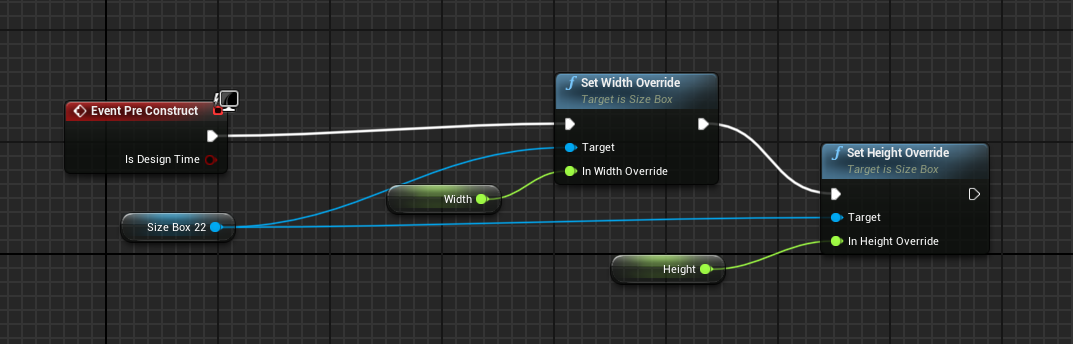
instance editable Height/Width variables that update the size box
supple crag
@plush yew yeah i only had set the item button as variable. I just set the size box as variable and could access it like that. I am doing the same now as your example 🙂 Thank you very much for your help!
plush yew
np, just don't forget to set the default values to 100
how can i create a admin panel for a multiplayer game?
(spawn weapons, kick players, revive myself, etc)
mystic holly
If anyone knows about source control can you check the Source-Control chat
I have a problem
barren flume
How do I get an ambient sound to play in game?
I can't seem to hear it at all while playing
barren flume
Weird it used to play by itself without doing that just by being placed in the level
mystic holly
then you can adjust the sound volume
frigid needle
If you're doing ambient, you probably don't want Play Sound at Location, but rather Play Sound 2D
 turbid jacinth
Hey, I have an array of Boolean arrays and I want to change only one value, in this example of the second boolean array the third element to true. I printed it out afterwards but all values are still false, how do I change one value in a 2d array?
plush yew
Hey uh. I have a question about collaboration. I made a GitHub repository for my game, and I’ve invited my developers. I’m wondering how they get into the project and if I can see there changes live so I can add my own aswell.
mystic holly
You must do stuff
turbid jacinth
Normally you can change things in diffrent files without a problem, if you change stuff in the same file you gotta merge it. Thats how it was when I made a website at least, but I dont think it will be much diffrent when working on an ue project
plush yew
Ah alr
I have a question. How would I make a admin panel. (Kicking players, spawning weapons, reviving players, etc)
barren flume
I fixed it, I set the sound as looping and now I can hear it
 forest steppe
hey everyone, I have a question, should I or should I not add the "Cinematic" overall scalability level in my game graphics' option?
plush yew
Question: how can I make a startup screen like fortnite has?
frigid needle
Question: have you attempted to Google that?
plush yew
for very vague questions, tutorials will do a lot better than discord chat
frigid needle
Because I see an actual tutorial on one of the first couple of results when I Google that
 brittle tundra
Hello guys,
Any ideas why I can build for Shipping but development is not working since I build once in shipping ?
LINK : fatal error LNK1104: cannot open file 'G:\Powerz\Binaries\Win64\PowerzTest.exe'
frigid needle
Max, this was suggested when I searched for the error:
frigid needle
So was this one, yeah
Someone in that same thread mentioned a rogue Visual Studio process, but I'm not certain what that exactly entails
fierce forge
how i can make my license valid ?
because i think this is why i can't package to android
manic pawn
have you bought one?
plush yew
@frigid needle I haven’t googled but I’ve watched some videos, and couldn’t find a result.
Can you maybe send me a article or such so I can attempt to make it?
frigid needle
Just do a quick search. "UE4 How to create an external launcher"
Make that your first step for most every question, and you'll find results a lot faster than waiting for someone here.
Then come back here and ask question if there's something you don't fully understand
plush yew
Ah alright.
 inner cloak
how do i hide the extra camera view ?
plush yew
@frigid needle I didn’t mean a launcher. I meant how I make a launch screen when I start the app (like how fortnite has the loading screen and such?)
fierce forge
@manic pawn I need to purchase one just for packaging to Android ?
manic pawn
if you don't have a license, why did you install expensivebuild? go uninstall it
 woeful wadi
I've got a quick question
How do I set a material that's attached to the player
for example
this right now is grass but I need it to change based on on int value
 stark marsh
help does anyone know how i can make my armour move with my mesh
i don't want it a permenant part of my character since i want to equip and unequip each piece
and swap them out
wait i can parent it to my cahracter bones
so it will move with it when i add animations
stark marsh
help
so i made some armour for my cahracter
but i want it to move with him when he is animated
but the thing is i don't want it a permenant part of his mesh
since i want to equip and unequip armour eventually
woeful wadi
can't you just attach it in the viewport and toggle it's visibility?
Also I need help, does anyone know how to delete an instance that is hit by a raycast
Also how do I get something to happen when the game starts
I have something in Construction Script that only happens when I compile, not when the game starts but I need it to happen when the game starts
 rocky radish
Also how do I get something to happen when the game starts
@woeful wadi event begin play
stark marsh
if i attach it in viewport i don't know if it will actually move with him
woeful wadi
I need it to happen in construction script
stark marsh
when he's animated
barren flume
Oh I finally figured out why sometimes the perspective and view modes disappear on me sometimes
rocky radish
I need it to happen in construction script
@woeful wadi why?
woeful wadi
stark marsh
if i attach it to joint it goes really dodgy
woeful wadi
That's what the tutorial did idk
stark marsh
the size of it goes absoloutely massive
woeful wadi
I'd just rather do it in the construction script if possible
stark marsh
and i can't shrink it precice enough, or move it precise enough
rocky radish
I'd just rather do it in the construction script if possible
@woeful wadi that sounds unnecessary to me
woeful wadi
it's not working in the event graph
rocky radish
it's not working in the event graph
@woeful wadi why not? what is it doing that it shouldnt do?
rocky radish
the problem is it's not doing anything
@woeful wadi can you show me your blueprint?
woeful wadi
this is the important part
that should be randomizing this
also if anyone knows a good tutorial on like, chunk systems and/or just a better way to do seeds lmk please
fierce forge
@manic pawn without incredibuild I can't export on Android , it worked 5 months ago
rocky radish
and how do you know its not setting the variables? i'd recommend doing a print string to make sure
woeful wadi
it probably is
it's probably just not working because the thing can't check in time or something
what happens first
the construction script or the event graph
if it's the construction script then that's the problem
rocky radish
make a print string to check. also, what exactly are you trying to do with these variables?
woeful wadi
it randomizes the blocks that you see in the picture that I just sent
If the construction script is executed before the event graph then that's why it's doing nothing
plush yew
anyone know why in the editor the gun points straight but ingame the gun points sideways?
stark marsh
why when i parent it to the sockets i can't change it's size precise enough
rocky radish
If the construction script is executed before the event graph then that's why it's doing nothing
@woeful wadi because you're setting these variables in begin play, not construction script
stark marsh
why does it all mess up and make it change by massive amounts at a time, so instead of dragging it i have to manually type in numbers
rocky radish
begin play happens after the constructor, it happens when the actor is spawned in the world
stark marsh
is their any way to make it precise and accurate when moving it
woeful wadi
yeah that's why I said it has to be in construction script
stark marsh
like it moves by absoloutely massive amounts each drag, instead of tiny amounts which i want
rocky radish
yeah that's why I said it has to be in construction script
@woeful wadi but do you want it to randomly generate the blocks when the game starts or before that (in the editor)?
woeful wadi
like
it has to do it when I hit play or when the game starts up if it's exported
because if I have it in construction script it only works when I compile
rocky radish
it has to do it when I hit play or when the game starts up if it's exported
@woeful wadi for that you'd have to do everything on begin play, when you do that, it will generate the variables when the game starts (or when the actor is spawned)
woeful wadi
ah
do you have a better tutorial for how I can make a sort of minecrafty kind of game with random generation and chunks and seeds and all that
rocky radish
sorry but i dont 😐
woeful wadi
rip
plush yew
@stark marsh make sure that the orange button shown here (located in the top right of the viewport) is unselected so you can make small changes
stark marsh
okay thanks
can i have the same skeleton along with animations but with a differant mesh
like if the mesh is very similar in shape
plush yew
drag from overlapped actor and make a node called cast to first person character
@light oriole
 light oriole
wdum?
plush yew
wait no im stupid that wont really do much
light oriole
so you don't know
light oriole
i can't find the middle block?
 earnest violet
My remove from parent is not getting rid of the text widget
plush yew
itll be called whatever you character is called
plush yew
bruh
noble magnet
anyone know why i hit the top of the ladder and just keep flying? I think i tied in wrong somehow
should one of those branches be a sequence?
i see where the disconnect is, i just dunno how to fix it
woeful wadi
I'm so confused
Why is my material not working
I have 4 types of blocks but only 3 of them have textures that work
this works
works
works
this does not work, nothing was changed, the default one doesn't change, my custom one doesn't change, etc
Gold also used to not work until I made a brand new material and copied over the data for gold
plush yew
Intellisense and syntax highlighting in my Visual Studio is very slow. Are there any settings I can change to improve it?
 rocky cypress
Hello guys I’m playing around with mocap . ARKit in with LiveLink face. But I’m struggling with the eyeballs I don’t know how to link the eyeballs. Don’t know if need morphs in the eyeballs or remap the bone with nodes . Please somebody know about this? I can’t find documentation of this section.
plush yew
Intellisense and syntax highlighting in my Visual Studio is very slow. Are there any settings I can change to improve it?
@plush yew
So i think i fixed this with installing a better Intellisense (Recharper) Its like 1000x times faster and provides additional informations that vs didnt even get. (e.g. Reflection Specifier)
 earnest briar
visual assist is another option but ya stock intellisense can't handle unreal
 vestal ferry
hey all, so i'm trying to build my loghting (1116 unbuilt objects) and it stops at 0%, this is what opens
my foliage and lightmap settings
nothing in the Lighting Results log tho
 grave spruce


 halcyon flame
does anyone have the automotive materials (Epic asset) on version 4.22 or prior?
the vault/marketplace no longer has that version available
vestal ferry
missing dll
@grave spruce alright gonna try to update
 open gorge
@vestal ferry are you using an epic binary? Do you have debug symbols installed?
@plush yew intellisense is fairly garbo for ue4. Use Visual Assist or another extension and disable Intellisense
plush yew
Yes found that out too. as i said im using recharper c++ for now on. Works great. Thanks anyways
open gorge
ReSharper is good :)
vestal ferry
@vestal ferry are you using an epic binary? Do you have debug symbols installed?
@open gorge i installed UE 4.25 on the store, updated it, still can't build lighting
 jolly jungle
in blueprint, is it possible to make a delay that i am able to cancel before it is done?
frigid needle
You will want to do that with a Timeline.
plush yew
@open gorge Yes :)
I found out that Jetbrains also brings out an C++ Editor exclusivly for Game Engines: https://www.jetbrains.com/de-de/lp/rider-unreal/

JetBrains: Developer Tools for Professionals and Teams
Unterstützung für Smart C++ und Blueprints, um die besten Spiele mit Unreal Engine zu entwickeln
exotic thicket
@jolly jungle probably easiest by using set timer by event, you get a timer handle which you can use to invalidate the timer
 alpine laurel
my unreal engine just started being slow as hell. like not responding, delayed reactions
4.25.3 this normal or is my computer acting up?
 formal pebble
Hey, I've set custom mouse cursor, when I press play in one map it works, but if I try in another map it doesn't .. What can be the problem with this, if I'm setting it on project settings
frigid needle
Reboot your machine, Ep.
stark marsh
i need to know how to change a variables max value through script
 shut glen
anyone know how can i make fast paced movement in unreal?
stark marsh
i want to make dungeons full of puzzles and enemies, and once you reach the end you get the choice to upgrade health, mana or stamina
shut glen

Stack Overflow
I have a variable called yPos increasing and decreasing based on the value of $(window).scrollTop() on scroll. I would like to set a maximum and minimum value so that the yPos variable cannot be any
stark marsh
thanks
then i can just said it so when i walk over something it plays a script to icnrease it
nah that's not it at all
nothing to do with what i'm doing
exotic thicket
you could have two variables, Health and MaxHealth, let's say both start at 10
then when the player chooses whatever, you increase MaxHealth to 15 and set Health to match
that'd do it
 stiff mirage
Hello!
exotic thicket
yeah something like that should work
 odd steeple
Hello, I have a separate geo on my main mesh that translates a lot further on the skeletal mesh in Unreal than it does in Maya, has anyone seen this before? I do have a stretchy spine rig on the joint it is weight painted to, could it be that?
 hot canopy
@odd steeple Do you have a picture to show the issue?
odd steeple
Yeah I sec!
Chest piece is working fine in Maya.
Chest goes inside the mesh in Unreal.
It seems to be the only piece of geo that doesn't act correctly.
@hot canopy It also seems to push out a little too much on the walk cycle. I guess it probably is the joint it's attached to.
I'll bind it to another joint and see how it reacts.
hot canopy
(Probably) The monsters' chest have weights from more than one bone while the chest piece only from one OR the chest and piece have different weight ratios between different bones.
Does the animation work in Maya?
odd steeple
Yeah it looks just fine in Maya.
That chest piece just really seems to stretch in Unreal.
hot canopy
Can you show the mesh weights?
Or the material adds some displacement?
Sure that can cause some troubles. I don't he should make 2 separate skeletons in this case.
 chilly gale
I got the Sparrow hair exported BUT could not export the textures, the export and bulk export options are not showing for Paragon characters. Is that a thing? on export for the Paragon characters textures
ornate forge
Is it possible to change the scale of a static mesh in the Static Mesh Editor?
I would like to avoid rescaling every instance of it separately
Guess I'll have to change it in Blender and reimport
serene birch
you can apply a manual scale in the import settings
 dusky crest
@chilly gale you can using export texture 2d to export
but the paragon character license is only use in unreal engine project
chilly gale
@dusky crest It's for an Unreal project, just trying to fit hair etc to another UE4 character
Wanted to try making RPG characters in a Skyrim style of play where they can change cloths etc, with more customising options
dusky crest
you can make your own tool to export that texture
https://www.youtube.com/watch?v=83Jd3HhADCU
Tom Shannon, Technical Artist at Epic Games, will explore the systems available in Unreal Engine to create in-editor tools that automate and improve workflows, reduce errors, and even extend the Editor, unlocking new functionality.
Using Blueprints—the native visual scripting...
using Export Texture 2D
chilly gale
Maybe use CC3+ characters to put Paragon cloths and hairs on
halcyon flame
anyone know why this would happen? pasted the filename from the output log into the search bar
halcyon flame
I don't think that came from me
I guess I need to get the UE4 exporter for blender
 bold fog
Hi, sorry if this isn't the right place, but I built lighting in my map and it says lighting needs to be rebuilt bc there are two unbuilt objects.
Anyone know what sort of thing would cause that to occur?
rocky radish
I think you can't have the name start with a underscore @halcyon flame
halcyon flame
ok. weirdly it can find some of them
is there official support for a blender to unreal batch exporter yet?
bc what I did to get the underscore names was having all of them in the same .fbx
dusky crest
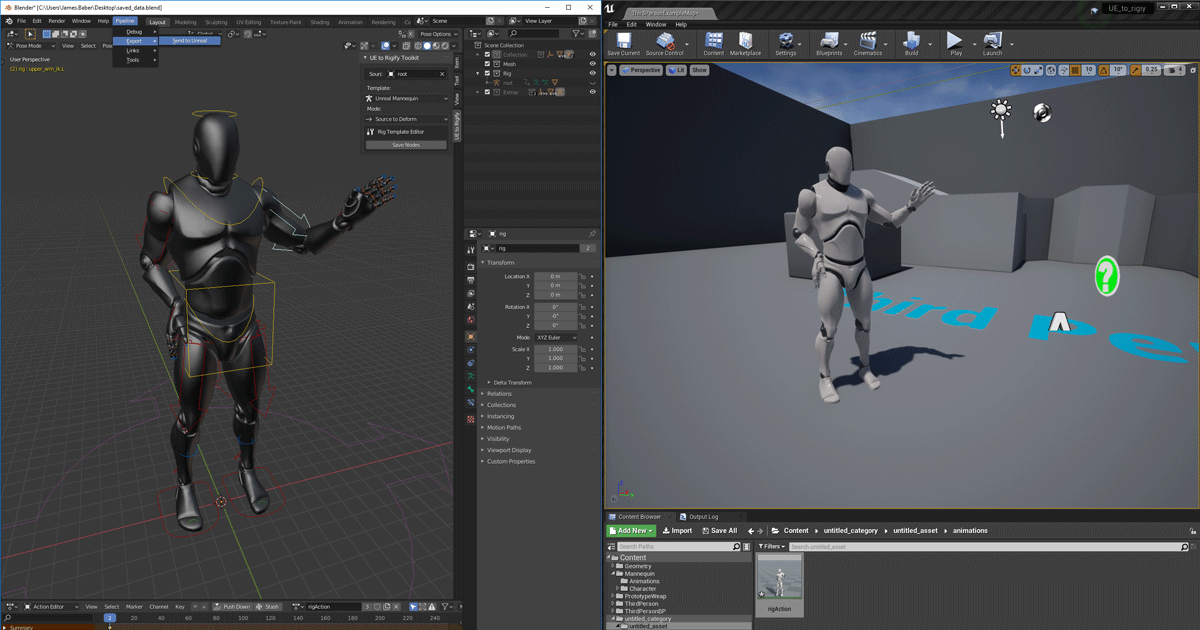
Unreal Engine
We’ve released two new, free addons that greatly streamline the workflow between Blender and Unreal Engine.
halcyon flame
does that support batch export?
just seems like more clunky file management from the video
dusky crest

YouTube
Send to Unreal is an addon that exports FBX files from Blender and remotely imports them into Unreal Engine. In this video, you will learn how to get up and ...
halcyon flame
@dusky crest ty. I'm trying to install this plugin on Blender, but typing in 'send' or 'unreal' after installing BlenderTools-master.zip doesn't return any results...