#ue4-general
1 messages · Page 808 of 1
 exotic cave
Please
Please
Look at some of the lessons I've been giving you 🙂
Read a basic materials tutorial
It will be an afternoon so well spent
I promise
 rough knoll
yeah thats opacity
exotic cave
You got to go into your materials settings, change from "Opaque" to "Opacity Mask"
Then ram your A into the Opacity Mask output
Do NOT use partial transparency (non-masked transparent) materials on your grass by the way
You will explore FPS values so low that you will need to invent new kinds of fractions to deal with them
exotic cave
Sure
How low would you like your FPS to get? 😄
My first programming mentor: "You can code badly in any language."
Applies to art too, bless his heart and his memory
Put fifteen kinds of Megascans stuff in your scene and use only the default Mixer export materials. You can render a frame every minute or two.
rough knoll
lmao
exotic cave
How's it look now? Reassure me that I actually helped with something before I bail for the afternoon. 🙂
rough knoll
it looks good, currently trying to turn off shadows myself
exotic cave
Double click your grass mesh
Haha I just noticed I should really not have collision enabled on that grass of mine, so maybe you helped me out too
 sterile stream
anyone using goodsky? i cant seem to get it to illuminate my level only change the skybox
rough knoll
well the shadow is still there but it moved alot further back so its not really going to be seen often anyways
thank ya
exotic cave
Turn it off on all your LODs
If it's only appearing at distance, that means it's probably still shadowcasting at LOD1, LOD2, etc.
Do you know what level of distance meshes are?
 dim kelp
not sure what caused it, unplugging everything, then reopening stuff fixed it. Thanks for point me to the lod controls
exotic cave
*FOV
LOD = level of detail = lower-poly meshes that are substituted at far draw distances
FOV = field of view = the angle subtended by your camera
exotic cave
Hmmmm, that's odd then
You may have to journey on alone, I feel the Odinsleep coming on, been breaking my brain lately 🙂
I will likely be back at hours that would shame a vampire, so you can add me if you want
rough knoll
thats ok, you've helped me alot lmao
it only casts the shadows when im not there
like when i move over to the shadowy areas it goes normal
i have no idea
exotic cave
Who is "I"?
rough knoll
the camera
exotic cave
Show me
 untold hollow
okay everyone. if anyone can help. this is really weird and frustrating and discouraging. This is my first time trying to do anything in unreal. If I use gamepad to control the editor it works totally fine. To control the first or third person examples, it ignores all input (maybe there's a setting to enable it). but most baffling of all is the car examples. it's not just moving by itself, the axises are all wrong. forward and back change the steering, and side to side changes the speed. where can I even start to try to troubleshoot?
rough knoll
this is it when i go to the far corner shown in the first screenshot
exotic cave
I don't actually see ground there between that grass
Usually a shadow needs something to cast on 😄
Looks like an issue with your landscape material possibly
exotic cave
It would, because you're using low-poly giant rectangles of grass
exotic cave
Your lighting will possibly get weird around the edges of your map anyway
UE uses semi-raytraced built lighting even for non-RTX projects
So when it builds lighting around a corner of a world surrounded by the nothings
It's not going to be physically accurate
rough knoll
can i change "the nothings"
exotic cave
For now I suggest just concentrating on your main scene and defining some boundaries
rough knoll
oh also this kek
rough knoll
i am
exotic cave
You're gonna have to mess with it man 😄 I feel the slumber of ages upon me
rough knoll
ye thats ok
exotic cave
I can set up a macro to respond with "ZZZ" for the next several hours
rough knoll
im probably just gonna move the bridge down and flatten that little hill
exotic cave
Unsure if that will result in good things though 😄
I would not move your scene around to fix the lighting.
When your lighting model, materials, etc., are in a good place, they will light any scene you come up with.
exotic cave
Try turning on contact shadows on your light 🙂
Little trick I learned for good grassiness
Sec I show
Then I slumber
@untold hollow : I really wish I could help man, I'm just only an environment art/materials guy at present
Zero good experience with inputs yet
exotic cave
Not that I know of.
@rough knoll : That is hidden in your d-light somewhere.
Contact shadow length is zero by default.
I actually find turning it on helps grass rendering a lot.
However, it is a screenspace rendering technique and values too high/low can result in artifacting around screen edges.
With that I am off.
rough knoll
i turned it on and i see little difference but the grass looks a little more colorful idk
but gn
ty for helping
 glacial wyvern
Has something changed with fbx importing since 4.21?
I've got this modular character, so the head and legs are split off
It worked fine in 4.21 with no seams
but in 4,25 theres seams between bparts
whats changed?
4.21:
4.25:
 thorn scarab
you can open anywhere dae
here's a really simple question
@rough knoll and convert it into fbx
rough knoll
will blender work
thorn scarab
the only way to know - try
rough knoll
welp it did not
exotic cave
@glacial wyvern : Probably something changed with the lightmapping. Seams like that are almost always related to lightmap settings...
exotic cave
I do not have an answer for that, by the way 😄
Possibly check the lightmap resolution for each mesh in each version, see if it changed anything by default
It would be in your mesh settings somewhere
rough knoll
couldn't sleep? 🤔
glacial wyvern
@exotic cave I'm pretty sure skeletal meshes dont have lighmaps
exotic cave
How sure? 🙂
glacial wyvern
at least I dont see any options for lightmaps on import if you choose skeletal mesh
exotic cave
You may be right, lightmaps do seem to be for non-movable objects
Hmmm
I will ponder
glacial wyvern
i see these new options that werent in 4.21
im guessing its a vertex normal thing
thorn scarab
all the materials on same UV?
exotic cave
Yeah, it's def related to vertex normals
thorn scarab
textures
glacial wyvern
but i cant find anything on these options in the documentation
exotic cave
Unreal Engine Forums
Talk about Level Design, Static Meshes, Physics, and more.
Threads like that might help
Those options have been around for a few versions
Just try each of the three versions
I'm not sure what 4.21 default behavior was
Import Normals
There's the official documentation on it
glacial wyvern
@exotic cave Thanks, doesnt seem to be much help though, pretty sure i've tried all the combinations already. I was searching the update documentation but i didnt see it there.
thorn scarab
@glacial wyvern it is definitely not related to the engine I just checked on my modular character.
4.25.2
glacial wyvern
@thorn scarab It has to be at least to some extent, since its fine in the older version. I do admit that the mesh is kinda wonky. The seams are visible in maya, but werent in 4.21. I assumed it was just mayas viewport being weird. Something must have changed and unreal wont deal with my wonky file the same way anymore.
thorn scarab
@glacial wyvern it's hard to say without seeing it because I upgraded recently from 4.22 recently without any consequences. if you have more than one UV for the character we could check materials but if it is, probably it's something outside
did you try to re-import
or just upgraded
glacial wyvern
I was using 4.21 to test, and I never bothered to ask what my client was using since i didnt think that would affect a mesh
I'm guessing the fact that it worked in 4.21 was a fluke.
thorn scarab
you can send head and chest meshes without textures (if it's not materials/textures related we will see) i can check if you want
basically any two meshes where you see the line
rough knoll
wwhy does the ground start fading out at a distance
glacial wyvern
The file here has separate elements, so there are borders between geometry, it just imports as one in unreal. I didnt know how they were handling modularity so i just let them figure that part out themselves
actually on second thought that might be the problem
they could be exporting the parts and not exporting the normals correctly
thorn scarab
one of the old meshes where i split ears from the head
no line
ok let me open your file
mesh and uv are okay, normals are okay. let me try to import
exotic cave
@glacial wyvern : Can you check the normals by hand in any way near the seam?
@rough knoll : It isn't really fading out, it's just UE's default antialiasing/texture interpolation behavior at distance. I quite often find that I have to add a distance-modifier term in my materials to get them to act the way I want to when far away.
glacial wyvern
@exotic cave Hmm yeah theyre bad apparently
thorn scarab
exotic cave
I think you just got lucky in 4.21, I agree that it's frustrating though
thorn scarab
on both normal rays look same way
exotic cave
FWIW the model looks fantastic 😄
glacial wyvern
@thorn scarab sorry i sent you the wrong one, that was one i was just testing and trying to figure out
They are actually wrong on the other one, I just have no idea how it worked in 4.21
thorn scarab
gotcha
glacial wyvern
I was really hoping i could get it to work the same way in 2.25, so i dont have to redo the whole skin transfer part
which is a pain in itself
thorn scarab
how about just to fix a few normals
if this is the problem you just could pick them around the neck and near them
and reimport the mesh
update it
glacial wyvern
I had gone around and manually avereged each pair of vertexes on the mesh but that didnt seem to export properly
The way i managed to fix it in the file you saw was by getting the whole unsplit mesh and deleting parts i didnt want, and doing that for every iece
which is the way the forum post you sent me recommends it
only issue with that is it breaks the skinning
And I was hoping to avoid doing the skin transfer again
but it seems thats the only way to go
and how it miraculously worked in 4.21 is gonna stay a mystery haha
exotic cave
I can barely see the seams even when they're there. You sure this is worth spending extra weeks on?
glacial wyvern
Thanks for putting up with me and helping out haha
thorn scarab
so if you will copy/past orientation in xyz of each normal around the neck and chest it won't work?
exotic cave
Are you sure you tried all the vertex import options btw?
You have to actually hit the Re-import button after you change the type
It won't actually just do it for you
glacial wyvern
yeah I know
glacial wyvern
its quite apparent dependiing on the angle
glacial wyvern
and the guy i did it for wants it fixed understandably
thorn scarab
you tell him this is Frankenstein and this is how it suppose to be
glacial wyvern
i wish i could haha
I spent days trying to figure out what was up because originally I was testing in my 4.21 scene and i couldnt see the seams at all, only their screenshots had them
thorn scarab
there's 100% way to work around
glacial wyvern
so i thought they had some perfect storm of a lighting setup that highlighted them
thorn scarab
without all that back and forward
if it worked in 4.21 you should be able to update it the way
you need it
glacial wyvern
It was weird how it worked in 4.21, I didnt even expect it too, I thought splitting the mesh would end with seams unless i did something to edit the normals, but i teseted it without and it just worked, so i just figured it was fine.
thorn scarab
if this is related to normals (the one you sent me appears fine in 4.25) you can modify them in the max or whatever. but i think it's not even a problem if it was appearing fine in 4.21
glacial wyvern
Forum posts have this same probelm, and the way they say to fix it works, Its just super weird how it worked in 421 to me
thorn scarab
you need to try to re-import your model into clear-test project 4.25
glacial wyvern
this is the actual one that doesnt work
glacial wyvern
Dont bother yourselves too much, i know how to fix it I'm just left with this mystery of how it wokred once lol
 jolly jungle
Are savegame files readable by a person, ie could someone go in and easily change values
thorn scarab
yes, normals
let me see how you imported it without any issue in 4.21
curious already
exotic cave
Can you import it as a 4.21 asset, then upgrade the project manually to 4.25 and check it?
Then if it works you can just send them the .uasset via Migrate
thorn scarab
yes i'm trying to see how it didn't show up in 4.21
exotic cave
Or to rephrase, if you import it in a 4.21 project then manually upgrade that project to 4.25 is it okay?
glacial wyvern
how do you upgrade a project?
nvm ill google it
Yeah the mesh stays fine if I upgrade the project
but as soon as I reimported the asset it broke lol
so its gotta be something to do with the importer update theyve done
exotic cave
But should save you time right?
Just import into 4.21, upgrade, Migrate the .uasset to them?
Or do they require having the FBX in a format that can import to 4.25?
I can see it if the contract requires the latter
Just trying to save you your version of the week of hell I'm going through on my own pack 😄
I mean, you could always ask 😉
glacial wyvern
yeah they want the fbx so they can edit stuff if needed, and I guess its better to have good practices with these things
glacial wyvern
gotta figure out how to setup modular characters consitently either way
exotic cave
That's what I'm gonna do when I finally figure out how to get my Marketplace pack in a format Epic likes it in, I'll be writing a guide on how NOT to remake all one's foliage assets fifteen times until they're finally Marketplace proper
thorn scarab
if you will do it with hands idk you'll spend about 30 min
this is how it works in max, idk what you use
you choose all meshes, drop on them Edit Normals modificator, then open sub and choose Normal. In parameters you choose Select By Normals. Then, you pick two normals (they look in different ways 15-20degrees or so and pull them in the same - uni direction
then everything works
glacial wyvern
@exotic cave what are Epics demands with Marketplace assets?
exotic cave
@glacial wyvern : Well, there are many, but the particular one that wrecked me is that I started saving small copies of static meshes with material configurations I liked, and Epic requires that all meshes that use the same basic mesh structure point at the same root mesh and use Blueprints (for game actors) or Material Overrides (for landscape actors) to change the materials 🙂
glacial wyvern
@ pete how do you pick specific normals?
exotic cave
Basically, there's a one-base-mesh-per-set-of-unique-geometry requirement. Not so bad for characters, but very frustrating when I got in the habit of saving a lot of copies of little mushrooms and grass meshes that I liked, since they're barely even there in modern filesize terms (250kbish)
But, I get it, it's a good rule, I just wish it had been made clearer in the Marketplace guidelines.
thorn scarab
not sure which version, dropped to 2017
yes, as I said it will take max 30 mins to do. I left modificators so it should be easy
basically you pick 2 normal rays sitting on same spot (only they look like horns looking in different directions)
glacial wyvern
@thorn scarab I figured it out just s you sent that
thanks its gonna save me a lotta time
thorn scarab
when you pick two of them you start to pull them in same direction a few time so they'll look into same direction and viola everything is nice and smooth, i just checked, 4.25 eats it
sterile stream
anyone help me with goodsky? it wont illuminate my last lvl but the skybox/sun is there
exotic cave
I don't use it, sorry @sterile stream
thorn scarab
no worries all of us learn
glacial wyvern
you can click average selected under parameters to get them to point in the same direction
exotic cave
@thorn scarab : You seem like someone I ought to start listening to now, a year or so before I start doing my own character stuffs 😄
sterile stream
its ok, i posted a msg on forums too to see if i can get any help but thats slow sometimes. it rly interrupted the flow i had going too xD
worked fine on my other 2 lvls tho
exotic cave
The prob with asking about specific plugins is that user base penetration on any given plugin is pretty small
thorn scarab
it will take 5 mins of yours
exotic cave
It's almost always better to go to the dev's Discord if they have one
thorn scarab
not even 30
exotic cave
And ask for one if they don't :>
glacial wyvern
Thanks pete, didnt think to try using edit normals in max. I dont know how poeple use maya since it doesnt have modifiers. I've been trying to switch to it but its so much worse at modeling.
exotic cave
I don't know how people even manage to use most 3d modelers. 😄 People swear by Zbrush and it makes me want to gnaw off my own fingers.
thorn scarab
@exotic cave i'm not an expect but whatever I know I'll share
exotic cave
@thorn scarab : I will be stuck in environment art land for likely another year, doing all the plugins I want to do.
How about you two get together and make a character creator plugin for UE? 😄
I'll help!
glacial wyvern
I havent found zbrush useable for hard surface modeling since its cant handle open shapes, so you cant extrude edges and such. Thats coming in the next update so It'll be alot more useable
exotic cave
Yeah I can't even really stand to do sculpts in it. It's just a workflow thing, I guess.
glacial wyvern
what do you use for sculpts? blender?
thorn scarab
@glacial wyvern np. you're right, there's no all-inclusive software yet
exotic cave
3dCoat. (Mostly I don't sculpt...)
I am doing mostly foliages and landscapes. So, lotta tree tools, lotta Substance and Filter Forge.
glacial wyvern
I've heard good things about 3d coat
exotic cave
I do like 3dCoat a lot more than most software, which is to say I can actually stand it and it's a super good price ($400 I think and you actually own the version forever, at least when I bought it.)
glacial wyvern
I'd be open to working on some sort of character creator asset if someone can handle the in engine techincal stuff
exotic cave
I mean, yeah, that's a lot, but not as far as modelers go. 🙂
@glacial wyvern : Check this out, it's a procedural tree modeler an Epic tech artist did completely in a Blueprint

Arran Langmead shared his article on procedural mesh generation in Unreal explaining how to create basic geometry and generate a foliage tool with blueprints.
I think some of these techniques could easily be adapted to modular character meshes, would be thrilled to help you explore a project like this when you're done with your current contract or find the time.
This is next on my list of things to explore when I'm out of mesh hell. Alternately I could just code this, redo all my foliage in it and do it right this time around I guess. 😉
Arran Langmead is one of the stars of my world right now (hint hint Epic, this is cool tech)
A character creator might have to go deeper and use the actual C++, but I'm C++ trained, worked in it for many years...
glacial wyvern
I've liked messing around with blueprints, but I'm not particularly good at it and I dont have the fundamentals.
exotic cave
There are ways. UE has mesh manipulation routines. But fancy stuff would have to include blendshape support and/or morph targets and I know zero about all that.
thorn scarab
@exotic cave I really liked growfx for trees there's a lot of advantages comparing to anything else.
exotic cave
Did you just suggest actually good tree modeling software that I wouldn't have to wrestle with for days and days per tree???
rough knoll
not in my old project not even in my character blueprint
thorn scarab
the only problem with ultra realistic trees, there's choice or a realistic tree or ~okay trees and ~okay leaves
i went for late fall winter
 exotic thicket
@rough knoll backwards/left use forward and right, but they just get a negative value
thorn scarab
exotic cave
Them's some spicy branches. That looka high poly.
glacial wyvern
@exotic cave well if youre interesting in working on something at some point you can add me on discord and once youre out of your mesh hell we can figure something out
thorn scarab
nah it's lowpoly but the point is, you can't afford such trees with leaves on it
exotic cave
Sent!
thorn scarab
it will be too expensive so i decided to get rid of leaves in order to keep trees as detailed as possible
rough knoll
welp
exotic cave
Ah yeah, I looked at this, $325 for a dedicated tree modeler is more than I want to spend right now
rough knoll
guess its time for a new drive
thorn scarab
nah
exotic cave
Seems good tho 🙂
thorn scarab
i meant - expensive for a video card
exotic cave
@rough knoll : GET THE MAGNET 😄
thorn scarab
not money wise
exotic cave
(Disclaimer: Don't actually put any magnets near your hard drives, kids. You will destroy your drives.)
rough knoll
big brain
exotic cave
I wonder if magnets work on SSDs come to think of it?
exotic cave
This conversation is starting to remind me of the Penny Arcade strip where Gabe built a computer without a heat sink on the processor 😄
Please don't put a magnet near your hard drive, @rough knoll, just so we're all clear, magnets destroy all data on magnetic state hard drives 🙂
glacial wyvern
@thorn scarab Isnt speedtree the standard for making trees? Its $20 a moth for a subscription. I dont really do evniroment assests so i wouldnt know if its any good.
rough knoll
yes i know lmao
exotic cave
It is a standard. However it is also a standard that disallows the use of the trees in third party packs.
thorn scarab
@glacial wyvern depends what you want to do. if you want to do real life like trees speed tree isn't good
i mean you can do realistic trees in zbrush or 3dcoat but growfx just saves time
exotic cave
SpeedTree's whole deal is that you can only use the trees for end-user products. No intermediate assets or third-party packs (eg no Marketplace). At least this is what it was last I checked.
I have been using TreeIt, which has some problems but is actually pretty good for a free tool 😄
thorn scarab
I just stack with ultra realism
exotic cave
However I plan to upgrade to my own tree modeler based on Langmead's, once I get out of pack hell
thorn scarab
and i brought me to another level of challenge
exotic cave
@thorn scarab : Any screenshots in-engine?
thorn scarab
sure
glacial wyvern
Oh right that kinda sucks about speedtree
exotic cave
It does
SpeedTree is an important Epic partner, as they are a partner to many companies in the game space. 🙂 I wish them well.
glacial wyvern
I've seen really good tees made with houdini, and you can use it for making all sorts of procedural models. Probably longer to setup since it not a tree oriented too but I'd guess it gives more freedom in general.
exotic cave
Houdini can do literally everything and aaaargh because I don't know how to use it and buying a year license would be a big risk at my level 😄
If I find some success with my packs, it's on the agenda
thorn scarab
@exotic cave they're good for 90% of situations for sure.
exotic cave
I see the building packs people are making in Houd and uuuuuugh
I wannnnnt
Eventually it will all be Houdini's world and the rest of us will be pawing at the hem of the robes of the people who mastered it early, that's my fear
thorn scarab
for example
exotic cave
That's Houdini?
glacial wyvern
yeah real nice
thorn scarab
i wanted to make an ultra realistic game. it's about time travel and parallel universes
so i digged into how to create realistic buildings first
glacial wyvern
I've seen a guy use houndini for character faces https://www.artstation.com/artwork/KaQ9Ay (scroll to the bottom)
exotic cave
What are you using for materials? Are those your own?
thorn scarab
i stack there for 8 months studying, then engineering, then how to design and sew clothes, to create ultra realistic stuff. then etc... it was bad decision lol
glacial wyvern
no idea why hed do that instead of just sculpting like he sculpted the rest of the face. Maybe hes just flexing his houndini skills lol.
exotic cave
I mean if Houdini can literally do everything, why not do everything in it?
I wish I had and knew how to use a modeler that would take the place of my 5 other modelers, none of which talk to each other and each of which has to be wrestled out of its own peculiar quirks
 regal hawk
Why PostEditChangeProperty dont update the value of properties in details panel?
exotic cave
@thorn scarab : Seems like great decision to me 😄
thorn scarab
@glacial wyvern there's a reason why. for example, this funicular to be real has to make engineering sense otherwise it will be just some graphic designer creation. so i studied engineering and this particular model had 3840 elements in max before i baked it
glacial wyvern
@exotic cave well he sculpted the rest of the face in zbrush, all he did was that one eye crease
exotic cave
Ahhhh 🙂
Zbrush, still the king of characters
I got daisies to wrestle with all weekend, I'll cross those bridges when I come to them I guess
thorn scarab
unfortunately, you can't be mathematically presided in zbrush, painter and etc. so you just "punch it" but subconsciously we can notice that sloppiness
exotic cave
Eh actually genuinely mathematically symmetric people are super uncanny valley
glacial wyvern
@thorn scarab I think you misunderstood, I was taliking about the guy in the link i posted. Your thing is awsome and whatever youve done to achieve that is clearly working
exotic cave
Usually features are a few microns diff on real people at least
glacial wyvern
well any competent character artist will usually disable symetry on faces and work in some aysymetry
thorn scarab
same way with buildings and etc. like probably not a lot of people know that first floor is about 20 inches higher then 2nd and in 3 floors building for example, it's about 10-20 inches less. for the optical illusion to make buildings visually bigger then they are. and bunch of other rules. so when people design buildings for games they don't know about many of those. then they build but for some reason it looks unnatural because we got used to live around those. so.
most of the time i had to learn base stuff not related to the computer lol 🙂
exotic cave
I bet 80.lv would let you do a professional article based on those screenies alone
I've talked a bit with the site author in LinkedIn, he loves stuff like that
thorn scarab
I meant of your trees but holy goodness
@exotic cave not sure i would do it cuz i do it for my video game but you can jump on the wagon and I will teach you 😆
exotic cave
tries to disentangle himself from many mushroom and flower and grass meshes
Soon
I will add you
I bet if we all could actually conquer our various challenges and put heads together we could create the singularity 😂
Or at the very least, a very cool demo
Actually, who needs the singularity when your demo is cool enough?
@hearty rose : Hey, that's next month 😄
thorn scarab
@glacial wyvern gotcha. looks great. there's another link, he punched skin like really hard https://www.youtube.com/watch?v=ahNfCGrqZqE&feature=emb_title
 glacial wyvern
@hearty rose Heres a full shot of the character.
exotic cave
Don't sell that skill short, I need to hook up with a network guy to learn how to sync characters for my MOBA framework
exotic thicket
he looks like super buff Uwe Boll
exotic cave
Man, that is photorealistic, @thorn scarab
Insane
I was so happy with my pack, but the more I see the next gen of UE the more I wonder if I'll even be relevant
My stuff's not bad, but it's def a level below true photorealism. But I stay grinding, I hope to get there.
glacial wyvern
@thorn scarab what do you mean by punched the skin exactly?
exotic cave
@hearty rose : You can't have a hit multiplayer game without it, keep it up, you will never not be in demand with that skill!
thorn scarab
@exotic cave technically you can easily do something like that on certain level. some xyz multimaterials zwrap, bake, and viola. but that one in particular took some time for sure.
thorn scarab
@exotic cave if you will look what is popular today you'll forget about realism. roblox and simular. i think for all-in-one developer lowpoly / acrade / simple games are must. no AAA stuff.
glacial wyvern
@exotic cave yeah those are texturing xyz displacement maps, pretty much the only way to go for full photorealism
exotic cave
You are probably noticing three things: 1 . The leaf mesh is a bit warped off-center, 2. I can't seem to get a good roughness mapping, and 3. on real trees there's more shadowing near the center of the tree
All these things are on my list of upgrades, if I don't die in the next few weeks just trying to get this version out 👻
There are some spherical-distance-check rendering techniques that can allow a lovely shadow near the center of a tree, and I can't wait until I have a spare week to actually research that.
The mesh warping is just me needing to buckle down and really fix the mapping, it's annoying because TreeIt's export to UE is not the best. I am indeed seeking a tool upgrade.
exotic thicket
I'm probably going to have to do a game with MS Paint tier 3D models and hope that people like it despite that so I can then pay someone to do better models lol
exotic cave
And actually I'm more unhappy with the ground in some ways than the trees, because it is low-poly grass and it doesn't look great from directly overhead 🙂
@exotic thicket : Look at something like Binding of Isaac, execution is everything, all styles are amazing if done properly
exotic thicket
Yeah the problem is that my project is kind of complicated for assets that aren't custom made for it :)
thorn scarab
@exotic thicket makes sense
exotic cave
I am drawn to seeking AAAish graphics, or somewhat thereabouts, it speaks to me, but I won't finish a game until I'm in my fifties probably
exotic cave
You kidding? I won't even be out of environment art pack land until next year or the year after on my current plan
glacial wyvern
nothing wrong with using quixel or other assets, especially if youre indie
exotic cave
@hearty rose, @glacial wyvern : My problem with using pure Megascans right now is the filesizes
thorn scarab
I am drawn to seeking AAAish graphics, or somewhat thereabouts, it speaks to me, but I won't finish a game until I'm in my fifties probably
@exotic cave
make it lowpoly and you will finish within a year if it's not too long game
exotic cave
They do, they can also afford to distribute on DVDs or whatnot and have 100-250GB project sizes 😄
exotic thicket
yeah sometimes I'm debating working on one of my other slightly less ambitious ideas which would be doable with more "stock" 3D models and stuff
exotic cave
I just don't want to be building 100GB of project every day on my single lone machine, even if it is a nice machine
I am currently planning to use Megascans as an accent to my own packs
It looks GREAT
thorn scarab
@exotic cave people play in games because they're interesting or not. not because of graphics. ppl can say wow but players won't buy it if it's sucks. so no harm to do it in lowpoly (where you spend too little time for assets)
exotic cave
I wish I had time to do more fab demos with Megascans integrated with my stuff, and less time to spend reorganizing my project for a week, but them's the breaks
glacial wyvern
what was that game made by one guy that got pretty big? pretty sure most of the assets were outsourced, but it stil looks pretty cool and got the guy and his game on the radar
exotic cave
I will probably sprinkle in like 10-20GB of Megascans on my current projects. (That's not a lot of Megascans, if anyone's worked heavily with the assets. 😄 )
glacial wyvern
This one i think https://www.youtube.com/watch?v=lWgOHjAyiyk

A look at the first 18 minutes of Bright Memory on PC. Developed by FYQD, a one-man studio. Experience fast paced FPS action mixed with various other genres.
#ign
exotic cave
I can do a set of biomes in 10GB that would take Megascans 100GB and it will look nearly as good, and players will hopefully thank me. 🙂
exotic thicket
@hearty rose is that why the framerate was so bad lol
exotic cave
Was it PUBG? (PlayerUnknown's Battlegrounds)? Sounds right
exotic thicket
Yeah I mean the assets probably hadn't been really optimized for their use
glacial wyvern
@hearty rose I'm less forgiving of pubg since they raked in money, so they should have been at least able to outsource and not just buy from a public marketplace
exotic cave
That does look good @glacial wyvern !
exotic thicket
I remember in the cities half of the buildings had more parts to them that were just hidden under the terrain and probably were still being rendered
thorn scarab
@hearty rose yes, they're all assets. they even keep them in original folders like fps pack and etc
exotic thicket
I don't think there's wrong with AAA titles using marketplace assets.. I mean there's only so many ways you can make an M4 or an UAZ :P
exotic cave
I feel the same, as long as enough uniqueness is put into the final product who cares?
There's a Sonic Infinity project out there using the old Infinity Blade assets and the way he uses them, you can't even tell it's the same asset set
It's all about execution
glacial wyvern
@exotic thicket Hey if youre a AAA stufdio then dont be a scrooge and actually let folks like us make some money making assets
exotic cave
By far my favorite thing I'm not allowed to love in UE and love anyway ❤️ https://www.youtube.com/watch?v=OA3tPwjXk4E

Here we go again! I'm back again and I'm in this game for good! It's good to see some of the feedback you guys put down in the last video I made. So I decided to turn one of Unreal Engine 4's fabulous free assets into a fully decked out Sonic level that is somewhat boost-frien...
thorn scarab
@hearty rose same
exotic cave
Sonic Team srsly should just pick up the Infinity guys and go full on UE, can you imagine a real Sonic game in Unreal Engine????
exotic thicket
@glacial wyvern well it would make sense to buy assets which are already good quality enough (eg. let's assume some weapon model) but they could then of course pay the author of the asset to do some work on other things for them if they liked it
thorn scarab
@hearty rose that probably make sense to blend the spaghetti in something unified
exotic cave
Make the next great character creator, @glacial wyvern , and you will be rich beyond imaginings.
glacial wyvern
@exotic thicket i dunno i kinda find it to be beneath a AAA or AA developer to use an asset that 10's of indie games are trying to use.
exotic cave
Everything in indie game space right now is amazing EXCEPT the character creators.
thorn scarab
@hearty rose how about substance painter? they support multilayers
exotic thicket
@glacial wyvern well if you have for example a high quality gun model, why would it need to be redone? How is it going to look any different if you redo it?
exotic cave
Adobe is taking Fuse/Mixamo behind the woodshed in a month or two, iClone is (while promising and just the recipient of a Megagrant) somewhat unstable and disallows third-party work, and there's nearly NOTHING else except custom sculpts
People are literally paying more than two grand a year for Marvelous Designer licenses just to make CLOTHING for AAA models
exotic cave
There's seriously such a lack of good character modeling software compared to how good environments are getting, that's how I feel at least.
Mixamo is staying up, nominally, but eesh I don't trust anything about the situation.
Fuse is being put down.
thorn scarab
@exotic cave mmmm... what do you mean lack of good? zbrush?
glacial wyvern
@exotic cave Marvelous designers only $490 for a perpetual licence. pretty good compared to other software
exotic cave
I mean software to do characters quickly, without the need for custom sculpts.
Oh really? Maybe I misread that then.
I swear it was more last I looked? Maybe I'm thinking of Houdini
thorn scarab
@exotic cave for sure, and marvelous can punch clothes to another level then polish in zbrush
exotic cave
It could have. Adobe really just hurt the indie game space with that acquisition.
All they wanted to do is poach the team.
exotic thicket
man.. 500 is a lot of money if you're not seeing a single dollar from these things lol
glacial wyvern
@exotic cave I think thats pretty much impossible, so much variation and detail you need for characters
exotic cave
I swear, at least find the project a home before you poach the team. >_>
Oh I don't think one size can fit all, @glacial wyvern , but at minimum there's a need for something Fuse-like that can pump out stock characters and prototyping characters without weeks per sculpt.
Right now - as far as I can tell - really sculpting, painting, and rigging a AAA character is about a month's work. Right?
Ballpark, give or take a week or two perhaps depending on the project.
I can not spend a month per character right now, even if I had the skills.
 distant totem
so strange, I just imported the FPS character into an existing 4.25 project using the "add feature or content pack", it gave me what looks like a in progress version of the template, https://blueprintue.com/blueprint/4gp_0jp1/
BlueprintUE
exotic thicket
tbh it seems characters shouldn't need so much modeling work since assuming it's a human there's really only so much that a human changes
as in, it should be possible to make tools for that to significantly speed it up
same with adding clothing and accessories
glacial wyvern
@exotic cave depends on the character, could even be several months if its really high end, like god of war. But in genral yeah a month if you need the full outfit too
exotic cave
Yeah, that's about the feedback I've gotten from the character guys I know on LinkedIn, thanks for confirming
glacial wyvern
if its realistic clothes and faces you can use scans and thats faster. AANd once theres a set workflow you could optimise it
but for scans you need thousands of dollars of equipemnt so
thorn scarab
@exotic cavethen you can create a pipeline for characters. get something like daz/iclone skinned character, through GOZ drop it to zbrush, add details with zwrap (check Jetani on 80lvl). bake it to your skinned daz character and viola. 1 character per day. naked 🙂
exotic cave
Big studios can afford to pay a dozen modelers for a year or two to get a real game cast, indies can't...there's a need for a base character creator that has a few universal styles that people could then modify themselves in other modelers, certainly.
glacial wyvern
Isnt that what Iclone and fuse is though?
exotic cave
Exactly, @thorn scarab . 😄 Except I don't think my brain can handle learning five new pieces of software this year.
Sure, but iClone is another no-third-party-packs vendor.
thorn scarab
@exotic cave i guess I need to create a tutorial lol. techically it's 10-30 min operation
exotic cave
I've heard from other friends that have used it that technically you don't even own the models you create in your end-user game; you theoretically are on an extended lease of some kind from iClone, though I haven't confirmed this.
glacial wyvern
@exotic cave theres daz3d, but thats pretty much been taken over by people making weird fetish stuff and im not sure how well it works with real time
exotic cave
Maybe that will change with iClone being a Megagrants recipient, or maybe Epic will buy them, but even then it would be like Megascans - I am hoping to do a lot of third-party packs over the next decade to help finance my studio.
thorn scarab
@exotic cave if you will rebuild them through the pipeline there's no way they'd chase you
exotic cave
I personally have a need for software that lets me create models I own. I sleep a lot better at night. Others' needs may vary.
exotic thicket
@glacial wyvern we were actually testing out Daz for our retro FPS project for generating human sprites lol
exotic thicket
the sprites are so low resolution that you can't really tell it's a Daz model so it actually is sort of doable in our case
exotic cave
Could certainly be
I think whatever they got pales in comparison to the acquisition. Most Megagrants are not actually that big, Quixel was a thousand-person studio at the time of acquisition AFAIK
thorn scarab
@exotic thicket you can easily say if it's daz model the way how it moves because it moves incorrect 😆
exotic cave
I think it's a good thing for everyone that Epic bought Quixel
I mean I might not be here if they hadn't 🙂 It was the tipping point for me certainly
exotic thicket
@thorn scarab well the sprite animations mostly consist of 3-6 frames anyway :D
thorn scarab
@exotic thicket you're right
exotic cave
I certainly hope that so far it has benefitted them, it's been great for the Epic ecosystem
I have to imagine there are some AAA teams ready to blow minds on the PS5
I was amazed enough by Tekken/FFVII Remake over the last few years, two of my favorite franchises and they both look better than I ever thought they could
thorn scarab
@hearty rose I think for the most they created a problem. Look, Quixel assets are on AA+ AAA level. So the rest of your stuff should be equal - means time per asset increases drastically
@hearty rose so it's very tempting but
it's like computer 🙂 can be used for good, can be waste of time
exotic cave
I don't think it's a problem at all
I love dropping a Megascans model or two into a scene
Esp for closeup shots
And then I don't have to have everything be Megascans brilliant, and the closeup looks great, and the rest of the level can be my ordinary old assets and can actually run properly on the potatoes I need it to run them on.
It's certainly not to where I'd recommend small studios do entire projects in Megascans, the file sizes and build times get prohibitive
But it's still great for the ecosystem, particularly the Mixer and Bridge integrations, those are sooooo fantastic
thorn scarab
my point is, the wider your toolset is, the more time you spend on it the less time you spend on question - why should i play in this game. candy crash is an addictive game 🙂 my father in law plays all the time 🙂 no megascans there
exotic cave
Yeah I'm not even sure I would recommend Megascans at all on mobile
My experience with mobile is that vast great amounts of production phones are subpotato all the time
If there's a word that means "less than a potato"
A bean sprout. That's what a lot of phones are.
glacial wyvern
Megascans stuff is more intended for archvis and film. Having it available for games is nice, but you need to edit it to be useable.
exotic cave
The cellphone world runs on absolutely crappy mobile hardware all the time. 😄 A few people have nice phones but you can't really count on it.
thorn scarab
@exotic cave cellphone game has the lowest bar of acceptance by players when it comes to low quality graphics, means - more assets per hour, more time for "is my game is engaging, interesting", the easiest to distribute, especially with "free to play" with in-app-purchases.
exotic cave
You know I find that in some ways your game is going to take a fair amount of time and your life force if it's any good anyway 😄
So I just don't shoot for lowest common denominators
About five or six years back I decided I really wanted to finish a game, so I decided, hey, let's make something low graphical quality but high production value in RPG Maker
Found a wonderful mod
It let people make serious late-16-bit action RPGs with a robust drop system, amazing, brilliant boss AI, really fun games
And then I found out how many sprites I was going to have to make for the enemies
I was like "This is going to take six months to a year, even in this antiquated technology set."
So now I just chase what my real dreams are, though I admit to a pang of loss at never getting to play the game I would have made in that kit, it was an awesome kit
exotic thicket
That is literally all my projects. And I don't even know how to do art
If I can make a game where all the art is boxes and circles and triangles
Maybe a few different colors
I can do that
lol
exotic cave
Always remember that Geometry Wars made a bunch of money and got picked up by Microsoft 😄
exotic thicket
lol yeah
exotic cave
Execution is everything
I'm gonna try to get back to sleep though, or maybe I'll just have insomnia and lurk. Either way though, good luck to one and all. 🙂
jolly jungle
Are savegame files readable by a person, ie could someone go in and easily change values
exotic cave
I almost wish Minecraft hadn't done as well as it did, by some accounts Notch is nearly insufferable now and I can go make a million-dollar game and Notch can be like "So? I sold my game for two billion dollars."
And I'll go "Yeah, but your iconic creeper was actually a pig you completely botched. 😄 "
I won't hate, well wishes to Notch and every other dev who made it, we should all do so well.
thorn scarab
@exotic cave nah. not 2. 2,5 bln lol
exotic cave
Then I am one gorgeous dev.
exotic thicket
@jolly jungle they can be modified but it's not like "oh I'll just open notepad and change it"
jolly jungle
Oh
exotic cave
Notch made the new Legos
 open gorge
they aren't safe from cheaters if that's what you're on about.
jolly jungle
What would u have to do to change it
Cuz I want to make an Easter egg where u have to hack in a value
exotic cave
Nah, there's plenty of room to innovate in the voxel game space
Make something amazing, don't let what people think stop you.
open gorge
^
exotic thicket
@jolly jungle a hex editor probably would be what you could use
jolly jungle
I think hytale was way overhyped
That trailer gave many people the wrong idea
They thought that’s what the game would actually look like
open gorge
jolly jungle
But it’s just a cinematic I think
thorn scarab
@hearty rose I have an idea for you that will be 200% popular in revenue due to you're involved in VR., you can share 1% from profit after first 100 000 in revenue 🙂
very simple gamew
exotic cave
I disagree, I think Blizz did indeed miss out on a goldmine
thorn scarab
@hearty rose nah i thought about that, just didn't have time to execute
exotic cave
Blizzard hasn't really been the same since they became Blactivision, but you have to respect their reach and power no matter what
When you can "accidentally" fall into a billion-dollar title like Hearthstone (it was supposed to be a small side project and never was expected to be a ten-figure-game), I'd say you're still doing pretty well.
thorn scarab
i have 3 games in development, 2 coming out this fall and the big one for next year kickstarter so i drowned but yeah someone will make the game i think about very for sure
the point is vr
so if you feel adventurous i can share
simple nda + contract if you develop it, 1% after first 100k 🙂
well it's money making idea, for sure
exotic cave
@thorn scarab : Link me your trailers/teasers! I'm very interested in your titles based on what I've seen today
thorn scarab
nah wrong link lol
thorn scarab
okay deleting it 🙂
i'm just saying, that with that super realism i ended up with, was total mess. my biggest mistake 🙂
i could launch already 10 games
exotic cave
That fractal sketch from earlier was yours, right?
thorn scarab
yep
exotic cave
I have a client right now who's working with a pretty serious Hollywood VR guy, currently working on the Star Wars VR thing at Disney, the theme park one...
They have a serious need for UE fractal tech
We should probably chat at some point
thorn scarab
i lived between ny/ca and london for some time. now in florida, taking care of my parents in law
they got sick a bit
exotic cave
(Not for the Star Wars project though, this is a side deal and not Disney)
thorn scarab
I barely worked there, i just knew Nolans
so if you will be adventurous about vr game, trust me, it's simple
i'll shoot you nda, if you like it, we'll sign a contract 😉
but it will be super scandalist +18 ( obviously not porn) and everyone will talk about you 😉
okie dokie
well it will be unavoidable 🙂
i see
sure thing, good night
this is not a game
this is - experience
that the max i can tell about the idea without nda 🙂
super simple in execution, super scandalist, maybe even will be in "breaking news" lol
exotic cave
Your career certainly warrants interest in any project you're excited about @thorn scarab 😄
thorn scarab
lol
 lucid socket
There's always someone who's made more money... ...
thorn scarab
@lucid socket agree. lately gamedevs got billions of tools but the story is the same, it's not "how" but "what".
lucid socket
Sounds like you're doing some pretty interesting stuff.
thorn scarab
@lucid socket nah i'm on the same boat. trying to launch a few ip
lucid socket
Ah yeah, same here.
thorn scarab
quick question. does anyone seen some car designs "real life like" in ue4? not digital representation but something like wow cow. trying to learn about metal sheets with base paint + clear layers maube with some flakes or whatever surfaces
couldn't find anything yet
 autumn elbow
BMW has one
thorn scarab
where
autumn elbow

Probably the coolest car you could've owned in the 80's, shot in UE4 4.25. Only RTX ON can bring this tech demo to life-like photo realism; just warming up to Nanite and Lumen in Unreal Engine 5, and next-gen consoles like the ps5
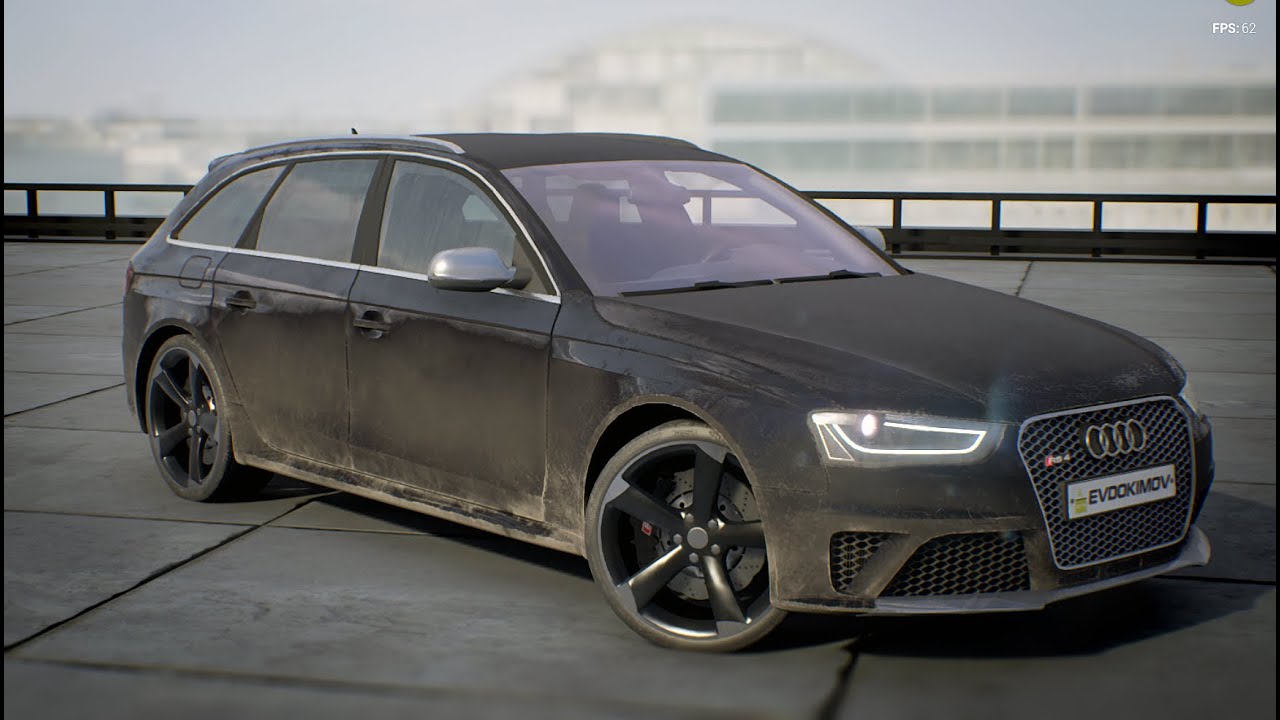
Интерактивный конфигуратор Audi RS4
Interactive Configurator of Audi RS4
Autodesk Softimage / Substance Designer / Substance Painter / Adobe Photoshop / Audiacity

Purchase the complete project: https://ue4arch.com/shop/complete-projects/car-customization-system/
ue4 archviz, assets, ue4, architectural, unreal engine 4, archviz, interior, realtime, UE4 Archviz, architecture, unreal engine 4, interactive, Unreal Engine 4, ue4, archviz, i...
thorn scarab
bmw is not good. look at tires, also body surfaces. in real life situation it's impossible.
lucid socket
Mclaren also has a thing.
autumn elbow
There are tons
thorn scarab
nah i restore an old car as a hobby. so i learned a bit about surfaces paint clear and etc. they just can't be "straight" plus many other tiny things that make it "oh no" in the reality, but "please yes" in digital rep
i just trying to recreate those surfaces and so far looks sucks
trying to learn from someones example hm
 marsh chasm
how do i add water to this
 plush yew
@marsh chasm add a plane and assign a water material to it. check Dean Ashfords Cartoon Water Shader on youtube for a good example on the shader.
 untold swallow
Hey How do I add an interstial Ad from Admob whenever the player dies?
marsh chasm
how do i open back up the detail tab
 worldly otter
I'm trying to use unreal insights to capture cpu and network data from a game instance, but nothing is captured. Is that missing dll the reason or is there some other known problems?
I'm running a shortcut of packaged game with parameters -NetTrace=1 -trace=net, cpu, gpu
Okay got the cpu tracing working by adding -cpuprofilertrace
rough knoll
can i hide this?
 inland kettle
Hello together,
i want to attach an actor to another actor an weld them together. My goal is, that the actor componets are welded to. I dont want to weld every component. So. When i weld one actor to another, the components are not effected. Ana clou what iam doing wrong here?
PS: iam working with the default scene root
 viral rivet
when i build a scene for offline rendering and i get some problems with texture streaming can i just disable it somewhere ?
inland kettle
Project Settings
viral rivet
thanks!
 winged crypt
Anyone that upgraded from 4.24 to 4.25 notice anything strange with player movement speeds? Without changing the speeds, they're a lot faster in 4.25 for some reason 🤔
 open wadi
Does UE4 have native support for an HTTP cookie jar implementation?
 honest vale
exotic thicket
honest vale
exotic thicket
You probably have to manage it yourself, I don't remember seeing anything about cookies in the docs
But I mean it's basically just a bunch of HTTP headers so it's not hugely complicated
inland kettle
OneToWeldThemAll
Problem is. The Components are not affected
I works only, when the root is a Component
 elder crest
Hello all. im new here. do expect alot of dumb questions
my last project was done on RPG MV but i felt it was too limiting. so im trying (and failing) to learn unreal.
can you give a better screen shot? Hold the windows Key Shift and S and highlite the mapping only please
exotic thicket
@ebon linden have you checked if the heal custom event gets called?
It looks like the "set timer by function" is missing the object parameter so I'm not sure if it's right... the logic itself for the heal looks like it should work assuming all your variables have been set to correct values
yeah so you need to start by debugging where the problem is
so best to start by verifying the function is called correctly first
elder crest
interesting o.o this stuff kinda bewildering at first o.o
 lofty wave
Ok yesterday I already talked about ue crashing my project when I open a level per BP
I looked into the logs today and its just full ofWarning: PopulatePhysXGeometryAndTransform(Convex): ConvexElem is missing ConvexMesh
Does anyone know what that means?
elder crest
not I, it all depends on what the convex item was in the first place. did you change any items recently? dont mine me tho im noob at this
lofty wave
I havent changed anything with the blueprints in the levels
It even crashes when opening a completely new level
exotic thicket
@ebon linden you could have a print node, or add a breakpoint, whichever is easiest for you
lofty wave
The last line of the log is Runnable thread TaskGraphThreadHP 18 crashed.
elder crest
so from watching people on yourtube. you make your own levels there no prefabs?
exotic thicket
right, but you also need to verify it calls the Heal event
yep
the idea is to see that the graph in there gets executed, so having a print there would indeed work
okay, the timer is probably wrong then.. try using a self node and connect it to the object parameter on the timer
elder crest
is there any easy/coherent videos to start learning the basics of unreal?
 whole quarry
@elder crest https://www.youtube.com/watch?v=EM_HYqQdToE& this is a good one

Announce Post: https://forums.unrealengine.com/showthread.php?101051
This Training Stream takes a look at Blueprint Communication. We find that Unreal Developers of all levels can sometimes struggle through the concepts behind moving data between objects. So in this video we'...
exotic thicket
@ebon linden Is your timer variable set correctly?
hmm not really sure 🤔 what did you change when it stopped working?
it might be a good idea to remove that parameter from Heal since it's clearly not being used... I don't know if timers support functions with parameters
elder crest
so i assume everyone and their grandmother use paragon assets yeah?
whole quarry
How does that logic work?
elder crest
well free assets are free so...
exotic thicket
I have no idea how I would integrate this asset into my retro sprite based shooter
so no I don't think everyone is using them lol
elder crest
haha fair enough
untold hollow
hi all. So I disabled projectsettings|rendering|enable static lighting hid every light source and fog and skysphere in the scene, and turned worldsettings lightmass environment intensity to zero. The sky is black now, but objects are lit up like it's bright as day. How can I make it pitch black until I add a light source?
exotic cave
@untold hollow : Turn off your eye adaptation.
If you scroll up a few pages I gave a lovely lesson on how to do this.
untold hollow
thanks
btw i figured out my input problem with a little help online, in case you're around when some poor future soul arrives. In the project input settings, the entries for usb controller, and xbox gamepad were interfering with eachother. just got rid of the usb ones, and everything is wonderful now
elder crest
how does unreal handle multiplayer? does is have reserved Servers or something?
untold hollow
you might get more details from someone else, because I'm like day 1 here. But, I asked a similar question online, and from I can gather it doesn't have reserved servers, so aside from helping you matchmake, you need to get the servers yourself or do peer to peer
 somber quail
Hey I'm having trouble launching a light build from commandline - I've hit the character count on the "target" dialogue box for the UE4Editor-CMD shortcut. Is there any way around this or any other way to launch a lightbuild without opening the map?
 dark rune
what does Height map translate to in UE4 materials
plush yew
Hello guys I need little help about following the docs:
 golden condor
Hello
plush yew
golden condor
I am running into an issue
 tender pecan
Hi @plush yew you can find where your engine files are here. https://docs.unrealengine.com/en-US/Programming/Basics/ConfigurationFiles/index.html, compare the documentation engine version, it needs to be current or prior to yours. if you cant find the file, or you can find the file, but the setting does not seem to work, it may be why.
 alpine badger
golden condor
alpine badger
golden condor
How do I find the references of a particle effect?
 steel rock
Greetings folks, I'm planning on releasing my game (basically just uploading it for anyone to play for free) but I'm confused about the licencing process. I have no idea how to go about it. I've read the publishing licence, but since my game would be completely free I'm not sure how to go about it. The game I would upload would be more for testing purposes and of course if someone enjoys it even better, but that is pretty much it. I realise I don't need to pay any royalties to Epic, but I'm just confused what to do with the licence in general. Is there a step by step process of how to go about licensing your game or am I free to just package and upload it without complicating it further? Thanks
tender pecan
how are you 'releasing' it?
exotic thicket
By using UE you accepted the licensing terms. As long as you abide by the terms of the license agreement you're fine
exotic cave
@steel rock : A good read on UE licensing terms below
Since your project would be public, you'll probably need this license: https://www.unrealengine.com/en-US/eula/publishing

Unreal Engine
Unreal Engine 4 is a suite of integrated tools for game developers to design and build games, simulations, and visualizations.
Some important points: You can't break the law. You must keep project records sufficient to satisfy legal requirements of software projects in your jurisdictions of company operation. You agree to indemnify Epic of liability related to your project. You must keep your Unreal Engine account secure and make every effort to prevent other actions that could compromise the engine/expose it to criminal hackers. If you monetize and make more than $1,000,000, Epic gets its 5%.
(Note that I am not a lawyer, and lawyers should properly be consulted on these issues when a project is large enough. There are other important points as well and it's worth it to read the whole thing. Do your own research.)
steel rock
@exotic cave Yea I've read it and the other licences, in other words I've done my research as well as I could, and I'm not confused about what is written in the license but the process around it regarding a game going public. In any case, your info was helpful and @exotic thicket thanks a lot, nothing better than a concise answer 😄 love it 😄
exotic cave
Epic is in my (very limited) experience pretty cool, they want people to make things and projects that matter, that keep getting the UE and Epic name out there 🙂
What is the jurisdiction of release? Is this some kind of public MMO or other multiplayer game designed to be released without restriction?
If you don't feel the need to tell me that's fine 😄
steel rock
no not at all, it is actually my first complete project and its a simple single player space top down shooter. I would use this as a way to get feedback, and to have something for my portfolio
exotic cave
You're 100% fine
People release student/portfolio projects every single day on LinkedIn and other social networks and Epic staff regularly give likes and approval to the best ones in my experience 😄
Don't break the law and you should be just golden.
steel rock
awesome 🙂 thanks
exotic cave
(Note that I do not speak for Epic in any way, just a journeyman dev hoping to become a UE expert, would be nice to see an Epicer weigh in on it all - 👍🏻 )
steel rock
true 😄
 open compass
how come some materials work on my landscape and some go on but just display the default grid material
exotic cave
Landscape materials are not like regular materials very much
They require their own set of learning
Setting up materials to work with Landscape terrains
Super powerful stuff but def read up on the differences
open compass
alrighty thanks, is there a way i can quickly transfer it into a landscape material?
exotic cave
In particular if you are using over a certain number of textures you've gotta start setting them to Shared mode or the material stops working, that's a frequent complaint of new landscape material designers
Is it just, like, an ordinary material you want to go on a landscape?
open compass
yep
exotic cave
Read up on that documentation, it's pretty good
If it still doesn't work post some screenshots of the problem you're having and I'll try to help
open compass
alrighty cheers
plush yew
ue4 crash at launching pls help
exotic cave
plz logs, plz screenshot
exotic cave
What changed about your project, computer configuration, or et cetera that was the most recent change before it stopped working?
plush yew
i had problem b4 for example it cant build in any project
exotic cave
System specs?
plush yew
What changed about your project, computer configuration, or et cetera that was the most recent change before it stopped working?
@exotic cave litteraly nothing
wait
i3 6100
gtx 1050
8 gb ram(ik it sucks)
exotic cave
Yeah an i3 is not the best choice for UE
You're lucky it's ever even run at all 😦
UE4, at least
I know it's what you have, but projects of any real size will choke those specs
plush yew
it ran perfectly b4
exotic cave
Something changed 🙂
Could be that your computer is running out of hard drive space? Your RAM is okay but you're probably hitting the swapfile regularly on 8GB these days, and if you start running out of HD space then everything on your computer that depends on your swapfile could break
plush yew
i have 70 gb left
exotic cave
Should be enough. Not sure how to help other than that. Sorry.
exotic cave
Invest in a higher end machine if you can at some point, an i3 just can't really be a serious UE dev machine. 😢
plush yew
yea im planning in changing my system
 merry gazelle
I've created some building BP actors and decided I want them to have CCTV the player can switch too. Is it possible to switch between a player pawn and regular actor, or do I need to make my buildings in characters?
plush yew
so the project files are fucked?
exotic cave
@merry gazelle : You should be able to design a system that switches between various characters, though I haven't done it myself 🙂
@plush yew : I have no way of knowing without taking a look at your project, and I just can't right now, so busy.
plush yew
ok
merry gazelle
yeah but the building isn't a character, so I would need to switch it?
exotic cave
I mean if all you're doing is switching between camera viewports, so easy
I have a basic BP for that I can show
I'm not sure what you mean by CCTV and the building's role in this stuff?
merry gazelle
so the building is just a regular actor with a camera component inside
exotic cave
You can create a blueprint that accepts inputs to change your camera, if all you want to do is be able to have the player find like a CCTV console with various cams or whatnot
Very easy
Here's what I use to allow the user to press C to change between some scenic cams
All those inputs coming in from the left are just camera components, drag them into the blueprint to get a reference 👍🏻
"Current Camera" is a variable
merry gazelle
thanks, I was attempting something like this
I'll check yours out, I think it'll work better
 fierce forge
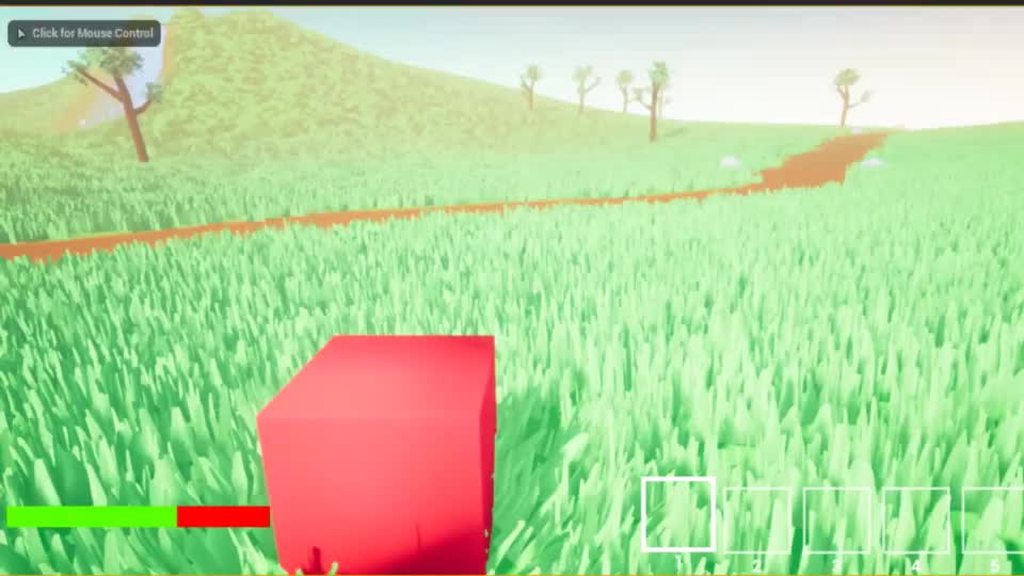
why these particles appear just when i eject from the character ? https://imgur.com/a/UuawT1u
 merry gazelle
cool, this does the job
 hearty walrus
how do I make a cube that the player can pick up, move and lock in place?
so pressing a button locks an object in place, and pressing it again unlcoks it
like in gmod
Don't Just Say "Hello" in Chat.
@stiff hawk
fierce forge
where i can find a tutorial for a fishing system with a fishing rod ?
 tame marsh
Hello, has someone worked with multiple GPUs and UE4 Editor? As in, run multiple instances of a non-packaged project, each using a different GPU?
 limber swallow
Hello... So... I'm making a "Shooter" actor component that will spawn bullets according to parameters. The idea is that I can put it on any enemy and it will be able to shoot. Problem is... I need to get the origin of the shoots from that Actor. I was thinking about using a socket with a specific (or parametrized) name and getting it's position, but I want to be able to use for static meshes too, and those have no bones. So... is there a way around that? Or should I just limit it to use only skeletal meshes?
 restive yarrow
hearty walrus
restive yarrow
hearty walrus
how do I spawn an actor?
 river mesa
@ebon linden maybe a decail works
 vocal beacon
So I just realized on Quixel that megascan assets say something like "4 points". Is that the price of the asset? And if so, how many points do I get with the regular UE license
 noble tapir
Have any of you used FFrameGrabber before? Trying to use it and having some problems. Trying to do #include "FrameGrabber.h" and it's saying it doesnt exist.
when I use the full path
#include "MovieSceneCapture/Public/FrameGrabber.h"
a bunch of errors come up
 limber mesa
Anyone know of some animation software for animating objects
hearty walrus
blender
exotic cave
@vocal beacon : Megascans are free for Unreal Engine users. The points value is for use among Quixel's non-UE users (who still pay a subscription).
However, you can only distribute Megascans with end-user applications (finished games, etc.) - no third-party or Marketplace packs.
vocal beacon
Ah thanks
open wadi
Does UE4 have native HTTP cookie jar support?
 midnight gate
im doing a poll on twitter because i want to make more tutorials vote pls thank you https://twitter.com/GloriaAnimator/status/1289228694578270208?s=20

hey i wanna help out artist improve their skills by making tutorials what kind of 3D or art fundamentals tutorial should i make?
please retweet for more accurate results of what knowledge i could share in our art community THANK YOU <3
#b3d #indiedev #artist #ArtistOnTwitte...
 Twitter
 ember star
Anyone have a suggestion for designing 'races' for characters? Do I want a 'Race' Actor component class, which I can make subclasses of, 'human' actor component?
or 1 actor component with a variable of some race class?
 balmy tide
how to fix the Intellisense when using VS with UE4?
It is running very slow, detecting errors late, not giving suggestions
midnight gate
i dont think i specialize too much in that kind of stylization
 crystal swallow
i made a thing
Better than atan2 (In VectorToRadialValue) because atan2 makes it pixellated at slanted ends
 fleet helm
Hey! Dees anyone know how to influence motion vectors in UE4? I have a lot of smearing with parameter bound WPO 😦
 grim ore
@hearty rose there are addons for UE4 that let you use html/css for UI, look at coherent
 limpid egret
Good luck getting access to coherent unless you're a large studio
There are open source version though on github, Mathew is right
ember star
Is there an easy way to associate enums with class refs? Besides doing a switch on the enum and assigning them all manually?
Or, is there a way for me to 'get all subclasses of type'
somber quail
Use a dictionary?
@ember starJust threw together this nonsensical example - just to show how to map an enum to a specific reference. Hopefully it makes sense
plush yew
Hi guys, is there a way to figure out which collision? I got this box collision that keep colliding with my physich and I have no clue where it come from
Any idea? :S
ember star
thanks @somber quail ill follow that lead
 marsh swallow
@plush yew its all based on what the collision object is set to on the collision box itself. Thats what its feeding the other collision boxes it overlaps.
plush yew
I don't really have a box collision in my BP tho
I have absolutely no idea where this box come from
all i have is a capsule component
ember star
@somber quail have a suggestion for where i can define that map to use it pretty globally?
 scarlet birch
You can add a print statement to the collision event and print the hit actor or , IIRC, press T in the editor to select transparent and just carefully click the box.
open wadi
@grim ore Does UE4 have native HTML cookie jar support?
scarlet birch
@ember star Maybe get it from GameInstance. The framework page of the docs might be helpful.
ember star
thanks!
open wadi
I ask about native HTML cookie jar support because I'm building an external authentication system for my UE4 app in node.js, but I've learned from multiple people in the know that using stateless JWTs for authorization has many flaws, and it would be superior if I could use session cookies like any normal web browser.
If UE4 doesn't have such an implementation, I would have to build my own.
But it's hard to find documentation either way. I see that UE4 has native HTTP/HTTPS support with references to saving cookies, but it's hard to determine if that's related to some sort of in-game browser.
thorn scarab
my brothers, who could level me up in developing super realistic rain? my results from last year. I'd love to come back to it and ramp it up 😇
exotic cave
@thorn scarab : That's pretty good - are you open to things like rain on the camera lens and/or on windowpanes? I can't tell from here if your windows have realistic runlets.
thorn scarab
@exotic cave I didn't bother yet with on camera yet cuz my rain still isn't that great
exotic cave
I have only the barest experience writing water shaders and none for UE yet, sad to say. But what I do know is that the most realistic water looks I've seen almost always include some kind of actual droplet/runlet distortions on materials, particularly transparent ones
Ehhhh your particles look pretty solid from here
thorn scarab
when i done with it iguess id move to on screen and etc
exotic cave
But "wet" is a whole concept, and droplets merging together somehow/distorting surfaces with moving water is what really sophisticated looks I've seen do
Adding runlet distortion to scene materials is a concept. If you're just asking about the particles themselves, IDK because yours look pretty great from here. 😄
Here's a nice article on the kind of thing I'm talking about, maybe not your needs right now though : https://80.lv/articles/setting-up-rain-materials-in-substance-designer/

Cem Tezcan gave a detailed breakdown of his amazing moisture/rain material he created with the help of Substance Designer.
thorn scarab
so far my drops are able to fall on the surface, change their shape depends on the surface and angle, go down and fall again
exotic cave
Yeah but drops merge in real world, drops alone will never get the most realistic look, because rain can be both wave and particle 😄
I don't think you can easily simulate real particle stuffs merging like fluids in Houdini or anything, unless you want to get really spicy, that's a lot of work
But there's def material stuffs that can make things look "wetter"
thorn scarab
I see, it's a different game with drops on camera, just not everything works for it. like when you open a door outside
i'm not in the "rain" so nothing to
exotic cave
I agree, I don't think drops on camera can fully cover what I'm talking about, it's mostly the kind of really "wet" distortion in that picture there that can't be purely simulated with particle systems
thorn scarab
be on the camera and etc. plus in the reality i have no glasses so that thing is not good for such thing 🙂
exotic cave
I apologize then, probably not helpful to your current needs 😄
thorn scarab
@exotic cave nope it's actually good, I need to work on my windows shaders to create interesting look
exotic cave
Real wet out in the world splashes around, drops get on your windows, your stuff, even in your eyes
That's why I suggest
thorn scarab
also car windows and etc
exotic cave
I seriously think even just a little bit of a wet-camera look could be cool, esp if it weren't uniformly applied, I may experiment with that at some point as this has me interested now
Variable coverage that would allow focus on scene objects but kind of simulate the effect of water from heavy rain splashing into the corners of your eyes
Who knows, could be bad 🙂
thorn scarab
@exotic cave it is cool if my characters would have helmets or glasses but so far none of that. maybe i'd use it for some scene with helmet or whatever
exotic cave
Yeah that's a really good idea
thorn scarab
but in other situations it's not as useful unfortunately
 vivid plume
Hey guys, how do you handle bug fixing in your game especially if the game crashes in a certain situation?
hearty walrus
how do I make an object translucent if it's in the way of the camera?
vivid plume
yeah of course but the game crashes in the package version and only for clients
exotic cave
Hmmm, I'm not a build expert yet in UE. Def sounds related to your deployment process
Unfortunately, despite the best efforts of the hardest working devs in the world, running in Viewport and in package will always be somewhat different
The package works for you, but not them?
@hearty walrus : Explain "way of the camera" more? You mean testing to see if an object is in front of the camera and blocking other objects?
exotic cave
You can cast a ray or series of rays from your eye position (often directly forward, but you may need to test a range of angles) and see what you hit, and adjust the material accordingly.
hearty walrus
so if a part is blocking view of the player, make it translucent
exotic cave
However, you will probably have to hotswap materials at runtime as you really don't want to use a partially transparent model for everything in your scene all the time.
hearty walrus
it's only the walls
exotic cave
You would cast the ray, see what you hit, see if that object meets your conditions for being big/important enough to make translucent, and then swap/adjust transparency on the material as needed.
vivid plume
the package is not the problem, I think I made a misstake by disconnecting the clients or something because the game crashes if the host moves the party from the map where you are game over over to the lobby and right there the game crashes for the clients
exotic cave
"Only the walls" is a lot of screen space at any given time. 😄 Transparency is super expensive. You super don't want to just have a bunch of materials that are rendering in transparent mode if they are fully opaque, the shader won't be smart enough to tell the difference unless you get really fancy.
Basically, cast a ray, hit a wall, see if it matches your criteria, if so, you activate material partial transparency (fully transparent would make it disappear)
hearty walrus
there's 4 walls
exotic cave
@vivid plume : I can't help debug networking, sorry. 😦 Out of my wheelhouse.
hearty walrus
so each room has 4 walls, that need to go transparent so the player can see what they are doing
exotic cave
Doesn't matter how many walls there are. It matters how big the walls are on the screen, because if you have a 2 triangle wall that's taking up 50% of the screen it's still rendering hundreds of thousands of pixels.
vivid plume
thanks nevertheless 😄
exotic cave
Is this for something like an Onimusha style camera? I don't know how to describe technically....
Semi-fixed camera that needs to see through parts of buildings to maintain a cinematic perspective
I don't find too many good links on an existing procedure, @hearty walrus . But the process I described to you should work, if you're technically proficient enough.
Do you know how to cast rays?
This is the general approach - you'd replace the ray casting from the third person described here with one casting out of your eye position: https://docs.unrealengine.com/en-US/Engine/Physics/Tracing/HowTo/SingleLineTraceByChannel/index.html
This how to covers using a Single Line Trace by Channel Blueprint node to return a the first Actor it hits that responds on the Visibility channel, and prints its name.
Once you have the object that your Trace has hit (as raycasts are called in UE) you can do whatever you want with it
If all you need is either fully opaque/fully transparent then you can just turn off rendering on the object when you hit it. If you need AAA cool partial transparency you'll have to get fancy. Good luck!
 rain pier
Hey everyone,
Posting here since I don't find any appropriate channel.
We are working on an RPG with a lot of text and dialogs, be it random NPC or cinematics. I'm wondering if you would have any advice on a tool to use to keep track of all this text, especially for Localization.
We are going to work with a writer who doesn't know anything about UE and ideally we'd like to simply extract his Excel into UE and have it work in a Datatable.
Does any of you have any experience on this ? If there is a recommended workflow or something. I went through the dialog systems on the marketplace and in most of them you just enter the text directly in UE, it doesn't come from a datatable. If you know any asset that works like that, I'd be glad to hear about it
So basically every text in the game should point towards a Datatable eventually is that it ?
 quartz cosmos
Hello!How can I call a function when an Actor is Destroyed?I tried OnDestroyed.AddDynamic() and it didn't work.
rain pier
Gotcha, still unsure how to technically do it but at least the idea is correct
exotic cave
One thing that the big engines still lack is the kind of truly robust database support and integration that desktop apps have had for awhile, @rain pier
There are some SQL plugins you could explore as well however
rain pier
Single player RPG
exotic cave
Yeah, might not need it then 🙂
Still a big fan of SQL however for anything truly data intensive

Unreal Engine
Ask any game programmer, and they’ll tell you that it’s best to adopt a data-driven approach that allows game designers to tweak as much about the gameplay as possible without the aid of a programmer. If you talk to the game designers themselves, many of them will tell you tha...
This might also be relevant

This plugin provides you with Blueprints and C++ to read & write Excel.xslx file data directly.
I always tend to prefer Blueprints to C++ these days 😄
rain pier
Oooh that looks super interesting
exotic cave
I'm sure I'll have to deep dive into UEC++ eventually
rain pier
I'll check it out
exotic cave
Not too expensive 😄
rain pier
Thanks for the help guys
I feel like the doc is severely lacking on how to handle hundreds of pages of text
exotic cave
I think it's pretty good, just sometimes hard to find what's needed unless your search skills are very good
And some articles are certainly intimidating for the newcomer
thorn scarab
@rain pier unreal has API which includes operations with dialog system. you can connect any front end you want to manipulate with dialogs.
Unreal Engine API Reference
untold swallow
Hey Do I need To get SDK if I need to test the game on mobile with usb cable?
Okay thanks
 digital badger
8K
Am I blind? Is there a share functionality in the Marketplace( launcher version)?
Need to copy the link
open wadi
Question: Does UE4 have native HTML cookie jar support?
ember star
I have a bunch of classes that I dont ever create/spawn, i just use a lot of 'get Class Defaults'. Am i designing this wrong?
 warm plume
Hello everyone!! Can someone help me with somthing :(
plush yew
Hello, is there a way to just turn off shadows?
and is there a way to make the void black, instead of white?
Hello everyone!! Can someone help me with somthing :(
@warm plume
just ask the question.. 😄 🙂
warm plume
@plush yew ty
I edit an animtion on my oc when I hit save/comply it dose not save
The change I make on that animtion dose not happend even if I press save
plush yew
make sure that you're not previeuwing/playing the game if you are editing in unreal.
warm plume
I do not do that
It's just do not save the change I make on the animtion after I retaget
 worn oasis
im having trouble with lighting
im trying to use this hdri, which i have loaded into the scene, but i dont know how to "activate" it
plush yew
does someone now how to turn off shadows?
i hate it to add lights, and there is previeuw everywhere.. xD
@plush yew on static mesh?
or on the light
@plush yew see the green mark, turn it off
on ur lighting
on the lightning bulb? i only have 1 in the hole map.
i'll have a check
you're map looks nice btw! 🙂
 fiery mortar
is there way to record the gameplay inside ue4?
plush yew
i don't think so, but if you have something of geforce installed, try shadowplay.
@fiery mortar you can use fraps software
fiery mortar
ok thanks
plush yew
@plush yew it worked, thank you very much!!
👌
1 question, do you know how to make a save progress option? @plush yew
@plush yew no i cant program
aah daim, but thank you for you're help anyways. 😄
good! i'm making some levels right now, and setting up a command to tp you back when you hit the wrong block
happy new profile noises
hearty walrus
how do I make a tube that dispenses a box when a button is pressed?
digital badger
lmao as if I had that many browser tabs open that I couldn't build PCH
 opal totem
@hearty walrus spawn actor