#ue4-general
1 messages · Page 804 of 1
 slender sierra
but then it doesnt actually keep all inverse kinematic info
is that why its broken?
 soft fiber
just sec
Have you watched this:

In this Blender 2.8 tutorial I explain how to export a low poly character model with animations as fbx and then import it into UE4. I use a simple demo project in UE 4.24 to import the models, create a material with a diffuse texture and add a model with an animation to the le...
soft fiber
Its the same concept
slender sierra
but i have anims too
i know how to import and stuff
its just my ik rig is not working
everything else is fine
soft fiber
What did you use to do your rig?
soft fiber
I usually use the AutoRigPro FBX export which it meant to work with Unreal. Maybe that's why I haven't seem this issue.
slender sierra
could you tell me all the info in dm?
like about auto rig pro and link and stuff
if you dont mind that is
soft fiber
DM your model and I'll give it a try.
slender sierra
alright thanks
 thick herald
Send to Unreal, Epics official addon may be of use.
 dim echo
Hello, I had a problem with UE4. Every time I click launch to try and see if everything is working, nothing launches and my cpu goes up to like 80%. Just wondering why it's not launching
 plush yew
Hello, I had a problem with UE4. Every time I click launch to try and see if everything is working, nothing launches and my cpu goes up to like 80%. Just wondering why it's not launching
@dim echo Check your resource monitor. It might be compiling shaders in the background, give it time.
 ancient parrot
Hello, are there any tutorials on multiplayer FPS using C++?
 worn peak
any ytb channel recommend to start learning ue4 ?
any beginners tutorial or something lik
thick herald
Ryan Laley, underscore are good places to start.
 grim ore
@worn peak look at the pinned message in this channel for learning resources
 flat axle
@grim ore didnt even know that was there. Thanks!
worn peak
@grim ore thanks ^^
 frank oar
Does anyone know of a good, fairly recent flipbook tutorial ?
I have 5 second videos in my tutorial widgets but because it is in mobile it is tanking my fps from 72 to 15-30
after looking into it, it seems like flipbook is the way to go ?
 exotic thicket
Have you tried downscaling the videos or reducing the video framerate?
You usually wouldn't need them to be at a particularly high fps or resolution on smaller screens especially if it's some kind of a tutorial video clip
plush yew
Has anybody who did initial design in unity pivoted to UE4 for production and had better than expected results? (for mobile games) Also, can you build for android supporting rtrt yet by default?
 zinc basin
Hey guys, I have a 'super' simple bug I can't get to the bottom of.
I am making a shield recharge delay for an FPS, I have a simple Delay Timer, with a Float of 3s, and it works fine - after 3s it resets a boolean. If I use it with a retriggerable tho, it never resets; is somthing retriggering my delay, or is there possibly some kind of bug regarding this someone knows about atm?
exotic thicket
If your retriggerable delay never runs it means your BP keeps triggering it
zinc basin
im going to make a trigger counter and add it to my HUD just to check actually, and yep that's what I'm thinking, thanks. Just wondering if it was me. It probably is.
frank oar
@exotic thicket I would be happy to try reducing the resolution and frame rate, would I have to do that with the media file outside of unreal or do you know if it can be done within unreal ?
exotic thicket
haven't really done that much with video in UE so don't know
frank oar
ok, thank you for the suggestion anyway
exotic thicket
ffmpeg is pretty easy to automate with a script or such if you have a lot of videos :)
it can do all the rescaling and such
 storm venture
can i apply the lighting of mesh A to mesh B?
as in, if mesh A is beside a spotlight and mesh B is in darkness, can I still project the lighting of mesh A onto mesh B to make it look like it is lit as well?
grim ore
I dont think directly but there are lighting channels so you could have a light casting on channel 2 and that mesh accepting light only on channel 2 and that light would then only work on that mesh
 hollow yarrow
Hey everyone, what size do you think i should make my map (im going to be making multiple of them). This is for a mob killer type game, similar style to CoD zombies
grim ore
put your player model in the game and start blocking it out. The size is your design choice
frank oar
Is it possible to change the resolution of media played within unreal engine ?
instead of having to use a video editor to change it out of the engine/having to re import and do all the setting up again ?
hollow yarrow
been watching your videos for a while and just realised it was you when i looked at the profile picture lmao @grim ore
 sharp magnet
I got a question, what makes you guys choose Unreal over any other engine?
plush yew
@frank oar r.setres
frank oar
@plush yew I don't understand what you mean.
@sharp magnet for me, it is free, fairly user friendly, and a lot of my favorite games actually run on it.
plush yew
after you google r.setres it says you can pres the tilde key, type that in, and type in any resolution you want as a console command.
@sharp magnet unreal is best for 3d, unity is good for 2d.
frank oar
looking into that now, will that work specifcally on the media I have in my scene (and not the whole scene) ?
@plush yew
plush yew
@frank oar try it out and get back to me? 🙂
sharp magnet
I kinda wanna try making 2d and 3d games with unreal. To me it just looks and feels better.
 wheat hare
The node editor is really convinent and routine tasks are really easy with unreal
plush yew
yep. blueprints and material node editing is pretty nice.
a bulk of my code is in bp for my games
a good reason to use unreal is UE5 which comes out late 2021, should be compatible with 4.25 / 4.26 @sharp magnet
frank oar
@plush yew hmm looks like that is for resetting screen resolution, also, pressing the tilde key just brings up a strange color pallette with cubes and spheres.
plush yew
what are you trying to set the resolution of?
the screen space is usually what people do that to
are you using file media source ?
frank oar
Ok so I am in VR and using 3d widgets, on those widgets there are media textures I am using for my tutorial...
its causing my game to drop fps badly.
I was wondering if you can down res the media in unreal engine @plush yew
yeah I think so
plush yew
just re-encode the media using handbrake en masse and reimport to unreal as files?
why would you want to downscale in unreal? unreal is not an encoder
 scarlet birch
Yeah, if you do it in handbrake and keep the same file location / name you can just right click them and reimport
frank oar
because It took me a while to get the media working and it has been a while so I am scared of messing it up if I try to do it over with lower res videos.
Also I am not educated/inteligent enough to just assume that unreal can not down scale these textures...
plush yew
then backup your files using git / perforce / file backups first
and run the encoding in handbrake using in place encoding over the same filename
and re-load the files in unreal after you're done
i do monthly backups.. tends to work pretty well
frank oar
the only handbrake I am familiar with is in my car XD
is this a program I would need to download ? 😄
frank oar
2017
 honest pivot
any idea when 4.26 will come out ??
frank oar
@scarlet birch sorry to @ you,
If I follow your instructions, how do I reimport ?
scarlet birch
Right click? or you might be able to use the bulk editor
plush yew
@honest pivot
scarlet birch
Don't recall if you can multi select, right click, reimport
 fossil crane
We are doing a game me and a friend and someone told me we should focus the textures on the game engine is that true ?
honest pivot
damn i wanted to use chaos in my project
frank oar
none of those files give me an actual reimport option when right clicking
scarlet birch
4.26 looks to be getting close but you never know when until it's out. You can use chaos now.
honest pivot
how? thought it wasn't working for 4.25
scarlet birch
Why?
plush yew
epic said the approximate date in the UE5 description nick penwarden did . usually they don't announace ETAs though Mike Unreal Engine for Next-Gen Games | Unreal Fest Online 2020
 untold swallow
hello, currently my project has no virtual joystick or any buttons for android.... i wna add a joystick which will only do work of A/D keys ... i.e move left right and a button to jump!!!! please helpp
honest pivot
might want to look at controller tutorial on YT
sharp magnet
I really enjoy using unreal more than unity, my college mostly has people working in unity but I've focused more on unreal
scarlet birch
In the past, commits on Github and activity on Trello has been a somewhat reliable indicator of when a release was getting close. Based on that I think there might be a 4.26 in the near future. But I've not had a lot of time to keep up with all the news and stuff.
plush yew
you haven't seen the ue5 launch stuff?
 fluid lance
Does anybody know why HISM is ignoring the collision of the set mesh although the HISMs collision is set to default (which should fallback on mesh collision settings)?
scarlet birch
are you changing the mesh?
untold swallow
hello, currently my project has no virtual joystick or any buttons for android.... i wna add a joystick which will only do work of A/D keys ... i.e move left right and a button to jump!!!! please helpp
anyone plz help
scarlet birch
Don't spam.
untold swallow
uh okay sorry its just somewhat important, could u help?
scarlet birch
Everything's important to someone.
untold swallow
i said sorry ! have a nice day
sharp magnet
oof
scarlet birch
@plush yew Good video, hadn't seen it. Thanks.
A little more detail than I'd seen before on quite a few things.
fluid lance
are you changing the mesh?
@scarlet birch I made a spline tool for quicker level design and I don't want certain meshes to respond to visibility. They don't show up in visibility collision visualizer but they do block visibility channel...
scarlet birch
So they're blocking something you don't want them to?
fluid lance
yep
scarlet birch
Player?
fluid lance
visibility
it's top down and these are between the camera and the player. I'm using a ditther mask to fade them but somehow they still block vis channel
scarlet birch
By blocking you mean they are not transparent? or they are returning a hit on a visibility trace or interfering with camera movement or something? a screen or short vid might help.
scarlet birch
I follow.
fluid lance
so if that pillar blocks, then i can't trace down to the floor and navigate properly
now...the HISM component is set on default collision
which should fallback on SMs' settings - right?
fluid lance
yep
scarlet birch
It's returning a hit from a trace?
scarlet birch
Can I see the trace node?
scarlet birch
I'd try manually setting the collision in the BP with the pillar before doing anything else. What happens if no hit is returned? it doesn't look like that is accounted for.
fluid lance
I'm not use I know what you mean - sry 😅
 proper stump
Hello, I've got wind in my level, not sure how, is there a global wind setting?
scarlet birch
Select the component for the pillar in the BP and set its collision properties there.
fluid lance
@scarlet birch yep...that's it, found the problem...This bit of code adds the HISMs, there may be several in the tool, and it's collision was set in the node
However, problem is this: 😭
scarlet birch
Yeah, I've had issues in the past with collision when changing meshes in a BP.
fluid lance
I can't set default!
scarlet birch
You could go into project settings and add another preset or just set it to custom and set the responses.
fluid lance
ahhhh, i wanted to avoid that! 😂
scarlet birch
You might have varying collision settings?
fluid lance
yea...but if i set it to ignore/not ignore "navigation collision" - say i just name the new channel that - on the HISM component and NOT on particular meshes, then I can't use the same tool for the floor & walls, since none of the walls should be navigable 😦
or maybe add to the struct collision info on that channel and adjust for each HISM component accordingly...
scarlet birch
I don't know if you can do this, but you might be able to get the default collision for the mesh when you set it and then use that to set the collision for the HISM
I'd have to open an editor to see if that is doable
fluid lance
hm...i'll check that out. So basically after I set the mesh, get it's "native" collision and apply to the whole set (HISM comp)
scarlet birch
I'm not sure if you need to reregister it or if the collision would update without it. In the past there was issues with it not updating collision
yeah
fluid lance
😐 I can't "get" the static mesh's collision
scarlet birch
I'm looking. You could always just set a bool or something though for what to set the collision to.
proper stump
I've got something weird, I have a skeletal mesh with bones that react to wind.... I have not wind source in my map... where does the wind come from?
 brazen harness
does anyone know anything about making a replay editor with keyframes and different camera angle options?
scarlet birch
I don't understand, there's functions that should return that but they don't show up for me in the editor.
fluid lance
@scarlet birch done with the bool 🙂
scarlet birch
cool, works?
fluid lance
thanks for the ideas, went great in the end 🙂
yep, made a bool which selects to ignore or not so yea 🙂
scarlet birch
There's functions for getting the info, it looks like they may only work in the editor though or for editor tools. I haven't spent a lot of time looking at it though.
fluid lance
it's weird that the SM var type doesn't hold collision information...
And that the add HISM node doesn't support "default" collision preset.
Aaanyway, as long as there are workarounds it's great! Thanks! 🙂
 coarse turtle
Is there anyway to copy/paste or drag/drop static meshes from one BP to another BP?
 dense hatch
@coarse turtle yes, you can right click on the static mesh component and copy (or use ctrl-c ctrl-v)
 plain terrace
how come streaks like this are created by my lights?
 hearty igloo
I can’t make a #looking-for-talent post any ideas why?
 gusty dune
Could anyone recommend a tutorial for a cover based system please? I'm hoping to get started on a Division-style project for my course
 mossy nymph
blueprint or c++?
gusty dune
Blueprint for now 😅 I'm still starting out learning c++
mossy nymph
no idea then 😦
gusty dune
Although I'd be willing to try some basic level c++ if you think that's not too crazy
fluid lance
@gusty dune maybe start by looking at TurnBasedTileTookit on Marketplace, it's dev (Knut Overbye) has some tuts explaining how the Kit works and it also has a cover system (if I remember correctly). Maybe go through his vids on youtube.
 brisk echo
Hi guys, I'm trying to loop through animation montage on RMB press
however it only plays the animation once
scarlet birch
Montages are usually for playing something once.
brisk echo
idk man, i'm just following this tutorial series

(00:05) - Intro and Hugh Jackman analogy
(02:30) - Adding a Custom Event
(04:49) - Adding Anim Notify Events
(06:32) - Telling Montage to jump to Sections
(07:55) - Calling punch Custom Event and wrap up
i'm actually using montage cus of slot nodes
so i can use the animation on upper body only
scarlet birch
You can blend States the same way in the animation BP. If the animation needs to loop then a montage is likely not the best solution.
brisk echo
oh... i thought it works on animation montages only
scarlet birch
Slots are for montages, but you have nodes to blend.
brazen harness
-.- i keep getting ignored
brisk echo
do you have a better tutorial for that kind of thing?
brisk echo
aight, i'll keep searching
 storm terrace
Do any of you have a script that will re-name a UE4 project?
I don't mean just re-naming .uproject file, I mean all the nested folders, creating re-directs form old to new objects an everything in-between
mossy nymph
there is a 28 step guide on how to do this
few can be skipped for projects without c++
sp google is your friend
 narrow mauve
Anyone know why when I export FBX from blender some of my UV's arent exporting with it? I never had this problem before I am so baffled
plush yew
Curious, does SunSky intend to replace HDRI Backdrop, or will they work together in tandem?
 frigid temple
Hello plssss, I have this issue, it might not be big for you guys but I am trying to stop widget from replicating in an actors blueprint when "on component overlap"
 autumn elbow
@haughty moth YouTub Game Theory, Unreal UI+Navigation, Blueprints.
plush yew
Also @haughty moth : https://www.unrealengine.com/en-US/onlinelearning-courses These are some good learning resources to get started.

Unreal Engine
Unreal Online Learning is a free learning platform that offers hands-on video courses and guided learning paths.
autumn elbow
was it working before?
hollow yarrow
ive only just started building my map so this is the first time checking
autumn elbow
Got a pic?
hollow yarrow
autumn elbow
Throw a checkerboard texture on ur wall.. does it look better?
hollow yarrow
how do i do that?
autumn elbow
Clear the material slot
and unreal should automatically put the grey checkerboard texture on it
hollow yarrow
still the same
plush yew
hi
plush yew
i need help on something
hollow yarrow
its rendered in now but taken like 5mins
plush yew
i need to publish my app yes or yes to the play store to use admob?
or
how do i use admob
hollow yarrow
it now says 800MiB over budget...
plush yew
i have 7 day searching videos
hollow yarrow
no... 16GB RAM, ryzen 7 3700x, rx590
pretty good pc, it shouldnt be like this for 2 wall pieces lmao @autumn elbow
autumn elbow
Ya.. lol
hollow yarrow
i fixed it, had texture streaming turned off lmao
plush yew
thanks for the help
hollow yarrow
what it should look like
autumn elbow
Looks grand!
 haughty moth
Do you know a server like this but in spanish ?
 glacial pecan
anyone know why this function doesn't appear under the interface? (it's the same category as the others)
holy shit, wait... that's the wrong interface even... wtf
ooh... ok, get it now... that interface doesn't have categories, so it's listed under its interface name... but if you add a category, only that gets listed
ouch... so now I can't get back to the "engine default" category anymore that lists it as an interface
😭
fluid lance
@glacial pecan tried playing with context sensitivity? it should show everything regardless of messed-up categories
glacial pecan
it shows everything, just under "Default" instead of "My Cute Interface"
fluid lance
oh lol 😛
 gentle crypt
when exporting an fbx from blender to UE4. Which smoothing method do i choose? face or edges?
plush yew
Hello ! There is something that confuses me with the retargeting of animations and skeleton in UE4. For me, the retargeting is essentially this thing (but I know this is not the only thing) :

But if I import a character and assign it the skeleton of another character, here in the FBX Import Options :
... Isn't it a retargeting method in itself, also ???
storm terrace
from the UE4 Marketplace, "Pro Main Menu v2" looks just like "SWBF2"
In fact it is so good and close, I would be called a copy-cat if I used the menu system unfortunatly.
They did a really good job making it look professional, especially for $40
 vale notch
does anyone know how to add animation notifications in 4.25
vale notch
The layout is different now tho
I don’t see the notification track
Oh
Thanks appreciate it
plush yew
Fellas is there a proper way to import a model to ue4 that's a parent and has children objects as well
I exported the file as fbx
From blender
 patent cave
hey guys
I just joined because I need help with something
I'm trying to script timestop for jojo's bizarre adventure
I already finished everything except the effect
because it's such a trippy weird effect I can't replicate I thought I'd use professional help since I just started unreal engine a few days ago

^talking about this thing
any advice on how I should do it?
plush yew
Why is my game so blurry when I use stand alone and full screen it? (via F11)
@frigid temple not quite that simple if im understanding you correctly
I exported from blender
Then my friend dragged and dropped the model into ue4 but he had to set up sockets for all the seperate meshes manually
Despite already parenting the meshes in blender
 silk sleet
hey, i'm trying to generate a water mesh, but the texture is getting stretched oddly.
all the vertexes in the mesh are on the edge of the water, making some of the triangles skinny
the uv just calculates each vertex's position within the level (0 -> ~100k units) as a percentage (0. -> 1.) and uses that for the uv coordinates
shouldn't this be working?
can see it better here, sorry
frigid temple
@plush yew did you export it directly from blender? I.e the export to unreal tab in blender
 neat forge
Is there a way I can make a volume make a material inside of the volume disappear for only the overlapping part?
I want the water material inside of the sphere to disappear
 idle garden
same here, ive been experiencing crashes too
@restive yarrow I changed from DirectX to Vulkan and reinstalled the engine, and now it is really better than before
frigid temple
Just go to blender and look for import
Sorry export
And you ll see one for Unreal
plush yew
By the way this is supposed to be 4K (from an earlier message) I am not sure why it was 1280x720... Which is what I mean when I said that I was having issues with fullscreening the game.
 limber oar
hey is there a channel that covers game crash errors ive tried everything trying to fix my asgards wrath and UE4 keeps cucking me
 unique lodge
hello fellow youngsters, How tf do i fix Unable to patch action graph - unexpected executable in compile action (C:\Program Files (x86)\Windows Kits\10\bin\10.0.19041.0\x64\rc.exe)
its an unreal error when i try to compile my project
frigid temple
Haven't encountered this before, sorry
limber oar
k thank you
plush yew
Ah thank you very much that fixed it.
 balmy tide
does anyone know any free animation pack for pistol wielding animations? the Mixamo ones are not good. I want a idle pistol animation, but the mixamo ones are constantly aimed
 ocean hemlock
Am i allowed to animate this weapon pack that is permanantly free for collection and then sell it on the marketplace
https://www.unrealengine.com/marketplace/en-US/product/fps-weapon-bundle#:~:text=7 weapons and 4 attachments optimized for FPS.&text=This weapon pack is optimized,are included for all firearms

7 weapons and 4 attachments optimized for FPS.
 brazen crow
probably not
 weary basalt
@ocean hemlock You cannot resell Assets.
ocean hemlock
How can i sell a fps pack on the marketplace, do i have to learn how to make a 3d model?
brazen crow
gotta make ur own
ocean hemlock
I have the animation skills just not the 3d modelling skill
ocean hemlock
Ok
brazen crow
u cant just take other ppls free stuff and sell it xD
ocean hemlock
it was sponsered by epic so i thought you could
plush yew
well the asset is in game
but for some reason the cloak isn't parented to the body
hey guys plz @ me for a response, is it possible to export animations and particle effects from unity to unreal4?
scarlet birch
Animations yes, particle systems no.
You can copy the parts of the particle (meshes, sprites, etc )and rebuild it in UE.
plush yew
ok kool
narrow mauve
Is there a way to interpolate between multiple splines with niagara particles
plush yew
so ive been animating this in blender for all this time when i could literally just do it in unity and see what it would actually look like
i love my life
:/
 midnight root
did you mean unreal ? ;))
 ashen nymph
I have a question regarding importing meshes if anyone can help
 uneven fractal
is there a way to downgrade to 4.25.1?
@exotic plover were you able to fix your plugin issue?
 opaque crystal
What's your plugin issue?
opaque crystal
@uneven fractal there's also a hotfix you can do instead of downgrading
Unreal Engine Forums
Unreal Engine 4.25 now available!
With the release of Unreal Engine 4.25, we continue our mission to provide the most complete, flexible, powerful, and proven real-time 3D creation tool. We have further expanded the toolset to include content creation and editing for more ar...
uneven fractal
like 20 different plugins appear to have been broken by the 4.25.2 update
opaque crystal
Some people have been talking about it in #plugin-dev . I literally just fixed this issue
It's a simple hotfix, there's a post there by an unreal dev. If you download and open the zip folder it'll tell you where to put those files
uneven fractal
oh I didn't even know there was a plugins channel
opaque crystal
it should work after that
if it doesn't, i can't help you. i downloaded unreal today :^)
flat axle
Does anyone know how to get a BP's rotation to follow a player? (all directions)
opaque crystal
I have a question as well. Does anyone know why a plugin I'm using has intellisense errors for include files? I'd like to fix it; it builds fine but it's a bit annoying
flat axle
This is what I have right now, but the Y Axis doesn't follow
 tribal citrus
hi there, does anyone here know how to add anamorphic lens blur in unreal?
is it possible?
flat axle
@tribal citrus post process bloom?
tribal citrus
that won't effect the depth of field right?
flat axle
@tribal citrus to be honest, I have no clue haha
ashen nymph
any reason why i all of a sudden wouldnt be able to move or anything when hitting play (and my inputs are still there)
 marsh chasm
how do i make fortnite terrain like in unreal fest
grim ore
@marsh chasm The water video or a different one? if water it's not out yet
marsh chasm
the terrain
grim ore
if its just terrain then its just the terrain system, have you read any docs or watched any videos?
marsh chasm
how to i get the hill stone with it
grim ore
you might need to be more specific
marsh chasm
like this
grim ore
that just looks like a normal terrain
multiple layers, either painted or set up based on height
marsh chasm
how do you make it based off of height
grim ore
read the docs and check out the tutorials on it
you have access to the world position of an item in the material editor so you can blend based on that
grim ore
you don't
none of the fortnite assets are public or available for use outside of Epic and their game
marsh chasm
what about from inside the files
 barren flume
Having problems getting the steam api to work with my project
I did what it said on the steam subsystem on ue4 docs
but doesn't seem to start up
when I run standalone or packaged
I also tried using the same settings I used on a different project that worked before but still doesn't work on the new project
Plugins are also enabled already
 open gorge
@barren flume including ?
open gorge
and you've setup your .ini correctly?
barren flume
yes
open gorge
you have steam open?
open gorge
you're playing in standalone?
barren flume
yes
open gorge
paste the bits from your DefaultEngine.ini regarding steam
should match this:
[/Script/Engine.GameEngine]
+NetDriverDefinitions=(DefName="GameNetDriver",DriverClassName="OnlineSubsystemSteam.SteamNetDriver",DriverClassNameFallback="OnlineSubsystemUtils.IpNetDriver")

[OnlineSubsystem]
DefaultPlatformService=Steam

[OnlineSubsystemSteam]
bEnabled=true
SteamDevAppId=480

[/Script/OnlineSubsystemSteam.SteamNetDriver]
NetConnectionClassName="OnlineSubsystemSteam.SteamNetConnection"```how do you do the box thing? (nvm)
[/Script/Engine.GameEngine]
+NetDriverDefinitions=(DefName="GameNetDriver",DriverClassName="OnlineSubsystemSteam.SteamNetDriver",DriverClassNameFallback="OnlineSubsystemUtils.IpNetDriver")

[OnlineSubsystem]
DefaultPlatformService=Steam

[OnlineSubsystemSteam]
bEnabled=true
SteamDevAppId=480

[/Script/OnlineSubsystemSteam.SteamNetDriver]
NetConnectionClassName="OnlineSubsystemSteam.SteamNetConnection"```i'm not sure then
barren flume
idk if it's a project setting or something
open gorge
it shouldn't be
that should really be all you need to do
you've used steam before with this UE4 version?
barren flume
yes
open gorge
no idea then
that's very strange
just to double check, you're definitely using this?
and you're actively signed into steam
barren flume
yes
open gorge
try restarting your PC
barren flume
tried that
open gorge
restarting?
barren flume
about an hour ago
barren flume
i don't know how to open it up
barren flume
weird it doesn't work anymore on my packaged build of the other one that worked
just doesn't work at all anymore
open gorge
that's super weird
barren flume
yeah it worked fine before on that one project
let me try another version of that same project
having more issues
i already have 4.8 installed
oh nvm i got regular
 supple bridge
Im learning the basics of Unreal Engine 4 nut keep running into the same problem, Im trying to put grass onto my map and have already made a landscape which is colored screen but I cant get use a imported file or know how to to use actual grass textures, I tried Unreal's Offical site but they tell me to download and use the Open World Demo Collection which I did but it just says use it, how do I use the imported textures from "Open World Demo Collection."
glacial pecan
urr... I'm missing something about interfaces
 crisp fable
anyone know how to attached foliage to a new landscape? right now if i delete this landscape, the foliage goes with it
 hexed siren
same here
crisp fable
they should prompt you if you delete a landscape if you want to try to drop it on something else
at the very least
 restive yarrow
I have 2 copies of my project, one copy is 67 GB, and the other one is 59 GB, the 59 GB project seems to be very slow and choppy, and often tends to crash when I delete something like a player start from my level, and even sometimes would say out of texture memory and then shuts down, when im near my HLOD actors it says texture memory streaming pool over budget 251 MB ( keep in mind i have done everything to make the 59 GB project work well, like delete extra junk folders, redirect folders, etc )
Inside the 59 GB project's level, there are only 3.3 k actors and a few HLOD cities, the project crashes
inside the 67 GB project's level, there are over 30k actors and no HLOD cities ( everything is laggy ) but yet no crash, no texture stream warning
frank oar
Anyone here used Hanbrake to get videos onto a mobile device ?
 exotic plover
@uneven fractal Can't remember what the issue was exactly haha, i'm currently stuck on gettting the ocean project plugin to work on unreal 4.25 i can only get it to work on 4.24 i am getting some "Houdini runtime" error when i compile for the 4.25 version. It's really frustrating how it won't just work on the next stage of the engine.
restive yarrow
Who can tell me whats going on in the 59 GB project?
plush yew
@frank oar still at it eh? 🙂 what's the issue?
frank oar
Hey @plush yew I just have such a large list of things I have to do in a short time I decided to attack something else yesterday while I considered the options Hanbrake vs making a flipbook vs just using images to explain the tut...
I want to try with just 1 video this morning to see if there is an improvement in frame rate...
I wasnt sure on the settings in Handbrake though
plush yew
i'm going to @ you in #cinematics ok?
frank oar
Im also unsure if I should try 720 then lower, or just start at an even lower, test it an move up...
yeah thats fine thank you
 limber swallow
Hello... I'm making a 3d game with 2d gameplay, but sometimes the character gets moved in other directions by accident (for example, when standing on top of a spinning enemy). Do you know if there's a way to guarantee that that doesnt happen?
I'm thinking about detecting if the character is not in the correct Y position and setting it, but I'm not sure about how expensive that would be, and I try to avoid things that happen every frame
I mean every tick
limber swallow
nevermind, I just had to set planar movement correctly on the character 😄
frank oar
Any idea how to fix this error ?
LogMediaAssets: Error: Failed to validate media source
nothing in google that I can see XD
Never mind 😄
Got it.
 supple zodiac
I have folders "CustomStructs____" and "HUD_" in the c++ classes folder and they dont show up in content browser. What is causing this?
frank oar
Has anyone here used handbrake before ?
 thin sluice
Yo I have a quick question
How do I make an hdr dome transparent but still affecting the scene?
idle garden
question
I have a NavMeshBounds
I put it there
But when I do my Simulation
It changes
Someone knows why this is happening?
 proud hedge
short question: Does someone know how to get the physics work on the paragon models? (hair, cloths,..)
 glass raft
hi all, need recommendation
for env design, would you prefer
1x 16:9 2K 32 inch 144hz monitor.
or
3x 16:9 FHD 24 inch 60hz monitor?
 pliant rose
Hi all, what is the name of the website, that stores immages, artists use it for reference when sculpting or designing scenes? i remember its grey color amd you simply drag and drop pictures there, possibly accessed from phone or pc and..
idle garden
Someone knows why this is happening?
Remove NavMesh, Build Everything, close editor, deleted builddata and rebuild everything and adding a new navmesh worked to fix this
 wraith wyvern
hey guys i dont know what to look up for this but how do i do something like just as a example having a "block" following a path in the map and mooving like that
like a train
 glad loom
Hello, how to see if an actor exists anymore? ( Casting to it and using the return value node ) Is there a "Does actor exist?" or something like that?
plush yew
Hi super basic question.. I want floors to act as a parent to walls/roofs/objects and I figured I could drag the latter into the former in the World Outliner to create a parent/child relationship that I could navigate - but this seems to be wrong-minded
what is that relationship in the world outliner and how to access it in code?
grim ore
@glad loom you would use an is valid on a a reference to see if something is valid. If something exists is different as you would need to either have a reference to it you can check with is valid or it sounds like you want to see if something is in the world, for that if it's unique you can do a get actor of class and see if the result is valid from that.
 acoustic wing
Anyone know why I can't to see imported marketplace animations in the default thirdperson animbp ?
grim ore
different skeletons
acoustic wing
so I need to retarget the animations using imported sk_mannequin, to the thirdperson sk_mannequin ?
frank oar
Hi @grim ore do you happen to know if Modulated shadows currently work without Mobile HDR ?
grim ore
@acoustic wing yes or you can just use the imported mannequin and animations instead of the third person template one
frank oar
looking for a way to get a single dynamic shadow in my mobile game (for oculus quest)
grim ore
@plush yew how are you trying to get the parent? read the tooltips on the nodes some of them are for getting child actors and others are for getting transform parents
@frank oar I have no used them so I don't. but #virtual-reality might have tips on how to do what you need
plush yew
Tried several approaches - from my component - GetOwner()->GetOwner()
or GetOwner()->GetParentActor()
grim ore
Look at the code for the Get Attach Parent Actor node
grim ore
figure it out in blueprints then look at the code, usually a good process
plush yew
ComponentUtils::GetAttachedParent() looks promising
acoustic wing
@grim ore THANKS ! I was quite confused because the retarget mannequins were not showing since they were marked as "incompatible" .. for some reason ?
frank oar
thanks @grim ore
grim ore
@acoustic wing ah thats not really an issue just uncheck show only compatible skeletons that is very common even if its the same structure it just means it was not created from the same parent
acoustic wing
To be specific, does that mean same parent as in the GUID at the time it was made/exported ?
grim ore
pretty much even in the same project half the time
like I have 5 characters in my project all using the same skeleton base = compatible
pulling in the free animation stuff into the third person template = not compatible
both are the same tho lol
acoustic wing
😬
grim ore
its probably used an id like you said or something internally to ID it
acoustic wing
yeah
I was wondering actually how to clean up duplicate mannequins like that - would you want to important, retarget, and delete dupes after that ?
grim ore
or just only use the imported ones
acoustic wing
it'd make it .. difficult .. to cleanly import and update and propagate the changes if any
grim ore
if using multiple packs then yeah you would have to retarget to something and only use that something
ah I knew there was another option
acoustic wing
it'd be nice to have a workflow that can preserve those kinds of transformations in a project
grim ore
yeah like in this case for the anim starter pack that is the anim starter pack skeleton and I retargetted it to the third person template skeleton and
now all the animations use the template skeleton
acoustic wing
does it disappear the anim starter pack skeleton as well ?
grim ore
nah but at that point you can delete it, you can see it references no more animations
yep in this case I deleted the map, deleted the character, then deleted the mannequin folder that came in with the anim pack and done
acoustic wing
makes sense
grim ore
even the anim BP gets remapped properly to the new skeleton
acoustic wing
wouldn't the animBP potentially have custom logic for the set of animations ?
grim ore
well they link to the animations which are still there and good
all you did was say hey these animations now work on this skeleton, the anim bp just plays back animations
possibly if the old skeleton had custom sockets I could see an issue
but even then, 95% of the work is done now so lol
acoustic wing
what about the custom event logic + anim state machine ?
I thought that might be specific to the character actor / control logic
grim ore
well yeah if you deleted the character you might have an issue
but if you planned on using the anim bp might as well keep the character at that point as well
acoustic wing
interesting
grim ore
the hard work of remapping is done tho which was the big one
acoustic wing
yeah
frank oar
I found that modulated shadows work in the editor at least but because they require a directional light they totally light up my (supposed to be dark) scene XD
I wonder if I could make an invisible box to stop the light escaping into the rest of the room....
saying that I think directional lights are boundless ?
because I only need it to cast a shadow on 1 actor (an animated mannequin) and do not need it to lighten up the room...
hmm maybe if I can set a channel on it to only effect that actor...
 digital rover
can we make a new patch to same game by upgrading engine to latest version
glacial pecan
Does anyone know why an interface function can "suddenly" become "read only"?
I mean, setting a variable in my blueprint class works in my interface function, but calling a slightly more advanced function from within that same interface function fails
plush yew
When I'm looking for the path of the FBX animations of my project (from the Advanced Locomotion System), I have something like this : ../../../../../../SourceFiles/Mannequin/Animations/Actions/ALS_LandRoll_F2.fbx
I have launched a research of the file in the window explorer but I didn't find it
grim ore
usually the source animations are not included with marketplace assets, if they are they would be called out in the docs and usually in a separate .zip file somewhere else near the Content folder in the project once imported
Unreal Engine converts source assets to it's own format when it imports, it does not use the source after that except for reference if it needs to reimport it
plush yew
oh
thanks
So this source file path is not very use to me 😄
Hi Guys
I watched the show bernd the bread last night. it is a german show where the bread is stuck in an endless room or dimenson and every time he walks through the room he ends up in the same starting position. can someone explain to me how I can make something like this ?
( In fact I would see if I can find the fbx to import it in blender )
Keep getting this error whenever i try to move files within editor itself or submit files so source control, i have 8GB of VRAM and 16GB of RAM so i don't think thats the problem
UE 4.25.1
grim ore
@plush yew any more info on that? if its just what you said you can easily teleport someone to the starting location if you want
plush yew
a Teleport is something with a cut.
i need something seamless
the user doesn't see what's happening
one tiny room but endless
imagine you walk in a house.. you go trough the house and out of the backdoor . you going over the street and there is the same house. you turn around and there is nothing. just the street and the house
to much ?
a room within a room within a room... endless
grim ore
you can use portals and render targets to make it seamless or just keep duplicating the same room around you. there are a few ways to hide the cuts
 primal scroll
Where there is a indie . . there is this as his alter ego https://www.youtube.com/watch?v=_0x0aWvazkc&pbjreload=101

New album "World on Fire" out NOW. Listen here: https://fanlink.to/worldonfire
Stick Figure - "Easy Runaway" (Official Lyric Video)
Listen and follow us on Spotify: https://open.spotify.com/artist/5SXEylV07TC57eanSxxg4R
Buy on iTunes:
http://itunes.apple.com/album/id1332225...
 chrome moss
If I were to use Amazon GameLift servers, would there be latency on the server and the clients or just on the client's side? I'm trying to debug, but I'm not sure what settings I should use.
grim ore
well technically both? the connection between the client and server would be where there is latency
usually its a round trip number that matters so test with both
proper stump
I've got a BaseCharacter BP can I create an interface that's added to the base class but only implemented in the child classes?
pure functions style
Also, classic inheritence does seem to work with BP... got a Base class implementing an interface, got a Child class overriding that interface function....
on a child instance, code written in the parent class does not call the overriden functions but the base class functions...
 ornate forge
Epic's 2FA keeps failing to send a code to my email, this is really annoying
Can't login into Quixel Mixer for half an hour because of this crap
 dawn gull
Hey, so I have a Gravity Control system that allows you to switch the way gravity goes so like on the walls or ceiling if you are in the box of influence, and I am making it so the Z rotation of the box is always the same as the character so when you want to go left you go to the player's left and not a set left. And it works, but when I go on the walls it goes berserk, and whenever i look around it changes the gravity. How can I make it so when I go to wall it does the same thing but the box is rotated towards the wall so it does the same but on the wall? Sorry for wordy question
plush yew
How do you guys get intellisense working in VSCode? Its not autocompleting for me
proper stump
As can be seen: a == b == 1 but the red color is not selected... why?
proper stump
i think it's a bug in the latest ue version 4.25.3
grim ore
works as expected here in .2 which is the latest
oh
uh
You have 2 parameters with the same name
so yeah fix that lol
poor engine getting blamed for something it didn't do 😦
 radiant shoal
Hi everyone.
I have a bit of a question. I'm interested in using Zbrush to model terrain to use in unreal, along with substance painter to texture it, but I'm a little fuzzy on the details on dividing the model in sections so that parts of it can be lower poly whilst keeping UV coords intact.
My main concern is making sure that the edges still align though.
which might not be possible considering the disparate number of polygons
Say I make a terrain in Zbrush for a couple M polygons.
I paint the mesh in subtance painter.
I export that and some fewer polygon versions to blender and there I partition it up.
Now finally in unreal the goal as I see it is to use the appropriate amount of detail per section depending on camera position
However this creates problems at the edges between sections because they have different levels of detail they don't align...
Ideally there would be polygons bridging the gap
I'm unsure as to the best approach to solve this problem
Is there anyway to perform mesh to unreal terrain conversion and thus not have to deal with this issue?
radiant shoal
heightmaps are a less than ideal way to convey detail from a 3d sculpted mesh... They lose a lot of detail on the sides :(
I suppose B is a good-ish option. It would still break any sort of shader smoothing and I think it would eventually be noticeable.
C is problematic but I see how it would be used.
oh there are plugins for this?
nice
that price tho.
I mean this is fairly common issue developers have to run into, how is this typically handled?
 obsidian nimbus
expensive is relative 😛
radiant shoal
So you think it would make more sense to try to use UE's terrain tools for this?
I'm concerned it wouldn't match the level of detail the sculpting tools in Zbrush allow
And it would also throw substance painter out the windows
I think I'll start there
thanks
 smoky sonnet
hey does someone know how i can fix my camera to capture a specific spot? - I dont wnat to have black bars on my android phone but it should also not just cut out some of this spot to get fullscreen (fullscreen, with no black bars but with the entire picture/image/view without cutting) is this possible?
 grim juniper
That's in engine right now. 4.26 is the water feature
radiant shoal
4.26 is not out yet tho
grim juniper
It's the Landmass plugin
radiant shoal
danke this is perfect
I'll have to see how it shapes up
it's quite sad as Zbrush has all sorts of neat tricks to make sure you have the exact amount of detail where you need it and not more
It would be nice to see integration at the terrain level
Considering it's such an essential part of most scenes I would say
exactly, but you could easily have some sort of exporter or that 80€ plugin that does that work
anyway I'm talking out of my ass atm as I'm not familiar enough with the terrain tools
in UE
first order of business is to do that.
thanks for the assist
yeah true
and it can easily enough
but the reason to use Zbrush is anything but that.
it would be to preserve extremely fine detail
something you could never export on a height map
well I support it comes down to texture in relation to mesh size in scene
pretty
UE5 is still a year away no?
anyway my point was just that a heightmap could either convey information for a canyon or for a rocks but not both as you don't want to try to load an impossibly large height map.
like a 1:1 one x)
exactly
hence my
original problem
how to model terrain properly.
model and paint*
it seems there's an entirely different workflow for terrains and it sorta sucks
in comparison to all the stuff that exists
for meshes
smoky sonnet
can a ad banner be resized for example to lock it at the bottom and use the full width
or just ad it in the widget
radiant shoal
I'll first have to see how powerful the terrain tools are. It's possible that I can do everything I want there.
I'm more concerned with very fine detail
the sort you possibly try to bake.
but I suppose all these terrain tools are scalable
I'd have to look at the
project itself
you can easily just use meshes for those shots
yeah
no
nor did I want to
but I did want to sculpt it with the detail I wanted
and then trim it down based on camera position
yea
mesh procedural detail is a tricky subject
that's why terrain usually has a lot of constrains at the polygon level
 ember star
My onOverlap isn't firing when I spawn an actor inside of it. They have to leave and then go back in to get first onOverlap. Is there a fix?
 sinful sage
I really need some help with my cover system. I only want my character to be able to move left and right without the camera affecting the rotation also have to use “Add Movement Input”
Thanks I will look into it
 atomic meadow
Hi, whats wrong ? https://gyazo.com/bb673366b08d2bc89880a700d92c35c6 4.25.2 pc spec- gpu 2070 cpu i5 9600k 16gb ram...

this happens when I open a project
smoky sonnet
maybe smth fucked up in your project
 snow saffron
@atomic meadow do you have enough space on your hard drive you're running Unreal off of?
atomic meadow

 mighty copper
I'm not sure where to ask this question... I'm working in a blueprint on a project I'm working on... I was creating a Local Variable named Return and by mistake created as a Variable... Noticed my mistake and then deleted the Return Variable and proceeded to create the Return Local Variable... and it won't let me... I've closed out and gone back in... No luck just tells me "Conflicts with another object in the same scope!"... I can't find a Ref for this in my project anywhere... Can anyone help or explain why this is?
Anyone?
 ancient lotus
im having a big brain moment so heres dumb math question. i have some full auto firearms in my game and im trying to control their fire rates in terms of RPM. im trying to figure out what value to input into the timer to achieve the RPM value. for example i have a gun that shoots 550 RPM, but i cant quite figure out a formula to convert 550 to a value that the timer would match. ive tried a few things but keep getting stumped, any suggestions
storm venture
@ancient lotus if you want an RPM of 550, then that's 550 shots per minute, so 60 seconds for 550 shots means 0.1090909 seconds for one shot (60/550)
so i think all you want is (60/RPM) = delay
ancient lotus
derp thank you, i was going the other way around
 next badger
hope you aware that i'ts super hard to maintain rpm with inconsistent fps?
Borderlands 3 devs iirc even made video on that topic
 unreal comet
Hey guys. Somebody asked me an interesting question and I didn't know the answer. So If you are using the default Steam AppID 480. Why is it that when you you find sessions it doesn't show lots of found sessions for everyone in the world using the default AppID? Instead it only finds sessions using the same project as you. Is their some sort of built in filter where it can detect the version of your game? Just curious. Thanks 🙂
next badger
@unreal comet it filters all the sessions by BuildId
you can set it to custom value as well
unreal comet
@next badger Ahh Ok that makes sense. Thank you very much. 🙂
 supple totem
@next badger do you happen to have a link about the borderlands devs talking about rate of fire? Sounds very interesting but my googling failed me.
next badger
nope sorry...cant recall what this video was about in general
maybe it was sound design
ancient lotus
@next badger are timers not framerate independent? if not cant you just use deltatime?
next badger
timers are, but you can only read the timer value during game loop tick
i.e. every 1/60th of the second, every 1/34 etc

Help us entertain the world! Gearbox is hiring: https://www.gearboxsoftware.com/careers/
Take a look at how the audio team at Gearbox created the unique weapon sounds for Borderlands 3.
^ timestamped
@supple totem
supple totem
Thanks!!
smoky sonnet
why isnt my c++ blueprint node not showing up any tips?
 north stream
i need to learn about how to use textures and maps and PBR
but i need guidance and direction
anybody can help ?
grim ore
watch the unreal online learning courses on....... textures maps and pbr
north stream
@grim ore the official courses ?
smoky sonnet
is someone seeing any mistakes in those 2 pictures?
grim ore
@north stream yes. tons of free official resources out there if you are trying to learn how texturing works in UE4
smoky sonnet
@grim ore can you check my 2 pictures pls cant find why it isnt showing up in the editor
north stream
i need to learn what are these, and when to use them:
albedo, AO, specular, roughness, metallic, normal, diffuse
i watch different tutorials, but i cant understand their thought process
grim ore
did you look at the materials masters course... https://learn.unrealengine.com/course/2842589
or the creating PBR course https://learn.unrealengine.com/course/2436592
like... 2 of the 3 courss that came up when i typed in PBR
north stream
where did yu find them
grim ore
I typed in PBR or Material in the search bar on the learning portal...
and one thing is PBR and what it is is not unique to UE4, its an art thing and there are plenty of resources out there to learn what they are
north stream
i figured that out, but thank you so much for telling me
that''s why i need to learn about it to make my environments
grim ore
you should learn what it is in concept outside of UE4 then
thats why you dont understand the thought process, all they are doing is applying knowledge to the UE4 materials
north stream
but i'm watching tuts in UE4
opaque crystal
in c++ how would i set my groundfriction for my character programmatically?
is there a GetMovementComponent() thing?
north stream
im lost when they work on the editor
opaque crystal
Thankss
north stream
@grim ore i'll check those courses tonight, that's already a big push forward
thanks a lot
 restive zinc
what line trace is the best for a gun?
 alpine laurel
any idea whats doing this?
smoky sonnet
anyone know how i can scale an object between 2 objects to fit?
grim ore
@alpine laurel do you mean spawning somewhere other than the start? what happens when you try it in single play and not multi
alpine laurel
still does it
you can see where the player start is but the camera just spawns way away from it for no reason
grim ore
an under the play drop down is it set to spawn at player start or camera?
well if you have 1 player start you might have issues when spawning in multiplayer is why I asked
alpine laurel
actuall i just fixed it a bit. not the camera spawns with the player, but it still spawns way away from start
grim ore
you might have collision enabled somewhere and its pushing the player out of the area
sky sphere, collision volume, mesh, etc.
alpine laurel
i didnt change anything from earlier though.
it just started doing it for no reason. i didnt change anything
grim ore
close the project and open it back up
but you might need to just watch what happens and see if you can figure it out. see if there is a reason why its moving the player if its spawning it.
shift-F1 lets you unlock the mouse you could click on stuff then and check or eject out and see what is going on. maybe drop a plane in the area somewhere outside where you are , move the player start there and see what happens
alpine laurel
i might make a new map and see if it does it. if it doesnt then its something on the current map
 rough knoll
how do i set the amount of time before you can fire your weapon again? (semi auto rate of fire)
ember star
create a float, 'time since last fire'
each tick, increment by delta
if time since last fire > reload time, allow shot
rough knoll
ty
ember star
i seem to have broke one of my levels. I added it to a persistant world comp, then removed it. now i'm stuck with this:
'go to' anything in the scene just puts me here
i cant seem to ever scroll to my level?
smoky sonnet
why am i getting so many deprecated messages
rough knoll
okay, another one
how do i go about finding out which weapon is equipped and showing a different item on the hud based on the equipped weapon
i assume its a boolean but i dont know how to put the equipped weapon into a boolean
like if the equipped weapon is the pistol show the pistol hud
if the equipped weapon is a rifle show the rifle hud
mighty copper
I'm not sure where to ask this question... I'm working in a blueprint on a project I'm working on... I was creating a Local Variable named Return and by mistake created it as a Variable... Noticed my mistake and then deleted the Variable and proceeded to create the Local Variable with the same name after I recompiled and saved so I could use the same name... and it won't let me... I've closed out and gone back in... No luck just tells me "Conflicts with another object in the same scope!"... I can't find a Ref for this in my project anywhere... Can anyone help or explain why this is or ran into it?
 viral herald
got a quick question, what is the ebst LOD range difference do you guys use for small bushes?
its a 0-4 lod

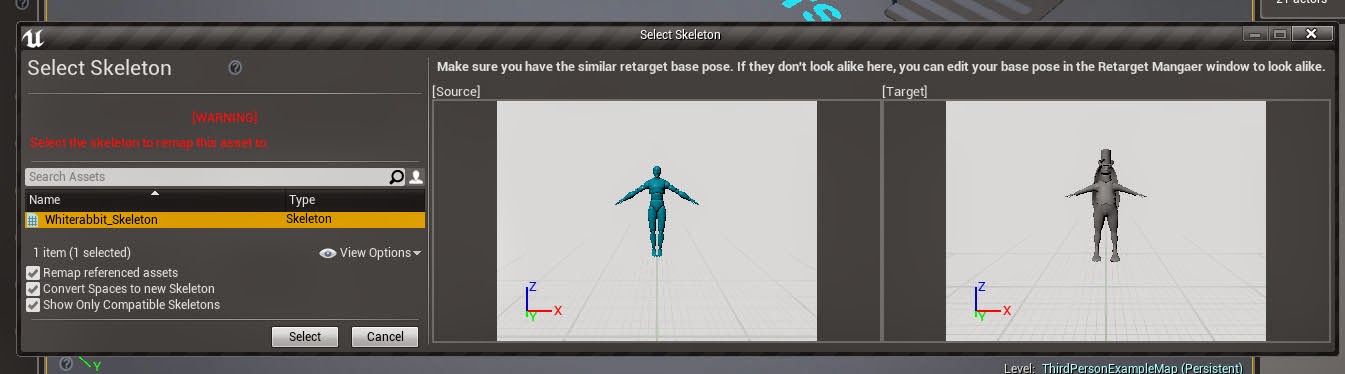 plush yew
Has anyone managed to get a switch pro controller to work with unreal?
Not for a switch game, just so I can use my switch controller instead of my crappy xbox controller
(No clue where this question would go so Im asking here)
alpine laurel
so aside from constant crashing, what exactly are the differences between 4.24 and 4.25
plush yew
Hello
How i save this checkbox like when i leave and join again is unchecked
ot when i hit play
alpine laurel
also why is unreal engine so damn slow and making my entire computer slow as fuck
like seriously, i have seen molasses on a slope move faster
plush yew
Hello?
alpine laurel
dont expect responses right away
brazen crow
@alpine laurel are u running from ur samsung smart fridge
or integrated graphics
same thing
or u have 8 gb of ram
alpine laurel
i have 32 gb of ram, rtx 2060 and a 4.7 mhz quad core cpu @brazen crow
 marble hazel
I have been having this issue that I can see the cpp files in the source folder in the file browser, but they don't show up as classes in the ue4 editor
Does anyone know why?
They were sent over through source control
 static sparrow
Because I was having problems with the state of my project (see #macos for the entire horror story), just for the hell of it, I decided to run the editor from the command line. I was intrigued when I discovered that doing this produces (in my case at least) much more informative output than running from an IDE or just launching it from the prebuilt binary's desktop icon...
I noticed a lot of lines like this:
2020-07-26 20:03:29.027 UE4Editor[39858:8299847] [UE4] [2020.07.27-03.03.29:027][ 0]LogLinker: Warning: While loading '../../../../../../${USERNAME}/Documents/UnrealProjects/KittyCatastrophe/Content/KittyCatastrophe/Characters/Kitty/AI/AIC_Kitty.uasset' failed to load '/Game/KittyCatastrophe/AI/Kitty/Tasks/BTTask_PlayWithLure': Can't find file.
where ${USERNAME} is just my username on my computer
All these lines were exactly the same in that they all referred to something in the AI directory
Now, does that mean that my uproject file:
{
    "FileVersion": 3,
    "EngineAssociation": "{1811139E-5B40-8814-B46E-A5BC83FCE296}",
    "Category": "",
    "Description": "",
    "Modules": [
        {
            "Name": "KittyCatastrophe",
            "Type": "Runtime",
            "LoadingPhase": "Default",
            "AdditionalDependencies": [
                "Engine"
            ]
        }
    ],
    "TargetPlatforms": [
        "Android",
        "IOS",
        "MacNoEditor"
    ]
}
Needs "AIModule" added to its AdditionalDependencies section?
(Also, I just noticed, what the hell is MacNoEditor? Is that normal?)
OR... is it that the two paths don't match? i.e. It's trying to find file '/Game/KittyCatastrophe/AI/Kitty/Tasks/BTTask_PlayWithLure' but that actual uasset file is in .../Characters/Kitty/AI/Tasks/, not .../AI/Kitty/Tasks/
Why would it have that mixed up?
I would have posted this in #build_issues if that were a channel, but it's not, so I posted here...
static sparrow
Okay, so...
I had originally placed AIC_Kitty in Content/AI/Kitty/Tasks/, but later reorganized my project and changed its entire directory structure. But I did so using the editor's content manager by dragging the asset, clicking MoveTo...
Why is it still referencing the old location? I opened up the AIC_Kitty.uasset file in vim and it's a compiled file so can't just fix it like that, I'd have to have UE do it for me. Is that possible or should I just create a new project and recreate all my broken AI assets? I hope not, but whatever, that's part of learning to use something like this
 tiny sonnet
How do i make it so my grass ouput only places where the grass material is on my auto material. I used the explicit normal until now, but i have additional weight layers now.
static sparrow
sounds like you may wanna ask that in #graphics
shit, I just realized that I probably should have asked my gigantic question in #engine-source
 regal hawk
does anyone know why?
@radiant jasper Just use a branch node to connect IsA
 radiant jasper
i have it so when the player presses a button, the sound is toggled, and when the player presses it again, to toggle the sound off
but idk how to toggle the sound off. I do know that I have to use a flipflop
 night basalt
in function FlipFlap not work
radiant jasper
so how should I do it
regal hawk
use a bool parameter to trigger it
radiant jasper
how would I connect it
regal hawk
When you press a button, set it to true or false
radiant jasper
idk what that is
radiant jasper
hmm, it doesnt play the sound, and the false branch doesnt work
radiant jasper
night basalt
u have team viewer ?
radiant jasper
No
radiant jasper
what is wrong with it
radiant jasper
ok yeah I forgot to do that, False still doesnt work tho, pressing only continues to play the sound
ok
How do I make the false output work though?
@night basalt
scarlet birch
If I set a custom mesh as the complex collision mesh in a static mesh, when visualizing collision it still shows the complex mesh but the applied mesh seems to be the one actually used. Does anyone know if anything is actually gained by setting the collision mesh in this way? I'm trying to work out the different ways I can setup collision when working with assets generated in Houdini.
I suspect it's just an error in the visualization, but wanted to ask to see if anyone knew better.
night basalt
scarlet birch
Wow, that's a mess.
radiant jasper
scarlet birch
@radiant jasper You're just spawning a sound each time
radiant jasper
now clicking the button doesnt do anything
radiant jasper
how do i do that
scarlet birch
Set that little blue output on the create sound to a variable.
radiant jasper
not compatible
night basalt
wrong site
radiant jasper
?
scarlet birch
Do not listen to that person, in any way.
scarlet birch
What type of BP is this? is it a widget?
night basalt
Light sound Default is checked ?
scarlet birch
ideally, you would do this in the bp for that button.
radiant jasper
it is checked
scarlet birch
You want a sound reference then when the button is clicked toggle back and forth between play/stop
night basalt
show me now the code
scarlet birch
This is relatively simple.
radiant jasper
its an onclicked event tho
it automatically added the event to the level blueprint
scarlet birch
What that is doing is creating a new sound each time it's clicked
radiant jasper
whats wrong with that
night basalt
change check on set vareiable
scarlet birch
it is not referencing the existing sound
scarlet birch
Are you both just trolls or what?
radiant jasper
yeah thats a problem
no not a troll, promise
just kind of new to unreal
so u want me making the onclicked event in the bp of the button
scarlet birch
I would. It should all be together.
radiant jasper
ok, is it neccesary tho?
scarlet birch
Create an audio component in the button, turn off auto activate, on-click use a flip/flop for play/stop
night basalt
hehehe
scarlet birch
radiant jasper
im also having the button trigger a light tho
scarlet birch
Not an issue.
scarlet birch
I would recommend going through the learning projects or some more tutorials.
radiant jasper
Ive tried
it only references in the level blue print
can u tell me how to reference the light in the bp of the button?
scarlet birch
A demonstration of passing information directly from one Blueprint to another.

Announce Post: https://forums.unrealengine.com/showthread.php?101051
This Training Stream takes a look at Blueprint Communication. We find that Unreal Developers of all levels can sometimes struggle through the concepts behind moving data between objects. So in this video we'...
 lucid radish
Can anyone give me any example (reel or video) that shows cool explosions made with Unreal Engine? I just want to set some goals
radiant jasper
@scarlet birch can u help me please
man can someone help me
all im tryna do is have a button that toggles an audio cue
 fiery relic
hello hello
rough knoll
how do i go about changing animations based on equipped weapon (assuming equipped weapon is an integer 1-2)
i have different animations for each weapon that i made but idk how to change them based on the equipped weapon
 tender pecan
@rough knoll You have to use Animation State machines, that transition between the various finite state machines, and each would require their own locomotion with upper|lower body blends. https://docs.unrealengine.com/en-US/Engine/Animation/StateMachines/index.html
@radiant jasper it's better to do more tutorials and learn more on blueprints, especially components, their life cycle and their relationship to their owner|parent, as what you are showing here violates some basic rules, you will have a few unforeseen issues because of spawning and adding a new runtime audio component (and then loosing the reference afterwards), along with a flip flop which only affects the last added audio component. look at how someone else did more or less the same you are trying to do, as there are always different ways to solve the same problem. https://answers.unrealengine.com/questions/767683/turning-audio-onoff-with-same-button-input.html
radiant jasper
problem is its a clickevent
not just pressing a key
so the flip flop becomes kind of neccesary
i think
idk
 lusty carbon
Noob question. If Unreal is DirectX, how does it work with mobile phones and other playforms?
Isn't DX a Windows api only?
radiant jasper
@lusty carbon it doesnt use directx for mobile, it uses Metal for iOS
and something else for android
@tender pecan how do I add the audio into the bp like that? It forces me to make the add audio component thing
rough knoll
?
tender pecan
@radiant jasper you can look at Sound Actors ( https://docs.unrealengine.com/en-US/Engine/Audio/SoundActors/index.html ) and several ways to reference them. https://www.youtube.com/watch?v=DiI0doBarkg
rough knoll
any idea what i did wrong there
radiant jasper
right but its forcing me to add it as an audio component
tender pecan
@rough knoll you are going to need to learn about statemachines https://www.youtube.com/watch?v=NYFeFUxU6DI
if you want to use different animations based on equipped weapon type.
radiant jasper
ok figured out how to set it wit a variable
radiant jasper
audio component object reference is not compatible with sound cue object reference
tender pecan
@rough knoll if not providing a target, it will assume 'self' on the cast. learn more about casting in blueprints here. https://docs.unrealengine.com/en-US/Engine/Blueprints/UserGuide/CastNodes/index.html
the rest of the error is quite understandable, as it states, the blueprint ( self ) [ this is the current blueprint ] is not a ThirdPersonCharacter_C...
rough knoll
so then how do i go about checking if the weapon selected is equal to 2
(and if so allowing the transition)
radiant jasper
it doesnt let me connect the stop node to the variable
tender pecan
@rough knoll you can look at how to access and check those using the tutorial I provided. they explain it in great detail there how to access the character from the animbp for the transitions.
start with a new small empty project if need be, and then use what you have learned to figure out what you did wrong in your existing project.
radiant jasper
so how do I get that specific reference
which one can connect to the stop and play nodes
tender pecan
@radiant jasper you should rather use an audio component already in the blueprint, it will have stop|play etc.. look at the content provided above. 🙂
tender pecan
@radiant jasper my same answers as above. 🙂
 lucid jetty
Did you make sure Audio Component actually got sound in its details?
Click on the "Add Audio Component" and you will see details
radiant jasper
yes
lucid jetty
Hm. odd.
untold swallow
Hey I had an issue could anyone help?
radiant jasper
it says "sound cue Lightsoundeffect" in grey
untold swallow
how can I make a UI like a joystick on Left A jump button on right and 2 more buttons to turn??????
lucid jetty
Onclicked is actually working?
radiant jasper
yeah
but false output doesnt work
and when it goes back to the true output, it just creates another sound
@untold swallow widget blueprint, buttons
lucid jetty
I think the reason is you are constantly spawning an Audio Component.
Spawn Audio Component somewhere else like on beginplay
radiant jasper
ok
lucid jetty
Then have a reference to it, and it shall work
radiant jasper
what type of variable do i use to reference it
radiant jasper
ok
untold swallow
@radiant jasper ohh Shall I just Normally add 3 buttons?
radiant jasper
yeah
untold swallow
So what abt the joystick?
radiant jasper
unreal engine has defaults
untold swallow
Like I've 2 joysticks right now! How do I remove right joystick?
radiant jasper
oh uh idk lol ive never wanted to do that
radiant jasper
Ok it works now!!! only issue is that its on by default when I launch the level
how do I turn it off on default
lucid jetty
search for "deactivate" option
tender pecan
@rough knoll hi. 'As Third Person Character' is a result of a cast, target is a receptor to a 'get' variable where the variable name is weapon type. So this means WeaponType requires an object that exposes this variable. The engine believes that ThirdPersonCharacter does not expose this variable. And it also believes that the current blueprint where this is begin called, is not of type ThirdPersonCharacter. Which is why you are getting all of those messages and errors.
lucid jetty
or have no audio component sound value