#ue4-general
1 messages · Page 802 of 1
 tender pecan
 plush yew
@primal furnace was the mesh using a 'right-handed' coordinate system?
 primal furnace
I'm not sure what would that be to be honest.
Somehow I think it has to do with how I extruded the polygons from the spline I started with. Weird but for it to work, my normals have to look flipped in max for them to be fine un UE4 and vice-versa
Other exported objects are fine
It's a first that's for sure... but meh, if it works, I guess I'll pinch my nose and move on!
 soft fiber
I upgraded to 4.25.2 to see if it is any better than 4.25.1... and there are tons of white artifacts in stand alone mode.
On the bright side, I fixed all my issues in 4.24.3... so I'm pretty sure I'll just stay there.
 north ivy
Hey guys, me again for a new question : Do any of u now any "application" about sounds ? One that could, you know, change voice, make it "older" or younger, extract a specific sounds from a lot of sounds happening, all these things ?
Can't fight anything by myself
primal furnace
@north ivy Audacity is free and you can do pretty much everything you mentioned here.
For your fighting skills, I could teach you tae kwon do and jiu-jitsu, but it's difficult via discord.
@north ivy Of course the last part was a joke! 🙂
north ivy
@primal furnace thx Expod I know, that actually made me laugh thank you, nice one 😆
plush yew
where i find the remote manifest file ?
how i create the manifest file
 vale silo
 fast hinge
4.25.2 is out !
@vale silo Do you know where to find release notes for the sub-sub-versions?
 gleaming narwhal
@fast hinge are you looking for this? https://forums.unrealengine.com/unreal-engine/announcements-and-releases/1791750
Unreal Engine Forums
The 4.25.2 Hotfix is now live!
Feel free to discuss this release on the 4.25 forum thread (https://forums.unrealengine.com/unreal-engine/announcements-and-releases/1755531).
If you experience a bug with the 4.25.2 Hotfix, please follow the How To Report a Bug Guide (https://...
fast hinge
perfect! Thanks mate
plush yew
hello guys is there a way to check the number of polygons in one mesh in ue 4?
if yes how to check? Thank you in advance
 digital badger
Go to the static mesh viewer
then at the top left of the window
or you can mouse-over the static mesh in the content browser
 hard flicker
hey guys, i've been doing some of the Learning modules, and i noticed there are some great images for the game framework (class relationships, schematic stuff)... but i cant seem to find copies of them anywhere... anyone know where i could get that stuff?
plush yew
Hello
I Have A Question
How To Make A loading Screen with A Video or A Scene like Far Cry Games And Such
 grim ore
you make a map, you put a camera in the scene, you make the camera the main actor so it's showing the viewport thru it, and you use that map when loading. Level streaming would let you load in a loading map then load in the game map in the background. Far cry alot of the time uses videos so that is an option as well
plush yew
@grim ore Thank U dude
then at the top left of the window
@digital badger I found it, thank you

lightmap is already set to 1
😁
okay one more question about the amount of the triangles and polygons, when I saw this little sign with this big amount of polygons and triangles is there a way to reduce the amount or not? the mesh is not mine and the level designer put it in the project
fast hinge
Hey peeps, wanting to paint an rgb texture to be used for material blending all within UE. Is there a way I can create an empty texture to be used? Or is it just something I need to make and import into unreal?
plush yew
one more question: is there a way to check one mesh in content folder to see do I use it on the level?
plush yew
"remove from parent" node
 limber mesa
Yea right after add to viewport
 glad loom
Thanks, that worked!
But if I do that, I can't open it again
Is there something else I need to use instead of Add to viewport to use it more than one time?
Oh wait, nvm
I had a bad branch
plush yew
xD
okay 2 more questions:
1st: about the amount of the triangles and polygons, when I saw this little sign with this big amount of polygons and triangles is there a way to reduce the amount or not? the mesh is not mine and the level designer put it in the project
2nd: is there a way to check one mesh in content folder to see do I use it on the level?
 smoky sonnet
hey does someone know how i can fix my camera to capture a specific spot? - I dont wnat to have black bars on my android phone but it should also not just cut out some of this spot to get fullscreen is this possible?
 open wadi
Did you fix the crashing issue @smoky sonnet?
smoky sonnet
yea
smoky sonnet
vulkan support
smoky sonnet
yea
now i am facing another issue
i am starting an counterwidget ( counts from 3 to 1 so my player know when the map/audio starts) but when i start it my camera fov is weird after the widgets vanishes its normal again
 rocky radish
unreal engine 4.25.2 is out
smoky sonnet
@open wadi do you know what this might be?
plush yew
is it normal that 80.000 tiny stones need 20 minutes to bake with lightmap size of 4?
on prevewi setting
 rugged tendon
I need a Help How to setup multiplayer is it is paid pls help me withany tutorial pls tag me while answering
open wadi
@smoky sonnet I do not, no, would be happy to help but I'm relatively new to the UE framework myself. Better people can answer your question in here.
@rugged tendon That's quite a broad question.
rugged tendon
Pls explain pls it is paid if yes then cost etc... Ways to setup pls@open wadi
Tag me too after done
 magic fern
What is the name of that kind of animation that goes away from the starting point?
The one that moves is root motion? I am also confused xD
Okok thank you. Tryint to see if it is possible to transform stationary animation o root motion. Because of foot sliding
 untold cipher
So I upgraded to ue4.25.2 and it won't launch, and my project from 4.25 won't launch, how do I set the editor back to 4.25
Are my projects saved if I uninstalled the editor?
 river nimbus
@untold cipher yes
untold cipher
Good, thx
grim ore
assuming you did not put them in your engine folder of course lol
river nimbus
That'd take a special effort, tho...so, unlikely. But... ¯_(ツ)_/¯
smoky sonnet
@grim ore do you know how i can fix my problem
plush yew
okay 2 more questions:
1st: about the amount of the triangles and polygons, when I saw this little sign with this big amount of polygons and triangles is there a way to reduce the amount or not? the mesh is not mine and the level designer put it in the project
2nd: is there a way to check one mesh in content folder to see do I use it on the level?
grim ore
@smoky sonnet i dont think I can, that sounds weird. do you have any screenshots of what is happening or video. Are you sure the FOV is changing?
grim ore
@plush yew right click the mesh and go to reference viewer, it will tell you what references it. Or you can try and delete it and it will tell you. you can open the mesh and go to the LOD section and use the auto LOD tools to lower the poly count on a mesh in the editor
smoky sonnet
that is happening because of that
but i need the set game paused with that i fixed my asynchronous thing with my sequence player and my audio
grim ore
so it does that on device?
smoky sonnet
but with that set game paused my camera isnt adjusting right, i am not controlling my camera it has a fixed view but with the pause its at start around fov 120 i think
so it does that on device? -> on everyone
pc
android
grim ore
thats weird but check the fov itself, you can also set it after pause if its changing
smoky sonnet
is there a node where i can check ifcameraiscorrectlyadjusted or smth dont even know why the fov is so weird at start
ok the fov is correct
grim ore
I doubt it but again you can check the FOV value and any time to see if its actually changing
smoky sonnet
it doesnt change
but smth isnt loading right after the pause its correct
because even the colors at screenshot 1 and 2 are different
 vernal thicket
Anyone know how to duplicate a text on a uniform grid panel? it currently sets the new row but just replaces the text panel, currently using a widget with a text box as the Content to be created
grim ore
well you might have post process, you might have materials that work off of time, and none of those would work if time is stopped
smoky sonnet
mhhh
mhh cant find the problem do you know how i can run the 2 nodes after set game paused synchrone
but sometimes the audio is delayed with the sequence player(spawned objects) or otherwise with the set game paused dont know why it started synchroned
grim ore
any reason why you dont put the sound in the sequencer?
another thought, for the not being in sync, is there is a "on play" event dispatcher that you could bind to that perhaps will trigger when the play actually starts and you could then start up the audio at that point? I have no idea if it would help but without putting the audio on the sequence this is my next idea lol
 midnight bolt
does anyone else gets flipped normals? i can import model to UE just fine, export to fbx, reimport, and some normals end up flipped.
 restive yarrow
What does redirecting folders do guys?
untold cipher
So if I add a map to my project that is let's say 8 GB, would my game be 8gb to download
restive yarrow
@untold cipher nope, packaged games are smaller in size
untold cipher
Thx
 ornate forge
I've got my AWS Perforce server going, yay
smoky sonnet
@grim ore sorry helped my dad i seperated the audio from the sequence because we already discussed this problem months ago.
i cant change the audio speed or wasnt able to slow down the sequence player
grim ore
gotcha
magic fern
What is the best way to do character movement on sequencer and not get foot slide?
plush yew
thank you a lot @grim ore ❤️
yeah it is lod auto but my level is so unoptimized I think cus I got only 15 fps
what to do? 😦
grim ore
change the type and it will LOD it differently, or go to manual LOD and set it to a lower count
you wont be seeing the level like that tho will you?
grim ore
you would go into lod 0, change the percent to a lower percent and it would decimate the mesh to a lower setting
you cant just assume its the number of triangles tho
you need to use stat profiles and view modes. It could be lighting, it could be material complexity
smoky sonnet
even if i start the sequence player after the audio started, the sequence player is faster tf
grim ore
you need to get into the level at the location that the player will be and actually test
smoky sonnet
is there a node so that i can check if there is really sound playing
because some songs seem to be siltent for 1 second or so
 hollow ridge
oh god how long does an average full rebuild take?
vernal thicket
How big is the package?
vernal thicket
not long
vernal thicket
for 180mb?
hollow ridge
eh ill just see how long it goes for
smoky sonnet
does someone know how i can check when my audio component really started playing sounds
magic fern
What is the best way to do character movement on sequencer and not get foot slide?
plush yew
hmm, good one
😂
ok, so I need to change the percentage from 100 to what you would recommend me?
i was working on a mobile game, when you need to parkour and kill Ai's.. but i cam't make the AI work 😂
i'm not so good in game development, just started a week ago..
hollow ridge
Ooo I have a good idea
plush yew
But will you use the 2d option, with a nothing.. or a starter package? @hearty rose
I'm not home ad the moment, and my phone is 16%... shiet 😅
hollow ridge
And open world game where you make stuff and there are 3 dimensions and at the end you can kill a boss called the ender dragon or a boss called the wither
A completely original idea
plush yew
I would do it in 3D and use the physics thats already there, you could in theory only rotate the ground and the ball would have default physics
@hearty rose
Cuse it will slide down, or?
Aah, maybe use some unfreeze objects, wich you can shoot away.. and some of them not
but keep them te same collour 😂
Ooh, easy! i can get this.. just shoot... shoot.. aah that one does not go away, dead
vernal thicket
how do you duplicate something when creating new uni grid panel?
smoky sonnet
fixed my problem 🙂 @gilded eagle
hollow ridge
welp I had to use remote build and 40 minutes into the build the computer fell asleep
 dapper bridge
They are each separate, within the different levels @frank oar
 frank oar
thank you ! @dapper bridge
 dawn gull
How do I make text and images of an image fade in? I know I can do fade to black with a widget but you cant do a gradual fade for text and images in a widget
dapper bridge
Inside the widget, on the lower left, theres a spot for animations
You will want to select the text or images, and set up an opacity track, that goes from 1 to 0, (Fades out) or 0 to 1, (Fades in)
plush yew
how i create a manifest file for my game
 woeful wadi
I need a bit of help
For some reason when I play the game it doesn't automatically possess the starting character
 cosmic matrix
Hi
Anyone could make ue4 blender tool working with a mixamo character for exemple
i don t know if i m doing something bad or if tool is broken
dapper bridge
@woeful wadi In the world settings, do you have it possessing the right player?
grim ore
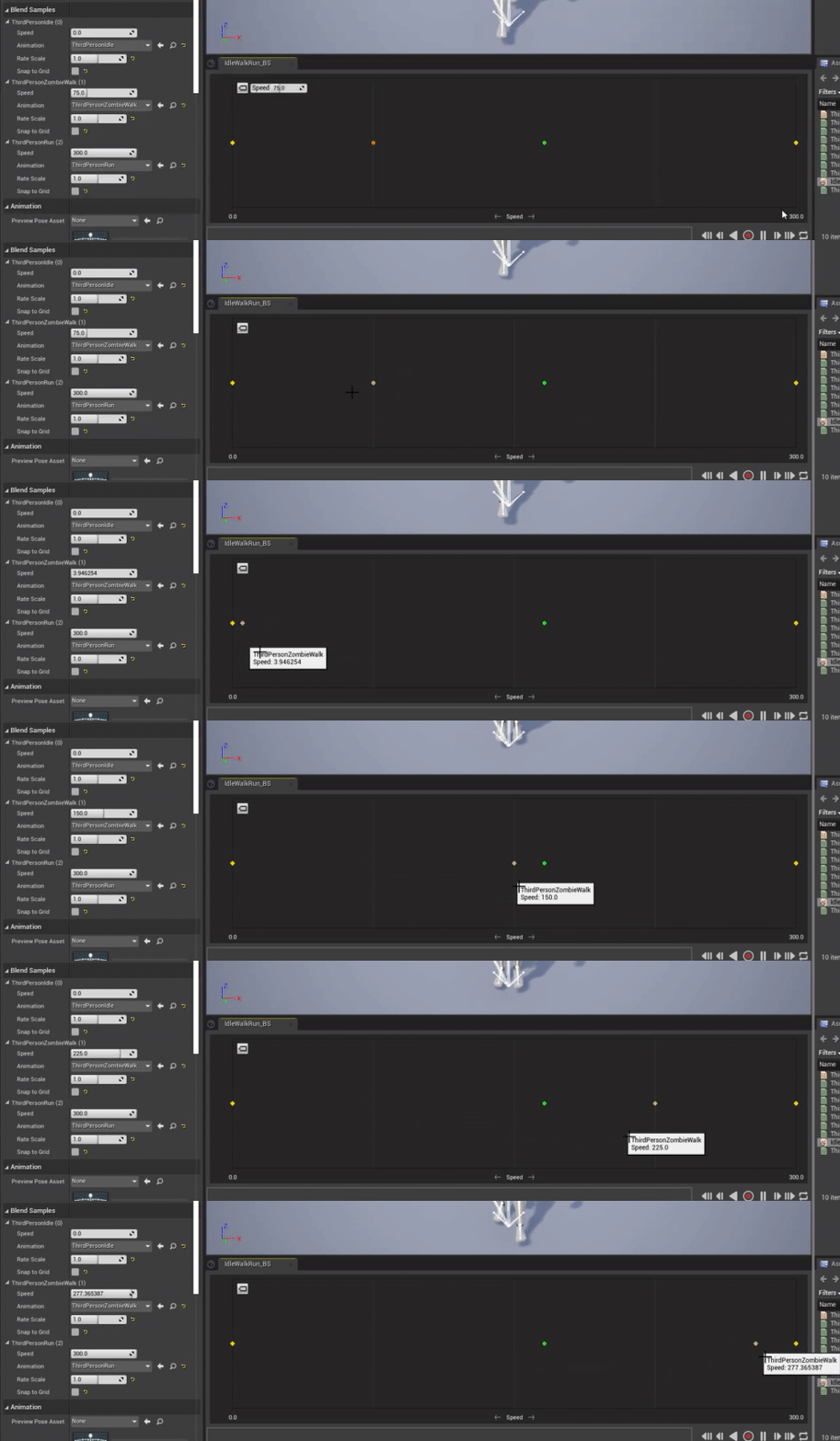
Can anyone else confirm that Snap to Grid in Blendspaces appears to be broken? disabling it doesnt seem to actually let you have free placement of the animation it still snaps
dapper bridge
Trying to pull unreal up to see if I can confirm for you. Laptop is slow, sorry
grim ore
yeah no biggie just... annoying it seems if its disabled it allows free movement between the first and second grid marker, and the 2nd to last and last marker, but any between still snap 😦
dapper bridge
It is free moving for me too
 hidden siren
Anybody have any pointers or resources on setting up a calibrated, neutral lighting level for previewing game assets - in particular, assets with a lot of bare metals and reflections - Ive been watching tuts etc an dreading, but haven't been able to get something working very well with reflective metals in particular - perhaps there are some reflection settings I'm missing?
dapper bridge
I can only open 1D for some reason, but its not snapping for me at all
grim ore
this is what I get https://i.gyazo.com/958daf1dd4ac3891c09a13a780c75035.gif
 dapper bridge
i tried looking for other settings to maybe snap in the grid, but sadly nothing
and Mr. Google was no help lol
grim ore
@hidden siren maybe check out in the templates in new project the film -> virtual production. it has a test map
yeah the checkboxes on the left should be defaulted to on for snapping to grid and it should snap by default i just cant it to not snap
hidden siren
@grim ore thank you - what version is that in?
 inner cloak
@grim ore I'm trying to bend a mesh on a spline but i dont see where i can select the mesh .. i feel so stupid right now
grim ore
oh thats weird. It only snaps if there is a grid to snap to, if I have every grid full of animations I can add a new one and it wont snap it can float between animations... this is odd
@hidden siren should be in the recent ones, its in .25 for sure
grim ore
so say I have 3 grid divisions, so left middle and right, and I have an animation on all 3. IF I add a 4th animation and set it to not snap it will freely move between each division
if I have the same setup but with nothing in the right, I can freely move a new animation between the left area (no grid to snap to since an animation is already there) but the second it gets near the right side with an open grid it snaps to it...
its... odd
definitely not intended I think
its basically performing the snap to grid code if it can snap, else it performs the free movement code
I can work around it atleast but man... thats odd
grim ore
@inner cloak is this on a spline mesh actor in the world? If so you cant really adjust the mesh direclty it will conform to the spline as you adjust it
nah I think its broke I will harass someone about it
inner cloak
My issue is that the mesh does not show at all .. so im trying to find how to set it
magic fern
Is it possible to convert a in place animation into a root motion one?
inner cloak
Oh, this is a mesh in a BP
grim ore
so its a spline component in an actor?
inner cloak
yes
plush yew
Anybody knows what this variable is please (When I change the variable I don't see any difference in game) ?
 glad pelican
hello i need some help.. ive been struggling with this for over a week now... (let me know if im in the wrong channel)
when i export my model from blender either as fbx or as gltf, and i import it to UE4, my material doesnt show properly.
i downloaded for example a substance (sbsar, clearest example of what's happening), and applied it to a default shape (carbonized flesh in this example) and it does show properly (link attached)
but on my object it just shows some polygon with some base color.
i have tried all the normal / transforms etc and i am lost in a rabbit hole... pls help.
grim ore
@inner cloak ah yeah then in that case there is none you assign to it, you add it at runtime or in the construction script. The spline component is just a representation of a spline
 icy mulch
grim ore
icy mulch
grim ore
@plush yew it will let the actor take input from the specified controller, for example a blueprint could be in the scene and take direct input from your arrow keys instead of it having to go thru a pawn you might be controlling instead
 bold compass
everytime i try retarget animation my ue4 crashes any way to stop it from crashing also how do i download ue4 4.18
grim ore
@glad pelican does your model have a proper UV map for the material to apply itself to?
inner cloak
thanks @grim ore
grim ore
@bold compass go to your launcher and click the + button in the library for Unreal Engine and choose 4.18 to install it. As for crashing we can't help without a full crash log or you could read the log and see what the issue is
@icy mulch download the debugging symbols from the launcher and crash it again for a full log, without knowing where it crashed people can only guess. that error is normally a driver/card issue tho
glad pelican
@grim ore how do i check this... ? i exported the model from blender but i guess somewhere in the pipeline im missing something..
i had some vertex painting in blender which didnt export either so i tried to use a substance (picture)
i guess im doing the export just all wrong since when i export the model from blender it comes up white in ue4
bold compass
ill try do it in 4.18 and then bring it back into 4.25
grim ore
well for the most part the material will not come over from blender so that is fine, in the mesh editor you can check for UV channels and maps
double click the mesh to open the editor in UE4
in this case it has 2 uv channels, the first (0) is for the texture mapping and in the bottom left you can see the UV map and it being set up properly
plush yew
@plush yew it will let the actor take input from the specified controller, for example a blueprint could be in the scene and take direct input from your arrow keys instead of it having to go thru a pawn you might be controlling instead
@grim ore Thanks ! Is it a pre-created variable ? It's in the Advanced Locomotion System but I can't find the reference of this variable... 🤔
( I'm talking about the "Auto Receive Input" )
grim ore
that variable is part of the pawn it should be in anything that inherits from it
plush yew
thxs for the youtube vids Mathew just wanted to say
dawn gull
How do I fade out all sound in my project?
 storm vapor
How can i make file media source to sound wave ?
grim ore
@dawn gull look into using sound mixes https://docs.unrealengine.com/en-US/Engine/Audio/Overview/index.html
glad pelican
@grim ore ok i have understood i apparently need to do UV unwrapping...
i went to blender and tried to unwrap with these algorithms but the UV map still shows empty... (i didnt know i needed to get a UV before exporting...sorry!)
grim ore
I don't art so #graphics might have more help or a tutorial online.
but you are on the right track atleast
glad pelican
oop sorry i have to explictly select all the vertices i want to unwrap
 ember star
Engine is crashing every time I try to open a blueprint: 'Assertion failed: Tag.Size == Loaded'
i cant even right click the BP, crash
plush yew
@grim ore Ok.. So it means it's normal if I don't find when I'm searching for it in my character BP, here ? 🤔
( I'm just trying to understand why I can find some variables and some others not... 🤔 )
grim ore
its not a variable in there, its in the details panel
grim ore
yep its part of the pawn class itself and will show in the details panel, its a property of the pawn
plush yew
ok so all is clear now, thanks again
glad pelican
@grim ore i managed to unwrap a UV for my model and now the materials show properly on Unreal...
i have some vertex painting on blender tho and it is not showing up when i import in unreal
how do i export with the vertex painting ?
edit: i actually used a voronoi map because it was more reliable at randomization than the vertex painting... i dont know how to export this into unreal (the material exports somehow incomplete? do i need to bake?)
edit2: apparently i can bake what i see on the model with Diffuse mode (created an non-connected image texture node)
bold compass
@grim ore this is what pops up after I try retarget animations
frank oar
Is there a built in way to give a widget a border ?
not a block color, even a thin white outline would do...
dapper bridge
@frank oar
 winter gale
Just updated to 4.25.2 and getting this error. Anyone experiencing this issue
UnrealBuildTool : error : Expecting to find a type to be declared in a module rules named 'AutoSizeComments' in UE4Rules, Version=0.0.0.0, Culture=neutral, PublicKeyToken=null. This type must derive from the 'ModuleRules' type defined by Unreal Build Tool.
For now I uninstalled AutoSizeComments
frank oar
thank you @dapper bridge !
 storm venture
anyone know of any cool ue4 youtubers that just make small neat stuff? ive seen quite a few unity developers who make short videos of their journey through making stuff like clouds or procedural worlds or portals and whatnot. everything i find on ue4 is always strictly tutorials, i just want to watch someone make stuff when im eating meals and whatnot
Sam Hogan and Sebastian Lague are good examples, their videos are really neat but they use unity unfortunately
plush yew
i can't delete my older maps xD
is there a channel for data table questions
@marsh sparrow
You can ask everything in here for Unreal-Engine.
vernal thicket
Mobile games are the way to go, you access such a massive audience.. everyone has a phone nowadays.
& here I am making pc games lol
 marsh sparrow
cool. Imma watch some videos and come back
@vernal thicket the device testing.. ug
🙂
 odd steeple
I'm setting the scale of my Maya to fit Unreal but once I do the camera tumble no longer seems to center around the objects I am working on, even with the correct tumble settings. Am I just making the grid too big? CM measurements with 100 GRID size, 10 sections, 1 subdiv
storm venture
@odd steeple camera tumble in maya? if i remember correctly, F will recenter your tumble point on the selected object and A will center it on all objects
storm venture
@plush yew in a nutshell, its a technique used for realtime physically-based lighting/reflections. its expensive, but pretty
odd steeple
@storm venture Even pressing F to focus keeps the same behavior and seems to tumble around a large portion of the grid. I've changed every setting I could in the tumble menu and it doesn't seem to effect anything.
plush yew
@plush yew in a nutshell, its a technique used for realtime physically-based lighting/reflections. its expensive, but pretty
@storm venture
Thank you!
storm venture
@odd steeple have you selected an object first? im not sure what the behaviour would be if you dont have one selected before pressing F
odd steeple
Yeah, I select it and press F yet the camera doesn't seem to care.
The tumble works correctly up until I change the up world axis to X and change the grid size to 100.
storm venture
very weird, do you tumble using the "tumble tool" or with alt+leftclick?
odd steeple
alt leftclick
plush yew
For some reason, i can't see the arrows to move my object.. Does someone had this problem before? Compling Shaders is also still loading.. it takes a while
storm venture
damn, not sure what to suggest then, sorry, i would assume you may have touched a wrong setting somewhere though, ive set mine up to match ue4 and havent experienced what you have
@plush yew press G maybe?
if you have G enabled, it hides stuff like the transform gizmos and actor sprites @plush yew
odd steeple
@storm venture Actually, the one setting that changes how it acts is right when I change the grid size too 100.
plush yew
@plush yew press G maybe?
@storm venture
Does not work, but i'll wait till the shader is loaded in
 glossy mirage
Hello, i want to work with my friend on same project. We use hamachi+multi-user editing. We followed the instructions exactly, but my friend can't see my session. We have same project name and same project settings 😦.
do you know what the problem is?
storm venture
@odd steeple like this?
 proper stump
I've got a MouseGameMode & MousePlayerController that show the mouse cursor, but on Click event are not working (it's set to allow onClick and onHover) ... When I setup the projects i selected to use the "For Mobile" settings... could this be the reason the mouse is not working well ?
plush yew
Does someone have the problem too... ( Compilling shaders.. ) it takes so long, and almost nothing is working
odd steeple
@storm venture That's right! And subdiv to 1.
Right when I make those changes the cameras tumble no longer tumbles around the object but makes it feel like I'm using a first person camera.
 abstract sigil
For an unreal build on windows can I pass a parameter to select which gpu the application should run on? I am trying to launch applications remotely on a server with multiple gpus.
storm venture
i cant seem to replicate what youre experiencing, thats very weird
magic fern
Is it possible to convert a in place animation into a root motion one?
inner cloak
@grim ore I ended up finding the missing parameter .. guess my brain was refusing to see it for a while lol
glossy mirage
HELP! Hello, i want to work with my friend on same project. We use hamachi+multi-user editing. We followed the instructions exactly, but my friend can't see my session. We have same project name and same project settings .
do you know what the problem is? Our ue versions are 4.25.1
inner cloak
I believe you dont need hamachi now for this scenario ...
if im not crazy, ue4 has support for multi user editing now
glossy mirage
where
inner cloak
plush yew
Does someone now how to remove the automatic kill system, when you fall of the map?
winter gale
@glossy mirage IIRC Multi User Editing does not work via Internet. Its LAN only
inner cloak
oh, my bad then. sorry
glossy mirage
but it should also work using a VPN
plush yew
@hearty rose i am currently trying you're idea, but the void will kill you.. can u turn that off in some way?
or do you need to build up freaking high
winter gale
@plush yew In world properties try disabling World Bound checks
inner cloak
i believe there is a parameter for kill Z in settings
grim ore
@bold compass I think someone had a similar issue due to no material being on a mesh or something similar, check for that
glossy mirage
@winter gale
 gritty marsh
Hi Slackers
inner cloak
Go to Settings > World Settings and disable Enable World Bound Checks.
plush yew
the settings before loading up you're game, or is there a setting option in game?
gritty marsh
Could someone provide the c ++ code for this type of blueprint arrangement?
glossy mirage
is there any way to work on one project with my distant friend?
 glacial pecan
@glossy mirage eh... #source-control ?
@glossy mirage or https://www.kinematicsoup.com/scene-fusion/unreal-roadmap

KinematicSoup Technologies Inc.
plush yew
Go to Settings > World Settings and disable Enable World Bound Checks.
@inner cloak
Thank you! @winter gale
winter gale
@glossy mirage Can you make sure you:
- set on server the unicast endpoint to be its proper IP address, make sure there is not several network interface
- set on client the static endpoints as IP of the server
- set on server "Engine/Programs/UnrealMultiUserServer/Saved/Config/<platform> Engine.ini" the unicast endpoint of the server
- Again on server "Engine/Programs/UnrealMultiUserServer/Saved/Config/<platform> Engine.ini" set the staticendpoints using IP of your clients
 uneven fractal
anyway to stop "show fps" from disabling itself everytime you restart the editor?
winter gale
I got that info from the forums
 slate basalt
is there a nice and easy way from commandline to "build & package" a custom unreal editor build to deploy on some other machine?
winter gale
@slate basalt You can try out the binary builder I made: https://github.com/ryanjon2040/UE4-Binary-Builder

GitHub
An application designed to create installed Unreal Engine builds (aka Rocket builds) from Unreal Engine GitHub source. - ryanjon2040/UE4-Binary-Builder
plush yew
Sorry if i am asking too many questions.. xD
i'm making a game where you slide down, and need to watch out for the incomming objects.. Is there a way to make the character go faster left and right?
Depends on?
vernal thicket
Can someone help me with arrays?
I'm trying to compare all of the possible text arrays against a text output, i've used a for each loop but it'll only accept the first item in the array
 terse surge
Hope this is the right channel- I am moving around some of my existing projects and engine files to make space on other SSDs- As part of that I installed the launcher and UE_4.25 on a new SSD and moved over my project. When I look at that projects source in Rider IDE all of the standard engine imports cannot be found. Does anyone have a fix for that to set the "correct" engine?
plush yew
It is hard to move arround, cuse.. physics
but i hope i can change that a bit, so you can move arround better.
 topaz moth
So I'm trying to create a dash to Location function but it's creating an infinite loop because it's not happening over ticks : What are ways to fix this ? I'm thinking of just sticking it in a component to be called every tick and just execute it based on a variable within the main char- Would this be a feasible solution ?
plush yew
@plush yew How the game looks, can't wait to test it when it works 😄
@hearty rose
I'm going to make it in levels i think.. first lvl intoduction.. and make it harder each lvl
vernal thicket
So my a for each loop equals gives you the last index as the only result?
storm venture
@vernal thicket a for-each loop will iterate once for every element in the array you feed it
vernal thicket
^ I think I found it
I think it's the FIND index i'm looking for, coz i want to compare what the user input with a list of possibly integers
storm venture
you may be looking for "contains"
inner cloak
is it possible to rotate the view by 90 degrees while looking from top view orthogonal ?
storm venture
@inner cloak grab a reference to your camera and add 90 to the x, y, or z, probably using SetRelativeRotation?
inner cloak
ah good point
oh . i guess i meant in editor .. i'm doing a pinball tutorial and currently the camera is locked to this:
 fluid lance
Did anyone else notice remaining rogue vars in UMG after using "replace with child" in the designer tab?
plush yew
I am looking for someone who can help me 24/7 in ue4 about general game development! like a senpai
 distant widget
super basic question here, can I move things in the editor with hotkeys? by single units etc
like with arrow keys
instead of dragging with mouse
glad pelican
i have a noob question ... when i am baking my texture isnt mapping to the correct place in the UV map...
how do i select this properly on blender (trying to get it into unreal..)
@plush yew i am obliged to use 2.23 :/
i think i should use Diffuse mode?
not combined?
i assume its general knowledge but this isnt my field and i dont know how to finalize this step of baking the textures properly...
o wait, 2.23 is my unreal version.
my brain is a baked, from trying to figure out this baking process the whole day
im using 2.83 ^^"
sorry ._.
i think i have found my "bug" (mistake). i am supposed to select all the faces in the UV editor before baking
(apparently)
inner cloak
is there a setting or option that show or hide splines in a blueprint ?
i seem to be unable to see my spline to edit my bp content
anyone know how to see it ?
glad pelican
omg i got it. thank heaven's!
just in case someone needs the (freaking) detailed workflow for baking:
Listed in steps, this is how I do it - using Blender 2.48:
Load 3D model
For all objects of the 3D model do:
a. Select the object of the 3D model
b. Go to Edit Mode and select all its faces (press A)
c. Place seams if you want better unwrapping
d. Press U and UV-unwrap the object (I choose Unwrap (smart projections))
e. In the UV/Image Editor create a new image with Image -> New...
e. In the UV/Image Editor select all unwrapped faces (press A)
f. You might want a better unwrapped image using UVs -> Average Island Scale and UVs -> Pack Islands
g. In the 3D-view press Ctrl+Alt+B to pop-up the Bake window. Select Texture Only
h. In the UV/Image Editor you will now see that the unwrapped image has taken over the colors of the object's texture.
i. Save the unwrapped image. Image -> Save As...
step e) was either assumed everywhere but that's why my texture wasnt baking into the UV map properly T_T
thanks everyone for your patience!
plush yew
ill need to copy and paste that haha]
glad pelican
it's a bit old (2.48) but i spent over 3h because i didnt know i had to explictly select the UV map
every tutorial either skipped that or smth but they just run so fast on the shortcuts i completely ran over it.
just remember yeah like ponkiis said its a bit old but the guideline is there 🙂 worked for me
 hallow bough
hi there im new, i try to load an asset pack but when i draw it to the view port it lost the textures on the materials , someone could help me on a way to revocer the links from the materials to the textures?
 stable orbit
Wasn't sure where to post this so I will just pop it in here. I create a landscape material that I placed on quite small landscape. Everytime I save the materials I have to recompile the shaders which is fine, the problem is that the number keeps going up whenever I add more nodes in the material. I would assume its because its doing more calculations but when I first noticed it I was compiling 1400, now 3600 and its annoying as it takes a long time to compile. Anyone got any suggestions on what to try to avoid doing or what might cause this?
 zenith flower
@restive yarrow Fixing up redirectors is just a pet peeve of mine, I've had countless issues of corrupted blueprints due to no fixing up redirectors before making sweeping changes to the folder structures/asset locations, but not so much in the latest engines, so maybe they fixed it
hallow bough
its weird that the little thubnail got the texture right but inmidiatly i place it in viewport they lost the links... even the conectors didnt have the textures there... neather a name so i could try to re link them
 dire coral
plush yew
dire coral
plush yew
Like a bone rig? I’m pretty sure you can import a bone rig, correct me if I’m wrong though
 weary grove
Has anyone had the pleasure of 4.25.2 breaking all of their plugins?
 fervent apex
Is it possible to make the transform relative to the object in the details panel? I can't seem to make it work
 viral veldt
Is it possible to having blocking volumes draw with thicker lines? They are hard to see sometimes
actually I can just go into Player Collision view mode, a lot easier to see then
weary grove
For anyone having issues with plugins on 4.25.2: https://answers.unrealengine.com/questions/972901/view.html
magic fern
What is the best way to bot having foot sliding in a sequencer with on place animations?
grim ore
is the thing moving that has the animation? normally it just looks like sliding if the move speed and playback rate are out of sync.
adjust the playback rate, or the move speed of the object till they look right
dapper bridge
Anyone know how to implement a color wheel and set it to a material? Im trying to make a color wheel selection for a primary and secondary color. I tried following the only tut i could find, and its working, to a degree, but only giving me yellow to orange, and idk how to change color accordingly.
plush yew
I'm creating a little platformer. I'd like when the player has finished the game, he wins a bonus (an item, a new competence, etc.). I can make something with a simple trigger when he finish the game but I don't know how to make it persistant. Maybe it's like a simple save & load but not sure though... A little help ?
grim ore
@plush yew persistant between shutting down the game and starting it back up? then yes look at the save game object
 exotic thicket
@plush yew have you verified the variable actually contains the correct actor?
grim ore
@plush yew do you have something in that variable to destroy? what are you trying to destroy
plush yew
@grim ore Yes, persistant like this. Very basic. Taping "save game object" on YouTube, there is your video on top above 😉 I guess I have just to follow this and I'm good : https://www.youtube.com/watch?v=_4usRrTiqak

How do I use the Save Game Object in Unreal Engine 4?
Source Files: https://github.com/MWadstein/wtf-hdi-files
 real patrol
what are the options for facial expressions in ue4?
i have a model with a morpher for the face, but exporting it as an fbx, im not sure how that translates to ue4?
hollow ridge
anyone know what could be causing this?
rsync error: error in rsync protocol data stream (code 12) at /home/lapo/packaging/rsync-3.0.4-1/src/rsync-3.0.4/io.c(632) [sender=3.0.4]
 balmy tide
Does anyone know how to make projectiles shoot towards the center of the screen, i.e. towards the crosshair? My projectiles go towards center for distant target, but they hit left of the crosshair when target is close
this is the video
hollow ridge
ehm
grim ore
thats just the way its going to work since you are aiming for a far point center of the screen no?
 restive zinc
@grim ore is the crowd manager setting in the project settings for the detour ai controller?
balmy tide
I don't get, what do you mean by it's physics will continue?
my weapon is to left of camera
please see the video
for close targets, it goes way to the left of crosshair
restive zinc
@hearty rose is the crowd manager setting in the project settings for the detour ai controller?
 opaque crystal
im not sure if this is the right channel but i seriously cannot get unreal engine to work. I just want to be able to make and compile a blank ue4 project
restive zinc
Ok
balmy tide
@hearty rose yes, check my BP
grim ore
you should be firing forward from the camera center point which is where you want the cursor to be.... like... thats what you should do.
if you want a physical bullet to go from the gun to the target you would fire from the camera to the center crosshair point, see what it hits (this is your impact point or your trace end) then you can trace from the gun end to the impact point and.... win
you are expecting if a wall is in front of the players crosshair that the bullet will hit that impact point, so you need to find that impact point and then make your gun fire to there
balmy tide
This is the blueprint
@balmy tide Doesn't this do that?
grim ore
your issue is you are expecting if that wall is 10 units away or 100 it should always be hitting that same point even tho your are not actually aiming your gun properly to hit that point (angle from gun tip to impact point)
hollow ridge
anyone know what could be causing this?
rsync error: error in rsync protocol data stream (code 12) at /home/lapo/packaging/rsync-3.0.4-1/src/rsync-3.0.4/io.c(632) [sender=3.0.4]
opaque crystal
is there a help channel, so i can get unreal setup
i can't load unreal projects in vs 2019, including blank ones
balmy tide
doesn't the "Line Trace by channel" find the hit point
opaque crystal
I've had a TON of issues before this. ue4 being unable to compile at all on a blank project... then i updated vs 2017, and then vs2017 and vs2019 would crash after loading the solution
grim ore
the line trace goes from start to end, it cant guess at where the end is
opaque crystal
no, but i can try that i guess. i cant load the actual vcxproj types in vs
I've fresh installed everything like 10 times now
grim ore
so... uh... any actual errors on why they wont load?
 marble cosmos
hello, i'm having a little problem with my behavior tree, my Move to node isn't working, data is set, i see the yellow line but ai doesn't move
opaque crystal
balmy tide
which function is used to get the hit point then?
opaque crystal
in vs i would get a popup for Visual C++ Project System Package being unable to laod
grim ore
YOU set the hit point...
you go hey trace from A to B and tell me what you hit in between
balmy tide
I have set the end point as 3500 from camera
opaque crystal
and then i would get a popup from something to do with the projects being unable to load because vs doesnt know wtf it is, apparently
grim ore
are you sure you have? the code doesnt look like that is what you did
opaque crystal
ive definitely double checked the visual studio installer for the reqs.
balmy tide
wait, that is inside the macro, I will post it's image
grim ore
but what you keep missing is your start point is off to the left so it will only hit the center of the screen 3500 units away
so if your target is closer than that, your hit point will be to the left since your trace starts on the left
if you are saying "end point is 3500 units away in the center of the screen" and your actual wall is 200 units away....
balmy tide
so, should I use Line trace by channel with camera location as start point?
grim ore
if you want to get the closest point in the center of the screen forward yes
grim ore
@opaque crystal so whats the actual problem. You click on the .sln file and nothing loads? you open the .uproject and nothing loads? you hit compile in UE4 and nothing compiles?
opaque crystal
the uproject and unreal editor side is "fine"
but the solution won't load in vs]
i have an actual log file that doesn't seem to help (from vs)
grim ore
so nothing loads on the screen or you get an error?
opaque crystal
is there a way to install visual studio through epic or ue4? that might be safer if i delete everything, yet again
grim ore
no, you want to use the VS installer
so this is on a new blank C++ project?
well actually a template would be better, the blank doesnt have any c++ files
balmy tide
thanks a lot, it works great now
marble cosmos
sorry to write again, i'm having some issues with behavior tree, can some body help me?
grim ore
did you try in #gameplay-ai ?
plush yew
@opaque crystal check Unreal Engine 4 Documentation > Programming Guide > Development Setup > Setting Up Visual Studio for Unreal Engine
hey matt good to see you again 
opaque crystal
@grim ore yes ive tried both
grim ore
what tools have you installed with your VS install?
plush yew
you need
 brazen crow
hello its me
does anyone know of a way to refresh the moveTo in ai
i need it to be moving to a location
which is constantly changing
but right now it just moves to the last seen location and then looks again and goes to the last seen location and so on, despite the player being right next to it
this is in behavior tree ^
i tried using abort self to refresh it but it ends up just not moving lol bcs it detects at the same rate it aborts
should i use blueprints instead
idk what to do
plush yew
@brazen crow i used MoveTo a fair number of times in BTs. each time the behavior tree executes to the MoveTo node, it should trigger the move to the object you specified.
you might need to ensure the tree branch is being triggered. so try calling the behavior tree from the root repeatedly based on your use case. beyond that i guess #gameplay-ai
brazen crow
targetLocation is changing, and i know its getting called again and again but it looks like its just using the first one and since it hasnt reached the point yet, it just keeps going until it reaches
plush yew
are you inspecting the behavior tree in UE to check the execution line and seeing it being executed to the node?
plush yew
check the moveto target?
brazen crow
yep the variable is changing according to the player
grim ore
@brazen crow you can set it to move to an actor instead of the location if you need it to follow
 dire moth
Anyone know happened to the "Run Dedicated Server" Play In Editor option in 4.25? Coming from 4.21 Pavlov VR modding and I always had a "Run Dedicated Server" option; it's just missing in a new 4.25 project
dire moth
Ah so it was just changed to that dropdown, rodger. Figured it was something like that but wanted to confirm since I couldn't find the changelog with it 😂 Appreciate the help; awesome videos btw they've help me throughout my UE journey 😁
grim ore
that is funny they did miss that change in the release notes. I only knew of it from the github stuff lol
smoky sonnet
can someone please say if i am retarded because dont know why this one is setting the text to 0 but the print string says its actually 372
i dont know if i am just making some dumb issue on easy nodes or smth like this because its late idk
frustrated xD
is there a thing that someone know why this wouldnt work in specific cases?
nvm i am just an idiot i want to kms
holy
30 minutes wasted
after the setText i am setting my crystals and not my coins but i used the text variable coins
brazen crow
anyone know how to make an object affect nav mesh better
the ai obviously cant go under this table
but it thinks it can
and ends up just walking into the table but it cant so it never ends
 polar hawk
brazen crow
polar hawk
brazen crow
awesome thanks
 nova pollen
Is there a thing in bp's that when trigger changes an object's material?
nova pollen
@plush yew thx, have I done this correctly, or could I trim some fat here?
 frank fjord
]''/y8rtv67*-*+-*Zxcvnjm32 w[
 kindred orbit
Is there anyone willing to help out an unreal engine noob and join my team?
hollow ridge
@kindred orbit ?
gritty marsh
Hi everyone, I need to flipflop node to c ++. Search the forums and google and the answers have not worked for me. Can anybody help me?
kindred orbit
@hollow ridge I have a large project that I really would like to do but don't have the knowledge or experience, therefore I'm looking for someone with that experience so that we could teach one another about opposing subjects.
 hazy lake
@gritty marsh all you need is a bool defined in your headers and a
if (theBoolValue)
{
  // Flip
}
else
{
  // Flop
}
theBoolValue = !theBoolValue;
 ornate ice
Hey one question? Why most locomotion tutorials out there are made using root motion animations?
 sly fox
Anyone know why this math expression is giving me an error? It's something about the negative 2 but it's not really saying anything other than "error"
hazy lake
I'm not familliar with that node, but maybe the -2 should be -2.0 or -2.0f @sly fox ?
hazy lake
It's super cheeky, but it looks like doing (0-2) works
sly fox
Lol you're kidding
This might just be a straight up bug then
A little annoying but at least it works. Thanks @hazy lake
hazy lake
👍
dapper bridge
Anyone up thats good with creating or changing dynamic materials?
 alpine laurel
hazy lake
alpine laurel
hazy lake
Looks like it's less of a bug and more that the Math Expression node just doesn't support defining literal negative numbers for some insane reason 🤔
sly fox
That.... seems like a bug
That the MATH EXPRESSION node doesn't support literal negatives. The node that is supposed to solve math expressions
Also, weirdly obnoxious with the amount of parentheses it throws around everything
hazy lake
Found this screenshot from ue 4.10
sly fox
Oh f***
hazy lake
Yeah the parentheses are gross and make it super unreadable
sly fox
I remember reading that on the documentation, I just forgot that a negative sign is a "unary" operator
hazy lake
The thing that I don't understand is that interpreter understands that you've added a unary operator, but they didn't bother with implementing the simplest and most used one
sly fox
🤷♀️
 neat forge
Is there any way to send projects back to an earlier engine version without doing it all manually? (assuming not but hoping yes lol)
 manic pawn
no
 brazen harness
what should i look up to make a replay editor in an unreal game?
kindred orbit
How to make a replay editor in Unreal Engine 4.
brazen harness
obviously that didn't work which is why i'm here
kindred orbit
😯
 pallid talon
I have a project in 4.25, but I need it to work in 4.24 as well, is it possible to save the project for an older version?
pallid talon
@kindred orbit Unforunately that doesn't answer my question... Thanks though.
kindred orbit
I think I know what you're asking but idk the answer sry
 worldly bough
Unreal Engine 4 tutorial on how to convert or update your projects created in older engine version to new upated Unreal Engine 4 version.
 harsh oak
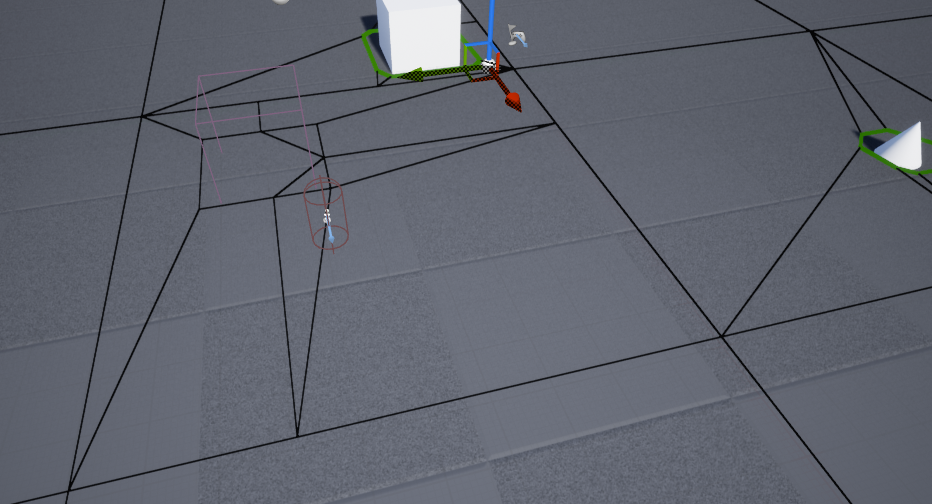
https://i.imgur.com/gzTXeZE.png
anyone know why my navmesh pathcostcalculation stops at the polys of that mesh?
 shy totem
how come I can't login? I already tried the Run As Admin trick
well, I'll try tomorrow I guess
 dense hatch
Is BootstrapPackagedGame necessary to distribute? or can I just use my game exe in the binary folder?
 modest agate
excuse, Im having problems with my projectile
when I shoot at this direction it works, it impacts on the wall
however
when I try shooting at this direction, it doesn't work
how can I fix that?
It spawns but wont move when facing that direction
 rocky field
Can anyone help explain what this is about?
UnrealBuildTool : error : Expecting to find a type to be declared in a module rules named 'BlueprintAssist' in UE4Rules, Version=0.0.0.0, Culture=neutral, PublicKeyToken=null. This type must derive from the 'ModuleRules' type defined by Unreal Build Tool.
 silver crown
@rocky field 4.25.2?
 pliant rose
need to destroy one of them, which one? please hurry paint us drying
need to destroy one of them, which one? please hurry paint is drying
@pliant rose
i am Ue4 user but need advise asap, dont ban me
pliant rose
should i keep them?
they are not as good as others
but they are like my children
have paint ready
got to choose
 radiant jasper
Does anyone know what the “fake platform XXX” is?
I’ve always wondered what it means
(For packaging)
?
harsh oak
here you can see how much a path to the individual points cost.. and how it ramps up when going over a tile.. I dont know what to do? There is no way of me telling how much a path really costs? :I

 ancient parrot
Hey, what channel should i ask in for some help with CPP & Rider for unreal?
pliant rose
@plush yew thanks for showing the way, i used 50x50 new canvas, and it happened that the paint i prepared was not enough due to experimented thickness.. good Sheppard must protect his flock, no matter how dumb.. your reply was valuable to my leveling.. good day..
sry for not related content
plush yew
it looks sick
pliant rose
puke x throw up sick or good sick?💩 👍
admins must create room for not ue4 related discussions, unless its the right room, last 2 years spent so much time in ue4 learning, this the lastplace left to make bonds
pliant rose
k
 proud narwhal
Hi, is there a way to have unreal automatically look at the lightmaps for all models and optomise the size?
this import is not great and would take me a long time to go though each object and set an overide up or down
magic fern
I have a character with a movement with several keys in sequencer, is there any possibility do copy the transform to another character and do like -30 in all x values and -40 in all y values?
 azure reef
Hello guys! With the new hotfix for 4.25 I get this error when trying to build for mobiles. Does anyone know how to solve thsi?
LogLauncherProfile: Found promoted target with matching version at ../../../Engine/Binaries/Android/UE4Game-Android-Shipping.target
digital badger
@modest agate Did you solve your problem? You basically need to edit some trace settings so that the trace ignores the player character
frank oar
Hi,
Does anyone know what costs more performance in a mobile device.
I am making a sign rotate, should I be doing that on tick or with a timeline ?
 rigid belfry
@pliant rose nobody cares about your pictures
proud narwhal
rude
rigid belfry
i find spamming unrelated stuff way more rude
proud narwhal
I guess so
glad loom
What's the best way to do a melee attack? Have a collision component and when you attack it damages the enemies in it? This way you can attack through small walls I think. What other ways are there?
digital badger
@frank oar You should do it on a timeline, you can get away with the sign not rotating on tick, but rather 0.1s
Make a timeline which has a looping interval of 0.0333333333s or more, then it'll be better than tick
frank oar
thank you, I do think it is effecting my fps (as it is on mobile)
as long as it looks like it is rotating smoothly I don't mind if it is not syncd to every frame.
would .1 achieve that ?
digital badger
I think so, though you'll have to practice
Use the Profiler tool to identify performance issues more specifically
frank oar
https://youtu.be/RZCfzGMHhAI
this has some very interesting work arounds for replacing tick




apparently this one is good too!
digital badger
That's essentially a timeline without a timeline node.
I wouldn't recommended anyone to do this, as it's not good practice but rather a workaround
The best way to minimise the use of event tick is to re-think your logic.
Can the rotating sign be an animation instead?
Should this logic be done every frame? Or can it be put on a callback?
frank oar
ok no problem, to a laymen like myself that video looked good (it had 4 methods btw not just that one...
Though I could just make the sign a slow turning animation, Is that actually more performant then using a tick event (or any of the work arounds ?
@digital badger this is the sign I am rotating (it reads, Access Menu)
im looking at tick stats but not sure if thats the one I should be looking at XD
digital badger
Animation would be best imo, since the animation would be managed by the animation system
Which does some things in the background to reduce performance loss
frank oar
ok I will try it, thank you for your knowledge!
digital badger
Could be a useful article for you, https://medium.com/@rgbguy/how-epic-games-optimized-unreal-engine-for-fortnite-battle-royale-part-1-8190f10bf940

It's a summary of this talk at GDC

Fortnite has served as a development sandbox for UE4, and in this presentation from GDC 2018 we explore the effort involved with taking FNBR from 30fps to 60fps on consoles.
Learn more at http://www.UnrealEngine.com
azure reef
Does anyone know why I get this errors when using exclusive nativization?
 left mist
Hi all, I want to move Uassets from my home pc to my work pc, but it doesn't load in 4.24 and it crashes 4.25.... Is there something I can do? ( beside doing the work twice...)
left mist
There is no connection between both and the scenes are huge....
Thought of it, but migrate is not possible, I think
harsh oak
maybe migrate it to a folder and then export it? 😄
 misty stone
I need urgent help from anyone with Git LFS experience
So we have a data pack for our repo and it says we've reached our storage data quota which is capped at 70gb but the files are only 28gb. So how can I bring this down to the actual value and have storage again??
harsh oak
isnt that the bandwidth usage? so you can only download like 3 times and are done for the month?
fervent apex
How do you make the transform relative to the object in the details panel? I can't seem to make it work
frank oar
thank you for the links @digital badger !
misty stone
@harsh oak it's storage but i dont know how to bring it down
 willow marlin
Does anyone use the Advanced Sessions plugin with blueprint nativization? When I package with nativization I get this error:
ornate forge
How's 4.25.2? Are there no widespread issues? I've heard something about the plugins being broken
 frigid kindle
Can someone help me with my PPVolume? For some reason, in one of my projects the sliders for AO have no effect. I have the same level in another project and there, the sliders work. Both PPVolumes are enabled and unbound, Engine Scalability is set to cinematic.
If I enable Ray Tracing on project #1 and then Ray Traced AO in the PPVolume, then the sliders will affect my AO, but in project #2 with the same level, Ray Tracing is disabled in the project and I can still adjust the AO?
fervent apex
I've rotated my actor and I want it to go forwards in the sequencer. But whenever I mess with the location values - the actor is still relative to the world so it goes the wrong way. How do I fix this?
 ashen orbit
I'm having a logics problem, I have a quest for my character which is for the character to go somewhere. I think I'd be best to have a collision box on the map and when overlapped with the right actor it casts to the game mode to tell the game that player succeeded.
Now, I noticed I can't cast from the level blueprint where my box collision is
How do I even solve this?
Oh wait maybe I could make the character check if he overlaps with that box?
well tell us the mechanics and we will help
figured out my problem
plush yew
is it possible to ckeck via blueprint how much free disk space the user have ?
plush yew
thank you
 hot thistle
Hey guys! Let's talk a little about this;
Pros and cons for showing enemy health?
(By that I mean like in WoW where you always see the health and how much damage you deal to the enemy, but like in games like Ratchet and Clank it shows neither)
 pseudo pulsar
Do any of you guys have issues with the blender to unreal addon exporting reallyyyy tiny meshes?
plush yew
@plush yew thank you very much
 gilded needle
I have made all of my UI elements toggleable, that is personally the way I like games to do it.
 brave lark
Do I want to install unreal engine and houdini on the same drive or would it be better to keep them separate. UE4 is currently on a pcie 4 m.2 and the other drive is a pcie 3 m.2
 jade wadi
Hey guys i got an Bad Problem - Every time i try to render a Video unreal says Out of Video Memory... i Can easy move in the scene without any Lags.... please help !
marsh sparrow
did you watch your memory usage before video load and after you tried
plush yew
why is nobody using udim for 3d meshes in games?
ornate ice
Hey why most locomotion tutorials are made using root motion animations?
 hollow yarrow
Anybody know how i can make my character turn with the camera? Ive adding turning animations but they dont play he kinda glides side to side when idle and turning.
Hope that made sense xD
 summer verge
EditorErrors: Warning: Can't save "myfile.uasset" Graph is linked to external private object Unknown
What the heck why can't I save this asset?
restive yarrow
Here is an update - reduced the actors in my level from 30 k to 3.3 k , cleared project space from 93 gb to 57 gb , deleted many trash folders that were not required, fixed redirectory of the content folder, ran Ccleaner on my PC removing all temp files from the computer, restarted it, did all that and yet no changes in the project, it still takes a whole 15-20 mins to load into my main level, the editor is always laggy and slow
everything is almost still the same
marsh sparrow
do you have a ton of lighting on objects in your maps
i've had this problem with blades of grass
🙂
restive yarrow
No i dont, I just have directional light, sky light, and post process
right now im transfering my project to see if it will run better or worse on my second pc
marsh sparrow
dynamic shadows on blades of grass LOL, that killed me too
hollow yarrow
They do need to fix it. I have multiple monitors and when running ue4 on whichever monitor, the others glitch out and have vertical lines going through them. This is not the graphics card as its very powerful lol and works fine on needy games
restive yarrow
i have done HLOD as well
 opaque vector
Anyone else experiencing massive hitches in PIE mode only? Started happening after upgrading to the latest NVIDIA driver.
Looking at stat SceneRendering, RenderQuery results is hogging the frame
meanwhile Standalone is fine
marsh sparrow
@restive yarrow thats all i have. sorry
hollow yarrow
This is similar to my problem but when i updated the Radeon driver
restive yarrow
@hollow yarrow similar to mine?
hollow yarrow
@restive yarrow similar to both yours and @opaque vector problems
@restive yarrow similar to yours in the way it takes forever to load up, and similar to @opaque vector in the way it glitches my other monitors when ue4 is open
 mint raptor
Any tips or tricks to get a spline to mold itself "through" a static mesh?
or trace rather
restive yarrow
Also whenever i try to merge actors, after merging like 2-3 times the editor crashes
then i gotta wait for another round of 20 mins for the loadup
marsh sparrow
now thats awkward
hollow yarrow
@restive yarrow it is problems to do with the actual ue4 launcher i think if its happening to numerous people... How are your pc specs?
restive yarrow
@hollow yarrow Launcher? you mean engine?
marsh sparrow
@restive yarrow do you have your taskmanager up? notice any awkward spikes in anything, disk even.
Epic launcher
hollow yarrow
Yeah thats what i meant xD @restive yarrow
restive yarrow
Ryzen 5 1600x CPU, GTX 1050 ti 4gb VRAM, 16 GB memory
marsh sparrow
what engine version?
restive yarrow
@marsh sparrow when i run task manager UE4 shows using 90% of all MB's and power
4.25.1
 karmic nymph
So I'm running into an issue with my sprint code
the bp i have prevents my character from sprinting in any direction but forward
but if i start sprinting and change directions, the character will retain the additional speed in that direcction
marsh sparrow
@restive yarrow I'm running 4.24.3 still this is what mine does, latest nvidia drivers, windows updates, etc
restive yarrow
windows updates matter?
marsh sparrow
ha no clue, but its one of the first things i see in forums
hollow yarrow
restive yarrow
the task manager you guys are showing is while UE4 is running?
marsh sparrow
yes
hollow yarrow
correct
marsh sparrow
i also enabled something in preferences yesterday that shows FPS, Mem, objs, in the top right corner of UE4 all the time
restive yarrow
One thing is I dont have my nvidia geforce drivers updated, so i did that now, not sure if its really important
marsh sparrow
well i think they test the engine version against whatever driver at that time right
ancient parrot
Hey, how do i find a plugin in my engin plugins? as i need to move it to my project plugins?
restive yarrow
@marsh sparrow you mean like latest engine version for latest nvidia driver?
hollow yarrow
yes
marsh sparrow
yes, so if 4.25.x came out yesterday, they test against whatever the latest drivers are at that time
so its possible they fixed a bug
hollow yarrow
do you have any idea on why my other monitors glitch when ue4 is open?
marsh sparrow
that would be present in later versions of the video drivers
No clue.. i have 1 34inch curved i use
🙂
hollow yarrow
ahh no worries then, i use 3 21s but i do lots of stuff so makes it easier
ive got a question about something i need help with ue4 also lmao
marsh sparrow
Well im new to all this.. so I can try to help LOL
hollow yarrow
how can i make my character turn with the camera? Ive adding turning animations but they dont play he kinda glides side to side when idle and turning.
Hope that made sense xD
same with me lol
restive yarrow
I also got my Engine installed in an ssd
restive yarrow
Do i need to restart after installing drivers?
marsh sparrow
oops
hollow yarrow
what LOL?
marsh sparrow
@hollow yarrow I don't actually have turn animations in mine
i sent an image of the chat instead of this.. Lol
hollow yarrow
oh right lol and i didnt at first but its just a lot better as im making a sort of fantasy tps
just dont know how to get it to work
like when im running it turns with the camera but idle it doesnt
marsh sparrow
one thing that caught me... was I had something not attached to the root correctly so my 'asset' center was off
ha no clue then
hollow yarrow
no clue either then lmao
 vernal dock
hey guys can someone help me as to why my client cannot call execute on server function in blueprint? please help i looked everywhere
i am working with replication for multiplayer
 sterile lichen
is it possible somewhere disable automatic opening of all sub-tabs in blueprint graph editor? some blueprints have over 80 functions and it is troubling to close them all whenever I open the file to edit
hollow yarrow
just close them and reopen when you need @sterile lichen
give that a try if you havnt already cos that works for me
sterile lichen
yea, that works until you reopen file or editor (because editor crashes quite frequently)
hollow yarrow
ermmm. close them and then save, see if that works
i dont think theres an actual option to disable it
did that work? @sterile lichen
sterile lichen
no, after I re-open file it opens all sub-tabs again
hollow yarrow
im not sure then sorry, it works with mine @sterile lichen
mint raptor
Splines are typically used to have meshes follow the spline, does anyone know if it is possible to do the reverse and have a spline follow a mesh?
 honest rune
is there a way to rollback to a specific point release of the engine?
like, specifically to 4.25.1...
 marble hazel
Is there a good way to map voice lines to dialog using a csv? I was thinking of each line of the csv starting with the name of the audio file to play but I'm not sure if that is a good idea
grim ore
@honest rune only using a source build, the launcher cannot be rolled back
honest rune
😦 thank you
grim ore
@marble hazel you can create data tables which are basically spreadsheets in the game and you can import them from external CSV files
digital badger
Can you show me the trace function on your player?
Where you actually do the line trace
digital badger
Okay @modest agate
I think the problem is that the spell actor is colliding with the player causing that effect
What you need to do, is use this node https://docs.unrealengine.com/en-US/BlueprintAPI/Collision/IgnoreActorwhenMoving/index.html
Ignore Actor when Moving
on the spell, to ignore the player when it's cast
So it'll go through the player
Now the target for this node is Prim Component so you might need to cast explicitly to the mesh of your spell actor
Though BP might do it automatically
modest agate
great, thank you!
digital badger
Did it work?
 inland kettle
Hello! 🙂 I want to weld one actor to 2 Components. But every time only the last component gets welded.
Am i missing something here? 🙂
modest agate
digital badger
Target is the spell primitive, and actor is your player
I would put this on the BeginPlay of your spell
grim ore
@inland kettle you can't attach the actor to 2 different things, if you look in the hierarchy for an actor for example every item has 1 parent. you want to give an item 2 parents
digital badger
@modest agate You don't need to cast to Actor, for actor use "Get Player Character"
Then since this is on your Spell Actor, that's all you need
modest agate
digital badger
Then set the bool to True, and it should work
hollow yarrow
how can i make my character turn with the camera? Ive adding turning animations but they dont play he kinda glides side to side when idle and turning.
Hope that made sense xD
sorry for asking this numerous times just still cant figure it out
digital badger
@modest agate Your welcome, ask anytime 🙂
hollow yarrow
it works correctly when running but not idle
grim ore
can you show the issue @hollow yarrow It sounds like its the options for the spring arm, movementr component, and pawn set to rotate with the camera and such
inland kettle
@grim ore Thank you very much! 🙂 How would you approach to attach vor example 9 cubes at runtime. how i understand this... with welding you can never attach the middle one with all surrounding cubes. Only one. Is there another way to attach them at will without an order?
hollow yarrow
does that help?
Like i want it to show turning animations when idle but it doesnt... i have them setup in the animbp
grim ore
@hollow yarrow you want to look at setting up in place animations for turning. you can do that with a 2d blendspace
 thorn hazel
Reposting since my last image has issues, and text is a bit messed up.
I'm having a dynamic light setup..
- I don't know why there is difference between my editor view and in-game view (maybe some exposure settings?)
- I don't know why when I turn the sun the other way of noon, on a 45 degree angle in night, it is suppose to be dark in my scene.. there are no other lights! I don't know why my cube is lit.
grim ore
@thorn hazel there is auto exposure by default, you can disable it in the project settings or from the lit menu at the bottom in the viewport
thorn hazel
okay trying that..
is it the same setting in the lower left of my screenshot? @grim ore
grim ore
as for the lighting, unless you disable the light when it's under it can still affect other things. Its a directional light it wont be completely blocked by the ground for example
hollow yarrow
wait what am i talking about lol, i have already done the 2d blendspace
grim ore
yes the game settings checkbox or ev setting is for auto exposure
if you dont want it go to project settings and disable auto exposure
hollow yarrow
do i add it to a walk bs or a seperate idle one?
 sterile stream
im having troubles with landscape painting and layers, anyone care to help?
grim ore
you can look at the shinbi paragon character from the marketplace, it should have a working animation blueprint
thorn hazel
- I just turned it off, it still gives me a blue tint in the editor
- editor is still brighter than my in-game as well.. I want both to be equal .. so I can change in my editor viewport my lighting without having to play the game multiple times to adjust light
@grim ore
grim ore
did you rebuild lighting after moving or turning off lights
you might have other light generating items like the sky sphere or sky light
thorn hazel
please see my image I shared a bit above. There are no other lights. and I don't need to bake lighting at all, since I'm using a full dynamic lighting set-up
everything is realtime
grim ore
well your screenshot doesnt show your hierarchy so we cant know for sure what you have. You have exactly 1 light in the scene, the directional light?
thorn hazel
there is skylight .. but its indirect light right.. if there is no other direct light in scene.. it shouldn't generate any indirect light right?
here
grim ore
so build lighting and see what happens
thorn hazel
I told you static lights are disabled, this is completely realtime, as such the 'build lighting' option is disabled, even if I tried that.
I can share-screen if you want btw
open wadi
Quick question: I'm building my own authentication system for UE4 for a small app I'm doing to be used by my team - Is a CIS-hardened Debian EC2 instance running Node.js recommended for the external authentication box? Or is leveraging Node.js not recommended?
 flat axle
What is the best Program to create maps to use in UE4?
 umbral trout
Milkshape 3D
flat axle
Thanks @umbral trout
 idle garden
Hi, it's just for me or Editor is crashing more frequently nowadays?
karmic nymph
theres an issue with my sprint code
The section on the left works fine; it makes it so that the character can only sprint forward. Holding shift while holding "a" "s" or "d" will not do anything
the problem is that changing directions while sprinting will allow the character to retain the additional speed in that direction
i tried to fix this bug with the code on the right
which doesnt work
does anyone know what i did wrong?
ooo that sounds good
plush yew
Hey I've got a question.
I'm interested in starting a new hobby project that's basically going to be a civ game, but I want to be able to do two things. First is being able to wrap the grid of the map into a sphere to see the world as a world. Second, while the grid is flat like a map, to have the grid repeat itself right-left like you would have on any map projection, so that when you move the camera left or right, the map seems infinite.
My intuition is that I should learn to do this in python or something as a script rather than a blueprint, But I wanted to ask you guys if you have any thoughts on how best to go about this?
 sweet relic
@plush yew python is really only for in editor scripting and automation. So while you could make a python script to generate maps at edit time. Any actual gameplay stuff would need to be implemented in BP/C++
I think there may be some plugins that add python based game scripting, but I have not used any myself
digital badger
The experimental python plugin included does have some actor functionality, but yeah C++ should be used
Really if you know python, UE4 C++ shouldn't be too different
Oh, and with every language implementation plugin in the engine assume computational overhead
Core logic should be C++
storm venture
how i prevent a mesh from casting shadows only on a specific other mesh?
@hearty rose i still need shadows cast on it, just not from a specific mesh
here's my use case:
i have two characters, one with a full body, one with missing limbs, they follow the same animation but the limbless one has an arched back, and in certain positions, the shadows of the full body can be seen on the partial body
plush yew
Hello I need help
plush yew
Does someone now how to make this:
I need a object, and if you hit that object you will respawn ad you're starter location. I'm new to unreal engine, and i can't find a video of it
 weak cypress
anyone?
 plain terrace
eveyrtime i try building my lighting it says that the lightmass crashed because therre wasnt enough memory
 viral fractal
Get more memory
plain terrace
bre
shouldnt there be a way to optimize it so that it doesnt try using more memory than u have?
anyways, ive heard about lowering the lightmass resolution, and i have some questions about that but now I need to eat
viral fractal
Just use realtime light
plain terrace
how would i do that
 glad orchid
Anyone know if we will ever get tools to simulate lower hardware?
Currently I find myself constantly swapping hardware to target my base
No matter what I just can’t seem to profile properly without having the actual base hardware I’m targeting
And swapping from 1050ti up to around a 1070 constantly gets old
glad loom
Hello, quick question. In my game ( 2d ) you can use a sword and a shield ( sword on left click and shield or right click ). I want to add a parry, so if you time it well the enemy's attack does nothing and he gets stunned. I'm thinking of putting it on right click, where the shield is, so you parry with the shield ( like in Dead Cells ). However my friend is arguing that it should be done with the sword, not the shield, and you press a different button to parry, not right click ( like in For Honor ). Which do you think is the most "normal" way of doing it?
glad orchid
Input should be consistent @glad loom
No matter if it’s a trace to the sword or shield
Give them a parry input or a consistent method
But technically a parry can be a result of a hit trace from either
glad loom
Yeah but I'm asking if it should be done with the shield button, and the animation being with the shield, or the animation being with the sword, on a different button
glad orchid
Maybe enumeration on your trace result to a anim blend
Well
If you attack and sword clash that’s different
That’s not technically a parry
Neither is a full fledged block
So technically I guess you could give a cue and result in two actions
A shield parry would result in a much quicker attack
Vs a sword parry
So I would say separate your block, attack and parry input
And parry would result in the trace result enumerated
For either sword or shield
Then your follow up attack would counter on it
This way your not just attack spamming with inconsistent behavior
@glad loom
Do you have shield bash in?
glad loom
Nope, but I'm open to adding it
glad orchid
A great follow up to a sword parry is a shield bash
glad loom
And also yeah, your idea sound great! I think I'll add that
glad orchid
That way you can bool branch the block input off a successful sword parry and block input results in a bash
glad loom
Thank you for your help! That makes sense and makes the combat deeper and more interesting
glad orchid
No worries 😉
 brisk urchin
Lighting question: been using static meshes to create an indoor lab map and I deleted all of my indoor lights but after rebuilding my scene there's a lot of Skylight/directional light bleeding into my rooms. Any suggestions??
glad orchid
@storm venture
Are you using copy pose from parent
As a child skeletal mesh component
It’s a simple tick box
For the child mesh
Secondly disable shadows on the parent on your dismembered event
Then cast from the child
storm venture
@glad orchid yeah, the partial body has a animBP that copies pose from the full body
glad orchid
Untick cast hidden shadows on the parent
radiant jasper
does anyone know if Unreal Engine supports Xcode 12 for remote compiling?
glad orchid
@brisk urchin check your csm settings
radiant jasper
I seem to be getting quite a few errors while attempting to use
glad orchid
Is it baked or dynamic bleed?
storm venture
Secondly disable shadows on the parent on your dismembered event
@glad orchid i need the parent to cast shadows, their purpose is to show the arm+head shadows while the player (who will be in first person) only sees the torso+legs
radiant jasper
I need to use Xcode 12 because the device I am using to test with is running iOS 14, and only Xcode 12 supports the SDK for iOS 14
glad orchid
Also Tyler make sure your not transforming any bones by accident or that something didn’t go wrong on retargeting
@storm venture yes but
brisk urchin
@glad orchid my directional and sky lights are set to movable.
storm venture
spine bones need to receive a small rotation backward do that first person camera can look down and not see a neckhole 😛
glad orchid
When you kick off the dismemberment event
storm venture
no no theres no dismemberment
storm venture
goal is to just have a first person view like so:
and i will later mount some separate arms on the camera
goal is to have a typical "arms glued to the screen" first person game, but with legs that work with the shadows
glad orchid
There isn’t a need to split the mesh in FPS
Not really
You can have a full body skeletal mesh
Make sure your camera is position correctly
And blend your animations for the arms correctly
Your workflow will thank you for it
brisk urchin
@glad orchid where do I find those csm settings? World settings or within each mesh?
glad orchid
On the directional light
The skylight shouldn’t result in bleeding
But the directional light can
Especially with thin modular assets
@storm venture but yeah if you want to continue with the two mesh method
You do need to rely on parent shadows
But there are ways to do a full FPS with the entire body
You just pull the camera a tad bit forward and offset the look to head rotation of the camera offset position
That way you look down and see yourself
And your head should never clip into view
Also saves a bit on animation tick and draws
Since skeletal meshes aren’t instanced
But if your flat the cost isn’t that big of a deal .... VR is a little different
@brisk urchin you have a csm count
On your sun
brisk urchin
My whole science lab level map will take place indoors at all times and there are no windows which is why these light issues are driving me crazy
glad orchid
and the asset "static mesh" part in the mesh editor
I need to see if its the bias or your exponent
you might have to bump the cascade to 4
just depends on what I see happening
brisk urchin
brisk urchin
Currently there are Zero lights in the whole map and all of this is coming from the outside
glad orchid
do you have normals on the back side of the roof?
also
does your sun move?
if it doesn't move then you should be able to swap to stationary if you wanted.
glad orchid
so a plane
brisk urchin
How do i check for normals?
plush yew
Does someone now how to make this:
I need a object, and if you hit that object you will respawn ad you're starter location. I'm a bit new to unreal engine, and i can't find a video of it
?
brisk urchin
just the 9
glad orchid
@brisk urchin so you have a few options
first i would try ticking contact shadows
since your 100% dynamic
its "contact shadow length"
which is set to 0 by default
brisk urchin
yea, its set to zero. would should I try setting it to?
glad orchid
are you using ray trace shadows?
brisk urchin
is it bad to use static mesh walls/celings that are rendered from only one side? 🤔
let me check on the trace shadows
glad orchid
@brisk urchin its not bad
just hard to deal with dynamic lighting
and even baked lighting for that matter
there isn't a normal blocking light at that point
brisk urchin
glad orchid
but you can simply put a plane above the roof to block it
at this point its about how you want to spend the performance cost
do you want to eat a little on contact shadows, adjusting the bias, increasing the csm count or a draw call for an extra plane mesh above the roof