#ue4-general
1 messages · Page 785 of 1
 tribal seal
 midnight root
any errors
 icy mulch
I even used the registry editor and it doesn't work
midnight root
ya thats very dangerous
doable, not for faint of heart,,usually avoided
just sayin
icy mulch
Oh I thought it would help cause for the display thing
midnight root
no idea on that, where did you get idea to do that if I may ask
icy mulch
I used it cause I saw a video on how to fix the display driver failed to start
midnight root
Sounds like your nvidia driver went south pretty hard, after messing with registry sounds like....
I get it, I've done it...try to avoid it when possible :))heh
icy mulch
So in others works I freaked it up it did that even before I had to change it
icy mulch
Is there way to fix it
midnight root
if your system is totally messed, uninstalling your driver , restarting and going to https://www.nvidia.com/en-us/geforce/drivers/, after you have internet back, should be the plan
nvidia driver <<
wait for your internet before doing anything
icy mulch
Can't I uninstall from the device manger
midnight root
yes
icy mulch
So after I uninstall it I restarted the PC and it should be back on right
midnight root
it should resort to Microsoft basic
if you can I'd wait till you have internet, but ya it should resort which is fine for basic stuff, NOT 3d
not 'heavy' 3d :))
maybe not 3d at all as I recall..... ..
unless you have a capable onboard gpu
 dim arch
you dont need to try, to install the driver on the new w10, it always install it with windows update
midnight root
maybe, but honestly I'd do it manually , ive seen M$ update mess up before
 wanton lotus
I would never let windows update install display drivers for me, especially nowadays when a new driver version comes out almost weekly just to add in something to support whatever new game is hot. These little patches sometimes cause major issues.
icy mulch
I don't why it says display driver failed I don't get it never gave me that before
I updated to the latest windows
midnight root
ok and you got no errors after doing so right ?
or is error result OF doing , just that
icy mulch
Yeah the only error I have
I get that every time I restart the message from unreal engine
icy mulch
Now its crashing my game to
midnight root
what I dont know is if you did any damage to registry, but since windows started , prob. ...not...
wanton lotus
@icy mulch in one of your screenshots you showed 2 driver versions for your gpu, can you try rolling back to the earlier version?
icy mulch
I did tried both still doesn't
wanton lotus
Unreal Engine Forums
I've installed 4.23 and I keep getting crashes. Error message - "Video driver crashed and was reset! Make sure your video drivers are up to date. Exiting...
I'm running a Gforce Nividia 2070 RTX card and my drivers are up to date. This problem has occurred since I installed t...
Unreal Engine Forums
hi just downloaded new version of unreal engine UE4.24.2 and it crashed if I create a gaming project with RealTime RayTracing
My graphics card RTX2060..(running on Windows 10..updated)
it works fine if real time ray tracing is not selected but crashes everytime when Real Time ...
2 similar cases
icy mulch
I used this video https://youtu.be/cZ8gSyHzsSU to fix the display but it still doesn't

Hii Friends Welcome Back My Channel MK Tech..............
In This Tutorial How To Fix Display Driver Failed To Start Error On Windows 10 || Black Screen Displayed
Follow My Tutorial Steps Properly...................
Thanks For Watching...............................
,,,...
wanton lotus
Some other people mention using the studio driver instead of game ready driver.
icy mulch
When I use the video method the game works but with it out it crashed even the editor
My friend said i should use roll back but its greyed out
wanton lotus
You'd have to wait for your internet then to just redownload and install.
Make sure to do a cleanup of old drivers. Use some software like Display Driver Uninstaller to guarantee it is removed completely,
icy mulch
True I just hope I didn't freak anything up I'm at the point of factory reset
wanton lotus
Software like DDU should also remove registry references as well, so after using that and then reinstalling, it should be repaired.
Recommended to also reinstall the unreal engine, since that is what initially caused you to look into display driver fixes.
icy mulch
Yeah I plan that to cause I delete my old unreal engine 24.5 version the newest one that worked fine for a two weeks and that happen I went to my old pc and dragged unreal engine 4.23 same thing
I guess it's my ram or something I don't caused I moved to my tb storage cause I have 2 terabytes
64gb
My old pc never did this
midnight root
K well , not sure if anyone has ever expereinced a project STUCK at 91% load, but thx to the internet , found cloning and apparently renaming project to something else does trick, and it did
THAT was scary 0-0
Thankfully I had a backup but still...
Anyway Rick sounds like a plan is underway you should be fine
icy mulch
Yeah basically my pc is trying to force me to use Microsoft basic display
icy mulch
Microsoft display basic is slow tho
icy mulch
Anyway around it cause this pc was very expensive
midnight root
based on your GTX , heck YA :)))
SO worth it tho
2060 magic , not to mention your i7 o_0
did I read that right 64gb ram
midnight root
ok so you're SOLID , 32 they say is the break point with ue4 BUT that doesn't matter, with 64 ( if they're right at all) gives you a lot of multitasking POWER many croon for ;)))
me included at 8gb LOL
icy mulch
I used DDU But now I half to re install it the rtx cause it's not even there
midnight root
ya as slash noted, remove it all , clean as noted, as internet is back you can download RIGHT driver and be home free
you can let nvidia find the right one or do it manually ,,either way easy peasy
icy mulch
Okay hopefully that will fix the problem
 grim ore
Craaaaap.... Ok real world issue here but cant seem to find an answer. Async Load Asset using a Soft Object Reference, when in PIE mode the stupid reference changes to a PIE version of the map which means the object doesnt actually exist which means it fails to load it.... this is.... odd behaviour
midnight root
just stay away from registry :)))
in general ;))))
@grim ore that went over my head essentially but soft objects are BP's ? o_0
clearly I
m not THERE yet ;)))
so much to learn so little time lol
 plush yew
Does anyone have any good pc builds that I can build where I can make games on UE4 and play games. Max i would spend is about $3000. But if it could be less that would be cool too. Dm me if you have a recommendation.
midnight root
@plush yew oh wow that will get you a HUGE system ;))
I wish for those kinds of funds ;)())
anyway , newegg as a start I guess
its my goto, prob. for most
grim ore
yeah it's a weird "bug" I guess
maps when you are testing in editor end up being referenced as PIE_whatever instead of the map name which is normally not a big deal unless you are trying to reference them using soft references then it gets all wacky.
I found a weird workaround, and in a packaged build this is moot, just.... its the way PIE works
its the same way if you started up a new map but never saved it then were trying to do some things with it the map is called Untitled and even if you rename it on disk its renamed but until you save it to disk it doesnt exist then it gets all weird lol
also... lightmass is version specific, I keep forgetting that. It also doesnt default to using all cores if you have more than 16..... /rude
midnight root
yikes
rude is right ;)))
lightmass, my understanding is using it for wc worlds doesn't work ?
world comp...so frustrating at times o_0
partly my fault,,
THAT is very weird..no all cores if > 16 o_0
 open eagle
Can someone help me out in #multiplayer
midnight root
@icy mulch those images dont seem to be coming thru right at all,,i can't scroll thru them for some odd reason
has no MP experience YETTT
 open gorge
I'm running into a super strange issue with UE4. Currently using latest version of 4.24, this happens in 4.25 as well. https://i.gyazo.com/a14efca6cc0ff8f4eafe00cb2308eb63.gif

if I jiggle the window it fixes itself
the full window ends up looking like this: https://cdn.discordapp.com/attachments/593195953733763073/727745749647097866/unknown.png

i've reinstalled UE4, made sure all my drivers are up to date. I'm at a loss.
midnight root
never seen that b4 but hey so many moving parts, complexity of OS's doesn't take much I guess
4.24.3 ?
midnight root
ditto
open gorge
yeah
what's weird is there's nothing happening in the log
so i'm not sure if it's OS level
or something weird elsewhere
open gorge
i've reinstalled UE4, made sure all my drivers are up to date. I'm at a loss.
midnight root
k
open gorge
needed Pro for Docker for another project
midnight root
wth is docker
open gorge
uhhh
midnight root
nvm got it
midnight root
im also having weirdness not sure if I caused ornot , current project wont load past 91% so I clonned,,thought it was FIXED, nope load issues again past 91%
its ok I have backup, not 'quite' the same but still
open gorge
just hangs?
midnight root
SO annooying!!
open gorge
what does your log say?
midnight root
ya at 91%
haven't checked
let me fihnd
wel weird thing is it n ever crashes,,like wtf
SO odd
do I check for whats there at END of file ?
if so there is no direct error
[2020.07.01-04.28.44:090][ 0]LogPackFactory: Copied "../../../Samples/StarterContent/Content/StarterContent/Textures/T_Wood_Walnut_N.uasset" to "../../../../../../Users/thehe/OneDrive/Documents/Unreal Projects/Essence_Alpha0_6a/Content/StarterContent/Textures/T_Wood_Walnut_N.uasset"
wait I guess thats the clone log ;0-0
anyway no crashing so...
i rarely have issues so Im not used to looking at logs
open gorge
crashing isn't indicative of something going wrong, i mean it is, but not in this case
you can check Saved/Logs
midnight root
ya
open gorge
after it hangs and see what it's doing
if something seems weird, then remove that asset
midnight root
ya a good first step.if its megascans I can always re do them
midnight root
so for you, you get that issue even if shutting down, back on , dont recall
midnight root
god knows , ive no idea
open gorge
You can always just do it locally
midnight root
but its fine, i have 4.25 project on this
speaking of which doews it take up a lot of ssd space or
always wondered
worst thing I usually see is too slow shader compile or too many but its gotten 'better' lately
open gorge
4.25?
midnight root
man it was UGLY for a time
open gorge
or Version Control?
open gorge
subtract ~15gb for plugins I have
midnight root
same here basically
midnight root
wow ;)))
this is all errors I see but nothing looks 'fatal'
LogWindows: Failed to load 'aqProf.dll' (GetLastError=126)
LogWindows: File 'aqProf.dll' does not exist
LogWindows: Failed to load 'VtuneApi.dll' (GetLastError=126)
LogWindows: File 'VtuneApi.dll' does not exist
LogWindows: Failed to load 'VtuneApi32e.dll' (GetLastError=126)
LogWindows: File 'VtuneApi32e.dll' does not exist
LogConsoleResponse: Display: Failed to find resolution value strings in scalability ini. Falling back to default.
but nothing about a stalled load
I suppose those are for loading INTO engine, not after exiting and re loading DUNNO
feel lucky you just have dizzy text 😉
open gorge
@midnight root just to double check, you've reinstalled your video driver and updated windows?
midnight root
that was a ways back I think
open gorge
also there's a handful of solutions here: https://answers.unrealengine.com/questions/758236/all-my-plugins-nodes-get-call-unknown-function-err.html
midnight root
hm
open gorge
that's almost verbatim that log
midnight root
omgosh
ty for finding that
i'd NEVER have guessed!@!!
WEIRD
maybe my driver is TOO new
sometimes I get them and install them and wonder if they are too new for the newer cards
mostly 'this for game X is better' LOL
so ya
ok Ill look into it ty
anymore on your fuzzy text ?
midnight root
been looking for you not finding anything close
enough
https://forums.unrealengine.com/development-discussion/blueprint-visual-scripting/1569324-low-resolution-and-blurry-meshes-in-blueprint-editor-viewport-only-please-help , that but its on a mesh
Unreal Engine Forums
Hi,
on one of my projects, I've just encountered something that's making me absolutely lose my sanity. Under certain circumstances, meshes inside Blueprint
open gorge
yeah google turned up nothing
I've found a way to work around it
just a bit annoying
midnight root
nice
could be current bug forget where one checks for that
or interaction with editor and your gpu ?
god knows thats a complex topic
BP editor
bb soon going to restart just in case..windows 10 pro updated security but thats about it..
🙂
here goes nothing
nope still 91% issue
unless I need to go back to OLDER drive for this gtx dunno
well I still have 4.25 hope ITS ok ;))
near identical
would running from console help I wonder
try deleting folders as per url see if that does anything
open gorge
yeah
midnight root
its ok no biggie,,I did above now time to test
not expecting miracles ;00
HM removing iliad plugin beta WHO knows
maybe progress removed that plugin and its 'stalling' at 39% where it usually does when plugin is removed or such so we'll SEE
45%
thinking as expected 🙂
midnight root
yes
hoping so, and BETA didn't help at all
a risk enabling
still a 91% issue, we'll see if it stalls there forever but it doesn't look all that good ;))
no other beta plugins that I can think of
and w/o a crash where do I look for trouble areas ;0
open gorge
disable all your external plugins that you've installed since the issue started
midnight root
power went out lol
\storm as always midwest and all so far just rain..but that took the power ;))heh
checking
while I can :))ha
ya there is two that should go prob.
fixing
done here goes
na 91 again
only one I left which b4 didnt' seem to cause any issues is voxel plugin
 storm jasper
who is better?ue4 4.25 or ue 4.25.1?
midnight root
maybe ones I removed are forcing recompile at 91% give it more time to see
using 4.24 atm so no idea sorry kaz
HM maybe progress , lots of shader compile items in process in task manger, windows
INTERESTING
odd it does this at 91% tho o-0
open gorge
sometimes it takes awhile to do it's thing
midnight root
hope so...shader stuff done, still stuck at 91%,we'll see but iut doesn't look good at this point ;0-0
only other thing is maybe removing voxel plugin but it never caused issues before
but ya more activity in ue4 thread task man
if need be Ill just take world comp terrains and migrate elsewhere
can we see anything at all live if ran from console or such ?
running in the dark isn't enjoyable ;))
so weird , ue4 project cpu goes up to .9% cpu back down to near 0 ,,off and on so something is clearly up
1.3 ;)lol
 marble pendant
not sure where to ask this one, Having a strange issue.
Added a landscape and now when I hit play, my pawn doesn't posess and I get stuck inside a "cameraActor"
on very rare occasions it'll spawn my character up in the air where it spawns the camera actor
and he'll fall for a second and then disappear
Think it has something to do with the landscapes collisions maybe ?
midnight root
ya if you were falling through but not this i'd think
marble pendant
this is very strange lol
marble pendant
nope, literally just created a landscape using a heightmap from world creator, added it in and set my playerstart and a test enemy on it
 jaunty cedar
I'm working on a new character setup and I'm having some issues
Here's the hierarchy in editor
The problem is that Mesh1P (arms) has nothing in the details panel, and no mesh shown
The only change from the default one in C++ that'd impact it is that I reparented the camera
It may look convoluted but I just forgot to delete FP_Gun, the rest is laid out very logically (Fullbody is un-animated and invisible until required for a full body animation moment such as climbing ledges, the mesh1P is the first person arms, legs1p is first person legs, both 1P models get hidden when the Fullbody is shown), but for some reason the Mesh1P has just stopped working
It's just the default setup, no changes
Same with the declaration
It's the only one where it can't render and there's no details.
Wait, the name doesn't match up. Potential cause? I must have set that and forgotten.
 eternal violet
hey guys
found this the other day

GitHub
[WIP] Unreal Engine 4: Smooth voxel terrian example - bw2012/UE4VoxelTerrain
I'm wondering if anyone around here has got this to work on the new engine
 silver crown
Just use https://free.voxelplugin.com
eternal violet
I have but you cannot use graphs
silver crown
That other plugin doesn't even have graphs
eternal violet
true
 rain knot
guys I currently have UE4.24
if I install 4.25 it's gonna take up another 30gigs???
do I just get rid of 4.24 altogether then? i don't have space
jaunty cedar
@ebon linden I'm not sure, but it shouldn't be too hard to write your own implementation? Just tick up a value in your gamemode for flag captures/kills/tickets for each team
 serene birch
you can save 27GB by not installing the debug symbols if you don't need them
@rain knot and you can uninstall 4.24 before you install 4.25 I guess but I'd recommend keeping both at least to handle your projects transition phase more smoothly (reverting changes back in case it doesn't work well I suppose)
or yolo it!
jaunty cedar
Just wondering ahead of time, can I easily change the attachment of something during runtime?
IE. Change Camera parent from capsule collider to mesh when animation triggered
I have it set up a certain way but it's preventing me from doing things like use the built-in crouch, and I'm wondering if this can be done in real time. Or would I be better off to make two cameras, one under the mesh and one under the capsulecollider, and then switch between them?
rain knot
thanks @serene birch
 sullen rain
Hello, Anyone know why a webpage opens when i try to press package apk
I have setup sdk jdk and ndk properly(using 4.25)
 noble tapir
Hey there. Im trying to make a static mesh (a cube for now) with 6 identical materials tiled on each side. I made one in blender but when I apply the same material* to each element, they dont end up being identical on each side, it seems like its the same as if I had 1 material for the whole thing. Am I doing something wrong?
Or is this intended behavior?
dim arch
element like each face, or the entire object? if you apply a material to a face, it will create a materialID just for that face, try applying just one material to the entire mesh, also check your UVs as they may be different on each face
noble tapir
@dim arch, element like each face
in blender each face has a different material, then after importing into ue4, I replaced all 6 of those materials with the same material in each slot
essentially what I have is a media source material and I want the media to be fit to each side of the cube
both ways, I kind of end up with the exact same thing
dim arch
what is the difference between each side of the face?
noble tapir
they are the same essentially. sorry, if Im explaining this badly. I just want the same exact material on each face but rather than wrapping around the whole cube, each face has 1 instance of that texture.
currently it looks like this
but I'd like that texture to be fit to each face rather than wrapping around the whole thing
dim arch
well, a standard cube from the editor should do that
noble tapir
yeah, it has to be a static mesh though and not a bsp thing
dim arch
it will have one material slot and it will have a square texture mapped to it
noble tapir
since its part of a blueprint
dim arch
there's a mesh object you can use in the engine content
 tight prawn
how can i generate collision on meshes that the character walks on ?
 wraith wyvern
when will the free models be out?
noble tapir
ended up being 100x easier than I thought >_<
 sterile venture
I cant understand how to work without rtx
dim arch
@tight prawn you can use complex as collision to use the mesh geometry as the collision object
noble tapir
@dim arch, what exactly did they set in this static mesh that makes it do that?
dim arch
or click here to generate a collision shape
 flint ermine
Anyone knows why my planar reflection take double the amount of time to render when not in view port?
dim arch
@noble tapir its just a standard cube, the UVs of each face take up the same space, so they will all map the surface the same way
the UVs you had meant each face has unique space
if you click the UV button in the mesh viewer, you can see UV0 is the UV mapping for the surface shader and UV1 is for lightmaps, your UVs were probably like UV1
tight prawn
I know, i've setup collision properly
noble tapir
Ohhh, wow okay thanks for the explanation. Havent really done much with this part of unreal before, so a lot to learn. Appreciate the help 🙂
tight prawn
I have also changed the body collision as "Use complex as Simple Collision" to generate per pixel collision
however when the character walks over the said plane, no collision is detected
but if i make him fall on it
it would generate the event
dim arch
do you have a collision capsule on your character
tight prawn
yes
as i said, collision works if the character falls on the plan, or hits it on the front (plane rotated 90°)
colision doesn't work if the character simply walks over it
dim arch
maybe try using some surface with thickness
 fiery mortar
hey guys I have problem I have this character I want to add crouch I have the animation but when I implement it the camera stay where it is so character doesn't go down but animation still triggers what should I do about it ?
It's fps btw
plush yew
i need help lighting build fail help
 vernal thicket
@fiery mortar Is the camera attached to the head socket of the skeletal mesh?
fiery mortar
yeah
I mean the head should get down as well I guess
hence the camera
but apperantly it doesn't work like that
tight prawn
collision is only detected when the character falls on it
however when walking, it is not detected
what am i missing ?
 finite tangle
How can i get current health?
 exotic thicket
it depends on how you implemented health
flint ermine
So is there any way to use planar reflections on water without losing half fps?
 austere scroll
i made a custom material , its black on one side and the other side is the material itself , i discovered a lighting probleem because if i put a light up on the door , i becomes normal (but doesnt look natural at all) how do i fix this problem
finite tangle
Hm
vernal thicket
@austere scroll If you move an object in the editor the lighting needs updating, also make sure you've UV unwrapped the model
austere scroll
hmm
i fixed the problem by adding .1 emmisive color in the MAT , but i will make sure to consider ur suggestion
 ocean geode
How could i reduce lag on the clients end on p2p hosting?
 wet relic
please am in trouble i cant package to android . i keep getting error: UATHelper: Packaging (Android (ETC1)): :app:mergeDebugResources FAILED
please any help at all....pleaseeeeee
 midnight gate
@wet relic seems that it cant merge the package
plush yew
Hello guys can u help me please. I need just skip authorization process to enter the multiplayer lobby(i have lobby file and multiplayer maps but always kicked cause im not logged in the game), somebody know how to do it? This game is dead Activison shutdown all servers, i have nobody to ask🥺
PS sorry for my english im russian
fiery mortar
guys
I have a character fps with third person character and camera's parent socket is head and when I try to make a crouching animation work, it doesn't work because animation triggers without camera moving so how can I change this
wet relic
check again if its actually parented to the head because as far as i know, it should remain attached to the character when an animation is triggered
vernal thicket
Yeah the if the camera is attached it will follow the mesh regardless of the animation
fiery mortar
@vernal thicket what's the idea to find a solution around that?
wet relic
can you upload a screen shot
wet relic
lol..yeah
vernal thicket
You need to setup an action mapping on C and set crouch
finite tangle
My problem
After Character's death, health goes back to 100
But hud don't update
 rigid belfry
are you telling the hud to update?
rigid belfry
how are you setting the progress bar in the first place?
do you have health regeneration set up already? because it would be pretty much the same
rigid belfry
i think if you watch that guy who makes beginner tutorial, he does health regen in most of his videos
vernal thicket
Health regen is simple
rigid belfry
i dont know how you're doing it
vernal thicket
You should bind your progress bar to the Health variable, make the variable default 100 or whatever number you're using
finite tangle
rigid belfry
but basically you want a custom event that will update the hud anytime you change health
finite tangle
rigid belfry
at least i would do that instead of running the hud on tick
vernal thicket
Where are you setting that to 100?
finite tangle
vernal thicket
no
rigid belfry
destroyed? what?
vernal thicket
Use your character blueprint and do an update on begin play
finite tangle
vernal thicket
Is that in your character bp?
finite tangle
Ye
vernal thicket
you're setting the health to a variable inside the widget
finite tangle
vernal thicket
You could set the variable inside your character
finite tangle
vernal thicket
1 sec
fiery mortar
@vernal thicket @wet relic okay so I tried to change the height but that didn't change anything animation still triggers without moving the camera
I am following virtus tutorial on this aspect btw fyi
vernal thicket
Remember that videos become outdated when unreal change things inside the editor
@finite tangle When you Event construct from the Health widget, grab the progress bar and set value to the health variable
fiery mortar
yeah I guess that's true
is there a way to fix it or should I just look for other? 😄
 rigid belfry
@finite tangle you set the health bar only once, and thats when your pawn begins play. you never change that progress value so it will always be 0 when it reaches 0
fiery mortar
rigid belfry
plus the promoted variable shouldn't be called "healthbar" but rather your UMG name plus Ref. because that's what it is
depends how you're doing your hud, you dont even need bindings
correct me if i am wrong, but i believe bindings run on what is essentially a tick
you can have that logic by 100% driven by blueprints
tight prawn
would you please check the video i just uploaded
i'm losing my sanity over this weird collision behavior 😦
vernal thicket
@fiery mortar go into your Character Movement details tab, scroll down to 'Movement Capabilities' and make sure Can Crouch is checked
fiery mortar
it's checked
vernal thicket
Yeah I thought the same
tight prawn
didn't know discord doesn't play mkv, but here goes
when a character falls on a mesh, it generates collision events and works properly, however when the character walks to the same mesh, no events are triggered
rigid belfry
you have a fall damage set up, yet when the character is colliding with the landscape, it doesnt register as damage?
oh i see
rigid belfry
why is it dying then
rigid belfry
r/me_irl
tight prawn
however, this On Component Hit is not triggered
it is only triggered when the character falls unto it, or when it's 90° rotated, and the character collides with it directly
rigid belfry
what do you want to achieve
what do you want to happen
and what do you think is going on
tight prawn
i want that On Component hit
to trigger
that's it
I just want to trigger
apparently when the component is under the character feet, it doesn't
tight prawn
nope
rigid belfry
such as overlapping?
tight prawn
Begin overlap End Overlap don't do anything
vernal thicket
@fiery mortar It might be an issue with the camera being attached to the head, Try to attach the camera to the capsule component to see what happens
fiery mortar
If I do that it will lose the first person camera effect tho
vernal thicket
Lots of people have reported the problem, I've just tried it on mine also where my camera is attached and it doesn't work for me either
I know
Just to see if it works
vernal thicket
Yeah it works like that so it's an issue with the camera being attached
rigid belfry
@tight prawn i am trying to set up something similiar, this is what i am doing right now. so quite simple, right?
lets see if this works like yours
plush yew
Guys when i type "GetAll BoolProperty Name" log write all names of BoolProperty but i need value of these BoolProperty (I mean true\false), somebody know what i need write instead "Name"?
tight prawn
@rigid belfry Thank you, and yes that's basically it
now put the cube under your characters feet, walk over it and see if it triggers the event
then try again with jump or falling
tight prawn
change that purple ramp
make it the same orientation as the cube, walk from the purple cube to the white one
and see if the event gets triggered
rigid belfry
i know whats happening
and there are many solutions for this "problem"
notice the quotation marks
i'll show you real quick
tight prawn
just any solution would suffice
rigid belfry
but please mind the low quality because of the discord compression
tight prawn
its fine
rigid belfry
first off
lets see whats actually going on
i'll explain what on component hit does real quick
reading off the documentation, it says "Event called when a component hits (or is hit by) something solid. This could happen due to things like Character movement, using Set Location with 'sweep' enabled, or physics simulation"
so, why the hell is the event not firing
here's why
i think the video makes it very clear, but just to clarify
the capsule component in your character is not actually colliding with the actor
so it rightfully does not trigger any event
now you could do all sorta stuff with this information
you could have custom checks, and sphere traces to see what you're colliding with
or you just move the actor in such a way that your character collides with it
@tight prawn
tight prawn
if it is not colliding
why would it generate the event when the characters falls on it ?
here i changed the capsule height
tight prawn
it is clearly colliding as the character is higher than the capsule
wet relic
can anyone please just tell me what " app:mergeDebugResources FAILED " means
tight prawn
the engine doesn't trigger hit events when the character is moving above a "collidable" surface ?
tight prawn
the capsule component in your character is not actually colliding with the actor
@rigid belfry can you elaborate ? I have demonstrated that the capsule component is clearly colliding with the other object
plush yew
I want learn this engine im new here is there any courses ?
vernal thicket
Thousands
sterile venture
Can someone halp me to get started in Unreal. Im to retarded sitting here for 2 days strait. Nothing lerned yet
 gilded needle
So many on Youtube. The Devsquad ones are pretty decent when you are starting out.
rigid belfry
its colliding only when he falls directly on the actor, right? @tight prawn
rigid belfry
and i am showing you exactly that
in my project it happens too
and thats why when you simply walk on it there is no hit being generated
tight prawn
if that's normal behavior, i want to change that
tight prawn
the actor that kills the player
@rigid belfry you mean i make the character fall on the objects that would kill him if he walks above them ?
that's not really a solution
vernal thicket
@tight prawn what's the issue?
tight prawn
that's not a solution either mate
this extremely limits what i can do for level design
vernal thicket
You want the character to die when he walks onto the cube?
tight prawn
for example i won't be able to use this water
i want the character to generate hit/overlap collision events when he walks on specific surfaces
vernal thicket
Qhat are you using? A cube? An actor?
tight prawn
static mesh
vernal thicket
You've made a 3d model?
tight prawn
it's an actor bp yes
vernal thicket
Show me the event graph
tight prawn
vernal thicket
You want begin overlap
 next badger
@tight prawn just attach a helper volume and trace against it, spheres and capsules are fastest in performance
vernal thicket
Also, try creating a collision component if the cubes collision isn't working correctly
tight prawn
begin overlap doesn't work
and using any helper volumes will be a huge hassle
since at first I thought of using Physical Materials
if the Physical Material = PMAT_Danger or Death or whatever, the character "dies"
no need to complicate it with helper volumes, tracing and what not
next badger
if you want pure physics based movement, just make your own and not use CMC
tight prawn
and yes, my static mesh have the proper collision/primitives setup properly
I want the collision event to be triggered when the character walks on the surface
vernal thicket
What do you mean begin overlap doesnt work? Have you printed it?
tight prawn
the collision events trigger ONLY when the character falls on them OR they are 90° rotated so the character walks UNTO them
yes, i've printed it
vernal thicket
Nothing happens?
tight prawn
nope, nothing gets printed
same with actorBeginOverlap
and any other collision events
none work
vernal thicket
So your collision capsule on your character isn't colliding with the static mesh, you could raise the collision on the static mesh or lower your character mesh inside the capsule or make the capsule bigger
vernal thicket
Wtf?
tight prawn
try it yourself
Righy has reproduced it
walking on something doesn't generate collision
vernal thicket
Is it water?
tight prawn
static mesh
vernal thicket
Or lava etc?
tight prawn
one has shader material that is water
the others are simple textures
played with every variable possible
vernal thicket
So it only works on component hit when the charCter lands on it?
Have you tried begin overlap landing on it?
vernal thicket
If you make it begin overlap instead of hit does it still trigger?
When you drop it
tight prawn
i'll try sec
tight prawn
no begin overlap doesn't trigger
tight prawn
Event Hit triggers
I do not want a capsule component
i'm creating a parent class without the capsule component
this way no matter what shape or mesh i use, the event will work
tight prawn
all i have to make sure of is the static mesh itself has proper collision
that's a hack, not a solution..
rigid belfry
game dev is a hack
if you dont think most games run on faith and dutch tape, you're wrong
vernal thicket
^ I've just tried using cube standard collision against using a seperate box collision, the cube collision doesn't work, the box collision works without issue
tight prawn
i know, but I don't want to create collision components for 100+ different shapes and meshes that could kill the character
that's just too much trouble to handle
vernal thicket
The collisions shouldn't take too long to create though
They dont need to be perfecr
rigid belfry
i presented a solution to something you considered impossible
vernal thicket
Yeah
rigid belfry
all we know is that works
vernal thicket
Its definitely an issue with the collision on your static mesh
rigid belfry
and you're going to spend even more time on something that might also not work
and its gonna cost you even more time wasted
tight prawn
rigid belfry
you can try doing all you need, you might even end up fixing the problem all togheter
but imma call it quits
tight prawn
on the right as you can see is the collision set properly on the mesh
here is another mesh, that has the collision properly set up
what you are asking me to do, is to throw all this pixel perfect collisions, setup on each mesh, and use a simple box collision
on the actor blueprint, where i have to configure it on each child BP i create
vernal thicket
You could protrude the collisions on your mesh?
If there is no collision then there is no collision
From what I can see even the Basic Cube collision overlaps don't work
tight prawn
yes
vernal thicket
Can you try bringing your collisions out a bit?
tight prawn
vernal thicket
So strange man
vernal thicket
You've simulated physics on a bone thats trying to be animated
midnight gate
how is that causing problems
vernal thicket
Its not able to read the curves
vernal thicket
What does the warning say? Collision enabled is incomp...
vernal thicket
What collision is set?
midnight gate
what do you mean
vernal thicket
On the character mesh what collisions are you using?
vernal thicket
What are you trying to acheive?
 shadow pawn
Hi is there anyway to speed up the Epic Games Launcher? I have a decent computer but every action in the launcher takes 5+ seconds to update. I have many marketplace assets in the 'Vault' and suspect that's the issue
plush yew
@shadow pawn yeah mine if pretty slow aswell, honestly if it works i wouldnt fool with it like i did and i completely had to reinstall the launcher b/c i messed up essential files for it.
 void barn
is there a better way to transform the skeleton from one chara to another
retarget animation is just
my 3d model always lack of "twist bone"
and then the entire animation just fk up very hard
im ok even its not in ue4 like blender or anything
plush yew

In this video we take a look at how we can share animations between two Skeletal Meshes that are using different Skeleton assets. We go through the setup and retargeting process and pass an animation between two different Skeleton assets.
(00:05) - Recap
(01:14) - Creating & A...
thats about all i know, hope it helps you
1st time modeling a gun that has a box magazine, was a difficult process to make the ammobox/belt an independent object so when i use it in the engine i could setup a more proper reloading animation.
Fyi this was made COMPLETELY out of squares and cylinders
 vernal bramble
Hey guys, I think I need a specific blueprint node but I'm not sure how's it called
For instance, let's say I'm making a character controller that I will pack in a plugin and send to a friend
But I don't want this plug-in to be dependent on my character mesh
How do I "export" a setting in the property side menu, so that he could only drag and drop the mesh thru there after applying my controller plugin
void barn
@plush yew
thanks i tried that but
im missing a few bone for my own model (not from epic marketplace)
basically ue4 default mannequin has these weird twist bone which i cant really find elsewhere other than epic own marketplace asset
and these twist thing is actually messing up my animation real hard
retarget animation doesnt solve the issue
 storm yoke
@void barn try to see visually which bone is where inside the body, sometimes the name don't match up, and you can ignore the twist bones if your target or source don't have it. Just don't set it up in the right on both side. Then don't forget to change the skeleton transform inside of animation and only keep animation on pelvis then it should do
void barn
yes i tried all of the things u mentioned

i think i will need to add my own bone
but these nodes
what are they tho
plush yew
in UE 4.25, am i able to dock the foliage, vertex painting windows etc instead of using the keybinds constantly?
grim ore
@shadow pawn at the top left of the vault in the UE4 tab is a drop down that lets you filter those items down to nothing if you want, it does speed up that tab. the other tabs, like store library..... nothing you can do
midnight gate
hey anybody knows how to let rigid bodies work in locomotion asset without 100000000 bugs
 wheat hare
@vernal bramble alias everything using variables? Make sure all your static mesh components and material slot names are the same? There's a few ways to skin that cat
I have an apartment block blueprint that takes a base, an apartment floor, and a top, and the blueprint dynamically builds the building to a random number of floors and applies materials tinted random colors, fudges the scale randomly a little, and then rotates it 90, 180, 270, or 360 (lol) degrees. I can use any static mesh components I want for this and if I keep the names consistent I don't have to change anything.
 dark rune
Would there be a way to calculate the pitch and yaw input needed so that even when the camera is rolled, Mouse Y input still corresponds to up or down on screen? This is default TPS controls and camera.
 fiery fiber
@dark rune sounds like you want relative "up" instead of world "up"? You can get that by asking for the "up" of the target camera, then have your input move/rotate using that vector : https://docs.unrealengine.com/en-US/BlueprintAPI/Utilities/Transformation/GetUpVector/index.html
Get Up Vector
 dire coral
so just found out you dont need a souce version of ue4 to have chaos physics
dark rune
@fiery fiber how do I translate the up vector of the camera into the respective add controller inputs? this is for camera rotation btw
fiery fiber
Thinking further, if your goal is to rotate up/down, you actually want the left or right axis, because that's the axis you want to rotate "around"
so you would get the left or right axis of the camera, then use that to make a custom rotor to move your camera. see here : https://forums.unrealengine.com/community/general-discussion/1530175-rotation-around-custom-axis?p=1530876#post1530876
Unreal Engine Forums
hi,
i need to rotate my scene component around an axis in blueprints. this axis of rotation is being updated using event tick.
i already know how to get the angle
fiery fiber
yup thats the one you're looking for
 inner hatch
Hey folks, I'm stuck in a rut with this spline-based procedural pack and I could use some help.
I'm trying to export a chunk of the demo scene into my project and I can't seem to figure out how.
Can anyone help a brotha out? 😄
vernal bramble
@vernal bramble alias everything using variables? Make sure all your static mesh components and material slot names are the same? There's a few ways to skin that cat
@wheat hare
So in that approach, I would need a node in the blueprint that fetches a model based on a variable name right? like a GetComponent("variable_name") , am I correct? I'm newbie in UE, so I'm not sure what is that Blueprint called, but I'm trying to find doc or videos regarding this one
shadow pawn
@grim ore Thanks Matthew. Unfortunately I can't notice any speed improvement, and I would have to change that dropdown every time I boot the launcher :/
ocean geode
Pant
wheat hare
@vernal bramble sure. You can have the blueprint add its own static mesh components based on a variable, picking entries out of an array, etc.
there's probably a better way tho
 unreal sable
Do i need to update UE4 to get Niagara? I currently use 4.24.3.
grim ore
it should be in .24, you might have to enable the plugin
unreal sable
I see, thanks.
rigid belfry
is there a way to have custom made collisions for melee attacks?
or is turning a collision box on and off enough?
 uneven fractal
 barren flume
I was wondering when the next set of free items was coming out on marketplace?
rigid belfry
its every first thursday if i am not wrong
grim ore
Tuesday
exotic thicket
I've been trying to get the current free items from the store but every time it just crashes EGS :P
wheat hare
they're already on there? thanks for the heads-up
exotic thicket
yeah it seems the shopping cart is broken
I can buy them one by one but if I try to put them in the cart and buy them all at the same time -> error 500
storm yoke
I have a pre~rigged naked character made in 3dmax (has blender version too), I made cloth using MD and export as fbx file. I use 3dsmax to import the cloth and fit on the character. Then I hide the cloth. Export the character to UE4, everything is great. Then I hide the character in 3dsmax and try to export the cloth with the rig and bones together, when I try to import in UE4 it keeps saying merge bones failed that it doesn't have same. bone structure. Any thought? What's the right way to do it. Because I need to do master pose component after. Many thanks I did a bit more test and I see after I import the cloth into 3dsmax it won't be linked to the skeleton or body. So that's why the problem to export it. Thoughts.?
 lilac wigeon
Hi Everyone, does anybody use a notebook for UE? i'm using my desktop and might have to change soon but i don't know what to buy (Note: i'm not from USA so i might not have a lot of options but it will help me choose)
grim ore
pick the parts you need and find a laptop that meets those needs. it also matters if size, heat, using it portable or just as a desktop replacement, etc.
 smoky sonnet
i am decreasing 0.999 with 0.001 in an while with this delay but why isnt this working like it should, it should take around 5 seconds but it takes 8 seconds | anyone know why?
grim ore
same specs as a desktop would work in the laptop, the laptop is just more in the other requirements
 shy totem
@grim ore https://tinyurl.com/isitenough4heavyVRstuff
or anyone might see something wrong with this laptop for vr stuff?
grim ore
@smoky sonnet if your game is not ticking that fast there is probably almost no way for it to process that delay at that low of a duration
smoky sonnet
oh :/
grim ore
you need to determine if your laptop needs certain things. USB3, Displayport, etc then see if the laptop has those connections. The hardware is fine for VR spec wise.
vernal thicket
I have the msi ge62, vr works but not in high settings so it's not worth it
Better off going for an expensive laptop if your gonna get a lapotp
otherwise pc will have better spec for lower cost
I mean.. IMO lol
Oh bro.. I've got a wife and kids, I sit on here for hours but it doesn't matter coz im next to my wife you know?
If I had a PC she wouldn't see me for hours and would complain like fk
Although. my next laptop is gonna be the hp omen x, top spec with a sweet little dual screen above the keyboard, might be usefull doing blueprints and stuff
smoky sonnet
@rigid belfry holy xD never knew you can make animations in an widget thx i will look how to do that to ps : newcomer
rigid belfry
holy shit
it was the target
alright, i've had too much programming for today
i feel like a dumbass
man i wanna continue though
i have done lots of progress, yet its all backend stuff so it doesnt look i've changed anything
sucks when you show people what you've done and they dont know if yourejoking or not
has it ever happened to anyone else?
lilac wigeon
thanks everyone for the suggestions ^_^
rigid belfry
anybody knows if i can record and save a sequence i made?
trying to skim through the docs but i cant find it
 vital cosmos
if your using the persistent level system, does that mean you can delete the directional light, skybox skylight etc for all the sub levels?
vernal thicket
Righy you can conert it to a video
plush yew
@rigid belfry you can render it out in .avi format using UE's offline renderer
it'll trigger the BPs tho (not sure if that's a bug) so make sure to give it enough time to warm up 😉
rigid belfry
i got a level sequence right now that i've recorded
 whole tartan
How do I add subtitles to my cinematic?
rigid belfry
whats this offline renderer you're talking about?
plush yew
there's a render button, it'll give you a popup window to set the settings for the offline renderer
i suggest rendering it out in 4K / 24fps
rigid belfry
oh yeah right i saw it
plush yew
great
plush yew
yep, should be
 subtle orchid
Hey guys!
I have a question that I couldn't find a solution for online..
I have a camera inside a BP and I can add that camera after adding its BP to a sequencer, but I can't add that camera to the camera cuts !
Expose to cinematics is un ticked
rigid belfry
cant help you because i have no experience with the sequencer
subtle orchid
I want to use the spring arm
rigid belfry
btw i am rendering it in 1080p but its taking pretty long
subtle orchid
it gives a nice camera lag without much effort when creating videos
plush yew
the render time depends on how your GPU is feeling today
vernal thicket
Mines feeling poorly
grim ore
if the camera is in a BP, you would add that BP to the camera cut track and it would use the camera inside of it
rigid belfry
i've got a rx 5700 so that shouldnt be a problem 🤔
plush yew
you can disable the Cinematic Engine Scalability, that'll make the renderer run in realtime
plush yew
but though, everything will look way worse than when you use CES
rigid belfry
are you kidding me? how am i supposed to ship games with cinematics this large
plush yew
it does, but i suggest setting it at 75
rigid belfry
1 minute
plush yew
a good tradeoff between quality and size
vernal thicket
Are you making a cinematic trailer?
If it's for ingame use you can just create sequence player inside level bp and play sequence
rigid belfry
alright, i think i fixed it
vernal thicket
what did you do
rigid belfry
now its 42mbs large 😅
plush yew
😂
grim ore
uncompressed is great but yeah high % for quality is almost as good for 99% of the time
rigid belfry
set the compression to 75% and made the movie 7 seconds long
and then i'll be looping it
vernal thicket
xD
rigid belfry
it was actually a mistake
plush yew
damn you big dumb
rigid belfry
i dont know why the cinematic was that long
plush yew
if you need to display the cinematic vid ingame
rigid belfry
considering its my first time ever rendering a movie in unreal, i am glad i could make it work
allthought you guys helped me a bunch
plush yew
create an emissive material using a video texture
place camera in the exact same position
rigid belfry
i am actually thinking about converting the file to a gif
plush yew
and push it backwards
rigid belfry
and then making that gif into a flipbook inside unreal
plush yew
gif?
grim ore
you can export out the video as an image sequence if you want
plush yew
you shouldn't if you're concerned about the compression
unless, gif aesthetics
beautiful old school colors
 fluid lance
any idea why skeletal mesh isn't showing in persona? I only changed CPU access and did some cloth sim. Next time I went into persona, it was gone. It shows in preview though. Bug? Anyone else had this?
plush yew
qeustion is it possible to port animations from mt framework to unreal engine 4?
i dont really know where to ask
wait nvm ill move to animations
 sick bloom
Hello all of you guys
i was just deciding to switch engines since unity has been giving me head aches
i was deciding between ue4 and godot
can anyone quickly explain why ue4?
for a solo gamedev
 waxen raven
Go watch the ue5 demo.
sick bloom
i dont care about graphics that much
sick bloom
yeah but its ue4 right now
waxen raven
Bp is a fast way to prototype, but both will frustrate
Yeah it will allow project migrations.
An engine makes assumptions.
sick bloom
i plan on using c++
waxen raven
Just a question of getting used to it.
That's fine, still faster to prototype in bp usually
Transferring out is easy.
More like quick logic checks.
Since BP is just c++ anyway.
It really depends on game types etc, but after a few years working with Unreal it seems faster to me. But I know a lot of the assumptions in the system.
sick bloom
is that so
plush yew
with Unity, you'll enter laughing and get out crying
with UE, you'll enter crying and get out laughing
waxen raven
Yep, though if you're good with code it helps. A lot
Because the system makes assumptions. A lot to speed up professionals.
plush yew
when you have a good axe
waxen raven
Because Marketplace assets and people who don't know how to make things.
plush yew
you gotta know how to cut a tree in a proper way
you can make assets look better by fixing the graphical flaws in them
waxen raven
Being able to buy assets and not know how to change things, yeah. It's the assumptions in the system allows fast making the same junk.
plush yew
some aren't set up properly, so marketplace assets are gonna look shit at the end
waxen raven
Yep, learn a few shaders, Niagara, some multi, and you can make something unique. Working on AR myself atm, because I hate me.
sick bloom
hmmm nice i see
waxen raven
And some stand out to new people. Also marketplace doesn't have a ton of options, because most higher end games will want their own to keep themes.
If you can do a bit of modeling and coding, you can avoid a lot. Though to be fair, some AAA games feel the same too :p
Inevitable until you invent new ways to express, hence Fortnite and Minecraft and...
 plain terrace
how come this no work, this is in a player controller, and golfcar2 is a pawn
 glass rapids
@finite tangle What do you exactly want? Do you want a new hud to show up?
finite tangle
@glass rapids Wait pls
glass rapids
okay
finite tangle
glass rapids
First I would set the widget to a variable in wherever its being created. So after the create widget drag out the blue and promote to variable and name it whatever
finite tangle
glass rapids
What are the max values set to?
glass rapids
How are you telling the hud to update the health?
glass rapids
When the health decreases what do you do to tell the hud to update the bar?
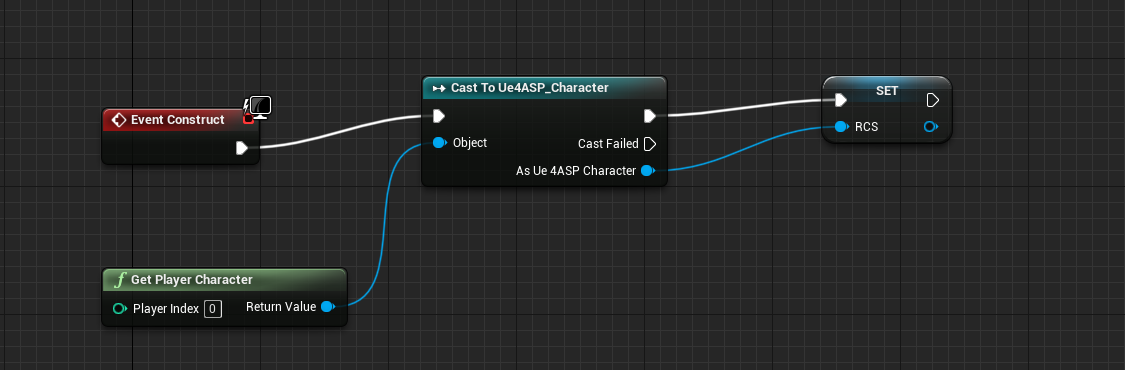 glass rapids
So that is the characters variable, Show me your damage thing in the character bp
finite tangle
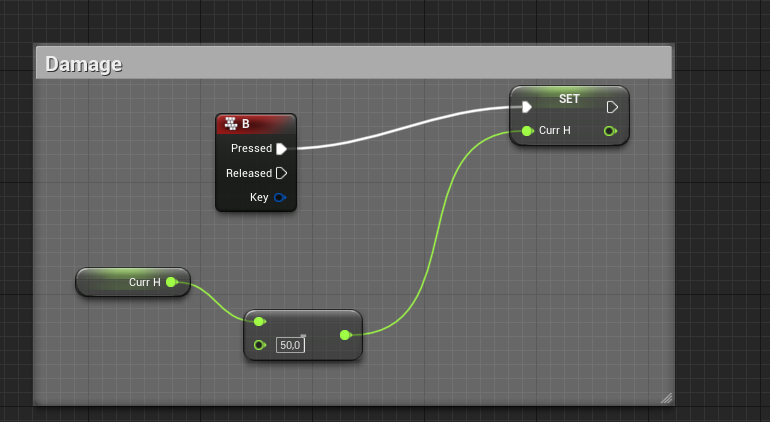 glass rapids
okay, So I'm gonna make your system a little bit more optimized. So you know the binds that you use in the widget to calculate the bars percentage
Binds seem to run every frame and that is not good.
finite tangle
 glass rapids
Yeah those
finite tangle
And how to?
glass rapids
I use functions or events that I call Update(HUD Element)
subtle orchid
if the camera is in a BP, you would add that BP to the camera cut track and it would use the camera inside of it
@grim ore you are a super star, thanks !
glass rapids
Sure
finite tangle
Thx
glass rapids
So this is an event. I calculate the the percentage and also have another graph for setting text
This is called inside of the player when the health is being updated
glass rapids
Use the reference to the widget inside the player and call this event or function after you either decrease or increase the health
My Damage system is really complex but you are on the right path
I would use an Event called AnyDamage can be used the bp called Apply Damage
I would do the same math that you use to apply damage to the player but stick the bottom value in the subtraction into the Damage node
glass rapids
sure
Some of this is just preference like the percentage sign or the 01 instead of 1 effect
finite tangle
thx
glass rapids
np
plain terrace
by the power of randomly clicking on stuff, somehow this worked
glass rapids
@plain terrace Are you going to have more than one Golfcar in your map?
glass rapids
@simple torrent Go into your post processing and type in motion blur, then disable it. That is as much as I know
 simple torrent
oki, I'm personally looking to keep motion blur, but having it being realistic
plain terrace
i just wanted to have 1 golfcar
simple torrent
but thanks for helping out as much as you can!
glass rapids
@plain terrace Okay, just making sure because I don't think that would work with multiple because you are always getting the first.
plain terrace
yeah, its just the unique car that belongs to the main character
glass rapids
okay, cool. Just making sure
plain terrace
now my cuurent issue is that even though i enabled physics, the pawn doesnt haev any physics
glass rapids
make sure you check the collision.



 plain terrace
oh, i just set the collision to "vehicle"
thanks sir, even though i didnt really know wat u meant, still gave me motivation to continue doing random things
glass rapids
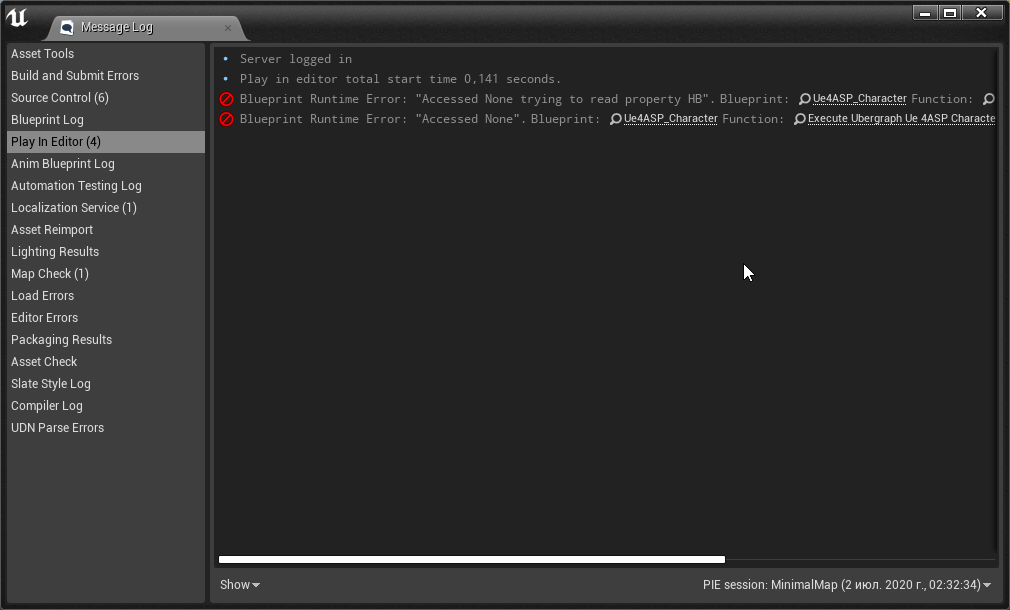
@finite tangle Can you scroll to the right in the error pls
finite tangle
something with setPercent
 smoky crescent
Hello, how can I scale an actor around a point?
By blueprints, not in the editor.
 whole quarry
Set transform
smoky crescent
Of course.
 polar bobcat
Some advice regarding blueprints, let's say I've got a targeting box in the center of my UI, and I'm trying to cast inside that box and return every enemy/actor inside of the box.
Any guidance on how to do that? I gather it's something along the lines of breaking to a Vector2D, but I'm not sure if that's correct.
open gorge
I'd use a line trace or something similar.