#ue4-general
1 messages · Page 780 of 1
 sand gale
 plush yew
Hello guys I did this system for changing the material of the mesh and it works almost but when I change the color of the material, when I want again to change, unreal engine crashes, idk why
can you help me?
I tried with removing the widget after I choose color but it doesn't work again
sand gale
You should only create one dynamic material - do it on begin play
save a reference to that material (like you are) then when you want to change the color of that material you should just set a color parameter to a different color
they kind of give an example here under "Material instance Dynamic" - https://docs.unrealengine.com/en-US/Engine/Rendering/Materials/MaterialInstances/index.html
Hierarchical material relationships that allow modification of properties to alter behavior and appearance of child materials without shader recompilation.
 sinful bone
I am still struggling with migrating my assets to another machine/making it ready for market place. I've tried to migrate it to the content folder and then move it between projects (to the content folder of the other project), but references are still getting lost.
Is there really no solution for this?
plush yew
I tried with removing the widget after I choose color but it doesn't work again
if someone can help me tag me or DM me
plush yew
whenever the player clicks away from any of the UI elements (on the 3d scene for example) their cursor gets captured, anyway to fix this?
 dusty marlin
Hello, how to add a texture group to the project? Should I add it in some .ini file? Ty
 vocal herald
I have a set of animations and my "camera" is the player so after animation ends I control player from the last frame. The problem is I can move the player but cant rotate him via Sequencer. It changes rotational values in Sequencer but in game nothing rotates at all. I need to control player camera rotation in Sequencer please help
plush yew
How do I remove default camera in Player controller?
how do i get rid of ActiveGameNameRedirects is there anyway to properly rename my project?
 blissful sorrel
Hey everyone. I tried everything from packaging to downgrading ue4 builds, but ansel still gives "A supported game is required to use this feature". I'm trying to record 360 captures and the PanoramicCapture plugin doesn't cut it, because the screenshots look nothing like the built level. is there anything else I could possibly use?
 tight prawn
is it possible to generate/create skeletal mesh directly inside UE ?
plush yew
Does anyone know how can I attach a spring arm to my Player controller inherited camera?
 mental swan
Hey! I have a trigger event in my scene, but it gets triggered when that capsule overlaps. How do I disable the overlap for the trigger volume, so it triggers only with the mesh?
 limpid turret
I take it no ones got a solution for unreal engine not importing a model because it says it can't triangulate it
 severe lodge
How to apply tessellation to a Main Material with different layers? Is this working?
limpid turret
@solemn sun did you ever fix the 'unable to triangulate mesh' problem you had
ah I think I fixed it, didn't realise there was a random extruded vert
 lusty pumice
How do I control dimensions here? which node to use? srry for noob question
texture coordinate is not working
 rigid belfry
@lusty pumice is that a texture or a material you want to scale?
 novel oriole
Hey peoples, I snapped up a quick protoype scene in blender, and just exported as fbx, but my colliders are retarded, is there any fix for this?
heres a better view of the issue
lusty pumice
@rigid belfry that is a texture that I want to scale, because it ends up too large when I plug in the ScreenAlignedUVs
doesn't fit the frame
this is without the ScreenAlignedUVs how it normally looks 👇
so I'm guessing I need to plug something into TextureDimensions (V2)
 midnight gate
so ugh i clicked low quality settings
and my whole engine has not responded for 10 minutes now
my pc really aint that bad
oh it responded
and crashed
ok im glad it responded
lets hope it saved low settings
novel oriole
That happens to me, the lowest preset i ever got to was medium
midnight gate
rip
novel oriole
anyway, after some digging i found that there are 2 different colliders, a simple one a complex one, how would i get the player to utilise the complex collider
 manic pawn
for this mesh it would be more sensible to just fix the simple collision
novel oriole
how?
manic pawn
you can have a box that is oriented properly
name it UBX in your 3d program or something
it's on the documentation
novel oriole
alright cool
 mild belfry
or you can just add a box collision and scale/rotate it
manic pawn
ah, there are tools to move it in the editor now?
mild belfry
yep
manic pawn
that's nice
mild belfry
you cant use "F" key to focus to them tho which is annoying
novel oriole
is there anyway to lock an object, so its visible, but cannot be selected?
 glacial lantern
Heyo got a question
For some reason this is mixing both the "aim cache" and "locomotion cache" weirdly
I want it to swap between the two
I think I get what I did wrong
Ah okay the slot didn't work how I thought it would
 stray smelt
How does lightmap resolution work, like what does "8" (default) constitute? I assume higher value = higher res?
so if it's 8 (pixels?), how does this translate to a landscape? each segment?
my issue is that the baked lightmap file is huge, even though i have an importance volume. trying to find the culprits
 dim merlin
Hi, i was checking out 'SpringLandscape' (a landscape auto material) and noticed tiny parts of different textures, like:
So how is this possible, im unable to reproduce it using the paint tool (way to small)
is it a color map maybe?
i mean, they are layer for sure...
 rocky radish
@dim merlin did you try in the landscape paint tools or other paint tool?
dim merlin
the landscape paint tools, its just vertex colors i'd say..
so but notice the grass on the image is way way smaller than the vertex density
 warm hinge
Hey there,
does anyone know, why reflection capture resolution is drastically reduced on OpenGLES 3.1?
Is there a way to control the resolution?
Thank you in advance 🙂
What I mean:
Editor:
Mobile (Android and iOS):
 whole quarry
Mobile is usually less graphicsl than pc
Also not everything is supported on mobile
 dark rune
how can i make it so that my character (tpp) can't turn beyond x degrees (like a mounted machine gun)?
warm hinge
Yeah, I read the page "https://docs.unrealengine.com/en-US/Engine/Rendering/SupportedRenderingFeatures/index.html"
I just thought there maybe is a hack 😛
whole quarry
@dark rune clamp
rocky radish
view pitch/yaw max/min in player camera manager maybe @dark rune
dark rune
ok trying the yaw max min thing rn
rigid belfry
i dont even think reflections are uspported on mobile
@lusty pumice you'd usually change the U and V tiling of a texture to either make it larger or smaller
why are you using that material function?
 willow plank
hello guys.I want to ask
is there any sorting or filtering tool ?
like
what we use and what we dont
rigid belfry
what do you wanna filter
willow plank
what we use and what we dont
@willow plank .
rigid belfry
what is that you're using
willow plank
?
rigid belfry
😄
plush yew
what we use and what we don't .... you mean built in tools of unreal or what ?
willow plank
i just wanna sort these objects i used so i can delete what i dont use
rigid belfry
actors you placed in your scene?
willow plank
ah yea
and textures materials also
like there is two materials
i use one of them
but i dont use another one
and i want to see it that i don't use it
rigid belfry
and you wanna delete materials and textures you're not using?
willow plank
right
rigid belfry
you can right click almost anything in the content browser and there should be a "find references" option
willow plank
so im going to do it on every single object ??
plush yew
Hello everyone, I just imported an FBX object which I generated in C4D. My plan is to texture it in Unreal. However, when I want to apply textures, it is really hard to align them correctly because something weird is happening to my mesh: https://i.imgur.com/BzVuWxj.jpg Does anyone know how to avoid this? I'm new to this stuff so the answer could be very simple..
 rigid belfry
well, why did you create stuff you're not gonna use in the first place?
willow plank
cuz im downloading some stuff from Epic store.
And they include hell lotta items what i don't even need
Hello everyone, I just imported an FBX object which I generated in C4D. My plan is to texture it in Unreal. However, when I want to apply textures, it is really hard to align them correctly because something weird is happening to my mesh: https://i.imgur.com/BzVuWxj.jpg Does anyone know how to avoid this? I'm new to this stuff so the answer could be very simple..
@plush yew i see there u have an Uv overlap.
plush yew
Move them into manually created folders (the stuff that you need is "them")
rigid belfry
@plush yew could be you need to unwrap the texture mapping, could be the UV channel in case of bad lighting/the actor turning black
plush yew
And delete the folders you originally imported
willow plank
And delete the folders you originally imported
@plush yew its going to take so long...
plush yew
Well you always manually select what you want
rigid belfry
there is no tool that does that automatically
@plush yew there should be an error popping up saying "uv overlap" or something like that
plush yew
@willow plank @rigid belfry can this be done in Unreal, or do I have to set that up in C4d?
rigid belfry
do you have that error perhaps?
vocal herald
im going crazy guys. How can I control player camera rotation with Sequencer???
rigid belfry
why do you want to control the player camera?
willow plank
he means rotation maybe ?
rigid belfry
you need a new cinecamera in the scene, make that the main for the sequence, and then return to player camera
plush yew
@rigid belfry one sec, I"ll reimport to check
vocal herald
my animations sequences need to move the player
so i can continue playing where the animation ended
plush yew
I'm trying to import a mesh, for some reason the content browser can't find it
rigid belfry
@plush yew even if you search for it?
plush yew
arch_corridor_gaps nowhere to be found after importing it
 next badger
New camera nad transition to it will be a proper way, but you can control camera that is owned by player controller too
you just need to add that reference to Sequencer
rigid belfry
i would almost never animate a camera the player is gonna control
what if for some reason it bugs out?
vocal herald
@next badger I tried to keyframe PlayerController rotation and Camera manager
but nothing works
rigid belfry
make a new camera and make it main
plush yew
Men I actually wanted to ask a question myself. Chaos rising in chat lol.
In Unreal when you merge actors you can change the merged actor's material but not the array of static meshes as they're , well , merged.
What I'm talking about is a merge like in unity where you have one parent objet´ct with further childs and the relationship can be pulled into and out of the CB.
Or if you have any ideas how to move parts of a scene consisting of static meshes without turning them into a single model , I'm open for ideas ._.
rigid belfry
then do transitions to swap to normal
rigid belfry
Illustrates how you can blend animation smoothly from gameplay into a Level Sequence based animation.
plush yew
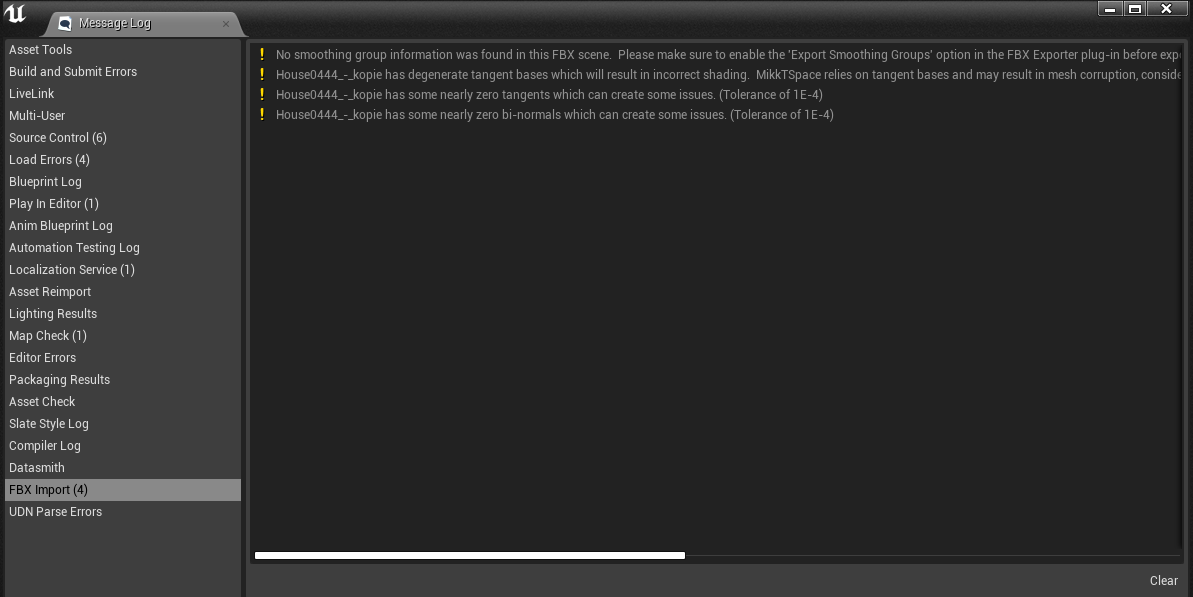
@rigid belfry These are the errors I see upon importing https://i.imgur.com/53vbc0w.png
 rigid belfry
did you make the mesh in c4d?
plush yew
yes
rigid belfry
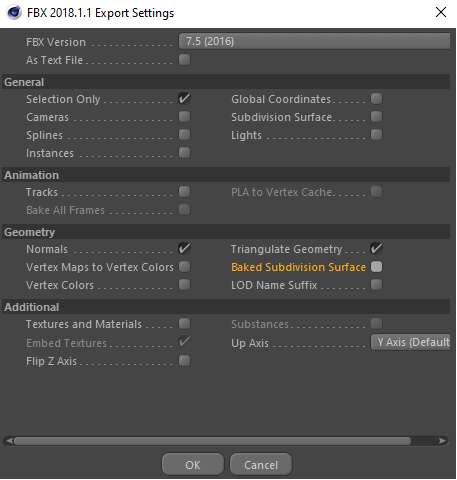
there should be a setting for selecting smoothing groups when exporting
something like edge and face?
or are you exporting with smoothing groups disabled?
vocal herald
@rigid belfry i really need to animate player controlled camera. doesnt matter if it bugs out
next badger
@vocal herald you need to reference actual camera, it may be persistent or spawned on runtime, if it is spawned on runtime you will have tough time animating it
rigid belfry
you really dont, but whatever
vocal herald
its persistent
but its controlled by playercontroller
and playercontroller only respects mouse input
plush yew
@rigid belfry which one? https://i.imgur.com/hSoDNyY.png
 vocal herald
i cant change rotation manually for some reason
next badger
no it's not...camera controlled by player controller is controlled via camera manager, and you can manually control it
you can feed some parameters to it as well
vocal herald
i start my game and there is PlayerCameraManager
whenever i change the rotation values they change back
next badger
why would they not?
they are still controlled by CM
but it does not mean you cant modify the way it is controlled by it
next badger
add some bias, set the bias from Sequencer, add that bias by CM
plush yew
uh. Does unreal engine detect naming conflicts when importing? I just renamed the mesh arch_corridor_gaps to ADFSDGjsgfh and now it did import properly
plush yew
@rigid belfry it's the same
plush yew
Ok np, thanks for helping out though
 signal rover
does anyone know what the best way is to massively reorganize the folder structure of a project? Moving all files, fixing up redirects and continuing takes ages
 thick herald
There are marketplace assets that claim to help with that kind of thing @signal rover
 soft lodge
Hi folks, is there anyone here that I can ask a couple of questions about the Hello Neighbor Mod Kit?
plush yew
Does anyone here have an idea on how can I move a cahracter like in monument valley?
signal rover
There are marketplace assets that claim to help with that kind of thing @signal rover
@thick herald ok, thanks
soft lodge
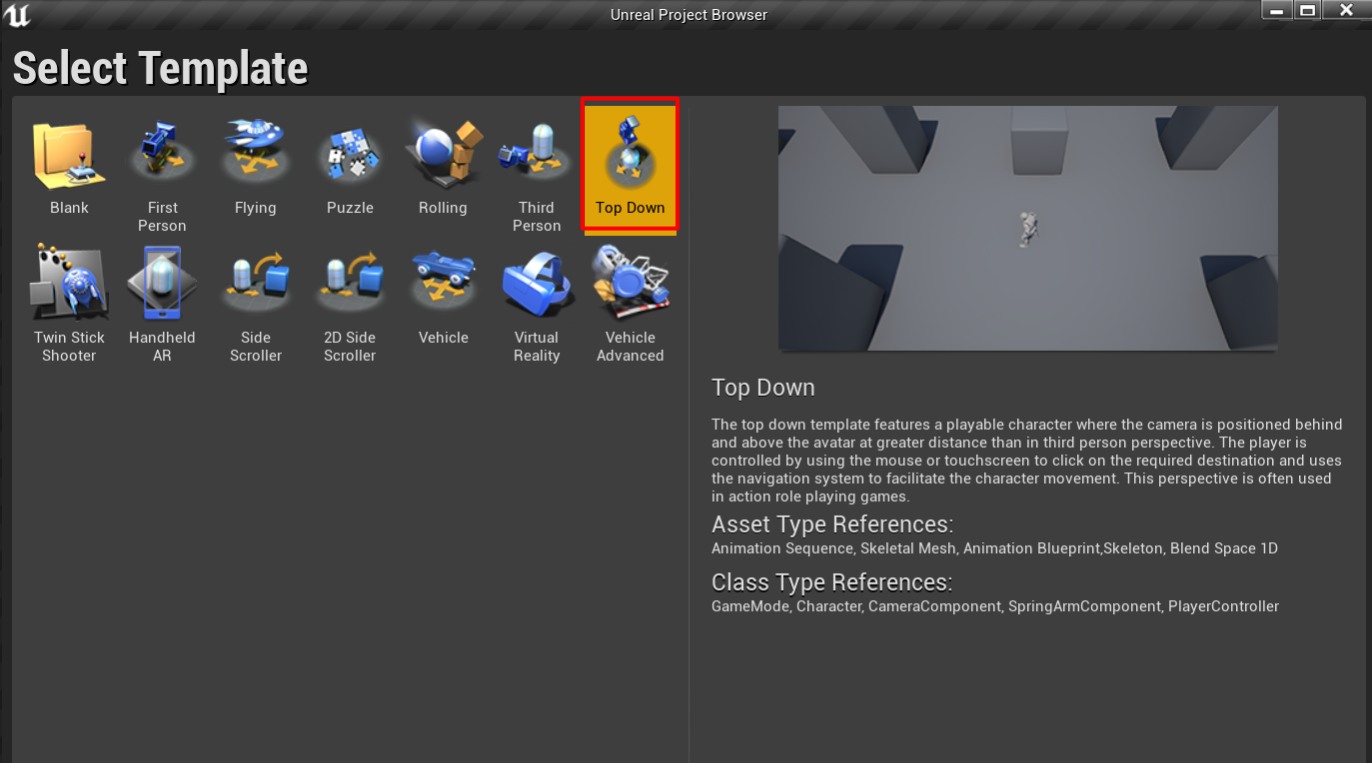
@plush yew set up a new project with the top down example map http://prntscr.com/t6d5k1
 flint trench
Anybody know when the UE4 Marketplace Summer Sale will be?
 ember star
I want to define a set of mechanics, would normally go in 'game mode' i supposed, but for the sake of not putting EVERYTHING in game mode... what's the right parent class to use to keep extending out game mode, so that i can still make blueprint callable functions from the game mode context?
 vernal thicket
@ember star Instance?
ember star
i guess i mean... gameinstance, game mode, etc classes seem singular
i want to define multiple systems seperately
like 'database connection/queries'
i want to build out general functions that i can call from game mode/levels
i tried a simple Object c++ class, and upon making a blueprint for it i couldnt find it in the listed classes
'blueprint function library'?
 wanton lotus
@ember star yes, use that for global static functions.
ember star
awesome, thanks
 left citrus
Having some pretty weird visual bugs, building lighting doesn't fix it, disabling post processing doesn't fix it, not SS reflections causing it, Ray Tracing is disabled, no permutation of post processing fixes it, disabling all the lights doesn't fix it, so I assume it's something in the light bake file, anybody got any ideas?
doesn't show up on any profile overview
 ashen orbit
why is googling an unreal engine issue so fucking hard
i just want to know if its possible to open two projects at the same time
 thin sluice
hello i'm having an issue with unreal rn
so essentially all emissive materials that i've made are displayed as solid black in the viewport
i've tried the emissive from the automotive materials pack as well as made my own but both of them display as black

on preview mode it looks fine but in the viewport its just a reflective black
plush yew
I think I'm skipping a step. I build a mesh, unwrap but I never check the texture in blender. I just import a texture in unreal
left citrus
@plush yew forgot to mention, removed all the reflection captures, rebuilt them etc afaik not the offender
seems to only be a problem with all these assets I migrated from 4.24 -> 4.25
 narrow meteor
hello, so im having an issue that when i spawn a projectile that it supposed to line up with a line trace it doesnt line up at all and goes a little bit to the side?
plush yew
Hello, can anyone help me with my ik foot placement?
I made a post process anim blueprint for my character that has ik
And it worksl because i can see it in the viewport
I dont know how to apply it to the main animbp and the mesh in general though
 tawdry storm
has anyone here worked with the variant manager and has some tips to make working with it less frustrating?
thin sluice
many questions no answers
 pliant echo
Hmmmm unable to open projects in 4.25.1. What does this error mean? "Assertion failed: !IsGarbageCollecting() [File:D:/Build/++UE4+Licensee/Sync/Engine/Source/Runtime/CoreUObject/Private/UObject/UObjectGlobals.cpp] [Line: 2286] Unable to create new object: MediaPlaylist /Engine/Transient.None. Creating UObjects while Collecting Garbage is not allowed!"
 misty lynx
Hey guys, can you recommend any good(and obviously up to date) books on programming in Unreal/Unreal in general/Game development? I will be going on a no internet type of holiday soon and want to take a bit of education with me
 maiden sundial
I sadly think there aren't good books for UE since most of them are quickly out-dated.
The best source would be the internet
whole quarry
i just want to know if its possible to open two projects at the same time
@ashen orbit
Why not just try it (and yes you can)
ember star
if im doing collision detection via line trace, and i detect the 'same collision' in multiple ticks, whats the easiest way to handle it so i only get 1 result?
do i need to keep track of objects collided, check new collisions against that array, and clear after each?
ashen orbit
@whole quarry yeah it was possible when i clicked the files in each project file
 plain terrace
i dont even need to get 3ds max or whatever I can just get all parts of my car into an actor, give it textures, convert to one static mesh, then convert to a fbx. Theoretical stonks
 hot thistle
Let's say I want to make something like a Ratchet and Clank game in 2D, but with free shooting (you shoot wherever your mouse is)
How would the animations and such be?
Anyone have any tips for how I could do that without making 100+ unique animations for each angle the player is aiming?
plain terrace
da arm just moves
plush yew
the way game like terraria do it is basically have the arm be a separate sprite that's parented to the main player, and rotate that based on mouse position. Doesn't quite look as good as 100+ unique sprites maybe, but well, you also don't have to make and load 100+ unique sprites lol
hot thistle
Yea I thought about that, but with 2 arms theres gonne be some wierd clipping and such
I'n theory I mean, guess I can try it out to see what it looks like
 azure gazelle
@rigid belfry It should be there.. maybe it's hidden as advanced option (white arrow pointing down)
rigid belfry
these settings seem to work, yet i feel like there might be a better way of doing it 🤔
azure gazelle
those are all the settings available for automatic line break. You can set the policy to break at the end of a word.
 dense aurora
i have small problem
i have this
as emissive
but i want to change the color
rigid belfry
you can multiply the result with a vector 3 material
if you press 3 on your keyboard and left click, it automatically creates a const3vector
you make that a parameter, apply the instance material to what you want and fiddle with the settings untill you find what you need
azure gazelle
use the emission map as a mask (a lerp node should do)
rigid belfry
yeah that should work
dense aurora
btw
rigid belfry
you can try lerping it too instead of multiplying
dense aurora
lerping ?
rigid belfry
am no material expert though
yeah its a function called linearinterpolation
lerp for short
dense aurora
i never used it
rigid belfry
theres always a first time 🤷♂️
dense aurora
dense aurora
idk how it works
azure gazelle
tbh it should already work with multiply because the b channel itself is black & white.. so simply multiplying it with the color and then again multiplying it with a param for the power should work
Lerp could work too, but shouldn't be needed in this usecase
azure gazelle
https://docs.unrealengine.com/en-US/Engine/Rendering/Materials/HowTo/Masking/index.html (regarding masking)
Guide for using Texture Masking in your Materials.
rigid belfry
in your material, type time, from the pin drag and type add
rigid belfry
add a constant vector
(press 1 and left click)
make that a paramater so you can change in in run time
from the add, you can do something called "Sine" which should be a curve or wave if i am not wrong
you plug that in the emissive and thats it
let me do that real quick
something like this
dense aurora
1 and left click does nothing
rigid belfry
1 and left click creates a constant vector
dense aurora
it does not work
rigid belfry
or you just right click in the graph and type constant
whole quarry
@dense aurora search for param
dense aurora
though
i meant
that the glow would change after some time
something like scripted event
rigid belfry
1-2-3-4 and left click create respectively a vector 1-2-3-4
whole quarry
Not when you are in a remote session
rigid belfry
something like you upgrade your weapon and it starts glowing
or maybe you pick a power up and its now a very dangerous weapon?
if the answer is yes, you do that with blueprints
you create the material, on wanted event = set new material
on finish power up = default material
dense aurora
i did something i wanted yesterday
emissive moving into the beat of music
yet im wondering about something else i wont solve
rigid belfry
btw, do you guys know good widgets for selecting missions/levels?
dense aurora
how can one tilt the weapon
if you tilt the camera
i assume its something advanced
rigid belfry
what does that mean
 crystal swallow
Like a first person shooter?
rigid belfry
why do you wanna tilt the weapon?
rigid belfry
you attach the weapon to the character
you then control the character rotation through the camera
so now whenever the character rotates, everything attached( a child) will rotate too
dense aurora
ahh
 north sphinx
Dun dun dun... did my bullshit for today.
I already tried every possible way in my mind to do a sneaky roll back.```
Do someone knows a shady trick that after 6 years on ue4 i still don't know?

Already tried:
- ~~just migrate to a 418 and hope~~
- ~~convert the 424 to a 418 and hope ~~
- ~~copy a bunch of assets at a time to the 418 checking if something is savable~~
- ~~make a human sacrifice to Pelor asking for forgiveness~~i have heard about converting from old to new versions, never from newer to older
sorry+
north sphinx
i have heard about converting from new versions, never older
@rigid belfry
thats a matter of a button 😢... well in most of cases, usually as far as u do not use deprecated functions or stuff that has been removed
rigid belfry
but to be honest
i've migrated stuff from 4.25 to 4.22 and i havent had any problems?
are you getting any error?
ashen orbit
So I'm having trouble creating a save game, but i don't really get any errors and I've checked all the connections and nothing seems weird, is there some kind of basic thing I've forgotten like project settings?
north sphinx
are you getting any error?
@rigid belfry nope, empty content browser, not even sounds or textures
rigid belfry
man that sucks
north sphinx
man that sucks
@rigid belfry gotta open side by side the two versions and re-do everything, cannot even copy paste blueprints cause in most of cases crashes whole editor
north sphinx
nope, its kinda normal, the way they structure the blueprints can have variations from version to version
and if even a single one of your nodes catches one of those variations, whole editor crashes
 soft fiber
When moving forward in the scene with (alt-mouse right) it often stops moving forward as if there was a collision? Does anyone know why this happens?
plain terrace
how can i have a mesh with physics not act like aladins carpet when i walk over it
north sphinx
guess you already copypasted a blueprint into a text editor
no way my dude
@rigid belfry
how can i have a mesh with physics not act like aladins carpet when i walk over it
@plain terrace
physics channel dude
dense aurora
btw how can one make
invisible model
but only visible shadow
something like Outlast has
character has no head
but it sill appears in a shadow
rocky radish
@plain terrace wdym? does it launch itself?
plain terrace
i made it so that you can grab it and when u step on it makes u fly
(i dont want it to fly)
it flies really well tho
soft fiber
I'll try this again. When moving forward in the scene with (alt-mouse right) it often stops moving forward as if there was a collision? Does anyone know why this happens?
north sphinx
i made it so that you can grab it and when u step on it makes u fly
@plain terrace
cause the block moves toward you while you are in air and cannot reach you so keeps coming to you lifting you up... please > physics channel
ashen orbit
is physics considered difficult in unreal engine?
north sphinx
is physics considered difficult in unreal engine?
@ashen orbit just depends on what you want to do
ashen orbit
I mean I'm not really interested in making a physic based game, let's say a charm that rests against your gun dynamically like in rainbow six siege
north sphinx
I mean I'm not really interested in making a physic based game, let's say a charm that rests against your gun dynamically like in rainbow six siege
@ashen orbit i'd do a fake jiggle with a rigged element using something like apex "cloth simulation"
or you just apply a phys contrain, but that would be OP
ashen orbit
does it require you know physics at uni level or can you do well without it
north sphinx
if u know what to do, the contrain thing would be a 15 seconds thing
ashen orbit
ok
north sphinx
rigged body would be better but longer
rigid belfry
no
ashen orbit
it would take me 2 minutes to do that cliff and ive used unreal engine for 2 weeks
north sphinx
That is a nightmare
@dense aurora i wouldnt say so
dense aurora
for me yes
ashen orbit
jk
thin sluice
Does anyone know how to fix my lights problem
north sphinx
there is the audio visualization giving u all the infos you need about frequencies in real time
rigid belfry
the plugin is well documented and there are guides online
north sphinx
you need to setup material first
@dense aurora an exposed scalar parameter which influence just the height of your bar through material
the plugin is well documented and there are guides online
@rigid belfry <-- and he is right
thin sluice
well shit
hot thistle
Ait, so I tried out what you guys told me in theory, and.. kinda works, kinda don't.
Any inputs?
https://streamable.com/g0o5rg
 thin sluice
lmao
rigid belfry
whats working and what isnt?
i saw it flip when you aimed upwards
is that the problem?
rigid belfry
because that looks straight up insane
north sphinx
it seem to me that some of them are going sideways also (rays)
dense aurora
is there tutorial somewhere about the m bars
hot thistle
Rays are for show I guess, I'm trying to make a ''free'' arm independent of the body
I'm trying out a 2d Platformer with free shooting, but I'm not sure on how to handle animations for each angle and such
rigid belfry
also, ue4 for 2d? i respect the hustle
hot thistle
Its not as hard as people say it is actually, been working quite alot with it
Its janky yea
rigid belfry
its not hard
ashen orbit
Is machine learning any use for game development?
rigid belfry
its just...unnecessary? the engine isnt really helping you in making 2d games
you're better off making it 3d and having the character be in 2.5d
at least, thats what i would do
but you're free to do whatever the flip you want, of course
@ashen orbit i spent 2 weeks trying to get procedural paint and foliage to work togheter
hot thistle
Yeah, well I like pixel art and I don't really have the time to learn a new engine, so I guess I'm working with what I have
hot thistle
I'm just trying to figure out if I can overcome this hurdle
rigid belfry
you're having troubles rotating the arm basically?
hot thistle
Having trouble making it look right
rigid belfry
how are you rotating it in the first place?
hot thistle
Look At Rotation at mouse
rigid belfry
is the arm a different sprite
hot thistle
- the character is gonna be supporting the weapons with its left arm, how the f would that work with this system
Yea
rigid belfry
can you show me the actual character components?
rigid belfry
and you're rotating by using a look at function right
hot thistle
yea
plush yew
I kind like the way the flip looks actually, if you limit motion to just above the head
rigid belfry
the sprite might be flipping because you're telling the sprite to look at 2 dimensions instead of one
scrap that
thats wrong
ashen orbit
@rigid belfry not sure what you meant with what you wrote me mate
hot thistle
Well, the flip is not the issue
I'm aware of the flip
Sorry for not being clear about that
rigid belfry
@ashen orbit what do you need machine learning for?
whatever it is, its simplier to make it yourself
hot thistle
My ''issue'' is how I can make this look and feel natural
rigid belfry
what is the joint component doing?
ashen orbit
@rigid belfry oh mama
rigid belfry
thats the point from where the sprite will rotate, right?
hot thistle
Yea
rigid belfry
i think it felt natural from what i saw btw
are you sure you're trying to fix something thats not there?
plush yew
I'd suggest separating the whole arm instead of doing it at the elbow joint, but other than that it looks pretty good already
rigid belfry
once you get an idle animation in, it may look more natural
plush yew
it'll never look quite as natural as a fully animated sprite obviously
rigid belfry
yeah, rotating the whole arm would look better maybe
hot thistle
This better?
https://streamable.com/t91syk

That's the whole arm
Its a bit wierd looking when at the bottom
rigid belfry
you could clamp the rotation so it doesnt reach 90, -90
hot thistle
True!
rigid belfry
also you could lerp(instead of rotating) so that the head slightly follow the rotation too
having it rotate exactly the same looks odd
having the head move a bit might make the sprite feel more alive
btw is that yours? it looks very good
the sprite i mean
hot thistle
Thats a good idea!
It'll be alot of body parts tho
No, this is a Pixel Art sprite of Ratchet, I'm just using it as a placeholder and test to see if this idea of mine actually works
hot thistle
Its made by a guy called Boris Vigec
I clamped it now, and it looks alot better, thanks for the help!
rigid belfry
np, does it work when flipping the sprite left and right?
hot thistle
I haven't made that yet, but I'm probably gonna run into some problems there aswell
Of shit
You're right
Thats gonna be a issue...
plush yew
maybe to make the arm look a bit more natural you could also switch between, say 3 sprites for the arm depending on the angle, so it doesn't look quite as awkwardly angled at the bottom
rigid belfry
that shouldnt take too long
plush yew
but that's pure visual polish
 steel osprey
Is there an option to allow to apply all materials without going 1 by 1?
hot thistle
He's holding it in his right arm, when turning it'll be in the right arm, wouldn't that be wierd?
plush yew
could you just offset the sprite behind the main character sprite as soon as the asset flips?
and then draw another sprite on top for the other arm
hot thistle
Yea but then I have to do 2 of each animation for the body, as the left arm will then be visible
I guess yea
plush yew
if you just also isolate that offhand arm out in your initial animation you should be able to reuse it
narrow meteor
can anyone who is good with unreal dm me i need help with some linetracing and projectiles
hot thistle
Hahahahahhahaahaha
https://streamable.com/10wq06
 plush yew
I mean, with a proper animation running backwards while still looking and shooting forward would look pretty cool
hot thistle
Yea, I mean it kinda works, oddly enough
ashen orbit
bruh
looks like something i would make
Can you use external software to create menus in unreal engine?
 prisma plank
hi guys.. I have some old concept/idea why look of games have fov not human eye... In all engines we have 1 camera at 90 fov, or like 18mm lense. can some one build 2 camera with like 70mm and unite them in one. it's real?
 exotic thicket
There's technically no limitation in rendering FOV, you could render at 180 or whatever if you wanted
But it'll look strange on a monitor
prisma plank
you not understand idea.. why 70 mm or higher? Because will be more datails views- like camera in remember me game. Sure there style is better, cause camera at high mm, but you have tiny space to view...
rigid belfry
@ashen orbit just using widgets
exotic thicket
Yeah I don't really know what the difference is between a 70mm and 18mm lens as I'm not a photographer :)
thin sluice
oof
thin sluice
i still havent figured this issue out
prisma plank
sec will show...
thin sluice
none of the emissive materials i've made so far are visible in viewport as emissibe
they all show as a glossy black
its so weird
its still like that even after i built the lighting
exotic thicket
ah I see
prisma plank
@exotic thicket ok. This is from real rendering. The inscriptions where better to see?
exotic thicket
yeah that should be possible to do, tweaking FOV or the view frustum settings for the camera should allow some effects like this
prisma plank
the problem at low fov 100-110 you unable to see small details, but this is nedeed. ..
rigid belfry
day 2 of working on the multiplayer project
exotic thicket
Yeah a lot of games have a zoom function to inspect things at a closer distance because of problems like that
prisma plank
and so, can put 2 cameras- for wide range, but with close view
 shell wigeon
Anyone else getting login issues right now? Need to get work done wondering if it's something my end?
rigid belfry
i thought they added offline mode for the epic games launcher
prisma plank
zoom- it's not about that)
@exotic thicket it's like panorama and simply 18mm landscape...
difference
shell wigeon
They did but I'm trying to log into Mixer with account
Same issue and trying to log into launcher, telling my I'm to frequently loging in only tried once, had a browse and seem to be a common issue
plush yew
blender to unreal is causing me headcaches. XY is always swapped, making textures rotated 90 degrees or the mesh itself is rotated
 brazen crow
ok so
i have a problem
i think it can be solved with one option
but i dont know what option
im a beginner
trying to import a hollow mesh to walk into
but it's importing as just a cube
and not something which is hollow
 lusty night
I'm using a post process volume to use screen space ambient occlusion. My problem is that ambient occlusion that is on geometry that is above my character seems to be inversed; it is darker around the exposed edges and lighter in the occluded edges of the geometry. Ambient occlusion below my character however looks correct. Anyone have any insight on why this might be happening?
 obtuse pendant
@plush yew couldnt that be because of import settings
rigid belfry
@brazen crow the mesh needs to have a proper collisions
What the UseSimpleAsComplex and UseComplexAsSimple flags do, and when it is appopriate to use them.
obtuse pendant
i know blender has like settings where you set how imported stuff gets positioned like Z forward and stuff, check if they match up
 vast pine
@grim ore Hey I had someone comment on a youtube video of mine where i showed use of the BP override for Spawnign Default Class - Made me think I don't recall seeing you ever going over some of these usefull BP Override functions. like get spawn location etc. some people might find your type of tutorial very helpful on these items.
prisma plank
@exotic thicket something like this, if you caught the idea.. FOV 50 -2 screenshots
brazen crow
i am importing from blender
prisma plank
Cause when you have high FOV- there loss in details...
brazen crow
yes but from what i understand its like while creating the object in unreal? bcs i dont see that option when importing
oh
im stupid
nevermind
lol
prisma plank
FOV 70
@exotic thicket sure you can make wider angle, but there absolute loss in details. FOV 111
The idea is simple- humans have 2 eyes, so there is more detailed image, than 1 eye..
 sage ingot
@rigid belfry It's locked in place
sand gale
You should check this out - https://www.gamasutra.com/blogs/RobertPepperell/20200527/363615/FOVO_A_new_3D_rendering_technique_based_on_human_vision.php

FOVO is a new CG rendering technique that creates a more natural view of 3D space. It could potentially transform the way games are designed and played. We explain what FOVO is and why it works. By Robert Pepperell and Alistair Burleigh of Fovotec
vernal thicket
I wonder if FatDino ever uses this discord. Dude seems a ue4 genius
@heavy lagoon for your first issue you need to set an end overlap or it won't reset properly
vernal thicket
@heavy lagoon you shouldn't use event tick there are better ways to do it
 open wadi
@light lintel Can you manually delete them via the OS?
No, I do it all the time with content.
I mean at least to my knowledge it's not a problem.
vernal thicket
@heavy lagoon after the first check for damage, do a branch and delay to see if the player has left the trigger, if not loop back, you can set the variable inside the end overlap to check if its left. Event tick uses too much performance you want to limit where you use it
 grim ore
@vast pine yeah I have not covered a ton of the base actual classes where the overrides would come into play, game mode being a big one of those. I want and plan on doing it but its on a list a mile long at this point lol 😦
open wadi
@light lintel I'd just be curious to see if the OS allows you to delete the folder, if it doesn't then perhaps the issue isn't related to Unreal.
thin sluice
i've been at this problem for 6 hours now and i still havent worked it out 😭
i cant get my emissives to not look black in the viewport
this annyoing
vernal thicket
Mat I've got a question if you've got time?
thin sluice
anyone know how to fix this
vernal thicket
@thin sluice do you have a colour assigned?
vernal thicket
Yeah
thin sluice
its from the automotive materials pacl
this is how it came stoc
adding a base color doesn't change anything
vernal thicket
I suppose so you can set your own colour? Seems strange
thin sluice
ye its the master shader
its got a couple instances in the pack for different light colors
none of them are visible in viewport though
vernal thicket
O.o
vernal thicket
Are you able to use the instances of this material?
vernal thicket
Yeah
vernal thicket
So you've got the result you want just not the colour?
vernal thicket
You could duplicate one of them
thin sluice
its for a night scene so i need the lights on
vernal thicket
Change the colour?
thin sluice
i tried making my own emissive as well
same issue
so it isnt anything with the pack i assume
vernal thicket
What are you using for the base colour?
thin sluice
let me check
vernal thicket
Oh quick question
thin sluice
oh wait tf
grim ore
it looks like you have no alpha assigned to that base color
vernal thicket
Lmao
vernal thicket
BTW you can set the intensity of the emissivity inside the edge intensity and facing intensity nodes
vernal thicket
^
vernal thicket
Check the nodes edge intensity and facing intensity inside the details panel there should be a number to change
thin sluice
alright
grim ore
well whats the actual value? to make it "glow" you need quite a large amount of emissive to work
grim ore
plus keep in mind it's just a look, it doesnt actually emit light
vernal thicket
Spot lights would be good for that car :o
thin sluice
lol
let me try it on the hdri and volume i wanted to render in
i bumped up the power to 250
vernal thicket
Fair enough lmfao
Could I use game instance to store like equipped inventory items or ammunition level in a multiplayer game?
thin sluice
@vernal thicket out of curoisity what r u worrking on?
vernal thicket
Atm a single player horror game but planning to start a MMO after
Well, attempt haha
Again...
For the 5th time
plush yew
can I make textures in multiples of 10 instead of powers of 2?
thin sluice
@light lintel idk i had the same issue
i did ctrl z spam and redo a couple times and it randomly work
i feel like a lot of my work in unreal engine is deadass just bruteforcing at this point 😆
vernal thicket
Tried restarting editor obviously?
Ah raman, I spent probably 9 hours trying to figure out why I couldn't cast to something, it was because it didn't compile properly lol
vernal thicket
Tidii have you checked your computer directory to check if the file is still there?
thin sluice
ill tell u what tho
azure gazelle
@light lintel did you fix redirectors? Maybe it’s a broken redirector.
thin sluice
the main reason i switched to unreal from cycles
is because i have no patience for render times
it does that part well at least lmao
vernal thicket
But some of the things you can get away with in render you'd have no chance here :o
vernal thicket
What are you up to anyway?
thin sluice
especially when most of the work i do is stills
vernal thicket
Architect?
thin sluice
oh nothing much just designing car builds
lol
i've been in blender for 6 months and unreal for 2 weeks
photoshop for a year and a bit before that
just so i can make widebody kits and crap lol
 reef lintel
what are some of the best youtubers to learn Unreal engine for short movies/cinematics ?
vernal thicket
Haha thats nice man
@reef lintel I found Ryan Layley a while a go hes really good, goes more in depth explaining why he did certain things etc
Damn I didnt read ur question properly
vernal thicket
maybe ur a shady bloke
thin sluice
would be funny if it wasn't so irritating
@light lintel literally my whole life
azure gazelle
@light lintel well.. You could try to force ue4 to rebuild all the intermediate stuff...
1 way: enforce rebuild in the project settings (packaging I guess)
2 way (backup whole project first): delete the intermediate and build folders from the projects folder
thin sluice
@vernal thicket thx for your help btw
i think i shouldnt be having any more issues for tiem being
azure gazelle
@heavy lagoon get owning actor? Not sure what you are trying to do
thin sluice
yo im so confused rn
if i move near my car the hdri dims
if i zoom out it brightens again
tf
 storm venture
sorry for the dumb question, but why are DFSs disabled on my RT directional light?
storm venture
i cannot. that is the problem.
thin sluice
oof
 regal drum
Can someone walk me through setting up UE4 source code later
There is a project I desperately wanna work on and need help setting up source
 agile glen
dose anybody know where i can find a .fbx or .obj for the unreal engine white character model? need to scale some items
 still hemlock
Does anyone know how to add splatter dirt vfx on the landscape when shooting a gun at the ground
 teal tulip
@storm venture is the light movable?
storm venture
@teal tulip yup, i also just tried all 3 mobility settings and none let me edit the DFSs
bingo, that was disabled!
teal tulip
Do you have distance fields enabled in project?
storm venture
thanks 🙂
 south urchin
Do distance field shadows not do self shadowing? I have a wall mesh that has some its windows inseted and when I move the camera away and CSM transition to Distance fields the shadowing on the windows disappear. I've searched the web but I can't really find this problem 🤔
narrow meteor
can anyone with unreal expereince dm me to help me with a problem ive been having all day
 spare kernel
@narrow meteor ask your question, if its blueprint related #blueprint, c++ in #cpp if its general or you don't know what channel, then ask here.
still hemlock
Hey can someone help me
spare kernel
Don't ask for help, just ask your question and someone will reply 🙂
still hemlock
I'm trying to add a component tag to the landscape material but I can't find it in the landscape mat
Ok
spare kernel
i am not sure you can add tags to materials
components, yes, actors, sure, but not a material
still hemlock
I'm trying to add dirt splatter from gunshots on the landscape
Do you have any suggestions
spare kernel
that is normally done using decals
 steep garnet
Hi, I'm nativizing my blueprints. Sometimes it finds some other blueprint dependencies sometimes enumeration. Enumerations can't be converted to C++ will it lead in future when packaging the project to errors?
spare kernel
@steep garnet if some blueprints don't like being nativized in the future, you can simply mark them as not nativized. So unless you have problems it should be ok. Tho nativizing doesn't make the cleanest code and writing it in c++ itself is a lot better. As for long term nativizing issues, that i am not sure off.
@still hemlock https://docs.unrealengine.com/en-US/Resources/ContentExamples/Decals/index.html i am not a VFX guy, but decals are pretty simple concept
still hemlock
Thankyou
steep garnet
@spare kernel I'm aware that it's better to manually code in C++, I'm just helping someone with converting to BP. Thanks for the help.
spare kernel
@still hemlock there is also mesh decals https://docs.unrealengine.com/en-US/Engine/Rendering/Materials/HowTo/MeshDecals/index.html
spare kernel
Recreate it? 😄
spare kernel
it was there own custom engine
spare kernel
Google Angle?
soft fiber
Anyone done anything with spines, I have a question?
dense aurora
Yes Google's angle
spare kernel
interesting
dense aurora
If you try playing the game with MSI afterburner
The stats won't show
It uses older version though
Of OpenGL
2.0
soft fiber
Anyone know why these spine segments don't seem to have proper lighting?
soft fiber
I've tried everything short of deleting it and redoing it... any ideas?
 calm sable
I need help
Please someone q.q
I've been having an issue and I'm stuck. So if anyone can help me I'd appreciate it a lot...Dm?
storm venture
@calm sable youll probably have better luck if you just say what problem youre having right off the bat
calm sable
Well my character keeps glitching and blinking when I move. If I move forward it will do the right animation, but it will move backwards
Same with left and right
It's a blinking glitching mess
dark rune
@calm sable actually i have the same problem too but im trying a solution which is in AnimBP if direction = -180 set it to 180 because i think maybe the direction keeps changing from -180 and 180 then blend space doesnt know which one is correct so it keeps flicking
calm sable
hmm
I tried having my character have a sword, but it's only when I make him start off with the sword it messed up
when hes in his normal set animation, everything is fine
calm sable
hm. idk I can't use it. so is there a different way of my character equipping a weapon without it glitching all over the place
soft fiber
Your using a mounting point?
calm sable
? no. it just appears in my hand when I start the game. so it will automatically start me off with it. but doing it like this
and when I delete it, everything runs fine
soft fiber
Change it so the sword has an offset that doesn't touch the character and see if that works.
Move it far away for a test.
calm sable
well it looks like it;s holding the sword just fine
soft fiber
Also, try anouther object for the sword to make sure its not the mesh.
calm sable
i'm trying to move foward. but it keeps going backwards and blinking, etc
@calm sable if your still having the walking backwards only jitter here
@dark rune how do I do this for the plugin. I'm still very new to unreal
hmm
that could be it? because I'm doing it with a static mesh
dark rune
@calm sable idk im quite new too but this is assuming you're using a 2d blend space and tps
 dense gate
Is that multiplayer?
@calm sable
If it is, you have to set the speed on the movement component for all clients
Otherwise you'll get weird stutters
calm sable
no, but I do want it o have multiplayer
dense gate
Whenever you set the movement speed, call this event instead
Otherwise things will jitter
soft fiber
I changed the spline segment mesh to one of the unreal meshes and I'm not getting the screwed up lighting? Assuming its the mesh, I have no idea what wrong with it... Anyone have any ideas?
dense gate
That event is in the pawn @calm sable
I hope you're familiar with RPCs
Whenever you change the movespeed of your character, call the event
Whether it's on begin play or an ability, etc
Alternatively, if you have a variable that controls the speed, set it to RepNotify and from the generated function change the walk speed of the Character Movement
Try disabling motion blur from the global post process
Or just type in console: r.MotionBlurQuality 0
 ionic gyro
is it not possible to switch cameras to other blueprints?
like when youre controlling one blueprint and you want another to hold the camera?
exotic thicket
iirc you may need to create a custom camera manager
there's a setting that allows you to choose whether possessed pawns should automatically become view targets
or it might be on the player controller, either way that should allow you to manually choose the view target (eg. the actor which holds the camera)
ionic gyro
yeah when i used the view target node in my possessed pawn it wasnt working. thats probably why
thanks i didnt know about custom camera managers lol
 sudden oriole
can someone help me out? I am having issues with the Modes tab, it doesn't exist. I am trying to learn Unreal Engine 4 via courses and it requires it.
and yes I have tried this
just 2 greyed out options
ah I see, thanks. Man that annoyed me
and yeah I am, I really wanna use Unreal Engine, I love it!
 thorny schooner
So when you download and compile the source.. and right click your project and retarget to use the compiled source... ( I used 4.25 branch ) do I then just also build the editor and launch the editor that I built?? shit's interesting in the fact I am a programmer, but I normally dont build my tools and then use my tools to ... build tools, lol.
calm sable
@dense gate do you think that would fix itm
thorny schooner
Tried to use the 4.25.1 editor I had installed already, but says its a different version -- which btw.. which branch is the 4.25.1 branch?? I saw one named 4.250plus ? da fuq..
dense gate
It fixed it for me, however I don't specifically know your use case
What you described is basically exactly what I had, adding that node fixes it
Walk speeds aren't replicated, so whenever you change them in the server, you also have to change them for everyone
sudden oriole
lighting?
 fierce forge
skybox
sudden oriole
ah
calm sable
@plush yew though I dont think it's a multilayer issue
 floral mesa
has anyone else had issues setting up random patrol for ai? the blackboard key i have says invalid. its set to a vector like the documentation says to. so when my ai reaches the patrol random area task it fails. i cant figure out what i missed. if anyone had this problem please contact me with the way you fixed it. thankyou so much
yes
and i set up the logic for the nav object
in the ai controller and the task itself
the weird thing to me is it says my vector variable in the blackboard is invalid
yes
aside from the area under the pig
but i was told its because you cant navigate to where u already are
 forest ingot
what is this crash? why does it keep giving me this crash? what does this log mean? it has been doing this for 3 weeks now, I have reinstalled unreal engine, I have reinstalled windows, I've gone through every troubleshooting tip I could find. What. Is. This. Crash. It doesn't matter what I'm doing, I could open a blank project and leave it alone and it will eventually crash with this exact error message every time. No one has been able to help me
no one else working on the project via perforce has had this crash happen even once
floral mesa
ive never experienced that particular crash
thorny schooner
run a memory test on that computer woofer
floral mesa
if anyone has a solid tutorial reference on creating tasks (patrolling, likewise) im interested. the ue4 doc here has had me stuck on something seemingly simple for days. https://docs.unrealengine.com/en-US/Engine/ArtificialIntelligence/BehaviorTrees/BehaviorTreeQuickStart/index.html

This guide shows how to use Behaviour Trees to set up an AI character that will patrol or chase a player.
just inbox me, dont wanna blow up the channel thanx
 smoky imp
Hello, im using 4.25 and i would like to learn to use the cmd, but it looks like i can only access when i hit the play botton...also i had to change the key, because tilde did not work for me..any idea?
soft fiber
You can switch back to the old UI if that would help.
@jolly sage Or something like VectorParam.
 jolly sage
how come I dont have an animation tab next to event graph?
forest ingot
@thorny schooner memory test returned nothing
glacial lantern
Hey I'm new to animations, I was wondering.
Is this a bad way of doing this?
I have it set up for the rifle animations for aiming then not aiming
and I'm gonna have each weapon type with different groups set up this way
I was gonna make the aiming a montage but it was a bit jank
plush yew
how do i stop the screen from capturing my cursor?
prisma plank
this is before playing
@fierce forge maybe skybox check hidden or visible in game mode? check it
 eternal urchin
how do i change visibility of a level in world composition with nodes?
 mystic holly
Does anyone want to make a game together?
floral mesa
@jolly sage look under my blueprint to the left and click your animation graph to reopen it
 vast anvil
Hey guys - Looking into adding mod support for my game, so players can make maps/bps with the editor. 3 options I'm aware of are:
- Build custom engine, submit to epic to distrib via epic launcher (downside, need epic to aprove of sharing modkit)
- provide instructions for users to build custom engine (downside, big barrier to modders getting going)
- Share full game project, so users can use launcher engine (downside, requires sharing full project, and using stock engine)
anyone else have some good info in this area? Not sure how hard option 1 is - probably best if aproval process is not too hard. 2 and 3 both seem dooable though
 modern sinew
can someone help with whatever is breaking my Inventory?
more information, it's only when it is connected to the output pin for the event. Putting in a static input like so doesn't break it, although obviously that won't work
This one stupid error is causing a lot of problems, because a lot of other features sorta rely on the inventory working
so if anyone could help that would be great
 bold compass
hello
where can i ask for some help ive been stuck on this problem for ages now im rather new to using unreal engine
so im using world creator to make a world composition with a terrain width of 8129x8129 and want to export it in 16 tiles to make a full map
what would i have to put the tile width an height to make that work
or would it be recommended to have it at 1009 per tile
 noble tapir
Hi there, according to this link both AndroidMedia Player and WmfMedia Player support rtsp streams, yet I dont seem to be able to get it working for either android or windows, does anyone have any experience with this?
Technical information regarding Media Framework in Unreal Engine 4.
 cloud briar
 tough lantern
Hello everyone.
I am new to Unreal.
As you can see in the linked video below. I have 3 problems on my project related to dynamic lighting.
1.The white buildings don't cast shadows on the floor. They are all 1 object, I suppose UE has hard times generating Mesh distance field for such a large object
2.The round roofed buildind is dark as if it is in shadow)
3.When I get far or very close, the shadow disappear as if it is clipped.I suppose it is linked to cascade shadow settings. But i play with it and noting happen
For info, i am using the nes Sun and sky in UE4 4.24.
I am finalising my project, i am stuck because of this. If someone could help me it would be awesome.
 dark rune
I attached a widget blueprint to in front of my camera
whenever i move the camera it gets blurry
how do i fix this
nvm im fine now i just set User Interface- Space - Screen
glacial lantern
Hey is there any way to choose what child socket the object will link to?
 stark briar
Hello!
Currently i'm working on open world AI system and i got a question.
What if i want to spawn an AI, that moves around few levels?
I have world composition, that contains 9 levels. Where and how should i spawn enemies?
rigid belfry
is there a way to make a widget's alpha be gradient? that way i can fade from opaque to transparent going from one side to the other
rigid belfry
ok, i'll search more about that, thanks
btw, do you know if its possible to have something like a vignette but inside widgets?
like a post process effect
vocal herald
I still didnt find a way on how to rotate players camera in sequencer
I tried putting PlayerCameraManager in sequencer and keyframed different transform values. Doesnt do anything
same with PlayerManager
tried with different pawns and FirstPersonCharacter, unchecked Use Pawn Control Rotation on camera. nothing worked
It works fine in edit mode but never works in play mode
rigid belfry
managed to apply a material to the widget by using a retainer box, now to make it look slightly brighter...
 exotic plover
Hey everyone, can someone help me please? I'd truly appreciate it. I am integrating particle effects from UE4.24 to 4.25 and am having to manually set all the particle effects via assigning textures to materials and materials to the particle effects. Even though i have been assigning materials and textures correctly i see some of these textures as sandy block material shown in picture.
how do i fix this? please help
vernal thicket
@rigid belfry the one without
vignette makes it look liek you're looking through something lol
maybe good for vr?
exotic plover
@rigid belfry The one with vignette looks more defined, reminds me of fortnite a little bit. the one without looks softer and appears more calming
rigid belfry
i think the one without looks like you're already in the game
almost as if you're 1 button away from being able to walk or something
vernal thicket
Make the menu UI more invasive
The easiest way around that is lower the viewpoint
Atm it's at head height
or higher i guess lol
exotic plover
If it's an ingame menu then it looks good that way i think
If it's a main menu which it looks to be. I think it would be best in centre. You want the player to get into your game with as much ease as possible. That's why most main menu's are in the middle with the campaign at the top in big letters 🙂
these days people can't even watch videos unless within 6seconds it entertains them. Those are my thoughts on Main menu UI.
vernal thicket
I've got mine on the side, but my main menu is a level looping a camera
rigid belfry
i dont want a 3d menu because i think its just a waste of resources, i'd like to have a 2d render
i am thinking about animating a camera, recording it and then converting the gif to a flipbook in unreal
i think i am 1/3 done with setting up the basis for a multiplayer game, i should really continue but having a non functioning menu really slows everything down
plus while i am at it, i can finish it once and for all
sudden oriole
need a little help here. I am trying to use the sequencer but I can't get any key frames
I even have the auto key frame thing on
this is my scene
 fresh python
Hello, can I watch the unreal day videos after July 14th or is it only for the day
 gloomy ginkgo
John Connor from terminator?
maiden sundial
When will the casual user get chaos without building from source ?
 soft panther
How Do i Create Event which when i can hold long press on the left mouse button
? ????
 rapid ridge
Hey guys, I have an actor that consists of blueprint and 1 static mesh that simulates physics. How can I set it up, that the actor always has the same position as the static mesh? thanks in advance
noble tapir
The static mesh is part of the actor. So when you move the actor, the static mesh moves
 little otter


 rapid ridge
@soft panther You have the Mouse event with press and release. Then you have a branch at your event tick, with a boolean (MouseIsPressed). Now if "press" is triggered, set the boolean to true, if "release " is triggered set the boolean to false. from the true branch, you get a float variable and increase it by delta time (from tick event). On event release you check if the float variable exceeded a certain value and if true, it triggers your "long press action", if false it triggers your short press action... make sure to reset all variables.
@noble tapir Yeah, but I mean the other way around...
noble tapir
What do you mean by the other way around? I guess, how are you moving the static mesh?
@rapid ridge
rapid ridge
Physics
noble tapir
ahh
rapid ridge
The problem is, I use AI Perception, but it only "sees" the actor. I want it to see the Static mesh and move towards it
noble tapir
hmm
There might be a better way but you could possibly GetLocation of the mesh and use that location to SetLocation of the actor?
noble tapir
I guess if you are using blueprints that might be true
but thats definitely not a rule you should follow 100% of the time
Also wouldnt setting the staticmesh as the rootcomponent do what you want?
@rapid ridge
Also, question for anyone. I need to have a static UMaterialInterface for a type of Actor. What would the best way to initialize this be?
plush yew
hello guys , when i import animation from maya to ue4 its give me a error message like this in picture so any help pls
 digital anchor
is the animation actually called that?
 restive eagle
i think he blurred his directory
digital anchor
give the output log error
midnight gate
ok
so ugh
im trying to use a blueprint interface
but it does not play the event
am i using it right?
fresh python
No ur not
calm sable
@plush yew @dark rune @dense gate Thank you for all the help, you guys are truly awesome
dense gate

 rain knot
Hey guys.
For some reason, when I use Unreal and add a plugin, I get some weird permission errors.
Recently I was trying out vivox, I added their SDK to my plugins directory (as directed by their documentation), I regenerated the .sln file from the .uproject, but when I try building my project I get this error:
Error    MSB3075    The command "chcp 65001 >NUL && "C:\Program Files\Epic Games\UE_4.24\Engine\Build\BatchFiles\Build.bat" ParkourEditor Win64 Development -Project="C:\Users\user\Documents\Unreal Projects\Parkour\Parkour.uproject" -WaitMutex -FromMsBuild" exited with code 5. Please verify that you have sufficient rights to run this command.    Parkour    C:\Program Files (x86)\Microsoft Visual Studio\2019\Community\MSBuild\Microsoft\VC\v160\Microsoft.MakeFile.Targets    46```

This seems to be happening for all of my projects. Am I doing something wrong?Is something incorrect with respect to permissions on my PC?
Edit: Neither Build.bat or Parkour.uproject are read-only.
 cyan robin
i have a blueprints asset which has a series of cameras, and i also have my own custom camera set up that i wrote in c++, how would i combine my camera class with the blueprints asset class? i know this is a very basic question, i have a few years of programming experience, but not much unreal experience, so sometimes i get to these basic challenges i don't seem to be able to solve (they are both pawn controllers)
plush yew
Any1 have problem exporting morph?
I've exported morph just fine but this one model doesn't export morph for some reason
@cyan robin Maybe you can do add component
see if your camera is there
inside your blueprint asset
rain knot
Anyone with permission issues?
cyan robin
THANKS
bold compass
So I accidentally deleted my playable character and now when I click play I’m not in a 3rd person character instead I’m flying around how do I add the character back Sorry for such a silly question to ask I’m rather new and am struggling to get it to work
plush yew
@cyan robin actually, they are both pawn controller? i have no idea man might not be how it should be
hopefully someone is around to help you
cyan robin
well, i see "add c++ component" so maybe i can rewrite the code there?
plush yew
I only use blueprint, but hopefully you can work it out
just give it a go 😄
i dont see it any different than adding a blueprint component
 jolly kernel
@bold compass go to third person bp folder, blueprints, drag third person character into scene
bold compass
Ty @jolly kernel
rigid belfry
is the server receiving the event
gloomy ginkgo
yes
rigid belfry
so what isnt working?
gloomy ginkgo
the server can shoot but the client cant
also it gives error saying that it can't read Gun Ref Variable
rigid belfry
i cant really help you beside linking you this incredible documentation about networks in unreal. it is about 100 pages long, but its really well written and with many examples http://cedric-neukirchen.net/Downloads/Compendium/UE4_Network_Compendium_by_Cedric_eXi_Neukirchen.pdf
gloomy ginkgo
thanks