#ue4-general
1 messages · Page 779 of 1
 copper flicker
haven't done it in ages, and it's hidden well..
oh sht... I found it. It's disabled...
O o
I tried creating a custom event, same
We can't have custom events that get overwritten in Child class??
 wheat hare
Wow I didn't know you could do that. I am also interested in the answer to this.
 wanton lotus
Print screen key takes better pictures 😝
 digital anchor
@copper flicker @wheat hare all functions and custom events can call the parent, delegates (dispatchers) can not, OnOverlap is a delegate
you cant call the parent because it will always call it anyway, as the delegate will call any functions bound to it
 rocky radish
Guys I'm trying to do a landmine, that have to have an area of explosion bigger than the mine itself
@heavy lagoon and what do you need help with?
wheat hare
Thanks for the explanation
I made a similar mistake trying to use an instruction inside a function
Can't you use a collider for that?
rocky radish
then you could just make your bullets collide with it
and do that function
overlap also works if you configured your collision settings to do that sort of thing
 dense aurora
yes
the map is one entire object
and im guessing that the character can only walk on top of it
ue4 mannequin
character just falls through it
🤔
 muted minnow
Hello, I'm working on a spinning trap that's supposed to push the player character, but the collision seems unreliable, sometimes it'll push, but often it allows my player to go through it. It's a very simple blueprint consisting of just the static mesh, a box collider set to block all dynamic, and a rotator. - Any suggestions on how to best achieve this result? https://share.getcloudapp.com/OAuBQG0l
 muted minnow
@light lintel The static mesh doesn't have collision on it, so that shouldn't affect it I don't think? The collider is a simplified box mesh over all the poles: https://share.getcloudapp.com/DOuAq6vp
 dense aurora
i checked the plane and the object settings
i set them to same
still fall through
rocky radish
@dense aurora how big is it (it can glitch sometimes depending on the size if its ridiculously big)
rocky radish
🤦 lol
rocky radish
why didnt you say it was a custom mesh
anyways
maybe see if complex collision works? maybe it didn't import a simple collision
@dense aurora
wheat hare
I did the exact same thing, imported a custom mesh as my floor. Used complex as simple too. Not sure if it was the right call, but my player can walk on it and step up on the curbs.
wheat hare
In the engine?
dense aurora
yes
rocky radish
wdym with volumetrics?
dense aurora
volumetric lightning
like you know
when the light catches dust
its one entire mesh
so i rather disabled the collision
and put a plane instead
muted minnow
@light lintel That didn't help, however... I switched to using the Rotating Movement component instead of doing it on tick in the blueprint, and that's giving me reliable results.
@light lintel Thanks for your help
rocky radish
@dense aurora you mean something like this?
muted minnow
@light lintel The particles themselves, or like, the entire emitter?
rocky radish
@dense aurora use volumetric fog
@dense aurora https://docs.unrealengine.com/en-US/Engine/Rendering/LightingAndShadows/VolumetricFog/index.html take a look at this docs page

An overview of the Volumetric Fog features available when using Exponential Height Fog.
dense aurora
hmm
oh
darn
i kinda wonder how will UE5 UI look like
probably same as UE4
reminds me of FX in terraria
like being protected by flying shields around you
muted minnow
@light lintel As a quick proof of concept, I just used cascade and gave it an Orbit and got pretty close.
Yeah, I haven't touched niagara yet... Good luck
 rigid belfry
i am reading about multiplayer and often times i see people have booleans for either use lan or use internet
what does lan mean in this case?
dense aurora
did Epic show the UE5 UI somewhere ?
rigid belfry
i know lan means local area network, so does that mean a lan server will only find clients using the same connection?
rocky radish
did Epic show the UE5 UI somewhere ?
@dense aurora no
the only thing they showed about ue5 is that demo trailer
 vernal thicket
@rigid belfry i'd assume so yeah
rigid belfry
while working with loading screens? how do i make sure a level has loaded fully before hiding the loading screen menu?
also,how do games make the loading progress bar bind to the actual loading?
 plush yew
either move the hinge corner of the doors to the origin in the modeling program or add the mesh to a bp with a scene component as the root.
@scarlet birch
sorry I didn't understand the 2 ways 😦
can you send me tutorial or docs?
muted minnow
@plush yew I'm not sure the context of that... You'll need to search for your modeling program's docs on origin points, but as for bp with a scene component as root... just create a new BP Actor, the default scene component will be there, add static mesh component, and position it relative to the origin.
muted minnow
Origin.. as in... the point 0,0,0
muted minnow
Like I said... I'm not sure the context. You tell me what you need 😉
plush yew
okay
muted minnow
Looks like you're tryng to get the door to pivot on a hinge?
plush yew
I tried with sequencer to rotate the door but the whole door is moving
I want the door to rotate like this:
not like this ^
can you talk in DM to screenshare and show you what is the door looks like cus I can't explain it as I can see 😂
muted minnow
The big circle is the scene root, that's the origin, you need to position the door so that the corner of the door that you want the hinge to swing from is right at that origin.
muted minnow
Yes.
dense aurora
how can i use emmisive map within UE
plush yew
Yes. @muted minnow
and now when I try to do the sequencer it will work?
muted minnow
In theory.
muted minnow
👍
Alright, so I've got my spinning trap mostly working, it now reliably always pushes the player, except for when there's "no place to go", when the trap pushes the player character into a wall or something, such as this: https://share.getcloudapp.com/YEupZk9L

Suggestions on how to detect / handle that scenario?
Ideally... the player would get pushed along the wall until while there was still space for it do so... and then if the player runs out of space, he'd get crushed and dies.
vernal thicket
@rigid belfry
@rigid belfry under maps there is something called 'transition map' you can use that
maps & modes
rigid belfry
@vernal thicket what do i need the transition map for?
 dense aurora
well
darn
😄
how can i spawn sound at location
i got stuck here
i want the sound to trigger at start
 restive eagle
put it on begin play
dense aurora
lol im dumb
restive eagle
if you say so 😄
 fleet wraith
Anyone know how to add a button ON TOP of a text box? I want to do this:
but i can't figure out how to get it to sit ontop of the text box, i have to manually place it on the canvas panel but then it moves around at different resolutions
restive eagle
can it be that the sound is mono?
 vale silo
I made a simple material with bump offset and it looked as expected. Then I decided it would be nice to do 3-way blend using vertex colors, heightlerp and bump offset. Well, that didn't work for some reason. Is there a trick to making N-way blended material (using vertex colors) with bump offset and height lerp (to have more natural transition between textures) ?
 minor grove
What would the appropriate channel be to talk about "my friend's" rigged vehicle that may "hypothetically be shaking" even when motionless?
SWIM's vehicle
 atomic vortex
shit has been driving me crazy for hours, my component pointer is being nulled after constructor, has anyone seen that before?
vernal thicket
@rigid belfry The transition map is the loading screen map
 dark rune
Does anyone know what node do i use in the anim blueprint transition so I can know how long has passed since an animation started/blended in
muted minnow
@dark rune something like these? https://share.getcloudapp.com/5zuXYbmn
 dark rune
most likely its just a thing i want to do so after the init jump anim it transitions into a falling anim if it is still falling
muted minnow
That's quite literally the example I have shown above. After jump start ends, it switches into a jump loop state.
rocky radish
its still 2D sound
@dense aurora and why is that?
dense aurora
i dunno
rocky radish
i meant what is it doing that makes it a 2d sound
dark rune
@muted minnow cool, thanks was just trying it out
dense aurora
i can still hear the sound
rocky radish
i can still hear the sound
@dense aurora because you need a sound attenuation
without it no matter how far you are it will be the same volume
rigid belfry
@vernal thicket why would i use a transition map when i can simply create a widget
rocky radish
i can still hear the sound
@dense aurora try making a sound cue with sound attenuation and see if it still happens
 blissful sorrel
hey everyone, I'm testing out ansel since I got a new rtx 2070 super
 teal sparrow
Hey does anyone know a way to make an effect like this 🙂
blissful sorrel
but whenever I play in standard game mode ansel says "requires supported game"
restive eagle
@teal sparrow https://www.youtube.com/watch?v=syVSRDQxrZU this could help

In this demo, Chris Murphy covers the fundamentals of Niagara, Unreal Engine's new VFX system, and extends what begins as simple functionality into an advanced character disintegration effect. This presentation acts as a primer for new developers looking to create effects in U...
rocky radish
but whenever I play in standard game mode ansel says "requires supported game"
@blissful sorrel ansel is kinda broken in newer versions of ue4
blissful sorrel
ah I see
restive eagle
have you enabled the ansel plugin in the first place?
rocky radish
i already tried it but it just kept giving me errors
blissful sorrel
I did
rocky radish
have you enabled the ansel plugin in the first place?
@restive eagle ansel plugin no longer works correctly in newer versions
blissful sorrel
the photography plugin is enable in latest ue4 build not it refuses to work
 hexed siren
not 4 me tho
dense aurora
Danielll
rocky radish
yes?
dense aurora
how hard is it to make visual respond to music
hexed siren
btw i just made a HUGE project and plan to release it on steam in a couple months
blissful sorrel
does packaging to exe it bypass that?
rocky radish
does packaging to exe it bypass that?
@blissful sorrel i think not, but you could try (i never tried that because packaging takes too long for me)
how hard is it to make visual respond to music
@dense aurora depends, what do you mean with that
vernal thicket
@rigid belfry Transition map is between levels, it's something to display when the game is loading
dense aurora
let me show you
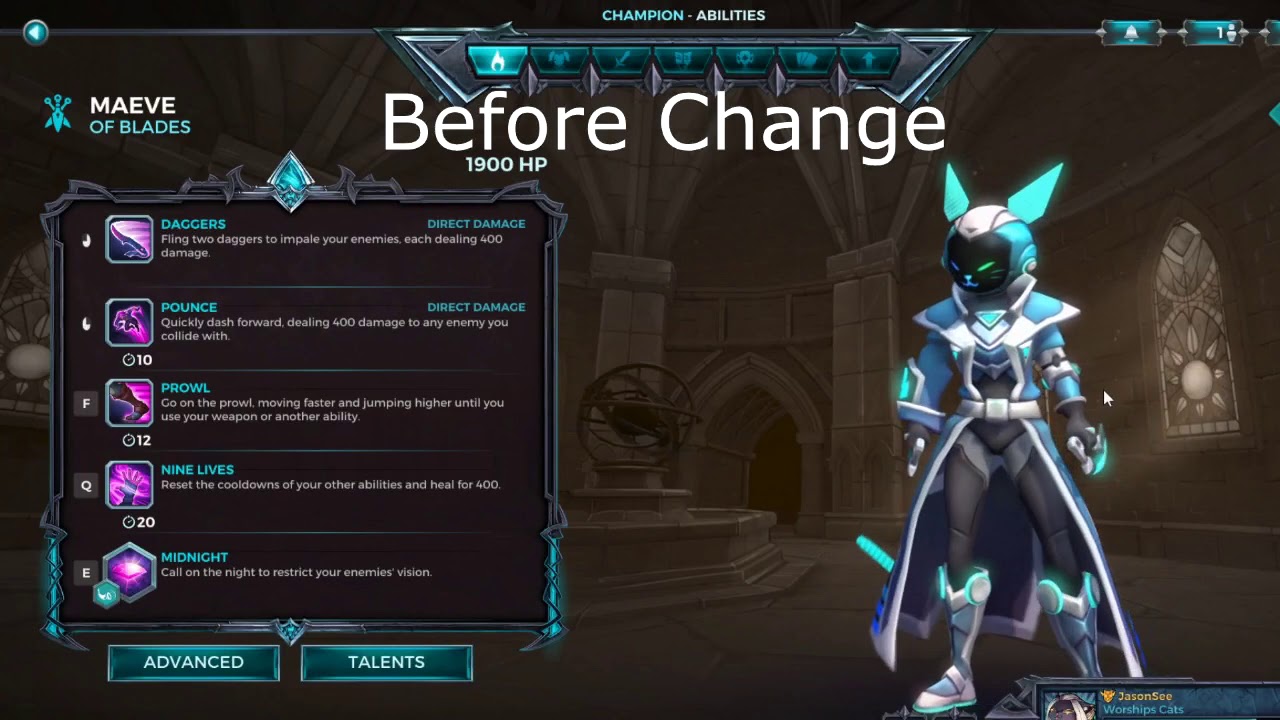
look at the sides of her outfit
the bars are responsive to the music
rocky radish
maybe you could try the audio visualization plugin?
rocky radish
sound visualization plugin may help
interesting.... light propagation volumes still work in 4.25 lol
that was unexpected i must say
dense aurora
well
this will be hard to replicate
i never did such thing lol
could you help me with it ?
this one ?
never did such thing
but ill try
 shadow spade
Does someone know how can I import a blender model to ue4 model properly?, cause I have tried to import some and the rigs don't seem to work properly.
rocky radish
Does someone know how can I import a blender model to ue4 model properly?, cause I have tried to import some and the rigs don't seem to work properly.
@shadow spade what happened to the rigging?
shadow spade
Like, the meshes and the bones go to weid positions, or are some rig parts that separate from the rig to independent ones
rocky radish
what are your import settings Lucigu?
shadow spade
Give me a sec, I will take a screenshot
 ashen orbit
Hello, I just downloaded some rigged character off the Unreal Store, ``` Scaled to Epic skeleton: Yes
Rigged: Yes
Rigged to Epic skeleton: Yes, UE4 Mannequin Skeleton
Animated: Yes
I'm using the default third person mannequin as my parent class to these, but the base mannequin animations will not work with the characters. How do I set this up?@ashen orbit did you retarget the skeletons?
ashen orbit
Well I don't know how to do that
rocky radish
Danielll could you help me with it
@dense aurora there are a bunch of tutorials out there, you could probably find the one that fits best for what you're doing (i didn't use that plugin that much so i'll probably put you in a mess trying to help)
shadow spade
https://gyazo.com/4195993b94f133276a74abf20c6d68e0
This are the settings
 plush yew
is there a texture pixel count to surface area size ratio?
rocky radish
@shadow spade and can you show me a video of the animation being weird?
shadow spade
Yeah
ashen orbit
Do I retarget in the mannequin animation blueprint?
rocky radish
Well I don't know how to do that
@ashen orbit right click the skeleton of your imported character and press retarget, and do that to the default mannequin
ashen orbit
well the problem is I'm trying to find the skeleton but I can't find it, I will do a search again thank you
rocky radish
np
shadow spade
https://gyazo.com/1dab418ffff26bb9803948bcc4effaa8
https://gyazo.com/fb66c61cb829a8536d76cc9bf590e839
This are some screenshots

 ashen orbit
Ok but the problem is here that the skeleton is already the UE4 mannequin
rocky radish
https://gyazo.com/1dab418ffff26bb9803948bcc4effaa8
https://gyazo.com/fb66c61cb829a8536d76cc9bf590e839
This are some screenshots
@shadow spade hmm... sorry for bothering you on that but can you put the engine language to english? i don't speak (what it seems to me) spanish
shadow spade
Ok
ashen orbit
rocky radish
does it happen on the animation editor @shadow spade ?
ashen orbit
The skeleton and the mesh are correct but the animations are not the default ones form the UE4 mannequin, so I guess I somehow need it to to understand those are animations I don't want to use?
shadow spade
does it happen on the animation editor @shadow spade ?
That happens when I press play
shadow spade
Wait, I will look in that
rocky radish
The skeleton and the mesh are correct but the animations are not the default ones form the UE4 mannequin, so I guess I somehow need it to to understand those are animations I don't want to use?
@ashen orbit ok wait i'm confused, do you want the custom animations to run in the default mannequin?
ashen orbit
No I want that dude with the jeans to behave like the default mannequin
and he already has the mannequin skeleton, so I'm abit confused as to proceed
rocky radish
oh so you want the default mannequin animations on the custom mesh?
ashen orbit
yes
rocky radish
ok i'm gonna open ue4 to guide you through this
shadow spade
with animation editor i meant when you double click the animation asset
Its static
rocky radish
ok go to your default mannequin skeleton
@ashen orbit
right click it and press retarget
if your custom character skeleton doesn't show up toggle 'show only compatible skeletons' option
then select it
and press retarget
dense aurora
i made cylinder move into the beat of music
ashen orbit
Well the problem is the characters already have that skeleton
ashen orbit
I don't see anything on the list
rocky radish
@ashen orbit yes but that will allow it to run other skeleton animations
ashen orbit
Oh wait
rocky radish
I don't see anything on the list
@ashen orbit https://discordapp.com/channels/187217643009212416/225448446956404738/725377354322673674
ashen orbit
Thank you very much Daniel it works now
rocky radish
does everything work correctly now?
dense aurora
lol
rocky radish
Thank you very much Daniel it works now
@ashen orbit you're welcome 😄
rocky radish
@dense aurora what have you done so far?
dense aurora
i made cylinder move into the beat of music
ashen orbit
Is there a way to combine two animation blueprints?
rocky radish
Is there a way to combine two animation blueprints?
@ashen orbit i think that just by retargeting you can make them work with both of the meshes without any additional work
ashen orbit
Anyway, I haven't studied animations yet so I'm just gonna stick with basic manipulation
rocky radish
@ashen orbit you can just assign that anim bp to the retargeted mesh with no issues
dense aurora
this big bar should be enough
im not very good with UE4's nodes
i only got used to Blender nodes
so how exactly can i do what they did
plush yew
if I have a surface that is 1500 x 1500 units. Should the texture have at least 2048 x 2048 pixels?
 frosty sentinel
i have a widget blueprint for my HUD and I'm tryin to change the text color but every time i change it and then compile it or try to play it in the editor it goes back to white
dense aurora
This enough @plush yew ?
well
darn
lol
how'd you want to do that
there is
but only for blueprints
cuz in the nodes i dont see any audio releated functions
rocky radish
i think you could use a scalar parameter to change the value of that mask and change it in bp - suggestion
dense aurora
how did the devs make it is a mystery to me
i'd have to ask them
yea
well this is some hardcore stuff
im lost
 brazen pier
Is there a way to edit blend space in order to make an additional directional axis?
rocky radish
@brazen pier you can make values in the vertical and horizontal axis if thats what you mean
brazen pier
that's what i want but have no idea how
rocky radish
you made a blendspace 1d, you have to make the other blendspace one
(wich name is only blendspace, not blendspace 1d)
rocky radish
np
 onyx cedar
do any of the rest of you have problems getting verification emails from epic when logging from a new machine?
blissful sorrel
darn
@dense aurora audio visualization tutorial is fairly achievable, I can configure it in a base project for you and you can tailor it if u want
ashen orbit
how long does it take to learn basic 3d modelling for prototyping only (not something I want to focus on)
rigid belfry
are you willing to start the donut challenge?
ashen orbit
i don't know what that is
rigid belfry
oh, you poor child
Blender tutorial for beginners! The long awaited reboot of the popular donut tutorial, completely remade for Blender 2.8. New videos will be uploaded every other day to this channel.
Get the shortcut pdf: https://mailchi.mp/ef5b15a32043/subscribe-to-the-newsletter
---------...
ashen orbit
why is it a challenge
rigid belfry
technically speaking, anything you do is a challenge
i like to call it challenge because completing the whole beginner tuts playlist is not an easy task
also
ashen orbit
I'm not even done with unreal engine basic tutorials
rigid belfry
strictly speaking, you really dont need anything beside cubes for prototyping
ashen orbit
true
rigid belfry
if you cant make a box die, you wont be able to make a player die
you cant build rome if you've never build a lego set
rigid belfry
then you're already ahead of most people who try game dev
ashen orbit
did it myself like a big boy
ashen orbit
well look
I have an idea for how to make learning unreal engine easier
and im shocked its not a thing (at least I cannot find it)
What i mostly find is tutorials that kind of show you how its made, but if you've ever done a university course, they show you something and then they ask you to do something yourself that's conceptually different but cannot just be copy pasted. And that helps me a shit ton
it's hard to know what one's level is when starting out so exercises would be of tremendous help
rigid belfry
most tutorials cather to beginners who need to be hand held
ashen orbit
sure but its too much hand holding
ashen orbit
there's no thinking yourself
rigid belfry
instead of blindly following along, i make sure to sit back and understand what they're doing
then doing it myself
while making sure i am not making too many errors along the way
restive eagle
you can try using this, its similar to what you were talking about https://learn.unrealengine.com/home/dashboard
ashen orbit
sure but it would be nice with some standard exercises with a "manual" afterwards when you've attempted it
restive eagle
just instead of making a system at the end, theres a quiz
to evaluate how much you understood
ashen orbit
i will check it out
restive eagle
never used it myself because it mainly covers fundamentals
its a bit too late for that 😄
theres udemy as well but they are using most despicable marketing practices https://prnt.sc/t5rske

discount from 165 to 16. yeah right, praying on people who impulse buy
muted minnow
Yeah... Udemy has 85%-90% sales every month...
Gotta feel bad for the poor sucker who paid full price.
muted minnow
Yeah

 lapis bronze
Udemy sales are fake
that said i bought a udemy course on unreal4 networking and wasnt disappointed
muted minnow
Yes
https://www.udemy.com/course/introduction-to-unreal-engine-4-ability-system/ - I just took this course which was a good primer on getting started with the Gameplay Ability System
 harsh tiger
hello, does anyone happen to know the object wildcard that goes into PlacedEditorUtilityBase
restive eagle
you need to make your own variable for the object
and it needs to be set
if your object is of the same class that you are casting to, then you dont need to cast
muted minnow
Out of my own curiosity... What is PlacedEditorUtilityBase?
muted minnow
Base class of all placed Blutility editor utilities.
restive eagle
yeah doesnt exist anymore on 4.23, then i guess i was wrong...
muted minnow
I'm not sure... but... https://docs.unrealengine.com/en-US/Engine/Physics/Collision/Reference/index.html
The Collision Presets section in the Collision Property Category has a large number of properties broken out here for clarity.
WorldStatic vs WorldDynamic... so I guess if it movable?
rocky radish
if the object mobility is set to static then overlap all dynamics wont detect it unless its set to movable
restive eagle
yeah i understood that later
muted minnow
@heavy lagoon Further down the page, it defines WorldStatic vs WorldDynamic.
restive eagle
you still need to set up a system on how to get the object, it could be done via line trace/overlap or even get all actors of class (the last one should be avoided if possible), just few examples. there are more approaches, mainly depends on your system
ashen orbit
Are Udemy courses any good for Unreal Engine
rocky radish
some of them maybe
most of them are not imo
some of the courses just have a fake introduction to the course like teaching you how to make half life 3 but in reality the course is nothing like that, but these are just some rarer cases
rocky radish
wow i forgot that existed tbh lol
 jolly sage
im still confused
idk what the hell im doing lol
i just downloaded hamachi
we connected to a server
i see his pc name
he sees mine
it says request timed out
what should I do if the request timed out
we cant ping
it says reques ttimed out
ashen orbit
guys how do you make so i don't see the visible outline of an actor (the box that contains it in a world)
restive eagle
press g?
 ashen orbit
thx
 plain terrace
how would i be able to have all these meshes have physics but stick together, is there like a weld option
restive eagle
physics constrain handle?

cant tell you more though, will have to figure out the rest 😄
if he merges them together then it will be a single object
then you wont be able to apply physics to each mesh
plain terrace
i need diferent textures and moving parts
i just need to get a better model
prob get free trial of some autodesk thing
cuz i have 130 parts with my current model and that its painful to import them all as skeletal meshes
lol
when i import the obj into belnder it merges all the parts together sadly
ill see what i can do lol
but shouldnt i have multiple parts to that skeletal mesh?
 round fox
is it normal for it to take >2 hours to compile UE4 from AUR? (with Ryzen 7 1800X)
I think clang
plain terrace
mk im gonna get 3ds max or somethin
round fox
I like AUR because I'm lazy. Is there a downside to using AUR?
ah
I think yaourt is unmaintained now
I use yay
plain terrace
i wonder what will happen if i pretend that im going to a certain school on autodesk hmmmm
i am going to a certain highschool but it didnt pop up on the options
lol
ill just get the full version with a free trial later then
round fox
god why is compression singlethreaded
plain terrace
mk so after lke 10 minutes, i imported it as a skeletal mesh from blender and its just one peice
on blender, it merged everything to one
the wheels arent supposed to be one with the body lol
i know that with 3ds max you can somewhat have a bunch of different parts and export as one file
and with unreal you can then import it as one skeletal mesh with all the parts
and boom that should work
i phink
or i can just use normal meshes
and have a really bad car
mk ive concluded what i shall do, thanks yall
 serene ridge
I applied material to a couple mesh in Unreal, and now I would like to move the whole house to a new project, is it possible? I managed to move it but without the material applied
 gaunt tide
Any reason my left clicking on my mouse during runtime isnt working for my game?
serene ridge
@plush yew the thing is it is not an asset, and I don't know how to pack it all as an asset
gaunt tide
@plush yew Yes input is set in project settings as well in the blueprint
serene ridge
@plush yew I found the mesh in the content browser, but the material is not applied here, if I migrate it, it will be grey
 fading kelp
I hate to ask such a basic question, but could anyone help me figure out why the lens options on my cameras are greyed out?
harsh tiger
any ideas on what should go here? i cant find nothing in the docs
i know how casts work, however i didnt make "PlacedEditorUtilityBase" so i'm not sure how i'd figure out what to put in the object wildcard input
4.22.3
is what im using now
damnnnm, 4 months ago an no answer
all i want is to get the location of the camera in the view port😂 didnt think it would be so awkward
the camera you use to look around the editor
i want to get the location of it in the world during editor time
 whole quarry
Make an actor that print its location and then attach that actor to the camera
harsh tiger
i swear the docs are terrible for this sort of thing
but i need it in bp haha. this is where im stuck
i have been doing a c++ course. what that guy done doesn't look too difficult. i just think i'd have to create a fresh C++ editor utility widget class and then change the parent of my current BP one
i just feel like its gonna give me a ton of issues haha
so i can make this into a blueprint function library and add it to my EUW in bp?
baffles me how you cant get the viewport camera location in blueprint
well, i guess you can but its impossible to know what object goes in the cast afik
okay, thank you!
do you need to be logged in
that may be an issue then haha
plush yew
what are these artifacts?
harsh tiger
ah okay, i'll have a look into it. thank you for the help @plush yew !
restive eagle
5% is just if you make 1mil, as far as I remember
arent you licensed by default?
all you have to do is link your epic account to github
and you will get access
well yeah thats what i had in mind
by using the engine you already agree with their terms
it sounded a bit that you need to ask for persmission
so that might scared the guy 😄
harsh tiger
its all good, although i just linked my epic an git account and it still gives me that error when i click on the link
 open wadi
Question: I have 5 nav menu items that are supposed to sit in a "slot" in a background image. I've got them set up decently when I "play" the game on my 40" Dell 4K, but I'm concerned that on a smaller monitor they'll be off-center from their "slots", which you can see here in the design section of the widget.
Is there any way to "center" either a size box, or a button, at a specific point on a background image?
harsh tiger
nvm, i didnt join the invite that gets sent to your email after connecting haha
open wadi
So that regardless of monitor size the text will be centered?
gaunt tide
@plush yew Oh I can click the mouse all day with BP playing and not get a response from it lmao. I have a bp called EditorCamera which is the pawn I am controlling when the vehicle editor level is opened.
 crimson vector
So we just upgraded our project to 4.25 and noticed a major regression. Our map takes a long time to save, but in 4.24, we could use File -> Save All and the map would save quickly because it would not save the builtdata file. Now it seems in 4.25 that File -> Save All saves builtdata and is very slow again. Anyone know how to get back the fast map saving?
(maybe this has nothing to do with the version upgrade but we didn't change anything else)
 lost reef
@crimson vector after upgrading I no longer have any crashes. So 4.25 is a god send for me. But my landscape material is out of wonk for whatever reason 😂
crimson vector
I noticed I can alt+F4 out of UE4 and then just not select builtdata when it warns me about the things I need to save
but killing the editor is not what I want to do
I feel like I'm just missing something really obvious
shadow spade
Can someone recomend me some tutorials for animation in UE4?, like for making animation videos and stuff (not game animtions), since I am trying to learn more things about making animations and short films in UE$, and I am not able to find any more good tutorials on the internet.
Oh
fading kelp
Is there some setting I need to enable to be able to get depth of field in the camera?
lens options are disabled
jolly sage
When I use steamworks to upload a game I’m a bit confused with registration
 grim ore
@open wadi about all you can do is use the anchoring system to set it up properly. make them offset X from one side so they are always X from that side for example regardless of your monitor size. Or you make the image in the background always centered and then the icons always centered in a box the same size as the background and it should sync up regardless of the monitor. At the worst, drop the monitor down in resolution and test it yourself 🙂
 honest vale
@dense aurora begin play only fires once
when the object is spawned into the world (or at level startup)
vernal thicket
@dense aurora yeah you need to make a timeline and set to loop, its easy
dense aurora
and where do i find that dam timeline
honest vale
I mean, of course it's more ergonomic to use timelines than it is to have a gigantic tick function 😛
dense aurora
i wanted to do something complicated
honest vale
but they don't magically have better performance
dense aurora
but im unable to do it
vernal thicket
The loop is called inside the timeline not on the blueprint
dense aurora
i see no timeline bro
vernal thicket
How would you do a flickering light without some kind of loop
dense aurora
im not so new to UE4
vernal thicket
Cliff
In this tutorial Matt takes you through how to create a flickering damaged light through Level Blueprints. This section shows users how to create actions that appear in a sequence with timeline functionality.
Follow Pub Games on Twitter at @PubGamesAU or Facebook at https://w...
restive eagle
thats normal, mine is 92gb
 dry lotus
okay ty
restive eagle
without any error messages we cant help you
dense aurora
i have question about something else
how can i change emission of material based on beat of music
 terse vigil
restive eagle
terse vigil
restive eagle
hmm, do you have debug symbols installed?
i dont remember what it displays without them. you can check here https://prnt.sc/t5uq8b

even then you will most likely be on your own, you did smth that is causing this error and only you know what you did
try to redo your changes that you think might be causing this, if not then you could revert to your previous version if you were using source control
 limpid turret
well this is a new one, I'm importing a model into ue4, its already triangulated but it gives me an error saying 'import failed, unable to triangulate mesh'
I checked and the model has no quads, its all tris, I also tried removing all triangulation to let ue4 do it instead but it failed there too with the same message
open wadi
@grim ore Thanks Mathew, appreciated.
limpid turret
hah I suck at naming conventions apparently, I should change that
but yeah I'm stumped and it seems like no one online has had this problem or fixed it
 next badger
Anyone familiar with AHUD?
restive eagle
@light lintel its fine, intermediate folder weights 20gb
wheat hare
@dense aurora that's a sweet idea
wheat hare
Post BP pls
wheat hare
That's some mighty elegant blueprint work.
next badger
@dense aurora new audio engine?
dense aurora
its a plugin
but
i stil ldont know
how to make the bars move into the beat
that must be harder to replicate
wheat hare
I've got a little neon element in my puzzle, I'll go plug that into it. Wonder what it looks like with 90s techno
dense aurora
time to figure out the music bars
how it works lol
its funny cuz
each bar moves differently
and it seems to be hard
wheat hare
There's probably a function for it lmao
wheat hare
It's nice how much control you have over the eq in the engine
dense aurora
well
i dont get how they did it
my brain is freezing
look at the coat
im confused
wheat hare
Ok yeah that's pretty cool
dense aurora
confusion 100
wheat hare
Almost like it's a video that's projected on there
It's a material that does that?
dense aurora
yes
atleast i think so
cuz i have the texture for the bars
How do these bars move like that
wheat hare
There's a cool material in the free section this month that changes visibility in a cool way, maybe there's some idea in there
dense aurora
🧠
idk how it works
idk how to replicate that
im confused to bottom
I'd have to ask the devs
wheat hare
It's a cool effect
grim ore
so the actual question is does that music change? if not you might be seeing a material effect that is completely independent of the music
you assume its based to the music but it might not be
dense aurora
it is
cuz
when are two people with lobby in that game
with two remix skins
the music changes
and so the suits go into beat of that
i dont know how it works
next badger
@dense aurora in ue4 you can make a material that will have say 8 bands, 0-1, it will show proper amount of the tiles based on the band volume (value 0-1)
then you add those variables to MPC (material parameter collection) or DMI (dynamic material instance)
you can update those vars in async audio thread i think
next badger
and you can get those variables from sound vis plugin
wheat hare
Yeah it's dark
next badger
is that a job offer?
restive eagle
either find a tutorial or you are on your own 😄
you are asking a bit too much for a simple thank you
dense aurora
Simple?!
restive eagle
i mean i doubt anyone will be willing to spend couple of hours of their time
to make you a system
maybe there will be one kind soul, but I highly doubt it
next badger
yep, i think it will take a couple of hours to make a material template, shaders, sample BP and link that to example sound
restive eagle
i mean it can take even 10 minutes if you already went over that stuff bunch of times, but its a pretty new and unique system that not a lot of people had the time to figure it all out
if he had somewhat working system but it had some bugs, then sure we might be able to help via discord
next badger
no chance I can make a material with texture that can be sampled to show volume bars in 10 mins
even tho i know what i'm doing
maybe some people can
next badger
@grim ore yep, he needs a material that draws them
dense aurora
i used simmiliar thing to move lights into the beat
 polar plank
What's the simplest and most fool-proof of duplicating an UE4 project so I can try some very extreme changes to important code that I don't want to mess up in the original? I'm basically looking for "Save As" but for the entire project.
grim ore
ctrl-c and ctrl-v in file explorer?
next badger
^
polar plank
lol does that work?
restive eagle
it does if your keyboard works
next badger
ue4 project is just a folder
polar plank
Damn, I should have thought of that lol. Thanks for the advice.
next badger
@polar plank but keep in mind, doing so with content in content folder does not
polar plank
So if I duplicate the folder, the new project won't have the Content?
next badger
no, if you copy some content in content folder it will break...WHOLE folder is ok
 livid haven
Anyone remember if/how to run the editor using -game and cooked data?
open wadi
So @grim ore, based on what you're saying, it might be impossible to ensure that these nav bar items remain properly in their bg image "slots" regardless of resolution. I tested like you said and if I drop down to 1920x1080 for example, everything is out of wack.
I'm modeling this menu after the Dota2 menu, which I know was built in Source2/Panorama, which is CSS / XML based, so maybe UMG can't replicate this functionality?
Here's the nav style I'm emulating, for example.
livid haven
Late to this thread, but you can do whatever you want with UMG and/or Slate, just may not be as straight forward out of the box as some other approaches.
open wadi
Right now both my nav bar image and the horizontal box that my buttons are within are centered, one issue, for example, is I have a spacer on the left side to ensure the first menu option appears in the proper slot.
livid haven
What exactly are you struggling with?
(I'm freelance now, but was on the Fortnite UI team for 5 - 6 years)
open wadi
droptoneToday at 2:37 PM
Question: I have 5 nav menu items that are supposed to sit in a "slot" in a background image. I've got them set up decently when I "play" the game on my 40" Dell 4K, but I'm concerned that on a smaller monitor they'll be off-center from their "slots", which you can see here in the design section of the widget.
Is there any way to "center" either a size box, or a button, at a specific point on a background image?
open wadi
Do what?
livid haven
Horizontal Alignment. Have it centered.
open wadi
To which MathewW responded:
MathewWToday at 3:00 PM
@droptone about all you can do is use the anchoring system to set it up properly. make them offset X from one side so they are always X from that side for example regardless of your monitor size. Or you make the image in the background always centered and then the icons always centered in a box the same size as the background and it should sync up regardless of the monitor. At the worst, drop the monitor down in resolution and test it yourself
livid haven
Is this because the "buttons" aren't actually buttons at all and it's one big texture?
open wadi
To which I tested and, dropping my resolution breaks the layout. I was hopeful there would be a way to "pin" a given button / sizebox / whatever to a specific point on a background image.
No, the buttons are buttons within sizeboxes, within a horizontal box, as seen in the previous image hierarchy.
livid haven
I'm looking at your screenshot and it definitely looks like what I just described.
You have one big texture.
open wadi
Right now I'm using a spacer on the left to move the first option to the first "slot" in the background image.
Are you referring to the background image?
livid haven
Yeah
open wadi
Yes, the background image itself was ripped directly from the Dota 2 assets and is one large image. The buttons are buttons within size boxes, which are within a horizontal box, with a spacer on the left to get the first nav option to appear in its proper "slot" on the background.
livid haven
Then yes, as he described, you'll have to forcibly fit all your elements overlaid onto the texture.
Which is a rare, rare, rare case of Canvas Panel being sensible.
You really do want to force all of your elements to be arbitrarily positioned.
open wadi
Ok, thank you @livid haven. Is there perhaps a better solution to replicate this functionality?
Or layout, whatever term one would use?
It's a project where step 1 is directly replicating the Dota 2 nav in UMG.
Then building from there.
livid haven
Well, not having one big static image with elements overlaid onto it. 😛
Having each logical element of the UI actually having its own separate visuals.
open wadi
So what, I would have to cut up the background image and place them within containers, so to speak?
livid haven
Essentially
open wadi
Hmm
livid haven
Which will get a little weird as you may need to use negative padding in places, since those "buttons" are weird parallelograms.
open wadi
Right.
livid haven
If you really want to use the aesthetic they have, then yeah, you either go with overlaying onto a fixed/static 2D image or go hardcore off the deep into vector-art.
open wadi
Interesting that Panorama does it this way but UMG can't, ohwell.
 storm venture
hey so i have an issue and was able to create it fairly easily, its regarding a massive frame drop when using landscapes.
if i make a blank project with raytracing on, fill the world with a landscape (15x15 quads or greater), then it causes my fps to drop by half whenever i move the camera.
open wadi
Why would going deep into vector-art be relevant? Confused as to what I'd be doing there.
 distant totem
@storm venture how many components is your landscape
livid haven
Interesting that Panorama does it this way but UMG can't, ohwell.
Can't do what?
open wadi
Apparently can't use a static background image in the manner described, the background image was pulled directly from the Dota 2 assets, so they're using static background images.
livid haven
I just told you how to do it, as did Matt W
It is an inherently limiting and flawed approach.
It can't scale because it's a 2D image.
And all your UI that's overlaid on the image has to be strictly fixed relative to the top left of the image.
open wadi
I mean, it works perfectly good in Dota 2. The assets contain a smaller version of the navbar images for 4:3 aspect ratios (based on filename).
Ok, it should be fixed to the left?
livid haven
Then do that.
open wadi
Then do that, ok.
livid haven
It works "perfectly good" in that they had to author different UI textures for different aspect ratios. Which is not great.
So double the work.
open wadi
Well, they have 2, but yes that's true.
open wadi
So ideally, one would have a single image that scales properly to various resolutions.
livid haven
Ideally, one wouldn't have an image at all.
open wadi
Obviously I don't plan on using this exact image, I just want this setup.
Oh really, ok, what would one use instead?
livid haven
Each logical element would have its own textures and flow and scale reactively as necessary.
storm venture
@distant totem 1024 components on my current test
open wadi
I see.
So as an old coder who is quite new to UE4, I've watched multiple "build a main menu" tutorials, and they basically all have you doing the same thing - some generic 3 rectangle menu that looks fairly ghetto. That's part of the issue, I'm having to basically learn how to pull off "pretty top nav" as I go.
I appreciate the advice.
distant totem
theres your problem, the more components, the more it's going to tank your FPS. when your making a landscape, try something like these settings, then scale it in the creation left side up to 500 or whatever your desired size, you gotta do anything to keep that component count down. I just copy and pasted a huge landscape I had that was 80 components, down to a landscape of the same size, consisting of 4 components, but scaled up to 600 @storm venture
livid haven
I doubt there are any good UI tutorials out there, given the quality of tutorials I've ever seen.
open wadi
Indeed.
distant totem
these settings
grim ore
see if I was just trying to duplicate the feel of that UI I would start with this
using normal buttons sheered to give the angle effect, then just skin it all
distant totem
(i wish discord had threads like slack)
open wadi
Interesting @grim ore
Yes that looks like a practical starting point.
Any chance you could detail how you just did that so well or toss over the uasset or some such?
Or point me in a direction for a relevant tutorial?
grim ore
its a horizontal box, you can see it on the left. then some buttons in the box, you can see that on the left. then some text in thebuttons, you can see that on the left
lol
open wadi
I see.
grim ore
open wadi
Ok so I can glean all the necessary info from the screenshots, will do.
grim ore
the key is the render transform section where you can change the way stuff looks
so the buttons are sheared -30 to angle them, then the text is sheared 30 to put them straight again
I dont have any fancy artwork to go with it lol
open wadi
No worries, I grabbed the screenshots, getting to work, much appreciated.
Which begs the question - say someone wasn't an artist themselves, but was interested in commissioning some art for such - what's the recommended place to do this?
Something cheap like Fiverr?
grim ore
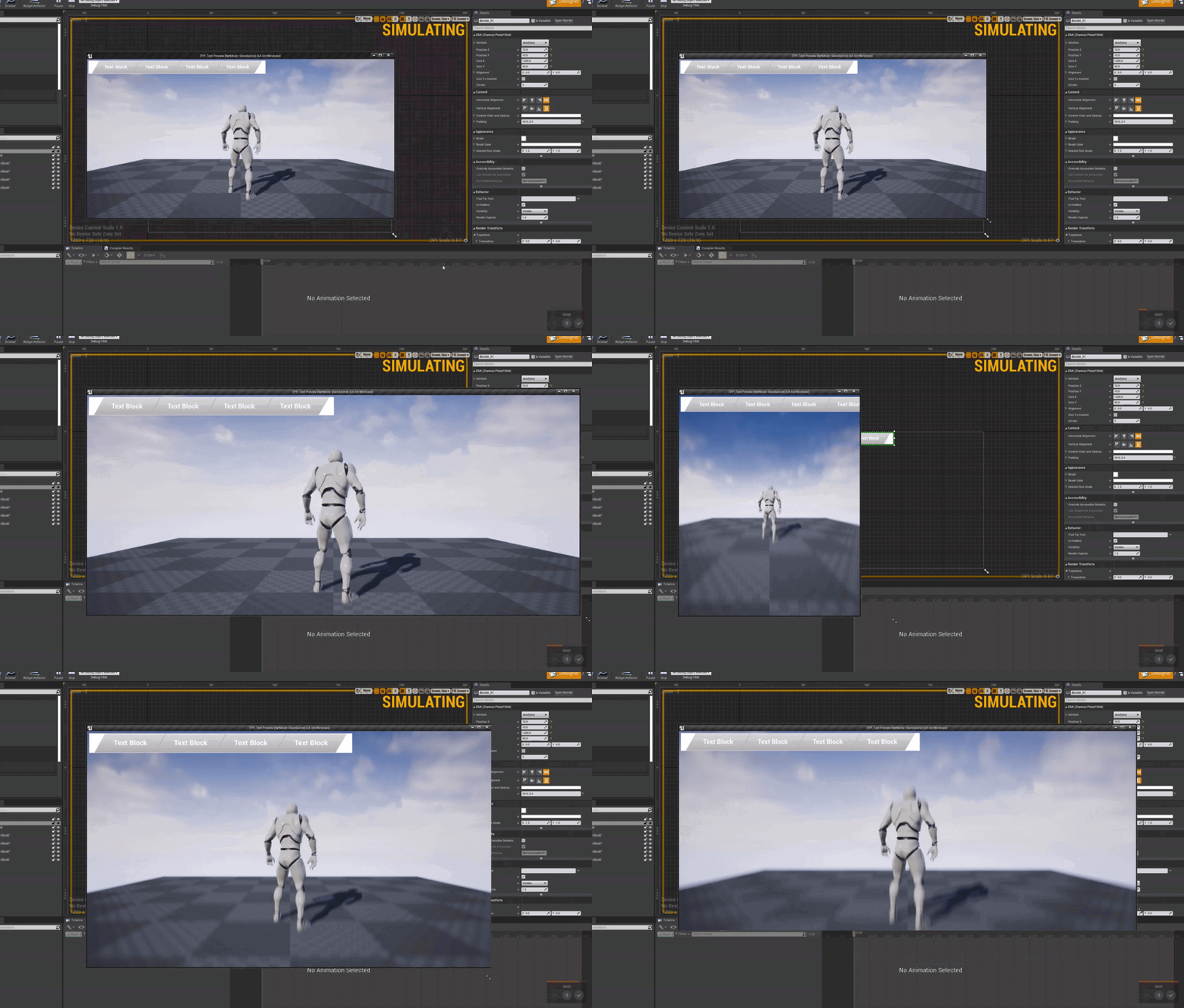
in theory since its anchored to the top left, the background border, it scales and sticks fine https://i.gyazo.com/5073c04cddf79cd471fa992eaf5831d8.gif
 open wadi
Terrific.
grim ore
#looking-for-talent works in here, and the forums probably have some people interested in work
otherwise find someones portfolio online that does work you like and get in contact with them 🙂
open wadi
Sounds good, will do.
grim ore
UMG isn't perfect but there is a ton of functionality there if you whack at it enough lol. the only real annoying feature that is missing is non square click targets (even sheared you still have a square, so circle buttons are a pain for example)
wanton lotus
Oh, I like that shearing. Didn't even know buttons had that.
Circle buttons would be no problem with the render target button I made. As long as the render target resolution is pretty low it doesn't impact performance.
I just don't get how there is no "polygon button" or something similar. Would come in very handy for buttons of all shapes.
grim ore
yep it would, you can code it yourself under the hood using the events in UMG but out of the box nope 😦
wanton lotus
If I create a custom button, can I setup click events for it that are created inside its parent widget, like a normal button?
grim ore
how so?
wanton lotus
Like the ones under events on the right.
Right now they are just custom events within the custom button's blueprint.
 weak perch
Hey guys, just a quick question. I have been making an environment and just want some feedback on what game you think it looks like the most?
grim ore
those are tied to the button so if you set those up in that widget then yes. If you for example make a widget blueprint, put the root widget as a button, and set up the button in that widget then that button event would be in that blueprint. If you then added that custom button blueprint to another widget blueprint it wouldnt show up as a click event since you are not talking to a button but a custom widget blueprint
wanton lotus
Wanted to make my render button feel more like a normal button before releasing it to the marketplace as a free download.
 stark briar
Hi, everyone, I have a problem with "Fatal error".
My packaged game crashes, when i'm transiting from one map to another. I hope, someone can help me..... Ping me, Please!!!!!!!😭 😭 😭
weak perch
What game do you think this best represents
have 3 more images laoding but internets shit lol
next badger
Is Possess Acknowledge triggered on Unposess too?
grim ore
in here you can see i made a UMG_CustomButton with Button as a parent. this shows up in the widget panel like a normal button and the click event will show up on the right. the one below it, UMG_WBP_Button is a normal UMG Widget with just a button inside of it, that will not show up with a click event on the right since that is a WIDGET BLUEPRRINT (USER WIDGET) and not an actual WIDGET like a normal Button @wanton lotus
grim ore
@stark briar install the debug symbols so when it crashes you get a full log, turn on logging if its packaged, and read the logs in the logs folder in the saved folder. Without any of that info no one here can help, we can only guess its broke
wanton lotus
@grim ore I think I got it now. Thanks for your help.
stark briar
@grim ore i guess, i have it...
stark briar
@grim ore yep, i have them. What's next?
grim ore
it could be any type of game, the setting is just fantasy @weak perch
@stark briar you can paste them to some place like pastebin, or you could read them and see what it says is causing the issue
stark briar
Can't find them in Appdata/(projectname)/saved.....
grim ore
is this running in editor? if so they are in the project folder
grim ore
then you need to turn on logging or the console to see them
wanton lotus
Damn, got the button events now, but then realized I can't use them since I am doing custom hit testing to figure out if it is a click or not.
stark briar
But how can i read them, if game crashes?
grim ore
you can always add -log to the project when you run it and it will give you a console log while it is running
 raven narwhal
Hello, maybe someone had this problem. I have Rich Text with Decorator (To display key icons)
And it works in ENG, but for some reason dont work in other languages.
I use BP's and regular Set Text node and built-in Localization
Thank you
stark briar
How do i open command line in packaged project?
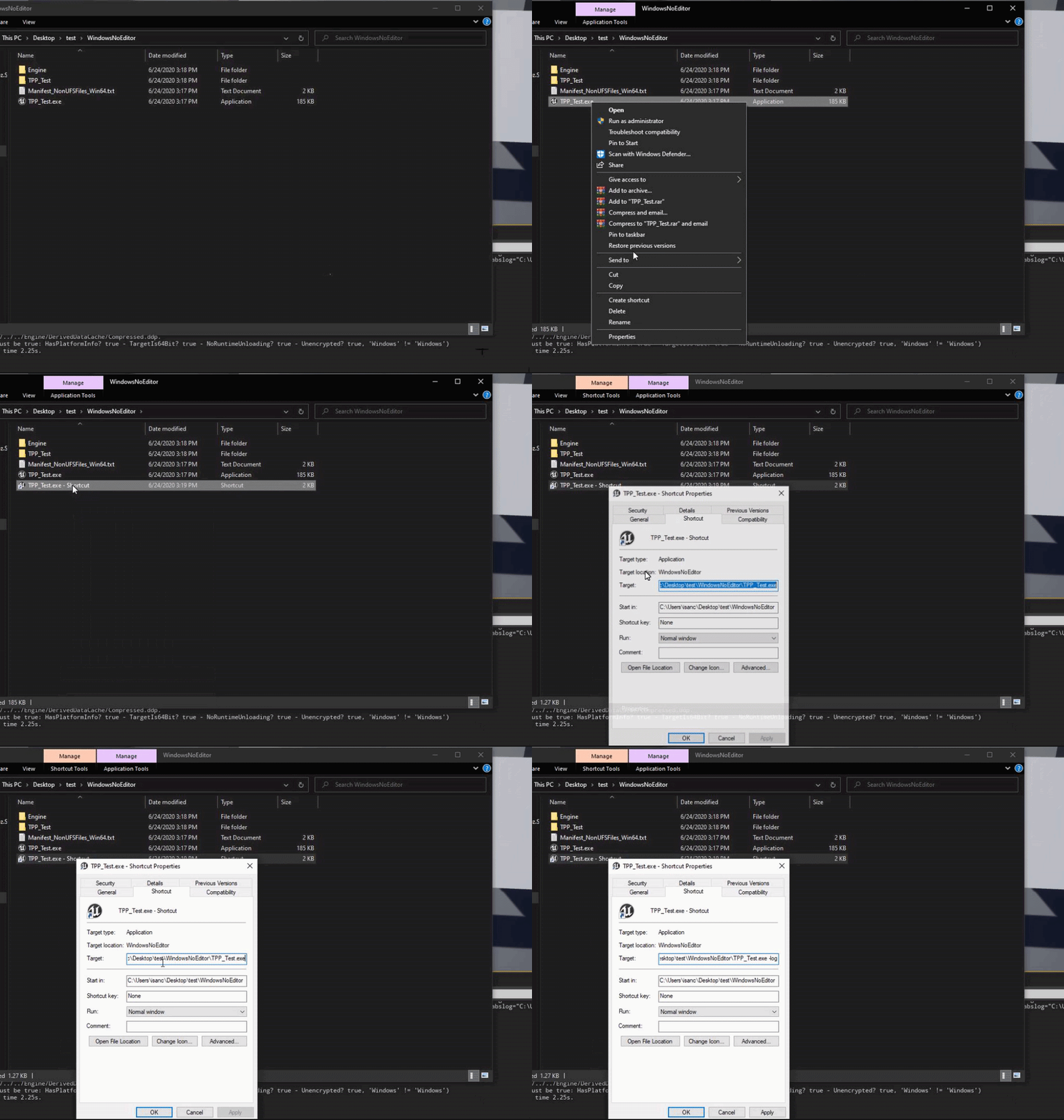
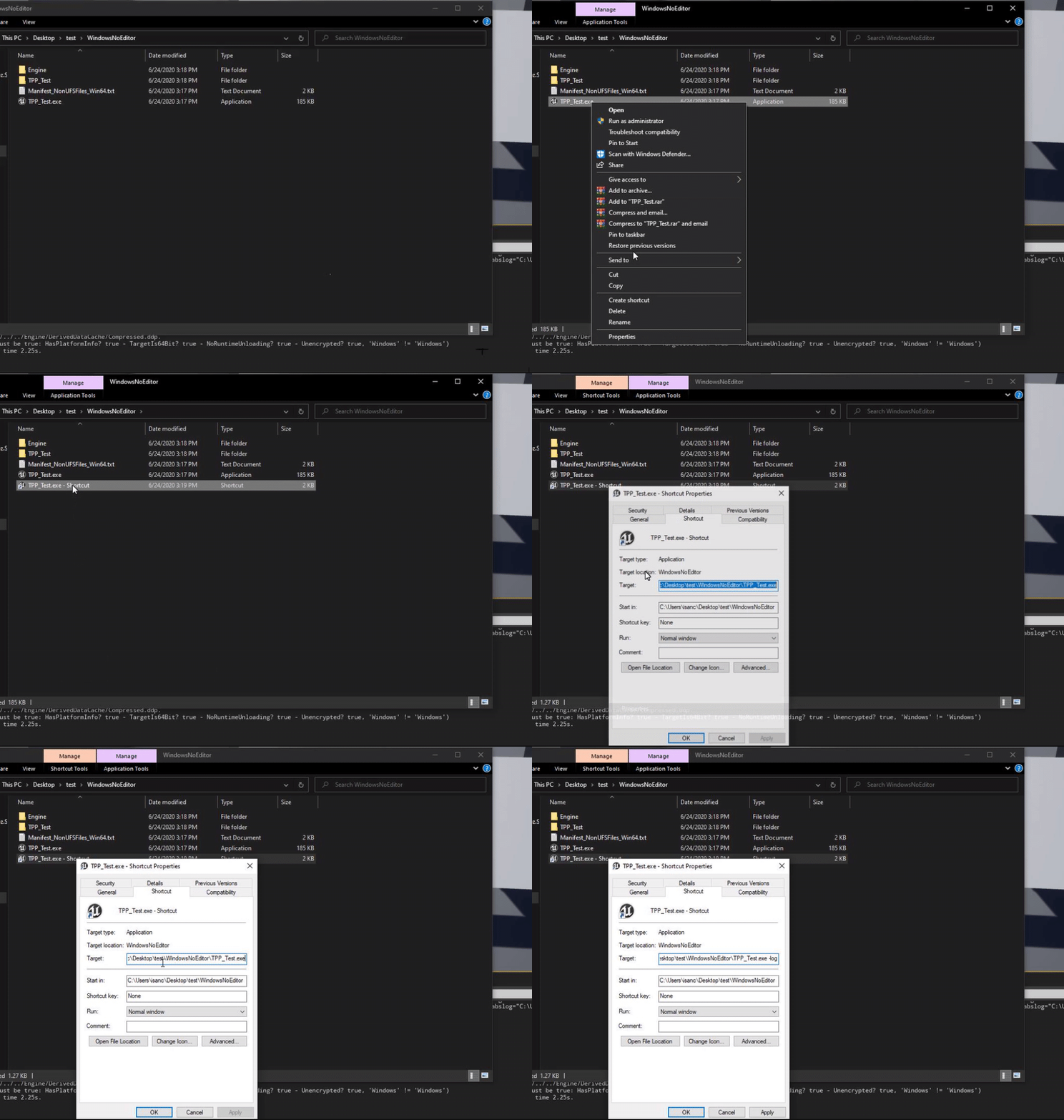
I feel stupid...
grim ore
right click the executable, make a shortcut, edit the shortcut and add -log to the end of the executable
stark briar
after .exe?
open wadi
@grim ore - Building from your example, if I insert background images for those buttons, will they scale properly as well, as the buttons / border did in your gif? Could I slam one background image behind the entire border and it scale properly as well?
stark briar
@grim ore
open wadi
This gif, specifically.
 mystic holly
Hey does anyone know how to fix widgets not showing up at all
stark briar
Hey does anyone know how to fix widgets not showing up at all
@mystic holly depends on what you mean
mystic holly
All of my widgets won't show up at all
stark briar
Code please 🙂
grim ore
@open wadi it will scale based on the DPI scaling options in the project settings. Basically it will be 1.0 (normal size) at a certain resolution then scale up or down when you hit certain other sizes. Check out the Project Settings -> User Interface. IF you dont let someone scale by hand, so fixed resolution only, then its easy to test as well
mystic holly
Could the files be broken??
open wadi
Perfect, thank you much.
@mystic holly While I'm still in the UE4 learning stage, I believe it's a safe bet that the information you're providing is too vague to make a proper diagnosis.
stark briar
@mystic holly Try to create new widget and simply add it to the screen
stark briar
Try another engine version?
mystic holly
The code I'm writing is: Event begin play, create widget, then add to viewport
okay
grim ore
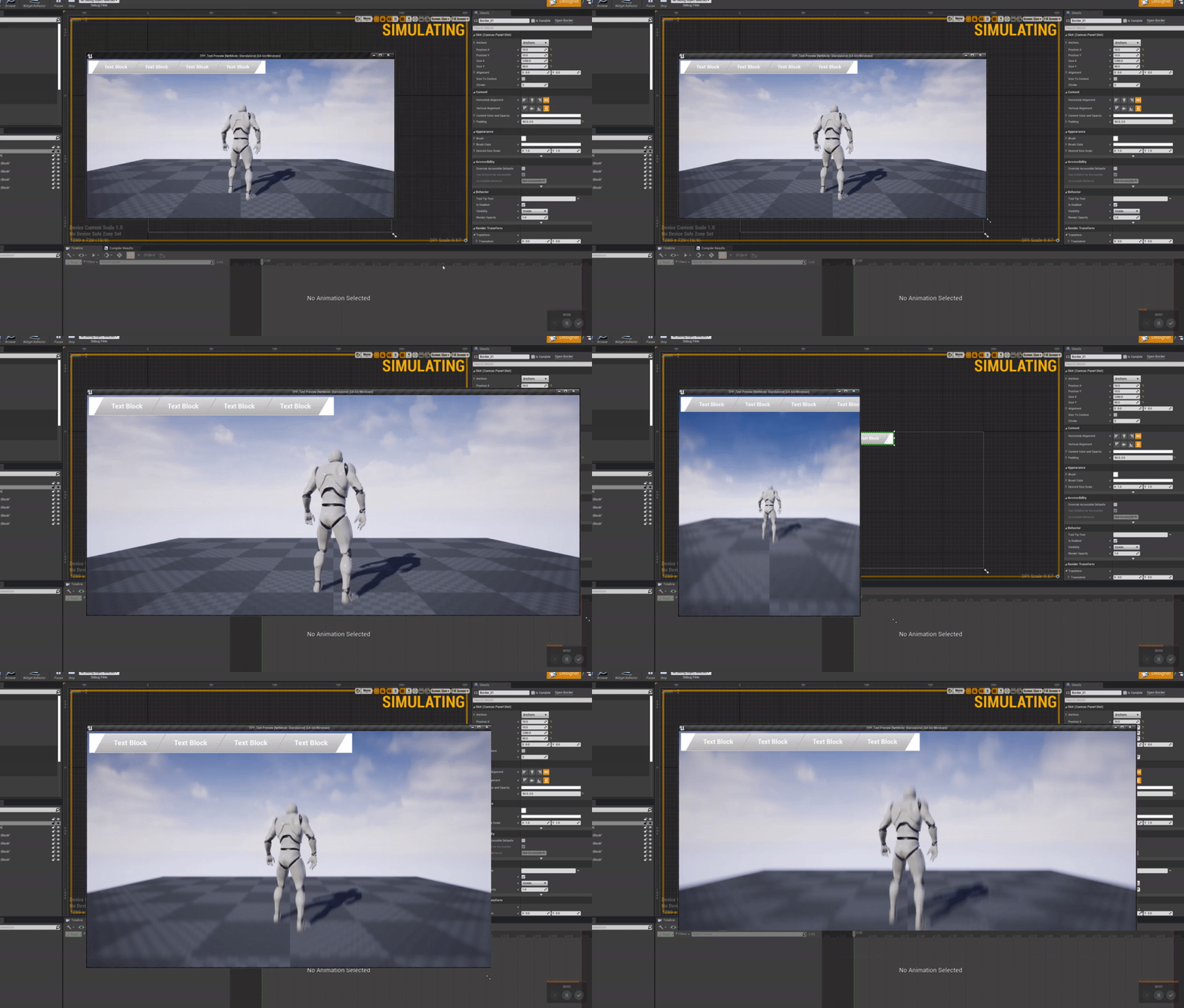
@mystic holly is your widget good? are you sure the code is being called? is anything else using the viewport?
open wadi
@grim ore When you have a moment, would you mind screenshotting the details panel for one of those horizontal boxes and one of the buttons so I can properly duplicate those parallelograms?
mystic holly
What do you mean is anything else using the viewport?
grim ore
I dunno, maybe you have 2 different places you are adding widgets
stark briar
"Add to screen" can help too
grim ore
welp..... we cant really help if you tried it all and it all works but it doesnt work 😦 that means it all broke
open wadi
lol
mystic holly
well
grim ore
@shut juniper button
mystic holly
At least I didn't have too much
grim ore
Box
Border
no idea if this is a good order lol, I just like using borders to allow background images
grim ore
keep in mind it was literally a quick and dirty you have options here are some options idea lol
open wadi
Absolutely, just going to stat with the basics here. My legacy method would not allow for the text blocks to stay uniform within the background image sections when resolutions switched, so this is a good starting point.
Yes, well @grim ore is a true guru, I've watched about 30 of his tutorial videos on YouTube thus far.
grim ore
keep in mind there is a size box widget which might have helped as well without using the sheer.
open wadi
Right.
stark briar
My time!🥳
grim ore
I pasted an image, it will give you a running log you can watch
stark briar
Still can't
grim ore
cant what? the log doesnt show up on screen?
stark briar
Yep
grim ore
does the log not show up, or the window doesnt show up? one issue is without is being in developer mode or setting the use logs in shipping mode flag when you build you wont get any logging
shipping mode strips out logging
 soft fiber
Does anyone know if you can change to editable layers in landscape after the landscape has been created? I'm guessing no?
grim ore
you can, click the landscape in your world outliner -> scroll down in the details panel a short bit -> click the checkbox for enable edit layers
soft fiber
@grim ore found it! Awesome... Thanks
stark briar
@grim ore [2020.06.24-22.35.42:598][123]LogStreaming: Error: Couldn't find file for package /Engine/VREditor/Sounds/UI/Click_on_Button_Cue requested by async loading code. NameToLoad: /Engine/VREditor/Sounds/UI/Click_on_Button_Cue
[2020.06.24-22.35.42:601][123]LogStreaming: Error: This will hitch streaming because it ends up searching the disk instead of finding the file in the pak file.
[2020.06.24-22.35.42:602][123]LogStreaming: Error: Found 1 dependent packages...
[2020.06.24-22.35.42:605][123]LogStreaming: Error: /Game/VanGogh/Placeable/Interactable/Statue/BP_Statue
[2020.06.24-22.35.42:666][127]LogStreaming: Error: Couldn't find file for package /Engine/VREditor/Sounds/UI/Drop_Item_From_ContentBrowser requested by async loading code. NameToLoad: /Engine/VREditor/Sounds/UI/Drop_Item_From_ContentBrowser
[2020.06.24-22.35.42:669][127]LogStreaming: Error: This will hitch streaming because it ends up searching the disk instead of finding the file in the pak file.
[2020.06.24-22.35.42:671][127]LogStreaming: Error: Found 1 dependent packages...
[2020.06.24-22.35.42:673][127]LogStreaming: Error: /Game/VanGogh/Placeable/Interactable/Urn/BP_Urn
It's red
 glass dirge
Anyone know how to make my character fall faster than he jumps?
stark briar
I guess, i should not use engine sounds.....
grim ore
that shouldnt cause a crash as far as I know but yes either copy (dont move) those to your project and then use those versions and package or use different sounds but all of the content for your project should be IN the project
plush yew
is there a material function out there that rotates the texture?
seems like there should be.
 severe lodge
Hey guys. Can i add tessellation to a Material with Several layers
 neon bough
gotta love when the engine crashs on startup while it worked fine before you closed the project -.-
distant totem
if anyone has a moment to look at a landscape question i'd appreciate it https://discordapp.com/channels/187217643009212416/221799337414361089/725460846632763452
stark briar
@grim ore Fatal error: [File:D:/Build/++UE4/Sync/Engine/Source/Runtime/RenderCore/Private/RenderingThread.cpp] [Line: 836]
Rendering thread exception:
Fatal error!
Unhandled Exception: EXCEPTION_ACCESS_VIOLATION reading address 0x00000000
0x00007ff75950071b ImpressionismProject.exe!UnknownFunction []
0x00007ff75842d320 ImpressionismProject.exe!UnknownFunction []
0x00007ff75841ff3c ImpressionismProject.exe!UnknownFunction []
0x00007ff758432ab3 ImpressionismProject.exe!UnknownFunction []
0x00007ff757f78dbc ImpressionismProject.exe!UnknownFunction []
0x00007ff7583c2705 ImpressionismProject.exe!UnknownFunction []
0x00007ff7583a2fd3 ImpressionismProject.exe!UnknownFunction []
0x00007ff756ee9fd4 ImpressionismProject.exe!UnknownFunction []
0x00007ff756eea333 ImpressionismProject.exe!UnknownFunction []
0x00007ff758b2a204 ImpressionismProject.exe!UnknownFunction []
0x00007ff758b2eeff ImpressionismProject.exe!UnknownFunction []
0x00007ff7572f615f ImpressionismProject.exe!UnknownFunction []
0x00007ff7572ec0c1 ImpressionismProject.exe!UnknownFunction []
0x00007ffe670581f4 KERNEL32.DLL!UnknownFunction []
0x00007ffe69e7a251 ntdll.dll!UnknownFunction []
grim ore
yeah you are going to haved to include debug files on package now since thats not much help. It definitely points to a problem in your project tho
stark briar
Yep, found it
grim ore
hopefully when it crashes again it will give you the actual spot now where you have an issue
stark briar
Hmmm, very useful feature 🙂
stark briar
@grim ore `Fatal error: [File:D:/Build/++UE4/Sync/Engine/Source/Runtime/RenderCore/Private/RenderingThread.cpp] [Line: 836]
Rendering thread exception:
Fatal error!
Unhandled Exception: EXCEPTION_ACCESS_VIOLATION reading address 0x00000000
0x00007ff61510071b ImpressionismProject.exe!FArrowSceneProxy::GetDynamicMeshElements() []
0x00007ff61402d320 ImpressionismProject.exe!FSceneRenderer::GatherDynamicMeshElements() []
0x00007ff61401ff3c ImpressionismProject.exe!FSceneRenderer::ComputeViewVisibility() []
0x00007ff614032ab3 ImpressionismProject.exe!FDeferredShadingSceneRenderer::InitViews() []
0x00007ff613b78dbc ImpressionismProject.exe!FDeferredShadingSceneRenderer::Render() []
0x00007ff613fc2705 ImpressionismProject.exe!FRendererModule::RenderPostResolvedSceneColorExtension() []
0x00007ff613fa2fd3 ImpressionismProject.exe!TBaseStaticDelegateInstance<void __cdecl(wchar_t const * __ptr64,IConsoleObject * __ptr64),unsigned int & __ptr64>::ExecuteIfSafe() []
0x00007ff612ae9fd4 ImpressionismProject.exe!FNamedTaskThread::ProcessTasksNamedThread() []
0x00007ff612aea333 ImpressionismProject.exe!FNamedTaskThread::ProcessTasksUntilQuit() []
0x00007ff61472a204 ImpressionismProject.exe!RenderingThreadMain() []
0x00007ff61472eeff ImpressionismProject.exe!FRenderingThread::Run() []
0x00007ff612ef615f ImpressionismProject.exe!FRunnableThreadWin::Run() []
0x00007ff612eec0c1 ImpressionismProject.exe!FRunnableThreadWin::GuardedRun() []
0x00007ffe670581f4 KERNEL32.DLL!UnknownFunction []
0x00007ffe69e7a251 ntdll.dll!UnknownFunction []`
 fluid lance
@plush yew you use a "custom rotator" function inside the material and roate your texture by how much you want it to be rotated
plush yew
I think I'm missunderstanding the coordinate system in blender
stark briar
@fluid lance Don't you know my problem?
 river silo
Does somebody know why my dedicated server is crashing while loading the server default map with the message: Browse: 127.0.0.1//Game/Maps/Lobby - TravelFailure: ClientTravelFailure, Reason for Failure: 'Servers can't open network URLs'
grim ore
@stark briar this is what someone says about that error when they had it "This problem is seen in the nearby process that the ArrowMaterial of ArrowComponent is empty, I feel very embarrassed! Finally, after testing, it is found that this problem will occur if HideInGame is unchecked when using ActorComponent in Actor. There is no problem in the editor, it will appear after packaging."
so are you using an arrow component in the game? those are normally editor only items that should not be used in game
stark briar
@grim ore yep, it works finally, thanx to you! Greetings!
grim ore
yay
 boreal sun
When my pawn runs into collisions he gets turned around super easily
Is there any setting in character movement that might fix this?
I feel like most games will let you hold forward and keep playing the running animation when you press into a wall, but unreal kinda turns your character and slides him along the wall
 crisp fable
ok who wants to have an appendage measuring contest
i've been a paying member of cgtextures/textures.com since 2008
ok go
 alpine laurel
why does the splash screen not show up on packaged game? It will show on standalone in the editor
 keen moss
can anyone help explain why my terrain material is showing a hard edge in certain areas? and how to fix it?
vale silo
I am using Spawn Emitter at Location BP node with Manual Pooling (which I use inside a function). I need to release emitter back to the pool when particles effect done playing. Is it this the correct way of doing it:
 unique timber
does unreal engine work with Visual Studio 2019?
crisp fable
@keen moss it looks like you've set a hard limit for materials per terrain component
But I've also run into that as a bug before
keen moss
@crisp fable how do i adjust that?
crisp fable
I'm out at the moment and can't check, but by default it shouldn't be an issue unless you're targetting mobile
Also the landscape layer blend mode matters
You can attempt to force it to rebuild the splat map by painting some cliff on that tile
All it should take is one brush click
keen moss
ive tried sculpting to fix it and it adds more hard edges
 exotic cave
I mean, that's a null pointer dereference by any other name, @stark briar
 cobalt orbit
I am trying to study some Opensource games so I can extend my knowledge on unreal engine, but the thing is, I don't know how to download Opensource projects. Anyone know how?
 lusty citrus
cobalt orbit
lusty citrus
cobalt orbit
@lusty citrus hi
@plush yew trynna see how this works https://gitlab.com/Flakky/stream-survival

me neither lmao
 lime gull
Anybody know how to make a web swinging / rope swinging system, mainly for vr?
keen moss
ive tried both of those things, nothing seems to work, i think its an issue with the terrain asset being created from a height map but i cant figure it out
 regal drum
Why does Epic make it so hard to get the UE4 source code and build it
I've had nothing but problems for the past 4 hours trying to get it set up
 icy flower
lapis bronze
icy flower
lapis bronze
@regal drum i have no clue
i pulled from source once on github, and changed nothing, and it just doesn't compile
different error everytime
regal drum
I can't even get the thing to download properly
 pure stratus
https://discordapp.com/channels/187217643009212416/225448446956404738/725501433708806235
@boreal sun Bad design: character take half of the screen so you don't see anything…
Good character design: Your character does not take half of screen so you can see anything else.
https://cdn-wow.mmoui.com/preview/pvw59668.jpg

How can someone state that a character covering half of screen is a good design? 🤯
boreal sun
@pure stratus That's a cropped screen cap
Not sure why I need to prove anything lol. This is so far from even a prototype of a game
 boreal sun
Also that was not even anywhere near the point of the question I was asking
pure stratus
@boreal sun It's quite obvious that 971×360 isn't a native resolution.
boreal sun
Anyways, I'm guessing my problem is inherent with the character movement component 😐
Right here I'm stuck on terrain, but my velocity is still 400
I'm not sure what makes this specific spot different from when I collide against, say, a wall or something
But when I normally collide, my velocity goes down to 0. Does anyone know if there's a way to keep my velocity value high, even when not moving forward?
Or at least proportional to my movement input
pure stratus
@lapis bronze Sounds like a casual to me. 🧐 Or noob.
btw. If you can't see you're standing in fire, you should propably not say that at all.
Or if you really have to tell that to everyone, #lounge seems a way better place for that.
lapis bronze
you'd have to step into C++ to do that reliably
boreal sun
guh
plush yew
whats with this guy lol
lapis bronze
idk i blocked him
plush yew
<@&213101288538374145>
plain terrace
wat who
 weary basalt
 hollow knoll
Can someone help me share a build of a vr game to another team mate?
We're developing on Oculus Quest, and a team member needs to play around with the project on their quest.
We're not in the same location or else we would use the same HMD.
I would really appreciate the help! 🙂
jolly sage
when my friend and I do multiuser session the things he put down disappear on my screen but they are still there
 swift relic
Is there anyone here that can help a newbie with like... 2 problems I'm having? People keep linking me videos and stuff but they aren't solving my issue. This is so entirely frustrating. I'd love to stream what I'm doing and voice chat with someone. I'd be willing to pay for help at this point. Lol
wanton lotus
@swift relic what problems are you having?
swift relic
Its specifically with getting materials to correctly import from megascans and then tiling them without it looking reptitive. I know theres something called texture bombing, but I cannot figure out for the life of me
 glacial lantern
Casting confuses me so much
How could I go about getting this?
I just need an event from the blueprint of the character's animations
wanton lotus
@swift relic beyond my expertise, sorry. I am no good with materials.
glacial lantern
These are the events I want to trigger
wanton lotus
@glacial lantern what bp are you calling your input action from? Player controller? The name of the game is references. You need to know how BPs interact with eachother.
glacial lantern
Just the event graph in the Ue4ASP_character (from the free animation pack)
Then I'm trying to cast to the blueprint for the animations of the same character
I assumed it would've just required the mesh ahd that would've been fine
I hate casting ;-;
Okie
I found something that works
still don't understand casting
wanton lotus
@glacial lantern https://www.youtube.com/watch?v=HBplrWCrHtc

What is Casting in Unreal Engine 4 Blueprints?
Source Files: https://github.com/MWadstein/wtf-hdi-files
glacial lantern
Yeah I found the anim instance works
I just gotta learn what works and what doesn't
 sage ingot
https://cdn.discordapp.com/attachments/349590460135637014/725558836202831922/unknown.png
Took me a while but I've managed to make a nice character sheet!


 ancient lotus
looks clean
 marble pendant
So i want all your thoughts on this.. cause i know everyones got their own opinions on it.
I've gone through 2 tutorials now using blueprint. With a much firmer understanding of the engine, do you think I should switch over to learning C++ or do you believe that with all the improvements that EPIC makes I should just focus on learning blueprint really well
 dim plover
You gotta get pretty good with BPs first, especially just to learn the UE4 API.
 teal shell
Hello, anybody know if ue4 supports CMYK?
rigid belfry
@sage ingot is that widget draggable or is it locked in that place? i'll do something similiar in a not so distant future so i am curious
storm venture
anyone have any opinions on the Quixel Mixer vs Substance Painter debate?
I like to idea of switching over to Mixer but Painter still has more (arguably critical) features afaik
 gilded plinth
Evening all. I'm working on some low poly procedurally spawned levels and I would like to determine the shape of the floor and other bits and bops using world position offset material vertex manipulation/animation. I will have a character running on the floors while the floor is changing shape and i'm wondering what my options are for collision in this scenario, or perhaps if collision with the floor is a bad idea all together what my other options may be to get the characters feet to continue to be on the ground despites any floor transformations
Not sure what channel to take that question to : )
Does complex collision update when a mesh is deformed with world position offset?
terse vigil
My project crashes when i press play
It works new the was a bp messing things up i removed it and now its work
 sand gale
@storm venture After playing around with Mixer and trying to get it to work well for painting objects, it's nice and all but it's very very simplified compared to substance painter, understandable considering it's much newer. But I think the way they are designing their UI I expect Mixer wants to stay a lot more simple compared to substance painter. They seem to be taking that very easy unintimidating approach. I think it will be good and useful for simpler straight PBR map stuff though.
@gilded plinth I'm 95% sure that complex collision doesn't update with shader vertex offsets. I say this because I know even the object visibility bounds don't update. I think shader vertex offsets only happen on the GPU side and the cpu isn't even aware of them and the traces happen on the cpu.
But I'm not 100% sure.... so might be worth testing.
plush yew
Because of VR re-projection, my game runs at 45fps most of time, and 90fps some times.
My game could easily run 70fps+ all the time, but because of VR re-projection every time the framerate goes below 90, it just snaps to 45.
Is there any way I could tell the game to keep ticking an actor at 70Hz, even if FPS goes to 45 ? (considering my machine could render 70fps, it's clearly powerful enough to tick my actor at 70Hz)
Or maybe is there a way to keep 70fps, but only feed my VR headset with 45fps as it demands ?