#ue4-general
1 messages · Page 772 of 1
 sullen sonnet
 restive eagle
i think i had the same issue as you, in the end i decided to stick with a montage
sullen sonnet
@restive eagle in order for it to work i have to set the char to flying which is annoying
restive eagle
only this animation doesnt work or other anims too?
sullen sonnet
but animation without montage doesn't work at all
all that go up
horizontal animations are fine i believe
restive eagle
ahh, maybe try disabling gravity for the character temporarily
while its doing that anim
maybe the movement component has to do smth with it
restive eagle
but you just said it works if you change it to flying
restive eagle
can you show your bone list?
might be that your root bone is not at the top of the hierarchy
but just a guess
Unreal Engine Forums
Build powerful visual scripts without code.
i think he had the same problem
sullen sonnet
sullen sonnet
i mean ye XD
restive eagle
so its not a root animation?
sullen sonnet
wait explain
restive eagle
honestly i dont remember if root needs to stay at 0.0.0
but try clicking on the link i've sent you
im no expert in root anims, so honestly cant help you much in this case. sorry
restive eagle
had the same issue that capsule didnt move but i somehow fixed it in my other project.
i would recommend downloading ALS
and trying to learn how they did it
they have a climbing system as well

An advanced bipedal locomotion and layering system focusing on high quality character animation with responsive movement. Built to be flexible, extendable, and to provide a solid starting point for new projects. Currently Singleplayer only. (100% BP)
cant help you more honestly, sorry :<
but that system should have everything you need
sullen sonnet
oook ty
restive eagle
you can use this as your foundation, its very well made
they have discord support too
sullen sonnet
ill look into it
 upbeat lake
hi all, anyone can tell me if 2 way audio is possible with pixel streaming? I have it working with one way audio, but how to get audio back from the web viewing client?
 wary wave
I don't believe you can
it may be possible with engine modification, depending on how streaming hooks into the browser
 cosmic furnace
can we use c sharp in ue4?
 obtuse pendant
If someone could be bothered to look at this quickly; one picture is just the standard TPS BP, second one is standard TopDown BP and the third is what I added, switching the cameras works, but the control is what I'm stuck on: how can I seperate those entire comments of nodes so I can toggle between them?
 silk ingot
An error occurred while trying to generate project files.

Running D:/Games/Unreal Engine/UE_4.25/Engine/Binaries/DotNET/UnrealBuildTool.exe  -projectfiles -project="D:/Unreal Engine/MyProject2/MyProject2.uproject" -game -rocket -progress
Discovering modules, targets and source code for project...
ERROR: Windows SDK must be installed in order to build this target.
Hello lads, I've been working in Unity for a while now. But I've been wanting to learn how to use UE.
After some research I've found it was best to start with a C++ project rather than a Blueprint project (difference between these are still a bit confusing to me)
But when trying to create the project I get this error.
However, if I create a blueprint project. This error does not occur.
wary wave
I would suggest that you need to install the Windows SDK
silk ingot
Wherefrom,
wary wave
silk ingot
Ill give that a shot, thanks in regards.
wary wave
hehe
UE4 needs the 8.1 SDK, but I would be very surprised if everything isn't included in the Windows 10 SDK
silk ingot
I guess we'll find out 😅
 digital badger
I deleted a file and it's started to haunt me. I removed all references, the raw *.uasset file has been deleted, but Asset Manager keeps complaining about the asset being unable to be loaded. Any suggestions?
 novel oriole
I usually download the Win 10 SDK from VS Installer, it’s much easier to manage etc.
wary wave
installing Visual Studio would install the SDK yeah, but I don't think it's bundled with VS Code?
silk ingot
I have both
novel oriole
check your components in VS
wary wave
@digital badger - that would suggest you didn't manage to find all the references (also never delete the raw uasset file)
I would recover the deleted file, then try to track down those remaining references, the referencing assets would usually show up in the reference viewer
silk ingot
I used to use VS Studio, but after a new Unity update it had some problems with compiling the code from some library's. Gave me some errors that weren't supposed to be there. When switching back to VS Code it was all fine again.
digital badger
@wary wave I figured, now I have to go through this mess. Thanks for the suggestion, if the file is no longer recoverable would creating the asset with the same class/name work?
wary wave
probably not - but the file should at least exist in the recycle bin
digital badger
It appears I have cleared it since then :/ time to audit all my files
silk ingot
Well, installing that SDK did indeed work 😅
Odd that I had to reinstall it from an outsource rather than VS itself.
but if it works, it works.
wary wave
it's an optional install in Visual Studio
silk ingot
I believe I had it installed. But maybe it was outdated.
wary wave
which seems sensible, since not everyone will be developing Windows applications
silk ingot
Fair enough.
I hope I'm not going to get problems mixing up C# and C++ on the long run 😅
Now I am wondering what has changed between the Blueprint project and C++ project.
they both look like the same project to me.
wary wave
one has a C++ project file, the other does not
silk ingot
Alright.
upbeat lake
@wary wave thanks for your response regarding pixel streaming 2 way audio. That's really to bad. It would be great to be able to tap into the viewers mic for a thing I'm building.
 plush yew
hello guys, is there a way with key when i click the camera from third person to change to first person?
 vernal thicket
@plush yew Add the 2nd camera whether it be the first or third person, Attach it to the character mesh, then set whichever you want to start on as active, and use the key press to toggle activate the first person off and the third person on, and vice versa
vernal thicket
Look
plush yew
😄
vernal thicket
Here's a tutorial

🚨⭕🚨📷This Tutorial will be deleted very soon... please make the NEW VERSION https://www.youtube.com/watch?v=gaSGBsOsFfk
plush yew
ty
 hearty trench
where can I learn how to make games in ue?
vernal thicket
@hearty trench I'd start with devsquad learning hub on youtube, he's in my opinion the easiest to follow to get started & covers lots of points thoroughly
restive eagle
anything but virtus...
vernal thicket
What's wrong with virtus?
 frank oar
Hi,
Basic question.
if you need to reference an object to access BP concerning that object from within a seperate BP,
Is using a "Cast to" adequate for the task ?
(I would expect it to be context dependent).
restive eagle
he uses worst approaches for most of the stuff
restive eagle
just teaching bad practices
vernal thicket
Each to there own
restive eagle
well sure maybe its fine just to see a bunch of different nodes
but nothing else
after few years you will look back and think to yourself, did I really did that..
vernal thicket
As you said, to learn how certain things work, it's not for building a full project
restive eagle
there are probably only few youtubers that put in time to explain why they went with this method and not the other
most of them just tell you to copy things like mindless zombies
Mathew Wadstein is a really good teacher
he should look him up
vernal thicket
Agreed, but for a complete beginner, someone who's never done this before, virtus does a good job at showing the basics to get started
@frank oar If you cast to, you can drag off the 'As', get the variable and then promote it to variable
But It's better to Cast to at the beginning and not repeatedly, you can promote the 'As' straight up to a varaible and then use that reference to get the other variables
frank oar
Yeah MW is amazing,
Speaking from the perspective of someone who started learning game dev 3/4 months ago, I can say that there are certain quality's a teacher can have to actually get the message across.
Not many of the youtubers (knowledgeable as they are, really get the information in/point across/explain things through)
I have just recently started using the learning portal/online courses that you can access directly through the epic launcher.
Since then I have had so many THATS IT moments.
I really do wish I started there.
thank you for the knowledge @vernal thicket !
thats really helpful!
vernal thicket
No problem bud, glad i could help
 austere scroll
is there a node that makes it the activation of the node by chance ? like sometimes it does and sometimes it doesnt 50% 50%
for example i have this function and i want it to sometimes spawn
restive eagle
one way would be using "random int in range" 0-1
then lets say if its = 1 you add a branch
https://prnt.sc/t1cbas @austere scroll
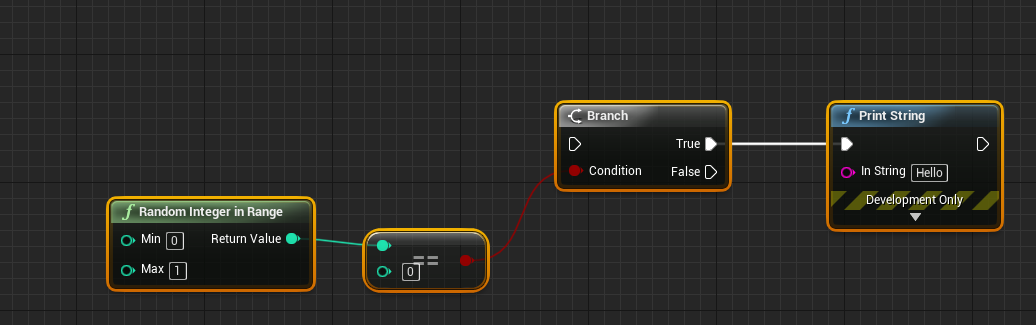
probably there are other ways, but this is pretty simple as it is
https://prnt.sc/t1ccr5 or this
 austere scroll
if i want to make it less frequent , i increase the number from 1 to whatever i want ? @restive eagle
restive eagle
yeah if you want lets say 25%, then min 0 max 3
 late gorge
Anyone know of a fix/workaround for 4.24 constant shader compiling issues?
 next jetty
@restive eagle don't forget about Random bool with weight
restive eagle
never used it before but you are absolutely right
@austere scroll look what @next jetty wrote. it will be easier to setup exact % without having the need to calculate it manually or making a macro
austere scroll
where ?
austere scroll
oh ok
restive eagle
my example will work too, but if you are going to make different % in the future. that example will be easier to setup
austere scroll
the spawning is fine , its just that the logic doesnt activate when it spawns
which im trying to figure out why
restive eagle
my point just was about the chance. that theres a better solution to what i suggested before
austere scroll
yea ok thanks
 granite magnet
https://discordapp.com/channels/187217643009212416/225448446956404738/722762648479072256
anyone got an idea why that's happening? (I hope I'm not posting in the wrong channel 😅 )
granite magnet
alright I'm gonna post there
 wooden forge
is there anyway i can make the edges of this object a bit more visible? it looks like 2d on mobiles
 lost monolith
evry time i import something from megascans it crashes, pls help
@wooden forge or simply add colour variation
plush yew
support :
Problems setting up and adding classes and compiling in UnrealEngine
wooden forge
thanks, i'll try to find something out
plush yew
@plush yew this is something new ill try it
@plush yew to answer your other questions 8 GB of RAM is pretty low to work with UE4 and it will be painful, if you have no need for a custom source build use the launcher version, and UDK is something else entirely and you only want it if you want to mod old games, not make new games
@plush yew ok
im having problems with the launcher
version
adding a class and compiling it or the project
always tells me c++ compile failed
someone please help me with this i really got tired and frustrated using unity and godot to me was so much easier ofcourse unity cant be edited in some aspects but still didn't have problems adding or compiling the project
and i cant be using a desktop these days im constantly moving can someone recommend a laptop for future uses im going to change this ... also im going to add rams to this one
you had a textbook case of not enough virtual memory
@plush yew yes im installing Unreal through the epic launcher again
hello guys I have little problem with the animation of the chair, I did this code for it, when i press X it works, but when I click again X it doesn't work 😦
serious CPU, serious GPU and 32 GB of RAM
@plush yew wdym by serious ?
well wat about something for "gaming" i mean by that more powerful like lenovo legion y540
3ghz ? is their something like it in laptops uk i can use ?
the problem was in the X button that i setuped, idk why it didn't work
ok then
 rigid belfry
@austere scroll if you select 2 or multiple nodes, you can press Q on your keyboard to straighten the nodes
austere scroll
ok lol
rigid belfry
to drag reroute nodes, select it first and then press ctrl to drag it around
plush yew
@plush yew should i try installing from the epic launcher now or there is other fixes i should try ?
mhm ik i used the source cuz i thought it would be easier but i see its a painful process every time i wanna compile a project or start editing something
so im going bak to the launcher version
rigid belfry
btw anyone tied this? https://www.unrealengine.com/en-US/tech-blog/learn-how-to-create-a-character-animation-rig-with-unreal-engine-s-new-control-rig-mannequin-sample
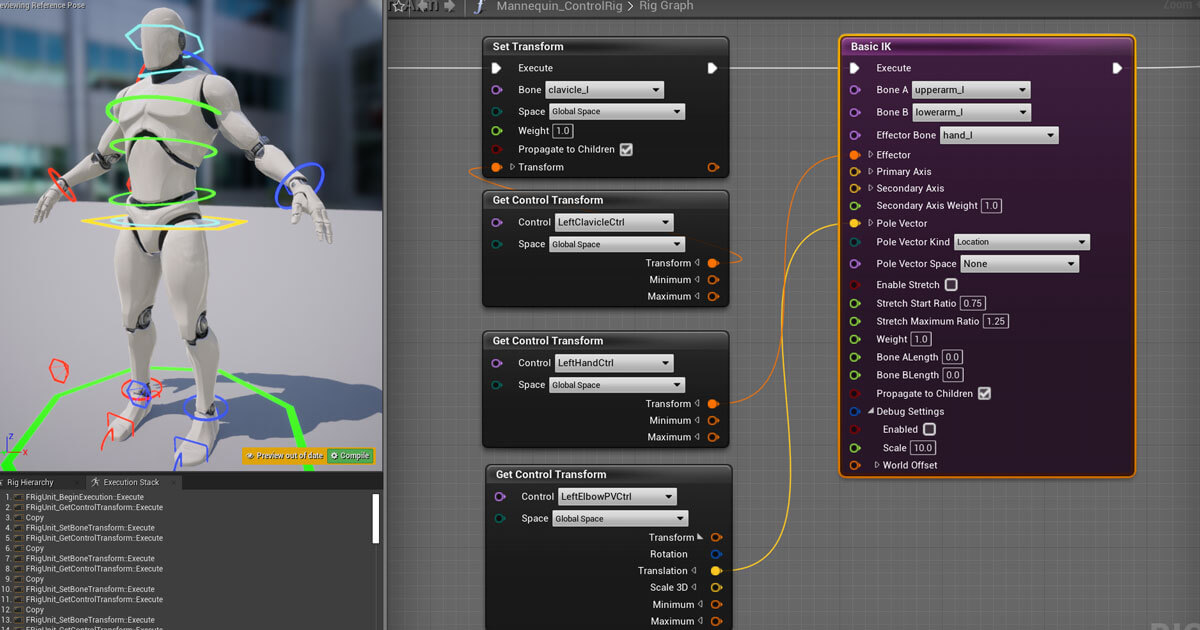
Unreal Engine
With the addition of Control Rig, users can now fully rig and animate characters directly in Unreal.
plush yew
i thought so having "2" problems adding and compiling in the launcher i thought well lets give it a try
but now
rigid belfry
is it now possible to animate stuff in the editor itself?
rigid belfry
@plush yew can i animate all kinds of actors now? say i wanna animate a cube. it is possible in unity, but from what i could understand, it is not in unreal
plush yew
should i restart before i install or its ok to install unreal first ?
❤️
ill come bak for u if it doesnt wooooork lol jk thank you so much ❤️
rigid belfry
pretty much that. you just animate through the animator
i'll take a look at the sequencer first and then try the character rig project
i am assuming the latter is used for playable characters rather than random actors
good to know
thanks a lot
plush yew
hello guys again I have problem with the animation, I did it but when I click the button to move the chair, after time the chair goes back without touching the key again-why?
rigid belfry
maybe the problem is that your actor goes back to starting position after animation is played
see if theres any setting that could prevent that inside the actual animation
could also be that the animation is looping?
plush yew
no
I didn't setup it looping
in the cinematic I don't make it to return
other question, I want to play video with sound and picture but when i upload it unreal engine detect only the video, why? it does it with every video 😦
😭
hey can someone help me out real quick?
now I checked that in my other projects when I upload mp3 format music I can't use it cus it uploads in format
why it uploads by default
plush yew
i cant link Get direction to the speed so its not giving me a direction variable, help?
austere scroll
@rigid belfry i made your set up on a spawning system , but the AI just stands there , is there anything i need to add/missed that would fix that ? thanks in advance
this is the AI's event begin play blueprint
there are oter parts for the AI blueprnt
 exotic thicket
you need to either use a spawn ai node or set auto possess by ai to spawned
 spice cliff
Hello i was just importing my mesh to see if there are any problems and this came up, how can i solve this, im not sure where to start
plush yew
hey can someone please help me real quick?
whenever i look down** my character cant move forward**
he can move** side to side though**
suggestions?
austere scroll
@exotic thicket THANKS
exotic thicket
Sounds like you're using the camera's forward vector to calculate movement direction instead of the character's
rigid belfry
@austere scroll what that script does is, it simply instantiates an actor in your scene. it would be as if you were to literally drag the actor and drop it in the scene. what happens when do dont use the spawning script and instead drag the AI in the level? does it work?
plush yew
well i followed a tutorial and im trying to calculate direction but you cant link get direction to the speed variable output.
can someone please explain a way i can calculate the direction?
i made a blend space but i need a direction input to make it work
rigid belfry
you can set the ai logic without using blueprints, in a class setting i believe
plush yew
@exotic thicket how can i make it use my characters movement vector?
rigid belfry
@plush yew i think you can do get velocity from the mesh??
plush yew
lemme check
rigid belfry
or the character movement component
plush yew
where would i find that?
vernal thicket
Don't you need to get the actor rotation and plug it in?
plush yew
should i get controller rotation?
rigid belfry
get actor rotation, get velocity
plug those in the calculate direction function
it spits out a float value and you can promote that to a variable
you could even get the vector lenght out the velocity and have it be a speed variable
anyone has any doc for having a landscape material use different textures based on height? i am assuming its done through masks?
 paper kernel
Question about map data: if I have a dummy actor that gathers some information about map geometry, how could I bake that into the map as persistent information?
or do I just have to export it into separate file
plush yew
i think i realized my problem, i rigged my blendspace for the slowalk animation, but my speed when pressing W exeeds that strait to running animation which has no blendspace
 hearty walrus
How do I access a boolean from another blueprint?
I'm trying to change a boolean whenever the player walks through a trigger box
rigid belfry
you can cast to it to begin with
but that can get very expensive real fast
from the trigger box event, there should also be a "another actor" pin
thats the actor who triggered the event, from there you can have access to your character
plush yew
Hi Guys, I got a little challenge (or not). I’m no expert yet and I don’t make the worlds that I use, only modify them to make them work for xR purposes.
For xR I use front plate and Back plate, that’s setup with 2 cameras each in the same position in the same world.
To achieve what I want at the moment, I run 2 instances of unreal eacht with different objects deleted from them.
But I want to run it in 1 instance to make it run smoother.
I know that there is a option to hide in game, but I wan’t to make something like hide for camera.
En then choose either camera 1 or camera 2.
I don’t know if it's very clear what I want to achieve but I hope one of you guys can help me out!
Thanks in advance
hearty walrus
shit my cat stood on my keyboard
 placid hill
I am trying to get a grenade working but I can't figure out how to talk to another blueprint properly. I want it to check if its overlapping the component made by the grenade at explosion time
rigid belfry
feeling cute 🥰 , might delete later 😳
hearty walrus
oh my
rigid belfry
is the new control rig project so buggy just for me? also isn't there any form of documentation? no tutorial?
i have never worked with the sequencer so i am feeling a little lost
 fleet wraith
do the paragon assets in the marketplace come with their abilities or particles? It looks just like their movement and basic attacks
 merry gazelle
I'm hoping for some feedback on my particular usecase.
I have 1000 words as .wav files (200kb) each. I want to randomly play these files.
Originally I had a similar random word setup using multigate and tons of nodes. This time I think it's best to have a BP that connects to a datatable. Do you think this is the better way to go?
I'm just worried about inputting all the files / titles into a large table and then hitting a limit or maybe 1000 entries is to much to handle(?)
rigid belfry

In this video we recreate the the Animal Crossing Talking Sound Effects in Animal Crossing New Horizons! The rough process basically involves recording your voice, and then setting each voice to a different letter in an integration program like Wwise or FMOD, and hook it up ac...
hearty walrus
Is there a reason to why this code is failing to compile?
placid hill
im trying to interpolate a post process blend weight but I can't seem to get it to work?
rigid belfry
this was done in unity, but the concept still holds @merry gazelle
placid hill
need to set what object is connecting to third person character
placid hill
the gui is the object
placid hill
bring up the list that shows when you type it
hearty walrus
placid hill
hmmmm not sure. still learning bp myself
rigid belfry
Unreal Engine Forums
Build powerful visual scripts without code.
 indigo glade
you wont be able to cast a widget to a third person character
placid hill
what about the camera within it?
rigid belfry
the way to normally handle widgets is not by casting, but by housing a reference to that widget as a variable. If and when you add the widget to the viewport, set the variable in your character class or level BP (or wherever) to reference that widget and handle all interactions with the widget through that reference variable.
hearty walrus
...what?
rigid belfry
you have player named joe
hearty walrus
yes
rigid belfry
scratch that, watch this video

In this tutorial i demonstrate how to communicate between Widget Blueprints and Blueprint actors using Event Dispatchers.
We also create an interact able door with an popup menu.
If you would like me to share the project or run through how I did this with you more personally...
that'll explain it a bit better
 mellow flame
@hearty walrus
plush yew
other question, I want to play video with sound and picture but when i upload it unreal engine detect only the video, why? it does it with every video 😦
anyone ??
hearty walrus
@mellow flame did you mean get player character#
or controller
character compiles with no errors, and controller shows a warning
not a fatal error, just a warning
mellow flame
it depends on where you're running that function, of course if you're inside playercontroller blueprint the casting would be useless, since you're already performing stuff as playercontroller
hearty walrus
okay, it's compiling fine - how do I actually get it to show up?
mellow flame
what you trying to do?
indigo glade
@plush yew did you add the MediaSound component?
mellow flame
@hearty walrus to see in the viewport just attach a "print screen" and connect your bool variable to the string pin
hearty walrus
this is in the GUI, right
mellow flame
no
hearty walrus
where is it, then
mellow flame
just in the viewport as "debug" print
hearty walrus
where do I write this code
hearty walrus
what blueprint
mellow flame
the one you're trying to access that variable
plush yew
how to add it and where? @indigo glade
hearty walrus
indigo glade
its "print string"
exotic thicket
it's set collision something or other
it sounds more like enabling collisions but it has an option so you can choose
hearty walrus
It doesn't display @indigo glade
exotic thicket
unticked means no collision yeah
austere scroll
ok thanks
nope
it doesnt owrk
i have this AI actor and when i kill it it turns into a ragdoll
but his collision stays where he died
although i put it so it disables collison
that doesnt make sense
exotic thicket
try one of the others then
 hard quarry
If you add a Physics constraint to an object inside an actor it works, but it does not take in account the rotation of the static meshes which you selected.
In this example the door mesh (blue) and the anchor mesh (red) are both rotated -7 degrees, but the bounding boxes itself, red and blue are not rotated -7 degrees
Does anyone else experience this?
If so I would open a bug ticket.
indigo glade
@hearty walrus what class did you derive your blueprint from?
hearty walrus
?
indigo glade
example:
 fierce forge
hi , do somebody knows from where i can get or buy a cartoon skybox for my game ?
austere scroll
@fierce forge there is a program called "Spacescape
it makes u make ur own skybox
fierce forge
cartoon ?
austere scroll
u can put a solid color as the background and pictures of cartooney clouds
if thats what u wnat
fierce forge
where i can find clouds ?
fierce forge
but it legal to use it in a game ?
austere scroll
tbh i have no idea
indigo glade
all of your blueprints will derive either from C++ classes or blueprint classes, the parent class determines what your blueprint will be able to do from the get-go, but I dont think theres any class where you cant call Print String
exotic thicket
If you want to use content from google for your game, you have to make sure it's licensed in a way that it's okay if you intend to release the game.
austere scroll
@fierce forge
exotic thicket
If you're just fucking around and not releasing it, nobody really cares
indigo glade
especially those two you posted, I checked them myself just a moment ago they both can call print
fierce forge
i said about clouds image
fierce forge
i used spacescape
austere scroll
ok ?
 vocal nimbus
Hello everyone
This is really frustrating but I have been trying to get the editor 4.25.1 working since 8 hours now and its only stuck at 39 %. its taking 100% of my CPU. I installed the same one in my mc air and it works super smooth. What is going on?!!? this is incredible and i am lost and frustrated.
does anyone have an idea how do i solve this?
hearty walrus
@exotic thicket I've got it working now - problem is, it only appears for a few seconds, and it appears to be non-updating
also, how can I make the variable get adjusted every time the player goes through the TriggerBox?
vernal thicket
@hearty walrus if you've got a triggerbox with on collision it should trigger every time u walk through it
vernal thicket
Well obviously I don't know the context but variables dont change themselves, you need to change it back to true so it can be trigged back to false again
Can I see some blueprint?
And what's the context?
hearty walrus
vernal thicket
So when do you want it to go back to true?
hearty walrus
when the player goes through the trigger again
vernal thicket
Then you need a flip flop i believe?
indigo glade
then you need to flipflop it
vernal thicket
So after cast do a flip flop, plug A into set false and B into set true
indigo glade
hearty walrus
thanks
hearty walrus
That's (hopefully!!!) this trigger system dealt with
now I need to properly update it to work with the zooming system
indigo glade
so you might need to put a NOT between the IsA and Set
hearty walrus
- rewrite the zooming system whilst I'm at it, because it's giving me headaches
indigo glade
if it comes out backwards from whta you expect
hearty walrus
 dapper vortex
Hello i got problem i dont see textures /msh when im behind
what can be wrong
 rocky radish
Hello i got problem i dont see textures /msh when im behind
what can be wrong
@dapper vortex culling maybe? can you show a video of the issue?
 vital cosmos
anyone else getting frequent random crashes on ue 4.25
dapper vortex
@rocky radish ty
rocky radish
np
novel oriole
Does anyone know a alternative to data table, because you can’t add entries to it
Dynamically
 lethal venture
Hello, how can I make the buttons scale to the text inside of a vertical list thanks
novel oriole
Fit to content
lethal venture
I can't as it makes it really small then
novel oriole
Is the text the child of the button?
lethal venture
It's because I've made it when you hover over the button the text changes color and yeah
and the buttons are a child of the vertical list
dapper vortex
how i can reset my ui on unreal engine ?/interface
i mean i close someting and this is not show up
lethal venture
Is there a way if you hover just over the text not the button?
How can I allow multiple objects into one target?
plush yew
sorry to interrupt but i setup my animation engine to go from Idle to Crouch with (C) but when i crouch it repeats the crouching animation over and over. help?
 dapper oak
if you have a crouch idle animation you need to make sure you set that up at the end otherwise it willjust continue to loop until the condition can return
vernal thicket
@plush yew are you using a full animation where inside the animation the character goes from standing to crouching?
Because if the animation is set to loop it will look strange
plush yew
yeah i have it to where the 1st keyframe is him standing and then the last is him crouched
how do i make it not loop?
vernal thicket
Well it's just going to loop
plush yew
oh i have to have just crouching animation?
vernal thicket
the problem is if you remove the loop the character won't be moving at all at the end of the animation, but for now if you want that, click the animation inside the state and there will be a checkbox called looping inside the details panel
plush yew
ok im doing that now
vernal thicket
Realistically you should get an animation which is just crouching, not moving from standing to crouching, that way you can still show it breathing or something
plush yew
thanks that fixed it
vernal thicket
sweet
plush yew
yeah right now im just doing a from scratch test model to get a feel for how the BP mechanics work
when i seriously make the real deal game im going to make the animations correctly
thx man
vernal thicket
What i'd do in your case to make it more realistic
is get the same crouching animation and trim out the standing to crouched and just have the crouching part looping
then you can transition into that animation from the standing to crouching
but yeah it is more work lol
lethal venture
How can I add multiple Text and Buttons to the target thanks
 mint raptor
@lethal venture There is already a built in way to change color on hover for UMG button
rocky radish
yeah, you dont need to do it like that
mint raptor
and if by add multiple text you mean set text?
lethal venture
Oh okay
mint raptor
Go to the button on UMG
lethal venture
Yeah
mint raptor
and look at the details panel
lethal venture
Okay, sorry I'm new to Unreal 4
mint raptor
no worries
lethal venture
I came from Unity lol
mint raptor
once there you will see an "Appearance" section
lethal venture
Okay
mint raptor
You will see a style section
lethal venture
Yeah
mint raptor
And you can set the color for Normal, hovered, Pressed, etc...
lethal venture
Oh okay thanks
mint raptor
But as to your original question I need clarification on what you mean by multiple text.
Multi line text?
vernal thicket
The hover setting is for the button
 random holly
Anyone offering services to rig to epic skeletons? Dm me
lethal venture
I know I've changed the tint and it's not changing the text color
mint raptor
@lethal venture Text doesn't have that
if you want to do text
the button has a on hovered/unhovered event
Use that instead of tick
lethal venture
I know yeah But's it's long when you have to do 14 buttons
mint raptor
You don't want to have tick execute the code needlessly
No need to take that performance hit
lethal venture
Okay thanks
rocky radish
Anyone offering services to rig to epic skeletons? Dm me
@random holly #looking-for-talent
random holly
I dont have permission to post in there =[
rocky radish
@random holly check the pins
rigid belfry
so i've been doing some reading about this https://www.unrealengine.com/en-US/tech-blog/learn-how-to-create-a-character-animation-rig-with-unreal-engine-s-new-control-rig-mannequin-sample
Unreal Engine
With the addition of Control Rig, users can now fully rig and animate characters directly in Unreal.
and i've come to the conclusion that i dont think this is necessary at all?
it just feels like there's so little you can do in terms of actual good animation
when i could instead use the mr mannequin's tools blender add on and do my animations in blender
obtuse pendant
my progress with getting to know animations and movement has stagnated
and so has my motivation
 weak hemlock
Sort of Unreal related but, do you pronounce Skeletal mesh like Skeeleetal mesh? Or Skeletal like Skeleton? Maybe an UK thing 😆
rigid belfry
i just pronounce it how its written, in this case skeletal
weak hemlock
Yeah, always done that as well, but heard 2 people from work say Skeeleetal, was surprised haha
rigid belfry
i think it depends on your accent
i am italian so i would actually pronounce it something like "skeletael" in english
weak hemlock
@plush yew Auto Exposure
rigid belfry
its called "eye adaptation" and its a post process effect that comes by default with the engine
weak hemlock
You can change in Post Process or camera settings
obtuse pendant
is the TPS BP solid enough to use as a base
or is one supposed to extend on it
i mean you obviously will but i mean
i dont know how to put it
 soft fiber
The texture on one of the landscape segments completely disappeared and I can't get it back?
 midnight gate
elp
update leads to a save file
and for some reason it overwrites it self all the time
how do i fix this?
rocky radish
it overwrites the older save games because its saving to that same slot
soft fiber
Looks like I used too many texture, I though you could use 16...
midnight gate
but it shounldt do that
because im saving a map
the map has like 6 rows of data
why is it showing only 1
 vagrant nexus
So... Just joined.. this would be the place to discuss and/or ask for help with unreal related things?
midnight gate
ok so when i select the other ones it overwrites the boolean data of the 0 value map
 rigid viper
How to unlock my account
rigid belfry
@vagrant nexus yeah, you can post for help, reply to help requests or just talk about ue related stuff
@obtuse pendant all the third person template does is make you move, of course you'd want to expand on it. i like to remove everything from it though and just use what i'll need
obtuse pendant
locomotion looks so appealing when comparing to the ice-skating feet
but i still dont grasp it
rigid belfry
i also have a copy of a third person project where i already have stuff i know i will always want in there
say, some gravity related stuff, just so my character falls off faster than it takes him to reach max jump heigh
then you just duplicate it from there and you're good to go
the animations could have use some touch ups at later stages of development
even the free mocap ones in the marketplace are way better
you could technically work on a project where you just set up your mannequin to work with those animations, and you could always start a new tp template off that first project you created
obtuse pendant
back when i used to fiddle around with unity i always had the issue that animations looked so off
not even like their fluidity or anything but them just not playing along
like the sliding feet i mentioned
hence why im so fixated on locomotion because it just looks amazing
plush yew
noticed that a wall of 500 units. If I split it into 100 x 5 meshes, lightmass takes longer to rebuild
obtuse pendant
true that, guess ill just do as you mentioned
rigid belfry
you wont notice them once you got hud, textures, grass, combat
NPCs
you see that only because your project is blank
hard quarry
Has anyone of you ever worked with a physics handle?
obtuse pendant
i mean you can still blend animations no?
hard quarry
I want to make a door handle for the VR hand to grab and open the door, and I am wondering if a Physics Handle is the right thing to use there
 dusty latch
Hi! I imported a mesh into ue4 and after I built the lights I got these shadows... can anybody help me how to correct it?
rigid belfry
UV mapping
dapper vortex
ue4 have someting like a save in cloud like a unity ?
bsc i want work on project with 2 person
rigid belfry
did you make that object in a 3d modeling software?
dusty latch
in blender
 analog vessel
Hi guys! 🙂 Can anyone point me in the right direction on how to apply the displacement map so that it affects the sphere on all sides? Right now it seems that it only affects the sides, but not the whole sphere, haha. I am using Quixel Scans, and am trying to learn to setup all the maps correctly. Does anyone have and idea what might be missing?
 echo blaze
so any idea on when this is coming ?
NVIDIA Developer
RTX Global Illumination Leveraging the power of ray tracing, the RTX Global Illumination (RTXGI) SDK provides scalable solutions to compute multi-bounce indirect lighting without bake times, light leaks, or expensive per-frame costs. RTXGI is supported on any DXR-enabled GPU, ...
inb4 it's in lumen
rigid belfry
@dusty latch https://youtu.be/Y7M-B6xnaEM
Blender is Free and Open Source Software
Download: https://blender.org/download
Support core Blender development - https://fund.blender.org
--
This tutorial is part of the Blender Fundamentals series, produced by Dillon Gu.
Find more free tutorials on: https://blender.org/t...
dusty latch
okay thanks
frank oar
If you are playing an animation montage, will anim notifies ne inherited from the anim which the montage was created ?
rigid belfry
an uv map tells the engine where the light has to go in a nutshell
 full goblet
how does unreal engine run on mac os without a gpu
I might get a egpu though
maybe with a rx 580
rigid belfry
what mac do you have
the system reqs for unreal should be : Quad-core Intel or AMD processor, 2.5 GHz or faster NVIDIA GeForce 470 GTX or AMD Radeon 6870 HD series card or higher 8 GB RAM.
These are recommended specs so realistically your going to need the equivalent of a MacBook pro, or an iMac to run it and still then it probably won't run great due to the graphics cards
you could buy an used laptop for the same price as the egpu, install a 128gb ssd and it would still perform better than most macs, just saying
rocky radish
@analog vessel multiply it by the vertex normals and also, you have a node that is just multiply by 1, so its useless
 deft haven
I have gtx 1070, i7-7700, 16gb ram and HDD. Is that enough to have a good experience in unreal engine 4?
rigid belfry
just posted the system reqs 2 messages above...
deft haven
Yeah but requirements and experience are different things
I heard ssd plays important role
And you need like 32 gb ram
To actually be productive
 rare harbor
16 GB of ram is more than enough to be productive
Putting your projects in an SSD is gonna greatly reduce loading times whoever
rigid belfry
yeah the ssd is a great jump in terms of quality
rare harbor
this is helpful if you are a programmer and close and recompile your project often
plush yew
Is cinematic matinee ?
rigid belfry
but you dont absolutely need 32gb of ram
what helps is cpu cores
so any new ryzen cpu is a must currently
deft haven
So i7-7700 isn't enough
rigid belfry
of course it is. i think you're just finding excuses for not starting?
rare harbor
It is
rare harbor
more than 6/8 cpu cores is needed for very heavy workloads and giant games
plush yew
@deft haven lol I have a i7 870
rare harbor
don't compare yourself to AAA title devs and setups
For anything that can be done on your own, what you have is great
rocky radish
@deft haven lol I have a i7 870
@plush yew i used to have a i5 650 lol thankfully i upgraded it
deft haven
I build my system just before Intel increased the cores
plush yew
yeah
rare harbor
4 cores might be just the limit
but it's a powerful CPU
it shouldn't stop you from learning and working properly
deft haven
Do you guys work in big teams to make games with unreal. Have you made a game that made money alone?
rare harbor
No, i'm a beginner
rigid belfry
if anything i'll help you make more performant games
plush yew
unreal engine run proprely on my old laptop with 2 cores
rigid belfry
never worked with a team, never shipped a game on ue4
vagrant nexus
Ok cool. So I'm not at home right now, but here's my issue I'm having.. so in my game setup, I have an AI charger character, set up with the on see pawn blueprint. It was working before, now it's not, and I've looked through everything and can't figure out what changed in order for it to stop working.
rigid belfry
most of us are Amateurs
 silk sluice
Hi, are the tutorials from here still relevant/functional? or the interface has changed a lot since then. Its 4.14.1
rigid belfry
from where? @silk sluice
silk sluice
The HighTide care package to get started
deft haven
Is motion capture really important for the game to not feel clunky? I mean combat based games. Or can you manage to have a pretty close result without motion capture?
midnight gate
so i have a widget that takes data from actors in level this widget is a child so all 6 of them have difrent id's right? that they take from the actors? then why do when i click the button to change the variable it only saves the last variable
rare harbor
@deft haven motion capture makes a huge difference in animation if you want to make a realistic moving character, but it can be very expensive
it's not a must
midnight gate
its like all the other children just reset to default
rigid belfry
only AAA game corps use motion cap and even then, its not used that much for combat. animators would have the motion cap and then fix it by hand
rare harbor
@vagrant nexus You should ask in #gameplay-ai, you have more chances of being answered there
rigid belfry
there are ways to make motion cap even in your home, but i think using handmade animation is still better
deft haven
Have any of you made games with unreal engine?
 onyx cedar
Are there any legit reasons to use VS 2019, or should I still just stick w/ VS 2017?
rocky radish
so i have a widget that takes data from actors in level this widget is a child so all 6 of them have difrent id's right? that they take from the actors? then why do when i click the button to change the variable it only saves the last variable
@midnight gate you can make a for each loop for setting each variable, from what i understood from your question
rare harbor
Even if you use mocap you still need animators to fix the details
@onyx cedar i've recently upgraded from 17 to 19 and the first thing I noticed is that the main menu of VS opens quicker
Intellisense is a bit faster with unreal too
midnight gate
@rocky radish so every time i click a button i loop thought them?
are you sure thats gonna work?
onyx cedar
are you using whole tomato visual assist?
rare harbor
Without visual assist I noticed it
onyx cedar
i wasn't able to get it working w/ 2019, i admittedly didn't try very hard to though
rare harbor
I just downloaded the extension trial
rocky radish
@midnight gate the for each loop will execute the nodes you put in it 'in the body of the for each loop' for each index of that array
so you can set the array element for each index in the array
midnight gate
NO
i need them to be induvidual
not the same
i want 1 to be true 6 to be false 4 true
smth like that
not that only last selected one will be true
rocky radish
yes, for each loop will help you set each variable inside the array, sorry if i didnt understand your question
midnight gate
i dont want to set all the variables to true
rigid belfry
you can set the value of 1 index
rocky radish
you dont necessarily set them all to true @midnight gate
midnight gate
yea thats what im trying to do but it only sets the last variable modified
 storm jungle
Not a dev or anything, and I don't know if this is the right place to ask....
is it possible to create a mod for an unreal engine game for practicing in-game mechanics? Like a sandbox training room of a sort? I'd be willing to pay for one to be developed.
rocky radish
is it possible to create a mod for an unreal engine game for practicing in-game mechanics? Like a sandbox training room of a sort? I'd be willing to pay for one to be developed.
@storm jungle some games (like hello neighbour and Unreal tournament) have mod editors
storm jungle
The game I have in mind would be Dead by Daylight.
If there's any mod editor for it, I haven't found one
rocky radish
i dont think Dead by Daylight has an editor for it
 kindred viper
quite difficult
rigid belfry
the game needs open source
that means everybody has access to game files and they can edit them
kindred viper
open source isnt the issue
rigid belfry
it isnt?
kindred viper
its the tools to do it in the Unreal Engine aren't exportable
you have to create them
storm jungle
Does anyone here have any experience with this?
kindred viper
some
rocky radish
it's possible, but it's not an easy task
plush yew
if there are global illumination solutions that work realtime and offline computing. Can't the offline computing be accelerated to work at 1 fps?
kindred viper
sure
you will find most global illumination solutions suitable for Unreal work at better fps than that anyway. Even the RTX one
plush yew
waiting for lightmass to rebuild for hours is a lot of wasted time
midnight gate
imposible
the array system is imposible
i have no idea why its not working'
i guess its ue4 problem
been trying to figure this out for like 5 days
 grim ore
yep 100% UE4, definitely not operator
wary wave
'array system'?
kindred viper
@plush yew I haven't built with lightmass for years. Even back in the day I was using Approximated Hybrid Raytracing to work so I didn't have to worry about lighting builds. VXGI also. Now we can use the tools from RTX and its all good
rigid belfry
@midnight gate i am still a beginner and i have never done this, but let me try to help you either way
this will simply read the values
each single value will be read, meaning that it is possible to change them
rare harbor
Oh boy, I'm I the only one that hates blueprint for loops ?
grim ore
you are
rare harbor
nice.
wary wave
blueprint loops are messy
kindred viper
should feel lucky really. There are no multi-dimensional arrays in the engine. Imagine how that would look in blueprints
kindred viper
I tell people :p
rare harbor
I personally always map multi-dimensional arrays to normal arrays, then access the variables by inputting x and y in a function to get the index
index = x + width * y is an example
grim ore
they do tell you on the website and the launcher...
onyx cedar
If I'm ever caught iterating over a group of things a lot, i move it to c++. which is its own can of worms, but so it goes
kindred viper
me too
 sweet relic
 stable needle
Hey, I'm using the Navigation Invoker system for an open world AI, but I'm getting the error message that my navmesh bounds volume is too large.
"Error: Navmesh bounds are too large! Limiting requested tiles count (1225224) to: (1048576)"
Wasn't this system implemented specifically for large worlds? Is there anything I can do to raise the tile count limit or work around the limitation?
full goblet
what mac do you have
@rigid belfry I havent bought a mac yet but im looking at a i7 mac mini or a i5 macbook pro
rigid belfry
@midnight gate sorry i received a call. just to move this forward, this will now print each array index and its current value
 half panther
Hello, Im trying to recreate a piece of terrain in ue4.
Do you know a way to somehow underlay a map image as reference material so I can orient myself a bit?
kindred viper
technically you can use geodata to recreate real life pieces of terrain.
rigid belfry
world builder is creat too
kindred viper
its not always perfect but its a great start
rigid belfry
you can also create landscape in other programs and then import it
or you can sculpt it by hand in unreal
half panther
I already have a heightmap, but I want to know where to put streets etc.
kindred viper
you can also just dab a jpeg with greyscale and make a landscape :p
@half panther geodata will cover streets. You can dynamically generate them too
midnight gate
But i just need to set values induvudualy inside an array and save them
kindred viper
set array elem
What is the Array: Set Array Elem Node in Unreal Engine 4
Source Files: https://github.com/MWadstein/wtf-hdi-files
midnight gate
Its not working either
I think its smth to do with the way ue4 handles spawning children
rocky radish
are you setting the ID variable to anything @midnight gate
kindred viper
@midnight gate what are you trying to do?
midnight gate
Trying to save the value of my children widget into an actor using array
kindred viper
I would guess your logic is broken then rather than it being how UE4 handles children
I dont mean that to sound harsh as it does
midnight gate
The value is being changed in runtime when i click a button
Then how else do i do it?
If my logic doesnt work wich one will
kindred viper
well you would typically have an array of widgets, then you would get a reference to the widget you want to store, then add it to the array.
rigid belfry
@midnight gate i havent found an actual way to change their values in blueprints yet, but so far this is what i've wrote
midnight gate
Hmmm
grim ore
define problem very very clearly. break problem into smaller parts. code the solution to each part.
exotic thicket
One fairly easy way to do it would be to keep a value in your button widget to tell you which actor it is changing
this way you can just refer to it directly
midnight gate
Thats how im doin it zomg
I have the boolean variable in my child widget and im setting array element based on the id
It seems to work
But when i load back in its broke
grim ore
wait... wait a long long time
exotic thicket
"load back in" as in you load a save game or you reopen the menu or what specifically?
grim ore
@midnight gate looking at the code you posted, you never set the array element to anything but false.....
midnight gate
I close it and open it and it saves everyyime i change a value and loads on begin play
Cant i use it to set true?
grim ore
look at your code
grim ore
your set array elements should be getting the vaslue of InParty I assume and not the return from the setter before it
 soft panther
Which Of Them I should Download So I Can Make Games With IT ?
midnight gate
But ive tried other methids too they didnt work
soft panther
Which Of Them I should Download So I Can Make Games With IT ?
@soft panther ??????
grim ore
especially since your true is never hooked up
 cedar wave
Community @soft panther
midnight gate
I used maps they gave me aame errors
rigid belfry
you dont make games out of visual studio per se
kindred viper
@soft panther I'd probably get the "patience" edition
rigid belfry
thats called an IDE, you write scripts with it. scripts that are then used by a game engine to build the game
soft panther
Yea
cedar wave
@rigid belfry Thus "making games with it". Don't be that guy.
soft panther
I Mean To This @rigid belfry
grim ore
@midnight gate walk thru your code out loud. Read the A part of your flip flop. It reads "If A -> Set InParty to True -> Call Set Array Elements on an Array, with an Index of ID + 1 and set the Item to nothing" (nothing is hooked up to it on the A path)
kindred viper
you can make games out of visual studio though.
Technically you could make a little shader only game with it. It would be a math nightmare but you could
midnight gate
So is it the flip flop ?
soft panther
Visual Studio Is Hard ?
kindred viper
yes
soft panther
oh ***
 agile aurora
I swear UE4 wasn't meant for anything that's not a supercomputer
cedar wave
Making games is hard.
kindred viper
I've used it for nearly 20 years and I still have only used 1% of the entire thing
soft panther
im 1 year with ue4 and now someone recomended me to use visual studio
kindred viper
@agile aurora actually its made to scale down to low end hardware. Just not during development
agile aurora
exactly
kindred viper
well whats the issue?
kindred viper
I mean, you dont expect to win a grand prix in a Fiat Polski
kindred viper
you need a beast of a system to create a beast of a game
soft panther
Yea Thats Right
kindred viper
fiat polski was an EU re-issue of the Lada classic models
grim ore
or use a crap of a machine to make a lower target game, UE4 can do that if you have patience
soft panther
@grim ore Youtube God Is Here With As
grim ore
I've run UE4 on a iGPU on an i3 3rd gen and did just fine, lower your expectations and just go with it
agile aurora
my CPU is even worse than that lol
grim ore
then lower them even more 🤷
agile aurora
lmao
grim ore
"I want to make GTA6 on a Raspberry Pi" is just not a valid expectation
cedar wave
Do you absolutely HAVE to use UE? Maybe a different engine would be better for your particular case. Use the right tool for the job.
kindred viper
I have a project right now, had no baked lighting, uses RTX, hasn't got any volumes limiting/optimising path tracing at all. It runs in editor at 3 fps thanks to the fact I only have a 1080ti. So what I do is, when I need to do anything, I move to Unlit mode, or use console commands to switch off certain effects. Mostly its the reflections/translucency that kills my fps. Global Illumination does of course, but in an expected way
cedar wave
@grim ore To be fair. Rockstar doesn't even want to make GTA6 on a supercomputer 😛
soft panther
Yea With Unlit U Run Less Caculations So Yea Basically You Run It Faster In Unlit
 gritty marsh
Hi ,
Does anyone know how to do this node loop easily in c ++?
soft panther
0.8 ??? Is That Possible ???
kindred viper
sure
grim ore
drop your scalability to low and render scale to 50%. if you can't get 15FPS at that you need to replace your hardware or switch to an alternative engine.
rigid belfry
@midnight gate i think you figured it out already, but just to familiarize myself with the topic, i did this
kindred viper
we all are
restive eagle
hmm i wonder if they ever going to introduce cloud computers, like google stadia
but for ue
restive eagle
that would be a cool feature for those who cant afford a powerful pc
soft panther
we all are
@kindred viper My Man
gritty marsh
@gritty marsh Sry But IDK
@soft panther
cheer up!
soft panther
@soft panther
cheer up!
@gritty marsh ❤️
restive eagle
@kindred viper ahh thats cool, thought it doesnt exist yet. personally i wouldnt use it but those who cant afford a decent pc might consider it as an option
kindred viper
When im down I listen to Electric 6. https://www.youtube.com/watch?v=NF4azs25kUw

Down At McDonaldz by Electric Six
(c) 2007 Metropolis Records
kindred viper
happy music, happy thoughts
midnight gate
@rigid belfry does it work?
kindred viper
the band is amazing. more than 13 albums and they are still fairly unknown
rigid belfry
the branch takes in the bool values of each index, when its true, it fires TRUE and sets it to false. when its FALSE, it fires and sets it to true
check what i've already posted
rigid belfry
the video @grim ore made helped a lot
kindred viper
yeah. lots of happy songs. Danger High Voltage is probably their most famous alongside Gaybar, but they have dozens of amazing songs
soft panther
All Those Ue Talks Maid Me Want To Go To Make Something Cool In Ue4
rigid belfry
thats how they get you
soft panther
Bro Im Started To Vibin In My House So Hard Now
Im Dancing Like Im Down At McDonaldz
@kindred viper U R God
agile aurora
Nooooooo
kindred viper
I dont know about that, but I do know that music is important when you do this job. You need happy, energetic music otherwise if you listen to music that is down and depressing, you will end up in dire straights.
plush yew
does anyone know a good site to find Height Maps? (Png file)
agile aurora
UE4 crashed right before it was done baking
and now I gotta do everything over again
plush yew
heck gamr
kindred viper
harsh
rigid belfry
Unreal Engine Forums
If you are working on mods for ARK, this is the forum for you! Dino riders welcome!
plush yew
hey guys do yall know where i could find/make a height map for my "project"?
soft panther
@rigid belfry You Know Everything Are You
agile aurora
soft panther
Unreal Engine Forums
If you are working on mods for ARK, this is the forum for you! Dino riders welcome!
kindred viper
@plush yew you can make a heightmap yourself, or you can use geodata to generate one, or you can use WorldMachine to use an editor to make one. But essentially all you need is mspaint to make a heightmap
soft panther
@agile aurora You Can Do An Excute Consol Command And Cancel This
plush yew
your speaking a whole new language to me buddy, but lets give it a shot
kindred viper
check out worldmachine then. do the tutorials (you will need to its not the best UI). Should be golden then
 barren flume
How can I get it so when a player's health reaches 0 possess a different character already in the level
rigid belfry
you can literally open up paint, fill it with black and then paint some white spots
and use that as heighmap
soft panther
@agile aurora
kindred viper
@barren flume in your health check, fire an event that depossesses and repossessesesessessessss
soft panther
@agile aurora
kindred viper
@barren flume a couple of ways. either a. store a ref to it when it spawns or b. get all actors of class or c. interface or d. tags
@agile aurora top of the viewport (lit by default)
kindred viper
yeah its like leaving a public bathroom and being able to breathe again :p
barren flume
 stoic osprey
Hey guys a bit new to Unreal Engine just been wondering how do game devs make games with different levels as separate. How do you combine these levels into a game.
rocky radish
3% baby!!
@agile aurora 🥳 🥳 🥳
grim ore
@stoic osprey you can make seperate maps/levels and then just load them as needed when you finish the last, or you can use level streaming to load and unload them while the player is playing
stoic osprey
@grim ore How do you combine them into a game.
rigid belfry
console command load level
vernal thicket
Yeah load level lol
Under project settings set the starting map as the first to open, and then at the end of each level just do a open level with name
stoic osprey
What does load level do? Srry for my ignorance btw.
vernal thicket
Loads a level
On your project, you can for instance save as, and type Map1, then click New level, save as Map2
You now hVe 2 levels you can open with Open Level
dapper vortex
how i can give some one my project to work on in both ?
vernal thicket
Github
vernal thicket
Mat? XD
barren flume
git
and some more
then you chose which one you want to use
I've only used git for that
dapper vortex
Ok
barren flume
I don't know about the rest
you should be able to work with other people on unreal engine
then changes made are updated to whatever provider you use
when you chose to submit it
vernal thicket
Oh is that how it works?
barren flume
if you want to use git
dapper vortex
to working on project
vernal thicket
Google github kio
dapper vortex
but i need all time, update it manually and send again ?
barren flume
only issues i've had with git is how to use lfs
i've read tutorials about it but can't seem to get it to work
kindred viper
use perforce. save yourself the pain
I mean, there is pain involved in learning perforce, but its short and worth it
analog vessel
@rocky radish Hi Danielll, thx for your help, been trying for some time but I can't get it to work 😖 , do you mean like this perhaps?
I can only get tessellation on right and left side
rocky radish
yes, that should work, but apparently not 🤔
analog vessel
yea, hehe, I am very confused, perhaps there is something wrong with the displacement map of quixel?
Maybe I should try another texture set?
rocky radish
is that displacement texture directly from quixel?
analog vessel
yes its from quixel
agile aurora
ARE YOU KIDDING ME
AGAIN
right before the lighting finished rebuilding
now I gotta re-rebuild it again
rocky radish
lol i feel bad for you Dirty Dan
rigid belfry
@plush yew off the rgb value of the diss. texture, drag the pin and type power
or maybe its called 1-x?
@agile aurora can i see what your lightmap density is?
agile aurora
no
rigid belfry
found the problem
agile aurora
because UE4 crashed again
rigid belfry
i am suspecting its all gonna look white
agile aurora
nah I remember it was all blue
rocky radish
how many lights do you have in your scene?
rocky radish
yes its from quixel
@analog vessel try getting the red channel for the displacement then
analog vessel
Ok will do 🙂 Thx for your help btw, really appreciate it!
trying my best to learn how materials work
rocky radish
Np
rigid belfry
creating material is basically doing math but with colors
analog vessel
@rocky radish You solved it! Now it is doing tessellation on all sides!
Thx a lot man! 🙂
rocky radish
Np 😄
frank oar
I am trying to cast to a BP,
The warning says that it doesn't inherit from the player character but I do not know what it DOES inherit from.
So I am totally stumped as to what should go into the object Pin..
ANY advice is welcome!
rocky radish
is the class you're casting to a character or a pawn?
frank oar
it is an actor bp
soft fiber
Could someone explain the max terrain textures to me? I'm looking at some textures that have base color, height, roughness, ambient occlusion, and normal maps. Would that be 5 of the 14ish available textures? Thanks
rocky radish
it is an actor bp
@frank oar if its not a character type class then its not going to inherit from character
grim ore
@frank oar What Is Authaer_BP? Why do you want to cast to it? what are you trying to do?
frank oar
I am trying to create a reference so that I can call an event in that bp from my anim bp.
when connected, the notify event will call an event in Authaerbp to attach static mesh to sockets..
grim ore
so what is Authaer_BP?
frank oar
that is a parent bp I currently have set up to effect a bunch of children actors.
grim ore
is this something in the world somewhere?
frank oar
Ill explain very briefly,
its basically a sports educational tool.
you can view skills which are spawned in using widgets.
some of them you can interact with, I use Authaer_bp as a parent to handle all of the spawning/interaction ect..
grim ore
ok, is this something in the world somewhere?
frank oar
the skills are basicaly animations i created/ made into actors and children of the authaer_bp
they are in the world when the player spawns them in
grim ore
you are trying to talk to Authaer_BP, you need an instance of it (a copy in the world) to talk to. This is why I keep asking is this in the world somewhere?
grim ore
if Authaer_BP is in the world you can use "Get Actor of Class" and get the instance of the one in the world to talk to
frank oar
thank you @grim ore
plush yew
is there a way someone can record themself from a scene capture component then place the recording in the VR world which other could see
frank oar
would it be correct to say that...
you can change one function without effecting the rest,
but macros all change when edited ?
I watched a live stream on media the other day @plush yew which showed how you can get a live webcam/camera feed into your level if that has any relation to what you are trying to achieve ?
others would be able to see it
I would assume since it would be playing in the level, either on a widget or on a mesh your using as a screen.
plush yew
kind of, what I'm kind of attempting is the player in VR headset would give there views infront of a scene capture component, the point being it's inside of the engine which is captured but the audio is them. That recording is then available for them to place somewhere in the world. Which other people trying it can see it
rigid belfry
first pass for my NPCs
i kinda like this art style
maybe i'll do something with voxels
current plan is to go with a stylized toon look, hence the little dust poof
 open wadi
Is there a way in UE4 to automatically open any given module / widget as a tab on the main viewport by default?
So I don't have to constantly drag newly-opened windows to the top bar?
kindred viper
@open wadi there is but you wont like it
rigid belfry
havent done it yet, but i know you can set or remove focus to widgets, so i am fairly certain its possible
open wadi
I won't? Ok.
kindred viper
well depends what you need but
rigid belfry
oh wait i misunderstood
kindred viper
there are standard editor widget utilities for the viewport. But they are the editor viewport. There are some others in the most recent version (if they were released). Or you can make your own
open wadi
Well, the issue is, I'm essentially rebuililding a project, for training purposes, in two different Unreal instances. One instance has the old project, and another has the new project where I am constantly referencing the old project to mimic variables, event graphs, etc.
And it's horribly annoying, when alt+tabbing back and forth, to have these open windows.
So I'm having to constantly drag a given window to the top taskbar in the viewport.
kindred viper
that adds another layer of nope
open wadi
Do what?
kindred viper
you could technically do all kinds of inter-application stuff but its deep code. You could probably do something really hacky too. But as far as I can think for now, you would be better just alt-tabbing and getting on with it
kindred viper
in more ways that are available too
open wadi
Ok, then I'll leave it as-is, thank you @kindred viper
kindred viper
UE doesn't like backwards compatibility so accessing the assets directly for import wouldn't even work
open wadi
I wonder if there would be a way to get Windows to not layer the two instances of UE4 in the bottom Windows taskbar so I could click either one.
Well it's for training, I'm learning the UMG widgets and what not as I go.
It's not a complex project I'm copying.
Pretty simple.
 covert pollen
kindred viper
covert pollen
kindred viper
you could snap the editor to the side of the desktop and have them aligned that way (presuming you are on windows)
covert pollen
open wadi
Yes, I'm on Windows.