#ue4-general
1 messages · Page 769 of 1
 digital anchor
 storm venture
what's a soft pointer?
my goal is to shift the long loading times on later levels to my initial level
 latent flume
Do anyone know any good video about multithread? I want to multihread a class with functionality to a ray trace, select location, then spawn a object. It has to be multithreaded because I would like to use procedural terrain with spawned HISM meshes. I can't keep the main threads stuck on the spawner.
digital anchor
when you create a variable you can select soft class pointer or soft object pointer
 ancient obsidian
Can someone explain this to me? It's from Release Notes:
TFieldIterator no longer iterates properties, use TFieldIterator instead
 plush yew
hiiii !
is there a way to remove this foliage in a choosen square objecct ?
like i want to place a house so when the house is placed the folliage will be removed?
 shadow shore
Go to the foliage tab then press shift and do the same you do to place foliages
shadow shore
can someone help me with multi user editing?
storm venture
@shadow shore im pretty sure it only works if you're connected to your friend with a vpn
plush yew
is there a better way ??
storm venture
youll both need to download something like hamachi or zerotier, then one person hosts and the other connects, theres tuts online for each of the programs
@plush yew use an "or" statement
connect all your boolean values into a single "or" node and use that instead
shadow shore
@storm venture thanks ;)
storm venture
np, good luck
shadow shore
:D
storm venture
you're trying to remove all overlapping tree meshes?
plush yew
ow i changed it with little foliage now xD
i want to put anything on the ground like a farm , a house anything that you can put into the game then i want an actor or code to do away the folliage in the game were u put the building or object
forums says its imposible but i dont beleive it everything is posible
storm venture
you might want to consider using blueprints instead of meshes for your foliage
plush yew
yes i think that to
then i can make some wind effect into it and some walk true grass without putting to mush performance loss
gone take me 30 minuts of blender to xD god i hate blender and the co operation with unreal engine xD
 lime girder
Hey guys, I just have a strange issue on switching to Android preview (ES 3.1, and Vulkan both show this:)
https://storage.googleapis.com/maketheory-send/12b063cf-3450-40c2-b91f-ce07904e27ce.gif
So I'm having this issue
On Shader Model 5 my map looks great
When I swap Vulkan my map's lighting is very different.
What's the general workflow for working between two separate rendering systems like this? Duplicating maps and adjusting lights?

 azure reef
Hello! I want to upload my game to Google Play and I need to create OBB file and I don't know what it's about 'Disable verify OBB on first start/update'. Should I let it checked or should I uncheck it? Thank you
 quiet swallow
@rigid belfry, Nothing is wrong with the auto material it works just fine it's just that It was not what I was looking for first but since the auto material works better than my first solution there is no problem 😄
 rigid belfry
yeah i linked the yt video because i saw you're interested in level design more than actual coding
plush yew
can anyone say why my meshes stop rotating after a while? I just added the rotating movement component. I want them to rotate forever.
quiet swallow
Yep I tried to learn coding about 5 times but it was all in vain since I ended up forgetting everything I learnt and not understanding anything beyond the basics and I also love being creative so I ended up deciding to specialist my self within 3d environment artist and nothing else yet, all though I want to learn as much as I can so over the years so I'm going to pick up on more things, after ue4 I want to blender then premiere and then coding etc.
 novel oriole
Hey all, how would I go about storing a large list of data, as a asset of sorts in the content browser, basically what I want to do is have a almost sort of database of emails therfore using ALOT of text. As its the main medium of my story, and the list would be so large, I'd rather have a whole asset dedicated to it, rather than have to manage it in either a blueprint or have to manage tons of data assets. I have tried UDataTable but personally, I find the workflow awful as its not great for dynamically adding more entries in runtime, and to get a single entry where i dont know the row number, i have to iterate through each entry until it matches a boolean criteria, anything would be helpful at this point and damn this is a long paragraph
 vernal thicket
Enumeration?
novel oriole
I cant dynamically add entries to a struct
novel oriole
yeah I don't think an enum is a great idea for my thing
vernal thicket
You designing a game or something else?
 cyan pasture
4.25 Version
Hey guys, does someone knows why, the lighting on android package is seems to be blown out?.. on preview mobile mode looks ok.. but on the actuall package it's all white.
 obtuse pendant
Can someone help me with this, sorry for paint I just couldnt really put it into words
novel oriole
Maybe putting the widget into world space?
obtuse pendant
Not sure that helps with the space available/angle of the face
 cerulean sandal
do u have any idea on how i could do a thing for my game?
i need to
once an object is placed in its spot it should play an animation of the camera moving
and the hard part is
that i need some rocks in the scene to fly away
and i can do that with animations but thats not realistic
 neon sparrow
Hi all, just installed 4.25 and tried to open a project - now it's getting me to install VS 2019 (7GB) - do I need all of the components as an artist? 😩
novel oriole
unfortunately yes, although you can remove some extra stuff
The only extra components you need is the Windows 10 SDK and the .NET SDK, but I'm not completely sure
neon sparrow
Cheers for the info - wish there was some additional clarity for what artists need when installing this sort of stuff. I'm not going to be writing C++ anytime soon! 😄
novel oriole
Install it through through the VS installer not unreal, ue4 doesnt gove you the option to remove some stuff
obtuse pendant
Found the solution to my question, orthographic projection mode for the camera is what I was looking for
 novel oriole
Your explanation is pretty vague
 granite magnet
I want to import something from quixel to Unreal but I don't know what to choose here
 whole quarry
do you want to import a datatable from quixel?
novel oriole
So if I'm correct, object placed in area -> camera animation -> epic realistic rocks flying away? @cerulean sandal
Use the quixel addon
granite magnet
I want to import this
novel oriole
Bridge and quixel addon
cerulean sandal
So if I'm correct, object placed in area -> camera animation -> epic realistic rocks flying away? @cerulean sandal
@novel oriole nah the rocks shouldnt be realistic, the movement of them should
granite magnet
how do I use the addon? Do I need to install it from the UE store or..?
novel oriole
Install bridge, and it give a dialogue when it first starts, to select an DCC/Engine, just pick UE4, and then install it (guides online( @granite magnet
@cerulean sandal you could use a explosion force?
cerulean sandal
whats that?
novel oriole
Have you installed the plugin
granite magnet
granite magnet
hmm I don't know I think not
cerulean sandal
@cerulean sandal adding a force to objects
@novel oriole ok
novel oriole
Try googling up, I don't have access to my computer rn but theres a official quixel guide to installing the bridge link @granite magnet
granite magnet
alright I will thank you @novel oriole
novel oriole
I will welcome you
 tiny sonnet
unless they have to be public, should i make most of my variables private?
 hushed hare
dude
im so happy
ive been coming back to this problem on and off for months
and i just restarted the part that i couldnt figure out today
and already
almost perfected it
its so nice
im so happy
tiny sonnet
?
hushed hare
im not talking to you in specific
tiny sonnet
ik
hushed hare
sry if the "dude" confused you
tiny sonnet
im asking what are u talkin abt
hushed hare
im just saying this all cuz i was feeling down about it all earlier and i wanna let everyone here know that pushing through trouble times is so worth it
i have a new motivation for this project now
tiny sonnet
ahh gl 2 u then!
hushed hare
you can see msgs from me in february where i was trying to get help on this lol
granite magnet
@novel oriole even though I got the message "Successfully installed" I don't have the folders "UnrealEnginePython" and "MegascansPlugin"
oh nvm.. seems like it works now xD
plush yew
Is anyone here
 waxen raven
Nope
plush yew
Are you good with animation?
granite magnet
dude just ask your question and if someone can help that person will help
plush yew
Well for some reason my animation has gone wack it's completely fine in blender but in unreal it just doesn't work
granite magnet
maybe send a gif or a short video of the problem
plush yew
granite magnet
a picture is not able to show an animation 😅 maybe something has gone wrong while importing.
I can't really help you since I'm new to Unreal but I've worked a lot with Unity and sometimes problems like that happened
plush yew
Hmm alright
 white relic
anyone know how to change the spawn location of particles in niagara
changing the '
changing the 'location' on the z axis does not start them up or down
it doesnt make any sense to me
 surreal laurel
Hi, so I have a BP that intermittently spawns actors that are all the same class. However, each of these spawns need to have movement based on different inputs. So ideally i'd like the same BP class to be spawned over and over, but to be able to drive each of them differently. What is the best way to achieve this?
 dapper vortex
Any one can help me ? i want build someting, to exe and on build i got 0 files
 grim ore
not much we can do but ask what does the error/output log say?
surreal laurel
Hi, so I have a BP that intermittently spawns actors that are all the same class. However, each of these spawns need to have movement based on different inputs. So ideally i'd like the same BP class to be spawned over and over, but to be able to drive each of them differently. What is the best way to achieve this?
@surreal laurel I'm imagining with an array somehow, but i'm confused on how to access just the Actor Transform of each spawned actor seperately
 quiet latch
okay.. here is what you do ... you set up your inputs on the Player Controller... make an enum for each movement set ... a variable in the controller with that enum and on each input function you check that variable with a switch, make it call different functions on the pawn ... in the pawn class you define that same variable and set it to the movement set you want ... and when you possess a pawn you check the pawns movement set variable and set the one on the Controller ... savvy? @surreal laurel
so enum with the sets ... one variable on the Player Controller, one on the Pawn ... the pawn is fixed to what it needs and the controller checks it and sets it's own on possess... and on your input "forward" you switch by that variable ... and make it do different things on the pawn
if(GetPawn())
{
switch(MovementSet)
{
case "hover":
GetPawn<YourPawnClass>()->HoverForward();
break;
defailt:
break;
}
}
surreal laurel
@quiet latch dayum, that's a great response. super helpful, thanks a ton!
quiet latch
❤️
 light lark
hey guys. How do I add the Soul: Cave demo to my project? I just want to use the premade cave and give it a spin. But it only says add to project for some reason
 digital badger
The /master/ branch on github is at 4.26 :- is this correct?
 neat forge
would it be possible to make a material that can change text during run time?
I want to make a computer screen that is printing variables basically, and itll print the words onto the material of the screen
tiny sonnet
can u get the owning player controller from a player state
quiet latch
take a look at render targets... @neat forge
No.. but you can
if(GetPawn())
{
GetPawn()->GetController<YourControllerClass>();
} @tiny sonnet
 half barn
I'm looking for someone to help/create a custom shader - what channel would that best fall under?
surreal laurel
@half barn Probably graphics if people are feeling generous, otherwise looking-for-talent
neat forge
Thanks guys for the info, I'll look into those
quiet latch
@plush yew @neat forge the thing is if you use render targets you might aswell put the umg out onto it with it's full variability ... otherwise just set a parameter in the dynamic material ... however the scope is ... if it's just a neat thing to have do the limited version with the material ... if it's a core feature like having another player text something on screen you need to dig in
oh.. yeah.. you need to MAKE the render target with the Slate ... I don't know if it's possible in BP... like draw() into the render target
surreal laurel
What's the best way for every N execution fires to trip a branch then reset? For instance, a Do N node that returns false when it has completed which could set a boole and reset itself, if that makes sense
tiny sonnet
@quiet latch im using bp, but that still helped thx!
surreal laurel
Is there a node that returns a value based on whether or not the node before it is actually firing?
storm venture
@neat forge if you're going for a computer screen, check out 3d widgets. you could get really fancy with those
tiny sonnet
@plush yew cant you use an isvalid node or an breakpoint for debugging?
storm venture
- allows for the player to interact with the screen
neat forge
:O
surreal laurel
@plush yew cant you use an isvalid node or an breakpoint for debugging?
@tiny sonnet I couldn't, cause i didn't know it existed! thanks
quiet latch
umg is a shell for the slate system so you can have a facy editor ^^ ... I don't know if the render target approach works if you only use the editor... displaying one in umg sure... but you wanna MAKE one and draw to it with your umg thingie... I remember it being a husstle in code @plush yew
plush yew
Would anyone know how to fix this model problem this only happens with animation
surreal laurel
@plush yew What's the problem exactly?
tiny sonnet
i dont think that rig is for that animation
plush yew
I'm not sure it looks great in blender
tiny sonnet
it looks like it twerking but facing forward lol
surreal laurel
Looks more like it's mid-fortnite dance to me
quiet latch
sry brother @plush yew
it is absolutley possible tho... you just need a code build and f**k arround with slate ... it's a major endeavor tho and you need to weigh the efford... BUT... you know a lot when you made it ^^ ... essentially slate can do all the things umg (editor version of slate) can. But umg can not do all the things slate can.. some functions are not exposed... 🤷♂️
https://docs.unrealengine.com/en-US/BlueprintAPI/Rendering/BeginDrawCanvastoRenderTarget/index.html
maybe those help and I'm wrong and you CAN do it in BP ... fact check me, ALWAYS ^^
I'm using the dark side for too long now.. don't remember much about BP
Create Canvas Render Target 2D
Begin Draw Canvas to Render Target
plush yew
It's not supposed to look like that
surreal laurel
This is my set up for a counter that does 'A' until it reaches 100 and does 'B' then resets itself. I feel like there is probably a better way to do this, any advice?
quiet latch
hmmm.. would help to know what it IS you're doing? ^^ ... right now you're doing a LOT of stuff on tick repeatedly.. that ain't no good son! 😄 @surreal laurel exept for you wanna test your CPU performance
 slate vessel
why with high lag values does spring arm camera rotation lag make the camera roll like this? i cant solve it
 surreal laurel
@quiet latch Yeah definitely trying to avoid the ol' tick. Event Tick is fed into a delay, and basically every 100 of those I want something to happen (Spawn Actor) and then the counter to get reset
quiet latch
is that counter function increasing one per tick? .. or does it runn 100 times per tick? 🤔 @surreal laurel
surreal laurel
The Do N was left over from a previous attempt, so I guess this is a better look at it:
dapper vortex
;;LogLauncherProfile: Unable to use promoted target - ../../../../haha/MyProject2/Binaries/Win64/UE4Game.target does not exist.;; when tried to package exe.
surreal laurel
is that counter function increasing one per tick? .. or does it runn 100 times per tick? 🤔 @surreal laurel
@quiet latch Increasing one per tick
storm venture
@surreal laurel keep in mind you're using !=, which means "does not equal"
surreal laurel
@storm venture Right, that way when it does equal the boolean triggers and the counter is reset
quiet latch
okay.. STAHP.. that would make me wait for a spawn for ages on my shitty rig... use a timer to count down time ... how is it called in BP .. TimeLine or something ... OR.. you
define on the Actor:
float time = .0f;
float timeMax=10.0f;
tick(delta) //---->OnTick
{
time+=delta; //-----> increase time by delta or time = time+delta
if(time>timeMax) //---->branch if time bigger than timeMax
{
SpawnEnemy(); //--->do a thing
time=.0f; //---->set time to zero
}
}
@surreal laurel
storm venture
ah, so you want the "true" in the branch to execute 100 times and then execute the "false" once, then repeat?
dapper vortex
?
surreal laurel
ah, so you want the "true" in the branch to execute 100 times and then execute the "false" once, then repeat?
@storm venture yeah exactly
@quiet latch Is using a timeline better than delay?
quiet latch
more what you want in that situation @surreal laurel
but take a look at that tick function.. does EXACTLY what you want in real pausable ingame time without having this huge timeline thing lerking arround
dapper vortex
;;LogLauncherProfile: Unable to use promoted target - ../../../../haha/MyProject2/Binaries/Win64/UE4Game.target does not exist.;; when tried to package exe. end nothing create in folder
storm venture
@surreal laurel did you make the Counter macro?
surreal laurel
@surreal laurel did you make the Counter macro?
@storm venture No I didn't, should I?
quiet latch
timers also run on tick.. just not that obvious and maybe on another thread @plush yew
surreal laurel
@storm venture nvm I misunderstood, the Counter macro came with ue4
storm venture
that's weird, it's not in my version
surreal laurel
my bad, it doesn't come with, you need the extended scripting library plugin @storm venture
storm venture
@surreal laurel this probably isnt the best way, but, it seems to work:
dapper vortex
;;LogLauncherProfile: Unable to use promoted target - ../../../../haha/MyProject2/Binaries/Win64/UE4Game.target does not exist.;; when tried to package exe. end nothing create in folder
quiet latch
@surreal laurel @storm venture made an edit above.. to make it more clear for BP
 novel summit
Hey, could someone help me? My spline system isn't working. I'm trying to use it to make a subway system but the little thing that shows up to bend and twist the spline isn't there.
dapper vortex
some one pls
quiet latch
use a Spline component and make the constuctor go over every spline segment and create a splineMeshComponent.. use the splines in and out tangents to set the ones of the splineMeshes... BUT.. also get the upvector.. super important or everything will be a mess ^^
@novel summit
 frigid trellis
how do i scale an entire particle system, rn it just scales the individual particles like this https://gyazo.com/48b174993b8dea730e2db65f5e0d0bcb
dapper vortex
;LogLauncherProfile: Unable to use promoted target - ../../../../haha/MyProject2/Binaries/Win64/UE4Game.target does not exist.;; when tried to package exe. end nothing create in folder pls some one can help
white relic
bleh
I am trying to get a sound to play attached to my tornado
added it into the blueprint and started the audio as th second in sequence
but its not playing
he
heh
quiet latch
@dapper vortex seems like something went wrong with your project... it sais it dosn't have the target file of your project... try to rebuild game files on the UE4Game.project ... 🤷♂️
dapper vortex
@quiet latch i just try to , build exe from ready ue4 project. what can be wrong lol
im click build then package. ;p
quiet latch
anything brother 😄 ... don't know your set up nor what you did @dapper vortex
quiet latch
oh man..idk sawwwyy
 opaque quail
Sorry for the newbie question... I'm suddenly unable to control my pawn and not sure what I did wrong. It was working fine--I have a pawn set up that I can control third-person style. It's set to "possess Player 0." Well, when I load up my project now after editing the landscape, and hit "play," I'm stuck at location 0 0 0 instead of controlling the pawn, unable to move at all. The pawn is still set to "Player 0." No other pawns are. What the heck did I do wrong? 😮
quiet latch
it auto spawns your default pawn by.. well default 😄 ... mabe you messed with that? ... or it spawns it now AFTER you possessed it in your code? .. it's messy I always disable that and do the spawning and possession myself
@opaque quail
opaque quail
Yeah, maybe--I'll look into that, thanks!
tiny sonnet
i have been trying to get keyboard input in a umg and this is the best way i could find. Is there a better way to handle this?
maybe a event dispatcher, now im think or a class interface directly from player controller?
quiet latch
ooof.. yeah... handle the input in the player controller and make it do a thing on the UMG
@tiny sonnet
NEVER put gameplay into the UMG.. it's only a display.. it does what you put in ... it REACTS.. never acts
novel summit
@quiet latch I'm trying to use this https://youtu.be/mKRrLJ4kmFE this is

This scene is available for purchase at these locations:
Cubebrush - http://cbr.sh/ej7iz6
Gumroad - https://gum.co/subwaytunnel
Unreal Marketplace - https://www.unrealengine.com/marketplace/en-US/product/city-subway-tunnel
New York style underground subway tunnel created for ...
It has a spline component in it
storm venture
@opaque quail might wanna double check and make sure you have it force the spawn despite collisions, maybe your new landscape is blocking the spawn?
quiet latch
oooff.. someone made what i explained to you into a custom thingie ... idk how to use that.. ask the creator or make it yourself @novel summit .. it's not that hard ... like i said.. the spline itself is just to get the deformation info ... and on the constructor you go over every splinepoint (get num spline points ... do a thing for hat number of times -1) ... and create SplineMeshComponents ... and feed that the position, tangent and up vector of the point and the next
opaque quail
@storm venture That very well could be it, I'll try that out. Thanks!
novel summit
@quiet latch lol, it worked before. I bought the dudes system and everything. It's just one day I loaded up what I had done already and the edit thingy was gone
So I couldn't extend it or twist it out anything
quiet latch
O_O... well.. ask the creator to trouble shoot his product 😄 .. I wouldn't know... I know how you can do it yourself from scratch
dapper vortex
some one work on VR?
tiny sonnet
@plush yew i couldnt figure out how to use that lolol
not to mention, i rather have all my inputs in one placwe
@plush yew there is another problem tho
I figured out what i was doing before but there is another problem https://gyazo.com/f7adee0fbe5970862051ca3f311b38a9 im trying to access access the function i set up for the enter button, but the "next-line" default function has priority. do u know how to fix that?
@plush yew
 merry gazelle
Any idea what node sets the widget class of a widget inside of blueprints? (set widget for example doesn't list any widgets)
white relic
Is it possible attach particles to an animated.. ..spline
novel summit
@dapper vortex what ya need?
dapper vortex
@novel summit this is possible from normal project, not vr start build it for vr ? to exe ?
novel summit
like turn a normal project to vr?
plush yew
is it ok to use the default mannequin for my finished game?lmao
dapper vortex
@novel summit yes but after build to it exe
bsc on , engine i can run it, but after?
novel summit
@dapper vortex so would you be using the vr project template or fps template
dapper vortex
fps
novel summit
@plush yew you'd have to check the tos
but the animations are pretty eh so I dont suggest you do so lmao
@dapper vortex if you would be doing it with the exe you can but you need a specific software and you have to use a controller instead of 6dof vr controllers
dapper vortex
Yes ofc ik
novel summit
ok, then yeah. If you have the right software, any fps can be vr
white relic
Can splines be animated..
dapper vortex
I tried, some things with normal vr started asset, they fun but.. uh
novel summit
I have no idea sorry
dapper vortex
well
dapper vortex
@novel summit u know anything about doing exe ? i tried bud nothing create to me
''says'' package complete''
but nothing on folder
novel summit
can I see your folder
white relic
anyone want to make me a quick mesh XD
like its super simple
I am trying to use blender but its making my brain hurt and I am having trouble just clicking on the fucking cube lmao
dapper vortex
@novel summit ?
 restive arrow
I have a dot on a hud, and I want the position to follow something in the 3d space, how do I bind that?
Sorry wrong chat
white relic
oh wow I actually did it hahaahha
 soft fiber
@white relic Is that a tornado?
dapper vortex
any one cna help me how do it this exe?
LogPackFactory: Finished extracting 8 files (including 0 errors).
quiet latch
@white relic
^^
it has 1:1 scale and you only need to apply a tilable texture that is moving sideways. it's 2km high and 20 meters wide on the ground... or 16m.. don't remember ...
plush yew
anyone know how to get a character to glide after pressing the jump key twice and holding it down in a 2d sidescroller?
white relic
@white relic
@quiet latch lmao you're awesome dude
quiet latch
😄
i know, right?
✌️
let me see it towering and threatening in your game if you may... vids pls
 grave spruce

GitHub
Unreal Engine 4 .NET Core integration. Contribute to nxrighthere/UnrealCLR development by creating an account on GitHub.
 fading crag
hi guys ~ how get shadowmap on material editor?
quiet latch
simple answer: you don't ... you could do a line trace from the Pawn to the light source to determine if something is in the shadow or not. Just be careful with the transparent parts of a sprite, because they will also block the trace. @fading crag
 copper pike
Can anyone help me with a pc issue please
 manic pawn
@grave spruce first thoughts - the way the engine api is exposed (https://github.com/nxrighthere/UnrealCLR/blob/master/Source/Native/Source/UnrealCLR/Private/UnrealCLR.cpp ) is a total failure, and the license (https://github.com/nxrighthere/UnrealCLR/blob/master/LICENSE ) is basically saying no one can use it for any real purpose
quiet latch
@fading crag oooff.. someone cracked open the render pipline by the looks of it ... that's no standart feature of the unreal engine. in the material editor you provide the renderer with material information. then at render time it takes the material information and the lighting information and makes a picture.. the material usually does not know about the lighting information. I don't know what these guys did but it must be something inserted in that process to give feedback to the material? ... idk. would need to see the code
 covert pollen
i enabled forward rendering and distance field shadows and my shadows dissapear on play, anybody know why?
fresh level, no post processing
fading crag
ok~ i need think about it@quiet latch
quiet latch
I looked at the lightattenuationtexturesampler .. looks like a Mobile feature with the forward renderer. Not versed in mobile at all, saaawwyy ^^ ... but if you tell me what you try to do, maybe there is a clever workaround to make it happen @fading crag
grave spruce
 ok
ok
fading crag
I want to simulate shadows on the mesh...because the mesh is Luminous@quiet latch
quiet latch
hmmm.. there ARE lighting channels... you can exclude meshes from being affected by a light source.. maybe that helps ... hmmm.. there is also a way to render cutom stencils in the render settings of a model... that can be used in the material editor to only affect that area and make stuff glow with a post processing effect ... maybe these starting points help you ^^ ... good luck! @fading crag
look up lighting channels, custom stencils and postProcessing materials.. there is always a way 🙂
 modern sinew
For some reason connecting these two nodes causes the entire widget, aside from some buttons that aren't bound to anything rn, to be disabled, and I don't know why; does anyone know?
Everything that has it's Enable bound to something gets unenabled when I connect those
fading crag
thanks for you @quiet latch
 fickle wharf
hi, if i set an actor to "HiddenInGame", does this mean i can still use it? and does it have tangible performance benefits?
specifically, i want to add a PlayerState child bp to my player so i can add custom state (while keeping PlayerState base bp functionality), but i dont want to be seeing it in the editor or have it impact performance, since it'll be on every single player and NPC
 chilly gale
Is there a way within UE4 Editor to change the pivot point from say X forward to Y forward or rotate the model 90 degrees please?
 restive eagle
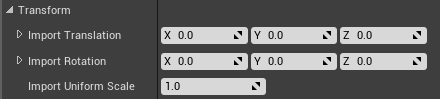
@chilly gale open the mesh and change settings under "transform" then click reimport
 chilly gale
Reimport as not an option unless I export it, its part of an asset pack, My main issue is Epic don't set a standard for X or Y forward on assets so door etc come with what ever and it's a pain to change models for eg doors in BP's and the like
restive eagle
oh yeah makes sense when you are setting the hinge
i would just throw that mesh into maya and edit the pivot there
chilly gale
So I guess it export it change it in an app and bring it back again still, really should be a standard IMHO
restive eagle
i dont think that you can change the pivot inside the blueprint, but if its inside the level you can hold alt+middle mouse button
neat forge
is anyone good with particles? How do I get these to stop twinkling/blinking https://gyazo.com/d7e42e8cd4f2b088629937109aaedb50
 chilly gale
it's more for having it work in BP's changing out a door that Y forward with a X forward doors not nice
restive eagle
you could try parenting the mesh to a component scene
and the scene would be the new pivot
chilly gale
Like an empty?
restive eagle
like so
its a bit hard to align it
but should work
scene is the pivot of the mesh, you just have to move the door into the right place
but personally i would just set the pivot within other software
plush yew
how do I import source code from another game into UE4 so that I can tinker with certain mechanics from it?
like is there a way I can translate the source code into a blueprint?
chilly gale
@restive eagle thanks for ALL your efforts and help Sir
As you say export fix is much cleaner and more professional
restive eagle
yes definitely, even if you never worked with maya/blender that shouldnt be too difficult
chilly gale
It's for doors in a UMG interface so who know what could break
restive eagle
im sure there are some tutorials online
plush yew
@restive eagle you talking to me?
chilly gale
I can use Blender to do mesh work don't ask me to do bones or rigging tho
plush yew
but you can make your custom blueprints from the source code
@restive eagle how?
chilly gale
carefuly? <smile>
restive eagle
Search the world's information, including webpages, images, videos and more. Google has many special features to help you find exactly what you're looking for.
i mean your question is not really reasonable
theres no magic button that on click will make that happen
plush yew
so basically what I do is get the source code from a game, put it into UE4, then reverse engineer it into a blueprint?
restive eagle
im not sure you can get other games source code that easilly
even if you can that is illegal
you shouldnt talk about this here
chilly gale
Taking ANYTHING from another engine into UE4 would be deep deep Dodo I think
chilly gale
I would'nt want Epic leaning on me
restive eagle
prison is just a place though
chilly gale
Lotta time to contemplate code I guess
restive eagle
probably wouldnt go that far but still :D. dont use what you dont own
plush yew
code: the most frustrating language to learn
 open wadi
I have a border with a background image that I want to insert as a background to a horizontal box tab button bar navigation. It is contained within a size box. For the life of me, no matter where in the hierarchy I set the border, it ends up on either the side or the bottom of the horizontal box. How on earth does one set a border with a background image within a horizontal box?
In this example, it ends up on the right side of the horizontal box.
In this example, it ends up beneath the box.
What am I missing?
Anyone?
restive eagle
you need to put all your boxes inside the border
border need to be at the top of your hierarchy
open wadi
@restive eagle Thank you for the help, let me try that, I believe I have but let me check.
restive eagle
the same way as you have it with "b_global"
open wadi
@restive eagle Yes, see, here's the issue, now it appears at the top. It appears the issue is this SizeBox.
This is code I inherited so I'm attempting to make this work.
restive eagle
you havent parented anything to the border
theres no collapse arrow
it means its empty
restive eagle
drag the sb_buttons to the border and should be fine
open wadi
@restive eagle That did it! Thank you much.
If I wanted a vertical box to encompass the entire screen, is that possible? And would there be a point to doing so?
I assume so.
These are my VB settings. I don't see padding set, I'm trying to determine how to make it encompass the entire screen so my main menu encased within will be at the top of the screen.
Not sure how I simply make the VB encompass the entire screen.
Never mind, it appears to be its parent.
lol, how does one get the details pane back to the right side.
Has anyone in here ever accidentally moved the details pane in UMG to the center of the screen, so it takes up the upper-half of the editor, and then you want to move it back to the upper-right side of the editor and it simply won't return?
Details now will not snap to upper-right side, it simply will appear in a floating window or will take up half the screen, that's all it will snap to.
Closing and re-opening the project did not work, the details pane for any given widget is still nuts.
restive eagle

?
for me it snaps without any issues
not sure if the reset will work, worth a try i guess
open wadi
Yes, I'm looking for this.
I'm reading an article on that, but I don't see reset layout.
I have "Load Layout" and "Save Layout" in that section
Where you see Reset Layout, I have Load Layout
I'm on 4.24.3
What on earth
lol, why does everyone else see reset layout.
This is truly bizarre.
restive eagle
umm i took this image from 4.21
open wadi
Yeah.
Where you have "Reset Layout" I have "Load Layout" and I can choose the "Default Layout" but that appears to do nothing.
Restarts the project, everything remains the same, details pane is broken.
 steep sandal
Any idea to make visual studio autocorrect better for ue4 cpp
open wadi
Man, for the life of me I cannot reset my layout.
Anyone else on 4.24.3 and can confirm in the Window menu you do not see "Reset Layout" but "Load Layout" instead?
lol it's apparently impossible to reset the layout so my details panel appears where it used to, that's nice.
restive eagle
try deleting saved and intermediate folders, dont know what else you could do...
or maybe just saved should be enough
plush yew
hello guys I need little help for my character setup, I got the character from one site and the animation from mixamo, but my animation is not normal, see this:
lol
restive eagle
inside that animation find this
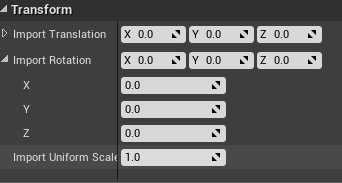
and change the import rotation
then click to reimport
i think it should be x90
 stray tundra
is there any way for me to search for all macros in my project? I didn't use a prefix and i hate to check each bp one by one 😦
plush yew
restive eagle
right click on the macro and find references
plush yew
I found this
restive eagle
@stray tundra then click this https://prnt.sc/t0ij1x

@plush yew told you what to do
stray tundra
@restive eagle what if i want to search all macros not with a specific name
restive eagle
@stray tundra no clue then
plush yew
hello again
I started setuping animation bp
but i have no animation for idle 😦
I found from mixamo, will try to setup it
 marble hazel
Is there a way to check for a Boolean on a behavior tree?
I am trying to do a tree where if the enemy is stunned do nothing and if it isnt stunned chase the player or roam around
I can't get it to work because all I have to work with is the is set option
Is this something where eqs would help?
 regal mulch
EQS is to gather information
I haven't touched behavior trees lately, but you should be able to just use a decorator or so
You can access the AIController and the Pawn in that
So you should be able to query if they are stunned
 haughty monolith
Hello, guys can you give me an advice if you know some service which teaches UE4
im basically new
marble hazel
The only option I get from the decorator is that if the variable is set
which doesn't seem helpful since its a Boolean
I was using the blackboard decorator but maybe there is a more helpful one?
I have a variable that gets the stunned state from the ai already and set my blackboard variable as that
haughty monolith
Where did you guys learn how to work in UE4?
regal mulch
I opened UE4 and started playing around with it. Watched random Youtube videos that interested me etc.
but there might be better ways today
@marble hazel Well, you can make your own Decorator?
marble hazel
Yea I guess I should than I'm pretty new to Behavior trees I was not sure you could
Or maybe use compare blackboard entries and have one variable always set to true and see if another stunned boolean is equal to that
regal mulch
Ultimately you might have more than one reason why the AI shouldn't chase :P
 tawdry wren
@vernal thicket @wooden forge ue4s networking isn't meant to scale to the scability a mmorpg needs, and i would not recommend using spatial os either
DM me if u want more information. I'm actually developing a mmorpg inside of the unreal engine 4 but not with SpatialOS nor UE4 networking.
@whole quarry and yes game instance gets more importance than the game mode. Game modes are honestly rather pointless when developing a mmorpg in the UE4 but they are still partially used.
open wadi
I have a question. I am on UE 4.23.4. I somehow detached my details panel and I cannot reset the layout. In the Window context menu, I do not have "reset layout", I only have "load layout" and if I load the default layout, it restarts the project but everything remains the same re: my details panel.
When I research this, everyone says to navigate to Window > Reset Layout, but I don't have that option. Did they modify that on 4.23.x?
And regardless, how on earth do I reset my layout so my details panel for any given widget is back on the right column where it belongs?
regal mulch
So I can't say I know how to fix this, but usually it saves properly if I just shut down the editor manually
I sometimes have these issues if I kill the editor via VS process
Without saving first.
open wadi
Ok, let me give that a shot.
Nope, no dice.
Thank you for the idea though, I appreciate any help on this, I've been trying to fix this for an hour.
I'm surprised this is so difficult.
Is there an ini file I can hose or something?
 unkempt sandal
Yo guys, anyone tried importing a model and rig from blender with IK-s? Followed some tutorials on youtube on how to export from blender into unreal. But it looks like my rig gets disconnected at the IK-s like this:
open wadi
Hmm, ok.
regal mulch
But worth a try backing it up though
open wadi
Sure.
unkempt sandal
anyone working with blender and UE?
 tender flume
should a fast-paced RPG game have crouch-mechanic?
 wooden forge
@unkempt sandal yes i do
unkempt sandal
@wooden forge Any idea why the thing happens in the pic?
wooden forge
No idea, tbh, could yoy send me the blend filw so i can check it on my end
unkempt sandal
Sure, redoing the IK-s now, maybe i messed up the parenting somehow
wooden forge
Aight
 gusty sigil
anyone know how to import an EXR images as a cubemap? It keeps showing up as an image texture.
unkempt sandal
@wooden forge ok i seem to have fixed the disconnected bones issue but the IK-s still appear in UE , except Knee IK it didnt import it for som reason
unkempt sandal
Uhh i think i got it @wooden forge , but thanks anyway !:)
wooden forge
all good @unkempt sandal , i was a bit busy rn sorry
unkempt sandal
@wooden forge No problem! 🙂
plush yew
Guys can you please unban my second account please, i have been banned for 1 year now. I know my mistake and would never do it again, please give me one chance i didnt get a warning. I really need this server, it would help me a lot.
My second account @OrdanFilm, i would be so glad
quiet latch
@plush yew You already have it in code and you make a BP from it... to prototype... and then get it down in code again? .. there is no magical "make code out of my BPs" button! You redo EVERYTHING if you want it in proper.
Set up a C++ project, create the classes needed and put it there.
I make a video series of my streams to show people EXACTLY that stuff.. it's raw streams tho... no compressed tutorialz... might have to skip though it
check it out
https://www.youtube.com/watch?v=UlzrLj2XPfs&list=PL8XXsDrzCD2s0QoTTdstqjlxXUXDaJH5x

Part of the tutorial streams of an entire game
join the discord
https://discord.gg/0n3t7wXxHlRiCB9C
support my work
www.patreon.com/hellrunner2k
www.subscribestar.com/hellrunner2k
www.streamlabs.com/hellrunner2k/tip
plush yew
Does anyone know how to get this type of grass like in Rocket League, artificial grass
I 've been struggling a whole day and i cant find a way
tender flume
i think thats plane
open wadi
Hi everyone - quick question - for the past 2-3 hours I've been attempting to reset my layout. I'm using UE 4.24.3. Whenever I google it, I'm told to go to Window > Reset Layout, but this option does not exist for me. I have Window > Load Layout, and you can load the "default layout", but this isn't resetting my layout.
regal mulch
Did you try deleting your saved folder now?
open wadi
Yes, that didn't work, alas @regal mulch
plush yew
@regal mulch can you please answer in private chat
unkempt sandal
I have red that UE-s multiplayer support is so-so. How was fortinte and PUBG was able to handle 100 players then? Am i missing something? Or just misinformation
open wadi
I appreciate the idea though, truly.
regal mulch
I already forwarded your PM. You would do good not using the Server at the moment, cause you are basically ban-evading.
tender flume
is it safe to delete derived cache folder?
quiet latch
@plush yew You can use a material to distribute foliage... look that up.
plush yew
@regal mulch i didn't even get a warning before i got permanently banned
i have been banned for a year now, i really need the server
regal mulch
@unkempt sandal UE4's default Multiplayer support is for games like Unreal Tournament.
They added support for larger counts of players via the "Replication Graph".
For all I know, it's not suuuuper stable and def requires C++ and some manual fixing.
open wadi
@regal mulch Wait, perhaps I'm mistaken - do you know the path to the "Saved" folder? I assume it's under Program Files > Epic Games > UE_4.24
I think I may have edited the incorrect folder.
open wadi
Oh, the project-specific one, yes I believe that's the one I edited.
One moment, checking.
plush yew
Please unban my other account, i beg you. I have been banned for a year, i would never do that again ofcourse
tender flume
a ban sounds more reasonable than a warning
plush yew
hello guys I have problem with my animations, my character when I turn him left or right he does it so weird
tender flume
people tend to not take warnings seriously
open wadi
lol, what on earth happened to get permanently banned from a support channel?
quiet latch
what did he do? ^^ Just curious.. don't wanna do it myself
tender flume
when youre banned, you know if what you did was right or not as compared to just a warning
open wadi
Sure, no worries, just curious.
tender flume
@regal mulch derived cache, whats the purpose?
 raven island
https://gyazo.com/f5d266644551a244d0624e83221547eb why can i not rezise the highlited capsule?
 unkempt sandal
@regal mulch Thanks! Im planning to dive into C++, so if its doable i will try to figure it out! 🙂
 sullen sonnet
is this channel ok to ask for help ?
 exotic thicket
just pretend you're in a professional setting talking to people you've never talked to and you're probably not going to get banned lol
sullen sonnet
was that to me? XD
exotic thicket
oh no just in general since people were wondering what happened
sullen sonnet
ah
open wadi
@regal mulch I confirmed - while this did surprisingly change the settings of for example, the content browser view, back to the default, my details panel remains improper.
Very strange.
What a conundrum.
I mean, would reinstalling the entire engine be recommended at this point? Seems a bit extreme.
sullen sonnet
Anyone know an easy way to get direction speed?
regal mulch
Your best bet is to remove Intermediate and Saved folder of your project and check if that resolves it
sullen sonnet
of a character in bp
regal mulch
If not, then there are stillsaved folders for the engine itself i guess
@sullen sonnet Velocity of the CharacterMovementComponent?
open wadi
@regal mulch Thank you much, I'll track down the Intermediate folder as well.
restive eagle
@open wadi 😠 https://prnt.sc/t0lhdk
 sullen sonnet
@regal mulch well i need forward speed and right
quiet latch
@sullen sonnet GetVelocity() ----- speed
FVector VelocityTmp = GetVelocity();
VelocityTmp.Normalize() ------ Direction
regal mulch
Vector Math is your friend
You can take the Velocity vector
And use the DotProduct with the Forward and the Right vector
To get the speed along that axis.
open wadi
Oh, @restive eagle, I apologize! Must have stepped away when you provided that response.
restive eagle
im joking btw @open wadi 😄
sullen sonnet
let me try
restive eagle
not angry
open wadi
Well I just tried intermediate too and the details panel remains in the same spot.
restive eagle
create a new project and see if the problem persists
open wadi
I closed the project, renamed both folders to bak-NameOfFolder, relaunched the project, and the behavior remains.
restive eagle
but it should be project related
open wadi
@restive eagle Will do.
 jolly arch
Hey, does anyone know anything about UWP Support in Unreal Engine?
restive eagle
@open wadi it wont hurt removing them in general
open wadi
Ok, I backed up the directories, both of them, and deleted them entirely.
Let's give it a shot.
sullen sonnet
@regal mulch ty so much i didn't know dot product is so useful
raven island
any1 know a ue4 discord where 1 can ask for help? sry nif not allowed to ask it ehre
regal mulch
Guess you could try to reinstall the engine version itself :D
raven island
thank you
sullen sonnet
@raven island and https://discord.gg/unreal-slackers
open wadi
Yes, different projects work fine.
sullen sonnet
kappa
open wadi
So it's tied to this specific project.
restive eagle
if its not a big project you can try migrating everything to a new one
open wadi
Hmm
 azure gazelle
@raven island regarding your collision capsule problem. I guess you use a Character as a base class? Then you should be able to modify that capsule collider in the class defaults or Character Movement (don't have UE4 open atm)
open wadi
Also, could there be any other place that such viewport settings might be stored within a given project?
Project-specific settings?
restive eagle
thats your saved folder
open wadi
Bizarre.
raven island
what i did was make a bp class character and add the pig to that
azure gazelle
@raven island Then the options to modify the root collider should be exposed in the details panel to the right. Either on the class defaults or Character Movement.
open wadi
Not sure if relevant, but the details pane in question that is misbehaving is within a UMG Widget.
raven island
if i rezise it there it also rezises the pig
open wadi
Never mind, just confirmed that permanently-undocked details panel is happening within all modules, or whatever the term might be.
azure gazelle
@raven island That's if you scale it. But there are seperate options like character height, etc. that modify the root collider
raven island
okay ill look into it thx
open wadi
I mean what on earth, if all viewport settings are contained within "Saved", and I delete Saved, and I see that it updates the default view of the Content Browser for example, why on earth would it retain the odd, undocked Details panel?
Only within this one project? That makes me concerned that reinstalling the engine will have no effect, since other projects are unaffected.
raven island
found it thank you
quiet latch
@raven island You can not ROTATE it tho... you might need to make your own character class derived from pawn ... and if you use a relative rotation for the UCapsuleComponent you add and set as RootComponent you MIGHT even get arround creating your own UMovementComponent and can use the UCharacterMovementComponent... one would need to R&D that
raven island
yeah idk what u mean by that
regal mulch
Character and CharacterMovementComp are pretty much one thing
And the cmc expects a capsule
If you make a pawn child, you will lose all cmc stuff
open wadi
Honestly, I find it very surprising that you can't simply drag the Details pane to the right sidebar and have it regain its default position. Once you undock the details pane, you can only have it standalone, or taking up half the screen, or full screen.
quiet latch
@raven island the ACharacter class is a Apawn with extra shi.. ssstuff.. like there is a Capsule in there.. the CharacterMovement component.. all sorts of networking stuff... depends on what you wanna do.. but you could get away with it if it's just basic NPC animal movement.. and you would have a performance increase cuz it's not computing a whole bunch on unnessesary stuff.... exept you ARE the pig... don't know what you wana do ^^
open wadi
@regal mulch That would be tremendous, thank you.
raven island
well i cannot make capuse size of pig as with cannot be bigger than height
well all i want to do is make it walk around its pen
open wadi
I'm truly at a loss here. While I'm new to UE4, I've been coding for decades and spent years as a Network Administrator, I'm quite computer literate. And this makes no sense.
Clearly these project-specific settings related to the Details panel are contained somewhere other than "Saved" or "intermediate".
Where, I haven't a clue.
What about the Config directory?
All I see in there are 4 .ini files.
Eliminating the Config directory didn't fix the Details panel.
regal mulch
Character capsules are meant to be upright. All you can go down to is sphere size
quiet latch
@raven island https://docs.unrealengine.com/en-US/API/Runtime/Engine/GameFramework/ACharacter/index.html
look at the Inheritance Hierarchy
It's based on pawn
you could create your own PAWN ...
Add a PrimitiveComponent for collision and make a tailor made MovementComponent that has the bounds of the pen already defined and just gets random points and move there, and add it... that would be way less expensive that the fully fleshed out character class...
Characters are Pawns that have a mesh, collision, and built-in movement logic.
raven island
alright thank you
 noble marsh
Нереальный рынок двигателя
quiet latch
gesundheit ^^
raven island
just assume no?
quiet latch
@noble marsh you speak some english? ... I only know the trading language of the planet and german .... I might be able to help you 😄
open wadi
lol
 spring arch
Hello guys. Maybe you know how to limit frame rate on particle system? I want it to update only 24 frames per second.
quiet latch
cascade or niagara? .. particles update on every frame... but you can define the speed of the flipbook.. idk what you wanna do ^^ @spring arch
open wadi
What's the recommended way to download the latest version of UE4?
restive eagle
what do you mean?
open wadi
Manually download it or leverage the Epic installer somehow?
restive eagle
do you need to edit the source?
if so download and build it from github
if not use launcher
restive eagle
that makes 0 difference
open wadi
I should build from source on Windows? Ok.
Normally if I'm building from source I think *nix.
restive eagle
yes, i blocked you
plush yew
wtf?
restive eagle
stop harrasing me in dms
spring arch
@quiet latch I think its cascade. I know how to limit flip book frame rate. But to use it I need a sprite sheet right?
quiet latch
https://www.youtube.com/watch?v=UlzrLj2XPfs&list=PL8XXsDrzCD2s0QoTTdstqjlxXUXDaJH5x
I make a video series to explain exactly that.. it's raw streams tho so you might need to skip though stuff
@open wadi
Part of the tutorial streams of an entire game
join the discord
https://discord.gg/0n3t7wXxHlRiCB9C
support my work
www.patreon.com/hellrunner2k
www.subscribestar.com/hellrunner2k
www.streamlabs.com/hellrunner2k/tip
open wadi
Yes, I'm watching, thank you @quiet latch.
restive eagle
is there a reason why you need the source?
quiet latch
@spring arch yes.. there are some open source programms that take a series of pngs and make a spritesheet
open wadi
Me? No, I don't need the source. I was just assuming that Epic had some method for manually upgrading the engine from their little UI.
restive eagle
oh then use the launcher
open wadi
Since they like you launching from the UI.
restive eagle
building from source will take up a lot of space
open wadi
The Launcher, yes.
spring arch
@quiet latch Ok thank you!
restive eagle
and it will take hours to build it
regal mulch
@open wadi Which UI element did you unhook again?
open wadi
@regal mulch The details panel.
I moved it to the left so I could take a reasonable screenshot on this 40" 4K monitor.
regal mulch
Like, in the Event Graph of the Widget area?
open wadi
And now, I cannot get it back.
regal mulch
Screenshot?
quiet latch
@restive eagle Yes, BUT.. you have full source code controll and neat little features like the ability to make dedicated servers for your game
open wadi
Yes, exactly, screenshot coming.
regal mulch
About Source: Get a decent PC :P then it takes ~20 min to compile the engine if at all
restive eagle
@quiet latch im using myself a custom version build so I know that, but i was wondering if he needs the source in general
i have the one with dual quaternion
quiet latch
ooofff... MONSTER rig @regal mulch 😄 ... i compile about 4-5 hours on the damn thing .. rip me
open wadi
For example, it's detached. And I've dragged it to the left here so it will fit in a reasonable screenshot.
open wadi
And for the life of me I cannot reset it so that it appears in the right sidebar like it always did.
plush yew
this is the problem with the animation, idk why it is weird
open wadi
And deleting Saved and Intermediate for the specific project has no effect on this, and other projects remain fine in this regard.
I can full screen it, I can make it take up half the viewport, the top half.
quiet latch
@open wadi click on that Details card in on the top of the window and drag it.. you should be able to dock it back into the ui
open wadi
@regal mulch For example, setting it to the top half of the viewport is no issue, like this.
@quiet latch That's the entire issue, if I drag it, it will only lock to the top half of the viewport like this, I cannot get it to lock to the right sidebar like it is supposed to.
quiet latch
@open wadi wierd ....
open wadi
It will either float or do this.
I'm not sure if it's an issue with 4.24.3 specifically, as every article I read on this tells you to navigate to Window > Reset Layout, yet I don't have that option under Window; I have "Load Layout" in place of "Reset Layout".
And I can Load Layout > Default Layout, which relaunches the project, yet the issue remains.
restive eagle
yeah that option doesnt exist on 4.24
i think they changed it to load - load default
 ashen ermine
@open wadi
open wadi
@restive eagle That makes sense.
ashen ermine
Just load - the default engine
restive eagle
but he said that doesnt work
ashen ermine
oh, sry my bad, came in late 😛
open wadi
@ashen ermine Yes, I've tried that several times, does not resolve the issue.
 eager sigil
I'm getting weird hitches every few seconds where the frame rate drops from 120fps down to a very very low frame rate for a fraction of a second and then recoveres. Any ideas what might be causing it? I have added the hitch log here
open wadi
No worries.
quiet latch
@open wadi seems like a bug at first glance... cutsom build you say? .. idk brother
open wadi
I appreciate the help.
regal mulch
Can you drag it away
Release it
Then grab it again and pull it over the left side?
Cause i have no issue putting it where it was before
 open wadi
@regal mulch Yes, oddly enough that does work. It will lock to the left side, as seen here.
It just won't lock to the right like it always did.
regal mulch
Hover the designer graph and it should show you the white lines
Drage it on the right one and release
That must work
Tsauken shows it in the image
restive eagle
sometimes it might be a bit wonky
ashen ermine
@open wadi close engine, go to "\yourproject\Saved\Config\Windows" and delete the EditorPerProjectUserSettings.ini - it should reset all layout and stuff
ashen ermine
lol wtf xD
restive eagle
its been going for some time now 😄
open wadi
@regal mulch If I drag it to the right, this is all it will do - taking up the top half of the viewport.
regal mulch
Then you dropped it on the top of the window :D
restive eagle
 open wadi
Is there some sort of right sidebar I need to open to give it a place to dock?
regal mulch
No, it's attached to the right of the graph
restive eagle
you are dropping in this zone?
open wadi
Never mind, holy crap.
@restive eagle That's it. The very middle of the right side allowed for it to be docked there.
And then I could resize the designer graph.
My word, that was 3 hours of my time.
open wadi
Thank you very much @restive eagle @regal mulch @quiet latch
Good lord.
The space is not as large as indicated there.
restive eagle
i mean thats the first thing you should have tried...
open wadi
On this large monitor it's a tiny fraction of the middle of the right sidebar, but if you place it right in the middle, it'll dock on the right.
regal mulch
:D
restive eagle
but since you said it doesnt snap we believed you
quiet latch
hahahaha... well it worked in the end 😄
open wadi
Good lord.
Much appreciated.
I still find it interesting that resetting the project-specific settings didn't resolve this earlier.
I'll study that later.
ashen ermine
Ok...how to ask this? I need to make a widget with a larger-than-viewport map (Much like Frostpunk's book of laws, any other game with a large map). I would want to be able to zoom in-out & drag the viewport on it where I need it - if that makes any sense. How would I go about that? I need it to be widget, not level with top cam or that kind of workaround. Any ideas?
quiet latch
@ashen ermine
take a look at this
https://docs.unrealengine.com/en-US/API/Runtime/UMG/Components/UWidgetComponent/index.html
The widget component provides a surface in the 3D environment on which to render widgets normally rendered to the screen.
it's a widget component placable in 3D space ... and you can even easily interact with it if you get one of those in your player controller and hook it up
https://docs.unrealengine.com/en-US/API/Runtime/UMG/Components/UWidgetInteractionComponent/index.html
@ashen ermine
This is a component to allow interaction with the Widget Component.
ashen ermine
@quiet latch But the point is I want it to be 2D
plush yew
i need support.
the problems I am having is with compiling the C++ project or adding a class in c++
i tried reinstalling but it didn't work nothing on the forums i found that fixed it I tried adding everything in the VS and using the default 2017 instead of the 2019 and still didn't work ... so please help
im working on: OS windows 10 64bit, intel core i7-8565U CPU @ 1.80 (1.99), RAM 8GB, GPU Radeon 520, intel UHD Graphics 620 memory 2048mb
i read the unreal requirements and it wanted more powerful pc and i dont hv that now ig thats the problem anyways so i need a work around i see it works fine but the c++ doesnt so please help
ashen ermine
Player opens it, pops up, fills the entire screen and can be dragged, zoomed (probably zoom can be done with scale so that's ok). But the dragging bit can't think of a way. Btw, I can't cpp a single line, so I need to make it in bp.
quiet latch
well... then make a large SConstraintCanvas and drag it over your main canvas.. maybe ^^
https://docs.unrealengine.com/en-US/API/Runtime/Slate/Widgets/Layout/SConstraintCanvas/index.html
@ashen ermine
ConstraintCanvas is a layout widget that allows you to arbitrary position and size child widgets in a relative coordinate space.
oh wait.. UMG is different... but it should be easily possible in UMG aswell
ashen ermine
@quiet latch "constraintCanvas" isn't exposed to UMG 😐 Was looking at the canvas options maybe it's something in there...
plush yew
check it please
??
quiet latch
I think the regular canvas in UMG IS a ConstraintCanvas... make a full screen canvas and add the large one as a child... should be possible @ashen ermine
exotic thicket
^ yeah I think you should be able to do it, you can just adjust the position of the child object so it's partially outside of the parent
the areas of it which are outside of the viewport won't show
eager sigil
I am getting frame hitches every couple of seconds. When i look at the hitches log, it seems like the issue is with something in PerObject Shadow Projections. Any idea what might be causing that/what per object shadow projections does exactly that might cause frame hitches every couple of seconds?
ashen ermine
@quiet latch Yep, 🙂 It works. It allows me to make children bigger than itself. Now...the question is how to access/move the viewport(canvas) on the larger child...
 frank oar
Hi all,
Does anyone know of any courses which talk/walk you through the general optimization process of a project ?
I know its different in every project.
Something that would advise you where to look and what to do in certain scenarios.
I know it is a subject with a TON of parts, but if I can get a general idea, at least I will know where I need to branch off/do further learning for which points...
If I am making sense ?
I'm not asking a crazy question like "How do I optimise my game"
I just need pointing in the general direction.
quiet latch
get that Input functionality in your Player Controller and control the widget directly from there... @ashen ermine
always remember.. gamplay happens on the controller and the actors.. NOT in the menus!
open wadi
Is 4.25.1 stable? Any major issues since it's a .1 subversion?
ashen ermine
always remember.. gamplay happens on the controller and the actors.. NOT in the menus!
@quiet latch Ofc. The problem was changing the transform of the widget (viewport) itself...But now, I think I have it, and will dig into it since I could jsut ref the canvas itself and change it's transform, see if that works. 🙂
quiet latch
@open wadi I ran into issues with win7 on that build ... I REALLY hope they resolve it in the next update
open wadi
Oh really.
plush yew
check it please
@plush yew how I can fix this turning?
 fierce forge
i need to use replicating for local co op ?
quiet latch
@fierce forge Local sa in LAN - yes .. local as in couch splitscreen - no ^^
sullen sonnet
hi guys i need some more help
how do i reverse the rotation here? Reverse in timeline doesn't work so im guessing it's something to do with the lerp?
 mellow flame
i need to use replicating for local co op ?
@fierce forge no you don't need
@sullen sonnet you should plug in reverse from end
mellow flame
instead of "reverse" go on "reverse from end"
sullen sonnet
that doesn't work either
the false check goes through aswell
it's just not reversing
Anyone ?
cerulean sandal
plush yew
Is adding a negative force a good idea to simulate gravity?
exotic thicket
That's probably how the engine applies gravity
vernal thicket
Anyone know how to export materials from blender? my whole ass model is exporting with no materials just some horrible off white colour
quiet latch
@vernal thicket I'd export all the textures from various programs and assemble the material in the Material editor directly ... no extra weight for stuff you don't need. and parameters for dynamic mats and what not ... you could also make material functions and make base Materials for your game... the more you reuse those the beter...
remember ... 1 Material = one draw call
1 Mesh = 1 draw call...
so the fewer you get away with per model the better... like have the eyes seperatley and use the same eye Material for everything.. make parameters for the iris and the color and you can reuse the same material on ALL your models with eyes
 remote roost
my controllers just stopped working with ue4, dunno how to fix it
doesnt even work on older packaged builds
any of my controllers
lol
figured it out, its assigning it to player 2
how can i fix that
restive eagle
@sullen sonnet i think it doesnt work when reversing because "A" is already the same as your "B" you can print string it to make sure
sullen sonnet
what can i do if it is ? @restive eagle
restive eagle
your A needs to be a promoted variable
that doesnt change
your initial starting point
if that makes sense, like a checkpoint to which you would want to return
but in your current example you are using your current rotation and not the "checkpoint"
restive eagle
on start you can get your rotation and promote it to a variable
which will be plugged in into A
restive eagle
im not exactly sure i follow you
no idea why it should be an issue and what begin play has to do with it?
sullen sonnet
because it rotates me weirdly when i play
restive eagle
thats not enough information to determine whats exactly wrong
sullen sonnet
hmmm how can i explain
restive eagle
your logic should be simple enough, you save the rotation before slide and use it in your "A"
so after you finish sliding it would return to the initial rotation
unless you have some other logic which rotates your character when its sliding
sullen sonnet
ye but during slide i can still change rotation
restive eagle
so then save only the axis you want it to return at
like you did with your "B" input
sullen sonnet
hmm ok let try
ashen ermine
Can someone pls help a little bit with the vector math here? I want to zoom in at mouse cursor location in this widget. The code:
The widget:
 sullen sonnet
doesn't work
restive eagle
doesnt work can mean a lot of things
whats the issue now
i mean since you are only changing X-axis you can just use "float lerp"
sullen sonnet
it doesn't reverse still
restive eagle
have you checked if it ever goes to false?
ashen ermine
@sullen sonnet play from start & reverse from end maybe?
sullen sonnet
it is
restive eagle
are you changing your rotation before the timeline?
sullen sonnet
no
restive eagle
because it should return to your original rot
show me a picture
how it looks atm
sullen sonnet
it starts true ye and nothing happens on reverse it's stays at the rotation that play from start sets
restive eagle
show how it looks inside your timeline
sullen sonnet
wait
restive eagle
another guess would be that you are calling this event constantly on reverse
restive eagle
can you add a print string on update and connect it to "alpha delta"
to make sure if it returns to 0
frank oar
when you click play and you play in the new menu pop up screen....
if that freezes/crashes, can I go back to the editor or do I have to force close/restart ?
sullen sonnet
force close @frank oar
frank oar
thank you @sullen sonnet
sullen sonnet
@restive eagle i think having a timer with a timeline is bad idea lol
 late loom
guys whats the JDK version used for Packaging for android. I am suing 1.07 and its giving me error
restive eagle
it sticks around 1, right?
sullen sonnet
@restive eagle and it does goes to 0 on reverse
restive eagle
hmm
one last thing you can check what value for the roll is saved on true
and what value it tries to set it back to when going back to 0
other than that, no clue
restive eagle
if that looks fine i would recommend simplifying your logic a bit just to make a working system even without going down the slope
just to have a working concept and later on build on that
sullen sonnet
fml
it's fixed
i just had to set roll to 0
if that looks fine i would recommend simplifying your logic a bit just to make a working system even without going down the slope
@restive eagle what do you mean by this
restive eagle
i mean if you are struggling with something and your system has a lot of different logic, i would cut out all the unnecessary parts and just leave the one that needs to be fixed
because some other places might be overlapping with your logic
once that is done, you start reconnecting all the previous steps and that way you would narrow down the exact issue
sullen sonnet
i don't think there's anything overlapping?
restive eagle
"dont think" is not being sure 100%
sullen sonnet
that is the start of the system
restive eagle
thats not the point, your current problem was that it was not returning back to original rotation
so you just temporally remove all the other logic and make that one work first
easier to debug if you are not sure about smth
anyways im glad you fixed it, im going back to my work 🙂
sullen sonnet
ooo i see what you mean ye i do that often actually but in this case there wasn't much in the way
obtuse pendant
when you create a widget (say for a HUD) and create another widget within that widget (say a popup), how do you disable interaction with the parent widget? I tried set user focus but it doesnt work
sullen sonnet
@restive eagle ty for the help m8 appreciate it!
obtuse pendant
Oh I thought focus was meant to take care of that
restive eagle
np, didnt help much though :D. you did the heavy lifting yourself
obtuse pendant
Ill try it out
sullen sonnet
❤️ 😊
restive eagle
@obtuse pendant usually mouse click re-enables focus again
you could also try changing "is focusable"
both solutions should work
obtuse pendant
Yeah I figured that "is focusable" is meant to seperate like, static things from say menus
but in my case both the parent and the child widgets should be interactive, just not the parent when the child is active
restive eagle
well im sure my first suggestion does work, would have to try the second one though
 stable needle
Quick performance question:
My player character, NPCs and enemies all need footstep sounds and particles. Right now I have sound and emitter components in each character blueprint that activate for each step, but that’s a bit of a hassle to set up for every new character. So I’m thinking of creating a separate blueprint that just spawns them for every step of every character, but that’s a lot of sounds/VFX getting constantly created and destroyed.
Is that a bad idea, performance-wise, or should it make no noticeable difference? (Talking PC and console, not mobile.)
 brave pebble
Any suggestion what to do when I get non stop crashes in UE4 with this message? "Unreal Engine is exiting due to D3D device being lost."
stable needle
Any suggestion what to do when I get non stop crashes in UE4 with this message? "Unreal Engine is exiting due to D3D device being lost."
@brave pebble Did you check this thread? Several suggestions there
 midnight gate
so im trying to make a menu for all the characters in game by using a actor component and also game modes
note that im using 2 game modes 1 wich runs the battle system 2 wich shows the list by spawning children into a grid widget
so the spawned children are buttons right?
now i want those buttons to change a variable called in party
the variable in party comes from an actor that tells the child wich image and text to use
so how do i cast it backwards from the child widget to the parent aka the actor?
i just want to make a list of characters and set them as available or not
quiet latch
@stable needle the standart approach would be to derive from ACharacter and put your functionality there so it's on every instance of your NPCs and PCs ... you CAN do this by creating child blueprints but i would advise against that ... I usually make it so that the porperties of an enemy (models, sounds, values like speed and stuff) come from a DataBase.. that way you can make a new model and just make a new entry in the dataBase to create a new enemy
brave pebble
@brave pebble Did you check this thread? Several suggestions there
@stable needle Which thread?
stable needle
Sorry, messed up the copy-paste: https://forums.unrealengine.com/unreal-engine/feedback-for-epic/1722586-unreal-engine-is-exiting-due-to-d3d-device-being-lost-again-and-again/page2
Unreal Engine Forums
Hi
I have noticed a new issue with UE 4.24 when shaders are compiling if I tried to move around in the level even a little movement, or play the level the editor will crash with message
Unreal Engine is exiting due to D3D device being lost.
also when renaming/moving a fol...
whole quarry
@whole quarry and yes game instance gets more importance than the game mode. Game modes are honestly rather pointless when developing a mmorpg in the UE4 but they are still partially used.
@tawdry wren
What language are you using for the server?
whole quarry
note that im using 2 game modes 1 wich runs the battle system 2 wich shows the list by spawning children into a grid widget
why overcomplicating it? you can only use 1 gamemode at a given time
stable needle
@quiet latch Thanks, that makes sense. I considered creating a new character class for that, but that would mean I have to change the parent class for my already existing characters, which tends to get messy. Probably worth looking into though
 stray notch
i cant export my file.... ERROR: Unable to clear log folder
Anybody have experience finding a work around to export a project...?
 oblique tangle
 midnight gate
ok ok im almost there
so i finaly figured out how to set the in party value inside the widget
but now how do i export this value and import it into my actor?
that i even have set a value id for
i need smth like is this id matchig etc
but how this is so complex
quiet latch
@midnight gate Gamplay values should be on classes like the Player Controller or in networked games the gameState.. you only DISPLAY these values on the UI ... NEVER put gameplay mechanics in your Menus and HUDs.. so your Controller can get and dirtribute them or your pawn can ask for them.
plush yew
hello guys I am using room model which is from internet and I think that i am having problem with the visibility, when I watch the ceiling I can't see it, when I move the camera over it, I see it
hmmm
how I can fix it?
novel oriole
hey all, quick question, does uint derive from UObject, because I have an Array of UObjects, as i want multiple variable types, thanks
 drowsy scroll
Hello
plush yew
??
drowsy scroll
Were haiving an issue when packaging the gamebuild?
Also @plush yew in the settings somewhere you can enable backface culling
plush yew
where is this option?
novel oriole
uncheck but beware, it causes your geometry to be rendered twice sometimes, i think
plush yew
I tried with checked and unchecked, bth of them= same result 😦
doesn't see it in the game
drowsy scroll
@novel oriole have you any knowledge with compile errors.
and Martouu, does it have an alpha mask applied?
whole quarry
you need to flip the normal of that face
drowsy scroll
Oh yeah didnt think of that
whole quarry
that Double Sided Geotry is for collision detection
novel oriole
What errors are you getting
whole quarry
if you go in to the material, you cam enable double sided material
drowsy scroll
whole quarry
then it will render the material on both sides of the face
drowsy scroll
@novel oriole
novel oriole
yep im having a look
drowsy scroll
Oh sorry my bad :p
whole quarry
@plush yew in the Material, the Details Pane enable the Two Sided option
discord is slow today..
novel oriole
Youve got an access denied error in there, so try running the build tool as admin
or just run ue4 as admin
see if that helps
drowsy scroll
Oh okie 🙂 I'll let you know
 late stag
I am using both engines unity and unreal and I wanna choose a main one for 3d and 2d games which one should I use
novel oriole
2D - unity
3D - a bit more tricky, but i imagine loads of people here would say ue4 lol
late stag
Oh ok
whole quarry
this community would rather be biased for that question tbh
plush yew
Hello guys, I have other problem for mp4 in ue 4
I imported the video
but it is weird
I want on this rectangle to be normal, notrotated
also the video has no sound 😦
idk why
can someone help me?
does rebuild lighting time depends on meshes?
I added meshes to my map, rebuild light is taking much more time
 paper kernel
naturally adding more geometry makes lighting more complex
 rocky radish
on meshes, how many lights, shadow resolution and other things
but meshes CAN make build times longer
plush yew
higher poly meshes make lighting rebuild longer?
azure reef
Hello guys! Just released a game on Google Play and I use Google Play Services for login but the problem is that the login always fails. The strange thing is that in development mode the login it's working. I'm doing something wrong?