#ue4-general
1 messages · Page 758 of 1
 rustic panther
 heady moon
but Im having a problem too, intellisense won't work for 2 files
idk if that's a 4.25 prob in general
but the other files are working fine
i have updated visual studio restarted it tried everything possible
heady moon
That's weird
rustic panther
I restarted computer, I wonder if it's a network drive or something
heady moon
I hope these issues get fixed in a new patch or something
 alpine sand
What node do you use to cancel the input of one key?
 grim ore
@ember shadow yes if you want to sell/give away items on the Marketplace you need to create an account and submit content that epic will review and approve.
 barren flume
no matter where i set my playerstart
grim ore
@plush yew in the bottom right of the content browser is the options, you can disable favorites from there.
 bold bay
Im wrecking my brain, why the AI dont follow me up the stairs......
I mess with slope settings, disabled collision, ....im lost
(Recast Nav Mesh)
 ember shadow
@grim ore Ah ok that makes alot more sense. thank you very much
grim ore
does it compile tho ?
VS Code has an issue with the generate project files being broken in .25, perhaps its a similar issue in VS
 still pawn
@heady moon Have you tried Rider for UE? Intellisense breaks a lot of less for me in
 late stag
barren flume
late stag
barren flume
Unhandled Exception: 0x80320012
KERNELBASE
rpcrt4
rpcrt4
rpcrt4
rpcrt4
rpcrt4
FWPUCLNT
ws2_32
ws2_32
ws2_32
ws2_32
ws2_32
ws2_32
UE4Editor_HTTP
UE4Editor_HTTP
ucrtbase
kernel32
ntdll
grim ore
you will have to install the debug symbols, without them that's near useless
grim ore
well if it was installed and working there would be info on what crashed in each of those parts
heady moon
@still pawn I prefer visual studio because it's free hehe
 rocky radish
bruh
heady moon
Ah yes I could've regenerated the files from the beginning
barren flume
unreal engine isn't even opened
still pawn
@heady moon I feel you, they're giving a year free which is why Im using it. Then I'll be back to VS. Hopefully intellisense will be more stable then :/
rustic panther
is swarm open or anything? @barren flume
heady moon
ill look into it
barren flume
no
it's weird
the project opens up fine
but after around 10 or 15 seconds
it crashes
 supple wyvern
here is a file with an M9 bayonet i just designed. feel free to use it in your games!
no textures yet
barren flume
supple wyvern
interesting
it looks fine in the engine
lemme open it in 3d viewer
yeah
yeah its... not looking right in 3d viewer
barren flume
i don't know why but i thought when you said bayonet I thought of bayonette
like this
ember shadow
Hello all, is anyone willing to check over my marketplace submission and check i done the zipped folder correctly?
barren flume
oh yeah this also happens when I click the project I want to open
but the project still opens
hmm
if i don't close that the project stays open
supple wyvern
i don't know why but i thought when you said bayonet I thought of bayonette
@barren flume lmao
it looks wierd in 3d viewer but fine in unreal just poiting out
pointing*
barren flume

if you look you can see that little ue4 crash thing on the taskbar
and towards the end you see
the project runs perfectly fine until I close that
 flat scroll
Any suggestion for a plugin for commenting in blueprints? The standard comment boxes aren't always the best for that.
Prefebly free
 jolly jungle
guys, i need help doing uvs with blender, i made a basic landscape plane for a scene i was going to try to make (Not having made one before) but when i put it into unreal and threw a megascans surface on it, it showed up as a solid color. @rocky radish said i needed to do uvs, could someone help me?
also, im stuck trying to figure out how to make colisions that actually work
 carmine sorrel
Is there a reason my Cine Camera can't see the (new) Thin Translucency Material) but my regular camera can? Is there something I need to enable? The Cine Camera is picking up the shadows, but not the material itself.
rocky radish
@jolly jungle there's a video on blender official video from blender teaching you how to make uv unwrapping https://www.youtube.com/watch?v=Y7M-B6xnaEM
Blender is Free and Open Source Software
Download: https://blender.org/download
Support core Blender development - https://fund.blender.org
--
This tutorial is part of the Blender Fundamentals series, produced by Dillon Gu.
Find more free tutorials on: https://blender.org/t...
jolly jungle
ok cool
 sudden forge
is there any way to move around files once created in the content browser?
i miustakenly crated a cpp class in the wrong directory and i wanna move it
i cant drag them into a subfolder or anything
carmine sorrel
In most cases you can simply drag the object (or folder) into another folder in the content browser (You'll see an option to move or copy). Be warned though - this can be a bit unstable if you're moving a ton of things that are referenced that you're moving. Further, you'll want to clean up things up with a 'fix up redirectors' (right click on affected folders and choose 'Fix up Redirectors in Folders') - fixes references.
that said - some stuff doesn't work like that, like levels. Not sure about CPP stuff either.
carmine sorrel
you may need to move them from the actual project directory (which can also be tricky depending)- but I have no idea on that type specifically. I doubt you'd have to recreate. Hopefully if you can't do the standard process, someone can jump in and guide on that specific.
sudden forge
okay, ill try it
yeah moving them in file explorer doesnt update their content browser positions and i can use the fix up redirectors on cpp class folders
 hexed jasper
What is the difference between flat and pn triangles for tessellation
carmine sorrel
An overview of the Material Instances example level, example 1.8: Tessellation
hexed jasper
Ty I’ll read it 😃
carmine sorrel
I think the main difference is that PN Triangles use a smoothing group.
supple wyvern
what do you guys think?
barren flume
i figured it out
when i open my project from epic games launcher
is when I get the first crash message
but if I open my project from file explorer
it doesn't crash at all
 gaunt tide
Lol all my brushify Forest assets look like noodles flopping around lmao
barren flume
nvm
i also noticed in gears 5 it also randomly freezes
so I think it might be something with my gpu
 pallid ivy
So I tried out unreal today, but this time longer than 15 minutes and running away screaming in C++. I tried blueprints and it's super fun to prototype so quickly without writing code. Now I have the banana from the pinned tutorial but it also spins randomly, and glows and is audio reactive... 😅 I got a bit carried away 🌚
 lime girder

Does anyone know why this error happens
For the record, "List of Maps to include in a packaged build" I am specifying the only map in my game
and its also setup under maps & modes correctly
Can I specify a commandline perhaps for UE4 to run on the cooked build?
jolly jungle
once i import a mesh i made in blender, how do i make the collisions actually somewhat accurate instead of just being a big box around the space that the mesh takes up
hexed jasper
Yo... I was about to ask that too haha @jolly jungle
jolly jungle
lol
hexed jasper
Expect I can’t even get collisions I just still walk thru my walls
jolly jungle
lol
 fallen marten
Easy, use the naming convention in the ue4 docs and add your own collision meshes in blender - or - open the mesh In ue4, and add collision capsules or boxes etc and scale them to fit your mesh
 barren gyro
Hello everyone, found this discord by chance while looking for UE tutorials, hope to learn from others here
hexed jasper
thank you ! confucious
 modest crest
Anyone got a quick solution for input-debouncing? The shoulder-buttons for my controller seem to easily trigger multiple times when I press them, making it quite annoying to use.
I'd use a "last time pressed" timestamp, but not sure if there's an easier solution
hexed jasper
hello dhaos this is a great place to learn new things ! Welcome
barren gyro
Hi found it while trying to find if there was a way to import a .txt file into UE4.22.
 steep sandal
when i delete the folder in ue4 only the stuff inside the folder are deleted not the whole folder
barren flume
fixed the issue
I think it had to do something with my gpu
I ddu and reinstalled drivers and now it doesn't crash
What are some ways to optimize?
I thought there was some stuff in project settings that could help
but I'm not sure
 harsh tiger
hello everyone, having a very strange issue. i have 2 editor utility widgets. both have an event construct. but it only fires on one of the EUW? why could this happen? it literally makes zero sense haha
 marsh swallow
This has been haunting us for a few years through different sky systems and I can never seem to find an answer on this. We use Dynamic Lighting (UDS to be exact) and in dark caves / Dungeons underground, etc we get lighting issues like this during the daytime.
there is a square box around the camera essentially that moves around with it. I know its something to do with Occlusion, I just cant seem to fully understand now to correct this. lol
jolly jungle
guys, ik this is technically in blender but im making it for unreal so how do i get uvs that arent atrocious for a model with a bunch of tris and no obvious places to make seams
 sleek spear
i want to render a sequence that reacts to audio and then sync it with the audio in a video editor. its a particle simulation that reacts to audio. but its heavy and doesnt render in real time so it soon gets out of sync with the audio. what could be the solution to that?
jolly jungle
cuz ive tried multiple things, just unwrapping without marking seams, marking general seams of the general shape of the mesh, project from view, everything i try ends up looking terrible in certain places once i have a texture on it
hexed jasper
Can someone help me out here? My walls with tessellation are flashing.
Some other walls are doing this too not just these 2.
 plush yew
For some reason out of nowhere the engine has started telling me that my projects are out of date. Even the new ones I create. Is this happening to anyone else?
 safe mortar
Anyone know how to get rid of this random sphere?
safe mortar
It’s the door handle actor, It’s really used as a static obj, do I need to use an actor in that situation
 heady quartz
Everything in the game is an actor
Anything you place
The sphere will disappear in-game
safe mortar
I just looked at what the default doors and stuff are and they’re static meshes, I’ll try and use that because they don’t have the sphere I don’t think.
heady quartz
If you want you can set the actor root as the static mesh component
And it'll dis
Disappear
safe mortar
How do I do that?
safe mortar
Yep
heady quartz
Then in the left You’ll see "Scene Root"
safe mortar
Yea
heady quartz
And i'm guessing "Static Mesh Component" under it
safe mortar
I have default scene root and underneath it it has cube and sphere
fallen marten
@hexed jasper looks like the wall planes are fighting for screen space priority
heady quartz
Drag the cube and drop it in the root
fallen marten
If that sphere is a mesh, just set it's visibility to hide in game
safe mortar
Thanks it worked
heady quartz
Np
steep sandal
HELP PLZ when i delete the folder in ue4 only the stuff inside the folder are deleted not the whole folder
fallen marten
Right click, fix redirectors
Then delete in your windows explorer if the engine won't delete it
 ripe saffron
I updated my engine from 4.24.3 to 4.25.1 for Niagara improvements and when I loaded my game persistent level from my menu persistent level I was getting an assertion error. So after lots of time it seems like its because of a material instance on the text render. If I change to a master material so far it seems fine. Is there a better alternative for text than the text render ? ...because 1.. I dont trust it now and 2 ..it seems to always be a bit blurry anyway
 slow scarab
Could anyone recommend me some 3D cartoony/anime games on Unreal?
I've been looking for a cel-shader for some time but after searching for so long, I gave up and decided to just try regular, smooth lighting 🤷♂️
 kind dew
Okay noob question. What are the common reasons why I can't see "add call to parent" in BP? Other than the class not deriving from the parent
 fervent kernel
Is there a way to stop the camera from stuttering at long distances after origin shift? The origin will move but the camera stutters regardless.
modest crest
how long are we tallking about? If it's several km from the world origin, it may be floating point errors
 open eagle
I am trying to set a player's view target to their new pawn when they die
their player controller remains intact
I destroy the old player pawn, spawn a new one, set view target with blend to the new one, then make the player controller possess the new one
 little falcon
Hi guys, if i want to use material tessellation on my mesh, do i need to sub-divided enough times in 3D Program before imported into UE4? or is there any way UE4 can handle the sub-D?
 unique timber
what does the "I" prefix mean on class names?
 pseudo pulsar
How do you make it so when you open a new tab; it's automatically docked?
I thought I changed the setting to allow for it, but it still seems to be popping up. lol
Oh wait I got it I just hadn't set it to default I guess.
 uneven fractal
what causes this sort of shadowing artifact?
hexed jasper
Hey Richard I was having this problem too a couple of days ago and I just went into blender and subdivided a cube a lot of times. I would not recommend going over 50k triangles if you are going for a big scene. Then export that into an FBX then import it in UE. @little falcon
little falcon
Thanks for replying, i was planning to use a landscape mesh with adaptive tessellation material, but since landscape it huge, sub-D in Blender and then import to UE4 seems not a good choice..
@hexed jasper
So how did other people do with something like World machine generated landscape mesh, do they also sub-d first and the nimported into UE4?
hexed jasper
Hmm I’ve never worked in landscape but I don’t think you would use tessellation for that large of an area because that would be pretty hard on the engine. I’m not familiar with landscaping I would not know sorry
Because you would usually cover the landscape with grass and rocks so that small of detail isn’t necessary unless you are trying to achieve ultra photorealism @little falcon
little falcon
Yes, that make sense, so i want to use adaptive tessellation.
thank you anyway, i will figure that out tomorrow.😂
 errant venture
Is now an okay time for me to ask a question?
hexed jasper
No problemo sorry I couldn’t help , just don’t know that much about landscaping but I wish you luck in you project !👍
go ahead 🙂
little falcon
No problem, thanks mate
errant venture
I want to add a force to a static mesh in one actor in the direction of a static mesh in another actor,
How do I reference a specific static mesh of another actor?
 exotic thicket
Assuming you have a reference to the actor in question, you can cast it to the specific actor class, and then you should be able to access the specific components
exotic thicket
Yeah I mean if you have staticmeshes meshA and meshB in MyActor, you can use "cast to MyActor" and then you should be able to just do "add impulse on meshA" or whatever
 thin tendon
Is there a way I can disable the default navigation for gamepads? So that way d pad buttons aren't consumed by widget navigation.
 fresh rampart
Has anyone managed to spawn a niagara system using c++? Im a bit confused, i cant even include the .h for some reason
as soon as I put this
UPROPERTY(EditAnywhere, BlueprintReadWrite, Category = Gameplay)
class UNiagaraSystem* HitParticle;
it stops compiling
exotic thicket
Is that supposed to be a member variable of a class? If so I don't think class is right
It would probably be helpful if you actually can show the error you're getting, also #cpp might have more people who actually know about the C++ side :)
fresh rampart
oh sry didnt even knew there was a cpp part
 karmic stratus
not sure if this is the right channel, but is anyone able to help me and a friend set up a multi user session
 ashen vapor
 floral knoll
join general voice?
karmic stratus
ok
exotic thicket
Are there any best practices for things like working with NPC sounds? For example, my NPC can make pain and death sounds, and under some circumstances they could trigger several of them in very rapid sequence.
I can see the options for this would be using a sound concurrency setting which would limit it to 1, or using an audio component where I could keep track of what sound is currently playing
Is there any particular upsides/downsides to those?
 quasi tendon
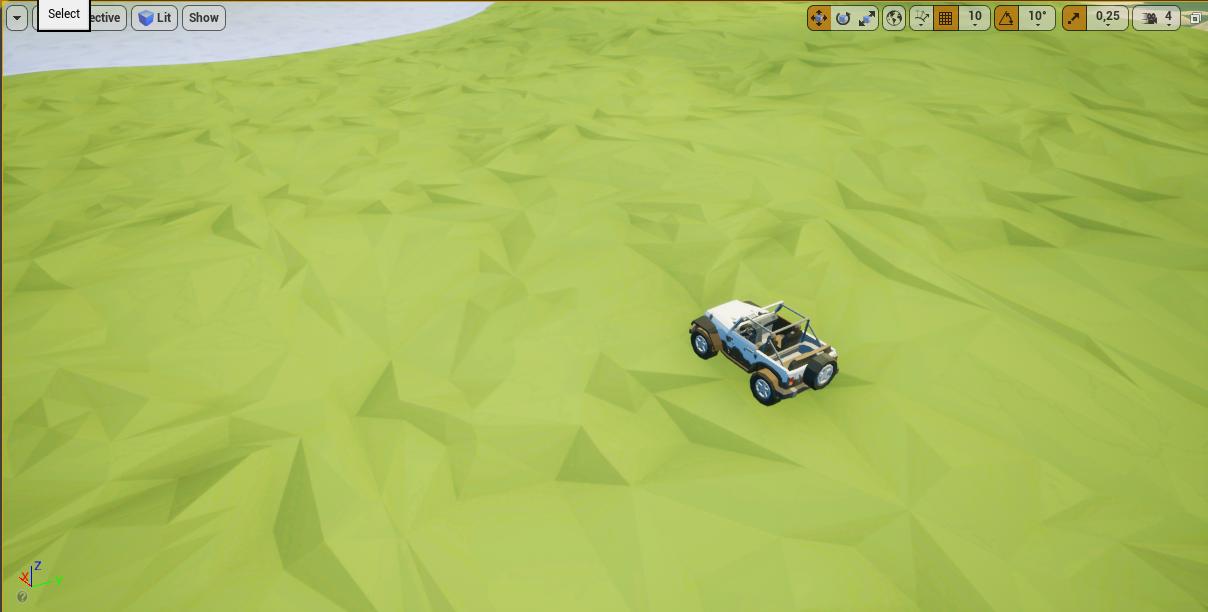
Hey, i'd like to reduce the material size (i don't know how to explain) here's what I have now : https://i.imgur.com/p1CPGlM.jpg
and you'll see that the grass is way too big for the car size.
I hope you understood 😂
(sry for the english)
 rich helm
Why does my ray not destroy the actor when it is hit
Im just starting UE4 so yeah, following a tutorial but cant figure out what I did wrong
 timid grotto
You're only drawing a debug line, the linetrace isn't connected to the execution line so it never fires. That's the white line that connects the nodes.
 mortal cedar
@uneven fractal shadow bias
timid grotto
And if you're not -that- new, make sure the box blocks the visibility channel in its collision settings.
rich helm
Im literally newest new lol
You're only drawing a debug line, the linetrace isn't connected to the execution line so it never fires. That's the white line that connects the nodes.
How do I make it connect to the execution line?
OH wait
Thank you so much! : )
timid grotto
The execution line determine the order in which functions are called. So if you linetrace into the air, you'l get an error saying "accessed none.. blabla destroy Actor node". So that's because the linetrace didn't hit anything, finished execution, which causes the Destroy Actor node to execute, but with an invalid reference.
So we must handle the execution flow, and we do that with flow control nodes. If you rightclick in your event graph and type "flow", you'll see what types there are. Though mostly 2 or 3 are commonly used. The most common one is the "branch" node, which is like an if- statement.
So you should add a branch node and connect its condition pin to the return value pin of the trace node. That then says "perform a linetrace. If return value is true (ie if the trace hit something), destroy that actor. Else do nothing (that's the false execution path).
rich helm
Ok thanks! : )
plush yew
Base10 or Power of two grid, snap and sizes. Which do you prefer?
timid grotto
@rich helm Okay, so maybe you're hitting something that isn't an actor. It is good to do an is valid check on objects that you're not 100% sure on if they are valid. So drag off the Hit Actor result and type "is valid".
rich helm
Where do I connecy the "is valid" node pins
 leaden dust
I just came. Whats up?
timid grotto
before the destroy actor
 restive yarrow
I have a procedural mesh door, attached to a procedural mesh car body, both simulate physics, but the problem is that the car door is colliding with the car body and making it fly around ( both the components are set to vehicle )
I have even set ignore actors and compoents on move
leaden dust
@rich helm do you still need help mate?
rich helm
Yes
leaden dust
What are you trying to do if I may ask
Trying to destroy the actor?
you hit with trace?
rich helm
Im making a debug line, then if that object hits an actor, that actor will be destroyed. Now Im getting an error when the ray is not hitting anything
leaden dust
ohk
timid grotto
leaden dust
let me make an example for you
What error are you getting btw
robin is pointing you in the right direction
restive yarrow
@leaden dust can you help me with my collision issue?
rich helm
@-Cool_da_noob Blueprint Runtime Error: "Accessed None trying to read property CallFunc_BreakHitResult_HitActor". Blueprint: MyCharacter Function: Execute Ubergraph My Character Graph: EventGraph Node: DestroyActor
leaden dust
@restive yarrow sorry I am not good with the engine myself. I struggle with collsions
rich helm
Robin, what is that "actions taking... " node, where can I find it?
timid grotto
You should get it automatically when dragging off the Hit actor node. It's what you get when you right click the event graph.
restive yarrow
@leaden dust hmm ok
rich helm
Ohh I was using the wrong node
rich helm
Im trying, gimme a sec
leaden dust
@restive yarrow I believe you need a physics constraint
between the car and the door
restive yarrow
thats making it worse
 ember cliff
Anyone know of a way to increase time dilation above 20x?
rich helm
@leaden dust Which "is valid" node did you use
leaden dust
@rich helm what is your engine version
rich helm
The newest one
leaden dust
4.25?
rich helm
4.25.1
leaden dust
ok nice
it should work then
you should not just right click on the blank space
drag out the hit actor pin
and then right click
so it will show only valid nodes
leaden dust
@rich helm it should show you two different 'is valid' nodes
any will work
this one needs a branch
this one does not need a branch
rich helm
Ahm now it destroys the player though
ember cliff
Scratch that, not 20x, 50x. Time dilation seems to ignore the max setting if it is above 50
rich helm
Oh nvm
I didnt connect the hit actor pin to target pin
First day in unreal engine 4 lol
leaden dust
@rich helm its ok
rich helm
Ok
@-Cool_da_noob Any good tutorials you know of for UE4? Im using one tutorial now but do you have any good ones?
 dim merlin
hello, so i was thinking about 'steaming actors', is this possible? (like spawning / removing AI) Maybe a good example would be gta 5.. (i dont believe all pawns are spawned??)
like.. how does gta5 handles a city full of people ? i dont think its only streaming levels right
plush yew
guys where is export to html5 in 4.25
 manic pawn
deleted
fallen marten
@dim merlin you can have an actor that spawns AI and depsawns them after you leave an overlap sphere or whatever
dim merlin
@fallen marten yeah i was aware of something like that 🙂 but i was looking for something more solid..
note its not a first or third person game, more like a strategy game @fallen marten
rich helm
Yayyyy I finished my first UE4 tutorial!
 restive vale
Hi! One question about google ads for android. If you create a Remove Ad purchase, do you have to code a boolean in your game to prevent the ad to be displayed or it is internaly driven by android and they just dont reproduce the ads anymore?
 cerulean sandal
 keen pawn
could anyone give us some direction as to why emmisive materials appear to be washed out
we have looked into it abit
and see that there was a tone mapper change
but I cannot get the reds to look decent at all
they just go orange right away
we really want to get some reds
like this
but seems unacheivable
🤔
restive vale
less emmisive maybe
look that here in this example, the parts that are really emissive are more yellow, the others keep more red but are less emissive
dim merlin
@keen pawn the actual lines of the mercedes lights are orange right? just the background part of it aint???
restive vale
Unreal Engine Forums
For discussions about Materials, Textures, Lighting, Particle Systems, and Post Process Effects.
dim merlin
so the emissive is overmaking the background @keen pawn ?
 serene birch
standard film reaction to very powerful lights
and UE4 implements a "filmic" tone mapper to simulate that effect
note that without that you'd get something rather more ugly typically : your super bright orange color would saturate to yellow quickly
I've posted on #graphics a rather simple way you can resurrect the old tone mapper if you want
something like that could work
custom tone mapper shaders are considered experimental though
 karmic cipher
Hi,
Im wondering if there's a way to apply smooth mesh similar to the one we have in DCC packages to get more rounded polygon surface?
The reason for that is to import light-weight mid poly animated cache from DCC and then apply smooth tesselation before capturing the movie in UE
jolly jungle
guys, i need help. I made a landscape in blender (which i am pretty new to) for a scene that i was gonna try to make in unreal (i have not made that much stuff in unreal but i have watched a ton of vids of peeps making stuff so i kinda know how things work) but i cant get uvs that arent horrendous. there are no obvious places to make seams and i don't know what to do.
 sharp parrot
hey
does the sphere mask only mask a part of the material
say if you put it in the middle of a mesh
will it "slice" the mesh or will it mask everything in the z axis
 exotic cave
@jolly jungle : Why not explore UE's own landscape features?
They're really pretty robust. You can do spot modeling for Blender for particular features rather than wrestling with UV's for every single portion of a huge mesh.
jolly jungle
@exotic cave the reason that I was using blender was because i wanted to use the vertex paint materials generated by megascans, and as far as i know u have to have materials specific to the landscape system
exotic cave
Let me research those materials a bit. It's definitely possible to use Megascans textures in landscapes, but this probably isn't how I'd do it. 😄
jolly jungle
what if i made a copy of the normal master material megascans generates, then replace the texture nodes with landscape blend nodes with all of the textures connected to it
exotic cave
I've done a bit of Megascans integration work - not a huge amount - I love their textures and models, but their autogenerated materials in my experience can be a bit overengineered.
I found it difficult to work with them, but I also didn't put in a huge amount of time on it yet. Maybe they're great, and it was on me. 😄
I tend to take their textures and run them through my own materials, but that's not as feasible for a new user.
jolly jungle
the thing is that i know nothing about materials and how to make them look nice so its nice to have an easy good material that is made for me
exotic cave
Which particular Megascans assets are you trying to get integrated? Maybe I can take a look
jolly jungle
im just trying to make a blend of a couple of gravel materials
exotic cave
Yeah, but like, which ones? I can download them and run some tests
jolly jungle
just use any two surfaces it doesnt matter
exotic cave
Will help me too, I need to do some basic work on ensuring my own plugin integrates well with Megascans 😄
But when you say "surfaces" I don't know if you're talking about the raw textures, the autogenerated material, and so forth. 🙂
jolly jungle
auto generated materials
exotic cave
Are you using Mixer?
jolly jungle
no
exotic cave
K
jolly jungle
gtg for now
plush yew
can i use marketplace asset for the game jam?
 quick star
guys, what happened with some engine feature packs? I cant find landscape with kite in launcher
or particles
jolly jungle
@quick star ik at least for particles, they have switched over to the niagara system
why does the editor say lighting needs to be rebuilt even tho im using raytracing
rocky radish
why does the editor say lighting needs to be rebuilt even tho im using raytracing
@jolly jungle are your lights either static or stationary?
jolly jungle
my lights just sit there
plush yew
Hey guys, I'm new to VR/Unreal. Could someone tell me if it possible to create a vr app wiht only having a mouse and keyboard available? In Unity you've got VRTK, is there maybe an equivalent to that?
rocky radish
my lights just sit there
@jolly jungle i meant in the mobility settings of the light
 primal furnace
Hey folks, any idea how to solve that? Custom depth works perfect with geometry, but I get this with sprites:
 wooden forge
hi, does EQS works inside blueprint actors?
barren gyro
So I am trying to do one of three things, either make UE accept a .txt file to cook into an .uasset/.uexp, use a converter to do the same thing, or import a .csv coma delimited file and make a structure in order to cook it as well. The first 2 have been difficult to do/find, the third one I have been able to get to work a bit except for the fact that it will not accept the first column [STT] which is the timing for the text file.
 digital anchor
@primal furnace your actor is getting culled
you can try setting actor bounds to something like 10 to test if its really it
primal furnace
@digital anchor That totally solved it thanks a lot! Now for it to work for me I had to set it at 70.. will that affect performance that much, knowing that I will only have 1 or 2 sprites on the screen at a time?
digital anchor
just means it wont get culled, shouldnt be a problem
serene birch
not sure you should play that much with custom depth offset?
for that scene you should consider turning off culling entirely in fact 🙂
primal furnace
@serene birch Damn I'm still such a newbie, I guess I don't understand culling all that well
serene birch
An overview of Visibility and Occlusion Culling methods in Unreal Engine 4.
primal furnace
Ah ok, sorry, a little slow this morning: of course I know what culling is. What made you deduce I should turn it off entirely?
serene birch
if you start putting giant culling volumes to your objects, it's a sign 😛
primal furnace
*I know what it is, that said I don't know all about it!
 violet goblet
Hy there :)
Is it somehow possible to convert a already created material into an instance of another material?
(instead delete it, and then create a new one)
primal furnace
Haven't used any culling volumes yet... hell I'm confused now. Should I or not? Wasn't it done automatically (what is not on screen is not being calculated) ?
when it's not on screen, sorry for the bad english..
serene birch
I mean, you changed the actors culling bounds to prevent them from getting culled
if you increase those so much that the occlusion culling doesn't cull anything much, that step is wasted time
primal furnace
Yeah but that will only be for a single actor though
All the rest of the geometry still requires to be culled doesn't it?
(Trying to learn here so my apologies if I sound any dumb)
 dawn kelp
Hey. How do I resolve following error?
I created box (simple) colliders for my mesh in mesh editor
rocky radish
do you have 'complex collision as simple' on the mesh settings?
if so, change it
@dawn kelp
dawn kelp
Where can I find that option?
Pretty blind
Oh my bad I didn't see the scroll bar damn. I 'm awake for too long
Thanks found it
rocky radish
you're welcome
dawn kelp
I have to annoy you again 😄 @rocky radish
According to the docs, (https://docs.unrealengine.com/en-US/Engine/Physics/SimpleVsComplex/index.html), the header is "Static Mesh Settings". I cant find that
rocky radish
I have to annoy you again 😄
@dawn kelp lol you're not annoying me
that doc page is from 4.11 it probably changed the name
rocky radish
try removing it because ue4 can't simulate physics with complex collisions
dawn kelp
That worked
Yeah I know that. But the thing is, it does simulate it. The error only occures after I re-simulate them in code.
Thanks. Removing that worked.
rocky radish
you're welcome
 drifting goblet
is it possible to make a new mesh of a group of single objects they stay single objects and not combined like "convert actors to static mesh" ?
 wary wave
that will depend on the license for the assets in question
 jovial pollen
How would someone go about making a multiplayer respawning script. Say if you were shot by another player you would respawn
Like a 2 second delay then you would respawn
plush yew
hello guys I work now with the cinmeatics
I created cinematics for these 2 doors but why I can't make t when the event begin play to start moving?
 jaunty wadi
Is there any performance differences between scaling an object compared to copy pasting objects to take up the same amount of space?
hexed jasper
@dawn kelp I know the problem for no collision, did you figure it out or do you still need help?
dawn kelp
@dawn kelp I know the problem for no collision, did you figure it out or do you still need help?
@hexed jasper The error doesn't show up anymore, thanks. Although I still have a bug, but that is one in my code.
hexed jasper
Hm well as long as it works that's what matters. Could just be that it's a complicated object to put collissions around.
wary wave
it's usually included somewhere with the assets, where ever you got them from
that's kind of a 'how long is a piece of string' question, I really can't answer it
plush yew
anyone can help me with my problem?
 crisp hawk
can you prevent widgets from being removed when joining a session?
i have a loading screen widget which i add to the viewport before i join a game session, but its removed once i'm joined. i added teh widget back in both the player controller and level's begin play event, but there's a flicker of the level before the loading screen pops back up
the game mode is set to use seamless travel, which from my understanding should not cause widgets to be removed from the viewport, but its happening
 viral flame
how does one disable texture filtering for pixel art stuff?
i cant change mipmap level
 gritty marsh
Hi Slackers
I have a strange problem. Adding a TArray <AActor *> to one of the classes I'm working on The editor breaks. However if I run the code from Vs2019 everything works correctly. O.o ?? What could be happening with this?
plush yew
I did this but the door doesn't open 😦
viral flame
hello?
plush yew
rocky radish
hello?
@viral flame hello
grim ore
@plush yew that looks right for playing the sequence, does your overlap actually work?
plush yew
idk
rocky radish
@viral flame there's a filter option in the texture settings
viral flame
i do know about this one but i cant change it at all
grim ore
put a print string after the on overlap before you play your sequence and see if it prints out
viral flame
@rocky radish where is the filter option?
plush yew
okay
grim ore
and you should have no reason to tell the play rate to go to 0 after you stop overlapping if you dont set the sequence to loop, it should play once and stay open
plush yew
like this?
rocky radish
@rocky radish where is the filter option?
@viral flame in the texture options (by double clicking the texture)
viral flame
i dont see it anywhere
plush yew
I followed this tutorial but nothing 😦

In this Unreal Engine 4 tutorial, we'll look at how to easily create a door that automatically opens and closes when the Player enters a trigger box. The animation of the door is done with the cinematics sequencer. The sound effects and wall assets are available here: https://...
I put print string and it doesn't overlap it, hmm 😦
grim ore
then you are not overlapping the item to trigger the event, that is an issue
plush yew
oo shit I am so stupid
I need to add referene for the trigger box
not on the sequencer-lol
grim ore
that would do it
viral flame
@rocky radish hi?
i dont see any filtering options besides the one i already mentioned (mipmap level)
plush yew
this is now
plush yew
it prints that it overlap is
plush yew
oo shit guys I can't write for my stuff it is one message then other person is writing ...
ember shadow
my unreal market place submission didnt get approved and they said there wasnt enought content.... is there a minimun amount of content that there needs to be?
rocky radish
thx
@viral flame you're welcome
 dense hatch
@plush yew then type it all in one message lol
dense hatch
as for your overlapping, you have generate overlap events on for both actors meshes?
dense hatch
What are you using to trigger it
plush yew
??
dense hatch
Ok
dense hatch
Right
dense hatch
So you want the doors to overlap the box?
grim ore
are you sure you are using the correct sequencer in the level? it says 2 at the end so do you have more than 1 sequencer in your level?
dense hatch
wait you got to the print?
plush yew
hmmm
dense hatch
ignore me then
grim ore
try dragging off the sequence reference you put in, the correct one, and find the correct play node again
 opal totem
is there any good tutorials on using multiple hitboxes for a character. I can't seem to get it to work or find any good tutorials
grim ore
the play (Sequencer Player)
grim ore
so did you delete that sequence by accident from the level ?
plush yew
I deleted the second one and I put this new one
will delete again the whole sequencer and do it agaion-holly molly, so easy thing it makes me problem and doesn't work 😦
grim ore
unhook the nodes for overlap, go to the sequence player in your level, scroll down in the details and check auto play and see if it plays back
plush yew
does it matter the location of the sequencer?
grim ore
no it doesnt, it just has to be in the level
 midnight bolt
any idea why i cant see sphere preview of some of my existing light blueprints? they used to work before, now i cant see preview on certain BPs
plush yew
grim ore
yes check auto play and when you hit play in the editor it should play and open the doors
this weill atleast let you know the sequence is in the level and works
gritty marsh
Hello, I have a strange problem. Adding a TArray <AActor *> to one of the classes I'm working on The editor breaks. However if I run the code from Vs2019 everything works correctly. O.o ?? What could be happening with this?🤖
grim ore
then you can try hooking it up again after knowing it works
viral flame
how can i give GUI elements a white outline
 storm venture
what is this weird extra cursor?
viral flame
also why cant i put more text in a border
any attempt at creating more inside of it fails
open eagle
I am trying to set a player's view target to their new pawn when they die
their player controller remains intact
I destroy the old player pawn, spawn a new one, set view target with blend to the new one, then make the player controller possess the new one
it seems to do nothing
viral flame
uhh is there a way to give a border some sort of black bg
 short gale
would anyone know how to make a game like Power and revolution or something of that sort? i cant find any tutorials or any thing
viral flame
like both box and border
plush yew
Hello
viral flame
i guess none will help me
 terse shell
Question: Unreal documentation for Setting Up Android SDK and NDK for Unreal is only for 4.25, what equivalent may i follow for 4.23? https://docs.unrealengine.com/en-US/Platforms/Mobile/Android/index.html - > click Setting Up Android SDK and NDK for Unreal
plush yew
Can I have some assistance with a particle effects not showing up in my editor? It is Cascade and is from the Science Lab assets
grim ore
@open eagle the act of possessing a new pawn if it has a camera should automatically switch that camera to the current one that the player camera manager is using, no need to set it by hand
@terse shell the biggest difference is you install the codeworks included with the engine from the same android folder. so the first part about getting the current version, then going to the folder to set it up is basically skipped as you go to the folder, install the codeworks from there, then restart and the correct software should be set up
viral flame
i guess none fucking cares about my problem cause its too amateurish
terse shell
@viral flame there is UMG and slate channels for that stuff
 unique kraken
left is 4.25 right 4.23
anyone knows why the bloom is so different? its supposed to be the exact same lol
viral flame
actually found a better way of doing what ive wanted
open eagle
@grim ore I want it to slide over to the new pawn, not just teleport to it
viral flame
im very very very very very new and very very very very very very fucking dumb
and probably mentally challenged
open eagle
I want a smooth transition
terse shell
@grim ore for this thing only you put out, do you mind if i DM you for any issues I run into with that (again, only that part, nothing more)
I respect your time and resource availability
grim ore
@open eagle gotcha. Weird if you are using the set view target correctly it should swap to the new pawn then. I've never tried it without a possessed pawn tho lets see if that breaks it
@terse shell you could try but I have DM's off so it wouldnt work lol
grim ore
@open eagle when you destroy the old pawn where do you move the camera to at that point?
perhaps your code is inside that pawn and that is why it fails?
grim ore
its possible your new actor is not in the world completely when you run the blend
open eagle
it definitely is
this is s multiplayer game and I used another client to check
it spawns, but only possessing it will get the camera over to it
maybe it is because there is no camera
does it need a pawn to set view target with blend?
 drowsy turtle
can someone send me a link to a good tutorial on how to make a car? The UE4 one is really bad, so I decided to make a car pawn myself, but I can't find any tutorial.
grim ore
I just tested it and yep if you dont have an active camera in the player camera manager it cant blend out to the new one.
I spawned in a new actor with a camera and set that as the current view target, then blended over to the new one fine
open eagle
so.. should i make a spectator pawn
Ok
I deleted the "destroy actor" node and now it works
grim ore
thats what I did so I had a new camera to use when i destroyed the first pawn, after that I could blend without issue
terse shell
btw, BIG SHOUTOUT TO @grim ore @gleaming narwhal AWESOME PEOPLE!!!!!
open eagle
I will wait to destroy the old pawn until I possess the new one
grim ore
that would work as well
grim ore
yep yep, good to know tho and it makes sense on why its failing. never tested it this way before 🙂
terse shell
Mr. Wadstein, do you still work at Epic?
grim ore
I don't work at epic, I am a contractor for the Online Learning Team
 tight prawn
is it possible to edit Animation Sequence pose in UE ?
I mean I created Aim Offset Poses, 1 frame each
but now i want to change the pose a bit
i've been changing the skeleton bones position to what I want, hit save
terse shell
I apologize for that assumption, whoops. That explains the composition of your youtube channel, now i have context
I will never get that minute back 🙂
tight prawn
reopen it again to find that none of my changes are applied
grim ore
well the youtube channel is all me, nothing to do with them. I've only been doing the contract stuff with them for a few years now
 copper pike
hi
plush yew
hey
terse shell
right, but the composition is about introduction of a wide range of aspects of the unreal engine features and gameplay with emphasis on short burst learning and introduction
grim ore
ah yeah. It's goal is to just be a supplement to the docs since the docs needed help heh
plush yew
Sorry for interrupt your chat... um....
I am having trouble starting the engine. I Just installed. It says unhandled exception: EXCEPTION_ACCESS_VIOLATION
Is there a proper channel where I can ask this?
grim ore
this channel is probably best but we might need more context or a crash log. you should be able to check in the saved folder for logs that might give more info
@tight prawn are you adding new key frames after moving/before moving your bones? the anim system when you are editing in the engine is keyframe based if you are editing it in there.
plush yew
Where's the saved folder for logs?
grim ore
If you do it correctly you should see an Additive Layer Track show up that references the bones you are changing.
@plush yew is it the engine crashing when launching it, or a project?
plush yew
launching it.
terse shell
Launching from Epic Games Launcher?
grim ore
try looking in <C:\Users\USERNAME\AppData\Local\UnrealEngine> and then the version of the engine you are using
then it's under Saved\Logs
terse shell
Antivirus / Security software could be hosing the process somehow, Personally, if you're on windows, I would give the machine a reboot to test the easiest thing if you have NOT rebooted since you downloaded / installed the engine. Stepping back into the void now. Good luck
plush yew
I tried to install UE4 in my linux environment, it was a failure. So.. I had to flip to windows lol. What OS do you use?
There are no anti-virus. I already rebooted.
terse shell
Check out MathewW's question and lets see what you come back with. the crash log will also tell a story to evaluate
I use Windows, waiting installing Android stuff atm
plush yew
Already found the files. I am installing a decent notepad so I can open them XD
tight prawn
If you do it correctly you should see an Additive Layer Track show up that references the bones you are changing.
@grim ore Yes i've figured that part out thank you
problem now is
can i copy these Additive Layer Tracks to other animations ?
grim ore
I dont beleive so
tight prawn
so I have to copy the changes one by one ?
grim ore
ok I take that back
if you open the curve editor itself in there you can copy/paste the curve keys. that might work
but you cant copy the entire track as far as I know
that technically worked, open the original animation. open the curve editor for that bone, grab the keys and copy them out (ctrl-c). then open the 2nd animation, it should still have that bone selected. Add key, go to the curve editor in there, go to the correct spot in the timeframe and paste in the keys (ctrl-v)
its... not elegant but lol
plush yew
The file has 712 lines 😦
grim ore
upload it to pastebin or check out the last parts of it
plush yew
Apparently it was an assertion which failed.
Inside EditorAnalyticsSession.cpp
Let me open pastebin lol.
grim ore
well the whole thing might be more beneficial, and at this point you might need to install the debug symbols from the launcher to get the full crash stack
plush yew
sadly.. it is not my laptop..
most of the log is in the wrong language (not english).
you want it anyway?
open eagle
How can I reset my player controller
because when I posess my new pawn, the mouse position transfers over to the new pawn camera
grim ore
you can paste it if you want, my guess tho is its a graphics issue. What laptop is this?
@open eagle reset it how? you can set the mouse position if you need it otherwise you destroy the old player controller and create a new one
open eagle
If I move my mouse on my old pawn before it dies, the same mouse position/camera position transfers over to the new pawn when I posess it
grim ore
you are moving it when it should be "dead" is what you are saying? if so disable input so it doesnt happen
open eagle
No, like if I move my mouse 30 degrees left, and then someone shoots my player dead, my new pawn's camera is also rotated 30 degrees when i posess it
grim ore
that's weird, it shouldnt be doing that 😦
grim ore
might be, I know when I destroy and possess here its no issue since the old offsets are gone on the destroy
 digital rover
unreal mobile build quality is very very low. someone know why is that? is there any settings to be adjusted?
terse shell
@grim ore going back to android stuff. 4.25 does not use codeworks, and 4.23 does not use android sdk, but in 4.25 instructions i was asked to follow, it starts with installing android studio, does that still apply for 4.23, and, do i also install codeworks?
plush yew
hello guys I decided to create it again but the animation node doesn't show, idk why
terse shell
@digital rover unsure what you mean by build quality, but the documentation does contain mobile performance docs
plush yew
digital rover
that means it's like very low scale factor@terse shell
texture qualities also dropped
plush yew
@grim ore
Sorry for delay.
https://pastebin.com/jZ6WBBN6
digital rover
when we build default third person map for mobile it's look like very bad graphics
It has very low res graphics with jagged edges
grim ore
@terse shell technically they both use codeworks and the ndk, you just use android studio to install it in the newer version. You dont need android studio for .24 and before, just the codeworks installer in the android folder in the engine folder
copper pike
im just curious what does Compiling a blueprint actually do?
And how often should I do it
 hexed dock
Trying to get 4.25 up and working (oculus fork version). Main stumbling block when I tried this before was sdk/ndk. UE's guidance at https://docs.unrealengine.com/en-US/Platforms/Mobile/Android/Setup/AndroidStudio/index.html seems to be wrong. I don't get the "verify settings", where it shows the SDK would be downloaded. And once installed, it says it hasn't installed any sdk at all. (And yes, I did specifically get 3.5.3.) And that's pretty much the end of the instructions there, so it seems to assume that it will get the SDK all on its own correctly.
How to set up your Android development environment for Unreal 4.25 and later
Is it because I haven't uninstalled NVPACK yet, because I'm trying not to also break my 4.24 projects?
terse shell
@grim ore ok, I am not familiar with Codeworks and if it contains an android emulator like Android Studio does, if not, then I hope I can have Android Studio installed with Codeworks with no issue in 4.23
thanks for the help 🙂
grim ore
@hexed dock they do mention to remove the older install if you have it and want to use .25, it can conflict 😦
hexed dock
Yeah, that's what I'm wondering. I mean, I can imagine it conflicting IN unreal, but it seems hard to believe that it would keep android studio from installing any sdks
grim ore
they do have a separate section for installing both if you need it but its more work.
which part of the AS part failed? I went thru it recently without issue so I know it works but that was on a clean machine
@terse shell technically part of codeworks can install an android emulator yep but I never used it, I always tested on device
 native wharf
Hi, I'm fairly new to modules, and every time I try to load into UE4 with a new module added to the .uproject file, it fails to compile, but in VS2020/VS2017, it compiles fine.
I'm sorry if I missed something
hexed dock
@grim ore it installed, with everything in the wizard matching except the part where you decide to opt in/out of google usage statistics (okay, no biggie) and the Verify Settings screen that they say will come up (also not a big problem, per se, but I do note that screen says it will download the SDK). So AS is installed. But it says there's no SDK installed and I need to pick which one. That doesn't seem to jive with their expectations.
grim ore
yeah the finish part is what launches the download that is weird
maybe its detecting the already installed parts and failing is my only thought
hexed dock
the finish for me finishes the install and then launches AS with its normal startup screen
grim ore
yeah before that comes up it should have downloaded the default SDK's and tools
hexed dock
yeah. not there. Going to try uninstalling codeworks (I copied NVPACK to another dir first, so hopefully that will be workable for old projects)
grim ore
but ignoring that did you try the next part with the .bat file to download the ndk?
hexed dock
I worked on trying to get this straightened out for an entire day back when 4.25 wasn't final yet, and never did get it right
This time, I nuked every AS-related folder I could find under c:\users just to be sure
grim ore
the only issue I had on .25 was the one they mention in the docs about the cfg file needing changes but it installed fine with those changes
@copper pike compiling the blueprint turns those pretty nodes into usable code by the engine. You should do it whenever you want to actually use it or test if changes are good (when compiling it will check it's valid). The engine usually also compiles blueprints before playing in editor in the event you have uncompiled ones.
grim ore
@native wharf what is the error when it fails to compile? It should compile fine if it's set up correctly.
copper pike
ty
wooden forge
mathew is berserking the questions ❤️
grim ore
well easy questions so far lol
plush yew
and mine? XD
grim ore
@plush yew you are trying to get the animation node from the trigger box, not the sequencer
yeah I had that up but was loking thru it. I would be 99% sure this is why it's not working "HD Graphics 5500"
hexed dock
people who have "easy" questions (myself included) are often the people who need help the most. The people with the really hard questions are probably already close to experts. @grim ore 's WTF videos have been my UE savior, especially when they're explaining the "easy" stuff
grim ore
actually it has an 820m in it, do you know if it's using that or the intel GPU? @plush yew
plush yew
I am not sure. It says "the driver is working correctly" (the nvdia one)
copper pike
Wait, Mathew is the one with the WTF/HTF do I do this videos?
copper pike
I didnt know that that's funny a friend just recommended his videos
wooden forge
yeah the legend himself, flesh and blood
grim ore
@plush yew I would update to the latest nvidia drivers if you can and also force it to use the nvidia card in the control panel and see what happens. I know that GPU should work, I used one a few years ago, but its been years and it just might not have valid drivers anymore 😦
copper pike
Just curious, is there a free animation software I can use to create my own character models?
and then import them to UE
wooden forge
yeah blender
grim ore
Blender, Fuse, uh... character creator?
wooden forge
does running EQS query inside blueprint works? or it only works in bheavior tree?
copper pike
I've heard good things about Blender. I'm going to give that a try thank you
plush yew
I was trying to update the video drivers. But, will definitely follow your suggestion: That is, to disable the other one. :)
Thanks!
hexed dock
@copper pike just know that Blender will be its own steep learning curve, only with way more obscure keystrokes and UI wonkiness
copper pike
lol alright, thanks
grim ore
I would try both basically, force the nvidia driver in the nvidia control panel for the ue4editor.exe and see if it works, if not force it to the intel gpu and check. The render thread is failing, the log says your nvidia driver has no driver verision which is odd, and ... its old
copper pike
I had it installed already but wasnt sure if it was specifically for character models
hexed dock
Oh, it's not specifically. It's a general 3d modelling tool
terse shell
@grim ore I am not sure but believe you misunderstood my original questions: its confusing b/c Epic doesn't seem to have docs for anything but 4.25. So lets see if i got this right. On windows desktop to develop for Android on UE 4.23 (using source), install codeworks found in engine\extras\android... 10-4, good there. This installs NDK needed automagically. Can I use Android Studio with these and UE to test Android UE game on Android Studio emulator? I personally don't see a problem with that, but you may know more.
hexed dock
But its one of the most commonly used tools, especially from people that can't afford the expensive ones.
plush yew
@grim ore wait.. which line did you see that it said that render thread is failing, and nvidia driver has no version?
wooden forge
its for general use you can basically do anything in it, but programs like character creator that is especially made for character creation is most likely easier, so you combine a bunch programs to speed up your workflow
grim ore
@terse shell I beleive you can, all the engine cares about is the NVPACK and correct NDK installed. There is a way if you run the AVD Manager after codeworks is installed to install the android emulator from there as well if you want to use it. with that said I have no idea if the emulator actually works for testing UE4 stuff due to the GPU requirements, I always tested on device.
@plush yew "[2020.06.05-17.29.15:645][ 2]LogThreadingWindows: Error: Runnable thread RenderThread 1 crashed." and "[2020.06.05-17.29.05:244][ 0]LogD3D11RHI: Adapter Name: NVIDIA GeForce 820M
[2020.06.05-17.29.05:244][ 0]LogD3D11RHI: Driver Version: Unknown (internal:Unknown, unified:Unknown)
[2020.06.05-17.29.05:244][ 0]LogD3D11RHI: Driver Date: Unknown"
native wharf
@grim ore It's just "<ProjectName> could not be compiled. Try rebuilding from source manually"
grim ore
@native wharf if you check the Saved\Logs there should be more info on why
plush yew
That's indeed odd.
grim ore
yep I think the drivers are not installed correctly, or not even at all perhaps. I cant really tell which adapater (internal or dedicated) the engine is trying to use from the log but if you force it in the nvidia control panel to test it can atleast eliminate something
plush yew
Right! I'll try to reinstall all drivers. If that doesn't work, I'll force one of them and see what happens. 🙂
terse shell
@grim ore Gotcha, yes, i feel its easier to use the emulator to test basic things like forcing crashes to happen and manage our crash system 🙂
native wharf
@grim ore All it says is "Still incompatible or missing module: <MyModule>"
I've rechecked my cpp and header files, but nothing seems wrong
grim ore
the real issue recently with the emulator is UE4 uses ES 3.1 and most emulators seem to not support that, they seem to be stuck at ES 2
@native wharf and when you open the .sln file, compile the project in there, and run it from VS it works fine?
hexed dock
@grim ore Aha! I think I figured it out. I had an ANDROID_HOME and ANDROID_SDK environment variables, I think from the last time I tried to get that to work. I went to a reinstalled and used Custom and could see the screens showing that it was NOT going to download an sdk, and that the Android SDK Location was going to be c:\android-sdk (or something similar - it's what was in that env var). I removed those variables, and re-ran it and now it decided it WAS going to install and sdk.
grim ore
@hexed dock ahh.. so it thought it was already isntalled perhaps?
hexed dock
And yeah, the Verify Settings screen ONLY comes up if you choose Custom install, not Standard, as the wizard tells you to
Yeah, that's my guess @grim ore
SDK 29 is what 4.25 expects, right?
grim ore
@hexed dock yeah it will probably just install the latest, thats more for which versions of android are supported more than anything
@plush yew by default the engine will minimize CPU use if it's in the background so tab out of the engine, or minimize it.
you could also try limiting the engine FPS by opening the console (~ key) and typing t.maxfps XXX
go to the editor preferences and look for background and enable that option then
it might be off for some odd reason
thats weird if you arent getting like 8fps when its not in focus
plush yew
you are trying to get the animation node from the trigger box, not the sequencer
@grim ore ??
grim ore
@plush yew you asked how to play the animation again it looks like but you were trying to play the animation from the trigger box and not the sequence player
yeah weird lower cpu use is like 8fps for me lol
plush yew
I made level sequencer, but I wanted to make animation
grim ore
actually in .25 I dont even get an update when its not in focus, the fps meter goes away and all animation stops in the viewport
grim ore
you are trying to play the animation that is on your trigger box?
or play the animation on your sequence player
grim ore
which your sequence player is doing?
plush yew
??
grim ore
what is doing the animation
plush yew
opening and closing the door
grim ore
how did you make the animation that you want to play
grim ore
ok so the sequencer player needs to play the animation, and you are asking how to have the trigger box play the animation
you have the wrong item in the blueprint to try and play from, you are trying to tell the trigger box to play the animation
wooden forge
anyone know why running eqs query inside blueprints not working?
plush yew
no it is not @grim ore
grim ore
yep that needs to be your sequence player that is in your level, select it in the level then go back into here and right click and tell it to create a reference like you did before
 covert pollen
how on earth this virtual texture thing is not an experimental feature is beyond me
crashes on almost anything you do
 sharp terrace
onde ficam os brs?
viral flame
when and why should i make a custom character controller?
with everything from scratch
including the functions
 rigid belfry
i am trying to understand how to set up custom animation. i've made the mannequin be upside down for his idle animation
deleted the blend space and connected the animation to the final pose
yet they still play the default animation? they both are using custom animBPs
even doing so doesnt get me the results i want
 raven marten
Has anyone used "Show 3D Widget" or meta=(MakeEditWidget=true) before? Their descriptions sound like exactly what I want, but I don't see a transform widget for the property I set them on =/
 hazy lake
Make sure you're in edit mode (shift+1 I think)
crisp hawk
i'm trying to add a widget to the viewport on preloadmap and it says its adding it to the viewport, but i can't see it
if i add it to the viewport anywhere else like beginplay of the player controller or something, it adds fine and i can see it
hazy lake
It doesn't show up in BSP mode, or I think the other modes either
errant venture
I accidentally closed the palette of a widget blueprint. How do I open it back up?
covert pollen
what do you mean pallette?
the 'Windows' tab usually has the things you need if you accidentally closed something that you need back
you can also reload the default layout
grim ore
@rigid belfry The animation preview doesnt seem correct when you are forcing it, are you sure you make your custom animation correctly?
rigid belfry
the editor seems to be crashed when i tried to remove frames from animations
raven marten
@hazy lake wait, does Show 3D Widget only work on actual placed instances? Like I can't edit the vector on the object itself using the editor widget?
rigid belfry
can someone test this too? i am on 4.25.1
grim ore
test which part?
rigid belfry
removing frames from animations
grim ore
no problems here right clicking and choosing remove frame X to X
rigid belfry
really? on 4.25.1?
grim ore
yep, 4.25.1. Tested using the third person idle animation, remove the first 19 frames and saved. no issues
rigid belfry
okay, i'll try restart the system later on the night, i'll have something to eat right now
thanks for the quick help
grim ore
@errant venture
 quiet token
why cant i update ue4 4.24.3 to 4.25 ??
grim ore
you cannot update major versions, only minor. .24 and .25 are separate installs
plush yew
@grim ore Sorry for the ping.
Just to let you know. After updating the drivers, it worked, without the need of having to disable one of the adapters.
Thanks for your help. 🙂
grim ore
@plush yew yay!
plush yew
XD
hexed dock
Well, now I'm on to another issue in installing 4.25/SDK/NDK. On the NDK install, I'm running the UE SetupAndroid.bat script and I get
Warning: File C:\Users\jpierce\.android\repositories.cfg could not be loaded.
Warning: Failed to find package lldb;3.1
Update failed. Please check the Android Studio install. updates...```I wiped out .android before installing AS, and it recreated it, but there is no repositories.cfg in there
grim ore
yep thats noted as an issue in the quick start docs and how to fix it
you basically will create the file and remove the reference to the lldb package
errant venture
@grim ore Ty!
hazy lake
It's been a while since I tried, but yeah I think it may only be in world @raven marten
raven marten
Lame, that makes it not useful for what I wanted. I also still can't get MakeEditWidget to work, not sure why...
open eagle
I can make it 20000 and it still only blends for 0.2 seconds or something like that
if i make it 0 it still blends for like 0.2 seconds
I don't understand
covert pollen
if you take that node out does it still do that 😄
hexed dock
@grim ore Thanks for the pointer. https://forums.unrealengine.com/development-discussion/android-development/1757741-solved-failed-to-find-package-lldb-3-1-when-trying-to-install-android-for-4-25
Unreal Engine Forums
So I Uninstalled NVPACK and deleted everything to start a fresh Android Install
Downloaded Android Studio 3.5.3 following this guide:
https://www.unrealengine.com/en-US/t...al-engine-4-25 (https://www.unrealengine.com/en-US/tech-blog/updates-to-required-setup-for-android-ndk-...
grim ore
@open eagle might be something you are doing somewhere else, I tested on mine and changing my blend time does make it blend longer https://i.gyazo.com/4fb875857e61898e53dc6ee80f80494b.gif
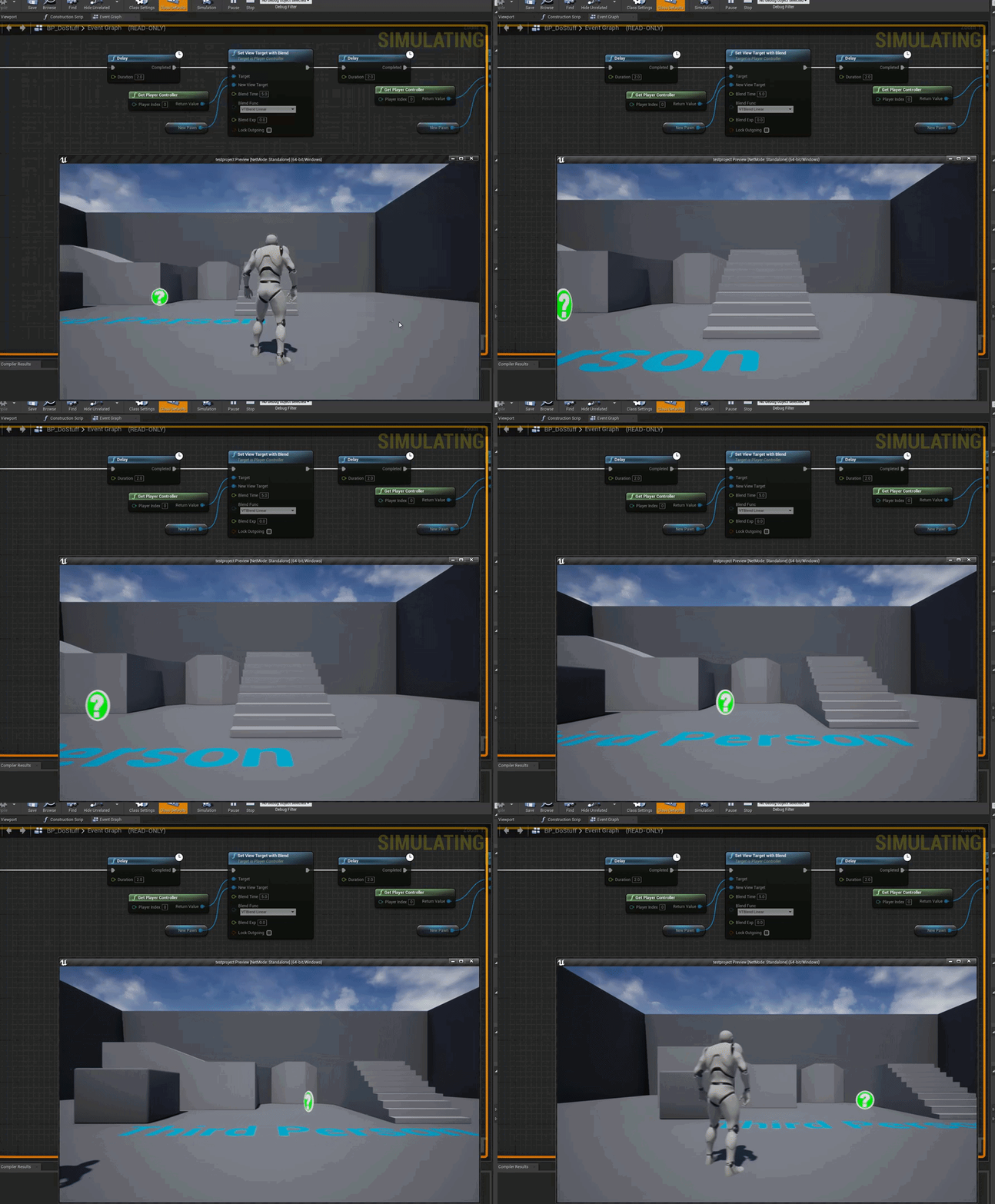
I blend from a camera actor I created to the new player and no issues changing the Blend Time
open eagle
I... really have no idea what it could possibly be
grim ore
step thru the code in debugger mode and see if its getting called late
hexed dock
The docs say after running AndroidSetup.bat:
This script will download and install NDK r21b for you in your Android home directory. The install directory for NDK should be C:/Users/[Username]/AppData/Local/Android/SDK/ndk/, where "username" is your login name for your computer. You should see a folder containing NDK r21b.
However, after running it I only have SDK/ndk/21.1.6352462
grim ore
all I can is that this code when i press 1 on the player will do what you see there and the delay works as expected
well 21.1 would be NDK 21b I assume
21c is 21.2 so that makes sense to me
I dont think they literally meant the folder would be called r21b
hexed dock
heh, well, they have a hell of a way of wording these things. 😄 Thanks
open eagle
@grim ore I Should have expected
I ran the thing again but on the server and it works as expected
 misty creek
Okay, so I know this is a really dumb question but it's got me pretty well stuck. For some reason I can't get an overlap event to fire.
The tree has collision when i run into it
grim ore
@misty creek chances are you want the hit event then, not the overlap
misty creek
That's the part that isn't making sense to me
It has collision, so I don't know what I'm doing wrong for an overlap event
grim ore
how can it overlap if you are stopping it from overlapping when you collide with it?
misty creek
I have a projectile that overlaps everything
And I've used the same settings, as far as I can see, for a different mesh and it works
grim ore
well I mean from what I can see you have that set to block all dynamic, which pretty much eliminates anything that wants to overlap with it. Did you also check the generates overlap events? it looks like you did but if it's not set to overlap anything (all I see is block checked) how can an overlap event fire?
misty creek
Now I feel so smart. 🤦 I had a static mesh version in the world
lol thank you for your help
wooden forge
Hi, what's the best way to control a playing sound with bp? like changing the volume and pitch while its running?
while the sound is playing*
wooden forge
oh okay thanks
 half orbit
Hello, i'm seeking for car model with an interior for a realistic quality type of game do you think that 16k triangle is enough ?
 open wadi
Is it possible to move a comment box in the event graph without moving the nodes within it?
Doesn't look like it.
rigid belfry
dude, what the hell? my editor is crashing when i try to remove frames from animations
grim ore
custom animation or one of the ones that epic supplies?
rigid belfry
i am making a custom one inside the engine itself
grim ore
I gotcha but what is your base animation you are using?
grim ore
ah., yeah that should work 😦
rigid belfry
recording from that, rotating some limps, and then removing the frames i dont need
that's what the crash report is saying Assertion failed: KeyIndex [File:D:/Build/++UE4+Licensee/Sync/Engine/Source/Runtime/Engine/Private/Curves/IndexedCurve.cpp] [Line: 71]
hold on, its working?
i can remove frames from the default idle animation
its crashing when i record it and try to remove the newly created anim
pallid ivy
Hey guys, noob question. I ran into "out of video memory" for the second time today. I have a 1060GTX 3GB. Is that not enough? Or can I lower the editor requirements/graphics somewhere. I'm only using the FPS template right now so no fancy environments.
 twin adder
Hey guys, has anyone stumbled upon an issue that unreal compiles shaders like 90 000, that's like crazy numbers for just opening a plenty simple landscape from marketplace
 ashen ermine
@twin adder It wouldn't compile 90k shaders if the landscape had less - tessellation maybe? . Anyway, this might help you: https://www.youtube.com/watch?v=_Ag21Il8C_g&t=268s
UE4 Compiling Shaders on 4.24 maybe is so huge like thousands of compiling shaders for just a simple terrain without layers, and maybe you not even try to use the new features for the Landscape Tools from Unreal 4.24.
To solve this problem caused in Landscape Material with La...
twin adder
thank you, will take a look
grim ore
@pallid ivy go to the scalability settings in the editor, the top bar -> settings and change it to lower and see if it helps
twin adder
ok so looks like this 90k shaders crazy thing is 4.24 ue4 bug
opened in 4.25 and all of it just gone
 marble hazel
Sorry if this is a dumb question but for a game I was making a part of the jam I was planning to have ai ducks which are always walking towards the nearest bread in the level. I was wondering how difficult this would be and what I should look into in order to implement it
rigid belfry
nice pasta
alpine sand
Don't worry about how its organised :), true professional
grim ore
make sure your blueprint is showing up top under the debug filter drop down
@marble hazel look at the EQS tutorial on the official website or the learn AI tutorial on the official unreal online learning portal. They both have something similar to that, the AI video one shows how to make a hunger value on an AI and to have it find the closest "food" and move to it when needed.
otherwise you can use generic behaviour trees without EQS by just looking around the duck for the closest bread and moving to it
marble hazel
Sounds great thankyou!
twin adder
Guys maybe someone knows how I can disable unreal feature, looks like it unloads particles if camera isn't looking at them (which is logical and good for optimization) but in this case I need snow to be loaded always without stopping it as you can see in the video blow. Is there any way to set it to always render no matter what? Particle is done in cascade btw. https://i.gyazo.com/b9031bf6bcedc7b6447a1a6e5aa5b004.mp4
particle is attached to player pawn
grim ore
twin adder
thank you very much
steep sandal
I have to know everything in Blueprints or can I start to learn cpp in ue4 because I hate Blueprints I like programming
grim ore
blueprints is programming
every blueprint has a C++ function behind it, it's not "some pretty thing that does stuff" it's visual programming.
and no you do not need to know everything in blueprints but if you dont know the engine, dont know C++ already, and want a more reasonable way to learn the engine then learning the engine by using blueprints then diving into C++ may be better
 shrewd steppe
So how do I fix this dxgi error
It's been happening since 4.25
I thought the new update might fix it but no
so I might as well ask
I saw someone on the forum talk about replacing it with an older version and it works just fine but I'm concerned it'd break something else I don't yet know about further down the line
rigid belfry
was trying the foliage tool out. clicked by mistake on the empty level while having the fill tool on, froze the editor. love it
shrewd steppe
this is the error btw
the editor works after you close popup
but its still annoying it happening every time I run it
open wadi
Question: I've been coding for decades but am quite new to UE4. I'm in the event graph and, per this UE4 tutorial, am instructed to "add an R key event". I see that I can do this by simply right-clicking in the event graph and looking for nodes - it appears I can manually create events for any given key in this event graph. Do I also need to go to project settings > inputs and add a key mapping for R?
 tired lynx
Hey! Has anybody else experienced a bug in UE that causes one's entire OS to crash? basically what's happening is about five minutes into having the engine open the UI will crash. If I attempt to end the process via task manager my system will freeze shortly after and will not recover. I thought it may be a 4.25 issue so I attempted 4.24, same thing. I updated to the latest Nvidia drivers, no success. Disabled all other non-essential programs: no luck. Discovered that putting my computer to sleep before the OS freeze and then waking it back up fixes UE's UI for another five mins. I've trawled forums for hours but am completely stuck. For reference unreal was fine the last time I used it, a few days ago, and nothing has changed since then. The last crash did bring up the bug report screen for the first time but then that too froze before I could send one off.
Am at my tether's end. Desperately want to swap over to unreal from c4d but these issues are putting me off big-time.
(also apologies if this is the wrong channel. I'm not necessarily looking for tech support per-say, just to know if anyone else has experienced this issue)
open wadi
@tired lynx I mean, a UE4 expert could chime in, but the entire engine crashing could be a million things. physical disk issues, conflicts with AV software, malware, disk space issues, various hardware issues, etc.
tired lynx
I'm wondering if the win10 2004 update may be the cause?
No disk space issues or hardware issues. Can definitely rule that out
open wadi
As a network administrator, you're going to want to get access to those logs somehow, if at all possible. That's where troubleshooting starts with something like this, generally.
grim ore
logs for engine or for the project? project is saved\logs. engine is users\user name\local\unreal engine\version\saved\logs
tired lynx
Thank youu
barren flume
I'm trying to hand create an animation but i can't change the red line
extend
and it's not letting me manually change it
 distant totem
@abstract mauve please do not post errors in the introductions channel. you are having direct x errors, for me when I had those errors, it was because GPU would fall out of sync with direct x, reinstall your drivers.
if you have nvidia, download geforce experience, check for updates, if there is an update, download it and try unreal again, if there is not an update, click the 3 dot menu, reinstall driver, tick clean installation
if you have AMD, use DDU to uninstall your your graphics drivers, and the AMD software to reinstall it clean.
 true nexus
grim ore
true nexus
grim ore
@barren flume How are you trying to create it?
barren flume
what do you mean
I selected the character mesh and selected create animation
i set working range end but I can't change the playback range stop time
grim ore
the working range is the range you are working with, its not the duration of the animation itself
you want to add frames? right click the bar at the top and add frame


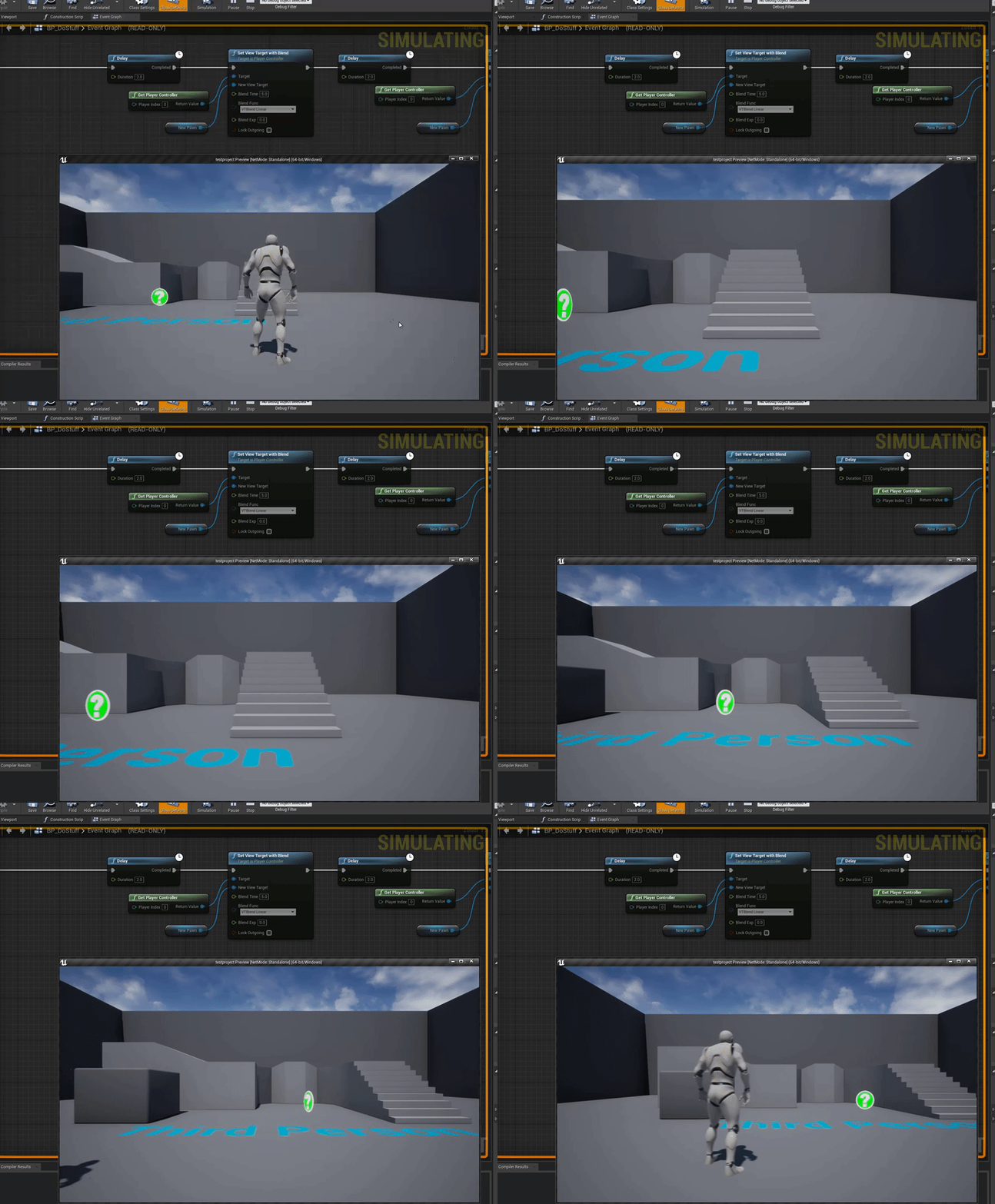 grim ore
ok? you have 1 frame what do you expect it to do?
the green is your start frame, the red is the stop frame
if you want to add more frames you right click the time code bar at the top and add frame
IF you want a more robust animation editor you have to use something outside the editor or look into making sequence animations.
 wheat hare
Do you guys know if chaos is already built into 4.25?
Or if I have to do a build from source?
ashen ermine
source afaik @wheat hare
wheat hare
thx
ashen ermine
mocap anims are no good for games @barren flume for artistic reasons
ashen ermine
wont work...not rly
barren flume
i know you could do it by hand
ashen ermine
no1 runs irl like they do in games lol
barren flume
i always thought mocap was cool
like those fight sequences
and the old gears of war trailer
with the mocap video
ashen ermine
after capture there's alot of work into tweakin them like that
ashen ermine
so much as for an indie it's a deal breaker
ashen ermine
crudest mocap anims you will see in a AAA game is witcher 3 and the anims thr are probably the weakest point of the game
 steady lantern
I remember that I saw somewhere that you can simulate physics in Unreal and then freeze it to create more natural looking piles of rocks and ruble in general. I cant find how to do it anywhere, anyone knows what I am talking about?
 weary basalt
@steady lantern You maybe thinking of a Chaos feature.
Chaos is the new physics engine thats still in development.
steady lantern
@weary basalt No, its like been around forever.
 scarlet birch
I've never seen anything like that but you could maybe simulate something in editor, pause the simulation, keep simulation changes , turn off physics in the actors and make a BP or mesh from them.
steady lantern
I've never seen anything like that but you could maybe simulate something in editor, pause the simulation, keep simulation changes , turn off physics in the actors and make a BP or mesh from them.
@scarlet birch Yeah yeah is something like that, I hate when I remember something from like a tweet or Pinterest or whatever and never find it again 😩
scarlet birch
I thought they did something similar in one of the Chaos demos though.
steady lantern
@scarlet birch In chaos they simulate the destruction of whatever and "bake it" then play the baked destruction without having to actually simulate at run time or something like that. Its similar yes.
scarlet birch
It's pretty much the same thing if you can move to any place in the simulation. What you're talking about would just use the final state of the simulation.
marsh swallow
Anyone have any idea how to fix this? I have been after this for many months and it seems to happen when the sun is up. We use Dynamic lighting.
I have played with the Occlusion settings, but nothing i do seems to work.
 stone kayak
@grim ore man, I'm a massive fan! I really like your videos! Cool to know that you're here. ❤❤
marsh swallow
I mean... what is UE4 Tutorials without Mathew?!
 I probably would have given up on many concepts or dev all together had it not been for the many many videos that helped me understand the concepts.
wheat hare
Anyone seen this before and know how to fix it? I'm building the source
doesn't look like anything I can control...
scarlet birch
You can turn on long file name support in windows 10
wheat hare
right on