#ue4-general
1 messages · Page 757 of 1
 gaunt tide
Autocorrect but whatever antways
 viral flame
well i guess then ill have to just observe the "supreme" programmers and not learn anything at all since in the end i wont be able to handle or comprehend it
Roblox is "too childish" and makes me look like a 6 year old
gaunt tide
So ig I’m going to have to restart with my trees and rocks for my terrain @plush yew :/
viral flame
oh then you'd be damned if youve seen like a billion people point their fingers at me and laughing cause i use RBLXLUA
gaunt tide
Oh had to do with object references and even using the foliage from inside the Brushify folder it doesn’t simulate the trees on the map. So maybe starting over on that wouldn’t be a bad idea
gaunt tide
Ahhh
viral flame
i dont have any money
gaunt tide
Now I know and it shall be taken note of
viral flame
to actually invest into an engine
well i dont feel like using unity cause "unity - "good enough for bad games""
but of course
 untold wedge
@plush yew Scale of object ,you mean the XYZ ? thats set to 1
viral flame
theres cities: skylines or whatever which is on unity and is a good game
 heady quartz
Surely you don't expect yourself to make the next fortnite with the first 3 or 4 years of programming @shadept ?
viral flame
but "the chance that youll be making the next cities: skylines with a game engine like that is really doubtful"
i dont
i just want to make an FPS for the sake of learning experience
ive already made an FPS controller with blueprints but it has some shit that bugs me out of it
heady quartz
I mean programming is programming no matter what engine you're using
heady quartz
It doesn't matter which one
viral flame
no it is possible
but its just snapping you immediately
and does not slow you down
and when i looked for tuts on how to make something like smooth crouching
they had a bit different code
 scarlet birch
Do I need to do something with scale when moving a rigged fbx from Blender to UE? I'm seeing an issue with a rope I've rigged and modeled that I think has something to do with scale on the bones. I've applied all transforms.
viral flame
from what ive made up
untold wedge
@plush yew Yes ,its just mess ,the tesselation doesnt work at all ,dont know if the size of object is problem or its something esle
heady quartz
For smooth crouching i assume that you can make the character max walk speed and capsule height gradually decrease overtime with a timeline @viral flame
viral flame
i just feel like id be shamed if i used blueprints or anything like that for a game
i never knew games even used that stuff
heady quartz
Literally everyone in this discord server uses blueprint. Even fortnite
viral flame
but im sure they use c++ for the character controller
untold wedge
@plush yew I try ,but after many tutorials and trying everything ,nothing ,I think the problem is something else ,but cant figure it out what
heady quartz
For the base controller yes they use c++ but otherthings are mostly blueprints
 teal sparrow
does anyone know how to make a flare vfx like this 🙂 https://www.youtube.com/watch?v=B_dUrPjNPwE

 plush yew
how long should it be taking to build a project on a different engine version?
untold wedge
@plush yew Yeah,about that ,that might be the problem
viral flame
yea fuck it going back to blueprints
gaunt tide
Damn just noticed my trees collision is like 20ft instead of its actual size
 quiet token
how do i get this to open up on my other screen maximized ?
 dawn kelp
Welchen suchalgorythmus verwendet die UE array contains?
What searching alogrythm des Array contains use?
 spiral island
when I try to package my project, the packaging fails, because this field is not set
if I type anything into this field, it gets blanked out as soon as I close the window. How can I set this field?
dawn kelp
Thanks
spiral island
pressing enter selects the text @plush yew
but that did seem to keep the value, i'll try packaging now
scarlet birch
Do I need to do something with scale when moving a rigged fbx from Blender to UE? I'm seeing an issue with a rope I've rigged and modeled that I think has something to do with scale on the bones. I've applied all transforms.
@scarlet birch Answering my own question, part of the problem had nothing to do with scale. The joint I was attaching the character to didn't have a physics body attached. Using a joint that did fixed one issue. I still have a weird issue with attaching anything to the joint with inherited scale that I don't know the cause of.
heady quartz
Did you really not try pressing enter before 😂😂
untold wedge
@plush yew Nothing :/
@plush yew I tried many textures ,but nothing worked properly , POM - I'll try 🙂
 weary basalt
Does anyone know if the ShooterGame project has Steam Achievements?
scarlet birch
I don't think it has Steam setup
 fallen marten
Generic shooter does
viral flame
okay, i tried to go back to blueprints and now am wondering: why cant i go back from crouching to standing?
heres the blueprint
perhaps i forgot something?
scarlet birch
@weary basalt I was wrong. It does have it and the achievements stuff should work.
weary basalt
👍
scarlet birch
What's wrong with the built in crouch/uncrouch?
fallen marten
@viral flame you haven't set a value for it to stand back to
scarlet birch
Your mesh is snapping?
viral flame
im not using ANY meshes
only a capsule
it just doesnt have any smooth animation for crouching
once you crouch
your camera just snaps down
scarlet birch
Is the capsule going to be your final pawn?
viral flame
i dont think i plan to make a static mesh for the character
scarlet birch
Then the issue is the camera moving, not the capsule change
You might be making it harder than it needs to be to fix
untold wedge
@plush yew So the material is not the problem ,its something else
viral flame
@plush yew still nothing
scarlet birch
Are you using a spring arm?
viral flame
using what?
scarlet birch
...
fallen marten
@viral flame disconnect your capsule from lerp b and set a new variable
viral flame
im making AN FPS CONTROLLER
not a third person controller
@fallen marten a completely new one?
or changing the old one?
fallen marten
Yes. Once you set it on the first timeline play, it is trying to lerp back to the Hight you've already set it
scarlet birch
Get capsule scaled half height feed that into a lerp and use the output to set the half height
viral flame
im having a hard time visualizing this to actually understand it
oh
so im not lerping it to the actual height the capsule is by default without crouching
scarlet birch
fallen marten
Boom
untold wedge
@plush yew If you look at the object it looks it should work ,but then I apply it to landscape and it doesnt work
fallen marten
No just add a variable. One to stand, one to the Crouch hieght. Lerp between them
Easy
viral flame
i mean, i already do have those?
crouchheight
standheight
so i disconnect the crouched half height and?
scarlet birch
I'd rename those so they explicitly inform you they're target values and not current
viral flame
so swap the names?
scarlet birch
If you're storing your target halfheigt in a var it will be easier to understand later if it's named something like Target_
maybe that's just me though
viral flame
well im confused and gotta go anyway since its like 2:27 am and i have been staying up a lot
viral flame
well im not logical at all and just watched a video since i completely dont understand how to make smooth crouching
 dense hatch
I'm trying to make and use a post process material and it works... but only in 16:9 aspect ratio. in any other aspect ratio it breaks, like it's aligned to the left side of the screen
viral flame
well i know that from LUA i think
lerp is basically a thing that turns the objects, say, position from A to B
in LUA you can lerp CFrame and thats mainly what its used for
scarlet birch
Interpolating from one value to another
untold wedge
@plush yew I tried to place the texture to some objects and still doesnt work properly
viral flame
i just dont get it at all
what i have to do
to actually achieve what i need to
since i have limited time pleasehelpmemyparentsaregoingtofuckingkillmeforstayinguplateyesidohaveparentsdontcallmeoutforthatyesimnot18
okay so i go from standing to crouching
okay
now
B = desired TARGET "standing height"?
like the actual height of the capsule without being crouched?
ah so i have to swap them or something?
scarlet birch
You need to be using the current value and moving towards a value. That setup is not good because it's not using the current value.
scarlet birch
That depends on the direction of the value coming out of the timeline
It's also not the current value
viral flame
i just dont understand what i fucking have to do
make a new variable?
make it the ACTUAL capsule height but a duplicate or some shit?
i dont fucking get it
i mean ISNT THIS THE HEIGHT BEFORE IT GOES CROUCHED?
okay
yeah
but now
i just dont understand anything at all
i do understand that i have a lerp
and i need to go from the height before crouching
to the height where the capsule is crouched
wdym constant forever
untold wedge
@plush yew It really look like It should work ,but after applying it to any surface/object ,it just doesnt work
viral flame
and for some reason it isnt
the reverse does not make it go from crouched to standing
these are my variables
i DID
and it did nothing
i connected it back since it did nothing
so, i connect it to the reverse from end
and just swap A and B
untold wedge
@plush yew I'll do it tomorow ,had enough of this ,4 hours and still nothing 😄 need some sleep for this
viral flame
yes it does work but
not going back to standing
and what instead?
this?
okay i made a new variable
now what do i have to set it up from
event beginplay?
what if i dont know the default one?
if i were to make my game realistic i wouldnt do this at all then
yknow i just want something to put on a hand rig and work from there
still wont work
it still doesnt reverse it
oop
it still wont work
goddamn
it fucking is in b
what is this then
well same here
i guess i should be an artist instead of a developer
i have no chances without any logic
 bleak widget
hi everyone. How to reduce num of used tex. samples ?
just 2 textures with no alpha
viral flame
okay i guess im not getting any help
im too stupid
okay
fuck this i give up again
viral flame
too bad you are not allowed to hold guns in this country
cause then id probably stop typing mid conversation
bleak widget
oh my gun is my mind
viral flame
yknow id love to fucking suffocate myself right now
cause this issue has not only drained someone else's energy
but made me want to fucking reconsider my life choices
cause first: im illogical, i make no sense, i do not understand any fucking english and am not able to do anything besides infinitely say that i can do something
 quasi meteor
Can I release/distribute a game under GNU/GPL license leaving unreal engine entirely seperate for people to obtain through proper channels?
not asking for legal advice disclaimer this is made up scenario
viral flame
i guess none will help me cause now everyone knows how stupid i am
quasi meteor
Also in this scenario the game is also published and licensed properly. Its just the code that I want to run through unreal engine which i wish to make public
viral flame
okay none fucking cares about my shit i see
 sweet relic
@quasi meteor afaik as long as you don't include any editor code/content you can release your own code under whatever license you choose
IANAL tho
quasi meteor
I emailed the software freedom law center waiting to hear back for sure.
viral flame
okay none cares i guess its over
quasi meteor
because I think the order matters maybe. If I push an update out to my commercial game containing code I didn't officially publish through GNU/GPL first what takes precidence etc lol
but I equate it to writing down C++ code with pen and paper and then later deciding to use that code in other ways, it doesnt become someone elses that makes 0 sense
viral flame
so i guess none can help me anymore right
plush yew
Hello everyone, I need some help in regards to emissive Materials, I have created a character and applies an emissive mat on it, unfortunately Im getting some artifacts if I move or turn to fast. Any way to fix this issue?
 hexed jasper
How do I change the directory of the quixel download folder? Whenever I move the main folder to my D drive it puts in back in my C drive when I download a new material
 manic pawn
@quasi meteor unreal engine is incompatible with GPL
 little falcon
It seems that i cannot do vertex paint on landscape, when i select the landscape and switch to mesh paint mode, the paint button greyed out
quiet token
how to maximize window threw console command?? or any c++ function that can do this ?
 sonic bane
Probably a dumb question - How can I code in Unreal Engine (like without block code)? This picture is the block code, so how can I make with code?
 runic quiver
I usually put all my games publicly on github. If I get some paid marketplace assets, I won't be able to do that anymore right? How do you guys deal with that?
@plush yew good idea, thanks
 exotic thicket
Well this is a bit disappointing... paper sprites apparently do not support getting UV's on hit, even though it's pretty much just a plane
Slap the sprite on a static mesh plane and hey look it works 🤔
plush yew
I'm making meshes in blender. Do I have to unwrap cylinders and other shapes?
the default texture is stretched
scarlet birch
Yes. Unless you use materials that are aligned some other way
Unwrapping is probably a lot cheaper though
 sharp kindle
So I have 2 problems with packing for android, first as you can see is the textures don't load in all the way for the ground, (don't worry about the buildings they are not textures atm) and second as you can also see is that some of the grass/tree foliage is really dark almost black.. What could be the problem here?
 barren flume
I was wondering what the difference between Resonance Audio by Google vs Steam Audio is
or what would be the better choice
 empty oracle
can you combine different projects into one?
scarlet birch
migrate
 gilded plinth
Has anyone tried to package for win64 on 4.25.1 yet? I'm getting consistent crashes in all projects as soon as the package location window pops up
 fierce lance
@gilded plinth looks like the compiler is not finding the api stuff for windows might check compiler settings ???
 bold wyvern
If I am working on a long-term project in Unreal that I intend to publish, should I stick to one version of the engine, or keep upgrading as new versions come out? I have been encountering compatibility issues with the latter approach.
gilded plinth
@fierce lance I just tested on a freshly created project and same crash
where would i check compiler settings?
fierce lance
what are you working on
gilded plinth
In what sense?
fierce lance
windows ios ???
gilded plinth
i'm on win 10 and packaging for win 64
I was packaging fine no problem this morning
only thing i changed on my comp was 4.25.1
fierce lance
you compiling from sorce
gilded plinth
nope
fierce lance
ok so just launch editor and then load project any at all crash
gilded plinth
My steps are: 1) load project 2)
and then in 1 second it will crash
before i have a chance to select folder
I just tried creating a new project through the launcher/editor also and that new project also crashes the same
fierce lance
I am updating it now lol just seen it was there not 5 min ago lol
gilded plinth
I have a second computer and I just got my big project onto it through source control. The second computer has 4.25 (without the hotfix) and i can package!
i'm freaking out lol, deadline hehe
fierce lance
ok use the editor to migrate your project crap i don't have one to test all mine are 4.25 and compiled so i can play with chaos
 kind dew
can i migrate assets to a folder inside of the content folder? It gives me that warning saying it needs to be in the content folder so I am worried
gilded plinth
Not sure what you are suggesting Seth
@kind dew no i don't believe you can. but migrating respects files structure
so if you migrate a file inside a folder /Content/Folder/Foo.uasset, It will appear in the new project as /Content/Folder/Foo.uasset
gilded plinth
don't we all : )
kind dew
oh well. Seems like a wierd thing to enforce
gilded plinth
There's a lot going on behind the scenes in the Content folder with redirectors especially
I'm sure there are reasons : )
 shell bay
why is movable lighting sooo much darker?? help
 lusty night
if anyone here knows how to create a UTexture2DArray asset in the editor please tell me. Or even knows how to create a class that extends from UTexture2DArray
fierce lance
@gilded plinth do you have visual studio
gilded plinth
yes
community 2019 and code
i build in visual studio community sometimes because i do c++ UE4
fierce lance
well i am using 17 and i created new 3rd and the started package win 64
so far so good
gilded plinth
gotcha. I was just chatting in packaging channel and we decided it could be my installation
so i uninstalled ue4 4.25.1
rebooted and i'm now downloading it again/installing
will be done in 10 min and i'll make a third person and try and package
gilded plinth
@fierce lance still crashing : /
fierce lance
@gilded plinth do you have the windows sdk installed to vs19
gilded plinth
Yes, i'll tell you the version
btw 4.24.3 packages no problem!
There is one new version in individual compoonents
which version are you using?
I also have .net framework 4.8 sdk
@fierce lance are you on the same version?
yours may be older if you're using vs 2017
fierce lance
yup i am using a older compiler and i know they are still working in 17
fierce lance
@gilded plinth got me
 candid falcon
am I the only one who kinda wishes there was native .blend support?
 frosty perch
Hi, I'm new here. Foliage drag and drop doesn't work. any help?
im trying to drop grass
i will drop it and it wont do anything
gilded plinth
Could anyone 4.25.1 go to project settings/package and click the three dots on staging directory and let me know if they crash or not? I'm crashing consistently in any project new or old
frosty perch
@gilded plinth ok i will
I'm in project settings and I can't find this "staging directory" you're talking about
oh I found it
no I'm not crashing
works like a charm
gilded plinth
@frosty perch do you have vs community installed? do you mind telling me what .net framework sdk you have installed?
frosty perch
I'm new here... all I did was install epic games launcher and install unreal engine
frosty perch
hey
please dont go
do you think maybe you can help me now ?
I cant drag and drop foliage
im new
gilded plinth
you gotta look up the foliage tutorials : ) there are multiple ways to use foliage
hexed jasper
dragging in foliage into that section shouldn’t be hard I just did that like 10 minutes ago : P
hexed jasper
I don’t see why it wouldn’t work
hexed jasper
Where did you download the grass
gilded plinth
you need to make sure you're trying to put the right type of asset there
hexed jasper
^^
frosty perch
startercontent/media
startercontent/materials* grass
i didnt download the grass it came with the engine
its a stock grass
frosty perch
@gilded plinth @hexed jasper
hexed jasper
Ah there’s your problem, that is a material, you need to drag in an actual 3D model into the foliage section
If you are trying to get that grass texture onto an object just drag that material onto the object in your viewport
frosty perch
so how do i find the 3d model
and im so happy right now that you know whats wrong ty sm
ive been at this for hours
hexed jasper
Haha all good man
frosty perch
unistalling reinstalling even tried old versions of unreal engine
hexed jasper
You gotta find a 3D model that you like, the best bet is to find one on Quixel Megascans
frosty perch
what button do I click to use it
well to open up third party 3d models
im assuming thats what quixel is
hexed jasper
This is something you gotta do outside of Unreal Engine
frosty perch
and thanks this is all i wanted to know i just wanted to use grass I want to make a spooky house in a forest
always wanted to make maps
spooky maps
gilded plinth
hehe that's cool, but wvm, take it slow. You have a lot of basics to cover
i suggest finding some tutorials that take you through it step by step
gilded plinth
you're definitely trying to shortcut too much if you don't know what a material asset is
hexed jasper
Yeah I made that mistake of just trying to make my idea without tutorials
frosty perch
sorry
gilded plinth
and i'm not gonna indulge that : )
frosty perch
they got like 40 part series just for 3 of the videos to be what i actually wanted to know
hexed jasper
Well you wanna learn how to make some sort of horror forest i presume?
frosty perch
wooden small dilapidated shack house in a forest at dusk or dawn whichever is almost dark but not exactly
not a ton of trees around the house
it'll be fun to make i think
hexed jasper
I would learn the basics of how to put a material onto a cube at first
frosty perch
yeah sorry, its just the guy was taking so long to get to the point in the video even at x2 speed I almost fell asleep
and i wont get anything done if im asleep
not his fault its just hard for me to pay attention to things I'm not particularly interested in at the moment
im just like, let me play around in the engine and see where it goes
hexed jasper
I was in the same page man I couldn’t make it thru a tutorial without giving up but you say that “it will be fun to make” and I gotta say that it will be even more fun when you learn new things. You may not get your spooky forest on the first attempt but if you keep on learning new ideas and watching tutorials on YouTube you will progress faster 👍
frosty perch
thanks
I'll finish the tutorials. Just wanted to scratch the itch of creation for a second and place some grace on terrain for fun I guess. I know I need to finish them.
Thanks for your words and especially your help my dude
hexed jasper
Yeah no problem if you need any help just DM me or ask some people around here 👍👍
gilded plinth
FML, I thought my crashes had to do specifically with the staging directory for packaging but actually, these three dots are crashing also
Just trying to create a project!
 brittle gulch
The Launcher needs hell of an update! It's so slow...
 ashen ermine
Anyone experiencing crashed on compile - sometimes - after modifying structs?
 brave pebble
Why does my UE4 crash whenever there is anything compiling when I press inside viewport
Is this normal or it's just me
 ember raven
Is it possible to bring Schematic(minecraft Buildings etc) to unreal engine?
brave pebble
i can't find anything online
 timid grotto
Anyone on win7 upgraded to 4.25.1? Can you launch the project? In the forum someone wrote that they get a crash before the interface error we're now getting.
 exotic cave
I installed 4.25. No project upgrades yet.
It was a beast to launch it first time.
I have a bonzo i9/2080/ssd rig and it still took forever to launch, but it seems spicy so far 😄
exotic thicket
I wonder why do the docs etc. on the cheatmanager class talk about how it's a blueprint but... you can't even do anything with it in BP's :P All of the useful stuff like... cheats with console commands... is just C++
exotic cave
I wish the volumetric sky was built into the starter content, it really deserves it
 frank oar
Is it possible to make a Navmeshbounds volume ignore a mesh ?
I ask because I am using this mesh for another navmeshbounds volume in the air, but it is blocking the one on the floor and
creating an area which I can not get into/move around in (if that makes sense)
 wary wave
actors should have a flag on them somewhere that says how they should be treated when generating nav meshes
scarlet birch
@gilded plinth My guess would be some temp file, cache, or other intermediate file held over from before you updated is causing an issue. If you haven't already I'd delete what you can in Saved, Build, and Intermediate directories. Maybe also the .Vs directory.
frank oar
@wary wave the higher mesh Is invisible in play, I need to be able to navigate under as well as on top of it.
wary wave
you may want to change your generation settings if you need to be able to navigate over it
scarlet birch
Use a nav mesh filter
wary wave
it sounds more like the agent is taller than the characters it's generating for
scarlet birch
or the collision on the platform is bigger than the visible mesh
wary wave
also possible
 merry flower
How can i copy some objects transform (location, rotation, scale) and copy to another object?
 summer musk
@merry flower right click on the word transform and select copy, then do the same on the other object and select paste
merry flower
right click the one in details?
frank oar
@scarlet birch looks like the collision is tightly bound to the actual geometry.
I haven't heard of a nav mesh filter before, Ill look
scarlet birch
Vanilla likely had it right with first comment.
 frank oar
@wary wave I need to be able to navigate below as well as above.
merry flower
damn im dumbo
scarlet birch
Look at the nav mesh settings there's something about height or area needed.
frank oar
would that be in project settings ? thats where I am currently looking.
scarlet birch
no idea, more likely it's on the nav mesh volume
I don't recall exactly and don't have an editor open
frank oar
thank you anyway, I am going to keep messing with it for a little while.
exotic thicket
What's the licensing with Marketplace plugins? I'm noticing that if I add a plugin which my other team members don't have, they get a nag screen about it... I notice I can just send the files for the plugin over, but not sure if that's gonna break some license or something :P
Oh nevermind of course I find the answer to it immediately after asking
Yes, you can share Marketplace products with your team but only for the limited purpose of the project that you are jointly developing.
In case anyone else is curious.
exotic cave
That is indeed good to know!
 modern sinew
My button's "On Click" event isn't triggering, anyone know why?
 astral phoenix
Hello, Is there any1 that knows how to do so more than 1 person can edit a project via WIFI and not LAN? like a multiplayer session 🙂
 frank oasis
@astral phoenix you do the wrong questions here
astral phoenix
@frank oasis idk where that question need to go sorry :/
astral phoenix
what do u mean?
frank oasis
you mean internet not wifi lan is is a network of local computers and internet is the worldwide network of computers
astral phoenix
ohh.. but still the same question xD
frank oasis
also to do internet you must create your own server no matter if its for fun purposse or to play with friend you need a server and then you can make some programming in unreal
my suggest is go off to create lan option
and use hamachi server to play with your friends and ppls
thats way you still can make a room of alot ppls depend alway on the game if its co op of 4 ppls for ex you can create a server in hamachi and invite your friends
if its mmorp kind off i can give you a link
astral phoenix
i dont want to ''play'' with friends i want so i me and my team can work on a project on the same time but we are in diffrent citys
astral phoenix
yeah? did u even read my text? xD
frank oasis
If you are in a newer version of UE4, he can just go to File -> Package project -> Zip Up Project, and then upload the project. If you want to simultaneously work on the project, you can do that using source control.
@astral phoenix hope thats helps you
im not sure how its work
but there arent any other option when your are across only by zip it to compress the memory and send it
and as you see there is a source control of how your work together
astral phoenix
source control? what do u mean?
frank oasis
im not sure its copy paste man but from what i understand its only one way zip upload wait a bit

Source / Version Control:
This playlist will cover multiple ways to work with source control with UE4.
This Video:
In this video, I cover the basics of source control, what it is, why you'd need it and some of the popular options available to you when working with UE4.
Link...
it explains it
How to use Source Control software inside UE4.
here its showing everything about the source controll
astral phoenix
this just save files?
frank oasis
what you mean
this is the purposse actualy to save your files and send them over to your friend connect somehow i dont know the way but it explains it in source control inside unreal editor and work together everytime he do something and you miss it your project will update from him and vise versa
just watch the video look the source control and do this File -> Package project -> Zip Up Project
astral phoenix
so we cant see each other like in this video?
In this webinar, Senior Technical Marketing Manager Daryl Obert and Technical Artist Matthew Doyle demonstrate a unique collaboration workflow in Unreal Engine.
The Multi-User Editor is a powerful tool that enables multiple artists to make changes simultaneously to the same ...
frank oasis
let me check and i tell you
plush yew
Hi guys
Do you know UEFY script ?? As long as I understand, it's a script for RIGIDIFY (add-on for blender) in order to export characters' skeleton properly in UE4... Does it mean that I can't export blender's characters properly in UE without this script ?? 🤔
frank oasis
@astral phoenix this seem legit did you try it ? you just need to create one session on the pc with the project and the other pc which is intent to work together about the assets the same assets you have he will be able to use
im not sure if he can even have control over it
astral phoenix
@frank oasis i tried but my team could not join the session, im not sure if its because we are in diffrent citys
frank oasis
@astral phoenix OH NOW I REALISE IT
cause its only lan
or some vpn made connection
here one idea from me
go to hamachi site https://www.vpn.net/
install the hamachi thing create a server yourself maybe you need to register but its free
tell your friends name or ip whatever
actualy wait
astral phoenix
i will wait then
frank oasis
@astral phoenix https://www.youtube.com/watch?v=-tFXNpYZcdc

Download Hamachi click here: https://windows10freeapps.com/logmein-hamachi-for-windows-10-8-7-free-download/
This video will show you how to install Hamachi on Windows PC, how to use Hamachi, how to play minecraft with Hamachi.
Top 5 b...
just do the install of this hamachi thing
and create a server invite your friend with ip
let him join up after this follow the guide you send me with the unreal webinar thing
hamachi connects your friend pc to your server and read them like they are in the same local areal
area *
astral phoenix
i see i will try that!
frank oasis
also
as you know for ex you download steam cracked games right ? some of them have local games that must be connected to steam server and play via friendlist right ?
astral phoenix
no, idk
frank oasis
and if your game are cracked it will never work on steam
so hamachi do the job and you can play most local games if the games are cracked
astral phoenix
but what have cracked games to do with anything?
frank oasis
just logic
well forget it do what i just told you up and all should be fine dont forget to do the ip configuration in the unreal too
astral phoenix
ohh okay, i will try to see if Hamachi works ty 🙂
frank oasis
now about the assets i think its possible to send files over too for ex if he needs a new model or icon or something in the unreal for ex it would take time cause hamachi connection is is not made for this kind of thing your should communicate and you download any asset is needed for the project and put it in unreal yourself
so he can work with whatever you put there
 sudden forge
hey guys im trying to edit the third person template to adjust the movement of the character and im having trouble figuring out how to access the code of the included character. any idea how i can get that?
frank oasis
@sudden forge the speed or the animation ?
sudden forge
just different properties of it, but mostly mechanical changes
frank oasis
the speed on the third person is like 300 you can lower the speed or make it higher but the animation remains the same
sudden forge
the speed is fine, just i wanna tweak the jumping and midair movement
or do i have to make a custom character to do that?
frank oasis
well if you want to change the way hes jumping etc
then yes you need to do custom char cause the animation for the manequin in the 3rd person template have its own animation you cant change anything thats already are made
unless you use manequins fbx to use an animator and change anything you want
but the code is surely changeable just the animation wont change by any way not even if you try to code
sudden forge
im not interested in changing the animations really. i think they are fine for now
i just need to edit the code
how can i do that
frank oasis
then its possible go into the third person BP
oops wrong
go into the Manequin file
Animations
and choose the ThirdPersonAnimBP
there should be all the code on how the manequin behave
sudden forge
would that not be changning how the animations work, not the character itself?
plush yew
Is it mandatory to download the unreal engine nvidia wave work version for nvidia wave work or is there something plugin style
sudden forge
yeah @frank oasis this is animation controlling
frank oasis
@sudden forge did i indicate you the wrong thing ?
i mean you asked to change th mechanics of the character
frank oasis
yes ?
 next badger
to edit movement you have to use c++ and make custom movement component
or take a look on functions that let you hook to it in BP, if there any
next badger
well, it's all in CMC
if it's not included in original, you have to inherit, override and pass it back to character
afaik it's possible to edit air control w/o c++
sudden forge
what do you mean "CMC"? im not familiar
next badger
Character Movement Component
sudden forge
ah alright
so just make a class that inherits that, then override what i need
then i can replace the current class on my character with my custom one
next badger
no just, you also need to pass that component back to character and add few custom functions
sudden forge
oh so i can do everything inside the current component?
next badger

In this video I show the proper way to make movement abilities for your characters. This is done by creating a Custom CharacterMovementComponent.
We start from scratch with a third person BP project, but here is the completed project you can copy code from: https://drive.go...
sudden forge
oh cool thanks
 jaunty wadi
Is it normal with flickering when resetting location of something to 0 0 0?
It does that 10 times per second
I am just starting out from the official UE4 learning courses, and I came across this
Issue disappears if I use 0 0 -1 or 0 0 1
 rocky radish
it's because the object in 0 0 0 is intersecting with the grid
so it will cause the flickering in 0 0 0
rocky radish
it won't happen in game
but you can simply put it at 0 0 1 or 0 0 -1
if it's bothering you
jaunty wadi
I see, thank you! 🙂
rocky radish
you're welcome 😄
 cold venture
I am having a wee bit issue with alpha brushes can I dm anyone with the issue?
please @ me I might miss it thank you
 fiery moat
THANK THE LORD OF CODE AND EPIC, MY UNREAL UPDATED!
rocky radish
lol
fiery moat
thank you too for sharing my happiness
rocky radish
😄
fiery moat
now I must make the starting area of my game
a spaceship good thing I got all those packs
uh oh I need help how can i make building parts snap on each other?
merry flower
is there any way i can shift select or something? https://gyazo.com/8b9ae7c646d6922c45b8110366accfea

i dont want to go one by one in there XDD
rocky radish
uh oh I need help how can i make building parts snap on each other?
@fiery moat snap?
fiery moat
stick to the sides or top so that they shape a proper building-ish object
rocky radish
i think you can, hold up
fiery moat
hold up?
merry flower
cant box-select idk :/
rocky radish
i forgot the comma
fiery moat
oh ok lol
rocky radish
done now it makes sense
wow my pc is slow today
if you press v it snaps to other objects aparently (pressing v while moving an object )
it feels really weird to use tho
fiery moat
oh thx
rocky radish
its vertex snapping
merry flower
umm
so basically i want this hand to move up n stuff like this https://gyazo.com/2d82d3f6749b10fe5e3a887a91c54094
 fiery moat
how can i make the player see from a different camera until the character hits a trigger?
merry flower
but it messes it up like this:: https://gyazo.com/f4a7506fd95138b6177a7028f26e8754
fallen marten
@fiery moat set view target with blend. It blends between whatever cameras are referenced
fiery moat
how can I do that?
fallen marten

O’Reilly Online Learning
That page was almost first google search man -vjew blend is a simple thing to setup
merry flower
can someone help me with the animation?
fiery moat
where do I apply those node commands you showed me @fallen marten ? (sorry for pinging)
 runic yoke
Hi. I need widget to have both text and image and I need to place it on a grid. How can I do so? What container should I use for image and text?
fiery moat
I am having massive trouble trying to put together those nodes from the link help
merry flower
Idk why it's flying away when i just want it to move smoothly. Any ideas how to fix this? https://gyazo.com/7f1cedc60ce7f5d381dfb531f6308d5c

 ember shadow
hello, for some reason when i import my mesh from blender the light only appears when put in the mesh and doesnt show when ontop of the mesh. Any fixes please?
 restive vale
Could it be a flip normals problem?
ember shadow
how do i fix that?
restive vale
ember shadow
cheers
fiery moat
help I am having big trouble blending cameras, my head is about to explode
 gaunt spoke
Hello! Does anyone know if you can edit an existing data table in UE4? I want to edit the existing rows, not add a new one. But wasn't sure if you could edit existing ones or if I need to make a new one from scratch in Excel and import. Thanks in advance!
ember shadow
@restive vale nope, doesnt fix it 😭
 fleet cosmos
@gaunt spoke can't edit datatable in runtime
gaunt spoke
Sorry for the confusion. Was not trying to edit in run time. Was simply trying to change an existing one.
I exported and realized the data table was pulling info from a struct. So all I had to do was add a variable to the struct to get it to populate in the data table.
 midnight gate
hey im working on a cutscene for my game and its a bit long so im wondering what are your preferences on cutscenes should i cut it down a bit or keep it long https://www.strawpoll.me/20259184

Straw Poll
Vote Now! [10-30 seconds] [0.5-1 minutes] [1-5 minutes]
fiery moat
I have created a very basic teleportation node series but it is not working what am i doing wrong? (how can I take a screenshot?)
fleet cosmos
press print screen on your keyboard and paste in MSPaint
fiery moat
nvm I found out how
ok now I need help. I want to add a node to the player character to start an event once the character touches a trigger
fleet cosmos
depending what you want, the best thing is make the trigger make the action
and not add stuff inside your character blueprint that other object can have
fiery moat
ok
fleet cosmos
make a blueprint, add a collision to it, than add a event "On overlap" and make sure only the character trigger it
fleet cosmos
you want to teleport the character between triggers?
fiery moat
no from the trigger to a location
fleet cosmos
you need a reference for this location, position or object
fleet cosmos
make a blueprint only for the teleport position
fiery moat
on what actor?
fiery moat
um could you be more descriptive?
fleet cosmos
than add a variable like "teleport name", than when you go teleport you can find this other actor in the world and see if is the name you want
this is a easy and good way
2 actors, 1 to start the teleport and other the position for the teleport
than you add a variable of "name" type inside each of those actors, when you trigger the first actor it find with "get all actors from actor class" the other actor type and see if is the same name
if you want to go back to the position other the other teleport, you make it only 1 actor
than you add 2 of this actor, and they teleport between each other
fiery moat
I don't want the player to teleport to its previous spot
fleet cosmos
its good to know how to use Interface, than you create a interface of Teleporter type and make tha communication easier
fiery moat
what type of variable should teleport name be?
also the teleport variable should be a public node/
fleet cosmos
you can use "Name" variable type and dont need to be public because you will set it and don't change in the level
the way to trigger only characters is to set the trigger to only overlap with pawn
fiery moat
ok
 fresh rampart
Hi everyone, I just started using Unreal and started with the First person project, and im trying to do some first person sword skyrim'y stuff
I have my mesh with attack animations, and because the first person project used an Animation Montage to play the fire animation, i kept with it for the slash animation
but now, i want to only allow a second slash animation after the first ends.
I having trouble understanding the docs if there is a "anim montage ended" so i can code it, or if I should go and put the attack animation in the animation blueprint
rocky radish
Hi everyone, I just started using Unreal and started with the First person project, and im trying to do some first person sword skyrim'y stuff
I have my mesh with attack animations, and because the first person project used an Animation Montage to play the fire animation, i kept with it for the slash animation
but now, i want to only allow a second slash animation after the first ends.
I having trouble understanding the docs if there is a "anim montage ended" so i can code it, or if I should go and put the attack animation in the animation blueprint
@fresh rampart do you want the second animation to play right after the first ends or do you want to alternate the animations each time you press the attack button?
fresh rampart
alternate
rocky radish
you can use a flipflop node or a boolean to check if it is the first animation
in the flipflop case in the A you can put the first animation and in the B you can put the second one
fresh rampart
im using c++
rocky radish
ok, you can make a bool in c++
and a switch
case true it's the first animation case false the second one
and you toggle that bool each time you press the button
fresh rampart
but i dont want the player to press attack while the first animation is still running because it will cut it short and play the second animation
rocky radish
you can just make a timer for the time between each slash
fresh rampart
i have that bool and an if, to alternate already
fiery moat
@fleet cosmos I am sorry for pinging but the text is hard to make out (I am not so good at understanding stuff in general) could you show me the blueprint itself?
if you have time to make a makeshift one of course
fresh rampart
Danielll, how would i make that timer
currently i have binded to lmb a function that does this
        if (!alternateAttack) {
            AnimInstance->Montage_Play(AttackAnimation, 1.f);
        } else {
            AnimInstance->Montage_Play(AlternateAttackAnimation, 1.f);
        }
        alternateAttack = !alternateAttack;
But this means if you press twice very fast, it will play the AttackAnimation and then halfway it will blend out and play the AlternateAttackAnimation, without letting the first animation finish completely
fleet cosmos
Later I will show you something, I am trying to fix a crash here right now
rocky radish
let me open visual studio cuz i already have a timer set up to tell you how to do it
fiery moat
oh ok
rocky radish
wubbalubbadubdub just gonna check how to fit that code in this situation
fresh rampart
kk, no rush, thanks for the help 🙂
merry flower
Idk why it's flying away when i just want it to move smoothly. Any ideas how to fix this? https://gyazo.com/7f1cedc60ce7f5d381dfb531f6308d5c
fleet cosmos
@knotty grail click on "window" at the top and reopen the viewport, toolbar and details
rocky radish
@fresh rampart you can use GetWorldTimerManager().SetTimer but to tell you the exact code you're gonna need i'm gonna need some time
 knotty grail
@fleet cosmos thnx but do u know how can i put blocks on it im a little noob on unreal srry
fresh rampart
before setting the timer?
fresh rampart
its weird there is no "OnAnimationEnd" or something?
fiery moat
oh thx
rocky radish
to know the length of the animations
@fresh rampart yes, and you can make the timer based on that
i'm not an experienced c++ programmer not gonna lie
fresh rampart
its hard to understand what tools are at my disposal with unreal c++ honestly
thanks for the help, ill try doing that, if i find another way ill refactor or something
rocky radish
ok
fiery moat
um on which actor should I have that blueprint?
fleet cosmos
in the trigger actor
fiery moat
the trigger box for example?
fleet cosmos
the actor will trigger and teleport the character
fiery moat
ok got it
fleet cosmos
the trigger box is inside the actor
 grim ore
there is an on animation end you can bind you for animations andd montages
hexed jasper
Are there any free alternatives to Brushify.io?
dawn kelp
Hey
How would I tackle a problem, where objects should have physics but relative to a parent?
For example, I have an airship. And I want to load gargo onto it. I would like to attach the cargo as a child object to the parent (airship), so once the airship flies up, the cargo gets a relative transform and doesn't use physics to get pushed up.
However, while the airship moves up, I want to move into the cargo and it moves around (physics like).
Does that work? I would like to avoid handling transform stuff on top of physics stuff myself. For example, doing the "parenting" manual, force sleeping the child, just setting the "parent" in child, and every tick check for movement and then apply that to the child, and once I have some sort of physics event, unsleep it and apply physics to it.
Any "design idea" or "unreal way to do this" type of idea for me? please ping me.
Decided to post here as its more of a "whats the unreal way" or "design" question
fleet cosmos
you can attach the cargo to the airship, it will follow the air ship. the biggest problema you will have is the physics of the cargo inside the a object that is moving
dawn kelp
Doesn't physic simulated objects auto detach from parent? I have something like that in my mind
 jolly jungle
guys, i made a simple landscape mesh with blender sculpting, imported it into unreal, tried to put a megascans surface on it, but it just shows up as a solid color, help?
fleet cosmos
yes, I think it will be attached but the physics overwrite it
fiery moat
um what is that get with the squares node? i can't find it
rocky radish
guys, i made a simple landscape mesh with blender sculpting, imported it into unreal, tried to put a megascans surface on it, but it just shows up as a solid color, help?
@jolly jungle did you make the UVs properly?
fleet cosmos
make a small test, with a block moving and attach a physics object to it
jolly jungle
dunno, i didn't know that was a thing i had to do
rocky radish
dunno, i didn't know that was a thing i had to do
@jolly jungle it is, otherwise the texture will be wrong
fleet cosmos
click the collision and in details at the bottom "on overlap", @fiery moat
its a multiplayer game?
rocky radish
is there a tutorial or something?
@jolly jungle it has to be done in blender
i'm sure there are tutorials
fleet cosmos
physics in multiplier is TERRIBLE
fiery moat
I am not plannign on making a multiplayer game
I want to make a side scroller shooter
and the player leaves the starting area by teleporting
physics are almost inexistent btw
just the player gravity when he jumps nothing more related to physics
dawn kelp
make a small test, with a block moving and attach a physics object to it
@fleet cosmos Good idea actually lol. THanks for your help
fiery moat
oops I confused the messages XD
fleet cosmos
@dawn kelp I remember, now it don't follow the objected attached, the physics will need to contain the object inside the airship
dawn kelp
, the physics will need to contain the object inside the airship
What do you mean with that?
I remember, now it don't follow the objected attached,
Then it wont make sense to attach them
fleet cosmos
@fiery moat
dawn kelp
I just hoped that the attachment handles relative physics
fleet cosmos
it means that the object will be inside the airship and will move around and stay inside based on the collisions
fiery moat
I know but I want to know what that GET node with the squares is called
dawn kelp
it means that the object will be inside the airship and will move around and stay inside based on the collisions
but that would also be able with normal physics
fleet cosmos
it get all actor of a class you created, you will put "end of the teleport class" there @fiery moat
dawn kelp
Ah I understand
plush yew
anyone???????
rocky radish
anyone???????
@plush yew leaks were wrong lol or maybe it will be the next game
plush yew
RIOT
grim ore
did Epic say Ark was supposed to be free today?
grim ore
so Epic posted on there saying it was going to be free today?
rocky radish
did Epic say Ark was supposed to be free today?
@grim ore nope, the leaks that got the other games right did
plush yew

reddit
0 votes and 28 comments so far on Reddit
grim ore
I am posting on Discord saying GTA6 is the next free game on the epic store. QUICK! repost it as fact!
 grim ore
so on the RUMOURS website.... it was wrong..... A RUMOUR
plush yew
75% true
grim ore
ru·mor
/ˈro͞omər/
noun
noun: rumour
a currently circulating story or report of uncertain or doubtful truth.
plush yew
not likely
grim ore
anywhoo like they said, this is not UE4 related so #lounge if you want to find out why epic didnt release the game for free like they said they would
rocky radish
I am posting on Discord saying GTA6 is the next free game on the epic store. QUICK! repost it as fact!
lol you're wrong, half life 3 will be the next free game
grim ore
poor HL3, always the target of being picked on lol
rocky radish
lol
fleet cosmos
I will be at blueprints
 shrewd lantern
i cant find a help channel, are we free to just ask stuff here?
 rigid belfry
yes
shrewd lantern
awesome, so im looking to make a non-moving 2d game which for the most part is just ui. Would i still go for an orthographic camera and put most clickable objects in my world because the ui can be limiting? Think of a game like cookie clicker or adventure capitalist where you basically play a hud
grim ore
as long as the question is not appropriate for another channel, if it is the mods will ban you for not being a good person
shrewd lantern
lets hope im a good person then, but i feel like its a very general question
grim ore
what is limiting about the UI system in UE4 that would stop the game?
shrewd lantern
im thinking of the hud elements that cant have a free shape and are limiting in their material, i think its called umg?
grim ore
so having non square clicky parts?
shrewd lantern
exactly
grim ore
yeah for the most part out of the box it doesnt support that, if you really need that then you might have to go with sprite actors or mesh actors you can click on
shrewd lantern
thats what i thought, thanks!
grim ore
you could code your own click detection and there are plugins docs out there to do it but it's a pain for the most part 😦
shrewd lantern
im up for the pain, have a lot of free time and want to get back into ue, its been some time
grim ore
https://forums.unrealengine.com/community/community-content-tools-and-tutorials/96724-free-custom-shaped-buttons-custom-hit-box-for-any-button is some older code that might be usable, uses alpha testing for the hit spots which seems like the easiest way of doing it
shrewd lantern
that looks great, thanks!
 dawn plover
I'm having a big problem. Once every while UE crashes, when it does and I re-open my projectfile, the objects are still listed in the outliner, but the actual assets are gone from both the viewer and the content browser. Anybody knows why this is? If this keeps happening, it kinda is a dealbreaker considering the trust that UE can keep everything together is gone.
merry flower
Idk why it's flying away when i just want it to move smoothly. Any ideas how to fix this? https://gyazo.com/7f1cedc60ce7f5d381dfb531f6308d5c
@merry flower
dawn plover
😢 unbelievable, a full day of work, gone. UE crashed and all the assets and the settings adjustments, gone!
cold venture
Can anyone help me with a query related to Alpha brushes? I ran into an error
 slate basalt
so i have a custom C++ actor that encapsulate a custom C++ ComponentA which encapsulates a custom C++ ComponentB.
if i modify ComponentA, it seems to get saved with the actor. if i modify componentB... whatever gets modified doesn't seem to get saved
any common issues regarding this?
sorry, componentB is not custom. it's a UWidgetComponent
cold venture
It works with other alpha not this one
 kind robin
Hey, does anyone know if Unreal 4.25 will be the last version before UE5?
cold venture
Probably not
dawn plover
Can someone from UE please help me out here???? I lost a full day of work due to a crash!!! OMG
cold venture
Eh
kind robin
There's no much anyone can do about that, unfortunately @dawn plover
Try to save often and use source control
dawn plover
Yes I saved many time, yes I saved multiple levels. But with the assets gone, the settings I adjusted for each individual mesh is gone as well
fiery moat
I have managed to make the character teleport but now I can't make the camera go back to normal again
dawn plover
How on earth is this acceptable?! When a program crashes AFTER saving, everything should still be there when you relaunch
cold venture
Thats the exact opposite of crash
dawn plover
In my case UE crashes, I relaunch the project, and the actual assets, are gone, only the folders are there???
grim ore
maybe give it some time to reload the asets, it might be scanning. Make sure they are actually gone
or search for the assets in one of the content browsers to force a refresh, like go into the character and look at the meshes assigned to it
cold venture
@grim ore Yo
dawn plover
Oh they are gone alright, every last one of them. Just the folders of where the files used to be are there.
fiery moat
um hello?
grim ore
is this inside of the content browser in the editor or in the file explorer in your operating system?
cold venture
@fiery moat Uh hey
fiery moat
I have made a blending mechanism so that the horror of the outside of the starting area is not visible but when the player teleports the blended camera remains there I want to make it so that the original camera get turned back on when the player stops overlaping with the trigger that causes the camera blend
dawn plover
@grim ore both, it looks like UE deleted the files in the engine and on my hdd
grim ore
thats very unlikely that UE4 did that from a crash
fiery moat
what happens now is that the player gets teleported but the standard camera is not activating and the current blended room camera remains active instead
dawn plover
well I dont know what I can tell you, Im looking at my hdd folder, and only the folders exist, the actual files are gone as well
fiery moat
could someone pls help me?
grim ore
might need to submit that as a bug, seems weird that UE4 would start crashing, delete all the files while crashing, then finish crashing.
check your auto saves folder in the saved folder, some might still be in there if it deleted your content items
fiery moat
I would like to know if you can choose the standard camera as an actor in the blueprints
grim ore
the standard camera? the one in the player character?
fiery moat
in the side scroller the one that follows the player yes
grim ore
how did you switch to the other camera ?
grim ore
have you tried blending it back?
grim ore
seems like if you did it one way to get it one way, doing it the other way to get it the other way should work
fiery moat
that is what i am trying to do
but the adjustment I made only makes the camera go to the player character's bottom end
grim ore
so you did try blending it back to the players camera ?
fiery moat
I dunno if there is a node for that hold on
grim ore
well you said you blended it from the player to the other camera didnt you?
dawn plover
how do I trigger the autosave to reload, maybe that gives me more insight (or better, my entire project)
fiery moat
yeah
grim ore
the auto saves are files in the auto save folder, you can rename them and put them back in the correct folder(s)
fiery moat
um I am still here
dawn plover
that's 133 files that I need to rename manually?! 😮
grim ore
you dont have to rename them, the assets internally know what they are but you should rename them probably.
@fiery moat I dont know what else to say. You said you changed it from the player camera to another somehow right? how did you do that
dawn plover
sorry but I'm not a technical engineer or programmer, just an artist, I have no clue which files need to be renamed, moved, or whatever action is required, I just like to trust my program so I can use it to do my work
fiery moat
just check the unreal forums on camera blending
dawn plover
not sure why but UE didn't even asked me to load the backup or autosave or whatever it is using for terminology to recover, it just gave me empty folders while showing a log saying that it can't find the files to load, which makes sense as UE deleted the files
 forest holly
Hello, I'm a 32 year old 3D artist. I want to learn to code games. I can do some basic things in Blueprint but I feel like it's not good enough. I don't know how to organise code, when to use classes, any of these things. How can somebody like me learn this? I feel like Youtube isn't good enough, there's just so much garbage on it it's impossible to navigate.
For example if I wanted to have a character target something and that controls whether or not they can preform actions, or what their range is, I don't know where to put this information, how to pass it between codes.
grim ore
@forest holly look at stuff like this https://gameprogrammingpatterns.com/ for how to organize your thoughts and content when programming. Programming standards can also be looked up regardless of you using UE4 as a general idea. If you want to learn to code games then just do that. Even watching garbage might still teach you something but there are Epic courses available on the online learning portal and in the pinned messages above if you want less garbage
forest holly
Thank you
I just find most content feels mind numbingly basic or so over my head I can't comprehend it
grim ore
repetition for learning coding. even if it feels basic if you can't do it in your head or know what you are supposed to do before you do it then doing it again will help with that muscle memory.
hexed jasper
Anyone have brushify? Is it worth a buy?
fiery moat
ok I don't need help for now I think I found out how to fix the camera
forest holly
Thanks Matthew
Are there any GOOD courses for this? For 3D there are things like Cgmastersacademy where you learn really professionally from industry professionals, not just a guy making a game based on tutorials he's watched without an understanding of the fundamentals
grim ore
just keep at it. Even if you don't know the HOW to do it but you know the what you are supposed to do that's a good sign 🙂
forest holly
It looks like I need a BCS to study it at a university level
fiery moat
nope i did not
grim ore
figure out what you want to do and look for that. There are defintely good courses out there from Epic themselves as well as on Udemy or Pluralsight. Epic has a ton of curated content and more coming out
but you need to break it down to what you want to do and learn that. "making a game" is quite a few separate disciplines and things to do
forest holly
Good advice thank you.
very true
I'd like to make a third person warcraft style game with combat and things... but I think this is too deep to jump into because I haven't made any simple games that might teach me how to group code and things
grim ore
grouping code tends to come over time after you actually get to the making stuff part. Eventually you either fail over and over because stuff is broke and not organized or you start to learn how things can go together and you come up with your coding style
fiery moat
how can I send a screenshot of my camera blueprint?
forest holly
Also things like how and when to use enumerators and data structs
grim ore
print screen button, alt-print screen button, shift-windowskey-S. any of those work
then just paste the screenshot in here or in something like imgur
fiery moat
or paint ok
hexed jasper
I use Xbox game bar for screenshots
grim ore
@forest holly you learn those by figuring out what an enum and struct is then when you program you go "oh this would be a good spot for that"
fiery moat
here
I have a sphere trigger taking up the entire room and once the player leaves he stops overlapping with it I want to change to the normal camera once the character has stopped overlapping
grim ore
plug the Get Player Character node into the New View Target when they stop overlapping?
fiery moat
u mean duplicate the node on the right?
grim ore
well if your goal is to set the new view target like you did before, then yep you probably want that node again
forest holly
@grim ore Cheers man. I'm gonna practice then!
fiery moat
well it does go to the player but not to the side
grim ore
when you move your character now is it still messed up? what do you do with the character or camera when you are using the other camera?
fiery moat
I mean everything else works just fine the camera however gets placed between the legs and not the side
grim ore
did you change the camera or do anything weird? is the camera colliding with something in the world now?
fiery moat
ok let me describe the situation in the starting area there is a trigger that covers the entire area but when the player teleports outside of that part as they are supposed to be, (according to my tries) the camera either remains in the starting area or goes between the character's legs.
grim ore

so it sounds like your might have something blocking the camera which is causing it to have to collapse down the spring arm
fiery moat
almost exactly the same but the 1st get player controller is connected to the top one only ( that is what I currently have)
grim ore
yeah it doesnt matter if you re use that pure node
fiery moat
so if I make it like that it will work?
grim ore
no, it will not change it. it doesnt matter if you use the get player controller node 1 time or twice
i am just showing that this code, which you say you have, should work so something else is causing the issue. If the camera is in the crotch it sounds like your spring arm is colliding with something else
grim ore
then yours was slightly different
fiery moat
things are turning out as planned
mine was broken
I had 2 get player controller nodes
grim ore
I bet you set the New View Target to Get Player Controller
and not Get Player Character
fiery moat
yeah I made an oopsi
anyways thx
now on to make the shooty part
can anyone show me a guide on a tutorial on how to make a side scrolling character use a gun? thx
Note: I already have the animation and weapons packs I am going to need
grim ore
assuming you are using the 3d side scrolling template its not different to use animations than any other 3d template like the first or third person so start there
 unreal sable
I got some problems after respawning the player and most widget binds don't seem to function.
In errors it says it can't find PlayerCharacterRef. (Get Player Pawn > Cast > Set PlayerCharacterRef)
I believe it has something to do with player pawn, but i'm not sure if it gets set automatically when you possess a new pawn?
In that case how do i set the new player pawn?
grim ore
how are you respawning the character?
unreal sable
Through gamemode, just like the unreal documentation example.
Better if i just show maybe.
grim ore
so which part of that is failing on the cast? the on destroyed callback or the respawn/begin play one
you are talking about binds for widgets but there are none here so is this not the part that is failing?
unreal sable
I'll make a picture.
fresh rampart
Hey everyone, im currently playing a sound when my melee attack hits an object with
OnComponentHit.AddDynamic -----> and then PlaySoundAtLocation
The thing is, the OnComponentHit is triggered multiple times sometimes, so the sound repeats and sounds weird
Im sure there is a quick and easy way to fix but maybe im not seeing it, anyone knows?
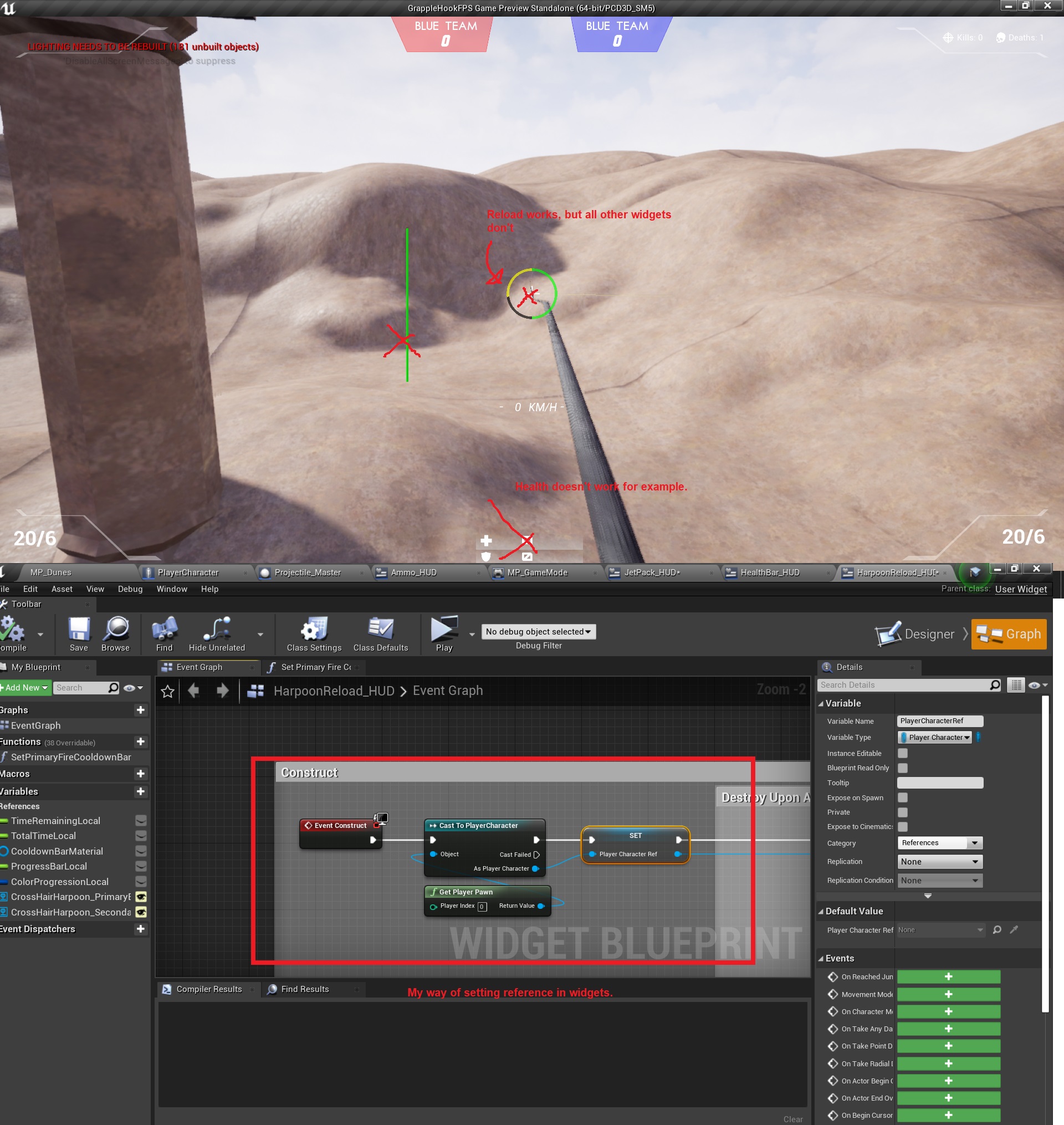 unreal sable
So the way i set binds in widgets for reload and other things like jet pack is the same.
But jet pack progress bar uses a bind, where as reload is a function called from the player.
grim ore
so you will need to tell your UI to recreate that, or have your UI make sure that is valid before using it and if it's not valid get the valid one. The issue I can see is for 4 seconds you will have no pawn at all
if you are going to keep the same setup you need to use a valid before using that reference as there will be times it is bad (no pawn at all in the world), and if its bad you can try and get it again and you will have to do a valid check again to see if that is bad (no pawn in the world) and fail gracefully for that time period
unreal sable
I don't know if this matters but:
-On possession: HUD widgets are created
-On unpossess: HUD widgets are removed from parent
So there should be no issue in between the 4 second respawn time.
Valid check will get rid of my errors for sure.
It won't help with the functionality of the HUD widgets though.
grim ore
removed from parent is not the same as destroyed
unreal sable
Oh.
grim ore
and the valid check would help because if it fails, you just run the code again to get the pawn -> cast -> set the reference
unreal sable
Ahhh good idea.
grim ore
you can make a function that does it all for you and just run it on construct and run it whenever it's accessed. I dont know if its the smartest but its the easiest with your design
unreal sable
If it works, then it's good enough for me. 😄
grim ore
yep. Might want to consider reworking it a small bit as well btw if you are creating and removing but still referencing it somewhere. Create makes it -> saving it as a variable refrences it -> adding to viewport lets you see it. Removing from parent removes the ability to see it but if its still referenced its still in memory
and if you then go back and create a new one, the old one still exists (unless the player referenced the old one then it might get removed at some point if the player is removed)
people thing remove from parent causes it to go away but it's still there in the background ticking away so you end up with multiple copies of the same widget if you just keep creating it over and over lol
unreal sable
Could be all the youtube tutorials that have created that habit lol.
 wild cobalt
Question guys, When organizing a my project can I do that in file explorer? When doing it inside the project it doesn't always delete the old folders, However my concern is if I do the reorganization in explorer do I need to fix re directors?
unreal sable
If you don't do it inside UE then things can get messy i find.
gaunt spoke
I keep getting a compiler error in my Animation Blueprint when I attempt to use a Linked Anim Layer that caches poses. The error state "Failed to find index for a saved pose node while building ordered pose list." Any ideas what causes this issue or how to resolve?
 storm venture
anyone recognize this cursor? im trying to do pixel streaming but ue4 keeps making its own cursor despite having ShowMouseCursor false.
fresh rampart
Hey everyone, im currently playing a sound when my melee attack hits an object with
OnComponentHit.AddDynamic -----> and then PlaySoundAtLocation
The thing is, the OnComponentHit is triggered multiple times sometimes, so the sound repeats and sounds weird
Im sure there is a quick and easy way to fix but maybe im not seeing it, anyone knows?
dense hatch
sure
just use a Do Once node and reset it when you don't want to play the sound anymore
fresh rampart
im in c++
dense hatch
ah
then you would do the c++ equivalent. set a bool canPlaySound or something
then if true play the sound and set it to false
spiral island
you can use an Audio component, and then call Activate with reset set to false
then if it gets spammed it won't reset the audio component and you won't get double plays
fresh rampart
im still a bit new to the terminology, my sound is a type USoundBase
im assuming if its not something "attached" to an actor, then its not a component?
spiral island
stuff that derives from USceneComponent or UActorComponent are components
wild cobalt
@unreal sable is that anyother solution because when I do it inside UE4 it gets buggy and half the folders move and then the other half of folders that move move the folders but leave half of the assets in both folders
unreal sable
If folders won't get deleted. I usually just leave stuff for when i restart UE and then delete it.
 summer geode
Hello! If we are in teams already its enough to register individually and then add our names in the final submission?
grim ore
are you referring to the spring jam?
brittle gulch
Hi guys, I can't open my project again, it's crashing on launch directly. I'm using prefabricator and I think it's because of this plugin. Here's the error summary https://pastebin.com/NCnMN1cN Can someone help me understand what is going on?

Pastebin
merry flower
@merry flower
@merry flower
Idk why it's flying away when i just want it to move smoothly. Any ideas how to fix this? https://gyazo.com/7f1cedc60ce7f5d381dfb531f6308d5c
 still moat
Arm goes swoooshh
merry flower
XDD
plush yew
Guys i have a question: Can i use Unreal Engine 4 for programming small games (for example 2d flappy bird) which is after build only 20-50 MB big? Because UE4 looks too big but i want to get familiar with lot of things and dont want to use Unity for smaller games, guess you get what i try to ask 😄
grim ore
UE4 can build smaller built games but it takes work, by default the projects when built are not small or compact. If size is that important Unity will make smaller builds out of the box.
There are 2 mobile projecs on the learn tab you can download and look at, one is a 2d game
plush yew
Can you tell me how much work it will be and the difficulty?
to increase the size like you said
How i can change the Component Size of a landscape in 4.25?
grim ore
I cant its based on experience and knowledge. With none of that it will be difficult
plush yew
so what i need to change? i thought about some changes in the build settings and deleting not needed assets?
I can make basic things in UE4 if that explains my experience 😄
grim ore
pretty much that to start, then removing plugins that are included by default and not needed. removing engine assets that are included and not needed. optimizing assets for the target platform.
plush yew
How i can change the Component Size of a landscape in 4.25?
Okay could the game for example be under 100 MB if i do what i/you said except the asset optimizing?
grim ore
it could but but I dont know what your game is, etc.. There are documents on the docs portal for how they optimized match 3 and tappy bird. You can also just download the match 3 and see how big it is when built for your target
plush yew
Ah great, have you a link of the "docs portal"?
grim ore
just the documentation page for unreal engine
plush yew
Ah okay, thx
 fading latch
Would you guys use dot product to detect a big change in direction? Or is there a simpler way? I have the previous velocity and the current velocity.
I'm trying to detect if the player made a large change in direction
 tiny anvil
I've gotten raytracing working on my gtx 1060 pretty well. 120 fps at 720p in editor pop out preview. So far Epic's implementation has me very impressed with how pain free it is.
grim ore
@plush yew It looks like it is bugged in the current .25.0 release https://forums.unrealengine.com/development-discussion/architectural-and-design-visualization/1756433-4-25-where-s-the-change-component-size-tool
ember shadow
Does it cost to upload stuff to the unreal market place?
grim ore
no, you just have to be approved
sudden forge
hey guys, im working through a tutorial on movement and i would like to replace the cube static mesh that we are using in the tutorial with the basic character from the base template. i migrated over the assets, but it doesnt seem like simply dragging and dropping the skeletal mesh in works. its a bit too small and hovers off the ground, and is rotated by 90 degrees. anyone have any good docs/tutorials for this or have any idea what to do?
 pallid ivy
Hey guys, I'm pretty new to UE and I just wanted to ask if there's an essential video series every UE newbie should watch? Especially a crash course for like "first simple character controller" would be nice to get into it.
ember shadow
@grim ore approved? can u explain abit more
do u just mean the pack im uploading has to be approved
 still pawn
@pallid ivy Im assuming you mean for the purposes of gamedev and not like archvis or anything, right?
pallid ivy
oh yea, I forgot that UE is widely used.
oh wait, I just discovered the pins. always forget about the pins
still pawn
It might be a little advanced, but I'd say understanding the Gameplay Framework of UE4 is a good way of getting familiar with how the engine is laid out or where you can put things

Today I go over some off-hand information about the Framework of games in Unreal.
pallid ivy
ah many thanks! I'll have a look at this first, maybe it's already sufficient for my current needs.

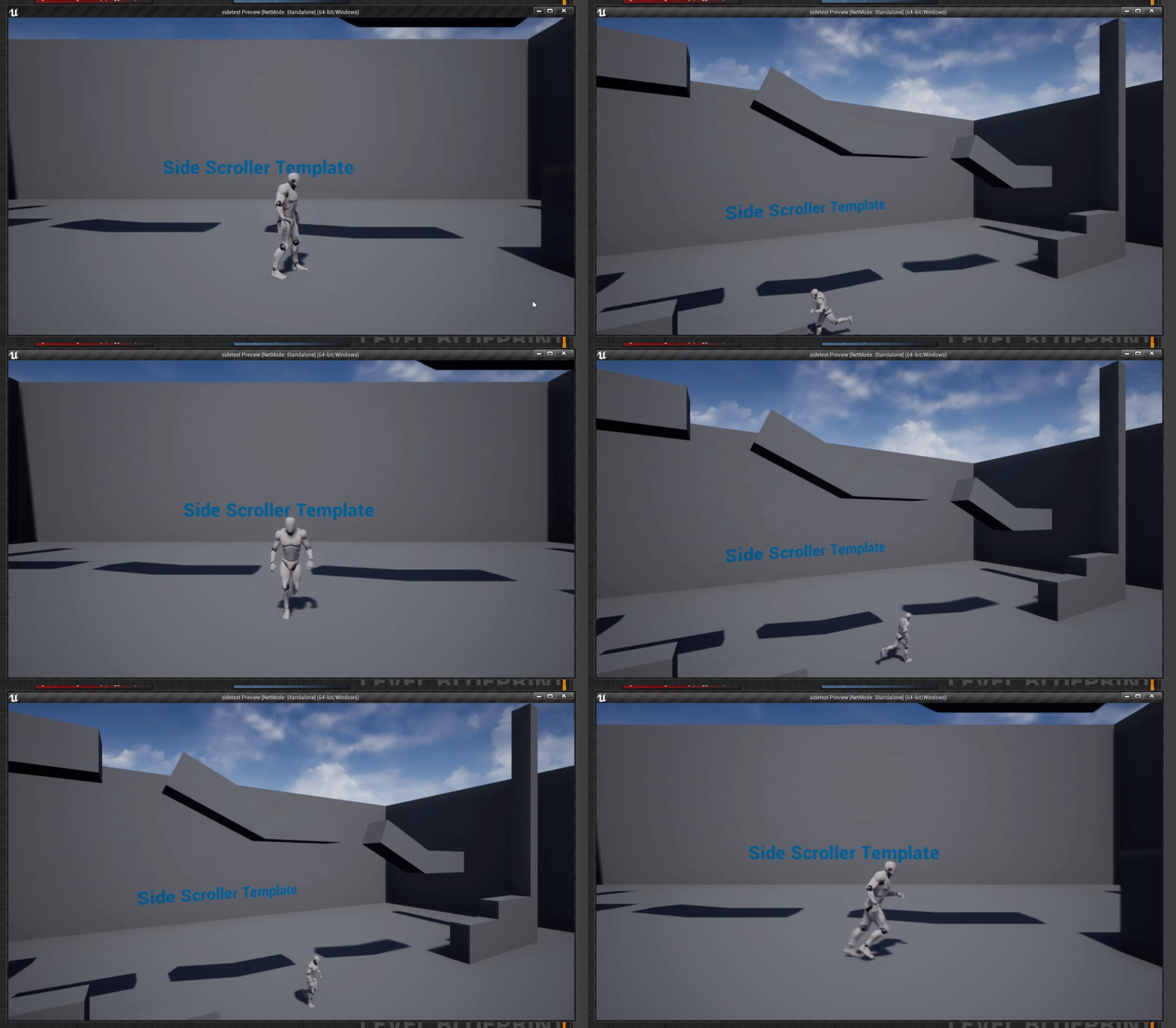

 rustic panther
anytime I "import new file" sort of dialog unreal 4.25.1 is crashing
am I alone?
:(
Unhandled Exception: 0xe0434352
 heady moon
Probably yes, I have imported more than 1000 assets yesterday and I haven't seen this exception
I'm using 4.25.1 too