#ue4-general
1 messages · Page 756 of 1
 exotic cave
 hexed jasper
I’ll check that out
exotic cave
Turn on "Engine" from "Advanced" and "Unit" from "Engine"
Engine gives you this, which has a triangle count:
Unit gives you these values, which shouldn't look like mine because mine are thrown off by the process of the snip:
My actual values for those things when not disturbed by snipping are crisp and green, and yours need to be too if you want a game that plays at a reasonable frame rate 🙂
You need the whole thing to come in under 8 ms for 120fps, 16 ms for 60fps, 33 ms for 30fps
hexed jasper
Hmm I’m trying to get that same stat box
exotic cave
Go to "Stat"
Then go to "Engine", and turn on "Unit"
Then go back to "Stat", and go to "Advanced" and turn on "Engine"
Snipper can't grab it and I really don't want to have to boot up Photoshop etc right now :/
hexed jasper
Ah I got it thanks
exotic cave
How many tri's with it on?
hexed jasper
Static Mesh Tris?
exotic cave
Yes
exotic cave
That's not actually very high
Which is why I'm thinking the issue may be in your material and not your tessellation
This a transparent material?
exotic cave
UE should power through 500k triangle scenes.
hexed jasper
Free materials never looked this good! Get hundreds of PBR materials and textures for free under the Public Domain license.
It is in 4k
exotic cave
The material, not the textures
The textures don't matter so much in my experience
That BrickWall material you got there. Who made it?
exotic cave
K, how many instructions is it?
I mean...don't get me wrong. 500k triangles for a wall is way too high 😄
You absolutely need to turn down your tessellation.
But still, it is concerning that the engine can't handle those 500k tris, because most serious UE scenes not meant for mobile will easily hit 1+ m and many do a multiple of that
hexed jasper
Well if I turn down my tessellation then the bump effect will be lost
exotic cave
It will be lost at the edges, but your normal map should make it look moderately bumpy
And in any case you shouldn't need 500k triangles to make a bumpy wall 🙂
You cannot make up a reasonable map if every wall needs 500k triangles. Maybe in UE5 on top machines but not in UE4 and not on your machine
hexed jasper
Yeah this was my first time using tessellation in general so I didn’t really know what amount I should go for haha
Now I know
exotic cave
You have ten walls, you're at 5m tris already. 100 walls, 50m tris and the godliest machines choke
You're going to get way better results by increasing scaling or mixing in a second normal map or a dirt map to break up that tiling anyway 😄
I am getting decent with hard surfaces maybe...the best brick materials in my experience need to integrate a second normal map at a different scale than the original to simulate missing different chunks across different tiles, as well as to do the same thing with dirt or discoloration maps 🙂
So, my advice is probably to research that instead of trying for 500k tri tessellated walls 😄
hexed jasper
Or also mess around with adaptive subdivision, kind of like what blender does.
exotic cave
I think UE can do fairly advanced per-area tessellation concepts like that, but even then, seriously, try the texture tricks first
You seriously don't need fat piles of tessellated triangles to make a good brick wall in UE
You could also try per-brick modeling
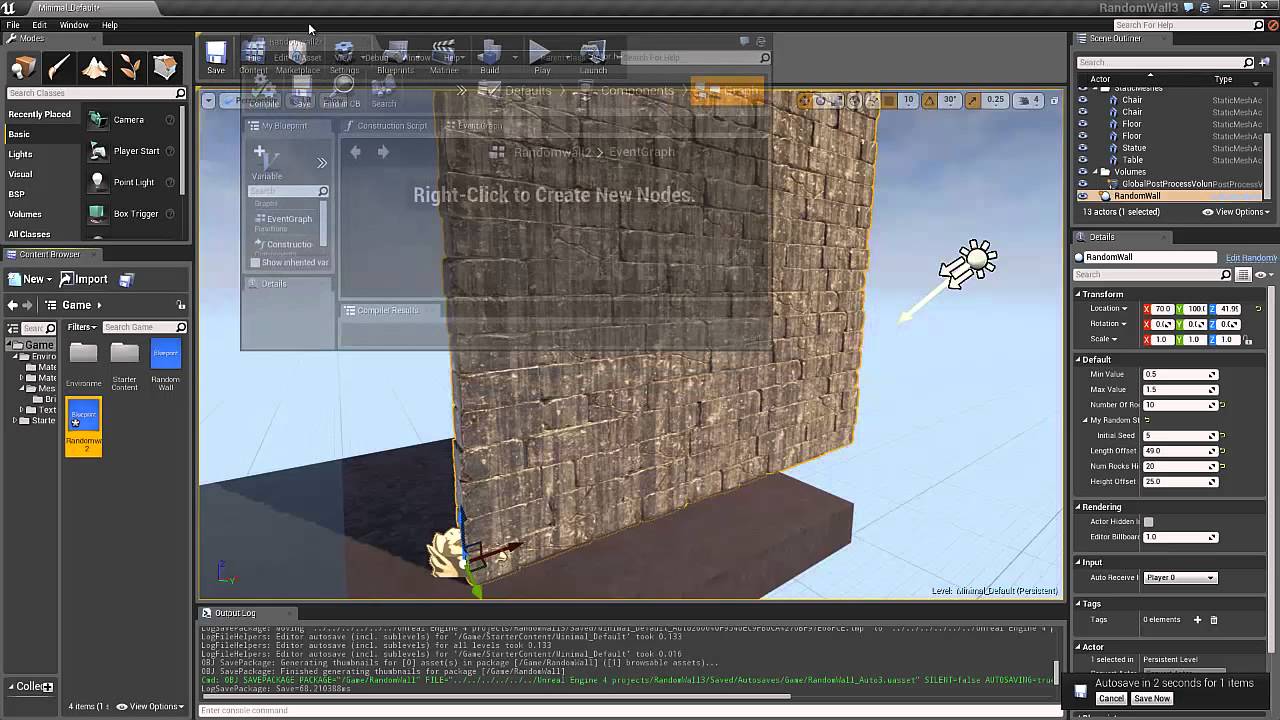
Learn how to create a randomized stone wall procedurally in blueprint. Each stone in the wall will be randomly selected from 4 meshes, each stone will be randomly scaled and rotated, but still each row in the wall will be of the same length. Part 1: Introduction
As so
Or bricks with layer painting from a layered material 😄

Demo of vertex shader blending in unreal 4 engine. Brick has a cracked damage, moss, dirt, and wet effect added to it. All of it is just painted on in the unreal editor. Each brick pull quasi randomly from a texture sheet, making tiling nearly impossible to see uv tiling. The ...
Off to bed, good luck to all!
🛏️
hexed jasper
👍
 open wadi
Bit of a noob question - each BP level has a construction script, yes? If so, how do you locate it? In this project I bought off the UE4 marketplace, if I double click on the default level (per Maps and Modes), all it does is load the level in the viewport. I can't get to the Construction Script - does this exist for a level?
lol
 old shard
What did you export it as?
@exotic cave as FBX. I just reset the normals and now it's working as expected. Some tutorials said that I have to point the vertex normal up for I dunno why I have to but I just set it to point to where the face is pointing and now it's working perfectly in unreal. Do you know why I have to point the normals up when working with foliage?
open wadi
So I bought this ProMainMenuV2 off the UE4 marketplace, and it consists of two simple levels - the "intro" level and the "main menu" level.
The intro level is completely empty as far as I can tell. There are zero objects in the viewport, and if you go to Blueprints > Open level blueprint the Event Graph is completely empty. This level is designed to be a placeholder for you to add intro content to your game.
The point is, I'm attempting to figure out the logic for this Intro level and at what point it decides to pass execution to level 2, the "Main Menu" level - If there are zero objects in the viewport for the intro level, and the Level Blueprint's Event Graph is completely empty (no nodes), where might the execution logic be?
What am I missing?
 waxen imp
Hi man so i managed to merge ALSv4 with SGK, and implemented the smart AI system. And i got some problem, the zombie dont chase me, when i set the pawn to animBP but if i change it to Survival Character, the zombie do chase me, any idea how to fix this?
 plush yew
What's the maximum recommended polygon count for a multiplayer map?
Currently at nearly 25 million and thinking it might be about time I start optimizing.
plush yew
what does this all mean
 dim arch
it means some of the meshes in your scene do not have a lightmap UV channel
plush yew
im new to this and do not understand what that means
dim arch
An overview of generating your own lightmap UVs in Unreal Engine 4.
 blissful trail
is it common for an unreal project to use 450GB of storage ???
dim arch
check the generating a lightmap UV section. make sure you set your lightmapUV channel to one which is different to your shaderUV channel
@blissful trail no, you probably have a lot of cached data, delete intermediate/saved
probably video recordings and cached data
blissful trail
all the content uses 450GB
xd is there a way i could possibly maybe lower the storage use ???
dim arch
@plush yew it depends on how many polygons are on screen at the same time
blissful trail
"there are alot of polygons"
dim arch
if it's in the content folder, than it's data which is required for the project
blissful trail
is there maybe a way i could have one project take up 2 different drives ???
dim arch
afaik, no, you need all .uasset files in the content folder for the editor to find them
450gb sounds like you just have a bunch of unused or unoptimized assets which you need to filter
blissful trail
kinda running low on storage rn :<
plush yew
There are 24m polys placed in this level specifically, and most of the time you'll be seeing a good 20m at once @dim arch
@blissful trail Symlinks. Move a chunk of the content folder (or the entire thing) to a different drive, then use something like Link Shell Extension to link the folders.
dim arch
20m is pretty high yeah but you cant use one metric to measure performance, it depends on number of lights, shader complexity etc
most games have about 2-3m polys on screen max, and a hero character is 100k
plush yew
Hmm. They're standard Quixel materials (nothing too fancy) with the only lights being a dynamic directional light and all the weapon tracers.
dim arch
well, UE5 is going to optimize the poly useage a lot, so it depends on what you're trying to do
plush yew
Sounds like I've got to lower the polygon count, I suppose I'll start with replacing the base Quixel lods with the LOD1 variants (near-identical visually)
dim arch
filling a scene with scan assets isnt gonna work right now, wait for ue5
plush yew
I'm making a custom map for Contractors, though I'm not worried about VR-specific performance. Odds of it being ported to UE5 are unlikely.
I'll see what I can do in regards to optimization, thanks for the help!
 brisk nimbus
Hey there...
First question of many regarding using unreal for creating an animated short, that I originally started in 3ds max....My main character currently has 11 UDIMs, as the camera sometimes zoom in from far out to pore-deep.
Information on UDIM in Unreal is a bit sparse to find, one way seems to involve a LOT of material hacking with material functions, thats beyond my current level of expertise.
The other way seems to be too simple to be true and only involves enabling virtual texturing and using the right naming convention...
Can somebody elaborate or point me to a step by step tutorial?
@brisk nimbus bump...:)
plush yew
i slightly upped my lightmap resolution and now im stuck at 98% building lighting
help
 restive vale
wait
restive vale
ok
so you can monitorize your computer with Ctrl + Alt + Sup
and you can see if computer is working
you will see that there are some stuff going on
plush yew
sup?
restive vale
Task manager
plush yew
oh ok
i figured i set something wrong
https://cdn.discordapp.com/attachments/225448446956404738/717634542155857941/unknown.png im also still getting these errors even though ive done everything his link told me to do
 restive vale
You have problems with lightmap
plush yew
im also getting a lot of artifacts
restive vale
but that means that you have completed the light calculation
you have lots of spotlight overlaping and some bad lightmap
and this artifacts are normal
until you tweek a little the lightmass parameters
restive vale
With lightmap, you can try to rebuild it in UE and if it doesn't work you should go to your modelling program to unwrap the meshes
Unreal academy has some tutorials about ligthing
there is some good stuff in there
I suggest you to have a look on them
plush yew
im using sketchup to model 😓
restive vale
Switch to blender
plush yew
ok
restive vale
you can export the mesh from sketchup to blender
plush yew
would it work if i model primarily and then switch to blender before importing to unreal?
yeah ok
because im already very skilled with sketchup
restive vale
I highly recommend you to learn Blender, it's so intuitive and Free
plush yew
im using a free version of sketchup only for modeling rooms
because it is very good at modeling rooms
i will learn blender though
restive vale
I work with revit to model Buildings
But all the other stuff its better to be done in Blender, at least for me
 whole cosmos
hi am new to unreal engine, currently have issues, after creating a project it getting stuck a 39%,,,, wat should i do help me out
dim arch
its building shaders, wait.
whole cosmos
so i just wait it will eventually open
dim arch
ye sopen task manager if your cpu is at 100 its building shaders
plush yew
anyone here willing to help with blender a little?
 thick gazelle
How do guys think we have to google next year, when ue5 is out? My guess is that for some years we always have to google both versions: "ue4 thing i am looking for" AND "ue5 thing i am looking for"
 whole quarry
Why do you think that?
More importantly, why are you already thinking about that while there is almost nothing known about ue5?
 ashen ermine
Hey, this is driving me crazy, it's been 2 days now...Tried renaming structs, reloading data table, idk what to do anymore 😭
thick gazelle
@whole quarry The offical docu (https://docs.unrealengine.com/) will probably put ue5 in all of the pages, so that will be found by searching ue5, same for all the new features..
But all the old community questions, articles etc. that are still valid in ue5 will still have "ue4" in them, so they will be found by searching ue4
 rigid belfry
why do my shadow look so bad? everything in this scene is a static object and the lightmap res is set to 512 for almost all of them
dim arch
because your mesh lightmap UVs are probably not using all the space
check lightmap density, all the meshes should have the same density, if one doesnt, change the lightmap scale in the static mesh options
dim arch
green is good, blue is too low, red is bad
make your lightmap density so it's at around 1pixel per screen pixel from the average view position
 honest vale
I would also probably change the lighting to a stationary light, the shadows would be better then
rigid belfry
all lights were set to static too
thick gazelle
@rigid belfry maybe it's not what you need, but you can look at distance field shadows https://www.youtube.com/watch?v=vef_ZPLhjt8 (even if you don't need that, still good to know)
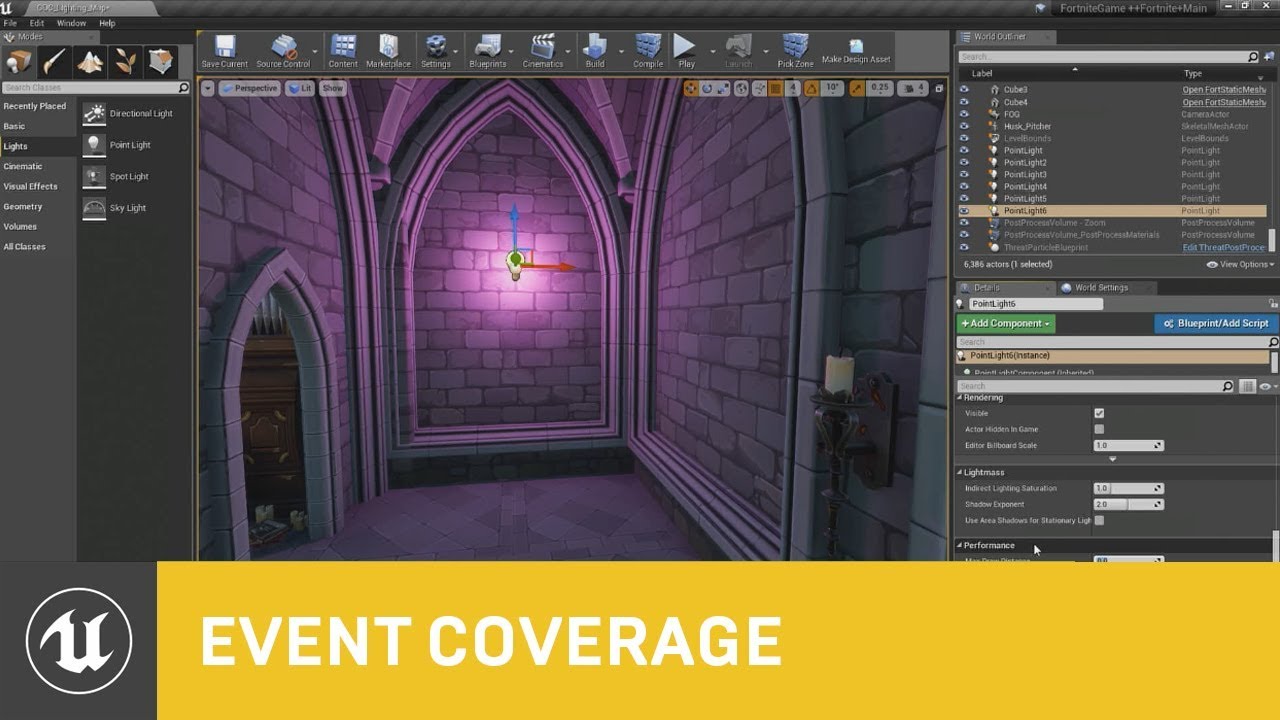
In this session presented by Epic's Zak Parrish, you will learn about some of the dynamic lighting features we use in Fortnite with Unreal Engine 4.
We'll take a look at how you can set these up, optimize them, and get the most out of your dynamically lit worlds to achieve t...
rigid belfry
@thick gazelle thanks, i'll check it out. i set up a new level, created a quick 4x4 room, set up a stationary light instead of static and here's the lightmap density
this is how it looks
whole quarry
@rigid belfry what is the lightmap resolution of that mesh?
rigid belfry
i think 256
whole quarry
can you open the mesh and look?
rigid belfry
@honest vale for the meshes or for the light?
honest vale
light
plush yew
how can i add more than one texture to something like this?
whole quarry
easiest is to assign materials to faces
plush yew
i dont know how to do that
whole quarry
cant do that in ue4 tho
plush yew
i started this like 8 days ago lol
whole quarry
do you use blender?
whole quarry
then you need to google how to do it in the modeling program that you use
something like "program assign material id's"
plush yew
i use sketchup for modeling buildings, but that caused issues, so i put them into blender then get it into unreal
 obsidian nimbus
you might be able to assign a mat in unreal these days, i dont recommend
rigid belfry
it looks better when using stationary lights or moveable. i though static light would produce better results?
whole quarry
if you have a high enough lightmap resolution, yes
rigid belfry
where can i read more about lights in ue4? sorry i am kinda new to the engine
obsidian nimbus
static is cheapest
rigid belfry
@plush yew theres a lot of tutorials and even some plug ins for buildings on blender
plush yew
so far compared to sketchup blender is absolutely unusable for me
whole quarry
why?
plush yew
it just doesnt do what i tell it to do
like when i tell it to delete an edge it does absolutely nothing
whole quarry
have you tried to use keyboard input instead of vocal input?
whole quarry
its weird that when you delete an edge it doesnt delete the edge
have you tried to follow some blender tutorials, like from Blender Guuruu?
plush yew
my blender never seems to work the same as the blenders in the videos
like my sculpting does basically nothing
 waxen lintel
anyone experiencing significantly longer start/stop PiE times in 425?
plush yew
2.82.7
whole quarry
from Steam I guess?
plush yew
no
whole quarry
the experimental one then?
rigid belfry
you dont really need to sculpt anything if you need buildings
rigid belfry
changed my lights from static to stationary, what does this mean? i know meshes need a separate UV for lightmap, does it have to do anything with it?
 short stirrup
Maybe a stupid question, but how do you decide what the size of things should in 3D environments? Not reletive to in another, but in absulute terms. Cause in a way if I rescale everything in the same way I still get the small environments.
rigid belfry
"Only 4 or fewer overlapping stationary lights can have static shadowing, because the lights must be assigned to different channels of a shadowmap texture." from https://docs.unrealengine.com/en-US/Engine/Rendering/LightingAndShadows/LightMobility/StationaryLights/index.html i guess i now my problem
Light type that can change its color and brightness at runtime but cannot move, rotate or change influence size.
 thick herald
honest vale
thick herald
honest vale
@rigid belfry a general guideline is that the most dominant lights in a scene should be stationary
I'd imagine a spotlight is pretty dominant, especially in a dark moody scene for example
smaller fill lights should be static if you go over the overlap limit
rigid belfry
and static will produce cheaper results, right?
short stirrup
If I have a blank project and I put some asset in it, then I can resize it however I want, later when I add new assets I'll resize them in relation the original asset so it looks right. Does it matter what the size of the original asset is though? If I take everything in project and double the scale, what's the difference?
If my question is confusing it's probably because I'm confused 😄
short stirrup
Well I need to check what uu is but I guess that's helpful. So I can use it as guidelines for what size objects should be
Oh ok, cool
whole quarry
x0 y0 z100 is 1 meter above ground
short stirrup
I made my stuff huuuuge then 😂
whole quarry
You could use your own scaling on that tho
Using 1uu as 1 meter
But the engine will consider things tiny :d
short stirrup
What if i considered 100uu as 1cm? Will it make the file size much larger? Or interfere with other things?
 wary wave
scaling things in weird ways could cause weird effects in the physics engine
short stirrup
Ahh right, that makes sense. I'll try to keep it sensible with the 1uu = 1cm then
Thanks :)
What's the appropriate channel to ask about ingame cameras?
wary wave
this one, or if you want to talk code either #cpp or #blueprint
if you want to talk purely about behaviour, then #design-chat could be appropriate
short stirrup
I am making a chess-like board game, and I don't like the camera controls these games usually have (at least the ones I played).
I'm thinking to have an invisible done around the board which the camera moves on, while always automatically looking at the center.
I have no idea how to do that though 😄
rigid belfry
in C# there is a LookAt function
i don't know how well c# translates to blueprint but i reckon it wouldn't be that hard to figure out
short stirrup
What about making it move along the face of the dome?
rigid belfry
no i meant
the lookat function basically takes in a vector3 called target, then it rotates the camera so that the target is always the focal point. that way you could move anywhere and the camera would always look at your target
@short stirrup https://docs.unrealengine.com/en-US/BlueprintAPI/Utilities/Animation/LookAtFunction/index.html maybe this is still relevant? seems unreal also has the function
Look At Function
 astral phoenix
Hello, idk where to put this but is there any1 that knows how to do so more than 1 person can edit a project via WIFI and not LAN? like a multiplayer session 🙂
short stirrup
@rigid belfry yes i understood, that seems like the right thing to make the camera always look at the center. but i also don't want the camera to be able to move everywhere, i i want it to only move along the inner surface of a dome
 gleaming creek
You need your inputs to adjust the latitude/longitude as desired, then use maths to calculate the position, then finally make it look at the centre
rigid belfry
@short stirrup you mean you dont want the players to fly off the map? you can simply set some bounds for that. in the place actors tab, search for blocking volume and your drones won't be able to fly off anymore
short stirrup
i want the dome to act like a rail for the camera, but when i say rails i imagine lines and here i want it to move freely on the surface
 austere scroll
i tried googling this
in UV tiling you can change the U to be a value and the V to be a Value , but which one is thw width and which one is the height ?
all google searches explain UVs but none mention width or height
 analog yacht
You need your inputs to adjust the latitude/longitude as desired, then use maths to calculate the position, then finally make it look at the centre
@gleaming creek this is the thing you need @short stirrup .. The dome here would be implicitly defined by the maths you are making. Unreal already has long/lat conversion functions. You would make the player control the long/lat that moves the camera along a fixed radius (or a radius being controlled by another parameter) and then use the LookAt to rotate the forward vector of the camera towards whatever you want. It keeps the roll to 0 so it will always look straight-on
moving up/down would control the latitude and left/right the longitude position of the player's camera
or the y-axis of the mouse for latitude and the x-axis for longitude
(if I understood what you want properly)
short stirrup
Sounds like you do
would it also work if i wanted to let the player resize the "dome"?
analog yacht
yea
it would only control the radius
because the lat/long pair would be constant when you increase/decrease the radius
imagine a balloon inflating/deflating.. a point in the baloon would keep its angle the same when compared to the center (if the balloon would be a perfect sphere, obviously =P)
short stirrup
Yeah sounds good. do you have some pointers to where i can learn to do this stuff?
 fleet scroll
for those new to ue4, learning all the nifty shortcut keys while working in blueprints is key to fast iteration. Luckily there's a guide for that here -> https://docs.unrealengine.com/en-US/Engine/Blueprints/UserGuide/CheatSheet/index.html
Reference covering Blueprint shortcuts and useful actions.
analog yacht
@short stirrup https://catlikecoding.com/unity/tutorials/movement/orbit-camera/ although its unity, its still almost spot on (section 2.1)
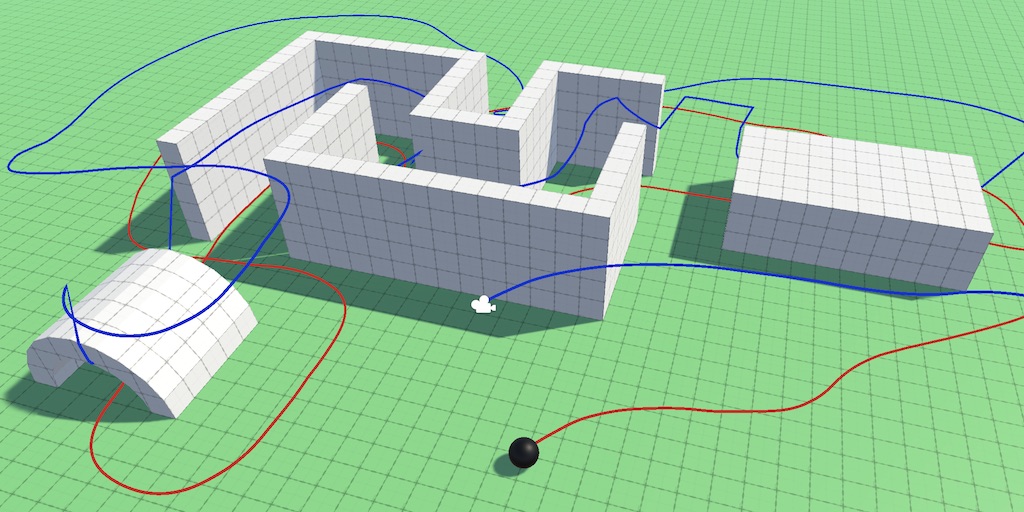
A Unity Movement tutorial about controlling a sphere via an orbit camera.
 silent harbor
hey,
[HELP] any idea why quad overdraw is not working on 4.25 on masked materials? want to see how my foliage is doing but the view is all blue.
short stirrup
Ok i'll try it, though as i'm not even familiar with Unreal a tutorial on another program might confuse the hell out of me 😄
analog yacht
just focus on the maths 😛
Unreal Engine Forums
hi,
I want to create a simple scene with one actor (a sphere let's say) and a camera that can orbit it, pan the viewport and zoom in and out with the wheel.
Actually, just remembered
the fly template from unreal (the one with a blue spaceship)
actually has a orbit camera (with a spring arm)
just look at that template and should be pretty straightforward (if not just copy-paste) to your project
I would say the third-person template would have the same mechanism (but not sure now)
astral phoenix
Is there really no1 that knows how to do so more than 1 person can work on a project without LAN?
short stirrup
@analog yacht Thanks! I'll try that
restive vale
Hi Comunity. I'm working in a Game and I would like to deploy at first for Android and IOs but later maybe steam or any PC game selling platform. My doubt now is how to manage the internal coins of the game (which can be purchased or gained while you finish levels) and the saved games. How would you aproach it? Save it localy is obviously not safe...
analog yacht
@short stirrup good luck
Hi Comunity. I'm working in a Game and I would like to deploy at first for Android and IOs but later maybe steam or any PC game selling platform. My doubt now is how to manage the internal coins of the game (which can be purchased or gained while you finish levels) and the saved games. How would you aproach it? Save it localy is obviously not safe...
@restive vale what other alternative approaches are you thinking about?
restive vale
Recently I discovered Google play services

Google Developers
but also i thought that maybe use a server to store the data
or maybe try Epic Online Services (but there is not lot of information about that, and i think is not ready for mobile devices yet)
analog yacht
Saved games would only work on Android or atleast with googleplay login (there is something similar from apple, using icloud)
There are more services like that more cross-platform that provides you with a well defined or atleast with a defined API for you to use.
My typical advice here is to go with something that you feel confortable working-in now and then revisit it in the future.
There always the option to boot up your own server in whatever language + some database and use rest calls or socket based communication (protobuf, cap'n'proto, etc)
restive vale
Thanks for your response. I will aim just for 1 platform for the moment, and if it succed move on other platforms and fix things up in that moment. So I will have to code which i'm not used to or ask for help in this topic. Thanks again!
plush yew
hi guys, i'm having insanely crazy problems getting a video to play in a UMG widget
seems all existing videos are out of date
anyone have an up-to-date tutorial?
the video player doesn't store the video
silent harbor
someone got any clue why foliage is popping in instead of fading in nicely
 mint sequoia
I'm posting a free tool I've made here which have been tested for a long while now, just for those who never heard of it
UE4 cleaner is a tool that adds these options to the .uproject context menu. It will delete all Binaries/Intermediate and regenerate your project files, giving you a clean slate.
Due to how UE4 constantly rebuilds the file association in the registry it needs to be reinstalled anytime you download something from Epic Launcher (and there is no workaround).
I keep an installer shortcut on my desktop for when I need it and run "Repair" installation. You can double click it and spam press "space bar" and it will fully reinstall and close dialog from doing simply that.
https://github.com/Vaei/ue4cleaner/tree/master/Binaries/v1.0.1
exotic cave
@old shard : The problem with "some tutorials" is that there's a lot of fly-by-night learning in this field. You won't normally point normals anywhere but straight out from your polygonal faces until you get really advanced.
There are advanced shaders out there that require all normals to face in directions other than what a traditional perpendicular normal actually is, and your tutorial may have implemented one.
However, without that advanced material acting on your modified normals, all you'll get is broken lighting. 😄
I suggest learning some of the fundamentals of 3d modeling mathematics. A normal is supposed to represent an arrow that points straight out from any surface at a given exact point, in traditional mathematical terms.

In geometry, a normal is an object such as a line, ray, or vector that is perpendicular to a given object. For example, in two dimensions, the normal line to a curve at a given point is the line perpendicular to the tangent line to the curve at the point.
A normal vector may h...
 strong schooner
Hi does anyone use a blender>quixel/substance>UE4 workflow? Currently, I am using blender, doing a high and low poly version of a model. I export the low poly version to unreal engine then send it via substance link (real time) then within substance I export the high poly version to bake the normals and I start texturing etc. The changes are real time so I see it immediately in UE. If I get my assets from megascans I find stuff on bridge then export to mixer then send it back to bridge and then to UE.
exotic cave
I don't, but that sounds lovely, @strong schooner
I do use Substance in my workflow, and Blender is part of my suite of 3d tools, but I often sculpt in something else first (3dCoat, or even Unity on occasion) and just use Blender for fixes to UVs, normals, etc., as I find its sculpting workflow somewhat cumbersome.
Did you have a particular question?
strong schooner
Nice. I just want to share my workflow to check if somebody does not agree with this workflow, so I can review and change it. I also want to know if there are several alternative workflows that will suit my needs. After several youtube videos with making assets, I finally combined them to suit my needs. Too bad I am new to sculpting, I am currently doing basic modeling and hard surface modeling for game assets. This is also just a hobby so I am confined to blender which I like, UE4, Quixel and a few paid stuff like substance or speedtree.
exotic cave
Oh no, it sounds boss 🙂
I mostly only use Designer as I'm currently an environments guy
I'll check in with you once I get better with Painter and start doing more objects that tile less 😄
 long thicket
can someone help, My UE4 project literally froze up my pc last time i tried to load it. had to hard shut down my pc, now its stuck at 95 percent loading. Its not a new project
exotic cave
I think it sounds utterly optimal. The only concern is that if you're planning to be a Marketplace seller, you generally still can't use Megascans in your own packs. If this is for end-user games it sounds like a workflow you could build a real studio on.
@long thicket : What specs?
exotic cave
How big a project? And what changed?
 severe lodge
@long thicket Where is the lambsauce?
long thicket
was running smoothly yesterday
exotic cave
I'll assume you lost mouse movement or whatnot, and it was a real freeze?
exotic cave
There are notorious percentages that UE gets stuck on with loading. 39%/45% are notorious (shader compiles)
exotic cave
Is it a pretty big project or big map?
long thicket
lemme check how many gigs
exotic cave
UE4 is fairly stable in my experience, but it is not low-footprint software really 🙂
long thicket
53 gigs
exotic cave
Ya
long thicket
idk, usually loads in 5
exotic cave
You're almost certainly hitting your hard drive swap memory on that
Sure, but if you make a change that necessitates recompiling shaders or whatnot this can happen a lot
exotic cave
It may be worth considering on projects like that
50GB is a lotta data for anything but an SSD
Stuffs will be slow
long thicket
yeah, thanks for the suggestion
 midnight root
I get that sometimes and my map total is only 1.35gb ;0
strong schooner
I think it sounds utterly optimal. The only concern is that if you're planning to be a Marketplace seller, you generally still can't use Megascans in your own packs. If this is for end-user games it sounds like a workflow you could build a real studio on.
@exotic cave yes thank you for the reminder. I did ask that prior, since I want to know the grayzones of the free stuff we get being in unreal. But for quixel stuff, I entirely use it for my cinematics in youtube. For things I am planning to sell I get or make it in substance, some textures I get from texture websites with cc0 license.
exotic cave
Never heard a better workflow for what you wanna do yet. I sent ya a friend request @strong schooner , maybe we can talk some turkey. 😄
long thicket
sure
exotic cave
Lmao, my bad TurkeyMaster, you and I are already talking turkey
I totally didn't even mean to do that
🦃
strong schooner
I agree with @exotic cave at least ssd. I am currently using nvme though much faster.
exotic cave
Anything that isn't old school SATA, etc
midnight root
lol
long thicket
lmao im confused bru
midnight root
ya ssd
exotic cave
"Talk turkey" is an old slang phrase for discussing business 🙂 It doesn't always mean "talk to TurkeyMaster" 😄 Sorry for the confusion
midnight root
if you can afford get the faster ones
midnight root
or the pciE ones even better if good quality
exotic cave

English Language & Usage Stack Exchange
Some customers and I started to talk turkey over a programming requirement the other day, meaning that all parties involved were starting serious negotiations or discussions.
Naturally I wondered ...
long thicket
cool, that just sounds funny
exotic cave
🦃 🦃 🦃 🦃
strong schooner
Never heard a better workflow for what you wanna do yet. I sent ya a friend request @strong schooner , maybe we can talk some turkey. 😄
@exotic cave I speak english and filipino only haha
exotic cave
I think that I am clearly the turkey here 🙂
Oh the challenges of communication in a profoundly international channel 😄
In American English "turkey" often means the bird that runs in our East Coast forests, not the country. It can be slang for a feast (we eat turkeys at Thanksgiving), or for communication in business (as people would sit down to talk over turkey dinner), or as slang that someone is a fool (as the bird can act quite foolish and showy at times!)
I suppose I'm now going to have to analyze whether or not I should change phrases to avoid confusion for Turkish developers. 🇹🇷
long thicket
nah, its okay i have gordon ramsay because i watched a christmas video special from him preparing turkey
so he is the turkeymaster
and thus the name and the picture
ofcourse, the picture has to be an awkward face
exotic cave
Eh, always nice to improve my international communications skills 😄
I worked on a team briefly that won a game design award last year, and the two guys were French and Swiss
Game design is a compositely international experience in a lot of ways these days, I really believe there are future award-winning teams out there for folks who can figure out how to actually collaborate across continents
strong schooner
In American English "turkey" often means the bird that runs in our East Coast forests, not the country. It can be slang for a feast (we eat turkeys at Thanksgiving), or for communication in business (as people would sit down to talk over turkey dinner), or as slang that someone is a fool (as the bird can act quite foolish and showy at times!)
@exotic cave ow, I see. I am not familiar with such American slang. But yeah I always get a sudden stop when my consultants who were trained in the U.S. gave me several "American" slangs. But then again, my English has become abysmal, both written and verbal. haha
exotic cave
You speak better than some Americans I know, actually. 😆
🌎 🌍 🌏
Earth is my country!
long thicket
Personally I think there needs to be a universal language taught worldwide
should be english as it is the most used language
but many countries dont teach it well
plush yew
whats the deal with EPIC games, i can't login to the website or the launcher. is it down?
long thicket
so instead of learning multiple languages, one only across all countries and everyone communicates with no issues
plush yew
that would never happen, try telling china or russia they have to speak only english
 steep sandal
I have a question what Computer Specifications
Can make a game like FORTNITE
whole quarry
Its a bad idea to have the world speak 1 language
People will get ideas, start to build towers to reach the sky
long thicket
nah that aint what im saying
im not saying to abandon the home language
teach it as well as the home language is what im saying
it=English
 humble delta
but Russia will argue the common language be Russian and China will argue it should be Chinese
whole quarry
The world should speak Dutch
humble delta
I'd say English but taught only by Aussies so everyone sounds fun
long thicket
eitherway, it doesnt have to be English, can be anything. I picked english because its the most spoken internationally
lol, yeap, also teach people to hop instead of walk
just kiddin
silent harbor
i asked before but got no answer
why isnt foliage in ue4 fading in like it used to?
 north ivy
Hello guys, I had a question and I hoped you could help me here. Does anyone know an official "dictate" or file that sums up everything we cannot represent in a game ? I mean, Nazis symbols are an obvious example, but there are more "stupid" examples, like the fact the red cross cant be used for health (but still can be used in movies). Is there one for every countries ?... Could really be usefull to me right now
 mystic spruce
What's up guys! I need to make a player location heat map. I found an old tutorial but it doesn't seem to translate to 4.25 since some of the nodes are a bit different. I cannot find anything updated that gives info on how to draw a heatmap to a render target. Any info or links to newer tuts or info would be great! thanks!
silent harbor
@whole quarry i have the issue that foliage is popping in very obviously (cull distance) while i remember it used to fade in nicely
 heady moon
what's the difference between ue4.25.0 and 4.25.1
heady moon
what
 novel hinge
a 3.3 gig hotfix
novel hinge
thats the full engine
heady moon
yesterday i paused the unreal engine 4.25.0 download
today i find this and it restarts the download
novel hinge
i'm downloading it right now dude
 rocky radish
do i have to re-install the engine so epic launcher lets me download it?
novel hinge
try restarting the launcher
heady moon
ye
 vale crane
Hi to all!
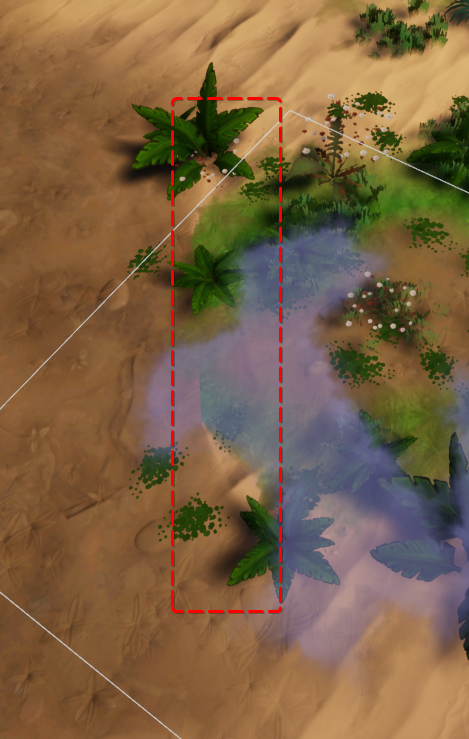
Why my landscape mat has this kinda of trouble with height blend layer type?
https://i.imgur.com/M8Neweq.png
 exotic cave
I was given to understand that the world's universal language was shattered at the Tower of Bab-il by the great fiend Zeromus. This is at least what Final Fantasy taught me 😄 ⚔️
@vale crane : What's the issue?
What's it supposed to look like that it doesn't? That screenshot seems nice 🙂
exotic cave
Are you sculpting this terrain? Or just using a heightmap?
vale crane
im` painting terrain
exotic cave
You may want to read this article, seems possibly relevant to your issues: https://docs.unrealengine.com/en-US/Engine/Landscape/Materials/index.html
Setting up materials to work with Landscape terrains
vale crane
with this type og blend
https://i.imgur.com/ZAVcvLV.png
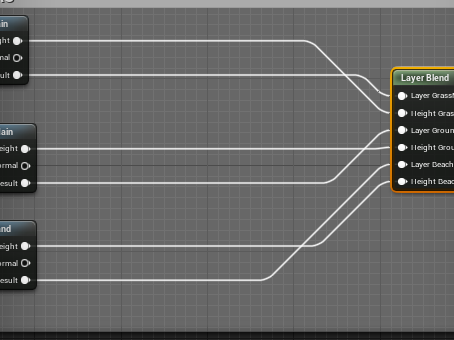 exotic cave
UE can have issues if every single layer in the map is height blended, it's recommended that at least one be an alpha blend apparently
exotic cave
Again, a bit hard to know how to help when I don't know how it's supposed to look.
I sculpt my terrains and use an automatic landscape material I developed, but it's not height blended, just weight
@north ivy : Depends on country, and I don't know Epic's particular rules for consideration on their own marketplaces.
You are actually only prohibited from depiction of swastikas in Germany as best I know, though other countries may have similar laws. There are no laws against depiction of Nazi imagery in the United States, though obviously you need to be careful about how things are portrayed. 🙂
It's arguable the 3d games industry would not be here in the state it is without Wolfenstein 3d 😄
But, you know, in Germany all that stuff had to be taken out 😄
It's more of a localization issue, and an issue about giving offense. I know Epic's rules on the Marketplace are that you have to avoid being deliberately offensive in any kind of hate-crime way, probably applies to games too.
But, like, you can't really make a realistic World War II game without depicting a swastika, and plenty of them get made.
Don't use your games to promote hatred, is the best advice I can give, and you should be just fine in the United States.
wary wave
you can just use a different insignia in Germany
though accurate historical depictions of a Swastika are not illegal
exotic cave
I mean, maybe don't make a game where going "Heil Hitler!" into the microphone gets you a special Nazi gun.
wary wave
the newer Wolfensteins as an example just used a different flag for all versions
it's pretty trivial
exotic cave
You're certainly allowed to depict anything historical in the United States by law, though offensive depictions may get deplatformed and Epic certainly has the right to revoke UE usage from any project they feel promotes hatred.
I can't speak for the company as I am not affiliated. 🙂
 tawny sand
What channel would I go to, to get help about texture sampling?
wary wave
reference:
https://www.bbc.com/news/newsbeat-48785435

BBC News
Before now, games released in Germany have not shown swastikas or referenced Adolf Hitler.
north ivy
Well that's good to know @exotic cave thx you. But what about Smoking cigarets, same things ?
exotic cave
You can have characters smoke all they want to, unless your game is targeted at five-year-olds 😄
north ivy
RIOT had to remove the cigar of one of their character, as well as Ubisoft had to do a whole change on their maps
Alright thank you ! 😄
exotic cave
I don't think they had to. They chose to, and Graves has the cigar back now 😉
north ivy
that's cool to know, thank you again 😉
vale crane
UE can have issues if every single layer in the map is height blended, it's recommended that at least one be an alpha blend apparently
@exotic cave yeah but if one layer is Alpha blend - all other loose theirs heigh info (
exotic cave
Sadly not an expert on height blended nodes yet 😦
By the way, @north ivy , I do believe the Graves localization change in League of Legends was made due to policy in China
China does have a lot of laws about content, and it's one of the biggest gaming markets in the world.
north ivy
Yeah, so every company have to bend...
exotic cave
Again, the laws generally go by country.
If you know the initial country you're planning to release in, I can probably advise better.
plush yew
is unreal editor always on top?
exotic cave
My understanding is that you can probably mostly release what you want, but also that anybody can kinda just sue you in France if they get offended enough 😉
I will look into it a bit more, though.
France is indeed a country with Western freedom of speech expectations and a strong tradition of such (look at things like the Charlie Hebdo incident), however it vigorously prosecutes things that are judged as promoting hatred. Britain is very similar.
Most recent French regulation seems to have revolved more around sales policy and lootboxes rather than content so much. If you're going to offer lootboxes, you need to hire a good legal team.
north ivy
2 years ago, in France, the great-kids of a GOOD characters in Black ops 2 (Savimbi, the Angola chief) , sued Activision and won
I mean, how dumb can this be
exotic cave
Your country is very litigious, as these things are considered, it is true 😦
I would say you'll probably be fine as long as you fictionalize your characters. You can use historical settings, but don't make a game about, say, becoming a Nazi and loving it.
north ivy
--Sure that would be lovely-- who would say that
exotic cave
My best advice for France would be, avoid lootboxes, and stay positive, try to promote a positive message with your title whatever your content is 🙂
And I do think you will hopefully be okay, though this is not formal legal advice and I am required to tell you that.
France does indeed have a strong tradition of freedom of speech, and there is a quote from Voltaire I will teach you as it can be referenced in court as necessary:
 merry flower
henlo
exotic cave
"I find what you say reprehensible, but I will defend to the death your right to say it" --this is attributed to your French philosopher Voltaire
merry flower
where can i ask questions about ue?
exotic cave
Here 😄
exotic cave
There are a lot of them, but general questions can go here 🙂
north ivy
Yeah, but for almost 15 years now this cant be applied x) but anyway this is political stuff, so I will stop there
merry flower
oooh well then how can i sort of like reset transform controls in ue?
exotic cave
Reset the transform? Or the controls?
merry flower
because i have this object in one place but the transform controls are far away
all the rotate object things etc
scale objects
exotic cave
That means your pivot point on your model is off
merry flower
oooh so that was the word
exotic cave

Use the key combo of ALT + Middle Mouse Button to move the Pivot Point on either a BSP or a Static Mesh. To make the change permanent right-click on the shape and choose Pivot - Set as Pivot Offset (UE4.10.4, MacOSX).
merry flower
yeah liek the center of the object
exotic cave
Yes, formally that is a pivot point 🙂
 exotic cave
Great snip, that helps me out too 😄
merry flower
i just didnt know the right word for the center point of the object
exotic cave
What do you use for animated snips like that?
merry flower
i didnt understand, what?
exotic cave
The screenshot 🙂
exotic cave
Tyty
 jovial pollen
Does anyone know how I can fix this? It's really annoying me
I've tried all I could to fix it but I cant
rocky radish
@jovial pollen what?
jovial pollen
My capsule is attached to my camera some how
When I look down on not able to move, same with looking up
 uncut sky
@everyone See the chat #looking-for-talent please
jovial pollen
And it moves me back and forth too
rocky radish
what is the code/blueprint on the look up and down events?
 sleek solar
Victor did you just ping everyone for the unpaid "job"?
jovial pollen
Lol
rocky radish
@jovial pollen and what about the hierarchy in the character?
jovial pollen
The what?
rocky radish
thats not the name
bruh wait
let me see the name
is the capsule attached in any way with the camera
exotic cave
Inherited from what?
rocky radish
hmm.... odd
 midnight gate
CAN I EXPORT A GROUP ACTOR?
i need to export my whole level into a third party 3d software as an fbx
exotic cave
Is that one of the official Epic blueprints?
midnight gate
i asked if i can export a group actor
exotic cave
You can honestly just take that BP apart if you know what you're doing
jovial pollen
No it's some bs free thing that was $9 but free for the month a bit
exotic cave
Right now, your capsule collider actually owns your camera
jovial pollen
Should I just rebuild it in the official blueprint
exotic cave
You can just, like, go to the capsule collider and turn it off for now or make it zero in extent
Long-term, probably rebuild the blueprint to your taste, and no, I'd make a copy
jovial pollen
Where do I find the collider
sleek solar
you didn't set it right, there are special options for controller/actor rotation
exotic cave
Yeah, you need some kind of collider so you don't just walk through walls 🙂
sleek solar
let me find those
jovial pollen
I'm not walking through walls
sleek solar
you have to make sure that only yaw option is checked
exotic cave
Yes, but if you simply detach the collider as you originally asked you would 😄
sleek solar
and... I think you need orientation to movement enabled
exotic cave
This sounds right to me
jovial pollen
You cant detach an inherited object
I FIGURED IT OUT
It was in the class defaults smh
I still cant walk when looking down though
 next badger
4.25.1 released?
gleaming creek
Heh, UE 4.25.1 went from one error message on startup in 4.25 to crashing the launcher AND then showing the error message
(It still starts, though)
next badger
gleaming creek
For some odd reason I'm not inclined to switch to 4.25 yet 🙂
next badger
i'm worried it still shows 4.25.0
rocky radish
i'm worried it still shows 4.25.0
@next badger restart epic launcher
sleek solar
ScrubblyNumgies you can't walk because you keep rotating capsule (breaking movement physics)
jovial pollen
It's not rotating the capsule at all
 balmy rose
hey there, is there a way to occlude the light of the new atomospheric light and fog?
because i got the same light also in a bulletproof interior
 fiery moat
I just started unreal, I also want to ask for advice is this the proper channel?
rocky radish
it depends, what topic is it about?
fiery moat
I want advice on a single-level 2d platfomer shooter I am making
fiery moat
also my unreal is updating and I can't find help on the internet
um btw what is that?
rocky radish
first of all, this should probably go in #blueprint
second of all, what do you need help with?
fiery moat
welll alot of stuff
I have health and health regeneration set up all right
but I need to make ranged enemies
btw I installed a bunch of gun packs but they are not compatible with 4.25
also most free stuff on the marketplace is compatible with either 4.21 or 4.22
so no much help form there
yes I have the animation starter pack
and wow my unreal really doesn't want to update
rocky radish
wait i got lost you need help with the ranged enemies
rocky radish
and you need help with the ai or the animations?
fiery moat
the ai
rocky radish
first let's go to #gameplay-ai channel
fiery moat
ok
 modest crest
anyone got a changelog for 4.25.1? can't find any
fiery moat
btw what should I use for the character model for enemies?
I mean there is the mannequin
rocky radish
you can use the mannequin as a placeholder if you don't have any other models
 ember shadow
Hey, im making my first small asset pack for unreal engine, any tips i need to know?
modest crest
so far, I had no problems installing assets like models from older versions. So if you find models from older versions of UE, you can normally just add them to a newer project
fiery moat
I mean I can't add the gun models to the project
rocky radish
I mean I can't add the gun models to the project
@fiery moat are they from the marketplace?
fiery moat
yes
modest crest
when using the "add to project" button, you can check the "show all projects" checkbox in the top right. Then you can use the latest version from the marketplace and use that
fiery moat
I onl have 1 project and it is in unreal version 4.25
rocky radish
i think you can add them as if you were using an older version, but it can cause compatibility issues
modest crest
if will complain about not finding the marketplace asset for your version, so you just select one from the dropdown that is the latest
fiery moat
it is not allowing me
modest crest
what does it say? There should be a dropdown in the bottom
fiery moat
oh wait I changed the version
rocky radish
even by pressing show all projects
fiery moat
what will happen if I add them? will the project be demolished or something like that?
rocky radish
nope
modest crest
no. there will be a folder with the assets
rocky radish
worst can happen is the assets being broke
fiery moat
should I worry? That is what I mean
modest crest
I wouldn't do this with Plugins (it's VERY likely they will be incompatible), but with basic stuff llike models and sounds it shouldn't cause any issues
fiery moat
so the worse thing that might happen is the models deforming?
rocky radish
not deforming
like
the assets you'll import from the marketplace will have some messed up settings
and other thing
things*
modest crest
I think the worst thing would be that the level can't load and it will complain. But in that case you can still just remove the asset
rocky radish
nothing to really worry about it
fiery moat
but what I have are gun models no blueprints
rocky radish
then you'll be fine
rocky radish
if something is wrong with the models you can always delete them
modest crest
Models, Textures, Sounds etc are so generic, it's very unliely that engine updates will make it incompatible
fiery moat
ok nice thx
rocky radish
Models, Textures, Sounds etc are so generic, it's very unliely that engine updates will make it incompatible
that
modest crest
I mean, you should always back up your projects into a source control anyway... sooo... 😉
fiery moat
ok so no threat thx for confirming (sorta)
btw how long does maintenance take?
I will work on ai but I need to figure out how my character can hold the gun
and shoot with it
rocky radish
there's a TON of tutorials out there teaching how to do that @fiery moat
fiery moat
ok great
modest crest
personally, I'm a fan of youtube tutorials. tons of stuff for pretty much anything you'd need to know
fiery moat
oh great the epic games site is not working
modest crest
The official videos tend to be a bit out of date, though
fiery moat
how long does maintenance usually take?
rocky radish
maintenance of what?
fiery moat
the official site
modest crest
that's something noone but the sysops of epic can tell you
fiery moat
oh ok
rocky radish
i know that the maintenance of the epic servers after they put free gta on their store took like 9 hours
fiery moat
oh lol
 brittle adder
4.25.1 went out today?
rocky radish
i read it already lol
jovial pollen
I'm able to walk side to side when looking down or up but I cant move backwards
humble delta
anyone know why my material is busted? I painted it useing the layer blend thing and it worked fine. Then I updated my drivers/restarted my computer and its back to the checkerboard. The material is still applied. I deleted some nodes in the material and remade them also just to force it to compile again. Still only shows the checker. Thanks for any help
jovial pollen
Did you press the apply button
humble delta
yes
 languid oasis
[2020.06.03-15.47.11:203][216]LogStreaming: Warning: LoadPackageAsync failed to begin to load a package because the supplied package name was neither a valid long package name nor a filename of a map within a content folder: '' (/game/Plugins/roleplay/Blueprints/A)
[2020.06.03-15.47.11:203][216]LogUObjectGlobals: Warning: Failed to find object 'Class /game/Plugins/roleplay/Blueprints/A.A_C'
[2020.06.03-15.47.11:203][216]LogLoad: Warning: Failed to load game mode '/game/Plugins/roleplay/Blueprints/A.A_C' specified by URL options.
when I try to load the game mode from the blueprint class and try to load the map, everything else loads fine
ember shadow
Low poly arcade machine... thoughts?
jovial pollen
Cool
rocky radish
i think the edges look way too round, mainly on the bottom
uncut sky
@sleek solar No... It's because I didn't have time to write, but what I wanted to say is that the work would be rewarded in the end by sharing the profit for everyone in the group, you know?
uncut sky
because the bot only gives 30 seconds to write the description.
rocky radish
not about being pointy
about being low poly round you know what i mean?
other than that it's good
ember shadow
It’s my second blender model haha
rocky radish
lol it's not bad just gave my feedback on what could be improved
exotic cave
@humble delta : Checkerboards on a landscape indicate that the shaders for that landscape section need to be recompiled.
ember shadow
@rocky radish I know 🙂 sorry if it came off rude
exotic cave
Generally speaking, anyway. It can also indicate a broken material. You might want to post your material graph.
 gleaming narwhal
Forum maintenance should be another hour
brittle adder
👌
 wild lotus
so for some reason my fresh version of 4.25 source isn't wanting to build can someone help me out?
hexed jasper
If I’m making a game with high quality materials, should I use tessellation or parallax for better performance?
Performance as in better FPS
 solid shuttle
anyone know what's in 4.25.1 update?
 ionic oxide
@solid shuttle See the news chat here, but the forum is offline right now
 sharp crest
Please is anyone able to help me?
I'm trying to load a file (PlayerController) from a project I haven't loaded in a long time.
It was ran on a source built version of 4.22 with some plugins.
Whenever I open/load the file, even right click it, the editor crashes:
Error: Pin named StructOut was serialized while trashed - requesting pin named StructRef owned by node K2Node_SetFieldsInStruct_650```
I tried:
- To run it on the source built editor that it was originally ran on.
- To run it on a regular 4.22 version.
- To run it on a regular 4.24 version.
- To load the file from backups of the project, even very old backups that I'm sure were working - are giving the same crash when I load the file.
**Any idea how to fix this?**
Please ping @ me if you have any advice, thanks. frank oar
How can I apply a nav mesh volume to a mesh so that when I press P it has a highlighted area on top of it ?
sharp crest
@frank oar just make sure the box of the nav mesh covers that mesh
and that the mesh has collision
frank oar
it does, but the mesh doesn't recieve it.
 frank oar
ok cool 😄
the mesh with the red X has is inside a nav mesh but doesn't recieve it.
@sharp crest
sharp crest
@frank oar it seems floating to me? try connecting it, like sizing it up on Y? not sure
frank oar
the box is totally surrounding the area of the mesh I need, does it need to be connected to the floor or something ?
even when I take the nave mesh that works on the floor up to the mesh, that one doesnt rejister either.
 granite marlin
oh no what have i got myself into, is there any youtube videos anyone recommends because they all speak a different language...
 spiral schooner
I suppose the new 4.25.1 hotfix didn't fix the intelisense problem
exotic cave
@plush yew : Axial tilt actually gets very complicated 😄
I can't just give you a formula as I don't know it myself offhand
But, as with everything, learn the math first: https://en.wikipedia.org/wiki/Axial_tilt
In astronomy, axial tilt, also known as obliquity, is the angle between an object's rotational axis and its orbital axis, or, equivalently, the angle between its equatorial plane and orbital plane. It differs from orbital inclination.
At an obliquity of 0 degrees, the two axes...
In astronomy and celestial navigation, an ephemeris (plural: ephemerides) gives the trajectory of naturally occurring astronomical objects as well as artificial satellites in the sky, i.e., the position (and possibly velocity) over time. The etymology is from Latin ephemeris,...
NASA has some good resources on this stuff if you want to go really deep, though I can't make heads or tails of them, lacking several years of an Air Force engineering curriculum 😄
Trying to find a decent, easy approximation
Absolutely 🙂
I didn't know that was a thing, should be good enough for anything nonscientific 😄
Remember, the Earth goes around the sun, not the other way around 😉 So your final result won't be very much actually like your green ring from above, but it will certainly prevent this:
(Not a bad render; that's famously a real photograph at Hawaii around noon. It's called Lahaina Noon.)
hexed jasper
where are my ue4 projects located? I cant find them in my files
exotic cave
Of course, everyone knows if you go too far, you fall off the edge of the world in a giant waterfall 😄
Also, there are dragons and sea monsters beyond the edge of the map, plus the entrance to the underworld
frank oar
Does anyone here understand how Navmesh bounds volume works and why it doesn't interact with certain mesh ?
exotic cave
@hexed jasper : If you can open your project, open it, right click any directory in your Content Browser and go "Show In Explorer"
If not, you possibly have UE projects stored in either your guest/public user directory (assuming Windows of any recent vintage), and you're looking in your own docs directory, or the other way around
And now, Answerbot Replay must attach a power cable to his brain and go into sleep mode for a few hours 😄
Good luck all!
 sweet hamlet
this might be a dumb question, is there any way to possess a pawn through the console
 alpine sand
Which channel would be best to ask general questions that don't fit in any specific channel
 mint raptor
Thought this would make for a good laugh
ashen ermine
4.25.1 crashing on compile when working with structs to anyone else? 😐
...not always, but most times
 bleak copper
A little sanity check here -- temporary FStrings are not garbage collected, correct? They have typical constructor/destructor behaviour when the stack frame pops, correct?
exotic cave
@alpine sand : This one
 hollow sable
Is it possible to allow friends to use assets I bought on my account? Like allow them to use it without having them on my acc?
Yes we're working on the same project
I didnt want him to have to buy it again if that was avoidable
Roger, thanks!
alpine sand
Is there any sort of really convenient button or something that changes all object collision to use complex as simple
Or do I have to manually change them one by one?
 ashen orbit
Where can I ask questions? Newbie here
alpine sand
Will that take effect immediately, or will anything already in the project that hasn't been changed stay the same
ashen orbit
I will ask my question here and if there is a better place please tell me. I am looking for some kind of resource where I get difference exercices i can do in UE to practice, preferably something that scales in difficulty the further you get into it. Is there anything like this?
 fresh rampart
Hi, im very new to unreal, whats the best way to handle melee combat? colliders or line traces?
 somber quail
Is there any sort of really convenient button or something that changes all object collision to use complex as simple
@alpine sand Why is it you're wanting to do this?
alpine sand
Character is the size of a crayon, there are a bunch of objects he has to go on/around
fresh rampart
huh, never heard of notifies, ill google it a bit, but it seems like its events on the animation itself?
why go that approach vs the other 2?
somber quail
Character is the size of a crayon, there are a bunch of objects he has to go on/around
@alpine sand Still doesn't explain why it needs to be complex. Complex does not work the same way as simple - complex collision doesn't understand volume so you cannot tell if one object is inside another while using complex
alpine sand
Its just so I can go inside it or through holes
For example, a rocking horse
For going underneath it between the legs, the only collision complexity that allows me to do that is complex as simple
 half panther
What do you all think of the Landscape Blueprint Custom Brushes?
ashen ermine
My widget has a border filling the screen behind elements which has visibility set to visible. However, I can still click through the widget in the world. Is it a new bug?
I know I've used visible transparent borders in the past to prevent clicking through widgets.
 tiny sonnet
Im replicated montages with root motion and getting up wonky results. I have a run on server custom event running a multicast, which as a repnotify triggering the montage. https://gyazo.com/ceb4111533516388ac7735b5cc105ea0
somber quail
For going underneath it between the legs, the only collision complexity that allows me to do that is complex as simple
@alpine sand Simple collision allows you to place boxes, cylinders and spheres in the asset. You don't need to use complex
alpine sand
Just a school project, was hoping to simply save time instead of individually changing things
 errant ice
Trying out 4.25.1
ashen ermine
@errant ice 90k?! Jesus! What are you making? 😛
 slate vessel
in stat gpu what is "Slate 3d" ?
 autumn elbow
Does anyone have the Unreal Mannequin Rig (with controls) for 3DS Max?
 frank escarp
yes. A lot of mistakes on cpp code cause an instant crash
autumn elbow
Be sure to use source control
obsidian nimbus
sure, but making something is hard, and mayB not as fun as you think 😛
 tidal agate
Hi, i have a problem. I want to tranfer a Unreal Engine 4 project to another PC but if i try to open it on my second pc, it crahes. can anybody help me please?
obsidian nimbus
you should be able to just copy the project folder and open on other pc
if same engine installed
autumn elbow
@karmic slate start with YouTube tutorials, and practice them.
tidal agate
i think it is because of my pc specs. So if i paste my project files on a better pc, can i then simpely open it or do i need to do something first?
 karmic slate
@autumn elbow k thx ❤️
autumn elbow
Be sure to practice, and not just watch. 😂
 supple wyvern
how long should my stamina recharge be?
autumn elbow
Whatever feels good to you. LoL
 manic pawn
autumn elbow
manic pawn
autumn elbow
Try like 4 sec
supple wyvern
im going with what zeblote said
autumn elbow
I think in Yakuza it's 4 secs
supple wyvern
i havent played a single vr game with a stamina mechanic
so
except payday vr which isnt even natively vr
autumn elbow
Oh in VR?... no stamina
obsidian nimbus
make a counter counter and keep it at 0 🙂
autumn elbow
I have just 1 speed in my vr game
supple wyvern
i just realized i dont actually have a toggle system for sprinting atm
lets change that
now how would i make it toggle and not hold
obsidian nimbus
a bool?
supple wyvern
yep... i had a massive brain fart
autumn elbow
lol
supple wyvern
lmao
obsidian nimbus
actually havent done much of that stuff lately, the character comp allready holds a ton of stuff i 4got about
autumn elbow
it's best to look at the Character and CharacterMovementComponent API.
There's so many free stuff already coded
obsidian nimbus
yea you can really forget about that stuff, just picking the right component
supple wyvern
idk if your addressing me @autumn elbow
autumn elbow
lol... just talking out loud
supple wyvern
lmao
autumn elbow
I'm lazy today. I have to build a vr slicing system, but I'm lazy today
supple wyvern
lol
i am really stupid
how do i make it on a toggle with a bool
i have my input running into a bool
and then what lmao
i have my action and then i cant figure out what next cuz im an idiot
 uneven fractal
hmm how would I rotate an array of location vectors using a rotation vector then spit out the rotated array of location
uneven fractal
supple wyvern
go on...
autumn elbow
For a toggle, Get your bool, attach a NOT node, and Set to ur bool
obsidian nimbus
ahh yea sry that was for the other guy
autumn elbow
Ya
 honest onyx
Hello, I'm not sure where to ask, but I feel like I've been having trouble finding tutorials that would fit my needs. I want to make a kind of simple management game. The closest thing I can think of is This is the Police. I was wondering if anyone knows of any tutorials that would fit that sort of idea. For blueprints, I mean.
autumn elbow
GetBool > NOT > SetBool
 heady quartz
Isn't using a flipflop the same?
 sudden forge
Has anyone had an issues with unreal and performance? I can play the games alright but as soon as I compile everything goes to shit
I'm running an i7-8700K and a 1660ti
heady quartz
Yeah if that's what you're looking for
supple wyvern
if im looking for a sprint toggle
autumn elbow
Why not use the release?
supple wyvern
cuz its annoying holding a thumbstick
autumn elbow
Oh ok
heady quartz
That's what all games do i think?
heady quartz
Imagine playing games for 20+ years that uses the normal sprinting and then you see this.. I don't think people will enjoy that but its your game not mine
¯\_(ツ)_/¯
supple wyvern
its vr
 mint umbra
How do I spawn a camera in place? I forgot the hotkey. What's the hotkey and how do I jump back and forth to it? 🙂
supple wyvern
@heady quartz
uneven fractal
er owin I don't think your code would work
input vector {0,0,50},{0,50,0},{50,0,0}
input rotation = {0,0,90}
output vector {100,0,50}, {50,0,0}, {100,50,0}
owin output vector {0,0,140}, {0,50,90}, {50,0,90}
I calculated an output vector by hand and yours would produce some very different
 pliant echo
@twin adder Did you get nDisplay/VRPN answers? Are you using Vive? or another tracking solution?
tiny sonnet
Im replicated montages with root motion and getting up wonky results. I have a run on server custom event running a multicast, which as a repnotify triggering the montage. https://gyazo.com/ceb4111533516388ac7735b5cc105ea0
https://gyazo.com/527fe06bc4c8da4ba1cb39e5b6d2faac


i wasnt replicating some variables, i figured it out
 kind zephyr
i can't believe how hard is to change a font in Unreal.
 carmine sorrel
Did 4.25.1 break the project templates? They've totally changed the launcher and everything seems missing...
release notes for 4.25.1 are here
Unreal Engine Forums
The 4.25.1 Hotfix is now live!
Feel free to discuss this release on the 4.25 forum thread (https://forums.unrealengine.com/unreal-engine/announcements-and-releases/1755531).
If you experience a bug with the 4.25.1 Hotfix, please follow the How To Report a Bug Guide (https://...
But yeah - I'm not sure wtf is going on with the new projects launcher.
 untold bluff
Whats the easiest way to reference a lot of assets from another asset? Is there any tooling support for adding reference to a UProperty array?
I dont wanna drag in everything manually if possible
carmine sorrel
This is what I see with 4.25.1 Project Launcher.... No templates or anything...
 viral flame
so im using c++ to make an fps character controller and for some reason it refuses to work as intended. by that i mean that when i press play, the character's camera does not appear to be used at all.
why is this happening?
heres how its looking in the viewport
i can send in other information but i dont really know what else
are you talking to me?
whats PIE
im not really familiar with unreal engine 4 that much
oh
 barren flume
I'm having an issue with a level sequence
I'm trying to get it so when you touch a trigger box
it starts the sequence but when it does the character I'm moving does not move at all
but it does play the animations
viral flame
i mean they do exist in the editor
barren flume
viral flame
i did change the gamemode
and i set up the pawn
but um
umm not really
there should be one
also heres the settings ive set up for the gamemode
hmm
i deleted it and used player start
so uh
it appears that my code for the character is not functioning
so uh
what could i do to fix it?
all it is is just looking around code
 outer moat
any idea where I can the get patch note for 4.25.1?
viral flame
https://www.youtube.com/watch?v=a5gA7q5GD7Q i tried watching this video and thought id borrow some stuff from it to make an actual fps controller even though its a third person controller in that video

Learn How To Make Games With C++ And Unreal Engine
https://www.awesometuts.com/ultimate-game-dev-academy-dis2?utm_medium=youtube&utm_source=tutorial_video&utm_campaign=character_movement_unreal
Join Our Discord Server
https://discord.gg/SUGm9PY
If You Are A Complete Beginner...
well id like to make one myself from scratch
outer moat
Thanks Lorash!
viral flame
i dont really want to
i just want to learn UE4 c++
and not have to reuse existing stuff
heady quartz
I have never heard something so pointless in my life
viral flame
// Called to bind functionality to input
void AFPSChar::SetupPlayerInputComponent(UInputComponent* PlayerInputComponent)
{
    Super::SetupPlayerInputComponent(PlayerInputComponent);

    PlayerInputComponent->BindAxis("Turn", this, &APawn::AddControllerYawInput);
    PlayerInputComponent->BindAxis("LookUp", this, &APawn::AddControllerPitchInput);

}
heres what ive added
and so far it doesnt work for some reason
and yes i did include the playerinputcomponent
#include "CoreMinimal.h"
#include "GameFramework/Character.h"
#include "Components/InputComponent.h"
#include "GameFramework/Controller.h"
#include "GameFramework\CharacterMovementComponent.h"
#include "Camera/CameraComponent.h"
#include "GameFramework\/SpringArmComponent.h"

#include "FPSChar.generated.h"
im too dumb to understand what you are saying
really ive only coded in lua and have almost never tried c++ in my life especially on unreal engine 4
i do know some basics but thats not it
how can i check that though if theyre set up
i did add them into the input section
i only made fps controllers using blueprints
and honestly i dont think game companies even use those things
like not the indie ones
like big ones
i thought c++ is the only one thats being used?
so youre saying im just wasting my time?
and probably mental health too figuring out how to code/debug in c++
plush yew
how do I change unreal from cm to m?
viral flame
i dont know it just feels childish for me cause its like scratch
but well
blueprints are just way more
 gaunt tide
How can I make the object in my game folder be the reference instead of the Brushify one? Im trying to be organized and this is bothering me for whatever reasonhttps://gyazo.com/05746a260adbc4bacacbe583d2fdd339


 untold wedge
Hi , is there anyone who can discuss a displacement and tesselation with me ? Not working properly at all :/ trying to figure it out for hours
gaunt tide
I did that
viral flame
yea i guess i give up once more
gaunt tide
Do I need to drag that mesh into the folder as well
heady quartz
@viral flame https://youtu.be/fJc99wfm-Cw 1:43

We visited with Sweden-based developer Mojang Studios to explore how they’re pushing the boundaries of what’s possible within the Minecraft franchise.
Learn more at:
https://www.minecraft.net
http://www.unrealengine.com
Check 1:43
barren flume
@plush yew It's not animating the main character
untold wedge
@plush yew Private chat or here ?
gaunt tide
@plush yew So if I want it to be moved and not reference a material in another folder what do I need to do next time or do I just have to go back and reference it everytime
viral flame
https://www.youtube.com/watch?v=7Equ1dVbfgo literally the beginning of this video
In this UE4 tutorial we'll learn how to create a first person controller from scratch using C++!
Most people create their character's control using blueprints, but I personally think that's a poor practice.
Why is that? Most axis nodes act just like event ticks (meaning that...
why im using c++ for the fps controller
viral flame
i dont know how to do anything honestly
god when ive seen the basics of c++ they were so much different
heady quartz
Would you listen to a 9k sub guy or damn successful company with 100+ million downloads
viral flame
in most use cases of c++ i saw some weird ass texts that were full caps
untold wedge
@plush yew Yea I know ,but there is many people discussing a lot of things ,so i thought it would be better to discuss it in private chat
heady moon
guys fr loading a map is stuck at 75% for me
it's been like that for a while
or lets say more than 30 minutes
heady quartz
If you understand blueprint it would take you at least a month to learn ue4's c++
By learn i mean making basic things not fortnite
carmine sorrel
Just to check again - Anyone use the 4.25.1 update? Are project templates nuked?
heady moon
probably broken installation
carmine sorrel
the entire project configurator is changed.
heady moon
or something
carmine sorrel
hmmm - any chance you can post a screenshot with 4.25.1? This is mine:
Weird - and the last page looks like:
is that correct?
Okay - so I guess I just need to attempt to reinstall
viral flame
i guess i have to give up
carmine sorrel
Thank you very much for sending the screenshots - it's hard to know if there's a bug or something on my side
viral flame
learning c++ AND making a C++ based game in unreal engine 4 since ive heard from some other dude thats, well, lets just say a friend of mine, that he couldnt manage huge projects just with blueprints
untold wedge
@plush yewI've been searching for solution but find nothing at all
viral flame
i guess ill have to keep making shitty LUA games on RBLXLUA and get laughed at for having an account on that platform cause that platform is "cancer"