
#ue4-general
1 messages · Page 732 of 1
 honest mango
 queen wasp
Well, you got it linked to volume, not pitch
honest mango
yes i tryed to pitch but dont work too, its just an horrible resulkt
queen wasp
normalize the vector before vectorlength
honest mango
okay i let the default tolerence value
doesnt work it just play loop 😦
and it doesnt change pitch when i move
queen wasp
depends on what values of the vector is to give what pitch, specifying a range and then divide perhaps on that.
honest mango
i tryed to change value but didnt do anything
queen wasp
I would debug to see what the velocity vector is
honest mango
nice idea
it stays to 1.0
print work if i remove the normalize befor the vector leznght
it print correct speed but sound is really strange
queen wasp
If the value is varying a great deal from frame to frame if you do some deltaseconds adjustments and all I would put the value of vectorlength in a separate variable and fade it towards new values with an finterp, then use that for the sound
Just ideas 🙂
honest mango
hmm i dont know how to do that 😦 im ptretty new
queen wasp
Trial and error, and youtube, is how I learned a lot 🙂
honest mango
yep haha but there is no tutorial on youtube for this 😦
queen wasp
I spent a year just watching tutorials and trying things, before I started working on my game. I do have a lot of experience programming though, so I picked up things pretty fast.

What are the Interpolation Nodes in Unreal Engine 4?
Source Files: https://github.com/MWadstein/wtf-hdi-files
The whole series he got of videos are pretty nice
honest mango
thanks im gonna take a look
 crimson basin
Artists - Do you use multiple projects for each new piece of work you do? Or do you tend to work from one "master" project utilising different levels?
 mild granite
Hey, I want to name my section in interface after Player statistics but the word statistics takes too much space. Is there a word that describes stats with less characters than statistics but is not an abbreviation like "stats"?
 sour rampart
Guys, does anyone have any info on how SubtractionStrenght works under the hood?
Found in a tutorial
 daring tundra
@sour rampart That's hard to tell without context. Here on the screenshot it could be anything because it's just a scalar parameter node
sour rampart
@daring tundra Ah ok, so it's not a real material node?
it's just something like a multiplier? With SubtractionStrength as label?
daring tundra
Yes exactly, if I see it correctly on the screenshot it's just a value of 1
sour rampart
(I'm not a UE dev, just figuring out how it works)
So essentially is useless since the input & output is the same -> input * 1 > output
daring tundra
Yeah no problem, it's a place to ask questions and hopefully get some answers, no need to explain ;)
"So essentially is useless since the input & output is the same -> input * 1 > output"
That depends on the setup. But I think it actually acts as a multiplier. So when you look at your final material and just play around with this value you should hopefully see what changes.
As a quick tip: If you want to see what the material looks like at a specific point in the node graph you can hit right click and then "Preview Material Node" (or something similar)
sour rampart
Ok, maybe it's time to download UE 😂
I just saw a tutorial and I'm trying to make a porting into OpenGL
daring tundra
This would definitely help when you want to check some things ^^
 dim merlin
Hi, anyone knows more about virtual textures and know its possible to change them at runtime?
 inner moth
anybody got a good tutorial on ray tracing? global illumination, shadows, that thing
honest mango
how can i know if my character is on the ground ?
dim merlin
isFalling()
 next badger
Can anyone explain me, why the hell sorting of stuff so random?
 obsidian nimbus
sometimes the order matters 🙂
 willow plank
hey guys, is Nvidia preffered much more than AMD for game deving ?
 rare ivy
Does someone know what collsion setting evironment needs to have so raycast can interact with it?
 clever arch
Hi, in a destructable mesh how to i set the weight of it? the mass KG doesn't seem to be under physics anymore?
and also how do i damage it using a line trace?
next badger
@obsidian nimbus well, some stuff can be reordered manually, but some - not, and it's not consistent
More tabs to the God of Tabs
 willow echo
Hi, help required regarding Pixel Streaming. can any one help ?
 honest vale
what's the deal with timeline components defined in C++ and in BP? If I double click a BP defined timeline component I can edit the timeline curves in the view that opens
but with a C++ defined timeline component it's not possible
double click the variable and nothing happens
obsidian nimbus
hmm i used ALS, didnt see anything too weird
other than it didnt package right out of the box
 long comet
Someone can help me to do work Videos at startup when launch the build?
 fierce tulip
question unclear
long comet
How to do work UE4 to launch videos before the .exe? Not the instructions.
Things like :
MP4 container
- 720p (1280 x 720)
- 25 FPS maximum
Audio to be MPEG AAC (mp4a) (48,000khz is fine)
or use this software instead of other
Unreal Engine Forums
Talk about Level Design, Static Meshes, Physics, and more.
 plush yew
can anyone answer how to block permissions on an android build? noone in #mobile can seem to answer and no1 replies on answerhub to answer this question that has been asked a few times on there
I dont want to have a permission for "access photos media and files" in my app
4.24 android manifest override seems to be disabled now too, only way to do it is through packaging settings it seems now, but still, it's not straightforward / no documentation on it
 brisk urchin
Can someone help me with this Error Code in the log?? I tried packaging my level but it quickly fails. It wasn't having this issue before today.
 grim ore
@plush yew depends on what you are moving. There are nodes specific for character for example like Launch character, otherwise you can add force to a physics object
 analog magnet
I hope i am allowed to ask here:
I am fairly new to unreal and I am facing a wired Problem... I am trying to create a small multiplayer game. I also have to use Pawn's and not Characters due to the capsule thig.
Having two player in one lvl wasn't a problem at all and also joining "sessions" via steam went rather well.
The problem is once i enable physics in the Pawn all other "players" get invisible.
did i just miss something?
maybe if someone wants to give it a shot, we could have a quick call?
grim ore
this is how the animation BP gets the velocity of the pawn for it's speed variable
so you could check to see if the speed is > a number to see if they are moving in a direction
are you just trying to see if its moving or moving in a direction?
also the player controller wouldnt have a velocity as it doesnt move
you would want the character movement or just the straight character itself
then yes get the player character, get the velocity, get the length, and see if that value is > 0
just like the picture I pasted
you can, it's what the animation blueprint uses
 sonic pagoda
would there be any good reason why ue4 launch won't respect my arguments? for example, ive set the startup map here in the shortcut to the ueproject but it still loads the default map: Someproject.uproject TheSphere -AudioMixer -PixelStreamingIP=localhost -PixelStreamingPort=8888 -RenderOffScreen
TheSphere is the map im trying to load into
grim ore
any errors in the logs?
also is that map in the maps folder? A URL consists of two parts: a map name or server IP address and a series of optional additional parameters. A map name can be any map located within the Maps directory. The inclusion of a file extension (.umap) here is optional. To load a map not found in the Maps directory, an absolute path or a relative path from the Maps directory can be used. In this case, the inclusion of the file extension is mandatory.
sonic pagoda
yes its in the maps folder
no errors in the logs , it just loads up into game/maps/entry
grim ore
crap and the map should be auto cooked and included if its in the folder
sonic pagoda
it seems like its not respecting any of the arguments though
made a shortcut to the .ueproject file
and set the arguments there in target
well before boosting him, print the string for that vector length(and break that execution for now), when the game starts he might actually move a bit
and then he'll never stop moving because thats what you've programmed to happen
 slate vessel
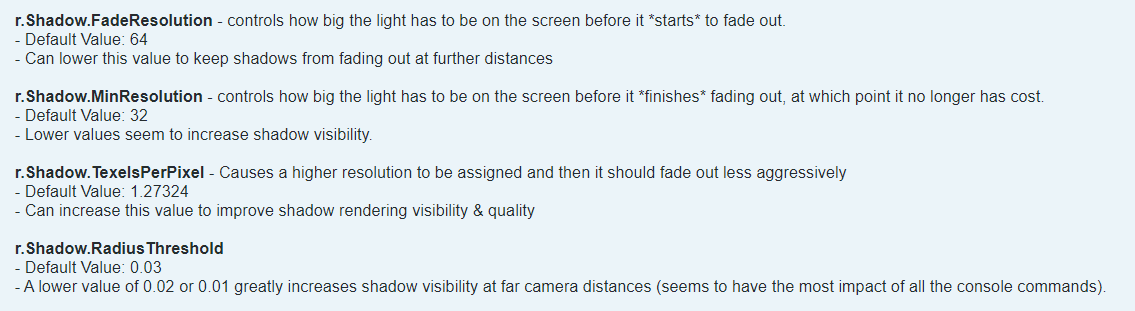
looking for tips on increasing shadow distance for cinematic video export.
I have tried:
r.Shadow.DistanceScale
as well as:
https://i.gyazo.com/1617857a9ffb09193eccad51b4d4b3bb.png
but none of these are having any effect on my mesh

 raw rock
Hey so i want to add a forest with multiple of this good quality trees but at the third of fourth is just too laggy, anything i can do? btw i have good computer
grim ore
@plush yew I would assume he either moves to drop to the ground, or moves out of the ground. You could always ignore this for the first few seconds or until an event happens for example using a boolean check like ShouldBoost
or if this is for example driven by player input, put the bool on the key pressed released so it only can trigger this on the tick if you are pushing the button
@raw rock are you doing these as separate Static Meshes or using something like the Instances Static Mesh system? if not look into that
 orchid marsh
@raw rock what s the vertex count? Make sure it has lods and use the foliage system
 twin raft
Does anybody download for free of this months ?
grim ore
you shouldnt put a delay on tick if possible. and if you are asking how to stop a character there are stop movement nodes to do it
the character, as in the character blueprint/class, does not really use physics so you need to keep that in mind
 thorn dew
I've got Unreal 4.25.0. When I make a new game, put down my PostProcessVolume" and set it to have Raytracing On it seems to not be working even with DX12, and Ray Tracing being set to on in the Project settings. I know my windows and everything works with raytracing because I open an old project that I upgraded to 4.25.0 and raytracing is working in that project. I also see the "Ray Tracing Debug" under the lighting conditions on the old project. Is it bugged to only work in upgraded old projects or am I not doing something I need to do?
grim ore
which template?
thorn dew
game template
grim ore
which game template
thorn dew
the one with nothing in it and raytracing set to on
grim ore
so blank template with RT turned on in the new project window?
thorn dew
yes
grim ore
works fine for me, I kept the starter content included and the default scene with the 2 chairs has RT on by default and working. 2070 super
thorn dew
i'll try it with starter content
grim ore
well I only mention that as the default scene shows it working
thorn dew
By the way thank you for making those videos. You are one of the best Unreal Engine teachers out there. I feel like I'm talking to a legend.
grim ore
yep no issues here with a blank blank project. made a material set to white, 100% metallic and 0% rough and added it to the floor plane. popped a cube above it and
and actually did not even need the PP volume, the project defaults to RT on when you choose it in the new project window.
thorn dew
When you click on View Mode does it have a "Ray Trace Debug" line?
grim ore
yep and path tracing
thorn dew
Maybe I need to reset my computer. 2.25.0 did want me to do that after install. It worked, but maybe something changed again. It's the only thing I can think of at this point.
thorn dew
knowing that does help. It means it's something on my side and not a bug.
 old fulcrum
Hi, need help with the new version 4.25, it is stuttering every second. So i have this progress bars run by a timer it stutters when i run the game unlike in 4.23
grim ore
check out the profiler to see what might be happening
and does it stop stuttering if the progress bar is not running
old fulcrum
wow all that are run by timer is stuttering not only progress bars. im going to learn profiler first. thanks mat
 obsidian remnant
hello , new guy here i have some questions about changing the gamemode of my level , built everything as 3rd person. but would like to switch to fps, swapped the game mode and the player character, but when i enter game mode it doesn't play, like pawn seems fine but no movement
thorn dew
Did you reconfigure the controls so it now outputs the movements right?
thorn dew
I figured out my raytracing problem. I had 2 video cards installed one that can do raytracing and one that can't. I uninstalled the one that can't and now it works. Thank you @grim ore since I knew it had to be something on my side I thought about it harder.
 abstract relic
Project setting > input
thorn dew
@obsidian remnant there are actually a few ways to do it, so it makes it hard to know what you got set up. I'd say start by double clicking on the game mode and seeing if there is anything in there, but still it can be hidden under some tabs that are not easy to get to if you don't know how. The input HighTide mentions is only for setting the basic node linked to keys. What the nodes are linked to is what you want to look for. I'd start looking at some tutorials on how to get a character to move
that way you can see how the stuff is linked.
grim ore
@thorn dew ah ha, yeah you can also force it to use a specific adapater if you want with a command line command
thorn dew
what command is that?
daring tundra
Hi all. Has anyone of you guys ever used the procedural mesh component with iOS and got it to work since 4.22? It works perfectly fine on Android but for some reason in iOS it just flickers when updated and then it's gone.
Any help on this would be very much appreciated. (I asked the same question in mobile section, I hope I don't violate any rules by posting it here again)
grim ore
 safe field
What are the best methods for anti-piracy and spotting/preventing hacking/cheating/modders?
 viscid oasis
Is it possible to change Parameter in LayerMaterial during runtime ?
next badger
@safe field not to release
abstract relic
Yes. Look into dynamic material
next badger
@safe field but if you want multiplayer competitive game, look on some products, like EasyAntiCheat
 dense hatch
also for online multiplayer always do server side checks and heartbeat
viscid oasis
@abstract relic Event for Layer Material ?
dense hatch
and if you use those anti cheat products be prepared for it to not always work because people always find workarounds, and be prepared for non-cheaters to be frustrated because of technical issues they're getting because of the anti cheat
believe it or not your anti cheat can make or break your game at release lol
safe field
That seems to be the consensus; that anti-tamper is hard to impossible to get right even for AAA studios.
One day I was no longer able to play Black Ops III because the anti-cheat went haywire and never played it again lmao
I heard Fortnite uses something called Battleye.
I envision a reporting system that uses AI to spot anomalies and also a system to send demo clips to mods when cheaters get reported enough, but I haven't heard of this kind of system talked about.
next badger
i think gold rule is matchmaking with ability to blacklist people
but that only works for self hosted games
dense hatch
@viscid oasis Create Dynamic Material Instance, then Set Material on your mesh, then Set Vector Parameter (or Set Scalar Parameter)
plush yew
Is there an equivalent to "event receive draw hud" for c++? Can't override it because it's not virtual and i want to do stuff on the event. Do i have to get the source and change it to virtual to attach actions to it in c++?
 dawn gull
Hey, sorry if I am interrupting, but how can I make it so that my first person character rotates when the camera rotates?
I added the skeleton thing from the third person character into a custom first person
viscid oasis
@dense hatch , @abstract relic Thank you 🙂
next badger
@dawn gull you are not interrupting, this is public place...
answer is...are you using CharacterMovementComponent?
dawn gull
I just updated. It is a custom first person that doesn't have a rotating thing with the mouse just for the camera
next badger
CMC controls the capsule, if you attach your 3rd person character to that capsule - you will get the rotation
abstract relic
Enable Use Controller Desired Rotation if you’re using CMC
dawn gull
because if I look behind I can see the mannequin's butt
next badger
oh...maybe the thing HighTide mentioned is the reason
dawn gull
@next badger The capsule doesn't rotate so I attached it to the camera and got this beauty
it looks like it levitates
grim ore
that could just be a mesh with a translucent material on it, or it could be a particle effect, or it could be a flat plane with a material on it
abstract relic
Looks like a basic fresnel
grim ore
it could to all of them. You can resize the plane for example, you could create a procedural mesh at runtime
abstract relic
You got options, you got creativity, you have endless solutions.
grim ore
Decals is another option but it might be wonky on terrain unless you want that (and it might be a good idea to have it if needed)
dawn gull
Hold on whats the node that splits an event pin into multiple I think this will fix my problem
like this
abstract relic
The server been crashing in certain regions on certain devices
Nothing to worry about
plush yew
i have added 2 players in the multiplayer settings but one window is not visible anymore. its out of my screen
anyone know how i can move it still?
next badger
@ebon linden that texture looks like distance field
 soft fiber
When you create a new project and you chose Blueprints, you can still use C++, right? What the difference in that setting?
next badger
@soft fiber if you add c++ it will convert project to c++
you can't go back w/o removing c++
most of the devs start with bp and eventually migrate to c++. but not the opposite
so hence the option
soft fiber
I've done c++ in unreal, but I was considering trying to limit the project to BP... but I'm a little nervous about that decision..l
next badger
you always can extend it to c++ one
some work will be involved ofc, like reparenting classes
soft fiber
ok, very well... Thanks
next badger
the only thing i see require c++ is network replication
specifically for tps or fps characters
soft fiber
Ya, I'm not interested in that for this project anyway.
Makes me fell like you didn't leave enough space.
feel
next badger
@plush yew https://www.youtube.com/watch?v=tnzz-eFmKaw

A song about making things right. iTUNES: http://bit.ly/MyOCDsong
NOTE: We understand that OCD is a serious mental disorder that significantly affects the lives of millions of people (including Rhett's wife). This song is not intended to make fun of people with OCD, but rat...
plush yew
i have added 2 players in the multiplayer settings but one window is not visible anymore. its out of my screen
anyone know how i can move it still?
 acoustic crag
Is there a way to lower the texture resolution globally? or do we have to do it 1 at a time?
next badger
@acoustic crag you have the texture groups, you may use that, or you may use property matrix, or set the device profiles
https://docs.unrealengine.com/en-US/Platforms/Mobile/Textures/#per-devicetexturelod
Texture creation and properties for mobile games.
: if this is changed: update BaseEngine.ini [SystemSettings] you might have to update the update Game's DefaultEngine.ini [SystemSettings] order and actual name can never change (order is important!)
daring tundra
@acoustic crag Exactly what @next badger was saying ^^
next badger
Information over texture support both within the engine and hardware.
 meager musk
Does anyone have workflow/pipeline recommendations? I've used UE previously, and have experience with P4, however I'm sure there are other best practices for building a strong foundation before just jumping into the actual development.
 sweet relic
@meager musk there is a course on learn.unrealengine.com called Building Better Pipelines that may be of intrest
meager musk
Thank you!
sweet relic
also look into the editor python integration as it is intended for pipeline work
 autumn elbow
There was a game dev that had a dev blog - hourus ... something like that.. anyone remember the blog ? He made a space exploration game...
crash landing on a planet..
I forgot the name of the game and the blog 😂
dense hatch
oh my
 midnight gate
is theres a way to connect them easier?
dense hatch
i can recommend using a reroute node
dense hatch
yeah
dense hatch
if any of your overlap events are similar you can group them together with a reroute node and then make them all go to a reroute node,
or redesign your overlap events so you have fewer events
 thick herald
why don't you have the logic for the overlap in the item being overlapped and not the thing overlapping?
 queen bolt
Hey guys I'm having an issue where I can't save any of my work in the editor. It just fails to save. There's no other instance of UE4 running and the files aren't read-only.
I can't continue working 😦
dense hatch
make sure you don't have the dev build running as a separate process
queen bolt
Nothing in task manager looks like that
Only background process named Epic or Unreal is the Launcher
dense hatch
it might be the name of your game
queen bolt
That's also not running
It basically saves right after I start the editor
For a few minutes
Then stops being able to save
dense hatch
and this is before you ever "play" a preview, right?
queen bolt
Yes, after restarting the editor and windows as well
Created test blueprint, was able to save it, worked on it a bit, was able to save, then after a while it doesn't save anymore
And after that nothing else saves
Maps, materials, etc.
dense hatch
Can you troubleshoot by making a new project and seeing if you can reproduce there
queen bolt
Will try
 gleaming narwhal
Seeing a lot of mentions about Steam in Editor: Steam integration in 4.25.0 doesn't work when playing in Standalone. This will be addressed in 4.25.1, but in the meantime you can remove the -MultiprocessOSS argument from the CommandLine in PlayLevelNewProcess.cpp line 101:
CommandLine += FString::Printf(TEXT("GameUserSettingsINI=\"%s\" -MultiprocessSaveConfig "), *GameUserSettingsOverride); /*-MultiprocessOSS*/
 normal burrow
moderators victor has dropped some knowledge upon us
obligatory question of when 4.25.1 will arrive
acoustic crag
Does camera frustum only render whats in the camera view?
gleaming narwhal
@normal burrow Obligatory answer: "when it's ready"
normal burrow
obligatory hurray
gleaming narwhal
:obligatory: <- need an emote for this
normal burrow
need more emotes, so many emotions
 summer saddle
Hey guys, I'm trying to record a movie with the Sequencer. I have an issue with that, as the Sequencer starts the game when I hit the record button, and it uses the default player camera instead of the cameras I have in my sequence. I there a way to force the Sequencer to use only the cameras in the track?
 frozen pond
how i can create new asset from play level? 🤔
dawn gull
@abstract relic Do you have a break node that would work for this?
sweet relic
@summer saddle you might want to ask in #cinematics
summer saddle
I will, thanks!
dawn gull
Oh I meant a Sequence node
 crystal linden
Hello, i downloaded the megascans plugin, once i did the engine would not be able to open and it crashes each time i try to open it , anyone knows a solution for this problem?
it gives me the following error: Assertion failed: [File:D:\Build++UE4\Sync\Engine\Source\Runtime\Core\Private\GenericPlatform\GenericPlatformMemory.cpp] [Line: 212] Ran out of memory allocating 61416049696 bytes with alignment 0
i dont understand why it needs 64gb ram when downloading the plugin
 glacial pecan
FFS UNREAL WITH YOUR HIDDEN NAMING RULES! It's the 21st century, get with the program and allow more flexible asset names. 👺
it's like https://xkcd.com/327/ all over again

 tiny sonnet

brisk urchin
I'm still having issues packaging my level. I noticed on the log that it shows a file from a D drive but I don't have that drive on my PC. I have a C, E and F drives.
brisk urchin
When I click the image its gives the option to open the larger original size image. Discord automatically makes a small preview one.
I'll post the text
 warped tangle
Looks like you're attempting to reference an invalid index
brisk urchin
tiny sonnet
also, most likely one of your assets or levels are coorupted
analog magnet
hi guys, has anyone experience with the Camera SprinArm thing? Mine simply goes through walls and so on, "Do collision test" is on btw.
brisk urchin
does that text file above work?
 woeful wadi
I'm brand new with UE4 and I'm wondering how can I check if an object is left clicked?
tiny sonnet
C:\Users\Armando\AppData\Roaming\Unreal Engine\AutomationTool\Logs\C+Program+Files+Epic+Games+UE_4.20\UBT-FPS_Map-Win64-Development.txt @brisk urchin i need this
brisk urchin
I tried to past the log text but it auto converted it on discord to that
warped tangle
@woeful wadi enable mouse click events in your player controller
woeful wadi
I don't think I'm using a player controller
brisk urchin
woeful wadi
I'm trying to figure out how to make it so if you left click a cube it adds one to a variable, is there a way to do that?
warped tangle
You are absolutely using a player controller, based on that statement you probably have not made your own Game Mode/Player Controller. Do that first, set the new player controller as the default player controller in your new game mode, and set the game mode as the default game mode in project settings
 zenith lily
Have there been more reports of nvidia messing with a ue4 level that worked fine before the latest driver updates?
warped tangle
Unless you are talking about doing this at editor time, and not runtime @woeful wadi ?
woeful wadi
Uhhh
 rancid peak
Can anyone tell me where I can find the "Particle Effects example included with UE4"? The docs mention it but I can't find it. Thanks.
woeful wadi
Like I said I'm brand new to UE4 so sorry if I'm a bit slow
I'm in the editor
I want it so when you're in game you can click a cube and it adds one to a variable
And I want that variable to be displayed on screen somewhere
warped tangle
In order to be able to even select something at game-time, you need to enable click events in the player controller. First thing you should do is as I mentioned above, make a new game mode and player controller.
If this is above your head, I would recommend starting with some online learning and get familiar with how UE4 works
woeful wadi
I watched tutorials but I guess most of it went in one ear and out the other
Yeah, I'll do that
Thanks
warped tangle
Check out Epics online learning stuffs
 rain moss
Any blender guys in here able to help me out with scaling?
analog magnet
does anyone know how to make my camera attached to a spring arm not go through walls?
 quiet pivot
Is there a way to view collision meshes while playing in the editor?
warped tangle
It's heavy, but pxvis collision will show collisions
@analog magnet make sure your wall actually has collision
 marsh geyser
somebody know why my ragdolls are broken when I use chaos plz ? https://cdn.discordapp.com/attachments/428267367378976779/709501659365113946/unknown.png
 analog magnet
it definitely has
rain moss
When I add a cube and go to the properties, it only gives me the scaling and I want to be able to set the measurements individually in cm's... Is that possible and am I missing a certain window?
warped tangle
press "N", that should bring up a property window
analog magnet
@warped tangle basically the SpringArm thing doesnt work at all, if i set it to relative rotation it just takes the rotation of the parent which it definitely should do...
brisk urchin
@tiny sonnet any tips from that specific file I uploaded in order to fix the problem?
warped tangle
are you using source control by chance @brisk urchin
brisk urchin
@warped tangle According to my message log after building my level it says that Source Control is Disabled
tiny sonnet
FPS_Map.uproject has an asset that has the format of an argument which is invalid
@brisk urchin
most likely an array
 ripe tiger
me and my buddy both cloned the same project off github but his content browser won't show any of the files. they previously did show the content, and he reset all his settings back to default to try to fix it.
brisk urchin
@tiny sonnet Would I have to manually check every asset I have used in the past 3 days since I last packaged my level? Any tips on what to look for specifically?
what's an array?
tiny sonnet
do u know any other programming languages?
ripe tiger
tiny sonnet
An array is a data structure, which can store a fixed-size collection of elements of the same data type.
brisk urchin
I'm not a programmer per say. I've just played with some basic blueprints
ripe tiger
no assets or blueprints are showing up in content browser
even though we have the exact same project, and mine is working
frozen pond
@brisk urchin array is like pack of cookies, you got box of cookies, that containt cookies, so box of cookies is array, and cookies are array elements, you can have box with or without elements so array can be empty or have some cookies
tiny sonnet
@brisk urchin u probably changed an index of an array, or a get player controller index to the negatives or something.
i can't really tell, only u can.
maybe try running the level and see if you get an error
warped tangle
In reality you should get an error when attempting to play the level
Yep
@frozen pond But you didn't finish your analogy so everybody is properly confused. When you want to get the first cookie in the box of cookies, you have to get cookie(0)
lol
frozen pond
he ask what is array
tiny sonnet
packaging is weird as fuck since even if you dont use those assets, it still packages them
warped tangle
Lol I know
brisk urchin
When I play the level and run around in the map I get no errors. I can shoot and climb
ripe tiger
has anybody ever had the issue i stated before?
tiny sonnet
@ripe tiger wut
ripe tiger
me and my buddy both cloned the same project off github but his content browser won't show any of the files. they previously did show the content, and he reset all his settings back to default to try to fix it.
 tiny sonnet
use a backup
ripe tiger
thats not the problem
the content browser isnt showing anything
its working on my machine, we have the exact same files
tiny sonnet
wait
ripe tiger
we are using source control but we're opening a local project rn
right now source contro lisnt setup
we just downloaded the project locally
grim ore
and you both are opening it using the same version of the engine?
tiny sonnet
u usually dont need the same version
brisk urchin
Would right clicking and clicking "Audit Assets" on the ones added before my last successful packaging help at all?
warped tangle
100% need to be the same engine ver....
grim ore
and you cant open a SQUAD-DEV-EDITOR asset in a .24 launcher version
ripe tiger
you guys are correct probably, his unreal switched 2 versions back for some reason
we're testing now
tiny sonnet
👍
ripe tiger
ok that was it, y'all are a boss
i don't understand why google didnt recommend or talk about that once
grim ore
you can go forward as that is basically upgrading the project *for the most part
ripe tiger
checked like 15 sites
tiny sonnet
oh ok
ripe tiger
including unreal forums lol
tiny sonnet
unreal forums are ass lol
ripe tiger
apparently
tiny sonnet
thats how i found this server, cuz unreal never has the fucking answers
ripe tiger
even a simple answer/fix as this
every answer was some random hack
i.e "drop a .txt file into the folder to get the content browser to update"
which will probably work, but i doubt thats the first thing that should come to mind knowing about versioning(which i didnt know was that strict til today, so thanks)
brisk urchin
I found some building static meshes with a "Space" in their names. Could that be that issue possibly?
tiny sonnet
doubt it is the original error, but if its a problem, you still should fix it
brisk urchin
You're right. It didn't fix it. It still fails right away when trying to package it. 😦
I just don't know what happened. It didn't have this issue 3 days ago.
 tiny coyote
is there a hotkey for the reroute node?
 boreal plinth
Anyone know why attenuation or light radius no longer is showing?
tiny coyote
I have seen some youtubers using one but I dont know which one
 austere scroll
i followed a tutorial on making custom collision , it was to basically put "UCX_" behind the name of the custom collision in the modelling program (in my case : blender) .
i did exactly what he did , but it didnt work
i forgot to mention that i want it hollow from the inside
dawn gull
Heyyy This is for moving the camera in my first person character but I can't move my camera up and down. This is a screenshot
hold on i will paste the code
Here
https://pastebin.com/bUdZs9yK

Pastebin
 ancient lotus
@austere scroll use 5 separate box meshes for your collision and use UBX so you have 1 for each side wall and the bottom. ive had some funky issues with convex collisions importing into UE4 for some shapes so i think that this may be a better route since it is just a few boxes
also that screenshot is super blurry lol
austere scroll
ok thanks
 fierce merlin
How long does it typically take to build UE4 from source? Most places say 15-40 minutes but I’m an hour in and I’m on module 600 of 3000... my computer isn’t THAT bad is it?
ancient lotus
oh right that explains why your post was blocked
ancient lotus
@fierce merlin takes me a little over an hour with a haswell i5. once you get past 1500 it will compile very quick
annoyance
dawn gull
Ah sorry about that. I didn't understand that spam annoyed people back then. I was kind of new to social media and stuff
 charred shoal
Can someone recommend me a UE4 tutorial for a beginner that uses c++ AND blueprints?
because all I can find are tutorials that use one or the other, not both
 ruby folio
@charred shoal Look at the Tom Looman series on a survival game
@dawn gull #blueprint would be the place to ask about that
ancient lotus
my tutorials are primarly c++ and uses blueprints for things like widgets. my new series will use a good bit more blueprint with some things like beacons written in c++ and called via blueprint
charred shoal
@ruby folio can you link me? sounds good
@ancient lotus also sent me a link of yours! ill check it out
ancient lotus

YouTube
dawn gull
@ruby folio Ok thanks
charred shoal
also @ruby folio is this the one you mentioned? https://www.tomlooman.com/survival-sample-game-for-ue4/

C++ Survival game covering common gameplay concepts packed in an open-source project. Series includes C++, AI and Networking.
viscid oasis
Is it Possible to setTextureParameterValue the parameter in green (btw this is layer material)
if yes how ?
ancient lotus
yes but your naming is messed up, do this for the names
UBX_treasure_chest_00
UBX_treasure_chest_01
UBX_treasure_chest_02
UBX_treasure_chest_03
UBX_treasure_chest_04
ruby folio
@charred shoal Yeah thats the one
ancient lotus
@austere scroll check out https://docs.unrealengine.com/en-US/Engine/Content/Importing/FBX/StaticMeshes/index.html
Setting up, exporting, and importing Static Meshes using the FBX content pipeline.
charred shoal
@ruby folio ok 👍
 devout sluice
I don't know if this has been shared before but it's a bunch of cool free stuff https://stevelois.com/tools-and-resources/ue4-resources/ (I didn't find anything in search discord)

Here, you will find only free, high quality materials (Mat), static meshes (SM), textures (TX), special effects (FX), audio packs and so on from various authors. All authors are freely distributing…
It is just a collection of many peoples free work
brisk urchin
Update to my problem. After rebuilding my level I did get some "Load Errors". They are below. Would these prevent the project from packaging?
austere scroll
@ancient lotus this is right ?
if i put "generate auto collision" in import settings , it will become as it was at first ( so no result) , if i dont put "generate auto collision" there will be NO collision
sweet relic
@austere scroll it should be "UBX_treasure_chest_001_01"
austere scroll
understood
sweet relic
you need the full name of the mesh including the number
austere scroll
Thank you !
ruby folio
@brisk urchin Have you tried fixing up redirectors?
analog magnet
would someone be interested in helping me out with some client server stuff? basically client is unaware of certain thigs it shouldnt be...
ruby folio
analog magnet
thanks
brisk urchin
@ruby folio I just did. I right clicked all of the and selected fix up. All were fixed but one. None of the ones in the load errors are in the my folders.
ruby folio
Have you tried runnig fix up redirectors on the root folder?
brisk urchin
doing that now
still leaves that one by itself
can't delete it or anything
not sure what broke my packaging tool
ruby folio
The
Update to my problem. AftWould these prevent the project from packaging?
@brisk urchin The answer is no btw. I have seen games with much worse errors than this and those are on Steam!
brisk urchin
From the log file i uploaded earlier is has to do with the automation tool
No clue how to fix fat
The engine packages other projects fine
just not this one
ruby folio
Tried migrating? Is it a BP only project?
brisk urchin
Just some blueprints here and there. I'm no programmer
this issue started yesterday.
brisk urchin
It was packaging fine 3 days ago.
how do I that? Open up a blank project then whats next?
I'm on 4.20.3 btw. Would opening it/converting to a new engine possibly help?
ruby folio
I'd stick to the current engine for now.
Make a new project. Name it whatever.
In the old project, right click and migrate any assets you want to keep. Point them to the content folder of the new project
This document covers how to migrate assets into other projects within the Content Browser
brisk urchin
I'll try that right now. Thanks
@ruby folio Does it matter if I select either "Blueprint" or "Unreal Studio" when creating a new project? What's the difference?
ruby folio
Just use Blueprint
brisk urchin
alright. When I migrate, do I each folder under content or all at once?
ruby folio
Thats up to you
 scarlet birch
If it was me I'd fix those broken reference errors first
They could cause packaging to fail.
ruby folio
@scarlet birch Thats the problem that is to be solved by migrating
scarlet birch
Why?
ruby folio
uh?
ruby folio
Because it gets rid of old borked references.
They have already tried fixing up redirectors
brisk urchin
The "Fix Up" didn't work on that the last remaining redirector. 😦
brisk urchin
@ruby folio just finished migrating each folder. Some of them said that "some file were not migrated over... ". Is that normal?
I'm currently packaging the projects and it's working
So far.
 blissful trail
controller isn't working properly it detects the inputs in usb game controllers but not in unreal
(im using a xbox one controller wired)
 ashen ermine
I have hangs up to 2 mins when I try force-deleting assets since 4.24 Anyone else noticed this?
Even memory-referenced only assets still hang for 5-10 secs before they get deleted.
abstract relic
Yep it’s an introduced bug since .24. No idea if it’s been fixed in .25
 obtuse swift
 maiden swift
@bleak elk Modes have a redesigned interface in 4.25. Click the Modes button in the top toolbar and choose a mode from the dropdown.
maiden swift
Yes.
ashen ermine
@abstract relic I'm on .25 now, if anything, it's worse lol
abstract relic
Oh joy
 bleak elk
It is very mixed in terms of depreciation.
i'd have looked somewhere else if this was not here
And although I need to handbuild for Chaos, all the plugins are enabled by default.
normal burrow
think of the slowness as it perhaps correctly running through all the assets in your project as intended. I've not had a rogue redirector in 4.24 yet
ashen ermine
and I know it sounds "entitled" and minor, but there is another minor inconvenience introduced in 4.25: the TAB key isn't working properly in persona on vectors (say you want to scale your particles on notify: you need to click change, click change... 😂 laughing, but I'm dyeing inside bec of this.
ashen ermine
@normal burrow yea, I remember those, they were awful but I have a fairly big project and hangs in here are...just "not responding" - ok windows, it will respond, hold on - kinda thing
@bleak elk oh, that's lovely 😄
we're bitching now, but the sky atmo is GG - played with it a little 😛
normal burrow
did you make the project in 4.25 with chaos built rj?
ashen ermine
i know, it's exactly what i'm saying 😛
bleak elk
Yes @normal burrow
normal burrow
interesting
bleak elk
but not this release.
The one previous to this.
I was kinda hoping it would be in this build by default so did a test run.
plush yew
What's missing from my scene? :(
I am trying to make a low poly scene for mobile but it always ends up looking ugly
It looked way cooler in blender
I can't figure it out for days now anyone?
plush yew
No it's something with the colors and lighting no?
blissful trail
anyone know the solution to my problem ???
 fallen marten
The green is too rich
 midnight root
Nice coloring/style, maybe lawn is too green dunno, but its not unattractive to me anyway, as always its in the details and gameplay etc.
plush yew
I want it look nice
ruby folio
@blissful trail Might be better off asking in #blueprint
fallen marten
Maybe the lights are a little too bright as well
Too shiny
They don't have that flame glow
plush yew
I'll make a day time verison
midnight root
short of color of law, may not matter as much if you plan on adding other items/colors to it,the eye can be distracted if thats desired, not with great difficulty
lol law on the mind I guess,,'lawn' o_0
 ebon marlin
anyone else getting a lot of stutters after 4.25 is open for more than 20 or so minutes?
Im talking macro stutters every 2 seconds or so
just shows how consistent the stuttering is in-editor
it makes working with the editor just feel bad
ashen ermine
Any idea what "ComputeDiffuseIrradience" is and why it's taking 3.21 ms?
plush yew
anyone else getting a lot of stutters after 4.25 is open for more than 20 or so minutes?
@ebon marlin > i thought i was the only one, thought my potato needed an upgrade
ashen ermine
@plush yew i get hiccups and whatnot here too sometimes, what I'm working on hasn't changed that much so i suspect it's the version, but it's not bad at all, just feels a little bit unstable
plush yew
Any idea what "ComputeDiffuseIrradience" is and why it's taking 3.21 ms?
@ashen ermine it is used by reflection captures afaik
 ashen ermine
I haven't got a single freakin' reflection capture in the whole game...
ashen ermine
hm...could it be the refraction on my particles? I'm using it alot
plush yew
guessing vs ue4 profiler 😉 good luck
ashen ermine
yea, I should 😛
but it's been such a long time since i've done it and i'll need session frontend since nearly everything is procedural so it has to b in runtime while playing 😦
so reading/remembering/updating knowledge first 😭 FML
plush yew
The green is too rich
@fallen marten what do u mean? Too green? Too much green? Should I tone the colors down?
abstract relic
Please install debugging symbol.
Engine library >>> [engine version] >>> option
normal burrow
it'd be cool if the bot could read debugging symbols @maiden swift😄
abstract relic
30gb bot
normal burrow
worth it
 barren flume
i'm verifying files
normal burrow
it'd have to be able to take phone pictures of logs too
maiden swift
Oh come now. 😛
normal burrow
😄
abstract relic
We want a bot that can read minds using predictive algorithm.
 glass rapids
Quick question, does anyone know how to use the twitchplays thing?
normal burrow
just have it suggest removing intermediates folder
abstract relic
Got a problem? Delete /intermediate
barren flume
easy
maiden swift
@glass rapids Not sure if there's a go-to solution for that. I assume different devs implement that feature differently.
glass rapids
Im trying to get it so it connects to my twitch chat
maiden swift
Sounds like a Marketplace plugin opportunity, honestly.
If someone hasn't done that already.
barren flume
yeah

This is a plugin for Unreal Engine 4 that makes communication with the Twitch chat of any channel super simple to use. Also allows to subscribe to custom commands coming from the chat.
it is
but not for sale
glass rapids
That is the plugin im using
barren flume
and not up to date
maiden swift
Ohhh bummer, so it's not supported anymore.
glass rapids
I know, I'm using an old version for it
Some dev streamers seem to use it and I can't figure it out.
maiden swift
Did you read the documentation?
glass rapids
yes
barren flume

TwitchWorks Is The Easy-To-Use Unreal Engine 4 Twitch Integration! It Features Commands, Cheers, Messages, And More!
another one but not sure if it's what you mean

Twitch Integrator aims to heavily simplify in-game twitch integration.
this one implements chat
maiden swift
Looks like TwitchWorks also allows connecting to chat.
And his is supported and up to date.
glass rapids
The problem with twitchworks for me is I am kinda 15 and have no money
barren flume
I'm 14 and even when I have money I can't buy anything online
unless it's a store where you can buy gift cards
There are a lot of things relating to unreal engine I would buy
but don't have the right thing to buy it with
glass rapids
I wish I could spend money for ue4 things
barren flume
I was thinking visa gift cards but I don't even know if I can get those
maiden swift
@glass rapids What trouble are you having with the plugin?
Are you using the right version of Unreal?
glass rapids
yeah I am using 4.21.2 is that not correct?
maiden swift
No that seems right. Looks like that's the last supported version.
Are you following the setup guide in the docs? If so, where are you getting stuck?
barren flume
oh I can get visa gift cards at my age and buy unreal engine stuff
glass rapids
It connects. Idk why it wont print a message though
maiden swift
OK that sounds plugin-specific. I'm not familiar with it so I can't be much help, but this forum thread from the developer contains their email so you should try contacting them.
glass rapids
okay, ty
plush yew
barren flume
plush yew
does this affect the project size? Should i worry?
because it's a single landscape material
brisk urchin
FINALLY!! Fixed my packaging problem.! Migrating it to a clean new project didn't work. What worked was opening it on 4.24.3 and converting to it (was made in 4.20.3).
 sleek spear
is there something like the launch URL node that launches an explorer window at a specific path?
barren flume
my goodness i can't delete anything to get more space for unreal engine
i can't figure out how to remove windows files from other hard drive
sleek spear
@plush yew does this happen evey time you do a change to your landscape material?
plush yew
I made a landscape material, just drew a stroke on the plane and boom, 10k shaders WTF
fallen marten
Does anyone know some good ways to have the client machine check and see if it's timed out? I'm using an older version of generic shooter that uses time remaining from the game mode and if the HUD hasn't gotten an update in a while, it shows a time out message. I want to be able to stop the timer so the match can keep going until tickets are depleted in a conquest game, and not have that time out warning show
 thin tendon
I haven't played much with networking. If its not a feature here is my idea. Create a simple script. That passes a variable from the client to the server. Then checks the servers value. If they don't match it = to timed out
fallen marten
I'll try something like that and see how it goes - if you can't cast to the game mode from the client, you'd assume it's timed out too right?
thin tendon
I'm not sure to be honest
fallen marten
I'd bug Mr Allar but my break just finished at work so can't get into a lengthy discussion if he decided to help me with it
thin tendon
All you really need is something on the server you can check against where you know what value to expect
fallen marten
Yeah true - ok well fingers crossed I work this shit out in a somewhat acceptable manner
Thanks Slim 👍
thin tendon
All good mate
 quick kelp
Hello, anyone know if it’s possible to implement voice recognition in UE4?
 narrow meteor
does anyone know any reasons why after a while of playing my game standalone it starts to lag very hard. like 30 seconds. Even if i dont do anything
quick kelp
It doesn’t lag in editor the same way ?
fallen marten
Press tilde and type stat unit object. It'll give you a readout and may give you an idea of what's making it lag
glass rapids
I have a quick question, is it possible to make an index array go from highest to lowest?
I am trying to make a scoreboard of top five
thin tendon
@glass rapids You need a method of sorting the array
glass rapids
how would you do that?
thin tendon
@narrow meteor https://www.youtube.com/watch?v=hcxetY8g_fs

This session by Sr. Dev Rel Tech Artist Zak Parrish explores performance concerns for shipping games, focusing on how to track down problem areas on both the CPU and GPU. Learn how to set up a test environment and how to employ the necessary tools to identify key performance p...
fallen marten
There's a node that gets the highest number from your array and gives you the index
narrow meteor
@fallen marten where is tilde?
thin tendon
I don't think Ue4 has an array sort by default. Which is kind of weird it doesn't. You might have to create one.
fallen marten
@narrow meteor next to 1 above w
narrow meteor
oh u mean that squiggly thing
fallen marten
Yup
thin tendon
@glass rapids @fallen marten is right. Use a max of array node. To get the max. What I would do is make a macro. That loops over an array. Getting the max each time. And putting it in a new array. Then removing the value from the first array. And have it loop until the first array is empty. This should sort the array for you.
fallen marten
I was going to suggest that too
 empty isle
Anyone know how UE4 solution generation (on the uproject) determines if the resulting solution should just reference the source, rather than build it?
thin tendon
@glass rapids https://www.youtube.com/watch?v=pj5buBQ0lHU

What are Blueprint Macro Libraries in Unreal Engine 4?
Source Files: https://github.com/MWadstein/wtf-hdi-files
 terse oriole
I am looking for someone to learn from. I would like to create something with someone. Is anyone willing to join me?
 dusky lichen
!help
plush yew
@dusky lichen, Sent you a DM with information.
 icy fjord
!help
plush yew
@icy fjord, Sent you a DM with information.
 dull vessel
https://twitter.com/Emre_C_Deniz/status/1258566030244278272
@fierce tulip cheers for the link - I think that type of solution would work for MP but I didn't test it. I did test PCs on moving platform over local MP instances, which worked, but it's quite glitchy. Also rebuilding navmesh in real-time is pretty expensive, it's hard to say what would cause lag but I doubt the navmesh rebuilds are doing any favors.


World's best evangelist @HighlySpammable put me onto the blog post from the Sea of Thieves group regarding faking navmesh movement on moving actors. The crew move on a still mesh under the ocean!
I did a quick build up of the concept over an hour and it works surprisingly w...
Likes
126
 Twitter
 pseudo star
whtas the new best way to calculate direction regarding player animations
 midnight bolt



 rich rose
So I upgraded my project from 4.24 to 4.25 and the ONLY thing i see in GitHub that is described as a change is this:
I thought I would see hundreds of lines of changes. Is this ok? [the project does function perfectly]
normal burrow
as expected yeah @rich rose
unreal will only upgrade assets to latest engine version if you save them
which is why you can sometimes get a speed up in loading time for editor if you resave everything
but yeah it doesn't touch files it doesn't need to
pseudo star
@normal burrow r u able to help me with getting my animations working
rich rose
@normal burrow thanks for the info! good to know. I got worried that my project got corrupted or something 😅 [ofc i have a backup but it woulda just been another thing to worry about] 👍
 rocky pine
Has anyone played with insights in 4.25? My logs aren't showing frame times, but everything else with it seems to be working.
 grizzled condor
Hey Guys my unreal engine 4.25 keep stucking at 39% when i open the new project how can i fix it ?
rocky pine
How long did you wait? A new engine load is usually a "go get lunch" type of operation for me.
grizzled condor
maybe 5 min, so need to wait ?
rocky pine
Oh yeah, much longer than that. Once you get it done the first time, it should load much faster the next time.
rocky pine
You can open the task manager and keep an eye on the CPU usage. As long as that's working hard, you can be sure that the engine isn't 'stuck'.
pseudo star
could i please get some noob help in support channel
 unique kraken
anyone know of a way to get the "reseted normal" vector even if you have edited normals
normal burrow
talking about in blender or something?
you can choose to calculate normals, instead of importing them
normal burrow
Your using 32bit editor?
barren flume
No
i tried 64bit and 32bit
i still get the same message
i also tried running with dx12
still same message
normal burrow
Interesting call stack but you still don’t have debug symbols
You could watch memory usage ffffffff is a common address to signal something wrong
unique kraken
hmm
can i get a float value from a float 3
like a rgb img and just get a grey value from all of them
normal burrow
Yes
honest vale
are we talking about materials or blueprints?
unique kraken
mats
honest vale
there's a component mask node or something with that name
normal burrow
You could mask components add together divide by 3
unique kraken
hmm, there should just be a function for that or so.
normal burrow
There’s also a hsv conversion node I think
Could use two max nodes too, it really depends on what you need to do
unique kraken
nah the add/3 works out just fine thx
normal burrow
Yellow will be .666 and red .333 but it’s an average yeah
pseudo star
my animations dont work going forward and left but they do for back and right anyknow how to fix this
normal burrow
Google: sync markers
barren flume
it says i have debugging symbols installed
i installed it the same day i installed 4.25
fallen marten
@barren flume is it just that level that crashes the light build? Try build lighting on another level and see. Sometimes a corrupt static mesh Instance screws it up. I had to systematically delete meshes from a level a while back until I found the one causing the issue
barren flume
it does it on every level
thin tendon
you got enough ram?
normal burrow
How much free memory do you have?
thin tendon
Get some more ram bro
barren flume
ue4 only uses about 4gb ram on idle
when doing stuff like lighting it get's t around maybe
6
i don't really look
normal burrow
Look
barren flume
unreal engine isn't open
thin tendon
Bro I got 32gb and seen it use 24 - 26 building. Ue4 Floods your ram to. So if you don't have enough for what its wanting to do it will crash
normal burrow
Lightmass is what you should be looking at
barren flume
you must have a big project then
mine is a flat floor
a little house
and a couple large blocks
with material on it
it might be something with the meshes
i'll try in another project
fallen marten
@pseudo star sounds like your speed and direction variables in the blendspace are wrong, or the blendspace is incorrectly setup if that's what's running
barren flume
i'll come back at 4:30am
my back
i've been sitting in this barely office chair for hours
looks kinda like this
oh wait time to go to lounge
welp I'm dumb
okay just started lighting build again
here is currently
normal burrow
16639 huh
and a couple large blocks
Watch memory usage in your performance tab in task manager
barren flume
between 8 and 9 GB
my goodness
my internet
8% building lighting rn
oh shoot
i forgot i have blender open
normal burrow
Yeah just keep an eye on that
barren flume
okay now it dropped down to 63%
only a little though
my internet still doing bad
but everything is fine for me
oh right
that's prob what it's using
normal burrow
Still building?
barren flume
yeah
38%
it's actually doing it
it failed at 0%
usually
but now it's actually going
turns out i still ran in dx12
all my other projects work fine with dx12
but i guessnot this one
43%
memory usage hasn't changed much
what kind of ssd is this
i dunno
it's fine
oh it's not reading much
57%
81%
91%
95
 short vector
what type of normal map is this or texture type?
barren flume
i've seen those
i don't use it because i think they're meant for unity or something like that
and there are no slots i know i could use it for
@normal burrow it finished
i guess it's running ue4 in dx12
is what makes it not build
honest vale
@short vector looks like a channel packed roughness/metalness/AO(?) texture
short vector
sounds like it thank u
 echo zealot
Does anyone know who the hell made the decision to not support infinity blade 1-3 anymore? I'm really mad, those were the best games on the whole app store!
 dusty scroll
it was my call, i stand by it
 drifting geode
where is the best place in terms of blueprints to call actions like "checking for HMD" or pre-game settings like "choose if the device should be a client or a server"?
plush yew
Can someone tell me how do you get decent lighting on mobile? Skylight doesn't work. How do you make ambient lighting then?
Nothing seems to work on mobile... Even the editor preview gives false result this is frustrating. How can people make nice looking mobile games in UE4 if nothing works
 whole quarry
give all mats a small emission
just a little bit so the shadows dont become pitch black
thats how I do it, I get results like
plush yew
Okay. And how do u get proper shadows and AO?
 buoyant trout
Hello, how could I disable the mouse look-around feature ? What I have to put in my DefaultInput.ini ?
whole quarry
@plush yew im not sure if you can do that on mobile
whole quarry
give all mats a small emission
plush yew
I have no shadows whatsoever
whole quarry
i've a normal directional light in the scene
and all materials actually glow a little bit
so that w/e is in the shadow doesn't turn black
 plush ibex
hey guys, whenever i migrate this level to a different project file, the landscape is there but the towers trees and mountains just are not there, any ideas?
plush yew
Mobile isnt a PC or console :d
@whole quarry I know haha but I have spent so much time trying to get a house look alright
coronavirus makes people productive 👍
 teal tulip
SSAO is a thing in mobile ?
plush yew
Yes but it only works for fornite of course
teal tulip
I had nightmares with portable VR systems, seems to be worst than mobile this days
plush yew
almost everything that glows looks nice in VR
echo zealot
it was my call, i stand by it
@dusty scroll My nigga Lawrence.. why? 😢
dusty scroll
it gave me a twisted sense of satisfaction
dusty scroll
fraid so mate
bleak elk
Any info out there on how to enable multi bounce ray trace reflections?
dusty scroll
i did! but i pressed it twice, and undid my undo
echo zealot
😩
dusty scroll
yeap
bleak elk
nevermind, for anyone who cares. r.RayTracing.Reflections.MaxBounces
plush yew
Any info out there on how to enable multi bounce ray trace reflections?
@bleak elk r.RayTracing.Reflections.MaxBounces
teal tulip
@plush yew post process cannot be used on VR portable
plush yew
😏
@plush yew post process cannot be used on VR portable
@teal tulip only in Fornite
💩
plush yew
That just shows how bad VR actually is..
teal tulip
XD
plush yew
Epic won't invest in it making a game but we should... 🤔
teal tulip
We are like the ones that have to feed himself with the food we find around the floor and the big ones don't use/eat at all
well was like that always on every sector tbh
 fierce forge
how i can resolve this problem ?
fierce forge
i don't have any bone
plush yew
and auto key framing
fierce forge
it's just a cube
plush yew
adding a single bone is like 5 seconds
plush yew
make a dummy object with a single bone, then attach the mesh to it?
you do have to have a single bone on your mesh regardless
ue4 actually creates one for you, it's called the root bone.
btw try changing the interpolation method
fierce forge
how ?
plush yew
I honestly have no idea, i use blender for animations, and i try to avoid any animation tools made by epic (they just suck at it sadly)
it's a game engine after all 🤔
if you need to animate go to blender, add a bone, assign to it's vertex group, animate however you'd like it in blender, then export to ue4 and enjoy.
If you do this way you still have at least one bone you can't avoid it...
What game are you making by the way? @fierce forge
fierce forge
survival/fighting
 left ridge
Hi -anybody that can give me a pointer here? I'm sure it's something obvious
It's my own C++ node, asking for a reference to the library?
plush yew
no he is asking a reference to the class instance
because this function is not a member of the library
can you show the c++ function definition?
for that function
i believe you're missing something
left ridge
plush yew
ok i believe it has to be a static function
if you require the WorldContext for a function you have to define it in a parameter and you can tell the blueprint system to pass it along automatically
UFUNCTION(BlueprintCallable, Category="Test", meta=(WorldContext="WorldContextObject"))
static class void TestFunction(UObject* WorldContextObject, int32 MyParam);
static keyword and meta=(WorldContext="WorldContextObject") is all you should need
left ridge
Thank you - I'll give it a go
 digital rover
hello, does anyone know how to control ue4 pixel streaming game separately?
plush yew
Ways your Unreal Engine application can interact with the Pixel Streaming system at runtime.
is there anything missing here?
@digital rover ?
digital rover
I mean how we can matchmake to few clients that can control it separately?
plush yew
?
digital rover
because its default way, if one player move forward, other client also can see it
plush yew
i think you want to run multiple instances
digital rover
yes
plush yew
and connect the various clients to the different instances
plush yew
so change the port
digital rover
how can we prevent two clients go to same port
plush yew
change the port?
digital rover
do i have to do it manual? or is there a way in unreal engine
plush yew
you have to do it manually
i can't really help you as the question is way too generic and is out of context
you should read up on the matter of how networking is done, what is an ip address / port etc... also learn some web development if you're doing a web based client
but to change the port you want to tell the client to connect to a different instance (it's dependent on your implementation)
to run a ue4 instance on a different port you can find the information on the documentation
Advanced networking configuration and other considerations for hosting the Pixel Streaming system.
everything is explained here tbh
digital rover
ok thanks ill check
 noble tapir
hey there, I got a question for you all. In my project I need to log out a bunch of data constantly in Json format. Does anyone have any experience with this in UE4 (C++)? I'm trying to figure out the best way to make sure output file is valid even if there is a crash and how best to handle writing to file. Should I open and close file on each write or just keep it open?
rare ivy
hi does someone know if you can give a tag to a landscape?
 buoyant root
question when you make the game focus an widget and it closes, do i need to do anything after that or is it already unfocused nothing more to do?
 dusty kernel
Hey noob here 😄 , I'm trying to add a socket to UE4_Mannequin_Skeleton because im practicing, but when i click save it gives me an error that its not possible to save it. It's not possible to save a socket on the example skeleton asset ? 😦
 sonic creek
@dusty kernel I think that happens sometimes if you have more than one editor instance open, maybe check task manager?
dusty kernel
hm it doesn't seem the case
do you have any other ideas @sonic creek
(lol you changed your name and i thought i've mistaken the name tag ahah )
thanks in advance 🙂
 undone sinew
need to get that into that
plush yew
Hello, I speak Spanish, and I wanted to ask one thing. In my unreal engine 4 project, ah when importing a weapon, previously downloaded, in the object, putting the static mesh and everything, I cannot change its size, only from the perspective of the program, but ah when executing it itself, the weapon appears giant

eu flaco ayudame posta,no te lo estoy diciendo insultandote
 rotund sleet
/** BYTE array to fill in as the response is read via didReceiveData */
TArray<uint8> Payload;
/** Caches how many bytes of the response we've read so far */
FThreadSafeCounter TotalBytesRead;
why counter is thread protected and payload is not in FCurlHttpResponse?
it is so sad, and streamed receiving is imposible 😿
nevermind, just crying of some parts of UE code
plush yew
because you're not likely to write into the payload when receiving?
and it should be safe to only read no?
rotund sleet
it is receiving payload, and i want to have it part until it finished receiving 10000 tb streaming data
http system gives data only after all data received
plush yew
you can override
ReceiveResponseBodyCallback
and implement your own logic can't you? 🤔
rotund sleet
be sure what it is not virtual and private, it is UE4
plush yew
🧠
rotund sleet
even whole curl section of http module is in Private folder
plush yew
well the OnRequestProgress is there called righ after the above function is executed
rotund sleet
you think in OnRequestProgress Payload is thread safe? 🤔
plush yew
well it is a delegate
rotund sleet
good catch, thanks
plush yew
are delegates thread safe?
rotund sleet
no
but it called from http thread, and this thread is not using Payload in this time
plush yew
curl_easy_setopt(EasyHandle, CURLOPT_WRITEFUNCTION, StaticReceiveResponseBodyCallback);
this doesn't run in a separate thread afaik
rotund sleet
it is running from start
plush yew
well you may want to have a separate thread for your http calls
rotund sleet
it means rewrite the whole http system, i'm doing this right now, but it is a lots of code
plush yew
We've implemented a custom online subsystem for ue4 using the IHttpRequest interface without any issues regarding the threads
i wouldn't worry about it much if you're not using separate threads
rotund sleet
do you online subsystem supporting sending and receiving streams?
plush yew
yes
rotund sleet
good for you 👍🏽
rotund sleet
look in private please
 tulip helm
Does it take longer to open up projects in 4.25 compared to 4.24? Curious if the custom fork I'm using is the cause. A blank project in 4.24 opened relatively quickly - like 10 to 20 seconds or something. A blank in 4.25 takes a couple minutes.
plush yew
Hello?
@plush yew Greetings!
hello!!!
Greetings!!!
I have a question
what is it 😄
yes
Hello, I speak Spanish, and I wanted to ask one thing. In my unreal engine 4 project, ah when importing a weapon, previously downloaded, in the object, putting the static mesh and everything, I cannot change its size, only from the perspective of the program, but ah when executing it itself, the weapon appears giant
https://youtu.be/nah3WhTrsnU
eu flaco ayudame posta,no te lo estoy diciendo insultandote
why are you changing mobility to static,stationary and dynamic?
mobility should be set to dynamic as it's a moveable object...
the weapon scale is setup terribly it has negative values on the Z axis.
as? Sorry, I do not know very well about these things, I entered a group of unreal in Spanish, and they told me to do that, to be able to put the gun, now one of them enters in English so they can help me
Also this is not unity, you don't scale your blueprint components in the world editor
Well if you don't know what somethig is then maybe learn about it
so you don't click on buttons that don't do any good for you