#ue4-general
1 messages · Page 720 of 1
 topaz brook
 abstract relic

 midnight gate
hm thanky you this might just work
finaly i figured out how to go around this stupid issue
still never gonna learn how to cast that damn bp :3
but fuck that
 grim ore
one you learn what casting actually is and how it works then you will understand your problem
abstract relic
If that player is destroyed, so will all that data
topaz brook
It sounds to me like your biggest hurdle is understanding casting which is preventing you from getting the data you need @midnight gate
midnight gate
i tried understanding casting many times my brain does not want to collabarate
topaz brook
Gotta figure it out eventually lol.
midnight gate
i would love to figure it out but it seems to be the most complex thing in the whole engine
 kindred viper
its one of those things that clicks and you will realise its one of the easiest :p
grim ore
I can say that in the UE4 save and load game course that will eventually show up on the learning web page if it ever gets finished the places that will be shown to save from will be the game mode, game state, a seperate blueprint actor, and if I have my way will not be in the player lol
topaz brook
One if the biggest tips I cab give you is take your time learning any game engine and prigramming in general. You have to have a solid foundation of how things work to really mold things to your liking
grim ore
Creating our Save Game Object in the Game Instance so we can keep it between levels as needed - Creating our Save Game Object and keeping it inside of our Game Mode so we can add/remove items from it between saves and loads - Creating an actor manager for loading and saving these objects - Archiving and Serializing data using C++ 😉
kindred viper
I hope you jacked the Replay code in some way.
grim ore
for the love of god never try and do it in the level blueprint.... I need to mention that i just noticed. in bold. italics. caps.. blinking.
I did not, this is a "intro" course on the basics
abstract relic

kindred viper
ah. I've always wanted to dig into that and see what I can do with it
abstract relic
Don’t have anything blinking though
 inner vine
Which coordinate system do the SteamVR motion controllers use in Unreal? Is +X the forward direction?
 azure shore
guys I have a problem thats driving me insane, so when using a mixamo skeleton, getting some animations from the site that look fine in blender and on the site, when I open them in ue4 the root bone is just frozen in place, and the rest of the body moves without it Ive tried everything with enable root motion and all that but nothing works
does anyone know about this mixamo stuff
kindred viper
have you exported it from Blender with the Mixamo to UE4 plugin?
 tight shell
I guess I solved my problem with tetra blocking volumes
azure shore
I havent used a ue4 plugin actually
kindred viper

GitHub
Blender addon for converting mixamo animations to Unreal 4 rootmotion - enziop/mixamo_converter
azure shore
thanks
itll be a miracle ifI can successfully add this to blender though
when I try to enable I just get whatever the hell this is
Im gonna lose my mind
abstract relic
If I could post a discord link to Blender. I would. The folks there can help you on that front
 normal burrow
OpenVFX?
kindred viper
@abstract relic luckily its just the usual link with Blender on the end. So without saying that it is, its that :p
abstract relic
cough hackle weez
normal burrow
sneezing
 kind zephyr
Hi. probleme there at day-2... Can we Cull an animated character?
kindred viper
cull how? You mean rendering wise?
 static sparrow
Question: I have a class BP_Influencer and a class BP_Yarn, which inherits from BP_Influencer. BP_Influencer has a public member variable size. Why can't I access BP_Influencer::size from BP_Yarn?
BP_Influencer's components
the details for BP_Influencer::size
BP_Yarn's components. Where is the size variable?
I have compiled and saved everything, just FYI
kind zephyr
@kindred viper Thank you Marc, I'd like to remove visibility of my animated characters. They are too much and my system slow down.
azure shore
alright I cant get any help with this bloody addon Im gonna tear my hair out
I dont see why itd need an addon anyway
why cant ue4 just process the stupid animation without messing it up
kindred viper
@kind zephyr being that it's animated, there may be a caveat with this, but the engine knows to cull objects that have their origin point outside of the FOV of the camera automatically. Being that it's animated and needs to remember where it is in the animation, there might be a specific rule for this with anim graph stuff
azure shore
most frustrating part is I cant find anything online about anyone else having this problem
kindred viper
that addon might be a little old now. I think I used it with blender 2.79
@kind zephyr Another option with animation is anim sharing. That can help a lot with optimisation
azure shore
yes Im on 2.79
kind zephyr
@kindred viper They are animated but they are not moving. They are static animated... but all diseaper but they not...
grim ore
@static sparrow click the eyeball drop down at the top of my blueprint and tell it to show inherited variables
static sparrow
YAY!!! Thanks @grim ore . Why oh why is that not checked by default
kindred viper
inheritance tax
grim ore
because its an inherited variable, you can still get/set it in the child from the blueprint no need to show it in the left
just like in normal code when you inherit you dont see the variable definitions in the header of the child
static sparrow
ah. makes sense
grim ore
doesnt mean it's not annoying tho 😉
static sparrow
Okay, one more question: I have two materials, one made from a 64x64 texture, the other from a 16x16 texture. In two different blueprints, I simply have a plane, that's it. I have set the material for the plane to be one material, the other material for the other blueprint's plane. Yet when I add each BP to my level, the one with the material made from the smaller texture is showing up HUGE. The scales are set to be exactly the same values. What's going on?
kindred viper
its not size, its resolution
static sparrow
@kindred viper on the material?
 valid lichen
Hi all! I haven't turn UE on for about a year. There were scores of updated assets in my library, so queued them all. From the way it looked, it was going to take days to update them all (vault on slow HDD drive). Then I noticed the launcher itself needed an update, so I decided to run that first. Now, the launcher is updated, but forgot about all the queued assets. And they have lost their "need update" marker, so idk how to for them to update. Any idea?
kindred viper
@static sparrow sorry I might have misunderstood there. What do you mean one is huge? They should both be the same size of the plane. Although at different resolutions
static sparrow
they should be the size of the plane... Ooooohhhhh okay, I think you nailed it there. Since the planes are the same size, it blows up the smaller texture to fit, and makes it appear way bigger
That sound right?
kindred viper
yeah
static sparrow
kk cool, thanks. Is there any way to force the plane to be the size of its material's texture by default?
 mental grove
i have imported a project but its split into 180 different things, how can i combine stuff?
kindred viper
@static sparrow probably but without opening UE4 I couldn't say for sure without a guess like, perhaps have a function that gets the dimensions of the texture and scales the plane accordingly.
static sparrow
okay. Probably in the construction script, eh?
 frozen pond
is there any plugin that let me export (in game time) actor, and import it on another pc ?
kindred viper
it doesn't have to be. That would be for editor only stuff in my personal opinion. I don't like to take it to runtime if I can help it
@frozen pond Datasmith I guess
frozen pond
datasmith isn't game dev stuff? i want to make system that let you share your in-game designs to other players
kindred viper
then thats something you will need to make for your game. You can do it but if it's been made already I haven't heard about it
frozen pond
can ue4 generate text files/save it and decode it latter doing some import scheme ?
kindred viper
@little epoch dont have materials on the same z-depth
 little epoch
ok thanks
kindred viper
even a fraction of a unit distance between faces on a model can make the difference though
@frozen pond Yes but you would be better off using a data format for UE. That would save reconstruction of assets. Or you can make a custom asset to deal with it.
frozen pond
k ty
mental grove
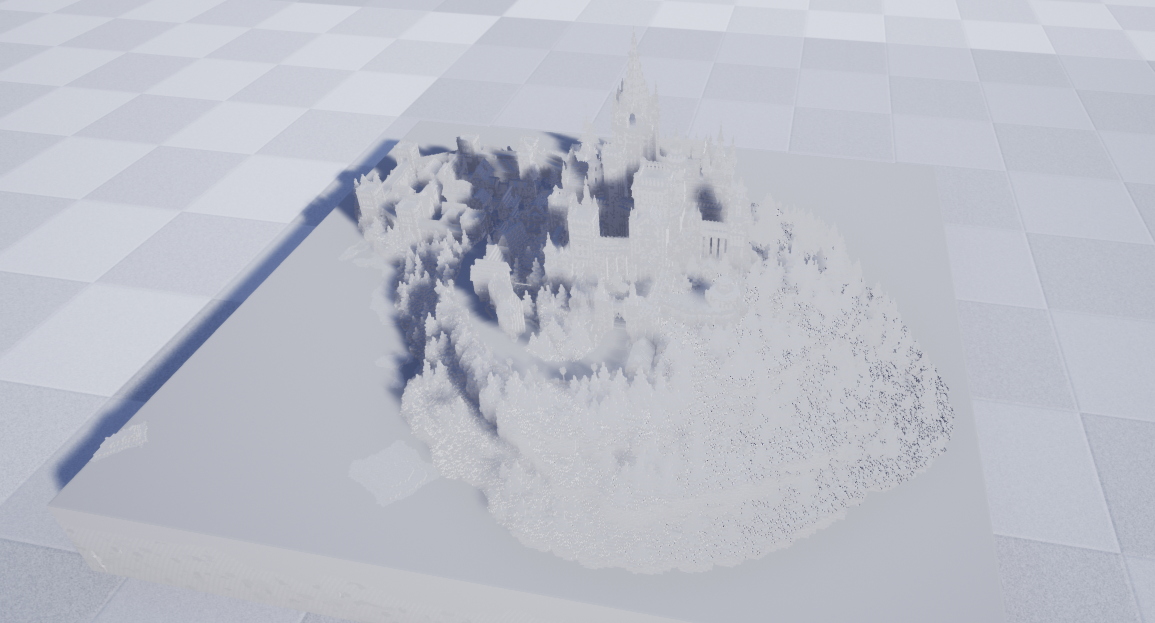
can someone help me? when i import a project its all gray eventhough i have the texture UV as the same name, i imported fbx, did i miss any boxes to check?
static sparrow
@mental grove what's all gray... a texture, a material, everything?
mental grove
the whole fbx file i imported is gray
seems like theres nothing assigned to it
sorry if this seems like a dummy beginner question i literally just opened unreal for the first time 10min ago
static sparrow
... sorry, I don't know much about fbx files. I was just trying to clarify your question
mental grove
 frozen pond
theres no material on it
mental grove
do i have to check some box to import it with a material already assigned or do i apply a material afterwards?
abstract relic
You need to make the material
Materials can’t get imported. Different render engine and all that
frozen pond
question from me: how to dected hover over actor? i want to get position in relative where my mouse is
 severe ibex
would anybody have any insight into exporting an FBX animation from Max that involves the blend modifier?
I have a nice looping cloth animation in max using said blend modifier and animated blends, it comes into UE4 with the blends but no actual mesh changing.
kindred viper
what I like to do with entire levels worth of mesh, is load it up into whatever DCC, then bake out an entire material for the whole thing. As high res as I can. Then use that instead. Often you get low res (depending on scale) but its a starting point for remaking the materials
mental grove
@abstract relic thanks i imported the UV and just drag and dropped it, didnt think it was this easy!
kindred viper
@severe ibex modifiers dont work in UE. You need to collapse the stack first
its probably not gonna work even then. Have you tried redoing the cloth directly in UE4?
severe ibex
@kindred viper I've seen that the blend modifier can carry over in FBX exports, unless I need to export said blend frame for each of the relative blends and re link in UE4
kindred viper
maybe it can no I dunno honestly
severe ibex
nah the whole idea here was to use some nice simulated stuff from Marvelous Designer
mental grove
@abstract relic http://prntscr.com/s5xzja
 kindred viper
My general rule has always been flatten stack, reset transforms then export
mental grove
any idea why theres no alpha applied + everything is blurry?
severe ibex
@kindred viper that'd be fine but then all the animation from the blend modifier would be lost.
kindred viper
yeah. Is there a Marv Des plugin?
severe ibex
there's a beta pointcache/alembic import option
 soft narwhal
Hello. I am trying to open up VS 2019 form UE 4 but I am unable to open solution.
severe ibex
Evidently I am retarded and didn't click the "import morph targets" when importing in UE4 @kindred viper
kindred viper
heh simple mistake but a lucky mistake as its solved now 🙂
static sparrow
Okay, @kindred viper I have found another clue here... the BP I was having the scaling problem with was a child of another BP class. When I made another BP class with the same plane+material that didn't inherit from another class, the scale of the plane+material showed up as I expected, very small, i.e. the size of the original texture. What is it about being an inherited class that changes this?
kindred viper
No idea without seeing the classes
static sparrow
here is it as an inherited class
severe ibex
or it's just opened up a new can of worms haha!
static sparrow
and as just inheriting from actor
I just can't figure out why inheriting from another class makes their child plane component render so differently
kindred viper
is it scaled in the original?
static sparrow
I do notice this... when I zoom out on the inherited one:
have anything to do with that floor?
they both have the same scale value of 0.25 across the board
the original texture is just 16x16 pixels
little epoch
This is my mod application for this server please consider me as a potential moderator!
static sparrow
Okay, I have changed directions here, I'll worry about that later. So, in my game, which is to be a mobile game, you're gonna drop little balls of yarn on the level in order to lure cats toward the litter box. The proper place for the logic controlling the dropping of the yarnballs would be the level blueprint, right?
kind zephyr
@kind zephyr Isn't LOD min draw distance, a way to Cull animated character?
 weak atlas
I think you just ignored a mod application
static sparrow
from the tutorial vids I have watched, LOD is used on materials to swap between various versions of itself depending on how far away the camera is from the mesh with that material
weak atlas
Whos that
static sparrow
but that may not be the whole scope of their use
little epoch
i didnt get banned?
 storm terrace
Can any of you give me two examples of
- Decent project
- Dev Count = 1-3
- Used Paid Assets
That in one case did well and in the other case did poorly, examples that I can learn from.
kind zephyr
i was hoping to not display that LOD can help me to not display if there is no Low version mesh...
 swift spindle
this might help you
https://docs.unrealengine.com/en-US/Engine/Rendering/VisibilityCulling/CullDistanceVolume/index.html
An overview of how to use the Cull Distance Volume to cull Actors in your Levels as specified distances based on their size.
 remote mason
why by default, the normal map doesn't seem to affect the surface much at all?
swift spindle
it really depends on your surface / lighting
you can also increase the height of your normal
which will make it pop more
abstract relic
And do note that the normals do not affect geometry. It gives the illusion of geometry. Which is the point of normals
remote mason
the height? can you send me a link about it?
yea I think I need to adjust the displacement map somehow too I was using Materialize before import
remote mason
thanks
kind zephyr
@swift spindle I'm using Cull Distance at first... But this is not working on Moveable Actor. Only Static. Or I don't understand how. This is why i'm asking here. And this is why i'm searching a solution with LOD.. or anything that will stop displaying my actors.
I can diseaper my dancers, but not their Haicut (that need to be Moveable)
Why Cull status does not propagate to child...?
 desert tartan
can someone help me?
 inner cloak
Anyone from Epic Games around ?
 barren flume
What happened to this?
I thought I used to see that
in the older versions of ue4
inner cloak
I'm unable to build 4.24 .. is that your problem too ?
inner cloak
i took the latest 4.24 from the zip file on Github
kindred viper
@inner cloak what was the error?
inner cloak
where did you get it from ?
barren flume
epic games launcher
inner cloak
oh .. you take prebuilt version, right ?
inner cloak
ok, i am going for testing a few changes i need to engine for my project
but i still did not change anything and cant build it full
 ancient lotus
mine built
inner cloak
oh .. when did you build it ?
kindred viper
did you install the prerequisites? Did you install visual studio? Did you get the .NET and Win SDK stuff?
barren flume
oh yeah and I don't see the html5 option
inner cloak
hmm .. so .. could be that i'm missing the Win SDK ..
barren flume
ue4 used to show this
kindred viper
steps to build
- Download zip
- put it somewhere and click the setup batch file.
- Generate visual studio files
- Compile.
kindred viper
@barren flume HTML5 is now a plugin seperate from the engine
grim ore
HTML5 is gone, read the release notes
inner cloak
This is what i get when i compile !
barren flume
what about uwp
grim ore
UWP was never part of the main source build
barren flume
isn't it the one on github
grim ore
with that error @inner cloak did you install any of the windows 10/8 SDK's ?
there is a NON epic UWP source on github, it is NOT an epic source version
inner cloak
that's what i'm trying to figure out ... current step is getting UWP
grim ore
@inner cloak UWP is not part of the ue4 release branch, are you trying to use UWP on it?
inner cloak
i never had that kind of issues in the past .. so i am not sure what is going on ... i tried downloading UWP but have not found the proper link
kindred viper
what is the UWP version for? Just for games on Windows Store?
grim ore
did you install the proper requirements like it was mentioned earlier? like it says in the docs "To install the correct components for UE4 development, check the "Game Development with C++" workload, and the "Unreal Engine Installer" and "Nuget Package Manager" optional components."
inner cloak
yes, i believe i did .. i can go and double check
grim ore
so to be clear you are downloading the 4.24 release branch from github and trying to compile it? which version of VS did you install 2017 or 2019?
if you are tryting to download the 4.24 from epic's github this is probably the correct tree you want as it's the latest point release https://github.com/EpicGames/UnrealEngine/tree/4.24.3-release
inner cloak
I used 2017
grim ore
that might be an issue as well as 2019 support has been primary for the last few versions. Perhaps uninstall 2017, remove the stuff you downloaded. Install VS2019 with the proper components
then redownload from the 4.24.3 tree, run setup.bat and let it get the extra files, run generateprojectfiles.bat to create the .sln file, then open it and build the UE4 project
about all I can see going wrong is the generateprojectfiles part will fail with a missing SDK which you can download from the installer if so
Epic has to keep changing supported VS versions and SDK versions and toolchains as it goes along so what might have worked for 4.22.1 might not work in 4.23.2 for example 😦 it sucks but software dev sucks
inner cloak
Hmm .. my system is acting weird .. i cant even take screenshots
actually . can't take screenshots when i open visual studio installer 😦
finally got it:
this is what i have active
grim ore
under individual components what does it show for the windows 8 and 10 sdk's
grim ore
well that error indicates it can't find the windows.winmd file which should be part of the windows 10 sdk's but in vs2017 it might be part of the windows 8 SDK is an issue
inner cloak
adding other SDK targets
grim ore
for example mine is found here "C:\Program Files (x86)\Windows Kits\10\UnionMetadata\10.0.18362.0" while yours might be in another folder or it might be missing completely as some windows 10 SDK's seem to not have it
inner cloak
That's what i am trying to find out
grim ore
well you can look for it, go to the Windows Kits folders and start looking under 8\UnionMetadata or 10\UnionMetadata
but I know the .24 tags do compile using the latest 2019 with the latest 10 SDK
inner cloak
i might try that later, thanks for the help ... i will try a few thing before coming back here
 snow reef
Is there a node to switch cameras?
inner cloak
How would i go about excluding HOLOLENS stuff from my build ?
i got a working build by commenting the content of hololens automation cs file .. now gotta see if i broke something
 honest otter
Damn, checking out what people are creating and posting here clearly didn't make me feel anxious about my own works haa
didn't expect that for sure :D
static sparrow
yeah @honest otter I can speak for myself when I say I really suck. Getting better every day, but still a major beginner
honest otter
I mostly struggle with being clueless
4 years of having fun as a "level designer"
or well, putting something nice looking out of assets I somehow managed to grab for free
:D
I saw a link on subreddit that was 2 years old, so I assumed its a link to a smaller group that is dying or something, so that I can look for some feedback and most importantly help with things I am struggling (mainly asset creation and implementation right now), as thats what people recommended me to do, but that big discord is something I didn't expect at all
and will now feel anxious of posting my weak assed asset maps o.0
 harsh tiger
i'm looking to make a challenge system like in fortnite. but it will be things like collect 10 coins etc. what would be the best way to approach this?
 plush yew
When exporting an fbx from zbrush to unreal engine it has these weird rips / disruptions, what causes this?
 alpine imp
Has anyone here used SpatialOS?
static sparrow
I am getting frustrated with this... It looks to me like there is no way (in blueprints) to create a public static class variable?? I have class Foo with public static float Bar, so I should be able to access this class variable via Foo::Bar (in regular code). How the hell do I do this with blueprints? Don't tell me they made it so that this isn't possible...
swift spindle
click the eye next to it
static sparrow
@swift spindle that just makes the variable public. I need it to be public static
static sparrow
i.e. I don't have access to (nor should I need one) an instance of that class.
swift spindle
🤷
 winter valley
preface: new to unreal and interest is limited to archviz ... how do i stop sunsky lighting from glowing up my interiors
swift spindle
@winter valley make sure your walls have thickness
I'll assume your talking about light leaking
winter valley
can i post pictures here?
static sparrow
of course red13
static sparrow
depends on what the picture is about. If it's not graphics-related, but rather a picture of an event trigger in a blueprint or something, this channel is fine
swift spindle
that's true
this is kinda generic area... but specific areas have a different crowd of ppl that might have the answer
static sparrow
this channel appears to be just a kind of catch-all for technical questions that don't seem to fit in any of the more specific channels
winter valley
ah, okay
swift spindle
it also collects trolls
winter valley
that's fine, i'm only here for insight
swift spindle
one request tho.. no phone screenshots!
winter valley
how is it a community of computer users isn't familiar with either the screenshot or the snip tool..
swift spindle
this is super common...
winter valley
anyways yeah i'll pop on down to graphics, seems lively enough that'll i'll get questions answered prompt-like
 zenith flower
Get Class Defaults is how you get to variables of blueprint classes without instancing the blueprint itself, for those who didn't know
snow reef
Im trying to make the camera switch to the third person follow camera when you overlap a box. I cant connect the follow camera to the target.
 narrow meteor
how do i change the players resolution
 scarlet birch
Make a convincing argument.
If that doesn't work try this: https://youtu.be/nmjzf38_Tlg

What is the Game User Settings: Apply Resolution Settings Node in Unreal Engine 4
Source Files: https://github.com/MWadstein/wtf-hdi-files
storm terrace
I need help. How do I (in blueprint) say if the return value is none, return this, else return that?
and when I say none I mean none type
zenith flower
no
zenith flower
its says your reference is invalid
snow reef
How do I switch from a static camera to follow camera?
storm terrace
did the blueprint initialize before the player starts?
blueprint is in C++
udemy tank game course
from gamedev.tx
It has been added, do you know what else I am doing wrong?
I just tried changing it in the class and it didn't work. You are right, it defiantly does not have a reference to the class instance.
snow reef
Im trying to make the camera switch to the third person follow camera when you overlap a box. I cant connect the follow camera to the target.
Im trying to make the camera switch to the third person follow camera when you overlap a box. I cant connect the follow camera to the target.
 plush yew
😃
 burnt heath
hey all im running into an issue which i think MAY be to do with the engine? im trying to change an enum value i have on a item and when i use the drop down menu to change it, it ust doesn't....
1
2 click red arrow one
still on this....
any help would be much appreciated ;_;
 marsh swallow
@burnt heath Are you overriding that in Event Construction/Construct?
burnt heath
nope welp i fixed it anyway i just had to go back and remove the struct that contained the enum and readded it and reconnected all the previous stuff...seems to have sorted itsself out now 😛
 thin tendon
I'm trying to use quixel bridge with 4.24 but every single asset fails to import
swift spindle
reinstall plugin
 soft panther
Hellp guys
so im 15 and im a programmer and i rly want to make my first game amazing as i can
I hope there is some people here who want to develop a game and if they do so contact me PLS !!
Nice To meet ya all fellas
swift spindle
make something small.... follow a tutorial.. then make it your own
thin tendon
@soft panther Listen to @swift spindle Start small. You say your a programmer but your 15 you have no experience. You have a lot to learn. Start small and work your way up in scope.
soft panther
@soft panther Listen to @swift spindle Start small. You say your a programmer but your 15 you have no experience. You have a lot to learn. Start small and work your way up in scope.
@thin tendon
make something small.... follow a tutorial.. then make it your own
@swift spindle will do guys Thx
thin tendon
@soft panther Best advice I got start with something simple like a 3 match free to play facebook game
soft panther
Oh and Btw im 1 year at programming
how much time do u think i will need to be a professional ?
its my dream to become a pro game developer
thin tendon
Alot bro. I have 5 years of programming behind me. And I'm still not what you would call a professional. But it also depends if your goal is to work for someone else or be successful by yourself
soft panther
my goal is to work for my self
u know how it is
that u want to meet a crew who is about game develop and then u make ur game with them
thats what i wanna do but it will be hard ha ?
thin tendon
You might get lucky your might not. I have been solo on my project for a year and a half and am still not able to afford to bring other people in
soft panther
how old r u ?
thin tendon
31
soft panther
Lol u way older than me
thin tendon
Best advice I got if you can't do this job for free. Then don't do it
soft panther
i should listen
Best advice I got if you can't do this job for free. Then don't do it
@thin tendon good advice
sry for the bad word but school fuckks me up and i cannt program quietly cause of this
so how do i manage my time right ?
thin tendon
Time is crazy. I can't speak for others. But my two biggest issues are always motivation and time management.
thin tendon
lmao
swift spindle
the reality is.. you'll never "know enuf"
soft panther
a long journey ahead of me
swift spindle
you just need to be good enuf that people pay you to do it 😉
thin tendon
Ohh for sure something new everyday in this area
abstract relic
An endless journey. You should never stop growing
swift spindle
the reality is... if the job is worth doing.. ppl will pay you (if they know you exist)
soft panther
but i rly afraid i dont meet and 3d designer cause i hate it
the reality is... if the job is worth doing.. ppl will pay you (if they know you exist)
@swift spindle U right
swift spindle
if you really wanna get into this... I'd focus in 1 of 2 areas.... Pipeline / production tools (python) or go full engioneering and learn to work in all areas of engine dev (c++)
soft panther
kk thx bro
swift spindle
but for now.. enjoy blueprints 🙂
soft panther
will do
swift spindle
but don't try to learn everything
for that is impossible
instead... build off what you can do and make it better 😛
(there is no spoon)
thin tendon
I reckon if you like code. Jump into C++. And focus on one area. For example AI. And then try to be the best in your one area
soft panther
yea i joined a coure of ue4 and i learn there animations
course *
well i must say thank u so much for all ur advices guys
when i release my projects i will tell ya about that
nice to meet ya
swift spindle
post ya stuff as you go in #work-in-progress don't wait till release
you'll never get there otherwise 😉
thin tendon
😛
 knotty rampart
@thin tendon
https://www.youtube.com/watch?v=z8WvSGNEV24
 paper tundra
does anyone know were to get free magic spells for unreal engine i need some but i dont feel like paying
soft panther
maybe check in epic games free store of unreal engine
if u looking for some p_system u could write VFX in search and take the free items
 sweet saddle
hey guys i just started using unreal engine lately and i was wondering whether we could make the animations and maps in blender/photoshop and then putting them in the engine somehow instead of using the 32x bit method because i don't personally plan on making a 32x bit game ( 2d sidescrolling to be specific) so is it possible??
 neon bough
is there any way to disable the status popups when deleting items for example?
deleting >100 assets is blocking my whole workplace because every few seconds a new popup gets window focus -.-
neon bough
because you dont pass an teleport target
midnight gate
but it focuses the actor
neon bough
but you iterate over an array of saved locations, so it will teleport to every location of that array and end up on the last location
soft panther
Guys after i add transform bone my character anim bp chain is not working??
@frozen mural bro i have no answer to u but u can download the app "lightshot" at ur computer and film what is on ur screen with ur pc and not with ur phone
neon bough
show your BP of where you spawn them
midnight gate
that is the bp where i spawn them
i just teleport them
but all of them should teleport to the right place
instead they all teleport to 1 loc
neon bough
why dont you save their location on the Character instead of having one array for all of them?
midnight gate
because i cant cast things from the character
is that a big problem? cant i just use the array from the save game?
neon bough
sure you can use it
but its an ugly hack
1.) dont iterate over it
2.) pick the last array item to teleport your character, then delete the last array element
that way the next character gets another element as last entry and they wont use the same
neon bough
look at the array methods, its pretty much self explaining
you can resize the array to array length - 1 to shrink it
 dire coral
Need help turotial or forum on how to set up a dedicated server on my own pc
 whole quarry
how did you make your server?
(i'll ignore the dedicated part since you want it on your own pc)
dire coral
@whole quarry i didnt make it im asking on how to make it on my own pc
whole quarry
you choose a language you want to write it in, hook the client up and start?
dire coral
Any forums or tutorial on how to do that im kinda new in all that multiplayer server stuff
I can make it in the ue4 engine to replicate and all bu i need a server to connect to
whole quarry
There arent "follow this tutorial for your specific" needs with that
whole quarry
you'll have to choose a language, search how to make sockets with that and create a client-server flow
dire coral
Ok thx
whole quarry
if you're going to make a custom server, I don't think the networking that comes out of the box with ue4 will be working for you
sweet saddle
anyone?
whole quarry
?
sweet saddle
is it possible to make a game using already made animations from photoshop/blender instead of combining different sprites together to animate the avatar??
whole quarry
are you talking 3d or 2d?
sweet saddle
2d sidescrolling
whole quarry
you can, just change the sprite sheet or create it from scratch
sweet saddle
ya but do i have to animate stuff inside the engine itself? or can i just animate them using blender ?
in other words do i always need sprites ?
sweet saddle
i see...makes sense
whole quarry
animating stuff, rendering to sprites is done in external tools
you could make the sprites in the engine but will be more work than needed
tho, usually people just draw their sprites
sweet saddle
is there a site where we can download sprites for maps and backgrounds?
the ones i found are all in 32 bit
whole quarry
instead of making a 3d model, animate it and render it to images..
sweet saddle
and i want to stay away from 32bit games
whole quarry
thats just... silly..
sweet saddle
xD
i mean i just started lately and i'm really clueless i just don't want to go for the old megaman games looks
whole quarry
the art style is totally on you, you can make spirtes with 16x16 textures, or go 1024x1024 or higher
sweet saddle
i get it but isn't there a site to download sprites from?? or do you mostly do them on your own from scratch?
whole quarry
you can just google for sprites, i prefer to make my stuff myself
sweet saddle
i see thanks a lot
paper tundra
i created a start menu for my game but when i click start the map loads but its stuck i cant play
dire coral
@whole quarry how will it not work
whole quarry
squares dont fit in circles
paper tundra
@whole quarry
whole quarry
totally not weird...
paper tundra
can u help me out
whole quarry
@dire coral its made for online subsystems, if you're going to make your own server, the client side must be working with it. So you will have to make the client side as well. I recommend the Net Shield plugin (can be found on the marketplace)

NetShield is an easy to use library that let's you use SSL/TLS, TCP sockets, AES, SHA and BASE64 using Blueprints!
 drifting geode
can somebody point me into a direction of how menu widgets generally need to be setup for VR? (my current setup works for non VR devices, but inside the quest i have no menu...)
dire coral
@whole quarry i kinda dont want to spend any money on this project
whole quarry
you could ofcourse make the sockets yourself on the client side with C++
dire coral
ok jsut need a refrence
whole quarry

GeeksforGeeks
A Computer Science portal for geeks. It contains well written, well thought and well explained computer science and programming articles, quizzes and practice/competitive programming/company interview Questions.
plush yew
im a bit confused how can i make a varaible universal and can be used on ery blueprint
whole quarry
Why do you want an universial variable?
plush yew
im just testing and i have my actors putting up a varaible and down a varaible when the spawn/die and i want that on a gui
whole quarry
You can cast to the widget to add/remove it from that actor
plush yew
thanks
whole quarry
Get Widgets from Class or something can be used to get the widget object reference so you can cast to it
midnight gate
theres no way to move the mesh inside the editor right?
i wanna change the pivot
 frozen mural
My retargeting aint working, no image in display i alr did the tpose for character but why?
 glacial pecan
is it possible to search the unreal engine github source files for stuff online? ie, without downloading everything?
 gilded flame
Hey guys. My Grid is not visible in orthographic "Back" view It just disaperred. idk what heppen and yes the grid thing is checked under show
 acoustic patrol
i wanna change the pivot
@midnight gate
maybe this helps https://www.youtube.com/watch?v=N1h5mMviSKs

Use the key combo of ALT + Middle Mouse Button to move the Pivot Point on either a BSP or a Static Mesh. To make the change permanent right-click on the shape and choose Pivot - Set as Pivot Offset (UE4.10.4, MacOSX).
azure shore
ugh this channel is never good for help 
midnight gate
ive did it in a third party program rip
 charred stirrup
Hello. Maybe you know how you can set rotation limits on pitch and yaw for a character?
I made such rotation limits on the camera (see screenshot), but I would like to know how to set the same limits, but only on the character.
I need this for a lying position in which an armed character could not direct his hands through the floor and bend like a snake.
In my example, this works, but I wanted to know another option.
 obsidian wasp
How would I go about passing a byte array from blueprints to a function in my c++ function library?
'byte' is unrecognized and detected as such right away. 'BYTE' gives me the same error when I try to build. And it won't let me use uint8 * or uint [] as a parameter...
 honest mango
hey do you guys know< how to add speed when "detachtocomponent" please ?
plush yew
is there anyway to do a thing if two spisific actors are touching
 maiden sundial
Anyone know where i can get sounds for free which i can use for a game which i possible sell later on ?
Like sword swing sounds and such
frozen pond
how to make my canvas panel cover 90% of screen ?
 keen ether
I'm searching for help!
I need a willing person who would help me embrace the preforce of eu4. I have problems placing the server. Installation I did connect it with eu4 just a problem that someone found the server and joined.
Anyone know what I can do?
 hoary locust
save games are very straightforward, aren't they?
 dusty quartz
I have a issue with loading
all of a sudden and I wished to find a person who knows his way around the language of blueprints
I did some debug and the load save wasn't even loading
 restive eagle
thats not how you should ask for help....
just state your problem and provide an example if you can
restive eagle
inside that game mode bp
restive eagle
open up and under defaults you will find it
 gilded eagle
i dont have it
i mean, i created a newBlueprint gamemode
and that appears in that list
or i don't know where to look for
restive eagle
and you want pawn/hud etc to be set?
gilded eagle
i just want to understand how this thing works, im completely new

 obsidian wasp
How do I make my c++ Ufunction either return a byte array to blueprint or accept a byte array from blueprints by ref?
restive eagle
these are default classes provided by the engine
restive eagle
you cant edit them in the editor as far as im aware
so you would need to make your own, as you did
 cold thunder
Chicken nugget?
gilded eagle
i've noticed that i dont need to create the character i'm playing in the level
when the level starts it create the char
cold thunder
Yeah
gilded eagle
let me try
ok if i set it to none... nothing happens and i dont even know where am i
restive eagle
im not sure what you are trying to do here
gilded eagle
can i create the char in the level, and when the game starts i use it? i believe possess is the word?
restive eagle
yeah you can spawn the character and posses it
gilded eagle
trying to understand how it works, see different ways of doing one thing
all characters are spawned?
can't they preexist?
restive eagle
if you place them in the level yourself, sure
gilded eagle
ok so i can place them and possess them later
restive eagle
yeah, but you will have to get the refference
gilded eagle
and why spawining is preferrend? for performance?
restive eagle
depends totally on your system on how you want it to be
gilded eagle
i know that usually in games all the characters are created at the beginning , and not created runtime, i think is for performance..
restive eagle
you can automatically posses by setting default pawn class or spawn it yourself and then posses it
gilded eagle
ok, i'll see later how to possess
restive eagle
it wont have any performance issue
its the same thing, one is being handled by default
gilded eagle
oh yeah, sorry i was thinking in a more general case, like if i have enemies
i would spawn them ?
restive eagle
depends on your game
restive eagle
you can place them or spawn at run-time
gilded eagle
ok very good
restive eagle
if its a big world and has a lot of enemies then sure you will have to make somekind of spawn manager
which loads/unloads enemies
gilded eagle
ok
thankyou
when i create a blueprint to set the game mode
what can i do with the graph?
restive eagle
what ever you want? 😄
gilded eagle
what is it used for i mean
restive eagle
to store some game logic, maybe scores or other game related info
gilded eagle
oh ok
restive eagle
or if its mp, its used for joining
you can do your posses logic there too if you want
gilded eagle
ok
makes sense
so for example i have some chars on the screen and i want to click on one or the other and control them
i can do it here
restive eagle
@gilded eagle its better if you made that logic inside the actor you are selecting or inside your player controller
gilded eagle
ok
if i have a chess game for example... would i have characters? i would move stuff around but... mmm would i posses it?
restive eagle
and your characters should be actors, unless you need them to be chars for your game logic
and only when you click you spawn in a character
for chess you wouldnt use characters, its enough to have player controller
character is something you take control of
which has movement component
gilded eagle
can't i use a movement component on something that isnot a character?
like if i want to drag the chess pieces around with themouse... i'm controlling them
restive eagle
pawn default class has movement component too, if you want to add it to an actor it wont have the same movement component
for chess you dont need movement component
restive eagle
np
 frank oar
when you migrate assests, do you lose them at the pace they started ?
before you migrated them
or does it migrate a copy ?
azure shore
does anyone know if theres any meshes that fit the ue4 mannequin skeleton but with like normal hands
abstract relic
Makes a copy
restive eagle
@azure shore all of the stuff in unreal marketplace is scaled to epic skeleton
azure shore
I need it in blender, is that possible
restive eagle
you can buy it from the marketplace, export them and import to blender
i dont think that outside the marketplace you will find anything that uses the same skeleton
you would need to rig it yourself
azure shore
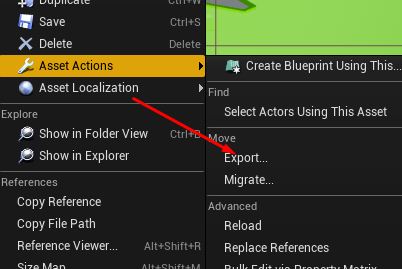
ok thanks, idk how to export from ue4 though
restive eagle
 abstract relic
Select asset >> asset action >> export
azure shore
oh thanks I probably should have looked for myself
man I just want some normal hands, this is hell just to get them
plush yew
I forgot what class a bp that i made is, and i want to recreate it. I dont remember what i chose in the blueprint class chose menu is there a way to see what class it was created with?
 zenith flower
please stop opening visual studio when I miss click an input box. How about ctrl+double click? eh?
 idle needle
Hi guys! New to the community. I’m trying to find the best place to put my managers update function.
I was thinking maybe in the persistent world BP variables adding an instance of my manager there but I feel maybe the game instance? Or what have you guys found to be the best place
 proper stump
Hey, i've created a character based BP, add a box colision to detect overlap with other pawns.. Event ActorBeginOverlap is not being called with the settings shown in image, why?
charred stirrup
Does anyone know how I can make a cigarette smoke effect? Are there any tutorials? Thank!
midnight gate
im working on a save system that if the object is destroyed it will be destroyed when you load the game
my concept for it is have an array for all objects in game and an array for destroyed objects
so on load i can destroy all the actors in the destroyed array variable
but how do i make those destroyed objects go into the array of the destroyed objects? how do i get their id or index?
 flat gorge
any way I can fix tis warning
midnight gate
i think your static mesh is not existant?
null means something like 0 etc
i think its set to null?
now can somebody help me pls
abstract relic
This pretty much sums up what null is in layman’s
flat gorge
@midnight gate thanks for explaining
midnight gate
hm yes that makes more sense
@abstract relic can you help me with advanced array stuff?
 junior shard
the shadows get's broken when light is built
this is when i move the table 🔝
this with buildt light
does anyone know why and if there is a fix for this?
whole quarry
What is your lightmap res?
scarlet birch
anyone using any of the plugins for the editor that are supposed to make BP faster. Like some of the ones that let you add nodes with keyboard shortcuts and such with out needing to use the mouse as much? Everyone I've tried has had a bug or something that was a deal breaker.
 pearl sonnet
it's to do with the scaled 'floor mesh'
junior shard
@whole quarry No clue but iv'e noticed that when i scale the floor thank the shadow gets funkier
inner cloak
I was wondering something about Instanced Static Meshes .. like for foliage: the default mentality about destructable objects (like cutting a tree) seems to be to delete the instance. Isnt it more profitable to simply move the instance like under the map ?
junior shard
if you have to use it again yes otherwise no
 raw rock
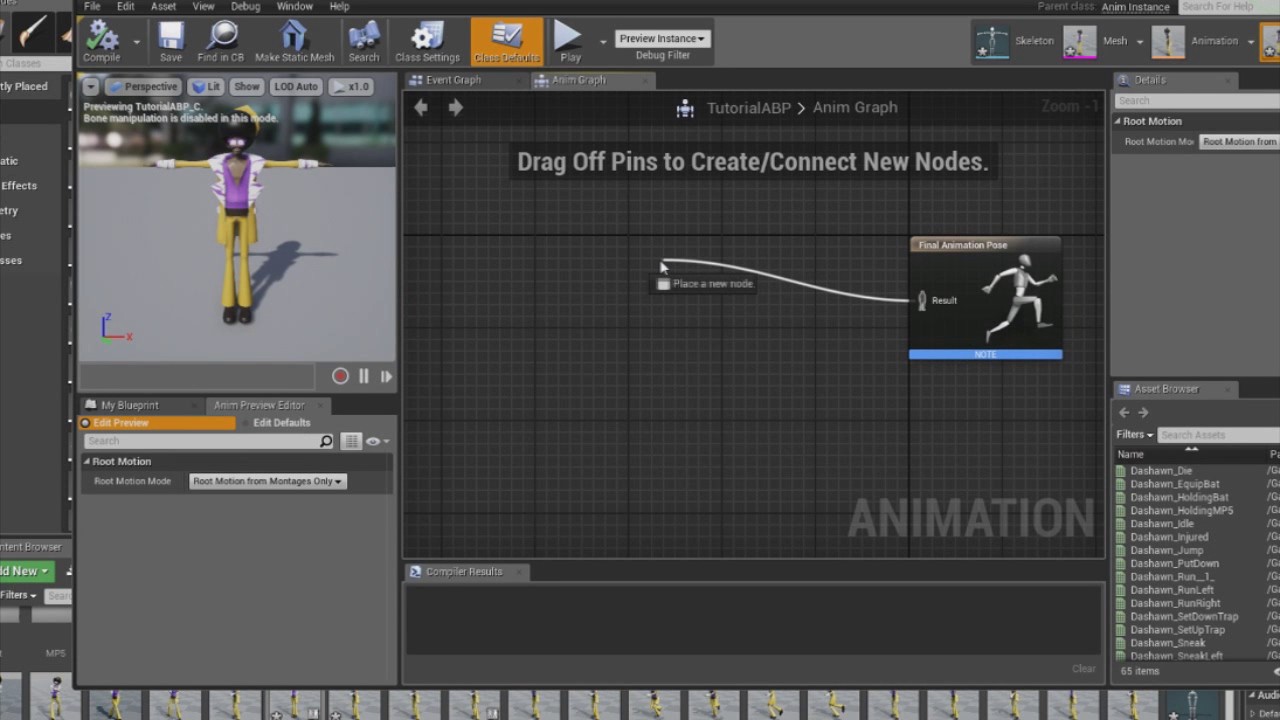
hello, i need help. Basically i have a shooter which when I press R it plays the reload animation and is all cool but if i press R while moving the legs stay idle so it looks like its floating. Anyway to merge two animations to have upper body reload anim and below body the run animation?
junior shard
Kadim Saleh 1002513
around min 15
in any cause u need to use the node layered blend pose
and feed it to final animation pose
junior shard
u welcome
dire coral
does any one know the fortnite wall floor unreal units lenght and the x and y
midnight gate
im working on a save system that if the object is destroyed it will be destroyed when you load the game
my concept for it is have an array for all objects in game and an array for destroyed objects
so on load i can destroy all the actors in the destroyed array variable
but how do i make those destroyed objects go into the array of the destroyed objects? how do i get their id or index?
whole quarry
@midnight gate I would make a structure that can contain the object and a isDestroyed boolean, then you can make a var of that structure. Make it an array and then you have only 1 array to work with instead of 2
midnight gate
hm is theres a way to do it without structures?
i think the main issue im having is i dont think if i put it as an array it will keep the index WILL IT KEEP THE ID OF THE OBJECT? if i add it inside the array
whole quarry
If you use the normal Add the new index will be equal to the length and remains the same unless you remove it from the array
Can be done without structure, but it would make it easier
whole quarry
Yes
midnight gate
if i for example remove an object 2 in the level will it add as object 2? or will it count from 0 so it will be object 0?
whole quarry
If you have an array with 5 items in it and you remove index 2.. 3, 4 and 5 will be moved up with 1
So 3 becomes 2, 4 becomes 3, etc
If you do it with a structure array with the boolean, you could just update the array and set the boolean to true so you know its destroyed and you wont have that index problen, as the array remains intact
dire coral
how can i make a grid that i can place in the world and place a lets say a wall in the grid something like fortnite
whole quarry
Building grids usuallt only exist in code so that objects can only be placed on locations like x100,y100,z0
dire coral
i got a system but its a bit buggy i want to try it a bit diffrent make a grid for example one squesr will be 200x200x200 and just make a area where the grid is and its expandable so if I put the size 600x600x200 it will make a grid of 3x3x1 to place a wall floor exe in it
just trying to figure out how fortnite made it
work
 worldly axle
Hello, is there an equivalent to photon unity networking but for unreal ?
abstract relic
kindred viper
whoa thats massive
frozen pond
hi, question, if i got struct of structs and i modifiy mother structure adding new stuffs, will child structure reset ?
 mental oyster
How does this sound for organizing ammo during development:
Ammo_(ammo name)_B/C (Bullet/Case)
For example: an unfired 9mm round would be Ammo_9mmPara
A spent .45 case would be Ammo_.45ACP_C
It’s how I’m naming the models in Blender, but idk if I should use the same system for when they’re in UE4
inner vine
It shouldn't matter that much which naming scheme you use as long as you're consistent.
obsidian wasp
So I have a c++ function in a c++ blueprint function library, like so:
UFUNCTION(BlueprintCallable, Category = "TextureRenderTarget2DConversion") TArray<uint8> ConvertTextureRenderTarget2DToPNGByteArray(UTextureRenderTarget2D * renderTarget);;
But in my blueprint, the node takes 2 parameters - "Target", and "Render Target". Where does the "Target" come from, and what do I plug into it/how do I get rid of it? 'Target' says it's supposed to be a reference to my function library.
inner vine
"Target" is the object calling the function. You can just ignore it if you don't use it.
obsidian wasp
I'm unable to compile the blueprint though. This blueprint (self) is not a *function library name*, therefore 'Target' must have a connection
inner vine
Try plugging a reference to self into it, does it compile then?
obsidian wasp
It says "Self Object Reference" isn't compatible
 mint umbra
How do I reset the vertex coloring I did? I messed up the texture somehow: https://gyazo.com/8dcaf9d87ef060c39b9a3dde3dccda71
 inner vine
How is your class structured?
obsidian wasp
It's a function library, so yeah
inner vine
oh yeah then the error makes sense.
obsidian wasp
I guess all functions will be static
inner vine
Library functions should be static indeed, libraries aren't supposed to be instanced.
My editor crashed while editing a physics asset and it seemed to have corrupted something. Every asset which contains a reference to that physics asset now crashes the editor when opened. Is there a way to repair it?
azure shore
hey, what do I do about the Cannot import this mesh, the bounding box of this mesh is smaller then the supported threshold error when importing a mesh?
Im pretty sure the mesh I imported uses the mannequin skeleton
hahah why does it say "then" not than
inner vine
Are you scaling your mesh correctly?
inner vine
Have you imported other meshes with the same settings?
azure shore
no this is the first try importing something using the mannequin skeleton
 bitter iris
Is it just me or does multi user editing have no ui in 4.24?
I have it enabled but nothing
azure shore
I feel like I may have messed up some settings when importing an animation, I had to use different settings for that
inner vine
How big is the mesh in your editor?
inner vine
On the right panel, open the scene properties and check the units.
azure shore
which should it be?
proper stump
Hey, using the 3rd person template, i need to make the character to do a 180 spin on click, suggestions on how to implement that?
frozen pond
how to disable auto play in umg ?
inner vine
Don't set "import uniform scale" to 0
azure shore
HAHAH its 0 🤦♂️
inner vine
Set it to 1 if you set up your Blender units correctly
Or 100 if you use Blender's default units
azure shore
dammit I must have accidentally set to 0 at some point, should be fine now
DAMMIT now its giving my failed to merge bones, I knew this would happen even though Im literally using the ue4 skeleton
inner vine
Did you perhaps enable leaf bones in the Blender to FBX exporter?
azure shore
no its disabled
inner vine
or "only deform bones" or something like that? You can also just let UE import the skeleton and see if there are clear differences.
 gray plover
hey, does anybody know why material built from substance maps jitter a little bit and is it fixable? everything else is fine more or less except this one model
raw rock
@junior shard hey man i finally managed to get it done, thanks again
obsidian wasp
So I've created a function in a c++ blueprint function library to try out FCrc. However, I get a EXCEPTION_ACCESS_VIOLATION writing address error (and an engine crash) whenever the blueprint node is reached.
The function looks like so:
GenerateChunkCRC(TArray<uint8> pngChunk, int32 length) { int64 startCRC = 0xffffffff; uint8* chunkPtr = pngChunk.GetData(); FCrc crcCalculator; crcCalculator.Init(); int64 result = crcCalculator.MemCrc32(chunkPtr, length, startCRC); return result; }
I suspect that the issue is that my variable chunkPtr points at an address that's created in blueprints or something, but I really have no idea. How would I even go about logging from c++? Could I call UKismetSystemLibrary::PrintString? And if so, where can I find the file that it logs to?
inner vine
There's a macro for logging
 solid beacon
im new to ue4 i want to make a sound cue play when i press e on a plane how can i achieve this
inner vine
UE_LOG(LogTemp, Warning, TEXT("YOUR LOG MESSAGE HERE") );
azure shore
quack I would either make a line trace from the camera straight forward (I can tell you how if you want) and when it hits the plane (has to be an actor I believe) then it would play the sound OR the simpler way is when the player overlaps this plane (or any shape in the actor) enable input on it, and have the E script in the plane actor
and disable input when end overlap of course
but Im not sure thats the best way
junior shard
@raw rock u welcome 👍
severe ibex
I doubt anyone knows if you can have 3 of the same asset animated with blend/morpher so there's no skeleton animations, and blend between those in UE4 for animation changes?
So for instance I have a looping idle, walk and run of an asset but animated with morphers in 3ds max, export those 3 versions into UE4 and be able to set up a blendspace1d to blend between them for animation blueprints?
 radiant haven
How can I set an Interger to the UI as a text(the interger)
smth like this
but it doesnt work
 heady harbor
@radiant haven are you trying to get the number of missiles?
 brisk urchin
Hi guys, I'm on the final steps of my project and I'm currently working on the lighting portion. I'm having trouble with shadows quality. Before I build them they look decent and after I rebuild the lighting the shadows look like blobs. Any tips?
Size of my level just for reference with how much lighting I'ma be working on.
barren flume
What are some good hard drives for game development\
I obviously need more
500gb isn't enough
 fallen marten
Your animation needs to have the root animated from memory 🤔
 serene birch
I used that tutorial for root motion the first time
Super beginner friendly tutorial which explains haw to make a playable character and an AI NPC follower from a set of root motion anims composed of idle and walk/run/sprint animations. Uses the same character and anim bp for both player and npc. For project files check: https...
try to see if you missed some steps I guess
abstract relic
all you have to do
if it doesn't work, then it doesn't have an animated root bone to work with
I see obs killed my recording
 hoary elm
anyone here have experience with gravity in unreal like for a small planetary gravity ?
normal burrow
turn off gravity in the engine, then just call add force to everything every frame
use some fictional center of mass for the direction of gravity
snow reef
@brisk urchin what are you working on? it looks really nice
hoary elm
Sigh i wish i was not so new to unreal and all of this. i am more a Houdini background, finally got my licence to be able to plug my work into unreal but most of my work will be done on a planetary mass and need to figure this out but everything feels like well appropriately a new language to learn. So am trying my best but most of that kind of made sense but also get lost in how to implement such a thing. been working on this now on and off about a week and have had answers and such that range from c++ is only way to simple reply like your own. Honestly trying not to be difficult but now i know how my 10 year old son feels when i try to explain him things 😛
hoary elm
lol
i wouldent say survived lol
more like made due enough to now want to hook it up to unreal and actually make something haha
hoary elm
im just throwing some humor into this
because i know i was insain diving into that first
but i had to with what i wish to accomplish haha
abstract relic
heh so am I 😉
hoary elm
and honestly i still cant vex in houdini as well as i wish. would be magical if that could also click but i take it day by day
abstract relic
Honestly. Do something small. Messing with the physic engine for any game engine is an epic task
hoary elm
have this wonderfull scaffolding for a planet i wish to built a game on 😛
worldly axle
Hello, i have a widget and when i hit play in viewport, it gets displayed but when i hit play in standalone it is just a black screen . Any ideas ?****
brisk urchin
@snow reef it's a multi-player level map for a boots on ground fps. Sorta like old modern warfare. I'm going for being a Level Designer. Just need need on lighting and shadows.
swift spindle
normal burrow
biggest frustration with houdini is crashing, for me
hoary elm
i find that can be fixed with cashing files and substepping more
normal burrow
nah substepping sucks
hoary elm
like. the way houdini works is that it will process alot of information than in cashing a file it just saves the final attributes not the process. so if you substep you can make amazing things doing one small thing at a time limiting the renders for each step
normal burrow
if your using substepping, your likely not applying forces properly. impulses are nonsense
 fading river
houdini is sooo much easier
that black line is UE4 compared to other engines, though
obsidian wasp
This might really be more about c++ than unreal engine, but I hope it's alright to ask anyway...
If I have a "pointer array" or whatever, and "get" a value from it using square bracket, and assign another variable to that, does the new variable point at the pointer or is it dereferenced?
I have a FColor pointer, FColor* pixels. A few lines down, I do FColor pixel = pixels[n] in a for loop, and then grab the R, G, B and A values from pixel and store them someplace else. Should I delete [] pixels after the for loop is done? Or will the values I grabbed from pixels and stored elsewhere point at something crazy then?
Full code:
`TArray<uint8> UThuleImageLibrary::GetPixels(UTextureRenderTarget2D * renderTarget)
{
UTexture2D* tex = renderTarget->ConstructTexture2D(NULL, "TemporaryTexture", RF_NoFlags);
int32 width = tex->GetSizeX();
int32 height = tex->GetSizeY();
const FColor* pixels = static_cast<const FColor*> (tex->PlatformData->Mips[0].BulkData.LockReadOnly());

TArray<uint8> byteArray = TArray<uint8>();
for (int32 y = 0; y < height; y++) {
    for (int32 x = 0; x < width; x++) {
        FColor pixel = pixels[y*width + x];
        byteArray.Add(pixel.R);
        byteArray.Add(pixel.G);
        byteArray.Add(pixel.B);
        byteArray.Add(pixel.A);
    }
}

return byteArray;
}`
normal burrow
@obsidian wasp no delete, but usually wheny ou have a lock in there, your expected to unlock it when your done reading
I've got no familiarity of that API
Do a search over the engine for LockReadOnly() I'm guessing you have to unlock somewhere
fading river
Has anyone done something like this and have any code or project they can share? Like almost all tutorials, it doesn't quite work and doesn't explain everything so it's not really workable for a beginner. https://www.informit.com/articles/article.aspx?p=2767093
obsidian wasp
Thanks @normal burrow. Yeah, you're right haha. Got sidetracked halfway through reading a webpage going over grabbing the pixels and completely forgot about unlocking.
normal burrow
you should put tbe hyte array above pixles btw
and reserve ((width*height)<<2)
before locking i mean
you want to treat locks as something your in and out of, so that your not blocking any queue to write
obsidian wasp
Do I need to reserve memory for TArray? Or for the FColor pointer?
normal burrow
tarray
obsidian wasp
Ah, thanks
normal burrow
color pointer is just some address in memory, theres no smarts to it other than that lock call keeps it from being moved
obsidian wasp
Really great tip about the left shift. Never would've thought about that myself.
 burnt ether
btw is there a way to find unused assets and delete them to clean up some memory ?
 calm sphinx
I think we will get a "Preview 10" build this time for real, lol
4.24 had 8 previews, and afaik it took 3 months for full release.
normal burrow
are we at 8 yet?
calm sphinx
We're at 7 😄
but situation doesn't look good from what I see in forum. They will probably need more preview builds to settle things up.
worldly axle
https://streamable.com/7kfhtd
Any ideas on why what i did only works in the viewport version but not in the standalone one ?


 forest tree
but at the same time, breaks lots of stuff
What has been will be
 grave nebula
@obsidian wasp You should probably work with raw data there and just memcpy the thing instead of iterating over each pixel. It is too slow.
Also, mind, that this is not usable for runtime purposes.
mental oyster
Any tips for creating a project with both C++ and blueprints?
normal burrow
yeah but i think the order there isn't the same death
it'd be faster to memcpy though yeah, you just would have to reconsider your indices
 wide talon

Core Games
Core is an endless universe of games and worlds designed by a global community of creators.
looks interesting
abstract relic
Brutal 😜
normal burrow
Phy is a part of that I believe
abstract relic
Extra brutal
 manic pawn
I like how the user counter on that is incredibly misleading
if you just opened the site, you'd think they have 4000 players online, but this is actually a counter on how often the server has been joined in total
wide talon
people might gain an interest in creating games in core then bring that over to unreal once they become more serious. anything that lets those get what is in their head into a game is a good thing.
desert tartan
why my texture looks like this?
abstract relic
scale the texture coord
desert tartan
thanks
 ebon marlin
75% of ue4 development time
manic pawn
maybe you should try to Provide feedback instead
and politely ask the engine to please unfreeze
 sonic pagoda
@grim ore Good night good sir, could you ever make a tutorial on using the tutorial actor?
a tutorial on tutorial
normal burrow
Analyze wait chain is another way to just crash things
plush yew
Anyone know why unreal crashes when I plug anything into to an output node of a macro????
normal burrow
Let’s see the macro
 hollow ridge
anyone know why when I copy content files from one project to another all of the uasset files vanish
the files are in the folders but then in the project they dont show up
swift spindle
use migrate assets instead
normal burrow
If your not using migrate assets your doing it wrong yeah
plush yew
Here is the macro. All it is doing it moving the spirng arm length based off of movement speed
I cant add a parameter to the output or unreal crashes. i've tried a few times now. It doesnt need to be a macro, but I'm just wondering why this is happening
normal burrow
Are you dragging an exec right to the output node?
plush yew
I've done that and I've also tried clicking the plus. Either way it crashes for me
I'm on 4.24
normal burrow
The plus makes the output but doesn’t let you connect?
plush yew
The plus crashes unreal right away, same with me dragging to the output node
 winter mist
hi all,
im wrestling with a render/packaging issue, perhaps someone here could shed some light? (pardon the pun)
ive got a landscape scene with 1 character (a dragon) flying around in it, and im making it for VR. using the forward shader/msaa i get a solid 90fps in my editor but on a ship package i get 45. using the deferred shader/fxaa i get a solid 90fps in both the editor and my package.
in my map all i have are movable directional light and skylight, no other lights, no emissives, etc. all my engine scalability settings are low except for effects which is medium and in my preload map (logo) i set these with game user settings just to be sure. i also set r.SceneRenderTargetResizeMethod=2 and r.SceneRenderTargetResizeMethodForceOverride=True. in render settings im using instanced stereo, no motion blur, no lens flare and i turned off frame smoothing and no fixed frame. my post-processing volume auto-exposures min/max both are set to 1. i have a lightmass importance volume. my draw distances are set, map has no tick (nothing is happening anyway, its a totally simple map with 1 character), and all other things being equal i'm kind of stumped...am i missing something simple i should be setting for forward shading?
any/all suggestions welcome! thx much in advance!
-s
plush yew
Ok, well now it seems to be working again in all macros. That was strange
Thanks for the help
normal burrow
Question @plush yew is this the event graph of animbp?
plush yew
It was in the event graph, but everything is working now. Not sure why is was crashing the five times I tried before
normal burrow
But animation blueprint event graph?
plush yew
oh, no not in the anim bp
normal burrow
Ah ok
normal burrow
Set content not add child?
normal burrow
Could it be possible the content is so small it’s hard to see?
marsh swallow
When i drag the widget class into the slot in Editor thats how it appears
so i would assume it should be the same?
normal burrow
With set content yea
But
If it doesn’t have size restrictions anywhere the viewport of the editor might be the only thing keeping it visible there
Are you using any size panels or whatever?
marsh swallow
i have a few in the images yeah
and one clear at the top saying Min Width is 600
normal burrow
Aye hm
Idk I’ve been experimenting with UMG lately and have ran into similar things too. Sometimes my variables got wrong when using the replace with X stuff
 misty owl
Are there any online tools specifically designed around planning game development?
I seem to remember coming across one last week, but I can't remember the name.
Something that helps with tracking tasks, and setting milestones. General planning. like Trello, but designed for game devs.
marsh swallow
Yeah its really weird
@normal burrow I changed it to an overlay and just "AddChildToOverlay" and its working
IDK
normal burrow
👍
hollow ridge
@normal burrow @swift spindle you said to use migrate, but I can't get it to go between projects. How do I do that?
normal burrow
@hollow ridge use migrate
hollow ridge
yes
normal burrow
You open the project that has the stuff
hollow ridge
but I can't do it to a different project
hollow ridge
I do migrate and it only shows locations in the same project
 sturdy apex
Is it yet possible to change the pivot point of a static mesh and have it carry over when added as a component? I saw a few tutorials on how to do it like in this first image, but as you can see in the second image once I try to bring it in as a component on my ThirdPersonCharacter it still shows the original position of the pivot point:
I used Alt+middle click to move the pivot point initially
hollow ridge
wait @normal burrow the migrate worked but still none of the uasset files were there
 dim arch
pivot offset is used just for quick editor changes @sturdy apex
you cant save a new pivot position for the mesh after it has been imported
and yes, its dumb as fuck
possiblt the mesh editing tools let you save a new pivot position now, not sure
sturdy apex
@dim arch thanks, I'll check there and if nothing I will just export it to blender. (was hoping I could save myself the effort for testing purposes)
hollow ridge
oh @normal burrow jjust relised im in 2 different versions would they make it not work?
normal burrow
You’ll have better luck with old->new
hollow ridge
?
@normal burrow do you mean going from an old version to a new verision
oh
should I just update the project to a newer version?
dim arch
they really need to add a function in the static mesh editor which lets you adjust the pivot position
hollow ridge
it is just a template
normal burrow
Migrating to older engine project?
 rancid lynx
@sturdy apex yea, you can export a shape and change its pivot with blender, im pretttyy sure. with ither the 3d cursor or the 0 0 0 location. im not sure. but im pretty sure i did it before, for things like swords and hammers
misty owl
This software is amazing. I'm loving this.
Makes it so much easier to bring ideas to life!
abstract relic
it's being applied
plush yew
What would cause the model to still be low res then?
abstract relic
Normals doesn't magically create extra geometry. Merely provides the illusion of detail by messing with lighting data.
honest mango
hey guys ! in a box collision, how to enable ONLY trace by channel collision please ?
i think i got it "visibility"
 chilly gale
Importing a landscape for World Composition, is there a way to set the Z value for the location, my water level is at 0.0.0 and the landscape imports way to low, the mountains are barely above water. Or can I change that after import? please
misty owl
@chilly gale Changing this value when importing might do what you want?
chilly gale
For world Composition It's not the same place is it? I know that for a standard single tile, just not sure thats for multiple tiles
misty owl
oh, no, sorry. That's for height maps. I haven't worked with world comp, yet.
chilly gale
Thanks for trying tho
 hollow pollen
Hi , someone can help me please
When i try to open devkit he's got me an error...
ConanSandBox could not be compiled. Try rebuilding from source manually
and a Fatal error come after this .... I'm already reinstalled the Devkit, but dont work...
Thanks
plush yew
Is there such thing as a hybrid NoSQL/MySQL game? Say I want battles and regular game function using NoSQL, but have items and stats handled by a dedicated db?
normal burrow
Abstraction layers exist for that sort of thing
plush yew
Come to think of it, it's kind of the same thing because all the game uses vs what it needs to sync is the same as what you require your db to know.
At normal function of joining an instance or going through the map isn't really that intense.
It would be worth it for like 2k players per server or something Id gather.
paper tundra
im building a battle arena game anyone wanna work on it with me
 gilded plinth
Hey all, is it possible to export a curve from a particle module or anywhere into a curve asset? In this case there is a niagara color curve and i wanna copy it to another place but there seems to be no way
 mortal quarry
Kinda new to Unreal - I have a sequence that has an animated camera - I've just added a second camera and added a camera cut to swap to it - how do I view the playback of the camera cut in my viewport? Till now, I've had my view set to the first camera, but now I want to see the full playback.
alpine imp
So im trying to launch this project in new editor window after its finished compiling the shades all I get is a black screen
 languid topaz
Hi all! I've seen that variables inside a blueprint can be sorted in folders. How can I do that? thx all!
Wow, very nice, So much thanks @plush yew
And just writing a name creates a new one category
severe ibex
Would anybody have any input on using static meshes with blend information? essentially I have meshes with animations stored in blend information and not skeleton animation.
yeah I've been trying something that I think won't actually work
I've got some looping cloth animations I made in Marvelous Designer and 3ds Max, so they come in to UE4 just dandy but I can't blend between them with the normal "Blend 1D" stuff. I'm just curious to know if it's even possible.
desert tartan
how do i create my own game and level inside a marketplace project?
proper stump
Hey, on the 3rd person template, on the default level the 'Player Start' creates the character, why isnt that happening on different levels i create?
midnight gate
dont delete properly
maybe you need to chose a game mode i believe 🤔
pick wich player you want to create
or i prefer to add a character mesh that is automaticly being possesed at begin paly
or just add both
flat gorge
question is there a way to make a puzzle in ue4, I mean 2 pictures one word type of thing?
honest otter
what would be like reasonable amount of polygons/tris for lod0 for tree?
midnight gate
@flat gorge ofc there is its just very complex
serene birch
ah wait, it's SSR
flat gorge
@midnight gate how complex we talking about, kind of need a quick way to make some puzzle involving crossword or word scramble
midnight gate
enums structures complex umg stuff lots of data etc
plush yew
heh transform gituair
midnight gate
the whole system for interaction
flat gorge
damn it...well ig that's out of the question okay thanks..I'll see what I can do
midnight gate
if you wanna do something easy i recomend making the templates into a game
for example a trd person or first person and turn that into a survival or shooter or smth intresting
flat gorge
yh...thing is I have an assignment which ask me to make a game that has a crossword format, and me and my team thought of something like inside a castle..and basically the character has to solve puzzles, but they are pictures on the walls and eventually if ya put them two pictures together they make up a word
I already have a first template made, I can use doors and swithc the camera between first and third person
sprint
all the basic mechanics I have done, I just need the puzzle
on top of that the game has to teach the kids spelling for some reason
midnight gate
try researching how to do a puzzle game and understnad the concepts from the tutorials
if youll have any questions i recomend the unreal forums alot
the replies are very good and explain how to do it
flat gorge
@midnight gate Thanks
 harsh tendon
Anyone know why I can only get the full details panel when I press play?
The mesh is something I create in C++ and set as a UPROPERTY(EditAnywhere, BlueprintReadWrite)
When I go into the blueprints I only get partial details panel that has less options for physics
 long comet
cause tu want the details of an instance that dont exist until hit play?
plush yew
im a completely new beginner in unreal engine looking to make a simple fighting game, where do i go?
for help/tutorials
 fierce tulip
i'd start with some getting started guides and tutorials, and take it small steps from there.
harsh tendon
@plush yew I wanna make a fighting game too. Can I hear what you have in mind because I don't know where to start.
I think there aren't a lot of fighting game tutorials online because of the relatively low popularity of the genre.
 granite heron
Anyone have experience with setting up models with with multiple UV sets in unreal? Whenever the a material is applied it comes out as a flat color even though the UV maps are present
fierce tulip
its more that fighting games are incredibly complex to make.
normal burrow
Frames have a lot of meaning in fighters ye
fierce tulip
@granite heron you might need to adress the correct uv-channel in the materials.
granite heron
Is that done in the details tab or under the material itself? I'm more of a 3d guy 😛
fierce tulip
Expressions that perform actions on texture coordinates or output values that can be used as, or to modify, texture coordinates.
granite heron
Not exactly sure what I'm supposed to be looking for :/
fierce tulip
how many uv-channels does your mesh have?