#ue4-general
1 messages · Page 719 of 1
 marsh swallow
 pearl sonnet
z-order is for widgets inside widgets,
widgets themselves are in order you add them
if you wrap them inside another you can do it
 grim ore
widgets have z order in viewports, its part of the code to add them
 rancid lynx
is it possible to remove this billboard icon from an Audio component inside my blueprint actor? , there is no view-show options inside the blueprint view panel options, nor is there a billboard option or visabiliy option in details panel, for audio components X_x
i guess thank god the gargantuant icon is on the back most layer of render X_X?
damn. this icon totally wrecked my train of thought inside my code tunnel X_x
grim ore
in the main part of the class
rancid lynx
than you jesus number 2
 storm terrace
I have spent several hours trying to figure out why my AI are not calling the override function RequestDirectMove
I checked the code multiple times form the unreal course. I think there is something in the editor that is messing me up. Did any of you come across this issue?
for the record, I checked my code here

GitHub
Battle Tank. Contribute to UnrealDeveloperCourse/Section_04 development by creating an account on GitHub.
but still no tanks moving at me so I think it is an editor configuration issue
storm terrace
I just watched
What is the AI: Move To Actor Node in Unreal Engine 4
Source Files: https://github.com/MWadstein/wtf-hdi-files
and I think my navigation is off
I get failed but I don't think there is any reason why I should be getting that
 knotty rampart
Is Tesselation supposed to cast weird shadows from certain angles?
 atomic forge
Has anyone here programmed game AI in C++?
 charred stirrup
Hello! Anybody know, how I can disable pinch controller rotation? I have an prone animation for my 3d person charter, and I wont to set is off for pitching in Aim offset, when it is the prone mode.
When the character in the prone mode, his hands going under floor if I pitch it down.
blueprint
 ancient lotus
@charred stirrup busecontrollerpitch i think
storm terrace
can I get location of blueprint instance name?
If I know the instance name at compile time? (this would be like Player5 if Player5 was a blueprint instance)
 sudden ermine
Hey does anyone know if there is a way to switch between the creator plan to the publisher plan without having to reinstall UE4 @gleaming narwhal
 frozen mural
i got some issue that my animation is shaking when im moving backward left and right but when i move forward it is normal i reimport the animation with in place condition but nothing change. anyone have solution?
nvm i found a fix just uncheck orient rotation
charred stirrup
ok, I try it again) how to disable only pitch rotation?
 bronze vault
@charred stirrup Without knowing what you are trying to do, I'm gunna guess you are looking for this.
charred stirrup
@charred stirrup Without knowing what you are trying to do, I'm gunna guess you are looking for this.
@bronze vault how to limit rotation yaw and pitch with nodes in blueprint, thx)
I have an prone animation for my 3d person charter.
When the character in the prone mode, his hands going under floor if I pitch it down.
ancient lotus
UseControllerRotationPitch
charred stirrup
I need to limit rotation yaw and pitch with nodes in blueprint
bronze vault
Ah, I see.. Ill have to think about that one.
charred stirrup
or use IK
@mossy nymph I'am newbie. tell me more. any tutorials?
 mossy nymph
there are some docs, its stands for Inverse Kinematics
basically you get a set of bones to find their positions so particular bone ends up at a provided transform
so you'd need a floor trace, get your say palm to IK into it, simulating bones from palm to shoulder
 junior shard
hi! i have a couple of problems i wasn't able to solve:
- how do i export an individual animation from a blend file
when i import the char it overwrites everything and no new animation get imported
- i uploaded a project on drive when downloading it tho the folder get compressed and losses occuress making me unable to open in this pc the project any solution?
- last one: i set up a 2d blend space by my char snap from one animation to the other in a very visible fashion how do i fix this?
ancient lotus
select armature, make sure the animation you want to export is selected in the action editor (or if using nla strips go that route). click file->export->fbx, uncheck all actions under bake animations so you only export the animation/action you have selected. import to UE and select the skeleton its using
junior shard
thanks i'll try @ancient lotus do you know about the other 2? sry i'm quite new
ancient lotus
last one, is it a smooth transition in the blend space? or is it only when you play?
junior shard
it is in the blend space
when i play the head snaps to the righ or lesf
*left
because the idle animation is the char looking around
ancient lotus
check whatever values are controlling the blend space
junior shard
and when i stop moving the idle animation is already playing in the back
so instead of starting from the beginning every time with the head in the correct location it starts from wherevere it is at that moment
ancient lotus
thats going to be difficult to figure out without actually seeing it, but its 4:44am so im off to bed. hopefully someone can answer
junior shard
ook thanks 4 your help
 raw elk
Hello, wondering if anyone might help me solve a problem. So, back in 4.12 I wrote a blutility that would auto place objects, I switched to 4.24, and I guess the old IWBE blutilitiy bp is deprecated, so I retargeted the blueprint as the new Editor Utility Actor and made sure my custom events had the call in editor checkbox ticked, however, even though they are ticked, in the editor I do not see any buttons for the custom events. I only see the public variables
I made a test blueprint just to check and see if the retarget was the issue, but I still cant get custom events to show up as buttons in the details panel
charred stirrup
Ok guys, try one more time. How i can limit pitch and yaw rotation, so that the character does not fall head and arms through the ground,
as well as not snaking like a snake?
 frozen pond
hello, is there a way to create actor in game and save it for latter usage ?
 fringe totem
when I add a file from turbo squid into my game I open it and nothing is in it. Sometimes there will be just materials in. Any help?
charred stirrup
Ok, I get that, I have my limitation on the pitch when I in prone mode, but i get that the same limitation after I leave the prone state. I need some reset pitch to default or something, anybody know how I can break of the limitation in the pitch to default?
 restive eagle
@charred stirrup you want to revert your camera movement to the default state like it was before prone?
charred stirrup
@charred stirrup you want to revert your camera movement to the default state before prone?
@restive eagle Yes. I want to break the limitation that I set in prone.
restive eagle
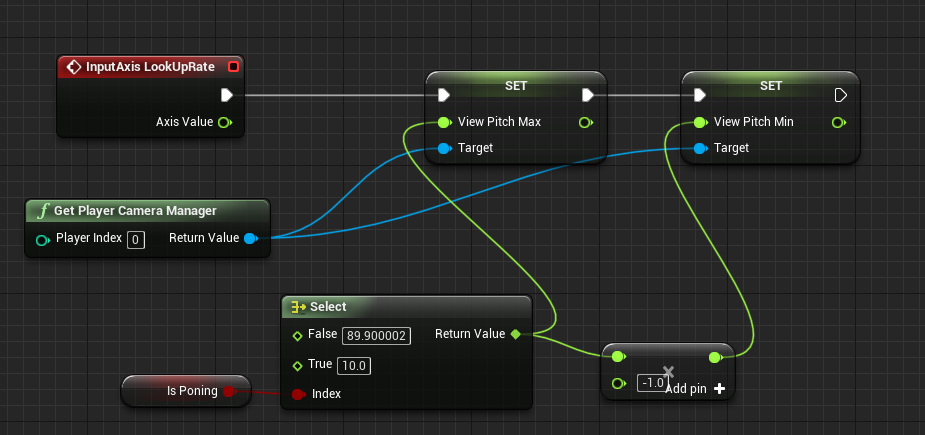
oh set the pitch max/min back to default
probably thats the issue

thats the default value
you can set both limitations after "is proning" (where the inputaction is)
you can even do it like this if its confusing for you https://prnt.sc/s5p3s6
 charred stirrup
you can set both limitations after "is proning" (where the inputaction is)
@restive eagle Yes, It work fine.
you can even do it like this if its confusing for you https://prnt.sc/s5p3s6
@restive eagle I try that one
restive eagle
cool, if you type in 89.9 it will set to the exact one, with bunch of 000
charred stirrup
https://prnt.sc/s5p1kw
@restive eagle where I can see this for Yaw?)
restive eagle
you need to create camera manager blueprint
and it will have all that info in the default tab
restive eagle
@dark briar inside PP theres a setting for "lens flares"
 dark briar
ohh thanks
how would i make my environment more radiant?
i want it to look gorgeous but also (ill reduce the lens flare)
restive eagle
maybe thats a better question for #level-design or #work-in-progress . im not an artist so cant give you any good points
dark briar
thank you so much tho! lens flare worked ^^
 plush yew
I need to get a scene component(camera) using c++,but idk how to do it,can anyone help me?
Ima throw my entire office out of the window

 barren flume
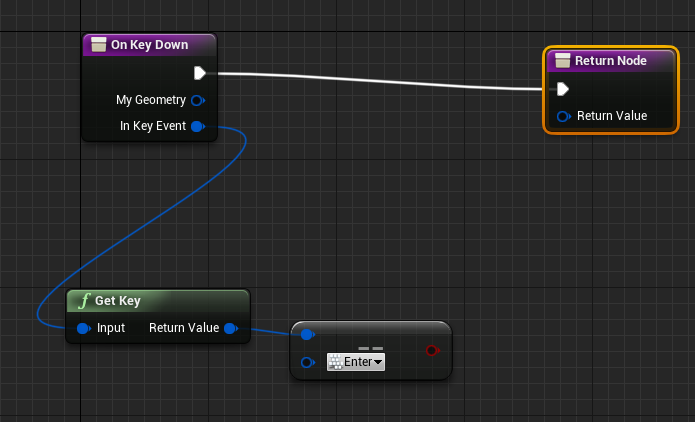
How can I get it so when you press enter it opens the main menu from an enter widget to the main menu widget
I seen an onclick but I'm trying to get it so when you press the enter key it opens the other widget
restive eagle
@barren flume https://prnt.sc/s5qm69
 barren flume
I tried that
restive eagle
do you still have an example how you made it?
barren flume
I don't know how to add a key
to that
when I drag off I don't know how to add a key input
 restive eagle
=
barren flume
Thank you
Return value should not be empty. Return a reply such as Handled or Unhandled
restive eagle
yeah drag of and type handled
ofc add a branch from the =
and do the rest of your logic after true
barren flume
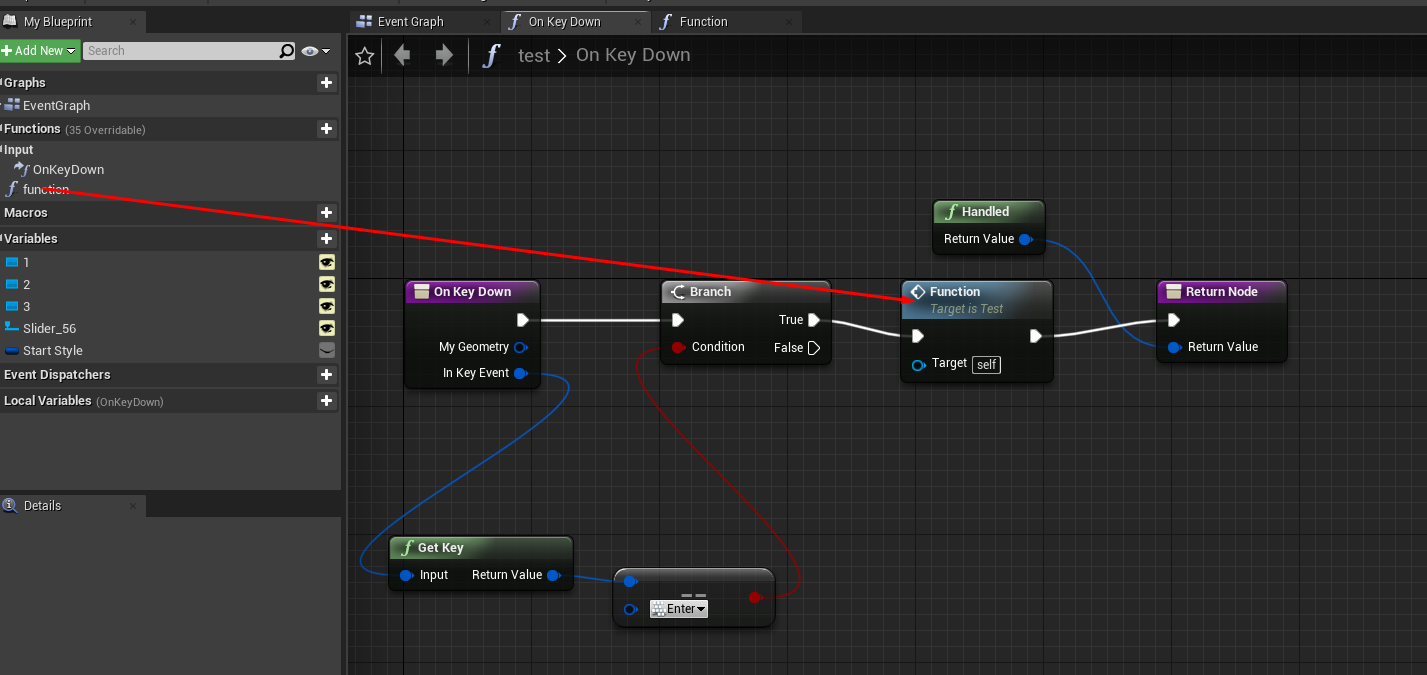
How would I implement this in to the event graph
to create the widget and add to viewport
barren flume
uh
restive eagle
or a function would work too
barren flume
I'm not sure how to add the function to the event graph in the widget
 barren flume
Oh I was on the event graph for the widget itself
Do I add the create widget in that new function
restive eagle
yeah sure, why not
 astral phoenix
Hello! how do i pause a matinee? i want my matinee to play but after 5 sec i want it to stop and then play the rest after 10 sec how do i do that? 🙂
restive eagle
@barren flume show me how you added it
restive eagle
have you set "set input mode only"
after adding the first widget

otherwise it wont register your "enter"
restive eagle
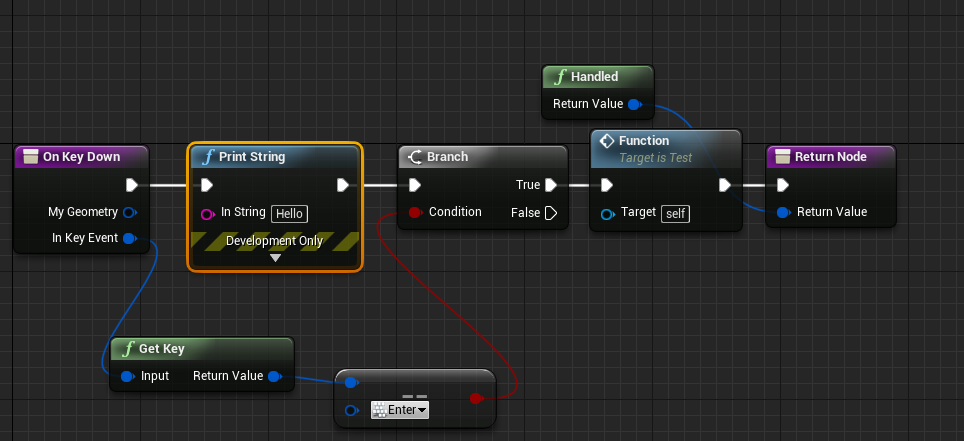
add a print string here and see if it prints hello
everything works on my end, you have missed something
barren flume
where would I see the string
charred stirrup
One more question. How I can change the camera view to a new state of character? I press Input Action Prone, character going down and the camera should follow to him.
restive eagle
@barren flume top left of your screen, if you dont see it then the problem is somewhere else
charred stirrup
And also can I get the same results as with the default crouch input state, when the capsule change the size and going down, after you press the crouch input?
barren flume
then I don't see it
 restive eagle
just where you want your keyboard to have focus
restive eagle
do you still have issues or its fine?
barren flume
I was on the wrong object
I'll see
Still doesn't work
and unreal engine crashed
restive eagle
dunno then, you missed something. everything should work
if you knew how to debug it would be pretty easy to narrow down your issue, other than that i can only guess
barren flume
this is my level blueprint
which adds the enter widget to viewport
which will show this
I gotta fix that a
when I press enter
it opens the main menu widget
restive eagle
do you see hello after pressing enter?
barren flume
No
restive eagle
can you show on key down again?
barren flume
restive eagle
add a print string at the end after add to viewport
and see if you see hello after pressing enter
barren flume
No
 peak lichen
Hello everyone.
I'm looking for one UE4 developer or 3D modeler for fps game.
barren flume
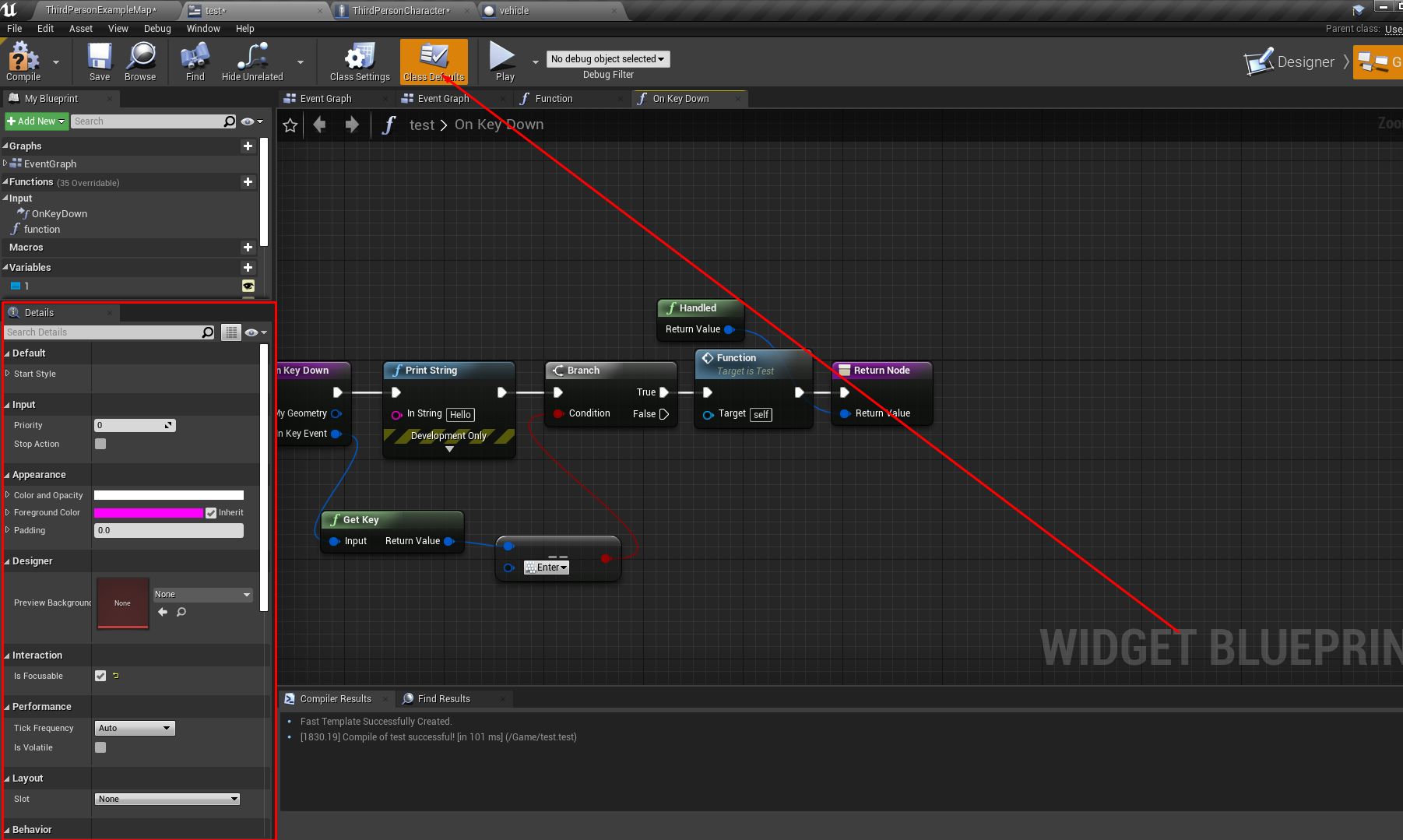 restive eagle
have you used enter anywhere else?
barren flume
level blueprint
restive eagle
delete it from there and see if it works
if not then im at a loss
try not to use level blueprint at all
barren flume
still doesn't work
restive eagle
🤷♂️
restive eagle
yeah thats fine, for some reason your keyboard inputs are not being registered
what i told you works fine, theres probably another issue somewhere else
barren flume
also when I delete the widget thing from level blueprint
the widget doens't show up at all
restive eagle
ofc it wont, you need to move it somewhere else
like player controller
of the main menu level
restive eagle
you need to make a new one
barren flume
okay
restive eagle
its better if you tried to follow some kind of tutorial
barren flume
I've tried
restive eagle
because it will take a while to teach you how to do everything
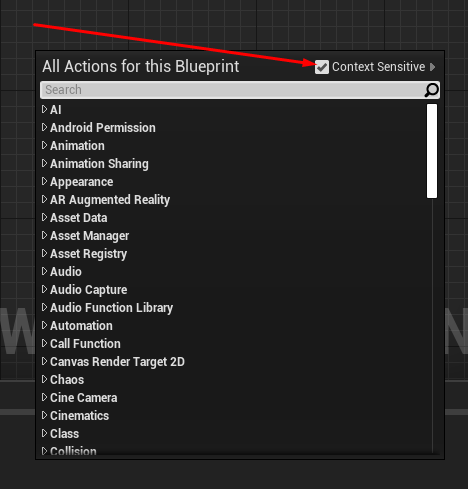 restive eagle
if you want more help you will have to be more precise on whats wrong, because the stuff i have shown works fine
barren flume
and it's the green function still
restive eagle
doesnt matter, both work. one of them is just a pure function
the blue "get key" you mentioned was probably removed, cant find it either. so the "green" is fine anyways
 whole quarry
why not make the Inputs in the Project Settings?
restive eagle
no need even for that, you can add enter input without setting that in project settings. thought keeping the logic UI related in widget would be cleaner and easier. ofc he can do everything inside a player controller it self, but then would need to teach him a bunch more stuff
whole quarry
well, re-inventing the wheel is fun too
restive eagle
i would still argue using enter input is not the way to go, it might conflict with your other stuff and you would have to use UI/game input mode
instead of just UI
barren flume
hm
in the onkeydown function
even with no other code and just print string
it still doesn't show
whole quarry
if you use input Enter anywhere it does not matter if its a clunky/hacky way of getting the input or via the Input Events, results remain the same
except, one way is less then 2 min and the other way is reinventing the wheel
restive eagle
you sound like virtus
whole quarry
who?
restive eagle
exactly
barren flume
I watched him
whole quarry
Exactly? Wait, are you insulting me now?
restive eagle
if you knew who he was you would take it as a compliment
whole quarry
Why would I know some random usename and see it as compliment? Bit strange. Still think its just an insult
restive eagle
hes the biggest ue4 youtuber
whole quarry
Bigger than Mathew and Luos?
restive eagle
yup, 160k subs
 pale forge
Hey guys ... looking for some general guidance here. I have this generic team player that I have modeled and textured. I am wondering what is the best way to give him a custom jersey in UE4 at runtime?
 orchid marsh
@pale forge You can use a texture created or specified at runtime
 honest mango
hello, does anyone know why my linetrace works only one time ? i take object when i click, when i click again it set again to position but when i click after i cant take it again
 plush plinth
how do i make a physics based sliding mechanic? I tried to enable physics when i am sliding, but problem is i cant lock the rotation of the capsule when "sliding" which made the capsule itself rotate when sliding
pale forge
@orchid marsh Can I project it and use the UVs?
 exotic cave
@pale forge : Make the shirt a separate material. Then change it out for every new model you want a custom jersey on. 👌🏼 EZPZ
You shouldn't even need to mess with the UV's. 🙂
In this free step by step Unreal Engine 4 tutorial video (UE4 how to) you will learn how to Switch Materials of an object at Runtime.
All my UE4 tutorials: https://www.youtube.com/watch?v=BT0jFArPtGM&list=PLEp7216xGGILh3i2BZe2E0ZEuiIGa-VQT&index=1
Join me for Live Streams: ht...
 hybrid sparrow
Is there like team create in unreal engine?
 worldly axle
Hello, how could i get the closest position of my character in a spline ? I have a path and i would like to know my character's position on the spline, idk if i make sense :/
 heady summit
if you have a spline component you can probably use FindLocationClosestToWorldLocation  @worldly axle
 severe solar
Hi all 🙂 . Anyone know why the documentation dark skin is not working anymore?
pale forge
@exotic cave Thanks I will do that.
worldly axle
Thanks , i'll try this 🙂
exotic cave
@hybrid sparrow : Webinar in four days on that! https://ue.unrealengine.com/Working-UE_RegistrationLandingPage.html
 plush yew
how do i group my things on the right
like all the other ones
Oh found it, it's called a comment if anyone else wanted to know or didnt know
For some weird reason
when i start the game the brightness increase slowly
which i dont want to happen where is it coming from the sun?
 normal cradle
@pearl sonnet @obtuse egret Another thing i just found out, Fortntie is using UE 4.25, which is coming with new Niagara features, sooooo maybe 🙂
frozen mural
anyone know how to attach base material to a specific part of body? please help me
hybrid sparrow
@exotic cave so this will allow me to create and code with friends?
 gentle moth
got this error when trying to build lighitng
google doesn't help
verifying UE files doesnt help either
 chrome field
Imaging having to build lighting
This post was made by the cel shading movable directional light gang
 abstract relic
Run the project as Administrator
 manic pawn
why did you have the amazing idea of calling your user "windows"
gentle moth
lol why not
manic pawn
I would just expect it to break things
abstract relic
Now I wonder what would happen if it was named ‘null’
manic pawn
same reason calling your unreal project Test or Shipping or Development will not work
 opaque plover
In Unreal 1 uu = 1 cm, and we can change that in World settings. But why would anyone want to do that? What are some example use cases?
gentle moth
but I reinstalled it
but in that mentioned config file there is no path to change so I can set correct one
this must be somewhere else I guess
marsh swallow
Can anyone assist in understanding ZOrder with Cpp for Widgets by any chance? I cant seem to get this working and it doesnt make any sense
plush yew
not sure if this is enough data (can provide more) but...
I want to put my stamina value into a progress bar
this is the blueprint for my stamina bar right now
How would I get the value of Stamina Value and put it into the progress bar
knotty rampart
@plush yew https://www.youtube.com/watch?v=qzcqmVcV9IQ
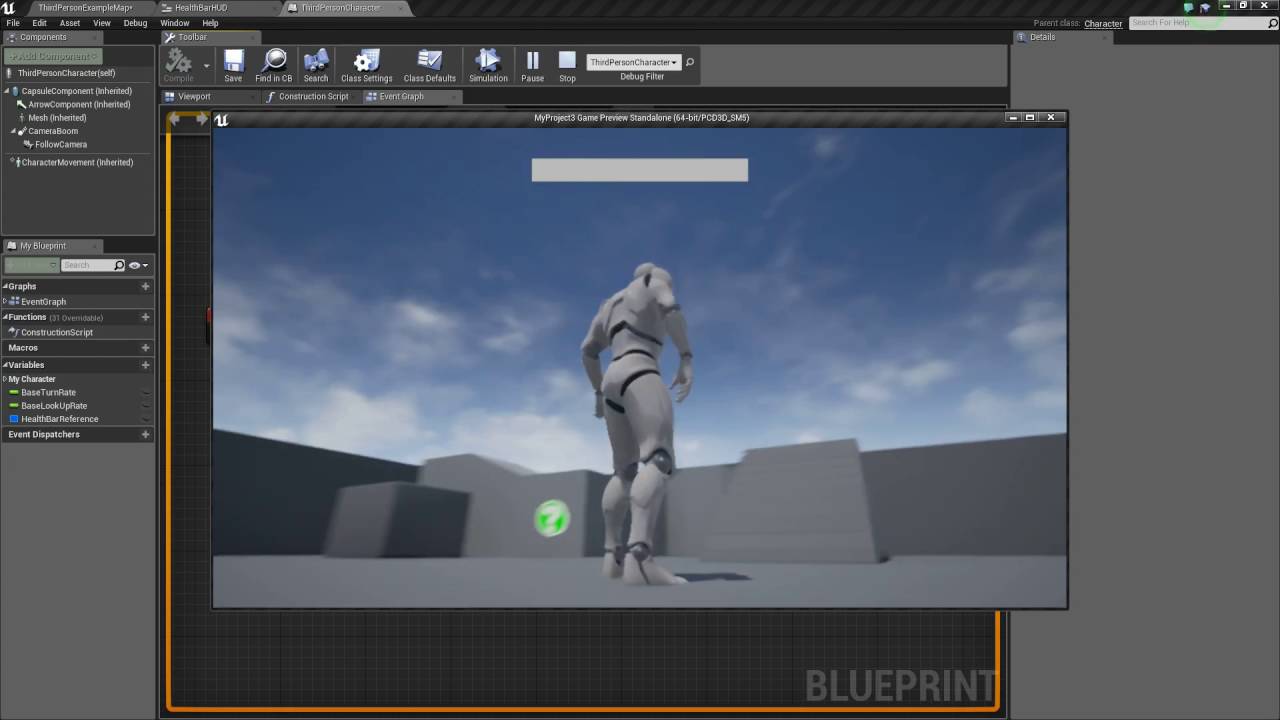
In this tutorial I show you how to create a basic health bar that fills up an decreases based on the player taking damage. If you have any questions or comments please let us know. If you like the video and want to see more, go ahead and subscribe. Or consider supporting us on...
frozen pond
is there better way to do that ?
marsh swallow
do what?
frozen pond
adding something on key press, but adding constantly
 thick herald
Use project settings -> input
marsh swallow

Unreal Engine
In Unreal Engine 4 we wanted to make binding input events as easy as possible. To that end, we created Input Action and Axis Mappings. While it is certainly valid to bind keys directly to events, I hope I can convince you that using mappings will be the most flexible and conve...
Use an Axis Mapping as opposed to Action mapping
not that i have needed to but i do believe if you set a keybind to axis, when pressed it should be constant. 🤔
but then release would provide the opposite
so that might not be what you need
frozen pond
k but its fine if i need it in all project, but what if i need in only on 1 map ?
marsh swallow
UV mapping messed up maybe?
 real prism
You might have to re map UV in blender or whatever software you use
plush yew
the issue with this is that it is only getting my stamina once
how can i get it so that it keeps checking it and changing the bar according to the stamina's value
i currently have stamina value set at 100
frozen mural
@real prism i done it myself from imported textures
abstract relic
You need to get percentage snazz
plush yew
so dividing the stamina value with something else?
abstract relic
So. [current stamina]/[max stamina]
plush yew
I don't have current stamina and max stamina
I just have 1 variable for it which is Stamina Value
real prism
I did a stami9na system before but have lost the file since my old ssd died like yesterdy
frozen mural
i use the root motion thats why i done my own texture and anyone know how do i apply textures in each part of body ?
abstract relic
You need to make it
frozen mural
i have done all of them in material but when i apply element it doesnt goes the way it does
plush yew
Did it, thanks guys
honest mango
https://gyazo.com/14528b3fb77008189fee3634b2af0ec1 anyone know why the second time i pick my object it dont attach to me ,

?*
it print "attached" https://gyazo.com/0bf6f0caceac92e921fddb836c24d6b7

but it dont
abstract relic
Show us your spooky code. And do you know how to print string? This will help you find problems
honest mango
yeah it's just what i did ^^
abstract relic
Unfortunate post timing 😜
astral phoenix
Hello! idk where to put this
But how do i pause a matinee? i want my matinee to play but after 5 sec i want it to stop and then play the rest after 10 sec how do i do that? 🙂
honest mango
hahah i read in your mind xD
@astral phoenix i'm new but i think you can make a variable called "canplayanimation?" and then you add branch to your matinee with condition ""canplayanimation?" true and at the end of matinee put delay 5 sec and set canplayanimation to false
abstract relic
I don’t see the attached printed on the first one. Unless the print was super fast
honest mango
on the gif ?
abstract relic
Yes
astral phoenix
@honest mango is there blueprint in the matinee??
i only see the line and key stuff like that xD
honest mango
yes i think its a gif i made 10 mins ago and idk how i fixed it but now it print but dont attach
abstract relic
Be aware Biebob. Matinee has be removed from recent engine version
honest mango
@astral phoenix isnt there a matinee or whatever this is called in nodes ?
astral phoenix
@abstract relic im useing 4.23.1 but what cant i use instead?
frozen mural
abstract relic
I’d put a print string at the start of your PickUpItem function. Just to see if it’s being triggered
frozen mural
Guys i want to ask if this setting is suit for root motion character?
astral phoenix
@honest mango i can call the matinee from where ever but idk how to pause the animation and then play it again
abstract relic
@astral phoenix sequencer
honest mango
i did print at start and it print
 tight shell
Anyone have an idea on how to do something like this: I have box spawners that will spawn whatever (gatherable objects, mobs etc) at random locations in the box. I need to figure out some way to add a volume or a way to designate places where they can't spawn, for example I wouldn't want a bunch of trees and rocks to be spawning on a road that goes through the spawned forest. This "volume" or something, needs to not be limited to a box or a cone or w/e, that would just be a pita to place everywhere something is not supposed to spawn. Any ideas?
astral phoenix
@abstract relic what do u mean with sequencer?
honest mango
https://gyazo.com/ed9971d0791d7ac9e65398e126bb797f as you can see it print but dont pick up
abstract relic
Awesome. So it’s the code in the function itself
honest mango
you mean in the screen that i send you or before ?
abstract relic
Yes 😜
 hollow ridge
Hey I need some help with Projectile Movement. I am setting the initial and max speed after it is spawned so it doesn't change speed. How can I make the speed change?
abstract relic
You move at the speed of sound crackerjack
honest mango
what do you mean ? ahha
abstract relic
That I can’t keep up
honest mango
no problem dude thanks for trying to help me
abstract relic
How are you calling the key? Blueprint interface? Casting?
honest mango
the key that come at me when i click ?

maybe you mean that, this is in my characted BP
astral phoenix
could any1 help me with the pause animation?
abstract relic
You hurt my heart with this reveal 😜
honest mango
xD whyyy
plush yew
Guys i have a tower and am trying to add each Zombie that overlap with its collision to an target array
hollow ridge
oof
abstract relic
get all actor in class
plush yew
Any thoughts?
hollow ridge
Hey I need some help with Projectile Movement. I am setting the initial and max speed after it is spawned so it doesn't change speed. How can I make the speed change?
honest mango
it dont work good ?
abstract relic
So, let me show you an alternative way to tell your code how to find which interactive object the player is interacting with. It’s confusing at first but much cleaner and easier to use in the long run.

What is a Blueprint Interface in Unreal Engine 4 Blueprints?
Source Files: https://github.com/MWadstein/wtf-hdi-files
Go to #blueprint if you have questions about it or dm me
hollow ridge
@abstract relic could u help me?
honest mango
i have blueprint interface too
hollow ridge
I am able to change the initial and max speed but the speed of the bullet does not change
honest mango
when i pick object its going to blueprint interface befor going to the bp of object
abstract relic
Then why use get all actor of class? And why are you casting to InteractiveObject
honest mango
i cant call my blueprintinterface if i dont cast :v
 abstract relic
When your call using player bp. It should look like this
 fickle wharf
anyone have any idea why a component of mine is suddenly getting set to None?
there's no code that sets it to None, if i add it in begin play explicitly and set it, it works again
abstract relic
then the object bp should look like this
 normal burrow
HighTide is right, casting be optional
abstract relic
as an example
fickle wharf
i'm using perforce, could a revision have screwed this up?
honest mango
hum i dont very understand how to do this steps
abstract relic
It’s a very pretty envelope
normal burrow
Pretty pretty security ink
 dire coral
Any one know the solution it gives me and error when i test play of an infinity loop
any fix
grim ore
we would need to see the code calling that
normal burrow
It’s certainly not that code causing the loop yes
When loop detection happens at some point in execution it just says: shit this callstack is deeeep
So it doesn’t stop right where the issue is always, just somewhere within the loop
dire coral
@grim ore give me a second
grim ore
okdoke, its invisible. now what?
grim ore
well which text box are we talking about and did you make it hidden or collapsed?
normal burrow
lord lol
 fossil basin
EditableText_641
grim ore
ok i think we are missing something on your end. we dont know how you set this up, we dont know what you want it to do. You arent showing us what is wrong.
I see a UMG layout, I see some stuff, I see a text box with no text.
I have no idea which one of this is incorrect or what it should look like
fossil basin
yes the user inputs
dire coral
@grim ore the event graph
normal burrow
@dire coral 
 🇸
🇸
dire coral
the function it self
frozen pond
fast question: is there mouse drag detection in game? not ui
grim ore
well text input boxes are invisible by default unless you put something behind it to make it visible
@dire coral well yes that is a loop, you are calling the same function over and over from the look of it
fossil basin
ive tried putting an image behind but it dosent scale
grim ore
which means it is infinite
fossil basin
do i make it a child of the image?
grim ore
you can use a border if you want a background for something
normal burrow
@dire coral ye OnStatSetup call itself
fossil basin
not sure i follow...
normal burrow
its also possible perhaps Set Stat calls OnStatSetUp, but the clear answer would be the completed pin yeah
grim ore
https://docs.unrealengine.com/en-US/Engine/UMG/UserGuide/WidgetTypeReference/index.html look at the included widgets and what they are for. Look at the tooltips
dire coral
and the last function that that pure function getstats is called
grim ore
@dire coral your code is literally; Call on stat set up -> do something -> Start a loop -> when the loop is done -> call on stat setup -> do something -> start a loop -> when the loop is done -> call on stat setup -> do something -> ...
hence.... infiinite loop
 maiden latch
Anyone have a solution for this on null subsystem? Maxing out on 16 players over a dedicated server.
 kindred viper
Infinite loop.... or hard working loop. #burnoutIsReal
normal burrow
that infinite/finite loop detection keeps me up at night tbh
i've had cases working with large data sets where it throws
maiden latch
Anyone?
grim ore
@normal burrow yep same here but I take that as a sign to do it over multiple frames at that point for performance reasons
normal burrow
all i see is server full, raahil
maiden latch
Yeah, but i cant find a place to set the max number of players. I see Max Inactive players in the GM, which doesnt work, but i need to set this number to 100. How do i do this?
Any idea?
dire coral
I fixed it just forgot to make another custom event when i left it yesterday
maiden latch
Been going nuts since the morning
normal burrow
yeah with bagi's stack depth @grim ore it makes sense, but when you just have a lot of for loops or don's i wish it'd take into consideration expected loop counts
grim ore
well you can increase that # but it does have a hard limit
normal burrow
yeah, its kind of like an impossible thing to stay on top of
grim ore
I mean I guess you could just take that out of the engine lol
maiden latch
Where do i do this though? And how does PUBG do it?
normal burrow
yeah matheww
just kinda like, keeps me up thinking about what scenarios could cause a loop that just causes a nope
#multiplayer would be a good place to ask raahil
grim ore
gotcha, so it forces you to think about your code 😛
maiden latch
Ahhh. Ok. Thank y ou.
normal burrow
someone might know here, but just saying
in a way nothing else does yeah matheww
"arbitrary loop limit"
i mean constexpr has stack depth limits sure
but idk
grim ore
maybe it's epic thinking of your code for you. Maybe it shouldn't work so hard and needs a break
normal burrow
infinite loop detection doesn't really exist outside of bp lol
grim ore
true, you just end up locking up the program or PC instead 😛
 unkempt raft
When i reference a blue print class and try to get the variable from the reference how come it doesnt work
 bitter garnet
hello folks , how are you doing ?
I'm endrit and today I started messing with unreal engine . I esported a project for android and on my smartphone I get this kind of message : No OBB found and no store key to try to download ....
Now the fact is do I need actually to sign apk builds to just simply test em on my smartphone ?
thank you for any help
unkempt raft

 tacit onyx
@unkempt raft I think what you might be looking for are class defaults.
grim ore
@bitter garnet how are you testing it on your phone?
bitter garnet
just installing the apk from my google drive
bitter garnet
I think that my developer mode is already active
grim ore
there is a bat file that is included when you build for installing properly if you build, other wise you can just use launch right to the phone from the editor
unkempt raft
 bitter garnet
oh I see
bitter garnet
so basically I should use that file , but does android read a batch file ?
oh now I see I can install my test directlyy frmo windows
thank you
 vivid mortar
How do i speed up shader compiling? Ive added a single object and it's taken nearly an hour to compile
grim ore
what does your task manager show for usage?
 inner cloak
what channel should i go to discuss Instanced Static Meshes ?
grim ore
then you just need a better machine if its pegged at 99%. shaders are 100% cpu
 sonic pagoda
do you absolutely need Visual Studio, to rebuild a project from source ( i mean with those dialog boxes that appear, on a BP only project) [asking for a friend]
vivid mortar
Power usage very high
sonic pagoda
he has this misbehaving plugin, and on my end i can compile it successfully
grim ore
if it's bp only and no plugins are source then you need 0% visual studio
sonic pagoda
but ive walked him through deleting intermediate folders and all that, and no success
ah ok
oh
but the plugins are source
grim ore
then you need VS to compile the plugins
 placid terrace
HI all, Im trying to show my UE_LOG(LogTemp, Display, TEXT("..")); to the client console. from what I read it should be Log LogTemp On in the client console but its not working
plush yew
What could be a possible cause for ui elements with binding function to not work properly?Sometimes when I start the game the "binded variables" have the wrong value,other times it's correct but updates only when calling destroy() on a component
I'm trying to do it on replicated variables
frozen mural
guys why after i import my character from mixamo converter in blender it becomes white colour?,it's 3rd time alr
i mean convert to root motion and import to ue4 become white
plush yew
Anyone used array here b4? am trying to put each target that overlap with my collision in a array list 😄
frozen mural
plush yew
You need to redo the material inside unreal engine
barren flume
I thought unreal engine was taking up a bunch of space on my pc
but it turns out
it turns out it was a video recording
 remote mason
is there anything that can automatically clean up my graph?
abstract relic
There’s a big shiny clean up button in the graph
remote mason
it didn't do anything it just says it removes any unused expressions
frozen pond
any idea how to recreate the sims building system ?
frozen mural
@plush yew thanks for the help
abstract relic
Yep. That’s what clean up is
remote mason
well I have nodes all over the place that looks like spagetti is there something that will make it look good?
abstract relic
You can align them by selecting node >> alignment
remote mason
ok
abstract relic
If it’s a bp. You can also collapse them into subgraphs
Select nodes >> collapse node
remote mason
ok thanks
 delicate tusk
Hey, does anyone know why my physics objects are flying off screen when using vr? The basic pickup cube launches away as soon as I press play, there are no weird collision boxes anywhere
normal burrow
its good to stay on top of the pasta as you go if you can
abstract relic

remote mason
well its a mess because my C++ code generated the graph and placed all the nodes on top of each other in one spot
normal burrow
😄 i knew i would get that lol
Yeah, nah I can relate.
you will still be judged by your spaghetti
honest mango
i still didnt find solution ... that so hard to fix
abstract relic
I wish there were autosnap and node push like Houdini and blender though
normal burrow
wut, there is autosnap in these?
abstract relic
Yes...
normal burrow
crackerjack are you still referring to interfaces?
honest mango
nope, i'm trying to attach an object to my characterbp
it works for the first time but when i detach it i cant reattach it again
even if pint say that its attached
normal burrow
keep an eye on the log
 static sparrow
I asked this question earlier in #blueprint but someone else was dominating the narrative, so it got overlooked: Why can I add a timeline in an Event Graph, but not in a method (i.e. member function)?
honest mango
i have no errors : s
normal burrow
timelines are sacred basically cali west
static sparrow
sacred how
static sparrow
that was my guess: methods can't spawn operations that block their own thread
normal burrow
the event graph is needed for timeline because they do some crazy things with the pins
nah its not threading
its just functions start and respond
static sparrow
okay, thanks pat. but... that sounds like a threading issue to me. but I digress...
normal burrow
anything that takes time or has complicated execution flow that calls thing ssuch as the update pin on timelines need to live in event graph
 topaz brook
@frozen mural as far as I know, mixamo does not use Root Motion... They use in place. Gotta familiarize yourself with them both
static sparrow
so... every UE-made game/program is always single-threaded?
normal burrow
as far as tick goes yes
static sparrow
wow. I wouldn't have thought
normal burrow
but specifically blueprints
when it comes to animation graph
this is full blown multithreading
not the event graph on the animation blueprints though
threads are definitely way in use, just not in blueprints
static sparrow
okay. I haven't gotten that far yet (to animations). Just doing core game mechanics in blueprints right now
normal burrow
if you use c++ there are all kinds of systems for threading with the engine of course, but these don't involve bp land
the single game thread is also where garbage collection of uobjects takes place so its all straight forward, don't have to ever worry about collection happening in the middle
static sparrow
so, right now, in order to move an actor, I am just using setActorTransform, which instantly moves the actor to the new location. In order to get smooth motion over time (since I can't use a timeline in a method), I need to create a custom event, use the timeline there, and pass in the actor/motion-vector to the custom event in the event graph, and fire off that event from the method?
topaz brook
Bps run on game thread but with c++ you have control over threading I believe
Oops p@t beat me to the punch XD
normal burrow
there be multiple solutions to your situation cali
its all good darkloud, your right. There is a tick option for multi threading in c++ as well, but i've found it crashes easily 😄
topaz brook
And KOd me in terms of depth if his answer 😂
normal burrow
i find treating the game thread like a asyncronous listener is the way to go in general
static sparrow
what is the most efficient way to programmatically move an actor smoothly over a time interval from point A to point B in BP?
topaz brook
That's actually a really good way of looking at it @normal burrow
static sparrow
what is VInterp short for
normal burrow
vector interpolate
normal burrow
It will move by interp speed per second (unless destination is nearer or reached)
static sparrow
Wait a sec... Where is the input for the actor
static sparrow
Tumon calm down
normal burrow
<@&213101288538374145>
topaz brook
@static sparrow do you know how to use interp nodes?
topaz brook
Please @plush yew stop spammi g
plush yew
getting triggered
kindred viper
@plush yew "If you opponent is in a bad mood, irritate him." - Epic's The Art of War.
static sparrow
I had to look up the word "interpolation" just now lol
kindred viper
I looked up the word interpolation in stages
static sparrow
So, you have points for the real numbers on an X/Y axis, and you want to know where the point for X=2.6 is, you use interpolation to estimate where it would be?
okay...
topaz brook
Cali, you will have a better time by looking up a tutorial I feel, but you need to plug in delta time from tick into delta time, interp speed is the speed of change basically. Current would be actors current vector and target is obviously target vector
static sparrow
okay, thanks, I will take it from there using youtube vids, etc. Thank you again, guys
static sparrow
@plush yew look at making a material from your texture, then use that material on a mesh
plush yew
In unity u add layers but UE4 is pissing me off
kindred viper
first you goto Blender, then you learn what you are doing
static sparrow
okay, so create a landscape mesh of some sort, and apply your material
static sparrow
use the landscape tool
I watched a really good tutorial vid on that, lemme find it
kindred viper
oh texture painting on a landscape my bad
plush yew
yes
kindred viper
thought you meant actual texture painting
topaz brook
I just use brushify for terrain... :p
plush yew
No I know how to apply texture to a landscape but I am making a beach and need multiple materials
like sand
dirt
etc
in one
I have the assets ready]
static sparrow
In this free Unreal Engine 4 for beginners tutorial video you will learn all of the basics of creating an environment in UE4. This includes setting UE4 up properly, creating and texturing a landscape, importing 3D models (static meshes), adding grass and trees with the foliage...
kindred viper
well landscape painting is another thing entirely
static sparrow
It's really long, but I think that covers what you need
plush yew
I know how to use UE4, but this is annoying me.
topaz brook
Dude seriously please stop posting that many lines at once @plush yew
plush yew
Don't need to watch a 4 hour tutorial, just trying to find a one paragraph solution.
kindred viper
you know there is literally dozens of tutorials on painting landscapes with UE4.
if you dont want to watch them, tough luck
static sparrow
@plush yew the problem you are describing, this guy in that video does exactly what you are looking for
plush yew
I already have the materials.
delicate tusk
Does anyone know why my physics are behaving this way? Simulation and gravity are on and the objects respond to being moved around, but then they just stop and stay floating like this. Dampening is also on .1
topaz brook
Maybe you should take things a little slower @plush yew Anything worth doing will take time. It's a good adage for all if life
kindred viper
@delicate tusk Not sure but looks like 0 gravity to me
plush yew
I have spent a year in UE4, however I only recently tried doing EA work
I used Unity for it for 3 years.
topaz brook
What do you mean by EA work
static sparrow
@plush yew skip to the 1:54 mark. that's where he does what you are talking about
plush yew
I used to use Unity and I am trying UE4.
static sparrow
that's 1 hour, 54 minutes
delicate tusk
@kindred viper It's using the default setting
kindred viper
A year in UE4 is nothing. You are still fresh and if you haven't spend that year watching tutorials, my guess is you missed the basics
plush yew
I didn't do landscapes.
kindred viper
@delicate tusk strange one. Usually with default settings, you can't get them to stop 😄
plush yew
I did other things
frozen pond
so there is spline tool, like lets say for making walls, but when you move spline it adjust by bending, is there way to make spline "break" at some angles ?
plush yew
But I have tried all day to add multiple textures.
kindred viper
you know there are tutorials for that right?
kindred viper
Unity is another engine entirely
kindred viper
No not necessarily
plush yew
And I cannot find where to add multiple layers
static sparrow
tumon, I'm telling you, just watch that video and skip to one hour, 54 minutes in. It's right there
kindred viper
just because you know one engine doesn't mean you know them all
topaz brook
^
plush yew
I am aware.
kindred viper
no you are not
topaz brook
^
plush yew
I know what I am and aren't aware of
 maiden swift
@plush yew I understand you're frustrated, but next time please refrain from the all caps when asking for help. 🙂
plush yew
not going to be told by a 12 year old what I do and don't know.
kindred viper
yeah im 43 and forgot more than you will ever know pal
 gilded eagle
hey, unreal engine keep popping up a message to install visual studio... i don't want to do it now. is there a way to prevent the popup?
topaz brook
As a side note, remind me to never buy a game from NL Studios
kindred viper
good luck with your basic task
plush yew
43 months more like.
maiden swift
Guys, step away and take a deep breath. This isn't worth arguing over.
kindred viper
yeah trolls be trolls.
plush yew
Yea I asked a simple question, not a debate on what I know.
maiden swift
You too Marc. You're only feeding the attitude.
kindred viper
yep I get angry at these people
gilded eagle
mmm busy chat i see
honest mango
@gilded eagle install it and check "game developpement"
topaz brook
Let's all just breathe. @plush yew Cali has sent you a tutorial video with the exact time stamp you need
plush yew
Yes.
maiden swift
@plush yew Take a step back and examine why it was easy for you in Unity, and why you can't do it in Unreal. It's probably just something getting lost in translation. Different tools, different workflows. 🙂
plush yew
I am now viewing it, period.
Yes @maiden swift
Trying to add different material in UE4.
In Unity I can usually just add layers.
But It wont let me do it in UE4.
that is the issue I am having.
gilded eagle
no but the point is that i don't want to install it
frozen pond
so there is spline tool, like lets say for making walls, but when you move spline it adjust by bending, is there way to make spline "break" at some angles ?
plush yew
@gilded eagle It is likely u cannot fix that.
honest mango
so you cant use ue4 xD
honest mango
its like you want google chrome but you dont want internet connection @gilded eagle
plush yew
@maiden swift No materials show in the paint area nor a way to add any.
honest mango
install it
honest mango
and
when u install it just check this https://gyazo.com/0eb2c59b499157e1ea4580ef3a5b7ba1


 maiden swift
@gilded eagle Are you getting this popup when you try to package your game?
gilded eagle
i don't know.. i am not sure what im doing. im still trying to find my way around the program
ok
it's dinner time
thanks a lot
topaz brook
@menoz could by any chance be double clicking on a BP node?
honest mango
guys can anyone help me in teamviewer ? ive been trying to figure out why my attach to component dont work the 2nd time i use it since 10 hours 😦
gilded eagle
i dont know what is that
maiden swift
Well, if Unreal asks you to install Visual Studio when you try to package your project, it's because you disabled or enabled some plugins, so the binaries need to recompile. You can just install VS as directed above and it should work. You don't need to actually use it. 🙂
plush yew
pfist do you think you can help me out with my issue?
topaz brook
@menoz a node is literally the things in Bps.
topaz brook
Yes
maiden swift
@plush yew You're trying to paint material layers on a landscape?
plush yew
Aye.
I dragged one of them into the landscape and it covered everything which I do not want and then it wont render unless im close
gilded eagle
i'll see next time it pop up
gilded eagle
thanks a lot
honest mango
can anyone help me please ?
plush yew
maybe the rendering is because it is compiling shaders?
topaz brook
Np @gilded eagle
maiden swift
@plush yew I'm not very knowledgeable about landscape painting, but I know there are a few different ways to do this depending on the version of UE4 you're using. I think the workflow has changed over the years. 🤔
plush yew
Latest version
honest mango
5€ paypal for the one fix my problem xDD im really going to explode idk how to fix im noob
abstract relic
Praise be docs. Good news that it’s simple
https://docs.unrealengine.com/en-US/Engine/Landscape/Materials/index.html
Setting up materials to work with Landscape terrains.
Getting up and running with the basics of the Landscape System in Unreal Engine.
topaz brook
@honest mango is it BP based or cpp?
topaz brook
C++
maiden swift
@plush yew Take a look at those docs. They should give you guidance on the material layers workflow.
honest mango
yes, i promise i give u if you fix lol even if u dont want
topaz brook
No. I refuse.
XD
I can't get on Team viewer, but I'm willing to take a look. I'm at work right now
honest mango
oh yes take your time ^^ i can wait
kindred viper
discord has a built in video sharing thing too
abstract relic
Don’t think employers will like that 😜
restive eagle
@honest mango it would help if you said what problem you are having, if its bp based then do it in #blueprint if we can help you we will without any payment
plush yew
is there any good alternative for the default vehicle system? too many settings, cannot get it to do what i want regardless of what i change (also asked in #legacy-physics )
honest mango
my problem is that i can pick my object one (attachtocomponent) and i can drop it (detachfromcompoenent) but then i cant pick it again
as you can see here
restive eagle
are you using physics handle?
kindred viper
@plush yew do it manually. The Vehicle movement Component is a science unto itself. But if you want to handle all the physics manually, or negate that and just have some basic non-vehicle mesh that you can "drive around" then just animate the wheels and move it
 snow reef
Does anyone know how to make textures not shiny?
frozen mural
@topaz brook oh ok thanks
plush yew
@kindred viper i have no clue where to even start with something like that
kindred viper
@plush yew same way you move any object in UE really. Set the transform to a new location, usually interpolated between two points
honest mango
yes Tsauken, it disable physics when i drop it and enable it when i pick it
restive eagle
did you follow a tutorial?
kindred viper
@snow reef specularity and refraction usually. Im not a material guy tho
snow reef
How do I change that
plush yew
@kindred viper and then add raycast susppension that just moves the (animated) wheels up and down without really doing anything?
honest mango
yes tsauken, one for item inspection and another one for attach an object
and i mixed the two
kindred viper
@plush yew yep.
plush yew
this keyboard i swear.....
maiden swift
@snow reef It may differ depending on the material, but generally speaking, you want to increase roughness and/or reduce metallic.
plush yew
@kindred viper i guess i start with making a pawn?
snow reef
Im not exactly sure how to edit the materials sorry, Im new to that stuff.
 lucid magnet
is there any way for my to scale theese widget component by the distance from the player?
maiden swift
For example: Roughness = 0 is perfectly reflective, Roughness = 1 is no reflection.
lucid magnet
snow reef
Where would i go to edit that
kindred viper
@plush yew if you want it to have the pawn additions sure, but you could write that logic in (such as controller) as custom controls also.
marsh swallow
okay! finally figured out what is going on and why nothing is working. Apparently you cant compile UE4 Marketplace plugins while in the engine folder. Is this true?
plush yew
@kindred viper well i need to be able to posses it so i assumed a pawn is the only way to do that? sorry for all the noob questions i never did anything like this
kindred viper
I need to get more into UE materials. I always end up guessing from 3dsmax/Blender stuff
grim ore
kindred viper
@plush yew yeah a Pawn would be appropriate then
maiden swift
@snow reef Add a ConstantVector node, attach it to Roughness, and give it a value between 0 and 1. Again, 0 is completely shiny, 1 is not shiny at all. To learn more about the essentials for materials, check out this documentation and the courses linked on the sidebar:
https://docs.unrealengine.com/en-US/Engine/Rendering/Materials/IntroductionToMaterials/index.html
An introductory document on UE4 Materials and how they work.
plush yew
@kindred viper alright i'll look into it when i feel brave thanks, if anyone happens to know any decent tutorials about this let me know
marsh swallow
Because AutoSettings is spawning the BindPrompt Widget (which picks up the mouse movement and clicks, etc) at a ZOrder of 1, which is hard coded in the Cpp. So changing it does nothing upon recompile. So the Bind Widget is always spawning behind my main menu
snow reef
Thanks but there isnt a constantvector exactly, there is constant and constantvector 1 through 4. does it matter which one?
kindred viper
@plush yew the last tutorial on such a thing I saw was years ago but they are out there. Its all the same thing as you described though. Raycast down to the ground at multiple points and use that to calculate the rest
maiden swift
You want a ConstantVector 1. Handy shortcut: Hold the 1 key and left click in the empty graph. You'll get the node you need. 🙂
As new as you are I probably shouldn't be giving you shortcuts, but I can't help sharing that one. 😄
snow reef
Thanks!
 midnight gate
why dont it let me change from character to something else?
topaz brook
@midnight gate why do you need to change it?
plush yew
Hello
I have a question about making characters. So let's say I have a tiny model and not a humanoid. Can i scale my capsule to the model's height, or does it have to be at human height
 little lichen
Hey guys, is there an easy way to NOT compile/use actors added to the world in the outliner? Basically use them as preview only?
little lichen
@plush yew Pretty sure the capsule has adjustable "capsule height" and radius so you should be good
frozen mural
I did that nothing change
topaz brook
@frozen mural open your character BP and be sure the feet is lined up with the capsule
You probably just have to nudge it down a notch or two
topaz brook
Lower.
frozen mural
Oh okok
topaz brook
Send me a picture of it with the horizontal lines in perfect alignment
little lichen
@frozen mural use LEFT viewport instead of PERSPECTIVE
frozen mural
Nvm i fixed that sry hahaha im new
topaz brook
All good :D
frozen mural
Just lowered down it
midnight gate
@topaz brook because its imposible to cast a character node
topaz brook
@midnight gate what are you trying to accomplish exactly? You can cast your characters no problem...
What you were looking at is a charactermovement component I believe
grim ore
That is a category for the details panel, not the class type you are trying to change @midnight gate . Also that item is a component that is built into the character you are trying to change it looks like
topaz brook
^
little lichen
Oh wow MathewW is on this Discord 😮
grim ore
nope, I am never here it's your imaginations 👻 🌈
little lichen
Is there an easy way to NOT compile/use actors added to the world in the outliner? Basically use them as preview only?
kindred viper
yeah but with C++. there is a macro specifying Editor_Only that you can use with a macro conditional like If
its #if WITH_EDITOR
midnight gate
i dont know anymore
i just want to cast my ai chracter in umg because i need it to save location on quit to main menu
if i save it inside the game it will lag the fps alot
plush yew
@kindred viper but is the raycast suspension actually doing something or just to "animate" ?
important detail
kindred viper
@plush yew well what is a vehicle suspension in the VMC? Just raycasts with animations at the root of it.
except it has more involvement in the VMC
plush yew
@kindred viper there i think it actually does (some of) the suspension physics
kindred viper
the animation per se is physics based, but its still only mesh moves here based on X,Y,Z
grim ore
@midnight gate you need to define exactly what you want to do. It sounds like you want to save your AI's location when you quit?
kindred viper
@plush yew it does actually do some suspension physics based on the PhysX libraries. You can copy that code from the Nvidia site though and customise it if you wanted to get your hands dirty.
plush yew
@kindred viper there are a bunch of hover vehicle tutorials that do something similar but they use the raycast as actual suspension, also not a fan of the physx vehicle stuff, it just overcomplicates everything and uses a TON of CPU for no reason
@kindred viper its mostly the physx stuff that i don't want lol
kindred viper
well you can use Bullet or another physics engine but then you are talking about eradicating the core of the physics engine in UE4. If thats what you want, then wait a few years until Chaos completely replaces it, or compile with a new lib (like bullet, Havok), or write a custom solution that negates physx.
plush yew
@kindred viper physx is alright just not the vehicle stuff....
kindred viper
I would say that PhysX has issues like any physics engine, but for a game engine based physics system, its pretty good. Not that it can't be bettered, but its tried and tested
well I looked into the VMC and PhysX and was impressed tbh. They have decent physics for accuracy when it's setup correctly. And it has more options that I cared to look at
plush yew
6519846516 million settings and you cannot make it do what you want, does not seem very efficient to me
midnight gate
@grim ore yes that is what i want to do im casting a funcion save from the medicai to do this
but it keeps failing no matter what i plug in the object
kindred viper
its never going to work out of the box. No physics solution that isn't dedicated will ever work without tweaking. Such is the nature of physics
its unlimited variables interacting at a frequency
plush yew
@kindred viper also realism is not always fun in games, imho
grim ore
@midnight gate I would assume its because you arent casting properly or understand what that even does.
plush yew
GTA cars are the most fun to drive of any game i played
kindred viper
yeah thats why I decided to not use VMC for a motorcycle. I could do it with some custom physx additions, but it was quicker to fake it
grim ore
@midnight gate if you want to make this easy, is there more than one AI in the level or just the one?
midnight gate
i need to plug a parent of the cast node in object yes?
there is about 13
i save them with array loop
grim ore
Casting is referring to one thing as another thats all it really does
so you need to get the one thing in the first place, your ai actors in the world. How are you finding them?
and if you just want locations of actors in the world you dont even need them as your AI, just as actors
midnight gate
so how do i get the save funcion from the aiBP?
plush yew
i think i'll just start with a hover vehicle that seems a good middle ground, kindof needed anyway if you want to get teh vehicle angles if 2 wheels are on a curb for instance
grim ore
your AI is calling the save function, or your save function is looking for the AI?
midnight gate
cast to medic ai > save > print string
midnight gate
im not sure how to answer that question i mean how do i even check?
grim ore
ok, where is your save at, what function is calling this save
"I have an event in my game mode that is going to save all of my ai locations"
"I have a blueprint in the world that is going to save all of my ai"
etc..
where is this save function at
midnight gate
the cast node is in the widget that is a pause menu on click save and exit to main menu it should save
grim ore
you keep jumping ahead, no one cares about a cast node
so you have a UMG widget that has a save an exit button, and that should save ?
what does the code look like now that you are using to save when you click that button?
midnight gate
it should save the ai location by using the save funcion i made in the ai bp
this is my save funcion inside the ai bp
grim ore
cool.
what does the code look like now that you are using to save when you click the save and exit button?
midnight gate
grim ore
ok and the goal is to save the location of all the AI in the world into an array of locations into a save game object?
midnight gate
correct
grim ore
does your save game object have that array in it?
midnight gate
yes
the problem is i need the save funcion to work in the pause menu but it doesnt work cuz i cant seem to cast the ai bp
grim ore
I gotcha but thats not the issue right now
the top screenshot showing getting all actors of class, what blueprint is that in?
grim ore
ok so you want every AI to save EVERY AI's location in the array?
so you will call this 15 times?
midnight gate
i tested this it saves and loads perfectly the reason i want to same in the pause menu is because every time it saves automaticly on event tick with a 10 second delay my fps goes to 2 wich is awful for optimization
midnight gate
hm
grim ore
assuming that code on the top is what you are calling on every ai
midnight gate
so how do i ask only 1 ai to do the funcion of saving all ais?
grim ore
you dont, the AI shouldnt be doing that. something else should like your game mode, or your umg widget if you are calling that save function when it ends
technically the game mode is a better place
abstract relic
Isn’t this what gamestate is for
grim ore
shrug could be
could be the game instance if you wanted to be lazy and have multiple maps 😛
midnight gate
hm so how do i do it?
grim ore
could be a separate BP that you drop into the level, could be the level blueprint if you wanted to be sadist lol
midnight gate
i have only 1 map so its not an issue
abstract relic
I have yet to tell the difference between gamestate and gamemode to be fair. Only that it’s persistent
grim ore
the code where you Get all actors, add all actors to your save game, and then save should be in one central place. Like @abstract relic mentioned it could be the game state or the game mode
 obtuse egret
@pearl sonnet @obtuse egret Another thing i just found out, Fortntie is using UE 4.25, which is coming with new Niagara features, sooooo maybe 🙂
@normal cradle yeah they used every feature in that event xD
I'm trying to learn Niagara on UE4.25
grim ore
then when you want to save you "get the game whatever" -> Cast to your specific version of that game whatever -> call save code -> ONE time it will grab all your actors and save them
midnight gate
so i could do the whole save funcion thought the game mode?
grim ore
you can call this every 10 seconds you can call this every time you save and quit. you can do whatever
you should do this save function somewhere else yes
grim ore
Game Mode is conveinent, game state is conveinent, a seperate actor BP works, etc.
grim ore
its just a class that runs and does stuff for you
pearl sonnet
sounds interesting for later @normal cradle
midnight gate
so theres no way to do the simple cast this and do that huh :<
grim ore
but its conveinent becase you can always do "Get Game Mode" -> "Cast to my Game Mode" and you have access to it from anywhere
pearl sonnet
im not in a rush so i'll wait for the official release
midnight gate
just like i did with the player bp ;-;
grim ore
i assume you mean you got the player character and cast?
abstract relic
Such a love for cast 😜
grim ore
Epic provides alot of helper functions because of the engine gameplay framework and architecture. You have one player controller per player, each one controls 1 player character, you have 1 game mode, 1 game state, etc..
due to this its like a house with an address, a front door, and a garage door. You can always count on it being there so epic gives you the keys and locations to all 3
midnight gate
hm i see
grim ore
but inside that house epic has no idea what there is so you have to keep track of it and let everyone else know
midnight gate
i guess ill try to somehow do it in game mode
but dont i need to cast the ai in the game mode to get its location?
HOW DO I CAST IT IN GAME mode
its imposible to cast it anywhere
grim ore
your missing the point of casting
and again for a location you dont need to cast
and again i said you had the code working, it was that top screenshot
midnight gate
then how do i get location?
grim ore
"Get all Actors of Class" gives you an array of all of your AI actors
midnight gate
oh right
grim ore
thats all you need, and you dont need to cast as they are already the correct class
grim ore
that top screenshot can basically go into a custom event in the game mode called "SaveAllMyAI" and then you can call it from anywhere and it should work. It gets all the AI -> puts them into an array of vectors for the location inside the save game object -> saves the save game object
midnight gate
are you saying i can even use that save funcion i did in the player bp?
if i made it in player bp?
grim ore
I guess you can, i dont know what that function is or how it looks or where its at etc..
grim ore
but I can tell you that if this code is on every AI and you tell every AI to do it then you are telling every AI to save every AI's location to the save game object at the same time which is ... odd
also.. look into the load and save game async nodes if you want to reduce "lag"
abstract relic
Stick with persistent places to store your data
midnight gate
hmmmmm