#ue4-general
1 messages · Page 718 of 1
 grim ore
 rancid lynx
i like the deep thinking. i just dont understand exactly what a vector does
i assumed it was "a location" and a direction
rancid lynx
but when i turn the mesh, it doesnt follow the updated forward vector
oh. thank you. thats a wonderful tip.
math hall.
grim ore
its a neato little map. all of the stuff in content examples is worth a run thru
 storm terrace
any ideas?
rancid lynx
what content example do i need to look for. i cant reemember where i found that little old space ship
storm terrace
to keeping sockets together
rancid lynx
i forget how to get to those content examples
from the market place?
learning area maybe
 hollow ridge
If I spawn a bullet then I change the bullet speed should the bullet change its speed? If not how can I make it?
rancid lynx
yea, i just found a content examples section.
 cosmic veldt
Guys is there a way to bulk edit screen sizes for imported LODs? I have 100 models that i need to set the lod1 to 0.1 but as default ue importing it as 0.75
grim ore
https://www.youtube.com/channel/UCEhBM2x5MG9-e_JSOzU068w , math for game devs. worth a watch. all of them are if you have time else there is stuff on vectors specifically
grim ore
@hollow ridge you would have to give more info on how you do this in the first place, we dont know how you are setting speed in the first place, changing it, or how it is moving.
rancid lynx
Matheew, if you had to define Vector , inside UE4, how would you define it ?
just a location with a direction element ?
i just want to make sure i understand the point of a vector. or maybe it was location plus velocity. i read the ue4 wiki page, but the definition was just a copy paste description
grim ore
well its 3 floats
i mean honestly a vector itself is just that
its when you use it to represent something that it can be something else lol
rancid lynx
oh, hense the multiply
grim ore
or using the forward vector node
and uh I am bad at math but basically
a vector itself is just 3 floats, so for example if getting the players location in the world its a vector representing in the world the players location on the X, Y, and Z axis from a given center point
rancid lynx
yea. that i can understand. from blueprint interactions.
grim ore
so a vector of (100,100,100) puts them that distance from the center, thats the common thought of vector as a variable to store stuff
rancid lynx
i accidently associated vector with a direction also.
glad i asked. i forgot it was that simple.
grim ore
now getting the forward vector is the same concept, you get 3 float values that represent something. In this case it's a normalized (0-1) value representing forward (X in UE4) for the item you are getting it from
storm terrace
can anyone see my text?
rancid lynx
i see it. ill read your last mesesage vanture
storm terrace
was scanning for @storm terrace
grim ore
I saw it, just not good at art and that to help 😦
rancid lynx
if the tracks are a child of a scene, moving the child wont force the parent to follow. that might help. idk.
storm terrace
so that is why they breakoff the sockets?
rancid lynx
not sure. but thats how it works when you move a subcomponent inside a blueprint.
apply the movement to the actor scene instead? idk
grim ore
so for the forward vector you are trying to find out which way is forward on the object (the local X on the object) in the world. So if you are asking a mesh who is currently facing X positive your "get forward vector" will probably be like (1,0,0) or "hey I am facing a ton in the X direction right now in the world and none in the Y or Z"
storm terrace
so in the video tutorial, he has the tracks tell the parent (tank body) to apply the force and then the tracks as a byproduct follow.
that is very different that the tracks carrying the tank body
grim ore
if the mesh was to rotate say to face up and you asked it, you would get something like (0,0,1) which is saying "hey i am facing like really far up on the Z and almost none on the X or Y"
rancid lynx
ok sorry. i dont know. i jus tmake bad tiny blueprints and manually move stuff ^ ^
grim ore
so no matter where you face you will get something in the 0-1 range for your X Y and Z
rancid lynx
hmm
storm terrace
thanks for trying 🙂
grim ore
with that small value (its known as being normalized)
now you can multiply it and multiplying a normalized vector basically makes it keep going in that direction
rancid lynx
ah. because 1.0 = 1mm directional offset.
grim ore
there are some neato videos that explain this better and I think even some from zak lol
rancid lynx
that helps. i didnt know that
grim ore
well 1 unit direction yeah
grim ore
but all that forward vector * a distance gives you is a really long ass location in that direction but its relative to 0
so when you add it to the current location of the object its now starting at that location then going really far in that direction you want
lots of pictures makes it easier to understand 🙂
its why I do videos and not written tutorials lol
plus you know, spelling grammar and all that sucky stuff
rancid lynx
that was also my guess, starting from the 0. i know how to limit the length of the trace.
i just need to figure out how to update the rotation. anyways, sorry spam.
finished installing Content examples. ill check out the math section and vector stuffs
trace stuff, i mean
grim ore
yep I dont know how you are doing your code and such which is why I suggested the scene component. It's just a location in world space basically that would be at the tip of the object or wherever rotated so X+ is forward in the direction you want to line trace from and it just makes it a super easy way to cheat and get something that is somewhere to start from that is rotated the direction you want always
think of it like a camera attached to your head, its always going to be pointing forward no matter what you head does which is what you want 🙂 like a camera in real life, a go pro lol
rancid lynx
the trace always points east. when i rotate the wand, it doesnt follow the mesh or scene rotation
oh. ill just move the wand tip scene 20 feet ahead of the wand. lolol brilliant
lmfao. i feel like i cheated and leveled Down. but the simplest solution may be the best. less math = more cpu
grim ore
multiply by a float, not a vector
but uh.. honestly lol if its a fixed position not far away like that then screw it and that would work
its the same end result you are tracing from one point to another lol the other one in this case is just an invisible point
i didnt think of the fact you arent trying to trace far away and its a fixed point you want
 plush yew
If i'm trying to make a camera that smoothly rotates based on the players left and right movement with limits, how would i do that? my cam just keeps spinning.
grim ore
is the camera fixed behind the player or does the mouse control it? have you look at using the built in camera lag in the spring arm?
plush yew
The camera would rotate right while the player is in the left side.
No it's fixed.
no, it's different than lag.
Like this.
Is my node set up right?
if i set my multiplier to 1 it loses it's mind.
 upbeat lake
Anyone know if it's possible to use any type of wildcards in your search filters for the content browser? The wildcards I expected to work like "*", and "??", don't seem to work. Is there another syntax for wildcards with these filters?
grim ore
I dont see wildcards but it should work on partial matches out of the box
so third will return the same result as *third* basically
gr....
oh but.. there are unary modifiers
so uh third... might be what you expect for a third* type search
plush yew
Is it possible to have an emissive material with bloom maintain it's color regardless of what's behind it? This is an exaggerated example, but still very annoying - it seems that both the color and intensity are being affected negatively by the bright background.
The intended effect:
 thin tendon
Does anyone know the correct command for No verify GC? The one from the documentation does this. Cmd: -NoVerifyGC
Command not recognized: -NoVerifyGC
thin tendon
Would that make the changes though so that players would get the fix as well?
 normal burrow
Do your players play in editor?
thin tendon
I want to say no. I package and cook the game. But it uses the Unreal Icon in its windows window
Thats why I was thinking more along the lines of a command to run at runtime
normal burrow
That command just gets editor time behave how packaged games do afaik @thin tendon
If you stop the garbage collector you can run out of memory
And if you want to stop the collector, just hold onto the references of things so they cannot collect (example: put them in an array as uproperty somewhere)
Ideally you don’t generate the garbage of course
What makes you think it’s the collections taking time?
upbeat lake
@worn granite Thanks it does help actually teh "&&" is doing mostly what i need. Still wish there were wildcards.
 worn granite
Cool! Yeah, same
 thorny stirrup
how would i make a portal or a one way door or at least a door through which you cant see?
normal burrow
Is teleportation an option?
 leaden bear
Hey everyone 👋 Can anyone tell me how to fix this issue when trying to package?
"UATHelper: Packaging (Windows (64-bit)): WARNING: Couldn't parse 'UATHelper: Packaging (Windows (64-bit)): LogCook: Display: Max memory allowance for cook 16384mb min free memory 0mb")' in UnrealBuildTool.ConfigFileSection of C:\Program Files\Epic Games\UE_4.23\Engine\Config\BaseEngine.ini"
 barren flume
Any idea on how to setup RGBA, RG_M, and RG textures in material?
I have everything else setup
I just don't know where to connect those
barren flume
that's what i was thinking
this is the rg
this is rg_m
and this is rgba
and I already have metallic setup
normal burrow
Yeah you could show me any grayscale and idk say ok for roughness the M seems to maybe pack a copy of roughness in red but idk
barren flume
I have these setup
normal burrow
Ask author if you can
normal burrow
Is it something that’d be subsurface?
barren flume
I'm not sure
the rgba one I thought i'd drag from rgba
Tried looking up online but not able to find
Where I would attach that too
yeah it's not subsurface
normal burrow
Am guessing you have dupes in channels
The pink looks to contain roughness and green ao
barren flume
i just got rid of those 2 textures
they're for unity
character was used for that
when i looked at the model page
so i'm not using those 2 textures
every other one is fine
storm terrace
btw, I solved my issue from earlier
if any of you want to know the answer who was helping me out
thorny stirrup
@normal burrow yes teleportation is an option
normal burrow
That’d be easiest, you just have an entrance volume and some sort of exit transform
storm terrace
I can't delete left/right track. why is that? what must I do?
normal burrow
That’s a strange looking tree
normal burrow
Are you in play mode?
storm terrace
all tracks must be deleted
 swift spindle
you can reparent it
storm terrace
can't delete either dup or any dup for that matter
normal burrow
You can rename?
swift spindle
REBOOT
swift spindle
you most likely have a second copy of unreal running or something stupid hiding in the background
storm terrace
a reboot should fix that
thorny stirrup
i have a camera error where i cant move in viewport while editing terrain, i tried restarting but im rebooting now
ok it works now
normal burrow
Damn that’s a double fix altermind potentially
storm terrace
still can't delete
just deleted it
!!!
Here is the trick
highlight all the components with the purple circle. then delete and they will all go away
yay!
normal burrow
nice
storm terrace
why is unity 2x as more popular than unreal even though unreal has way better graphics. I can't imagine that it is just because unity is C# which to me doesn't make that much of a difference. Sure if I was building console apps it would, but for game dev? I don't think so.
swift spindle
unity has traditionally been more approachable then unreal
and still is...
it's far more forgiving of mistakes
you can pretty much always compile
well.. "it was"
now with the added complexity they are pushing.. it's actually a bigger mind ****
storm terrace
seems like they are swapping then, unreal buffing blueprints and unity adding complexity
swift spindle
some of unitys stuff is pretty damn cool
iterative light baker
more approachable vfx editor over niagra
storm terrace
I don't know about those. However, if I was in the mindset of making 2d games, I would defiantly chose unity.
 fresh mica
multiply by a float, not a vector
@grim ore Pom pom pom, tomatoes?👍 😂
Hi, guys, im new here, How can i get Intellisense and autocomplete when working with TargetFiles and Build.cs files... also how can i navigate to the TargetRules class to see what i can override?
storm terrace
username ubuntu, guess you are not using windows
fresh mica
username ubuntu, guess you are not using windows
@storm terrace Ironically i am, on windows
 dire coral
Can i get in trublle if i remake fortnite sosone 1 or 2 in ue4 for a school project or just as a game so me and my friend can play offcourse if im going to sell or make it public i will make my own models soununds
storm terrace
The way I would see this is that if you are not wealthy and you are not making money (that would otherwise be theirs) then there is no reason they would waste their money to go after you.
don't hold me to that statement though
thorny stirrup
+it’s not a one to one recreation
 brittle gulch
Hi guys, is it really impossible to compile a project for mac osx from windows?
dire coral
@thorny stirrup it will have the standard ue4 manaquen and starter content and will be only accesaul throug a USB Drive for the install
 orchid seal
Is there any way to group the Vault items?
 unique kraken
just curios, any updates on anisotrophic?
plush yew
Hey guys I need some help
I wanna paint my terrain using different textures but I am not sure how
I know I can paint meshes like grass but I want to paint actual textures
For example, I wanna paint a patch of the land dirt, then fill around it with rock
 pearl sonnet
can anyone recommend a book that will address the use of game modes and all the the lesser obvious components
none of that "lets learn to make a game, place an object and hit play" stuff
but actually digging in
yea... not a fan of the docs, the left-side menu and navigation is weird, there's no real flow to it
i'll continue googling
 dim arch
fuck gradle
pearl sonnet
yes, it should remain in java and kotlin land
so nobody who wants to shamelessly recommend his/her book and no fans either, too bad
 daring tundra
@pearl sonnet I know you mentioned that you're not a big fan of the docs, but maybe you find it helpful: https://docs.unrealengine.com/en-US/Gameplay/Framework/index.html
Core systems, such as game rules, player input and controls, cameras, and user interfaces.
@pearl sonnet And this one: https://www.tomlooman.com/ue4-gameplay-framework/

Gameplay framework walkthrough for C++ and Blueprints, detailing the important game classes including pawn, playercontroller, actor, actorcomponent, gamemode, gamestate, playerstate, gameplaystatics, world, hud, and gameinstance. Providing important information on spawning, ac...
pearl sonnet
thank you @daring tundra
the link you gave appears to be spot on the topic
you'd expect to find that first before getting offered topics such as analytics and AI under the main branch "gameplay guide" lol
daring tundra
@pearl sonnet That's true but glad I could help. Keep rockin' ^^
pearl sonnet
😄 👍
 rustic swan
Hey guys

GitHub
Unreal 4 endless runner game using Blueprint to procedually generate course and obstacles - RaceMahoney/Endless-Runner-
Can someone help me get this open?
Like I want this project to run on my unreal
Installiation
Clone or download this repository then load the data into a new Unreal Project with Starter Content enabled.
I have downloaded it but am still facing trouble can some one help??
@frank escarp
dim arch
use 4.17
I mean, thats the safest way
theres probably a bunch of BP nodes which have changed since then
rustic swan
I used a new version is that why it didn’t work?
dim arch
yes
rustic swan
Ohh so will it work straight form the box?
dim arch
theres no guarantee it will work with a newer version
dim arch
yeah, but the blueprint files reference nodes which dont exist or were changed in newer engine versions
`Clone or download this repository then load the data into a new Unreal Project with Starter Content enabled.
`
you need to make a new project, with starter content enabled
then copy that repo into the project
and probably do it in a 4.17 version of the engine to be safe
dim arch
just download it as a zip, and extract it into your project folder
and overwrite any existing files
rustic swan
Extract into?
dim arch
?
rustic swan
Would 4.17.2 work?
dim arch
you need to 4.17.2 , make an empty project, extract the files into the project and then launch it using 4.17
dim arch
I mean, you can try it with the version of the engine you have now, but it may not work
 runic fern
Goodmorning
Guys how can i get a method better than this ??
i need to check every 1500 points the player will get a level
but for 100 level its alot of nodes 😄
 honest vale
Divide by 1500?
runic fern
not dividing i want to check everytime player reach certain points
every 1500 points he will reach a new level
runic fern
with current Points
dim arch
yeah, current points % 1500 if it returns 0 it means its a factor of 1500
and then increment the level
dim arch
check if the int it returns is ==0
dim arch
yeah
runic fern
so when the current points reachs this numbers 1500,3000,4500,6000,7500 etc will level it up ?
dim arch
I think so
runic fern
because i never used % i will try it now
pearl sonnet
x%y == 0
is a way to determine whether or not x is devisable by y without a fraction == 0
dim arch
runic fern
thats good info thanks 😄
 proper stump
In blender this idle animation looks fine, the spider legs stay in place and the body moves up and down. in UE, the legs move, like wings........ why is that?
pearl sonnet
the problem is that it cannot tell you what level you are if you had 4500 points
so why not x/1500
runic fern
and i've tried to add 500 points each time its not leveling up just when im adding 100
if he got more than 4500 like 4560 it will not check that
runic fern
yes the way should be work even if player got 5999 will still can level
honest vale
you need to check the points every time you modify the amount of points
runic fern
yes that what im doing already
honest vale
if you do a division you'll get the number of levels the player would get with that amount of points
you could do the division before and after adding points and checking if the level number increased
pearl sonnet
it depends on your implementation and what you want
if you want the current level you would do (int)(points/1500)
if you just want a mathematical way to determine whether a player is leveling, you could use modulo to determine that your current points can possibly divide by 1500 but it will not tell you what level
you would check that for every increase/decrease
runic fern
so as jonimake said i need to check before increasing and after that
pearl sonnet
after
pearl sonnet
yea
runic fern
So divide the current point with 1500 and check it == 0?
pearl sonnet
if you have 1450 points, you call your function it will not be 0
if you increase by 100 you'd have 1550 points, modulus will not be 0 either
runic fern
is that what you mean by points / 1500
 lyric tusk
Can I free up the derived data cache folder somehow?
It's taking a lot of space on my harddrive
 narrow glen
btw has anybody gotten the include too working ?
pearl sonnet
YAO most commonly your EXP table is some exponent usually
then you know per level how much exp is needed and it increases over time
then from total experience you can derive current level and percentage done logically pretty easy
in your case you require the same amount of points for each level, which is even easier
you just divide the total amount of exp (points) by the constant amount of exp you need per level
and that will tell you exactly what level you are and what fraction you have/miss from the remainder
by simple division
pearl sonnet
the problem you probably run into (when you feed your increment into the modulus check) is when your points are 1450
and you increase them by 100 to 1550, and pass 1550 to your modulus
1550%1500 is not 0
runic fern
the division gives me the current level now yes
pearl sonnet
so you will have to loop with increments of 1, animate your little EXP bar, when your modulus returns 0,
you'll show your little level up animation, increment current level, and so on
rustic swan
@dim arch I am downloading it fam
It’s gonna take an hour and half
Will you please help me when it is done?
runic fern
Yes Stealthy now the amount im getting after division the correct level so when the player reach 150.000 he will be level 100
pearl sonnet
smartest is just points/1500 after increasing them
it will give you the whole number, which is the level
and the fraction will be how much % is done out of 1500
runic fern
and i've tried to increase it 100 each time and 500 each time its works fine
Do i need to use the modulo
pearl sonnet
not in that case
here's the math
points = 1600
1600 / 1500 = 1.0666...
that means your level is 1 and you have 6~7% completed until next levelup (for your experience bar)
runic fern
i will try it now its cool
pearl sonnet
points = 3200
3200 / 1500 = 2.1333
level 2, 13~14% completed
runic fern
mate thanks for the help
pearl sonnet
np
runic fern
for progress bar im using Map Range Unclamped
between max and current
its showing the right amount
pearl sonnet
cool
pearl sonnet
👍
speaking of clamp you can also clamp the 1+(points/1500) between 1-100
instead of doing
if (currentlevel < maxlevel)
...
but whatever
runic fern
clamp the new number you mean ?
pearl sonnet
sure
runic fern
so no need to branch 😄
pearl sonnet
yep
runic fern
but i like them
pearl sonnet
np
 honest mango
https://gyazo.com/4f6c27568c99d82e5ed28a0bbe4cbd39 hey, do someone know why my material is so bright ?
 pearl sonnet
some material properties?
runic fern
Emissive
pearl sonnet
ah
hollow ridge
I recently participated in Ludum dare and The game launches fine for me but when other people try to play it it says “Failed to open discriptorfile”
honest mango
but thanks guys
 frozen mural
anyone have clue about scene flickering when having a long run?
runic fern
Stealthy
last question
im using R button for test purpose now when im adding points its going for all players
i've tried to make it run on server and run on client same
pearl sonnet
yea understanding the roles and replication rules between the relevant classes is a headtrip to get started on
pearl sonnet
Core systems, such as game rules, player input and controls, cameras, and user interfaces.
i am reading through the same
quick reference and overview, on to 'game mode and game state' give a general idea
of the separation of roles
runic fern
cool
frozen mural
how do i add 2 socket attached to my weapon? my left hand and right hand not uniform when crouching while using a gun
pearl sonnet
not sure what you mean
you add sockets to the gun in the same way you added socket to hand(s) lol
frozen mural
yes is that possible to add 2 socket? when i crouch my weapon move their position tho
 bitter iris
does anyone here use the "Loading Screen" Plugin from Nick?
pearl sonnet
i don't see why not CKW
bitter iris
I'm trying to see if I can extend the loading screen time as it removes the screen too soon
frozen mural
@pearl sonnet do you know how to apply 2 socket? i have no idea about that cuz i only added 1 socket in skeletal mesh
pearl sonnet
you cannot right click and add new socket again on one bone?
frozen mural
no need to click preview asset after i add socket?
after i add the socket my gun dissapeared
pearl sonnet
a socket has not much to do with assets, i don't know what you mean
you just add sockets/slots to a bone,
each socket has their own relative position/rotation
and then you attach something to them as usual
 solid cradle
@frozen mural you are trying to get your left hand to attach to the front handguard of the weapon, right?
So that when the weapon moves relative to the parent bone, in this case the right hand, your left hand would follow and be locked to the position of the weapon?
frozen mural
pearl sonnet
ah
frozen mural
i added preview assets to right hand will appear 1 more gun and i tried with idle aim its uniform but when go to crouch 😂
pearl sonnet
@junior shard might know
i don't animate at all
i just know that it's freakin timeconsuming and an art to have them blend and match up
frozen mural
@solid cradle i did that alr but when it does other animation the gun moves
pearl sonnet
to me it looks like they are conflicting
and whichever is applied last takes the crown
frozen mural
Im considering to change their skeletal position but idk if that will affect my whole project
pearl sonnet
would be nice if you could attach handle and nozzle and weapon would fluidly rotate in between accordingly
solid cradle
Yeah, the only fix that I've found for the hand, is using a FABRIC node in the animation, witch "corrects" the hand position relative to the right hand movements. It's not pretty but its that or creating more precise animations :S
Having kind of the same problem my self 😄
pearl sonnet
can't imagine how that would work without some forms of constraints
will the weapon stretch or bend in odd cases lol
 little epoch
Hey
Need help
So I’m using a MacBook Pro 2013 Touchbar, and my unreal is really laggy
So
https://www.ultrabookreview.com/21758-asus-tuf-fx505-review would this be a good laptop to get to do light gaming and use unreal?

Asus offers some of the most affordable gaming laptops on the market as part of their TUF Gaming series, and in this article, we're talking about the TUF
pearl sonnet
1050ti is alright
frozen mural
@solid cradle ohhh do you found any video link ?
little epoch
I know nothing about specs
frozen mural
For solution
pearl sonnet
cpu gpu and ram are alright
frozen mural
Mine 1660ti sometimes went out of video memory card and forced to exit when using ue4?? Is that my graphic card problem or ue4 problem?
solid cradle
@frozen mural there are some out there, just search for something like "unreal gun left hand fabrik"
Here is one for example:
https://www.youtube.com/watch?v=49MJWjlSHcw

In this video i add a rifle and a FABRIK node to fixate the left hand on the barrel. I also add a "hand"-camera.
I forgot to show how it looks when you shoot and hold the right mouse button. That creates a nice steady aim effect.
pearl sonnet
i use a 1060 3gb and i don't run out of memory or randomly exit
frozen mural
@solid cradleoh ok thanks
pearl sonnet
but my scenes are mostly empty ;d
what is expected behaviour though
just start overwriting old textures and meshes? lol
that may or may not be relevant in that same scene
can't really blame UE4 that's design
runic fern
Stealthy
i moved the addpoints event to game state
and still also give a points for all controllers xD
do i need to loop the controllers and set points inside the PC ?
pearl sonnet
yea if you have one variable to hold the level and replicate that to all clients and they apply it as if it's their value
runic fern
So better to do it in player controller the level variable and points variable
and loop controllers
little epoch
🥺
runic fern

pearl sonnet
playerstate is what you want
little epoch
😍
pearl sonnet
every participant have their personal playerstate
which is replicated to eachother but represents only 1 participant
runic fern
so its safe to set variables like this in playerstate right ?
pearl sonnet
yes
runic fern
kills , deaths, kds , scores , credits etc
pearl sonnet
so long as you execute the changes as server rpc and make sure conditions are correct
runic fern
you know if im working on singleplayer game i will never learn these things 😄
i will move all player stuff into player state
lyric tusk
any idea how can i get a 21:9 aspect ratio on the cine camera?
pearl sonnet
quote:
Game State is not the best place to keep track of player-specific things like how many points one specific player has scored for the team in a Capture The Flag match because that can be handled more cleanly by Player State. In general, the GameState should track properties that change during gameplay and are relevant and visible to everyone. While the Game mode exists only on the server, the Game State exists on the server and is replicated to all clients, keeping all connected machines up to date as the game progresses.
runic fern
Cool so the Gamestate handles just the counter of game how many players connected and what will happen inside the mode for all players
pearl sonnet
that's according to the documentation
runic fern
yes
pearl sonnet
doesn't really clarify where the actual RPC goes or where it's triggers should live
runic fern
i have almost everything setted into gamemode im not using gamestate
even i have fps drop when i look to the whole gamemode graph 😄
 austere jay
Hello does anyone know how to make the glass transparent. It goes opaque when i turn on ray tracing
pearl sonnet
gamemode i think is OK
at least in some of the screenshots, at least for respawns, they call it on game mode
@austere jay send me your 2080ti i'll play with it
and figure it out
😛 👍
austere jay
😂
 normal cradle
Idk where to ask since I dont even know of this is made with Niagara or not, but :

Watching the Travis Scott event with Pokimane!
► Like, Subscribe and turn notifications ON for more videos!
► Don't forget to use creator code "Myth" in the item shop!
► Check out my Merch! https://tsmshop.com/collections/myth
Watch me play live!
► https://www.twitch.tv/my...
What are those lightning effects ?
They are shaped like a 3D Model, someone got a keyword or smth that I can look for ?
pearl sonnet
i mean, i've seen some pretty cool stuff in hlsl taking interesting shapes
shaders
the background are clearly mathematical in nature
 obtuse egret
This event was amazing cool vfx stuff
normal cradle
I still cant rly describe what i saw in those 10 minutes
pearl sonnet
and other effects you can probably graph together
normal cradle
i dont feel like this is even unreal engine lol
obtuse egret
xD
pearl sonnet
hehe
obtuse egret
How did they blend between different levels seamlessly
normal cradle
its like they Took the entire map, scraped it, and yolo
Yeah thats what suprised me too
I doesnt look like a ServerTravel
because there is literally no loading time
obtuse egret
Yeah
pearl sonnet
where at in the video
normal cradle
7:34
obtuse egret
U can watch the event live in 30 min
obtuse egret
Lol
pearl sonnet
after significantly dumbing it down into components for us sillies
obtuse egret
😦
pearl sonnet
drag and drop instant awesome
normal cradle
Normal People: OMG Sick Event
Developer: How does this work
pearl sonnet
hahah
pearl sonnet
they're teasers lol
even their "live training" videos are teasers at best
XD
showing a ton of variables names, either exposed to blueprint or not
never the golden apples, the actual implementations
😩 😆
obtuse egret
😄
frozen mural
@pearl sonnet do you know how to fix when running my scene flickering? i cant send video here because im not nitro user discord
pearl sonnet
stop running
lol could be anything
30MB/s and i don't make it in 30 minutes
fornite huge
normal cradle
its tomorrow again
The Astronomical 'tour dates' are as follows (all times are UK times):
Friday 24 April - 1am
Friday 24 April - 4pm
Saturday 25 April - 6am
Saturday 25 April - 5pm
Sunday 26 April - 12am
pearl sonnet
oh cool
frozen mural
 glad karma
Somebody can recommend tutorial with very good setting movement character? With sprinting, jumping walking etc.
pearl sonnet
is that network "rubberbanding" or are you local
frozen mural
What do you mean network rubberbanding?
pearl sonnet
what i mean is that you can have that effect if you're goofing around with position replication between clients/server
 clever niche
where can i find the room and display assets
pearl sonnet
if that's local it could be cpu
clever niche
are they in the engine content somewhere?
pearl sonnet
i've seen that scene used in different "demos"
frozen mural
How do i fix that?
pearl sonnet
i guess you can find the scene alone
clever niche
i'm just not sure where
obtuse egret
I'm in
pearl sonnet
Overview of the samples provided in the Math Hall Content Examples.
pearl sonnet
aw 85%
 frail sail
guess these effects maded with niagara
to testing in fortnite
because so syncronized
pearl sonnet
for sure particle effects
could be hlsl but why do it tedious if they have niagara
xD
im too sleepy, damn staying at home messes with day/night cycles
frail sail
i just woke up now wdym
pearl sonnet
97% but having never played fortnite and having to figure out how to get to that event will probably mean that i wont make it anyway
grim ore
@clever niche those rooms are in the Content Examples learn project
 spare sun
damn. blueprints actually breaking whenever you use hotreload to add static mesh components from cpp
glad karma
Somebody can recommend good yt tutorial with full movement for sprinting jumping etc? Or person who creating good stuff?
obtuse egret
@pearl sonnet I can stream for u if u want
pearl sonnet
launching
obtuse egret
noice
pearl sonnet
thanks for the option, if all else fails
obtuse egret
🙂
pearl sonnet
anticheat doesnt like my proxy software running lol
you shall only use your computer for fortnite!
haha
 fringe totem
I need some help
Every time I add a file from turbo squid into my game there is nothing in it
frozen mural
Anyone have solution for this issue? I need some help!
grim ore
What animation are you using for walking/running? is it using root motion
@fringe totem that is too generic of a problem to really get help. Do you have an example file, what is "nothing in it"?
proper stump
I want to create an Enemy BP, which base class should I use? Actor/Pawn/Character ?
plush yew
@here somebody know how enable Set command in single player game based on UE3? How i can change current object's mesh by Set, i only know that Set command change all values of given class
 rain glen
when trying to launch my project I get this Fatal error: [File:D:/Build/++UE4/Sync/Engine/Source/Runtime/D3D12RHI/Private/D3D12Util.cpp] [Line: 266] Adapter->GetDXGIFactory2()->CreateSwapChain(pCommandQueue, &SwapChainDesc, SwapChain.GetInitReference()) failed at D:/Build/++UE4/Sync/Engine/Source/Runtime/D3D12RHI/Private/Windows/WindowsD3D12Viewport.cpp:200 with error E_INVALIDARG
frozen mural
@grim ore how do i check it?
grim ore
@frozen mural look wherever you got ther animation from. Open the animation up in the editor in UE4 and hit play, see if they move when they animate or stand in one place
@proper stump whatever works for what you need, look at the description of each one
frozen mural
Animated but not in one place
grim ore
then that is your problem, you need to fix that. https://docs.unrealengine.com/en-US/Engine/Animation/RootMotion/index.html
obtuse egret
xD
 topaz brook
@frozen mural do you have root motion extraction turned on in your BP? These are indeed root motion animations correct? Can't just use in place animations and set them as root motion either
Each animation must also have Root Motion enabled as well
 patent wigeon
Is there a danger of your blueprints getting corrupted if you build from VS Code? I don't know if that's the cause, but my blueprints have started to not being able to be saved recently
topaz brook
What do you mean by building from VS code? You mean you are using cpp and bps together? Or are you compiling the engine from code?
@patent wigeon
patent wigeon
Closing the engine and running a build task from VS Code
topaz brook
Not sure tbh... I use cpp and very few bps. I always compile with the compile button in ue4 editor and don't have issues... :/ You're probably talking about something completely different.. Maybe your bps aren't all compiled?
 obsidian ivy
hey can someone help me with a plugin?
 tame rose
does anyone know a way to add particles to a canvas?
 light thunder
@tame rose You should be able to use a 2D render target, obviously you'll only get one perspective and it won't be very efficient performance wise, compared to actual 2D
There is probably a better way to do it but that's one hacky way I could think of
light thunder
try this one, google is your friend https://www.youtube.com/watch?v=LXduG19JFWg

Here we see...
- how to create render targets
- what the different formats options are
- how to draw into them using scene capture 2d actors
- how to draw into them using materials
- how to set up a blutility to invoke drawing from the editor
Enjoy the videos and music you love, upload original content, and share it all with friends, family, and the world on YouTube.
 grand scarab
Performance question - if you have an array of clickable 'buttons', is there a noticeable difference between manually assigning each one an event, and programmatically assigning them an event? They all call the same event regardless.
It would seem to me that you end up with X bindings either way
I'm not able to detect a difference when I test, so I thought I'd ask in case anyone knows
thorny stirrup
idk man
grand scarab
(this would be programmatically on startup, not like... onclick or something stupid)
thorny stirrup
how would i make a simple texture i forgot after many years, ive got the starter material io just want to be able to paint lol
patent wigeon
I'm not an expert, but I'd imagine manually assigning them in blueprints would be more performant, but I don't think it would be big enough of a difference to even notice @grand scarab
grand scarab
@thorny stirrup You can just make the texture in the paint program of your choice, and then drag/drop or import
it will automatically become a texture if the file is a supported type
thorny stirrup
sorry material*
grand scarab
So take the texture, right click, create material
it will create a very simple material for you and you can build off it
runic fern
@pearl sonnet Are you on mate
grand scarab
Thanks @patent wigeon that's what I'm guessing too. Like programmatically it might add a couple ms on game load, but no significant difference
thorny stirrup
and i beive ill use cordiantes eh?
thorny stirrup
landscape cordiantes?
grand scarab
Oh a LANDSCAPE material
thorny stirrup
yes
grand scarab
ok, so easiest way is to use the landscape painter
That's a much more involved process, let me get you some good links
Getting up and running with the basics of the Landscape System in Unreal Engine.
thorny stirrup
oh btw speaking of normal mats, i coudnt find to plug in the displacment node?
grand scarab
On a standard material, normal is about halfway down
 gilded flame
I see its not only me who is using the Corona times to learn 😄
thorny stirrup
so their was a normal which worked and the "World displacment"
and how would i import files fro . quixel into UE4 is it the same as blender
grand scarab
Oh quixel. Sorry, can't help there, I can't even get the dang thing to run
thorny stirrup
lol
ive used it for blender for a while, ik where to fing the dowload files so how do i import
drag and drop aswell?
tame rose
how do i get music to play on my canvas
thorny stirrup
wdym want music?
tame rose
like i habe the wav
have
I want to cue it to my canvas main meny
manyu
manu*
menu
thorny stirrup
ahh
 ebon marlin
anyone got an idea how I can see the callstack on UE4 crashes?
tame rose
so no help?
tame rose
It sucks i have to use this account
my main got banned for no reason
just on this discord
frozen mural
@topaz brook sry im new and i dont know how to check root motion
thorny stirrup
oof
 drowsy bloom
Hello guys,
Can anyone help me with this problem?
https://www.reddit.com/r/unrealengine/comments/g78qsn/scene_capture_problem_on_phone/
honest mango
how can i make and objet that when i duplicate it i can change the mesh of it but it dont change the bp inside?
runic fern
tame rose
make sure to type in ue4
runic fern
right click on the bp and you can create child
honest mango
yes YAO
like duplicate the object and just change the mesh of that duplicated object
runic fern
Yupe just create a child
right click on the main bp and create child
its will be parented the main parent will feed it with the changes and functions
honest mango
😄
anoyther questionn, can whe change the axis of a mesh ?
like but it in middle instead of bottom ?
https://gyazo.com/af1ca8025f4cfa4fc2064d53c29ef1ad i would like to change the axis
 honest mango
i will see if its that ^^
hmm it change the direction but i would like to put it for example in middle of the lamp
honest mango
yes ?
runic fern
Hold your mouse middle button and drag it
hold the scroll button and drag it left or right to set it
runic fern
it works with the scene but not inside the bp viewport
so just change your rotation of your object
from the transformation
honest mango
hm ok thanks you man !
runic fern
welcome
rain glen
when trying to launch my project I get this Fatal error: [File:D:/Build/++UE4/Sync/Engine/Source/Runtime/D3D12RHI/Private/D3D12Util.cpp] [Line: 266] Adapter->GetDXGIFactory2()->CreateSwapChain(pCommandQueue, &SwapChainDesc, SwapChain.GetInitReference()) failed at D:/Build/++UE4/Sync/Engine/Source/Runtime/D3D12RHI/Private/Windows/WindowsD3D12Viewport.cpp:200 with error E_INVALIDARG Can anyone help? It's my first project and didn't do anything in it yet
 knotty rampart
How does open world works in UE4? The maximum size of a secene seems rather small for your typical open world, so I imagine that this is handled in some particular way?
runic fern
Random Guy Do you have DX installed ?
@plush yew i never worked with cloth simulation before but looks like the Collision is not working fine
you can check the collision
runic fern
ok what is your cloth collision settings ?
rain glen
Directx 12 is installed
runic fern
its shows that you have error with D3D12
@knotty rampart you can use World Composition
rain glen
I got that far... I just don't know how to fix it
knotty rampart
@runic fern World composition? I didn't know that term. Thank you.
runic fern
try to re install DX again maybe broken for somehow
Yes you can put many levels in one folder and make presistant level enable world composition and arrange the landscapes how you want @knotty rampart
Welcome
also check youtube for tutorial
thorny stirrup
has this turned into a blender server?
runic fern
yes but maybe your character collision need to set
honest mango
sorry i have another question, how can i get a variable of another BP inside my character ?
honest mango
thank you, but i cant see my variable 😦
plush yew
yep all set
honest mango
i can "set" but not "get"
runic fern
@honest mango you can do both but first you need to cast
honest mango
cast before get all actor of class ?
runic fern
@plush yew Weird but as i told you i never workd with simulation
@honest mango are you using get All Actors of class ?
honest mango
yes ^^
 runic fern
which variable you wanna call from inspectable object ?
honest mango
"canpickobject"
runic fern
ok look
honest mango
i would like to activate or disacttivate the possibility of picking objects that are child
thanks youuu
rain glen
YAO I reinstalled dx12 and it still isn't working. I did see something interesting in the error tho. It directs to a path from a D disk But I only have a C and F disk
honest mango
ohh thanks you it works !! you rock
runic fern
@honest mango Welcome
@rain glen ok you need to check the enviorment path
maybe its wrong
normal cradle
@obtuse egret @pearl sonnet (About our Fortnite Event discussion, might have found something interesting) https://www.youtube.com/watch?v=RWl3ySXTY2c&t=4s
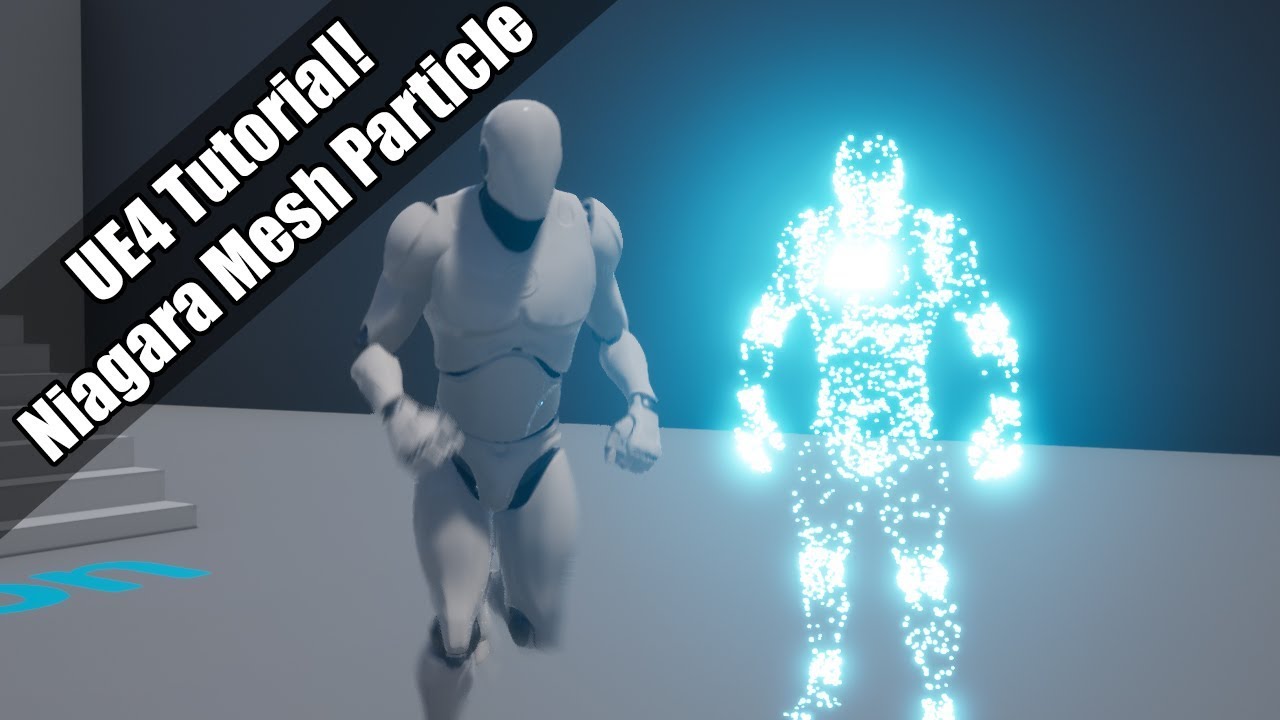
Whoops! I keep calling it "niagra" rather than "niagara" - as lots of you know, I'm severely dyslexic and I genuinely never saw that extra A the whole time until someone's pointed it out to me! LMAO
Setting up a system that spawns particles on a mesh surface using Niagara!
(...
runic fern
you know how to check the system variables ? @rain glen
im not sure but at least check maybe its wrong
@rain glen
rain glen
directx doesnt show up there
honest vale
Unreal Engine Forums
WHAT
With Unreal Engine 4.25 just around the corner, we've invited a few of Epic's engineering directors to share an overview of the new features and updates arriving in the full release. Tune in to hear about everything from major updates to Niagara and general animation impr...
sweet
runic fern
@rain glen well something wrong is happening xD
normal cradle
@rain glen is dxdiag working ?
normal cradle
I mean i dont have DirectX in my environment variables either and it's working
runic fern
In your System Variable @normal cradle not exist?
 icy narwhal
I had a few retargeted animations and I deleted the source animations from which I did the retargetting, now everytime I load the project, the engine tried to load those source animations and gives a "Failed to load asset" error saying the retargetting animations are referencing the source animations but the source ones can't be found anymore.
normal cradle
no
icy narwhal
What's the fix to this? I don't like being greeted with errors by my project, it works fine and nothing is breaking, I just want to stop seeing that happen.
runic fern
Well then its weird
normal cradle
runic fern
@normal cradle
normal cradle
😅
runic fern
[File:D:/Build/++UE4/Sync/Engine/Source/Runtime/D3D12RHI/Private/D3D12Util.cpp] [Line: 266] Adapter->GetDXGIFactory2()->CreateSwapChain(pCommandQueue, &SwapChainDesc, SwapChain.GetInitReference()) failed at D:/Build/++UE4/Sync/Engine/Source/Runtime/D3D12RHI/Private/Windows/WindowsD3D12Viewport.cpp:200 with error E_INVALIDARG Can anyone help? It's my first project and didn't do anything in it yet
his error
rain glen
I have to eat now maybe you can help me later?
normal cradle
@rain glen Maybe try reinstalling your graphics driver helps idk 😄
just guessing here at the moment
runic fern
@rain glen When you come try to check this
C:/ProgramFiles(x86)/Microsoft DirectX SDK/
normal cradle
Bro wait I rememebr something i had DirectX issues aswell, but not in UE i had them in LeagueOfLegends
The problem got solved as soon I installed steam since it shipped with it
Still cant really tell why I had issues tho, but maybe that helps you 🤷♂️ , I would try Re-Installing graphics card and maybe this random steam solution also helps you, when those things are not helping idk
tame rose
how do i make a blueprint that says show "in my case main menu"
rain glen
@runic fern
honest mango
https://gyazo.com/5f35b32037404a89d6122fb6b0c26bc0 any idea why my BP dont pass the GET at the end ?

https://gyazo.com/2f78d7be689b16226f29c823d2bde5b5 it stays here but dont go to ""PICKUP"

 unborn kettle
It seems as though it’s invalid. You could print the class of the object to the screen on not valid, might help you get a better idea.
honest mango
hmm what i put it tto valis and its passing, but now i have another problem lol
thanks you
i dont understand
the "canpickobject?" is false but it still goes to the true
wtf
rain glen
@runic fern apparently it was a problem that only that project had so I deleted it and created a new one
runic fern
oh good maybe the engine failed when you was creating the project
thats why it was throwing an error
honest mango
https://gyazo.com/96d27bee5b46016eb02869757b02527c i set my variable to true in my object but it go false ..
 pearl sonnet
@normal cradle cool stuff
honest mango
any help please ?i cant ffind the solution ...
normal cradle
@pearl sonnet Only thing left to do is creating a 3D-Model in Maya with about 200 Animations, make it walk across the map, make it flickering, duplicating it and spawning about 2k Particle Systems, nothing special
😄
unborn kettle
@honest mango What you could do is put multiple breakpoints along the path from the time the object is created, to when it is used here. Then you should be able to trace down where it is return that value and how is gets set and all that.
honest mango
hmm but all works fine exept that ..
 flat trail
Construction scripts are so handy when you learn it
This one is making billboards dependent on public variables you can choose how many and place them as you want, perfect if you want to spawn multiple targets on selected or random locations 😄
 abstract relic
Also the best way to crash your project upon launching the editor 😜 You better have source control set up and add Is Valid nodes everywhere
honest mango
im still stuck 😭
fresh mica
How do i ship a non-monolithic build.
LinkType = TargetLinkType.Modular;
bShouldCompileAsDLL = true;
result in linker errors.... "This is not allowed, Project has build products in common with UE4Game"??
 fallen elbow
i hope 4.25 gets fixed, impossible to work, crashed so much whenever i work with shaders
 pearl wigeon
god I tell you what I wish you could do in ue4
a custom shading model that doesn't need editing of the source code
fallen elbow
i am making simple automaterial for my landscapes. and it keeps crashing
pearl wigeon
i wish you could control more elements of how a material works instead of the 17 output pins a surface material has
i know it's cuz they're trying to keep things realistic
but damn
 bronze vault
@honest mango It looks like something else is setting your variable to false. You could do a search with "Find References" to see what else may be changing it.
hollow ridge
On my game when I test it on my pc everything loads find, but then on mobile everything that is purple is just white with black specs anyone know why?
bronze vault
@honest mango There should be a way to search in all blueprints to the right of the search bar.
honest mango
no result found huhh xd
normal burrow
Unreal Engine Forums
WHAT
With Unreal Engine 4.25 just around the corner, we've invited a few of Epic's engineering directors to share an overview of the new features and updates arriving in the full release. Tune in to hear about everything from major updates to Niagara and general animation impr...
i'm confused, does this mean its coming out the 30th?
 digital anchor
probably not, the 2.24 had a features stream like 2 weeks before release
abstract relic
Preview 4.25.37 😜
 manic pawn
the stream is usually a bit before the release
no release without fixing insights first 
 grave nebula
no release without fixing separate translucency 😡
manic pawn
what's wrong with the translucency?
 snow reef
Is there anyway to ungroup a big model like this https://gyazo.com/1e7cfb08f5f6c4911561b01957f9be35
 normal burrow
thankjs sounds like a real framework of something web related
plush yew
If I clear an array its length is 0, right?
manic pawn
yes
plush yew
I might be understanding decorators backwards
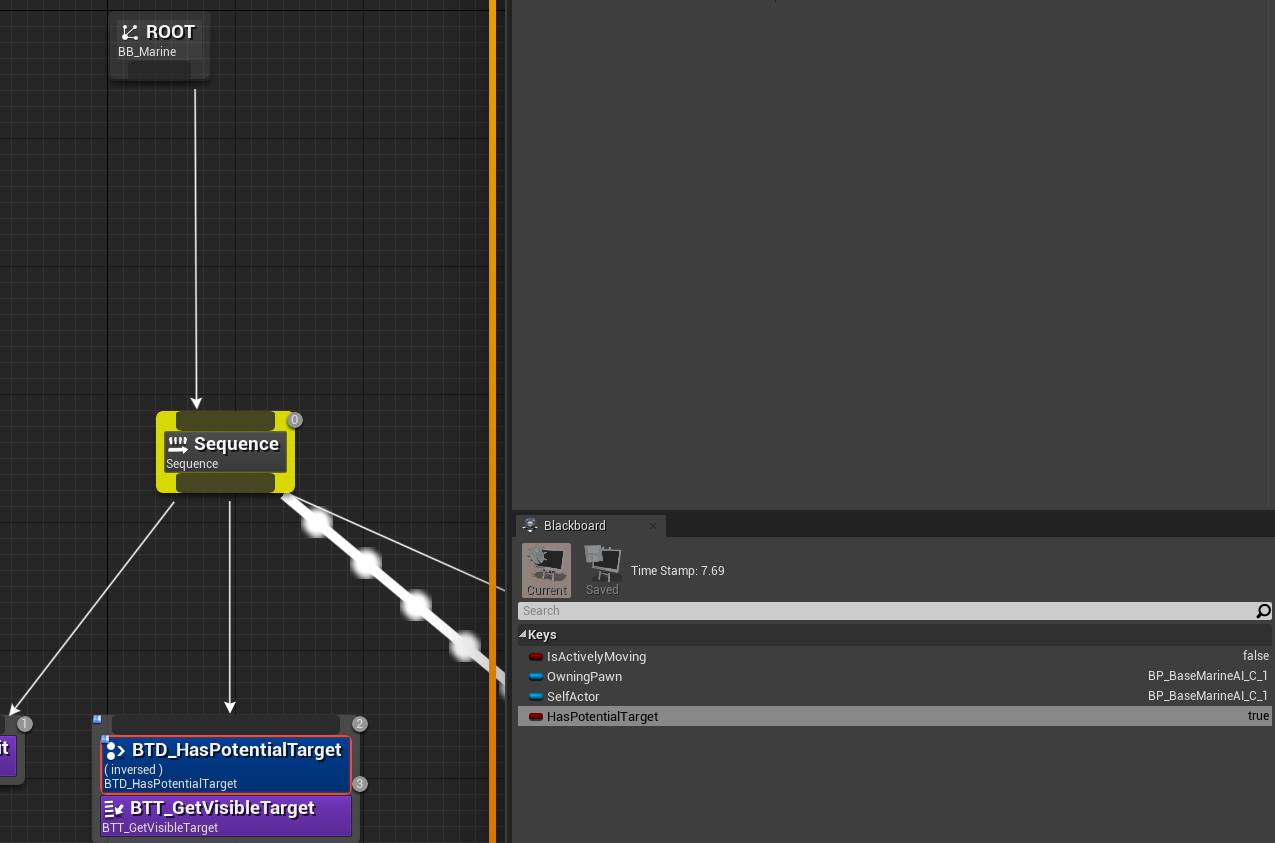
This kept me up until 5am last night and I still can't figure it out. The first task always executes, even though the criteria is that the HasPotentialTarget key is false
hello there
hollow ridge
In my game when I test it on my pc everything loads find, but then on mobile everything that is purple is just white with black specs anyone know why?
 pure stratus
Is it possible to supress warning messages from Unreal Engine source files generated by UBT in a file named SharedPCH.Engine.ShadowErrors.cpp?
storm terrace
I know i was complaining about this yesterday not being able to delete these tracks which I can now as explained yesterday
the issue now is why do I keep loosing those the object that those components are associated with?
I now need to delete them again, go back to add component, reconfigure them, etc. It's a pain in the ass unless one of you have a solution.
 frozen pond
hi, question again, i want to create actor in game and then save it (still in game) for usage, is this possible ?
 glacial pecan
what the heck is this???
digital anchor
child actors are all kinds of messed up
had the same problem once, dont remember if i found a fix tho
storm terrace
let me know if you come across the solution again, Thanks
plush yew
https://i.imgur.com/5KDJA9Q.png
I don't think my decorator is working? Has potential target is the criteria, and as you can see it's inverted. So the sequence should end at GetVisibleTarget because when "HasPotentialTarget" is true the inverted decorator won't let the task execute. But it still executes every time even though you can see that the bool is true on the right
 peak knot
@storm terrace I'm having the same issue
If you hit recompile they come back, but they continue to clear all settings for me
Which is getting bad because there's about 5 different things I have to set every time I open the project. It's gotten progressively worse to the point now every time I recompile (after setting up the blueprint again), the next time I click Play UE4 hard crashes.
snow reef
Does anyone know why this character is fully visible and bright even though they are in a dark area?
peak knot
automatic diffuse lighting prob?
snow reef
Where would I check?
obtuse egret
@normal cradle yeah I watched this video before> @obtuse egret @pearl sonnet (About our Fortnite Event discussion, might have found something interesting) https://www.youtube.com/watch?v=RWl3ySXTY2c&t=4s
@normal cradle
Whoops! I keep calling it "niagra" rather than "niagara" - as lots of you know, I'm severely dyslexic and I genuinely never saw that extra A the whole time until someone's pointed it out to me! LMAO
Setting up a system that spawns particles on a mesh surface using Niagara!
(...
 ashen ermine
Dumb question but where was that setting to "suppress screen messages" or something like that? I wanna use stat.unit but it doesn't show - I can't find it anywhere 😭
abstract relic
Got to you level bp >> event begin play>> console command >> DisableAllScreenMessages
ashen ermine
@abstract relic Yea thx, not that, the opposite, found it 😛 thanks anyway 🙂
abstract relic
You’ll have to put EnableAllScreenMessages for it print on screen again though. Deleting the console command node will not revert it
ashen ermine
@abstract relic Yea, it's just the shift+L thingy...I press it w/o realizing it toggles the viewport option's "display stats" 😛 found it and fixed it xD thx anyway 😄
 midnight root
Hey all, I tried searching for why viewport isn't same as game mode and found nothing atm, so wondering what do I have wrong that its this way,,GameView is ticked as is exposure>game settings, I had this working at one time..o_0
4.24.3
sunsky, skyatmosphere and atmospherefog
 upbeat jackal
Quick questions from a newbie. 1. Can I lock a cineCameraActor so that i dont move it by mistake? 2. Is there a hotkey to change the camera speed instead of changing it at the top of the UI?
 crisp turtle
Hello! Could anyone give me some feedback on how best to handle a event that destroys a support beam breaking apart a logging mode? I need the multiple logs falling down damaging player accordingly?
Also, would swapping meshes from static mesh to physics type mesh help performance any, or does putting them to sleep do as good a job? Thanks!
Example gif: https://gyazo.com/4cd0fcc404535febf2bea0cfcf95f169
Gyazo
Gyazo

 plush yew
If you can go into more detail I will try and help via DM but may not be as useful as you'd like
Just use simplified collision for the logd
logs
abstract relic
Or you can use sequencer
plush yew
Maybe you will be of more help but I'm not clear exactly what he wants
 south hill
I would like to point out that the Workshop PDF instruction are half good and are missing a decent amount of information to make it clear.
proper stump
I need to monitor when my character stopped moving, speed == 0, what's the best way to do that? on tick? seems expensive...
 lament saddle
That's not gonna shred performance on its own if it's just one ticking actor, but if you want, you can change the tick rate. Or use a looping Set Timer By node.
proper stump
thanks
normal burrow
that sounds like a perfect sequencer use case yeah
proper stump
@normal burrow how is that?
proper stump
i need to know when the charcter is idle, and do some checks....
normal burrow
that'd be how you'd do it. checking velocity for zero. store it off to a boolean once per frame to have it be speedier
but it means you also have to update the boolean for it to change
proper stump
yeah, i was wondering if there's an event for that or do i have to do it using Tick Event
normal burrow
theres no events that i know of, but where to put that check becomes the question yea
barren flume
like the xbox a button
instead of just the text a
like this
or should I just import an image of that
normal burrow
A package of +140 game-ready Icons for Gamepads, Keyboards & Mouse
could read the documentation for that mistermouse
barren flume
thank you
i was trying to look that up
but all i got was one forum page
and nevermind
i already got an icon
normal burrow
documentation? yeah its bare
in unreal 2.5 you used to be able to put things inline with [x] type stuff, i dunno if that was an engine hack for the game i was working inside of though

Unreal Engine
We explore how to work with the new RichTextBlock widget in UMG both as a UI designer and as a programmer while explaining how you can extend it with additional functionality using Decorator classes.
read that
Using Decorators
 dusk sphinx
@crisp turtle put some rounds into supports, and a reaction you decide to go for?
maybe caliper having a affect on how much dmg needs to get done
btw, first post i saw, just spitting balls
 unique timber
hi, in the quickstart guide it says the blank project "will automatically open inside both the Unreal Editor and Visual Studio", but it only opens in Unreal Editor
unique timber
yes
unique timber
yes
peak knot
You always can open it with File > Open Visual Studio Project
peak knot
^ that as well
unique timber
ok, "automatically" sounds like it should open in both
plush yew
does it really matter tho
unique timber
i don' tknow ,never used unreal before
it could be there's some kind of IPC that needs to happen
unique timber
wil they still be able to talk to eachother?
worn granite
Oh yes
plush yew
yeah
you will be happy to know this is the least of your concerns
good luck finding stupid bugs and not realizing it
lol
fun times 😄
unique timber
so File > Open Visual Studio opens a command prompt only, is that normal?
actually it was already opening the command prompt so maybe its working
i just expected the IDE to open
peak knot
speaking of stupid bugs
does anyone else on the latest version (4.24.3) have issues with c++ code compilations resetting their blueprint settings...?
things that were blueprint compiled and saved
peak knot
it happens when I just close the editor and reopen after saving the blueprint - no compile
plush yew
I always open unreal from this
if i have to compile
stop
redo it
dont bother with editor compile
even if u dont compile
hot-reload is still playing you
peak knot
I'll try it out. Thanks!
 steady ingot
Launch is not avaliable! And it was before..
 limber mesa
anyone know how to get that cartoon water texture?
like from the one in the weekly screenshot
on the epic games launcher?
plush yew
Why is this happening? Potential target is true but the task still fires despite the decorator only accepting a false value
nvm, it's returning a false value if I print it
Is storing data in the game mode the typical way to go about keeping data? Like, I have custom player stats that I'm manually entering to set up. I was keeping that data in the game instance but I need this info earlier than launching the game.
rancid lynx
can someone please explain why , when i go to "FRONT" view, moving a static mesh -y 10 moves the mesh Right? shouldnt negative move stuff left ? is that something im going to just have to accept and remembe with UE4?
am i doing something odd? or does -y 10 always move a static mesh to the right while in FRONT View
 paper tundra
im building a battle arena game anyone wanna work on it with me
rancid lynx
wish i had the time lostMr
plush yew
@rancid lynx I work with blender, when I import anything from blender I always make sure to have "force X forward" or whatever its called. that might help
rancid lynx
ok tyty
 shy jetty
Wasnt sure where to ask this. What are some cool world map animations or transitions you guys have seen in games? Like cool zooming features , some type of travel animation or the like?
rancid lynx
if I fire a line Trace at an actor with 3 static meshes, how would I "Get material" of the static mesh that was hit? a primitive component variable doesnt include a material, casting to nodes dont work either.
cosmic veldt
did the last nvidia update only broke my project?
 frigid matrix
Is this the room to ask code questions?
frigid matrix
Thank you
rancid lynx
how would i "get material" from what ever my trace hits? is it something simple im missing?
abstract relic
Hit component >> get material. You may need to get index of array first
worn granite
unless you mean Phys Mat
Not sure if you get those by default with BP traces, but if you don't get them by default there's likely a project setting for it
normal burrow
believe get material is on primitive which should be the min type for hit component
i don't think it gives you the slot name though
rancid lynx
@normal burrow you mean with this node maybe? just leave Element at zero i guess?
ill try that . tyvm
damn. get material instance isnt an option.
normal burrow
hm?
 marsh swallow
How might you set the ZOrder of a widget in Cpp
 obsidian wasp
Does anyone know the format for the byte array that the "Import Buffer as Texture 2D"-node takes? I'm trying to convert a TextureRenderTarget2D into a byte array so that I can easily save it in a struct. The documentation page isn't particularly helpful :/
 gray ether
Hi there!
I'd like to open a cooked map (.umap) using my packaged unreal game (for mod support).
What happens is that it detects where the file is located (in my Mods folder) but it doesn't open it.
Please help, thanks in advance!
worn granite
@normal burrow Unfortunately you don't get the material element index in a hit result as far as I could ever tell
you can use hit item for instanced mesh comps
that coresponds to the element idx
normal burrow
yeah, thats what i meant by slot name. you could get the materials of what you hit but not something triangle accurate
given if you hit a capsule collision or whatever, your not gonna have much luck hah
worn granite
You'd be able to get the closest poinr
gg phone
and then maybe you can reverse that to the UV
or the material element
 fathom glade
Does anyone know how to control an object along a spline like this guy? https://www.youtube.com/watch?v=v6z6oqRhmXI

Playing with momentum retention with splines and sliders.
Should think about making it so when the parent spline is updated the slider auto snaps back to the closest point.
I'm looking to just move an object along a spline with a simple click and drag
normal burrow
that'd work well ye, may need cpu read but idk about that
probably better off using phys mat @rancid lynx
you can make your own physmat type that specifies a material
though it's weird and i cant recall if physmat is blueprintable or not
rancid lynx
tyvm. i also read tutorials about physcs mats. thats one great way. but i was able to make get material and cast to MatInstance work also.
marsh swallow
This would say to set the ZOrder to 50 for the widget right?!