#ue4-general
1 messages · Page 713 of 1
 normal burrow
 crude linden
anyone around who might be a wizard with Hit Event and On Component Hit events? Trying to figure out why I can't trigger a hit event for a component unless that component is the root component
As with almost every other google search result I can find, overlap events work fine, hit events do not
 plush plinth
guys the event abort ai wont work
i have been trying to fix it for a really long time
 sly coyote
looks like you might have things happening out of order
notice the little numbered circles to the right of each node
thats the order those events will fire
top down left to right
 fallen wing
Please help guys. It's really stressing me out. It never did this before until I tried to download a new version. When ever I try to make a new project it says "Video driver crashed and was reset! Make sure your video drivers are up to date. Exiting...".
sly coyote
🙂 the first picture and the second one are different
sly coyote
no, theyre not
plush plinth
why?
sly coyote
the little circle number on the right side of each node determines the order that node fires
top piture has shoot as node 0
and bottom has node as 4
sly coyote
if a condition is listed at a low node priority than and action its supposed to stop, it will not stop that action
 hollow ridge
Hey anyone know how to attach part of a ui to an actor?
plush plinth
add a widget scene component
sly coyote
using BP widget, just add it as a component to the character bp
plush plinth
zeth so what shall i do?
sly coyote
have it set the visible player before it checks
not in the same sequence
then drag down from the selector
and add a condiation after that to check if its set
then just shoot
i always give them something to go back to also...like "stand there idling"
so when the condiation stops them from attack they have something to do
plush plinth
set visible player before it checks?
hollow ridge
@plush plinth Youngman wdym in the actor or in a separate bp
plush plinth
i didnt really understand this part
sly coyote
set focus
plush plinth
first thing make a widget, then go to your character/actor then add a widget scene component
hollow ridge
k
sly coyote
ai in ue4 is tough to help with cause there is so many places where things can get screwed up outside of the behavior tree
like are you setting the seeplayer in the blackboard on the enemys bp on sensing component event for player seen?
 plush yew
hello guys I did changing the name function and all work but I want to set max lengh of the name-how to do it?
sly coyote
@plush yew this?
sly coyote
your trying to do like breaking line of sight and they stop?
plush plinth
yes
sly coyote
you remembering to set the seen player to "none" after line of sight is broken?
 brittle gulch
Hi guys, if I create a data table for all of my objects, let's say a few hundreds. in the struct of this data table, I reference a static mesh. Will all these hundreds of static meshes be loaded if I reference the data table somewhere?
sly coyote
no, it will only ref the one you pulled from the struct
brittle gulch
okay good. So I don't need to use soft references and async loading for the static meshes?
sly coyote
that depends on your own levels
plush yew
maybe yeah, which of the 3 buttons I need to look at? @sly coyote
sly coyote
doing refs with tables and struct act more like the guy you ask for directions
you ask it where to find the file, it points to the folder
or file
its not actually storing a live copy of it
the branches, where i check how long the entered text is
brittle gulch
Okay, I wasn't sure when I read about references on the UE4 doc :
sly coyote
in my game its 14 characters for a name
no bigger, otherwise i set it to a substring of the entered text first 14 characters and dont allow them to enter more characters
plush yew
ok
sly coyote
yeah @brittle gulch doing the way youre doing is pretty similar to using B, but again weather you need the soft refs is dependent on your game
sly coyote
the whole thing
the events are pretty self describing there...first row adds the widget, guess you can skip that
but the second accepts the new name when you click done, and the bottom is what checks lengths and keeps them at 14(for my example)
notice row 2 also has a check to not allow them to have no name...it defaults them to "Nameless" if they entered nothing and click done
you can handle that any way you choose tho
thats just what i did
sly coyote
yeah your confirm would be my "accept"
plush yew
what is this set active widget?
sly coyote
i have my name editing done inside a costume creation widget i wrote
brittle gulch
I'm new to the whole concept of soft referencing. To me it seems like a good tradeoff for every referencing, as it's not loading the asset in memory along with what is referencing it, but just when it's needed. And it only keeps the path stored.
But I'm pretty sure It's not a tradeoff for everything, I'd like to understand a bit better about it, and mostly, when to use it? In what case?
sly coyote
personally i dont mess with storing soft refs at all...as what i would use it on would have already been spawned in the level (weapon laying on ground)
I let the engine handle it
plush yew
this is my code
plush yew
a, I did it?
sly coyote
yeah that gives you the number of characters in that text
which gets updated as you enter it if you do it off event text changed
sly coyote
if the name is too short just close the name edit widget?
brittle gulch
thanks Zeth, I think I'll forget about it for now x)
plush yew
have no idea hwo to do it, lol
also now when I entered 4-5 chars and it writes again that the name is short-wtf
idk why
sly coyote
dont worry about it too much unless you are struggling to recover performance...the engine handles most of the mem management pretty well without having to intervene too much
show me the whole thing
plush yew
me?
sly coyote
yeah
plush yew
what to show you?
sly coyote
you need to be setting the "entered name" off of "text changed" event of that editible text box
that graph is what i wanted to see
sly coyote
off the false node in the bottom row
connect the set entered name node
and drag the text over to it from the len comparison
off the true in bottom row just set entered text to itself
or leave it empty
you want to do that substring too
btw
how i had in the example i showed you from my code
that sets it to the first part up to your limit, even if the person is smashing all the keys
plush yew
I did this
sly coyote
yup that should work
plush yew
like this?
sly coyote
no
plush yew
how then?
 quiet token
how can i gain access to this to add? or how do i add CPF_SimpleDisplay ?
sly coyote
use the a node like where you set "the names too short"
your are leaving at this point, so set your characters name to the entered text and then from that remove from parent
plush yew
the first sentence I didn't get it
I need to put the node for name too short on false?
sly coyote
i tried rephasing what i said earlier....you need to set the name to the entered text
plush yew
english is not my native language and it is hard sometimes, sorry
plush yew
this?
sly coyote
you need that off the "false"
then off the true you need to set the name to "too short name"
plush yew
this I need it on the false part?
sly coyote
yeah
plush yew
ok
sly coyote
that goes on false
sly coyote
then on true its "name too short"
plush yew
ok
 unkempt raft
yo why is it when i choose cpp it says like something missing but when i choose blueprints it works
sly coyote
you do not need to remove from parent on the true
sly coyote
yup
plush yew
ok
sly coyote
@unkempt raft do you have VS 2019 installed?
 plush yew
yeah it works, but when I write more than 10 it saves it-lol
sly coyote
in the editor i think theres a place you can set a code editor
maybe that got reset somehow
unkempt raft
this the error
the only place i seen sdk thing is in visual studio when choosing the components
sly coyote
does your VS 2019 have the game devolopment tools installed?
unkempt raft
yuh
uh but lemme check again tho
but i clicked everything having to do with c__
c++*
sly coyote
it will be something like "tools for game devolopement" in the VS packages
unkempt raft
ight lemme check
 inner cloak
Hi guys, any of you know of a way to make some kind of fog of war on a minimap only ? what i mean is, i dont want the fog to hide the ground content when i roam the map but only what i see in the minimap should be hidden (fog) at first and then as a move around, the fog around where the player is gets dissipated. Hoping i explain properly here.
sly coyote
https://www.youtube.com/watch?v=0yk2JYonW8M @inner cloak

Unreal Engine Version: 4.20
Template: Third-Person Template
Assets:
The asset pack can be downloaded here: http://www.mediafire.com/file/zs4ti3vi5dttswf/Assets_WorldMap.rar/file
Video Description:
A feature of many map systems is that certain areas are hidden on the map unti...
unkempt raft
ight then yea it is
inner cloak
it has to be only the world map that gets discovered, the goal is to know where i did not go
hollow ridge
Hey could someone help me? I have a variable in an actor, and in my level I have multiple of those actors, but the variable is shared between them. (It is not public)
hollow ridge
Like the value on them is llinked
sly coyote
check in engine settings under "toolchain"
plush yew
yeah it works, but when I write more than 10 it saves it-lol
unkempt raft
alr
sly coyote
screen the graph
unkempt raft
engine settings? where i find tha
sly coyote
in the ue4 engine
hollow ridge
could someone help me? I have a variable in a actor and I need it to be a separate value for each instance of the actor in the level.
sly coyote
yeet, you would set that on the actual object dragged out in the level
hollow ridge
where tho
sly coyote
under the defaults for that actor
hollow ridge
no what is happening is when the variable changes both instances change
unkempt raft
zeth... there is no settings options in the start
sly coyote
its per project anyways, it wouldnt be your problem
not sure what to suggest in this case
unkempt raft
man bruh unreal trippin on me rn
sly coyote
need more specific into yeet, what are you doing and what changes those variables
hollow ridge
It is a begiin overlap
sly coyote
if you have 20 characters based on "my char bp" and you changed a variable on one in the level it should not effect the others at all
sly coyote
one widget connected to all?
hollow ridge
yeah
sly coyote
that would do it lol
hollow ridge
I think I need to create more copies of it
sly coyote
just have the BP spawn a widget for itself on begin play of that bp
hollow ridge
yeah
sly coyote
glad it was something dumb
hollow ridge
oh wait no that doesnt work cuz I need to have the ui attached to the actor
unkempt raft
zeth nvm i fixed it
hollow ridge
and when I do that it just puts it on the screen and not on the actor
sly coyote
on a side note i must go, my idea of procrastinating is coming on the discord and help others with thier issues lol not very productive procrastination
yeet add the ui widget as a component to the bp thats supposed to have it
and position it in the viewport of that bp
sly coyote
just making blind suggestions, i have very little info on what exactly is being displayed, what its being used for, or what its supposed to do
hollow ridge
it is just displaying a number that counts down and then when you are inside of it it counts up
sly coyote
then that can be a component inside the bp thats using it
like a HP bar on an enemy
i assume
sly coyote
go into the bp thats using it
and click the add component
then search for the widget counter thing
add it
 swift spindle
Hello all!.... looking for some help troubleshooting PIE hitching / freezing issues (not hardware spec problems) !!!!
sly coyote
and set the widget ref in that bp to be the new one you spawned for it

In this Unreal Engine 4 tutorial I show how to attach a UI Healthbar UMG widget to an NPC, to the enemy character.
It is just the UI part, I set the value of the healthbar / progressbar to a fake value, in the next part I will show you how to let the enemy take damage and how...
exactly like this
hollow ridge
do u mean like this?
sly coyote
but instead of hp bars youre attaching your counter widget
hollow ridge
ok
sly coyote
just skip past the part where he makes the hp bar
and go to where hes actually adding it to the enemy
although it wouldnt hurt to just watch the whole thing
hollow ridge
that is exactly what I did, but when I had multiple of the same bp they had the same number above their head
and I checked the values are different
 glacial pecan
anyone recognize this? I think Unreal is blocked in the firewall, but I don't even use any online features, yet this causes performance spikes every 2 seconds
 harsh tiger
im packaging my game and this keeps popping up. does anyone know a fix?
hollow ridge
@harsh tiger what are you packaging for?
 abstract relic
<@&213101288538374145>
 fierce tulip
on it
harsh tiger
@hollow ridge windows 64
 alpine furnace
hey guys, is there a set command you can use to modify individual components of an array at runtime?
something like:
set class array[1] value
 misty owl
Can anyone recommend a projectile tutorial? I want to implement a synergy system like Binding of Isaac has.
alpine furnace
@plush yew looking for the syntax that assigns it to a specific element
cause as of right now it just overrides the first element
 mortal quarry
Need help, I have a Cine Camera that is animated in a Sequence - It animates and renders perfectly till frame 590 and then jumps to 0,0,0 and renders the remainder from there, even though the camera is animated further.
What have I done wrong ? (#beginner)
In my sequence, the camera does what it should when I playback
when i say the remainder, I mean every frame is at 0,0,0
nvm, figured it out
Camera Cuts wasnt all the way
mortal quarry
@honest vale thanks for the reply, I managed to figure it out 🙂
hollow ridge
jonimake r u using C++ for bp's I saw there was just a simple block for it that you could use I forgot what it was called tho
plush yew
epic launcher not available, anyone else?
hollow ridge
um you dont need wifi for ue4
mortal quarry
@honest vale I think if you right click the camera, add it to a new sequence, you should be able to render a screenshot
abstract relic
Yeah, flip uv based on world normals
hollow ridge
HighTide could u help me
 empty plank
I don't know how to do that.
abstract relic
Now you do 😛
normal burrow
write it into google as well, its a pretty standard operation for whatever modeling software you're using
hollow ridge
Hey I need some help with a heath bar. I can get it to display above the enemies head, but when I add more enemies they all display the same heath. could someone help me
empty plank
@hollow ridge probably referencing the same bp var
hollow ridge
yeah it is the same bp variable but 2 separate instances I have an ai enemy and multiple of them in each level
 fair storm
i have to create a structure, put the skeletal meshes inside, and the tell to pick one of this?
can you show me how?
like this?
done
 rain glen
I'm new to UE4 and wanted to just play around with it but after creating a project and launching it it crashes. anyone maybe wanna look at the crash report?
 opaque plover
God I love how I can just create a Data Table and add new custom stuff from the editor. It's so easy.
fair storm
how can i, set a mask material, more preciselly i would like to make a sumple enemy hit, the enemy will be red when get hit, then come to default
 proper stump
Super basic question, i've taken a 3d model, created an actor blueprint, removed collision, the static mesh in the blueprint has "Generate overlap events" checked. i've placed an object of that BP into the level, it does not generate overlap events, Event ActorBeginOverlap does not fire. what am I missing?
a box collision is required?
component in the blueprint
 azure shore
guys is there a way to fix the slow motion physics? you know how when you use slow motion, any physics objects start rising off the ground then fly into space when you go back to normal speed
also @proper stump it might have something to do with the meshes collision itself, is it skeletal mesh? if so you might need to set up the physics asset but it might not be that
and how have you tested the overlap events?
proper stump
it's the 3rd person character and the box, when I add the box bp a box collision component it works, without it, it doesnt
testing with a print
 surreal hill
Is this a place were I can ask questions about an error report in de unreal engine 4 crash reporter?
plush yew
Am trying to make a list of target of the actors that get inside my collision
am making a turret that shoot them
everything is set but the Target list am really confused about
If anyone can help out 😄
hollow ridge
Could someone help me? I need to display an enemy heath bar (which I can do) but then when I put multiple into a level they both just display 1 of their healths
plush yew
Am using Game Mode to spawn enemies into the world
Or i should use Game State for that>
hollow ridge
?
 umbral palm
Hi everyone, I'm working on a game with a team and we're having an issue where when the game is alt-tabbed, controls stop working and things just start breaking... epicly. Any resources or tips on why this may be happening?
 coral spire
Building a couple of workstations. Anyone know if UE4 benefits in any meaningful way from having NVMEs vs SATA SSDs?
umbral palm
NVMe is faster because it's right on the mobo, but realistically, no unless you need the extra space for more hard drives in a small form factor case
coral spire
Cheers, saves me some money
normal burrow
hardware talk goes to lounge
umbral palm
Is there a better place to ask my question?
normal burrow
what version mold?
umbral palm
4.19.2
normal burrow
😬 yeah i can't recall issues from back then but may want to check release logs since to see if it wasn't something already addressed
rain glen
can anyone maybe look at this crash log?
happaned when trying to launch project
fresh project aswell
umbral palm
It will take me a while to read through everything in the release notes, but so far I am not finding any indication that it's an issue specific to 4.19.2...
plush yew
i don't understand how i cannot just remove duplicates from an array, it just removes too many without making any sense
everything works great, but for some reason this simple task i cannot do, i just dont get it anymore
anyone got an example that just works?
hollow ridge
Hey, anyone know if it is possible to disable inputs, but still have some pressable buttons
normal burrow
you could use a set onemoreed
 exotic cave
@umbral palm : Sadly, UE's support for lost-focus issues isn't very good, however there is a (kind of poorly documented) event you can try to catch and respond to
hollow ridge
@normal burrow ?
exotic cave
Though it seems from what I'm reading that a custom C++ file checking whether or not the window is currently the focus works better: https://answers.unrealengine.com/questions/301649/how-to-tell-when-application-has-lost-focus-ie-alt.html
plush yew
@normal burrow in what way? i need to remove elements not set them
hollow ridge
oh nvm @normal burrow I thought onemoreed was like a bp or something
normal burrow
nah its a different collection type
all good
there are arrays, maps, and sets. sets are the ones that can only contain one of any unique item
exotic cave
     if (!LocPlayer->ViewportClient->Viewport || !LocPlayer->ViewportClient->Viewport->IsForegroundWindow())
     {
         // viewport is either not present or not in the foreground.
}```That snippet seems to be able to check if an app has lost focus, @umbral palm. You could set a flag there, then check the opposite, and at least then be given an entry point in which you could try to call some reinitializations of your engine components.
Will require some C++ deep diving, though. Definitely seems like UE could stand to implement a more robust loss-of-focus framework as I'm reading about many other bugs people have had through losing window focus.
plush yew
@normal burrow its hard to explain but i dont just want to make them unique, i want to detect duplicates, and then do something (remove items with the same index from multiple arrays)
exotic cave
Introductory information for gameplay programmers getting started with Unreal Engine.
normal burrow
when your add to the set fails per element
it's a duplicate, of an element you already put in it
hollow ridge
how can I disable movement without disabling all inputs
exotic cave

Blueprint scripting is a great way to put power into the hands of your game designers. On this week's livestream, Richard Hinckley will cover the different ways you can expose C++ code to Blueprints, expanding your game's functionality.
NEWS
How virtual production broug...
plush yew
@normal burrow but why don't 2 nested loops work for this? (reverse and normal foreach give same results)
umbral palm
thanks! Our main developer is only using blueprints because they dont know C++, but I actually know a bit. So we'll have to work togehter.
plush yew
even if i save the indexes into an array, then use that array to remove the elements it just won't work lol
 worthy rock
anim bp vs anim montage, when would i use one over the other? seems that anim bp is for movement and anim montage is for special actions. Like if I want to do a stealth kill takedown, I'd use a montage?
and actually would a stealth kill be an anim montage or a sequence?
 bitter iris
if anyones good with physics stuff please help this unfixable with my knowledge 😦 #legacy-physics
hollow ridge
anyone doing ludum dare?
abstract relic
Is that what kids are calling game jams these days? 😜
 empty cliff
Hi guys, very stupid question but... I've a value that goes from 0 to 360, and I want to assign it to the yaw of a Rotator, but the value either get stuck in 90 degrees or so, it doesn't look to work
umbral palm
nvm i was talking out my butt
plush yew
How i can tell where the debug coming from?
its printing hello form somehwere ;d
i forgot where it is
 grim ore
if its a print string node use the blueprint search to look for print string nodes, otherwise the output log has the calling BP
plush yew
MathewW am making A single player using game mode / Game State etc.. is it a must to make it clean?
grim ore
clean?
 calm bolt
I'm new here, where should I go looking for help?
 prime vigil
Hey guys, question on Mesh Import process with LOD Groups from Blender 2.81. I'm trying to simplify process using single FBX file, but UE4 just imports all of them separately. I have "Import Mesh LOD's" setting on, and here is my naming convention in the blender file, from tutorials I've seen it is correct, and yet UE4 never auto-assigns LOD's. What am I doing wrong?
Should I export all meshes separately and manually assign all LOD meshes?
grim ore
anywhere that seems correct, this is the catch all channel
calm bolt
thanks, I'm trying to work with the paint tool in landscaping and when I try and make a weight-blended layer for a texture my engine freezes, I have no idea what could be causing this or what to do. It isn't a particular texture/material it's anything I try.
grim ore
so when working in the material or painting?
calm bolt
so in the paint section of landscaping if I go down to my layers I am trying to make them a weight blended layer but when i do so the engine completely stops
grim ore
weird. have you tried it with a material that has no layers?
i mean thats sorta normal, it has to compile and make the layer
so if your machine is low powered or your material is complex it might freeze for a bit
calm bolt
yeah my rig is pretty good and it will freeze for over an hour
grim ore
yeah it shouldnt which is why I was suggesting to try a normal non layered material to see if its the material or the engine
calm bolt
yeah i've used other materials and its not a problem until i try to make one of the layers a weight blended layer
grim ore
and is this with just the simplest test? 2 textures samples one layer blend node and plugged into the base color? no other changes
but no it shouldnt pause for but a few seconds if that if you are clicking the + to add a layer in your landscap
calm bolt
yeah thats exactly what i'm doing and it doesn't freeze like this for anything else, is there anyway to do it manually without using the + button
grim ore
setting the defaults
not that I know of, the + is what lets you create the layers then the layer info assets
is this even with the basicest of test materials? 2 textures, 1 layer, no changes
calm bolt
yes no matter what I use it still does it
grim ore
what size terrain? and is this in .24?
calm bolt
terrain is 256x256 and yes
grim ore
does it even pop up and ask you to save the layer info?
I can say on mine I just tested and it paused for ~3 seconds when I saved the layer info, then it popped up with about 1k shaders to compile. This was when adding my first weight blended layer
calm bolt
it does pop up for the save and freezes after
grim ore
yep freezes here as well but only for about 3 seconds while it creates it and starts the shader compile
calm bolt
when i look in my task manager it shows numerous shader compiles running but it shouldnt take as long as it does
grim ore
oh it should depending on your machine, so you see it compiling?
calm bolt
it doesnt show as compiling in the engine i can just see in my task manager
grim ore
yep thats what I mean. if you see shader compilers running and its using ~90% of your cpu or more just have to let it go
grim ore
depending on whats in your project possibly. Try it on a new project, new level, just make the material using 2 generic textures in the engine and then do the landscape stuff in the new level. eliminate your project
you dont happen to have visual studio installed do you?
calm bolt
no i don't
grim ore
yep then eliminate your project as an issue. yes it could take that long if it has to recompile all shaders in the engine, it's something .24 and later does and I have heard reports of 50k+ depending on the project which is why I suggested a new test one. I did that, third person template, and ~3s delay and then 1k compiles in engine
after the 1st layer was added and compiled the 2nd was instant
calm bolt
I see, i tested on a smaller project and it worked fine, must just have to wait and hope for the best. Thanks for all your help!
grim ore
i dont think it helps but I beleive its an issue with .24 only
calm bolt
hmm so maybe try .23?
grim ore
if you are just messing around or learning yeah it might be more enjoyable. most people mentioned this with .24
calm bolt
okay thanks
fallen wing
Please help guys. It's really stressing me out. It never did this before until I tried to download a new version. When ever I try to make a new project it says "Video driver crashed and was reset! Make sure your video drivers are up to date. Exiting...".
(please @ me if you respond)
grim ore
download a new version of what?
swift spindle
@fallen wing update your video card drivers. Make sure your system specs are upto par... and if your techy enuf... https://docs.microsoft.com/en-us/windows-hardware/drivers/display/tdr-registry-keys

The following TDR (timeout detection and recovery)-related registry keys are for display driver development testing or debugging purposes only.
fallen wing
ty :)
swift spindle
make sure you do first 2 things however
 rancid lynx
whats the cheapest way to add a flat light of say 30 percent to an entire scene ? directional lights leave terrible differences between light and dark.
maybe 2 directional lights, at 50% power, one with shadows on and one with off ? or would that hit the cpu gpu double hard, i guess. X_x
im making a VR game, i would like a minimum darkness applied everywhere, basically.
grim ore
I would assume an atmospheric light would be the flat lighting you want
the sky light
but beyond that can you not just up the eye adaption/auto exposure to make it brighter by default?
rancid lynx
thanks. those are what i was focusing on also. ill keep checking.
what are you doin today Mathew ? are you busy? are you home relaxing ? are you working? are you at some cool secret net cafe on the beach that no one knows about, but only like 2 people there, so social distancing is ok outside ?
or are you in a cool otaku anime room full of girl pillows hacking away at some UE4 game from the future ?
im sitting in my tatami room. i just cleaned my front door. i put some cleaner on it, and it was super strong, and i was surprised , i thought the door wasnt very dirty, i thought it was a natrual steel color, but the rust water that flowed down from the cleaner shocked me, WOW my front door is white ! ? so i spent like 30 minutes cleaning to see how white. apparently i have a white front door. anyways, sorry. spam finished.
grim ore
been at home all day playing WoW with the wife ignoring the world 🙂
swift spindle
@grim ore watching your videos dude 😛
plush yew
In this free step by step Unreal Engine 4 tutorial video (UE4 how to) you will learn how to make a simple physics based catapult.
All my UE4 tutorials: https://www.youtube.com/watch?v=BT0jFArPtGM&list=PLEp7216xGGILh3i2BZe2E0ZEuiIGa-VQT&index=1
Use function in the player chara...
i can't find the "Use" interface 6:58
 half turtle
is there any specific event or function on unreal that can check when the min of an array changes index? or should i craft my own with a timer?
plush yew
i think you have to make it yourself

Google Docs
Google Docs
@half turtle Do you know how to create the second one so i can call it in my catapault
half turtle
you mean how to create a function that detects when the min changes?
yes i know how to
plush yew
Whatever he does in those links
i don't know how to do it do you have a guide or a video on it
or can you explain it to me
half turtle
which part exactly are you not getting?
plush yew
Google Docs
i was trying to make the catapult from this video https://www.youtube.com/watch?v=-IAZuMaEeYA and used an interface
In this free step by step Unreal Engine 4 tutorial video (UE4 how to) you will learn how to make a simple physics based catapult.
All my UE4 tutorials: https://www.youtube.com/watch?v=BT0jFArPtGM&list=PLEp7216xGGILh3i2BZe2E0ZEuiIGa-VQT&index=1
Use function in the player chara...
that i i did not have
and i don't know how to create an interface
grim ore
you dont cast to interfaces
half turtle
interfaces are functions that you can implement into any object
you create an interface, and then implemenet it in the blueprint you want to have it
grim ore
look up blueprint interfaces
half turtle
plush yew
ok i'll look it up thanks
half turtle
once the interface is added
swift spindle
@grim ore has the skills to pay the bills
plush yew
ok thanks
fair storm
someone can explain me, why my sound keep restarting if i have more then 113 actore in the scene?
swift spindle
are they all making sound ?
 knotty vessel
how can i export a box brush for sizing refrence in blender?
i heard somewhere that you can
 vital kernel
Hello everyone, I was making my own movement code using the character controller, however above a certain speed, text spews out of the console and I'm unable to move (can still jump).
So my goal was to be able to bunny hop, and it works now, however, above a speed it locks inputs. I still have my momentum, but can't move after landing
As for what comes out of the console, turns out its unrelated
 scarlet birch
Any suggestions on getting mesh distance field shadows working for the skeletal mesh on a character?
swift spindle
don't think that's a thing
what you can do is create hidden mesh pieces that don't deform and have distance fields on them
kinda like how shadow capsules work
scarlet birch
You can't use a shadow physics asset?
 remote roost
o
swift spindle
I don't think so (my knowlage might be a bit out of date)
knotty vessel
how can i export a box brush for sizing refrence in blender?
scarlet birch
That's helpful though too. I'm trying to get shadows with a camera that's about 36,000 units away.
Either that or working shadows with an orthographic camera
swift spindle
ortho cams are buggy at best
scarlet birch
I could attach primitives I guess and have them cast shadows without being visible themselves. One of the docs implied that capsule lighting would work.
Thanks.
scarlet birch
I just added some spheres in the character BP, scaled them, set them to cast shadows when hidden, attached them to some bones and it's good enough for now.
swift spindle
goddamn stub documentation!
plush yew
in a blank level
how can i line trace
like what is the camera moving around the level and how can i make a reference to it
scarlet birch
current viewtarget?
plush yew
is that what it is
this is how i'm doing it with the third person bp
like when i press play it put's me in a camera that i can move around with and i want to make a reference to it
pls help
When i switch from the camera and possess the third person character this ball is what pops up and i thinks it is the camera does anyone know how to make a reference to it
abstract relic
That’s the spectator pawn
 candid flicker
Hi everyone, my level's getting heavy and I've got "STREAMING TEXTURE POOL" and some errors like this "LogD3D11RHI: Warning: Temp texture streaming buffer not large enough, needed 16777216 bytes".
I was able to solve the problem of the streaming pool via this command "r.Streaming.PoolSize" I am base at 600 and I put at 3000
But I don't know if it's right to do that.
By the way, after each launch of Unreal Engine "r.Streaming.PoolSize" recovers to 600
Or did you have another way to fix this problem?
It happens at a specific location, do I need to lower the texture resolution at that location?
abstract relic
Usually it means you have a lot of textures loading in that area
candid flicker
Yes, it is.
scarlet birch
I think it's set in one of the ini files. You can also just turn off texture streaming in the project settings until you're ready to set it up
candid flicker
Especially for gamers, Unreal tends to stop loading textures when there's too much "STREAMING TEXTURE POOL".
abstract relic
I’d advise against that
candid flicker
All right
However, I didn't understand what you meant by the Setting some textures to shared will also help
candid flicker
Yes
 signal bone
im starting to tackle down a minecraft like terrain on ue4
so far i found some really useful sources on how to start this
but it seems like is quite complex
more than i thought
 honest vale
programming is hard
signal bone
Well, yea i guess but im new into ue4 and never had to use C++
the drag and drop it has is outstanding
abstract relic
Here’s you obligatory plug. I sleep now
https://voxelplugin.com

voxel plugin™
Create infinite terrains procedurally using in-engine tools. Edit landscapes in realtime. Join an active community and benefit from frequent updates!
 ancient wave
why dose this spot light keep casting random shadows? i changed it to static mode and the shadow wasent there so i know its this exeact lamp. the scene is made out of bsp boxes if you need to know.
honest vale
@ancient wave static lights are baked into lightmaps on the surfaces the light shines onto
abstract relic
Or make assumption
signal bone
are the pro features worth it?
honest vale
so you need lightmap UVs on the ground and high enough resolution on it too
signal bone
spawning foliage.. hm that can be done in ue4 right?
ancient wave
im not asking why its blocky im asking why its casting at all i have nothing there @honest vale
honest vale
oh right, I glanced at it and thought that was a mesh but it was a reflection capture actor 😄
ancient wave
lol
@honest vale do you know if there is a more appropriate channel for my question?
honest vale
graphics most likely
swift spindle
who the everliving "bleeeeep" removed bluetilitys!!!!!!!!!!!!!!!!
 warped sun
Quick question, is there a way to change the way a texture looks during runtime? like can i shoot a blood particle on a mesh and it spawns a bloop on where it hit?
or actor, or anything that i can control for blood.
 sturdy apex
@warped sun I think I have heard of decals being projected onto meshes to achieve that
warped sun
what if i wanted a puddle of color to go all over a mesh?
im kinda confused on how it should be set up 
sturdy apex
I'm seeing an interesting write up by Tom Looman that may have some info for you: https://www.tomlooman.com/rendering-wounds-on-characters/

Earlier this week I tweeted about hit-masking characters to show dynamic blood and wounds. Today I’d like to talk a little about the effect and how it came to be. I’ll talk a little bit...
 charred stirrup
Hello! I need help so that my character can crouch. At the moment, I made a crouch animation in State Machine. I have inputs from the project manager, set it in blueprint character, but I don’t understand what I need to set on the graph of events in the animation blueprint. Can you give me some advice or link on the tutorial, how I can get crouch for my character with pressing the button? Thanks!
warped sun
@sturdy apex das epic, ill read
sturdy apex
@warped sun I wish I could find something like a tutorial, but I haven't bookmarked any yet since my research hasn't gone there. I see that someone made a plugin that might save you some time, but I do not know if it will hinder performance for what you need: https://www.youtube.com/watch?v=xnAn3VSz1xs

DoN's versatile Mesh Painting System is capable of many things; stamping a jaw-dropping number of decals without performance loss is one of them! If you enjoyed this video, check out this forum thread to learn more about the plugin and its main functionality: https://forums.un...
sturdy apex
@charred stirrup https://www.youtube.com/watch?v=NJolihHJUMM this might fill in the gap for what you need and how to get them connected?

In this short guide we enable crouching mode, add control keys and set up missing animations for our third person character.
 signal minnow
How come I swear I see some games made in ue4 that are like 25gb in size and they look the same, sameish size maps, as games that are like 3gb
sturdy apex
My best guess is the main usage of extra drive space would be high poly geometry, and high resolution textures/materials
signal minnow
I don't understand the benefit of super high poly geometry
I suppose you'd need that for things like grenades to use properly
charred stirrup
@sturdy apex Thanks! Looks like this is what I need. Yes, I need information on how to connect it all together.
sturdy apex
@charred stirrup glad I could help
@signal minnow high poly wouldn't have benefits other than looking detailed, but you can get those same details with less polys by making more use of materials that have height maps or bump maps to fake crevasses and such on the object. I've seen parallax be used in materials and it can do some cool stuff, but I think it can be expensive to use as well
signal minnow
Like I'm trying to download the just cause 4 on epic store's free game thing, but it's literally a 49gb game. That's gonna literally take over a day probably
Ehh I'm 1.25gb downloaded in like 45 mins
signal minnow
Idk, I'll get back to you in like 6 years when it's done
 vocal flume
Because I tried the PS4 version and it looks terrible
signal minnow
Eh, i personally don't care much for visuals
vocal flume
Big fan of just cause 3 but didn’t even play past the first level in just cause 4
signal minnow
Prime example, my desktop's tempered glass side panel has been sitting off, leaning against my PC for like.. half a year...?
@vocal flume never played just cause, heard it was good and I mean it's free, only annoying thing for me is the download for it
Like how can the launcher not resume partially downloaded files if you turn off your computer
Can epic not manage an integrity check system? Damn 😂
sturdy apex
Wait, epic launcher can't resume a download after restart?
plush yew
define "turn off your computer" :p
signal minnow
Apparently not for the store games
Idk, I had 10gb, restarted PC and checked if the files were in the games folder for downloading
I saw the 10.4 GB or whatever sitting there
But the amazing launcher tells me the folder has to be empty
Steam library is far superior setup imo
You can actually manage your files
Hell, even have precache servers for your local network
signal minnow
You can basically do that with steam
plush yew
you can do that with squid for anything :-p
signal minnow
So if you have numerous people that live together that play the same game, one downloads it, caches it to the box in the process, then the next downloads it in like literally a minute
sturdy apex
That has been a nice feature
signal minnow
Idk what squid is but it'd help people with slow internet because there's nothing available
plush yew
squid is a cache server
signal minnow
Ahh
Pretty sure the steam library one was meant for like PC cafes and shit
Which have like 50 PC's
All gonna be playing csgo or whatever
So that download throttle would be hella big, even on gigabit
Pfft
Anyways I'ma stop talking about this
plush yew
does anyone know how to access spectator span camera
What do i do from here and what should i put for obgect
 rich helm
Anyone knows why this is happening? I can open Unreal Engine 4 with the shortcut but not in the epicgamesstore app
 oblique stream
Maybe you need to update the engine. Through the app, you could be trying to open a later version than what you have installed?
rich helm
I have only installed 1 version though
plush yew
does anyone know how to access the spawn camera from the spectator spawn class
search the error if you didn't yet
rich helm
search the error if you didn't yet
Cant find it
How do I make the details panel appear again, I accidentally removed it
half turtle
anyone ever had an issue where a component begin overlap event is triggering... with the actor overlapping with itself?
plush yew
so it became self-aware in a sense? sorry i could not resist that 🙂
half turtle
apparently...
rich helm
window->details
Thanks, just started on UE4
half turtle
plush yew
Who knows access how to use the spectator camera
half turtle
eject
plush yew
eject
sturdy apex
Does anyone know if a heightmap can be used in UMG? I would like to have 3d looking buttons behind the widgets and I am not sure if this is a feasible option
I cant seem to find any mention of it online
 glad karma
Hey guys, somebody know what can be a problem? I had that ion obj and was great and when I exported in blender to fbx it's not bones in skeleton
i exported from obj to fbx and now is nothing
 rigid viper
why its showing failed to load third person character but my char are fully editable😨
half turtle
non scene components classes cannot be changed in childs who inherit them?
glad karma
Mesh containt root bone as root but animation doesnt contain the root track. Somebody can help with this?
proper stump
Hey, in animation blueprints, i have idle animations with and without a gun, is it possible to add a branch to the animation state?
nothing much under flow control in animations BP
 sage cape
Which channel is best for finding people who might want to collaborate on some sort of project?
abstract relic
#looking-for-talent read #more-resources on how to post there
sage cape
thanks
plush yew
you know how the UE4 contract says you have to give them 5% of revenue?
How do we organise that?
proper stump
any good tutorial (Free/paid) on animation blueprints? cant find a good source of information
abstract relic
Here’s a guideline and forms for reporting your revenue https://www.unrealengine.com/en-US/release

Unreal Engine
Unreal Engine is the world’s most open and advanced real-time 3D creation platform for photoreal visuals and immersive experiences.
plush yew
^wahts that?
@plush yew if you possessing the spectator pawn
then you can access it by get controlled pawn
put the input in your controller
rigid viper
All right everything fine now errors are not showing why i dont know may be its a kind of bug😱 😅
abstract relic
For general questions about releasing your game
plush yew
why do it in level blueprint tho
I want to replicate this with spectator camera instead of follow camera
oh yea
lvel blueprint does not make sense but how do i get controlled pawn
*into
you can get it via your player controller
put your inputs in there
 sacred sluice
Hello! Is anybody know 3dmax? i have a question about mesh removing.
plush yew
Where do i find the player controller blueprint excuse my cluelessness
@plush yew
there isnt one unless you create it then set it in gamemode
I mean there is but its cpp
abstract relic
I would go to a 3D studio max discord for all your 3dmax needs
half turtle
guys, anyone ever had the physics engine explode in such a way that an actor cannot move at all but just rotate? even tho absolutely nothing is constraining it?
 lucid magnet
how can i remove the gradient on this bar?
half turtle
i swear the more i deal with the physics engine in UE4 the more i hate it
 dark briar
how do i select ALL items in drawbox? Alt+ctrl only selects the ones i can see
half turtle
wasnt it ctrl+A?
plush yew
morning,
er im having a major issues and a friend said i should come here?
getting this error when packaging
Not sure how to fix it
damn, everyones having issues atm,
idk even whats wrong with mine it just crashes on pressing landscape or trying to build
plush plinth
how do i lock the capsule rotation via blueprints?
 hoary locust
@plush yew then it'd be pretty hard to help you, don't you think?
plush yew
probably it just weird
plush plinth
I am trying to make a slide function in ue4 where the capsule height is set to half of it and it will simulate physics for the how long the button have been pressed
for the most part its been working, now i am trying to lock the rotation of the capsule
 weak fable
Guys how do i set the duration to this particle system?
I can find the duration box to set the duration to 2s or more so can u guys tell me how can i set the duration here?
half turtle
*dies... somehow my AI component (custom made) was killing the physics engine for its actors just because it was telling them to turn around...
mortal quarry
Hey all, is there a way to render a sequence to TGA ? I see it isnt in the dropdown for output formats 😦
plush plinth
how do i lock the capsule rotation via blueprints?
I am trying to make a sliding function in which the capsule height is set to half (e.x, height = 10, half = 5) and the it simulates physics but just lock the rotation
plush yew
hey, is there any fix for
Assertion failed: [File:D:\Build++UE4\Sync\Engine\Source\Runtime\Core\Private\Serialization\Archive.cpp] [Line: 660] BulkData compressed header read error. This package may be corrupt!
 worldly axle
Helklo, why does my Left Mouse Button event doesnt fire?.
@plush yew is this happens for one of your projedcts or anytime u launch ue ? If it does anytime u launch ue try reinstalling it and vs
plush yew
it fires when i press Build or the landscape tool
plush yew
visual studio tools?
worldly axle
yes when u install ue u need to install vs too, with the tools for cpp and GD
plush yew
ok, thanks
dark briar
how do i select all items inside of my Ctrl + Alt?
plush yew
if i see this does that mean there's something wrong with my installation? also when I try to import any texture from bridge ue4 crashes lol
 dim arch
seems like your Megascans plugin is out of date
plush yew
@dim arch ty 4 input will look into that. weird
 dire coral
can i use the weapon component asset to make it like fornite or just copy and over the component and remake it for my own use
with my own animation
worldly axle
Hello, why this event doesnt fires even tho i press the left or rightclick button ?
 ocean hemlock
can someone try out my packaged game? i need someone to test out the multiplayer for me only for 5 min
dim arch
@worldly axle check the Blueprint properties 'auto receive input' player 0
worldly axle
THANKS @dim arch !!!!!!!
 manic pawn
ah yes renaming a folder with a measly 50 textures in it taking two minutes is fun
 royal crest
is i5 760 and gtx 1050 with 2 gb vram too bad for ue4? is it really necessary to upgrade my system?
normal burrow
Lounge for hardware
 lime gull
When in a widget, how can I fully disable the mouse cursor?
 runic fern
Hi Guys I need an advice again 😦
~~im setting this timer in GameController ~~
~~its sending the update to Widget BP this ~~
~~and its starting from beginplay here in game mode ~~
~~i've tried to do everything but still client can't see the time when he join after 5-10 seconds ~~
~~I want the Client Keep updated when ever he joined with the time 😦 ~~
Edit : nvm guys thank fixed by switching the timer to the server and looping to all controllers from there ❤️
 tender flume
is it dangerous to use instanced materials too much?
i'm more concerned on the draw call
 thick herald
What would you use instead? 🤔
tender flume
uhh, duplicates
so material01 then theres a duplicate again and again and again sort of.
not sure if this is efficient though
thick herald
no, keep to instances 🙂 That's what they are for.
tender flume
but wont it affect draw calls amount or performance?
 rough hound
Would this return the "Local Player" in a multiplayer environment? Or would it just be the first player to load in?
 royal sail
Player indexes are used in local multiplayer only
(IE, splitscreen)
In other words, yes, the local player.
rough hound
So if i used this in a multiplayer session it would get the player of the client it's ran on? I don't have much experience with UE4 networking and stuff but i'm working with UI and i don't want everyone to get the UI to pop up when a player clicks a button, only the local player.
 summer zealot
I run in a problem. how to use DoF on Translucent materials ?
Everything that has Translucent material is in a focus
Found the fix lol
r.SeparateTranslucency 0 - Will fix it if anyone needs ^_^
scarlet birch
Does anyone know a better way to get shadows with a skeleton mesh using a camera that's over 36000 units away? I can't get shadows with an orthographic camera so I'm using a really low FOV camera. Right now I'm using distance field shadows and adding hidden geometry to the mesh to get the shadows.
 wicked kettle
Does any know how to control Exponential Height fog so it wont be visible in the houses? Cuz right now its affects my interior as well which is pretty bad
 bold moss
Hi all! I'm trying to join two separate splines together by getting all points on each spline and then constructing a new spline. Problem is when i do so I get a "knot" between the last point of the initial spline and the first point of the second spline. Any advice?
swift spindle
@scarlet birch you can change your shadow distance on your lights btw 😛
scarlet birch
Yeah, tried that.
 kindred barn
Hello ! im looking for the last version of Zelda of Ocarina of time Available for Downbload
swift spindle
 scarlet birch
Not a bad idea, but I have a lot of these. I need something cheap enough for many on screen at once.
kindred barn
made by Unreal Engine 4 !
abstract relic
what
kindred barn
Zelda ocarina of time
swift spindle
this is a Developer area... not a download zone...
 snow crown
i think they left the server
scarlet birch
Drive by stupid
rancid lynx
Can i use springarm with a melee weapon child for interesting effects? I tried and failed.
 regal mulch
:D what
rancid lynx
For example. If i attach weapon to a springarm then pickup the springarm actor with an attach to component. Would thatt give me a soft rotation variable on the weapon?
Id like to stop my hammer from passing into solidnobjects. How would i do that ?
I use attachtoComponent on meshes
normal burrow
great guide btw cedric, have been looking into it and thought to mention what a great resource it is
scarlet birch
You use a trace or collision and change the animation when it hits something or use IK.
 night bridge
am i the only one who thinks that the "Compiling Shaders" thing is a lil satisfying
regal mulch
@normal burrow The network one?
normal burrow
rancid lynx
@scarlet birch can you give any gips about applying IK to a VR motion controller?
scarlet birch
If it's VR and first person I'd use a collision shape and use an animation to pull the weapon back inside the capsule collision when it intersects something.
If it's during a swing you're concerned about you have to change the animation on hit with either another animation or manually move it. You'd have to read up on IK.
rancid lynx
Okty ill check ik tutorials. I move my arm manually. So i dont know how to pull weapons back.
Well the vr collision boxes pass through other block actors. Also
plush yew
I'm having problems with the level sequencer or the blueprints because when i press lmb it opens the door but then goes back to the original place when i press lmb again it plays reverse, idk how to keep it the same place when it opens
grim ore
which one is it, using blueprint or sequencer?
plush yew
it looks fine on blueprint but i think its with sequencer
grim ore
so you are using sequencer to do something and its not working right or not working right when calling it again or?
plush yew
no, when i play the sequencer ingame when it stops it goes back to where it was, how do i keep it the same place where it stopped
night bridge
when i try to add Animations to a folder in my game from my desktop
i cant import it
i get the import screen
but i cant click import all or just import
they are all FBX btw
grim ore
if you hit play without messing with any settings it should stay at the last spot, it does for me. how are you playing it? what does the sequence look like
plush yew
it works fine but when i use it in the game it just doesnt stop where the sequence stopped
night bridge
@grim ore
when i try to add Animations to a folder in my game from my desktop
i cant import it
i get the import screen
but i cant click import all or just import
they are all FBX btw
plush yew
grim ore
in the level sequence details panel tell it to Pause at End
you can also set the state of each object in the properties for them https://forums.unrealengine.com/filedata/fetch?photoid=1560428
 unreal sable
I have this grenade made of:
Sphere - Simulated Physics
Projectile Component
How do i prevent it from rolling so much?
I've tried adjusting the values without any results.
plush yew
oh thanks it worked for me
grim ore
rolling as in rolling on the floor and not slowing to a stop?
unreal sable
Yes.
Although it does slow down from Linear and Angular Damping a little bit, but that seems to affect air velocity as well so it's not a solution.
What i'm looking for is a tiny bounce when it hits the ground (think halo plasma grenade).
plush yew
Anyone have any idea on how to get webcam feed into unreal?
Like I found this video: https://youtu.be/QojUd7Btmng

Unreal Engine Composure Introduction. Basics of keying and compositing.
unreal sable
Illustrates how you can pull live video captures and play it inside UE4 with the Media Framework tools.
grim ore
you probably want to set up a physical material on it then to add friction and bounciness
plush yew
I love you
unreal sable
Well i tried messing with the friction on projectile component.
Anything from 1, 5, 50, 5000.
Nothing happening.
grim ore
thats the friction for items on that surface, your going to want to assign physical materials or change those values on the surface it colliders with
your surface your item hits controls how it reacts when it hits it
I drop a ball on ice its going to slide more than I drop a ball on sand
unreal sable
I added a physic material to the sphere mesh and played with friction.
Tried setting material on the surface of objects/plane too.
Still rolling : |
I'm so confused.
plush yew
@unreal sable try making its mass higher
unreal sable
I tried 100kg
scarlet birch
@unreal sable Just add a tiny bit of angular dampening.
unreal sable
Tried that too
scarlet birch
Then no idea. It's pretty straight forward. For the most part if you want to reduce a force you can use friction, dampening, or negate it with another force. Are you sure you're not adding a force?
Try reducing restitution too.
Set it to multiply friction values or use lowest.
unreal sable
Ah, maybe you're in on something.
I use "Set Physics Linear Velocity", maybe that affects it?
scarlet birch
I mean you're directly setting velocity when you call that.
unreal sable
I changed the force setting from Linear..etc to the Projectile Movement, Angular Damping seems to work now.
Or it's the mix of surface phys. material + angular damping. Not 100% sure, but at least i'm on to something.
Learning UE4 feels like:
Want to do A, something is wrong so go research B, turns out it was C you need to do A.
scarlet birch
It's not really a UE thing with physics though. It's the same stuff used in a lot of engines and physics is physics. It's just forces and math.
 storm burrow
hey guys,
Any way to package with editor?
 astral phoenix
Hello i have a problem with my navmesh when i switch level its saying ''Navnmesh needs to be rebuilt'' but i have allready done that so what causing the problem? 🙂
 gleaming lotus
Is there any way to delete files in the project's directory in a packaged game through code? I'm using Numa's IO file writer and I'd like to give the players abilities to delete files in certain directories
 grizzled ferry
Can anybody explain me what royality mean?
abstract relic
A percentage of total revenue from a product is withheld and paid to whatever is enforcing royalties
Think of it like taxes. But just as annoying
 ember notch
Is it enough to use UE4?
8GB ram
GeForce RTX 2060
Ryzen 5 3550H (4x 2,1 GHz)
swift spindle
@ember notch moar ram
ember notch
Is the ram not enough?
plush yew
How do I add more transforms?
swift spindle
not really
 worldly dust
I kept getting ram crashes even with 16g, you won't be able to move large files around your folder structure and other intensive tasks, after upgrading to 32G I haven't had any memory crashes
there are still some things I do in editor with my puny 4gb GPU that I need to disable my second monitor and change my resolution to 800x600 (actually reccomended by epic lol) to avoid vram crashes,
swift spindle
ram is very important....
 still horizon
@plush yew right click on the pin and select split struct pin
normal burrow
pinned pin split
grim ore
its too bad none of that stuff is covered in any of the epic official starting tutorials or any other newbie blueprint stuff.. a shame
normal burrow
i avoid pin split tbh
abstract relic
Pin split for life
normal burrow
lol
ember notch
My problem on my current laptop is the cpu and not the ram lol
grim ore
my problem with my current laptop is i don't have one 😦
ember notch
Currently I have Intel i7 as a cpu
my problem with my current laptop is i don't have one 😦
sad
grim ore
should be nothing wrong with that CPU, better than most to be honest
I actually found a laptop I want to invest in just have to find it in stock at MSRP or less now
normal burrow
lounge be for hardware 🎵
yeah its just kind of is a suffocating topic. lounge isn't well suited for it either.
worldly axle
Hello, how could i separate theses bp and edit each of them separately? If i edit any of those, the other gets edited too .
https://cdn.discordapp.com/attachments/270909733580308480/701468182300459038/unknown.png
 grim ore
you would have to either make duplicate blueprints in the browser (those are instances, they are not blueprints)
or make children version of the blueprint for each one
but uh... this all defeats the purpose of a blueprint, what did you need to edit in each of them?
grim ore
branches?
worldly axle
if
grim ore
editing variables is fine, you would make them instance editable that is the point of it.
but if you are changing the core code of the blueprint then yes you should make new unique blueprints or adjust the code to fit blueprints properly
worldly axle
thanks !
sturdy apex
Could anyone point me in the direction of how to get 3d models (panels/buttons) to align with UMG on the player camera? I would like to have a menu with meshes that can be effected by lighting in the environment. I can't seem to find any information on this
to my understanding, 3d models cannot be added to a widget
grim ore
correct, you would use a render texture to hold a scene capture from a camera then put that onto an image in the widget
the other option is to have your widgets in the world along with the 3d items using the widget component
scarlet birch
I like the second option.
if you want to use meshes for a menu then your best bet is to just setup a scene, put a camera in it and use it for your menu.
sturdy apex
I was hoping to have the widget for text and scroll boxes on the player camera as expected for a hud, then be able to align 3d meshes behind the text (3d panels/buttons) and if the player opens their inventory it would pop up in front of whatever they were viewing and it pauses the game. Additionally, any nearby dynamic lighting could hit the menu panels
scarlet birch
You could do that. It'd be easier to use widget components and attach them to the mesh's in a BP though.
sturdy apex
I'd imagine I could attach the meshes to the camera, but if someone were to change the screen resolution I will encounter some issues you think? Like, the meshes may start unaligning with the UMG?
scarlet birch
If you're going to use a scene I'd not try and align it to a hud. Just use widget components.
This is one I did. The buttons are BP that you set the text on and then set a function for them to call. https://youtu.be/UlpQG6u6iGg

I spent yesterday putting together a new main menu.
grim ore
what you asking for is basically diegetic UI and thats going to end up having to be in the world
sturdy apex
diegetic UI, that's something I have not heard of before. I'll start looking into it. Thank you @scarlet birch @grim ore
 exotic lodge
hi guys
 ancient lotus
anyone have any idea on what the deal is with ALobbyBeaconState? is it something thats coming or what? i cannot find the class in UE4
https://docs.unrealengine.com/en-US/API/Plugins/Lobby/ALobbyBeaconState/index.html
Shared state of the game from the lobby perspective Duplicates much of the data in the traditional AGameState object for sharing with players connected via beacon only
misty owl
Looking at a lot of the free assets and the tutorials online, they use an older version of UE4. Should I learn on 4.19-4.22 so I can use all those assets and tutorials? Or should I learn on 4.24.3?
scarlet birch
There's very little that won't still be usable in 4.24 and if you're learning you might as well start with the most recent version.
misty owl
that makes sense. and i'll learn more by making the assets myself, too
sure wish I could use that Sci Fi Weapon pack, tho...
scarlet birch
You can. Just import it anyway.
Check mark show all projects and select the nearest version. Assets like that don't have anything that will break.
misty owl
Awesome! Thank you!
grim ore
IF you are super worried install the newest version it worked with then migrate it over, easy peasy
 pearl sinew
anyone have any idea whats wrong with the texture?
 earnest pawn
exotic cave
earnest pawn
exotic cave
@pearl sinew : Possibly no lightmap UV's? I only see 1 set of UVs (UV0) listed there. Usually when you import models for UE you allow it to autogenerate lightmap UV's it needs for static baking into UV1.
An overview of generating your own lightmap UVs in Unreal Engine 4.
scarlet birch
Preview window is dynamic lighting
exotic cave
It is. Just taking a wild guess.
 dusty basalt
Hey all, I seem to be facing a roadblock in my build when I have plugins included (that I purchased from the Marketplace). https://media.discordapp.net/attachments/550441494448832532/701346682763477022/unknown.png
Anyone have any idea what's going on with the build breaking? I am not a programmer so debugging via VS is untenable for me unfortunately.
 hollow ridge
how can I change an actor to be black and white with a bp
exotic cave
@hollow ridge : Have two sets of materials for that actor, and use the Blueprint to change back and forth between them
@dusty basalt : What pack is this?
dusty basalt
It's a UI for allow for picking files
exotic cave
Can I see the link on Marketplace?
You have a file there which has an error in the code.
It looks like it's missing an opening brace, which might be easy to fix.
dusty basalt
I did a successful build 4.23, but now it seems to break. https://unrealengine.com/marketplace/en-US/product/file-picker-ui-dialog
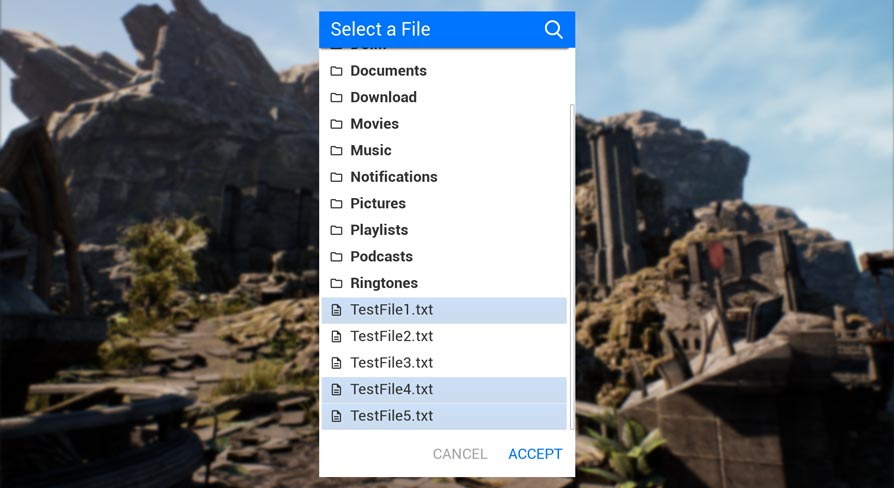
This plugin enables you to select a file (or multiple) directly through your UI. So it can be used on Android, for VR and even PC. Select a file from the File System and it returns the Path for your further usage in your application.
The same message happens when I disable that plugin and it picks up the same error on a 2nd custom marketplace plugin (about dynamic lighting emitting from media textures).
scarlet birch
It's a target file.
exotic cave
UE uses C# for build stuff?
I suppose it does!
Hmmm.
Unfortunately, @dusty basalt , it may be hard to solve this without programming skills.
dusty basalt
Ah crap
exotic cave
One or another circumstances, possibly plugins that are not updated for your version of UE or whatnot, have munched that target file, which is a file UE uses to build your project.
dusty basalt
Hmm, I'll do some more tests with alternative scenes in that case. See if I can get the build to go in a fresh scene with the plugin included.
exotic cave
If he deletes that particular target file, what happens?
I can't find much documentation on all this.
scarlet birch
It'll try and replace it with a default one is my guess. Which may or may not be fine.
I'm inclined to think it's not the issue.
dusty basalt
I've purged the intermediate and saved folders and tried to rebuild and no dice. I'm trying right now in a fresh template scene with the plugins enabled and used, and it's building fine....
rich helm
Is a source build better?
grim ore
yes
normal burrow
really?
 grave nebula
Yeah, source builds run much faster. Moar FPS!
normal burrow
 had no idea
scarlet birch
Idk, I always install source but don't build from it as much anymore.
normal burrow
I use launcher on oddball/testing things, but yeah not on serious stuff
plush yew
Anyone know how i would start a code for someone to lean like in R6S type leaning
Blueprints^^
 jagged salmon
Hey guys
Is it possible to choose a UVMap from the fbx for the lightmap bake?
In this case I want the second UV Map to be used when building the light
dusty basalt
K, dunno wtf the deal is, but I migrated my project to a fresh scene and it's building fine now....🤷♂️ 🤦♂️
scarlet birch
does radial damage trigger anyDamage?
pearl sinew
@exotic cave Thanks for the reply. I don't know what fixed it but its fixed now all of a sudden. I played around with settings that have to do with lightmap UV
scarlet birch
nvm, I figured it out. I had a gun that had collision which was blocking the damage.
 open ermine
are there any good example videos on people using dbuffer aka mesh decals? The documentation on it feels pretty vague it's like "yup, here's the wireframe! and then you apply a material and done"
scarlet birch
DoH!, I wasn't adding the actor that was exploding to the actors to ignore for radial damage and since it blocked visibility it was only damaging itself.
plush yew
is there a reason 'hollow' isn't exposed in brush settings for geometry sphere ?
knotty vessel
how do you export a boxbrush into blender?
 bold bay
https://steamuserimages-a.akamaihd.net/ugc/1023949183706778569/A1B5EB6FE2EFAAF379601E5CFCA4AA2F51E158DA/
Not possible to make a Array from a Enum?
Any other Array works, however Enum, fails.

 barren flume
I'm having an issue with a button for mobile users
I'm trying to get it so when they press it the character will ragdoll
I already have a blueprint for pc users
but it's not a button
you just have to press x
sacred sluice
Hello, everyone! I want to make a helper dog in the game. Has anyone ever seen a companion tutorial?
bold bay

In this Unreal Engine Tutorial I show how to add an enemy with an AI Controller that follows the player.
It is a very simple AI but I introduce some basic AI components: The Blackboard, a Behavior Tree and the AI Controller blueprint.
See my social profiles here
G+: https://...
As a start
I dont know how much knowledge you have
@sacred sluice
sacred sluice
Thanks! but it is so simple)
 gaunt abyss
@bold bay do enum EItemCategories : uint8
That's required for C++ enums to work in blueprints
bold bay
@gaunt abyss Thanks, ill give it a whirl!
plush yew
I just solved a problem in ue4 by myself and i feel like a genius
bold bay
@gaunt abyss It now gives an error: Missing "{" in enum
barren flume
shoot
i spent like an hour waiting for the game to launch on mobile
and it opens up and i get a message saying
Failed to open descriptor file ../../../MyProject/MyProject.uproject
then it closes
not sure what i did wrong
but i don't want to try again and get same error
 worn granite
@bold bay
enum class EWhatever : uint8
{
  First,
  Second,
  Third,
};
its the same syntax as extending a base class, but without access specification
class FWhatever : public FMyBaseType
{

};```also @bold bay, #cpp in future
bold bay
gotcha, thanks!
 low rock
hi guys, does anyone knows why my movable actor is too bright?
plush yew
I got this paricle
that keep looking at camera
is there a way to stop that?
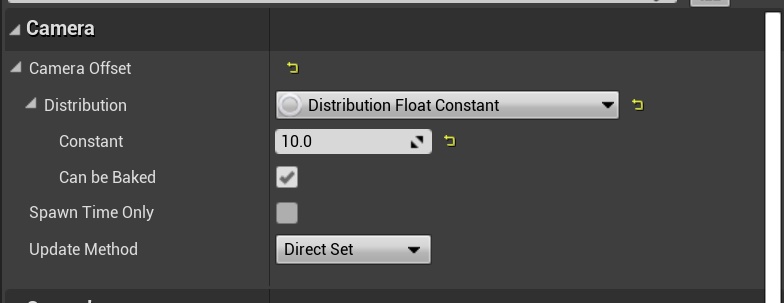


it has to be something from here
 near crater
how to play as imported characters which use custom armatures/animations?
rich helm
Where can I find the source code of UE4 in Github
dim arch
@proven tulip you can procedurally generate a maps layout using blueprints
if you want to procedurally generate meshes, it's more difficult
 proven tulip
I'm a C++ developer mostly. Is is normal to add blueprints like that into a c++ project?
dim arch
for example, you can generate the layout of objects in realtime, but you cant generate the shape of the objects in realtime very easily
yes, its easy to expose your C++ code to blueprint
proven tulip
Ok, so it sounds like to me I should just fully migrate to UE4 now and save a headache.
dim arch
the system you use to generate the layout of each level should be easy to hook up to the object placement system
I would use blueprints over cpp to familiarize yourself with the engine framework though
just expose your code to BP, for example return and array of objects/locations and then use blueprint to spawn and place them, possibly create different materials etc
proven tulip
I did a tutorial today with blueprints and it was ok.
dim arch
its good, the only problem is if your function returns a struct of datatypes, you need to define it and build the engine before you can access it in bp
proven tulip
What I have is basically a map that inherits a 2d array of type std::vector<Item>. So, each cell holds a vector. After the map is generated, items are dropped into each cell. I'd have to have Unreal read all of that in somehow then.
It does sound like starting off with Blueprints might be the better idea for learning purposes...
rich helm
How do I download the visual studio 2017 to get source build?
normal burrow
Definitely want to move on to ue4 @proven tulip
Console stuff is great and you’ll be glad you have an understanding of general c++, but working with unreal involves a lot of generated code that is kind of its own thing
Also standard library stuff like vector is just not something you’ll use much
Nothing stopping you from, but it’s not compatible with the generated code side
proven tulip
I see. Should I be learning with a C++ project and use blueprints? Most tutorials say to make a blueprints project.
I'd like to see both going on.
normal burrow
Honestly would recommend understanding blueprints