#ue4-general
1 messages · Page 706 of 1
 floral hull
 unreal sable
You can probably "paint" over landscape with an "eraser" type material. From there maybe a 3D model to shape the tunnel?
Then hide seams between landscape and tunnel with some rocks.
Just a guess though.
floral hull
can you make a printscreen, where is this tool?
 plush yew
@unreal sable Alt+V gets you the face orientation view tab, as well as some other useful features, like Eevee HQ, wireframe, and others
unreal sable
Nothing happens when i press Alt+V
But i know how to get it open now anyway, main problem is the inverted lightning.
 lament slate
Someone help plz
 atomic onyx
anyone else experiencing crashes with 4.24?
my old pc and new one seem to just crash when opening blueprints or any other window inside it
lament slate
Nope
Mine is just 4 gb ram , so i just got extra ram from D drive and some Readyboost
Initially it was cranky]
atomic onyx
my pc handles 4.24 easily with its specs, Im sure its something from ue4 that causes this
lament slate
But after i added extra virtual ram it runs ok
Oh
Actually i have another problem
When i leave it open for sometime, suddenly it becomes stuck like nothing works in it
 tender flume
What are your specs like?
lament slate
I cant even open it from taskbar
So i had to use task manager to close
Is that the problem u mean?
atomic onyx
okay so closing raytracing helped
so its some weird bug
rx 5700 ryzen 5 3600x 16gb ram
 brave salmon
guys... for real
fuck this shit
If you typo the password you gotta do this shit all over again for 2 minutes
just to fucking log in on the portal...amazing
 tired palm
Hello
Do you know a way to use a Github?
I understood that I had to use "Source control", so I put the link in the Github directory. But then? I don't have a push button, and nothing to add on the Github
I'd like to be able to communicate directly from the "github" site.
tender flume
But it's only 2 minutes. Be patient
 umbral ferry
 radiant haven
How can I place Two textures together
 cosmic matrix
Is there anyway to integrate a database to a ue4 like sql lite to save data in file.db
for exemple
 kindred viper
yeah sqllite works with UE. Probably better getting some kind of ODBC and MariaDB these days though
there are probably other options too for flatpack databases. Not that I've used them myself
plush yew
https://www.youtube.com/watch?v=LvTKQKyKHx4&feature=youtu.be literally unknown hell-ish performance with Vulkan
 hard quarry
Does this mean the normal Build -> Build Lighting only?
 twin orchid
Is this place really helpful ?
kindred viper
No you may as well leave
twin orchid
I am about to just asking to be sure
kindred viper
well its more useful if you ask a question related to Unreal 🙂 Whats up?
twin orchid
I did previously. But failed to get any info. Okay. So i have animated houdini camera. I import in to unreal via fbx. All good. BUT... It's 100x downscaled.
I upscaled it using weeeird method.
Attached it to actor and scaled it.
kindred viper
but then your animation was wrong right?
kindred viper
ok thats surprising tbh
kindred viper
Why not recreate the camera with UE? Why does it have to be a houdini cam?
twin orchid
Well animator worked on this cameras for ages. It's not one camera.
Just weird there are no solutions for this simple task.
kindred viper
well Houdini isn't designed to work with UE out of the box. But there is a probably a workaround for it. I couldn't tell you myself as I have only loaded up Houdini once.
twin orchid
But there is veeeery handy houdini engine thing in unreal
so i thought they get along good
umbral ferry
object is too smal if i scale it bigger the strike are desapear
do we have a fixe for that ?
hard quarry
@twin orchid Where exactly is your problem?
You can scale at the export and at the import?
So there is nothing complicated or "weeeird" about that.
The "correct" method is the one which is working best for your workflow
twin orchid
No. There is no option of scaling at the import. Thats exactly what is needed.
hard quarry
Than scale it at the export.
If that also is no option for you, just use the object scale like you did.
If you got only a few cameras, that will be no issue
twin orchid
- No scaling at export in houdini (lemme recheck though)
- No it sucks. I can't use my method because it comes alog with weirdness.
Like when i try to render those cameras they somehow pop out of scaled actor and become small again.
I know right
hard quarry
Why even use the Houdini camera in the first place?
kindred viper
thats what I said but its work already done
twin orchid
Good question ))) Ask my sup
hard quarry
Well isnt there an unreal engine exporter for houdini?
twin orchid
humm.. wha?
hard quarry
There is one for Blender, Maya, 3DSMax....
kindred viper
technically there isnt one for blender or 3ds. Maya is the only one with full support. The others have either datasmith or a proprietry plugin
hard quarry
I only used the maya one, it works great
kindred viper
yeah that was the one Epic focused on back when Blender was still youngish
twin orchid
maya works great with unreal without a doubt
hard quarry
I would suggest, you and your "sup" should try using the ingame camera, it will safe you a lot of time in the future. I also think it is more performent, but I have no numbers for that
twin orchid
I agree
kindred viper
its neither here nor there. Once its inside UE, it becomes the UE cam. Its just a set of animation keyframes with transforms
twin orchid
But what to do now
I checked houdini export btw. No scaling option.
I also dont know how to scale houdini camera in the scene.
So i insist.. this sh!t is weeeird ))
hard quarry
Well I guess you only scaled a part of the actor, while the defined camera distances did not change?
 proper stump
is it possible to debug pring a vector? the actual arrow? not the values? i want to see the forward vector of my pawn.... while in game... how do I do that?
 frank oar
I am currently using this widget to reset the level on button press.
For some reason it takes like 30-40 seconds to reset the level.
It is so much faster to press escape to exit play and re-enter manually then it is to use this widget.
Is there a better, faster way I can do this ?
I am in a VR headset and its becoming rather tiring having to take off the headset off and on over and over so much XD
kindred viper
@proper stump Show 3d Widget on a vector
proper stump
thanks @kindred viper
 half turtle
so i am having a really trippy error right now, a get valid, from a parent returns false but the same get valid from a child returns true (from the same actor component)
so is breaking half my functionality...
kindred viper
sounds like a disfunctional family
kindred viper
why use a pure IsValid with a Branch? Just use the IsValid with the branch built in. One less node
 cobalt scaffold
why is there a delay node in tick ?
kindred viper
I think the problem here is you have the wrong sense of logic flow. This being on tick makes me want to puke 😄
cobalt scaffold
you can set the tick rate to be your ai reaction time btw
plush yew
guys, I have friend who I want to give him the packages that I have in my account-how can I give to him?
kindred viper
if you mean assets from the marketplace, they are in your vault
half turtle
the parent tick...
the tick of what the parent has in its tick
it runs the code in the parent tick
in the pictures the one that has that is the child bp, it inherits the parent bp, but to run the code from tick, of the parent bp that node is needed
plush yew
yup they are vault @kindred viper
kindred viper
I know, it wasn't a question 😄
plush yew
XD so?
half turtle
eh, i do it thinking of future paths, i am currently refactoring my game, sorting parents and childs properly (it was a horrible mess before iwth like 10 bps for spaceships instead of a parent and just the variations
once i am certain i wont add alternate paths ill change to valids with exec
cobalt scaffold
so the target varible is set in the parent class ?
half turtle
yes
and it works, the ships are flying towards their target (the parent class doesnt have the movement section of the code as it is laso used for other things like space stations) so obviously the child is working fine
but the parent controls the shooting to targets as both ships and stations only need to consider distance before triggering weapons
the object in target is the same but for some reason the parent valid is returning false and the child is returning true
 crude silo
Hello there, I'm relatively new to programming and I'm making good progress through video tutorials but i don't know what i am actually doing. I would be very happy if someone would be willing to act like a teacher and explain one program list to me. If you would be happy to help just send me a message. Thank you in advance.
plush yew
my tower if it have 3 enemies insdie the collision it will kill only 1 and the other 2 need to go out side the collision and come inside again tp "Begin Overlap"
is there a way to make it as they are overlapping?
and thanks
cobalt scaffold
@half turtle so target variable which is inherited and not set in the child is valid but not in parent ?
lament slate
Someone plz tell how to get trigger vector position and actor vector position
half turtle
get actor
plush yew
@half turtle can you explain more?
half turtle
i can show you an example (though i am not sure is the most efficient)
cobalt scaffold
@half turtle are those delay nodes part of logic, or did you add them when debuging ?
half turtle
debugging
was not using breakpoints
coz i was tracking a weird bug somewhere (i should and will remove those)
example of making a list of targets to shoot at
@plush yew this is what i use for automated turrets BP_SpaceActor is just my spaceships and stations parent (could be units on an RTS or whatever)
then there is a function to track their headings or positions relative to the turret and finally a function to tell the turret to actually turn towards targets
cobalt scaffold
something weird is going on, or you accidentaly set something in the child/parent bp is all i can think of
half turtle
(on my case the tick gets enabled or disabled by controls from the AI or the user (on a per case basis)
and yes para that is exactly what is driving me crazy, something weird is going on somewhere
i don't come to ask for help unless i cracked my head a good few hours in an issue
cobalt scaffold
what i would do is re-create a minimal version of this in a fresh bp..
 cobalt scaffold
just to see if it works or it's a bug or whateever and then try to build-up compare with my existing non working version
plush yew
to add an array to it
 ancient orchid
Hello! 🙂 Anyone knows if there is a way to change the format file instead of PNG when exporting a high res image from Unreal ? Thanks
half turtle
guess ill redo that... been having quite a few glitches with a few bps (and already a huge argument with the physics engine too and lightning one...)
qBersp, what exactly are you trying to do? is your turret a character or a pawn or just regular actor?
plush yew
its my a turret
targeting zombies
i want it as it kill an zombie it gose to the other one as they are inside the collision
Choose another target*
half turtle
yes i understand this, but, your turret, what kind of parent is it? is it a component or a standalone turret that you just place in the map or spawn?
half turtle
does it turn by itself? if you just need it to keep track of targets from closest to farthers you can probably just copy my bp and tune it a little bit to something more simple
plush yew
No its ok if they are far or close but am confused
like 3 of them entered the collision
as it kill 1 it will ignore the other 2
So there is "On Begn Overlap" and "End over Lap" is there something like "Overlapping"?
half turtle
yes
get overlapping actors
but is kinda expensive cpu wise, and your turret is going to be switching targets like a psycopath
 half turtle
i mean you could use it, it will work, but i would not recomend it for that specific case
what you should do is on actor overlap, addunique each actor to a list of targets array
then tell yoru turret to kill them and as the targets become invalid clean them from the array
half turtle
yes
proper stump
im using the 3rd persion template, but im making something similar to a 2d platformer, so my character only moves along (1,0,0), when the character lands on rotating platform (around z), the y coord of the actor changes a little, how can i prevent that?
 spare sun
its alphabetically sorted
twin orchid
QUESTION: How can i move, rotate, scale object that already has animation?
half turtle
constrains in the physics position
twin orchid
Is it bluprint thing?
half turtle
wait is it using physics? or just offsets?
twin orchid
I mean i dont wanna go deep in to blueprints a nd stuff. Just doing cinematic with imported animated camera.
So i need to place that camera into correct position.
half turtle
if physics
just a check there and that is it, it wont move in the axis you want it to be restrained
that is in the mesh in the blueprint
twin orchid
erm...
half turtle
thats for aviran
twin orchid
Ah. ok. But i want to move that camera. Not restrict it from moving.
half turtle
ah your issue is separate, i havent even read your questino yet, sorry i forget to @@ people
half turtle
do you have the source mesh kham?
twin orchid
So i have an animated camera imported from houdini
i want to move it to correct starting postion
it means i need some kind of NULL
right?
because camera is animated
proper stump
thanks @half turtle , trying
half turtle
springarm
@proper stump, if you are not using physics that wont work for you, if that is the case setting the blueprint is very easy to nullify that movement
@proper stump just run this to cancel the offset in the cord you want to be 0
proper stump
great thanks
half turtle
that example makes sure z is always 0
@khamFx the camera you have, is it a component you added to your actor at runtime?
@twin orchid
 humble stirrup
Sup people. How are you doing?
Iam trying to enter the Unreal Fast Track Programm
but it looks a bit "buggy" to enter. I click the Join Discord Button AT THE
at the fast rrack page
and it resets the page
I mean, it goes to the registration page
than I try to register, but it resets the registration page
was someone from able to join the programm?
ancient orchid
Hello guys, is there a way to render wireframe in Unreal? Im not used to this software and I use it for rendering characters. I would love to be able to show the wireframe as well 🙂 Thanks
kindred viper
you do it via the shader/material.
there is a Level Editor viewmode, but its for in-editor only
ancient orchid
hm cool ill take a look at it thanks
 night bridge
 young steeple
So for my game Im trying to do a component driven kind of thing where each spaceship has hard points (type and size) and has added to those hardpoints. So like thrusters, shields, power plant, weapons etc. The idea being most of the functionality comes from the components.
Im not sure which kind of class to make these components. At some point id like some of them to be actually visible on the ship, like the guns. Maybe even pivot to shoot.
Im not super clear on when is best to use these: Actor Components, Scene Components, Actors. Which type, if any, makes the most sense to base these on?
 grave nebula
Sockets
 grim ore
I know foir my test rpg I just made normal actors for my items and added them as child actor components to the character. Weapon, shield, etc. Used sockets to attach them to the correct spots and just used Child Actor components on the character to spawn in the correct item in the hand as needed.
no reason to make them components themselves as I wanted them to possible exist in the world as well if needed and child actor components lets me use them in the character as well
young steeple
@grim ore so you create them as actors and then use the socket system to attach them?
grim ore
the socket system just lets you tell where something should be
top left is the character bp, you can see the 2 child actor components. Middle top is the child actor component details where you can see i tell it to use a 1h sword (bp class) and attach it to the hand_rSocket on the mesh. Right you can see the character and the weapon socketed. bottom middle is the BP for the parent weapon itself which is just a collider and mesh I can set per weapon and then the event graph has all the code for the weapon I need (stats, damage models, montages for attacks, etc.)
young steeple
I haven't used it yet. Can you use it to get a reference to everything attached?
Like in my case I need the parent actor to be able to tell the child actor how fast to go.
grim ore
for testing purposes I have weapon swapping hard coded as you can see here, can use 1h sword/shield or 2h sword and all I do is swap the class used in each hand to what I want then save my montages for later
if using a child actor? its just a component that hold an actor so yes it would be like any other actor. Here I am askign the left hand item for its actor, if its valid I cast it to a wepaon and if it has a valid blendspace set up I return that to the change weapon BP.
I do this because weapons may not have animation attached to them (shields for example)
and I do this because I keep all animations on the weapons and just tell the character to use those as needed so everything is self contained. Each weapon knows what it can do and how to do it the character is just along for the ride lol
its how epic handles it in the Action RPG sample demo. I didnt like it at first but it makes sense as adding weapons is super easy and changing animations when attacking doesnt touch the player at all just the weapon or item
not saying it's right or wrong its just an example of doing it. For your case if you want to use components the actor component would probably be fine
plush yew
I am looking at textures online. How do I know if my workflow is specular or metalness?
grim ore
I was trying to find the document that details this but I am 99% sure its a metallic PBR model
plush yew
ok thanks @grim ore
 narrow meteor
Im very new to multiplayer for unreal engine and i tried setting a print string so whenever i shoot an enemy it says something but only the server is executing the print string?
 frozen pond
hi, any way to convert static mesh into hud icon ?
(by blueprint not pre making icons)
 abstract relic
There is. The term is escaping me. I believe by using scene capture
 remote tide
Where should I ask collision related questions?
frozen pond
also wth is that
plush yew
Hello mathewW Everything is working super But if my turret has 3 enemies inside the collision if it killed 1 zombie it wont switch to the other one Only if they got out of its collision and come back in @grim ore
Do you have any thoughts how i can make it?
I need to make an array of targets?
 fringe olive
is anyone here who's good in animations?
plush yew
I have a set of textures, including the Normal (aka Bump) texture, and I am trying to figure out where to plug it in? any ideas?
I tried plugging it into the Normal slot, but . . .
 eternal scroll
bump is PixelDepthOffset is it not?
abstract relic
Can you show us the texture
 swift relic
Hey guys, very new at Unreal. I'm having some issues with adding textures and making them look good. All the textures I add tile and it looks ridiculous. Is there a way to randomize a textures tiling so it looks more natural?
 dull roost
Hello everyone.
How can I see the level of lighting around a character and write it into a variable?
abstract relic
Unreal Engine Forums
Thanks to this marketplace thread: wip-stochastic-height-blending-node-for-material-graph-never-see-tiling-textures-again (https://forums.unrealengine.com/unreal
swift relic
This is awesome!
Im a little confused still.. @abstract relic It says to create a material function. What the crap is a material function.
Also, please have mercy on my lack of knowledge
 normal burrow
@plush yew some people call normal maps bump maps, but if it’s a old school 1D grayscale bump-map you’ll want to convert it to normal map. If your bump map is actually a height map you can use that in combination with a normal map by multiplying height by vertex normal and assigning to either world position offset or tessellation offset when you also apply a Tess factor. It’s not going to look bumpy without normals though.
abstract relic
Snippets of material graphs that can be saved in packages and reused across multiple materials.
 silk lintel
Wasn't sure exactly which channel to post this in, but any idea why I'm getting an error trying to import this .wav file?
normal burrow
Ideally qbersp you use the inputs to drive the character on the character movement component for player. Then you can assign ai to the same character which will use the same inputs
swift relic
@abstract relic You the bomb dude.
silk lintel
Wasn't sure exactly which channel to post this in, but any idea why I'm getting an error trying to import this .wav file? Here's the output log:
And here's the file:
 polar hawk
LogAudioMixer: Error: Failed to initialize sound file: Format not recognised.
silk lintel
It used a 'file media source' instead of the regular sound file when I tried importing the original .mp3, so I converted it to .wav. Is there a way to use .mp3?
silk lintel
I agree, but do I need 3rd party software to convert it? I usually just rename files and it seems to work fine...
polar hawk
you renamed a mp3 to a wav?
silk lintel
yeah...
polar hawk
yeah... thats your problem
you can't just rename a file and expect it to be in a different format
polar hawk
then your whole life is a lie
abstract relic

silk lintel
apparently
polar hawk
yeah, you always face the toilet tank
silk lintel
NO WAY IVE BEEN USING THE TOILET WRONG TOOOOO
ok but seriously how do i convert if not just rename the file
polar hawk
try Audacity
abstract relic
^free
silk lintel
yeah ive used it before
silk lintel
for other things...
renaming files worked fine, so why open a program if you dont have to?
abstract relic
It doesn’t
abstract relic
A file format requires encoding
So you’re literally just changing the name. Not the format
polar hawk
you could probably do something like rename a .tga to a .png
and any decent editor would read the header of that file to determine its file type
silk lintel
yeah, that's what i mean
polar hawk
renaming the file in that case literally does nothing
and you shouldn't of renamed it to begin with
silk lintel
it may not actually change the file type, but it allows it to be used in cases where it wouldn't accept the file type it actually is
if that makes sense
normal burrow
Goldwave or that free one.. with dinosaurs
silk lintel
but i wont do it anymore
grim ore
Audacity is what I use for audio personally
abstract relic
You’ve given me some prank ideas though. Thanks
normal burrow
WAVOSAUR is a free audio editor for Windows with VST plugins support.
The program is ASIO compatible, can do loop points edition, auto-trim, noise removal
Audacity it is good too
silk lintel
i assume higher bitrate is better
normal burrow
Meh
abstract relic
Do 16
silk lintel
hey @grim ore thanks for the tutorials ive watched like all of them!
polar hawk
thats a lot
silk lintel
tOmAtOEs???
ok hopefully it works now
nope
lemme just make sure it was the right file
plush yew
@normal burrow this is what it looks like
normal burrow
That’s a normal map
silk lintel
there we go!
polar hawk
no thats blueberry icecream
silk lintel
thank you all
normal burrow
Oof I get those confused a lot
polar hawk
the A is already there
normal burrow
I took that one
plush yew
@normal burrow
Am trying to understand what you told me
humm cant figure it out ;d
@normal burrow so I am supposed to plug that into the normal slot multiplied with smth?
 steady valley
How do you break a link in UE? I saw someone do it in a tutorial and I'm not sure how.
plush yew
right click the node and click break link
normal burrow
If it looks reverse ender flip green in the texture settings
plush yew
I learnt that yesterday @steady valley
steady valley
Thanks.
normal burrow
Double click yer normal map. In details type green and it should come up
 ancient lotus
@steady valley hold down alt + left click as well
steady valley
@ancient lotus Thanks, also.
 ancient lotus
what do you mean
 rustic vine
clientsocket no file
where is the file
content in which folder
this code blueprint cliensocket
goole translation sorry
ancient lotus
not seeing it in any of my projects (including the one built from source)
rustic vine
no source
came out after I compiled source
ancient lotus
well i cant find it in any of my projects so im not sure
plush yew
@normal burrow thanks for the help, but it seems like I am going to have to wait for my new laptop to come in, I crashed UE by double clicking it.
 drifting geode
anyone here using the houdini engine for unreal and the oculus quest? everytime i build to the quest, i have to disable the houdini engine first. was wondering if its possible to keep the plugin active and assets unbaked...
normal burrow
Oof @plush yew good luck
plush yew
thx, I'm gonna need it...
 floral arrow
is there a way around running out of ram building lighting for a complex scene with a lot of meshes
kindred viper
download more ram
floral arrow
light build while compiling will only take half my ram but then once it hits 100% it shoots to 32 gb and then crashes
 exotic cave
Maybe increase your HD swapfile or make sure you're not also running on a constrained HD?
exotic cave
If the project can't build on 32GB of RAM it may not be very healthy 😦
This a large level?
kindred viper
I've never seen it use 32gb before. Not saying it can't, but it would be some huge lightmap that is probably broken or an unoptimised mess
floral arrow
yeah idk i went through and optimized lightmap resolution of all meshes
exotic cave
You could, like, take one stick of RAM and perform a miracle. Many sticks of RAM would be the result.
Like you did with the loaves and fishes.
kindred viper
@floral arrow did you add lightmass importance volumes?
floral arrow
yup
exotic cave
(Still, if it's a malformed lightmap or other crufty thing, it could grow to eat as much RAM as you want to put in)
kindred viper
are they huge?
floral arrow
itll compile like half the map okay
its a pretty complex map, has a garden with lots of plants and a 3 story building with a lot of meshes inside
exotic cave
What's your general system config?
floral arrow
like my pc specs?
exotic cave
Yeah
floral arrow
4770k 32 gb ram rtx 2060 super
exotic cave
Yeah, not a potato
So probably not that you don't have enough hardware
It's a problem with the level somehow, and the amount of detail
floral arrow
yeah maybe its just too big idk
floral arrow
i went through and did LOD's on a lot of meshes that were just too big on LOD 0
exotic cave
But you have a pretty gnarly system
It's not always as simple as just doing LOD's. Lots of things matter.
floral arrow
had some chairs that were like 180k poly's but put them on the 3rd LOD and it dropped to around 24k then
exotic cave
Like, I was having problems optimizing some foliage.
I found out UE had accidentally spawned exact multiples of some trees on top of themselves.
It could be something like that.
Have you done the F5/Alt-8 shader complexity check recently?
Yeah that's a lot though for meshes.
floral arrow
yeah might be the foliage, i was getting something saying the lightmap resolution of my grass that was used with the foliage tool was too big but i went in and over-rid the grass mesh lightmap resolution and set it for the foliage that was painted
exotic cave
180k polys is generally still too much for a chair for a reasonable game, unless you're modeling the Iron Throne or something
floral arrow
yeah
thats why i brought it down to 24k
and then 3 more LOD's past that that bring it down to like 1k at the last one
exotic cave
I try to shoot for 15k or less, though sometimes higher counts of polys with lower fillrate will outperform small numbers of tris
floral arrow
the house itself will build lighting okay
but barely
i have to close all my apps besides unreal or itll crash
exotic cave
I have some 3k leaf meshes that might be a lot better if they were 10k with half the overdraw problems.
kindred viper
a chair at 24k is ridiculous. I've characters with less than that
exotic cave
24k is probably too much for small props, I agree 😄
exotic cave
1-10k for simple props, under 20k for trees, these are reasonable targets
floral arrow
i have some folliage that is also like 20k for succulents
but if i decimate the poly anymore it starts to look shitty
exotic cave
You can actually just set the triangle reduction in LOD0 too. LOD0 can be a reduced version IIRC
floral arrow
yeah thats what im using
ill generate LOD's and set the first lod to the 3rd or 4th generated LOD
exotic cave
Not sure, wish I could put my finger on things exactly. Try saving an alternate version and deleting features and rebuilding, maybe.
floral arrow
maybe i should just upgrade and get more ram
exotic cave
I don't think that's the play
Your system ought to be just fine to do even reasonably complex stuff in UE
If you get too feisty upgrading your own system, whatever project you make will have increasingly zero chance to ever run on the average potato out there
Maybe that doesn't matter, but, still. Your system can handle serious stuff in UE if all the assets are built right. But you might need to learn some advanced optimization.
floral arrow
yeah, im not planning to do that, not trying to make a game. im doing arch vis and would be presenting projects to clients through my own system on VR
floral arrow
trying to get really high fidelity maps
exotic cave
It does make sense as to why your polycounts are higher
Archviz has diff needs than games for sure
If you're mostly doing renderings/live demos for actual archviz, then make your computer as non-potato as possible
floral arrow
i was reading something on level streaming
plush yew
i have event tick on turnning on my collider and turning it back one like every 0.1 secs
do you think that heavy on the game?
floral arrow
maybe thats the way to go, bake lighting for different sections separately and level stream them together
idk
exotic cave
It's worth a try
I see posts from some serious UE archviz guys on LinkedIn as well
Might be worth trying to network there, believe it or not.
I don't know how they do what they do, but they produce literally photorealistic stuff
And on some reasonably complex scenes of full houses too
floral arrow
nice yeah ive been trying to get to that point
exotic cave
It's super possible. UE great for archviz. Keep an eye out for mods/actual Epic folks in this channel who do appear like rare Pokemon from time to time 😄
They may know more
Good luck!
Also, maybe do some miracles about this virus thing in your spare time, humanity could use a break 😄
floral arrow
pic of my current project
exotic cave
Hmmm, not bad!
floral arrow
exotic cave
Maybe implement a dirt map on your hard surface shader?
exotic cave
Just have a repeating dirt texture that tiles at a different scale than the main texture 😄
And overlay it. It helps break up tiling.
Also look into stochastic rendering techniques
It'll all make surfaces look more realistic, less obviously repeating, less "clean" so more real.
But it's good! I don't think you're far from photoreal if you study hard for a month or two
floral arrow
oh, i see, yeah the repeating tile was intentional there
exotic cave
I don't mean the floor 😄
I mean the stuff like the wood on your kitchen panels, the marble counters etc.
A trained eye can see those tiling too, which will break the illusion.
( Don't get me wrong, your stuff looks really good. )
floral arrow
oh yeah ill look into dirt masks that could be good
these are all on preview light builds btw
exotic cave
And a secondary "dirt" normal map too, believe it or not
floral arrow
i havent done a production light build on these yet
exotic cave
I have one on my tree bark shaders that adds normal noise at a different scale than the main texture
And the difference in quality is well, unreal 😄
floral arrow
from what ive seen a lot of archvis people do daytime scenes
dont see many night time arch vis scenes
but yeah thanks for the dirt mask tip ill look into that
 midnight bloom
is there a way to get a list of all material instances referenced in a .umap?
exotic cave
Wait a minute
"Scionti Design"?
I know a UE dev from LinkedIn named Pasquale Scionti...?
I guess I shouldn't guess at people's names in an anonymous channel though 😄
floral arrow
hmm?
 thin thicket
is there any way to change the Ctrl L shortcut that allows you to control the suns rotation and position
abstract relic
 floral arrow
im not pasquale lol
exotic cave
Ironically enough, he does photorealistic work in UE at the level you aspire to 😄
Seriously, the LinkedIn Unreal Engine archviz people blow my mind
floral arrow
oh im sure yeah he has some nice stuff
i wonder if his methods are able to run real time or if its a lot of ray traced rendering
exotic cave
Realtime, he's working on a passion project inspired by The Last Of Us right now
floral arrow
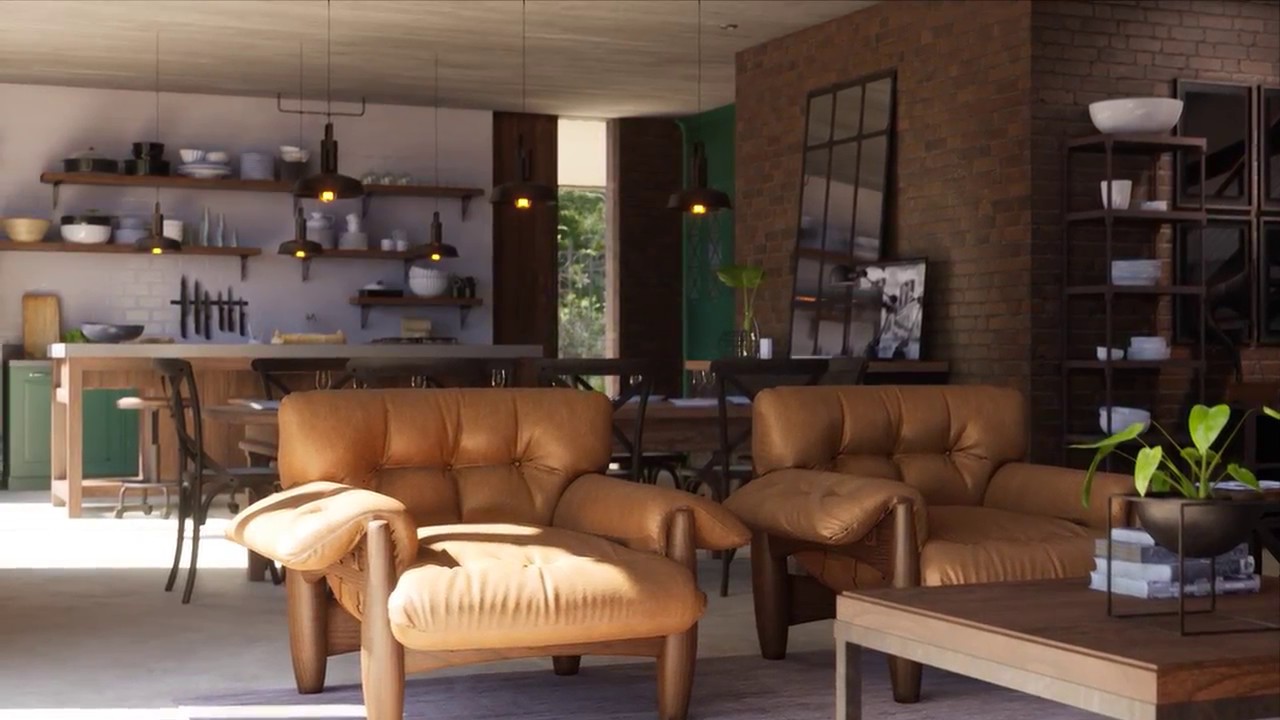
This is my CGArchitect Award 2018 submission.
It was rendered in real time at 1440p in Unreal Engine 4 and captured with Nvidia ShadowPlay. The game is locked at 30fps but the video capture was 60fps (I found that helps to reduce video stuttering). Computer used: i7 7700 + 1...
this is prob the nicest one ive seen
think this dude won an award a while ago
exotic cave
That's hot stuff, I agree!
The guys I see on LI are arguably up there with that though
You can get there 😄
( Just a random thought, experiment with possibly turning your Ambient Occlusion up a notch. )
floral arrow
yeah im sure i could tune in PPV's as well
i know that baking it in production will do wonders as well
i feel like the most realistic ones are day time ones
with sunlight coming in, seems that most arch vis is done with sunlight
exotic cave
Check out stuff like this:
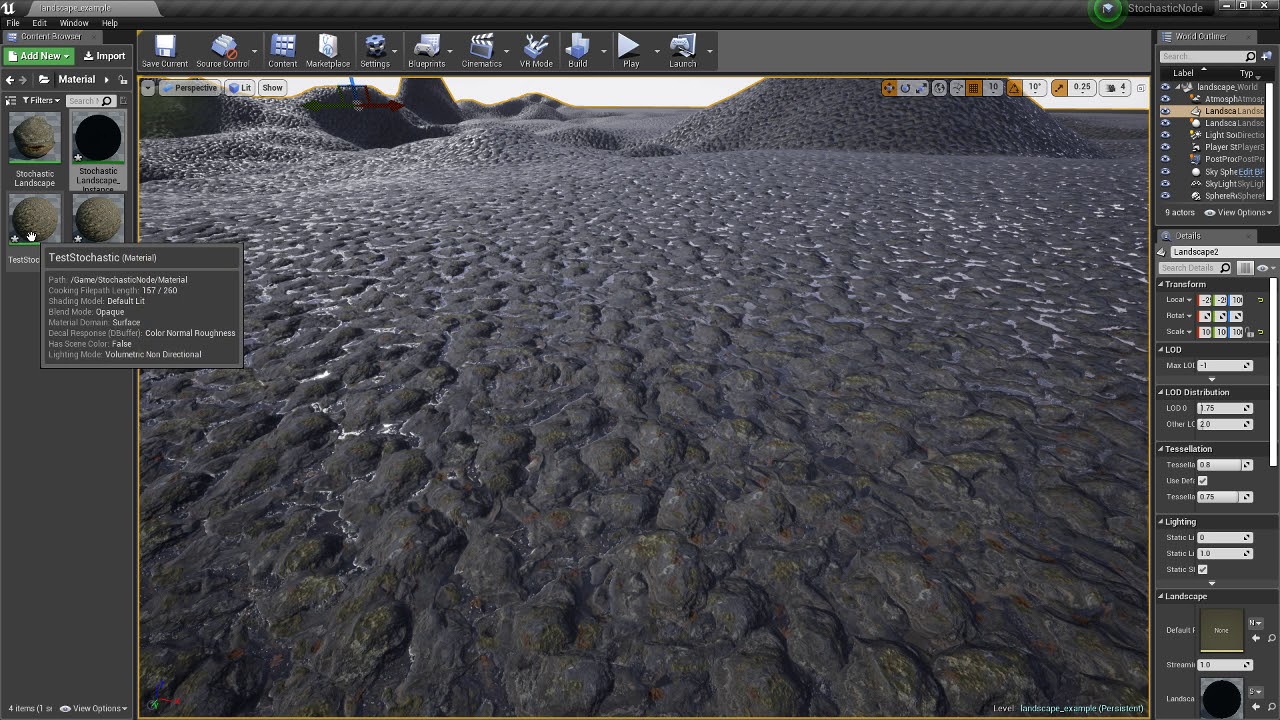
Demo of the Stochastic Height Blend node for the UE4 Material Graph
I really feel like if you can break up that tiling a little bit more, and add some dirt/normal masks, you might just magically find out you've just made the jump to photoreal.
Stochastic sampling will literally produce an endlessly non-tiled in-game material from a tiling texture.
But, it's a bit techy. 🙂
floral arrow
could that be applied to megascans textures
 shadow depot
Hey, something is wrong with my project settings. The Target Plattforms are only Windows, Mac, Linux.. but somehow settings like Depth of Field on Post Processing are only in their mobile Edition available (Mobile Depth of Field instead of the usual). Also other settings seems like the project is setup for mobile. Anyone knows where i could have a look, where there is still mobile setup in the settings?
exotic cave
@floral arrow : Absolutely!
floral arrow
from what im seeing a dirst mask is to add a more grimy kind of thing to the texture is this right or does it do something else you were referring to
exotic cave
Yes, that's it
It's not even so much needing to look "grimy" as just to create a larger pattern that helps break up the tiling a bit as well.
It adds speckles, little details, and should be set at a different tiling scale from the main textures for best results.
floral arrow
oh i see
exotic cave
You could even think of it as simply a detail mask rather than a dirt mask
It doesn't have to model dirt 😄
Your shots are really nice. The main thing I see in them that breaks the immersion is too-visible tiling. Stochastic texturing breaks up tiling, so does adding detail maps/additional normal maps that blend at a different UV scale to the main texture.
floral arrow
yeah youre seeing it on the marble counters you said?
exotic cave
On everything that isn't actually meant to be repeated. Your floor tiles are fine for instance 😄
But, even they'd get more cooler looking with dirt maps (you can't use stochastic texturing on repeating patterns)
I'll maybe look into making you a basic stochastic node or material as an example at some point.
floral arrow
i wonder why quixel doesnt build this directly into their materials
exotic cave
@plush yew : Because dirt maps aren't really about making things look "dirty", as I said. Honestly, detail maps are a better way to describe it.
floral arrow
that would be awesome @exotic cave i havent gotten into blueprinting really
exotic cave
Everything is dirty. 😄 And shiny too. Those are basic PBR principles
Just remind me if I forget JC, I got a lot on my plate lately 🙂
floral arrow

Quixel
Recently I can across a UE forum post talking about how they removed texture tiling (Links below) I was wondering if it would be possible for the Master Materials to implement this?
https://youtu.b...
looks like this was recently talked about in a quixel forum post
exotic cave
Yes that's the idea
And yes Megascans stuff will look fantastic with stochastic tiling
It's the kind of thing it was meant for
Stochastic tiling has really just been available in a commercial sense within the last year or two, don't fault them for not having it built in yet 🙂
floral arrow
yeah all good, ill look into it myself and see if i can do it if not ill hit you up
exotic cave
@light lintel : Basically it fixes tiling problems on non-regular materials at distance
It will take a texture, and instead of having it just tile endlessly, it will sample it such as to produce a literally endless non-repeating texture when it's drawn
Sure you can 🙂
grave nebula
stochastic blending is cancer, you gentlemen, should try to avoid. Picture already has enough noise even without it.
floral arrow
@grave nebula why wouldnt you use it
grave nebula
why would i ?
floral arrow
im just curious getting other peoples opinions
exotic cave
It can produce artifacts when done wrong, and arguably is not quite as nice as actually hand painting all meshes with non-repeating genuine texture
But it's such a fast nice workflow once it's implemented. Drop in a tiling texture, boom, it actually doesn't become a rug pattern at distance.
grave nebula
It introduces noise into the picture and does not give sufficient performance win to justify that.
exotic cave
If you can actually see stochastic "noise" in that sense it's being done wrong, I feel.
Good stochastic sampling should be seamless to the eye.
Back later, be well all!
 chilly gale
I'm not sure what's going on or why, when my landscape compiles it bakes landscape textures and hangs at times and just stays at that number and won't complete the bake
version 4.24 I'm talking about
shadow depot
Hey, something is wrong with my project settings. The Target Plattforms are only Windows, Mac, Linux.. but somehow settings like Depth of Field on Post Processing are only in their mobile Edition available (Mobile Depth of Field instead of the usual). Also other settings seems like the project is setup for mobile. Anyone knows where i could have a look, where there is still mobile setup in the settings?
@shadow depot Can someone help me with that?
 weak cypress
my pc has been running unreal really slow
grim ore
@shadow depot so what does it show when you try and enable normal Depth of Field in your PP volume?
shadow depot
I can't
Or at least dont know where i can enable it, its just replaced by mobile depth of field in my PP Volume
grim ore
there should be 2 sections
shadow depot
Also on Rendering the Mobile Settings are Shown first
 frozen pollen
Don't know where to ask this: i have several cables in my level and they all worked properly up until now. Before they would dangle and swing in real time as you move them. Now for some reason the cables are stuck in straight lines until the game is started, then they'll go back to normal. This is a problem because the only way that I can tell what the cables are gonna look like now is by starting the level. How can I fix this?
grim ore
and that is normal
shadow depot
Wait let me have a look again
Ok, i have both listed up
Ok, i guess there was a non existing problem in my mind, thanks anyways..
grim ore
yep yep
frozen pollen
if it helps at all, this only started happening after i implemented a pause and menu system, i don't know how it would effect the cables like that but that's my guess
floral arrow
if i want to increase my page file size to test something in unreal engine requiring more ram than i have on my desktop do i increase the page file on the harddrive that unreal engine and the project file are on or do i increase it on the operating system HDD?
grim ore
page file would be a windows thing so adjust it in the system settings
floral arrow
yeah, i am at the page to change it but i can give each seperate HDD its own page file
grim ore
which drive depends on how much space you have and speed, ssd would technically be faster
grim ore
it doesnt use a page file based on the drive you are using
chilly gale
I take it nobody has any thoughts on why this might be happening? when my landscape compiles it bakes landscape textures and hangs at times and just stays at that number and won't complete the bake
version 4.24 I'm talking about
floral arrow
@grim ore so it doesnt matter which hdd i do it on?
@chilly gale what does swarm say
is it stuck on 0%
grim ore
it doesnt matter. If you have 10 of them it will just page out to the least use drive at the time. I guess in theory putting the page file drive on your fastest drive that is not being used, say a secondary non windows/application drive might give the best results.
if you really dont know which one to put it on put it on both if you have space and see what happens. Page files tho..... dont expect miracles
floral arrow
yeah im really just wanting it because i have barely not enough ram to compile a very complicated lightmap bake
chilly gale
the dialog box is saying "Baking landscape Textures 415 and the working indicators and animated but the number is not reducing as expected
floral arrow
at the end of the bake is the main issue @grim ore it will max out my ram when compiling the bake after 100% and crash UE4
@chilly gale hmm im not sure personally
chilly gale
thanks for trying anyway
grim ore
check in the lightmass program itself, the swarm agent should be running the task bar. check the logs
chilly gale
Not seeing any swarm agent, I'm using dynamic lighting could that be why
 radiant iron
New to using tessellation but any time I try to load it up it just crashes
 fading river
Does anyone know of any tutorials which would show how to get an end-to-end hello world type multiplayer set up? For example, start the client, connect to a server, either have a menu to choose a map and game mode or enter a 'lobby' map before choosing the real map and game mode, and then enter the game map. No gameplay required or anything, I know how to do all that, I'm more curious about the ecosystem setup so that a friend and I could connect and be in the same game together.
radiant haven
How can I controll Overlap
that it only overlaps with a specific mesh
and not with anything
exotic cave
@frozen pollen : This might help? You could start your cables logic in something like this https://docs.unrealengine.com/en-US/Engine/Editor/ScriptingAndAutomation/Blueprints/StartupObjects/index.html
Describes how to define Blueprint functions that the editor invokes when it starts up.
 lofty wave
Is there a way to make a 16x16p image show the pixels normally and not smoothed?
 past eagle
I'd like to share a video of a level I made. Y'all know which channel I should plop that in?
grim ore
@lofty wave make sure you are using UserInterface for the compression type and Nearest for the Filter type on the image in the engine
plush yew
anyone seen a landscape layer blend just stop compiling like this?
it just flatly leaves an absolute world grid material where i paint and nothing seems to fix it, tried deleting and throwing the layerinfos back on fresh and it just goes through the same throes
grim ore
how many textures are you using in the material?
plush yew
this has 5
grim ore
in your texture(s) change to one of the shared type.
 runic fern
Hello Mr Mathew How are you
grim ore
Good. Doing nothing productive today lol 🙂
runic fern
Well me too i did nothing today and learned nothing im feeling sad 😄
plush yew
cool, where can i find that setting? in the material master itself?
grim ore
that is on each texture in your material
plush yew
all maps? split up roughness normal etc?
is there a significant difference between clamp and wrap?
i guess ill just do wrap for now
grim ore
there is but it will depend on your material and texture
 glacial pecan
why does deleting a hundred or so static meshes from a fbx scene import takes fucking ages?
(and like, each static mesh in my case has like 2 polygons...)
exotic cave
@plush yew : This is usually caused by too many texture assets in one shader and @grim ore gave you the correct fix
grim ore
the engine will load each item you want to delete, check for dependencies, then repeat.
exotic cave
Materials that use many textures must always use shared space
plush yew
noted, thanks
runic fern
I asked in Animation Channel i wont to spam the question but you are Always the Rescue Man 😄
What is the Technique they Used in games like Human fall flat , And Stick Fight For Character Animation ?
exotic cave
Texture assets are limited to something like 12, of which the engine itself reserves one
Nothing wrong with shared space 😄 It performs just fine really in my experience
@runic fern : You mean inverse kinematics, or ragdoll physics?
runic fern
Yes
exotic cave
Things like stick fighters are usually using some kind of IK
plush yew
Awesome, thanks @grim ore , always got the answers 😄
exotic cave
Falling characters, more likely ragdoll
runic fern
can that be done inside the Engine it self
exotic cave
Inverse Kinematic systems allow for reactive animation, such as foot placement on non-planar terrain.
You can blend the results of physics-based animations to ragdoll your characters.
runic fern
and its looks like they are not using alot of animation just walking and gun holding
i will check it i hope its teach me because i learned nothing today 😄
exotic cave
And getting hit, and falling down
Always remember that failure states are included in any functional game's actions and animations
runic fern
i've tried to make this with stick man its not going up just sleeping 😄
exotic cave
The official Unreal Engine inverse kinematics documentation is pretty good and interesting. Ragdoll physics, you might want to find a good YouTube tutorial
Neither one is strictly easy though, so be prepared to study hard 😄
runic fern
i've watched the videos all talking about ragdoll falling not movement it self
yes sure i'm Ready as we are into the Quarantine i can learn alot
exotic cave
I mean, I don't have much more to teach. Those are the names of the disciplines. I am not an expert in either 🙂
I am a technical artist, but mostly I do environments lately.
YouTube/Google will be your friend 🙂 IK and ragdoll have been done in Unreal games very many times 😄
runic fern
Yes I hope Mr Mathew Record A tutorial for us xD He is very good with solution so he can deliver the idea fast
goodluck mate
lofty wave
First of all thanks Mathew
So I have another question: Is there a way to make a UV parameter for a material
I noticed that it turns 2V constants into 4V parameters which can't be connected to the UV node
grim ore
? what exactly are you trying to do
lofty wave
I want to make a texture which has different UV sizes per instance
grim ore
you would connect a texture coordinate/landscape coordinate node into the texture
lofty wave
I know but it isn't a parameter, is it?
grim ore
its not, you can multiply it against a parameter(s) to change it in an instance
lofty wave
Oh I didn't think about that
I'll give it a try
Ok I did it and it works
BUT
the texture isn't repeating itself
Shouldn't it normally repeat itself when you downsize it?
grim ore
so if you are using the shared, is it set to wrap or clamp
grim ore
and that is the difference between wrapped and clamped 🙂
 royal sail
Hey guys! I want to make a 3D model of my world map and use it as, well, a map. Is there a good/performant way to display only 3D geometry as it falls within certain bounds? I experimented with dynamic meshes and slicing them, but it seems kind of heavy.
Is there a partial view of a mesh, or something along those lines that I could use?
abstract relic
I would use post process and stencil for that
 vocal flume
I have the following setup.. 3 different size textures in my material. The 2k map, 512 and 1024 map takes like 10mb disk space on my pc. I'm afraid this will increase my package size. Its supposed to be a mobile game. Is there a way to get around this or Do I have to go easy on the textures and stick with 512?
 digital anchor
you could use the higher res texture everywhere and use the mip bias commands
 atomic forge
Hello! Is there any reason my lighting goes from this (unbuilt) to this (built)
preview
really?
I'll try building it the next level then
radiant iron
Still don't know why when i activate tessellation UE4 just dies, possibly a bug?
radiant iron
No saved logs, report sent to Epic
vocal flume
@digital anchor have not used mip bias commands before. So lets say my 2k texture is 5mb.. if I use mip bias command, can I restrict it to display only 512 if the setting is low?
 burnt creek
Hi, can someone help me with a UE4 task? I'm trying to create a simple scene but have basically zero Unreal Engine skills. Basically I have the 3ds max model and texture of a truck based missile delivery system (DF-41) in .3ds/fbx format as well as converted into Unreal Engine format. This is basically a 18-wheeler sized truck with a large missile laid on top of it, and then it is raised at an angle and launched vertically into the sky.
I'm wanting a very simple scene, some small generic island sandbox map in UE4, where the end-user can walk around and circle the DF-41 (truck based missile delivery system) and then optionally decide to go to the door/entrance and jump in and drive the truck around to any arbitrary location on the small island. and then the ability to hop back out and hit a button or something to launch the missile, in which the missile loaded on top of the truck will be raised at a vertical angle and then the missile shoots into the sky.
I converted the 3ds max model to Unreal Engine 4.24 project but wasn't able to do rig conversion for the animations.
Basically I'd like for the model to be "drive-able", and to be able for the player to hit a button to launch the missile /payload on the truck after having driven it to any arbitrary point on the small island surrounding by water. Then the missile on top of the truck gets raised to vertical position, missile fires into the sky leaving trail of smoke behind in its wake. Missile doesn't actually "go" anywhere it just flies higher and higher eventually disappearing from screen.
reddit
48 votes and 8 comments so far on Reddit
 tired merlin
hey, im not sure if this is the right section but i was just going to take a look into recoils and was wondering if it was done via code or if it was part of the actual fire animation?
grim ore
@burnt creek something like that would go in #looking-for-talent , read the pinned message in there
plush yew
Am trying to make an array for the targets that enter my collision
is there a way to do that?
exotic cave
@atomic forge : Preview lighting uses Dynamic lights. The second image there is your built Static lights.
plush yew
For each loop?
exotic cave
If you want them to match, just set your sunlight to Dynamic. However, rendering will be more expensive performance-wise, and if you're trying to develop Marketplace assets they have to work in all light conditions so it may be worthwhile to try to make them work with Static lights too.
(For what it's worth, I also get terrible quality on foliage shadow edges on Static lights.)
digital anchor
@vocal flume yep exactly
 pearl sentinel
Do you know the node name?
@plush yew get overlaping actors https://docs.unrealengine.com/en-US/BlueprintAPI/Collision/GetOverlappingActors/index.html
Get Overlapping Actors
frozen pond
hi guys, i need to put X static mesh into circle, but idk how to handle that ? (not blueprint way more like concept way)
 abstract relic
What circle
abstract relic
A boundary?
frozen pond
i want to input X static meshes, put them into something like circle (?) and then rotate them using action
abstract relic
Or are you inquiring on how to spawn meshes along a spline
frozen pond
more how to algin them like this with possible to change main one ?
abstract relic
In that case. Get the tangent normals of the spline and set each mesh to match the tangent direction.
frozen pond
anyway to do that without spline ?
abstract relic
Sure. With the power of math
frozen pond
k, ty
plush yew
What files/folders can be safely deleted from a source build of the editor without breaking anything?
Looking to shrink the file size as close to a Launcher build as possible with no intention of making further changes
kindred viper
thats difficult to say because we dont know your project. Aside from the usual stuff, you could get the UE4 Project Cleaner. But if its the source engine side of things, I tend to do that at the start of a project and add what I need otherwise you never know what you are dependent on until you break it
plush yew
It's not a project, just an editor build from Github - I'm looking to strip it down to match the Launcher version so it can be distributed more easily. It needs to have the functionality of creating new projects, but there's nothing specific in there.
kindred viper
its module/plugin based. You just need to go turn off what you don't need.
Bear in mind though, last time I tried doing this, I spadged it good n proper. I didn't want any of the Apple or Google stuff, so disabled all that, and it broke beyond repair. So I had to re-enable and recompile. Still don't understand why. They both come as plugins but they are dependencies that need to be there.
 noble sentinel
so um. i just loaded up my project and everything is black
like lit, unlit
wireframe, detail lighting
everything is black
and all the icons for lights are 2D instead of being floaty images that follow your camera
any idea of how to fix this?
frozen pond
@abstract relic ty 🙂
 sinful osprey
Anyone know why the decal on the right looks right, but the one of the left is messed up? Using the same material, right is a decal placed in the world, left is on the character. The settings under Decal on both are the same. Not sure where else to look
kindred viper
sinful osprey
Figured out the decal issue. Not sure whey, but I had to rotate 90 degrees on the Y axis. Seems like it should be set to the required projection direction by default? What do I know, though. 🙂 Got it working
 jovial pollen
tbh Idk why im still here, I've gotten much more advanced with UE4 since I joined
I guess this is a good bye to everyone
bye my friends
kindred viper
Bye Obi-Wan.
 signal bone
Hello, im trying to start developinga 2.5d doom like game
i already found some tutorials on the rotatory sprites in a 3d enviroment, but im still lacking information about the UI that also displays the weapon shooting and stuff, anyone can lend me a hand on that?
atomic forge
@exotic cave Switching to dynamic lighting worked thanks for telling me about that
plush yew
yo i feel so dumb for not asking sooner cause i was grilling myself over this yesterday, but how do i change the mesh of the advanced locomotion system v4? i did it and then my characters shoulders became deformed and spikey,i have seen many people have their characters legs move awkwardly too. so clearly this is somewhat of a common issue. pls answer asap
@jovial pollen tbh you should still stick around at the end of the day, you can't get TOO advanced, also there will always be someone more advanced then you so when you come across a problem even YOU can't figure out and there are no tutorials you can always come here. also you can give back and help noobs like me :p
 sonic pagoda
@plush yew you should really ask that on the ALS discord, if its common the people there will help you for sure
plush yew
oh ok i think i found it
signal bone
anyone knows how to remove the tint from an image on widget?
signal bone
Hey
Can someone help me out?
im trying to put a sprite on a widget as a image
but it adds a tint on it
how do i remove that tint
signal bone
@plush yew Yo do you know something about this?
plush yew
tbh no
signal bone
Dam it
plush yew
imma check unreal and see maybe i can help tho
plush yew
ok
are they all set to 1.0?
@signal bone
Spawn Zombie "Child BP"
As i do that the whole ue4 crashs
lol
ue4 do be crashing a lot tho
compared to every other engine i've used
XD
but it's much easier so i can't complain
 sly coyote
Anyone know a half decent tutorial on getting npcs to turn their head towards my character when i step into thier vision cone...i know i can use "look at" in anim bp...but how do i get it to look at a bone from a different skeletal mesh?
I want my shop keepers to keep on eye on me to make sure im not stealing anything 😋
 grim shale
Hello, Is there a way to lock an animation in place using UE4 (or an external app), As i have downloaded an anim from mixamo that doesn't have the "InPlace" option for some reason. so when i use that anim the character slides forward then teleports back to the correct place. Thanks
Note: I have tried enabling the "EnableRootMotion" That didn't fix it though.
 trim steeple
@grim shale best way is to use a 3d software and remove the root mouvement
You can also fight against the root within persona, but definitely harder
And won't be as good as what blender/Maya can provide
grim shale
I already got blender so i will try it.
signal bone
@plush yew sry dude was afk
if i choose any color property to 0 the image just change colors
i want it to not have any kind of color on top of it
plush yew
hmm maybe change all of them to 0? or 1 maybe. cause 0 makes it transparent and 1 makes it white.
 sage coral
Trying to go about doing something not sure if anyone can help me or not I'm trying to design a feature where after a match if a certain criteria is met the player will be rewarded a loot box kind of item where it gives the player supplies to the players inventory
 green sky
is anyone familiar with Voip or Ovrlipsync? any help would be greatly appreciated. Thanks in advance.
 gilded plinth
Dang
Could anyone help me figure out why my transform looks really funky in the viewport
X,Y,Z is no longer red green blue lol
now it's all psychedelic
 whole quarry
Looks like the editor settings are changed
half turtle
how can i save and load a reference on save game? are references addresses in memory? or do they point to the object full name?
glacial pecan
damn, there's no way to script the blueprint editor? you can only access selections in the main world outliner? 😦
exotic cave
@glacial pecan : Blueprints can call C++ code
glacial pecan
@exotic cave urr... with all the UMG issues in Blueprints, I guess it's time to finally learn C++ with Unreal then 😦
exotic cave
There is never a bad time to learn to code 😄
I paradoxically find that even though I've been programming for nearly thirty years, UE is good enough that I rarely have to code. But, still, for advanced things, a Blueprint can never match the power of pure code.
glacial pecan
I haven't used C++ in about 20 years because I hate it 😛
Blueprints appeal to my right brain
exotic cave
But, C++ is the most powerful programming language ever developed 😮
 grizzled condor
Hello guys how can i remove this ?
 teal tulip
Baking the light
grizzled condor
build?
teal tulip
Yeah
grizzled condor
it take a bit long 😦
glacial pecan
welcome to static lighting! 😉 (wait until 4.26/7 has official GPULM to speed up things)
is it possible to add a material selector in an editor utility widget?
teal tulip
4.26 GPU light takes about the same time, at least until they add the performance improvements
You have to make your own I think, there used to be but no anymore?
exotic cave
Anyone here really good with foliage optimizations?
How to turn LOD3 into a billboard, etc.?
And modeling in such a way as to prevent transparent overdraw?
 jaunty horizon
hey guys, i have an issue if i change the frame limit in game my sensitivity feels slower by high fps limit. that's not normal i think. anybody some idea why?
 flint cedar
Hi guys, I managed to do point and click with the blueprint below, but the camera turns as well once you click. How can I make so the camera doesn't change and stays static?
 dense gate
I'm having an issue that really annoys me
I'm trying to rebuild my project using 4.25 P5, but I keep getting an error that "<project>Editor modifies the value of bCompileChaos" even though I removed that line long ago
I tried deleting intermediate folder and it keeps erroring with that
umbral ferry
i rename trigger voulume on my editor
how the rename can be automatic on BP?
Should my spike be on the sphere ?
 regal zephyr
Hello guys. There is any way to disable the skylight in certain areas?
 ivory yacht
hello guys I need a programmer to be able to run my project of an mmorpg online. in order to create the selection of characters and many various things. who is interested please contact me
proper stump
Im trying to get that texture look in unreal, in blender you turn on Cavity and push the ridge and valley values to the max. Any idea how to create that in UE4 ?
umbral ferry
wtf?
exotic cave
@regal zephyr : Yes, you can create zones that have a collision trigger for a blueprint that turns Visible on the skylight to on or off
However, you may find really abrupt shifts in lighting that way. Using several different postprocessing volumes for your scene might give better results.
An approach like this, only turning on/off your skylight rather than switching cameras, will work: https://docs.unrealengine.com/en-US/Gameplay/HowTo/UsingCameras/SwitchingCameras/index.html
An example of how to setup and trigger the use of multiple fixed camera angles.
regal zephyr
@exotic cave might be a bit tedious cause i have the inside and outside completely close between each other. so both of the areas will be visible and you will see the light changing in front of you.
@exotic cave thank you for the link btw
exotic cave
Shouldn't be too hard to adapt that approach to having collision zones that change lights instead of cameras. Good luck.
regal zephyr
cheers 🙂
 worldly axle
Hello, why my Event Actor On Clicked doesnt works as expected ? The white point on the video is the center of the screen, but when i click on the actor it doesnt works , i need to click a bit near it . Like the center wasnt the click point/ idk https://streamable.com/vre89x
 grim ore
@worldly axle clicking is with the mouse and where the mouse cursor is at (even if it's hidden), its not the center of the screen by default
 scarlet siren
Hi someone can PM me? I have a question about tracking in Unreal , ty in advance
 novel summit
What type of tracking
 desert timber
Hey i was wondering i am looking into making my own game and i dont know if i should install creator or publisher license?
could i have some help plesae
 fierce tulip
unless you have millions to spare, pick creator
desert timber
Okay but if i want to publish my game at the end on steam what do i have to do? @fierce tulip
fierce tulip
well, pick the creator one.
and read this: https://www.unrealengine.com/en-US/eula/creators

Create stunning real-time visuals for architecture, product design and manufacturing. Unreal Studio drastically reduces iteration time through efficient transfer of CAD and 3ds Max data into Unreal Engine.
desert timber
I am just wondering will i still be able to publish it if i choose creator
fierce tulip
you can
the publisher one is for entire teams that want additional direct support from epic's teams
fierce tulip
if you download and use UE4 you need to learn, understand, and follow those rules.
novel summit
@light lintel there are many tutorials on YouTube
Just look up "how to make my camera stop clipping in ue4"
 marsh swallow
LogCharacterMovement: Warning: GetSimulationTimeStep() - Max iterations 8 hit while remaining time 0.073199 > MaxSimulationTimeStep (0.050) for 'Fishing_Fish_Trout4', movement 'Walking' - Any idea what is triggering this. It only happens to a couple actors out of like 50
 low violet
Hey, why am I not getting the crash reported on crashes in editor? Instead I get a fatal error and I just click ok
Where is the crash reporter?
fading river
Do you guys think UE4 would be suitable for something like Echo VR clone? (VR, zero gravity with full rotation, hand-based locomotion, IK bodies, per-poly hit detection, dedicated server + clients multiplayer)
Would a block-world POC be something that would take a long time? Any suggestions for tutorials or UE4-learning things for somebody who already knows how to program and has previous gamedev experience (ue2, unity) but isn't familiar with all the changes in UE4? I've found a lot of the bits and pieces such as blueprint-based VR hand locomotion, c++ code for multiplayer fps, the templates for non-multiplayer fps, etc, but joining them all together isn't very clear. I know what I want to do and how to do the code for it, but I'm not sure how to go about doing it in UE4 or if it's even possible (ie dedicated server properly handling IK limbs and hit detection) without major major engine surgery.
plush yew
Is there any way I can deform my terrain when say, a ship crashes onto the ground?
Or what is the process called, so I can find some papers on it
 strange night
@light lintel Set whatever you want to block the camera, to have the camera collision channel as block.
 velvet ravine
Hey, Come across a little Problem Just wondering is anyone could shine some light in it,
When i change My Vid settings to Borderless i cannot change the Screen Res
strange night
The actors mesh itself will have it's own collision settings, you could adjust those.
 unique spire
does anyone know why i cant find anim instance in my anim graph using 4.24
 balmy rose
hey guys - can anyone help me out on the cinematic camera regarding depth of field?
i watched some videos and also read the documentation
Simulating focus by blurring the scene depending on depth.
it should work and i also placed my debug plane right but i dont get any kind of blur /depth of field effect
iam using the newst ue4 version
here are some screenshots from my camera settings
strange night
@light lintel I believe it defaults to a "Character" collision profile which is different then whatever the capsule gets. I've got custom profiles so, can't really see atm, I had the opposite problem and wanted the camera to pass through actors. 🙂
balmy rose
strange night
Set the camera channel to ignore on the capsule, or capsule and mesh if it's blocking too.
If you go into the project settings > collision, you can add a custom profile, and just apply that to your characters.
You'll want the other character to ignore camera, just leave the camera alone.
the other characters capsule or mesh's camera channel collision settings, which is a setting on the capsule or mesh under collision.
It'll be in this section:
 mossy plover
does spiralblur not work anymore? or am i missing something. watched an old video on how to make frosted glass, but havent seen anything of the like recently
 lucid magnet
can anyone help understand why this doesnt play the animation montage in game?
abstract relic
Add print strings for both On complete and a print string on the True and False
 ornate chasm
Hi everyone, new member here. Just a question, Is there a group for UE4 virtual production?
abstract relic
Virtual production? Can you elaborate
 thorny venture
Hey! another new member here with a dire need of guidance about painting the landscape.
I am in over my head and I need some help
lucid magnet
@abstract relic i know its working - but i think its something with the montage or the animation
i dont know what
ornate chasm
@abstract relic set ups, equipment, tutorials etc
using UE$ to run virtual production shoots
abstract relic
No. We don’t have a channel for that. Though I’ve been pushing for a hardware channel. The closest we got is #aec-visualization
But if you haven’t already. Check #more-resources
thorny venture
The target layers are not being shown for painting. What did I do wrong?
ornate chasm
No. We don’t have a channel for that. Though I’ve been pushing for a hardware channel. The closest we got is #aec-visualization
But if you haven’t already. Check #more-resources
@abstract relic okay will do, thanks
abstract relic
Show us the landscape material 🙂
lucid magnet
it seems to be problem with this
abstract relic
Zoom in please
thorny venture
This works?
lucid magnet
@abstract relic how do i cache the montage?
abstract relic
Just gonna plop this here. Layer blend is going to be your problem
Go to #4
https://docs.unrealengine.com/en-US/Engine/Landscape/QuickStart/index.html
Getting up and running with the basics of the Landscape System in Unreal Engine.
thorny venture
@abstract relic I have followed all the steps but the target layers are not showing whatsoever
I even tried to remake the material from scratch but it too yielded no results
abstract relic
Ah R3HTRO my apologies. It’s been awhile since I messed with montages. You need to cache the state machine, not the montage. Drag from the node >>> new saved cache pose
Then for the Base pose input >>> Use cache pose ‘[cache pose]’
Then for blend pose 0 >>> use cache pose ‘[cache pose]’ >>> slot ‘[whatever your montage is called]’
Eh. This explains it better than I ever could
https://docs.unrealengine.com/en-US/Engine/Animation/AnimHowTo/AdditiveAnimations/index.html
Demonstrates how to blend animations together, in this case, a character that can move and fire a weapon at the same time.
Make sure that material is applied to the landscape. Then you’ll get a bunch of blank layers that you need to assign AAUDITORE
I must work now. Good luck you two 🙂
 fierce forge
hello , how i can sync folders from content browser with a friend with multi user ?
thorny venture
Make sure that material is applied to the landscape. Then you’ll get a but of blank layers that you need to assign AAUDITORE
@abstract relic It is already applied
anyone, please help
strange night
@fierce forge https://docs.unrealengine.com/en-US/Programming/Deployment/UnrealGameSync/index.html is an option.
thorny venture
@strange night Please be kind and help me too
fierce tulip
<_<
thorny venture
I really need you guys, I need to submit it to my college to get my marks and I have no idea what to do
fierce tulip
"Be patient when asking for help. This isn't an official support channel or a paid service. This server is run by the community, for the community. Repeatedly begging for support or sending unsolicited DMs asking for help is considered harassment and may result in an infraction or a permanent ban, depending on severity."
thorny venture
I am sorry
strange night
Looks like you got the right idea, not too sure myself. Maybe check this:
whole quarry
@thorny venture Lightning needs to be rebuild
thorny venture
@whole quarry Let me try that
strange night
Not sure how that'd affect your menus.
 scarlet birch
With world comp tiled levels is there a way to change LOD distances and settings for all levels at once?
 harsh tiger
i've done some code changes and im not getting this error. but this is a new one to me. does anyone know what it could be?
normal burrow
Your not getting that error?
harsh tiger
thats the only one that shows up?
strange night
I've found that's usually UBT not liking, something. What, is another story.
harsh tiger
wtf am i looking at 😂
normal burrow
Output log please F5
harsh tiger
normal burrow
Build log or w/e
plush yew
Guys
Am trying to spawn my Zombie again as he die
As i do "Spawn Bp Actor" the whole thing just crash
normal burrow
Immediately above that line @harsh tiger
harsh tiger
ah i see it, ty
scarlet birch
Lod generation in level details is the details percentage a percentage of LOD0 or the LOD 1 lower than current?
harsh tiger
i wonder why it doesnt just say that in the error list?
normal burrow
UHT is bad with errors
scarlet birch
I'm assuming it's of 1 lower but thought I'd ask in case someone knew otherwise.
normal burrow
Always check that log when you get the one error you sent
0 is supreme quality mike
harsh tiger
i will do, thank you! i changed int8 to int 32 an it fixed it
normal burrow
I’m not sure on percentage or if that was the question though lol
exotic cave
I ❣️ Unreal Engine!
harsh tiger
do you have any tips on how to improve compile time? it takes a few minutes the very first compile of the day and then it gets faster after that
just wondering if there is any settings to tweak in VS
normal burrow
Better hardware and or disabling unity builds if you’ve got the muscle for it
 ionic lagoon
I made the camera clamp for when my character slides, so you can't look behind yourself, but how would I make it go back to normal? I'm using the player camera manager for this.
normal burrow
Google bFasterWithoutUnity F5 there is a new name for this now but that still exists.
It will disable the huge compile units which will speed up compile times if you’ve got lots of stuffs going on in headers (and are just changing single things)
harsh tiger
Google bFasterWithoutUnity F5 there is a new name for this now but that still exists.
It will disable the huge compile units which will speed up compile times if you’ve got lots of stuffs going on in headers (and are just changing single things)
@normal burrow
i will do, thanks again
 brittle gulch
Do you guys also have problems with the marketplace where images don't load sometimes?
strange night
@ionic lagoon Not sure on your setup, but I'd think you'd just have a bool setup to "clamp camera" when you need it. If you're getting it enabled, just revert the bool?
@brittle gulch Only when I browse from work behind a proxy/content filter... 😉
brittle gulch
It's happening at my mother in law's house XD. But some images get loaded, just a few of them don't. And even if I try refreshing the page, it won't load :/
strange night
Also, adblocker doesn't play nice with some of the documentation I've found.