#ue4-general
1 messages · Page 705 of 1
 exotic cave
 frank oar
yes @exotic cave It begins in an idle pose, It would be nice to return to that pose once played
exotic cave
@plush yew : Building your own landscape out of non-landscape things is totally permissible, though I don't know how it interacts with advanced features like grass etc.
@frank oar : Reading the docs, I don't think you can define that at the Animation Graph level. (Could be wrong.) You will probably need to integrate an Animation Blueprint: https://docs.unrealengine.com/en-US/Engine/Animation/AnimBlueprints/index.html
Animation Blueprints are visual scripts that are used for the creation and control of complex animation behaviors.
 silent parcel
I've got this issue appearing now, I've added a motion controller to my game, but now when I press play, it says "Can't play in Editor when performing Add Component operation"
exotic cave
Would help if you noted exactly what you're trying to animate and why. (Walk pose, action etc.)
 plush yew
@exotic cave thx, the enviroment is just a basic sand texture right now, so I think I should be ok.
 smoky grail
ah hello?
 fierce tulip
ello
frank oar
@exotic cave thank you for the information.
The mannequin begins standing on the spot, not moving. (Idle pose)
when I use the flipflop with a button input, the animation switches to running and doing a flip.
However, instead of returning to its Idle pose after the animation, its continually loops the run and flip animation.
frank oar
its flipflop bp looks like this
exotic cave
@frank oar : You can use an Animation Notify in that Blueprint: https://docs.unrealengine.com/en-US/Engine/Animation/Sequences/Notifies/index.html
Notifies are a system for setting up and receiving events in Animation Sequences to perform external actions.
I believe you find the animation in question, add a Notify at the end of it and then you get a Notify Event node you can add in the Blueprint.
smoky grail
HELP PLS???????????????????
exotic cave
@smoky grail : Don't spam the channel and don't be rude, please. Ask the question you need answered.
smoky grail
finaly
 frozen pond
@smoky grail lel
smoky grail
ok so i imported some models
exotic cave
@frank oar : After that you run the Notify Event out pin into your animation stop start pin.
smoky grail
but
frank oar
@smoky grail Speak up, let the people in the channel know what you need help with, If anyone sees your issue and can help they will 🙂
exotic cave
@smoky grail : Your materials aren't getting imported. Where does that model come from?
smoky grail
this one worked
exotic cave
Looks nice. Where are these models coming from?
smoky grail

Originally known as Frosted Freddy, this version of a freezing cold Freddy is coming to visit for this Christmas season!
Model by: Scott Cawthon & Illumix
Please credit the model’s authors before using, - Freddy Frostbear | Special Delivery - Download Free 3D model by JuztAndy...
exotic cave
And the other one?
smoky grail
same place
exotic cave
May I see the link please?
To the one that isn't working?
If you're just going to download a bunch of free models to work with from the Internet, and not Epic sources, you cannot be guaranteed they'll automatically import into UE automatically.
Experienced devs know how to make it work, but you'll always see some models that aren't set up that way.
You're going to have to learn how to make Materials and import the textures for your models manually.
plush yew
@exotic cave what is the easiest way to make a texture into a material?
smoky grail

“If you stay quiet enough maybe I wont find you.”
Model by: Scott Cawthon & Illumix
Please credit the model’s authors before using. - Circus Baby | Special Delivery - Download Free 3D model by JuztAndy (@Andre1518) [68eaad9]
aint working
exotic cave
@plush yew : Make a material and run the texture right into the Diffuse pin of that material. 😄 But that won't give good results.
@smoky grail : It's nobody's responsibility to just make it work here for you automatically, man. 😄 You're going to have to actually learn UE.
smoky grail

Introduced to the game for a limited time event. Mangle is a strange animatronic.
Model by: Scott Cawthon & Illumix
Please credit the model’s authors before using. - The Mangle | Special Delivery - Download Free 3D model by JuztAndy (@Andre1518) [1c84649]
working
ok?
plush yew
oh wait, it is already a material
exotic cave
If you want to be sure that your assets are going to import automatically and work well, you need to use Epic or Megascans or Marketplace assets, or learn to make your own.
plush yew
why wont it let me select my sand material for my cube?
exotic cave
Random Sketchfab stuff is so totally not going to be guaranteed to work 😄
smoky grail
ok stop with the emojis
exotic cave
@plush yew : You need to learn how Materials actually work at the basic level. 🙂
It sounds like what you want is a basic hard surface material, and then having the textures set up as parameters so you can replace them?
plush yew
nvm, I just couldn't find it by searching, but it worked when I dragged it over
exotic cave
Ahhh
Well learn Material Instances 😄
Make your textures parameters and then replace them in the instance editor
plush yew

smoky grail
ha...
i lost hope again...
exotic cave
That's the pro way to do it and will save time in the long run
plush yew
ok thx
smoky grail
maybe game making aint for me after all
exotic cave
@smoky grail : Bro, you can't just download a bunch of random stuff and get frustrated the first time it doesn't work 😄
Do you know how many thousands of hours any experienced dev here has gone through on stuff that doesn't work?
plush yew
that is what I did for my water, but I figured my ground would be static, so I didn't do that.
exotic cave
Ue is not easy. 😄 But once you learn it I find it works and it works really well.
plush yew
welp I uglified my shoreline.
exotic cave
I gave up on it first time I tried, years ago, and wasted YEARS of my life with one of Epic's competitors that shares a letter but not the graphic quality and reliability.
exotic cave
@plush yew : Not so ugly! 😄 I mean you need to learn all the cool things, but looks fine for a new person starting in UE 🙂
exotic cave
@plush yew : Make your meshes with working UV texture coordinates 😉
Where's that particular mesh from?
exotic cave
I mean, what is it in your World Outliner at bare minimum 😄
It looks like that geometry has two sets of geometry with UV's at radically different tiling scales
plush yew
OH
exotic cave
Do you know what UV's are? Texture coordinates?
plush yew
no
exotic cave
I would say that's really important to learn right now.
plush yew
ok
exotic cave
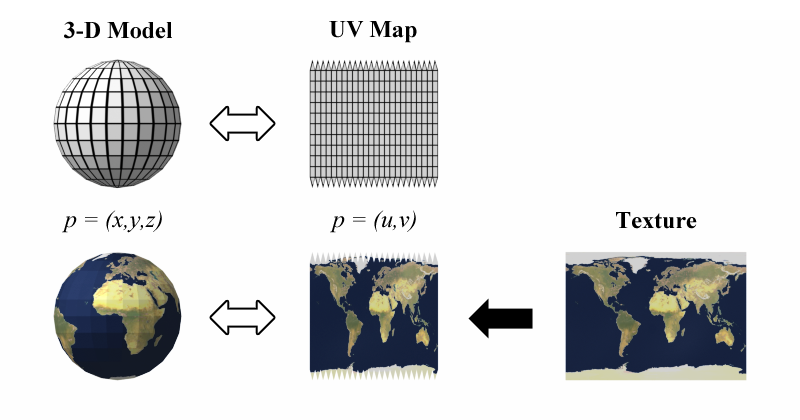
UV mapping is the 3D modelling process of projecting a 2D image to a 3D model's surface for texture mapping. The letters "U" and "V" denote the axes of the 2D texture because "X", "Y", and "Z" are already used to denote the axes of the 3D object in model space, while "W" (in a...
This might also be of use: https://www.youtube.com/watch?v=_thf1Z3j73s

What is the Material Texture Coordinate Node in Unreal Engine 4
Source Files: https://github.com/MWadstein/wtf-hdi-files
exotic cave
It explains how 3d models use UV coordinates (otherwise known as texture coordinates) to associate places on your models with points on your material and textures.
plush yew
how do I delete a line to a node?
exotic cave
Right-click the pin and click on the Break option, or whatever it is.
plush yew
ohhhhhh ok
exotic cave
Either connection pin will work
plush yew
ok thx
when i realize I set the line to the wrong node, I draw it to a new one, then I have it going in like 4 different directions when I want it to go to one place, and I end up deleting the node to fix it lmao.
exotic cave
EZPZ 😄 👌🏼
Just takes time to get used to, don't give up.
I wish I'd not given up on UE when I first tried it years ago!
exotic cave
'Cause once you learn it, you only have to do things ONCE if you do them RIGHT
plush yew
exotic cave
Yes, if you break the pin leading into your Diffuse connection, you won't have any color in your material 😄
Slow down, turbo
plush yew
I moved my texture from base color to normal
plush yew
wait should it be at diffuse?
exotic cave
Why did you do that?
plush yew
IDEK
exotic cave
Normal inputs are for textures that define the way your geometry is pointing
They look like that
plush yew
ok
exotic cave
Both are kinda synonymous in the industry, though a bit different at technical level
exotic cave
You need to actually sit down and study modern texture and material stuffs for a few days.
plush yew
ok
exotic cave
At minimum you need to actually understand what a Base Color/Diffuse map is for, what a Normal map is for, what a Roughness map is for, and what an Emissive map is for, I'd argue.
plush yew
ok cool
exotic cave
Base Color is the color, Normal is for showing which way the surface is pointing, Roughness affects the way it is shiny, and Emissive helps it glow or to bring up brightness in dark areas.
There are lots more pins, but you can't really work with UE materials without understanding those four concepts, I find.
plush yew
ok thx
and also I fixed my texture, but my landscaping isnt fixed
nvm
it came back
exotic cave
Sure. Your landscape there appears to be using two different materials at two completely different UV scales.
plush yew
my computer is a potato
exotic cave
Yeah, wait a bit when you see the checkerboard.
That usually means shaders are compiling.
plush yew
ok
exotic cave
This is a must read for you if you wish to continue to have my help 😉 https://help.poliigon.com/en/articles/1712652-what-are-the-different-texture-maps-for
plush yew
actually it is the same texture, but one is a cube and one is actual landscaping,
exotic cave
Link is a 2-5 minute read about the various kinds of most important texture maps in modern game development/CGI
 abstract relic
Is a quiz included Cali? 😜
frozen pond
what if array element wasn't added yet? it will auto add it?
exotic cave
@abstract relic : DOOOOOOLPHINS https://www.youtube.com/watch?v=kMYTQ1bxygM&feature=youtu.be

Blades over the Horizon is an upcoming action-adventure game set in the vast and ever mysterious blue sea.
Check out our website for more information!
https://bubblepony.com/game-titles/blades-over-the-horizon/
Interested in learning more about this game's development? Come...
 young steeple
Anyone have any idea why/how my projectiles are falling when I have physics off, gravity off, and have them locked to the z plane?
abstract relic
I’m just surprised anyone knew I was associated with that
exotic cave
@frozen pond : Make Array node probably what you're looking for
@abstract relic : I never forget cool people who are super cool and the things they do. 😉
frozen pond
@exotic cave yeah i know make array, but what if i will try to set value without adding anything into array ?
exotic cave
@frozen pond : You will notice your "Target Array" pin is red, so fire and death probably 🔥 ☠️
abstract relic
Ping @normal burrow then. He just released his boid graph explanation 😜
exotic cave
You need to give that node an Array to work with
@normal burrow , @abstract relic says I should bother you, something about boids 😄 🐦
 normal burrow

Pat goes over our own Boid Graph feature we use to define fishy behaviors!
Interested in learning more about this game's development? Come join our community!
https://discord.gg/P6dbUSA
thats our take on a graph for boids
 glacial cloud
Ive been trying to apply for unreal fast track and it just refreshes the page when i register. anyone know why?
exotic cave
Goodness that looks great as usual @normal burrow
normal burrow
Thanks! Wouldn't be much without the excellent fish and teaching of behavior from @abstract relic
 vivid heart
Would anyone be willing to give me a little bit of help for a few mins?
exotic cave
I usually would, but I just put in nearly a good hour trying to be the answermatic, I need a rest. Maybe others can step up 😄
vivid heart
I appreciate the response I suppose I'll wait for someone else to respond then thank you.
exotic cave
Ask the question 😉
Don't ask for generic, unspecified help. Saves time!
I may not get to it, but maybe others will.
plush yew
@exotic cave I am having a problem with my smoothing tool. It is leaving marks in my sand.
exotic cave
@plush yew : Not sure that's the tool, that looks like shadows to me.
frozen pond
how to reset timer on this node ? as i hold button first action goes after 1 sec but next one go instant
vivid heart
Been trying to set up base mechanics before introducing art level designs etc and I just got a premade character into my game got everything set up good and now my hp mana stam etc are all blank and no longer work but when I go back to my mannequin it works again. Ender btw that actually looks cooler honestly gives you a better vibe of the desert.
exotic cave
You're not going to be able to see much with your texture not scaling properly like that IMO @plush yew
You probably want to learn how to adjust your tiling scale in the material
Which is super easy, but I'm exhausted and need a break before I do more teaching today 😢
@vivid heart : HP Mana Stam are "blank" in what sense? You have variables in blueprints for these things?
Or UI elements?
plush yew
@exotic cave are you talking about using the texture coordinate node?
vivid heart
Vars set up they all lose it haven't set up regain yet tho but yea it works fine on the mannequin
exotic cave
Yeah, and multiplying it by a user parameter or two
plush yew
ok
exotic cave
And what do you mean before "go back to your mannequin", @vivid heart ?
@plush yew : https://www.youtube.com/watch?v=X4aXXm8km3w

www.Tesla-Dev.com
In this tutorial we will take a look at how we can Scale textures and materials.
plush yew
kk
frozen pond
how to reset timer on this node ? as i hold button first action goes after 1 sec but next one go instant
vivid heart
frozen pond

 grizzled thicket
Hi everyone, does anyone know if sub surface scattering materials work with planes/ one sided meshes
exotic cave
@vivid heart : Excellent, now let's see the snip of the Blueprint where you have those variables set up.
 kindred viper
@grizzled thicket they should do from one side.
exotic cave
🤔
exotic cave
Them's a lot of SET calls
 hearty walrus
has anyone ever tried to make a fully 2D game in unreal? What are some tips?
exotic cave
You sure some of those aren't SETting your stuff to zero somewhere?
hearty walrus
Also, how the hell do I design buildings/levels and all that shit
kindred viper
@hearty walrus I made a fully 2d slot machine with UMG. Top tip. Don't. Use HTML/Javascript/CSS/Node etc
hearty walrus
UMG?
vivid heart
It's temporary till I get the hang of this system more been following tutorials but theyre out dated so its kinda hard to have everything match up. Gimme one sec
kindred viper
yeah if you dont know what UMG is, I would seriously go back to HTML for it. Otherwise you will waste a lot of time
exotic cave
@hearty walrus : You get a degree in computer graphics and environment modeling, @hearty walrus 🤪
Alternately, learn some simple BSP stuffs
kindred viper
BSP?
exotic cave
It'll let you get to the blockout level at least
exotic cave
Guide to using Brushes to create level geometry in Unreal Editor.
You can do some verrrrry basic modeling from within UE itself
hearty walrus
I've got some good plans for it, but they're all mostly unfinished
kindred viper
no I know what BSP is... .I used it like 20 years ago when it was relevant
hearty walrus
it's all done in blender
vivid heart
heres what it looks like when i have the mannequin out
exotic cave
Past that, you need to learn a serious 3d modeling app
exotic cave
Read 80 Lv?
hearty walrus
the only idea i've got is the character's office being in floor -1, along with some servers
kindred viper
you assess if UE4 is the best option for a 2d game, then you realise it isn't... then you use what I recommended or goto Unity. The end 😄
exotic cave
Oh wait, you're talking 2D
 spare sun
why html and how even
hearty walrus
The second is just a dumb idea
exotic cave
In that case I love articles like this as far as getting from a "How Do I Blender" to a badass level

Samuel METIVIER shared his process of working on a UE4 scene Mountain House from blockout in 3ds Max to landscape material and lighting setup.
hearty walrus
(well the first one is a dumb idea but i've put more effort into)
kindred viper
80.lvl is a staple read
hearty walrus
It's meant to be a standard office building
exotic cave
@vivid heart : The problem I'm having trying to help is that I don't understand what you mean by "the mannequin is out" and etc.
Do you mean when you place/remove this actor in your World Outliner?
_guesses he's not off answerbot duty after all
vivid heart
this is for testing only trying to get bare minimum knowledge to set up core gameplay and advance slowly in world editor mode in game mode and default pwn class i changed to third person and to my created character after doing so resulted in my hud not working anymore
exotic cave
That arguably means that your logic to set up those variables is associated with a particular Blueprint from your old game mode
Put stuffs that is important and global in your Level Blueprint, or in a custom object and Blueprint you manage yourself
Blueprints used for scripting level-specific events within maps.
I gotta crash, sorry all. Good luck with your projects! 😄
frozen pond
any way to determine is all items in array has one value ?
kindred viper
@frozen pond loop it and check
plush yew
@light lintel I want to write you in dm
wtf why
who the fuck make this option to can't write you in dm-lol
a ok let's try
 proper stump
Hey, is it possible to not worry about lighting? just have that taken care of by the system, and do the actual lighting later? Just like in blender, you dont have to have a light in the scene when working on it..................
kindred viper
I don't do lighting until later so yeah. I guess it depends on what you are doing though.
abstract relic
Dynamic lighting will take care of it
proper stump
Im prototyping something using the third person template, so how do I do that btw? new to unreal 🙂
hearty walrus
How do I prep a model for export?
It's pre-rigged, but has a lot of lights and one control empty. Do I delete these?
 thick herald
Sounds like a DCC problem, not a UE4 one. But in general you select what you want to export and in the export options make sure 'only selected' etc.
hearty walrus
fbx, right?
 fierce forge
is there a way to change this to box collision ?
kindred viper
@fierce forge in C++ yeah. Just change the default sub object.
 quick kelp
@fierce forge you can put a box collision under it and set the capsule to not collide with anything.
fierce forge
@quick kelp i tried but the it will fall under map
kindred viper
@quick kelp why? That seems like a bad workaround to me
young steeple
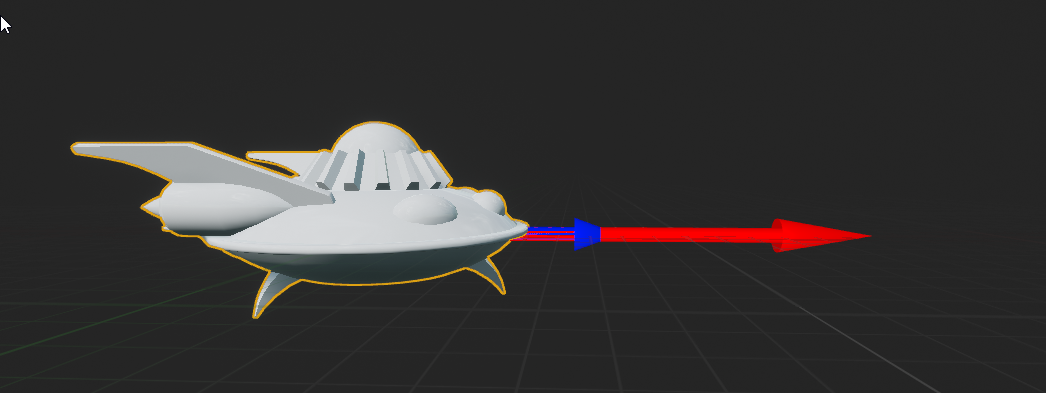
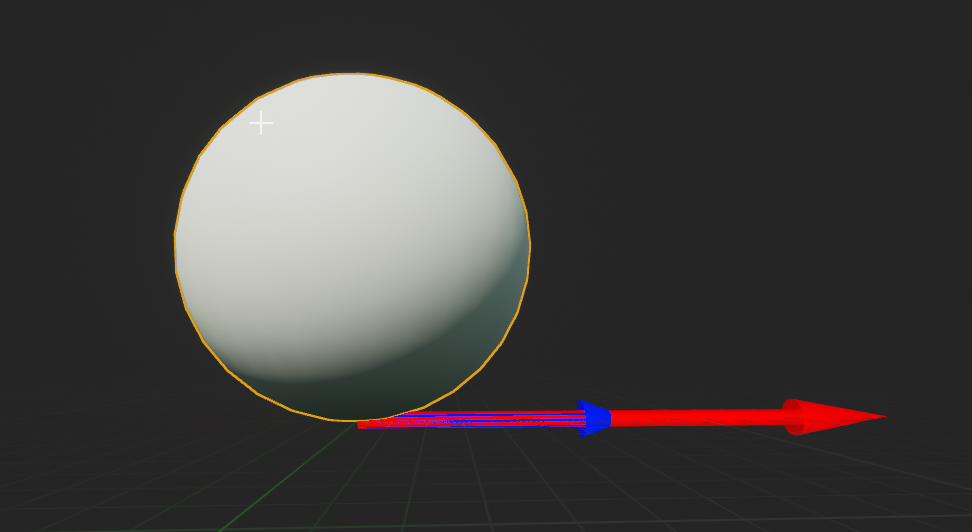
how do move the default "center" of an actor?
like the twinstickpawn is "embedded" in its coordinate space so that 0,0,0 is inside it. https://i.imgur.com/x7k1bTw.png
But if I make an actor myself and add a sphere mesh, it is sitting ontop of 0,0,0? How do I make it so that its centered on 0,0,0? https://i.imgur.com/oXlgUBo.png
 quick kelp
it is a bad workaround but if the alternative solution takes alot of time to do, and you don't have enough time to implement that, then its your only option.
fierce forge
not working so not an option
 swift spindle
ask the question 😛
swift spindle
lets try and put this all in 1 line..
swift spindle
ok. I have no idea what your actually asking for.. (automatic material assignment ?)
smoky grail
maybe
like i just put them into the content folder
and it worked for mangle
but not for baby
and freddy
swift spindle
when you import an FBX.. it will try and search for the textures assigned to it on the material. There are options on how it does it
swift spindle
I'd recommend learning the basics behind the material editor
instead of hoping for auto stuff
swift spindle

 ionic lagoon
Anyone know of a tutorial for separate torso movement. Like you look around, character's torso follows until you get to certain point in which your lower half moves.
abstract relic
@ionic lagoon basically the same concept https://docs.unrealengine.com/en-US/Engine/Animation/AnimHowTo/AimOffset/index.html
Using an Aim Offset, a character aims a weapon in the direction of your mouse or controller.
ionic lagoon
Oh dope, thank you.
kindred viper
 tiny sonnet
for sword collisions should u use event hit, or overlap, or does it even matter
smoky grail
im a noob tell me how
 primal plank
Question. Is it possible to make a map similar to earth .. not look like earth but how earth works.. As in there are no borders but if you walk in 1 direction long enough you will eventually end back up in the same spot
A big ass ball i guess you could say
quick kelp
@fierce forge i looked into it and the box collision under it seems to work but the character movement component is the one thats making it fall through the ground
abstract relic
Yes it's possible but you need to be clever about getting around the classic floating point problem
primal plank
🤔 noted
smoky grail
i cant find multi sub object
quick kelp
@fierce forge alternative solution though (might or might not help you depending on what you want to do with it), is you set the capsule componenet to custom collision and only make it collide with static mesh, then use the box collision under it to overlap with everything else that you want it to overlap with (edit: meant to say overlap)
smoky grail
wait
primal plank
@abstract relic. Wouldn't level streaming reduce possibly solve that problem tho
smoky grail
i dragged the textures what now
abstract relic
if you move the level's location to world origin then yes
smoky grail
like the lines?
the wont connect
like it has
(1)
(2)
and onwards
but the texturs wont connect
abstract relic
just import the texture to unreal
smoky grail
😐
abstract relic
make the material in unreal, apply material to the model... in unreal
swift spindle
 abstract relic
look in pinned message
normal burrow
diffuse color is about all you can count on pulling over from blender material wise.
swift spindle
it would really help if you watched the basic tutorials for unreal
normal burrow
must reauthor stuff using unreal materials
abstract relic
there's a list of resources for people starting out
smoky grail
pfffffff
i came for help
i was sent back to the tutorials
like wat the hell
i know tutorials exist
normal burrow
perhaps bayg, we are telling you the right thing to do
because what you want us to tell you does not exist
swift spindle
reminder.. for everyone. We are not paid to be here.
normal burrow
cya
 abstract relic
Cool. I'll send an invoice for my services 😛
swift spindle
a full day is not a long time to learn something hehe 🙂
normal burrow
they weren't interested in understanding
swift spindle
anything worth doing is worth learning
 runic fern
Hi Guys How can i calculate the player moved distance ?
 keen moss
New question, I have a scene with multiple lighting scenarios, what blueprint nodes do I used to let the user swap between them with a button press
swift spindle
dynamic or baked ?
 grim ore
@runic fern record starting location, record ending location https://forums.unrealengine.com/development-discussion/blueprint-visual-scripting/5882-how-can-i-get-the-distance-between-two-vectors
runic fern
Hello Mr Mathew , Thank you
keen moss
baked
 floral hull
Has anyone ever faced such a problem. The Unreal engine is starting to freezing. But there's no work with shaders.You just go from folder to folder and everything freeze for a few minutes. What can i do for fix that?
swift spindle
@keen moss you can make sublevels that only have lighting information on them
and use load streaming levels to swap between them
@floral hull yes... especially if your on an old HDD and have not cleaned up redirectors in a while
keen moss
i do have sublevels for each lighting setup, ill try out load streaming levels
thank you
swift spindle
you also need to set your sublevels to lighting only
floral hull
@swift spindleThanks, how can i cleaned up redirectors?
swift spindle
right click on a folder inside of content browser > cleanup redirectors
keen moss
its Fix Up Redirectors i think
swift spindle
same diff 😉
keen moss
yea
swift spindle
but your right
abstract relic
and if you ever want to see the redirectors
keen moss
Load stream levels worked, thank you @swift spindle
floral hull
Thanks a lot! @swift spindle @abstract relic @keen moss
keen moss
Im getting an error about multiple skylights being active with my lighting scenarios, but only 1 is active at a time
swift spindle
double check your levels / lighting 😉
keen moss
for rogue skylights?
swift spindle
yes... also in world outliner... View options. > Only in current level helps
if error still remains... remember that just because you stream in 1... you need to disable the existing.. and it takes a moment or 2... to garbage the old stuff
keen moss
ok ill try that
im attempting to package the project, looking for errors and I am getting the following error in RED
PIE: Error: Blueprint Runtime Error: "Attempted to access Audi_A5_7 via property VehicleRef, but Audi_A5_7 is pending kill". Blueprint: Spline_Follow Function: Execute Ubergraph Spline Follow Graph: EventGraph Node: Set Steering
 spiral island
Is it possible to draw lines in UE4, not using the debug headers?
for example, i just want to connect 2 points with a line but I also want this line to actually show up in the packaged game
keen moss
@swift spindle any idea how to resolve?
keen moss
im a novice when it comes to BPs
swift spindle
@plush yew what do u mean ?
all LOD0 to unreal is the highest resolution asset
yes.. then they wont be loaded
simple
if you disable LOD0 it wont use LOD0
grim ore
@spiral island out of the box you can draw lines on widgets and the HUD but its in 2D space on the UI
keen moss
@swift spindle my mistake that error was in my log from a previous issue that i already fixed
keen moss
I cleared the log and now it fails to package immeditatly and says its Unable to Compile Source Files
floral hull
I'm really asking for help with one thing.
I want to make an enemy that will grab a character by the throat and lift like Darth Vader, but only by touching his throat. I can't make the enemy grab by the throat, not by the air, or just as luck would have it.
Is there such a possibility in Unreal Engine?
swift spindle
@keen moss make sure all the levels are included in your packaging dirs
floral hull
keen moss
@swift spindle so i am unable to package a project in a directory outside of the project directory?
swift spindle
sorry if I was unclear
your levels are expected to be in certain places unless you define new ones
Project Settings -> Game Asset Manager
grim ore
@floral hull you can have sockets target sockets, or adjust animation points at runtime in the engine. Look at the content examples in the animation map and you can see them doing that for moving a hand to a weapon grip and making a punch sequence stop when it hits a board
 small basin
If I right-click and use "actor to static mesh" it should combine all meshes into one, however, on an actor I have with instanced static meshes it puts all of them at the center. Is there any fix? Would it work correctly with hierarchical instances?
floral hull
@grim ore and you have a video where you can learn about it?
swift spindle
@small basin unreal does not play terribly nice with instanced static mesh's ... hence the reason for plugins to fix it 😦
floral hull
I don't even know how to look for something like this on YouTube. What a request to write.
small basin
@glacial pecan Merge actor? Where can I find that?
 glacial pecan
swift spindle
glacial pecan
swift spindle
or just select 2 or more actors in your viewport
 limber mesa
hey, im trying to setup my source control with perforce but im having trouble getting unreal to recognize the project under workspace. can anyone help me
small basin
Same outcome @glacial pecan
swift spindle
is there a reason they are already instanced ?
abstract relic
@floral hull horseriding is a good one to search for. Since many people have done it/made tutorial and it uses similar concepts to what you're going for.
glacial pecan
@limber mesa ask in #source-control but if you ask me, perforce is a shitshow and you should try plastic scm instead
small basin
Hierarchical instanced static meshes are also not showing up in the hierarchy, really odd 🤔
swift spindle
Perforce however is the industry accepted standard for this type of work
limber mesa
i heard from a dev that perforce is great. why do you hate it @glacial pecan
glacial pecan
unless you have IT staff on hand to manage the fucking thing, it's a shit. show
floral hull
Thank you so much. I'll do the search now!@abstract relic
small basin
@swift spindle I'm instancing from modular meshes into a random generated building, which I'd then like to save as one mesh for performance reasons
limber mesa
really
swift spindle
@glacial pecan I run my own perforce server.. it's really not hard at all
small basin
Perforce is great, I'm loving it
glacial pecan
I'm not ADHD enough for it... fuuuuuuuck that 😛
abstract relic
different strokes for different folks. Everything has it's pros and cons
limber mesa
but @glacial pecan is it free
swift spindle
it took... 20 mins to setup
abstract relic
so is github 😛
small basin
Granted I come from github, never tried plastic, but yeah it was super easy to set up perforce
limber mesa
i think perforce won
swift spindle
@small basin take a look at https://www.unrealengine.com/marketplace/en-US/product/instance-tool

Instanced Static Mesh Editing Made Easy! Instance Tool is an editor mode plugin for Unreal Engine, it allows you to quickly select/edit/convert Instanced Static Meshes in editor viewports.
limber mesa
lol
abstract relic
and tortoisesvn
swift spindle
I'm not attached to perforce at all.. it just happens to be what everyone wants
small basin
@swift spindle Can't really use third party plugins as this generation tool itself will be part of a larger level design tool I'm making for the marketplace, can't really include thirdparty code in that 😄
 mint ocean
is it easier or harder to work with unreal engine in compare with unity ? 😮
small basin
Depends on a lot of other factors @mint ocean
abstract relic
yes
 jaunty drum
It’s using the mesh origins and placing them at the same origin
glacial pecan
@mint ocean depends on whether you like to follow rules or make your own
 umbral ferry
anyone know free decor for a platformer game ?
jaunty drum
If you export the meshes to blender and go to object ally translation and export it out of blender that way then do what you’re trying to do it should work
small basin
Right, how'd I get them to be placed at the correct location @jaunty drum
Well that's not a good solution, you'd lose the ability to use the modular parts in engine
mint ocean
@small basin the important one would be maintainance usability and the learning curve
jaunty drum
Yea like they said unreal doesn’t play nice with static meshes lol
small basin
Guess I'll try non-instanced static meshes, those should work I believe
If not I'll have to look into some custom C++ solution or a procedural mesh
The nice part about Unreal is that each system gives a lot more options and flexability, so you can do more without needing to create custom tools for it. The downside is that it requires more experience in the area of Unreal you wanna use (for example way more options around audio, but you need to know more about audio to take advantage of the more advanced systems) @mint ocean
umbral ferry
https://www.kenney.nl/assets/platformer-kit which 3D models format i can use on UE?

This pack includes platformer themed models including landscape tiles, items, blocks, hazards and more. Includes: 3D Models: FBX, OBJ, DAE, GLTF, and STL. 2D Sprites: Isometric and side.
normal burrow
fbx
small basin
Using static meshes fixed my problem, thanks @glacial pecan @swift spindle @jaunty drum
 cursive salmon
hi, I would like to make a system like on youtube with a slider, that is to say that I want to be able to move forward and backward a video that I play in a Widget. How to do ?
kindred viper
there is a slider widget.
 rapid ridge
@cursive salmon https://discordapp.com/channels/187217643009212416/435394527965085706/435593128465137674 No Spam #blueprint
spiral island
Does DrawDebugLine show up in the packaged game?
kindred viper
I simulate it with the built in cylinder in a packaged game. I know it's not great, but it works and you get mesh functionality
spiral island
i'm trying to use AHUD::DrawLine but nothing shows up
AHUD::DrawLine3D works but the line is too thin
so i thought i could use DrawLine and project points to the camera
even if i hard code the positions it still doesn't draw anything using DrawLine
 lucid magnet
so i kind of want to learn how to make a combat system - somewhat like soulsborn... does anyone know a great tutorial?
kindred viper
@lucid magnet I can't say I've seen one, but it can't be that hard right? Input -> Animation -> Collision -> Reaction.
lucid magnet
well sure, but i also need to find animations and such
kindred viper
@lucid magnet did you expect them to animate themselves? 😄
lucid magnet
no, but maybe to find a good animset, and learn how to set it up
 swift rose
If I was looking for someone familiar with TrueSKY where would I want to ask? Level Design?
 summer zealot
Can someone tell me, why I see different things in viewport and in camera?
 nimble moat
How can i interact with a 2d widget in game? ive done it before but i really cant remember how
as always, i remembered when i ask for help
kindred viper
@lucid magnet That's probably the cheapest way to do it but I would highly recommend at least learning some animation to alter them when you need it, or to add physical animations.
@nimble moat set the input mode to UI
nimble moat
yeah I done all that it still wasnt working, I had to go into the blueprint that held the widget and set "receive hardware input"
kindred viper
yep
nimble moat
thanks though!
lucid magnet
i get that - but i still need to find some great animations
or learn how to animate
 indigo kernel
Or if you're rich get a mocap suit and get your fitness subscription :p
kindred viper
Make sure to understand the animation system though, otherwise you will end up stranded when you need something custom
Rightfully so. But then he has to learn that system too. And will still need to learn something along the way.
 queen pawn
I started a project with a blank map but now I want to be able to have the third person character view when play testing. Is that easy to change or am I sol?
kindred viper
@queen pawn add the third person content pack
green button in content browser, Add New...
lucid magnet
cool, i do actually want to learn how to model too
queen pawn
Thanks guys! Once that's added what do I need to do to change the "Play" default to the third person? It's currently still a free roam camera
@light lintel i'm not seeing where to set the player character 😬
 brave gate
not sure if already linked around here?
Community Wiki is alive :)
https://www.ue4community.wiki/Unreal_Engine_Community_Wiki
IMHO it's worth to pin it here
fierce tulip
@maiden swift whadayathink?
queen pawn
@light lintel i feel like an idiot lol. found it. i was looking in the blueprints and was like whaaa
 maiden swift
We'll take a look at it.
 rough hound
Where does one mess with the distance for foliage LOD
queen pawn
just looked that up actually
How to set up LOD Screen Sizes on a per-platform basis.
brave gate
ok, so new wiki allows finally gather basic articles in the single place :)
one of my first self-proclaimed tasks in "filling gaps" is page on hardware recommended to work with UE4
please, take a look and let me know: about good and bad things there 😉
it could be extended, i.e. different specs for different type of artists
suggestions are much welcome
rough hound
hmm ok so it's not LOD? What's causing this?
This is as big as i get it
Unlit
This is close up
 steady valley
I'm new to UE and I have a question. What do you call this and how do you create one?
abstract relic
That is a comment bubble
Select nodes >>> right click >>> create comment
Or
Select nodes >>> C
fierce tulip
you can also just click > press C
abstract relic
Click on them
abstract relic
Remember to colour the bubbles like a rainbow
 green sky
Can someone help me with voip question please?
Voip keeps crashing 4.24 , i tried removing and now the project keeps crashing even after removing voip is there something else i should do to totally remove Voip?
rough hound

You can see all the foliage "popping in" becoming more detailed.
I need to up the distance.
I've tried disabling all the LOD stuff for it but it did nothing.
 narrow meteor
recently, i implamented multiplayer but. i have a problem where the listen-server player can run everything smoothly while the second player cant jump, cant switch weapons and can barely do anything. Does anyone know why this could be? and how to fix it?
rough hound
Thanks
 fallen wing
Hey guys. My apologies for asking a lot, first of all: how would I make a pounce attack like this? https://youtu.be/Xx_gwbzPCfA?t=131 and then second of all, how would I make it hurt another player BP? Thank you! (This is multiplayer, so don't worry about AI) Thank you!

DEAD BY DAYLIGHT Stranger Things Gameplay Trailer (2019)
SUBSCRIBE → https://goo.gl/wiBNvo
subscribe for the latest PS4, Xbox One and PC, Gameplay, Trailers, Walkthrough and Games News.
(blood warning)
 heady moon
Not sure if this is the right place to ask, but should I use mkaehuman or blender to make characters with my game?
Both are pretty amazing not gonna lie, but I just want to ask people who have experienced this before
fallen wing
Depends what you're going for.
heady moon
I want the character to look like a normal human however it's going to wear some clothes which may cover its face as well.
But its going to have the same height, legs, hands and arms as a human
fallen wing
I think it's preference. I'm not the right person to ask honestly, I rarely make human characters in my game.
heady moon
Ahh I see
 lament verge
How taxing is tessellation?
fallen wing
?
 compact halo
whats the best way to learn how to use unreal? I am really eager to learn how to use this program
 ancient lotus
any programming experience? are you looking to make a game? film?
you trolling me lol?
 dusty cypress
Hey guys. Any idea on how to fix a lighting bug for when you turn to diff hallways, you sorta see for a quick moment a flickering white light? e.g on walls when turning corners.
I can record it if y'all would like, but it's probably well known. Internet didn't help, didn't get any results of what I wanted
I'll try building the geometry and stuff, will update if it fixes it. Won't mind any other ideas until then, but it's prob the issue. Will edit this message if solved.
 dense gorge
hey @compact halo check out the unreal engine learning portal - there are plethora learning paths you can choose based on your experience working in 3D
compact halo
where's that?
plush yew
I keep getting this error when playing my game. Always leads to a crash
Can someone please help me?
dense gorge
learn dot unrealengine dot com 🤙🏾
plush yew
I've been stumped for the past month
Unable to figure out ANYTHING about it
I've searched far for any fix but no one has anything on it
 polar hawk
are you doing anything with custom physics math
it is like something divided by zero or went to infinity
plush yew
I know we use physics quite a bit for our ragdolls
And our starfighter landings
But nothing else really
polar hawk
you might need to compile the engine in full debug mode to get any insight
plush yew
I wouldnt know anything about that. Im mainly an artist who knows just enough blueprint to get myself by
So where would I look for this error then?
polar hawk
most likely you've set a setting somewhere or are doing math which isn't... valid
definitely look for anything related to movement of characters
plush yew
Any ideas on what the nodes may be called?
polar hawk
CalcVelocity is a very general function that gets called every frame
it does a lot of stuff involving tons of factors
its hard to say where its going wrong exactly
dense gorge
🙏🏾
polar hawk
but first place I'd look is any custom physics math
then I'd look at possibly resetting all your character movement component settings across all your character blueprints
maybe remove character types to see if the error goes away so you can isolate where the error actually is
plush yew
well its coming from all playable classes
or the ones that are children from our master one
polar hawk
then something in your master is probably bad
plush yew
ill look now
polar hawk
afaik it is pretty hard to get a float to end up NaN in bp
so at least you've accomplished something impressive in some sense
plush yew
I actualy didnt code the master blueprint
I mean I did small functions but another programmer did most of the work
polar hawk
purely bp or C++ too
plush yew
lil bit of both
queen pawn
anyone deal with floating foliage when you paint? haven't changed any settings
Edit: had a test landscape hidden that i was testing with different elevation. the foliage was trying using that surface to align to. deleted it and we're back in action
normal burrow
velocity is actually pretty easy to mess up if its physically simulated
polar hawk
to the point where it goes nan?
normal burrow
yep
polar hawk
I've never seen that happen
but I guess I don't really attempt to stress ue4 physics ever
plush yew
literally all we are doing is ragdolls and landings for our starfighters
normal burrow
Because UE4 uses cm and grams, forces can get out of hand quick and as soon as you send an impulse or force that causes the balance of strange units to waver velocity will go nan until its manually set otherwise
plush yew
but all the errors come from our characters
and here is the weird thing, we actually only simulate physics in different blueprints from ai and playable characters
normal burrow
ah if its a character movement component thing, should be easier to identify
plush yew
so it makes no sense why the character blueprints would be forcing the engine to close
Well nothing seems out of the ordinary on my end
And the crashing doesnt happen in a compiled build, only on a source build
Which is even more strange
normal burrow
how does jumping work?
plush yew
standard jump node
normal burrow
do you do any special launch character calls or add force?
plush yew
no
normal burrow
took a look at the screenshot of a log you posted
its something happening inside the walking function
plush yew
which node would that be then?
Movement input?
or wait
no
because the parent AI class doesnt have any movement input
So what would the node be called for AI/
normal burrow
how do they move?
normal burrow
believe that sends movement input no?
plush yew
not sure, this is generic AI stuff
No custom move node for AI
Just using the standard one
plush yew
says its caused by character movement component in those ai
plush yew
Not sure how I'd tell them to not move
How can I make a mesh rotate the way the character is moving instead of rotating to the camera direction?
 slow scarab
@plush yew You could have the character have a Vector with it's value being the character's normalized speed vector. I.E: If a character is moving 1 meter per second in the X and Y axis, the resulting vector would be something like (0.5, 0.5, 0.0) (i guess? pretty sure that's wrong but it's just an example)
Then, on the actor you want to rotate, create a vector (i'll call it Sigma) containing the actor's current position, add the character's normalized speed vector to Sigma and use the Get Look At Rotation function to obtain the rotation.
Sounds a bit tricky, I know - If you don't understand at first tell me
I have a question about object organization. In other game engines such as Unity, you don't really code directly on the object but rather you create a component and attach the component to the object. Since in Unreal you can code directly on objects, create components, what's the best/most efficient way performance-wise for communication between objects? Should I create various Blueprints and communicate between them using cast/interfaces or use components?
 quaint hull
help, I have been moving folders and assets to organize all day, now I just realized that most of my maps broke because I moved a few assets out of place, and 90% of the maps is made out of these assets, how do I fix this back without reverting my changes?
slow scarab
An example - If I want weapons in my game but I want each one to have different behaviours, should I create various components or various blueprints?
@quaint hull What did you have on these maps?
quaint hull
still trying to figure out what's missing, the main thing is the "cube" static mesh I used
but I also found entire bluprints missing
obviously it's gonna take forever to fix things by hand, even though I can move the cube into the static mesh (they are there but just empty)
 graceful breach
Hello, I am having trouble with importing an FBX file to unreal 4.24.3. When I import the file and attempt to put sockets onto it, the static mesh and the origin point are way off. Any help would be appreciated
quaint hull
what are you using for the models?
graceful breach
they are meshes. from blender
nimble moat
Is there an easy way to store decimals? Or would i have to do it the hard way
@graceful breach you would need to import the mesh to a modeling program and apply location/scale/rotation and center the object in the world origin to 0
quaint hull
make sure you set the transform in blender to the assets, the gizmo is probably unaligned
what Dylan said
kindred viper
and reset the transform. Blender likes to keep relative values for modifications, same as 3ds. Resetting it before export can make the difference
ionic lagoon
How would I be able to grab the rotation of a specific bone from the animation event graph?
graceful breach
Thank you! I am trying it now
 raven berry
Does anyone here still do udk / ue3?
kindred viper
not for 6 years but whats up?
raven berry
Ehh I'm trying to get local profile saving to work
kindred viper
sorry cant remember much about that. Might be something on the udn tho
 lament slate
For Event Hit node how to use the collision direction such that only if my actor hits from the top only then it should execute
 spare dust
is there a way to stop simulating physics on a skeletal mesh, and have it maintain it's current pose?
 marsh cloak
Does anyone know why the particle beam doesn't rotate correctly when using actors as source/targets?
spare dust
Just rotation? Are they moving correctly at least
spare dust
Can you explain what the problem in the screenshots is
marsh cloak
the beam should be facing the camera
never flat
and that curve in the middle shouldn't exist
spare dust
No clue about the curve in the middle
As for facing the camera, go to the "Orientation" tab and add lock axis
Lock it to the x axis, or whatever your camera's forward axis is
Thats the info I found at least
spare dust
marsh cloak
Oh that done nothing
spare dust
It really do be like that sometimes
spare dust

"My name is Barry Allen, and I am the fastest man alive. Except for literally every other speedster apparently. Cool lightning though."
Patreon: https://www.patreon.com/deanashford
Discord: https://discord.gg/ttqYq3r
Twitter: https://twitter.com/Play_Ruff
__
Huge thanks to ...
I'd say check this out, and compare your particle settings to theirs
marsh cloak
I followed the other one, with the pink beam
the one from source to target
then again his also has the weird rotati9ons
spare dust
His are intentional
marsh cloak
I think it has somthing to do with source and target
spare dust
made using noise
marsh cloak
Noise is not what I am looking for 🙂
It's tangents getting hijacked from source or target rotations giving inaccurate camera rotations between them
Maybe I'll have to do this in niagara
 narrow ferry
Hey ya'll, I'm pretty new to Unreal and I'm having problems troubleshooting a like bake problem. In my preview all my shadows are casting correctly, but when I bake out the lighting it looks like my directional light isn't casting shadows, here's some pics
The awful one is right after I bake my lighting with high settings
I'm fairly certain I didn't uncheck any "only self shadow" settings or anything like that so I'm kind of stuck atm
If I disable the "cast shadows" option on my directional light it basically matches the baked lighting look
narrow ferry
it basically looks the same :/
spare dust
Google's first result says increase your lightmap resolution
narrow ferry
Yeah, it looks like there's no light map though
like nothing is catching shadows
not like they are low res
I did change something around in my lightmap settings though and it seems to be improving
spare dust
awesome
plush yew
I will figure this out myself but if someone already knows you could save me a lot of time
if I play a montage in a slot that uses the spine and everything above it (hread, arms, you know)
and I play an animation from the montage that only has the left arm animated, what happens to the rest of the bones in that montage slot? Since they're not animated do they do nothing or do they animate as they would normally? Like in a run cycle if I play a montage on the upper body but I only want the left arm moving can I just make animations that only animate the left arm and leave the rest alone or will the left arm move and the rest of the unanimated bones just sit there dead
plush yew
my landscape shaders stopped compiling for some reason, anyone had this issue before? i tried painting over them and it just left me with the absoluteworldgrid material no compiling
was working fine earlier thne just broke for no particular reason
ill try restarting
 fallen marten
@plush yew look into the layered blend node if you want to blend montages and animations together
plush yew
Thanks @fallen marten. I'm using three at once right now I was just wondering if montages worked the way I'd described because I could make this less complicated if that were the case. What I haven't been able to find is the additive animation nodes, which I swear I was using a few months ago
fallen marten
To just montage the left arm and leave the rest of the skel animating as normal, then the layered blend node is ideal as you can select the bone you want the montage to blend into and the rest will animate as normal according to whatever is plugged into it. So on the node add an item to the bone array like left shoulder, and everything (including the shoulder) below that will play your montage
-If that's what you mean
plush yew
Well I created a new landscape and the painting functionality is back...weird
lel, spoke too soon..its still not compiling regions
its just leaving the middle chunk uncompiled
its creating blank areas where i try to paint new spaces...very odd
deleting and creating new layer info might've done thr trick
 grim shale
Hello, I got an anim montage that combines two animations drawing an arrow and releasing it, an in the anim graph i did a Layered Blend Per Bone at the spine_02 bone of the ue4 mannequin (So that i can shoot while moving if there is another way please tell me) with the base pose connected to the state machine that handles Idle/Walk/Run animations and the blend pose 0 connected to a "Slot default slot" node ( i changed the slot name to the slot i used for the animation montage), Problem is when i start and move around and then shoot the upper part of my character (the part that does the shooting animation) turns like 70 degrees to the left, And when am not moving the character shoots like 20 degrees to the left, My guess is that happens because the character is facing the left side a bit, But i have no idea on how to fix it, So i would really appreciate any help, Thanks.
grim shale
Here's a quick video, I hope it helps explain what i mean.
 thin tendon
Anyone else have issues with landscape materials? I am using 121 world comp tiles. And all the time my landscape material breaks. And several tiles will be missing grass. And I have to recompile several times before it works again
plush yew
I've come to the conclusion that the crash I experienced earlier is an engine bug
This bug doesn't happen in UE4.22
normal burrow
ShooterGame has a community ran github somewhere that is kept semi up to date
normal burrow
See the second pinned message here protactinium
normal burrow
Yeah, people like the banana one
 half turtle
i use to think the guys at wildcard were retards because their turrets would lag servers to a crawl... thinking ... how hard can it be to code hte IFF and tracking...
then i decided to add my own autotracking turrets with IFF to my game...
now i think the guys at wildcard are fucking genius
lament slate
Woah I love the banana one @normal burrow
normal burrow
I hear good things
lament slate
But why did ue make the colors a bit complicated
Like i mean a cube to be red in color
I cant just select red
Is there a reason why ue made it like that
normal burrow
Dunno about reason but the way it works with materials is something you’ll get a hold of
lament slate
Oh
 dark rune
why is nothing showing up on the Epic games launcher
 tender flume
Difference between state machine and blendspace? (For default animations such as walking/jumping which is recommended or preferred?)
abstract relic
Blendspace for Walking-Sprinting. States for jumping
lament slate
Why is the way UE handles with Materials is more complicated than others
Is there any step by step guide for just materials
 tender flume
States being used for jumping because to make the jumping transition smoother or?
And how many lod levels are recommended? 3 or 4?
abstract relic
So here’s the general problem with jumping. You know when and how long the act of jump is. But you don’t know how long the player will fall for. So you have to split jumping animations into three separate sequences; jump (start) for when the player starts the jump, jump (looping) for when the player is in the air, and jump (end) for when the player lands.
 granite condor
I am watching a tutorial that requires me to use "Get Actor of Class" but I am using an older version of unity as by requirement and I don't know what i should use instead
context is shooting a bullet
abstract relic
That is a very strange looking Unity
granite condor
start looking?
ohhhh
my bad
I meant unreal

sorry, my group forced me to use Unreal
I'm just not familiar with it
so I am somewhat struggling
could you please provide me with some assistance?
this is my current shooting function
abstract relic
Now it doesn’t mean you can’t have blendspaces for each jump sequence Shin-kun. Simple states for jump is merely what’s preferred. For it’s generally enough
abstract relic
I would suggest opening first person template and see their projectile example
abstract relic
Warning though
granite condor
and I am stuck
because he called something
that I cannot call
due to a mismatch of versions
abstract relic
Turn down your audio if you do look at the example and fire the bullet
granite condor
o ok
normal burrow
Your using the wrong node
normal burrow
You want non plural
abstract relic
The pretty box
normal burrow
Ye pretty blue box
granite condor
I don't know what the non plural one is
abstract relic
Turn off context sensitive and pray
granite condor
so it probably doesn't exist yet
normal burrow
Do you see it if you remove the..
abstract relic
Of course it is exist
granite condor
abstract relic
It’s not the 1860s 😜
normal burrow
Lol 😂 what version is it?
granite condor
if this helps
I can't change versions
I have to use this one
whole group is using it for university project
abstract relic
The array
granite condor
could you show me where that is?
tender flume
@abstract relic As for lod levels? 3 or 4?
normal burrow
granite condor
ohhh
normal burrow
That’s an array use the get array element node
granite condor
I see
normal burrow
Index 0
granite condor
so what do I do with it?
abstract relic
I’m curious why not just spawn actor
abstract relic
Or better yet
granite condor
I want it to shoot out like a bullet
abstract relic
Look at that first person template
 normal burrow
You can make the ball go faster
granite condor
I am used to Unity
this is all too complicated for me
I'm not big brained enough

normal burrow

granite condor
@normal burrow I just looked at the FPs template
and I am probably more confused
visual scripting makes me cry
dark rune
granite condor

dark rune
why is the launcher not showing anything
 formal maple
@granite condor you're trying to plug an array into a single object
You need an index from the array
granite condor
how do I do that
formal maple
Try the index node or a for each loop depending on what you're doing
granite condor
uh
can you explain that to me in english pls?
I am not familiar with UE4 terminology yet
formal maple
Lol this is just regular programming terminology
What are you trying to do with the array
granite condor
o
shoot a gun
I am following a youtube tutorial
and he does this
but I cannot do that
my Unreal version is too old
and I can't go to the new version
my group refuses
formal maple
You're getting ALL actors of class
granite condor
I know
formal maple
He gets one actor
formal maple
It's a different node
formal maple
It does lol
formal maple
Check which blueprint you're in
granite condor
the bullet's Blueprint
formal maple
Is he also in the bullet blueprint?
granite condor
yes
formal maple
Drag out of the array and do get array element
 formal maple
A single object in an array
granite condor
formal maple
Index?
granite condor
abstract relic
Going to give you a hint before going to sleep
If you’re ever confused about a node. Watch this guy’s stuff. An be sure to watch this video in its entirety.

What is the Get all Actors of Class Node in Unreal Engine 4?
Source Files: https://github.com/MWadstein/wtf-hdi-files
normal burrow
formal maple
I don't know why you can't use get actor of class lol that's dumb
formal maple
No, 4.22 is still very recent and it's a very basic node. I don't know why you can't use certain nodes
Maybe the type of blueprint you're using is wrong? I've no idea
I'd just use the first person template
Wait are you spawning the bullet from it's own template?
granite condor
ya
https://www.youtube.com/watch?v=4bb7gSNamZg using this tutorial

Do you need to make Gun for your VR game in unreal engine?
This Unreal VR tutorial is just what you are looking for.
*
unreal engine VR gun tutorial
Unreal VR gun
*
Welcome in this really simple Unreal VR tutorial.
The first thing is to get yourself a 3d model of gun.
Make sur...
formal maple
That makes no sense
dark rune
why is the damn launcher empty
formal maple
Did you not use the get actor of class node earlier on in the video?
granite condor
I used all
formal maple
What type of blueprint is your bullet?
You couldn't find it in the motion controller?
 proper hatch
Does anyone know the nodes to change the Device Orientation in Blueprints? Or any other way in game?
thin tendon
So I am on this page https://docs.unrealengine.com/en-US/Programming/Basics/CommandLineArguments/index.html and found a command a I want to use NOVERIFYGC. But when I add it to the execute command node its not a command. Does anyone know how I can use this command?
Collection of arguments that can be passed to the engine's executable to configure options controlling how it runs.
 grizzled condor
Hello guys how can i render an image ?
 honest vale
use a 2d capture actor
granite condor
so I managed to add a raycast shooter but whenever the bullet hits something, the force only applies in the same direction
is there a way to fix this?
grizzled condor
@honest vale how to use it ?
runic fern
Good Morning I was wondering what technique Stickfight game using for animation ?
is it Physics animation or other things
honest vale
I'm pretty sure there is documentation for it
rapid ridge
@granite condor You are in the wrong blueprint
He is in MotioncontrollerPawn BP and you are in Bullet as you said. That makes a huge difference I guess
 burnt swallow


 lament slate
Hey guys
Help needed
Why does the top one work but not the bottom one
But for an actor , on which if my player collides it makes my character jump i used cast to character and get player pawn
runic fern
Which one is not working ?
Cast to Character ?
Because you need to specific which character is getting the damage first one you called the ThirdPersonCharacter Health Variable thats mean you need to show the damage of that player
in the overlap event you are making every character overlapping this box will collide it
half turtle
so as i understand defaultscene roots cannot rotate, i have a parent that has 2 kind of childs, one needs physics the other does not.
if i add a static mesh as the root, i cannot change the physics enabled/disabled for the childs.
if i use a static mesh as component of the sceneroot, rotatethisactor does not work (as a default scene has no rotation)
what can i do?
should i apply forces and rotations to the component?
instead of to the actor?
 hollow wave
@rancid kernel I'm interested in your job offer that you published on the server. Would like to talk in private so add me as a friend please
 zealous estuary
Can someone point me in the right direction when it comes to working together with people on the same Unreal project?
I use a version control system of course, but I'm wondering: how do you work together on the same map? Is that possible?
zealous estuary
Share?
 eternal scroll
https://docs.unrealengine.com/en-US/Engine/Levels/CollaborateWithSublevels/index.html sublevels might be what you're looking for
You can use sublevels to collaborate with other designers working in the same space.
zealous estuary
Ok thats what I feared: I started development alone, and the project is not split up in sublevels
plush yew
man this landscape material just doesnt want to cooperate
i keep having to delete the layer infos and it still wont paint right without halting compiling the shaders
 unreal sable
I'm learning blender through some basic shapes, but i'm struggling with normals. Either they're inverted or i get this black mask hanging over the top of the mesh. How do i go about fixing it? The mesh appear like this in UE4.
lament slate
@runic fern Yeah man but then how did it work in the second pic like in an actor
In that case too the character for thirdpersoncharacter
But there i used cast to character it worked but here why cast to thirdpersoncharacter
 misty creek
@zealous estuary Try taking a look at this: https://docs.unrealengine.com/en-US/Engine/Editor/MultiUser/index.html
Get multiple users on different computers into a shared Unreal Editor session, collaborating live to build content together.
unreal sable
@plush yew So it's a UV problem, not a normals problem?
unreal sable
lament slate
But why in the actor case cast to character worked
unreal sable
I don't know, the model ends up in either state.
If i go flip normals now i get the black top part again.
lament slate
Whats the difference between Get Player Pawn and Get Player Character, Cast to Character and Cast to ThirdPersonCharacter
 viral fractal
possible to use a 3D Mouse (3DConnexion Spacemouse Pro) wich unreal editor ? it does not detect input from it by default
lament slate
@runic fern
unreal sable
Ahh thanks, i've been looking for that button, but youtubers just skip the part or the hotkeys i found weren't working.
umbral ferry
Any feedback on Asset Forge softaware ?
tender flume
@unreal sable That looked like a coffin whoa.
lament slate
For getting radial damage from an actor should i use Event Radial Damage?
floral hull
Guys, good afternoon.
Can you tell me if you can make a hole in the landscape? I want to make a tunnel.