#ue4-general
1 messages · Page 694 of 1
 midnight gate
@exotic cave yea it all works perfectly in game the meshes are super low poly aswell
hmmm
 cyan oak
mate of mine is trying to hook up his vive controller to ue4 cam, anyone have a tutorial for newbs?
 exotic cave
That does help 🙂
 tawdry storm
is there some kind of triangle count limit when building a project for html5?
exotic cave
Anyone know why all of a sudden UE is treating my landscape like a dynamic, mobile actor? O_o
And now my flythrough won't attach
 fierce tulip
there shouldnt, but if there is its 65336
also, dont update to .24
exotic cave
I get "large actor receives a pre-shadow" warnings and my level sequence with an opening camera sequence won't attach to the scene, I get "not static" errors
tawdry storm
yeah I'm deliberately on .23 for this test. and okay that would explain why it works with the 50k model, but looks worse with 200k and even more so with 800k
thanks luos
exotic cave
It seemed to happen after I accidentally dragged the landscape into a level sequence and added a transform to that sequence by mistake
But now that stuff is gone, yet UE still seems to believe my landscape needs to move all over the place
fierce tulip
@tawdry storm mobile accuracy for uv's is much lower, you can enable accurate uv's in the mesh (expensive)
tawdry storm
@fierce tulip UV's aren't really the problem, it's more that there's random triangles just piercing the mesh
fierce tulip
that might be html being html
all I did was some vfx for it, so I am not an authority on it though.
tawdry storm
yeah, but like I said, I didn't see any of that on the 50k triangle model
but it seems the limit is per mesh
 rancid lynx
is it possible to sphere trace by tags? or only by collision type, then for each, brance if actor has tag ?
 grim ore
pretty much correct, tracing is using the physics engine so it uses the physics setup
rancid lynx
oktyty
 fallow oxide
Where could i find the information about CVars.
In source code or any documentations.
rancid lynx
can i sphere trace by mesh ? this seems like it would be a specific instance reference as opposed to a mesh
i ask because this didnt produce a printf on true
seems like it should work, understand, being that it gives an input box for meshes
rancid lynx
i just want to trace for a mesh
grim ore
then you would trace based on the collision channel or type for that mesh
rancid lynx
ok. i set that correctly.
grim ore
you can make a custom one for just that mesh to make it easy
grim ore
which sphere trace, there are 3 of them
rancid lynx
i can get it to print the primative component. but if i try to == a generic mesh, it doesnt seem to notice
oops sorry one second
grim ore
print out the hit component, what is it saying is the hit component?
 tender flume
Question, for someone who only knows how to make something like third person RPG stuff.
rancid lynx
if i delete the branch == mesh, it shows the correct prim comp
rancid lynx
if i add a branch == mesh, it stops showing.
it shows the correct prim component in printf without the branch ==mesh. but with the branch== mesh, it doesnt printf. which leads me to think its looking for an instance REF, and not just "any mesh"
i want "any mesh of campfireLog
 brave gate
@tender flume
- Some day you start working on platformer.
- Repeat this "working thing" every day.
- Repeat after finishing or cancelling project, ta-da 😛
tender flume
Oh. I never cancel, more like learning how to make platformers haha
brave gate
sorry, but such questions it's too broad, like asking for ready tutorial guiding step by step 😉 😛
tender flume
I regret learning RPG related stuff only.
grim ore
the problem is the "hit component" is a component, not an actual mesh or actor so you won't be able to directly do your == to the object in your browser which is what you are trying
tender flume
So I will still have to watch tutorials?
grim ore
when you get the hit component you are getting a static mesh component, or a particle component
rancid lynx
an actual instance. yea, i thought that might be it X_x
and i cant get static mesh from the hit primComp X_x
surely there is a way to sphere trace for a mesh X_x.
without specifying a specific instance
grim ore
sure you can just think about it
you get the hit component, the one you care about is a static mesh component
on the static mesh component is a static mesh variable which you want
this is kinda weird for what you want, if your looking only for your specific object type in the trace itself then you would only get those back in the first place
rancid lynx
i tried to fish the mesh out of the hit comp , but it didnt show a get static mesh option
exotic cave
Anyone experienced with this bUseBooleanEnvironmentShadowing thingy?
grim ore
because a hit component, a primitive component, does not have a mesh
a static mesh component has a static mesh
rancid lynx
oktyvm. i never would have guessed you could cast to a mesh
grim ore
parent - child inheritence
something to look into might be using blueprint interfaces so you arent casting but generically talking to the item and checking for info or getting info or setting info as needed
 formal pebble
Hey @grim ore help us with some tutorials of how to make a easy mobile game
exotic cave
Seriously, folks, I'm at my wit's end and could really use some help. 😦
grim ore
look at the free mobile match 3 example on the learn marketplace for a mobile game
exotic cave
Did I break something by accidentally putting a landscape transform into a level sequence?
My level sequences won't attach to the landscape now, and it keeps trying to treat the landscape like a mobile actor and I can't seem to change it back.
And this is a map that represents several weeks' worth of hand-sculpting, I'm gonna be so sad if I have to toss it and start over because I uncovered a hidden bug
I'm getting all kinds of warnings about a pre-shadow on my map check now
grim ore
roll back to before you did the sequencer thing?
exotic cave
Yes, well, in a perfect world we all have source control
I don't, however, so unfortunately I can't, good advice as that is.
grim ore
none of the suggestions online fix the issue?
exotic cave
They certainly don't solve the issue whereby my flythrough sequence won't attach to the scene or play anymore
And unfortunately, for my kit, that's a non-starter. I have to have this flythrough
I guess I'll go check all my sequences and references again
grim ore
its definitely weird. I added a landscape, added it to a level sequence, keyed the transform and moved it and it appears to be working as expected (4.24.3)
exotic cave
It could be that I broke something or deleted a track I needed by accident, I'll check. Thanks for the help though!
I don't even need the landscape transform, for what it's worth. But it seems like it broke ever since that got added by accident.
grim ore
lol moving the landscape doesnt seem to move the collision tho which is amusing
exotic cave
I duplicated the landscape and deleted the old one, which seems to at least have fixed the map check errors about a preshadow
The cinematic still won't attach though
I am not taking this software developer thing seriously enough, or I'd have set up a special padded wall to bash my head into by now 😄
 radiant haven
Guys, I want A Random Bool in a specific time so Random FLoat in Range (is the time) and then every between 10-20seconds random Bool
How do I do thsi
exotic cave
@radiant haven : Bit unclear there. You want these variables where and what are you actually doing that you need this for?
radiant haven
I want that the AI shoots
every 10-20seconds, it will shoot
so its a random time 10-20
grim ore
^^ set timer, use random range for the time. timer fires, you do your stuff. when your stuff is done set timer, use random range for the time....
exotic cave
I mean, it's possible your set-a-boolean strategy would work too, especially if you need a "cooldown" concept rather than just simple firing
But, what MathewW just described is indeed the easiest way
radiant haven
well I think its right
 neon bough
is there some way to jump back to an files previous state which was checked out in source control?
radiant haven
@grim ore it wont be executed
grim ore
how you execute it is up to you
radiant haven
tick
grim ore
put it on begin play, put it on enemy sees player, etc.
its your code base
tick would be the wrong place to do this
that was just the basics of the system, you have to adjust it to your code
exotic cave
I agree. UE can handle many different paradigms but event-driven is the most powerful
But it can be hard for "update loop" style thinking to adjust
brave gate
@neon bough depends on the source control you use, it's super easy in P4 for instance
but this question for #source-control room
radiant haven
Whats the Oject reference I need to set?
neon bough
thanks wasnt aware that it has its own channel
grim ore
none, read the tooltip it defaults to itself
radiant haven
grim ore
yep after begin play it will set a timer that between 10 and 20 seconds will call the Shoot function
radiant haven
and after it will get called it will start the tiemr again within 10-20 seconds
and thats not happening
and somehow it odesnt work
I only get once a signal (print string added)
grim ore
did you tell it to call it again after you were done shooting?
Shoot Function -> Do whatever -> Set Timer by Function Name
if you want it to repeat without you having to do it, you can check the looping box on the Set Timer by Function and it will repeat forever
but if you do it yourself you can stop it easier, like say -> Shoot Function -> is the player actually still alive? Maybe I shouldnt keep trying to shoot
radiant haven
@grim ore could do this
grim ore
yeah that looks like it would work. You are basically setting the timer before firing but the result is the same
radiant haven
well ill try hang on it SHOULD give me eveerytime Hello withing 2-3 seconds
midnight gate
is it more optimized to have one bg complex material with big png textures or many simple materials with small pngs?
grim ore
is the Shoot event the one you are calling?
if so yes its a loop
I assumed your Shoot at the end was your event to actually fire the weapon
grim ore
yes then you would not want that
your calling the Shoot event with the timer, no need to call it directly as well
midnight gate
is it more optimized to have one bg complex material with big png textures or many simple materials with small pngs?
grim ore
ok
radiant haven
Looping doesnt worl
grim ore
I think you are missing the concept here
grim ore
Your timer will call Shoot after a few seconds
inside of your Shoot you want it to set the timer again so it will call itself again later
that is it
radiant haven
an Event gets executed withing 10-20 seconds. After It was executed itll execute again within 10-20 seconds
grim ore
assuming you are telling it to yes
doing it the way you pasted above
your problem is you are telling it to run the shoot function after it just ran it in a loop, instead of later using the set timer
but again this isnt optimal and you will run into problems later if you ever need to check for a valid target or stop shooting
radiant haven
AHH i done it
well yes this as well
SH is the event
wait what
corrected*
@grim ore was actually the same, I tricked UE executing the event SH in the function and not in the Graph, BUt Thanks ❤️
I really appreciate your work and help into this server 😄
grim ore
this is a bit more accurate of how you should handle it in the end
midnight gate
@plush yew THANK YOU
rancid lynx
do you understand why this is erturning 2 hits for each log ? there are only 2 logs in the scene. only 2 static meshes.
no extra collision boxes, just the one from the static mesh
radiant haven
Wait, @grim ore An Event can also be used as a function?
grim ore
look at the array from the multi trace, see how many it found?
rancid lynx
it shows 2 hits from each mesh.
log0 log0 log6 log6. maybe i dont undersatnd the question
2 index elements per mesh X_x
rancid lynx
sorry i dont understand.
rancid lynx
grim ore
@radiant haven yes, for the most part events and functions are the same except functions have an output. There are other differences but for a timer you can use a function or event name
 young stone
I don't know if this is the place to post this but ue4 source build started randomly crashing recently and it's very annoying. This is the error that pops up
this error also pops up on launch
grim ore
@rancid lynx you might have multiple collision primitives on the logs causing the issue
I just tested and had the template floor mesh returning 4 hits using the same code and it was due to it having 4 collision primitives on it
 normal burrow
Hm Noah it’s good to know such error is written towards the end user lol. Better than “reduce map complexit, use soft references” lol
Try keeping an eye on 🐏 usage @young stone . If it peaks before that error it’s likely that your running out
If not, there is probably some bug with something requesting a massive allocation
 plush yew
anyone know why it's never recognizing I have a mirrored actor?
 grim ore
well what is the mirrored actor value?
plush yew
it's the spawned mirror actor
grim ore
thats what it is supposed to be, have you checked what the actual value of the variable is?
plush yew
oh yeah that's what i mean it is setting it
but it's never sending the input values to the mirrored actor
essentially it's just cloning the players character and then copying every input
grim ore
have you done any debugging to make sure its valid? printing out the value of the Mirrored Actor or putting a breakpoint on the Move Forward and seeing what the value is?
plush yew
so far it's never reaching the mirrored movement
grim ore
where do you set the variable to be your clone?
plush yew

inside that overlap
im spawning the actor, setting the variable but from what I can tell input's aren't constantly being checked that's why it's always not valid
grim ore
your trying to fix it all at once rather than finding out the problem. You said its not sending the input values to the mirrored actor which I assume is the Mirror Forward.
tender flume
In what category would you name these two as:
grim ore
which wont fire if the actor is not valid
tender flume
Sound and Particles?
grim ore
which means you need to make sure the actor is valid
tender flume
Are these considered as SFX or?
plush yew
that's why I am saying mathew is that it's never going valid that is where the problem is
SFX and VFX @tender flume
grim ore
which means you need to find where your setting that variable
and then what does that code look like
plush yew
tender flume
What does that stand for again? @plush yew
plush yew
@tender flume sound-fx Visual-FX
grim ore
then on the input code for your axis, the inputaxis moveforward/backwards right after it is fired before your get print out the value of mirrored actor every frame and watch it
it should be nothing before you spawn it, then it should change to the correct one
 delicate elk
im not sure where i should ask smth about a texture error in unreal so ill as khere i guess
?
delicate elk
ty!
plush yew

it's always correct
I already know this is the issue

that is never being read more than once
tender flume
Alright thanks.
grim ore
so in your Mirror Forward what is happening?
 grim ore
what does that forward/backwards do?
grim ore
so if you do a print string in the mirror forward it only ever fires once?
plush yew
no it never goes to the is valid
so it's never called
because that valid node never gets read more than once
grim ore
weird. so you are saying if you watch that code it runs the is valid and always fails?
grim ore
so the fails line is always firing? we know the code is firing since your print string was firing every frame
i mean it has to be executing it goes from the input event to the move event somehow or does movement not work as well?
 grim ore
yep so it is firing its just failing every time
so here is a weird question, what is stopping your spawned character from doing all of this as well?
spawning in, doing the overlap, having its variables changes
plush yew
cause it checks for the owned character
grim ore
if you notice both of your characters are printing out the movement code
one just has an invalid value while the other is valid
plush yew
well the overlap is only ever running once and only with the controlled actor
But I did just figure out the problem 😄
Apparently it was the overlap on the pushing object was putting the mirrored character into a new state
 midnight root
how does one load a level ( world comp) from another project in a new project , keeping all objects where they are >?
normal burrow
are all your animations off the ground the same amount @gilded lichen ?
 spice canopy
Where can i find a good tutorial on setting up publicly available multiple-user pixel streaming, so people can simply go to a website and begin experiemcing the app with full graphics without having to download the app or load it into their own machine's ram or run it on their machine at all?
Kind of like my own personal Stadia I guess
 gilded lichen
no, some are on the ground but dont look right, for example:
I dont know what that bone is doing, is there a way to remove a bone in unreal?
as these are paid-for assets
 abstract relic
No
normal burrow
paid-for means what?
gilded lichen
I paid money for the assets
normal burrow
did you pay someone to make them?
gilded lichen
no, I got them from the epic store
normal burrow
okay, contact the author and ask them whats up. they don't seem to be authored with any shared floor in mind. so perhaps the author had something else in mind when authoring them
if they view it as essential, they'll fix it
 sweet relic
im betting it is baked in offset for the character controller bp
so it appears in the center of the capsule without repositioning
although now that i think about it that dosnt' make sense
normal burrow
hm yeah i don't think so. unless your doing something fancy with your character @gilded lichen ?
crouching by default, offsets the skeletal mesh by the shrink in capsule, so the animations should be authored with the same floor
gilded lichen
for the screenshots I dragged the animation out so no bp
gilded lichen
where would that be?
normal burrow
its a preview option
a moment please.
the Auto Align Floor to Mesh option, disable this if its enabled
gilded lichen
it is still floating
normal burrow
yeah then it is just animations being what they are
gilded lichen
in mixamo where I got the animation, the mesh looks fine
plush yew
I saw some Paragon assests on market
are these free to use to make your own game?
They characters and animations
normal burrow
mixamo stuff usually needs cleanup, i thought you said you paid for the assets lol
gilded lichen
Yes I did
normal burrow
the character right? not the animation assets?
gilded lichen
the character mesh
plush yew
@gilded lichen Put your character in mixamo
fierce tulip
@plush yew why not read the marketplace eula and such, its all written very clearly.
plush yew
and take the animation with the skin
normal burrow
yeah agent rhys, like i said you have to clean mixamo up. mixamo has no concept of a root bone and it treats the root bone as a tail
sweet relic
@gilded lichen when imported into unreal the root bone becomes the origin. that is why these animations are floating
plush yew
so i can only use it and get money from it if am using ue4 right?
sweet relic
you will probably have to fix it yourself
normal burrow
and qBersp yeah, the epic stuff is very clear on MP. you may use these for only games inside unreal engine
you cannot take the assets and bring them to other engines. that is the primary limitation, but for real read the agreement for use on them. and they are explicitly under their own agreement seperate from all other things sold on marketplace because it wasn't confusing enough
plush yew
@gilded lichen did you try the way i told you about?
And dont pick animations which dont have "In Place" option in it
Choose animations and press "In Place"
gilded lichen
I'll try it now
plush yew
If it dosent have that dont get the animation
abstract relic
Perfect
gilded lichen
thanks everyone anyway, I'll work it out with the information I have now.
normal burrow
that is what we call a power stance
if you want super high quality mixamo matching, you have to use the mixamo naming scheme and include manually placed leaf bones
then use blender or something to constrain it to the original
fallow oxide
@grim ore I tried the option to generate CVars list, but the directory is empty.
normal burrow
its a mess and there should be tools for it by now
grim ore
@fallow oxide yeah they broke it in a recent release, in .24 i think, in .25 and I think in .23 it works fine
fallow oxide
yeah I had same feeling
If you have 4.23 could u please share it here.
as attachment
else I had to installe 4.23
grim ore
it looks like someone did it recently https://digilander.libero.it/ZioYuri78/
fallow oxide
cool thanks
 fervent nacelle
@gilded lichen there's also a code plugin on the UE4 marketplace specifically for Mixamo rigs and Anims. I've had some good results with the Anims being correctly transferred to the standard Mannequin skeleton, but I can't say I've tried it the opposite way. It's like $35 USD, but I personally I think it's more than worth the cost. Although I do my own mocap now, but that's beside the point. https://www.unrealengine.com/marketplace/en-US/product/mixamo-animation-retargeting

Editor plugin for precise and automated retargeting of skeletons, skeletal meshes and animations created with and exported from Mixamo tools (Auto-Rigger, 3D Characters, 3D Animations).
 oblique tangle
yo, can someone help me out with implementing an addforce to my player while he wall runs? I want to mimic something seen in SM2 where the player can wall run, but the force is exponentially determined by the player's velocity - I'm not struggling with the actual wall running logic, just the add force logic I would need to achieve a similar effect

A quick comparison of the original Wall Sprint vs. the Wall Sprint Upgrade (available in the Spidey-Shop after collecting all the Skyscraper Tokens).
Created with MAGIX Video deluxe 17 Plus
can be seen in the vid above^^
fervent nacelle
@night bridge are you getting any Texturestreamingpool size warnings? That could definitely cause blurry textures
fervent nacelle
So that means the predefined texture pool Max memory limit has been exceeded. Your need to either make it large using the console command "r.streaming.poolsize" (no quotes) and then the max gpu memory in megabytes that you want to set it to, or lower you textures' max in-game resolution
The bunch of numbers you're seeing is how much over the current limit it js
@plush yew yeah, I didn't say that because I not near my computer and couldn't remember exactly which ini it was XD
exotic cave
Hey @grim ore , thanks for the help earlier!
I was completely wrong about my problem, or at least mostly wrong 😄
fervent nacelle
yeah, you can paste that same command in engine.ini to make it the default pool size
exotic cave
I had unbound my camera from the "Camera Cuts" section, if you're interested at all in knowing what simulated the error I thought I had
grim ore
ahh
exotic cave
Though actually I do believe that trying to use the landscape as a movable actor did cause those other pre-shadow problems and etc 😄
exotic cave
~ key (tilde) is the default console open key I believe
@oblique tangle : https://www.youtube.com/watch?v=OpoTTJQOADU

Hey everyone! In this Let's Create we're creating wall running that you see in games such as Titan fall 2 and mirrors edge. I hope you enjoy this video!
Consider supporting me on Patreon: https://www.patreon.com/matthewpalaje
Foundation video: https://www.youtube.com/watch?...
fervent nacelle
@night bridge tilde ~
 night bridge
what is tilde
exotic cave
The key above Tab
fervent nacelle
@plush yew the tilde key is. marked as "~" (without quotes"
oblique tangle
@exotic cave not what I'm looking for
exotic cave
fervent nacelle
Do your have the viewport in focus?
oblique tangle
like I said, the wall running logic isn't stumping me
fervent nacelle
click on that then use tilde
oblique tangle
it's the add force logic that is influenced by the player's velocity that is stumping me @exotic cave
fervent nacelle
so click somewhere in your active scene and then try pressing it
exotic cave
@oblique tangle : I mean, shouldn't be too rough if you just have a Blueprint that checks your actor's velocity, and maintains a boolean as to whether or not they're wallrunning
Sadly I don't have time today to try to actually write a BP for it though 😦
oblique tangle
I'm trying to mimic it similar to the vid, where the player's velocity when the begin wall running carries over and then exponentially decreases until they r kicked off the wall
night bridge
@fervent nacelle is there any other way other than pressing that button?
oblique tangle
that's not necessarily what I'm going for, it's more dynamic than just a simple bool check
the wall running logic is fine, I simply need help with how I would implement the add force that propels the player on the wall
which is scaled by the player's velocity
and decreases over time
oblique tangle
yeah the calculations to dampen it and returns to the original state are what's stumping me
plush yew
I've turned off auto exposure, yet the viewport keeps auto exposing?
How would i stop that?
 midnight bolt
Is it possible to see how many times my ue4 project crashed?
oblique tangle
hmm so if the player is moving at 4000, and you add forward velocity of 200 and then subtract-200 over 2 secs, doesn't that just negate the added force you have added, not the player's overall velocity?
wouldn't it just be smarter to
correct me if I'm wrong
but yeah
multiply the player's velocity
then interp that value down to a lower valhe
close to almost 0 or something
night bridge
@grim ore so after i go to the settings there and type console what do i do then
tender flume
@gilded lichen This is very memeable stuff right here though

When people ask to do drawing commissions for free.

When you manage to fix a bug thats been bothering you.
 kindred viper
No and you should have public liability insurance just in case though.
grim ore
@night bridge You change it from the ` symbol to whatever you want
night bridge
@grim ore how
grim ore
how what?
you change it, you click on the spot where it asks you what key to use and you type in the new key
alternately you put in a secondary binding in the spot next to it that says "type a new binding"
night bridge
by "Console Keys"?
grim ore
Its the keyboard shortcut called "Open Console Command Box"
 kindred viper
archive.org will cover that
@plush yew char * is a character array. I would have to see what you are doing specifically though
 limber mesa
Is anyone available to help me with this one short question about nodes
trying to make it possible for health and stamina to regen at the same time but stop regening when they reach 100
kindred viper
yeah you are on the long road of "why native C? why?"
once you get the hang of it, you get by. Its my crux though
brave gate
@limber mesa use math's Clamp or Min node 😉
limber mesa
@brave gate im kinda new to this but ill try what you said
what does each do @brave gate
brave gate
@limber mesa just place it, read node description, see how it works - learn by trying it out 😉
it's really simple
limber mesa
i cant find the math clamp
im using the min
thx moth
wait, @brave gate how can i make the min have an exec node on it
brave gate
you can't, it's pure node
limber mesa
oof idk where to put it lol
let me try one thing
before i come crying back lol
didnt work @brave gate here is what i did
i corrected it to 100 and nothing
Thanks I need this a lot
 proper quiver
https://docs.unrealengine.com/en-US/Programming/Basics/CommandLineArguments/index.html in this documentation they mention UE4Editor.exe where is this? Do they refer to the one in program files?
Collection of arguments that can be passed to the engine's executable to configure options controlling how it runs.
I'm trying to create a shortcut that launches ue4editor with my game project, directly starting the game (instead of editor)
grim ore
the one they are referring to is the one for your editor wherever you installed it, usually "INSTALLDIR\ENGINEVERSION\Engine\Binaries\Win64"
so yes it could be in the program files directory if you installed it there
normally if you just want a shortcut to start the game instead of editor you would make a shortcut to the .uproject and tell it to run
proper quiver
yeah
so I tried doing this "C:\Program Files\Epic Games\UE_4.24\Engine\Binaries\Win64\UE4Editor.exe" Tactical.uproject Setup?listen -game
however it gave an error message
grim ore
depending on where you created this shortcut if might have no idea where your uproject is at
proper quiver
it's in a totally different folder
I'm following these instructions from Epic https://www.youtube.com/watch?v=TbaOyvWfJE0 unfortunately they weren't very clear on this

For the full tutorial playlist:
https://www.youtube.com/playlist?list=PLZlv_N0_O1gYwhBTjNLSFPRiBpwe5sTwc
In this video you'll learn simple networking basics in Unreal Engine 4, including how to test/launch your game for network play.
A link to the wiki for further notes is a...
In this video, the uproject is elsewhere? Definitely not in the binaries folder
so does the uproject need to be absolute path?
ok it looks like it needs to be absolute path, the video was just not clear
grim ore
makes sense
 regal shard
Whats the best way to display loot drops with slots? Is creating a pickup object with an array and widget a good option?
I tried displaying the widget to the viewport on overlap and UE4 crashed xd so im doing someting wrong
grim ore
doing it the way you suggested seems fine, but thats very broad of an example
regal shard
yeah i just wanna know that creating widgets and adding them is the best way to do things
or the other option is having a widget created and modify it
grim ore
it just depends on how the rest of your project is designed. Creating a widget and adding it should be fine
grim ore
creating and destroying is probably the least efficient way tho if you just need to reuse one
maybe you were creating it over and over by accident?
grim ore
its probably more efficient if you plan on re using it yes
create it once, make it visible or hidden as needed, modify the data inside of it as needed
basically the same as your main ui
grim ore
proper quiver
apparently there's a race condition with pawn and HUD begin play...
play in editor, HUD will exist during begin play of pawn
but not in packaged game 😛
 rotund scroll
 cosmic matrix
why do they closed the wiki?
grim ore
they plan on folding all that information into their in house docs and learning portals
cosmic matrix
@grim ore thanks for reply
when do you think stuff will be avaible?
wikis are more important than there poor documentation really that s a shame
normal burrow
lol on returning a char*
also
@plush yew your leaking 512 byte of memory there
char nameChar[512]; would be how to put that onto stack memory.
otherwise delete[] namechar; after its used.
<@&213101288538374145>
 snow crown
casual homophobia is not welcome here
normal burrow
some people like to leak memory i guess lol
 manic pawn
accidentally deleted brain instead
normal burrow
lol ye
grim ore
@cosmic matrix I wouldnt count on any timeframe or even guarantee that info would come back. The thread on the forums says if there was important info in there let them know on the thread so they can move or replicate it
cosmic matrix
I think they do something stupid really... 😤
grim ore
well they stopped it a while ago, didnt look like it was going to survive and now we know 😦
midnight root
I chose architecture for project type and added starter content, but on play no 3rd person is showing up, just 1st player,,is that normal, is there no faster way to get a 3rd going ?
abstract relic
Yes it’s normal
plush yew
I have a question about Organizing the Content Folder? What suppose to go in order? I feel lost of what suppose to go where?
Example: I downloaded Materials from UE Market Place. I noticed it’s in my Content Folder, but when I try to add my Material, I don’t have an option to pick it?
I only have Options to pick Materials from the Starter Bundle.
midnight root
what an odd way of doing it, nobody wants a player to be seen viewing high rises ? lol
sigh
abstract relic
Nope
That requires a nice character
The default mannequin doesn’t match well with fancy architecture
normal burrow
@plush yew you could use https://www.unrealengine.com/marketplace/en-US/product/linter-v2 to help you follow epic standards with the content folder

Scan your content for potential issues and inconsistent style conformity. Comes with rule sets for Unreal Engine's Marketplace Guidelines and Gamemakin LLC's (http://ue4.style) Guidelines, but you can also create your own.
its made by allar
but generally organization is up to you
and yeah, dress slacks or dark theme dress shirts would fit a high rise much better
plush yew
Thanks!
midnight root
@abstract relic nonsensical, gotta start somewhere
SO, an adventure game doesn't deserve a fancy character ? ;)0
no matter
abstract relic
arch vis isn't for games
midnight root
why not
abstract relic
because it's arch vis
normal burrow
lol ^💯
midnight root
its the only one that has sunsky out of the box, soits recommended for that, according to forums
normal burrow
your opening yourself up to a much fancier industry going that route
midnight root
lol
abstract relic
a much fancier, 10 frame industry
normal burrow
so when you get no framerate... yep
normal burrow
just be ready to buy a arch vis computer
midnight root
:)I'm sure
 flat scroll
I started having issues with the UE4. It used to run perfectly fine, but now after running for a few minutes the entire UI/ window just freezes, you can still get popups and such, but they just stay over. It's like the display does not get updated for some reason.
I didn't use UE4 for a couple of months and in meantime I installed the latest GPU drivers (AMD RX470, from the official site) and I have a feeling this might be related.
I'm using 4.24.3
 bitter iris
hey guys tryna get player location., but the code just isnt showing it on print string does this look right?
normal burrow
@flat scroll have you restarted your computer?
Delete the intermediates folder otherwise and maybe that'll smoothen things up after shaders recompile
limber mesa
@plush yew im confused on how that can fix my problem
flat scroll
@normal burrow You mean restarted after installing the drivers? yeah, I installed them like a week ago.
I went into the editor pref and restored the default options. It might be a placebo, but it might have fixed the issue, somehow
bitter iris
If you can, try get stat gpu open, I think you're having the same issue i was having
Turned out to be HZBOcclusion
Slate UI
normal burrow
Jordan you get no prints at all? try removing that velocity zero check
bitter iris
i noticed i put get player controller lol
was meant to be get player character
chers though
bitter iris
what change my get player char to pawn?
bitter iris
oh lol okay
normal burrow
if its a character that is
bitter iris
yeah
limber mesa
hey @normal burrow could you help me out with something
abstract relic
mind read damnit pat
normal burrow
😓
limber mesa
im trying to get two things to regen at the same time. health and stamina.
i tried to use this but it failed
one sec
normal burrow
perhaps a sequence node is needed here?
limber mesa
let me try
normal burrow
i can't see to the left so i'm unsure, but you'd want the sequence on the top line, then add pin so there are two (if there isn't already) and connect second to bottom
limber mesa
it didnt work ill show you more
this is what i tried to do
any suggestions @normal burrow
normal burrow
limber mesa
?
normal burrow
limber mesa
dont you mean max?
bitter iris
max is 100
bitter iris
i ashume its this
normal burrow
nah you want a min there, so it doesn't exceed the max
limber mesa
i want it to regen but i need it to stop regening once it == 100
normal burrow
then you can get rid of what is to the right of setting health
limber mesa
so dont set it?
normal burrow
do the same for health as well
limber mesa
but then how can i connect them both
normal burrow
then just remove these
after you set stamina
draw a line to the health line
or keep using that sequence node
it should work, your logic was just a bit off there
limber mesa
so this is what i got so far
 versed lion
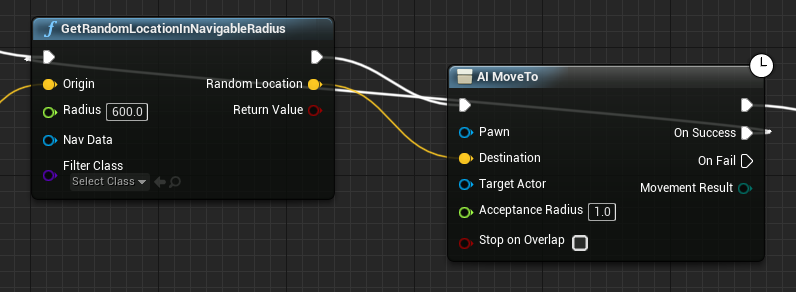
hey guys I made an AI that suppose be moving constantly to random locations but it moves to 1 random location then rotates his mesh 0.1 to the left or right any suggestion?
normal burrow
you could do this before adding to health if you wanted
by connecting the false to the start of the health regen.
@versed lion show graph
limber mesa
how can i connect the false to the health regen


 versed lion
yeah
limber mesa
when you done pat i need you to look at my graph again. it didnt work
stamina work but health doesnt
normal burrow
do you see the false there on the branch?
drag a line from false to where you set the health
and the line previously going to set the health
plug it in to the branch
limber mesa
didnt work
versed lion
well my AI now moved to 3 locations then stopped what are the differences between the radiuses? https://prnt.sc/rqhoj8
 bitter iris
this is gunna be a big message 😄 erm
I'm trying to make my own command, so this;
"/loc"
then it to display my location code of XYZ which is here, as you can see I've got a
https://cdn.discordapp.com/attachments/666796462503362575/694695206989201418/214109db60fc63ac78053bf51809e23a.png

I've then created a function of ShowLocationMessage, using the variable then add new message
https://cdn.discordapp.com/attachments/666796462503362575/694695363617095700/c21e5a76e468d44dc132b8ece1660502.png

then finally in "Check For chat command" I've got that function called here
https://cdn.discordapp.com/attachments/666796462503362575/694695568567697418/7b468ce99d62457d04b5e73924c0b94c.png

but nothing is outputting when I use /loc


wondering if anyone can help
bitter iris
constants
bitter iris
If youre making this as a landscape material id suggest making the material into an instance and doing params
 tiny sonnet
is replicating a inentory system a tedious process? I made one a while back but i nvr replicated it.
bitter iris
Yeah that way you can edit your material on the fly
abstract relic
@knotty vessel if you ever find a material node you're unfamiliar with
https://docs.unrealengine.com/en-US/Engine/Rendering/Materials/Functions/Reference/index.html
Reference page for each of the material functions, separated by category.
tiny sonnet
the unreal engine documents really arent that good in my opinion
 knotty vessel
usually i look up tutorials for things i dont know but i cant rlly ask google what a picture is lmao
normal burrow
😂 yeah, or source sdk
abstract relic
software doc sucks
knotty vessel
it rlly do
abstract relic
I feel pampered when I open unreal's doc
normal burrow
Luxurious documentation pampering is how i'd put it as well.
abstract relic
for beginners at least
knotty vessel
it took me a year to learn blender bc i was trying to use their docs lmao
normal burrow
You can usually look at the code as well if your really want to know how things work.
abstract relic
I'm not impressed with it's cpp api section
normal burrow
cpp api help is literally generated from comments in the code
so.. reading the code is really the better way hah
abstract relic
"this is a thingy, it does what thingies do"
normal burrow
// Executes the current context and modifies value.
whats worse is they miss things
so if you use the documentation api site to know whats available
it just skips things in the code that are wrapped around in
#if WITH_ENGINE
but code is good to read still
The base class of all UE4 objects.
like none of these functions are documented there
so just mentioning that if you get confused at where the hell GetWorld() is in documentation brohan
 lucid magnet
How do i connect theese two?
normal burrow
are you trying to stop or play a montage?
lucid magnet
but how can i check if an action is going on - by an interface event?
normal burrow
you need a branch there
if you want to connect the two and split execution based on that Return Value
normal burrow
add a branch first
normal burrow
do you see the red ring on the branch?
lucid magnet
yep
normal burrow
connect the red rings
 fallen marten
Lol
normal burrow
then connect the > symbol out of the event, to the > in to the branch
abstract relic
time to get mattew video
normal burrow
ye
abstract relic

What is the Branch Node in Unreal Engine 4 Blueprints?
Source Files: https://github.com/MWadstein/wtf-hdi-files
normal burrow
that @lucid magnet
normal burrow
you doing good, keep it up
knotty vessel
how do i fix no falloff on brushes in lanscape paint mode
versed lion
p@t sorry to bother man but about the AI thing, i still don't get why he stops
normal burrow
my bad i forgot oshri,
versed lion
its ok 🙂 you are a good man that helps alot of people no rush
normal burrow
the success and failed parts, you want to connect these to something that re-attempts the walk cycle
abstract relic
#askpat has returned 😛
normal burrow
picks a new end point
limber mesa
hey pat sorry for the bother but it didnt work
abstract relic
lol
limber mesa
ik
normal burrow
show graph
 peak merlin
Guys can someone help me on something im new the ue4 so im running on someone problems
abstract relic

peak merlin
Im trying to recreate a game called vainglory
I used some paragon characters
But i want to add health bar and other thing but
peak merlin
When i add them they dont show up
normal burrow
freshly doodled line == make
limber mesa
make a == float pat?
peak merlin
Noo can u show me a video
normal burrow
there is one line to add
limber mesa
ohh
peak merlin
What you guys are creating
versed lion
this is a playlist containing all the user interface information you need: https://www.youtube.com/watch?v=WJHfPwodtQo&list=PLL0cLF8gjBprIHm0yo-Vj9oBwi2-gAIEd

In this series we take a look at how we can develop beautiful, interactive user interfaces within Unreal Engine 4!
We'll cover the process of creating heads up displays, menus & more using UMG...
♥ Subscribe for new episodes weekly! http://bit.ly/1RWCVIN
♥ Don't forget you ...
normal burrow
versed lion
by Virtus learning hub enjoy
normal burrow
i made it ghostbusters now, add ghostbuster line
peak merlin
@versed lion thanks dude i have been for hr try to solve this lol
limber mesa
it doesnt work
versed lion
@peak merlin np man
versed lion
like smite?
limber mesa
it doesnt work
normal burrow
may want to start up playmode then observe what happens with those lines billiamsfluster
you'll see red glowing lines that indicate execution
if theres no execution going to that part then thats the problem
@versed lion if it goes 5 times and stops likely it failed to start
limber mesa
there is no execution
limber mesa
still looking
versed lion
@normal burrow if you were me what would you put after the "on success" note?
limber mesa
i found a problem
when i press on a key programmed to do something it works but on the graph it isnt showing that
normal burrow
if your getting a false from random location
may have to nudge the thing somewhere
in addition to just retrying after some delay
versed lion
ok man thanks for the effort
normal burrow
effort is what i think when i look at my scribbles too lol
tiny sonnet
is there anything wrong with replicating variables that don't need to be replicated?
knotty vessel
can you modify game ready characters purchased in the marketplace in blender?
 pure owl
wtf happened to the wiki, how am I meant to develop now without all that documentation?
abstract relic
For your project? Yes
peak merlin
@versed lion thanks dude it worked i fixed it
 ivory yacht
😂
knotty vessel
lmao is that mixamo
peak merlin
It looks like it damn that cool
 golden condor
Hello great people.
Its been a while since I've been here since every single project I was on was Unity but this month we're doing an Unreal project and I thought what better way to be back than to say hi to people.
So, hi!
 next jetty
hi, welcome!
golden condor
I am so excited to be working within Unreal again! I kind of missed Blueprints workflow lol
fallen marten
Does anyone know of a tutorial to make a conquest type game mode? I:E like battlefield where you capture control points. I could probably figure it out, but for once it would be nice to have something to cheat off 🙃
normal burrow
Can't think of any but yeah, it should be pretty straight forward with overlaps and such
 ancient lotus
ugh blueprint -_-
also define conquest, is it like most players of a specific side in a zone takes it over?
fallen marten
I've made control points that count how many from each team are in a radius and figure out who controls the point, it's a matter of tying all the levels control point actors into a game mode and sorting out scoring, where you can spawn etc.. Maybe if there's no tuts I'll have to make one once I've got this covered
Yeah pretty much. Although if there is opposing players in a zone, you can't fully own the point until there is only members from one team in the radius
ancient lotus
what are you struggling with currently
abstract relic
Can’t vouch for this
https://youtu.be/kaVj2G6hC5U

Some UE4 portfolio work on a King of the Hill style Third Person Cover Shooter Multiplayer shooter.
plush yew
hey if i need help do i ask here?
ancient lotus
you can
plush yew
ok i been having a problem
ancient lotus
which is
plush yew
Fatal error: [File:D:/Build/++UE4/Sync/Engine/Source/Runtime/Windows/D3D11RHI/Private/D3D11Util.cpp] [Line: 198] Unreal Engine is exiting due to D3D device being lost. (Error: 0x887A0020 - 'INTERNAL_ERROR')
i have been searching all over online but only people who are just into playing video games get this error but i haven't found anyone report this when actually in the editor
this happens before i even get a chance to open my project
on the project select screen and it crashes to say that
actually i have found some with the same problem in the editor itself but they say it crashes on their project in 5 minutes or so
i haven't really seen them solved
if someone has had this problem i would like to know the solution
abstract relic
Those are typically due to your graphic card, driver, and/or os needs to be updated
fallen marten
@abstract relic thanks man I'll check it out 👍
plush yew
could it be faultly like the update did that itself, could i downgrade and fix the problem that way
because this seemed to happen when updating my driver
abstract relic
It could
abstract relic
Heard similar reports that the most recent update is never a good idea to have
plush yew
I have no idea how to downgrade the update
yeah
i do not know how to downgrade this update to the previous one
yeah this update was pretty recent as of march the 24th
tiny sonnet
you can revert driver updates
plush yew
where do i go for that
normal burrow
DDU is what you need
tiny sonnet
go to driver tab
plush yew
it doesn't let me roll back
normal burrow
Guru3D.com
Here you can Download Display Driver Uninstaller, this Display Driver Uninstaller is a driver removal utility that can help you completely uninstall AMD/NVIDIA graphics card drivers and packages from your system, with...
tiny sonnet
use what p@t posted then
plush yew
ok thanks
oddly i have disconnected my internet
damn my 3 other routers are connecting
wait i have a question
when i clean and restart is the whole process supposed to be grey after i press the option
it hasn't crashed but the ui is unavailsblr
abstract relic
Feel your pain. I spent all day doing workstation management. Hang in there and goodluck.
normal burrow
These days are inevitable, how are you on discord without internet?
plush yew
Not quite
is there a way to move a group of meshes precisely in the editor?
like using the transform tool
But simular topic it took ages to compile 3 layers for my landscape
Snaptool
I was talking about modeling
Thought he was mentioning modeling
ok, thank you
You have freedom im it, for scaling and transforming there are snap tools even for rotating they all have their seperate integers tho for the snapping
But i am pretty sure that is customizable
alright, thanks
I'm trying to create a game which requires two copies of the exact same level over again
 weary basalt
Does the "Bounds" flag only work during a PIE session?
I have it checked but its not displaying bounds at all.
normal burrow
Yeah
plush yew
wait but now i can't go into my 2517x1527 resolution
it's now just the default 1920x1080 and unchangeable
weary basalt
Yeha fair enough.
plush yew
also, is there any better way to create artificial collisions for a map with more complex surfaces than creating a bunch of invisible boxes?
@normal burrow i have this error now after i had removed my driver update
plush yew
ok great
normal burrow
Spaghetti you can make an invisible mesh
plush yew
is geforce experience going to let me pick a driver
normal burrow
No use the site
plush yew
but it pointed me back to the same driver
i had an issue with
the same version
that's not working
invisible mesh?
how do I do that?
btw, the snap system worked perfectly
tiny sonnet
best place for me to learn to animate melee attacks
should i use record
or maya
?
plush yew
it's your preference really but look into both of them to see which one you like better
plush yew
love your help guys @normal burrow and @tiny sonnet really appreciate it
plush yew
is there a shortcut key combination to disable grid snapping when moving a static mesh?
tiny sonnet
np
 mortal zealot
Is https://docs.unrealengine.com/ editable? Meaning if I find an error can I make a PR request or a wiki change?

Complete resources for learning to use Unreal Engine 4
fallen marten
Drunk at the keyboard 🙃
 honest vale
at least they're migrating the content somewhere
honest vale
docs page is shitty
why is the sidebar going OVER the content?
why is the sidebar empty when I go to C++ reference page?
and imo there should be a breadcrumb navigation element at the top of the page
right now there's just the inheritance hierarchy
 forest tree
Yeah there seem to be issues on the web front
honest vale
the above thing is a bit iffy if you google something and land on that page, you have zero visible means to navigate the docs pages upwards in the hierarchy
forest tree
Same with the marketplace, perpetually stuck in MVP-mode.
Which is begging for features and bugfixes that could seemingly be built quite easily.
 frank pagoda
Seeing that there is not much simple documentation on how to do it, I decided to record a video showing how to setup Pixel Streaming for remote access over the internet with the latest 4.24 version of the engine.
Hopefully it will help some of you.
Enjoy
https://youtu.be/9V6Iy-OSlc4
@ancient tangle I got a server running in AWS, Any tips on how to make multiple instances with their own controls? Instead of copying all the files and folders. Have you looked into that?

With the new 4.24 engine version, Epic Games changed a bit how Pixel Streaming works, embedding Web RTC directly into the plugin and simplifying the setup process.
In this video, we are going through the setup process of an Unreal Engine project in order to be able to stream i...
 violet goblet
someone here used "unreal + alembic hair" already?
plush yew
Hello ! I Have a problem with the engine. I can't make changes to blueprints and in generaly its very hard to change anything. Does anybody know what should I do ?
?
Pls I just want to start my project 😄
ivory yacht
someone could help me out. I should put a game object (character). that after speaking to him allows you to change the character of the player. I need a guide or something
and also an initial menu that can be chosen between 2 characters. once you save it must remain that and you can no longer access that menu
 half turtle
what are the ... limits for a world in size? and what issues arise if i make a world over 20km?
like, if i create a world that is mostly empty space (almost literally) what issues would happen if i say create a world that is a million kilometers?
gilded lichen
Hello, how do you make animations smooth? I thought I remember a setting to make them look a bit better.
 placid arrow
hi all
im a bit concerned about this
Unreal Engine Forums
After over a year in maintenance mode, the official Unreal Engine Wiki is now permanently offline.
We recognize that the Wiki has been a valuable resource for many of you during your development journey, and we will be incorporating the top-visited content from the Wiki into ...
are all the wiki articles available on archive.org?
is there any community effort to relaunch the wiki articles as a github wiki then
i'd like to contribute if there is
 plush atlas
Anybody knows how to prevent steam vr from launching ?
plush yew
why is there no tutorial series which teaches me everything?
why do people have to come here and ask so many questions -.
there should be tutorial series which teaches you everything you need.
Like "Visuals 101"
 wooden vine
Hey guys, I need some help choosing terrain generation software, I'm considering buying one. I'm looking towards "World Creator" (as most feature-packed and game-dev oriented), also how about "Gaea"? looks promising and easy to use. "World Machine" is an outsider for me, UX/UI and workflow look kinda outdated.
young stone
I press PLAY or compile and sometimes this error pops up, I watched the memory usage and first the editor froze then the usage started growing and when it reached the max ram this error poped up
what's causing this
 frank escarp
@wooden vine houdini, maybe houdini + gaea
you can drag and drop houdini terrains into ue4 and everything gets setup automatically
wooden vine
@wooden vine houdini, maybe houdini + gaea
@frank escarp Sounds interesting, but I'm quite not sure about Houdini licensing, do they have an option to buy software? Renting is not for me.
wooden vine
Damn
 floral lion
Depends on your studio size
For smaller studios it is 250$ per year
radiant haven
Guys, how can I get the location of my Mosue CUrsor in the world
floral lion
and Indie has everything in it
Guys, how can I get the location of my Mosue CUrsor in the world
@radiant haven PlayerController Transform Mouse To world #blueprint #cpp for more
frank escarp
yaeh indie is a great deal
you can download the education license, which is like a demo
and check the terrain tools
the education license cant connect to unreal tho
wooden vine
I'm a single bedroom developer, I need something with an adequate learning curve, Houdini is too much for me, I guess.
Depends on your studio size
For smaller studios it is 250$ per year
@floral lion
radiant haven
@floral lion Yes I have it liek this but it doesnt recognize meshes if i click on a mesh
 dim merlin
https://forums.unrealengine.com/unreal-engine/announcements-and-releases/1739154-changes-to-the-official-unreal-engine-wiki
my god, the wiki software is so bad its offline now?
Unreal Engine Forums
After over a year in maintenance mode, the official Unreal Engine Wiki is now permanently offline.
We recognize that the Wiki has been a valuable resource for many of you during your development journey, and we will be incorporating the top-visited content from the Wiki into ...
 whole quarry
@young stone what videocard do you have?
young stone
Gtx 1050ti
dim merlin
anyways, so is it possible to show/hide debug shapes (lines etc) while not destroy them?
whole quarry
@young stone retail or a china version of it?
 lament verge
noob question... the part on top of the viewport where i can change the angle snapping dissapeared
how do i get ut visible again?
whole quarry
F11?
young stone
@young stone retail or a china version of it?
@whole quarry retail-_-
lament verge
@plush yew thank you very much!!!
young stone
The editor just some times freezes and starts eating ram
whole quarry
@young stone it was a valid question, wouldnt be the first time someone bought a spoofed old videocard presentes as a modern one. Anyways do you have the same issue in a new project?
 unreal sable
I've got RAM issues too.
Seems like the longer UE4 runs play tests the chances increase of crash.
 ancient tangle
@ancient tangle I got a server running in AWS, Any tips on how to make multiple instances with their own controls? Instead of copying all the files and folders. Have you looked into that?
@frank pagoda I am looking into that. Planning a couple of tutorials on aws setup and multiple instances
young stone
@young stone it was a valid question, wouldnt be the first time someone bought a spoofed old videocard presentes as a modern one. Anyways do you have the same issue in a new project?
@whole quarry I'll check but this issue never happened before
this also started poping up on launch
lucid magnet
Hi. I am working on camera controls... is there any way for me to make an input control on the 3rd person boom arm socket offset - kind of like what i did with this camera zoom
 plain gazelle
What is the relationship between the PlayerPawn and the CameraManager inregards to placement of the camera during gameplay, which one overrides the other, if at all. And where is the CameraManager set or can that be set in multiple places?
Basically in the CameraManager class I wan't to know where to attach the camera to the skeleton bone on the model/playerpawn skeletal mesh.
 mint sequoia
Does anyone else think that.. the sky in UE4 looks god awful?
 quick kelp
@mint sequoia there is a free asset on the market place called Good Sky. it provides you with a very useful blueprint for sky. i use it alot
fierce tulip

Testing out, pretty cool, should Star Citizen be scared? ;).
Found here,
https://www.youtube.com/watch?v=svb2UZ0BxqY
mint sequoia
@fierce tulip Yeah been keeping an eye on it. Wish there was a good stylized option too
fierce tulip
tweaking, custom textures, and some post processing and you should be fine.
mint sequoia
Hopefully. If I google images "ue4 stylized sky" I don't see any good results
I'll tackle it after I sort out trees
 ruby folio
Sooo.... Material layers are being brought back?
lucid magnet
How can i make so that when pressing an input - one thing happens, and when i press it again - another thing happens
?
fierce tulip
flipflop
lucid magnet
what?
bitter iris
flipflop is a node @lucid magnet
ruby folio
 glad gulch
Is my logic right: Interaction System -> Interactable (Parent/Master) -> Differend Sub-Categorys (Child/Slave) for example -> Weapons (Child/Slave and Parent of:) -> Specific weapon (Child-Child/Slave of Interactable -> Weapons) and findable in structs.
So: I'm on the right way? And where i should put my Inventory-System? D:
I see this all like a Matroschka puppet (edit:) and now i try to get the right order.
 grave nebula
What is this wiki thing people are talking all over? Wasn't it taken down for renovation ?
fierce tulip
yea, but they decided its better to close it.
grave nebula
mmm... I did not realize that it was closed for a year
abstract relic
Who didn’t see that coming? 😜
grave nebula
Was it helpful to people ?
abstract relic
There were some nice tuts
fierce tulip
i didnt even know it existed, others are furious hehe
abstract relic
It’s was more a wiki of, “how to get this specific effect”
grave nebula
My experience with wiki started and ended on one article.
Answerhub is next in line.
fierce tulip
oh yea, I forgot I put some vfx tuts on it when I made my first few tuts
frank escarp
epic games killing wiki before answerhub is.... not very smart
answerhub is far less useful than the wiki
its a shame tho, answerhub on the closed beta days actually worked
but its spammed to death
either by spammers
or by people who cant google their question
grave nebula
I'd disagree. Answerhub used to be helpful. Did not participate in beta, but it did work in 2016.
frank escarp
yeah when unreal costed money
grave nebula
yeah, that time
frank escarp
when it became free it got flooded with noobs
fierce tulip
some people siteripped the wiki, so its available
abstract relic
Webarchive here we go
 frosty bloom
And this is not an april fools joke?
normal burrow
Some sites started redirecting to way back and just not hosting their content. Which way back just removes