#ue4-general
1 messages · Page 678 of 1
 ancient aspen
How can I get a reference of an actor
 grim ore
uhm is the tile set to rough perhaps?
 ancient otter
rough?
grim ore
@ancient aspen usually after you create the actor you can get a reference to it. If you are not creating it you can try and find it using get actor of class and finding the one copy of it in the level. IF that won't work and the item you want AND the item that wants it both exist in the world at design time you can use a variable and make it instance editable and then set it in the editor
like is it a shiny tile which would show a good reflection or perhaps it has some roughness that makes the reflection look like that
it does look super weird tho lol.. well not weird weird but super low res
ancient otter
it does
 rotund scroll
@ancient aspen show your code perhaps
ancient aspen
rotund scroll
so uhh
what are you trying to do here
is this your original setup or did you copy paste it
ancient otter
@grim ore is there any way to make emmisives emit actual light?
ancient otter
rip 😦
 zenith flower
@ancient aspen is that the character or tele OnOverlap?
ancient aspen
the tele
its supposed to teleport to the position of another actor
no its another actor
zenith flower
oh, well then you need to set that up first
when you spawn the tele
you need to set an actor reference variable
I assume this tele is built into the world?
ancient aspen
yes
zenith flower
And how is the other actor ? Spawned or a part of the world?
ancient aspen
how do i make a reference variable
wdym
i mean it has 1 of itself in the world rn
zenith flower
One way to do it
Lets call these:
MainChar, TeleFromActor, TeleToActor
TeleFromActor: On begin play:
GetAllActorsOfClass -> of type "TeleToActor", take the first one out of the array, and store it
OR if TeleFromActor, and TeleToActor are the same type
Create a child actor, call it
TeleportTOActor
and create a variable called "ID"
ancient aspen
Nah, they are both different blueprints.
But there will only be one of the TeleReciever
zenith flower
Sure
then just find all actors, its usually frowned upon to use
but if you use it just the one time you will be fine
Hold up! GetActorOfClass, is that a new node in UE4?
zenith flower
that spawns a new actor
ancient aspen
it doesnt
cause i got the reference
and clicked play
it was still one
but
ikrn
zenith flower
Or maybe it grabs the first one it finds?
zenith flower
There are only a few ways:
Get actor of class
Get All actors of class
or inside of the actor itself
Lets say you want to pass
main char ref to tele1
Inside MainChar, begin play, you call a function in tele1, lets call it SetRef
the function SetRef, you make in input
of Actor
ancient aspen
what function?
zenith flower
you make one
ancient aspen
That variable how do i access it from another blueprint
ancient aspen
cause the structure of my thing i cant connect a cast
ancient aspen
yeah but my structure is different
zenith flower
no idea what you are talking about
not using a struct here
I'm just showing you how to pass a variable between actors
zenith flower
White = order of execution
Purple -> you don't "have" to connect this, you can just pick which class you want
 fading vector
I have mobile game, and I want my player to move towards the mouse constantly. Would Convert Mouse location to world space be good for this?
The only way I can think to do it is getting certain values I.E. x world location and saying if the player is less than cursor location in x value then change a variable which is tied to an add force.
rotund scroll
@ancient aspen you could add TeleportDestination as a vector variable and then just add its value for the teleport
you can expose it so that when you place the teleport BP you can change the value
equally you could also make a TeleportToActor variable, exposed in the same way, that teleports you to that actor
ancient aspen
Yes but i just want to know how to get it to teleport to another actor
Im confused
zenith flower
@rotund scroll ah yea, thats another much better way
rotund scroll
then just do TeleportToActor.GetActorLocation for the teleport destination
create an actor variable
ancient aspen
Oh so your saying i get the vector3 of the actor and then teleport it to there
rotund scroll
yep
ancient aspen
Alright
 pale forge
Hey ... I was wondering if anyone could help me figure out how I did this. Everything was fine and then suddenly I fire up 2 players.... and the animation is only playing on one network client and not the other. No difference if I am client or server. I just have no idea what I did.
rotund scroll
then select that actor variable and select instance editable
zenith flower
#multiplayer is better for that
ancient aspen
K
rotund scroll
now place that teleporter in the world
in the details pane you should now have that variable open to use
it will be empty, but clicking on it will either give you a list of actors in the level to choose from, OR, an actor picker tool
 wary jay
@pale forge Go to active play mode and look at the bottom at number of players
rotund scroll
@ancient aspen if you followed my setup you don't need get actor of class
like you should never have to use that node if you do things right
pale forge
@wary jay Sorry I am not able to understand 'active play mode'
pale forge
2
wary jay
set it to 1
wary jay
so your good?
fading vector
I have mobile game, and I want my player to move towards the mouse constantly. Would Convert Mouse location to world space be good for this?
The only way I can think to do it is getting certain values I.E. x world location and saying if the player is less than cursor location in x value then change a variable which is tied to an add force.
pale forge
ha ha ... no.... it's a multi player game...
wary jay
oh
 thin tendon
I'm having a weird issue using this speed tree node. When I enable physics for my tree to fall. The leaves flicker very quickly swapping colours each time.
 opaque berry
@fading vector https://docs.unrealengine.com/en-US/BlueprintAPI/Utilities/DeprojectScreentoWorld/index.html
Input mouse pos, use the world location to path towards, the angle output form screen to world probably not helpful as its angle from camera
Deproject Screen to World
opaque berry
Yeah same concept probably better way to handle it
fading vector
How would you suggest I move the character to it?
opaque berry
If it were me I'd use navigation, much like ai does
And just tell the actor to path there
fading vector
a move to location
opaque berry
Imo it would feel smoother than getting stuck, but also can feel odd depending on your desired control feel
fading vector
Might use the add force
Because its a physics game
Set timer by function name and run it fairly often
opaque berry
Sure that could work, alternatively to the path method, you could use the world location to get an angle, project the location vector toward it a tiny amount, ending up with a path location close to character and in mouse direction, but for purpose of stopping against fences, for example
Angle the character toward the world location and input forward
Tons of ways to pull it off depends on how you want it to feel
fading vector
not too snappy
 scarlet birch
@grim ore Yeah, it would need to get a reference in order to bind to it.
It's not the way I'd do it.
fading vector
So this is what I came up with, it's sorta buggy tho
Anyone have any idea how else I could accomplish this?
opaque berry
Must make actor look at world location then input forward
fading vector
It doesn't need to look at it
its a ball
This in essence just pushes it in the y axis
left or right
opaque berry
Oh a physical ball, yeah forces are best way
fading vector
It's really glitchy tho
does not follow it smoothly
Is there a way to lock my cursor on the game?
opaque berry
Not sure on exact math but it's along lines of get vector angle from current pos to target pos. Then multiply that vector until you're happy. Appy multiplied vector to add force
Setting y in vector to 0 will prevent forces pushing up/down
 normal burrow
is it a rolling ball?
opaque berry
You're looking for the vector angle to input into add force
normal burrow
are you trying to torque the ball somewhere?
fading vector
trying to make it follow my mouse/cursor
Because its a mobile game
I want it to follow the players finger
normal burrow
ok so
(finger location) - (ball location)
that would be the direction the ball wants to move
opaque berry
Yeah then multiply that by how hard it should move
normal burrow
if you want to spin the ball that way, you need the rotation axis. which would be
(direction) cross (0,0,1)
normal burrow
k then just what smoozilla said after you normalize the vector
fading vector
forward movement is automated or else the game would be too easy
so I just need to control its movement side to side
opaque berry
Maybe make the table underneath tilt?
opaque berry
Also possible to use normalized vector direction and remove the directions you dont want applied
fading vector
I didnt think of that
opaque berry
Yeah was gonna ask why not on tick event but figured you had your reasons
fading vector
or whenever you need to
tick is meh
I've been told to stay away as much as possible
normal burrow
I understand how they work but every engine has things about timed managed invocation
I would honestly stick with tick here
opaque berry
I dont think swapping to timers is any different, as many timers would be akin to many tick events, no? Suppose if your timers are more spread but for something like movement you want it updated every frame
normal burrow
thing is
opaque berry
It is true you dont want to overload your tick events, but they are useful for sure
normal burrow
how many of the balls are there?
fading vector
1
normal burrow
use tick
fading vector
Let me give the scope of my game
opaque berry
Especially for input movement
fading vector
On 1 level I have around 150 - 200 physics actors
All the red sticks
the wall
They do nothing but have a overlap event
opaque berry
Dont put tick on those, just your player ball and input sampling
fading vector
Oh I know
anything they have is begin play
those don't move
Then I got the ball
which moves forward constantly
and I also have a check for movement on the z-axis
if any velocity occurs I set it to 0
Dont want the ball to go up ever
normal burrow
I really would start with tick on everything that needs it but again, i've never had to rely on a timer in blueprints so idk, maybe they are reliable
opaque berry
I think you can check a box to lock it on z
opaque berry
Dunno mang, definitely sample and apply input every frame (tick) and I think forcing a velocity to a number can be glitchy, maybe add a constant force down?
opaque berry
If it works it works
fading vector
Yeah, that part is no concern anymore
Making this ball follow the cursor properly is a pain tho xD
opaque berry
That's where game dev begins, finding some random route that's not normally discussed and making it work for your situation :)
All I can suggest is use a normalized vector angle multiplied to desired force and sample/apply per frame
 rain pumice
Does any one know any way to turn get velocity vector into a float that I can compare against another float
I am trying to set chracters max acceleration to a number based on character velocity
opaque berry
Vector length/size/magnitude, can't remember unreal engine terminology exactly
That will turn a vector into a single float
rain pumice
nice
rain pumice
is there any way i can print that float
like see what that number is while playing
im trying to compare that velocity float to another number
and i am just not sure what range it is outputting
I can see that it works but i have to do huge numbers
 abstract relic
Use a print node
rain pumice
print string?
abstract relic
Yep
rain pumice
ok i will try and figure out how to put that in where would i connect it next to vectr length?
 pulsar badge
What is twinmotion?
ancient aspen
Alright thanks @rotund scroll
rain pumice
any one have any idea how to launch player off a hill?
currently you can only launch of a hill with a specified walking slope
regardless of speed a player does not launch off ramps
it sticks to the ground is there any way any one can think of to change this?
i think i might have to make a custom movement mode but maybe there is another way
rain pumice
ohh i was afraid of that
seems like the way they have the character setup through walking
messes things up
i tried to switch the character into flying mode at certain points
but it was bad
normal burrow

Project Borealis
Releasing our C++ movement code under an open source license
I’ve not tried that
But perhaps it is something that would work for you
I am more than mystified by the legal aspects of using it
But they claim they own it despite being a port of HL2
normal burrow
Yeah, it is
rain pumice
i am working on a tribes like ball game
normal burrow
Nice
rain pumice
here is some footage from last week it has progressed quite a bit this week
have a gravity gun
normal burrow
Yeah you need proper skiing
normal burrow
Nice what is your budget like?
rain pumice
it is hard to say right now
probably a few thousand
then i would try to go to crowdfunding after I got it working enough to show and release a demo
i had this game developed a few years back
spent about 2k to get the multiplayer and everything working
but there were obviously a lot of problems and i didnt reallylike what I had
i can do most of the 3d myself so I save some money there
normal burrow
Ye it happens but stick with it. Would like to see another tribes style game 👍
rain pumice
thanks will do
 plush yew
hey guys, does anyone have ideas for what I could use for writing a painted mask into a virtual texture instead of landscape painting?
 fading vector
Would anyone know where I could start to create a color wheel that can change the color of a material while in the game itself?
plush yew
Click on your Material
right click
THen choose Create Material Instance it iwll be the top option
@fading vector
fading vector
I get that part
but how can I create a color wheel in game
So players can actively change the color whenever they want
rain pumice
you could create seperate materials for each colour
fading vector
I already did that
rain pumice
then in a blueprint use a change material
fading vector
Mhm
rain pumice
i just did that yesterday it worked for me
fading vector
but its not enough
I want a higher level
Works for some things, but this needs the extra color
rain pumice
got ya I am not sure
fading vector
no worries
rain pumice
you want like an actual colour wheel
fading vector
yeah
rain pumice
can any one imagine why this launches my chracter forward fine
but if i look up it like flies me way up in the air
way more than it moves me forward or laterally

 kindred viper
@tame bluff you have a material parameter set to effect the emission value. Then change that in blueprints.
 tame bluff
And then you can turn it off and on like a light switch?
plush yew

Am shooting an arrow particle
it hits the enemy fine everything is good
but i want this particle to move with the mesh Of the Player as it hit it
THis is an Arrow BP
i can move this particle to be Player BP Mesh child some how?
i want to change parents
is there a node for that?


Am trying to let the Arrow particle stick with the Enemy as he move
when it hits him
Hiting him is done
but just want it to stick on him
 paper crest
u need to have BP_BaseGun aka blueprint for BaseGun, then u can create ref from it
if u already create BP_BaseGun, you can search "BP_BaseGun" in the variable type, and it will be listed
Spawn Transform need input
for dat question, u need to open Bp_sword
 quiet token
unreal insights dont work for launcher version?
scope type for unreal profiler and unreal insights show up in the program but theres always nothing happening
1665 logged event types all empty...
4.24.3
 coral folio
Is anybody experienced encing crashes on saving the project ????
Experiencing*
It makes it unusable
I'm on 4.24 latest
abstract relic
Get logs please. In [your project]/Saved/Logs
But my gut says delete /intermediate to clear some bad garbage collection
plush yew
guys i have problem with my save game system, for beginning I want to save location and then to load it, I did this bp for saving the location, I created the save game class and there I created the variable player location and in third person character
the problem is that when I press J it doesn't print anything to the screen
Now I see that there is some error
how to fix this error?
kindred viper
@plush yew plug your savegame object into the Save Game To Slot node. Not sure if it will fix the accessed none. That is to do with something else perhaps.
 tame delta
Why does "Select all Descendants" not select all descendants
It selects some descendants up to an arbitrary (and apparently random) depth
and then needs to be called again at least another time to really get all all descendants
plush yew
I did it I guess
^
@kindred viper
I want to save the location of the character when I click J for example
 pine furnace
Anyone know how long it takes for a question on the answerhub to get approved by a moderator? Posted 14 hours ago and still nothing - kind of floundering on a critical issue and could use all the help we can get!
tame delta
If I report a bug and it gets tagged as "Won't fix", how come I don't get an explanation on why?
This is one of those issues https://issues.unrealengine.com/issue/UE-87523
 glacial pecan
@tame delta that's weird... sounds like a no brainer... but then again, I got what I considered to be a bug listed as a "feature request" (wildcard macros can't set default values on enums... which should be the same as an int, really)
 primal prairie
Anyone else noticed edges jittering if you use the depth of field effects? It's really frustrating and i had no issues before using the now deprecated Mobile Depth of Field on PC....
rotund scroll
could be duplicate or work that is superceded by other fixes e.g.
 exotic lion
Okay. Kind of need a super quick answer, when it errors "map won't save" whats going on? I even removed everything i added since I last saved it. Whats going on?
Google was no help
primal prairie
Mine does it half the time too
@exotic lion try and save it via the "File>save all"
exotic lion
Okay. Did that, it hung up for about 5 seconds and crashed XD
plush yew
Does anyone know how to get time that a previous frame took to render?
primal prairie
through the profiler?
plush yew
No, programmatically in runtime
I tried saving GRenderingRealtimeClock.GetCurrentTime(); on different invocations of Tick, but every other frame current time is the same as the previous one...
Not sure how DeltaTime is reliable in such case, since AFAIK it denotes some time samples + dilation rather than something concrete.
 civic iris
someone has done this with threejs, how to achieve similar photo-realism with unreal?
glacial pecan
@civic iris lightmap baking
plush yew
Maybe at least someone knows a place in the source code related to DeltaTime. I think it is tied to rendering, but there's no mention of it in the official docs
 exotic cave
realizes he's going to have to learn lightmaps and lightmasses sooner rather than later
What is a lightmass?
civic iris
lot to learn
tame delta
@glacial pecan Yeah I don't know 😕 some of the other bugs I reported got fixed (I wish they sent you a mail or something though, took me months to realize that a major issue with Datasmith was fixed, had to work around it the whole time)
@rotund scroll Maybe, but they generally mark those as duplicate no?
@exotic cave Lightmass is the name of the tech, lightmaps are textures that a raytracer accumulate to
rotund scroll
I don't know how they do JIRA internally
tame delta
Don't know, but the way they expose it out really sucks imo
maybe I'm bad, but I can't even find the issues I've reported
I have to search for the subject again (provided I remember it) and hope to find it
rotund scroll
pretty sure it's not a high priority to expose their current buglists
it's more to give a cursory overview
plus they probably have strict guidelines on what they can and cannot post or comment on
tame delta
I can understand that, but there's big value into making what you do expose as streamlined as possible
ultimately, especially for Datasmith for example, they need the users to report issues
Well in general now that they target a more industrial sector, a lot of people do weird stuff with the engine that they didn't plan for
rotund scroll
sure, they need people to report
but report is different from seeing the reflection of said report
tame delta
Don't know what you mean, all I want is to know why the bug that I reported because it prevents me from doing a crucial part of my work will not be fixed 🤷♂️
(Not the case for the bug I linked obviously, which is just a minor annoyance)

 rotund scroll
like I said it's information that you aren't privy to
rotund scroll
so I would just roll with it
plush yew
any thoughts?
tame delta
@plush yew What is the error
 vale silo
Soo, updated Windows last night - now nothing Internet related works, except Edge. Epic's launcher doesn't work, Chrome doesn't work, etc. Any idea how to fix ?
rotund scroll
roll back
 tame delta
@plush yew What is MagnetCollision?
Is it not an actor?
The function needs a valid actor to move, you've got to reference it here https://i.imgur.com/RRiXdXO.png
Looks to me like you just forgot to set it to other_actor/BP_Player
vale silo
@rotund scroll how to fix without rolling back ?
 rotund scroll
don't think you can
 gilded sierra
Grass placing as shit due of Align to surface ? Is there a way to fix it?
rotund scroll
microsoft already said the new update was fucked
so either wait for a patch
or roll back
tame delta
@plush yew Yeah, give the actor you want to move to set "SetActorLocation" node
plush yew
But it wont move smoothly
it will just teleport 😄
@tame delta
i want it to go smoothly to the player
paper crest
is there a way to disable culling?
 spark niche
I might be going out on a limb here - but does anyone have any idea or possibly any references to how I might be able to implement loading assets post packaged game?
For example: Having an fbx file in a content folder call "custom" and it'll get parsed and loaded in when running the game?
tame delta
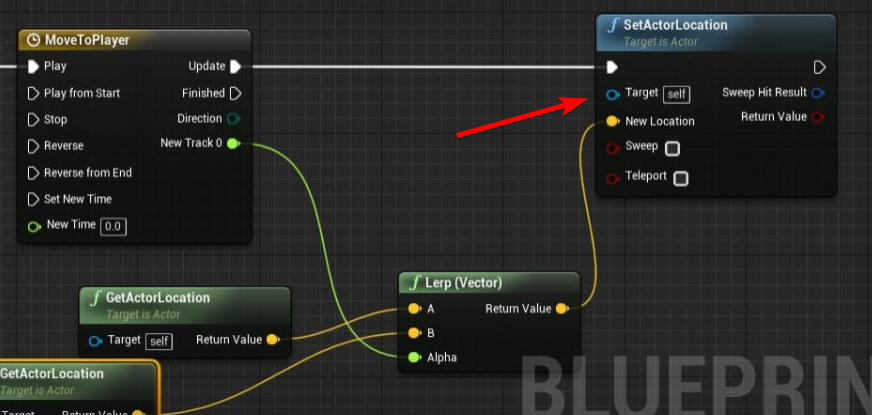
@plush yew Bunch of ways to do that, loot at interpolation curves online. The simplest ease-out would be to set actor location with lerp(current_location, target_location, 0.05) on tick
 wary wing
@spark niche This looks to make possible what you're talking about: https://www.unrealengine.com/marketplace/en-US/product/runtime-fbx-import-asynchronous

Asynchronously Import FBX files in your Unreal projects, in runtime.
spark niche
That very much sounds like what I am talking about! I will have to look into that more. I had no luck havinf that show up in my search results 🤣 @wary wing thanks so much!
wary wing
You're very welcome 🙂 I searched for "ue4 runtime fbx loader", for reference
It also yielded this, but it doesn't look to be maintained https://github.com/GameInstitute/RuntimeMeshLoader

GitHub
RuntimeMeshLoader for UE4. Contribute to GameInstitute/RuntimeMeshLoader development by creating an account on GitHub.
tame delta
@plush yew Yeah it should be, I have to assume your timeline is wrong then, but I don't use timeline so I can't help you with that sorry
spark niche
Oh cool, I tried various terms but not that. I think runtime was the missing link.
Anything fbx import related kept coming up with how to do it in editor haha.
Maintained may not be as much an issue if I can get ideas on how its done I might be able to do it myself (maybe :p )
tame delta
@plush yew Keep in mind this timeline probably doesn't work like what you expect. You lerp between the actor current location and the target, you should store the initial position if you want your curve to control position
spark niche
@wary wing im finding all the things with the keyword runtime now 😂 how much difference a single word can make. Thanks again!!!
wary wing
Yay! Glad you're going better now 🙂
 tame delta
Then consider putting a force on the cube instead of changing it's rotation
the gold cubes will be sliding/rolling to the character instead
 tame delta
actor position just teleports the cube around, ignoring it's physics state (that's probably why some cube are sent flying, you put them through each other and geometry)
plush yew
You think this will do the work?
tame delta
Add Force would be more suited as it scales with deltatime
 tame delta
location of player - location of gold nugger -> normalize -> multiply by a float constant -> add force to nugget
plush yew
@tame delta Okay mate am doing it
Add Force is the node for it as y ou say
testing it now
hopefully it will work out
 fathom mortar
can somebody help me with a error? ive got two levels: one for my main menu and one for my actual game. If i start the game directly from the game level, everything works fine. If i start it from the main menu level, The AI just doesnt move. Ive tried print strings at different parts and i still cannot figure out why it doesnt work. Any ideas?
 left citrus
Is there a way to adjust the order that material slots are stored on a given asset? Not re-assigning any verts, just change the order they're listed (and their IDs)
or will I need to use the python plugin?
 next badger
Anyone uses Firefox here?
 storm burrow
Not in the editor interface, afaik @left citrus
Is there a way to automatically convert sequencer sequences to 60 fps from 24?
plush yew
I want to make when i press J to save the location of the character, I did this script but why it doesn't work?
storm burrow
nvm figure dit out:D
next badger
@amber marlin which file?
 amber marlin
The fule button on top left corner
next badger
sorry, i have 0 clue what you're talking about
menu bar?
if yes, get a crash log, post it on pastebin
 misty creek
That's a lot of shaders....
 nova kelp
this is test my test world not even a game
i reinstalled everything and just opened it back up again
 ashen brook
enabled/disabled raytracing or something like that?
plush yew
@next badger Am having a problem
 mossy spear
plush yew
mossy spear
plush yew
Moving a cube to my Player
mossy spear
Anyone with idea of how to get rid of jagged shadows like the one in the image
mossy spear
Anyone with idea of how to get rid of jagged shadows like the one in the image
nova kelp
maybe rebuild light ?
mossy spear
Even after light rebuild still same
nova kelp
whats the scale of it ?
is it really small ?
Unreal Engine Forums
For discussions about Materials, Textures, Lighting, Particle Systems, and Post Process Effects.
google helps
You have to increase the radius or length of a light to get an area light.
next badger
@plush yew tried to print out the alpha?
mossy spear
@nova kelp giving that a shot now
plush yew
@next badger

it keep giving me this
am confused 😄
Some of them come to the player
and some of them go to the center of the map
sec
taking video
@next badger
Look wth man 😄
 serene birch
make sure occlusion culling is efficient, try different methods/settings
and if it fails, remove actors or LOD them better
batch some together in HISM
next badger
@plush yew log the actor location
serene birch
stuff like standard optimisation
next badger
@plush yew also, get used to use debug nodes
serene birch
Hierarchical Instanced Static Mesh
next badger
like points and rays
serene birch
but obviously first, you'll need to search for why it's slow
applying random "slowness" fixes won't work if you don't apply the fix that goes with the cause
nova kelp
oh maybe 2 boxes hit each other so it fires out
next badger
all objects in ue4 are actors
serene birch
guessing is good for a search direction but measuring is better
next badger
static mesh is an actor
serene birch
could be overdraw, too many draw calls, materials too expensive etc...
plush yew
@alx\
@next badger i cant understand where the problem at
if i changed the Other Actor at the Casting BP Player to get Player pawn
it work fine but even if he didnt overlap
so that didnt solve it
Cant find the problem meh
next badger
@plush yew um...you should set the collision channels on that overlap
nova kelp
Half way!
serene birch
best is to start reading the docs I guess https://docs.unrealengine.com/en-US/Engine/Performance/index.html
How to identify performance problems and fix them.
maybe there's better tutorials out there but I don't know them much
nova kelp
@plush yew when you pick up that box thingy
you get some kind of effect
does it have force ?
next badger
@nova kelp it's a timeline based movement, he posted graph above
plush yew
humm
@next badger am trying to make a magnet
to the gold
so i can pick it up
is there another way?
next badger
@plush yew this is a good way...you just making something wrong...
check the collision channels, make sure it only triggered when player overlaps it
nova kelp
oh you can make vector of movement change slowly so some extremes don't make gold fly
serene birch
if your issue is too many draw calls, yeah but UE4 has tools to do that automatically for you
Overview of the Proxy Geometry system in Unreal Engine 4.
tame delta
@plush yew I told you of another way using forces 🙂
All your cube seem to go to world origin or something, you've messed up some nodes
plush yew
I fixed it guys
tame delta
And as soon as you start interpolating your cube you should disable collision on them, because as you force their location through one another you're gonna have them glitch out
 little bone
Trying to bring an alembic file with an animation that looks like this in 3ds Max
but inside Unreal
I tried to reset my pivot points
xform
 radiant haven
SPawnActor spawns it in World how can I spawn it locally?
grim ore
pivot points in UE4 are based on the 0,0,0 from the DCC program, not any pivots you might have set
grim ore
it will ignore any pivot points you set in the dcc, the 0,0,0 point in your program (max in this case) will be the pivot on your exported model once it comes into UE4
little bone
oh, they are at 0.0.0
grim ore
besides that you need to clear and freeze any transforms on meshes
little bone
still I have this offset
grim ore
I think you are missing something. Where is the 0,0,0 point in max when you have that model loaded? not the 0,0,0 or pivot of the mesh but the 0,0,0 or world origin in max space
if you turned on the grid and axis indicators wherever the 0,0,0 is at in max is where the pivot would be on the mesh when you export it
grim ore
that spot is where the pivot should end up being when you export the mesh from max assuming local transforms are frozen and cleared
grim ore
yep just move your meshes around the scene to where that spot, the world origin in max, is where you want the pivot to be when it comes into ue4
 marble vigil
exotic cave
marble vigil
exotic cave
@thin gate : It looks like one or more of your lights isn't rendering right now, possibly a bug in the editor
That looks like a scene with just a skylight to me
Great models though!
Check all your directional lights, if they're on but not rendering, save your scene under a diff name (just in case) then open the editor and reload
serene birch
is autoexposure on?
 thin gate
think off
exotic cave
I mean, if they're visible, they should be rendering
thin gate
its visible just weird
exotic cave
Restart the editor
serene birch
well I guess your scene total amount of light is slightly lower than the manual exposure setting
exotic cave
It may not be what I thought
serene birch
could be some light that is missing that causes that
exotic cave
As I do see some shadows under the cars
Show us your postprocessing autoexposure settings possibly
thin gate
there is shadows under cars
exotic cave
Yeah, that implies your directional lights are on after all and that your exposure is possibly weird
thin gate
exotic cave
Does it do this from every angle or just the one you're looking at?
Also, did you turn any of your lights down any time between this lighting build and your last build?
 thick herald
Wonder what Epics acquisition of CubeMotion will mean for UE4.
thin gate
i was messing with them, and it looked fine, did a rebuild and it went haywire
i tired deleting them
exotic cave
Possible that you were looking at old baked lighting that was higher maybe then?
It may be as simple as turning your dlight/skylight back up
thin gate
and copy pasting the lights from another level that has working ones
exotic cave
Do you have a skylight in that scene?
thin gate
yes
exotic cave
What happens if you turn it up? Does the view in the editor actually change?
thin gate
us
exotic cave
?
grim ore
what do you mean by the way "lighting is weird" ?
thin gate
i put a image
grim ore
yes but weird is subjective
thin gate
 grim ore
I assume you mean the issues with edges between meshes and if so that's an artifact of using baked lighting
grim ore
yep you have to design your scene around those edges, its the way baked lighting works. there are ways of trying to get around it
thin gate
so how i fix something like that
i have another instance of the map
that it looks good
plush yew
That would make a nice Pavlov map
exotic cave
Oh you're talking about what the arrows are pointing at?
thin gate
ya
exotic cave
And not the overall brightness?
grim ore
does the other map use baked lighting or realtime?
thin gate
how can i tell?
exotic cave
You using a static or dynamic directional light?
grim ore
long story short the way lightmass works is by splitting meshes across cpu cores/threads and due to that the seams between 2 meshes can end up not being smooth but look like what you see.
exotic cave
You changed to static when? Before this build or just right now?
If you changed to static and that caused these artifacts, then yeah, I've seen the same thing
exotic cave
Sure, I find static lights exacerbate that problem, I was going to recommend dynamic lights
As @grim ore said this seems to be an issue related to where your modular meshes are meeting
exotic cave
Did you rebuild that map recently?
thin gate
ya
exotic cave
And it doesn't introduce those seams?
From the thread @grim ore linked: "The reason is each mesh is sent to to different CPU thread, so when they get the indirect lighting, the first mesh doesn't know the light information from the 2nd mesh sitting next to it, thus you get the seam."
grim ore
for the original map, what are the lights set to? directional and such
grim ore
the easiest way to check is grab one of your roof meshes and move it up a bit then back down. It should say "lighting needs to be rebuilt"
thin gate
does say it
exotic cave
And after it says it, do you still have the ugly seams?
grim ore
rebuild it and see if the errors come back
if you are using the same setup in one scene and the other you should see the same results. weird if you are not
however the issue is due to static lighting and settings. that thread does have ways of trying to mitigate it.
also I think GPU lightmass if you can make it work is designed to get around this problem as well if its well still a problem 😦
exotic cave
@thin gate : "It's nice to learn about lowering the min lightmap res can increase the padding between the islands though." --also from that thread
 elder moat
Anybody know a sort of tutorial or know how to make it so that if a monster touches you then it plays a jumpscare and then you die?
thin gate
ya looks like if i move the objects
and move them back
the issue goes away :/
anyway to do them all at once
grim ore
move the mesh around a bit and see if it goes away, if it does then its your UV's from a baked lightmap more than likely
it looks like most of your items have a low res shadowmap like they said above as well
plush yew
The unrealengine website is displaying plain text, is it normal ?
serene birch
check if it's not overlapping UVs first
as for resolution, really it depends on your texture memory budget I guess
 violet yoke
Hi can i ask about something in UMD there are something for border then border widget?
serene birch
obviously, you raise the resolution the strict minimum needed to get it to a good quality
grim ore
depends on where you get the animations from. From mixamo? you just assign them if you are using the same skeleton. From the ue4 store? you retarget them to your mixamo skeleton. from somewhere else, probably retarget.
If you change the lighting to movable, or move the mesh so it breaks the static lightmap on that object, and it looks correct then its the uv
try and get UE4 to generate a new lightmap in the mesh editor (double click the mesh and find the auto generate lightmap settings and go from there) or fix it in the original DCC program https://docs.unrealengine.com/en-US/Engine/Content/Types/StaticMeshes/AutoGeneratedLightmaps/index.html
serene birch
isn't there basically a warning when there's overlapping UVs in the lighting rebuild result window?
grim ore
if its a large amount yes, sometimes its not. sometimes its also just a bad UV map like in the 0-2 range instead of 0-1
paper crest
holy shiet, dat transparency sorting stuff is really can make people mad 😄
 twin orchid
Hey, good people! I have weird scale values in geometry from houdini hda.
In my houdini scene both objects are in scale to each other. All good. But fter importing in unreal scales differ.
normal burrow
hey a houdini question!
yes
here is some things to note @twin orchid
houdini likes meters, houdini engine by default takes meters and makes them centimeters in unreal by *100
houdini has a flipped y on uv's and will 1-y on (uv)
houdini also will retain X but use Y for Z and Z for Y. this works because the hand-ness is opposite.
When you come from the engine it does the things it does from houdini in reverse
grim ore
man all the left handed people causing problems again...
normal burrow
tbh i think unreal has it right
I don't want no left facing Y
and Z is up, always.
but yeah these things are transparent if the content coming from unreal to houdini is only being processed
and you can adjust these default conversions in the plugin settings
but don't recommend it
 crude rapids
Hello 😄 Im making a scene and I want to add a sort of tarpaulin over a box that can blow in the wind. I think it would have something to do with clothing but not totally sure?
grim ore
you can look into using a material to do that using vertex animation, an example being a flag. There are some examples in the content exaples and the particles effects (elemental demo) on the learn tab
you can use clothing if you want a realistic effect that is dynamic otherwise doing it in the material is cheaper
plush yew
yo guys i'm new to unreal engine
paper crest
welcome, and prepare to suffer 😄
 hoary locust
whats up, dont make an open world RPG
paper crest
wait, whyy
fading vector
I'm trying to create a number/variable that can change the rgb of this material. I have a slider bar in a widget that will control this number to change the color, however I cannot find a way to make this work.
paper crest
make it as dynamic material
fading vector
I'm still not sure how to actually change the rgb tho
paper crest

What are Dynamic Material Instances in Unreal Engine 4?
Source Files: https://github.com/MWadstein/wtf-hdi-files
plush yew
hello guys I want to make a save system to save for now the location of the player and load it but when I press J it doesn't print that it save the location of the character-what to do?
grim ore
fix your code so it works?
grim ore
what does it print out?
plush yew
it doesn't print anything when I press J
that's the problem
as I see the code is correct?
grim ore
Where is this code at, what actor or blueprint
plush yew
in the third person character bp
grim ore
ok so put a print string after the J key event and unhook the stuff after to make sure your key is working in the first place
it should be working in the character blueprint but it is better to check
normal burrow
no
normal burrow
as much as you can, try to think of the pawn as the thing in the game
grim ore
are you sure this blueprint is in the world then? also is that key being used anywhere else
normal burrow
if it can't go on the pawn, it goes to the player state, not the controller
grim ore
yep then that code should be in your inventoryplayercharacter as that is the player you are spawning in I would assume
plush yew
ok so to move it there?
 wise marsh
hi there

i have a situation the values of my game instance doesnt update
i have the same post in blueprint chat
plush yew
it works now, thank you Mathew
 fleet cedar
Is Chaos physics in 4.25?
fading vector
I have a slider that changes the hue value here, I did a print to make sure the slider value was changing and this custom event was firing. Both seem to be okay, my issue is that this does not change the color at all.
here is my material
abstract relic
Where does the dynamic mat live? Where are you print from? Are you using a widget (as I assume with the implication of slider)?
fading vector
Yes a widget
I printed from the custom event
aka CustomColor
I just printed the hue float you see there
This dynamic mat lives inside a pawn
It's created on begin play
and the pawn spawns on a skin level editor
abstract relic
Where is the custom event
fading vector
fading vector
pawn
abstract relic
Let’s see your interface in the widget then
But first
Do a quick key press function
Q >>> set parameter to 0,0,0
plush yew
I fixed this and I made the load system too thank you again that you helped me
abstract relic
Try creating the dynamic mat in the constructor
fading vector
Uh, never used constructor. How can I pull that up?
 lament oxide
Nobody really uses the animation channel so I'm gonna ask this here, can anyone explain to me why if I have an animation tied to a button press and I spam the button during the animation it tries to play the animation twice and then just freezes? I've tried to circumvent it by using branch checks to see if said animation is playing, but it doesn't prevent it.
 glass rapids
Hi, I am having a little issue with my Aim Offset System, When the client looks up and down it is really glitchy but it looks smooth on the server. I am making a gif right now of it

 mint raptor
Can BuildData for a map be shared between copies of that map?
Or does each copy need to have its own BuildData
grim ore
More than likely that 2nd one, I have never tried tho
glass rapids
Hi, I am trying to fix my aim offset system, I posted a little earlier and I don't really know what to do.
 regal mulch
If you do it like that, you need to interp between last and new value.
I'm also half sure there is already a replicated version of this
Pawn's have "RemoteViewPitch", not sure that's exposed to BPs though
@glass rapids You should be able to use GetBaseAimRotation on the character, to get that pitch etc.
There is no need to replicate this yourself
 brisk urchin
I'm working on a portfolio piece project and I'll be taking some long distance screenshots. I have about 20-30 trees that are currently on Auto-LODs. Everytime i zoom out they look very bad. Can i just use the "Forced Lod Model" settings on them so they can look high quality at long distances??
How bad does this affect performance and render time if any?
fading vector
So I am now able to manipulate rgb of my material however, I want to be able to set hex code as well, are there any nodes I could use for that?
@abstract relic
normal burrow
lol
does that work?
I want to say it wont, but i've come to understand blueprints do much more than i'd expect them to. if each of those parameters are literal kept memory it should be fine
normal burrow
Yeah but you see how those exects are coming from 3 places
what is the value of those pins before those execs?
normal burrow
it does work?
fading vector
mhm
I just want to use hex code as well
Not sure where to start tho
Like how can i manipulate this value
normal burrow
have you looked for a node that does this for you?
normal burrow
what about int color or something

What is the String: String to Color Node in Unreal Engine 4
Source Files: https://github.com/MWadstein/UnrealEngineProjects/tree/WTF-Examples
Note: You will need to be logged into your Epic approved GitHub account to access these examples files.
hm thats not hex
fading vector
Yeah, not exactly
abstract relic
https://stackoverflow.com/questions/60143514/ue4-conver-string-hex-color-to-rgb-or-rbga-in-blueprint

Stack Overflow
How to convert HEX Color String to RGB or RBGA in Unreal Engine's Blueprint. For example: #f0f8ff to 240/248/255 RGB vector.
Thanks a lot.
grim ore
there are math stuffs in the engine to do from hex to a fcolor in C++
just steal all the code and rewrite it in BP, or expose it in a BPFL
what ^^ said basically lol
normal burrow
lol 😂
normal burrow
i find myself repeating HighTide's recommendations frequently as well. I'm surprised there is no hex to int node
normal burrow
famous last words lol
rotund scroll
😉
normal burrow
hex is actually annoying af
normal burrow
but almost everything is the same endian now
plush yew
How do I make a functioning entity with sound, texture, animations, and functionality.
normal burrow
each of these things, one at a time
plush yew
How?
rotund scroll
you will it into existence
normal burrow
doesn't work
plush yew
I don’t even know how to make an entity
rotund scroll
you must think real hard
normal burrow
maybe my will is broken
 fallow edge
Go to google.com and type in each thing you don't know until you do
plush yew
Ah
grim ore
UE4 doesn't use Entities yet, Unity does right now if you need an actual entity
rotund scroll
@plush yew I suggest you look into getting started guides with unreal and otherwise think of an idea you want to execute
abstract relic
 normal burrow
^
plush yew
👌
plush yew
Thx
 vast pine
3+ years in UE4 and my mind is finally blown. 💨 🧠
ancient otter
Hey guys, so how can i make my shadows softer in 4.24 with ray tracing?
fading vector
you could try a post process volume
or a post process on your character
other than no clue lol
than that *
grim ore
@ancient otter https://youtu.be/EekCn4wed1E?t=231
I recommend watching the entire video as well
ancient otter
I alredy have that option on, wich is the weird part
@grim ore
Just found a fix, thankfully
grim ore
What fixed it?
ancient otter

In this quick tutorial we will learn how to get soft shadows.
i was looking for ray tracing specific fixes
fading vector
So I am setting the rgb of a material via
I am then storing those values into a game instance, because this pawn is a fake. Just a display because the real one needs to execute certain things once created.
Would the easiest way to transfer these values be to re-set the vector parameter value on the real once its created?
From the game instance of course.
Should note this as well
 dense gate
Dunno if this bug is relevant for 4.25 as I'm using 4.23 from source build, but in DX12 creating a new actor BP and opening it causes a crash
ancient otter
nevermind @grim ore , didnt do what i needed
 forest totem
what is causing this in the image?
rotund scroll
DOF
 hoary silo
I'm getting these bloom artifacts in UE4 and other games when my GPU is under a load, anyone else getting these?
 signal jetty
Do any one knows how I export this to UE4
hoary silo
Its happened on other cards as well
forest totem
DOF
@rotund scroll ty
 fair storm
hello! where i can ask for help? i just have 1 little issue to fix on my project
next badger
here
fair storm
so. i just do a screenshot
im just making the ragdol phisical hitboxes. i dont know how to call it. but i cant actually scale the capsules as i want. if i try to scale it will transform in a big sphere
next badger
capsules have length and radius, the properties are there on the right
fair storm
my solution was. directly to delete the entire rig from my character. and recreate it with the manequin skeleton
forest totem
nice ty
fair storm
capsules have length and radius, the properties are there on the right
@next badger cant find it
hoary silo
Heres another screenshot of the artifacts:
 sweet relic


 hoary silo
Anyway possible fixes you know of?
fair storm
Do any one knows how I export this to UE4
@signal jetty I KNOW
 abstract briar
Hi, so I created some health pack. The idea is to pick it destroy it and then respawn it after specific ammount, my problem is that I don't know how to spawn health pack at the same location it was destroyed. (Overwatch idea)
fading vector
@abstract briar Store the location on another pawn or game instance
fair storm
not as aspected xD i need help there
fading vector
So here is my material with the paramater color. I am able to change this via a pawn, however when I store the rgb info in the game instance and try to set it with another pawn it will not work.
next badger
@fair storm
fading vector
Here is the other part
hoary silo
Ah setting the bloom to convolution fixed it, nevermind
next badger
@hoary silo it's not a fix tho...the cause is still there...also convolutional is expensive
fair storm
@fair storm
@next badger here we go.
fading vector
I have tested the red float, it does have a value. For some reason the set vector param does not work on this pawn but works on the original.
next badger
no
rotund scroll
@nimble steeple #work-in-progress
hoary silo
Oh
 maiden swift
Seaside Town looks like a great asset pack. Been meaning to play with it at some point.
Someone could easily build an entire small narrative, horror, or adventure game with it.
next badger
but it may be caused by a lot of stuff...sometimes materials may have extreme emissions, sometimes lightmaps are bugged...even new dynamic sky can produce those
abstract briar
@fading vector Thanks it worked
fading vector
np
grim ore
you would replace the cart mesh with the bird mesh, then play the animation for the bird flying while it moves
signal jetty
@fair storm thanks Bro but I got it
 harsh tiger
Does the part inside the () have a name? I think I remember hearing it get called an argument???
plush yew
Keywords used when declaring UFunctions to specify how the function behaves with various aspects of the Engine and Editor.
harsh tiger
perfect, thank you!
grim ore
you are missing something here. a mesh and an animation are separate, you need to move the mesh and play the animation on it
fallow edge
Is anyone else familiar with Matches Tag not working properly in a packaged game?
dense gate
I wish there's an engine version from 4.24 onwards that compiles with Chaos out of the box
So far there's been 0 and some of the engine features I'd like to use
normal burrow
didn't 4.23 compile out of the box or something?
 proud ether
plush yew
proud ether
plush yew
Thank you @proud ether
brisk urchin
I made a wall with a window cutout using two box brushes, one of the is a subtractive brush. If I wanna convert to a static mesh do I need to have both of them selected at once? Or just the additive box brush??
 fathom glade
Should I be learning cascade or niagara right now? I'm just starting out and kind of confused because everyone says that niagara will be replacing cascade..
I want to ship a game within the next 2 months-ish.. Is there one that's more performant?
normal burrow
niagara
grim ore
@fathom glade either one will work. At some point in the future cascade might be removed but it took 3 years for matinee to get replaced with sequencer so dont worry about it. if you are just learning might as well learn niagara but if you have a choice try and find existing particles that will do what you want or you can modify right now regardless of it being cascade or niagara
fathom glade
Thanks!
normal burrow
yeah, though cascade is really unique to cascade
grim ore
yep so dont learn it unless you want to but if you can just steal stuff from say the elemental demo and use it as is why not
your project ships soon
normal burrow
yeah
grim ore
@brisk urchin You would need both selected for it to make a mesh using both brushes
normal burrow
If you want an opinion q0999 on things: cascade is more performant for smaller particle effects than niagara for now. This is something I understand them improving on. But huge particle simulations Niagara easily out performs cascade. Although you should consider how much more precise of things you can configure in niagara
Like performance is everything and all but, level of design you can undertake in niagara is large. People do amazing stuff with cascade as well but its a really strange magic to understand the ordering of things there
grim ore
^^^ ^^ ^
 next jetty
how stable is Niagara nowadays? I remember last time I tried using it, think it was a year ago or so - I encountered some really odd problems like entire systems not spawning in the right place, and crashes
fathom glade
That definitely helps! I'd assume the smaller things don't take too long to replicate/learn. Just trying to get my feet wet.
normal burrow
It crashes sometimes still, some weird reproducable things crash it. it sucks running into those but they mostly can be avoided
next jetty
Niagara definitely felt much more powerful and intuitive once I got the hang of it though, looking forward to getting back into it again
the amount of control is just awesome
normal burrow
like if you are setting up a bone mask for skinned mesh emitter, if you pick the same bone twice off a drop down for the mask it crashes
stuff like that
wet those feet yeah
next jetty
ok, I'll try it out again when 4.25 gets released then
next jetty
sweet
 surreal glen
I must say it's really annoying to have a bunch of my stuff crash on opening because something somewhere somehow got corrupted and it won't tell me what is failing