#ue4-general
1 messages · Page 675 of 1
 spare sun
 elder agate
im building from editor
but im trying to see i think its calling from some kind of backup file since it crashed
yeah, that was it
 normal burrow
hot reload is the devil btw
elder agate
i fixed one file but it had a cache from the original with the mistake
normal burrow
does not surprise me that was the case
elder agate
ok so i made them both nullptr and it deleted the ghost file and the editor opened
elder agate
I think its pretty good actually
ive used regular vs for years with C# in unity
the debugging worked pretty well for vs code
of course, im not big into the ins and outs of their capabilities so there is probably stuff each one is better at
normal burrow
weird to place threads under callstack in the way it did but different folks
impression of vsc to me is a minimalist ide
it is cool to see something other than visual studio get used on windows.. but then again its still visual studio lol
spare sun
as far as I thought it's a fancy notepad with tabs
like you need to set it up properly and compile through cli. It probably uses the same msvc compiler by default anyway though
but yes, its portable & fast and lightweight
normal burrow
that's been my understanding aswell i'm not real productive without vax
 lime gull
I got a packaging failure. This was written in yellow :
LogClass: Warning: Property InventoryItems of InventoryItems has a struct type mismatch (tag FallbackStruct != prop InventoryStructure) in package: FObjectReader. If that struct got renamed, add an entry to ActiveStructRedirects.
UATHelper: Packaging (Windows (32-bit)): LogInit: Display: LogUObjectGlobals: Warning: While loading 'C:/Users/kids Computer/Documents/Unreal Projects/MedievalRPG/Content/Blueprints/Battle/EnemyList/MasterEnemyList.uasset' failed to load '/Game/Blueprints/EnemyList/EnemyStructure': Can't find file.
elder agate
@normal burrow its a hot sell for me (vs code) because it is light, I use a laptop for a lot of my work and i need to make sure there is enough space on it, I only have like 20-30gb free rn lol
 unreal igloo
What is the green spline looking thing? This is from the 'Vehicle Game' under the Learn tab.
normal burrow
@elder agate you made the right move to unreal, and yeah vscode sounds usable
 toxic gorge
@unreal igloo definitely a landscape spline
unreal igloo
Thanks. How do I modify it or add a new one? I can't for the life of me figure it out 😦
 spark sonnet
: (
 coral bolt
I don't understand😭
 glossy scaffold
Quick question: is it bad to use for loops in ue4 c++?
 flat idol
notebooks can overheat, components can be faulty, driver issue, bad os, corona virus
take your pick, Harry Duke
spare sun
no, it is not bad to use loops @glossy scaffold
just prefer to avoid placing them in ticks
 tame delta
@normal burrow Sorry for the ping, but after creating my own SMC-derived class, I can't seem to add it to an actor 🤔 https://puu.sh/Fiv35/fc88e90d64.webm
glossy scaffold
@spare sun is there any other way to iterate over arrays?
spare sun
since you want to iterate over each element you'll do it one way or another and end up with a loop
spare sun
if its 3d ur gonna be fine with unreal @barren lake
spare sun
if not using version control, id simply choose the oldest [Date created] field that ur os shows you in project folder @autumn crystal
 barren lake
Just look on the calendar💯
 novel vine
ok so im making a blueprint(its an actor) but i want it to have a really high gravity but i cant do that?
does anybody know how i would make the object fall faster?(without effecting the rest of my objects)
 abstract relic
Enable physic. Set the mass high
abstract relic
It’s all a lie
spare sun
the cake is a lie
abstract relic
Game dev is the art of fudging it
novel vine
._. i feel small brain
spare sun
unfortunately this only counts for vacuum
 smoky sonnet
anyone have experience with an audio component & level sequence which are running speretaly (i mean i add a audio component and start my level sequence), because on my computer it runs synchronously the events are runned like they should but on my android phone everything is asynchrone
anyone know why?
 plush yew
is there like "default" meshes for certain shapes that would be useful in editor like sphere, cube, whatever
spare sun
lmao
plush yew
For some reason in a blueprint there is no meshes to choose from under static mesh :/ I am just trying to mess around with unreal
spare sun
?
 deft ferry
ISO pro to help me I give up on my mission three day’s straight and I am getting no where with the path I am searching for lol
 grim ore
@plush yew The engine has a few shapes (static meshes) by default. If you can't see them enable engine content in the filter
normally you would enable Starter Content when creating a project and that adds in other items to your project directly
 sacred inlet
anyone out here know how to change number of curves on an isosphere in blender? Can't find the setting
grim ore
Nothing in the project would have that by default
There are quite a few files in the saved/config folder that are created when you first start it up. If you never changed them, and never pulled down this project from source control they might still have the original date
spare sun
^
grim ore
yeah if you pulled it down from source at any point and replaced files they wont be the original files
when imported yep that might work if you know what you imported and when
novel vine
i um i dunno what i did wrong but my cubes like have a very low gravity when i set the mass to 9999999999999
abstract relic
Make sure the gravity wasn’t set to a weird number
normal burrow
mass is not how fast something falls jodancjb
novel vine
i was told it was ._.
normal burrow
something with a lot of mass takes more force to move
novel vine
i may have understood wrong
normal burrow
but force of gravity is defined as mass * acceleration
which means the acceleration (rate of speed change)
is not changed
novel vine
i was trying to make an actor bp fall fast
normal burrow
you can make actors fall slower by adjusting their linear drag
to simulate feathers
you can't make them fall faster though
novel vine
oh
normal burrow
you would need to increase gravity for such thing
grim ore
give it some impule on tick, simulating a rocket, downward and there ya go
grim ore
not impulse tho its the other one
normal burrow
well, it'll still fall at the same rate. but if you begin it shooting down yeah lol
novel vine
well im basically trying to make a advanced line cast
normal burrow
Actaully yeah what matheww said is the proper way to do it
not impulse though yeah
novel vine
so i can get the rotation and stuff
normal burrow
AddForce every frame with vector 0,0,-200*mass would make the acceleration from gravity would appear to be -1180cm/ps/ps
take mass out of equation by ticking the acceleration box (which internally just multiplies the thing by mass)
 gilded lichen
Hello, I've used unreal for about 3 years now, all for college/uni, but I still don't know what some of the blueprint nodes do or what some settings do also. Is there any resources that can help me with improving? As I already watch alot of youtube videos including wtf by @grim ore. And when it comes to summer, I want to start making my own game without the use tutorials when making my mechanics.
normal burrow
i like your wtf series too matheww
 crystal geyser
Sorry, I dont mean to weasel this into the conversation going on.
Hi! I just started messing around with unreal a couple of days ago, and I began to wonder: Is unreal viable for someone that wants to solodev as a hobby?
I don't know c++ or c#, and so I am trying to decide which one I should commit to learning. (meaning unreal or unity as well)
I am concerned that c++ might be suicide to attempt to develop with by myself. I do know that blueprints are an option, but programming is more interesting to me.
Would learning c# and unity and then moving to unreal with c++ be a waste of time? Should I just start with unreal, or avoid it all together? Sorry for the wall of text.
normal burrow
This is where I tell you to stay away from C# and unity for anything game related.
But for a hobby its really up to you
normal burrow
Aye me too
crystal geyser
would you rather have started with unreal?
plush yew
Totally
abstract relic
If it’s a hobby. Why would it matter?
grim ore
learning a language is helpful if you want to learn programming. you dont need to do it but it helps.
 polar hawk
🌈
plush yew
😂
grim ore
in the future you will be able to drag and drop code with both UE4 and Unity and be able to make a full game with less of the crap that is normally associated with "programming" but in the end knowing how to program and the basics of how programming works (variables, flow, etc.) will be helpful.
and yes unreal is fine if you want to be a solo dev
crystal geyser
Thank you all, I appreciate it. 🙂
grim ore
but .... but.... atleast try and figure it out on your own or try to learn before just asking for help on every step no matter what you decide 😦
polar hawk
alternatively, solely rely on other people
normal burrow
I believe unity is the most popular and if you are looking to not really make a living off game work, and just seek the self reward of getting things together in an unmanagable way it works
unreal will teach you a lot more but its not as easy to pick up immediately because it has more to explain
abstract relic
Tldr: quality in = quality out
normal burrow
yeah those are also way better options than unity
grim ore
If you are not a programmer please please skip cryengine and lumberyard
 next current
could someone help me figure out why i cant launch my project? it says there is an error but it isnt descriptive at all and it works fine if i only hit play.
at UnrealBuildTool.ActionGraph.ExecuteActions(BuildConfiguration BuildConfiguration, List`1 ActionsToExecute, String& ExecutorName, String TargetInfoForTelemetry, EHotReload HotReload) in G:\UnrealEngine_4.21\Engine\Source\Programs\UnrealBuildTool\System\ActionGraph.cs:line 507
Log.WriteException: at UnrealBuildTool.UnrealBuildTool.RunUBT(BuildConfiguration BuildConfiguration, String[] Arguments, FileReference ProjectFile, Boolean bCatchExceptions) in G:\UnrealEngine_4.21\Engine\Source\Programs\UnrealBuildTool\UnrealBuildTool.cs:line 1699
next current
where are they located?
coral bolt
When an actor is destroyed, are variables containing that actor set to none?
normal burrow
the packaged build for launching I think lives in the saved folder inside your project somewhere walter as well
you'd want to clear the binaries out over there as well
next current
okay i deleted those 2 folders and now it says starting build, i hope it works lol
thanks :D
normal burrow
let us know if its successful
next current
okie
 hexed hornet
So when I spawn an emitter for an ability, the emitter doesn't go away even after having auto destroy on
thoughts?
crystal geyser
Sorry, I had to leave for a moment. Again, thank you to everyone with the advice. I am going to keep going with unreal and see what I can do.
next current
it still failed, but with a longer error this time lol. @normal burrow
sry for the ping
okay my visual studio is having a stroke rn so maybe its just that, iil fix that first and then try
uh oh
 austere lagoon
anyone know how to place textures on walls, floors, etc.?
next current
drag it from the content browser to the place u want
next current
it is lol
 hoary locust
he means the material, not the texture
austere lagoon
the only other software ive used is the hammer editor for source
how do i unstretch it?
 fierce tulip
you... might want to start with epics getting started stuff
check the pinned message in this channel
austere lagoon
alright, thanks
 sweet relic
Is it possible to have a mesh component which can be either a static or skeletal mesh?
Doesn't seem possible with bps... if I declare A UMesh property, will I be able to assign it in the editor?
sweet relic
like I could assign a skeletal mesh if i need any animation on the specific actor, or just a static if i dont
I have been working with the assumption that it was either/or
normal burrow
well in terms of a base class of either or yes
they share a base of UMeshComponent i think, but you don't want to use this as your parent for sure
sweet relic
Ya that is what I figured
I was thinking of using skeletal since you can just not animate if you dont need it
it probably won't add enough overhead over static mesh to be an issue
smoky sonnet
why us my audio so delayed on android?
 placid arrow
im getting spammed with this once per second in my log
normal burrow
eh urist i would reconsider how your doing things if its a mater of conforming to a base like this
placid arrow
LogAudioMixer: Error: Audio Platform Device Error: 0xE000020B: UNKNOWN (File C:/UE/Engine/Source/Runtime/Windows/AudioMixerXAudio2/Private/AudioMixerPlatformXAudio2.cpp, Line 305)
what on earth is it? 😦
thats in the editor, not when playing the game
normal burrow
it might be a better solution to fit an interface and have two components for example urist
It'd be something that would be hard to undo later on, convert those single bone things back to static mesh
placid arrow
looks like its faling on this
XAUDIO2_RETURN_ON_FAIL(XAudio2System->GetDeviceCount(&OutNumOutputDevices));
im going to reboot, see if it goes away. good old 'have you tried rebooting'
brb
sweet relic
hmm that is an interesting idea, just have a skeletal and a static component and just use the relevant one
normal burrow
reality of having a two type split isn't real bad compared to a 3 or 4 type split (which is probably what it feels like)
yeah
i assume your talking about costumes or accessories?
sweet relic
this will be an actor spawned at runtime based on a data asset definition
of which the user has an arbitrary number of selections
normal burrow
sounds like costumes 😂 but okay
but yeah i've gone with the two route approach with this issue with success
UObject with UFactory might be a bit nicer than UDataAsset if you've not considered it
sweet relic
hmm, I hadn't thought about using a UFactory.
normal burrow
UDataAsset for whatever reason just kept not holding data or displaying it wrong for me, Ended up much happier just going with UFactory
sweet relic
hmm, i havent had that issue. I like that data assets can make use of the asset manager easily, but I think a factory might work well for the more complex initialization stuff
 remote gyro
excuse me.
how do I create a character from scratch before I can use it to import into unreal engine?
fierce tulip
reddit
10 votes and 7 comments so far on Reddit
 unkempt path
hey guys i have an issue i've been trying to solve for an hour now
I'm trying to make a bouncepad for a 2D mario clone for an assignment and i can't find ANYTHING on this
abstract relic
don't try to connect. Pull from the blue pin (AS BP Mario Pawn) and type get character movement
 ancient lotus
@unkempt path there should be a GetCharacterMovement node
that will add impulse (as it says) to an actor, if thats what you want then yes
unkempt path
thing is, when i try to pull from the blue pin it creates the node without connecting them
Is it maybe because my player is a pawn?
abstract relic
no
 rancid lynx
windows button shift plus S , is my new best friend. windows snapshot
normal burrow
Impulse is a really goofy mechancic rob but yeah that should work if you have non zeros in
rancid lynx
Niagara Question, my particle spawns 8 tiny block meshes, UpdateMeshOrientation makes them rotate, how do i randomize this effect for each particle rotation? currently they all spin the same direction
yea actually, i dislike impulse also, can you suggest a better physical way to move stuff?
it works, but the numbers always scare me
normal burrow
could you expand on "move stuff"?
rancid lynx
physically moving things, not with direct static offsets
sorry. my second question is less important haha. i want to figure out how to randomly rotate small mesh particles with niagara first.
normal burrow
around the x axis?
 brisk urchin
If I currently have UE4 installed on a HDD and I want to move it to a SSD should I copy the files/folders from one drive to another? Or should I un-install and install on SSD drive??
normal burrow
would recommend uninstalling and installing again
brisk urchin
ok. btw If I uninstall them, will it also delete all the cache files too from each engine? I have 4.20.3 and 4.24 installed
 thin gate
anyone know why im getting like 20-30 fps in vr game and only using like 20% gpu and 30% cpu
 dim dragon
Is there any reason data-tables can't be written to during runtime?
Or is a data-table intended as an intermediary for an SQL query or CSV, like a cache?
unkempt path
Guys, i keep getting "object reference is not compatible" no matter what i do
like this
 idle compass
hi, does anyone have a tutorial on how to animate vegetations in unreal?
 exotic cave
@idle compass : The short answer is the Simple Grass Wind node, which you can use without any real setup at all.
The long answer (basically, if you need branches and the tree mesh to animate as well) can get very detailed and usually involves vertex painting and more custom material graph work
 idle compass
ah okay thanks !
also do u have any tutorial on basics of scene creation in unreal ? I came from c4d and maya with pretty good skills, I kinda want to dive dep in to unreal bcs of the real time rendering
exotic cave
Eh, that's so general I'd say just Google it.
idle compass
okay
exotic cave
Here, watch this 😄

Final result at 15:10
Hi everyone,
In this video I want to show speed level design of Lighthouse level.
All the asset can be found inside project files, including Lighthouse that is part of Modular Houses asset pack,
I decide to share it for free as a demo of a main product....
Will give you the idea
exotic cave
One more for you: Here's the graph I use for basic wind animation on leaf and branch quads for my foliage:
That goes into the World Position Offset pin on your foliage material.
(You probably won't need to add -1 to the TexCoord the way I am; that's a quirk for TreeIt, which is a modeler I use)
That should get you started! Good luck!
hoary locust
exotic cave
Yeah, giving you a complete heads-up on Material Graphs is way beyond my time capacity tonight. 😦 Google is your friend on this stuff.
idle compass
@idle compass https://learn.unrealengine.com/course/2842589?r=False&ts=637192982994169550
@hoary locust I can't seem to open this link for a long time Now
I saw this link the first I started looking up to unreal , but it just wont open
is the wind node also considered as material Node ? @exotic cave
exotic cave
Yes
There are two major kinds of node graphs in Unreal
Blueprints and Materials
Both are basically visual editors that compile to code, so you can use a graph to represent things that you used to have to write a lot of complicated code for
You have nodes that represent data, and nodes that represent mathematical operations on that data, and then finally you have what are called output pins on a final node that represents what you want Unreal to do with the object or material in question
The one I showed you is a Material graph.
(Part of one, anyway.)
You probably should start with some introductory tutorials to Unreal Engine. It seems like you need some grounding in the basics!
 cosmic veldt
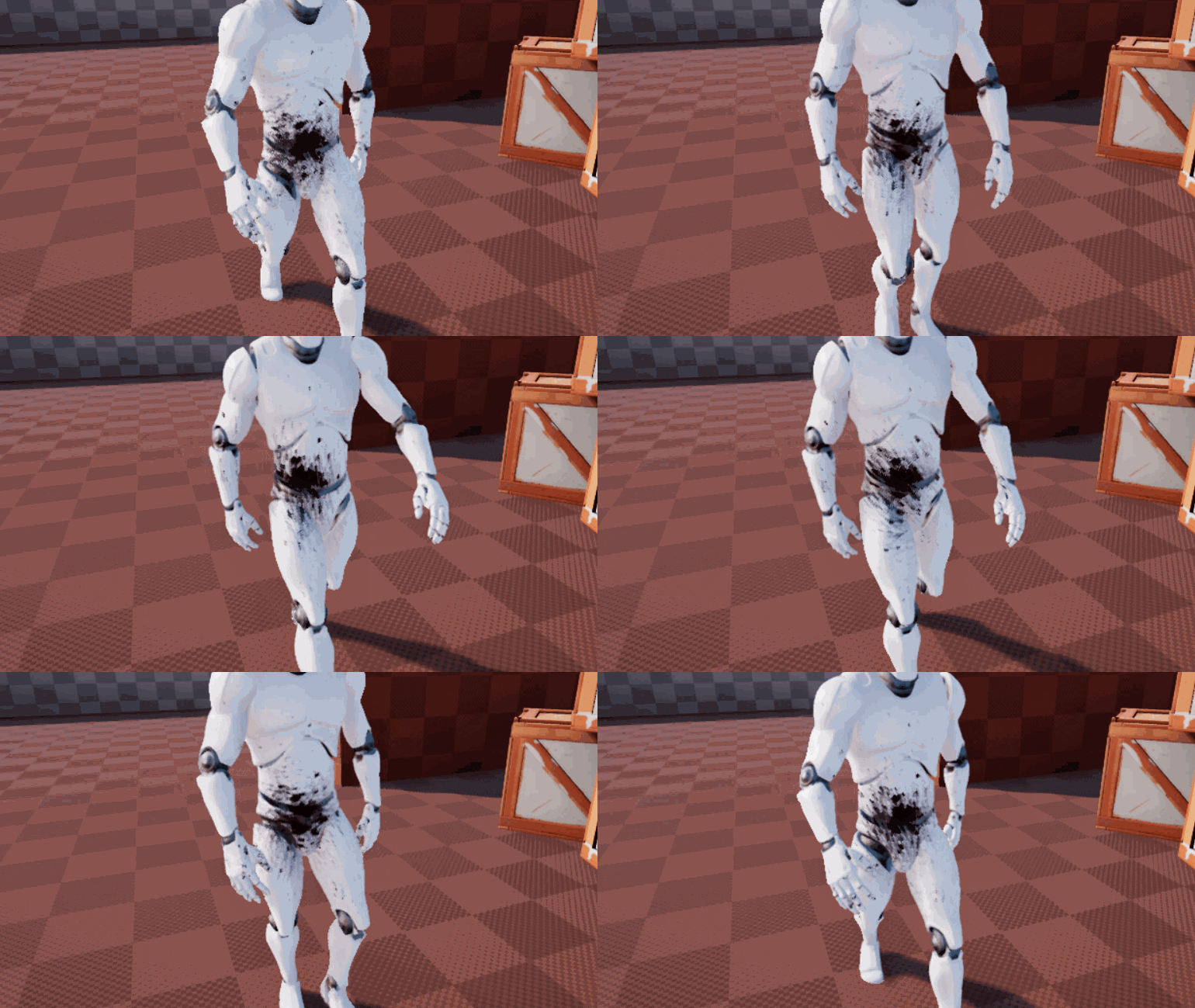
Guys is there any good way to render a gun wound on skeletal mesh? I've tried Tom Looman's method it's great for blood effect but not very useful for the wound itself. https://www.tomlooman.com/rendering-wounds-on-characters/

Earlier this week I tweeted about hit-masking characters to show dynamic blood and wounds. Today I’d like to talk a little about the effect and how it came to be. I’ll talk a little bit...
exotic cave
@cosmic veldt : "Good" or "easy"? 😄
cosmic veldt
good
exotic cave
I mean, REALLY good would involve destructible meshes.
That's very hard. So the next level down probably involves spawning some "wound geometry" over those blood effects to represent damage.
cosmic veldt
i made a triplanar material and try to mask but blending looks horrible
exotic cave
Screenshots of "horrible" as well as telling us what you're trying to accomplish would help 👌🏼
cosmic veldt
adding a regular decal seems like the most decent looking result
exotic cave
I don't doubt you there :>
brisk urchin
I installed ue4 fresh on a ssd. And it took about 10min to open my project. Now its compiling shaders after opening about 15,000 of them. Is this normal??
exotic cave
Sure, depending on the project.
 worn granite
first load? Sure.
exotic cave
How big is your project?
worn granite
Also you mention an SSD but no other specs
brisk urchin
Yea, first load. I just went from a HDD to a M.2 SSD
exotic cave
UE is fantastic for photoreal stuffs and high complexity projects but hey, there's a reason the pack I'm developing is being kept under about 250MB 😄
worn granite
Kinda hard to know what to expect if the only thing I can go on is the bus speed
brisk urchin
Project is almost 20gb
exotic cave
Yup, there's your issue.
Doing that on anything less than an i9/2080 is not going to be fun
brisk urchin
So the engine is rebuilding the old derived cache folder?
exotic cave
Your SSD is only going to improve the loading time
brisk urchin
Im on a i7-4770K with a GTX 1080 Ti
exotic cave
It can't help builds go that much faster, because that's CPU/GPU mostly (AFAIK)
cosmic veldt
it looks good on chest because it's away from the triplanar blending
but as soon as i move it close to blend it doesn't look good
exotic cave
I wouldn't want to be doing 20GB project stuff on an i7, Viking
worn granite
@brisk urchin Yeah it probably doesn't pick up on the old derived data cache
exotic cave
@cosmic veldt : You need to scale your decal, mostly, it looks like
brisk urchin
@exotic cave my hardware is definitely better than what they have on my college campus for sure. Lol
exotic cave
I mean... 😄
worn granite
4770 isn't really all too bad for UE4 but that first load is going to be a uh.
grim ore
it's just time. relax, watch some videos on UE4, it will load eventually 🙂
brisk urchin
Well, this November I'm planning on a new build. Been hearing great things about AMD recently. Looking at their 3900x and maybe a 2080 Ti.
exotic cave
@cosmic veldt : It's still scaled wrong :>
brisk urchin
16gb of ram currently.
worn granite
Yeah, so your hardware isn't bad, but that 16gb is going to hurt.
exotic cave
It's not scaling appropriately to the face. You'll need to find a way to make it hit the right UV coordinates, @cosmic veldt
worn granite
That's actually most likely your bottleneck - if you go to task manager and look at resource usage, I betcha the RAM is used up and your cores aren't all snapped up
exotic cave
Yeah, hitting 16GB in RAM is verrah easy these days
worn granite
I'd go to 32 if you can. But if you can't, just give it time and study up
exotic cave
Yup, that sounds right to me too.
 quiet token
unless your doing work in umg the engine shounlt be using more then 6gb at a time...
especially when just starting out which is what it sounds like atm
worn granite
20 GB project tho
exotic cave
16->32GB RAM is arguably the cheapest way to get more efficiency on stuff like UE
cosmic veldt
this is what i use to create the effect
worn granite
UMG is your ram killer?
exotic cave
@cosmic veldt : Unfortunately, I probably can't take the hours tonight needed to help you parse that.
cosmic veldt
i can change the blending angle to make it looks right from an angle straight to a triplane
exotic cave
In all honesty, if you actually start using an appropriate decal to test this, it's likely you will find your quality isn't that awful.
Seems better to me. What's the problem with that approach?
cosmic veldt
i'll probably end up using that approach but trying to find out if there is a better way.
exotic cave
There's ALWAYS a better way, it's just a question of how much time you can afford to spend to get it there.
 ashen prawn
Hello, I bought a pack with stuff like vest helmets and some other stuff but found out they weren't rigged, Is there a easy way to rig stuff like vest since I dont know how to rig AT ALL
cosmic veldt
https://imgur.com/TWV2kvH problem with that is best demonstrated on this one but it's less obvious with small decals
 exotic cave
@ashen prawn : You mean having the clothing actually move appropriately with your models?
Not easy to do. People spend lots on Marvelous Designer just to make that happen, generally.
fierce tulip
Expressions that output a vector value, such as a position or normal.
read that @cosmic veldt
exotic cave
oooohs
fierce tulip
scroll one section up for more info
cosmic veldt
thanks luos but i kinda already stole the triplanar material from there 😄
fierce tulip
also shows your tri-planar situation hehe
ashen prawn
@exotic cave As you can see I want the vest to bend with the character
exotic cave
I get it, but I don't have an easy solution for that, James.
Generally speaking, yeah, you have to either attach your vest geometry to your figure, or rig the clothing.
You could try T-posing your character, adding the vest, saving the whole thing as a static mesh and then using the Mixamo autorigger to re-rig the model
ashen prawn
It makes me upset cus the publisher does not say in the description if its rigged or not
exotic cave
But I can't promise that will actually work in your particular setup without issues, and then you won't be able to take it off
I mean, always caveat emptor with Marketplace packs, man.
Caveat emptor = let the buyer beware.
What you're trying to do, which is realtime deformable removable clothing, is considered actually pretty advanced in gaming space
AAA teams spend a fair number of millions on that stuff and no one has it all figured out perfectly yet.
grim ore
well if you bought these recently you can't blame them completely So the seller did a great job on the models. But you have to make them rigged yourself, for a real gamedeveloper thats no problem :) from the review section of the asset
ashen prawn
@exotic cave No Im trying to make it move with the character like this
Nothing fancy
exotic cave
That is fancy, brother
I mean, as these things are considered. It may not be fancy to you.
ashen prawn
Nvm
exotic cave
I know exactly what you're trying to do.
And you're right, you need to rig it up so that the vest will deform like the chest of your models.
You'll need to set up a fake "skeleton" on each piece of clothing so that it deforms properly with the model. It's not that hard. Google is your friend. There may also be a way to get Mixamo's autorigger to recognize your clothing models but beyond that I can't really promise anything.
Stuff like this is your friend on that: https://www.youtube.com/watch?v=XnG6aiNZF6U

Character Setup Video #1 in the OUGDA Tutorials series.
In this tutorial I cover the basics of rigging for use in a video game. Coming soon will be another video to help further construct a robust rig with facial animation options.
For more OUGDA tutorials visit http://www.o...
grim ore
ah hah, that would explain why the modular rpg kit has it set up that way
always wondered why but it makes sense now
seriously I didnt know why they were SKM with the same skeleton as the animations and you have to hook them all up together in the character
but the fact they now animate with the animations properly it makes sense
exotic cave
I agree that it would be great if UE devs for clothing packs added a basic skeleton rig that corresponded to the UE mannequin on all clothing models 😄
I don't know that I entirely blame anyone who doesn't, though, because even then it would only fit the mannequin and models of a similar shape
There really isn't a substitute for learning the basics of 3d game design - materials/shaders, basic engine code, basic character animation and rigging, particle effects, et cetera
grim ore
hmm but the backpacks are static meshes. I wonder if those will be an issue later. so far no problems but I don't bend the character like that
they just attach to a socket on the back
exotic cave
You might see a little clipping on larger models, @grim ore
grim ore
its a silly game so not worried about that, AAAAAAAA games have clipping lol
weapons/shields/backpacks are all static but so far no biggie even blending just the upper body
the rest being SKM with a skeleton was so confusing till now
yay for random learning 🙂
exotic cave
@grim ore : Nonsense, AAA games are flawless and never have bugs 😄
grim ore
got to figure out how to make the backpack physics based for fun now, I think there is a paragon or fortnite video on how they do danglies
 fallen marten
Easy - make the backpack a skel mesh and add bone chains to the dangly bits
grim ore
well I wanted to make the backpack dangly
normal burrow
virtual bones are nice for that too
grim ore
the entire thing having some weight when the character runs or turns
fallen marten
Yeah once you simulate physics, as long as the root is attached to something it'll flop around till you get sea sick
cosmic veldt
I guess i'm just gonna give up on my obsession with skinned decals. i figured no one gonna give 1 star rating because some bullet holes kinda moves a bit slightly while running.
exotic cave
I would take the solution that does not have the bullet holes move
Over the one that does
fallen marten
Don mesh paint
fallen marten
He figured it out
I did have trouble with it tho, as the 4.18 version made my compiled game crash and never did figure out why or how to fix
I stopped using it, but you could get a copy and check his C++ source code for the secret
exotic cave
fallen marten
Of non sliding decals
cosmic veldt
i believe don's mesh paint just the same thing with render target
do you know that he solved the triplanar blending areas?
fallen marten
Didn't know that, but then again never really looked into that kinda stuff
cosmic veldt
actually the best solution might be just avoiding spamming decals on blend areas
cosmic veldt
maybe i should reverse engineer the unity's uv paint
fallen marten
May as well lol
Like jack sparrow once said - take what you can, give nothing back
normal burrow
lol codemonkey
 naive comet
join voice chat to help me plz
 scarlet birch
@ashen prawn If you're using Maya you can import the character copy its weights, bind the clothing mesh and then paste the weights. Delete the character mesh, fix any weights and then export.
scarlet birch
Blender can do the same thing too.
It's not hard to learn and once you setup a good workflow you can do it fairly quickly.
exotic cave
Good advice, Mike!
scarlet birch
Painful lessons learned.
fallen marten
I would add, move the character mesh around while you weight paint to make sure you blend in the clothing joints properly - some clothes may not need as much weighting and meshes may overlap each other with equal weights
There's no quick process
scarlet birch
In Maya at least, most of the time pasting will be decent.
fallen marten
Lol I gave up on that
Never worked right
Well.. for me anyway
Hats off to you guys who can use those tools effectively tho
One thing is a must for skinning and rigging- a spare mouse battery... You'll never spam left mouse more than when you are weight painting something
naive comet
hey guys i currently have a huge probelem can u guys join voice chat to help me
 surreal glen
When I open up a couple of my blueprints it's just blank in the blueprint editor, is there a known way to fix it?
tried restarting etc doesn't work but they also don't crash the engine so it's weird
normal burrow
does it say data only blueprint @surreal glen?
 glacial arch
Hey wizards, I need some assistance remembering a thing about UE4 shaders. I’m currently working with them, and I’ve run into a problem where building a project takes a very long time. I’ve been told that it’s due to the engine expecting a bunch of different versions of the code for different platforms and having to generate it, but also that there’s a specific option in a particular file I can set to false to prevent that during development. I know I’m being somewhat vague but this is all I have and I’m spending 15 mins on every recompile boys I need a hero
Here’s hoping you guys know what I’m referring to cuz compilation time is gonna kill my productivity otherwise
surreal glen
nope, completely blank
 opal hornet
@glacial arch idk the setting exactly, but i do recall something about how it defaults for all compatible platforms. like theres a way to disable it so it only compiles for certain target platforms, but idr where. i think thats what it is at least
normal burrow
anything in log?
surreal glen
oh weird it seems to be ok now that I force it to open the class defaults window pane
for some reason it wasn't opening it by default and also wasn't telling me it was a data only blueprint either so I assumed it was broken
instead of just not opening the correct views
smoky sonnet
anyone know why my audio in my level sequence is synchrone on my computer but on my android phone its not?
 thick minnow
Hello I imported a swimming animation but instead of the animation swimming forward he swims up
anyone know how to fix
 teal tulip
 polar viper
So uh... unreal isn't fond of 12k textures
Why does unreal have 12k textures?
Hate**
 royal temple
Unable to build obb larger than 4gb for Android (Oculus Go)
Im getting this error
Packaging (Android (ASTC)): ERROR: Stage Failed. Could not build OBB. The file may be too big to fit in an OBB (4 GiB limit)
I have 7 360 videos. I need all of these for the app
Any workaround for this?
 crisp snow
After moving a folder from an unreal asset pack in unreal to another folder all the material references seem to be broken, Fix up redirectories doesn't work.
fierce tulip
because you moved it
 copper flicker
of course, move with Export or Migrate.
or fix the refs manually
moving assets between projects is a pain in UE
crisp snow
The thing is that i want to migrate that pack to an existing project to a folder i want them to be in.
crisp snow
what would be my best option then @fierce tulip ?
copper flicker
try to migrate first, and THEN move
fierce tulip
so, in that case, prepare what you want to migrate so its already in the right folder structure
fix redirectors, migrate, done
copper flicker
or that
fierce tulip
@copper flicker dont mess up your main project, mess up the temp one :p
especially if you have version control itll save bleeploads of time
copper flicker
yea makes sense
So.. meanwhile.. I have a George and Mary question.
What happens if we run both on the same tick, from external sources.
Like one is triggered by a trigger, one by the Player.
Next.
What happens with.. WhatIfWeRunThisTwiceSameTick if it's called TWICE during the same tick?
Also, from possibly external and internal sources, with different values.
Is it going to run only once?
fierce tulip
not my forte :/
plush yew
I want to set the all actors to dark Color
Is there someway i can reset it to go back to there main color after like 10 secs?
crisp snow
I've opened up a temp 4.19 project and created the folder structure as was needed to be in my main project. Then I've added the pack from the library to my temp project and moved the folders.
After that I've migrated the folderstructure to my main project
thick minnow
does somebody know why my character is not leaning forward when Im swimming ? got my animation from mixamo
fierce tulip
@crisp snow all I see is poor folder management?
 tender flume
Thats a lot of folders
 fading latch
Does anyone know if theres a way reverse combined meshes in HLOD back to their individual assets?
tender flume
There should be lesser and a smarter way to manage those files in folders.
The more you have the more complicated it gets sooner or later
copper flicker
once again.. can anyone help me with my George and Mary question?.. which I beautifully and superclearly described above 😄
I especially need to know if the WhatIfWeRunThisTwiceSameTick event... will run, or can run multiple times per tick
if let's say it's called twice, by different actors
tender flume
Question.
Will UE 4.25 require you to reinstall?
I was on 4.24 when i started so i have no clue about how the updates would work here like
fierce tulip
generally unless you are adventurous you dont install beta/preview versions
but if you download .25 itll be a new install
every engine version 4.XX. is a new engine you download
anything behind the XX. (so 4.xx.3) is an update
just woke up, havent had coffee yet, so me explaining is... poorly done :p
crisp snow
@fierce tulip I know, not my choice. Not working alone on this project
abstract relic
Slap your coworker
 somber quail
^ Getting angry is never an appropriate response
If there's issues, talk to them. Don't be an ass.
 final crown
Regarding landscape materials: If I set the layer blend mode to alpha in the material blueprint, instead of weight or height blended, is there any difference between using non-weight blending and weight blending in the layer info?
It’s just that the terminology being non-“weight” blended makes it sound like it would only after laters that have their blend mode set to weight blended
 tawdry storm
you shouldn't be doing it on tick, if that's what you're asking
 honest vale
Cast shouldn't be that slow, at least in BP world
 near chasm
C++
honest vale
I'd say it's negligible unless you do it in a hot loop
honest vale
abandon all hope
 scenic storm
Help...
i cannot build light anymore.
in the console: LogStaticLightingSystem: Warning: WorldSettings.bForceNoPrecomputedLighting is true, Skipping Lighting Build!
what is the meaning of this? i have nothing change, i think.
fierce tulip
because you are forcing no precomputed lighting, you cant build lights
or well, you cant build lightmaps
iow, everything is dynamic lit
tawdry storm
@scenic storm make sure this is off in the world settings
fierce tulip
ive moved around 50gb projects, always worked
if it doesnt, generally you missed something
(minus the odd bug)
scenic storm
@tawdry storm it workt, thank you^^
fierce tulip
having said that, never touched code-related folders, blueprints are fine
bit too busy to try, but i never experienced it myself
unless I forgot something/messed something up
 brave gate
@light lintel it never occurred to me,
just use to run "fix up redirectors" often and be sure that all related assets are saved
surreal glen
Speaking of bad folder management...what do you guys recommend for good folder management?
I haven't done a huge unreal project yet so I'm not sure what's best
brave gate
@surreal glen what do you mean? way of organizing folders - how to divide assets to folders cleanly?
surreal glen
yeah
so that when you post your folder structure people don't laugh because it's nicely organized
abstract relic
Fun fact. You can colour your folders
 lament saddle
Idk what's industry standard if there is such a thing, but look up UE4 Style Guide for one idea
abstract relic
And do note. You can have multiple content browsers
brave gate
mhm... IMHO the most important rules:
- Keep organizing/cleaning up your content all the time - if everyone on team cares about that, you're already have a big success
otherwise your content become a mess very quickly, i.e. people tend to put stuff in their "personal folders" which is pure evil, since all the enviro meshes are in their folders named "John", "Motherfucker69" instead of nicely organized Enviro folders. Keep project structure clean from the very beginning and try to update it every time it becomes messy (although the last part is more difficult in larger teams) - Use special folders, i.e. "ThirdParty" to keep all the marketplace junk in a single location, don't spread everywhere. It also prevents creating like 100 folderes in the root.
- Use unreal's special "Developers" folder (hidden by default, but can unhidden in Content Browser options), assets there don't appear in asset pickers - preventing anybody from accidentally using a personal junk-test that somebody else created
fierce tulip
fix
up
your
redirectors
and make sure version control is on when you do
 wanton wadi
@copper flicker there is no "same moment"
there's always one that runs first
oh crap, scrolled back, sorry -_-
brave gate
Make "folder rules" that are easily to follow, so you and others can easily follow them
- Animations
- Characters
- Enviro
- Gameplay
- Maps
- ThirdParty
that's example of simplistic main structure that most of project can use - obviously not exactly like that
surreal glen
I have a folder called "BigFiles" so I can separate out the git LFS into that folder
brave gate
and remember about "trash on the street" rule - if street is clean, nobody wants to be a guy who drops the first trash on the street
if are there trash already, many people will start throwing garbage everywher
@surreal glen ok, I'd recommend stop doing "BigFiles" folder, your entire Content should go the same way, use LFS for everything
always minimize the hassle, get related assets together if possible - "BigFiles" is already making daily work more difficult 😉
especially that you gonna have so many small files soon that you need LFS for it too 😉
oh... and try to cook your project regularly - this way you'll detect broken assets soon enough
if you'd run first cooking after a year, you gonna deal with a lot of errors and messed up assets
also you'd discovered that part of assets won't be cooked - that happens if assets is referenced by string, from .ini files or some ways of "soft referencing"
and you'd have organize your assets a different way, like folder you want to "always cook" and some "never cooked" folders
 severe ibex
Has anybody had issues reversing media textures from a paused position?
 radiant haven
File Size Reduce Under 100MB? (Mobile)
severe ibex
It's all desktop currently
Can go forward and pause. Then resume play forwards from that same point but reversing will jump right to the end.
I've tried recording the position and seeking before setting rate to -1 but still the same thing.
Posted on the answerhub and another person mentioned they had similar issues.
Tried with .Avi .mov and frames also.
 royal schooner
hey guys, can someone help me please, i started out learning ue recently and i was wondering how i can delete c++ classes from the content browser that i created and maybe wanna redo.
i like to keep things clean ^^
plush yew
I am not ashamed that I had to much fun with an error in scaling
radiant haven
@fierce tulip You probably mainly make Visual Design and textures that have 1-2K resolution, but did you ever cared about packaging size?
And You do not work for Epic?
radiant haven
🤔
fierce tulip
nope hehe, and you arent allowed to randomly @ epic people besides victor :p
radiant haven
Victor?
fierce tulip
but, I always try to keep texture sizes small where possible, make sure there are no duplicates, make sure there is no identical shader permutations, etc
radiant haven
and if not i mean i started with a blank project and I want to make my game down to 100MB 😄 UE is bad at Packaging
Luos do you work for epic?
fierce tulip
no
radiant haven
k
fierce tulip
i think there is a version on github that replaces almost all ue4 engine content to 1 poly meshes, 16x16 textures, etc.
fierce tulip
in theory you should be able to get a small project down to 30-ish mb
fierce tulip
almost every gamejam has a ""The Tiny Award" for the best game that comes in under 100mb."
fierce tulip
https://www.youtube.com/watch?v=gc6HGBx1WJk this is only 96 kb. (not ue4)

Seriously 96kb in a world of games where games like GTA 5 are of 60 GB.This game uses procedural generation technique which means that it creates all the assets from scratch(from the start) so it requires a high-end PC to run and but still I was able to run it even though I cr...
fierce tulip
lower mesh count, uv channels, lightmaps, texture sizes, optimize code, etc
radiant haven
it would be great, then i know its possible
but even if i have a blank project i dont come udner 100MB
so its UE itself
fierce tulip
because a lot of base files get added that you dont have to add, and some of it needs to be optimized
radiant haven
but some not and these are the problem, any way to exclude them?
fierce tulip
might want to ask in a channel thats related to coding/engine
How to reduce the size of your packaged game.
radiant haven
okay Ill thanks, my last question.
To who should I shout out, that works with Epic (employee)
fierce tulip
you cant really, they dont appreciate being @ -ed
radiant haven
pm?
fierce tulip
same
radiant haven
these are the Forum Mods?
fierce tulip
forum mods are just people who offer moderation to the forums
radiant haven
so no employees on this discord
fierce tulip
and community team is here to solve community issues and occasionalwebsite etc bug reports
 rotund scroll
perhaps you could say why you are interested in talking to Epic devs in general?
radiant haven
Is there a way to get in conact with an employee (no Epic Support...)
I really have to say something that should reach up to the UE4 Developer team
 nova kelp
Its incredible that there is no tutorial for something simple as shock wave.
fierce tulip
there are many
rotund scroll
if it's so simple why don't you just make it? 🙂
 radiant haven
@light lintel Who are they?
fierce tulip
I just told you
"and community team is here to solve community issues and occasional website etc bug reports"
quiet token
how to be they
nova kelp
You didn't watch it
radiant haven
aren't amanda and victorlerp employees?
It was ment to this guy Luos
spare sun
tbh nobody really says you cant @ them. Its just that you prolly wont get a response
radiant haven
Good way TO look whats the problem https://i.gyazo.com/3460c94bb19f28fab5624c63e9d1f830.jpg
 spare sun
and id have a separate acc ready just in case
fierce tulip
@spare sun we mods often get requests to make people stfu for dm-ing em
well, we did get em a lot. its not as bad now since they are no longer in a sep catagory
rotund scroll
tbh they should put it on only frends can dm
I do and it's the best thing ever
no randos
cannot recommend it enough
radiant haven
hmm I think Epic Support is the only solution 😒
spare sun
technically you can reach them on github and such, but epic themselves being open for questions? Better luck asking a question on one of their streams
radiant haven
well forums could take a while and you need to be lucky if an Employee sees your post
fierce tulip
we can talk to amanda or vic, but they tend to be busy so if its out of their knowledge or not directly related to community they might not respond
radiant haven
my question?
fierce tulip
there where issues in the past where they got targeted when things would not work, we kinda drove the entire marketplace team away because of it, and due to quite a few doxxings/other harrassments online targeting devs when stupid shiz like spidermans waterpuddles downgrades happened, they tightened rules for devs to be active in the community.
radiant haven
it would help a lot actually
Luos I can say my question or note to the team
Should need to stay, casue i am not allowed to ping u as u said (if i am finished)
rotund scroll
@light lintel if they don't want people dming them (which I'm sure also includes Victor tbh), setting it to frends only dm is a solid option
fierce tulip
your lack of knowledge on how to minimize ue4 project files is not a reason to contact em :p
fierce tulip
its like me asking wyeth how the orbit module works
radiant haven
well i could just remove the UE4 Engine Content Folder :/
rotund scroll
HOW TO MAKE GAME EPIC????
radiant haven
wat
rotund scroll
@light lintel epic has customer support... for actual customers
 craggy flax
lol right? Dont pull a karen and go to the management.
fierce tulip
buy the engine, get massive support
rotund scroll
^^^^^^
fierce tulip
they'll even ship devs to your office for training and such
rotund scroll
you aren't
 dusky inlet
you didnt pay them yet
rotund scroll
at best you're a licensee
fierce tulip
thats you not understanding commerce :p
craggy flax
😐
rotund scroll
it really isn't
rotund scroll
and I suggest you pick up a lawbook before spouting nonsense
dusky inlet
you are not a customer. Or would you argue that you are a thief because you downloaded the engine without paying, too?
radiant haven
Luos The Problem taht I am having with UE is that they stay on it. They dont let them time to make a proper UE4 version (24 is bugged fo example).
They extend the engine, thats good and could be helpful. But focusing on small things like getting Packaging right or optimasation for mobile in that sit.
dusky inlet
same logic
fierce tulip
@radiant haven false, they have teams fixing stuff, and other teams add stuff
its a dynamic thing, so things get fixed, other things get broken
radiant haven
but they mainly fix bugs and not not proper coded stuff as like packaging. Would you say that the packaging of UE is bad?
rotund scroll
lmao
craggy flax
bruh.
rotund scroll
no such thing between countries
fierce tulip
packaging has significantly improved since 4.0
dusky inlet
you are free to criticize the way they go about developing their engine or thinking there should be more resources on the topic of choice if you think something's missing but no one owes you anything at this point
craggy flax
So you are just citing random laws that dont actually apply to your situation and only loosely agree on your point?
wat
craggy flax
No. We are notorious for saying F you to other countries laws
radiant haven
But having a blank project compiled and has over 200MB, then its not userfriendly
rotund scroll
@radiant haven starter content?
radiant haven
engine content
rotund scroll
@light lintel same
radiant haven
I think
radiant haven
No Never use/used starter content
spare sun
it may be much but there are ways around hence its not a priority. You could work on it yourself you know and submit a pr with the feature fix
radiant haven
Luos i know this ive seen ton of tutorials/docs, but at the end only a reduce of 30%
 misty creek
I've gotten one of mine to somewhere around 60ish
fierce tulip
I think it was ambershee that got a game around 30-ish mb
rotund scroll
speaking of, where is ambershee
misty creek
Take a look at this https://github.com/polymoon/Nano

GitHub
A tiny template for tiny UE4 games. Contribute to polymoon/Nano development by creating an account on GitHub.
fierce tulip
i was asking the same thing Cranz
radiant haven
Ive made an android game very small low poly /everything was not more than 1k vertex or 512 texture size
it literally had 70MB
rotund scroll
🤔
dusky inlet
name change?
fierce tulip
he's prolly done with some people :p
rotund scroll
name still exists
radiant haven
Luos ill try to get the engine content C++ removed and engine content
i mean experience 😂
fierce tulip
GitHub
A tiny template for tiny UE4 games. Contribute to polymoon/Nano development by creating an account on GitHub.
nowadays I consider sub 1gb a small game
radiant haven
I consider 100MB
fierce tulip
100mb is simple mouse drivers :p
dusky inlet
if you wanna do mobile I guess there are some hefty considerations
rotund scroll
yea
radiant haven
I think the development of game industries have come to this point that they know how to optimize a game in all ways
rotund scroll
equally I wouldn't consider a full scale mobile project a beginner project to throw yourself at
dusky inlet
true that
rotund scroll
space is a least concern optimization
radiant haven
so thats why for me 100MB
fierce tulip
lol
rotund scroll
there are many more concerns you want to optimize before you optimize for disk space
radiant haven
I mean Pubg Mobile has 2.3GB
RIP PHONE
fierce tulip
for mobile you often seperate the game with an additional download pack
spare sun
haha I think actually the reverse
with more power we tend to underoptimize
rotund scroll
for sure
spare sun
prioritizing development speed over runtime performance
radiant haven
Luos YES!! Youre right!! But THis shouldnt be, it is bruh if you still need to download something seperately
rotund scroll
one of my first projects our lead programmer put in a dummy array in memory that he didn't tell us about. we were then told to optimize across disciplines. when we came to a point where we couldn't optimize anymore, dude showed us the array and deleted it
radiant haven
ambershee 😭
 radiant haven
oh
dusky inlet
I saw a story like that in regard to a 3DS game where someone reserved 12400 floats in an array lmao
spare sun
give him the dm
 dusky inlet
so people optimize earlier I'd guess? :P
fierce tulip
asked him, he said no thank you
spare sun
ambershee is still on forums under original profile name I believe
 silk sleet
what's a good system for handling multiple weapons? put the logic for each in the character bp and just hold the different weapons as enums?
rotund scroll
he's a ledge alright
radiant haven
or has he a history
silk sleet
or make the weapons objects themselves
 fierce tulip

itch.io
made for Epic Megajam 2019 - 'Down to Earth'
thats the game
has a multi-threaded, fully networked swarm implementation
rotund scroll
oof
radiant haven
never cared about file size
but now for mobile its one of the most important things
fierce tulip
most important thing imho for mobile is it being popular :p
rotund scroll
lmao
radiant haven
well my game rn has 3.5 Stars :I (MY FRIENDS downed me)
and its quiet popular
made 20€with it
craggy flax
👍
radiant haven
for 3months work
rotund scroll
it's funny how dunning kruger works
fierce tulip
lol
dusky inlet
good friends lol
fierce tulip
anyways, just keep gathering info on optimization and reducing filesize and you'll be fine
rotund scroll
I wonder what it'll take to get to see vengeful Luos
fierce tulip
getting screenshot from amber in a bit to show filesize on drive vs cooked build
radiant haven
ok
fierce tulip
or well, a quote

"using FMOD meant that all our audio compressed down to about 5MB"
radiant haven
luos ask him if he removed Engine COntent/Engine C++ Classes
more i dont need to know
brave gate
C++ class don't get cooked, dude
compiled modules are included, and you can simple disable plugins 😉
fierce tulip
"we didn't remove any C++ classes"
rotund scroll
@brave gate I was pretty sure this was the case but I didn't wanna say anything without double checking
fierce tulip
"we did modify the build settings to exclude some stuff
but that only cuts out like 10-15MB tops"
I feel like a middleman
brave gate
core engine is still too big/monolithic from mobile-dev perspective, but nothing you do if don't compile engine yourself
radiant haven
well I really wonder how he did that
rotund scroll
probably has the experience to find and optimize where necessary
brave gate
wonder if there's a game out there that don't use collisions or traces
really curious now 😄
fierce tulip
iunno hehe
rotund scroll
I don't think you can register agency without some kind of listener
I guess a game that only responds to gyroscopic controls perhaps
radiant haven
BTW IDK if it saves something but if i export out of maya EVERY model that I use (not merged/grouped) and import it (without "combine meshes") Would It save space?
instead of export/import every single one
🤔
fierce tulip
doubt it
if you are really nitpicky, make sure all verts dont have decimals.
so instead of 1.23424/1.3534/1.65333 use 1/1/1
can save a few 100 mb on million polygon cubes :p
rotund scroll
does that actually work
brave gate
going for texture-less workflow would save you megabytes and gigabytes, i.e. low-poly styles
using minimalistic sound design would save a lot 😉
fierce tulip
yes, back in 4.0 you couldnt import 1gb+ meshes
but if you moved all the verts to not have decimals, they could get sub1gb again
tried with 10million poly cube :p
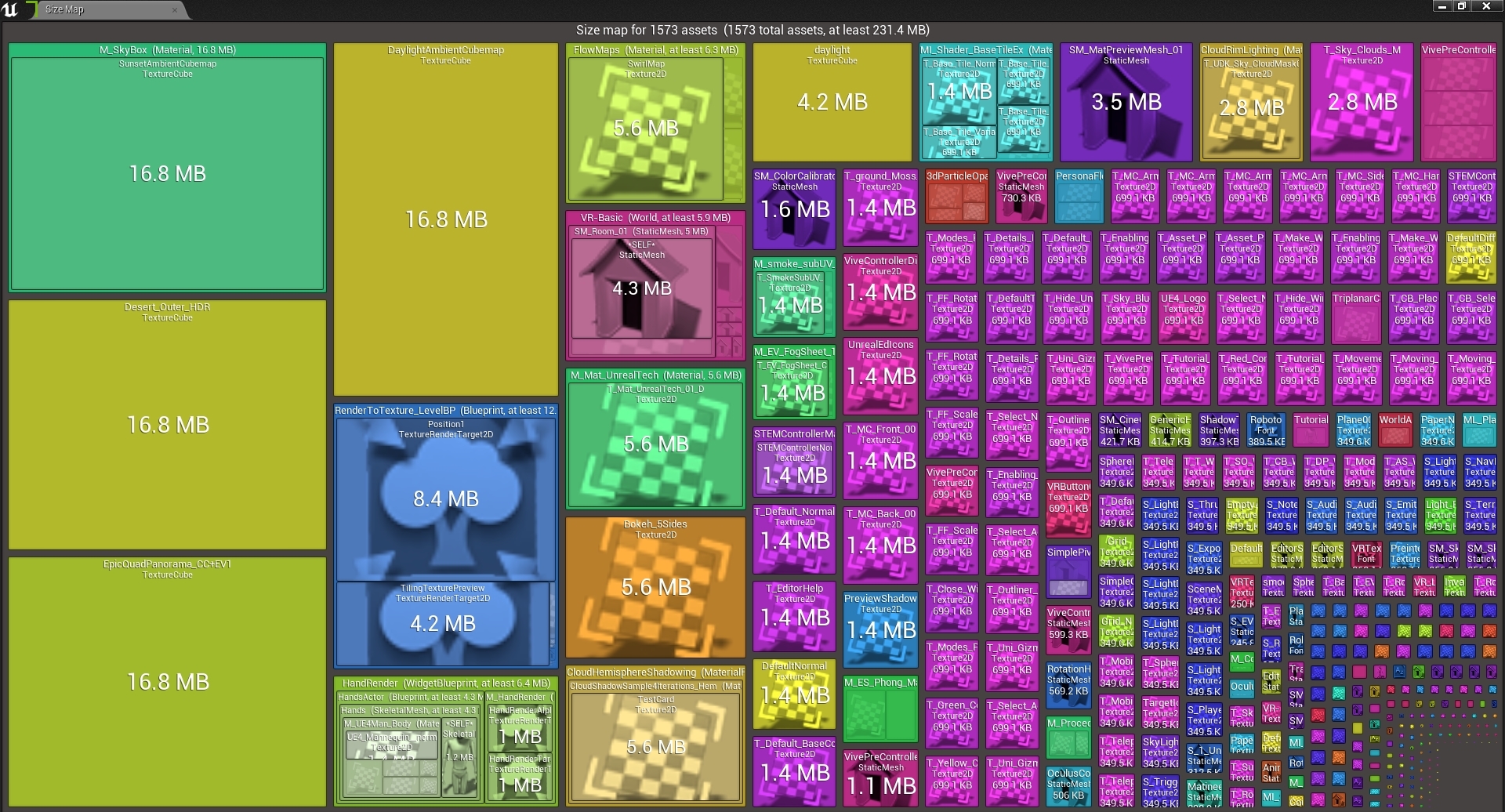
"the most important thing is the asset blacklist when making your project small
there is so much shit in the default engine content you can cut out
things like a 32MB texture used for depth of field"
rotund scroll
well that's a 2 hour delete right there
radiant haven
🤔
fierce tulip
lol
radiant haven
😭 UE is bad in deleting takes H
instead of removing it via file explorere
 devout gulch
the problem lies in references between assets which are full path strings
fierce tulip
^
brave gate
don't remove engine content from the editor
just exclude it from cooking
rotund scroll
yeah but equally if it didn't take time you wouldn't have time to sit and contemplate the misery of life




 brave gate
ready to throw photo-scanned textures at virtual texturing 😄
yeah, NVMe PCI 4.0 is officially confirmed
we don't about sizes and cost
rotund scroll
oh
brave gate
but NVMe is one of major selling points of new consoles
devout gulch
Unreal have new streaming method for next gens
brave gate
along with brand-new AMD CPUs and raytracing support
devout gulch
people on PC without NVMes are going to suffer with next gen games
brave gate
nah, that's that huge difference between regular SSD and NVMe, I mean going down from 10 sec loading to 6 sec...
fierce tulip
besides 2, all my drives are nvme. dont want to go back
brave gate
but... at least SSD gonna be set as standard
radiant haven
luos can i PM u (aloowed to=#
devout gulch
becuase games are optimized (!!) to stream for hard drives
rotund scroll
okay can you back that statement up @devout gulch
fierce tulip
sure hehe
devout gulch
you use streaming strategy where you want to put as much as in ram as possible and keep related data close on HDD
with NVMe you can stream directly to GPU memory
brave gate
doesn't matter how it's done now, any kind of SSD will give huge boost compared to HDD 😉
rotund scroll
do you have sources
brave gate
yeah, I heard about direct access to NVMe from GPU - but it's kind of nice bonus which, we, engine users gonna get for free
but still need to optimize for the slowest case of HDD?
devout gulch
you kidding ?
brave gate
you mean?
devout gulch
for next gen consoles ?
brave gate
only if you're game is console exclusive 😉
devout gulch
nobody is going to care about HDD if you game is for next gen
no
only if you are not making game for prev gen (;
you are not going to handicap youirself
brave gate
well, I'd happy if AAA would push for "you can't play on HDD on PC", but that would cause a major shitstorm 😉
rotund scroll
yea
devout gulch
nor you are going to optimize game for 4 cores because of pc
you can play
it will be just much slower
rotund scroll
I very much doubt that anything that happens on console will cause a standard to form on PC either
devout gulch
your problem
brave gate
Microsoft allows people to buy game once and play on PC, next-gen, current-gen
devout gulch
so ?
brave gate
not sure if you can/want to disable current-gen and PC with HDD
brave gate
if not, you need to omptimize for non-crappy experience HDD
brave gate
why not?
devout gulch
because it is waste of time
brave gate
or loss of consumers 😉
brave gate
millions people with older consoles isn't a waste of time 😉
brave gate
it doesn't matter now, only first-party consoles studios could go next-gen only
if they really need to
rotund scroll
standard... for whom?!
brave gate
optimizing for HDD would the be same, just stream the content properly
and enjoy awesome loading times on new consoles without doing exactly nothing
NVMe isn't a standard even in laptops
rotund scroll
like who is this hypothetical person we're making games for?
devout gulch
console player
brave gate
on next-gen console only, and some few % on PC
devout gulch
or someone who bouth PC in past 2 years
rotund scroll
I got a PC in the last 2 years and I don't have NVMe
brave gate
only if decided to buy much more expensive NVMe
I only recommended to people which uses it for heavy work
rotund scroll
sounds like a demographic not worth targeting for an actual business case
BUT WHAT DO I KNOW
brave gate
of course I use it, but it's not a standard
rotund scroll
APPARENTLY NVMe IS STANDARD NOW
brave gate
damn, Steam Survey doesn't check drive type 😦
rotund scroll
it's ok we'll just go with the assumption that everyone has upgraded to NVMe
it is standard afterall
brave gate
anyway, next-gen console will make NVMe a standard for pro-players, people who want to have the best experience
still have to optimize game to run on "low-spec", GPU worse than next-gen, less RAM than next-gen, slower drive than next-gen
business as usual
rotund scroll
sure there's always going to be a market for top tier rig enthusiasts, and with console players being at a certain level cross play games will likely start requiring similar (recommended) specs
but I don't think there's going to be an overall change in what is standard
at least until HDDs get phased out in favor of new low cost SSDs
craggy flax
SDD are pretty cheap now though? As long as you arent doing pci-e or m3 or whatever the other option is
rotund scroll
anyway this is just my opinion, I recognize I don't know shit but this is my best approximation of what's happening
craggy flax
SATA SSD*
brave gate
good thing even cheap netbooks use low cost SSD already - so the computer can be thin and reliable
SSD were super-cheap a year ago
price doubled last year
brave gate
and it can go up, because of supplying data centers (they started to embrace SSD) and new consoles 😛
yeah, SSD is affordable, true dat
1TB SSD for work isn't a weird dream anymore 🙂
still... happy I'm not doing mobile games 😄
rotund scroll
same
If you subtract editor costs then perhaps. I'd cook it out and test it for realsies though
quiet token
the memory usage in editor is super bloated, cooked packaged games take so much less
tender flume
HDD is still usable
 split crane
recent project in ue4 https://www.youtube.com/watch?v=2ayqra7DwJ4

Short animation Tony Leonard and myself have been working on.
 ashen frost
@split crane bro the trailer was pretty sick, is the game a story based name?
 lusty osprey
Can some one help me ? Im getting this weird yellow and blue stripes in my transforming actors and even in my lines i dont really know whats going on with my project
 spare kernel
i changed my crash reporter URL in DefaultEngine.ini but it doesnt seem to be sending
 brazen cairn
guys can anyone tell me how to make large scale maps (bassicly open world map size of old games such as GTA vice city or total overdose) without getting like 3 fps
spare kernel
streaming levels
brazen cairn
oh that's it?
spare kernel
yh
brazen cairn
Fair enough thanks
spare kernel
only load parts of the level that is relevant
brazen cairn
I tried World composition but I still don't seem to get smooth gameplay
Might give level streaming a shot
grim ore
@polar viper do you have more than one copy of the project open? if not can you save just one file at a time. what does the output log show
polar viper
@grim ore ah thank you. I had a few opened incase unreal decided to shit itself when it saw a 12k texture
 fiery mortar
hello lads
I think I am going crazy
I just retargeted default animation to my human character but it looks like this
quiet token
do u have to sit there and wait for 2 million shaders to compile when u release game ???
fiery mortar
why does the hands looks like this
 unkempt vector
who did the red deck for the "uncharted paths" event
think no one has ever won a game...
it's impossible
lusty osprey
Can some one help me ? Im getting this weird yellow and blue stripes in my transforming actors and even in my lines i dont really know whats going on with my project
 zealous cloak
is there any advice for jittering controllers?
forward axis is generic usb controller axis 1
sidward axis is generic usb controller axis 2
my vehicle is always moving to the side :/
in hardware properties my controller seems fine no jittering
grim ore
what does your input stack look like for moving your vehicle? have you tried printing out the axis values during play for the events that move it
zealous cloak
@grim ore will print out my axis asap
copper flicker
help. I'm in an emmm... impossibility here...
dunno how to save that chosen value
so that 5 seconds later or so..... it's the same chosen one
the problem is I'm rerolling the booster
I could DoOnce...
but I want to allow multiple boosts to overlap
and when they do, my first boost down is going to stop all of them
well, that might be a different issue
but the main one is... I dunno how to keep saving a new value
lament saddle
With a variable?
copper flicker
I tried adding to an array
renzu.... look at that example
if I save into a Boost variable, for example, Boost will be overwritten every time I reroll
lament saddle
Yeah, it's popping out of some black box collapsed graph. I imagine it's being chosen randomly?
copper flicker
yes
the black box doesn't matter, the idea is I keep rerolling
so.. I can't save this as a local value, inside a function, cuz Delay
zealous cloak
without any input
copper flicker
kano, it cannot be random
I roll say... Boost1, out of 5.
I have to Start and STOP Boost 1
and then I roll Boost 5, and I start and stop 5
it cannot start1 and stop 3
lament saddle
Yeah, every time the data pin from the graph is used, it runs all those nodes again. Idk. Maybe you can have it generate an array of random boosts all at once.
zealous cloak
input to the right center
lament saddle
I'm not sure what the considerations are. All I know is you have a bunch of simultaneous boosts going at once, and they all need a randomly chosen but persistent "boost type"...? So let's say you know you need a list of 10 randomly chosen boost types, then generate that in advance.
zealous cloak
@grim ore forward seems to work i just switched the direction somehow
lament saddle
Rather than choosing them individually on demand which might be hard to keep track of.
wanton wadi
@zealous cloak you usually want some kind of deadzone in analog controller inputs
there's always a little jittering going on when its in the middle. sometimes drivers fix it
zealous cloak
moving sidewards my axis is between 0(left) and 1(right) around 49.51 when not moved(deadzone
wanton wadi
i'd say, ignore 0.45 to 0.55 and use it as "no input" 😄
(maybe make that configurable)
zealous cloak
@wanton wadi the windows controller properties doesnt show jittering, but i will look for some up to date drivers
copper flicker
ok, so it's like having 5 people. you chose 1 randomly to say Hi and Bye. dunno how to keep track of what I chose... so I don't say Bye to another person
there has to be some simple solution...
it just escapes me..
😄
maybe with a switch
wanton wadi
@zealous cloak i'm not that experienced with UE4, but I know when working with controllers you can get "raw" input as well as "clean" input - the clean input coming through the drivers with the users' preferences
copper flicker
it would be duplicated code
abstract relic
@copper flicker https://docs.unrealengine.com/en-US/BlueprintAPI/Math/Smoothing/WeightedMovingAverageFloat/index.html
Weighted Moving Average Float
wanton wadi
maybe there's an option to use the clean one instead of the raw controller input?
grim ore
there is a deadzone setting in the input settings, click the advanced drop down but its by default set to 0.25
zealous cloak
thank you 🙂
grim ore
@zealous cloak it jsut might be your controller tho as I beleive the axis defaults should be -1 to 1 not 0 to 1 which yours seems to be
your seems to be acting more like a trigger than an axis
lament saddle
@copper flicker So what's wrong with saving the output of "chosen boost" as a new global (not local) variable? And then using that variable as the input for the "boost up down" nodes?
zealous cloak
its a logitech 3d extreme
grim ore
does it have more than one input setting? like on the botton a switch perhaps. dinput and maybe xbox emulation for example