#ue4-general
1 messages · Page 674 of 1
 tired palm
 rotund scroll
you can't modify inherited components
you can't change or remove the capsule because it's inherited
tired palm
I see, it limits me a bit though :/ the components inside are also inherited.
I find it a bit odd, because the change in capsule size doesn't change on the parent, though.
 abstract relic
Child inherits from the parent. Parent never inherits from the child.
 reef kayak
hey guys, ive been wondering about a shader complexity visualisation for a while now. it doesnt compile the material as seen in this example
i know the material is not too complex or weird but just wanted to check. and seeing this, I worry something might break @ building
 vocal copper
I've made a screenshot describing my problem with generated mesh collisions. :)
Maybe someone has some thoughts on how I can get collisions to the generated mesh (is available only in runtime). Maybe I can copy collisions from the meshes I'm merging? What I should look for ?
https://monosnap.com/file/lOmt2lBVdZGWC3IAo5UqytlqcirjpI

Monosnap screenshot tool
 slender storm
Yes that's what I think too @abstract relic but the child "AICharacter" has the parent "ThirdPersonCharacter".
But as soon as I try to modify in the "Collision -> Collision Preset" part, it modifies both (whether I'm on the parent, or the child). What I want to do is just change the "Trace Responses" part of the capsule.
rotund scroll
@tired palm you can change the values of variables, you cannot change variables themselves
@slender storm can you show your case
physics are really only enabled on ragdolls
collision presets themselves can exist on both capsule and mesh
yeah but enabling physics != enabling collision
vocal copper
merging my customizable character (used in the lobby for a game preset) into a single piece mesh (used in game). When tested a customizable mesh in the game, the collision worked, now it only overlapses the capsule and that's all.. So I went investigating, found a mesh that is created in runtime and it has no collisions on it.
Going to check what ppl do while merging static meshes, I hope to find some answers there 🙂
rotund scroll
there are different types of collision taht you can use for different things
for instance the CMC uses the capsule to figure out where the ground is, not the mesh
there are no other kinds of physics
there's that and collision
tired palm
oops sorry, wrong account for the server, I wrote with both of them. It's kind of messed up in the discussion...
@rotund scroll I understand, I'll see what else I can do about the system then. Thanks
rotund scroll
why do you have two accounts?
vocal copper
but I don't have an access to it in runtime.. I mean, the mesh is created anew right before the game starts 🙂 Hence, it should be done on a merging stage, but I can't find what exactly I should operate with, to migrate collisions from the old meshes to the new one
@light lintel
generated mesh has no preset in the editor
 quiet token

 surreal glen
are you looking for spawning things?
tired palm
@rotund scroll One account for the chat, and one account for the programming servers. I clicked "join" with both by mistake (oops 😸) , I leave the server with the second one.
 humble stirrup
Sup folks. Good afternoon. Guten Tag.
How one would make to import an image referenced in some folder, into a data table, to late acesss said image and update it in game?
humble stirrup
Dankeschön
 nova kelp
rotund scroll
nova kelp
rotund scroll
you don't set you line traces
to be coming from your character
they just trace at 0,0, 100..-100
nova kelp
this is just a function
rotund scroll
and that makes a difference... how?
nova kelp
its just checking for 100 up and 100 down for land ...
rotund scroll
yeah
since you don't use any location other than 0,0,100..-100, it'll just be smack dab in the middle of the world
it's not going to follow your character
humble stirrup
He Cranz, doch one question more.
nova kelp
well it does
humble stirrup
nova kelp
sec
humble stirrup
The said image path, is it than a string variable?
rotund scroll
yep likely
nova kelp
my hips move
up and down
but legs arent
but when i set leg to 1 it goes up
so its not that i f up a bone or something
rotund scroll
what do you mean leg to 1?
rotund scroll
never seen those nodes before
 brisk urchin
Does having UE4 and its project installed on a certain drive give any benefits to like loading and rendering speed?? HDD, SSD, or M2 types or is it all cpu/gpu dependent??
nova kelp
ofc it will go faster on ssd
brisk urchin
Render times or just opening project speeds? Or both?
nova kelp
well
how much of ram do you have
if you dont have that much ram it will create vram
and that one of drives not sure
probably windows drive
but not sure
brisk urchin
My current hardware is i7-4770K, 16gb ram DDR3 1600mhz, Gtx 1080 Ti. I have the software/files on my 2TB HDD.
I have a 250gb ssd for OS files only
brisk urchin
For rendering like when i wanna update the lighting when clicking the build button too??
nova kelp
well just slap everything on ssd and come back and tell me what happened
well it cant make it worse so try and see
brisk urchin
I don't have much room on my ssd. Only like 18gb left on it. Lol. Was asking since i was gonna buy a ssd, m2 or hdd since i need more storage.
 tender flume
Your specs are way better than mine.
840M 8GB here.
Yet i'm still trying to make some open world game for fun hahah
Optimization is key especially if i need the balance between graphic and performance.
brisk urchin
@nova kelp all I have is x1 250gb SSD which is almost full and x1 2TB with only 100gb left
nova kelp
yea i bought 128 at start of ssds then 512 for my windows and hardcore programs and just put one in my laptop it went from 0 to 100 real fast
 grave osprey
when i use blendspace and add interpolation. the character wobble to left. then move normally.sometime wobble to other direction.
how to fix this thing ?
i mean. when i move my character foward (that use blend space). it wobble first. either left or right.
brisk urchin
@nova kelp my current 20gb project file takes about 8-10min when i hit the build button to update geometry and lighting currently.
nova kelp
Btw when you use SSDs for stuff like this you have to have backups on HHD
SSDs have 3-5 lifespan and you can lose data
as it grades down
degrades
brisk urchin
I've had my hdd and sdd since 2014 @nova kelp 👀
 pseudo inlet
@nova kelp that's not as common with "newer" SSDs.
pseudo inlet
You SHOULD definitely still be backing up to something else as well, but ssd lifetimes have gotten much better.
@tender flume base color textures are just that. Color information. No shadows etc
pseudo inlet
Albedo is base color
brisk urchin
I currently have all my projects on a portable ssd for Scholls and have backups on my desktop hdd.
tender flume
So it's the same yes?
pseudo inlet
I'm sure there's some variation, tech ically, but that's what 3d software in general is going to call it. Base color and albedo
nova kelp
well i have ssd that has 10 year warranty and it was second class
i was talking about budget ssds that have low lifespan
that are third clas
s
tender flume
Does the kite demo has a base color on its grass meshes?
Can't use blender atm mouse scroll wheel stopped working so i'll have to buy a new one soon
pseudo inlet
I'd imagine so, but you can open the shader and look 😊
tender flume
I'm guessing that it might have
nova kelp
hey nick do you know about IKs
pseudo inlet
Inverse kinematics? I know what it is, and the idea behind it, but I'm no animator 😁
brisk urchin
That Kite demo keeps crashing my engine. Everytime I try to open the demo map on it, it just freezez my engine. 😶
nova kelp
yea i ment in UE4
pseudo inlet
It's likely not frozen @brisk urchin it's probably compiling shaders.
nova kelp
trying to make my legs work
tender flume
Okay it does not have a normal map.
It uses water as its normal map
will that be okay?
pseudo inlet
@tender flume not sure what you mean.
brisk urchin
@pseudo inlet i let it run for a bit then i open task manager and it always says the UE4 is "not responding"
tender flume
Found a workaround.
pseudo inlet
@brisk urchin check your task manager list for a shadercompileworker process
nova kelp
transfer speeds
tender flume
Each time I learn new things just by experimenting around and getting others opinions
brisk urchin
@pseudo inlet doesn't that process usually have a notification pop up in the bottom right corner of the engine? My didn't show that. Unless thats something totally different.
pseudo inlet
Not always, and certainly not when a new project is loading.
If the editor is already open and the project is loaded and you make a shader change, yes you'll see the message in the corner.
If it's a new project and there's not a DDC created already, on load the engine will begin compiling shaders.
 misty creek
Does anyone know how to spawn actors using a texture? I want to use a texture with an alpha channel and only spawn actors on the parts that doesn't have alpha. I've been trying to use Make Importance Texture and Importance Sample, but it isn't working for some reason. This is my current setup:
This was my base for what I'm using: https://forums.unrealengine.com/development-discussion/blueprint-visual-scripting/1377905-texture-based-importance-sampling-blueprint-nodes-how-to-use
Unreal Engine Forums
I have UV mapped mesh (plane) and I have a grayscale (RGB) texture that fits right over the mesh. I'd like to sample the textures and place static mesh cubes
 raven narwhal
Hello, I didnt know where to post this - but I have a bug here :)
I am using latest available UE version from Launcher and I have problem with loading scenes. When I load the scene, for example from game to main menu or vice versa, sometimes I get fatal error crash. (About 1 crash in every 3-4 loadings)
Is there any fixes for that?, also hapens sometimes when minimizing or alttabing
This is actually very important for me <@&213101288538374145> because I have a released game with few thousands of players playing this right now and I cant fix this, would be nice if experts from Epic would check this 🙂 (Exception code 0x00004000)
 normal burrow
nope
 ashen brook
Hi, we're just community run here, not working for Epic
raven narwhal
ok, thank you 🙂
ashen brook
I would suggest debugging it from VS to pinpoint where exactly it crashes
that should tell you what's going wrong, and you can go from there.
normal burrow
logs too, logs would help us help you
 echo cave
Hey everyone I'm wanting to do something seemingly simple within Unreal but I cant seem to find the right tutorials or wording while searching for the answer. I want the ability to have a BP actor in the scene that once you interact with it (key press or trigger) it pulls up an image full screen I'm assuming in Ui space? Then I want the ability to have some sort of arrow button than can go forward to the next image or backwards and also the ability to exit out of the images. I think the proper way to set it up is to tie it to a BP actor that I can duplicate and change source images and place around the game world. Does anyone know of a direction they can point me in to figure out something like this in UE4?
ashen brook
this sounds like a simple user widget - look into UMG 🙂
or rather, an interactable placed actor that pulls up a widget
it's not beginner level friendly, but with some intermediate blueprinting it's no problem
echo cave
Thats what I thought but everything I have found so far is fairly general. I probably just need to find a good widget tutorial to leverage with what I need. I'm an environment artist and level designer but I can do blueprinting so hopefully I can find a solid solution thanks for the advice! @ashen brook
ashen brook
good luck 🙂 Look into blueprint communication if you're not familiar with it yet - that'll be crucial and it's something that for many people is a first hurdle when learning to think like a programmer
there are a few good tutorials and docs pages about it
echo cave
Okay for sure! thanks again! I'll try to post my findings
 plush yew
Does unreal support map blending?
tender flume
Usually for a scene with plenty of foliage
Which light source type is recommended?
Static or Stationary?
I would like to use static but i'm afraid that maybe i might lose shadows like if the player gets close to a light source
 proper crane
I think I accidently attached a landscape to my pilot camera?
tender flume
it won't show the shadow on the ground
proper crane
I have no idea but it's messing with my cameras rotation
And wherever my camera is when I hit play, the landscape is oriented in that spot
It's fine when I delete it
But it can also be brought back with Ctrl Z
 wanton mauve
Hey. I have a UE project which was last edited under 4.20.(3 I guess) I have reinstalled my PC many times since and now attempting to load the file causes a crash. I didn't get any crash reporter under the latest version of UE4 editor. I installed 4.20.3 and that brings up a crash. Looking at the CrashContext.runtime.xml I see this:
<ErrorMessage>Fatal error: [File:D:\Build++UE4\Sync\Engine\Source\Runtime\Core\Private\GenericPlatform\GenericPlatformMemory.cpp] [Line: 193] Ran out of memory allocating 67108864 bytes with alignment 0</ErrorMessage>
I haven't changed the memory on my system and virtual memory is set to system managed. Both drives have tonnes of free space... This is beyond my knowledge - can anyone assist me?
abstract relic
Do you have visual studio installed?
wanton mauve
I don't
abstract relic
Are you able to launch a fresh project
wanton mauve
Let me try.
wanton mauve
16GB, same as I had last time this ran just fine. Yes, I can create a blank project fine.
abstract relic
I’m thinking they have weird admin issues if it isn’t the case
So it is project specific
normal burrow
Yeah I would imagine your on the money there. Its likely a large project or launch level
abstract relic
Delete /intermediate and /saved folder
Perhaps there’s just some bad garbage collection
abstract relic
Just be warned that it will recompile all the shader
normal burrow
Yeah, just as a note though if you have any rendered videos or screenshots, they live in the saved folder
if you don't care, clear it away
wanton mauve
I do not. The whole thing needs rebuilding anyway.
I'm going to reboot my PC and make sure nothing is loaded... back in a moment.
normal burrow
if you could pull up task manager and navigate to the performance tab keep an eye on your memory
as you launch the project
abstract relic
Initially I thought they had incredabuild or whatever’s called installed
normal burrow
oof that thing is nothing but problems
plush yew
Where do you find a motherboard that supports 256gb?
abstract relic
Puts a fake memory cap
normal burrow
its really lame the vs installer recommends it at all and that unreal automatically utilizes it when its installed
wanton mauve
So far stuck on 95% loading but evidently it's compiling shaders etc.
normal burrow
yep it should take a bit
wanton mauve
Assuming this loads... what might stand in the way of using the latest build of UE to bring this project in? Obviously I'd try on a copy...
Success - I guess something in the intermediate folder was to blame. Thanks! 😄
 atomic oriole
guys do any of you know of an example or a tutorial about how can i make stuff bend under load? like a branch, or a fishing pole, etc
abstract relic
Pat. You owe me another cookie
normal burrow
4 cookies is the score now
wanton mauve
🍪
 pseudo swift
Hi guys, when exporting FBXs & OBJs from UE, is there a way to make sure the texture is included so I do not have to setup the texture maps again inside for example blender? thanks!
(right now i am exporting first the mesh then the texture and setting it up manually in the other app)
normal burrow
no carl
wanton mauve
Now for my next challenge... turn this project into anaglyph with two cameras... I fear a long night!
wanton mauve
lol
tender flume
Isn't that 3D?
wanton mauve
This used to be a lot easier before NVidia decided to remove the 3D Vision support 😢
Yeah, red/blue glasses mode
normal burrow
purple mode
wanton mauve
I volunteer at a museum and made this 3d "dino fish tank" based on an asset pack I bought and we line the kids up with glasses on and project on a massive screen 🙂
tender flume
Wow.
normal burrow
thank you for using unreal simon
tender flume
3D?
normal burrow
i'm so sad to see unity3d at all the museums
 limpid otter
Total noob question here: I want to build a game where the player is a Pawn and not a Character. When I spawn in the world my model doesn't show up, regardless of what model I have chosen.
I have a custom game mode that derives from BaseGameMode and I have set Default Pawn Class to my custom Pawn (and have specified the model). What have I missed?
normal burrow
its so obvious
wanton mauve
Unity was no match for Unreal in this instance, I was able to achieve everything so much faster here!
tender flume
Unreal is much recommended for new devs.
normal burrow
this is always the case simon, you just aren't lazy or a student at a college that only teaches one thing
tender flume
The lighting that's just set-up out of the box is perfect
wanton mauve
I assume there is no oob anaglyph option? Failing such a thing, I presume I'll need 2 cameras, rendered to surface, tinted and post-processed into one image (not that I know exactly how to achieve such a thing!)
normal burrow
If you don't get an answer here on that simon may want to try #graphics it sounds like something they may have an idea of. I personally haven't used render textures yet and dunno if thats even the thing to suggest for this case
wanton mauve
Thanks, duly noted 🙂
misty creek
Does anyone have an example of using texture-based importance sampling blueprint nodes? I've been looking for an example but I can't find any, the closest I've gotten was this: https://forums.unrealengine.com/development-discussion/blueprint-visual-scripting/1377905-texture-based-importance-sampling-blueprint-nodes-how-to-use
Unreal Engine Forums
I have UV mapped mesh (plane) and I have a grayscale (RGB) texture that fits right over the mesh. I'd like to sample the textures and place static mesh cubes
I want to be able to find a location on a texture with an alpha channel, but I'm having a hard time figuring it out
Any help would be much appreciated
 wanton path
@limpid otter hey, im a total noob as well lol. I followed this tutorial to acomplish exactly that
Unreal Engine Forums
Greetings!
I have noticed UE4 doesn't really have any tutorials on how to set up basic character movement.
Character class has movement built in, but it's not very
limpid otter
Cool man, I will check it out
plush yew
Hi.
So who here knows about 2D fighters?
And how to make them?
 upbeat tendon
I am thinking about implementing my own online services as I don't know of a good alternative
abstract relic
Awesome
 brave lark
is there a place I should ask about swarm? I'm looking to slap together a cheap render computer and I'm thinking of grabbing some old zeons off newegg or something. Wondering if anyone had suggestions
pseudo swift
Hi, I noticed that i cannot export height maps to targa, is there a way to export a height map from ue to your local disc?
do i have to bake it out with a bp?
 hoary locust
it will export as png if you export the landscape heightmap
just right-click the heightmap layer and take export to file
pseudo swift
no i mean regular displace / height maps
when you right click and select export there is not the default tga option
when it comes to height maps
it works for all other textures :/
oh really
it must be a different file
 white geode
hey guys, when I use the Load Level Instance blueprint node to restart a level (while playing), everything in the old level persists & overlaps with the new level, along with the "Lighting needs to be rebuilt" message - I couldn't find any info on google about this - is this normal?
pseudo swift
aight, thanks ponkkis good to know that you find that option, i will mess with it later
white geode
ahhh that works, kind of - I get placed into a state with a really glitchy still frame of the last view port(?) image and a loading icon , but it reloads properly
thanks
 exotic cave
Hey all, anyone here have experience with capture cards?
I'm finishing up a pack for Marketplace submission, and I need to take some nice 60fps 1080p screen capture videos. A lot of the capture cards out there seem to be mostly for streaming HDMI inputs from consoles these days, so I'm wondering if anyone can recommend one that definitely has native PC drivers and can capture natively on the PC it runs on.
 graceful sky
I'd imagine OBS being able to do so, but im a noob related to captures
 swift spindle
@exotic cave you don't need to do that these days
swift spindle
nVidia cards have inbuilt screen buffer captureing now
swift spindle
you have more then enuf power
exotic cave
You might have just saved me $100
swift spindle
🙂
exotic cave
I feel the love 😄 Thanks so much!
swift spindle
the only reasons to do it with external these days.. is if your worried about games crashing and taking it out...
so.. streamers...
but otherwise.. naw
it consumes like.. less then 1% of the card max
exotic cave
Nah. This is just for Marketplace brand work and education on the plugin
Thanks so much!
exotic cave
(Tech artists unite 🙂 It's the best job 😄 I mean, among all the other best UE jobs)
exotic cave
Appreciate it! What is your own project?
swift spindle
currently looking for work / having fun with arty project (needed break from code )
exotic cave
Aw. I got nothing for ya at present. But hey, let's see how my plugin does! 😄
swift spindle
^.^
hope it's not a deformer system like I made.. then 4.25 came along and seriously oneupped me
exotic cave
Nope, it's just another environment art autolandscape. I wish I could claim to be more original, but I was working on a similar pack in Unity (where there is nothing) and then just decided that I couldn't live with Unity's broken ecosystem anymore.
So for now I get to be an imitator, not a true innovator, but I really think I want to spend possibly the rest of my life working in UE. 🙂
swift spindle
lol.. yeah.. I think a lot of us were unity devs.. that got burned hard
exotic cave
I worked for a YEAR off and on, on an environment art pack for Unity
At the end of the year, I show the woman I'm dating all my progress...and the shadows start flickering
I was like "That's it, I can't take it anymore" and did what I had a quiet feeling I should have done years ago
swift spindle
lol!!!!!! she's like. .your incompetent.. we are breaking up!
exotic cave
No she was actually super supportive 😄
exotic cave
Yeah, good idea
 hexed hornet
Hey, I forgot to save properly last night and my animations got messed up and won't work even though everything looks fine
Can anyone help?
normal burrow
do you need to reimport them?
hexed hornet
The animations themselves work, but I was trying to set it up to when a certain key is pressed it'll play the animation but the animation isn't playing
 loud valve
whoop whoop short question: How can you see what is the parent BP of a child? (looking into a project with allot of BP with bad naming).
So I am looking into a child BP now and want to see the original parent BP
 rancid lynx
how can i line up two edges of a terrain , while scupting? i cant seem to select both at once. is there an option ive overlooked?
 short onyx
Why the NearClipPlane are not exposed on Perspective settings for the camera ?
upbeat tendon
I am thinking about how I can have player accounts. I can easily implement a restful service. But what to do inside ue4 to handle auth tokens in ue4
hexed hornet
@normal burrow Nevermind I figured it out, I had something set to true when It was supposed to be false. I guess it saved right before I fixed that last night
Thanks for trying to help 🙂
 hearty cosmos
Any updates on control rig?
 frail sail
guys that "remove from parent" widget its completely removing from game? or stays in background and only removing from viewport?
i cant destroy this so
 bitter iris
alright got a question, could use some guidance please, I'm looking on giving the users the option to change input / output device in options but not sure how to get a hold of them. Any ideas?
loud valve
@rancid lynx If you find that out please let me know! I do know they sell a plugin on the marketplace that does it for you, so I don't think it's easy. Its about 15 euro.
vocal copper
A few hours ago I've asked about meshes merging problem, when the newly generated mesh had no mesh collisions on it.
Turned out, that one simply have to assign PhysicsAsset manually to the new mesh. FSkeletalMeshMerge simply doesn't take PhysicsAsset into account, so one have to do it separately.
vocal copper
okay, not the mesh itself, but the skeletal mesh component.. I can't figure out why it get's reset, but it all works after reassigning.
brisk urchin
I have UE4 installed on my Drive F: HDD but it keeps saving over 30gbs of data in a folder called DerivedDataCache on my other main Drive C. Why is it doing that when i installed the engine of Drive F?
 fierce tulip
separate folder where it stores compiles shaders among things.
you can empty it from time to time, but it does mean itll recompile shaders when opening a project
brisk urchin
How do i redirect it so it installs them on drive F instead of my OS only Drive C?
fierce tulip
Unreal Engine Forums
Discuss GitHub, using source code to modify the engine, and the creation of engine plugins.
Gizmo's Freeware
Is your C:\ drive getting crowded? Would you like to move some things to another drive or partition to free up space? Maybe it’s one of the personal system folders like My Documents, My Pictures, My Videos or the Download folder that is taking up a lot of space. If you have an...
thats how I did it
oh, thats win7
well, you get the point
misty creek
Anyone have a good way of determining if an actor is currently on screen?
Specifically for a 2d project
vocal copper
you can go FindActorsByName / ByClass to find one on scene.. but on screen .. I guess it's about Line(or Sphere) Tracing with Visibility channel
from your camera
misty creek
Yeah, that would work, but I'm also looking for a way to check if a widget is on screen, so that is making it slightly harder
vocal copper
it's 2d ? DeprojectScreenToWorld - you can pass there 2d screen location and get world location where it is and then compare with location of your .. widget ? is it located in world? lol
 rose salmon
Got a weird question that does not fit any of the programming subchannels. Also, one that I thought was not possible. My project, in 4.22, suddenly is in 4.21 and won't load correctly (for obvious reasons). Trying to force it back into 4.22 results in further issues. any idea what can cause this problem?
vocal copper
for example DeprojectScreenToWorld 1,0.5 - is far right middle position of your screen .. well, check it and you'll get the point and if suits your need 🙂
rose salmon
Also besides the cause - anyone have idea how to fix the problem?
abstract relic
Delete /intermediate folder. If that works, pat owes me another cookie. But first, logs please.
normal burrow
logs first.
plush yew
why does my blendspaces dont work how they suppose to
like backwards moving is bugged
2d
normal burrow
You likely need sync markers degast if your feet are not hitting the floor in similar stretched time between the animations
rose salmon
Failed to open map file. This is most likely because the map was saved with a newer version of the engine.
Logs above in the txt file
abstract relic
Just to double check. Are you unable to launch it from engine? Nor when you set which version within the .exe? Or after you deleted binaries and force a rebuild?
normal burrow
LogInit: Build: ++UE4+Release-4.21-CL-4753647 ZJ
rose salmon
Unable to launch from engine, nor when I use the .exe
normal burrow
your not on 4.22
normal burrow
yes, you can't go back
you would have had to have planned for time travel with source control
abstract relic
Yep, there isn’t backwards compatibility
normal burrow
There are ways to spoof it, that adludum has mentioned but really wouldn't recommend risking it
rose salmon
I am not looking for backwards compatability. Yesterday when I saved it was 4.22
today, when I checked it was 4.21
normal burrow
ok right click your uproject file
goto select engine version
rather
Switch Unreal Engine version
normal burrow
what do you set it to?
rose salmon
4.22
normal burrow
tell us the more errors then
rose salmon
normal burrow
is there c++ in your project or third party plugins that use c++?
normal burrow
do these files not exist?
abstract relic
Oh lord those broken refs. You didn’t move content files around externally correct?
 grim ore
oof. Sounds like time to roll back to source control
rose salmon
@normal burrow
Forgot to check.... yeah looks like for some reason they are missing and it oddly just the parent files...
@abstract relic
No.
grim ore
eep 😦
rose salmon
@grim ore
Already tried rolling back on the source control. HOWEVER
rose salmon
parent-child... inheritence
those broken refs are all the children classes calling for the parent
normal burrow
perhaps someone moved them
rose salmon
the children classes still exist the parent class files are gone.
normal burrow
search content browser
rose salmon
That's the however i have
normal burrow
do they exist on file though in uasset form? not content browser
rose salmon
I have 3 alt back ups for this because this is the file I use for recording tutorials... one of them is the prep file which is up-to-date with the recording file (the project that is having this issue).
Can I just duplicate the missing files over - like the BuildingMaster referenced at the start?
Not having seen an error like this I am not even sure how to trouble shoot it and given my source control isn't helping I am even more confused so weeeeee
normal burrow
perhaps you didn't commit/push these things?
abstract relic
Clean up file and revert
If you really want to be paranoid, make a new folder and pull from the repo
normal burrow
yeah, and you can put the files back too like you were asking, but if anything it relied on when it saved is gone or has had its redirector fixed it won't be a happy asset
grim ore
source control should be working, pull down the project into a new folder and... it should work
normal burrow
what do you use for source control? ZJ
rose salmon
I was using Git - local storage only. I tried pulling from my master and had this issue. I also have a copy that is relatively new in a branch I am a bit paranoid about pulling it and making it worse (not sure how it could be worse)
funny part is nothing that is broken is anything I have touched in months
normal burrow
k yeah i mean try what HighTide mentioned, long as you pushed and everything it should all be there
really dunno what could cause such a catastrophic destruction of only parent classes
rose salmon
and only the oldest ones too
abstract relic
Any unrelated files being corrupted? I’m wondering if we’re witnessing a hardware death.
rose salmon
Unrelated to the project, nope.
 glacial moon
Would someone be able to help me with a question on multiplayer replication?
rose salmon
@normal burrow no attempts at upgrades. As I was restoring some of the files I noticed that one or two of the children classes are missing too
but there is no order in which was missing
but copying the files from my prep is working slowly to fix it
normal burrow
checked your recycle bin by chance?
or lost and found
or wastebasket or whatever it is on mac
glacial moon
Thanks sorry didn't see the multiplayer channel
rose salmon
Nope not there. I am going to just assume git decided to do something weird and torture me
plush yew
where can i ask for some help on something pretty simple
normal burrow
rose salmon
well I think I found the source of the issue of something in git... cause some of the newer files are fine. the original files I put in to git are fine
but like 2 months of files in the middle are bizarre versions of different stages
plush yew
@lament saddle if you can show a screen shoot how you did call an object for it
I tried to call everything
still not working for some reason meh
 obsidian lily
so frustrated... I have a timeline that animated camera motion, and I wanted to see something about the motion, so I made it play slowly (3 seconds, instead of more like .2)
now it won't change! No matter what value I put into the SetPlayrate call it stays slow
so of course I thought, ok, it must be not actually be compiling or the build must not be making it to the player
so I added some logging
the logging is there, as expected, and changes when I change it and recomile
but still, the timeline won't change speeds
I'm lost here, I have absolutely no idea how to even begin fixing this
swift spindle
@obsidian lily you need to change your points on the timeline also
obsidian lily
I don't think so @swift spindle -- I made the timeline go from 0 to 1
so I could independently change the playback speed
and then I tweaked the values for a day or 2
which worked fine, as expected
swift spindle
send me a screenshot of the timeline
obsidian lily
but now the exact same thing simply stopped working
rose salmon
@abstract relic it might be the death of the drive...
obsidian lily
fuh, ok, I forget that "restart the editor" is the go-to bug fix thing to do
I restarted, it works now
goodbye 2 hours of my life
thanks for the response @swift spindle

 opal hornet
is it bad practice to have all your variables in a struct?
hexed hornet
My player model is facing the wrong way when pressing the w key, how do I fix that without reinporting the mesh?
plush yew
@hexed hornet are you using the firstpersoncharacter bp?
opal hornet
it faces the right way for ASD?
plush yew
^
opal hornet
seems like your direction is 90 degrees off
hexed hornet
it doesn't seem to be doing anything
plush yew
rotate the camera in the bp i mean
opal hornet
oh for third person you prob have the rotation controlled by controller
plush yew
if you really need to you could switch around the input settings in the bp, switching InputAxis MoveForward with InputAxis MoveRight
hexed hornet
Yea that was it, for some reason the inputs where different
I didn't even think to look at the inputs
opal hornet
was gonna be my next guess too, glad you figured it out
plush yew
I made a blueprint that lets me open and close one door but how do I apply it so I can have many many different looking doors?
obsidian lily
are timelines with animation curves the best way to handle character accel/deccel? it feels like not, but I can't really think of a better option
normal burrow
@rose salmon run some disk checks
hexed hornet
Anyone know why my thirdperson game mode screen is blank?
normal burrow
How do you mean blank?
hexed hornet
nvm, I just looked it up online
abstract relic
screenshot
normal burrow
gee pat talks to himself a lot tonite
plush yew
- guys i have a little question: when I choose to start the game as standalone it starts in window, I want to be in fullscreen-how to do this?
- also I have these problems, when i move my mouse the camera doesn't move(I want to make it as in the games but it doesn't work) I need to move the camera when I click on right button of the mouse and move
@plush yew press F11 for full screen
is there a way to do it by default?
grave osprey
i am looking for help.
The character (bp char capsule) when given input move. It wobble to left. Then it walk normally. (I use norm blendspace. With onterpolation 0.2) i am sure as hell it work correctly when interpolation set to 0.
the problem work when character start moving.
grave osprey
the result still the same. when i press move, the character play anim go left. then move foward normally
 gilded plinth
hmmm, if anyone has a tip.. when i create a new project in 4.24, BP only, blank project and then I add a plugin I made with a map. The lighting looks really different in the editor viewport versus when i run PIE
it's brighter and bluer in the editor
is there some kind of hidden default skylight in the editor settings or something?
All my lights and objects are moveable
 paper kernel
it should be in the details panel
I think
either that, or you manipulate the float value that drives the blendspace
 silk ivy
How do I change the player Controller in real time?
I have a different controller for the main menu than the level. The player Controller for the menu carries over to the level so I can't move
grave osprey
it seems anim blendpsace interpolation going crazy.
but i need it to smooth anim
this is the detail of problem

 gentle agate
Are there any naming conventions/folder layouts that are mandatory or is it make your own and stick with it?
grave osprey
i ask later at 6 hour
@gentle agate you dont have to. in fact, its reccomended to have folder name brief as possible.
gentle agate
Thats handy
grave osprey
now the problem is blendspacce for backward. it is a big problem
gentle agate
i get that glitch when i walk backwards as well
grave osprey
I got tired on blendspace. Next time i just use 2d.
Turn out we have to isolate the backward anim / separate it in state machine.
If anyone have that blueprint. Please share.
 dire zealot
Hey guys
Our client apparently wants our unreal project to run smoothly on laptops with integrated graphics
after butchering every particle system, deleting all lighting and using a single directional light, tried to force custom lod3 always by setting screen space size to 10k+ for every lod on most props, and fiddling around with the rendering settings
it's still very choppy
anything else i can try
My laptop has azerty keyboard and even when i plug in my qwerty it doesnt want to open console so i can't profile <_<
 near chasm
GetCapsuleComponent()->OnBeginCursorOver.AddDynamic(this, &ACreature::BeginCursorOver);
Would delegates such as this go in the constructor or beginplay?
 flat idol
beginplay
@dire zealot add english keyboard input for your os, and switch to english, it should allow the tilde to function. If not, then add new console key in editor settings.
in game you can usually press f2 key, that will disable all postprocess and many advanced rendering stuff. if game runs better, then you're frame bound, if game still stutering, then it may be cpu bound.
near chasm
@flat idol what is the diff between .AddDynamic / .AddUnique / .AddUniqueDynamic
any idea?
flat idol
well unique makes it unique i guess, cant add more
dire zealot
any way to adjust the key used for console in a packaged game?
flat idol
once you add a console key in editor settings it should cook with game i guess why wouldnt
dire zealot
Ok i managed to open up console on my shitty ass integrated gpu laptop
basepass takes 80 ms and prepass takes 65 ms
how do i shorten this 😄
plush yew
guys I made this menu for now but I want to make when I click on the button "Report a bug" to make a form with:
their in-game name
their email/a way to contact them
category of the bug (animation/graphics/network/etc)
Info on the bug
But idk how to do it-can anyone send me tutorial or tell me how to do it? or to do it with when you click the button to transfer you to internet to goodle form?
this is the menu
flat idol
@dire zealot foliage.CullAll 1 may disable all grass and trees, perhaps fps gets better. check landscape it usually is made wrong (too many components render super slow)
when you press button open a webpage with the form, and user can fill
dire zealot
our landscapes have 1 component and 256x256 verts and i already tried disabling most of the trees and foliage
flat idol
the command will disable it properly
dire zealot
i did find our materials are waay to expensive but fml im not an artist and can't redo that
the landscape material has so much texture samples sigh
flat idol
beware the auto landscape material
dire zealot
guess we're going with a solid color for the ground
flat idol
they added some new technique there was a video tutorial at epic telling about texture arrays good for landscape, probably worth checking out
dire zealot
i doubt texture arrays will fit on a intel igpu with 64mb of vram and a fraction of the performance of a gtx460
flat idol
you can also bake out materials of meshes
intel gpu share ram with cpu
grabs 2 gigs maybe more?
dire zealot
this is what's gonna be the next generation of apu's with a shared 1gb hbm cache on the chip
but ram is far away
too far too render smoothly
flat idol
to be fair intel gpu is not designed with gameplay in mind
more like browsing the web and watching hd/2k vids rather.
dire zealot
this is an issue that should've been adressed in prepro but we're in post production now and trying to apply bandaid fixes to a fundamental problem lmao
flat idol
you can try renderdoc too, it will provide you with a snapshot of a single frame, you can diagnose further
dire zealot
ah true
is it normal that ProfileGPU doesn't show anything in a packaged build
stat GPU does work
plush yew
someone can tell me?
flat idol
when you press button open a webpage with the form, and user can fill
i'd do that
 noble tapir
Hey there, can anyone help me with a problem? When I use SpawnEmitterAtLocation (C++), all I can see is the light created by the particle system but not the actual particles. Im trying to spawn a flame, but I dont see any of the flames.
plush yew
ok how to make this? @flat idol cus I didn't do this before?
dire zealot
@plush yew You will have to run your own exterior server and transfer the message using http
good luck in figuring that out if you have no experience with running a server, should be a fun experience
 half turtle
if i want to create a reusable blueprint for a spawner, which kind of blueprint would be most adequate? an actor? O,o
dire zealot
@plush yew you probably are missing a space before the 0
plush yew
https://gyazo.com/0f0a1cd478b63f083ceb1347110a623b.mp4
anybody know why my shadow disappears when playing
half turtle
or should i just write the spawn logic on the gamemode file and let the UI set the stats? is there some kind of abstract blueprint ?
dire zealot
fangli i usually use an actor and drop that in the world
you can also use level script
or gamemode
or just spawn from a spawnercomponent in the character
doesn't really matter
half turtle
ah okay, i was thinking of using an actor, was just wondering if there was some kind of abstract bp i was missing around
plush yew
hmm why to do it so complex? I found this:
@dire zealot
I think there is a way to do it with google form and then in bp to link it to the url and should work?
 radiant haven
is it somehow possible for the touch input, that u can CUT the Input, Left screenside does this and the other side does this
dire zealot
@plush yew try to google open html url ue4 ?
@plush yew the edge of the cube displays less aliasing?
looks a tiny bit better
plush yew
idk the google form is url right?
yup I tried to connect the button with url of youtube video and it works, so now should work the same with google form
dire zealot
Go into your character blueprint - click on the character mesh in the component tab - search for shadow and check if cast shadow and cast dynamic shadow is activated Go into your character blueprint - click on the character mesh in the component tab - search for shadow and check if cast shadow and cast dynamic shadow is activated
half turtle
question for advice, when making a project, should i put my interfaces in their own folder, or put them in the folders for the actor types they affect?
dire zealot
yes
flat idol
property
it's a variable of the Character class called Mesh. Pointer to the skelly mesh component. Pull a wire from "Get Character" and type in "get Mesh" it should be at the variables category
exotic cave
@plush yew : That's a static light, right? Try changing your lighting to dynamic
exotic cave
Ooooh, what was it?
plush yew
Cause I use contact shadow's for the tree i forgot weeks ago I never set contact shadow's on the player
exotic cave
Ahhhh, nice catch
dire zealot
just add a particle component to your player and set it to the snow particles you've made and you're done
half turtle
when i spawn an actor, how can i inform easily to this actor, who spawned him?
brisk urchin
I have UE4 installed on my Drive F: HDD but it keeps saving over 30gbs of data in a folder called DerivedDataCache on my other main Drive C.
Can I delete the folder and then reroute it from the editor settings?? Is it safe to do that?
 somber quail
If you delete the folder then you will need to recompile all shaders and it will just fill up again
There are ways to move it. Look in editor settings for "Derived Data Cache," you can specify a path there
fierce tulip
@brisk urchin we told you this last night
brisk urchin
@fierce tulip I'm planning on un-installing all the engines but what I didn't ask was if i could delete instead moving it over.
Is there an engine transfer method? Thinking of getting a 500gb ssd
fierce tulip
derived can be deleted
not sure you can regularly move it, there are probably advanced moving options for files, but I wouldnt risk it
brisk urchin
@fierce tulip can i just drag all the UE4 engine files to another ssd? Or is it bettter to un-install it completely then reinstall it?
fierce tulip
id do the latter
brisk urchin
Ok, how do i keep UE4 to make the new derived csche folder on my new hard drive instead of my current main drive?
Is it based on where the Epic launcher is installed?
fierce tulip
iirc you can choose the location nowadays, but as I said last night, there are ways to move it while making sure ue4 finds the right location
and no, its not based on the launcher loc
brisk urchin
Ok. Thanks
misty creek
Does anyone know of any tutorials, documentation, or examples on Texture-based Importance Sampling Blueprint nodes?
plush yew
Hey there. Can somebody helps me out please? I gonna drive crazy.. yesterday all was fine - now i got this blurry fubar.
What i remember, i dont have any "Graphic options" or doodled/tried them out..
Motion Plur in PostProcess is checked, nothing in there.
grim ore
what is your quality setting set to in the settings menu? the scalability stuff
 tame delta
If I got a car actor to which I attach wheels (which are gonna C++ classes), what should my wheels be? ActorComponent is the only option?
(I mean attach the wheels to root within the actor)
grim ore
@plush yew that doesnt sound UE relates, that sounds outside of the scope of the engine. If you didn't receive it check the support forums for that product
plush yew
ok so how you suggest me to do this thing with reporting bugs and etc?
grim ore
@tame delta There is a vehicle actor in the engine already that has wheel components, you can look into how that is done. Otherwise yes an actor component would be how you can attach an actor to another actor
plush yew
also the problem is that I don't see anywhere in the options place to put the email where I will receive these things
grim ore
@plush yew I have not done that before beyond just a simple email address for reporting bugs
tame delta
@grim ore My only fear with using an actor component (I already use an actor component now, but to handle the physics of the entire wheels, 4 wheels) is that it doesn't really have a transform afaik
plush yew
@grim ore : "Ingame" i dont have any Quality settings yet. Do you mean in the project-settings/world settings in-editor?
tame delta
I'd like to have this component be a suspension and wheel system, to which I attach a physicsless wheels model if that makes sense
plush yew
no, I don't want to make it so simple, I want to do it as the other people
grim ore
@plush yew does this show up like that, lower resolution, in game or in the viewport in the editor,, or both?
plush yew
okay so in which channel to ask for advice for this thing that I want to make? @grim ore
Only ingame. In Editor all is smooth and fine.
grim ore
@tame delta yep my only suggestion is to check out the current wheeled vehicle system
@plush yew the first thing to check is if its the level or your project, make a new level (the one with just the platform is fine) and go in game and see if its low res as well
@plush yew probably not in this discord, #lounge maybe as its off topic otherwise the support forums for the product itself
grim ore
at this point it might be one of your config files got changed some how, unless your game mode is doing it (as that would be the same in a new map). made any changes in your game mode?
if not you can rename your config folder temporarily in the project so it will use default configs and see what happens when you relaunch the project
plush yew
i will give this a try. Thanks in advance
grim ore
you might have to rename Saved as well as it has some custom config files
are you also sure the resolution scale is not changed?
plush yew
YES, SIR! ❤️ Wuhu.
All looks sharp again. Well.. HTF this happen.. 😄
Ehm.. yes. Shortly to check something.
Are you sirious, that Unity fucks up UE4?! This is meaning.. war! <trashtalk/off>
 pale forge
Did anyone have the experience of adding your project to a Git repository and then have it not opening with compile errors?
plush yew
🙂 I know. But maybe it can be real? 🙂
grim ore
my guess is at some point you had something going on, maybe some shader compiles or imports, and the engine noticed it was running slow so it changed the options down automatically and you didnt notice
@pale forge that shouldnt happen, it looks like some assets are missing, but someone else was here yesterday with the same issue and had no idea how stuff disappeared.
pale forge
yeah ... I'm in the process of replacing nodes exactly as they were, and it seems to be compiling.... really effed up though b/c what is breaking is K2 stuff .. that I have no access to.
 atomic meadow
hello,when i render my scene i have crash like this but my drivers is update ok but why crash ? rtx 2070.....https://gyazo.com/49bf433eafbf1638f4e8e632045fe0c5

 next current
any way i could solve this? it doesnt really do anything, it just says this at startup every time.
hexed hornet
Whenever i "launch" the game my character falls through the floor, but when I just hit play it's fine?
 rich reef
Can I add bones directly in the skeleton blueprint editor somehow?
abstract relic
You can add sockets
normal burrow
not animated ones anyways
rich reef
I need a bone for a inversed kematic setup
(Idk if I spelled that right)
But the answer is no then? I will need to reimport with the modified rig?
normal burrow
You can make virtual bones too but these are likely not what you want
rich reef
Can you teach me?
Might work, Idk
Ive found this, but it wont appear in the viewport when I add one
rich reef
Yes but its for a inversed kinematic
normal burrow
It is for where you want the hands to go?
rich reef
No, it will just help me set the rotation of the weapon
normal burrow
Even better. You want to use a socket
rich reef
(So its always pointing to where the middle of the screen of the player is at (Im using linetrace to get the location that the screen is facing))
Idk how I would use the sockets to set the rotation tho, my only idea was to use inversed kinematics
normal burrow
What you do is, you get the socket transform in code like blueprints
rich reef
I have the direction that the weapon should point towards, as well as the location that the butt of the gun should be it
normal burrow
Then you determine how to get that transform to point the right way
rich reef
Yeah well I have that already
I just dont know how else I would actually apply the rotation
if not with inversed kinematics
hexed hornet
Whenever i "launch" the game my character falls through the floor, but when I just hit play it's fine. Anyone have any idea on how to ffix it?
normal burrow
Ik is for chains of bones FYI
rich reef
Yeah well I were planning on just using 1
normal burrow
What your doing here is just math
rich reef
I know what IKs are
normal burrow
So if you have the target transform and the actual transform
The applied transform would be the relative from bad to good
 lime gull
How would I get a specific component from an actor for an overlap check?
normal burrow
You either set the transform of the weapon or apply the delta
abstract relic
Break hit result Light
lime gull
alright Ill try that
normal burrow
It will work
lime gull
Oh lord theres a lot
normal burrow
so many pins
lime gull
Im trying to say like, if this overlaps this, set this variable
But I need to do that with 4 different components and 4 different variables, will it still work?
rich reef
I just had to take a moment to think lol
The thing is, I want the pivot point to be where the butt is, but the origin (or whatever its called in UE4) of the skeletal mesh is in the middle of the gun
So I cant just rotate the weapon around its own origin
Which is why I were thinking about IK (tho thats not really the intent of IK)
@normal burrow
lime gull
uh so how do I single out the 4 components I need?
abstract relic
A Boolean with lots of And
rich reef
@lime gull Wait didnt you just want to get overlap of a specific component? Idk what the others are talking about but you can just select the component in the components list and add a begin overlap event lol
Sorry if I didnt understand you right or something
rich reef
So when overlap begins, you want a code to run within a different blueprint, right?
lime gull
I believe so?
When my player overlaps with something, I want to check if its 4 specific components from a different actor
rich reef
Well like Im not sure I get it, but if you go into the actor that you want the code to run in, and add a custom event, you can then cast to that character from within the actor with the overlap event, and call that custom event from there
Then the code within the "other" actor (The one that isnt being overlapped), will get a execution where you can run your desired code
lime gull
Here I took a screenshot to try and better explain it
I wanna get 4 components from the "BattleGrid"
so like if it overlaps component 1, do this, and so on
 deft raven
Hi, I have a question about unreal engine demo, anyone know the copyright about this unreal demo? Where showcase the power of unreal? I mean, can I use images I take from this demo for a commercial project?
lime gull
Oh I think I got it daniel
rich reef
Ah yes, first you need a object wildcard for the Cast to node.
-
It basically tells the blueprint type (Like if its controlled by a player character for instance, you would put a "get player character" node for it.
-
Then you can just drag out from "As Battlegrid" and search for the components you need
lime gull
I took the Other Comp and hit = and then just went from As battle grid and type out the components I needed
rich reef
Right, if Battlegrid is the component you want to call the on overlap, that is indeed correct
 tawdry sierra
Guys I need help. When i launch the game on mobile, i cannot see any of my sprites except the unreal one.WWHy?!?
i checked the materials and everything. Everything is identical with the unreal one
?!
 whole quarry
@tawdry sierra did you make the sprites emissive?
whole quarry
If its unlit then you connected the spite texture to the emissive pin?
tawdry sierra
i just opened the defalut sprite mat
it is connected to emmisive color
shouldnt it be?
whole quarry
It should be
tawdry sierra
i can play the game with no problems
It should be
@whole quarry it is
but when i laucnh it on mobile i cant see my sprites
atomic meadow
hello,when i render my scene i have crash like this but my drivers is update ok but why crash ? rtx 2070.....https://gyazo.com/49bf433eafbf1638f4e8e632045fe0c5
@atomic meadow help ?
whole quarry
@atomic meadow what video card do you have?
 earnest cape
Why is 4.24.3 crashing so much? It's like every hour it randomly crashes for various reasons. I can't even tell what's causing it anymore
whole quarry
Various reasons != random
earnest cape
Drag out a variable > crash
Save the project > crash
Duplicate a static mesh > crash
Open a new content browser > crash
earnest cape
Where are the editor logs?
whole quarry
In your project folder, then the Saved folder
radiant haven
everyone knows how to reduce file size (PRoject FILES = packaging already made)
earnest cape
[2020.03.08-17.33.29:694][ 59]LogD3D11RHI: Error: Result failed
 at D:/Build/++UE4/Sync/Engine/Source/Runtime/Windows/D3D11RHI/Private/D3D11Viewport.cpp:389
 with error DXGI_ERROR_DEVICE_REMOVED DXGI_ERROR_DRIVER_INTERNAL_ERROR
[2020.03.08-17.33.29:694][ 59]LogD3D11RHI: [Aftermath] GDynamicRHI=0000019A49AEA0C0, GDX11NVAfterMathEnabled=0, Result=0xFFFFFFFF, bDeviceActive=0
[2020.03.08-17.33.29:694][ 59]LogWindows: Windows GetLastError: The operation completed successfully. (0)```I have no idea
 manic pawn
atomic meadow
manic pawn
atomic meadow
@whole quarry 2070
 civic crown
I know I asked this before, but is there a way to stop SteamVR from launching every time I open UE4? Even if I disable the SteamVR plugin in my project it'll still boot up when I launch the project selector
 fiery mortar
yo lads
is it possible to keep the mannequin animations but change the model?
or does somebody have a good tutorial link to how making animation for unreal in blender works?
 silent harbor
problem is
they dont
and newly spawned actors are getting destroyed
how could I make it so that it destroys the one spawned after 5 seconds.
 kindred viper
@fiery mortar you can retarget the animations onto another skeleton with another mesh. That is done in engine. And making animation for Unreal in Blender is a bit of a tricky subject without getting into how the rig bones are rotated differently and needs a kind of middle man. But there is MrMannequin Tools for Blender that makes that a little easier (although its still tricky if you dont follow it by the letter).
Give it a few months though, and the new Unreal Blender plugin will get released and we will all praise Epic and Blender and become one #zen
fiery mortar
well if I didn't misunderstood it is possible the make the animation in ue4 right? @kindred viper
kindred viper
yeah there is enough animation tools to do it in Unreal, but its not the perfect method
fiery mortar
I mean I am happy with the current default animations for player just want to add more so if that's possible I am okay with that
kindred viper
you can interp between poses in a PoseAsset or various other timeline based stuff.
fiery mortar
oh really, what would you consider the perfect method
kindred viper
Externally, and brought in with FBX
or not FBX specifically, but yeah as that is standard right now
gitf seems to be a bit slow on the uptake even though its supported iirc
fiery mortar
brought in with fbx from blender? 😄
kindred viper
Well I would use Blender because I dont sub to Autodesk anymore, although I understand I am making it more difficult for myself by not using Maya or 3dsm. They are technically easier to port animations around to Unreal. Although I highly recommend learning how to use Blender to do it, and how to use Rigify, as that will be the method to do it in the near future
fiery mortar
@kindred viper okay man thank you so much
I did learn how to use blender tho
at least partially
and the rig stuff
kindred viper
check out MrMannequin tools for now. It should be fairly simply to get working if you know your way around
fiery mortar
allright man
 royal schooner
hey guys
can someone help me with my problem? i have stuttering in my editor and when i play a level. even if its just a few things going on in the scene
i got a 1080 gtx and a i7 6700k
kindred viper
https://docs.unrealengine.com/en-US/Engine/Performance/index.html this can help you figure out where problems reside
How to identify performance problems and fix them.
royal schooner
thanks!
 quaint osprey
Hi everyone, I'm having trouble with some materials imported from Quixel megascans into unreal, every time I put a material instance into the door I can see through it, anyone knows why? Should I recreate a material every time I import megascans in order for the instance to work?
Thanks!
https://www.youtube.com/watch?v=npl5DihP4wo&feature=youtu.be
I'm trying to change the door material
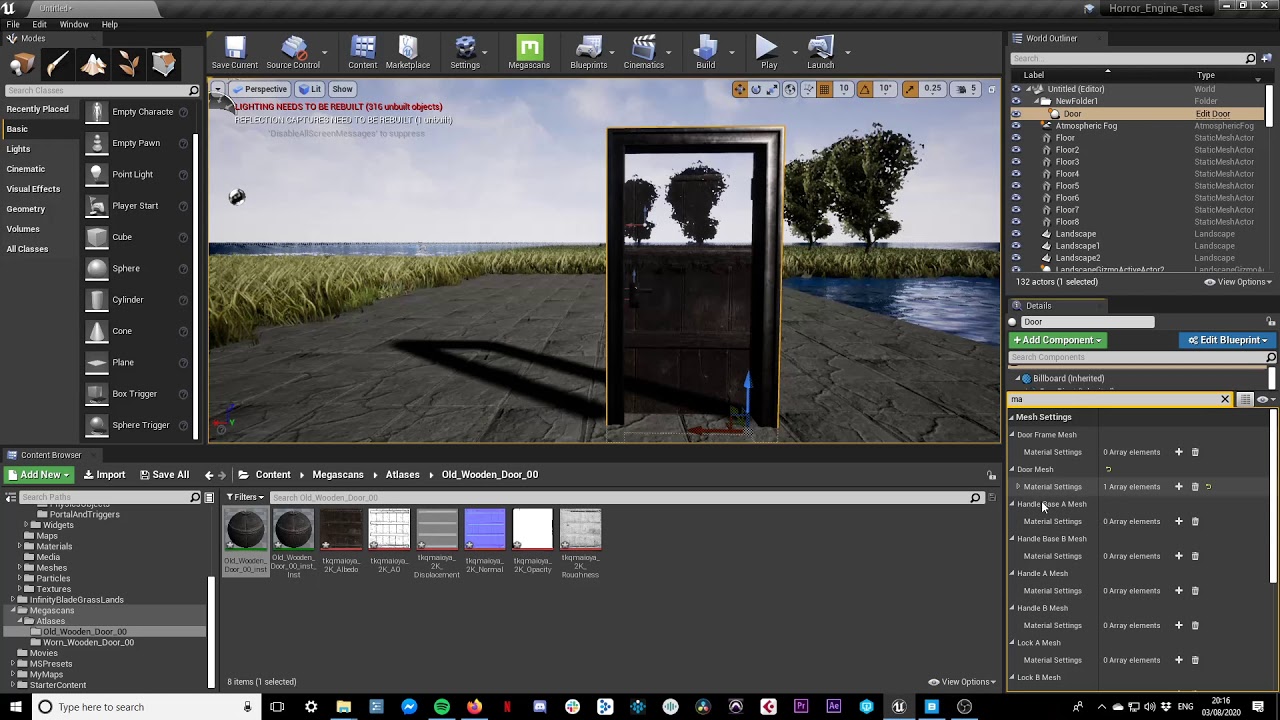 abstract relic
open the material please
 midnight bolt
@quiet token have you used the new 4.25 for converting to blueprint? I can't find anything new to do that
quaint osprey
There you go
 dawn gull
Hey, for some reason Unreal won't let me save my level build data it it isn't giving me an error code. Can somebody help me?
hexed hornet
One of my inputs are calling to the animation but isn't casting the skill or spawning the emitter for the particles after changing the character name but the other works just fine
Anyone got any ideas?
dawn gull
Oop I found an error code:
COuld not be saved because it was partially loaded how do I fix that?
(Also sorry to interrupt)
quaint osprey
There is no material, only the instance when I exportedf
tame delta
Can ChildActorComponents not get tick?
Can't see something like FChildActorComponentTickFunction
tame delta
I just created a class based on ChildActorComponent
normal burrow
if you need to control tick order, use tick prerequisits
tame delta
So yeha
normal burrow
Wouldn't recommend doing that
tame delta
Hmm I don't think I particularily care about tick order
I'm just looking for a tick method though 🤷♂️
normal burrow
question: do you come from unity?
tame delta
I don't
tame delta
I got my little wheel childactorcomponent, and I want the tick to handle physics
normal burrow
or what purpose of having some other tick beyond the holding actors tick?
tame delta
Well if I can hook into the owning actor tick I'm fine with it
Don't know how to do that though 😦
normal burrow
you'll want to consider the way actors work and componetns are arms of actors cafe
upbeat tendon
I am wondering are there any open source online subsystems out there?
normal burrow
you can do it how you'd like to of course, but components normally don't take on such tasks
tame delta
I got you, but the childactorcomponent is meant to spawn a childactor right?
Oh am I supposed to use the CAC as bare as possible, and literally just spawn an actor
so put all my wheel logic into an actual actor?
normal burrow
its up to you but yes childactor component takes on that functionality, i'm saying shoving additional functionality into it for wheels might not be the best approach
yeah
a wheeled vehicle actor would probably be a nicer more managable approach
tame delta
Oh alright, that's why it wasn't exposed in the "main" list of actors to inherit haha
quaint osprey
@normal burrow is it normal that it didn't import anything else than the instance and the normal maps?
tame delta
That's what I'm using right now, but I wanted to have my wheels be their own actors
Couldn't really think of a better way to do that
normal burrow
that was gonna be my next question cafe: why have wheels be actors?
actor parenting in general is usually avoidable
tame delta
Otherwise the vehicle has to know where the wheels are...etc, as opposed to just placing wheel actors
normal burrow
but if its a big part of your game to have them detach then yeah that makes sense
Yeah you shouldn't avoid teh actor knowing of its component in the same way you should avoid using slow generic things like find component
i asked about unity because it teaches you how to do this wrongly by always needing to find component because there is no central concept of what anything is
tame delta
Hmm I feel you, but means two things: My vehicle has to handle cases with more or less wheels, or in odd positions (reliant robin) and also placing them on the actor gets weird. I can place SMAs and use a naming scheme to find where they were placed within the actor, or tag SMAs, but it all feels a bit abstract
normal burrow
Beriadan check the parent material of the instance, this is likely the material material, if not the parent of that
your right cafe
but good news is
you can handle wheel count and everything in the actor
and probably should
tame delta
In theory the physics is all self contained for a wheel. It has a suspension, it handles frictions...etc and just applies forces to the parent body. All the wheel has to know is that it's a wheel, that it can/can't turn, drive, brake...etc
normal burrow
I can assure you the count of components on something is a messy way to do things where you'll likely be frequently ask the engine do do a lot more finding for you
tame delta
The parent (the car body itself) is just a dumb block of mass, and perhaps routes input to them
normal burrow
Yea Cafe
tame delta
Well realistically any actor only has to search the tree on beginplay and hold references to them (which is what I'm doing)
normal burrow
What i'd really recommend is that you understand how construction scripts and child classes work
tame delta
I realize now that childactorcomponents are just dummy components meant to spawn an actor and attach it. I thought the actual childactor is spawns was part of it, that was my mistake 🙂
normal burrow
Blueprints for example exist to do as little as change the skin, to as much as declare more wheels
so you can have a very verbose way of defining wheels in the consturction script or OnConstruction in data that is defined in the blueprint that is accessible by the c++
such as a struct containing the positions of each wheel and their orientation
where OnConstruct in c++ reads this list of structs and makes the components
tame delta
Yeah but this makes it kind of hard to iterate and line up wheels with the model 😕
normal burrow
and all this data is cooked!
 elder agate
Does anyone know what this error can be? It shows up every time I try to open my unreal project
`Assertion failed: Export.Object == nullptr [File:D:/Build/++UE4/Sync/Engine/Source/Runtime/CoreUObject/Private/UObject/LinkerLoad.cpp] [Line: 4317]
0x00007ff9a6e1a839 KERNELBASE.dll!UnknownFunction []
0x0000023d1b482b00 UnknownFunction []
0x0000006b94d6fd20 UnknownFunction []
0x0000006b94d6fd20 UnknownFunction []
0x00000000ffffffff UnknownFunction []
0x0000000000004000 UnknownFunction []
`
tame delta
Well optimally I'd like to open my actor, place my wheels as I want, tick a few checkboxes on them to say whether they are powered/turning/braking...etc
Moving, adding or deleting wheels would be very easy 🤷♀️
normal burrow
so imagine you had a struct { FTransform Where; EBitFlagsOfWhat Can; }
and an array of these
then your construction just makes these things from that struct, and has a separate array of the instanced components
tame delta
But this means I need to guess my wheel transform, radius and all no?
I don't have a visual feedback or a way to use the actor/level editor (or whatever else) to tune all that
normal burrow
i think the confusing part might be that your thinking when you change this array in the details panel you wont see a difference in teh viewport preview
construction script/construction runs with every manual change to a property
tame delta
Yeah you're right
elder agate
would anyone be able to help me with this editor crash?
tame delta
I've had bad experience with construction script in C++ before, hitting weird bugs, but that was 5 version agos 🤷♀️
elder agate
it started right after I tried to use an audioComponent with BeginPlay();
but after i took that code out and even tried deleting that script from the directory it still crashes on start
normal burrow
Its up to you really how you'd like to set it up though, there are many options
quaint osprey
all riht i just found it
tame delta
@normal burrow Yeah of course 🙂 I'm just trying to find the best way, so that later on I don't have to change the architecture because of poor foresight
Essentially right now I have a CarActorComponent that I slap on an actor and it handles all physics
quaint osprey
tame delta
The main two ways that I saw were to add SMAs for wheel and have that actor (on construction or beginplay) read the root children and look for those wheels. Wheels could have a naming scheme or tags (probably tags tbf)
I thought about using childactorcomponents instead in order to set the logic on the wheels directly (and not just have them be SMAs) but this might not be the best option 🤷♂️
SMA SMCs
Something a bit like that https://puu.sh/FittB/d861d2e382.png

 normal burrow
First: seems like your really avoiding embracing the car as an actor
tame delta
Obvious issue is that tags are just flags, so if I want to change radius and all it's not really an option
normal burrow
actorcomponents are fine for what your doing though
but the actor itself may end up having little significance which is likely something you'd want to avoid
tame delta
That's just so that I can have multiple actor version of it (I think)
but yeah I saw the actor as just a glorified container
normal burrow
But now if you want to know if somethings a vehicle
you have to see if that component exists
vs just checking if its a vehicle actor
anyways though, you could have a blueprintimplementableevent DescribeWheels where the implementor (blueprint) just lists all the wheels it has and their capabilities
that would be another way of doing it
then you just call describewheels in OnConstruction so that the lookup isn't done at spawn
tame delta
Yeah but that still doesn't solve how I define my wheels 😛
tame delta
So what are the wheels then?
normal burrow
they are the static mesh components
tame delta
Honestly I feel like that DescribeWheels method would do the same as method directly in the actor/actorcomponent no?
If I wanted to have a similar setup, but have booleans in my wheel SMCs, how you would you go about it?
normal burrow
what i'm saying is
you have
TArray<USceneComponent*>Wheels; on ACar
then in blueprints for your car you override DescribeWheels to populate said array
you could use more than just that for the data in the array
but now you can put any number of wheels on the vehicle so long as you properly report them in the describe function
tame delta
Okay I see
normal burrow
you could certainly make a UStaticMeshComponent child type for wheels
tame delta
So yeah realistically I should have Car be an actor, I can do that. then I just inherit that actor for as many blueprints as I want version of this car right?
normal burrow
Unlike the child actor component, primitive types do handle a lot already so its not unheard of if your willing to limit your wheels to static mesh components
right
tame delta
Okay I was just afraid making a C++ car actor meant that this was it, and I couldn't really get multiple version of it BP style
not conveniently anyway
tame delta
🙂
So if I extend an SMC to get add all the data I want directly in it, how will I be able to give it a static mesh?
Oh I guess it's gonna be like any other SMC right, just drag and drop a staticmesh to the details pane...etc
normal burrow
what you do with the car component there, is something i'd do for things like coconuts or otherwise gnawable items. so i don't have to rewrite the things a dolphin can carry in its mouth over and over through an interface, but i do still use an interface on the actor to expose the component rather than naively looking for its existance for example
right Cafe
in your native description, you can define there if its a drive wheel or a brake wheel etc
tame delta
Gotcha, I'll do that then, thanks 🙂
normal burrow
@elder agate do you have visual studio?
normal burrow
does this let you debug?
elder agate
it would, but this crash is occuring before i can open the game or play it
normal burrow
you can't start the game with the debugger like vs would?
elder agate
The project crashes the editor when i try to open it
as in I cant get to the game at all, opening the project crashes the project
normal burrow
in visual studio you would launch the project with F5 where the crash at startup would be caught by the debugger
dunno if thats the case for vs code
elder agate
i mean, unreals crash reporter is giving me Assertion failed: Export.Object == nullptr [File:D:/Build/++UE4/Sync/Engine/Source/Runtime/CoreUObject/Private/UObject/LinkerLoad.cpp] [Line: 4317]
elder agate
I just tried debugging the script on vs code, it stops at the same error, and prints this before it: [2020.03.08-20.42.59:091][ 0]LogUObjectGlobals: Warning: Failed to find object 'Actor None./Game/Blueprints/FPSCharacter' [2020.03.08-20.42.59:096][ 0]LogUObjectGlobals: Warning: Failed to find object 'Actor None./Game/Blueprints/FPSCharacter'
elder agate
let me check
callstack is in this screencap on the left to the bottom
MainThrd Paused on breakpoint
normal burrow
very unfamiliar with vscode but does that arrow on the left of mainthrd expand it?
these are threads on the left side under callstack but not seeing a callstack
normal burrow
yep
midnight bolt
how can i search in content browser more than one name? like i want to find palm1 and palm2 static mesh, but if i type both none are found
normal burrow
if you look through it, are there not any calls to your game module in there?
elder agate
since I mistakenly used BeginPlay() instead of Play() for an audio component
only question is, how can i fix it? I already changed the flame script to do Play instead but the editor wont recognize the change
actually, thats incorrect
or maybe it isnt, the line 46 its referring to is when i try to find the FPSPlayer
elder agate
which according to this is:
normal burrow
yeah dank you can't do that
You need to add a constructor to do that kind stuff basically and there are specific ways of doing it there
idea is to initialize it to some file in your proejct right?
elder agate
yeah, i think I already have something for that
right now im more interested in getting the editor open, let me make that line point to nullptr and see if it runs
normal burrow
yeah taht would solve it
midnight bolt
well the final point is that i want to filter through several names, so like palm grass tree
how do i get all 3 to display?
normal burrow
anything with palm in the name will show up
elder agate
so @normal burrow its still pointing to the line, which is now AActor* ActorToIgnore = nullptr;
normal burrow
then it did not compile
elder agate
what can i do to get it to compile without going through the editor?
normal burrow
oof lol
ponkkis?
I don't know anything about vsc, ponkkis might know
visual studio just compiles the code when you launch the thing
elder agate
let me try the build and run debug one more time
normal burrow
make sure you've saved the header
elder agate
i did