#ue4-general
1 messages · Page 673 of 1
 normal burrow
@next badger knows much on the subject
It’s fine, just saying it might do well there
 lilac wedge
is there a way to lower the size of a 2d texture in blueprints? (lower resolution)
 wide girder
hi everyone, are there any touch input c++ demos i can find?
 winged crypt
how do we change print string size in 4.24? used to be changing "small font" size in general settings but no longer the case
 ocean sphinx
guys
there is a gap
in the level
idk why is that
how do u fix this
i wanna make a longer level or stage
 tawny bramble
Just want to sanity check myself here
Light propogation volumes in UE4 are baked into world space
And so there's no way to rotate it or move it around?
winged crypt
yeah, I'm 99% sure it's like a lightmass volume for baking
winged crypt
Are you using static lights?
tawny bramble
but as Unity bakes them into Assets, they can be moved like any object - and I need that behaviour
I need it for the GI
Movable directional light, but GI needs to be baked into Lightmass so its there
but I want to be able to merge in other levels and move them about
and keep the GI correct
winged crypt
I haven't done level streaming but you can use static lighting with it I believe
ocean sphinx
how do u fix this
@ocean sphinx any fixes?
 crisp snow
Hi All,
I was wondered if there is a possibility to close the swarm agent on your pc after the lightbake is done?
Currently at our company we've got a setup with our workstations and our renderfarm but if we leave the swarm agent active on our workstation after we did a lightbake and another colleague starts a lightbake the other workstations also jump on that job.
If anyone would be able to help me out with this you can always DM me.
 plush yew
how do I import .COPY files into unreal engine?
It lets me export them but I cant see a way to import them
 honest vale
what does it contain?
 reef kayak
does anyone know why my shader complexity doesn't show one of my materials?
it's a layered material based on vertex painting
plush yew
@winged crypt Nah i dont have a .uasset version... I just want a way to be able to reuse a blueprint in multiple projects and unreal only lets me export in either .copy or . t3d files
winged crypt
Go into your project, find the asset, right click and find 'Migrate' (usually under 'asset actions'). Then select another project's content folder root as the target (must be content folder).
crisp snow
@plush yew you should be able to migrate the blueprint to the next project
winged crypt
That's the best way to move it
You can also copy the file over manually if you go into content folder, find the .uasset for it but it's better to migrate
plush yew
Ah yeah but I dont have any other projects yet, was hoping there was a way to store the blueprint as a file
guess the .uasset will have to do?
winged crypt
It should. Just keep in mind that if your other projects use newer versions of UE, it can get problematic depending on the content. It's safest to migrate from one project to another through UE. You also can't move the files to projects using older engine versions
plush yew
Alright cheers for the help 🙂
nothing scarier than unreal freezing for 2 minutes when you havent saved in awhile
 fiery mortar
hello lads
just a quick question: when I press play character just falls from the nothingness to nothingness instead of starting where I put my thirdpersoncharacter
how can I fix this
 rotund scroll
@fiery mortar are you using a PlayerStart actor?
 mossy cloud
I'm using the new SunSky BP example to try and make a starry night sky. How would i do this?
rotund scroll
is there a PlayerStart actor in your world outline
mossy cloud
adda player start instead of your character
rotund scroll
there's your issue
 dim merlin
Hi, anyone knows its possible to crossfade two camera's in unreal? (without use of rendertargets) ?
mossy cloud
i've always used the playerstart so 🤷♀️
rotund scroll
never seen third person working on its own
winged crypt
is it very taxing to use "get physics linear velocity"? I want to run that node every 0.4 seconds
@near chasm you could make a custom loop. Run logic, increment an integer (if loop isn't infinite), delay, re-run the same chain. If loop is finite, check for max int
 near chasm
Will try that out, thanks
 wary wing
@near chasm Is the delay constant or variable? If constant, you could use a timer. Might be easier than building your own
near chasm
So I have 3 arrays. need a 2 second delay between each index and 10 second delay between the array themselves
wary wing
@near chasm This article uses SetTimer for one-shot triggers. https://www.tomlooman.com/using-timers-in-ue4/
The false parameter that's the 4th parameter says not to loop. In your case though, perhaps you would want to loop until the end of the array at least, then cancel that timer and set a non-looping one to start the next array

A quick tutorial on how to use timers with unreal engine 4 in C++
 frail sail
Guys 30 fps is 0.033 60 fps 0.016ms but what is 144fps and 240 fps ms? (i have no good pc to see this so i want to know) no google results
 bitter iris
think about how you got those values
frail sail
at least i have normal pc to see 60 fps so i can see with stat fps
but i want to know other fps ms
bitter iris
the ms of statfps or stat gpu just depends on the complexity of your scene
you want to be below 16ms
frail sail
its empty scene to testing man i want to know what is ms at 144 and 240. not about optimization
bitter iris
umm okay lol
wary wing
@frail sail Well if there's 30 frames every second then each frame must have taken one thirtieth of a second. One thirtieth is 1/30 = 0.033. But since that's a very small number, milliseconds are more useful to us. There are 1000 of those in a second, so we take 1000/30 = 33.33
1000/60 = 16.67
1000/144 = 6.94
1000/240 = 4.167
bitter iris
big brain ^
frail sail
ohhhhhhhh
bitter iris
😄
wary wing
You're very welcome 🙂
frail sail
so 144 is 0.0069 and 240 is 0.0041 gotcha
wary wing
Yep
 rich reef
Just thought I would share
 fierce tulip
would be nice if you read the rules
rich reef
But its not like a game or anything
Its 3D scanned museum items
Rather "shared"/made public to the world than "released"
Its not even a product
fierce tulip
¯_(ツ)_/¯
rich reef
But alright
fierce tulip
nontheless, thanks for sharing. its an amazing database
 dim merlin
hey so i used to use live coding on ue 4.24 but suddenly the window wont load anymore.. :/
anyone knows why?
normal burrow
Sounds like it’s no longer on?
 austere scroll
Apparaently the setup not working problem is NOT a common problem , epic games support is taking some time to give me help and i found no soloutions for it .
does anyone have an idea about like a "default download disk" or something like that ?
 hoary locust
Anyone else getting stuck in an automatic update loop in the launcher?
How can Unreal Engine be so good and the launcher be a bigger piece of garbage than iTunes?
 regal mulch
Priorities.
 celest creek
What does GameMode has over GameModeBase? Seems like GameModeBase is preferred, judging by the quick picks list when creating a BP class in editor..
regal mulch
It's simpler
You should read through the API
I don't touch GameModeBase, cause I don't see the gain
But for simple games that need to match stuff, GameModeBase and GameStateBase can be used just fine I guess.
 buoyant trout
Hi all, I want to force user to click to pan the camera
by default, the controller pan the camera when you move the mouse
So I created a Mouse_PlayerController and enabled click events
in the editor / play, it works... when I do not click, there is no pan
but when I do launch, the pan is still present with no button press
celest creek
@regal mulch Got it, thanks! I took a brief look at the API but thought I'd ask in here too - always good to get thoughts from people in the trenches 🙂
 tame delta
How can I force navigation rebuild?
Area (shown by pressing P) doesn't seem to update with me rescaling my navmesh
I hear it might be a 2.24 issue
 atomic onyx
Start by finding a UE4 beginner course which will teach you all the basics. https://www.unrealengine.com/en-US/onlinelearning-courses
You can find some good stuff here as well. @plush yew

Unreal Online Learning is a gamified learning platform that offers free, hands-on video courses and guided learning paths.
 chrome prism
Is it possible to get rich text formatting for Text Render Components? I know you can have it in UMG
something like this but for the text render
 tame delta
No reason for it to stop there afaik https://puu.sh/FhMr7/100ddf9def.mp4
 tawdry storm
is the floor just one geometry or are that multiple blocks?
tame delta
One big block
That's the weird part
Moving the floor doesn't make a difference either
Even sliding the entire geometry to the left doesn't move the bounds
honest vale
are they in the same sub level? Not sure if that matters 🤔
tame delta
Looks like it caps out at +1140 on the Y axis, and refuses to go further
Yup, just one level
 obsidian nimbus
lol
obsidian nimbus
yours is a sliding door
 undone creek
Yeah
obsidian nimbus
i didnt make mine, its an engine thingy
undone creek
Never seen it
obsidian nimbus
i dont know what it does or why its there
it has to do with sequencer i think
i want it gone, its blocking stuff in there
undone creek
Is that during play mode?
undone creek
Just looking at it i have no idea what it can be
D:
But if its an actor you can probably hide it
obsidian nimbus
it makes one for every keyframe 😛

Announce Post: https://forums.unrealengine.com/showthread.php?140263
Mike, Lauren, Ryan and Yannick are coming on to the livestream to discuss the new improvements that went into VR Mode just before GDC. During the State of Unreal keynote, Ryan Brucks and Lauren got to do som...
u can see it here
tawdry storm
well now you know 😄
obsidian nimbus
i dont
that thing makes keyframing impossible
this is what my screen looks like after i make one of those tiny blue boxes to to 4 locations
i cant select anything other than those green things cuz they are blocking everything
obsidian nimbus
it visualizes the movent and the points that are keyframed but why so big and intrusive
the big1s are the locations i actually keyframed and the small are the interps
 spice hemlock

obsidian nimbus
but after i keyframe it once it becomes like super hard and annoying to select and drag it again
and if i drag the weird thing it doesnt keyframe but moves the location of that frame
so i can see what it is supposed to be good for but its just horrible to work with
it blocks everything
no idea why its only in the VR editor
 brisk urchin
Any tips on reducing project folder file size?? My current project folders are about 20GB. I tried removing many unused static meshes assets and any maps I'm not using anymore.
I work on it at home and sometimes during class time.
I've heard you can delete certain folders but I don't wanna risk breaking my project which is why I'm asking here. 😶
 brittle gulch
We can't cahnge the thickness of the sphere collisions anymore? (4.24)
 quiet token
@midnight bolt Gameplay and Scripting Updates:
Improved Convert-to-Blueprint. When creating a Blueprint from multiple selected Actors in the Level Editor, you can now make a Blueprint with a single master Actor that has one Child Actor Component for each of the Actors you selected. This means that you can now save groups of Actors to a single Blueprint and place those Actors around your Level, or in other Levels, by dropping in (or spawning) just one Blueprint.
in 4.25 preview1 update notes
 midnight bolt
@quiet token that's great, although im using 4.21
 maiden sundial
Where was the setting again to turn off this eye thing ?
Like where it goes brighter and brighter when you stand still
 grim ore
auto exposure/eye adaption. in the project settings. You can also disable it in the top left in the drop down in the viewport. You can also disable it using a post process setting volume
maiden sundial
Ty
 undone sinew
Does anyone know how to increase the sampling rate for Unreal RTX rendering so that I can get rid of the noise and flicker?
 pale ferry
Material appears in white even though I enabled alpha channel, something i missed out?
normal burrow
Is vertex color something you can get off a hitresult ultimately?
normal burrow
thats fine, but does it require that the mesh be cpu read or anything?
hoary locust
yes exactly
normal burrow
darn
hoary locust
it doesn't take a lot of memory usually, why did you say darn?
normal burrow
the amount of meshes and triangles could make it take up a good amount of memory
was hoping that information maybe didn't require cpu read
hoary locust
when I tested it, a mesh with 32000 verts took up an extra 1.82mb of memory
normal burrow
Yeah it adds up though
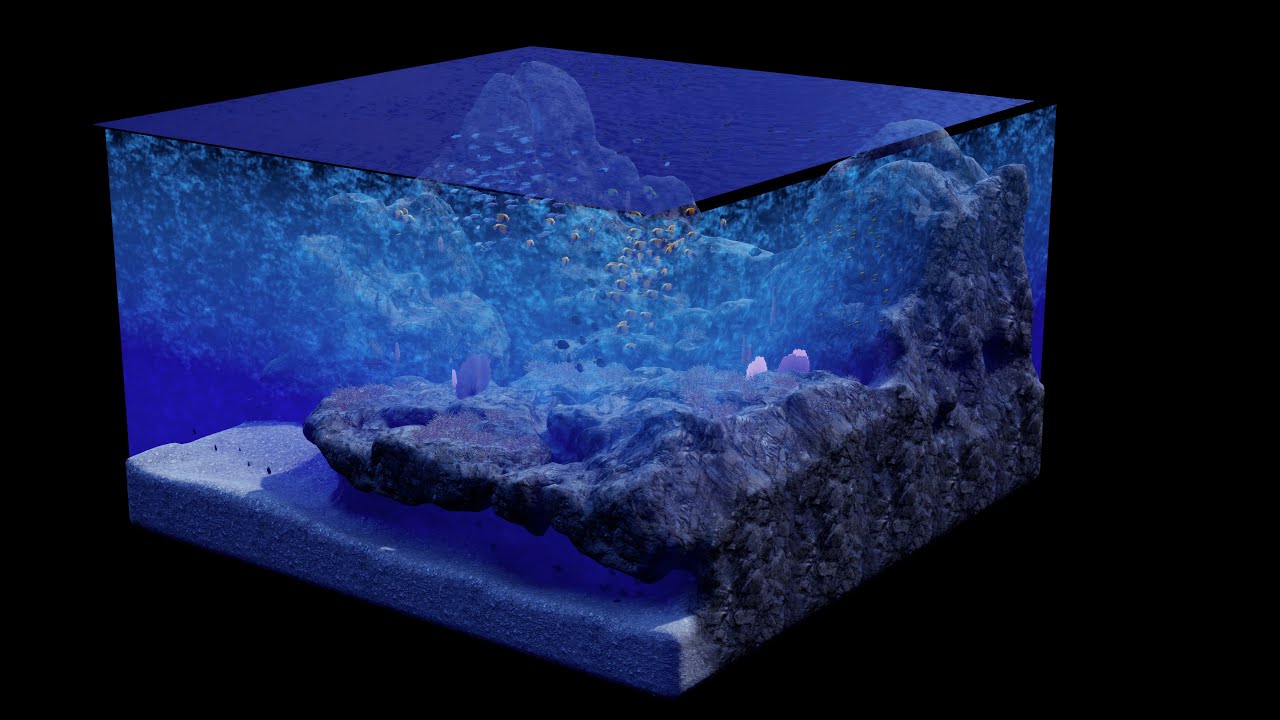
Blades over the Horizon is an upcoming action-adventure game set in the vast and ever mysterious blue sea.
Interested in learning more about this game's development? Come join our community!
the landscape is all triangle geometry so, it could be very dense to begin with
was hoping to avoid the extra use but it is good to know that the triangle index and barycentre is there?
problem with vertex color is you need dense triangles to begin with
hoary locust
I suppose so, depends what you're doing with it
normal burrow
its around 250k vertices per diorama there, which would be about the cutting chunk size of the world in game
but yeah it sounds like the way to do it beyond building some sideloaded data
hoary locust
Mmhm, in my implementation I looped over all the verts of the mesh to find the nearest one to the hit location, so that might take a while with those huge meshes as well
plush yew
heey guys is there any way to make the editor be 144 hz at all times every time i start it up? as of now i need to type the t.maxfps command every single time
144 fps i ment of course 😅 *
hoary locust
there's an ini file you can put it in
 kindred viper
@hoary locust do it per poly instead, then you save time, and can check the 3 verts
plush yew
hey @hoary locust do you refer to the engine folder or the project folder?
if so can you tell me what file it is and what i would have to put in there assuming you know?
hoary locust
consolevariables.ini in Engine/Config
not in the project folder
you just put the console command itself
plush yew
interesting how i just couldnt find this AT ALL by googling
thank you so much man!
i am sorry @hoary locust there is a reason why i visual script can you take a look and tell me what i did wrong here, since its not working? : https://gyazo.com/3a902dd7bfcfd7912235106c83a113f1

i did restart epic games and the launcher completely
hmm anyone knows?
hoary locust
yeah doesn't work for me either
plush yew
oof
hoary locust
there's a project file you can try to put it in
plush yew
i mean if i really have to ill just do it manually every time i open the project but it seems silly to m
hoary locust
Config/DefaultEngine.ini
it's weird because it should work in the consolevariables.ini file, that's literally what it's for
hoary locust
@plush yew yeah nothing I do works, but the last outpost is to do it on BeginPlay in any BP (like GameMode) with an Execute Console Command node
hoary locust
yeah
plush yew
cuz if thats the case i dont mind just typing the command
hoary locust
but at least it will stay during the session
plush yew
allright lets hope theyll add a option for that at some point 🙂
hoary locust
another option is to get 64gb ram and literally never close the editor 🙂
grim ore
do you want it to be a fixed framerate, or max framerate, or framerate with smoothing?
normal burrow
i think they just want t.MaxFPS to default to 144
 ruby ocean
Hey I was messing around with some modding tools and got a bunch of blendweights and packed textures for a model of mine. Can I put these in my characters MIC?
 abstract relic
Are you asking for the legality or?
ruby ocean
No the application, cause I've never worked with Blendweights before
I've only worked with the base normal map and texture file, never anything besides those two
 calm oasis
hello i downloaded a megascan map but it crashes when i try to open the level in the editor, what do i do?
hoary locust
delete it
fierce tulip
we all need more ram
calm oasis
sad life
 merry cape
Is there a easy way to have a PPV ease in, rather than abruptly start?
merry cape
Post Process Volume
I remember back in 4.21 I could "smooth" or "soften" the edges of the PPV so it eases in, but now I'm 4.24 I'm not seeing the option to smooth into the PPV, any ideas y'all?
 swift spindle
anyone ever had an issue with PostProcessVolumes being locked out randomly ?
existing or new ones
all greyed out
abstract relic
Read pinned message qBersp
plush yew
Best way to set weapon damages is using Interfaces?
normal burrow
@green sky post your log here
fierce tulip
if its long, preferably trough pastebin
normal burrow
is dropping it directly on the send area bad? -- as an attachment?
fierce tulip
thats fine, but i personally wouldnt click it :p
 keen birch
@green sky Not having any more crashes in 4.24.3 than I was having before
 dense wing
Hey everyone, i'm having an issue where i can't go back into ''play'' mode. Was playing around in the sequencer, made a complete sequence. But when i press the play button now it says ''can't play in editor when performing set playback range operation''.
 scarlet birch
@merry cape You could do it in the post material by using whatever the node is for everything prior to the post and lerping between it and the full post.
 mighty oak
Hello, is there a way for a blueprint actor to have a dynamically populated drop-down style list that works in a construction script?
 misty creek
Does anyone know how to properly use importance samples? The sample position is returning random positions, but they are tiny, so I'm not exactly sure what to do with that. Any ideas?
And I can't find any documentations on them
plush yew
I keep having this error when i want to save
Any thoughts how i can fix it?
I cant save at all
tawdry storm
hm check if you have another instance of UE4 open
 mossy spear
Random question
tawdry storm
random answer
mossy spear
My lighting only mode shows my lights are pretty bright, but in lit mode I don't get that level of light brightness
tawdry storm
are your materials very dark?
mossy spear
Nope
tawdry storm
do you have a post process volume?
abstract relic
Sounds like auto exposure
tawdry storm
good point
abstract relic
You can disable it in project settings. Make sure it isn’t enable in the camera and any post processing volume you have in the scene
 barren lake
If i move project into usb
abstract relic
No
barren lake
Will it have everything
tawdry storm
if you don't have any engine specific changes, yes
barren lake
Epic
abstract relic
You can zip up the project within the export menu. Zipping externally will result in larger file size
tawdry storm
so what was it? 🤔
mossy spear
Some random black AO in the shader
tawdry storm
oh weird
tawdry storm
because unreal launches steam vr if you have a headset connected
abstract relic
Or installed
barren lake
Oh
tawdry storm
or if you just think about it
barren lake
Well i do
tawdry storm
it really opens it at any possible oportunity
abstract relic
New steam technology at it’s finest
tawdry storm
new invasive spyware!
https://giphy.com/gifs/madqueen-the-show-XoM1QmEzuQrEgwGvlC

 barren lake
What
normal burrow
No
tawdry storm
if you close it during startup it'll just be there again once it's fully loaded, it's really fun
abstract relic
Honestly. It’s pretty invasive
 trim granite
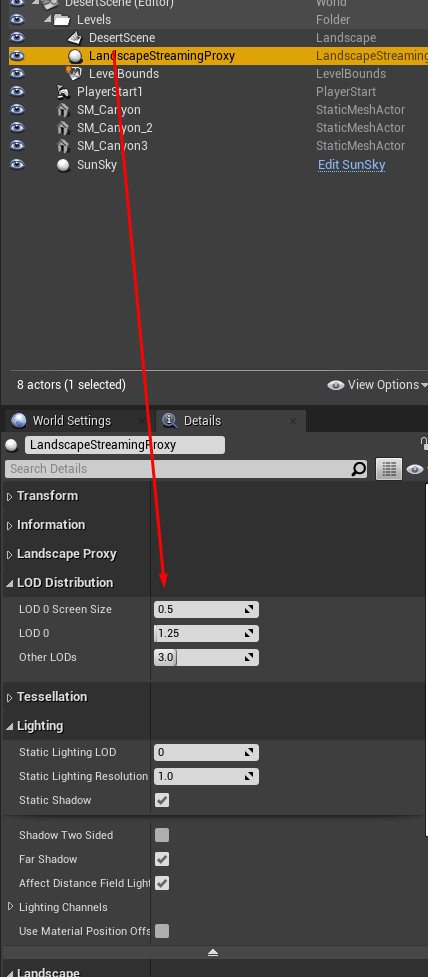
Is there a way to force the landscape LOD screen size to 0? Whenever i save my scene it pops back to .5.
 normal burrow
I'm considering turning off the hmd option all together, steamvr is annoying
tawdry storm
VR was a mistake
barren lake
No
normal burrow
No
barren lake
I mean boneworks and half life alyx prove how great vr is
And how many kidney's you gotta sell
mossy spear
Sometimes you just need a conversation to get thy head on the right track at work
 placid arrow
if my players character dies e.g. due to DestroyActor, the only thing left is the player controller (multiplayer). This playercontroller seems to have its own camera built into it, because the custom camera i have in the character goes away and the players screen shows some random view of the level. I've tried playing with 'get player camera manager' node in blueprint from the player controller to manipulate this cameras position and rotation and face it towards the location of the players death, but it doesnt seem to do anything. am i doing it right?
im guessing i should actually spawn a camera component and blend to it
 floral socket
Hi people! Im new here, sorry if there is a place for it, havent seen it. Do you have any really good tutorial for true beginner ? Im a future student and I want to explore Unreal by myself, but havent found anything good enough yet. Thanks!
mossy spear
What section of unreal do you want to focus on
mossy spear
So that would entail modeling and shader development and lighting
Modeling is Maya, Houdini or any dcc application
Shader involves substances and ue4 material
floral socket
I mean, i don't want to do modeling for now
oh well im just gonna stick to the video i found
mossy spear
Well if you won't be modeling then the next step is materials and lighting
abstract relic
Read pinned message @floral socket I made a care package just for such newcomers
 idle flame
ah k lol
 next badger
@floral socket Open https://learn.unrealengine.com/
then pick any topic you prefer...
brisk urchin
If I make a box brush plane and add a material to use it as a floor for a back alley area, should i convert it to a static mesh or leave as it??
Asking in terms of it affecting performance and or file space reason
next badger
afaik static meshes are faster
plus, you won't need to have a "box", you can have bare minimum of triangles...which is 2 and it's a plane (you can use plane mesh)
ue4.24 now has a lot of plugins to edit geometry (some are not super stable, but only affect editor), you can enable them in plugins tab (search for "edit","mesh", "poly")
in terms of drawcalls, every material slot will add a drawcall...so less materials - better performance
scarlet birch
Don't leave it as a brush.
brisk urchin
@next badger im currently using UE 4.20.3. Once i convert, all I gotta do is add a simple box collision? Or is there something else i gotta do when i convert it?
next badger
nothing else...box collision is fine
brisk urchin
@next badger thanks. Also, i downloaded some materials from the marketplace. There's is one master material and dozens of instanced materials in the material folder. For some reason none of them work except for the master material
Is there some issue possibly?
next badger
are they still referencing master as parent?
brisk urchin
Yea, when I open an instanced material. Under the general tab, it shows the master as the parent
Also, I just tried applying them to a static mesh and they worked but when i apply them to a box brush it doesn't work. 🤔
brisk urchin
@next badger I see. For collision, is it better to use the Auto Convex Collision tool or just go to details tab of static mesh and select, "use complex collision as simple collision"??
next badger
if you have simple shape it's better to have spheres/capsules/boxes...even several of them will work faster than one convex collider

 opal lark
is i diffrent to add a new land scape layer in the new engine
 surreal glen
My project is crashing on startup is there any way to figure out what files it's failing to load?
normal burrow
logs
surreal glen
all the logs have given me is
<ErrorMessage>Assertion failed: (Index >= 0) & (Index < ArrayNum) [File:d:\build\++ue4\sync\engine\source\runtime\core\public\Containers/Array.h] [Line: 614] Array index out of bounds: 0 from an array of size 0</ErrorMessage>
And then a call stack of identical UE4Editor_CoreUObject messages that doesn't tell me what's the problem
normal burrow
do you have visual studio installed?
normal burrow
can you launch the project with it?
yeah it will trigger a breakpoint when that assert fails
where you'll be able to gain an idea of what is triggering this
unless you have more callstack than that single line, you'd need to launch with vs
surreal glen
oh damn this one doesn't have a .sln file, I assume that's what I'm supposed to load
opal lark
how do i add new landscape layer in new engine i dont see an option
normal burrow
right click uproject file and "generate visual studio project files"
next badger
@surreal glen ue4 version?
opal lark
4.24
surreal glen
Got it opening again thanks @normal burrow
brisk urchin
Is there a way to permanently adjust the way point of a static mesh?? Currently when i select the mesh the way point is off of the object.
normal burrow
way point?
brisk urchin
Axis point
Its what pop up when you select a mesh on the viewport
Its what lets you move it on the xyz axis.
normal burrow
pivot?
normal burrow
you'll want to pick up blender for such task of changing it for good
 last helm
I know how to open a project and use migrate tool to migrate something to another project. But is there a way to 'pull items in' to a current project?
last helm
ok, thanks - just making sure i'm not missing a more obvious way
 south ridge
I saw a plugin for that on marketplace
One sec

View and import uasset files with dependencies.
last helm
😱
normal burrow
always kinda assumed if you cant open the project though, that might be a safeguard lol
south ridge
This plugin is supposed to retain all the usual safeguards that happen yeah
last helm
That's kinda why I need it - the project is crashing this machine LoL
south ridge
I think. I didn't use it 😄
 south ridge
@last helm revert to an earlier version in the version control system? 😄
normal burrow
i figured jayse
last helm
ur good!
normal burrow
🔮
last helm
@south ridge yeah maybe I'll try that
I just need ONE piece from it - that took me an hour to make LoL
3 hours to trouble shoot... hmmmm.... shoulda just made it again
Is there any kind of 'adobe library' that holds assets that I can drag in as needed in any project?
(newb q's I know, sorry)
how do you guys manage code bits/functions/materials that you use over and over
normal burrow
idk what an adobe library is
but you can make plugins
if you find yourself moving around a lot
plugins have their own content folder
grim ore
just one big project that holds crap if it's all custom crap works as well
last helm
That asset browser looks great!
normal burrow
Hold on, opening the crap project 😂
last helm
LoL
I'd do that, but it seems, for me, that just opening a simple project sends Unreal into a never ending compiling shaders thing
that normal?
do you just ignore that or let it finish
grim ore
it should really only do it once and then any time you change it
plush yew
how can I allow a character to jump only when he is in ground. I have a problem with double jump, that when I do double jump its very fine. just ok. But problem is that when I fall from edge and press 2 times jump in the air I do a double jump and i dont want that.
is there a way to execute jump command with boolean is walking or soemthing like thtat
last helm
@grim ore maybe because I keep updating Unreal to the latest version?
grim ore
if you update the project to a new version then yes it might recompile
 lean fractal
Does anyone know why rendering passes brightens the image?
grim ore
@plush yew yes you can do that, just check the is falling before allowing the first jump and prevent it if so
plush yew
but how to do it before jumpo
I have only jump input
and there is nothing before that
cannot connect anything
I have tried custom events
opal lark
How do i add a new landscape layer in the latest engine ver
i dont see the plus symbol
last helm
btw - thanks for your answers guys - SUPER HELPFUL
 wanton dome
I notice how after clicking on an button, any input from the keyboard will click the button again, without doing anything assigned to the input.
I tried to solve that by giving "set input game only" to all buttons, but that make buttons stop responding unless I click on it once already.
Anyone has any idea how to solve that?
normal burrow
that is how they should work
the operating system needs focus of the window to send the keyboard to it
wanton dome
Well it's an minor problem, but it makes the game experience a little less comfortable
normal burrow
perhaps if you manually remove focus from the button after its clicked. but i have no idea if this is a thing
yeah idk what the situation is
 frozen pollen
how can i make a trigger that takes a couple seconds in order for it to retrigger
wanton dome
You can use gate or do once
brisk urchin
Currently when I click the build button it takes about 8-10 minutes for the project to build the lighting and geometry. I still have many box brush objects on the map, do they slow down that process when building??
Pretty much wanna ask if converting those box brushes to static meshes will make the build process faster when updating the lighting and geometry.
frozen pollen
how could i use the multigate for it? its what ive been trying to use but it retriggers right away
normal burrow
delay node is what you want comrade
wanton dome
@frozen pollen Delay will also work
frozen pollen
im not sure how i would set that up for this, cause if i put a delay right after the trigger then it would just make the retrigger happen after the delay
unless you can put it in a different place or smth
normal burrow
check if a boolean is false, set it to true before then delaying, after the delay is up check that its still true, then set it to false and execute in that context.
plush yew
is there a way for booleaning Inputs in bp
grim ore
@brisk urchin more than likely not enough to matter
wanton dome
@plush yew What do you mean by booleaning inputs? Like using input to change an boolean?
wanton dome
Yes you can do that. Just put an branch after the input event but before all the actual function you gave to the input
Your character blueprint should be holding all of your input events
frozen pollen
is there anyway i can add a timer so that out 1 can only trigger after a set amount of time?
just to rephrase what i put earlier
wanton dome
@frozen pollen I believe this is what you are looking for https://docs.unrealengine.com/en-US/Engine/Blueprints/UserGuide/FlowControl/index.html
Nodes that allow for controlling the flow of execution based on conditions.
Scroll down to the part of multi gate
normal burrow
try it, i think so
frozen pollen
how would i put a timer on it
cause if i attach a timer to reset that would just make it do out 0 again right?
wanton dome
The document literary tells you how to achieve that using timeline
 tired meteor
Any BP gurus? Im in need of assistance merging the VRguntoolkit into the standard VR template, as well as to integrate the full functionality, assets are migrated and ready to compose and compile. Have some Paypal $$ ready for anyone that can assist and educate me remotely quickly and efficently. I cannot post in the LFT section so please forgive if this is the wrong category.
wanton dome
You can double click on it to edit it
frozen pollen
so like this?
@wanton dome
change time to the top one i missed that lol
other than that tho
wanton dome
Yes that should do
frozen pollen
now it only triggers after 20 seconds
let me see if it helps with retriggers tho
actually it doesnt even trigger at all
wanton dome
Oh no sorry I missed changing the "new time" is not what you want
frozen pollen
what do i need to do for that
wanton dome
Double click on it to edit it. Don't just give it an time output, you actually have to modify its behaviour using the editor
abstract relic

What is a Timeline in Unreal Engine 4.
Source Files: https://github.com/MWadstein/wtf-hdi-files
frozen pollen
could i just disable the trigger until i needed to use it the second time?
i feel like that would be a lot simpler
would it work?
grim ore
you can enable and disable collision if needed sure, it should disable the trigger
wanton dome
If you don't want to use time line, you can customize an unit by creating an new variable. Then use event tick to make it add up
Like this:
Then all you need to do is using branch to "do something when the unit reaches an certain number"
frozen pollen
i figured out a solution
i can disable the input at the end of out 0, and then reenable it after 20 seconds
and that seems to work ok
its not very clean tho
@grim ore how do i disable the collision on a trigger box i can only find how to enable it
grim ore
Set collision enabled?
frozen pollen
i can only find that
grim ore
And set it to no collision
frozen pollen
i found out an even easier solution than that
i got a retriggerable delay and put it at the end of the sequence
and then once the timer on that is done it goes back to a do once and it works
so yay
 worn sparrow
frozen pollen
worn sparrow
frozen pollen
thanks for the help guys
plush yew

This question been killing me since i began
This is a normal bp not a player BP
What i should put in the Object field
its not overlapping with it as well
It is an actor i need to change its color
normal burrow
does bp ghost trails exist in your game?
plush yew
what do you mean p@t?
normal burrow
where does this bp ghost trails live?
are you putting it in the level?
is it part of the ui?
what you put in for object, is the same thing you get as a ghost trail
normal burrow
k so lets say the cube is a bp_cube
and the color is inside bp_cube
and bp_cube parent type is actor
normal burrow
so you get this reference of an actor which is the cube right?
i mean lets assume its the cube
if you want the color on it, it wont give it to you because your looking at it like an actor
so you have to take that actor reference and view it as a box reference by the cast node there.
you get the same thing on each end
unless what you send it, is not a cube then cast failed runs
grim ore
Have you watched the long YouTube video about blueprint communication from epic by Zak Parrish? If not you should.
normal burrow
sounds like good advice
 normal burrow
if you think of someone throwing various fruits at you, and you want just the apples. when you get an apple tossed to you that is the first unnamed exec, when you get an orange its cast failed
plush yew
Is there a way i can put 3 of those into 1 target
which is the "Target"
@normal burrow yup your example helped alot tbh
in understanding how it works
normal burrow
not when there is a return type @plush yew
you'll need 3 nodes for that case
if the function didn't return a value you needed, you can stack targets
plush yew

Look like this p@t
am trying to call Fantasminha
into Player BP
This is an actor BP
@normal burrow
 normal burrow
your not passing anything to object there
normal burrow
you should find that video matheww mentioned. but i mean you'll need to find the ghost trail that exists in the level for that
you use the cast to take the idea of fruit and treat it as apple
actor is fruit, bp_ghosttrails is apple
cast does not find things for you
maybe you want to get the overlapped actors, and try to cast each of these to ghost trails?
plush yew
am ganna show you sec
 pulsar badge
Does anyone know why that when i build my lighting it doesn't even build the same number is still there
plush yew
Am trying to change the GhostTrail Color
I can do that from the Actor BP it self but it will be harder for me to find later on the long run
if i wanted to change it
@grim ore I tried your input even from the Project settings "Input"
normal burrow
yeah i mean you've gotta have a reference to it some how, make sure overlap works in the first place then that array of actors might contain some of these trail actors
plush yew
i have 1 problem even tho i did set it from there if i used it inside a BP diffrent from BP Player it wont Press
@normal burrow am checking on that atm
normal burrow
@pulsar badge how you mean?
i feel your pain, been waiting on houdini to build for 2 hours now
pulsar badge
@normal burrow I know how to build my lighting but when i do its not removing "lighting needs to be rebuilt"
 south ridge
@plush yew are ticks enabled lol
Handling event is only part of it, you must tell engine to generate events in the first place
plush yew
@south ridge can you explain more please?
south ridge
There is a checkbox that enables actor ticking
normal burrow
yea if its a component bp you migth need to enable that
only other time i have had a tick problem like that would be forgetting to call Super::Tick in c++
winged crypt
What changed in 4.24? My lighting looks fine when I'm playing or simulating but in the editor alone it looks blown out and bright. Makes it hard to work with movable assets when designing ;/
 flint trench
Gosh dangit how do I make it so that when I rename a folder it doesn't just make a new folder, move all the stuff and then leave a folder that I can't delete
grim ore
Try fixing up redirectors after the rename. Right click both folders and fix up. Also try and make sure your in a blank scene without anything loaded to try and help.
flint trench
Tried both of those, No luck unfortunately
It's annoying because I know if I delete the folder in the content browser it'l break things
winged crypt
@flint trench are you using source control?
flint trench
Not currently
winged crypt
move folder > fix up re-directors > file/save all > delete old folder
did you try saving all before attempting to delete?
winged crypt
if you fixed up re-directors, deleting the old folder manually won't break anything
winged crypt
assuming it's empty
flint trench
it's got the old folder structure still
winged crypt
are there any files though, or just empty folders
winged crypt
should be fine to delete it from file explorer directly, I usually close UE down when I do this
never breaks anything if I fix redirs before I delete
flint trench
but everytime I have previously deleted from explorer directly I get about a billion errors on packaging
and textures often unlink
I feel like there's a reason it's probs not letting me delete it
winged crypt
if you fixed re-directors and can confirm the old folders are empty, nothing should be referencing them. You can double check via reference viewer as well to see if anything does use them (which may be why you can't delete)
flint trench
It doesn't even do anything when I click reference viewer on that folder
winged crypt
what engine version are you on
flint trench
4.24
 uneven fractal
I'm no materials expert but this many layers can't possibly be good for performance can it?
 lapis vine
Measure first.
uneven fractal
It's not mine so I can't do that. I had just heard that 8-12 should be the upper end for landscapes
lapis vine
Its likely too high, but without actual facts (measurement) we will never know. Imagine this to be a piece of visualization - you have mostly landscape and don't bother for much else. Then consider also other factors as target hardware, interactivity rate and etc. There are so many possible variables which may make that pile of layers fine.
plush yew
Guys i did something i dk where
am starting the game and my pawn is not spawning
and am playing with camera around 😄
if any1 can help and thanks
AS i start my pawn is not spawning for some reason
last thing i did was deleting an input

@winged crypt sorry for @ you
As you have time please let me know ❤️
winged crypt
@plush yew Two ways to have your pawn spawn and get possessed:
- Check your World Settings, make sure you have a game mode set and the pawn you want as the default pawn selected. Then place a PlayerStart actor in the level where you want it to begin.
Or, - Manually place your pawn in the level and somewhere, in game mode for example (or level BP), get a reference to it and possess it on beginplay.
I recommend the first 👌
plush yew
It was working fine i must have done somehting wrong
Am doing the first one i will let you know what happen thanks!
winged crypt
Np!
 winged crypt
That's good, and is there a PlayerStart in your level?
 winged crypt
That means it's clipping through something (in your case, the floor). Delete it and place it again but don't lower it any further than it places itself by default. Only adjust the X and Y axis if you need to
plush yew
From where i can place it again?
never tried to get it b4 😄
am just ganna delete it but where ican get it again ?
winged crypt
The PlayerStart is in the level?
 winged crypt
okay, and are you running any code anywhere that spawns and possesses pawns manually
winged crypt
that wasn't the cause, will be something else
is there any code in the BP that spawns your playerBP
plush yew
Nope never tried to do such a thing
winged crypt
do you have a copy of your PlayerBP placed in the level (if so delete it)
winged crypt
And make sure you're using "Play" to run this, if you're using "Simulate" then no pawn will be spawned
 winged crypt
Ah there's your problem
You're simulating, not playing
Click the little arrow next to that and use 'Selected Viewport" to play with a pawn
You can tell its simulating because the play button has a gear behind it
This will not let you use a pawn, it's intended to simulate the level without playing in it
But on the plus side, you did set up your character to spawn correctly via game mode + PlayerStart 👍
Let me know if using 'Selected Viewport' fixes the issue
winged crypt
Anytime !
winged crypt
These modes do different things. To just play the game normally in the editor you want to use "Selected Viewport". If you set it to "Simulate", it won't spawn a pawn and you'll just be running the level on its own while you fly around.
The Simulate option is useful if you want to see how your level plays itself out. You could see animations play this way on characters, or events trigger etc. without needing a player to walk around with.
I knew you had this on because your Play button looked like this:
The gear icon is the symbol for the Simulate option
Once you choose a mode to play in, the Play button will change to that mode and stay that way until you pick a different mode later on
So you can just click Play from now on until you change it.
 grave osprey
People who use anim blendspace. How to make transition smooth ?
My blendspace making transition instant
winged crypt
@grave osprey
Interpolation time in the details panel, per axis
Higher = longer to transition
In seconds.
grave osprey
Ok thanks.
Quadruped animation is hell to animate
winged crypt
Always
Very helpful and super easy to set up, designed to support quadrupeds also
I'm using it on bipeds though
 sweet relic
anybody know when the default asset manager scans for new assets? it seems to only intermittently detect assets created in the editor
grave osprey
Damn. I have no budget.
I stick to blender ik
 winter flare
Hi!
plush yew
Is it possible to access the name of a variable in BP?
pulsar badge
I’m working on a big map and I’m lagging so badly
Which I can setup that my pc can only load certain chunks at a time
grave osprey
How fortnite works ? I have large map. Yet didnt lag.
 radiant haven
4.24 is bugged out Bloom deactivates itself everytime if i restart my Project
honest vale
what?
 grave nebula
kiloorder, megaorder,gigaorder, those are organizational units.
 ivory sail
maybe someone can help me out here i still have autosave files from a project that corrupted a couple weeks ago i wanna look at those blueprints that i'm assuming are unharmed. is there a way i can just put them in an empty project?
pulsar badge
@grave osprey I’m lagging in the editor When flying around but when in person walking around I’m fine
plush yew


AM trying to cast my sword BP inside my Player BP
Which i cant find the correct Object for it

the object field
 blissful trail
im trying to make a widget that you can click and hold and it moves the widget to the mouse cursor location
but when i click it. it moves a tiny bit but doesnt move any more
plush yew

What if it is an actor
cant find an answer 😄
@blissful trail maybe its true only when you press
and it get back to false quick?
blissful trail
its true the entire time i press and then goes false when release
plush yew
Any thoughts??
near chasm
Need some help. I have a Widget Component on my player. The widget only contains a Progress Bar. How do i access the properties of the progress bar?
such as SetPercent etc
blissful trail
ok so i found out when i hold left mouse the location stays at the location it was previously at until i release
 crimson vector
Real newb question, not sure where to ask it... I'm calling LineTraceSingleByChannel using ECC_WorldStatic and it's colliding with the player, but I don't want it to (and I have no idea why it's doing that because I assumed WorldStatic would only include static level geometry), any idea how to fix?
(I don't think I ever changed the collision settings on the pawn, it's just a default first person one. I don't want player-on-player collision, just player-on-environment collision)
calm oasis
do levels load faster if i set the editor graphics lower?
kindred viper
the levels are the same size no matter the graphics settings, but in terms of rendering it, yes it will be marginally faster. Perhaps not noticeable but somewhat
calm oasis
ok i'll try
nope still crashes, i think i need more ram
i reach the limit too often
 dark rune
quick question how do I set the start and end (world) locations of a spline mesh from another blueprint
kindred viper
get a reference to the spline
obsidian nimbus
if there is only 1 in the level, i sometimes do get all actors of class and get 0
is this bad practice? 😛
dark rune
@kindred viper done, how do I set it
kindred viper
@obsidian nimbus yes its bad. and @dark rune the same way as usual. Check out the spline mesh component and spline documentation. Im a bit rusty on that so couldn't give you specifics.
dark rune
@kindred viper alright
 fluid stag
how's the ue4 versions these days? still looking to upgrade from 4.15 but performance / stability always kept me in place
kindred viper
really? holy moly dude
fluid stag
4.23 looks like is has some nice features tho
kindred viper
Once 4.19 landed I didn't see any reason to deal with earlier versions. But it's looking like 4.25 is gonna be my next base build. Not finding issues with 4.24 though, its been very smooth.
 idle garden
I'm still with 4.23 and I like it
fluid stag
i was gonna look at 4.24 but there is already a hitching problem with it
kindred viper
I keep 5 versions or more usually. Never know when you need to dig out an old project/prototype for some reason
@fluid stag what is the cause in the profiler?
fluid stag
I guess the main thing is 4.15 is stable and performant, probably have to run a side by side test. So many random api changes tho grr
kindred viper
hmm seems a bit of an odd reason to keep from upgrading the engine version. Especially as its targetted at 4.24.1 and 4.25, with a fix coming for 4.25. However I don't know your game or editing workflow so I'll defer to you on that 🙂
regal mulch
Epic Games: TargetFix 4.25
Also Epic Games: Won't fix.
🧐
fluid stag
lol
regal mulch
Or is that a bug on the mobile version?
fluid stag
I guess they are split on it
kindred viper
perhaps its just a performance glitch with the default map in editor whilst performance profiling, and the fix would break something else. Who knows.
fluid stag
would make for an interesting video; stability and performance comparison of all ue4 versions since 4.10
 copper flicker
I think it depends on what yo have in your project
I had some issues, I uninstalled a plugin, issues gone
 lament saddle
@plush yew Your player needs to get an "object reference" for your sword in order to cast to it. It basically needs to know which object in the game world to cast to. A "cast" is just a check for "is this object a BP_DarkSword"? There are lots of ways to get object references (traces, collisions, overlaps, Get All Actors of Class, BP communication, etc.) but you need to use one of them.
Also an "actor" is the parent class of pretty much anything you can place in the game world AFAIK. Any BP you make or mesh you place is a child of the Actor class.
plush yew
heey guys 🙂 how can i make the game true fullscreen by default after packaging?
or what would be tthe best way to do it?
it is definitely borderless as of now
àlso the console simply wont open with the tilde key even though its set up that way
its just so confusing to me how there is no way to just make it fullscreen by default like unity allows you
fixed the console thingy.. 🙂 now i just need to have it fullscreen by default
if anyone wants to help that would be awesome 😄
why is it so difficult to find out how to do this?
wary wing
@plush yew https://stackoverflow.com/questions/34981226/how-to-make-unreal-engine-4-full-screen-windows-package
See the comment at the bottom

Stack Overflow
I'm really new to the Unreal Engine 4 and I need some help, I can't find the answer on the internet so I hope someone here can help.
When I go to the Package project (Windows) when I open the game...
plush yew
while in unity its just a seleection box
yes well see i don't want to use that opttion @wary wing what if a person doesnt use 1920x1080?
then that whole option wouldnt work
i want it to detect any resolution of course
plush yew
i just tried that defaultgameusersettings file but it doesnt seem to apply at all
even though i already restarted the project
wary wing
Can you talk us through what you've tried already?
plush yew
altough.. i did use that same solution back in the days and back then it did work
i would definitely prefer using the defaultgameusersettings file option
but for some reason the packaged game still is borderless
fierce tulip
im not a blueprinter, but there are bp nodes that can detect and set screen res/fullscreen
plush yew
unless... i type in the console.. in the game r.setfullscreenmode 0 and then after that alt+enter
fierce tulip
i think matthew has a video about it
plush yew
i am sure there are luos but i am just so confused how unity has a option for this inside the ui and in ue i have to do everything and still cant make it owrk
fierce tulip
¯_(ツ)_/¯
wary wing
Here it is: https://www.youtube.com/watch?v=RGxGmYMiKKY

What is the Game User Settings: Fullscreen Mode Node in Unreal Engine 4
Source Files: https://github.com/MWadstein/wtf-hdi-files
plush yew
this is my default file:https://gyazo.com/a5ab50b7bab68fa2c7861115415f2cea

and this is what it just put to the fricking packaged game: https://gyazo.com/f94c34b75cfe9525765e8e1734a481bf

so not like the default file
so its clearly not doing its job
why? god knows i guess
fullscreen mode 1 is NOT what i want
so no one is able to help? 😦
if i use fullscreen it gives the wrong resolution
as a run console command in the level blueprint that is
and... https://gyazo.com/1122078e2a6467f992de9d14d1d34bca doesnt work either
 misty creek
So I've been trying to figure out how to use Make Importance Texture. This is my current setup but it isn't working as expected
It does generate a random location every time, but it is always so close to zero that it doesn't make a difference
The texture I'm using covers the whole screen and I'm trying to use the alpha channel to determine a random location on the screen
Any ideas how I can achieve this?
misty creek
Are you talking about for a packaged game or in editor?
plush yew
packaged game 🙂
i have tried the defaultgameusersettings file that just does not seem to apply at all
but which did work for me back in the days
and sure i can use the console command 1920x1080f but that would put it to full hd res which wouldnt work well for people with 4k or lower then full hd
misty creek
What version are you using?
plush yew
4.24 🙂
and if i would have to switch to an older one that would be a pain in the butt considering i already have done some stuff
which if i really have to i wouldnt mind to redo it honestly
misty creek
Okay, let me package something really quickly just so I can see what it looks like
plush yew
thank you very much 🙂 feel free to dm me if you want to
plush yew
you have to download the plugin
from the plugins window
and then probably have to restart your project
austere scroll
restart ? you mean re-open or delete and make a new one ?
plush yew
reopen
austere scroll
ah ok
plush yew
https://gyazo.com/cbe68e4cc3dd9236de982c6acceb4521 @austere scroll
 plush yew
i am unsure what you mean by broken
austere scroll
the setup doesnt work
i tried uninstalling and reinstalling , and asking for help
even the epic games support doesnt know
it says that a hard disk (that i removed from the pc bcz it got corrupted) is not available although the downlaod path is in a whole other hard disk
hi
plush yew
set fullscreenmode in bp is not working guys any tips?
Unreal Engine Forums
When setting up a Level Blueprint to set a GamePlay Resolution - it's ignored after packaging and using 4.23
you can download the project file here and test
these guys are saying its broken
plush yew
guys


this seems to work but it only enters true fullscreen after i press alt enter
i dont want to ahve to do that of course i want it to do that by itself
o btw ,.. @wary wing the r.setres f command doesnt even work at all
tried 2 differen unreal engine versiosn
 burnt ether
Before I try something I wanna ask... Am I allowed to use my 4.24.2 Project in 4.25.0 ?
plush yew
on 4.23 it seems to completely crash like those guys mentioned so i am gonna try 4.20 now
and.. in 4.20 it doesnt work at all
was that mention towards me? @burnt ether ɪ ͢͢͢ⱥm 』
burnt ether
nuh
plush yew
o okay
burnt ether
I wanna try the newest version with my old project
plush yew
it is so weird no one seems to be able to answer my problem
which makes me think that everyone just uses borderless mode
burnt ether
but I'm not sure about how much trouble I'll have converting it
abstract relic
I thought .25 is still in preview
plush yew
well thats it i am done! if a game engine cant get their fullscreenmodes to work correctly then thats it for me
abstract relic
Regardless. Always, always have source control set up
normal burrow
Time travel is great backup
@plush yew shift+F11
I use this all the time in editor to enter real fullscreen
fierce tulip
@normal burrow he wants fullscreen when game launches iirc
plush yew
yes in the packaged game
but i gave up,. i remember i had a pain in the ass with that back in the days aswell, and i tried to replicate it just earlier and it doesnt work anymore at all
you know its interesting...
it makes me not surprised anymore that alot of unreal engine games nowadays dont have true fullscreen
😂
which is a horrible thing
 steady linden
guys how can i center the pivot to object?
frozen pollen
Is there a limit on the amount of teleport locations you can have or something? cause i have one teleport with a destination that works fine, but if i try and have another teleport it doesnt work. it only works when i use the same location as the first teleport. here's an image: this one works fine https://cdn.discordapp.com/attachments/221798862938046464/685851520557776938/unknown.png


but this one doesnt https://cdn.discordapp.com/attachments/221798862938046464/685851531270029343/unknown.png


they're both the exact same except for location but only the top works
hoary locust
it's the same input?
austere scroll
how can i change a static mesh default size and rotation , Its huge and rotated the wrong way . help ?
 supple totem
you can per instance, but not sure about doing it for defaults
there are new mesh editing tools in latest version I think
I have done it in engine with a plugin before
and you can export and fix it
fierce tulip
- reset it in your 3d app
- reimport with rotation settings
- accept it and build whole world sideways
 worn granite
there's also the import settings if you have access to the original mesh
you change those and reimport
better to fix it externally though
austere scroll
@fierce tulip i didnt make this mesh and it cannot be opened in blender , therefore im unable to edit it
@worn granite these ones ?
austere scroll
yea
supple totem
you can use this if you wanna drop 10 bucks, its what I use

Pivot Tool is an editor plugin that allows you to modify actors pivot easily, and bake changes to static meshes inside Unreal Editor.
but I would look into the new static mesh editing tools released recently first, most havent used them yet so a lot of people here might not know if they can help
steady linden
how can i center this?
 earnest cape
It sets to just actor
worn granite
yup
earnest cape
which means I can't run any functions
worn granite
actors of class with tag doesn't use the keyword to give you the right array
earnest cape
So how would I do this? It seems like get all actors with tag is useless now
I guess I could store the actors on game state
 wanton path
what if you just had an array of ActorObjectReferences and then have a for each loop, where you cast them to BP Egg?
im a complete ue4 newb so just a random suggestion
worn granite
that's the only way forward here
earnest cape
I'm thinking of a few workarounds. I just wanted to use this built in system first
earnest cape
So to put things in perspective, in the game you shoot the eggs to unlock specific doors
So the doors just check if that's the last egg for it's zone
when the egg is destroyed
worn granite
I see
earnest cape
The problem is that I was manually setting an array of eggs in the level
worn granite
so you do zones by tag?
earnest cape
Yes I wanted to use tags to define zones
worn granite
you can just loop over the array as it is and compare to self reference
the address won't change if the type does.
you can also remove self from the array and check the array count
earnest cape
Yeah I'm thinking I'll just use a name variable in the eggs to tag them since it'll be at the top of the details panel instead of buried in the actor panel
worn granite
You might also consider gameplay tags @earnest cape
worn granite
They're subtly different
earnest cape
But can gameplay tags run functions?
worn granite
Can you implement the gameplaytags interface?
Nah but if you can implement that interface you don't need a cast
gameplay tags are just data
they're just flat out better than tags
earnest cape
Seems like extra work though. I'll have to learn all about them later
worn granite
Yup welcome to dev
worn granite
Also future questions -> #blueprint
earnest cape
I usually ask here first to get a response. But next time I'll ask there first and see
 vocal copper
Hey all 🙂 Is there some secret behind merged mesh collision ? I'm using my trusty collision preset on skeletal mesh component, but somehow it does not respond to blocking channels.. I'm kinda confused and not sure what to google.
 slender storm
Hello,
I have created a child class (Create Child Blueprint Class) of a character, and I would like to be able to modify the collision system in the "CapsuleComponent" details. But when I modify on the son, it also affects the father (the opposite I understand, but why also the son?).
How could I do the modification without modifying also the parent please?
Thank you
worn granite
save both and then modify the son
otherwise I don't really understand what could be happening
rotund scroll
child blueprint class component?
worn granite
nah it's just a separate BP which inherits
rotund scroll
mm ok