#ue4-general
1 messages · Page 672 of 1
 rotund scroll
appreciate it but this is literally one of those cases where you need trig math
 scenic stirrup
ok
good luck
are u perhaps familiar with AI?
I have a question in the AI chat. Which noone has responed to yet
 hollow zinc
okay was able to come up with this to help split the text
 plush yew
Any where i can get a cross hair from?
scenic stirrup
perhaps from flaticons?

Flaticon
Download all icons in SVG, PSD, PNG, EPS format or as webfonts
@plush yew
 grim ore
This is my jam https://game-icons.net/
rotund scroll
this discord needs a math channel 😦 or a math bot
plush yew

The timeline only work 1 time
rather than that i will snap without doing it smoothly
like it only works 1 time the timeline
 maiden swift
My favorite icon set, Feather, also has a crosshair. https://feathericons.com/?query=crosshair

Feather is a collection of simply beautiful open source icons. Each icon is designed on a 24x24 grid with an emphasis on simplicity, consistency and readability.
@plush yew Try hooking the input event into Play From Start instead of Play.
That will make the timeline restart from the beginning every time you play it.
maiden swift
You can customize the size, stroke width, and color before downloading it too.
Really handy feature of that icon set.
grim ore
oh that is cool
 scarlet birch
My project looked like crap after moving to 4.24 but adjusting the AA and a few other settings got it back to where it was.
DOF is on the camera
 fierce tulip
wouldnt that be more for #work-in-progress ?
 grim ore
you can check for a boolean after you process the input for the number 1 and if it's true, dont process it. set the boolean whenever you want to not process it or when you want to process it
plush yew
@grim ore
if i press 1 it come back to the original place
if i press 2 it gose the bow mode
but if i spam 1 + 2
look 😄

 scarlet birch
What is with the abundance of people using two timelines to drive the same value??
grim ore
they dont know about reverse
scarlet birch
If you want to keep it moving smoothly use one timeline and just change the direction
It seems pervasive lately
grim ore
lots of stuff to hook up depending on what you want
grim ore
nah I mean you can hook up key 1 to play from start, and 2 for reverse from start
but then it wont flow smoothly if you spam so you might want to play or reverse from the current location and not start which might be smarter
so just play with inputs and stuff and you should get it
scarlet birch
You don't even have to use the node itself, you can call each from the timeline reference
grim ore
noooo thats too advanced, they will explode
scarlet birch
Ah...
grim ore
they just found the play from start earlier today
plush yew
For now i just made it faster the switch so the spamming thing kinda fade away
But i will keep trying to understand what you guys said
seems useful
scarlet birch
The problem with using two timelines is you have to worry if they are at the same place and make sure they aren't both playing. Where as with Play/Reverse it doesn't matter.
plush yew
SO mike if i used play reverse they wont interrupt each other as my video shows?
scarlet birch
Yeah, the value will just move from it's current one toward the one at the start or end or the timeline.
 rancid lynx
what does "instigator" mean ? "input spawner's object instance reference variable ?
rancid lynx
that sounds impressively lame luis. whats that mean ?
fierce tulip
I'd use it when I need to ban someone from discord :p
fierce tulip
(cant help you though, I lack bp knowledge)
rancid lynx
okty anyways : )
im amazed. these bps can do every thing ive needed to far. faster than i could ever type it
its not the typing thats bad. its the formatting. more so, the reformatting
 gentle agate
Isn't instigator like owner?
fierce tulip
and the "it works, I dont know why" "It doesnt work, i dont know why"
rancid lynx
hehehe. bps do that also X_x
rarely
i was literally saying "whaat the ffff" today and yesterday. took me 30 minutes of staring at the monitor to notice
 upper iris
Need help, texture coordinate, I set v to 20.2 and it comes up as 20.2000001 which is knocking the seams out of place?
rancid lynx
actually. islept.. then when i woke up, it hit me.
gentle agate
@rancid lynx This is probably the explanation for it rob https://docs.unrealengine.com/en-US/API/Runtime/Engine/Engine/FActorSpawnParameters/Instigator/index.html
The APawn that is responsible for damage done by the spawned Actor.
fierce tulip
you could try setting the mesh to accurate uv's, else do it in the uv channel itself trough your 3d app
rancid lynx
thank you zero. i look stuff up many times on unreals website, but the explinations are always so generic, they literally only say the same thing that the tooltip said. "x means x is xing x"
ill read that one inhopes that it doesnt just say "instigator instigates the instigation input "
gentle agate
lol 😛
gentle agate
hahaha
rancid lynx
haha. well, i have to admit.. they did add information this time.
 subtle lake
huh fair enough just deleting the buildconfig file fixed it since it made a fresh one
@uneven fractal Thank you for this! It just saved me a bunch of stress and time 🙂
 uneven fractal
 abstract relic
dang
subtle lake
That search feature is a lifesaver.lol
 blissful trail
https://gyazo.com/c37d5304827c2fec883cbfe33e743db7 is this a bug ??
 naive comet
hello, is anybody intrested in working with me on 3d design in blender for a game project
abstract relic
#looking-for-talent read the pinned message for instructions
 normal burrow
it looks like your material is different
 tawdry wren
Assertion failed: Enum [File:D:/Build/++UE4/Sync/Engine/Source/Runtime/CoreUObject/Private/UObject/EnumProperty.cpp] [Line: 199]

UE4Editor_Core!FWindowsErrorOutputDevice::Serialize() [d:\build\++ue4\sync\engine\source\runtime\core\private\windows\windowserroroutputdevice.cpp:79]
UE4Editor_Core!FOutputDevice::LogfImpl() [d:\build\++ue4\sync\engine\source\runtime\core\private\misc\outputdevice.cpp:71]
UE4Editor_Core!AssertFailedImplV() [d:\build\++ue4\sync\engine\source\runtime\core\private\misc\assertionmacros.cpp:101]```has anyone had this issue?
normal burrow
that be a crash?
plush yew
I have this 1 problem
check the first changing camera postion
it always teleport
then if i press it again it gose back to normal blending

Any thoughts why that is happening
?
normal burrow
@tawdry wren are you running visual studio when the assert fails?
tawdry wren
@normal burrow it happens when i open up a BP
normal burrow
yeah, if you have visual studio installed. try launching your project with it
then open up the bp
looked into it a bit
Can't really explain why Enum would be null
blissful trail
how long does it take to launch a basically empty project in standalone game ?
blissful trail
ue4 also freezes when i click launch
 rain pumice
has any one ever played the game tribes? I am looking for some insight on creating similar character movement and velocity
 smoky sonnet
copied my project from my pc to my laptop it got stuck at 83% everyone said just wait becaude it needs to compile shaders 😅, i woke up and its 83% anyway and i waited around 7 hours nice
why does my probject get stuck at 83% that cant be because of the shader
:/
normal burrow
Is there brain activity @smoky sonnet ?
smoky sonnet
that's really ambiguous @normal burrow
normal burrow
In task manager
normal burrow
K lol
smoky sonnet
at a really really slow speed
but 7 hours?
there is smth wrong with it
that cant be how it should work
 thin tendon
Have you tried deleting the 3 folders for it to rebuild. Its intermediate saved and one other one.
thin tendon
yeah I think its build. Just make sure you have a back up incase I am wrong on that last folder
thin tendon
cool. Basically there are 3 folders you delete them and it basically rebuilds your project. Once it launches it will have to recompile shaders though
smoky sonnet
oh now its at 90%
thats better as 83%
okay i will let it do his things
ey wtffff
bto
30 seconds and it gets started
i waited 7 hours
holy
normal burrow
90 > 83 ☑️
smoky sonnet
@thin tendon ❤️
thin tendon
I'm glad it worked for you mate
smoky sonnet
thx man ❤️
omg
thx
😄
nice
okay bye have a nice day i need to make me ready for school 😒
😄
abstract relic
Pat, you owe me another cookie I see
normal burrow
It would certainly seem so
Intermediates folder deletion wins again
If someone had a list of things you could do for any problem with unreal, deleting intermediate folder would be near the top
Especially with 4.24
But what kind
blissful trail
ok so if i try and launch the game, launch standalone game, etc unreal 4 freezes for about an hour any fix ?
abstract relic
You got some sneaky collisions
 shut oxide
anyway to fix that lol?
normal burrow
Perhaps the ground is lower than the navigation
shut oxide
normal burrow
Or enabling collision visualization
There seems to be a Jeep there
A sneaky Jeep
shut oxide

normal burrow
Extremely sneaky food truck
abstract relic
View it’s collision
A bandage fix would be to Use complex as simple under its collision tab
Just know that this isn’t recommended in the long run
abstract relic
For vampires
abstract relic
In the static mesh
normal burrow
So it would be a stationary food truck ambulance for vampires
Yeah
At the top there’s a ufo
That says show collision
A toolbar button in static mesh editor/preview
shut oxide
normal burrow
Use show complex collision and verify it’s against the mesh
normal burrow
Yeah that’s not complex collision
Is it not set to static? It should default to complex if so.
normal burrow
Sweet
shut oxide
normal burrow
They are very smart birds
shut oxide

normal burrow
 pale ferry
I wanted to import an animation I did in Maya. It doesn’t contain bones , just added rotation to Y and baked animation. UE4 is asking for a skeleton and failed to import due to lack of it. Any advise? It feels as if I have been searching along the whole web but couldn’t find a proper solution. I exported selected object with animation to fbx which didn’t help. I baked animation, exported to fbx and that didn’t help either. Have seen several guides now..
tawdry wren
Has anyone gotten this error?
It crashes when i open up a BP and i can't figure out what is causing it.
 sudden agate
What does that mean? is UProperty more lightweight now?
sudden agate
whats the difference lol
normal burrow
UObjects are things that are garbage collected and generally are hefty
Every class would have a UProperty instance for each of its fields
So the overhead in UClass is much lower in theory now
 manic pawn
result: a few 10000 objects removed from the gc and less memory usage
sudden agate
Epic needs 6 years to get there
normal burrow
UFunction?
 strong python
So this is probably a silly question but I can't seem to google it correctly
Whats the difference between different windows launch variants
i.e Windows, WindowsNoEditor, WindowsServer, WindowsClient
 ancient tangle
What's the best way to translate a fully baked scene into a raytraced one? I am doing archviz so everything is static, only the directional light is movable. In my head I just turn on Raytracing, restart the project and enable the desired Raytracing features in the post process. Can I get rid of the previous baked lightmap? How can I achieve the same lighting result? Do I need to put rectangular lights in every window opening instead of relying on the sky light?
 inner mountain
Hey, does anyone know why decals are drawn smoothly with some fade-in-out time? Is it possible to make them to be drawn instantly?
I've set the FadeDuration parameter (and other fade-related) to 0 but it did not helped..
 glad quail
Does anyone here have any good recommendations for an Unreal book or course that has a solid section on the build process and working with UBT? It's one of the biggest gaps in my knowledge and there is some potentially odd stuff I want to do such as compiling my project's editor binaries that are compatible with a EGL version of the editor to allow user created mods without relying on the epic games launcher :), this is one example but it's becoming obvious this is major gap in my understanding of the engine 🙂
 brittle gulch
Hi guys, how can I reduce the time of that : LogUObjectHash: Compacting FUObjectHashTables data took 7.13ms
This is the log of my game when I play it (packaged game)

 winged crypt
How can we make splash screens brighter?
@plush yew Flip flop will fire off A and then B, then A again. It flips every time it's executed. "Is A" will print True if the current execution was A, False if B.
It's useful for something like turning a light on and off, for example, where you know you want it to flip back and forth every time you interact with it.
A would set light to visible, B to not visible.
shut oxide
I increased my viewport quality to 200% if I render out a movie sequence will be at the same 200% quality?
 peak crane
hello, Please help me how to write correctly.
I want to abbreviate the word "D.A.T.A"
My English is bad. Therefore please help
Days after time of apocalypse
or
Days after the time of apocalypse
or
Days after the apocalypse
manic pawn
days after the apocalypse
winged crypt
I don't think any of those are gramatically correct
manic pawn
(but why would you have an abbreviation for this?)
peak crane
I want to call the game like that
winged crypt
hmm
winged crypt
"Days after the apocalypse" makes sense, but it depends on how you use it. As long as you avoid this format:
Days after the apocalypse: xx then you'll be okay. If you want to display a specific number or something, better wording would be:
- Days since the apocalypse
- Days following the apocalypse
"Days after the apocalypse" as a name alone would work, it basically means a time some number of days since the apocalypse.
peak crane
Well thank you. can you please tell how it will be right D.A.T.A or D.A.t.A
winged crypt
You can abbreviate it however you like, go for what you think looks best.
I would probably just do "DATA" without any dots and all caps, but that's just an opinion 👌
Is the word "data" somehow relevant in the game?
peak crane
yes
winged crypt
perfect then
peak crane
thanks a lot. 🙂
winged crypt
np!
 worldly dust
I can’t find if epic has confirmed that 4.25 is going to fix root motion, where have I been hearing this from then? Is it confirmed or just on the TODO list
winged crypt
is root motion broken? I'm on 4.24.3 and it works fine for me
plush yew
@worldly dust yup it is broken
You can fix it from Maya if you know how to use
Freeze all axies
smoky sonnet
how can i change the frequency of my particle in a BP
particle parameter cant be used or am i wrong
brittle gulch
UnrealInsights in 4.25 preview is still not ready to use?
manic pawn
insights has been ready to use since 4.23
 next badger
@plush yew @worldly dust how is it broken?
@manic pawn except it was broken a little 😛
manic pawn
was it? worked fine for me
manic pawn
from his other messages: gpu track is in 4.25, can be enabled with -trace=cpu,gpu, and only works on dx12
next badger
@manic pawn yep...but gpu one was not working
next badger
i have not tested...
manic pawn
they just now added the boilerplate in 4.25
smoky sonnet
anyone have a solve for my problem?
shut oxide
I increased my viewport quality to 200% if I render out a movie sequence will be at the same 200% quality?
worldly dust
@next badger @winged crypt it’s almost completely broken for GAS. Also some issues that weren’t fully addressed in 4.24 like notifications not being fired from root motion montages in certain cases
next badger
@worldly dust is there a related bug?
@shut oxide ask #cinematics
@smoky sonnet have you tried to use Patricle Parameters?
 red crane
couch #blueprint
smoky sonnet
@next badger i want to configure noise frequency there is no option to use parameters instead of a constant or smth like this
smoky sonnet
i cant get access to the noise frequency option by using particle parameters
there must be a othr way
 floral arrow
Any idea why when i import this tree the leaves are black?
should look like this...
next badger
"import" ?
next badger
it's not what "import" means...
what does the details tab says about the materials assigned to that tree?
next badger
in scene
floral arrow
it looks normal when i click on the mesh to view details
the second picture is also from my project, the materials are the same
and when i drag it in it turns black but looks orange
in the details
next badger
maybe the material on the leaves is incompatible with the light you have in the scene
floral arrow
i guess, just have a moveable sun

 green blaze
I have problem with lightning, after building light smaller rocks are black. Default light settings, procedural spawner from KiteDemo. Any advice? I have tried checking "Shadow Two Sided"
brittle gulch
@manic pawn sorry, late response. When I launch Insights in 4.25 I got an error saying that some dll or something is missing. Maybe my installation went wrong? Can you launch it on your end?
 atomic ivy
I'm trying to mess with Notifications / Event calling from within the animation blueprint anim graph. I am using Stumbling as an example though this is my first time exploring the concept. I have a custom event in the anim graph as well as the character BP with the name "StumbleEnd" and have set it up in a whole bnch of locations (transitions, states). How can I get the transition when entered/left to call a custom event? Do I need to make an anim notify specific to performing the functionality?
It does not seem to want to fire the event "StumbleEnd" (hooked up to a print string to test).
grim ore
Where do you have that event created at to listen?
atomic ivy
Thanks @grim ore for responding. I just figured it out using this YouTube clip: https://youtu.be/N-BI2pEaYA0?t=295.
Turns out that it doesn't call the event by name since you're meant to add the event as an animation event AFTER you type it in the box it will recognize it.
I have the event in the animation blueprint, Events Graph
grim ore
yep it basically creates a new anim notify
atomic ivy
Thanks so much for resolving my confusion. Appreciate the reply.
grim ore
well I didnt do anything but 🙂 yay for fixed
 lament star
UE4 needs a release where they focus just on fixing bugs and improving QOF
plush yew
How to get face rotation that i am touching with my actor
lament star
And also remove or finish the work on the countless broken features that are in "beta/experimental"
plush yew
@lament star expert can now help me
 tawdry storm
what's QOF?
lament star
just abbreviated quality of life
tawdry storm
how does life get abbreviated to F? 😅
lament star
lol
lament star
just noticed
plush yew
Good
tawdry storm
haha well I thought I might've missed some new version to describe QOL in a broader sense maybe 😄
upper iris
Why are uvs warped when I export from blender to ue4... Only happens with tiling, when exporting all transforms are reset before unwrapping and all transforms are reset before exporting.. Still the uvs look weird?
plush yew
How to make edges of material glow
💤
im so tired asking here
Never answers
UE4 server with fk 600 members gives always answers
Fix your community
upper iris
@plush yew like a fresnel?
upper iris
I'll have a quick look
rotund scroll
@plush yew we're all volunteers. honestly if you're having that kind of attitude I'd be surprised if people will want to help you
plush yew
Weird how 600 member server is better at giving answers than this 30000 user server @rotund scroll
 polar hawk
Then just go there man
plush yew
I gave this opportunity
rotund scroll
agreed
upper iris
@plush yew add a fresnel with a value of about ten, multiply with a vector 3 and place that into the emissive
polar hawk
And we failed, bye
plush yew
okay
upper iris
Also he's bringing up a good point, we're all here to help be humble and not just horrible
@plush yew your answer is above
polar hawk
You addressed his question within 2 minutes according to timestamps
That is an impressive response time imo
rotund scroll
clearly 2 minutes is too slow, how dare we not be instant
cross that, we should have the solution before the problem even occurs
 grave nebula
we're all volunteers, wait, you aren't on the payroll for answering ?
 craggy flax
Getting a bug where I get "Accessed none when trying to read" but its still giving me updated info in the data its "not reading"
Blueprint Runtime Error: "Accessed None reading structure BuildingName_11_AF06AE2B4C7F045035C8D2BDF2696B1B". Blueprint: T_MoveTo_Location Function: Execute Ubergraph T Move to Location Graph: EventGraph Node: Print String
but it def printed the information to my screen
even updated it between employment changes
any ideas?
Causing an AI MoveTo to not execute because of this error, but even that AI Move To sends "Success" from its move result. It just doesnt do anything
rotund scroll
if it's a struct it'll use default values
so null values where applicable, 0 values where not
craggy flax
The struct is being updated though
hmmm maybe not actually. A separate struct with the one causing issues in it is updating..
ty for a new direction to track down lol
rotund scroll
@craggy flax you should consider using the struct node called Set members var
setting and getting structs is a bit iffy because of how their references are set up
they aren't part of UObject so they aren't automatically placed as references
at least as far as I know
craggy flax
oh thats handy. Saves a little effort breaking struct and making it again
 marble sparrow
Hello all,
I'm running a game creation club in my university and I would like to install Unreal Engine, but it seems to be a real hassle deploying it on multiple machines (the sysadmin helping me to do the installs would like to avoid using the Epic Games store)
I found a "portable" version of it on https://thehouseofportable.com/1882/unreal-engine-portable, but I have no idea if I can trust it. Would you recommend it ?

The House of Portable
FREE Download latest Unreal Engine PORTABLE: no installation needed! Create your own game easily with this complete suite of creation tools.
grim ore
Unless you install it from the official sites you can't guarantee it is clean
if you want to avoid the store, you won't be able to easily update it later, you can try creating source versions and deploying it across machines locally
you can also just copy the installed engine directory and with some set up it would work on a new machine it's just a pain in the rear
also Google throws a warning on that website so take it for whatever you want
 thorn vector
anyone here can help me create horse mount i tried various things for almost a year now to the best of my knowledge but so far i have no luck
anyone here can help me?
marble sparrow
I know that unfortunately, but well I think I can have faith. I just don't know if this community is as trusty as other portable package crafting communities like PortableApps
I had no warning, and I'm using the WOT and Ghostery extensions, very weird
It's ok if we could not update often. I saw we could compile from source but for having experienced it already it's awful. We had to do it to use it on Linux, we decided to use it on Windows instead just to avoid buildings.
What kind of set up ? As long as I can avoid the store and building I'm down for everything
@grim ore
next badger
@marble sparrow totally safe
marble sparrow
I'm not using Google
grim ore
@marble sparrow you just have to run a few of the executable files to associate the project with the engine so the .uproject files run. That might not even be needed if you just want to manually launch the editor and then open the project. It might cause issues with C++ projects if its not set up right tho
rotund scroll
perhaps downloading it straight from the engine source?
marble sparrow
@grim ore I don't really need associations so it's ok. However I surprised it still works
My Unreal Engine 4.16 was installed in standalone (at the time it was possible) and I can launch directly, but last time I tried with the latest version it failed, had to go through Epic Games launcher to launch it.
Maybe the executables did change, so what process should I launch if I want the editor directly ?
@rotund scroll It requires building
rotund scroll
those are your options I'm afraid
I'd try and convince your sysadmin that the epic store is necessary
but ultimately non intrusive
marble sparrow
Not using the store is not only about intrusivity, our proxy is utter crap and the deployment on multiple machines doesn't seem very smooth
grim ore
I had the EGS and 3 engine versions installed. I just uninstalled the EGS and ran the .24 executable directly and it loaded up fine.
so its defintely not tied to it
rotund scroll
well it's necessary as part of the download if you don't want to build the engine
scenic stirrup
Anyone familiar why perfectly working AI in the engine PIE window does not work in a shipping packaged game? Can anyone please have a look with me
rotund scroll
plus there's no good way of verifying system files without the launcher either
even if you can launch UE4 without
scenic stirrup
Or does anyone know how to smoothly teleport a character across a world. As in, move a character from one place to another, but in a smooth way
where the character needs to go constantly updates
rotund scroll
AI Move To?
scenic stirrup
yes
can you please have a look at my setup?
Everything is supposed to work fine. Works all fine in PIE window
marble sparrow
Alright, I'll try once I'm back to Windows, thank you very much @grim ore
I know, but I need to proceed in standalone if I want to keep my hair and sanity, same thing for my sysadmin. Thanks anyway @rotund scroll
rotund scroll
it's a big ask to look at your project as a whole
scenic stirrup
@rotund scroll I actually use Move to Location on an AIController blueprint class
scenic stirrup
and then I use a NavMeshBoundsVolume. Thats all I use
works fine in PIE
it's a big ask to look at your project as a whole
@rotund scroll Ye sorry for saying it like that. I mean just this part that I have an issue with
I have no idea why this does not work in Shipping mode
 umbral trout
If you can get the online player use Move To Actor then it'll continuously follow them https://docs.unrealengine.com/en-US/BlueprintAPI/AI/Navigation/MovetoActor/index.html
Move to Actor
Just need to call it once
scenic stirrup
OK thanks to both of you, I will try both options out @rotund scroll @umbral trout
 fair hornet
how do I change a text box text from gamemode/
scenic stirrup
have u got the right Visual Studio 2019 installed?
with C++ unreal engine installed in Visual Studio?
to compile the game u still need that the right packages installed in Visual Studio
to package*
mhm
wanna call/
?
sure
 stray smelt
any idea what might cause this? too many textures at work? some squares will not render/compile:
 flat rapids
Does anyone any experience with bow and arrow because I desperately need help ?
flat rapids
Help please
 sweet relic
@flat rapids what is your issue? no one can help if you don't ask a question.
sweet relic
@flat rapids that is pretty broad... and the implementation will depend a lot on your specific needs: but drawing the bow can probably be an animation/blendspace, and the arrow itself could probably use the projectile component: https://www.youtube.com/watch?v=AM3TXKI-4co

What is the Projectile Movement Actor Component in Unreal Engine 4
Source Files: https://github.com/MWadstein/wtf-hdi-files
craggy flax
Unreal is suddenly not saving any structs. No errors other than it cannot be saved. fml lol
 solar crown
Hello all, can anyone suggest reference for creating realistic looking fantasy environments.
 quiet timber
Is there any way to preview the camera view? So I don't have to hop in and out in game mode?
upper iris
Yes you can, I forget how as I don't use the camera tools
Two seconds..
Right click camera and pilot camera
grim ore
if you click on a camera or something with a camera in the viewport it should preview the camera in the bottom right. It wont work in the BP tho as far as I know. If that object is in the viewport tho adjusting the Blueprint view will adjust the live view in the editor like so
quiet timber
Yes I need in BP
And I saw no "Pilot camera option"
I dont have the camera in view port, it's fallow camera
 empty plinth
Hi! This is I guess my first time using UE4 and I'm following "My first hour in UE" tutorial. I'm trying to make a simple light actor, but I need to unparent all of the objects and my "Default scene root" is missing. Any idea how I could solve this issue? 🤔
 honest dune
Hey guys, how would I track if an AI has lost sight of the player using AI perception? Using BPs no C++
abstract relic
Drag it to BP_Lamp Rown.
quiet timber
@grim ore oh I got ur point, tnx.. tnx @upper iris for input
 tame delta
What's a good way to lerp an angle to another without having the issue of it flipping when one value goes from -pi/2 to pi/2
If that makes sense
I've been trying stuff but my brain is too spent to work this out 😦
I know I've done this before, just don't remember of a good elegant solution
abstract relic
The point light and fire. The mesh is already parented to the highest hierarchy
empty plinth
It still throws me the same message.
empty plinth
Okay so I can make it a new root, but I don't want it to be parented to anything. Is there like a root component?
normal burrow
the first component is the root component
its also the actor's transform.
they are one in the same thing
nothing is parented to an actor
everything makes up the actor
abstract relic
Actor being Bp_Lamp(self) in your case
quiet timber
Can someone explain in simple worlds the difference between "Socket offset" and "Target offset" in cameraBoom settings (springArm)?
grim ore
look at them and adjust them
If the arm is attached to a socket, the socket offset is how far away it is from that socket
green blaze
I have problem with lightning, after building light smaller rocks are black. Default light settings, procedural spawner from KiteDemo. Any advice? I have tried checking "Shadow Two Sided"
https://cdn.discordapp.com/attachments/225448446956404738/685114960908648463/unknown.png
 grim ore
the target offset should be the offset for the target (or the end the camera is normally attached to)
craggy flax
So I have a weird problem. My blueprints work properly if I have "LaborCamp_BP2" or any other but the original, but when original is present it causes problems I cant nail down
making a citybuilder.
builders etc
k
either way I cant figure out why AI only work properly with BP2 instead of original
grim ore
@green blaze if the meshes go black after building there is a good chance there is a bad uv lightmap on it
green blaze
Well, they are straight from the EpicGames
grim ore
they might have been designed to be used with dynamic lighting
green blaze
Hmm, maybe cause In Lit View they have good light
BIG RIP
Maybe I can force them to use dynamic light?
grim ore
are they set to static or stationary right now?
green blaze
Static
grim ore
change them to dynamic
green blaze
Station?
grim ore
if you change it and the dark goes away then that might be it
sorry, movable is dynamic
check the adb logcat to see the actual error
ah the actual packaging fails? you might need to read the entire log then
definitely weird. All i could suggest is restarting the pc and trying again. Also see if you can package it instead of launching it to see if it's a package issue or an ADB issue
if you do launch on device yes
if you just launch probably not, its not a full apk file but more just the unpackaged assets on the device and running like that
upper iris
Please any help again, inside blender the seams are perfect but inside ue4 it does this???
grim ore
is that when the lighting is built or before?
upper iris
Before, even in the viewer it looks the same
Uvs re perfect but for some reason it's warped
grim ore
what does it look like in the static mesh editor itself when you double click
upper iris
In the editor it looks the same
 celest creek
Hey, what's the best way to check if the game is running or not?
polar hawk

celest creek
I just want something to stop construction events when spawned at run time
upper iris
I thought it might be the mesh itself but if I use a world aligned material there's no warping
celest creek
so 'if gameActive then don't do this'
@upper iris You're not having subD's on in blender when displaying right?
upper iris
Nah didn't use subd
celest creek
didn't think so but had to check.. looks like a UV interpolation issue. :/
upper iris
Strange isn't it
celest creek
I'd reimport your mesh as a new one, have you tried that?
upper iris
Yea tried that
 severe ibex
it's not caused by the triangulation of the mesh inside of UE4 right?
upper iris
Nah, I triangulated the mesh before export too
celest creek
@polar hawk ah you mean set a variable at begin play, a var that is False by default?
and set it to True at begin play
celest creek
nah but I could still do that per actor
polar hawk
all actors have a hasactorbegunplay
i would check if the gamemode has begun play
if it has, then you're definitely in game
:p
celest creek
ermm.., how do I find hasactorbegunplay?
polar hawk
i think its a c++ function
polar hawk
ugh
abstract relic
This is why you need a loading screen 😜
grim ore
yeah there is no easy way to check for in editor in BP only 😦
celest creek
ya
polar hawk
no, it just has different solutions
celest creek
I'll probs do that, it's not a bad idea but would've been nice with a gameMode.isActive or something
Thanks
polar hawk
well
if you're using gamemode and not gamemode base
and using match states
which you might even be doing accidentally
I think there is a HasMatchBegun
HasMatchStarted
but that checks if your game mode has... started the match
which is a weirdly specific and hidden mechanism
grim ore
it's also fairly easy to make a BPFL in C++ and just expose the existing methods to tell if you are in editor or not
severe ibex
magical coding people. Is it okay to ask here about a potentially really simple problem with playing and reversing a media file?
celest creek
Actually, I don't know if I can use that... I'm trying to not get my constructionScript to fire, and I believe that fires before BeginPlay..
celest creek
So setting a isActive variable at BeginPlay won't help me here
polar hawk
at runtime the world and game mode exist
and have begun play
at not runtime they don't exist and have not begun play
celest creek
right
polar hawk
so you would use that logic to gate your code
polar hawk
construct script -> if world is valid and world auth game mode is valid and auth game mode has some var set that gets set in its begin play -> return
else -> do stuff
celest creek
Yup, would've been nice to be able to self contain this var though for easier migration into projects, working on something I hope to re-use etc... now I have to remember to get that var set in other already existing classes.
But it's all good, thanks - this'll work.
polar hawk
all you need to do is do it on the game mode
set a var on game mode begin play
then anything that you want to gate in the construction script simply fetches the game mode and asks it
you don't need to set vars on every actor you want that functionality for
if you wanted to wrap it in a blueprint static function
all the functions you call can be called from anywhere
so you can easily make it in a blueprint function libary and have that single node in your construction script that ouputs true or false
celest creek
Yea I think I'll do a library indeed, good idea
grim ore
its possible your level is not being packaged and moved over to the device, it's possible your code to select the level is failing on the device, lots of stuff
use ADB Logcat or the device log inside of UE4 to see the actual logs on device
green blaze
@grim ore Moving foliage to the "movable" helped a lil bit, but I will check with default lightning settings right now
grim ore
no its the logging system built into android
upper iris
While it's busy, just going to throw this in again
Uvs perfect in blender...
This is inside blender
scarlet birch
You sure you don't have an unapplied modifier or something?
upper iris
Nah, no modifiers... All transforms reset as well
scarlet birch
If world aligned texture fixes it, my money's on the UVs being bad coming out of blender
abstract relic
Show the UV editor instead
scarlet birch
Yeah, open the mesh in UE and click the UV drop down
upper iris
Hang on... One second I think I might have figured it out
abstract relic
And in blender
upper iris
I have an overlap uv...
 orchid bobcat
Hey, I've been getting this warning error after upgrading to 4.24, not sure exactly what it means or what I should do. Has anyone else experienced this?
Should I adjust the tilesize on my navmesh recast?
tame delta
Is there a way to have an actor component automatically expose variables through the actors?
So I don't have to recreate an instance editable variable and the BP logic in my actor everytime I add a parameter to my component?
orchid bobcat
@tame delta What do you mean? What's your use case? Please include screenshots using the snipping tool
tame delta
These are some parameters that I expose through my BP actor's instance: https://puu.sh/FhvSX/fd59303f0a.png
And here is what I have to do within my actor to "sync" it with the component : https://puu.sh/FhvVp/1040fad075.png

 orchid bobcat
Ok. So there are a few ways you could do that
tame delta
In truth there are many more parameters that I'd like to expose, but haven't gotten around to it because it's a bit of pain
orchid bobcat
The easiest is to use the construction script
So make variables on your actor, expose them as you have done above, and then move that code you have there to the construction script
tame delta
Wait so what's the difference then
If I still have to make all the variable and the setters code
orchid bobcat
Construction is done in-editor and before begin play
tame delta
Well it's not like a performance issue or anything, it's just a pain for me to do that everytime I want to expose a variable (even temporarily :P)
orchid bobcat
You could also expose the variables in the component and as long as you add the component by default, or in construction, it will come up as its own section
orchid bobcat
When you click on an actor, you can select its components individually if they're initialised with them there
By default, i.e. you dont dynamically add it at runtime
tame delta
Oh yeah I guess I can do that
And this only changes them for the instance then?
Oh yeah looks like it!
Well that's what I was looking for @orchid bobcat Thanks! 😄
orchid bobcat
Yw 🙂
pale ferry
Well sorry for repeating cuz I already asked before. I’m still struggling with importing mesh+animation (or just single animation) from Maya to Unreal. The mesh rotated on its own axis so it doesn’t contain any bones. Unreal seem to require a skeleton or a bone. How do I import properly?
upper iris
Well I wasn't able to fix it, god knows why it's doing this...
Surely if its showing perfect in blender then ue4 should work too
scarlet birch
Not if what you see in Blender is not what's actually being exported.
upper iris
Nah, everything lines up except the beveled edges?
plush yew

Any1 know how i can rotate my upper body only using Rotation Pitch?
Look at the video my whole body going up and down while aiming
If any1 can help and thanks ❤️
Or if i can limit
him from going way to high or way to low
grim ore
Look at using the normal movement so it doesnt rotate the capsule and using an aim offset to rotate the top half of the character for aiming
plush yew
@grim ore its kinda working now i just wanna know is it possible to limit him from aiming too high or too low?
grim ore
you can set the max values yes, i beleive its in the player controller
plush yew
ok am checking it out
grim ore
no its in the player camera manager that you can set in the player controller
plush yew
@grim ore where did you find this camera manager 😄
grim ore
its a created blueprint
grim ore
no you create it, its a created blueprint
grim ore
the player camera manager managers the camera that is being used in the game yep
it's always there, there is a default one created just like a default player controller and game instance and all that stuff
plush yew
This is really cool
grim ore
 pallid talon
How do I stop SteamVR from launching every time I start Unreal? My headset is unplugged.
grim ore
disable the steam vr plugin
pallid talon
Thanks Mathew.
plush yew
MathewW am playing with the settings there
for some reason its not applying to the player camera
i need to connect it some how?
grim ore
you need to set it to use your custom one in your player controller
and then tell the engine to use your player controller
plush yew
The first pic from the Player BP right ?
grim ore
the first one is the Player Controller, says so in the top right
plush yew
@grim ore i know you ganna kill me 😄
i cant find this player controller class
I opened My Player Bp
and on project settings
even searched in the filter
i think am missing it never used it b
b4*
Oh its a bp
oh ok nvm thanks mate 😄
grim ore
lol
grim ore
hey no problem helping, you try and that is awesome 🙂
plush yew
I think he is setting the Pitch at last point i was aiming at
it it was 45 degree it will stay there
problem from Use Controller Pitch Rotation
I can set it back to defult?

 lament verge
is the quixel suite really free if im using an epic account?
i mean, i wont get charged in the future for downloading photoscans and using them on my projects?
Note that i wont sell any project and all of them will be just for doing renders and may be some free mods for games
 fringe totem

https://www.magisto.com/video/MgUTIlIMEzxgWxZnCzE
created with #magisto ue4 world
lament verge
like i just opened mixer, log onto my epic account and started downloading textures
fringe totem
Just a preview on a game I’m making I’m only 13 so it won’t be up to your guys standards
grim ore
well Mixer itself is free, separate from the megascans stuff
and yes logging into your epic account is what flags it for unreal engine unlimited plan
next badger
@fringe totem is that a horror game?
next badger
generally titles are meant to be misleading when it comes to happiness and something good
Like "We are Happy Few"
grim ore
@lament verge if you are worried go to https://quixel.com/pricing, scroll down to the Unlimited Access for UE4 section and click Get Started to 100% verify you are linked
fringe totem
Ah
lament verge
Thanks buddy!
next badger
and also those stingers
fringe totem
Well I haven’t thought of what to do up to now but I’n taking inspiration of rust
next badger
multiplayer/crafting?
 thick herald
@lament verge one thing to be aware of, you can't use megascan stuff for mods or asset packs etc.
lament verge
mods of unreal engine games?
thick herald
nope. It's been asked a lot in the Quixel discord and that's always been the answer. It's because of the different licenses in UE4 and Quixel.
lament verge
oh f
thanks for the advice tho
how can they know if i export a texture as a png
and use it somewhere?
thick herald
You can make your own textures using mixer however 😉
Megascan stuff is pretty easy to spot especially if you have been working with it a lot like the devs have.
But if in doubt, pop into their discord to get clarification. 🙂
lament verge
hey can i get a link for it?
yeah that's what i was asking for
i mean, i create a texture in mixer
using megascans
can i export it and use on a mod?
i guess no and still even if i created mixes and such, megascans are obvious as fuck tbh
scarlet birch
Read the license. You can always purchase a personal license too if you're under 100k/yr.
thick herald
You can't use any of the megascan stuff no, but you can make your own texture using your own assets with mixer.
scarlet birch
"This unlimited Megascans access is licensed for use with Unreal Engine only and treats Megascans assets as UE-Only Content under the Unreal Engine End User License Agreement that you have accepted under the Epic Games account."
thick herald
as far as I know the disuse of assets in anything other than a final render applies to other licenses as well?
scarlet birch
You can find the UE-Only details on the Unreal Engine license page
lament verge
fuck
😦
i hate texturing
and mixel made it really easy 😦
you guys said alchemist is similar?
scarlet birch
You can still use it. There are plenty of free textures all over the place. The cheapest license for megascans is still under 20/month
thick herald
nothing stopping you getting textures from other places, and importing them into mixer. That's what I do.
lament verge
no its just creating tileable textures
thick herald
do a google for "Free PBR textures" lots of sites available. Then take them into mixer and well... mix them up if you like and use them to paint on your 3d meshes etc.
lament verge
i tried designer but i found it's workflow not appealing to me
scarlet birch
You can create tileable textures in most programs fairly easy. All the ones I've used lately have an offset feature or similiar
thick herald
using any of the freely available textures isn't any different from using the ones from Quixel. The process is exactly the same.
 fading vector
Any idea why when I select an image for my button in my widget that nothing happens?
 karmic vector
hey guys. is there a way to enable landscape layers on a tiled map in world comp?
 lusty osprey
Hi im new in UE4 and in this Discord Server so im a bit lost but im loking for help in 2 things in my project the first one is the stripes that im getting in my ocean plane, the second one is my texture that are stretching in the camara probably this are commun things but im a rokie xD im gone a send som prints of what im saying
 pulsar badge
Got a question is there anyway if I make a modular house can I make them spawn anywhere on the map so I don’t need to copy and paste them each one?
Like you can with rocks trees and foliage stuff
grim ore
you can make the house a blueprint and spawn it yes
grim ore
well anywhere you tell it to
grim ore
so you want to paint the houses like with the foliage tool?
pulsar badge
Yes or have it generate it’s own location
I click one button and it spawns in the map
Anywhere
grim ore
you can do that yes
pulsar badge
Howwww
grim ore
use the spawn actor node and put in the location you want it to spawn at
 scarlet birch
You can use an editor only function in a BP. I do that for things like vases, or other litter type models.
plush yew
Is there a way i can set the caspule component to its default rotation?
Am using Controller Rotation Pitch
am trying when i let go of the aim it gose to its normal rotation
 ancient lotus
store its default rotation or just zero it out and set it to that whenever you need it
like when you let go of aim zero it out
pulsar badge
@grim ore you have a yt channel?
 deep stump
lol ^
scarlet birch
😱
ancient lotus
?
 ancient lotus
when you release your aim key, get your capsule component, set its rotation to be the empty rotator
scarlet birch
No.
ancient lotus
you should have an event or something for it like on Right Mouse Button released
scarlet birch
You want the camera to slowly move so it's back behind the player?
ancient lotus
when he holds the aim key it follows the pitch of his controller so he can aim up/down, when he releases it he wants it to be reset to vertical again
you can sort of see it in the video above, when he lets go of the key it stops rotating with his controller pitch
he wants it reset (from what hes said)
scarlet birch
My bad. Sorry.
plush yew

Yup you were right
but
when ever i let go
it will always face forward the player 😄
Sec i will show you
I think i need some how to only reset the up and down rotation
ancient lotus
get the capsule rotation and use the break rotator node, then use a make rotator node and connect everything but the pitch so leave pitch at 0.0 and then set it?
scarlet birch
I don't understand why you're rotating the capsule to begin with
It seems the harder way to go for anything.
ancient lotus
^
plush yew
I dont know any other way to aim 😄
ancient lotus
rotating bones such as the spine or by using aim offsets/blend spaces to pretty much do that. your bending at the spine instead of rotating the entire character
scarlet birch
IF you're using a character isn't the capsule the root of the actor?
ancient lotus
i think so yes
karmic vector
hey guys. is there a way to enable landscape layers on a tiled map in world comp?
plush yew
It worked thanks to you guys
if you think there is a better way for doing this than killing my bps feel free to drop a link ❤️
scarlet birch
I think you should work through some of the learning stuff on the website or a complete series of tuts. It'll save you time and pain in the long run.
upper iris
Worked my issue out, just increased the uv size...
 dry moon
Any way to keep the foliage that was painted on top of a static mesh
when deleting said static mesh
 jolly steppe
Anyone know how I can make a point light or spot light have ray traced global illumination?
ticking "affect global illumination" doesn't seem to do anything. : <
fading vector
Any idea why when I select an image for my button in my widget that nothing happens?
ancient lotus
can you explain more
 plucky axle
anyone know the right place to ask about navmeshes? 🙂
scarlet birch
Just ask. If they want you to move to another channel someone will let you know.
plucky axle
🙂 thanks
I had a guy get mad at me one time for asking about an animBP in the #blueprints channel
ancient lotus
well screw that guy
 polar viper
Is there any tutorial for a jade shader anywhere?
fading vector
So I have a png that I've converted to a material. I want to change the UV scaling for one specific blueprint, any idea how to do that?
polar viper
Type texco and link it to the Uv node @fading vector
fading vector
haha
They are a bit different then c++
I just find them more approachable than c++ or c#, java etc
polar viper
I love node based things since I'm a 3d artist and only using ue4 once off
And 3ds max is all node based
ancient lotus
and thats what i hate, it lures so many people into using bp for everything and turns 12 year olds into devs. it has its uses but people abuse those uses to where its harmful. just opinion here
abstract relic
You’ll want to make a parameter in the material >>> convert material to material instance >>> apply it to your bp >>> set material parameter
fading vector
Ah thanks @abstract relic
I'm getting close with this one
It might actual be a legit game soon 😛
polar viper
I'm only using ue for it's rendering 😆
fading vector
Ahh, its probably nice for that xD
 near chasm
If I have more than 1 static mesh component attached to my object how do i go about getting a reference to it?
TurretHead = GetOwner()->FindComponentByClass<UStaticMeshComponent>();
is what I'm using for 1
polar viper
Yeah. In max and maya it's not great for game enviroments.
I can't rememebr when that was
fading vector
@abstract relic Which paramater? like convert Texture Sample to a paramater or?
I'm not familiar with the material side
abstract relic
You want to scale uv yes? Just checking
fading vector
Mhm
ancient lotus
@near chasm i would store them in variables on the class for when you create them, such as this and access them as normal variables? am i missing what your after
TurretHead = CreateDefaultSubobject<UStaticMeshComponent>("TurretHeadSMesh");
Dm me pretty pictures of your project one of these days
polar viper
I finish my project in a month 😫
fading vector
@abstract relic Hmm, I suppose 😛 but I think I'll need help with these jagged edges first. I haven't touched aliasing yet
near chasm
@ancient lotus I'm not creating them by code i created it in a blueprint
But I want to use code for the logic
ancient lotus
 sinful pier
Why can’t u create them in cpp?
near chasm
I probably should. i was gonna tackle figuring that out later
sinful pier
It’s pretty easy too.
near chasm
@ancient lotus so loops through the list and compare names?
ancient lotus
something like this i think
TArray<UStaticMeshComponent*> SMList;
GetOwner()->GetComponentsByClass(SMList);
@sinful pier do you have some sample code you could link me to? like setting up their positions choosing what mesh to spawn etc
ancient lotus
that should (if i understand the function right) get all the static mesh components and store them in SMList
near chasm
@ancient lotus thanks!
ancient lotus
heres a partial example. this is for a pressure pad with 2 static meshes. one being the base and the other one being the raised part that moves downward when weight is on the pad
BaseMesh = CreateDefaultSubobject<UStaticMeshComponent>("BaseStaticMeshComponent");
RootComponent = BaseMesh;
BasePlate = CreateDefaultSubobject<UStaticMeshComponent>("PlateStaticMeshComponent");
BasePlate->SetupAttachment(RootComponent);
you can use SetRelativeLocation and SetRelativeRotation to move and rotate the components as well which might be what your after or you can be lazy like me and create a BP class derived from this C++ class and move them manually in the editor
sinful pier
Ahm I’m on mobile right now but the gist is you create a member variable (recommend protected)
And mark it as UPROPERTY(VisibleAnywhere, BlueprintReadOnly)
Then you instance it like the code above
near chasm
So does this create it in the editor or when you run the game?
ancient lotus
^ correct. you can also use the editanywhere tag (google the tags to see what all there is and if one suites you better) which allows you to select the mesh and such you want to use (if using staticmeshcomponents)
example (self promotion)
times: 3:40-4:48, 16:00-16:30
https://www.youtube.com/watch?v=OHfiKqFPfIg

In this video we make a simple door class that will open/close in a multiplayer environment. This is the first part for this door as we will make it open/close smoothly in the next video instead of snapping from open to close.
creates a static mesh, sets it up, creates a blueprint class from it and sets the static mesh
plush yew
After creating a map, how do I add a Main menu with a play button? How do I make it in order, so the map doesn’t start before pressing play?
sinful pier
If you put the code from Cody in the constructor of your cpp class then the component is visible in the editor.
near chasm
Awesome, thank you guys! @sinful pier @ancient lotus
ancient lotus
create a new empty map with nothing in it, then when your play button is clicked you can use open level node to open the map
near chasm
Subscribed @ancient lotus
plush yew
Thanks
How do I make it where, When shooting a gun outside. The sound of the gun is widespread in audio, where as shooting inside a room, house or building should have different audio dynamic? I hope this makes sense, lol.
ancient lotus
do you have a way to figure out if your inside of a building or not?
plush yew
I don’t think so, i’m pretty new.
ancient lotus
a thought would be sending like traces up and see if your hitting something specific but idk what a good method would be for this
plush yew
Yeah, I figured the Audio Dynamics would change, When shooting outside comparing inside. They sound the same.
ancient lotus
unless you made a blueprint for the buildings and added some kind of volume that you can overlap with but that might be expensive if you have alot of buildings
abstract relic
I assume something like the showcase starting at 54:00 ? https://youtu.be/ErejaBCicds

Aaron McLeran, Senior Audio Programmer, Epic Games gives a technical presentation of the new multiplatform Unreal Audio Engine. Starting with a brief architectural description and walkthrough of the old audio engine and its varied technical challenges, he'll outline the core d...
plush yew
Yeah, something similar. Audio of the gun should bounce off walls. If that makes sense.
@abstract relic Yes!! Exactly like that.
Is that out? where can I get it?
abstract relic
That’s the “new” audio engine which was officially moved out of experimental around .23.
thin tendon
How do you guys have the patience for level design stuff? I have been placing houses and trees for 4 days now and I am going out of my mind lol
fading vector
How can I create a transparent shape like this in a widget?
plush yew
@abstract relic That’s unfortunately, do you know anything similar to this? Perhaps a blueprint or Marketplace?
abstract relic
Pardon?
 digital anchor
out of experimental to feature not to trash bin
abstract relic
Means it has be officially integrated into the engine. You no longer have to jump through flaming hoops to gain access
plush yew
What’s Pardon?
ancient lotus
another way of saying like come again? like more explanation
plush yew
Oh, gotcha.
Sorry
@abstract relic Said “That’s the “new” audio engine which was officially moved out of experimental around .23.”
I was wondering, if there’s something similar or another way around this?
Perhaps to make my own or buy it from a Market place.
abstract relic
 keen moss
does anyone know of a discord for 3DS Max, i have a modeling question
 thorn lichen
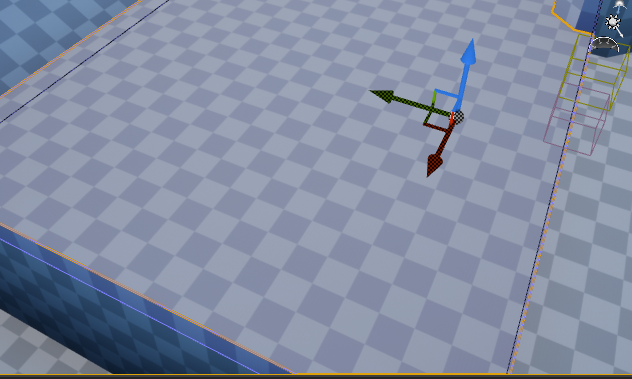
Is there a way to change this default grid material for brushes? I have another texture + world aligned material but I find myself constantly applying it to every new brush
https://i.imgur.com/FtH2uN6.png
 deep stump
Anyone know how to fix this issue? I have onlinesubsystem and advanced sessions. Is this a known issue? https://gyazo.com/53365bef1facd8dd94976707c33f2141
 fading vector
Does anyone know how I can put a text on an image in a widget?
thin tendon
Make the text a child of the image
 kind dew
Does anyone know why my move to behavior tree task isn't working on characters that get spawned in to the world?
kind dew
yep
the move to node is firing i can confirm that
it ended up being tha ti need to turn gravity on
but when i turn gravity on the character falls over... so now thats what im trying to fix..
near chasm
    TArray<AActor*> OverlappingActors;
    TriggerSphere->GetOverlappingActors(OverlappingActors, TSubclassOf<AEnemyAI>());

    for(auto &act: OverlappingActors)
    {
        UE_LOG(LogTemp, Warning, TEXT("%s"), *act->GetName());
    }
can someone tell me if I'm doing this right? it seems to be outputting actors other than those of type <AEnemyAI>
 midnight bolt
is anyone aware of video to flipbook texture for UE4 converters?
 fleet cedar
@near chasm for that someone on the forums recommends trying, YOURCLASS::StaticClass() for the class filter
Alternatively you could cast act to a AEnemyAI class and check if it's a null ptr, if not then you're good to go
@midnight bolt you could try looking for a converter that converts an .mp4 into it's individual frames
midnight bolt
yeah, i was hoping for some premade app that could help with live preview, setting columns/rows etc
getting individual frames is not a problem, but maybe there is a tool designed just for flipbooks
 green sky
Does anyone have a fix or work around on the constant crashes in UE 4.24.3?
So judging by the silence i take it that no one is experiencing crashes in 4.24.3 then
normal burrow
Logs
green sky
which log?
fleet cedar
@green sky do you happen to be using it on a laptop?
thorn lichen
I'm imagining it's because it's a cylinder instead of a nice rectangular shape, but still, not sure how to get that aligned
fleet cedar
@thorn lichen if you hold down the V and move the mesh then that enables vertex snapping which may help
thorn lichen
Oh another thing now that you menthioned it @fleet cedar , is vertex snapping buggy for anyone else too? Like sometimes the gizmo just flies off to some random geometry off the camera
fleet cedar
Sorry I can't speak much to using it, I just know it's a thing
green sky
Rhys our systems are as follow :28 core Xeon W-3175X 512Gb Ram 4 SSD - Hd's RTX 2080 ti other machine intel i7 -7700k 128GB Ram 2 Reg SATA Drives and GTX 1060 SC and third machine same as this but 32GB Ram all desktop's
thorn lichen
its all good rhys, I'm still new to UE4 so I'm never sure if it's a weakness of UE4 or just user error on my part.
fleet cedar
Alright that rules out one of my thoughts then, you can get the crash logs and take a look in there though @green sky take a look at Engine\Saved\Logs\UE4.log.
near chasm
@fleet cedar Class::StaticClass() worked great, thanks!!
fleet cedar
No problem! Good to hear 🙂
green sky
i dont have such directory but i do have a saved/logs in the project folder
fleet cedar
Take a look in there, I'm blanking on where Unreal writes its log files to when it crashes
But basically you want to find where that folder is because that's going to give you insight onto why you're crashing
green sky
there's also a crashes folder that has dump files in it
Well anyway i opened the log file, what should i be looking for inside?
fleet cedar
You can post it here or DM it to me and I can take a look
It's hard to say really what you're looking for, basically just take a look through it until something seems to break, that's what I do on my crashes
Sorry that's not a super scientific method
 brisk urchin
Any tips on reducing project folder file size?? My current project folders are about 20GB. I tried removing many unused static meshes assets and any maps I'm not using anymore.
midnight bolt
can i save selected staticmeshactors and copy them into blueprint with their current location rotation and scale? copy/paste does not work in blueprint editor
green sky
@fleet cedar Ok Rhys i sent you the log
And thank you for taking the time out to help me
thorn lichen
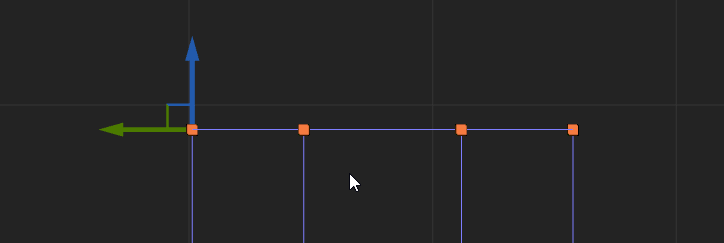
Does anyone know how you'd align this end of a cylinder brush to the grid?
"Align Brush Vertices to grid" will align it but the verts deform from the circular shape.
Is there some "Align Brush Faces to grid" that preserves the vertices' x/y positions?


 thorn cloak
Ah right, my bad
normal burrow
Or check #more-resources
thorn cloak
Thanks btw
normal burrow
Yep the pins describe
normal burrow
Don’t think this is a thing you can do. Those are actors
Arrow points where the components go
You could remake it in a single actor
midnight bolt
i can put those actors manually and copy paste location scale rotation etc so it ends up the same, was hoping for some tool or a way to do it directly
if not i'll just parse the text
normal burrow
I’m unaware of one but perhaps!