#ue4-general
1 messages · Page 668 of 1
 normal burrow
 rich reef
He has a very positive attitude when instructing, so I kinda like him for that reason
 frank escarp
btw, the polygon pack is great for prototypes
but for the love of god, dont expect to have a public game with them
they are FAR too known
 sinful osprey
Synty Store
Free low-poly 3D assets for Unity and Unreal Engine game development, by Synty Studios, the top asset publisher on the Unity Asset Store.
They have some free stuff
frank escarp
the models also are far more expensive than you would think
they are un-loddable, and fairly high poly
sinful osprey
Gives a good idea of the quality of the assets
rich reef
Also thanks gooner, I will set it up soon (Working on something else atm).
sinful osprey
yeah, that's their style... great for prototyping or learning which is what I use them for
NP, good luck
frank escarp
@light lintel not so low poly
sinful osprey
low poly look
frank escarp
they look lowpoly, but a lot of their environmental assets are quite high poly for what they are
specially all the stuff like ground tiles or walls
on normal games thats just flat with a texture
100-200 tris
synty has 1000-2000 triangles for a wall piece
but worst of all, you cant LOD them
level-of-detail
using simpler meshes when they are far
yes, they are very bad if you plan to use them as a final product
but they are pretty damn good as placeholder assets
due to their variety
rich reef
@sinful osprey Can I not create basic keyframe based animation sequences inside of UE4? Cant find any tutorials on it
sinful osprey
Do you mean in the UI Widget?
rich reef
The reason to that I want it to be done in a animation sequence is just so I can easily replace my basic animation with the animation that will be in the final game later
 keen shell
i would rather have basic graphics than 30-40k poly counts from some asset site.
rich reef
I mean, UE4 does let you create automatic LODs so
sinful osprey
Unreal Engine Forums
Build powerful visual scripts without code.
that's a pretty basic setup for what you describe... how to do it as a canned animation I don't actually know
 rich reef
If I follow what SireFuzzywig suggested there Im guessing I would have to redo the code later then tho
If I had an animation sequence for a mesh tho, can I play it directly in the blueprint class actor then? @sinful osprey
(And if so, whats the animation sequence node called ❤️ )
Or would I actually need to create a animation blueprint?
sinful osprey
as far as I know, Anim Blueprints require a rig for either vehicles or characters. Just moving a box or lever or something like that wouldn't work unless you rig it and that's outside my understanding 🙂
 spark sonnet
Why does this happen sometimes? It just creates a blank tab when making new variables and this issue only occurs some times
rich reef
Well I do know how to rig but that sounds quite unnecessary for stuff like doors opening ang closing (Which is what this is for)
I didnt know they required a rig tho :l
So like, how would you go about this?
 rotund scroll
@spark sonnet looks like a bug
rich reef
RIght now I just wanna prepare all my code using placeholder animations for my door and later on replace the animations and mesh with the actual stuff that will be in the game
sinful osprey
What is it you're trying to move? is it just a lever moving from up to down? Something simple like that?
rich reef
Well right now I just want it to move at all, but later it will (if possible) be a animation sequence based on keyframes
spark sonnet
Yes I think so too. Im using 4.21 so it is probably fixed in the newer versions @rotund scroll
rich reef
(If its easier doing it another way, sure, but the final product will consist of parts of the mesh moving (Like animated locks and stuff))
sinful osprey
ok, that may require different methods that I'm not familiar with. I'd search for some tutorials when you get to that. Simple doors are really easy though. Trying to find a great tutorial I use for my doors now
rich reef
If its easier, I could probably also do multiple meshes moving in relation to each other (I've never exported animations to UE4 before, which is why I say probably lol)
Okay
sinful osprey

Check out the website! https://cobbdev.com/
Join us on the discord! https://discord.gg/zc24tVj
Support the channel on Patreon! https://www.patreon.com/cobbdev
Get updates and vote for upcoming videos on my Twitter! https://twitter.com/cobbdev1
Wanna watch me play games? Tw...
rich reef
This isnt using animation sequences tho, isnt that a concern in my case?
sinful osprey
I honestly don't know... I've never done anything like what you're talking about. All the tutorials I've ever found for animating anything that wasn't a character or vehicle used this type of method
rich reef
Hmmm oh well
 plush yew

The long sword thing
am doing spawn at socket rotaiton
as it spawn it comes to the right side
Its killing me
any thoughts?
 rich reef
What is the question exactly?
plush yew
Am spawnning this emitter
it suppose to come forward the player
it keep coming to right side
in the sockets i did it to be forward
rotund scroll
@novel vine shift+F2 is vertex color mode in the main editor window
or maybe shift+2
I forget which
 novel vine
ok so im in the paint mode but like how can i color objects?
rotund scroll
@novel vine do you understand what vertex colors do?
novel vine
not exactly but im using a plugin that has the color set to the vertex color
rotund scroll
you change the color using the cursor?
novel vine
im using a plugin called "VoxelPlugin" and im trying to paint on to the world its using vertex color as the emissive color
im clicking the model in the viewport and in the world outliner i cant change anything
 thick herald
giggles at the weekend insanity and runs away....
rotund scroll
have you ensured that your model has vertex colors enabled?
novel vine
how do i do that?(ive never used vertex colors before)
rotund scroll
and that you have materials etc. that can use vertex colors?
I suggest googling a tutorial then
thick herald
because you told it to be
rotund scroll
@winter zenith spamming the same question over and over again is against the rules
 winter zenith
Just asking a question, I know there's a simple fix that's why i'm curious.
rotund scroll
you're spamming at this point
rotund scroll
no but we can get them in here <@&213101288538374145>
thick herald
Generally wait around 1 hours between reposting the question. (rule 7)
 weary basalt
@winter zenith Please read the #old-rules thanks.
winter zenith
Will do sir, 👍
winter zenith
@rotund scroll I have a question.
novel vine
ive fixed my issue by changing the vertex paint thing to a constant3vector
works perfectly now
thank you guys 😄
 wary crow
https://image.prntscr.com/image/EBWOCgVpQW6M9J0Wah-Qfg.png
When I press play the shadows don't update to the sun, pls help.
 novel vine
🤦♂️
wary crow
What?
novel vine
why the alt?
wary crow
Was it a dumb question?
winter zenith
It's not a alt
wary crow
What?
novel vine
i had teh same issue just play around with the world lighting settings
winter zenith
Okay sounds good 😄
novel vine
and rebuild the lighting like alot
wary crow
Ahh, okay thanks for the help man.
rotund scroll
<@&213101288538374145> something fishy going on here
winter zenith
It's not an alt account
winter zenith
It's not an alt account I just had a simple question?
rotund scroll
false accusation?
winter zenith
Look at our connected accounts we aren't alts 😂
wary crow
Yes...
novel vine
its prob not an alt prob a friend or smth
rotund scroll
what kind of false accusation?
winter zenith
It's not an ALT
normal burrow
Dm any other moderator probably
wary crow
Snacc was falsely accused of being me.
winter zenith
I was infracted for having an ALT to subvert a conversation.
wary crow
It's pretty obvious we aren't the same person.
rotund scroll
it's just very conspicuous that you post the same problem
wary crow
Regardless, hopefully the moderation can kick into speed.
novel vine
and the same exact picture...
thick herald
same picture
rotund scroll
after being one of you was told to stop spamming
novel vine
same glitch in the bottom left too
thick herald
well, same file to be exact
winter zenith
🧹
wary crow
Please stop attacking people who are just asking simple questions and not causing any harm in anyway.
Some people take great effect to public slander.
rotund scroll
I'm not attacking anyone, I just expect people to read the #old-rules and follow them
wary crow
What?
rotund scroll
I also didn't make any accusations
normal burrow
so you two work together or something?
novel vine
thats what im thinking
novel vine
i said same person cause i figured alt
then i said prob a friend
i dont care if you believe me tbh
wary crow
Ok, calm down.
weary basalt
Guys lets move on.
 lime gull
How would I take say, a pool of predetermined ( But different ) objects and spawn them in set target locations. I have a slight Idea using target points, but I don't want them to overlap with eachother
 abstract relic
Having fun with voxels Jordan?
normal burrow
hows the new flattening tool?
novel vine
i haven't actually used any of the terrain digging stuff(mostly cause idk how nor do i really need to learn rn) so im just making a random low poly terrain generator with it and that works great
normal burrow
neato
https://voxelplugin.com right?

voxel plugin™
Create infinite terrains procedurally using in-engine tools. Edit landscapes in realtime. Join an active community and benefit from frequent updates!
novel vine
yea
ok so i have a question is it possible to fake clone/mirror an object for a really far distance? i dont actually need it to be its own thing or functional or anything i just need it for looks
(im making an ocean)
novel vine
whats that?
lime gull
With the free version of Voxel Plugin can you randomly generate a planet?
 zenith flower
I want to upgrade from the 1060 6gb, opinions?
novel vine
the way i randomly generate stuff is you can do seeds so on event begin play i set the seed to a random value between 0 and 999999(or something like that) and it works for me however ive found that only few things can actually change with seeds idk if theres another way of randomly generating but it depends if the planets can change with seeds
zenith flower
k
novel vine
ok so back to the ocean thing what is a water pizza?
rotund scroll
ah sorry, tag me next time @novel vine
anyway a water pizza is a circular water plane that is segmented in concentric circles in addition to also being segmented in pizza slices
novel vine
do you think this would work for a low poly water model?
abstract relic
This make one unreasonably hungry
abstract relic
Tell me. What is low poly.
novel vine
wdym?
 fierce tulip
water pizza sounds like the only pizza suitable for pineapple
novel vine
its a model with a low poly count
normal burrow
everything is triangles
novel vine
its kinda like a very simple style of game or art or animation
normal burrow
life, sand, feeelings
rotund scroll
consider that you'll only need a single water pizza for a level
and that the shape is optimized for LODs
 azure shore
is it just me or is it SO goddamn hard to make a scrolling background?
normal burrow
so its a lifestyle?
azure shore
can anyone help with it? sorry this is a bad time
abstract relic
Now I genuinely what to know what low poly animation is. Just pose to pose keyframes? 😜
normal burrow
is it like virtua cop?
spark sonnet
A background that is scrolling by itself @azure shore ?
 misty creek
@azure shore try taking a look at parallax scrolling https://www.parallelcube.com/2017/11/03/parallax-scrolling-using-materials/
Learn how to create games using Unreal Engine 4, useful tutorials for beginners, intermediate and experts
spark sonnet
Oh as in a sidescrollers game background?
novel vine
so right now i have a big plane and i want to switch it out for like low poly animated water and id need a grid with like 100 faces on the top to get the low poly water look(i can link to a video im following) and my only issue is the water the video makes is very nice but also very small so id need alot or to upsize the plane id make or just to clone it several times
azure shore
p@t what
normal burrow
the right answer ain't always easy
abstract relic
Anyway. Be sure to avoid mistaking low poly with the art style. It makes the statement absurd otherwise. Like asking if you have a hamster to run the game.
azure shore
yes I know that Im just saying it looks overkill for what Im trying to achieve
novel vine
xD
normal burrow
not that there is any one answer to a problem, just to be at the point where your evaluating worth of effort by glances might negatively affect your experience
azure shore
I think that tutorial shows automatic scrolling for multiple layers in one material, I only need one layer that moves by slowly when you move
novel vine
well you could make that easily if you just moved the background when the key to move the player is pressed
(terrible idea though)
azure shore
nah I tried that it messes up with the camera movement
rotund scroll
@novel vine water animation can be handled by world position offset on a material
novel vine
yeah thats what im gonna use
rotund scroll
so you can just use the water pizza and subdivide it more
it's going to be fiiiiiiine
spark sonnet
The tutorial p@t sent is very straight forward and doesnt look too difficult to make
azure shore
but it doesnt look like what I want
novel vine
im ngl im still confused what a water pizza is but now im thirsty
lemme go get water
brb
azure shore
I dont get why theres all this alpha and weird colour stuff going on I just want one simple image moving slower than the map geometry
abstract relic
Same concept, just with less steps
azure shore
but then even camera movement like camera lag and zoom will mess it up
abstract relic
You’ve already followed the guide?
novel vine
back
azure shore
tbh I wouldnt even know how to do half of that using my own background image and Id mess it up
and thats automatic
doesnt look like it sticks to the screen or anything
abstract relic
Well. Can’t help if you won’t try. 🤷♀️
normal burrow
you may be misunderstanding a limitiation as well
azure shore
wont try bloody hell Ive been trying hours
normal burrow
you've tried the guide?
abstract relic
You literally just told everyone to sod off 😜
azure shore
wtf
normal burrow
I honestly dunno the lag your speaking of but, if you went through it you'd at least have more knowledge at fingertips on how to approach it your own way.
normal burrow
you can turn this off
azure shore
NO I WANT IT
azure shore
either way any camera movement will mess it up
normal burrow
well if question was on scrolling background, answered. try the guide out maybe and come back with actual issues we might be able to address
abstract relic
By the way Jordan. If you’re interested in proceduralism. Look into Houdini. It’s a rabbit hole but you’ll enjoy it if that’s your thing
azure shore
right at least tell me if thats going to even help with manual movement rather than automatic scrolling because thats all well and good but I dont want to waste time on the wrong thing
normal burrow
your wasting our time tbh by not running it yourself
azure shore
Ive looked through it, I dont see anything related to player movement/camera movement
normal burrow
and Houdini is absolutely crazy Jordan
novel vine
is it better then voxel plugin?
novel vine
i may try it out
normal burrow
but you can make really cool baked content with it procedurally
novel vine
ah
abstract relic
We’re using it in conjunction with voxels
normal burrow
Yeeah thats true
azure shore
ffs I should just go shouldnt I because its half past midnight and Im stressed as if that wasnt obvious and Ive already had it crash twice on me because I pressed ctrl w to duplicated and Im only gonna end up making more people hate me 🤦♂️ goodnight
normal burrow
We're not typical developers though, and it wouldn't help you much with completely random world generation at runtime. but its still very good. You'll learn a lot about procedural generation with it
Yeah legend get some rest
azure shore
will do, my mind is weak
plush yew

i did press the Consume input so i can use Z in other actors
for some reason its not working
am trying to use Z in other BP
 midnight bloom
try this
plush yew
i should do something in the other BP?
@midnight bloom
where i can find htis?
this*
midnight bloom
in the actor's details
plush yew
Worked
 grim ore
try not to bind directly to keys, try to use the project input actions or axis events. If possible route all your input thru one thing or else later you will be "Why the hell is that doing XXX"
grim ore
later you forget that your item is taking input and then when you try and add more somewhere else you get confused on why it's consumed. You end up changing your mind and want it to be a different key or you want multiple keys to do it and now you have to change all of those blueprints manually
someone else looks at your project and gets confused on why random stuff is doing stuff at random
its more of properly engineering it than just making it work, if this is just a throw away then that's fine but trying to make it engineered well will help in the future
hell in a year you decide to release it on consoles or mobile devices and... no keyboards
abstract relic
Tldr: design the game against yourself
grim ore
so unreal related question. Would you rather have a 6 core CPU, 1060 GPU or a 4 core CPU, 1070 GPU for your normal work machine ?
rotund scroll
the former
normal burrow
easily
grim ore
so the 6 core 1060?
plush yew
I think you are right yup
grim ore
okdoke, curious to elaborate or just in general the CPU tends to be the bottleneck in most cases?
 rotund scroll
@grim ore amount of cores supersede any speed increase by a single core, since most tasks can be done in parallel by a greater amount of cores
grim ore
nope you use the normal input settings in your project settings. set input actions or axis events to keys. use the events
 faint cedar
Stupid question but, does anyone know how I can turn on cinematic quality scalability in a map? I have some textures that have cinematic mip levels configured and I am unsure on how to toggle those.
grim ore
you can use one item, normally the controller, to take the input and pass it along as needed if multiple things need it
@rotund scroll yep just was curious if the GPU difference superceded the extra cores for UE4 use
 brisk osprey
I promise UE4 is currently crahsing on me to bully me
zenith flower
Always shoot higher than you can chew, make the next fortnite $$$
novel vine
would my best bet be just to make a big model for my water rather then trying to clone one a bunch?
 barren lake
Hmm
Im no expert but i think a big model would be good
But if it's a pool then cloning night be better
novel vine
its an ocean
i was saying clone it like fake clone it may times on start
idk if that possible though
rotund scroll
@novel vine yep, a single actor is best... again the water pizza is a solid approach
do you have experience in a 3d package?
rotund scroll
blender, 3ds max, maya
novel vine
yes i use blender
 scarlet birch
You take a circular plane and cut it up into big triangles
 normal burrow
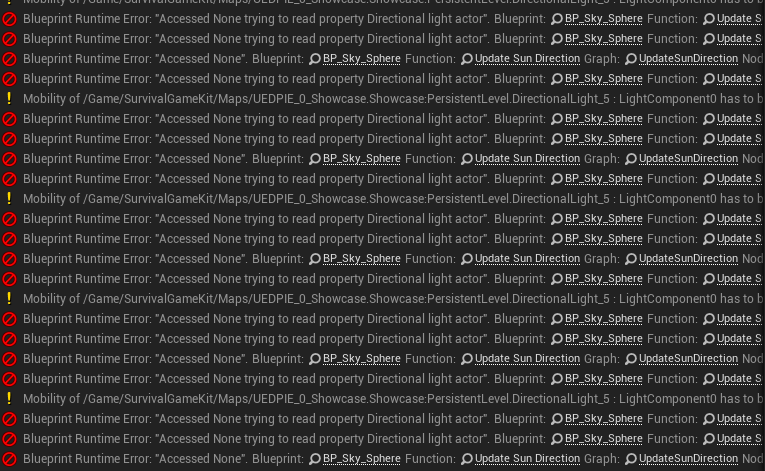
try clicking on one of the underlined things
its telling you that your trying to access something off of another thing that doesn't exist
winter zenith
kk
barren lake
Is unreal engine mainly for graphics
Because it really seems that way from how I've been told
 hidden knoll
Can someone tell me where I can find out how to make a 3D side scroller parkour game?
novel vine
ok so i want to fake clone objects so it makes a grid of them around 1 being in the center of the whole thing
how would i do that?(i also want the objects positions to update when the original object moves)
@hidden knoll youtube
hidden knoll
I’ve been searching all over YouTube and forums but I can’t find exactly what I need
novel vine
so your probably not gonna find exactly what you need but what id recommend you try is the third person template and take the camera off the body and move it to one side and somehow remove the forward and backward movements and after playing around with it you should be able to make what your looking for
or you could make it from scratch and in ue4 it wouldn't be the hardest thing
oh and by "take the camera off the body" i mean in the blueprint itself dont just delete it and dont just place one in the scene
your best bet is to keep all the player related stuff inside the third person character bp
unless your trying to like make the camera move to the level and have your player character just have to keep up with the camera
hidden knoll
Ok
Oh yeah I have another question but this one is simple, how can I make it so my character rotates all the way in the the direction that was pressed, instead of having it rotate a little when I want to turn around
Because it’s a side scroller I want the character to only face left or right
Not toward the camera
 crystal ruin
hello /... !! ... i moved a materials to another folder so it left me the redirector files ... when i do fix up .. it doesnt delete it ..
rotund scroll
@crystal ruin you're not connected to source control
 winged crypt
LogConsoleManager: Warning: Setting the console variable 'sg.PostProcessQuality' with 'SetByScalability' was ignored as it is lower priority than the previous 'SetByProjectSetting'. Value remains '0' Anyone familiar with this Warning (during packaging)?
grim ore
@hidden knoll if you start with the side scroller template it can do that for you.
novel vine
@hidden knoll sorry i crashed my pc 😅 but i believe the third person character template does that? im not sure and i could be wrong but if you hold down the button it should work
hidden knoll
I’m trying to get it to rotate all the way with just one press
 thorn lichen
Does anyone know what happened to this "geo tools" feature Epic was working on? Geometry creation is one of the only things that really bugs me. Especially for blocking out modular stuff.
https://www.youtube.com/watch?v=aMkl9pfMmn4

Obviously they're work in progress and buggy and the whole UI is a big ol' placeholder. Promising stuff. Definitely a lot of this video is like "this part sucks" and at Epic they're like "ugh I know it's early shut up".
(I have a bunch of other vids about level design tools, c...
grim ore
@thorn lichen they are in .24 as a plugin. Look for the mesh modeling toolset
novel vine
im not entirely sure how to do that @hidden knoll but maybe look at the blueprint and see if you could get it to face the wanted direction on each movement
is there a way i could like not clone but duplicate an object and have it move with the original and basically just extend the original? i cant figure this out other then spawning in a blueprint multiple times
and that would be laggy so im lost
(it doesn't need to be mirrored for this object i want to clone)
hidden knoll
@novel vine ok I’ll try that
normal burrow
hows the unreal unity thing going mathew?
sinful osprey
Is there a file somewhere that stores the Color Palette information used in a project? I mean the color picker saved colors stuff? I want to be able to move that from project to project and especially between machines
 waxen vine
Is there a way to move assets faster? I've been trying to move the paragon assets into their own folder but each one takes 10-20 minutes
normal burrow
hm it would be nice to plan the moving around before it executes huh
It has to rewrite the paths as it moves the assets around so it does take some time unfortunately. I think its worsened in 4.24
waxen vine
That is what I suspected 😦 I wonder how much speedup you can get if it doesn't check for other references, since we know all the assets are contained in the one folder
Like just adding /Marketplace/ to the paths
normal burrow
i wonder the same, the guid system most people hate is the only thing i really miss from unity3d
file paths are legitimately bothersome
waxen vine
It is painfully slow, like I'm considering just leaving all the 40+ folders in the Content folder, which would be a huge mess
normal burrow
tbh, this is likely what most do
 thin tendon
Does the lighting here look ok? Or is it too soft?
 swift spindle
there is no depth at all... everything is flat
better to put it in #work-in-progress or #graphics
 snow wraith
Anyone working on integrating AI and procedural generation into their workflow?
Procedural modeling aint that bad to me personally, but i wanna get into procedural music scoring and creation + mixing and mastering, then procedural level creation, etc.
crystal ruin
hello again ... i made adjustments on the animation .. when i made blueprint for the animation it didnt notice the changes i made in the animation ..
the first pic is the one after i made the blueprint
do i need to do something after i finish adjusting the animation before i save it ?
winged crypt
anyone know why stationary skylights are ignored in packaged builds when levels are loaded? in PIE they work, in packaged builds they're disabled or something on level load.
 forest tree
Some fog & lightshafts might do a lot for that scene @thin tendon
Though, on second inspection, there is a little in the distance already I think?
Simulating light scattered in the atmosphere.
This is neat though
spark sonnet
What do you mean by X @plush yew ? Do you want a forward vector?
 quiet timber
Pls guys! If u can add some comment > https://gamedev.net/forums/topic/705994-cant-make-decision-between-ue4-and-unity-for-a-new-project/5422350/
@light lintel also know c++
I like MegaGrant 😄
ehh
 wispy comet
Can't be assed to make an account to comment @quiet timber , but i'll give you my opinion here:
Performance wise, as long as you optimize your assets properly, you should have no issues getting even large maps to run on low end devices and still look nice
For example: What remains of Edith Finch was made in UE and runs quite nicely on the switch
 cursive cipher
I got a short question.. ^^'
wispy comet
Go ahead
cursive cipher
how much will map size impact the performance?
wispy comet
that depends on your assets really
cursive cipher
lets go with photorealism
wispy comet
you should be fine running an enormous map with nothing on it
photorealism is kinda braod
if you're using megascans with no tweaking
cursive cipher
I am working on a vr mmo rn (like for a year+ already)
and.. well the map should be huge
wispy comet
for VR, i don't really know
cursive cipher
my pc is dying inside the editor, just working on the map
wispy comet
since you're running 2 displays at high resolutions with preferably over 90fps
never worked with VR, but i'd assume you'd want more optimized assets than even those
cursive cipher
I mean, can you optimize the distance assets stop appearing
wispy comet
well that'll depend on how bad you want your game to look
cursive cipher
if that would be set up the right way, you should be able to make infinitely large maps right?
wispy comet
i doubt infinitely large maps will work, just due to memory restrictions
cursive cipher
ah.. ye well true x)
cursive cipher

so I should probably rethink, putting everything in one huge map and going with somewhat good looking graphics x)
wispy comet
for VR? That seems really tricky
quiet timber
@wispy comet tnx for ur input
wispy comet
in that case you can build a custom system to load/unload islands
and fog will do you a lot of good
wispy comet
no problem :D
cursive cipher
well, I wont start with level design in the next couple months anyway, so I still got time to think it over c:
wispy comet
still wanted to say more @quiet timber , unreal provides much higher quality assets for free (the entire megascans library is a great example), and for an indie like myself, that's an invaluable resource as you're able to reach AA or AAA levels of graphics quality. For me, unreal is my engine of choice because of it's ability to do much more than unity. While i don't have a lot of personal experience with unity (i've used godot more) i prefer UE's interface and way of handling certain things. The opportunities with megascans, free marketplace content and megagrants are also better in my opinion than unity.
As a side note, unity also has an image problem
cursive cipher
^
I gotta assist that opinion 😄
and regarding the image problem
realize, how ppl pay to get rid of the unity start screen?
but unreal devs put the unreal start screen in, even tho they can throw it out at choice x)?
wispy comet
That's also a good thing to note, with unity you pay for features in the editor, with unreal you get everything from the start
cursive cipher
well, u gotta pay once u make a lot of money
wispy comet
you pay royalties, yeah, but they don't magically unlock features in engine :p
cursive cipher
ye thats true x)
wispy comet
Another benefit, since Unreal is being constantly used for fortnite, you're getting very tangible updates to performance on all sorts of devices
wispy comet
in fact, fortnite is a fantastic example of how well UE can run across all sorts of devices
cursive cipher
runs of the bat on pretty much all platforms
(u gotta optimize it ofc, but u can easily package your game as a android apk, for linux, etc)
quiet timber
@wispy comet thanks again for the Input
 crisp fable
guys i wish to make an announcement
in light of the GDC situation
i'd like to invite you all to some paddock where i will erect a circus tent
and we can talk about game dev
there will be snacks
wispy comet
where will this be?
 bold belfry
General performance question. I'm currently adding some visual fx by using splines tracks with meshes. Should i be using the particle system instead? I'm thinking of performance issues. my target platform is pc.
 smoky sonnet
my mobile app crashes on startup it loads the menu widget i can see it for 1 sec then it crashes
with this error log
anyone know why?
 upbeat trench
because youre not reading the whole log
smoky sonnet
i read it but cant imagine why its not working
upbeat trench
yes well I cant imagine either, I need evidence
smoky sonnet
you mean that? @upbeat trench
upbeat trench
I dont think so, that one doesnt have a crash stack in it
smoky sonnet
it also crashes when i activate es3.1 preview in my ue4 editor
it give me the same error log
upbeat trench
the chain of events up to the crash are important, thats how you trace it back to whats causing the issue
smoky sonnet
ok i think i know why its crashing every time
yeah definitely
i have a cube and a scenecapture2d camera
to provide a 3d view in my widget of my skin
thats why it crashes
why is this so tf
smoky sonnet
i cant figure out why i cant find anything on forums ...
ok i fixed it
i used final color (hdr) in Linear sRGB and now i changed it to the first one
now it works
but my texutre doesnt look like it should
i hate it
😄
with final color it looks like it should but then it crashes
 gilded heron
Can't seem to drag and drop textures from windows explorer (file manager) into the content browser. I know that I used to be able to do it. Is there something I need to do to rectify this? It would make things much faster for what I'm currently working on
abstract relic
You most likely have another window open
gilded heron
no other windows open. just editor and file explorer. no other windows open in editor either
abstract relic
Hover the file over content browser for a few seconds. It might just need a hot second to read the file format
cursive cipher
I was pretty sure, thats not the case, I could be wrong tho @light lintel
 cosmic veldt
hey guys i need help i'm trying to make a give the minimap a perspective effect like gta v using retainer box. this is the effect that i made it works for horizontal and vertical lines.
fierce tulip
@gilded heron did you set ue4 into some admin privilege thing?
cosmic veldt
but diagonal lines gets messed up
this is the effect that i'm trying to get what am i doing wrong?
 paper arch
Can anyone explain what the "Input Key" attribute actually is in "Make SplinePoint"? https://docs.unrealengine.com/en-US/BlueprintAPI/Utilities/Struct/MakeSplinePoint/index.html
Make SplinePoint
Ah answered myself with a better search, now it makes sense https://gamedev.stackexchange.com/questions/178910/what-are-spline-input-keys

Game Development Stack Exchange
There isn't a really adequate explanation of these anywhere on the internet, so I thought I'd ask this question here.
What are spline input keys in Unreal?
How are they represented in Unreal?
Als...
gilded heron
@fierce tulip you know what!? that was it! for some reason the epic games launcher was set as admin. anyway I'm in business now. Thanks!!
fierce tulip
glad that worked. I had same issue with photoshop once.
 tame delta
Since we're using left hand rules, for those used to right hand rule, are you deciding (or is standard) to point X to the left or Y to backward?
Weird way to phrase it I guess, but do I put front of car towards +Y or -Y?
 quiet island
Which chat do we use for asking help with errors/bugs?
 eternal swan
@tame delta left hand rule = x forward, y = right, z = up, right hand rule is the same but y points left
tame delta
Oh jeez
Ok, thanks, so methods like "GetForwardVector" will return the X unit vector then
eternal swan
@tame delta yup, +x is forward vector
quiet island
So in this chat we may ask help?
tame delta
@quiet island Yeah sure, if your error is specific to blueprint, C++, physics...etc just go to the channel that seems the most approriate
Otherwise I just post here 🤷♂️
quiet island
oke oke
eternal swan
anyone know if this is a bug? ue4 sometimes does not calculate the nav mesh even though the volume is there. only when i move it with the gizmos ue recalculates the mesh. and is there any "trick" to fix this? sometimes this also happens when i packaged a project ...
 midnight gate
how do i make the ui widget scale down when the resolution is smaller
and also how can i test it for higher resolution than my screen
grim ore
resolution or DPI? DPI scaling is handled in the project settings. resolution is generally handled based on ratios such as all 16:9 will look the same. It doesnt "scale" down to a lower resolution your source art, you create it at the desired resolution and use it or swap it out if needed (you can detect running resolution using game settings). I have a feling you mean something else when you say Scale down tho.
midnight gate
i do not know but i asume its dpi
grim ore
DPI would be going from something like say a iphone 11 max to a 5 year old android device, same size screen different resolution
midnight gate
well basicly in this tiny screenshot i did everything is scaled up the whole image should be more zoomed out
i need difrent size screens
grim ore
in the larger screen do you see it all?
midnight gate
yes in my max screen its perfect
grim ore
then you need to use anchoring
midnight gate
but if the window is scaled down its weird
grim ore
so what exactly do you mean then. You have a source image, say 1920x1080 that fills the entire screen at 1920x1080. IF you are now at 1280x720 what should you see?
midnight gate
yes
but if i scale the window to like 300-200
the image doesnt scale down with the window
grim ore
what does it do? I know if I set it to fill the area and anchor it to the middle it scales when I resize it here.
also is 300x200 an acceptable resolution for your game? if it's not then it should not be a concern
 lost reef
Still havent been able to resolve my d3d device lost internal error crash in 4.24
midnight gate
no i mean im just opening the game in windowed mode and see what happends when i scale the window in all the ways
grim ore
yep is that something you are going to let people do?
midnight gate
and on smaller res it doesnt work that well
grim ore
if the game is designed around X you should not be taking time to fix it for Y
grim ore
ok so test it at that minimum then
midnight gate
how
grim ore
when you launch the project in standalone or in PIE there are options for the size of the window (check the project settings or click the advanded settings next to the launch button in the drop down)
also in the UMG editor there is a diagonal arrow in the bottom right that lets you resize your UMG window for testing/design purposes
 blazing lark
guys i got interesting error someone can help me?
i start the editor and everythings looks fine but after when i try do something, editor goes black and when i minimize the editor and maximize again, its goes normal but again go black. and crashed after few minimize
grim ore
install the debugging stuff in the launcher, drop down next next to launch then options, to get more info on what is crashing
otherwise that crash isnt very useful
blazing lark
(sorry for my english if they cant understand)
grim ore
that does look like an nvidia driver, try different driver versions and try not running in dx12 if you are.
grim ore
it might. An older one might help as well. We don't know what you have but that looks like a DX12 driver issues.
blazing lark
but i play games so much like CoD MW CS GO and i dont want to install studio drivers
ok thx for your help
grim ore
install an older regular driver if you have a new one, install a new one if you have an old one. Disable DX12 and go back to DX11 if you are using it.
blazing lark
i try the driver but thats probably not coused of driver
smoky sonnet
@grim ore my error that i posted yesterday was because of my capture source of my scenecapture2d for 3d viewer in my widgetr
it was on final color hdr
i changed it now to final color ldr and it is now working right
fierce tulip
yes
 marsh swallow
Has anyone been having consistent d3d device error crashes in UE4 since the 24.2 updates?
grim ore
quite a few people have yes
 lament saddle
Physics, blueprint, vertex shader... there are so many ways ranging from cheap and non-interactive to expensive and very interactive.
normal burrow
I’ve done coconuts
Coconuts float on water as to disperse the tree between islands
smoky sonnet
is there a tutorial to reduce the size of my ue4 app/program
because isnt 100mb a bunch of data because my app is really simple
normal burrow
You just call add force every frame @ebon linden
You consider the displaced water volume against the surface of barrel under water
Not really, water forces in general aren’t a thing. The coconuts below use Archimedes principle

Blades over the Horizon is an upcoming action-adventure game set in the vast and ever mysterious blue sea.
Interested in learning more about this game's development? Come join our community!
Custom forces is something physx does real well though
 boreal plinth
Do destructible meshes only react to environmental lighting and not static/stationary point or spot lights?
Having weird lighting offset on the DM, been trying to tweak it to no avail
 next current
what is the name of this “Set HUD Reference” thing?
 wheat dirge
its a variable set to reference your HUD
 humble stirrup
Sup Guys
humble stirrup
Any tech artist that could help?
wheat dirge
why would you leave it out? if you need to reference your HUD at anytime, you would need to set it again
humble stirrup
I am trying to LERP two material functions, while keeping with the traditional master material setting, instead of having to change the settings to "use material atributes"
while acctually using material atributes custom made, inside the master material
next current
that did it, thanks :D
keen shell
checked your world setting?
 green blaze
Can anyone tell me please which one is displacement and roughness?
I know one texture can have few things on diffrent color chanel but Im not sure yet how to check this
 lapis vine
That one weird naming convention. Why not ask your provider?
green blaze
I have downloaded these assets from market
lapis vine
The color has nothing to do. It might be just the blue channel is prevalent.
normal burrow
i'd guess that the right is vector displacement
lapis vine
No, no,... I mean until we see what is this, can't say.
keen shell
but then again the names are unclear
normal burrow
well if one is displacement and one is roughness
keen shell
so i could just be guessing at the end of the day
normal burrow
the roughness is only gonna be a grayscale for sure
vector displacement is a thing
if its tangent space dsplacement or something
lapis vine
@green blaze Just pull the ear of that author and ask him. Also ask him to use something more sensible as names.
normal burrow
but i think everyone is assuming that rgm is some form of roughness on red, something on green, and metal on blue
lapis vine
Roughness Grudge Metal?
normal burrow
grudge, perfect.
lapis vine
Hit!
normal burrow
mud grudge
lapis vine
You never know... Might bite your shoes.
normal burrow
its good we know the resolution at least
green blaze
8k
normal burrow
ye, grungy mud is rough and metal
lapis vine
@green blaze Also check if there is no documentation on this somewhere burried. But if not, yea ask him. You gonna contribute to the overall Quality of the Marketplace this way.
normal burrow
but yeah if one is displacement and one is roughness i'd go with right being displacement, but if you dunno what they are, then would expect the right one to be packed roughness, grunge and metal rgb, left displacement
keen shell
is it possible to actually use 8k textures on a game project?
normal burrow
yeah
keen shell
wouldnt it cause memory issues?
@light lintel then it has to be within the thirdpersoncharacter
normal burrow
no not really
i mean you'd need the memory for it
i don't think theres anything stopping someone from using a 16k texture?
keen shell
the default one but with your gamemode?
animal crossing would never use 16k texture.
unless cinematic stuff to render suree
but by default for games. its around the 4k mark as far as i know
normal burrow
generally you try to fit a consistent texture resolution or just ignore it
like if the texture is for a mountain vs a baseball cap, it might make sense to use a 16k texture
normal burrow
most games have a texture quality setting in them
green blaze
Shouldn't I use these 8k textures?
normal burrow
that allows the max resolution to be used
lechu its something to consider later on in development, unless your packing it up
abstract relic
Rip texture pool
green blaze
Almost every free pack on shop include only 8k
normal burrow
sometimes buyers expect 8k
even though it doesn't work best for them, or its unnecessary
you can set the max size of the texture used by the engine in the settings of the texture itself iirc
 frigid needle
Okay, I need some assistance understanding a concept. Most tutorials, etc, will build the logic for a pawn right into the Blueprint's EventGraph, either for specific keys or for axes and actions.
And I know a Player Controller is involved with possessing a pawn
But what about Pawns that are possessed by an AIController? How do I construct the pawn to make sure it can be used by either players or AI?
(as in actions and axes)
thick herald
axes use the same thing as hammers and bows.
frigid needle
Axes as in Multiple of Axis
 craggy flax
I think you’ve got it right? Controller specific stuff in the player / AI controllers and universal stuff in pawns
frigid needle
Okay. Sounds like what I need to research is how an AI Controller interacts with a pawn. That'll probably solve most of my confusion
 worn granite
Directly through Add Movement Input or Add Controller Input
Though if your AI controller understands the actual pawn it'll be using, it can also call functions on it
Typically you want to spawn a pawn (primary player pawns are handled by the game mode) and then possess it (immediately or some time later)
AI pawns have some other handy things like the auto possess setting.
frigid needle
Okay, great. That's a good enough starting point that I can start researching. Thanks, all
 crimson lake
Anyone got some free sword combat animation pack bois?
 naive comet
hey guys can u help me. Pls foin voice chat
 next badger
Jeezleweez ?
 elder moat
Anybody got something that can convert dae to fbx..
abstract relic
Blender
 brazen hull
Tryna add a asset from epicstore how can I select ue4 project location its gonna be in.
keen shell
i fell asleep
marsh swallow
@grim ore Okay so the D3D issue is well known then. Are there any fixes or causes for it yet?
keen shell
use vulkan qwq
 loud valve
@brazen hull depends if it is a full project or asset pack. An Assetpack can be added by pressing "add to project" and then choose the right project. When its a full project you just open it and migrate the main folder (in the content folder) to your game.
loud valve
@signal jetty What is your question? You can scale there, and if you click the lock all sides will scale together.
Or can press R in the editor to switch to the Scaler
 plain egret
Hello everyone, i'm hoping someone here can help me. I have been using unreal for a little over a year now, and encountered this problem today. I get similar error messages on all my projects of all version between 4.22-4.24. Anyone know how to fix this?
 signal jetty
@loud valve u there bud
loud valve
Yes
loud valve
Im outside getting Fries but i can help
Click on it, press R and use your mouse to scale it.
 vocal copper
hey all 🙂 I didn't quite get it from googling, but is there an actual way to fix import rotation of a mesh if I have no source .fbx file ? A gun is Y oriented which makes it go silly. Or is it just me and there is no big problem with wrong import rotation?
vocal copper
if it may help describing my issue:
https://monosnap.com/file/Xk1E9TJWRx9q06aYsfGt7DyrLOrm4i

Monosnap screenshot tool
loud valve
thats new to me, but we the spacebar or W, E R you can switch between the different options to change an object location, rotation and scale.
and no problem 😉
@vocal copper No its no problem, you can reset the pivot though. But I would just turn it right at the character. No problem after that
signal jetty
vocal copper
@loud valve thanks for reply 🙂 But actual problems start, when I start do FindLookAtRotation from the muzzle socket of a gun to a point in the World. And when I apply newfound rotation it starts facing sideway there (pointing rightward).
brazen hull
@loud valve its a asset but if I move the folder it breaks
like the landscape materials break
and it wont work unless I got it in the specific folder I want it in
fierce tulip
move in content browser, fix redirectors. done.
brazen hull
mhm ill retry
plush yew
Downloading desgins from place like SketchFab etc..
You can use them in your project?
As they are free to download
brazen hull
depends if the guy has set any terms of use
plush yew
Or it dosent work like that?
signal jetty
Anyone uses blender or Bridge
 fierce tulip
that only happens if you didnt migrate properly, or moved folders in explorer
brazen hull
I used migrate so and tried to move manually in folder browser
azure shore
if you add too many verts to a geometry shape, does it stop let you editing it? Ive got a kinda detailed geometry shape and its just completely stopping me moving verts
fierce tulip
though, its easy peasy to reapply the textures and mat function
all i know is that bsp is not something that should be complex
brazen hull
I tried to repplay them also but still broken
it just dosent like me unless its in the specific download folder
fierce tulip
i sincerely doubt its a ue4 bug
 unique kraken
anyone can tell me what im supposed to plug into a texture 2d?
isnt any texture 2d?!
 polar hawk
some textures are quantum
unique kraken
daheck
polar hawk
some are 1d
unique kraken
i do get it contains different sorts of information.
but what is supposed to go into a t2d?
polar hawk
its all data man
unique kraken
just one example, what should i plug into that
fierce tulip
you dont have to put anything into it
unique kraken
but i want
fierce tulip
a texture coordinate node
unique kraken
polar hawk
actually I think that is easier now
unique kraken
okey srsly
something that actually makes sense
i do have a fricking bw texture
and i just want it in there
fierce tulip
rightclick on the texture (in mat editor) convert to object
polar hawk
hold down your t key on your keyboard
and click on the empty void
that is our collective souls
fierce tulip
lol
polar hawk
lmao
fierce tulip
dude
scarlet birch
Yeah, that's the way to go. Build that good will.
 unique kraken
just proofs what i told you last time. but im thankfull that i got actually a awnser to a simple question
fierce tulip
last time?
 polar hawk
im allergic to simple questions
scarlet birch
I'm allergic to "WTF is this bug that won't let this square peg fit the round hole. %^$@#** UE."
polar hawk
im trying to take medicine for it
but i still stand by the fact that you could plug a soundwave into it
 silk sleet
anyone know any sweet write ups about procedural world generation in ue4?
i got terrain handled by a separate plugin but im worried about loading and unloading actors as they leave view
silk sleet
unless culling volumes are sick enough that I can have 2 players miles apart on a map at a time
will do lmao
scarlet birch
His not understanding that was the cause of some of his aggression I think.
polar hawk
his aggression is warranted
scarlet birch
I mean it almost always says "such and such is not a such and such, plug in such and such"
thick herald
bunkum and balderdash
azure shore
wth is happening to my geometry shape here? I just place a normal cube, move some verts a bit then half the faces screw up
polar hawk
well that is fucked
rotund scroll
it's ded
fierce tulip
its mainly my fault, didnt expect someone not to read basic getting started with material editor documentation
rotund scroll
brush is kill
azure shore
Ive tried deleting then using "create" to add them back too but they do the same thing
rotund scroll
or you deleted a face
thick herald
Just like this seasons Dr Who, it's fucked.
polar hawk
you know what
fierce tulip
wording
azure shore
theres another geometry shape close to it with a lot of verts, I get a feeling its something to do with that though idk why
rotund scroll
I'll go out on a limb and say no season of Dr.Who has been great
fierce tulip
i'd replace the geo and see if it happens again
scarlet birch
Does the mesh editor show normals and let you change them?
thick herald
Oooft. You stay out on that limb
rotund scroll
@azure shore any time you got holes in your brushes it may affect nearby brushes
so seal up those holes
thick herald
Time holes
rotund scroll
and perhaps consider using a 3d package for complex geometry
polar hawk
all plot holes are just episodes that haven't been written yet
rotund scroll
my god man
azure shore
and I can still click the "face" but its rendering wrong and has no collision
polar hawk
but yeah
rotund scroll
probably flipped
polar hawk
try not using bsp
 silver crown
managed to get the Moscone center yet Allar?
rotund scroll
like my lid will be listening to this go on
azure shore
geometry is the most convenient thing for map making in my project
fierce tulip
@polar hawk I wonder if you can still get semisolids in ue4 bsp
unique kraken
@azure shore what you did is move the vertecis over to the other side wich flipped the normal
polar hawk
it seems like san francisco is refusing to let me borrow a massive building
azure shore
but I didnt
scarlet birch
BSP should be turned into meshes or something else as soon as possible.
azure shore
I just moved some verts slightly and that happened, look in my image the normals arent flipped the faces are just wrong
silver crown
They could at least give it to you for a symbolic dollar or smthg
fierce tulip
symbolic dallar
silver crown
yeah
silver crown
yeah what's a city block nowadays anyways
polar hawk
they have plenty
thick herald
why only 2?
polar hawk
because I thought 4 would be too much
rotund scroll
just tell them that
thick herald
well, you won't make that mistake again
silver crown
yeah Allar's been reasonable and all, and they ignore him
rotund scroll
they'll look at your query with mercy
polar hawk
look, I only promise to cause tens of millions of cash loss
fierce tulip
The dallar riots of 2020
rotund scroll
remote connect me to an ipad and strap me to a tin can robot and I'm in
silver crown
lmao
polar hawk
they could afford to let me borrow 2 city blocks
thick herald
a real billion or like a US one?
fierce tulip
1/100th of that and I'd be happy
abstract relic
Also in San Fran dollars
 radiant fable
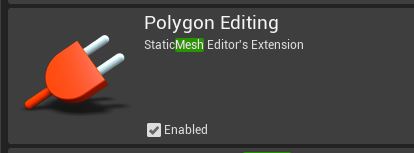
anyone know what plugin enables the mesh editing tools on a static mesh asset? they were introduced with datasmith, and available through a tab
silver crown
dallars*
 hidden heart
at least 2
silver crown
Small flat
polar hawk
2 bedroom at most
silver crown
Maybe a bathroom if you're lucky
polar hawk
ayy
thick herald
a door mat
 trim snow
Hello
scarlet birch
And you have to sleep standing up
trim snow
I need help with something
silver crown
ppl sleep in the bay?
thick herald
we all need help with something. Meds usually
rotund scroll
I heard they just microdose sleeping pills
polar hawk
look if gdc could gross almost a billion dollars I'm sure I can figure out how to gross a million in their place
instead of zero
thick herald
hotdogs and pizzas
plush yew
 polar hawk
it could literally just be a hotdog and pizza food truck event
trim snow
When I creat a new level I get a black screen
abstract relic
Sell Allar trading cards
plush yew
Is there anyway ican change the material instance inside another BP?
polar hawk
new levels with nothing are nothing but black
radiant fable
nvm, found it, was this one https://i.imgur.com/InwyooI.jpg
kinda getting confusing with all the plugs being similar 'mesh' names
 rotund scroll
lmao
silver crown
Sell Unreal Engine licenses
polar hawk
ayyyy
rotund scroll
sell do it yourself business cards
trim snow
Uhh nothing but just black
rotund scroll
also what's up with plan b
abstract relic
Gdc face paint
trim snow
And when I click play it's black
polar hawk
I could just straight up re-sell it to a company willing to throw a conference with all that space
rotund scroll
turn it into burning man moscone center
silver crown
I say default color should be white
scarlet birch
Rent it to the CDC for quarantine space
polar hawk
^
thick herald
^
abstract relic
Add a skysphere JCP
polar hawk
quarantined people need hotdogs and pizza
silver crown
looooots of pizza
thick herald
quarantined people need hotdogs and pizza
polar hawk
one giant awful pizza party
rotund scroll
give them drugs, but recreational ones
trim snow
Ok
abstract relic
I’m in favour of using it for a zombie sim event 😜
silver crown
Is it still a sim at this point
abstract relic
Nerf guns all around
polar hawk
which everyone will get so hyper stoned, it'll be a zombie sim
hidden heart
sounds great
rotund scroll
stoned people gravitate towards food
increase profit margins by selling low tier hotdogs
and pizza without cheese
abstract relic
Don’t you dare Luos
fierce tulip
but also pizza's with so much meat stoned people cannot refuse it
also, while I do suggest to take it to #lounge its a calm sunday evening hehe
rotund scroll
nooo you said the L word
thick herald
doesnotcompute
fierce tulip
looool
rotund scroll
lmfaoooo
plush yew
I'm pretty sure it's a mercy that you can't use lounge
scarlet birch
In 4.24 can I stop content browsers from closing the collections panel whenever I click on a folder? In prior versions the folder and collections panels were stacked, can I do this in 4.24?
scarlet birch
I don't think that'll work. In practice I don't ever use the folders panel since it's in a drop down if you click the folder up top. But I use collections extensively.
rotund scroll
I guess there's only one way to find out
 bitter iris
with my chat, its showing my pc name with a random id, how can i do it so it links up with steam names? complete noob
 glossy scaffold
My character movement seems to jitter at the end of each movement during replication , how can i fix this?
plush yew
How i can change Material Instance color inside Blupeprint?
i wanna use it inside player BP
scarlet birch
create dynamic material instance, then set the material to it. There's a page in the docs that goes over it all in detail.
signal jetty
U guys are so smart
I really need to get an SSD my HDD is really slow
Right
But if u can find it
 calm igloo
I want to build lighting in my level, but I keep getting BSoD
I tried a lot.. still same..
I'm even monitoring the task manager & lower the CPU usage by UE4 & lightmass & swarmp
so it doesn't hit 100% & everything freeze..
& still the same BSoD..
how people build lighting on big maps?
scarlet birch
He just might have not known to search for Dynamic material instance, which is why I replied.
signal jetty
Yep ponkkis
 iron stone
Hey does anyone have a good way to view fbx files in windows 10 file explorer?
Like a preview in the icon?
unique kraken
issue nu 1
rotund scroll
has anyone experienced that restore open assets on reload doesn't work?
unique kraken
u dont make proper screenshots
signal jetty
Wym
scarlet birch
@rotund scroll I don't get the pop-up for it since switching to 4.24
is there an option now?
scarlet birch
ah
 tropic pilot
erh... bought a pack of cannons assets but they are all facing Y not X
any way to fix this?


