#ue4-general
1 messages · Page 657 of 1
 green sky
Hey if your using World Composition i hear that there are alot of awful bugs in ue 4.24.2
game breaking bugs so beware
Hey slimWaffle are you there?
 wispy oyster
I haven't done it myself but one approach I've seen mentioned for really large maps is to divide it up into a grid and only stream in the adjacent grid tiles
But it sounds like world composition is an alternative approach to that?
green sky
Exactly, it's called World Composition
wispy oyster
Mb I should have googled it first
 plush yew
can someone show me one good tutorial for putting all kinds of animations to one freaking animbp
i have same exactly skeletons and what not nothing works
retargeting doesont show any mesh
I mean WHY
WHy there is 0 piece of information how to merge animations from UE market place.
 carmine garnet
anyone else make their particle alphas by taking screenshots of particle systemsin blender
plush yew
Thanks
 smoky sonnet
how can i write text to a file in ue4?
 ancient lotus
why not just use fstream?
ancient lotus
so you want a bp option?
smoky sonnet
yea if there is one
or copy paste c++ is good
i already copied some code but it wont work
ancient lotus
google and see if theres a way. if theres not then make a simple c++ function to call from blueprint
 rigid sleet
anyone understand UE4 Source Code on github?
ancient lotus
have to look, im guessing ffilehelper is UE4's thing?
smoky sonnet
idk lol
ancient lotus
print out GameDir() + FileNameB and make sure the path is correct and not messed up
ancient lotus
UE_LOG(LogTemp, Warning, TEXT("Path: %s"), *FPaths::GameDir() + FileNameB);
smoky sonnet
in the header?
ancient lotus
in the function your using to save the file
ancient lotus
-_- please copy and paste your .cpp file that you posted above lol
smoky sonnet
// Fill out your copyright notice in the Description page of Project Settings.
#include "MyBlueprintFunctionLibrary.h"
#include "Misc/FileHelper.h"
#include "Misc/Paths.h"
bool UMyBlueprintFunctionLibrary::LoadTxt(FString FileNameA, FString& SaveTextA)
{
return FFileHelper::LoadFileToString(SaveTextA, *(FPaths::GameDir() + FileNameA));
}
bool UMyBlueprintFunctionLibrary::SaveTxt(FString SaveTextB, FString FileNameB)
{
return FFileHelper::SaveStringToFile(SaveTextB, *(FPaths::GameDir() + FileNameB));
}
 polar hawk
Those copyright notices will get you every time
also remove the log line in your header
:p
ancient lotus
bool UMyBlueprintFunctionLibrary::SaveTxt(FString SaveTextB, FString FileNameB)
{
    UE_LOG(LogTemp, Warning, TEXT("Path: %s"), *FPaths::GameDir() + FileNameB);
    return FFileHelper::SaveStringToFile(SaveTextB, *(FPaths::GameDir() + FileNameB));
}
in your editor log you should see "Path: pathHere" and just copy/paste pathHere in discord
smoky sonnet
how can i see that
ancient lotus
output log in editor
smoky sonnet
where lol
ancient lotus
smoky sonnet
PIE: Play in editor start time for /Game/Maps/UEDPIE_0_MainMap 0,961
LogBlueprintUserMessages: Late PlayInEditor Detection: Level '/Game/Maps/MainMap.MainMap:PersistentLevel' has LevelScriptBlueprint '/Game/Maps/MainMap.MainMap:PersistentLevel.MainMap' with GeneratedClass '/Game/Maps/MainMap.MainMap_C' with ClassGeneratedBy '/Game/Maps/MainMap.MainMap:PersistentLevel.MainMap'
ancient lotus
facepalming so hard
when you call SaveTxt from blueprint the log will be written to the output log
ancient lotus
why not
ancient lotus
did you create a class object
smoky sonnet
i used this
ancient lotus
create a new MyBlueprintFunctionLibrary
smoky sonnet
which script?
ancient lotus
wherever you need it
smoky sonnet
but is it correct what i do
to create a new blueprint function library
what do you mean with script
ancient lotus
where you were searching for it
create a new variable of the type MyBlueprintLibrary
polar hawk
I salute you
ancient lotus
can i just screenshare with you
smoky sonnet
teamviewer?
ancient lotus
that works to
 steep meadow
anyone know how i could make wallrunning
 sacred inlet
Anyone here work with Nvidia Flex?
 normal burrow
0lento has
sacred inlet
I know 0lento has, but he hasn't updated his flex repo in like a year afaik
normal burrow
only person i know too.
sacred inlet
so any downsides to it? I want to build a small game that uses it, but not sure if it will crash computers lol
sacred inlet
I thought AMD could use it also as long as that had something
normal burrow
hmm maybe, i thought cuda didn't run on amd?
sacred inlet
PhysX / Flex has had support for DirectX 11 / 12, for a short while now, so I thought I'd upload a video to showcase how it runs on non Nvidia hardware. I don't own an Nvidia gpu to compare with, but it seems to do pretty well on a Fury. Intel's integrated gpu works via direct...
idk if this is legit
normal burrow
Tripwire Interactive Forums
It used to be something only NVIDIA cards could do but since last year AMD cards can also use this feature, i'm copy-pasting a post found on the steam forums about this:
(https://steamcommunity.com/app/232090/discussions/3/3020122487777359169/)...
would seem its possible to run flex on amd now
normal burrow
the biggest disadvantage is you don't really get much of an idea of whats going on visually
as far as the cpu is concerned
no, haven't used it
 manic burrow
what up, so im new to material editing in ue4 and as a whole, i have a model with a texture applied to it, it is a upper half of the body and he is wearing a vest, how should i go about making it look like one, instead of the whole body being glossy? any tuts or tips?
what it looks like now
 odd hornet
Is there a way to make Unreal use a C++ IDE that isn't one of the ones listed?
I'm using an open source one and visual studio gets on my nerves, clion isn't free
 pallid talon
Is this a bug? Using "Set Collision Enabled" inside a Construction Script, works when "No Collision" is set. But does not work when "Query Only(No Physics Collision) is set. Just stays with "No Collusion". 4.24.2.
Bug?
 gilded plinth
Hey all, this is really goofy that I've forgotten the deal on this but i have a player start in my level with default game mode and obvs when i play i possess the camera. I want all that functionality but i want to change the cameraactor settings. So do i just need to create a new actor w a camera and make all the key bindings etc etc?
hoping for any kind of short cut
 loud knoll
anyone get an emitter to produce mesh objects that have collision on them?
 shut cypress
https://docs.unrealengine.com/en-US/Engine/Sequencer/HowTo/RenderMovies/index.html
This page shows that UE4 has some video recording capability, however it's in the context of sequenced scenes.
Is it possible to use that functionality, especially including the fixed framerate playback, for outputting videos of replays? Assume we've already got replay recording and playback sorted using the engine's standard replay system...
Shows you can render out your cinematic sequences to a saved movie file on your computer.
 blissful trail
is there a way to fix my player slowing down and speeding up randomly ?
heres the bp
 cursive dirge
@sacred inlet re: Flex on AMD, this has been supported for a long time already
the versions I have on UE4 gameworks branches use DirectCompute by default and should run on all GPU's
same goes to Nvidia Flow
and to some extent to HairWorks
I say to some extent as there's been feedback in past HairWorks games it doesn't run well on AMD gear and I have no means to test it myself (all nvidia gpu's on my computers)
basically, blast, flex and flow are safe to use on Windows as they are not tied to cuda
I think hbao+ should run on AMD but I don't have hard evidence for that either
bigger issue with most gameworks techs is that they are practically tied to windows
so if you plan to port to consoles, or need mac or linux port, you are out of luck
there are some techs that may have linux version on the gameworks but can't remember which ones did out of my head
 livid haven
'allo again, folks
Woops... fixing that nick.
... maybe
Okay, nope, it insists I'm still [Epic]
Well, I am a free agent again, so there's that.
blissful trail
is there a way to stableize the fps a bit better ???
 worn granite
wince that was a close one there :P
livid haven
Maybe if my comments get broken up, the nickname changed will work. :X
Ahah! There we go. 😛
 weary basalt
Not with Epic anymore @livid haven ?
livid haven
Nein, gave my two weeks, finished my last day on Friday.
weary basalt
Needed a change of scenery?
livid haven
Still working from home, so technically no?
But it wasn't a good fit for me anymore.
weary basalt
Fair enough.
livid haven
Excited to get back into pet projects and maybe streaming again.
weary basalt
Still working with UE4?
livid haven
Yessir.
weary basalt
Good to hear.
 thin tendon
Its kind of awesome you are making time to work on your own stuff. I imagine it would be very different then working with a large company.
livid haven
Got a contract gig for now, but I'm actually able to do this now, legally.
 thorny perch
what is the best way to get a surface finnish like this in ue4?
normalmap with noise?
carmine garnet
can i use niagara yet?
 abstract relic
That looks really grainy to be honest
normal burrow
Enable it instant pudding
abstract relic
Like a blender render
 lapis vine
You think its render in blender, but its blending render of blender. Render.
carmine garnet
@normal burrow how?
normal burrow
Does look like a low sample cycles render
Plugins window
Project settings I think
abstract relic
Unreal Engine 4's Niagara visual effects system used for creating and previewing particle effects in real time.
Literally guides for you in there
thorny perch
@abstract relic was that regarding my image? 🙂
that's a real photo and a real finish if it was to me 😛
normal burrow
Still more grainy than noise
thorny perch
although I want that look on the material
not sure how to achieve it in ue4 though
other than using a fine noise normal
normal burrow
RTX
thorny perch
raytracing?
 thorny perch
moving? 🙂
abstract relic
I see someone was having fun in substance designer
normal burrow
Recall that type of noise from 3dsmax unfortunately
Substance would have been better
plush yew
Just got this error when trying to load a level, How do i fix it?
 regal mulch
Custom Engine Build?
plush yew
No, I am on 4.24
regal mulch
So just the Launcher Version?
plush yew
Yes
regal mulch
Then try to verify the engine files via the launcher.
plush yew
How?
regal mulch
Go to the Engine in your Launcher, click the dropdown and hit verify
 rancid lynx
I onow you can "clear all" tags in an actor with nodes, can you "add a tag" to an actor, with nodes?
Perhaps not.
plush yew
@regal mulch It has finished verifying should I reload the project now?
gilded plinth
can anyone explain why the default third person mannequin's green arrow locates him along the x axis?
i'm a bit baffled
Ok i see, because he's rotated as such but why wouldn't epic make the mannequin face forward on the x?
 surreal viper
any idea what can be the reason of the draw thread waiting for RHICMDLIST? 🤔
or how can I figure it out?
draw count + polygon count looks ok, GPU has way better frame time than draw thread
this happens only in specific areas but I just can't figure out why 😐
 lament saddle
Here's a stab in the dark: are you spawning tons of particles? There should be a console command to turn off all particle effects for testing.
thin tendon
This is so weird I have empty folders Unreal won't let me delete
rancid lynx
Common problem, maybe its from moving files to new folders too often. Its risky to manually delete folders in windows folders, but if you copy a backup of your game directory, you can usually manually delete unwanted empty folders from the windows explorer. Just be sure to copy a backup in case it fails.
Ive done that a few times.
Many people said backup, its risky
Righr click the folder in the editor and try "fix all redirect references" that helps sometimes also
lament saddle
Also try closing and restarting the editor
plush yew
Been creating this world, I applied the Texture, and it is very large, each individual tile is twice the size as the player, how do I make them smaller?
 serene birch
depends on what is it that you applied to material to
plush yew
What do you mean
thin tendon
both fixing redirectors and restarting doesn't help
plush yew
material applied to geometry, you can click on it and set it to be scaled, planar, wall, etc @plush yew for example. and on a basic cube it'll stretch
@plush yew I applied it to a landscape before it was created
lament saddle
@thin tendon try opening the folder with the computer's general file manager. Maybe there's a non-UE file in there.
I think UE is hesitant to delete folders with stuff in them, even if it won't show you that stuff.
 sleek widget
i am working on 2D game, I lost the focus when I run the game in editor, after i stop I see a black screen have to navigate to my tilemap again, i am using perspective view, in right view it's fine.
 cloud ginkgo
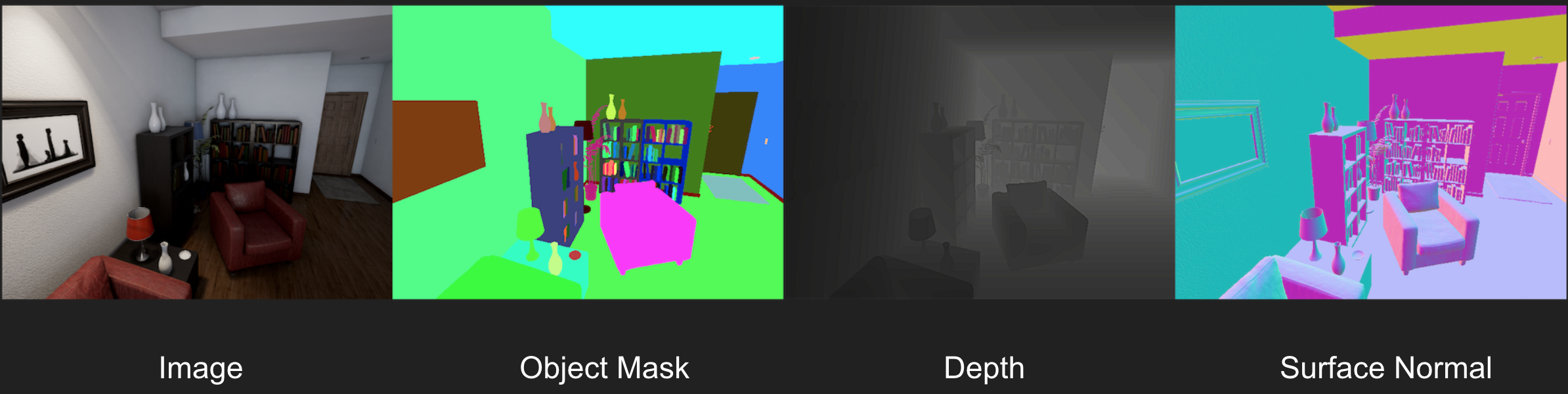
Q: Anyone have any experience with rendering the Object Mask; http://unrealcv.org/images/homepage_teaser.png

 honest vale
@plush yew you change the UV scale
if you're using landscape layer coords the node should have a tiling setting in it
 willow vapor
Hey all you sexy people (yes you); is it possible to export a Curve asset to json/csv (as they can be imported)? If so - how?
plush yew
Hello I need help importing something. I am in a Blueprint class trying to change something and I need to import a .fbx but I do not know how to and there is no import button in the blueprint class
NVM
cloud ginkgo
A very Manual Setup:
 grave osprey
Is there a way fpr unreal engine use render farm ?
Like concierge where you allow blender to render complex scene.
 tawdry storm
if you throw enough C++ at it, it'll be able to do that eventually
but as far as I'm aware it's not a feature by default
 radiant haven
 glad karma
Hey, I tried terrain.party, but unfortunately can't get place what I want exactly. Is too far. Have you got some different idea where can I get heightmaps?
 dim merlin
@radiant haven u should update visual studio
 polar viper
With the MiB is there a way to increase the budget? I knkw with cinematic it gets "rid" of it but i want to increase it just incase
 fathom abyss
I have a strange problem with ue... when I try to lower effect settings to medium or low (in editor, so bad blueprint isn't the issue) ue4 freezes and when I check task manager there's no response and CPU usage is 0%. When I changed settings before it'd start compiling, but I changed the project a lot since then. What can possibly cause it?
 zealous spear
@fathom abyss so you are changing settings in the editor and it gets frozen?
fathom abyss
yes
zealous spear
Same problem, I know how to fix this
So
When you restart and play again, it is still freezed like not playable at all?
Or it works until you change the settings
fathom abyss
the editor freezes too
zealous spear
Ok so you don't have the settings saved
You don't have a saving system
If you have one you go into the GameUserSettings.ini file and set them to low as they were before or basically delete it I think and it will make a new one
So
It gets stuck in the engine, you gotta run it on your desktop
Click on the arrow next to Play
It is not gonna get stuck when you run utt on the pc, the engine can't do this
Is like playing your own game multiplayer trought the engine...
Is just the engine
@fathom abyss works now?
fathom abyss
which option when I click arrow?
zealous spear
Show me a screenshot
fathom abyss
zealous spear
I never remember the names:)
Editor Pie
Select Editor pie
Or standalone game
Or you can Launch it
fathom abyss
oh boy, that's a big blueprint
fathom abyss
it's in no response mode now, so I'd rather not turn it off if it's compiling
and if there's CPU usage, then there's hope it'll unfreeze
zealous spear
If you think the bp is right, you can try changing the settings when is packed project
manic burrow
How do I use a exponent map (glossiness) in ue4?
fathom abyss
all settings work same as in editor
because even when not playing it freezes when changing them
zealous spear
Yes I had that problem
But I ran it in standalone or pie
Or packaging the project and then playing with it packed and it worked
fathom abyss
RIP my CPU usage (it's not a good CPU lol)
zealous spear
Ok, I have to go. Let me know if you fixed it
smoky sonnet
how can i see if a song is copyrighted
and not allowed to use for commercial purposes
(for my app)
 copper flicker
you can presume everything is copyrighted unless otherwise stated
and you can contact the creators or copyright holders
if you look for royalty free music, search for that specifically
smoky sonnet
Infected Mushroom & Bliss - Bliss on Mushrooms (feat. Miyavi)
but i love this song
this would fit so good in my app
anyone know if this song is free for use maybe not :/
Infected Mushroom & Bliss - Bliss on Mushrooms (feat. Miyavi) <
copper flicker
it sounds all over the place..
it's cool tho
just unlikely to be a good fit for an app...
but I don't know your app
😄
copper flicker
apps and games are better off with background music, something to enhance the experience, not attract attention
smoky sonnet
yeah in my game genre
you need to keep track of the music
its like geometry dash
and im spawning obstacles with the sound
of the music track
copper flicker
also, the song is long, and it goes lots of places
smoky sonnet
yea true
copper flicker
if you make a music based game, I suggest yo find a composer
someone to make specific music
if you can't afford it.. look for royalty free
but composers often work for peanuts
sad
anyway, my dilemma today.. and not just today. Is there a way to move a simple object, or maybe one with physics enabled, to a point on the navmesh? without it being a character?
I don't want to use character movement
even projectile movement is kinda slow and expensive in Unreal..
I'm experimenting with various ways to move a simple object from point to point...
in a guided and intelligent fashion...
fathom abyss
Maybe some kind of teleporting, except with timeline, so it's smooth?
plush yew
Any1 know where i can get a cool dash particle?
copper flicker
I was wondering if there is an Unreal node for this, like a simple Move To, but one that doesn't require Character Movement
jonimake, the 'lots and lots more' is a problem
I need lightweight, simple movement
I'm considering using physics, or projectile movement
I also tried lerp based movement
it's pretty fast...
but a lot more work needs to be done there to turn it into a 'character'
plush yew
can someone help me rq
thin tendon
I think I remember seeing something at one point where you could set location and instead of teleporting it would sweep movement
 uncut vigil
@plush yew chest has a decal with the logo
uncut vigil
@plush yew what have you tried?
 wary wing
The logo has its own material slot on the mesh. Swap the 2nd material for something else
plush yew

how i can change the particle color from here?
@uncut vigil
i tried pressing tab and going into uv editor
i highlighted the chest part trying to find it in uv editor
i couldnt find it
@uncut vigil
sc
 fast magnet
i have answerhub withdrawal 😦
honest vale
I bet they'll disable answerhub like they disabled the wiki 😄
uncut vigil
@plush yew i know you tried that, what have you tried to get rid of the decal mesh?
 willow yacht
Hi! May be someone know, can I use environment variable in my build.cs somehow?
 half panther
Does someone know a good introduction into voxel terrain (not plugin-specific)?
dim merlin
Hi, i changed all my foliage types using 'bulk edit via property matrix', but now they are not switching LOD's anymore... 😒
honest vale
@half panther all voxel terrain tools in UE 4 are plugin based 🤔
smoky sonnet
spawning objects depending on music beat is it better to use level sequence thats built in in ue4 or use fmod?
 tender flume
How do you optimise draw calls?
 solid matrix
@tender flume Less stuff. You have too much stuff.
so several weeks ago, I thought I had an issue that required deleting my derived data cache. Well it turns out that wasn't the cause so I restored my data cache from the recycle bin but now, i'm still dealing with obscene compile times. Just saving locks up my PC for a long time while it builds shaders and editing a landscape material that i've been using for a while required tens of thousands of shaders to be compiled.
I'm wondering if my cache is in a different place than I thought. Where is the DDC set to by default? Has anyone had this issue before?
plush yew

am trying to say if Max walk speed = 0 then start the FireParticle
How i can Do that? start it
i want to connect it to the branch
solid matrix
the fire particle should have a node that activates it
solid matrix
Drag out from the fire particle, then search "activate"
 solid matrix
how often do you want it to happen?
solid matrix
yeah you just need some way to run those nodes.
solid matrix
oh no my DDC question was a general question. Sorry lol
 solid matrix
yes because there's no node connected to Stop Active Movement
tender flume
You need a node connected there.
It has a target, but does it have a node to tell the target what to do?
tender flume
Oh, just use that at the moment
Even I struggle with coming up at efficient methods
But make a reminder to go back to that unefficient method when you have the plan.
I create several reminders whenever i am unable to get a much more efficient solution
The goal is to get it playable for me to test, not to keep coming up with efficient solutions haha
 young cliff
Hello. Does anyone have any idea when the answers.unrealengine.com will be coming back online?
plush yew
how do i get out of this mode
glad karma
Somebody know how export from blender gis to unreal engine highmap?
 delicate needle
Is there any reason, button I am missing, or a setting that would cause none of my lightmaps to load when playing the game? They show up in the editor but all seem to turn off when simulating.
sacred inlet
It is true that flex will not work with mac or linux systems?
tender flume
Which flex is this?
 hard quarry
Hi guys,
is it possible to move the pivot of an object?
So move the pivot of a static mesh
abstract relic
Ideally do that in a 3D software tool. A less convenient way is change the transform value in the reimport menu
plush yew
Help me in #blueprint
 gilded lichen
Hello, how do I see if shift and left mouse button are pressed at the same time in a widget?
abstract relic
Stop spamming New
Bear, there’s a grid snapping icon on the top right of the scene viewport. You can change units or turn it of entirely
 clever bone
@abstract relic but can you change the sensitivity without snapping?
abstract relic
Good question. Not something I ever tried. Best I can point you to is editor preference. There may be a hotkey, I’ll quickly look into it
normal burrow
I don't think so bear, but you could grab a mouse with a sniping button
Learn about the various control schemes for the editor's viewports.
would expect it to be there if possible (could be wrong, but yeah its not there.)
clever bone
@abstract relic @normal burrow you can only change the camera sensitivity unfortunately. Thanks anyway guys
normal burrow
https://www.amazon.com/ROG-Gladius-II-Origin-Acceleration/dp/B078YBG1VZ this is what i use bear. it has a button behind middle mouse that drops dpi. use it pretty frequently
your mouse may have such ability as well, just may need to assign it
clever bone
damn my mouse doesnt do that. will definitely take that into account when I need to buy another one
abstract relic
@clever bone
 glass rapids
Hi, I have a little question. When I use the crouch and uncrouch nodes the camera moves roughly, is there a way for me to use that system but not have the camera move so I can implement my own system?
abstract relic
I’m not at my work station at the moment but I’m curious if holding shift while moving object does anything. And mouse wheel while we’re at it.
normal burrow
i tried and nothing
well, shift makes your camera folllow the thing your moving or rotating
abstract relic
Grid snapping off?
normal burrow
yep
abstract relic
Good to know
normal burrow
normal burrow
i got a lot of threads 🤷
my windows key i bought doesn't work so i can't hide it and haven't taken time to contact ms about it lol
tender flume
Meh, you can always go another way around it
I used the other way because it does not want to activate at all on my other one.
🏴☠️ 👁️
Arrrr!
 austere scroll
MY static mesh doesnt have the option to simulate physics
it says it needs "simple collision" , or at least thats what i figured out
can i ADD a simple collision
or do i need to put it from the model ITSELF
pallid talon
Niagara question. I have a particle system that last for 60 seconds. Is it possible for me to create a keypress that will shorten the timeline during playback? For example, if I need the emitter to jump to the last 10 seconds of the effect. Is that possible?
tender flume
Oh lol. It was that simple to reduce tri counts on grass
 frigid needle
@austere scroll you can add collision by going to the Static Mesh asset directly from the content browser.
There should be a collision drop down at the top
frigid needle
Bah, my knowledge may be out of date. Stand by
Ah. It’s not the drop down, it’s the MENU.
Also, here’s the docs. https://docs.unrealengine.com/en-US/Engine/Physics/Collision/HowTo/AddSimpleCollision/index.html
Content guide to creating and setting up collision geometry.
Learn them, love them, bookmark them.
 minor flint
Hey, can someone help me with parsing together a .uexp and .uasset file? (Unreal engine files) I just have never done it before and have no idea what im doing or where to start
austere scroll
oof
abstract relic
You don’t exist I tell ya! All of you! 😜
minor flint
i mean, im not mad at you unreal server, i just expected more, like pc master race server.
abstract relic
1 message per second?
minor flint
something like that
lol
well sense i have your attention before i ask elsewhere
how the fuck do i parse unreal files?
i don't usually use unreal for anything, so i assume its something simple, but im being asked to do it and don't know how
frigid needle
What’s the context? Why are you trying to parse the files?
minor flint
(basically just because i was told to)
because i need the 'original file' rather then the split file
@frigid needle so.. do you know how to? or...
frigid needle
That is entirely above both my skill set and knowledge set. I was hoping some context would let me start Googling, but that’s all I’ve got. Sorry
 grim ore
@minor flint I think the issue is you are asking something that is outside the normal usage of the engine. an asset file is normally not something a normal user would want to reverse engineer. There are a few programs out there that can do it for you if you want on the googles
minor flint
okay, well, where would i go to find someone to help me.
 hidden aurora
I cant add two more than two virtual bones to a bone in the skeleton editor any help'
 dapper verge
Anyone familiar with VR? I completely broke the VR controls blueprint system from my project. How do I get it back to the state it was initially when I first launched the VR default project but keeping my custom map and objects in the scene?
hidden aurora
https://gyazo.com/c45cf3416c970204a79c668740908a26 I want to add another Virtual Bone to the hand_r but when i click it it wont show up

Done
 brittle gulch
Hi guys, is there a way to make the scale factor higher?
Reflection captures are so slow to scale! look at that, I'm dragging the mouse like crazy all over my table, and it's scaling a tiny bit :
grim ore
select the reflection capure, go to the transform details panel, change the scale by hand
brittle gulch
Yeah, that's what I do, but I was wondering if there would be a factor for the scale tool to make that easier. Apparently not
 stoic folio
anyone have any ideas why im constantly getting this error?
its pretty much instant after i try to install
and my path is straight in the documents so theres no way its actually too long
i started installing in program files and its working so far
 paper kernel
yes that is the longest path you can get
stoic folio
weird af
what do you even mean long
its a fucking computer
it calculates individual photon rays
stoic folio
im aware
abstract relic
Do you have non-latin characters in the directory
stoic folio
dont think so but good idea ill check
no and my projects are in there as well and have no problems
abstract relic
previous version were installed?
abstract relic
Just to confirm, could you reinstall a version that you previously had?
stoic folio
nah i fixed it now i was just curious what couldve caused that to avoid it if it comes up again
abstract relic
I'm curious as well
stoic folio
ill try it later then when this one finished installing
 craggy flax
Icerb what are you doing in unreal? Rendering for zbrush stuff?
 wet berry
is there anyway to get a dropdown list of values for an instance-editable string/text?
stoic folio
@craggy flax lol
wet berry
Enum, forgot about those
stoic folio
actually might get a job that might need dusting off my ue4 skills
wet berry
Got it >_>
craggy flax
Noice
worn granite
@wet berry If you don't mind cpp you can accomplish that with a custom details
wet berry
I'll make a note of that...for now I'm prototyping in BP and Enums/Maps should suffice for what I need. Thanks, though
 keen moss
im getting an unknowncookfailure, anyone available to help?
 hearty walrus
I've downloaded the cars essential pack from the unreal marketplace, how do I change the player character to the car?
 hexed dock
Is there anything obviously stupid I'm doing if I get wavy lines like this in UE (and in the program when it's running)
fyi, this was my "simple test app" where I was just going to fiddle with something. Just started with the VR template (because it's for VR, though this problem seems to be independent of that) and deleted most stuff.
 clever sequoia
Hey Guys,
I have textured my sword in Blender Eevee and now I want to get it into ue4. I have got this far (picture1), but know I want to archive the bloom effect. I am trying and trying but with my knowledge I cant get the result I am trying to get.
Hope anybody could help me.
grim ore
bloom is a post process in the camera if you want bloom. Emissive is making it look like it's glowing in the material itself, pump the emissive channel to a high value to get the "glowing" look
clever sequoia
ok I will try. First of all thank you! @grim ore
grim ore
of course, it looks neato would love to see it working in engine
 sterile sinew
Hey there,
Can anyone help please...
I have this:
And I know what the issue is, however, I can't change this:
The item that 'None' refers to
I have tried to update the reference in the top bar, which seemed logical but when I update, close and return it still states 'None'
 rotund scroll
@sterile sinew have you tried fixing redirectors?
@brittle gulch generally you should never use scale
 shell compass
Anyone know how to properly uninstall/reinstall an engine plugin? I suspect my VaRest plugin for 4.24 is broken, because my project just flat out refuses to see that it's installed, but all the folders and files are in the engine plugins folder, and the .uplugin looks correct and all.
sterile sinew
@sterile sinew have you tried fixing redirectors?
@rotund scroll Yes, I have
shell compass
I just removed the folder from the engine plugins folder, but I can't reinstall it from the Epic Games Launcher, it just says "You cannot install this plugin as it is already installe to all compatible Engines."
hexed dock
@sterile sinew just tried it, no effect. Tangential question: do you know if fixing up redirectors on a folder automatically does it recursively?
oh, misread that as for me. still wondering about the tangential
 steep ferry
hexed dock
steep ferry
hexed dock
btw, @plush yew , let me just say thanks SO MUCH for your little bite-size WTF videos. I'm learning UE4 and they're a godsend
argh, I mean @grim ore
something about the @ autocomplete always throws me off on where my focus is X)
sterile sinew
@sterile sinew just tried it, no effect. Tangential question: do you know if fixing up redirectors on a folder automatically does it recursively?
@hexed dock Usually I use fix up redirectors on a regular basis, though I can't answer your question, sorry
 vale girder
Hey y'all... I hope this is the right place to ask this question...
sterile sinew
The text above the 'None' reference is read only, whereas the text at top can be modified, but it doesn't save the updated reference
vale girder
My current PC is a little more than a plastic she'll with two aged hamsters for processing power. Does anyone have any off-the-shelf suggestions for a PC that can handle UE4 Game Dev? Any suggestions will be met with the glee an excitement of a 14 yr old girl meeting Justin Bieber in person! ✊🏾😁
grim ore
off-the-shelf is based on where you are and your choices
vale girder
I'm in the states. Is that what you mean?
grim ore
well I mean you walk down to the piggly wiggly and pick up an HP, or you use amazon and get one delivered, or you can go to a micro center, etc.
like where I am off the shelf would be Best Buy or online
maybe you mean pre built if online is an option or do you literally mean in store local only?
vale girder
There where isn't as important as the what. Processing power and graphics card capabilities.
grim ore
that will depend on your goal
basic game, real time ray tracing, the next halo
etc.
like you could get away with a new 10th gen i5 with built in iris if you wanted
but in general the min specs for UE4 for general use would be a quad core CPU of a recent generation (amd or intel is fine), I would say a 1060 or higher GPU for general use, 16GB of ram is smarter than 8 at this point, an SSD 256 or 512 depending on how much crap you want to hold and the rest is gravy
vale girder
If it's not too invasive, what kind of rig do you use Mathew?
plush yew
Wonder why we cant have low rez ray tracing for low end hardware
grim ore
desktop is a 2700x, 32gb ram, 2700 super, and uh 1tb ssd
the biggest issue with that is ray tracing is hard, very math intensive
vale girder
Is your workflow pretty speedy? Any processor lag?
grim ore
workflow is nice and happy for the majority of stuff. Higher end projects with alot to compile takes time but thats going to happen unless you break out the big bucks
vale girder
True
grim ore
again what you want is based on what you want to do. Not doing much C++ or engine compiling, a quad core is fine. Not doing any ray tracing or higher end film work, a 1060 is fine. not doing a ton of asset work, 16gb is fine. etc.
vale girder
I'm looking to do a platformer. But using art that's as complex (or simple) as Spelunky.
grim ore
if you wanted to just get a machine that worked and didnt mind waiting on it a simple project can run on the newer integrated GPU's in the 10th gen intel CPU's or even the higher end ryzen desktop CPU's. Even a cheap 1050ti would be overkill
This work machine here is an older i7-4790, 1050ti, 16gb ram, 512 SSD and it works fine for 90% of the light work I do in the engine and it was not expensive
I mean it takes like 90 minutes to compile the engine but hey i get what I paid for lol
vale girder
Lol... Fair point!
grim ore
2nd hand I paid ~100 for the machine, ~60 for the memory, ~50 for the GPU, and uh like 65 for the hard drive
but I know what I am doing so its definitely not off the shelf heh
grim ore
yep just look to hit something around those recommended specs and you should be fine. The more you pay the better you get generally but no reason to go overkill unless you want to overspend
vale girder
Yeah, I defo do NOT want to overspend. Just want to get a working prototype, post mortem and start building another.
sterile sinew
@sterile sinew just tried it, no effect. Tangential question: do you know if fixing up redirectors on a folder automatically does it recursively?
@hexed dock You got me at 'Tangential' too
grim ore
@sterile sinew the Reference viewer just does that, its a viewer you can't edit. Have you tried to go into your referencing items and saving/editing them to remove the reference internally. if the file is gone then fixing redirectors is probably not going to fix the issue itself.
vale girder
@grim ore Thanks for the info, Man! It helps A LOT! 👍🏾
sterile sinew
@sterile sinew the Reference viewer just does that, its a viewer you can't edit. Have you tried to go into your referencing items and saving/editing them to remove the reference internally. if the file is gone then fixing redirectors is probably not going to fix the issue itself.
@grim ore They're animations, [/Game/0_MyStuff/3D/Import/ETs/TheNewCrew/Animations/Alien01/Alien01_Ani_table_lean_01_loop - Dependencies], should be called [/Game/0_MyStuff/3D/Import/ETs/TheNewCrew/Animations/Alien01/Alien01_Ani_HaveASit_table_lean_01_loop - Dependencies].
The latter file is present, the other isn't.
grim ore
what is the Alien01_Ani_HaveASit_table_lean_01_CC file?
abstract relic
Best file name yet
grim ore
your _CC, DR, ETC file are what you need to open up and change what they are looking for
sterile sinew
An animation file reference where the character is sitting facing forward center
grim ore
so when you open up that file what do you see?
sterile sinew
I have 9 in total, DL, DC, DR, CL, CC, CR, UL, UC, and UR; the last 3 are fine.
grim ore
thats not opening the file, thats the reference viewer for it. what happens when you double click on the file
oooh Niagara live stream this week, neato
sterile sinew
I see the correct animation file open
grim ore
so when you double click on the CC file, one that is broken, it shows what?
sterile sinew
This.
 azure shore
can anyone help me with a really annoying physics problem
this cant be my fault at this point, are ue4 physics just shit or what?
 kindred viper
UE4 physics is PhysX. So no. It's how you use it that causes it to be shit. It doesn't just work out of the box for 99.9% of things. It needs more tweaking than a $20 crack whore.
azure shore
well, I dont know what I could have done to make almost all physics assets pin to the spot
like if I place one in the map or make the player ragdoll, its ragdoll but just stuck at its location, yet if I spawn the one the player uses, it works fine but not for the player bp, IT MAKES NO SENSE
if I move the player a bit then ragdoll, the physics asset jolts back to the player spawn location
OH and now one that used to be broken works, I DIDNT EVEN TOUCH IT
anyone there?
regal mulch
No one probably knows what to do about that
Also not enough info. Is that a single or multiplayer game?
 karmic galleon
is it me or does 4.24 crash alot?
regal mulch
Can be both
azure shore
well singleplayer
idk what else I CAN say because Ive hardly done anything
its literally just a normal physics asset
abstract relic
You can’t revert a project back to any previous version. That has never been a thing
normal burrow
The big warning dialog saying as such should be read lol
grim ore
you can if you have source control 😉
normal burrow
source control is time travel so yeah
azure shore
alright so I dont suppose anyones even heard of this happening before
physics asset stuck to the spot
grim ore
if it's told not to go anywhere sure
or if it's colliding with something else (like something around it)
azure shore
no
I can spawn seperate physics assets in the map on their own and they work fine, but then sometimes they DONT
without me even changing anything
god I hate these problems
ok I dont even get this it seems to be map based
I have two different ragdolls right, in one map, one works and the other stays pinned to the spot, in another map, THE OTHER ONE WORKS and one DOESNT WTF
Im gonna lose it in a minute this is unsolvable
grim ore
sounds like multiple problems then
 somber quail
@grave osprey nDisplay can do clustered rendering of sorts and swarm allows for network distributed light builds.
azure shore
jeez it really is too much to ask to just make a simple little game isnt it
grim ore
it is work to make a game yes
azure shore
but this is SUCH a simple game, in fact Ive even made the most complicated parts of it already, the rest is easy, stuff Ive done before even but OH THIS TIME its BROKEN
plush yew
dj legend ive seemingly fixed some issues by making a new level and copy/pasting all stuff from the old level into the new blank one. worth a shot i guess
hexed dock
so is there any actual EFFECTIVE way to save editor preferences as default, since the Set as Default button doesn't seem to actually do that?
sacred inlet
has anyone here recently setup the Nvidia Flex from 0lento?
craggy flax
What would be the best way to establish a loosely circular shaped grid of squares for an RTS building placement? Like each grid square checks for valid placement and the grid is used to check available land area
brittle gulch
@rotund scroll The reflection box capture doesn't have any box extent parameters, so I have to use scale :/
grim ore
going thru the Shinbi character on the marketplace to break apart how they handled animations and attacks. After about half an hour of trying to figure out how the Attacking event dispatcher is called in the character I finally figured out it was not used at all lol
 unreal wasp
Hey everyone, I got the burst fire down, but now I want to do the following: once a weapon fires, rotate 5 degrees towards a set direction, and fire again. Do this 5 times (i.e. fire, rotate 5o, fire), then reset rotation to original.
- Is there a smart loop system I should use for this? (or loop within a loop)
- Do I just create 5 instances of the weapon each with different rotation and iterate linearly across them?
- Some other, best-practice way?
 grim ore
make an array that holds rotations, one rotation per rotation that you want. Loop thru the array doing your fire thingy for each loop using the rotation for that loop from the array for your rotation that you want. when your loop is done you are done
plush yew
Hello, I need help so I made a map for Ue4 and whenever I save it, it goes back to the starting fps one how do I fix this
 fiery lagoon
you can change waht map is loaded on start from the project settings
delicate needle
Hmm, pickle I might be in. Volumetric light map, its missing. I used V-Ray for unreal to bake, but I guess it can't create a volumetric light map? Is there a way to create one?
abstract relic
project setting >>> Maps and mode @plush yew
plush yew
Ok thank you

any clue as to why a volumetric texture wont render in a scene?
I am trying to make a blueprint so x finds a player and moves towards it and this is what I have https://gyazo.com/7fe6ae5956593bb3c2a162315a94d6dc It was working earlier but now it is not I still have the Nav Mesh Volume
 fiery lagoon
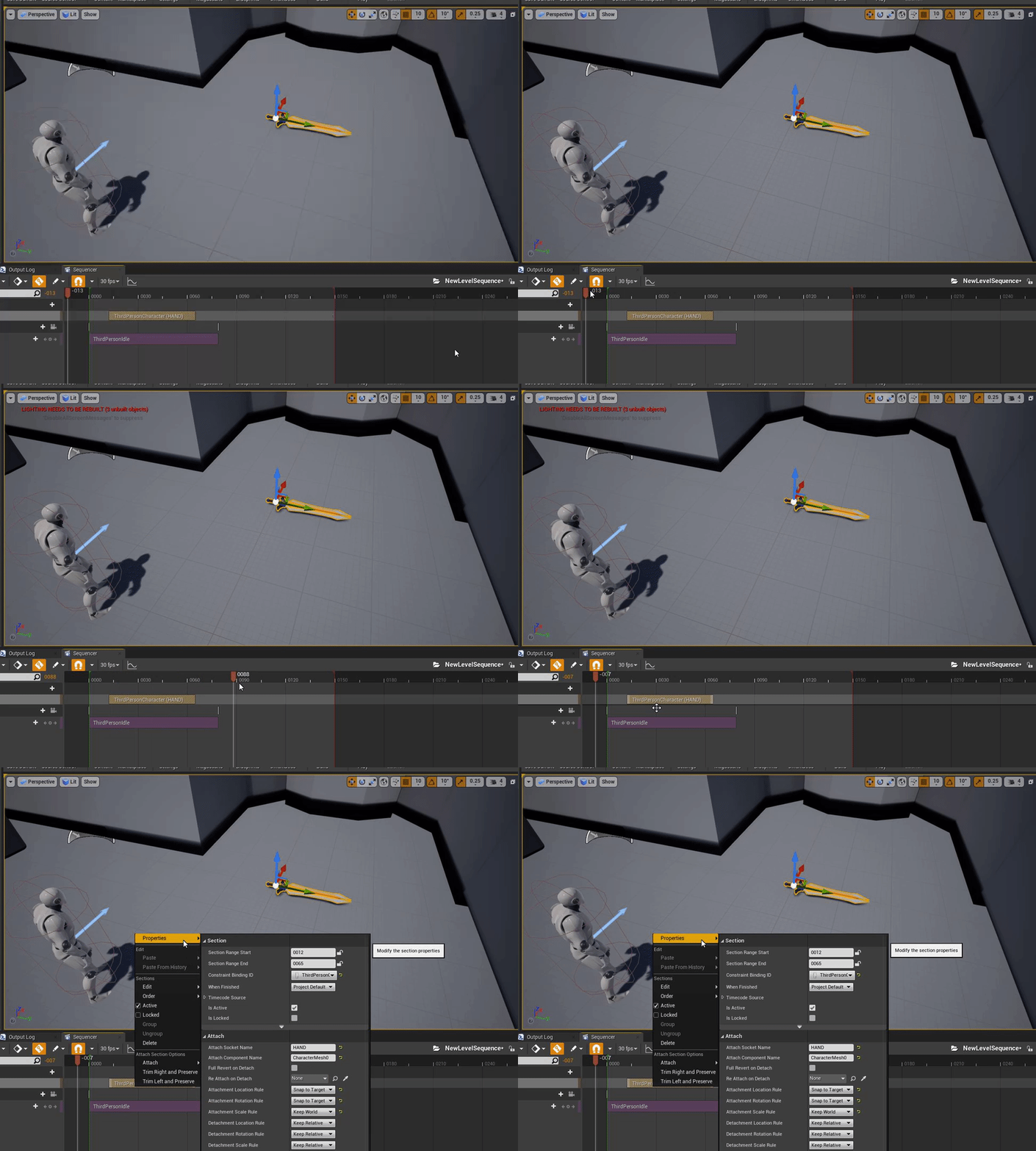
Can anyone help me figure out prop interactions using sequencer, I want to equip and un equip props, so i thought i could use an attach track but when ever i do this it sends my props off into space. if anyone could point me to a tutorial about using props in sequencer that would be great. i wanted to avoid using blueprints
plush yew
@plush yew has no destination
but it was working earlier
more than likely lucky in placement
so what would I do
GetPlayerCharacter then do get location then connect it
you wanna get (player controller > position and then feed it to that)
pretty much
also
thats not gonna run constantly
it will do it once then stop
I have a loop
ahh okay good
I can't find a location blueprint thingy
@plush yew

what is that middle thing
thats the root of my character
I don't have the Get World Location

In this Unreal Engine Tutorial I show how to add an enemy with an AI Controller that follows the player.
It is a very simple AI but I introduce some basic AI components: The Blackboard, a Behavior Tree and the AI Controller blueprint.
See my social profiles here
G+: https://...
or use this
ok
Fixed it
I didn't use the tutorial but for some reason my nav mesh bounds wasn't working
grim ore
@fiery lagoon When you right click the attach track on the object that you are attaching in sequencer have you gone to properties and adjusted your attachment rules so it will snap to the target. Also making sure your objects offset is normally 0 before you attach it if needed
 maiden sundial
Any way to run in editor with a selected fps ?
grim ore
open console (~) then type t.maxfps XXXX where XXXX is your locked max fps
maiden sundial
thx senpai ❤️
fiery lagoon
@grim ore yeah i tried messing with those properties but they didnt seem to work, and by offset being 0 do you mean something like this? cause i just had the prop on the grill before i added it to the attach track. maybe thats it.
grim ore
if its on the grill that should be fine you just have to get the right settings
fiery lagoon
aight cool, ill keep messing with it, just wanted to make sure i was on the right "track" with using props in sequencer
 tepid ore
Hi! thought I'll might try here.. does anyone know what could be the reason i can't move anything with the gizmo in my level? (snapping is off), i can change the location of static meshes only if i'm manually changing the location. rotate and scale don't seem to react, too. any ideas?
grim ore
you should be, I just tested with a sword you can see here. I would personally just use event tracks with blueprints inside of the sequencer but thats me https://i.gyazo.com/e487eb6ba6cba65ccbe7dbafb112bb7a.gif @fiery lagoon
it seems to be a pain in the rear to get the item to go back to it's starting point after detach is the issue with the attach node but I guess you could always "attach" it to the grill for example lol
like your grill has attach points and your character has his attach points and you just well use attach nodes to swap around
fiery lagoon
Ooo thats not a bad idea, i have no idea how to use blueprints, i figured this was easier.
grim ore
it would be easier if you just have the 2 skeletal meshes to swap, otherwise it's not that hard using attach to actor nodes and a defined list of points in the world (more work this way)
otherwise with the just 1 attach node it's being a pain in the ass when detatching
fiery lagoon
ahh
Thanks i think ill be able to figure it out then! if not ill just learn some blue prints lol.
plush yew
I have a question. If any of you know Bendy and the ink machine, could UE4 POSSIBLY make that game?
grim ore
yes
plush yew
like the way it is made in unity? With all the voices, the mechanics, etc?
grim ore
yes
plush yew
ok nice
grim ore
a constant
grim ore
its got other names like scalar or single paramater or vector 1 but if you are trying to find it in the materials palette its constant
plush yew
So guys
whenever i import my skeletal mesh, in the preview, half of it is cut off
like the bottom of it is
grim ore
is your root, or pivot point, set to the middle of the mesh in your DCC program before you bring it over?




 grim ore
what is it set to in your DCC program?
grim ore
if the skeleton layout matches you can yes
plush yew
its set to the bottom so that i can scale it from the feet @grim ore
MathewW
i need to retarget my character?
Cuz it already have animations on it 😄
i just wanted the Mannquie animations too
grim ore
you would have to retarget the mannequin animations to that skeleton yes
@plush yew you have set a pivot in your DCC or the root/origin/0,0,0 is at the feet of the model?
as ue4 uses the 0,0,0 for the root when importing
 versed surge
Real quick whats the hot key to snap an object to the nearest plan? Like make it snap to the floor when floating just above? Thanks in advance
azure shore
oi why do while loops with Is Overlapping as the condition just crash the thing
is it just overloading itself
and can I fix it?
smoky sonnet
hey i have a big problem but dont know why im having it or how to solve it pls help
azure shore
oh it thinks its infinite loop
smoky sonnet
im spawning objects depending on the music track (im using level sequence to run a function that spawns a object)
in ue4 it looks like this
but on my phone it looks like that
why is that so
azure shore
thanks mate
versed surge
hitting END key while selecting an object snaps selected object(s) to the nearest surface.
azure shore
oo cool
grim ore
@smoky sonnet are these objects in the world or using the UMG system?
grim ore
your going to have to do alot of math your resolution, dpi, scaling, etc on your pc is different than on your mobile device. Your going to have to get your camera fixed to a fixed location that works right on your target resolution then padd around it (extra on the sides) or change your camera as needed based on the target hardware
smoky sonnet
the camera is fixed
grim ore
as long as your ratio is good the rest shouldnt be too bad
grim ore
are they physics based or frame based?
smoky sonnet
hard coded
i have 4 different change speed function
they set the Y to -120 or -200
etc...
grim ore
which means the resolution on your device is probably lower than your pc. 2000 vertical resolution on one and 1000 resolution on the other -200 will be twice as fast on the once with less
smoky sonnet
yeah i also thought that im trying to get the resolution divide it by a value to set the speed
but dont know a good algorithm or calculation for that
grim ore
you can also set up your play field using fixed points to define the top and bottom then use something like a timeline or lerp to move it over time from one location to the other
that should let it atleast be framerate independent it just might stutter at low FPS as its jumping too many pixels
smoky sonnet
yeah but it should play in fullscreen without black boxes
with fixed points it would look weird or do you mean smth different
grim ore
well you have a spawn point right? and an end point?
smoky sonnet
yeah it spawns at a trigger box and it moves downwards till it overlaps with a another triggerbox that deletes the object
grim ore
ok so use your first trigger box as the start point, the end trigger box as your end point then use a lerp or timeline to move it from start to end over a time
you can lower or increase the time to make it slower or faster
grim ore
lets say you want to go from 0 to 100
0 is 0% and 100 is 100%
the lerp lets you pick a percent between those 2 values and gives you the value
grim ore
the 3rd value basically yes, start, end, lerp value
with lerp value being between 0 and 1 (or 0 and 100%)
so a lerp with 0,100,0.5 would be 50% between 0 and 100 or 50
all that really matters is you have a start, and end, and how much you want between
so for moving something you use a timeline that says "hey over 2 seconds go from 0 to 1"
plug that into a lerp from your start to the end and it magically moves from the start to the end over 2 seconds
fancier lerps have fancier stuff you can do with them like making it smoother at start or end, or adjusting the stuff that it gives you but a basic lerp is that
smoky sonnet
i will try it
it looks right now like this i just want to post it to get some tips if you have some more i will try it right now with your lerp method
my object setting the speed (offset Y)
basically setting speed hardcoded
how should i use a timeline in my option am i stupid
you didnt mean that?
@grim ore
grim ore
This is an example, it might not be exact to your needs but it sets the location of something from a start to an end over time. the time is 1 second according to the timeline float track
smoky sonnet
okay i will try
grim ore
if using something like this you would set the play rate of the timeline before you ran it, using the set play rate node, and since its 1 second long setting the rate to say 2.0 means its twice as fast (so 0.5 seconds long) or setting it to 0.5 means its twice as slow (or 2.0 seconds long)
this is just a generic setup to move something from A to B over time
smoky sonnet
okay either im stupid or idk
it doesnt work like it should... idk never used smth like this
it moves in light speed
its so damn fast
maybe because the second Y is negative?
grim ore
yes if you notice you are adding offset
I was setting the location
literally saying ok start here then next frame go to this spot, then next frame go to this spot, until its at the end. Yours its saying start here, then add some numbers to get your next spot and go there, then next frame add more numbers to get your next spot and go there
smoky sonnet
okay
it works
but...
even if i change newtime the speed never changes
it stay still
so it dont get faster or slower
is it even right to change the new time node on timeline to increase the speed
@grim ore
grim ore
new time is the time it's running at
not the speed
in your details list on the left should be the actual timeline component you can drag it and use
get the Set Play Rate node from that and run it before you play and set your play rate
smoky sonnet
you mean change the new rate at set playrate before running timeline
grim ore
smoky sonnet
puh now i need to think a little bit because my timeline auto plays
so it calls himself
if i need to call it with set play rate
nothign runns my set play rate
grim ore
when you were changing your speed before, do the get timeline -> set play rate
it doesnt need to be changed before running it
grim ore
if that is where you changed it then yep
smoky sonnet
thats in another bp where i dont have access to my timeline component
grim ore
when do you spawn the item, i assume the timeline is on the item?
smoky sonnet
i set the speed (other BP) spawn the falling object (another BP) and the BP of my falling object that i have spawned from another bp sets the speed of himself with the timeline above that autoplays
smoky sonnet
oh
 hidden knoll
Where can I find out how to make a parkour system for a 3D side scroller?
smoky sonnet
okay if im changing the new rate
what do i need to put in to make it faster or slower
i can try it on my self of course but if you would know
grim ore
if your timeline is 1 second long and your rate is 1.0 then your timeline will take 1 second
plush yew
anybody got a clue as to why ue4 wont render volume materials?
smoky sonnet
oh ok
grim ore
if your timeline is 1 second long and your rate is 0.5 (half the speed) then your timeline will take 2 seconds
thats why I set it up to use a timeline of 1 second long since the math is easy lol
hidden knoll
@grim ore Do you know how to make a parkour system?
grim ore
nope 😦 I know the concept but never tried it
plush yew
it's not that difficult just time consuming
smoky sonnet
Blueprint Runtime Error: "Attempted to access Enemy_Falling_C_100 via property CallFunc_FinishSpawningActor_ReturnValue_2, but Enemy_Falling_C_100 is pending kill". Blueprint: TriggerSpawnEnemyFalling Function: Execute Ubergraph Trigger Spawn Enemy Falling Graph: EventGraph Node: Set Play Rate
@grim ore
mhh
my objects can be killed before they reach the enemytrigger so how can i handle this
grim ore
well you should only be setting the play rate after you spawn it right?
or does this speed up during play
grim ore
lol
grim ore
after it has spawned and is moving you want them to speed up or slow down?
smoky sonnet
thats not the case
i get the error because they got destroyed
and i think it tries anyway to move it
because it gets destroyed before finishing the timeline
grim ore
yep but your saying you spawn it -> immediately change the play rate and between those 2 things it gets destroyed
you only set the play rate once after spawning
smoky sonnet
yea i set it once for every single object
i dont change the speed of 1 object again
i change the speed of a new object that gets spawned
grim ore
yep so unless you are literally spawn -> destroy -> set play rate in the same frame that should not happen
maybe you are spawning them in the wrong place or something. Regardless if you want to fix that you would put an "Is Valid" node before you try to set the rate and if it's not valid you dont set the rate. so spawn -> is valid? -> if it's valid set rate
 signal jetty
Hi
grim ore
the actual correct way of doing this is to expose the variable in the spawn actor function for that blueprint so you dont even change it after but you literally set that during spawn all in the one spawn actor node
it's just more uh complicated heh
signal jetty

 marsh swallow
i have 2 textures and i want to overlay 1 over the other and be able to have it either fade from bottom to top or from center out.
how would i do that? i have tried about 20 different things and i cant seem to figure it out. 😂
gradients and blends, etc.
thin tendon
Does anyone here know if HLOD works with foliage instanced actors?
thin tendon
I think the thing you are wanting to research is voxel terrain
blissful trail
i saw a voxel plugin but it costs money
thin tendon
I'm sure there would be a way to do it without a plugin
 manic pawn
yes just implement voxel plugin yourself
thin tendon

An ongoing Unreal Engine 4 voxel terrain tutorial using PolyVox and the Accidental Noise Library. With everything from generation to realtime modification.
that is after a quick search. It looks old. But I'm sure if you look longer then I did you could find a newer video
 scarlet birch
What would I use to switch between different textures depending on if the surface of the mesh was vertical or horizontal. I know I've done it in a material before but I'm drawing a blank.
grim ore
look for world aligned texture
scarlet birch
I'm using that now. But I want to use two textures and two normal maps and switch between them in the same material depending on the surface orientation. I'm assuming I'd use the normal in some way and an interp node.
I want to have two sets like that for use on rectangular meshes.
grim ore
you can use an if or a lerp to decide between 2 things
scarlet birch
Yeah, I'm trying to figure out what to use for the alpha
grim ore
a scalar and set it to 0 or 1
grim ore
oh uh. look at the absolute world position node then use a component mask to get the R G B (X Y Z) you want
pixel normal WS works as well https://www.tomlooman.com/download-auto-uv-color-mockup-material/ ive used this one before
scarlet birch
I think I found a way
ah cool. I've not seen that but I do something similiar for laying out levels
grim ore
yeah i used that to texture a game jam lol, just used an instance and changed the colors for each level
scarlet birch
Ah cool, there's math on that page using pixelnormal that does what I want
He used it with an if node to lerp between the orange and white. That's exactly what I wanted. Thanks.
grim ore
yay
scarlet birch
I use BPs that create instanced meshes based on setting things like room size, depth, etc... then use world aligned textures to make them look like things. 90% of the game's world is rectangles created in code and then textured to look like something.
grim ore
nice
thin tendon
So I just tried to set up HLOD for my project which uses 121 sub levels. While generating clusters it gave me an error. Out of video memory and crashed. But I have an 8gb GPU
scarlet birch
Guess, I'm not quite there yet. I copied what he had and ...
 fervent sigil
how can I choose the editor camera position when opening a project?
 surreal drum
is there a newbie channel on here?
rancid lynx
Can i add actor tags to actors with blueprint nodes? I know you can clear all, but can you add a tag to an instance of an actor at runtime?
Questions here are welcome. Try not to spam.
surreal drum
Anyone free to help a newbie with destructable apex blueprints?
rancid lynx
Ill answer if i know.
scarlet birch
It works as the alpha for a lerp on the BaseColor, but throws an error if I try to use it for the normal map.
surreal drum
I have a cube which is destructable, if i walk into it it breaks, if I shoot a projectile at it, it does not seem to affect it.
rancid lynx
Hits and overlaps are different i think. Maybe.
surreal drum
whats the difference?
scarlet birch
You have to either apply a force or damage.
rancid lynx
Generate overlap and generate hit are two different options in a actos, in the static mesh details.
surreal drum
the projectile imparts a force
fervent sigil
@scarlet birch I think normal map is needed for the vertex shader, so using a pixel(/fragment) shader node for it won't make much sense. I think, anyway
surreal drum
as it can move other objects in the physics engine.
scarlet birch
Thanks. That at least gives me a place to start looking.@fervent sigil
I'll probably just unhook the normal map for now, and make a note to fix it up later.
No, that looks like crap. Fix it now it is.
rancid lynx
Hey mike
Use print nodes to test when stuff hits. If you didnt knos
Connect other actor to a print. Thatll let ya know when stuff effects
Oopsnm
scarlet birch
Think this will work.
@fervent sigil Thanks for pointing me in the right direction.
Sweet. It works.
 molten bobcat
Hello guys! i'm having a bit of a problem with monetization on my mobile app, i have a few questions but i'd rather talk to someone via message about it rather than clog here, anybody so kind to hear me out?
To sum my problem: I have implemented AdMob and created 3 types of ads, a banner, an intertitial and a rewarded ad. I can show the banner no problem but the other two refuse to collaborate.
I have a currency shop that allows the user to buy via IAP but the buttons don't work!
 native cradle
Just came across this. Unreal Engine 4 Console Variables and Commands
Pretty sweet!
 dapper oak
Can anyone give me an insight as to why I am getting problems with this.
So I am trying to make a character file in a black C++ project. I'm doing my usual file structuring thing, /Public/Characters/Player.
When i do that though it says that it cant find "PlayerCharacter.h" and wont compile which is the file I just made
I made another project and didnt do any folder structuring and it worked fine
so is it something to do with /Public or something else
molten bobcat
@dapper oak are the playercharacter.h and the cpp file in the same folder?
dapper oak
They were sent to public and private folders, which is meant to happen if I remember correctly. I haven't used since 4.19 so it might be different now
honest vale
did you try including Characters/PlayerCharacter.h?
 pulsar badge
Hey is anyone really good at unreal that doesn’t mind getting in a call with me so you could help me with 2 things? Probably isn’t hard if your good just get confused with it.
molten bobcat
what are those 2 things about?
dapper oak
@honest vale that still gave the same error for some bizarre reason
honest vale
then I'd double check that the actual files are in the correct folders and maybe regenerate the VS solution
molten bobcat
@pulsar badge
thin tendon
What is the benefit to texture streaming? Is there any obvious reason a person would want to use it? For example performance
dapper oak
i regenerated the VS solution and the files are in the correct place
pulsar badge
@molten bobcat Vertex painting and ground materials.
molten bobcat
@thin tendon you answered your question, texture streaming is to have better texturing over large areas objects like landscapes etc
pulsar badge
I’m going to buy this, https://www.unrealengine.com/marketplace/en-US/product/forest-environment-set but I’m not sure how he got the different blends and painting on the landscape.

Huge foliage library for forest environment, landscape, and mountains. Assets are optimized, trees contain cross lod’s. All assets 100% photoscanned
thin tendon
ah ok that makes sense. What about forward shading? Is that something worthwhile for performance?
molten bobcat
@thin tendon https://docs.unrealengine.com/en-US/Engine/Performance/ForwardRenderer/index.html
This might enlight you
Describes the advantages of using the Forward Shading Renderer.
@pulsar badge i know too little about landscape painting, i set a very simple one myself a while ago but i think others can give you better advices
thin tendon
thanks I am reading through it now.
 marble pollen
Not sure what's the best channel for this, but does UE4 not have local wind support? The only thing I can find is the global actor. Is there no way to simulate wind effects from a local source that can affect things like cloth?
pulsar badge
Ok thank you
rancid lynx
Can i add tags to an actor with blueprint nodes? I know you can "clear all", but idk how to add a tag to an actor instance
molten bobcat
@marble pollen there is
under the pallette you can type "wind"
there you go
@rancid lynx do you mean dynamically or by the editor?
 zenith peak
hello anyone home
marble pollen
@molten bobcat In blueprints? nothing comes up. I'm not talking about the directional wind actor, I need something that can be spawned/activated with an ability.
Sorry I should have mentioned I was looking for something in blueprints, not the editor
I need it to coincide with certain abilities
zenith peak
does anyone know that gracphics error i have a R7 370 on windows 8.1 my graphics card is up to date for the OS im on but still tells me to update my GPU driver
molten bobcat
@marble pollen i see, i think you should add an impulse force then rather than a wind
zenith peak
UE4 referers me to a windows 7 graphics driver witch i cant use on windows 8.1
marble pollen
I've used that before, but never noticed it affect cloth.
molten bobcat
is your cloth sim correct? that should be affected by forces
marble pollen
Yeah it works fine whenever I use the directional wind actor, I'm just looking for a way to localize the effect to certain abilities rather than something that is handled purely through the level
molten bobcat
cloths should be affected even by forces generated by a bp as long as they are physics actors\cloths