#ue4-general
1 messages · Page 653 of 1
 sly hare
 rotund scroll
you're not going to make the game once you have all your issues settled
because there will ALWAYS be new issues to solve
sly hare
I am not just going hey lets' make everything perfect and make one big project...
I am just looking for understanding.
 zenith flower
(Unless you want to be like me, who's been working on a single game for a few years )
Okay
sly hare
Right now.
rotund scroll
I mean he's already into creating skill trees
 wicked kettle
@normal burrow pm?
rotund scroll
and wants vehicles etc.
but idk
I'll let him talk
I just saw the red flag of feature creep at a stage of pre production
zenith flower
I've learned more taking apart other peoples projects rather than asking questions here
I've learned the hard way that you can't ask complicated questions here
I use google
"UE4 vehicle movement project download"
"UE4 insert exact error message here"
"UE4 Lobby menu example project download"
ect
github is another great place to go snooping
rotund scroll
most questions asked here a googleable
zenith flower
exactly
rotund scroll
but people hate using search engines apparently
zenith flower
The ones who could actually ask my complicated-you-can't-google-this questions, are hiding from all the ones who can't bother to do a search
 hoary sorrel
Does anyone know what causes this issue with Advanced Sessions? If i package my proejct with it, i cant launch it
Log file open, 02/13/20 00:16:14
LogWindows: Failed to load 'aqProf.dll' (GetLastError=126)
LogWindows: File 'aqProf.dll' does not exist
LogWindows: Failed to load 'VtuneApi.dll' (GetLastError=126)
LogWindows: File 'VtuneApi.dll' does not exist
LogWindows: Failed to load 'VtuneApi32e.dll' (GetLastError=126)
LogWindows: File 'VtuneApi32e.dll' does not exist
LogConsoleResponse: Display: Failed to find resolution value strings in scalability ini. Falling back to default.
LogInit: Display: Running engine for game: ProjectName
LogInit: Display: Project file not found: ../../../Projectname/Projectname.uproject
LogInit: Display: Attempting to find via project info helper.
LogUProjectInfo: Found projects:
LogPakFile: Display: Found Pak file ../../../Projectname/Content/Paks/Projectname-WindowsNoEditor.pak attempting to mount.
LogPakFile: Display: Mounting pak file ../../../Projectname/Content/Paks/Projectname-WindowsNoEditor.pak.
LogPlatformFile: Not using cached read wrapper
LogTaskGraph: Started task graph with 5 named threads and 23 total threads with 3 sets of task threads.
LogStats: Stats thread started at 0.037546
LogD3D11RHI: Loaded GFSDK_Aftermath_Lib.x64.dll
LogICUInternationalization: ICU TimeZone Detection - Raw Offset: +1:00, Platform Override: ''
LogPluginManager: Error: Unable to load plugin 'AdvancedSessions'. Aborting.
LogCore: Engine exit requested (reason: EngineExit() was called)
LogExit: Preparing to exit.
zenith flower
Only one line here is actually about the plugin. Which isn't helpful. I would package it again, and pay attention to any warnings given
 normal burrow
Delete intermediate folder first Drakoz, you'll have to rebuild shaders but may fix your build
hoary sorrel
I did that already @normal burrow
@zenith flower If i turn off the plugin, and package it, it will work without errors
normal burrow
did you delete the binaries folder from the packaged build as well?
rotund scroll
Delete intermediate folder first Drakoz
this is the true running joke
hoary sorrel
ah fck
normal burrow
may be worth a shot drakoz
hoary sorrel
its too late here 🤣
normal burrow
its a joke only because it works
rotund scroll
well yeah
normal burrow
it's the solution to the unasked question
hoary sorrel
So binaries, and intermediete?
normal burrow
would try yeah
zenith flower
Package it WITH the plugin, pay attention to any warnings given
hoary sorrel
If i turn off the plugin it works
zenith flower
...
Well that is of no use to you
What I want to know, is if while packaging unreal complains about something but doesn't fail
hoary sorrel
I have no errors in the output log
zenith flower
warnings
normal burrow
https://forums.unrealengine.com/community/community-content-tools-and-tutorials/41043-advanced-sessions-plugin/page154 last post and onwards
Unreal Engine Forums
Advanced Sessions Plugin
Updated 12/09/2019
Plugin now has two modules, one is AdvancedSessions and one is AdvancedSteamSessions, this will allow me to tie more Steam specific functions in without forcing the steam subsystem to be packaged out with projects that don't wan...
zenith flower
There is no answer to that guys question
normal burrow
yeah its just the same problem
zenith flower
oh gotcha
sly hare
@zenith flower & @rotund scroll
I have spent hours looking for solutions...
hoary sorrel
I already read the forums
normal burrow
dunno how many people use it but would check if others have the same problem drakoz, maybe it is just broken
zenith flower
Or, you know... You could see if unreal throws any warnings....
non-fatal warnings != errors
normal burrow
if your familiar iwth vs drakoz, yeah you could throw breakpoints in the module load code as well.
if your positive the dll is there, then that module loading would be where its saying it can't run
zenith flower
Look, im loading up a blank project with the plugin, and i'm going to package it myself
I'll let you know how it goes
hoary sorrel
Its probably gonna work
LogWindows: Failed to load 'aqProf.dll' (GetLastError=126)
LogWindows: File 'aqProf.dll' does not exist
LogWindows: Failed to load 'VtuneApi.dll' (GetLastError=126)
LogWindows: File 'VtuneApi.dll' does not exist
LogWindows: Failed to load 'VtuneApi32e.dll' (GetLastError=126)
LogWindows: File 'VtuneApi32e.dll' does not exist
LogConsoleResponse: Display: Failed to find resolution value strings in scalability ini. Falling back to default.
LogInit: Display: Running engine for game: ProjectName
LogInit: Display: Project file not found: ../../../Projectname/Projectname.uproject
LogInit: Display: Attempting to find via project info helper.
LogUProjectInfo: Found projects:
this is the main problem , the first 6 line
zenith flower
those have nothing to do with adv. sess.
hoary sorrel
but i can't open the packaged project exe
zenith flower
They still don't have anything to do with adv. sessions
hoary sorrel
but its probably have something to do with opening the exe
zenith flower
I'm packing right now
hoary sorrel
or you think my project wont open because of adv ?
zenith flower
earlier you said it worked
now it doesn't
LogInit: Display: Project file not found: ../../../Projectname/Projectname.uproject
Open your project folder
delete
.vs
binaries
intermediate
and the vs project file
right click your .uproject file
click generate project files
open the new VS project file
ALSO
open your plugins folder
open every plugin you have there
and delete the intermediate and binaries folders from each plugin folder
hoary sorrel
zenith flower
then just open the .uproject
zenith flower
just download teamviewer and PM me
 next badger
@hoary sorrel Why there's no name?
 wary wave
edited out presumably
next badger
ok, i thought it may be related to some weird naming
 real pasture
Stupid question, but regarding the Mega grants if you get approved do you have to have your game only on the EGS?
 manic pawn
no
 abstract relic

Thanks for considering Unreal Engine 4 for your development needs. Here you will find a list of common questions answered to make informed decisions with little guesswork.
 tame rose
anyone have survival character meshes
abstract relic
The internet is literally overflowing with them. Google “character base mesh” and take your pick.
normal burrow
Its true
 hoary locust
Soooo.. is the grass type scaling (min max sizes) supposed to work?
 candid stratus
why wont this code work
 grim ore
Which part does not work the AI sensing or the AI move to
candid stratus
i dont know but im pretty sure that it was the ai sensing
@grim ore do you need any more info
?
grim ore
Well you need to know which one. Have you debugged to see if the pawn sense is even firing?
 vocal island
@tame rose mixamo
 bright basin
can someone advise how would they go about doing something like this, say I have a shop in the game, where I can buy items. I've added items, but now, after I buy this type of item, I want it to show as a dashboard trophy in all the vehicles I drive, can someone describe in a few words, what I need my blueprint to do, or just in general how I go about achieving something like this, especially the dashboard part... kinda likea Hula Girl thing? Thanks in advance
normal burrow
mm mmmixamo has a strange no-root-bone issue though
@bright basin an easy way to do it would be to set up sockets on all your vehicles where these trophies go. Then in begin play or something have something check the driver's whatever to see what should show or not, or replace etc
may have gone past word limit
bright basin
any guide on youtube you know that someone does anything similar?
 carmine garnet
Im losing motivation
carmine garnet
I have been
But the game im making i wanted to make before i make the game i REALLY want to make
And the person i started it with hasbt been contributing at all
Not even kind words wheb i send hin stuff
Not even a lookin good
sly hare
Mind If I DM you?
 fierce tulip
if you know the problem, solve the problem
carmine garnet
Please do
sly hare
Also, got a good bit of understand on how to switch between FPS TO CAR TO FINNALLY WORK.
Only took a few hours!
And absolutely zero handling.
XD
 tiny sonnet
umm.. some help. I have been stuck on building my lighting for the past 5hours, is it supposed to be this slow on larger maps?
normal burrow
is it huge?
sly hare
I doesn't take that long...
fierce tulip
depends on many variables
sly hare
You can do that in a few hours.
fierce tulip
remembers building lighting for 8 hours because 32mb ram back in the day
abstract relic
Build smart, level stream
tiny sonnet
i tried streaming, when i tried to package, i got an error saying assertion error clearblockedworlds or something
tiny sonnet
bp
sly hare
Open world?
sly hare
You make any flow to the map?
tiny sonnet
wdym
sly hare
I mean is it one of those games where is it just do whatever you want or is there a clear path to follow?
abstract relic
world composition is dark magic indeed
tiny sonnet
but you must find them
normal burrow
 world composition
tiny sonnet
would reducing the # of meshes help?
sly hare
Because if you are making it linear.... My choice would be to make a good bit of player bounds... so the player can't leave certain areas... make some areas discoverable and explorable and only focus on the spot you can go through.
tiny sonnet
yh i can't do that
sly hare
Why not?
tiny sonnet
that defeats the entire points
sly hare
It really does streamline things quite a bit... and reduces workload quite a bit.
tiny sonnet
i have a central area, afterwich you must explore the land to find the objectives
if i set bounds, that defeats the point
u get what i mean right>
sly hare
I see what your saying however eventually you are gunna have to make a map...
And It isn't gunna be square made of straight land right?
tiny sonnet
an analogy, everytime you go to the nether in MC, you only see the nether fortress and nothing else, that defeats the point
No
sly hare
Water is a good way to set some bounds without making it seem like bounds or actually being any borders...
tiny sonnet
simply i can't set bounds, any other ways
sly hare
Well, I hear you.
 thin tendon
LogFileManager: Error: Error moving file 'C:/Users/name/AppData/Local/UnrealEngine/4.24/Saved/SourceControlSettings.ini.bak' to 'C:/Users/name/AppData/Local/UnrealEngine/4.24/Saved/Config/Windows/SourceControlSettings.ini'.
LogSlate: Window 'Gather Text for All Targets' being destroyed I'm getting this error but I don't even use source control and I can't find an answer to fix it
normal burrow
what are you trying to do waffle?
you need to close editor when you do source control things
sly hare
Waffle your a god in functionality you got this bro.
thin tendon
Nothing it just came up when I relaunched my project. Thanks bro
What I have been working on though is getting language cultures to swap outside the engine
tiny sonnet
umm, whats a .bak file
normal burrow
specific to waffle, its probably a transit file. likely tries to delete the ini then replace it instead of overwrite
sly hare
But yeah if you want I could totally toss some ideas to make level design a little more stream lined without straight up making invisible barriers...
thin tendon
@normal burrow So I'm guessing then the issue is being caused by the file not existing and there not being some kind of valid check
normal burrow
well actually i'd guess it writes the new file to the .bak first incase some write failure hapens then replaces the original
if you've got the editor open that file is likely not editable.
or
whatever reason that is not letting you modify the file.
sly hare
BIVZE...
All I am saying is you can set things up in a smaller scaled environments and then combine them over time.
thin tendon
ahh okay. Cause the only thing I'm trying to do is swap language cultures. You got me thinking now. Maybe its being caused by trying to save the swap to a config file.
sly hare
Waffle... that error was from your translation?
normal burrow
are you doing the io here waffle?
thin tendon
not that I am aware of. I'm just using localization dashboard
normal burrow
hm
thin tendon
Its the first time I have seen the error and I have been working on this stuff for a bit over a week now.
normal burrow
restart computer if restarting editor doesn't work. otherwise check if that non bak ini is writable / not read-only
thin tendon
thanks I'll give that a try
normal burrow
it sounds like something has a read or write lock on it
tiny sonnet
@sly hare Thats what I did the first time lol, I build the lighting when I started, and progressed with the entire environment. BUT then I messed something up, the level corrupted, and I migrated a old version onto a different file to reduce the decrease the fil size as well. Now I have a massive terrain with 340 unbuilt lights
 vale silo
any idea if 4.24.2 supports rigged and animated glTF ? I saw something about bug fixes for glTF and skeletal stuff, but when I import glTF, it gets imported as static mesh :/
sly hare
Well BIVZe...
If you wanna PM me about it and we can talk it through I am sure I can help stream-line the process some.
tiny sonnet
i will just wait it out. i dont want to bother u too much
sly hare
It's all good man.
I enjoy helping on things I know.
🙂
Makes me feel special when looking up at the people who know all the features of this engine and I sit there clueless.
XD
 plush yew
My unreal download has been stuck on 96% for like 10 mins
plush yew
It says finalizong but its going really slow
sly hare
Cool beans.
tiny sonnet
internet explorer spends 3 days on 99%, you can wait 😄
@sly hare after all that, it crashes ;?
sly hare
huh?
tiny sonnet
i have been sitting... doing nothing... just waiting.... for the last 6 hourss..... only for it too crash
sly hare
🙂
 limber root
Hey does anyone knows what this means? i get this every time i switch to a new map.
sly hare
That is nice.
tiny sonnet
unless it breaks something, i ignore the errors lmao
plush yew
sounds like me and python
 mint raptor
Any reason why my SceneComponent Transform only has scale?
Can't rotate it via editor
plush yew
quick question
limber root
i would like to solve this error though....
sly hare
#AskPat?
tiny sonnet
did you change the assets in anyway after importing them? are they actors? many things mightve gone wrong
limber root
no i just open my project and switched the map then this started
tiny sonnet
migration gone wrong? how old is this project
also I keep getting an error called Assertion Failed:!bCleanedUpWorld
 primal furnace
Any ideas why I fail casting to my game instance? It's set up properly in project settings, but just fails..
sly hare
Mind giving more context?
I am importing like 50 different 4k textures for this new level and it is taking forever.
primal furnace
Casting to my game instance from my game mode (or anywhere else) and the result is fail, I don't know what else to say honestly
sly hare
O_O
primal furnace
The usual problem would be to forget setting it in the project settings, which I did
sly hare
Sinking man might have 2 cents...
primal furnace
I mean which I didn't forget, obviously..!
plush yew
I'm using a sphere trace for moving pieces in a turnbased strategy. By default the trace marks where it collides with an object, is it possible to get an inversion of that? where it traces out until it DOESN'T get a hit response?
primal furnace
Frustrating cause it should be simple thing. I even re-opened the project, didn't do it.
 silk ivy
How do I delete a map without Ue4 refusing to do so? I get this message:
Running the editor with '-NoLoadStartupPackages' may help if the object is loaded at startup.
sly hare
That is why I make maps in their own separate projects and move them into other ones as needed.
silk ivy
Everytime i try to save or rename it crashes
sly hare
You heard my solution to this problem already.
thin tendon
@normal burrow not sure what is going on mate. But a restart got rid of the move file error straight away
normal burrow
:bingo:
plush yew
i have someone who loaded into my game with an i5 and a 1050ti laptop. Theyre getting 16.67 fps solid. I get 140fps solid. He claims the game is using the NVIDIA and not the igpu. anyone know what's going on lol? 16.67 fps
 marsh swallow
So we touched on this elsewhere, but i am bringing it here. Has anyone else experiencing where Force Deleting Files is taking an incredibly long time in 4.24? Were talking 1/2 hour to an hour on an i9 with 32GB RAM.
manic pawn
16.67 sounds like they're telling you the frame time, not the fps. 16.67 ms = 60 fps with vsync
normal burrow
But 1050ti
grim ore
@marsh swallow it does take a while and i think its a bug with the reference checking of loaded files in .24 😦
normal burrow
Without too many details @plush yew what is your gpu?
normal burrow
K that’s a big difference from a 1050
grim ore
I agree with the frame time being reported, it's super weird it would be 16.67
normal burrow
Yeah drop 140 to 60 makes more sense than 16.67, but don’t know why they’d be complaining of frame rate at 60hz
grim ore
well he never said he was complaining, just his FPS was 16.67
"hey dude whats your fps? 16.67"
normal burrow
“Dude, FPS? Frame time”
grim ore
sounds like its screenshot time
normal burrow
Picture evidence!
grim ore
like even if gsync was causing an issue or something that would be super odd frame rate
abstract relic
Logs, pictures, never trust the consumer
normal burrow
I agree maths are strong
grim ore
since he says its solid that sounds like locked and... locking to that rate is odd
plush yew
yeah he got this info from the stat commands
normal burrow
Not on igpu
plush yew
idk what he read but i'll have to look at it
grim ore
well stat fps shows the frame time soooo
normal burrow
It shows both
grim ore
well it's weird but you can in fact lock the frame rate to 16.67 lol
marsh swallow
@grim ore is there some official bug report?
plush yew
vysnc is off by default, but he is on a 60hz screen and he had 60hz locked. he couldn't have forced that framrate, i think he was just reading off the wrong line. will yupdate if curious lol
grim ore
@marsh swallow I have not seen one I just know someone else asked 2 weeks ago and I confirmed it was an issue
normal burrow
Yupdate us yeah
marsh swallow
i couldn't find anything and its hindering and quite an annoyance. lol
normal burrow
VSync is what locks the frame rate to display rate
marsh swallow
okay ill file a report
grim ore
yep I think it works better if you open a blank map then delete but even then it seems to really suck regardless of the machine
I think its some weird deadlock
I mean I know why it's doing it but I don't know why it's having an issue lol
normal burrow
How many of those have you filed darinius?
marsh swallow
none
lol
i was going to for the bug Matt and i found with camera animations but wasnt sure if that was important enough
grim ore
since it was introduce in .24 and its still there I just assumed its not a bug but a really pooorly optimized new feature
 rancid lynx
when using "Spawn actor from class" nodes, and a "set boolean True-False" the item spawns before the boolean is updated , is it possible to spawn actors and set booleans at the same time ? before construction - begin play -, from blueprint nodes ?
grim ore
well it checks all the references to make sure it's safe to delete, preventing those weird crashy due to missing stuff
normal burrow
Reinforced delete
 floral arrow
anyone ever have an issue with emissive lighting creating artifacts and normal spot/point lights not
marsh swallow
DoD Level Delete
rancid lynx
besides manually adding a delay .01 hack on the begin play line X_x
grim ore
@rancid lynx setting the boolean where?
floral arrow
well i made a forum post a while ago on it let me get it
i could never figure it out
rancid lynx
the default boolean setting is false inside the actor. the spawn call from another blueprint also toggles true. but the actor spawns , constructions and begin plays before booleans are toggled.
floral arrow
@normal burrow https://forums.unrealengine.com/development-discussion/rendering/1708163-needing-guidance-with-shadow-lighting-artifacts
Unreal Engine Forums
Hello everyone! I'm new to unreal engine and im trying my hand at arch vis lighting. I'm having issues however with artifacting. Im using strip lighting in doorways and near the ceiling that i have wedged between a little lip i made and the wall so that you cant directly see t...
picture references
grim ore
@rancid lynx you can check expose on spawn in a variable and that variable will be shown up when you "spawn actor from class" and it sets it during construction of that actor
normal burrow
I bet @stark jasper would know @floral arrow
rancid lynx
what the fuck. your brain just googled itself for the probably correct answer.
floral arrow
okay thanks
rancid lynx
theres no way you accidently remember that. but i guess yo ulearned it X_x
ty. ill go check.
floral arrow
ill DM
grim ore
uh.. I remember everything lol
normal burrow
I believe it
rancid lynx
heheh. i guess so. where do i click expose on spawn ? i dont see that option
grim ore
in the variable details panel
 jolly steppe
So I'm trying to make a grapple system but I have a problem
I'm having too much fun playing with it while it's broken. 😂
 stark jasper
@floral arrow emissives are hard to sample
grim ore
stark jasper
to achieve required quality in your configuration, your static lighting quality might need to be bumped by .. 16x
stark jasper
and you need to pay that light building time
rancid lynx
ok tyvm. i found it.
floral arrow
well its weird, because the emissive works how i'd like when i use them in a simple room made out of normal cubes
normal burrow
How would someone speed up their building time?
rancid lynx
holy taco sauce batman. now all my gd reference settings dont need terribad hack delay .01's on begin play X_x
floral arrow
but not when i use them in a mesh brought in from another source like sketchup or the sample archvis scene unreal provides
rancid lynx
no way im going to fish all those out
stark jasper
i would say CPU Lightmass has almost already done the best of what we can do on CPU, except for some multithreading problem
it is still the best-efficiency (quality divided by time) publicly available lightmap baker
floral arrow
hmm
@stark jasper https://forums.unrealengine.com/development-discussion/rendering/1708163-needing-guidance-with-shadow-lighting-artifacts/page2
Unreal Engine Forums
Hello everyone! I'm new to unreal engine and im trying my hand at arch vis lighting. I'm having issues however with artifacting. Im using strip lighting in doorways and near the ceiling that i have wedged between a little lip i made and the wall so that you cant directly see t...
if you scroll down you can see some picture references on where it works in a sample room i made
normal burrow
What about GPU lightmass?
floral arrow
but not in a different room i brought in from a sample archvis unreal project
stark jasper
Unreal Engine Forums
Hello everyone! I'm new to unreal engine and im trying my hand at arch vis lighting. I'm having issues however with artifacting. Im using strip lighting in doorways and near the ceiling that i have wedged between a little lip i made and the wall so that you cant directly see t...
if you are refering to this one
i would say it is typical artifact pattern of undersampling

 stark jasper
you can copy the link and that will bring people directly to the post 😄
floral arrow
same level and lighting setting just in different mesh it doesnt work
oh okay
thanks
it kinda works on the wall its attached to and ceiling/floor but not that other wall
pretty bad artifacts
normal burrow
16x?
stark jasper
to me it is undersampling, the wall showing the artifacts is perpendicular to the emissive light long axis
then imagine how small the light will collapse to a point in the wall's 'view'
floral arrow
yeah, so you think the 16x would fix it?
stark jasper
from my experience, it should probably
 cloud galleon
Poll: DIY/Indie or paid developer?
grim ore
@rancid lynx I would like you to know if a video every shows up at some point asking the question "is it possible to spawn actors and set booleans at the same time ?" it quite possibly be due to your question lol
floral arrow
where do i change the static lighting quality, is in in the mesh details or the material instance, or master? @stark jasper
or is it in ppv
stark jasper
in World Settings
floral arrow
oh okay thanks
ill try it out, youre awesome thanks for helping me
and my newbie-ness
stark jasper
you can also try attaching a portal to the end of the light
floral arrow
yeah i did that
no change
well not on the end of the light i just put the whole light inside of a portal
stark jasper
well thats the wrong way of using it 😄
floral arrow
how do you use it?
stark jasper
you can imagine a portal is 'a magnet of rays'
it causes rays shoot from other objects to direct to it
floral arrow
so put a portal on the whole wall?
stark jasper
so if you have problem with the perpendicular wall, you need the portal at the end of the light
floral arrow
hmm
how big does it need to be
and it doesnt need to touch or engulf the light, just needs to be close to it?
floral arrow
ohh so its a magnet from the wall to the light
stark jasper
it doesnt need to be super precise as it will be treated as a circle
floral arrow
not from the light to the wall
cloud galleon
You whipped that up pretty fast loushangfw, what software did you use? I'm a gimper.
floral arrow
yeah that was impressively fast lol
stark jasper
yep, since lightmass final gather (and general path tracing) simulates light transport starting from objects, not from lights
i was using mspaint + some weird chinese screenshot editor lol
normal burrow
It’s excellent
cloud galleon
ni how.
floral arrow
so if i wanted to boost lighting on an emissive in all directions, I would make separate portals on all sides of the object?
not just use one portal over all of it?
i will try what you said there and the 16x and see what happens
youre like the lightmas Jesus, ill come back if i have any more questions
stark jasper
with how portals work in lightmass (they are treated as spheres), if you make a portal covering the whole light, its gonna look like this
and rays will be sent to where there's no light
normal burrow
Didn’t know how portals work until now, very cool
stark jasper
with it at one end its much better
stark jasper
yes
stark jasper
yes, instead of enclosing the whole object
floral arrow
so if i wanted to boot light from all sides, i'd do another portal like that on the other side, and one more on the front of the emissive as well?
on the long side
normal burrow
Sounds like that’d reduce the ray count to noise?
stark jasper
🤔yes, that's probably the best you can get now
floral arrow
k. i feel like that would help. but the 16x might be the key
because i was watching some arch vis lighting tutorial on youtube
and he didnt even use portals and it turned out nice
stark jasper
since long thin portals dont work well in general
another choice would be an array of portals lol
floral arrow
yeah like a lot of small portals next to each other
makes sense
https://youtu.be/6KreuaSufSM?t=1940 @stark jasper

In this 4 part series, we'll cover how to light an ArchViz interior scene from start to finish. Through this series, you should gain a much deeper understanding of lighting and lighting principles when working in Unreal Engine 4. The principles taught in this series should app...
thats the part in the tutorial i was following
no portals and it just works
but maybe its because he's just using it to light the floor
he didnt do anything that i saw either with 16x in world settings
stark jasper
there are clearly artifacts showing up lol
floral arrow
is that from the vid?
stark jasper
floral arrow
yeah wth
hmm
its weird because the end product he had turned out well, maybe its because he was drowing out the artifacts with point/spot lights
looking closer at that pic you can see artifacts on the edges of that marble counter too
well you've taught me a lot here just the last 20 mins ill consult you for any lighting questions, or if i still need guidance after applying the 16x and new portal method
normal burrow
Should update your forum post with this knowledge jeez
next badger
@stark jasper why...why this sacred knowledge can be found in some random places, like this discord, and not in official docs? 😛
floral arrow
^^^^^
stark jasper
i believe it was known by nobody beyond the original author of lightmass until i read the code 🤔
next badger
@stark jasper ok, now we have 2 people =))))))
thanks for sharing, you have mastered the Chinese screenshot editor
normal burrow
Mspaint?
plush yew
can you still use ue4 on linux?
 dim arch
yes
dim arch
not all features will be available though
plush yew
such as?
dim arch
iirc it can use vulkan and opengl
plush yew
can you still use bps?
next badger
and we all know that Vulcan is really broken in ue4
plush yew
can you still use blueprints?
dim arch
you can use BP, its buggier, no raytracing as well as some other core features
Win10 is the best IDE for UE really
*OS
dim arch
yeah idk, I have tried to optimize win10 but it always bloats and starts giving BSODs after its been installed for a while, its really fuckin annoying
next badger
i think 10 works faster than even 7...when set properly
plush yew
ue4 isn't laggy, i mean windows
dim arch
basically, regardless of how you configure it, you usually need to reinstall after a few years
next badger
isnt the linux?
dim arch
I used the LTSC which basically doesnt download any updates, but it still bloats up
next badger
how many years?
dim arch
havent used linux enough to know, but seems like its a lot more modular and easier to profile
plush yew
?
dim arch
but gamedev pipeline is generally win10
you are going to be waiting on features if you use linux, and some applications just dont work on linux
its kinda messed up, considering most machines have 'forced updates' now, so there's no stable environment to develop in
 regal mulch
Yeah can't really recommend using UE4 on something else than windows. Might be worth more fixing your "lags" on win10.
manic pawn
linux desktop is far more laggy than windows 10..
even gsync is so sketchy there. complete garbage
next badger
still old x11?
 pastel raven
Hi Guys, Is it possible to open pdf files inside Engine ?
 shut oxide
to stop the flickering i need to select the plane in my scene
if i select other objects and move around its starts flickering again
phew
floral arrow
i was noticing screen flickering the other day when moving if i had the sun directional light on the horizon in a sunset kind of scene
floral arrow
wonder if it was because of lens flare
 still atlas
if i'm having actors send variables to the game state, do i have each of them set their own object for the game state at start with "get all actors of class" to communicate with it? is there a more intelligent way of doing this? i'm really new and kinda just hamming through
i set it on begin play and it seems to be working fine but this feels clunky
 odd wyvern
hey, how would you approach airplanes in the sky to add to ambience? would you go the material route or use another approach?
 dull hawk
anyone encounter having the enemy healthbar showing through walls? trying to figure out how to get it to not show when it is
in BPs preferably
Its an issue for me for my health bar, and I don't mind doing it in C++ but a friend of mine is having the same issue with a text widget and the class requires only using BPs
 honest vale
why isn't this part of stock engine? 🤔 https://www.unrealengine.com/marketplace/en-US/product/widget-thumbnails

Widget Blueprint Thumbnails for the UE Content Browser
 open root
Hello, I want to ask for a help about WorldalignedTextures, where should I post it? 🙂 Which Group?, please?
 dusk hemlock
Hello eveyone
Im new here name is Vishal Bajaj
My query for unreal engine is that can I make a live link between maya camera and unreal camera in the main viewport not the editor's one
open root
Hello Everyone I have a problem with World Aligned Texture Something weird going on with UVs- Can someone help me please?
odd wyvern
@open root what is your problem exactly
plush yew
hey, how would I go about having a project with separate outputs/screens? ie. one monitor holding an interface, the other monitor holding a render, or something similar..
especially if they are different resolutions
for example i might want my interface at 1080p and my render window at 2k
sly hare
The engine is capable of opening new windows...
shut oxide
when im using vertex painting with alpha the mesh goes inward
i want to displace outward direction???
sly hare
What kind of mesh?
It matters...
I recommend using an external program for organic modeling...
Depending on your computers specs changes the recommendation of program I would recommend.
@shut oxide
sly hare
You mean your environment?
sly hare
Ok... so your issue is in environment creation?
shut oxide
yea
sly hare
Lucky you I AM AMAZAING AT THAT!
plush yew
thanks @sly hare , wasn't having a ton of luck looking for multi window examples/tutorials, i'll dive into the docs
shut oxide
🤗
sly hare
Did that work out for you Atagen?
@plush yew ?
And @shut oxide If you want a hand with that stuff toss me a DM/PM.
shut oxide
yeee oki
plush yew
any hints @sly hare ? I found this on the forum: "You can do it but you have to delve into the UE4 sourcecode - I did it by passing a command line parameter of an HWND and in the window creation code, made the UE4 window a child of the one passed in."
sounds worse than when I was using straight C and GLEW/GLFW :/
sly hare
NO I mean like all the different options in the engine... every time you start into the details of anything a new window / tab opens...
All you need to do is click and drag the top of it.
plush yew
oh, no, I want my application to have two windows - one rendered and one controlling
it doesn't seem very supported, scarily
maybe one solution is to use two separate apps communicating with OSC and Spout, but that's super hacky
 calm sphinx
sly hare
calm sphinx
sly hare
So, your going to waste time recreating the engine itself and not learning how to use it?
@plush yew
plush yew
@sly hare what kind of a question is that?
you don't appear to understand what i'm asking about so perhaps stay quiet
sly hare
I understand exactly what your talking about I just think the work flow is already quite optimized as it is all your attempting to do it augment it though.
plush yew
it's as simple as: there cannot be any control elements, hud, cursor etc on my output. they must be in another window on another monitor
sly hare
O_O
plush yew
i am producing live content for stage shows, not platformers for greenlight
it would look ridiculous to scroll across an entire stage with a huge cursor, adjust a visible slider, and then have the content change
sly hare
See that knowledge wasn't present.
plush yew
okay, fair enough
sly hare
And you didn't include that context.
There is a massive difference in settings... Your not going for a good work-flow your going for stage crap,
plush yew
I read some more about doing multiplayer splitscreen to 'fake' it but it's looking more and more like I will just build the control app outside of unreal and feed OSC in
sly hare
You could just modify a screen capture program to only show the part to the audience that you want to show....
thin tendon
one possible solution. I have no idea just spit balling here. Maybe set up some MP code. Have player 1 as a spectator. Then player two have all the HUD stuff. And make it so player 2's screen shows on a different monitor and player 1s screen show to the stage monitor.
plush yew
@thin tendon that's totally an acceptable solution, but it brings me to the heart of the thing - how do I spawn that second monitor's window? :)
sly hare
If that was a feature for real games I would buy that game.
plush yew
@sly hare there is a high chance of mismatched resolution between my output and my control screen, my controls will always be 1080p, but output could be anything - 384x200, 1280x720, 4k
sly hare
🙂
plush yew
so, too big/unusual to render in control screen and pipe back out or anything like that
thin tendon
So you would have two connections to the "game". Player 1 loaded on the machine that displays to the stage. Player to on the machine that displays to the side monitor. Player 1 is a spectator without hud. Player 2 all you have to do is make your code say add to player 2's viewport.
sly hare
NIOCE
plush yew
ooh, you're saying run a 'server' of sorts and connect two clients to it off the one machine
thin tendon
exactly
sly hare
YEA BOI
thin tendon
I'm not sure if its the proper way to do it. But it was just the first thing I thought of. And you are most welcome
plush yew
yeah, I don't think there is exactly a right or fully supported way
I saw a few mostly orphaned forum posts on it
thin tendon
I mean the only other thing I can think of that might work is looking into multi monitor support and displaying to a second monitor
sly hare
Hey waffle what parts are you patching this time around?
plush yew
yeah, but multi monitor appears to mostly cater to extended resolutions
can someone help me with a model I found,I haven't used blender for a year and I don't know this interface at all.
I just want to change the skeleton to the unreal one 😂
thin tendon
For my project? I'm working on making it compatible with 15 different languages
plush yew
@thin tendon I can help with greek
thin tendon
I actually just finished adding the greek just now. And already have french and spanish implemented
sly hare
Hey man I offered.
plush yew
did you use google translate?
sly hare
That is absolutely horrid....
thin tendon
Not sure how accurate they are though. Cause yeah I used google API to auto translate
sly hare
XD
plush yew
rip
thin tendon
lol
sly hare
Remember that polish I was talking about?
Yeah, I have a feeling we will never see that.... for years to come.
plush yew
I always seem to do more and more to the project
thin tendon
lol. Nah I asked my players and they reckon add questing (tutorials) then focus on map and polish
So probably real soon. And same I'm always thinking of cool stuff I want
plush yew
I haven't even released a beta version
sly hare
What game you working on?
plush yew
me or slim
sly hare
You.
plush yew
A remake of the hidden source
plush yew
but all the systems I have made is not for just this game, I made everything in mind of future using in other games
Highly customizable
thin tendon
Thats smart. I have noticed a lot of people doing this lately.
sly hare
That's why I got so much map practice....
plush yew
I wanna remake more old half life mods
sly hare
That's been done a million times over.
thin tendon
I really want to do an RPG for my next one and take myself out of my comfort zone for a while.
thin tendon
Yeah I suck at design story stuff. My strength is code
plush yew
I suck at 3d modeling
sly hare
I kinda cheat when it comes to that...
thin tendon
Don't get me started on 3d modelling. I still haven't got the hang of weight painting properly yet.
sly hare
Wanna know something?
thin tendon
I actually find the update nice. Its more like max and easier to use
sly hare
Download the legacy version then.
plush yew
I use box cutter
sly hare
If you have problems modeling you could always go to rocket....
sly hare
That is simple as heck.
Just cause they stopped supporting it doesn't mean you forgot how to use it...
thin tendon
Also I think I remember reading Unreal are working on a plugin to make importing from blender better
sly hare
NICE
 serene birch
probably from blender 2.8+ only though 😛
plush yew
@thin tendon what type of RPG you have in mind?
thin tendon
@plush yew Its going to sound weird. But from the movie wreck it ralph. The game sugar rush. How its all candy. That but instead of car racing. Questing with dwarves elves and wizards and stuff.
Thats what I am thinking anyway
plush yew
why can't u say a rpg on a sugar land
sly hare
Yeah....
plush yew
Sounds good, but in terms of design systems, what's a similar RPG? I'm good at Bioware RPG style
thin tendon
I can't think of anything similar. Like sugarland elderscrolls but not as complex
plush yew
I don't know, I feel like the way I blueprint things is based on objective programming
since my work is mainly focused around objective programming
thin tendon
lol
sly hare
Who hurt you?
thin tendon
Nah I just think younger kids might find a complex game difficult to play
plush yew
I think the correct way to phrase it is complex game with easy to understand concepts for younger kids
sly hare
Don't target kids unless you are making another fortnite.
XD
No really though...
The pc market already has achieved several grooves kid orientated games...
One of 2 things happen....
thin tendon
I haven't even ever played or tried fortnight. Its just something that never interested me. Not even enough to watch a video.
plush yew
sly hare
The game fails epicly...
Or....
Influences them to steal their moms creditcard.
plush yew
Ahh hm
thin tendon
What is it supposed to do? From that picture all it looks like its doing is increasing the count on a variable
plush yew
Yeah I want to add an grenade to my character to use like ammo +1
sly hare
I am guessing the amount of them he has stored...
thin tendon
First I would bread crumb it. Add a print string so you can see if the overlap is being triggered
thin tendon
Bread crumbing is a process used in programming. You add a series of print string commands through out a piece of code your working on. So that you can see clearly how far through everything is being read. It will show you the exact spot your code stops working.
sly hare
THAT IS A GREAT IDEA.
thin tendon
The message it prints can be anything. I like to use sequenced numbers 1,2,3,4,5 etc
sly hare
Whoops!
plush yew
Tryed it but nahh dosnt work still
thin tendon
Add it before your cast now. If it prints the problem is the cast. If it doesn't the problem is the overlap
thin tendon
So the problem is that its not overlapping
plush yew
Im fast af boi
I will create a collision box
wait
as I see he had collision on and the objects couldnt overlap
probs that
thin tendon
How do you even have an event overlap without a collision sphere or box?
thin tendon
instead of using overlapped component. Use overlapped actor into your cast
plush yew
ok
thin tendon
Sorry other actor
 undone pollen
Does anyone happen to know that after they updated the rendering pipeline they introduced raw mouse input as a setting in the engine or is it now default?
sly hare
@plush yew Mind if I bother you later when I get up to the kinds of functions your clearly allot more understanding of then me when I get there?
 stark acorn
hello humans
plush yew
fuck
stark acorn
where can i find the UE4.23.1 Installation path :/ ?
sly hare
What's wrong seal?
sly hare
For?
plush yew
Use overlapped actor into your cast
I´ll do the funktion later just dm me 😄
maybe read next time
stark acorn
any ideas though ?
thin tendon
wow danish must be a hard language. Took 4 tries to auto translate 😮
thin tendon
Nice. Hopefully they finally fix structs.
 brave gate
it's like Unity, if you'd pay for a subscription, you'll get a pink editor skin 😛
 zealous cloak
if i drag some actors in my level i cant see them :/ they are visible and not hidden in game
serene birch
https://github.com/EpicGames/UnrealEngine/compare/4.25...4.25-plus
ok so far this branch is underwhelming 😛
plush yew
@thin tendon everytime I move structs,I have to redo the interface
serene birch
thin tendon
Everytime I edit a struct. I have to go and refresh every single BP that uses it
zealous cloak
ok my actor who is a umg widget wont sho up
plush yew
when you move the camera, nothing changes except FPS
https://youtu.be/S0Q18uKeEn4
anybody know solution how to fix this?
 floral arrow
what are you trying to do with point lights?
 waxen crypt
Hi,guys i have a problem where every time i press play button it doesnt load the game i still see the main menu and i did this menu following this tutorial and did everything apart form the HUD and using the FPS template and i did try googleing but i didnt find answers and i looked over like 4 times and i still can't find where did i make a mistake "btw all other buttons are working fine only the play button that doesnt work"
here are the links and pic of bps
https://docs.unrealengine.com/en-US/Engine/UMG/HowTo/CreateMainMenu/index.html
https://prnt.sc/r1qee9
https://prnt.sc/r1qez4
https://prnt.sc/r1qfxv
https://prnt.sc/r1qgo8
How to create and script a main menu for your game.
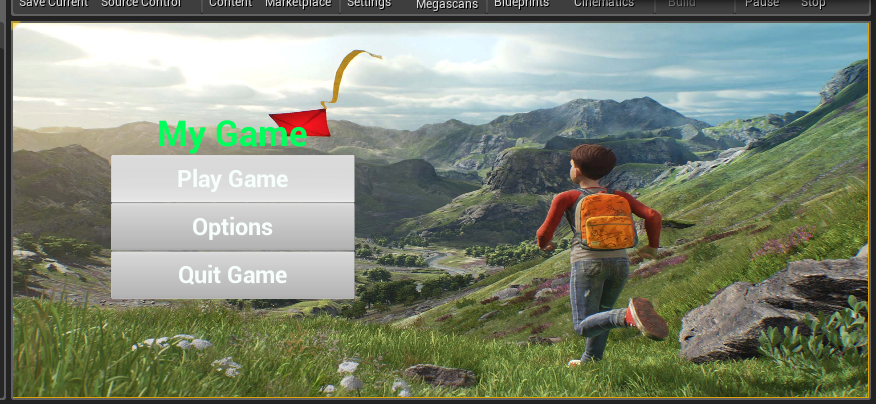


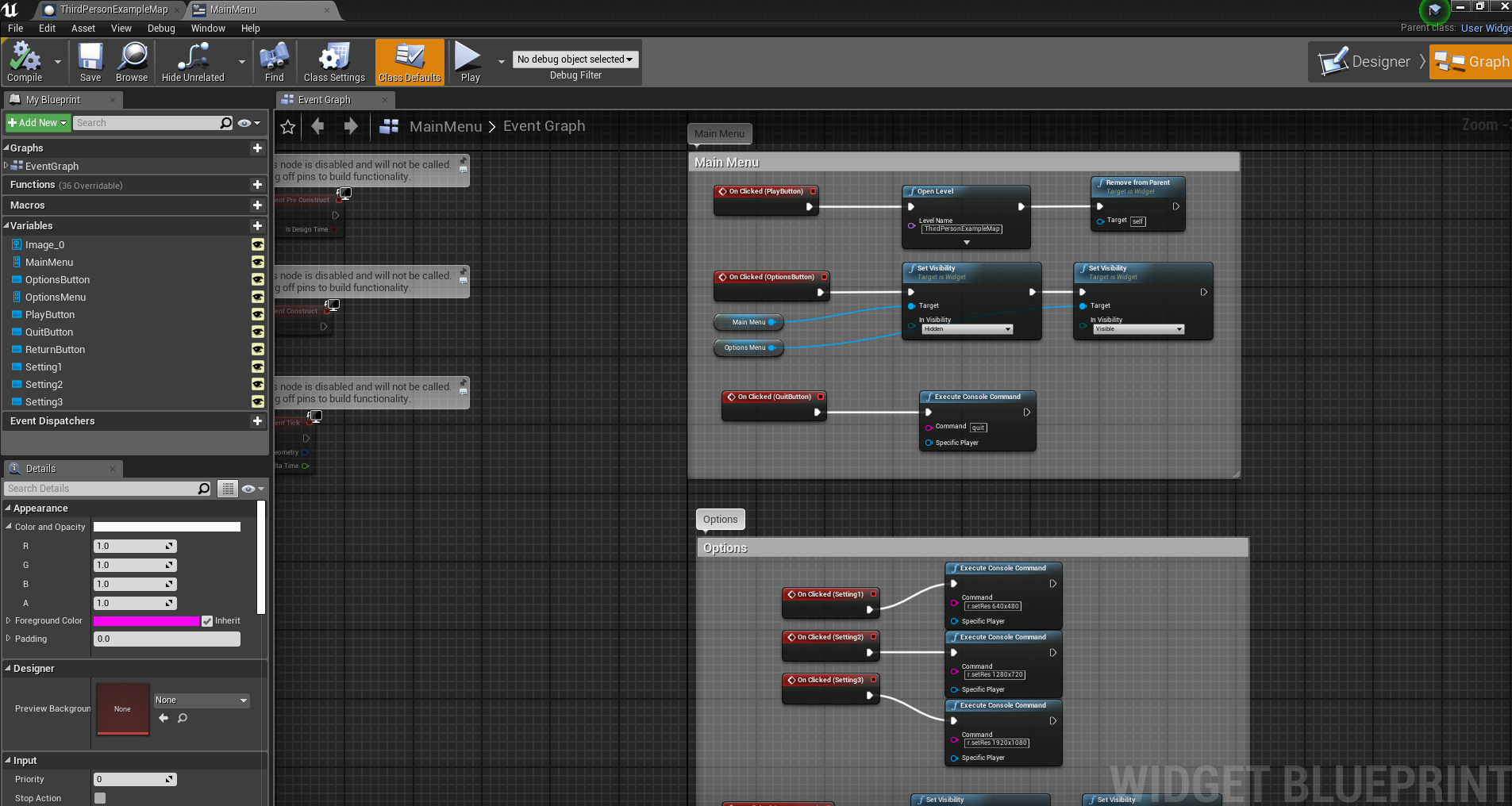
oh i forgot to mention i tried on 2 levels
 tawdry storm
@plush yew what exactly needs fixing? it's not clear from your video what your problem is
plush yew
when i get closer to point light my fps drops
tawdry storm
well I mean they take up more of your screen, also it might be your boxes
are you using some kind of shader effect to render the top of the boxes or is that all geometry? @plush yew
plush yew
geometry
tawdry storm
well that might also add to it
 regal hollow
I have a general question here, anyone who is interested in getting involved please do but be professional. I'm a game art tutor at a university in London and I'm having a disagreement over metallic values. I have always been told by multiple technical artists to only ever use black and white values it's either metallic or it's not. However, my head says that dust should be seen as a layer and should have grey values in the metallic. I would tackle this by having the metal fully metallic and adding the dust response into the roughness channel and Albedo if necessary NOT the metallic. According to allegorithmic their painter and designer takes into consideration a non conductive surface in the metallic values. So there are gray values in the metallic. Are there any Unreal technical savvy people here who can either side with him or me more or explain why? Thanks in advance. Also add a hashtag with my name when you respond as I may not see otherwise.
abstract relic
Meaning colour channel
regal hollow
But that breaks the shading?
fierce tulip
no
it jut means its not a perfect metal surface, just like in many real situations
dust, sooth, weird coating
regal hollow
Pbr is supposed to be a physically based accurate render using predictions. By adding any other values except black or white your not using the shader for it's intended use and thus becomes non predictive
tawdry storm
a strict 0 or 1 is easier to work with, since it's either specular or metallic workflow, any grayscale area between that blends between the two based on the metallic value. At least that's my understanding of it
regal hollow
But if you have dust on metal it's still metal.
If you have rust on metal the rust specifically re organises the metallic structure to o longer be metallic
fierce tulip
its like a drawing book. first you draw outside the lines because you know bleep.
then you are tought to draw inside the lines to understand the rules.
and after that, you learn to draw outside the lines for artistic reason, or for specific situations
tawdry storm
you're basically answering your own question. if there's dust on the metal then it's not pure metal anymore, is it?
regal hollow
Dust is transparent whereas rust isnt
abstract relic
Slapped those whose only use 0 or 1 for metallic value.
plush yew
dust is what?
regal hollow
When I worked at rebellion our technical artist argued that it should only be white or black.
tawdry storm
it still affects the look of your metal, and you have to control that somehow
fierce tulip
"Metallic
The Metallic input controls how 'metal-like' your surface will be. Nonmetals have Metallic values of 0 and metals have Metallic values of 1. For pure surfaces, such as pure metal, pure stone, pure plastic, etc. this value will be 0 or 1, not anything in between. When creating hybrid surfaces like corroded, dusty, or rusty metals, you may find that you need some value between 0 and 1."
An overview of the primary Material inputs and how best to use them.
regal hollow
But you wouldn't say dust on metal the surface is still metal but the dust would respond to light differently this changing the roughness values?

polycount
So I've seen a lot of posts regarding physically based rendering around lately, and one of the things I commonly see discussed is "metalness" and how to use it appropriately.
 grave nebula
@regal hollow Values other than 0 or 1 are wrong. Your head is wrong. But you know what? You will get intermediate values anyway and most importantly, You are artist. Toss everything unnecessary out and make it look good. It looks fine with intermediate metallic? Ship it. And therefore, your head is totally right.
fierce tulip
basically ^
tawdry storm
Deathrey condensed it down perfectly
regal hollow
@grave nebula I love that!
Well this is it. Everyone is different and does it differently. It should be about the final look right?
fierce tulip
its like the "only use quads" crew hehe
tawdry storm
as long as it looks like you want it to look and doesn't eat unnessecarily into your render budget, just do what you want
fierce tulip
ngons ftw
regal hollow
I say, quads and tris are good. Ngons are bad
regal hollow
You end up with skewed UV shells lol
And I have to mark my students down if they use ngons
fierce tulip

polycount
Today I tried to chat with some professors about how I've seen a lot of industry pros use Ngons in their hardsurface workflows.
abstract relic
Everything is a triangle anyway 😜
regal hollow
Omg
fierce tulip
ngons are the bomb if used well
regal hollow
Please just give me one thing at a time to argue with hahaha
regal hollow
I dont mark them down because I want to. I mark them down because 2nd marking Mark's me down if I tell them ngons are ok. Its academic so has to be by the book
fierce tulip
imma quote death
regal hollow
A bottle with 8 sided cylinder. Bottom is just closed hole. Not triangulated. Its ngon
grave nebula
In my time, students were slapped with a ruler for each triangle they left in the model.
Pretty effective.
regal hollow
Yeah the 2nd year students here are scared of triangles
fierce tulip
gons other than tris and quads are wrong, Your head is wrong. But you know what? You will get intermediate gons and most importantly, You are artist. Toss everything unnecessary out and make it look good. It looks fine with ngons? Ship it. And therefore, your head is totally right.
XD
grave nebula
Darn.. that phrase can fit so many cases..
wary wave
in UE4, Ngons and Quads will get triangulated on import, so you want to work with tris...
regal hollow
See I can argue that because talking from industry experience. And in was a lead environment artist at a AAA studio I would look for good topology
fierce tulip
trademark it death
grave nebula
(TM)
regal hollow
And remember I'm also teaching them at a university for a degree. So it's all by the book. Most you will throw out of the window when you get to a atudio
Studio
grave nebula
So how do you tech your students to triangulate cylindrical caps by the book and most importantly, why ?
abstract relic
And what book? 😜
fierce tulip
anyways, while its good to learn how to "draw within the lines" or well.. understand how things are made, work, and what the rules are, you can then start to push those rules and boundaries to speed up workflow, get better results, and learn that those who teach, generally dont know the latest techniques :p
regal hollow
Nah you can quad it really easily for caps
Well I left the industry in December of last year so I'm new to teaching but have a shit ton of industry experience
grave nebula
(My question holds a slight implication, that you might be doing it a bit wrong).
fierce tulip
people who say "I have done this for years" generally have not been improving for years, else they would say "been doing this for a month now"
regal hollow
@grave nebula if a student has a capped cylinder that is ngon my head would sit over my shoulder and have a go at me because they should have 'quaded' it
tawdry storm
where's that article that explains the different pros and cons of triangulation a ngon? D:
regal hollow
Hmmm
grave nebula
I've accepted your answer. We we will return with a correct answer after short commercial. But.. why ?
fierce tulip
3 scrolls up Sei
regal hollow
Honestly I cant tell you why because before I started teaching I never quaded shit either lol
@grave nebula
It sucks because I feel hypocritical but it's either I have a job or I don't lol
Gotta follow some rules xD
 fierce tulip
my discord is being a bleep
regal hollow
Lol
abstract relic
Google him and have fun
regal hollow
and this isn't me trying to argue but I can use your arguement against my boss lol
fierce tulip
started my first job about 14 years ago
regal hollow
Noice
fierce tulip
ued 2.5, 3dsmax 7 was new at the time
fierce tulip
nowadays yes
abstract relic
We love ya sparkleman, enjoy the show
fierce tulip
but before I was a modeler and env artist
regal hollow
really?
tawdry storm
well I guess it's forever lost in the internet 😦 can't find it. but there was an article that triangulated the same ngon in different ways and talked about why some forms of triangulation are better for performance than others, even though the tricount was the same 😦
grave nebula
It is still there, Seirei
grave nebula
Just.. where is there, is a bit undefined.
 shell jetty
engons VFX
tawdry storm
gotta start an expedition to find it
grave nebula
it was polycount around 2003 or so I think
fierce tulip
there are newer threads iirc, maintained by some of the leading modelers
regal hollow
ok so apparently here we're discussing and the only time you should use Ngons is on a flat surface as it won't 'fuck up' your workflow
grave nebula
I'd imagine theory, related to getting a degree in modelling, being a bit more theoretical. Like.. measuring time-weighted average modelling speed of individual or a group of individuals, expressed in net triangles/per hour.
regal hollow
Nope it's down to control of geometry and can they make this asset etc. But as my head said when I said about the ngons is even though its triangulated in the engine it will sometimes give you triangles in the wrong direction.
fierce tulip
not if you retriangulate properly
vale silo
Does anyone know how to import skeletal glTF with anims into UE4 ?
regal hollow
So then if you retriangulate your defeating the purpose of having an ngon?
fierce tulip
no
you can have ngons and still decide how the triangles are set up inside an ngon
kinda wish Torfrick was in this channel, he;d be able to make things clear
regal hollow
Hahaha I can message him on fb and ask him lol
grave nebula
There are sets of separate considerations here. As a modeler, how you are setting your control cage, is entirely up to you, ngnonsh shmengons.. nobody cares. Whatever subdivides nice, works. Art ends and tech starts when you import it to a realtime rendering package.
 upbeat trench
I feel like triangles-per-hour would be as useful a measure as lines of code-per-hour
grave nebula
AYE
regal hollow
Dude why would grade an artist on how many triangles they can make an hour
fierce tulip
hehe
grave nebula
It is called management. Effective management.
tawdry storm
what if I write all my code into a single line, thus making 0.5 lines per hour, but still have fully functioning code in the end? 😦
grave nebula
You can sort artists by their tri per hour. Those, on the lower end, are first candidates for lay off.
tawdry storm
A manager is a person who thinks 9 women can deliver a child in 1 month.
fierce tulip
@regal hollow tor frick is basically king ngon, so please do ask him
grave nebula
So yeah, after you brought the model in, the territory of your freedom ends, and you will triangulate the model as you are directed to do so, and this is where it matters.
tawdry storm
hit up your programmer friend and ask for tabs and spaces next 😄
fierce tulip
I remember this exact convo a few years back with other people when Tor jumped in XD

ok, finally going to watch Picard.
No hard feelings btw Cereal, its just a fun topic :)
regal hollow
upbeat trench
How much am I worth per hour?
fierce tulip
Mons is best paid mons in mons-land
tawdry storm
turns out, it's never fully black and white and most of the time it's some gray area inbetween
grave nebula
Sir, you are priceless!
regal hollow
Ofcourse no hard feelings man
If we were all the same art and games would be shit
@fierce tulip
fierce tulip
hug
tawdry storm
what if I do all my 3D modeling in my shader without using triangles at all? does that make me a bad artist or am I just worth less per hour? 🤔
regal hollow
Omg
upbeat trench
which reminds me, time to swoon over the Sweens
tawdry storm
TECHNICALLY it's still using 2 triangles, I guess
grave nebula
Yeah, sucks being geometryless.
abstract relic
What about the poor CADs?
tawdry storm
oh the horrors
fierce tulip
bans @abstract relic
upbeat trench
dont cross the nurbs
tawdry storm
don't you just love CAD data? 😄
upbeat trench
thats not too bad 😛
grave nebula
But it has high triperhour
tawdry storm
pretty sure this one actually ran throug some poly reduction process aswell
 obtuse nest
This has happened to every version of UE i've used until now.. so frustrating
 small vault
does anyone know why i'm getting these white outlines on my foliage? It happens when the foliage has the second part of my ocean asset as a backdrop. I can't seem to figure out why it only happens at that point. You can see that the bottom part is fine and if I move the camera you can see it change to more or less of the foliage.
fierce tulip
ugly mips?
though I have seen it happen in games like ff15 as well, might be something in the water/reflective related stuff
small vault
it doesn't really seem distance related but rather the distant part of the ocean is doing something. I'll take a look at the MIPs though
obtuse nest
Anybody know why 4.23 closes when initializing at 73 percent every time I open it??? Its driving me insane
I need to use this version for datasmith .. 4.24 opens completely fine
fierce tulip
@obtuse nest #old-rules please dont spam the same question over and over
obtuse nest
Well I can't get an answer on the forums cant get an answer from support and can't get answers here?
fierce tulip
if someone reads it and knows, you get the answer
else wait, be patient and do something else in the meantime
tawdry storm
if there's currently nobody around who can answer it, then it won't help you to repeat yourself in such a short timeframe
obtuse nest
Do something else? UE won't open
fierce tulip
do something outside of UE then until you get the answer you are looking for.
tawdry storm
does it just close? wihtout an error or anything?
obtuse nest
When launching UE 4.23 it gets to the same percentage of initializing.. closes and then reopens epic launcher
Without any errors or anything. Even on a fresh install.
fierce tulip
doubt the logs are empty
obtuse nest
I don't know much about using the logs
Some google searches have said having substance installed or steam VR causes it but I have neither on my pc
grave nebula
Well, put yourself in a shoes of the one, who might be answering your question. Pretend I asked the question, and you are answering. My editor is stuck at 73%. Are you able to extrapolate anything meaningful from that ?
obtuse nest
Not helpful @grave nebula I did say it was when it was initializing and I thought it may be a common issue as I don't have much installed or anything that should cause complications
fierce tulip
deathrey made total sense
grave nebula
Exactly. Not helpful. So whatever causes it for you, you need to provide something else, to get any meaningful reply.
fierce tulip
check the logs for instance
 fathom mortar
would somebody be able to help me? I'm trying to use the paragon asset Wukong and I've set up a state machine so that it will play a hit react animation when it takes damage. When it does this animation, it is clipping the floor with only a small bit of its head sticking out.
fathom mortar
well frick
fathom mortar
i checked the animation on its own without being in my anim blueprint and it works perfectly fine so im thinking its something to do with root motion?
tawdry storm
\Saved\Logs
tawdry storm
boom! faster than Luos!
fierce tulip
why do I always write / instead of \
grave nebula
It is good taste, Sir.
fierce tulip
I blame html
tawdry storm
I just copy pasted the path from my current project 😄
obtuse nest
But its prior to opening a specific project
tawdry storm
it should still create log files
if that's not the case, have you tried opening an empty project?
obtuse nest
Ok just tried that and it still closed at the same point
This is the log from an old project I tried to open
tawdry storm
so if you create an empty project with 4.23 it still won't start?
this might sound like a stupid question, but is your hard drive full?
I have UE4 crash on me on startup because of that in the past
obtuse nest
Still won't start nope