#ue4-general
1 messages · Page 631 of 1
 rancid lynx
If you drag the staticmesh text onto the scene text, in the leftside box, you can make a mesh the root
But you dont ned too
 warped current
but that would make overlapping actors work?
rancid lynx
Well maybe yea. Im not sure
It miiight grab the root mesh by default
I think thats what i do. But both work. Actor or component
I use component. Sometimes with rootmesh and sometimes scene mesh
warped current
I tried reparenting the mesh to be the root component but it wont let me
in the character bp it wont let me place it above capsule
so if i were to use component
rancid lynx
Oh yea. Doesnt work on characters. Capsuke needs control
warped current
howwould i tell get all overlapping component to get the specific component like the skeletal mesh?
rancid lynx
I dontknow . but that sounds very possible.
warped current
would it also actually work to just turn off mesh simulation when i grab the object
rancid lynx
Attach loves to disable physsics
Enabling physics is how i force drop items
Just set sim on
warped current
So i actually had physics turned off when grabbing but it was attaching the actor to the parent not the actual mesh
so i changed it to the actual mesh
and it.. sorta worked but
i think it's cuz the mesh was scaled
so it like blew up large when i reparented it lol
i think im going to have to mess with that a bit
rancid lynx
Youll get it. I had to test the same stuff
rancid lynx
Attach to comp might help alot
rancid lynx
Attach has three scale options
After attach, you can manually setscale 1.1.1 also
But thats a hack
You can find whats changing the scale
Probably a parent or the attach node options
warped current
yeah
I think i'll try to go play with it and see how to make it work correctly
but the attach to component fixed the initial propblem
that's awesome whew
rancid lynx
I use attach alot. You can make it work. Very probably
warped current
yeah 🙂 thanks rob!
rancid lynx
If you have extra collision boxes, make them visible during gameplay, if you notice strange bugs. Then you can see whats actually happening
warped current
heyy! i got it to work!
i just changed the settings in the attach to component node
to snap and then scale to keep world
and it worked the way i want it :D!
thanks rob!
 open eagle
is there anyway to set up regular autosaves
UE4 crashes every 30 minutes and I loose all my work
can i increase the autosave frequency
 normal burrow
probably, have you looked at editor settings?
also, should be launching from vs (always) to find where in your code its crashing, if it is in your code.
normal burrow
you've walked the call stacks?
rancid lynx
Yourewelcome :)
open eagle
is there any way to force the editor to save all upon crash
like take all the content in RAM and save it
unless it't corrupted
normal burrow
no
When a fatal is thrown, you don't want whatever is in memory to make the disk
but, there is some kind of thing added recently..
normal burrow
your best addressing the crash XZ, if its crashing somewhere else theres a good chance the origin comes from your code still. Thats why you'd look at the call stack once vs shows the exception.
 bitter iris
what the 😄
 odd wyvern
this is the only window left
haha used unreal for ages now
and I heave no idea what this is
anybody got a solution?
I could exit thats not the issue but I would like to know what exactly happend
😄
yeah and what a lol it is I've been using unreal since 2009 and I've never seen that happened
bitter iris
Is there a view that you can view the draw calls, an see which static meshes are the worst?
normal burrow
its almost always more about the material than triangles now adays
but just the general profiler will help you conclude what is taking time up
odd wyvern
@bitter iris yes trough console the command is stat rhi
normal burrow
UnrealInsights, is the profiler now too. Probably not gonna give you tons of relevant info on which mesh though
bitter iris
@odd wyvern does that show a list of which static meshes are the most with calls etc?
odd wyvern
no it will show the number of draw calls from the frame your looking at
odd wyvern
just look trough your models
in the mesh editro you can see your vertex count
editor
@plush yew what exactly is your issues?
bitter iris
i havent got any issues i just like to keep things above X fps
odd wyvern
Well like @normal burrow said, the vertex count will be your least problem that you will heave to figure out.
normal burrow
Yeah, if you've not taken a look at shader complexity view in game (F5 i think)
its helpful
 humble oyster
Can I dm anyone for small minor things I need help with
Pleaseith
I just need help with one lil thing
normal burrow
#looking-for-talent if it can't be asked here
normal burrow
keep them fire barrels at distance 👍
normal burrow
Yeah I just meant getting closer to them would hurt FPS
It’s probably the overdraw/particle count
 dim plover
Are there any general tips for "optimizing" fire/smoke particle effects?
normal burrow
would say to try and get away with as few particles as possible to sell the effect
 calm widget
So um speaking of optimization, how seriously should one take this "extremely bad" thing?
normal burrow
ogod
calm widget
Am i gonna die?
calm widget
I was kind of hoping they were more like "guide lines"
Particles, grass was also white before, not sure what happened, but something did. Also some other post process in there
normal burrow
Tbh, I'm not entirely sure what the colors represent
I'm not sure if its hardware relative or not
calm widget
Well i'm getting a stable 70 fps in this scene
normal burrow
what does your overdraw look like?
calm widget
Solid 10! : )
normal burrow
haha
calm widget
normal burrow
@fierce tulip is a pro with this stuff, may know
calm widget
I'm fine with all this as long as i get a good stable framerate, but it's kind of in the back of my mind all the time
 fierce tulip
 normal burrow
hahah
calm widget
That bad huh 😛
fierce tulip
so much transparency and expensive materials
calm widget
My trees only have 2000 instructions, i cant stop. Help
normal burrow
i imagine the picture speaks a story to you luos
fierce tulip
i almost feel personally offended :p
normal burrow
that bad?
fierce tulip
i would reconsider a lot of choices
calm widget
You are making the assumption i made choices. I just did stuff and shit happened : )
fierce tulip
not making choices is also a choice :p
calm widget
Touché
fierce tulip
is that fog?
calm widget
Volumetric fog yes. I had some lights there for 'a few' meshes, but that didn't work out so well
fierce tulip
hehe
calm widget
Not really that visible, the fog. But i like it. It looked very.. well, it popped a lot with fewer particles so
fierce tulip
you should check some videos from evilmrfrank on youtube to get some inspiration :)
calm widget
I'm on it! : )
Very short video demonstrations, i'd just be frustrated if i saw all that pretty work and have no idea how to achieve it
Inspiring none the less
 rotund scroll
RIP your game
calm widget
lowercase letters didn't do it huh?
 hollow wave
xD
calm widget
Well yeah, but seriously, i'm making a game, and i'm making systems i don't even need. I made a dynamic seasons system for a rougelite. I need an intervention
My landscape takes 3 hours to compile
rotund scroll
I think using standard materials will get you further
hollow wave
well... Since you've mentioned fog. If you just add a shit ton of fog at a certain distance between areas. Or even just every couple meters. have it jittered there. that could make it more optimized. games like BO2 back on 360 and ps3 did this on transit the zombie map.
hollow wave
apparently decreases draw calls. understandable since barely anything would be visible xD
calm widget
Not really sure what you mean
calm widget
Yeah, but i'm confused about.. well what you said
rotund scroll
also instantiate all your static meshes or use instantiated foliage
hollow wave
the more heavy fog. It kinda acts like culling as far as i undrestand. Fog just "hides" the objects That aren't too close,etc.... so they dont really get rendered but the player doesnt notice that
rotund scroll
use material instances
hollow wave
or as far as i understood it at least
doesnt make much sense to me at first hand since fog its self shouldn't be too optimized
rotund scroll
only distance based fog, not fog volumes
hollow wave
yea
calm widget
Ah, yeah i do use instances when i can, always material instances as well. So far so good 70 fps is acceptable i think but that's in default editor window, not fullscreen. Never built a project before, would that generally increase fps?
hollow wave
depends.
cant really tell. more power should be given when you build it since its not runing in engine anymore with all sorts of performance handeling. So maybe. But the fact that its all runing full screen with higher res in genereal... Might just be the same
only way to figure out would be to try it i guess
calm widget
Might try it now, should i expect it to take long? If it has the recompile materials and such it definately would
hollow wave
hmm... tbh yea. but also depends. what specs do you have?
pc whise.
stronger the GPU and CPU the faster. also the harddrives writing speed is important
 plush yew
How do I restrict the camera on an archviz character so It doesnt gain or loose altitude as I look up and down when moving?>
calm widget
1080 ti, 9800x
hollow wave
yea you'll be fine xD
I'm not sure how big your game is and stuff like that. but im guessing 30 min tops
rotund scroll
@calm widget whatever you're doing with your materials, stobbit
if you want to increase performance
rotund scroll
chances are there are better ways of doing whatever it is you want to do
calm widget
I'm being bullied!
rotund scroll
seasonal shader or no, there are better ways
calm widget
Only way to learn i guess
hollow wave
like what. vertex painting?
rotund scroll
seasonal shader should be 3 lerps and 4 textures, pls
calm widget
Oh i have that as well
calm widget
😛
hollow wave
sleep is for the weak
plush yew
I need to scale the material for the carpet, as you can see its kinda big, in Blender I would use a mapping node and texture coordinates, how do I do it in UE4?
rotund scroll
@calm widget how many instructions?
hollow wave
@plush yew UvCoord
plush yew
Thanks
 abstract relic
Texture coordinate node, plug that into the uvs
hollow wave
np
@calm widget tbh i wont give you much shit about that shader. i expected even worse. it could be better.but good job
calm widget
@rotund scroll Well, i guess it counts material functions in the master material instructions as well?
calm widget
About 2000 then
 hollow wave
╨
rotund scroll
on average I'd expect 100 or so per season
 rotund scroll
not 500
abstract relic
So many had a heart attack just now
hollow wave
I
normal burrow

calm widget
But there's so much left i have to do, i need lava. What about puddles and stuff. Wetness. I'm working on virtual texture landscape static mesh blending. You can't deny me those.
abstract relic
We can’t but your computer will
normal burrow
It's the truth
normal burrow
At some point, gotta start switching materials instead of packing them all into a lerp
hollow wave
Correction: All was fine until you learned about computer performance
and how they can catch fire xD
calm widget
It's fine, always been a scorched earth kinda guy
 frail sail
Guys how can i update this widget without starting project?
it crash on startup. when i deleted these widgets then project can open. But these widget is really important. so if i delete them, then i cant start game without that widgets.
YAMETEE 
hollow wave
@calm widget well you got a southpark profile pic so in my book i dont really care if you choose to suck at optimization xD
calm widget
It's settled then, more features! 😄
abstract relic
 frail sail

calm widget
Looks organized at least
hollow wave
............
calm widget
Wha.. the f
hollow wave
Ight. ima head out.
calm widget
I'm in love!
hollow wave
😂
frail sail

hollow wave
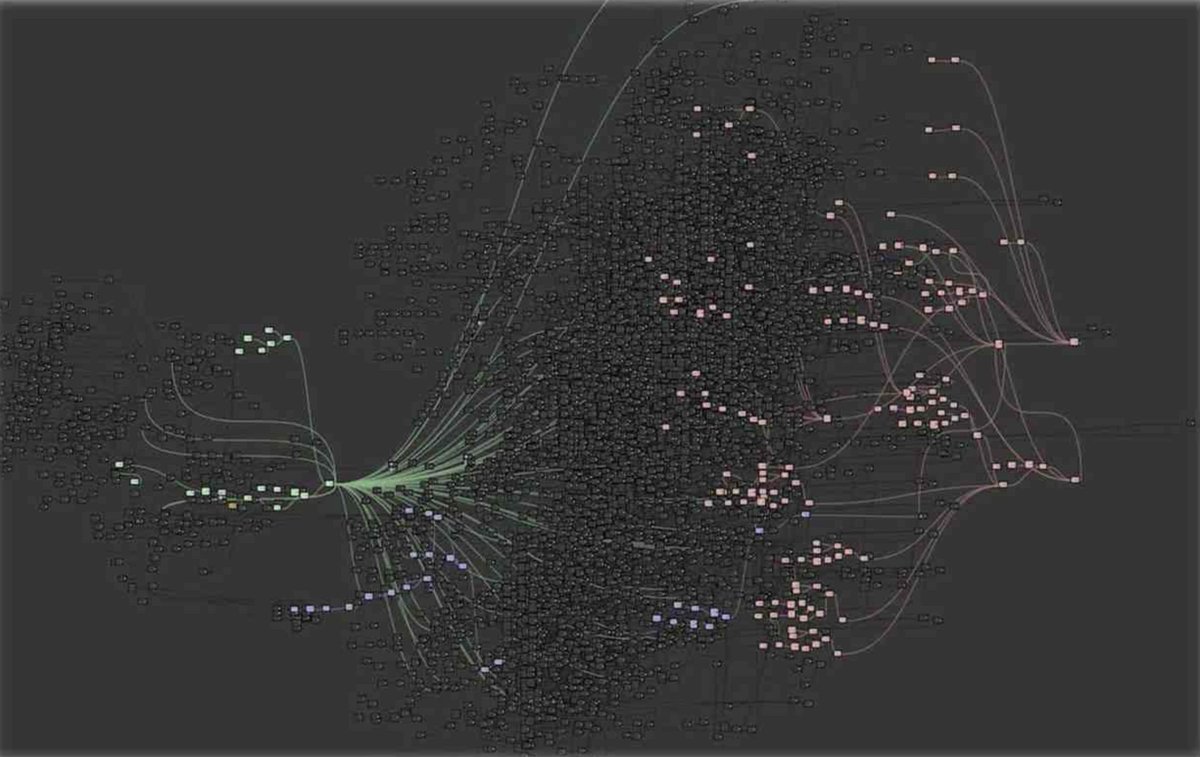
Come on man. it looks like the universe but with nodes
or a atom
with nodes as electrons
 hollow wave
i can hear people screaming when i look at both those blueprints
Just a lot of kids and families screaming in horror and torture. its like getting a glymps at hell
 brave widget
wtf, did they build the whole game in a single BP? 😖 😂
hollow wave
😂
 fallen marten
Probably scratching his head wondering why it won't print hello
brave widget
rotflmao 😂
hollow wave
xD
abstract relic
Remember kids. this is all single thread too
hollow wave
single threading.......
rotund scroll
anyone have that bug where you can't right click in editor viewports? and or found fixes for that?
calm widget
Alt i think, or tab in and out
 glass rapids
Quick question, How would I make a simple death system replicate?
calm widget
PIE and Esc?
normal burrow
gotta make the pasta shorter
rotund scroll
nope
calm widget
That's not how to make a death system btw
fallen marten
Last time that happened to me it turned out I'd worn my mouse out
glass rapids
sorry, replicated death system
hollow wave
oh
glass rapids
When the player dies I want them to go into a free cam and have a hud that says spectating.
calm widget
Hm, do you have any fullscreen games or such open? @rotund scroll
hollow wave
just switch players pawn
from the character to a freeroam camera
HUD and stuff like that should be easy assuming you got some basic knowledge
hollow wave
np. hope it goes well
glass rapids
ty
hollow wave
@calm widget btw..... i bet i can get bullied more than you...
glass rapids
I have a weird issue, when I create the widget on the spectator it goes to all players. Sorry I am decently new at ue4
hollow wave
hmm.... well wouldn't it be easier if you just looked at videos on youtube since they provide visual aid
glass rapids
where should I look, any suggestions?
hollow wave
just search up what you're looking for and choose the one with the most understandable indian
hollow wave
im sorry about that joke i made but its true. Most UE4 youtubers are indian xD
hollow wave
😂 ikr
 unborn fossil
they do a bloody good job tho lol
its the same with every programming tutorial ive looked up
 tawdry storm
jesus I just saw the blueprint pictures, I never get how people make those. I couldn't build something like that on purpose
calm widget
@hollow wave How so 😛
hollow wave
true. well the only issue is. i got a hard time watching those vids for a long time. i kinda get a headache after a while from the pronouncations
@calm widget I came from unity
calm widget
Me too! Had to quit, performance sucked!
unborn fossil
i find it easy to read the docs, then if someone has a video tutorial implementing it after i can follow much easier
hollow wave
i had no issue with that. im pretty good with programming. BUT GOD DAMN IT DO I HATE THE FUCKING VISUALS
im a 3d env artist. AND IT PISSES ME OF.
even in hdrp. wind is not a thing. shaders are all in preview since 2018. its been 3 years and still nothing is final
calm widget
I liked that there were so many marketplace assets, lot's of visual stuff. But still cant beat UE. But that was also back in the UDK days so.
calm widget
But more than a chunk missing
fallen marten
I tried unity recently after using ue4 for the last 5yrs and it felt like I went from driving a Ferrari to peddling a kids bike with flat tyres
normal burrow
plz
hollow wave
😂
calm widget
Anyone tried Godot?
normal burrow
physical pain, no unity
calm widget
Just checking 😛
unborn fossil
i only just started using unreal couple weeks ago, but im super impressed with unreal docs and learning centre
hollow wave
jk. was it good?
unborn fossil
epic is just killin it
calm widget
I don't need more bullying so. No no, i havn't tried it
hollow wave
😂
fallen marten
Unity has been deleted with force
glass rapids
How do I cast to a Hud class?
glass rapids
wow, sry for bothering
hollow wave
😂
fallen marten
Get a hud reference, drag it into the BP, drag off it and type cast- pick your hud class
calm widget
Don't forget to tessellate your hud, for performance
Why is epic launcher running at 15 fps? Just me?
hollow wave
Speaking about tesselation. Tesselation doesn't exsists in unity. or it does. But i wish it fucking didn't. sucks completly. idk why it even effects color saturation,etc....
calm widget
I got a bottle of water i'm fine!
hollow wave
i think you need the pacific ocean bottled up in this case but sure
calm widget
Haha, ouch
hollow wave
xD
calm widget
Speaking of that, my cpu does run at 101C when i'm compiling. That one does have me kind of worried
calm widget
It's water cooled, i can literally boil eggs in my pc
unborn fossil
nice feature
hollow wave
water cooling isnt better than a fan you know that right
unborn fossil
depends on the fan
 midnight bolt
is it possible to change global default material to something extremely simple, to boost up model importing with new materials? its a temp project
hollow wave
in best case hardware is what im hinting to
calm widget
I know, but i bought a dark rock pro.. 3 or something, it didn't fit. So i bought another one. That wasn't enough 'caliber' for my cpu apparently, so had to be water cooling
hollow wave
wait
wait
wait
do you mean you throw water at your pc or have a open hose on it?
cause its kinda hard to know with you
😂
calm widget
Just spit at it once in a while
calm widget
Well no, i got a nzxt or some crap
calm widget
Also wouldn't surprise me much, i broke my coffee machine cleaning it in the shower. Fucking thing is made to contain water wtf
hollow wave
on the inside ziecore. on the inside
calm widget
Where have you been all my life
hollow wave
😂
 tardy yew
@midnight bolt what are you importing? Fbx, datasmith? Just exclude materials on import
midnight bolt
@tardy yew it's static meshes map geometry, but i need materials with 1 diffuse texture for sorting purposes, as the naming is wrong
it crashes if i try to use instanced material, works only with fresh new one, but takes a long time to import 1000 pieces
plush yew
How do I use UE4 to create a rendered still of an architectural project I am working on?
hollow wave
In this quick 3 minute tutorial I walk you through the basic steps for rendering out high resolution images right out of your view port.
plush yew
i am completly new and i want to set up a blueprint where i can hold the mouse button to change to another charictar and then return to normal once released
hollow wave
@plush yew
plush yew
Thanks @hollow wave
hollow wave
np
 split wedge
so i reinstalled ue 4.24 and it is still enlarging everything the mouse if hovering over making it unusable for the most part
normal burrow
did you restart yet?
normal burrow
yea but did reboot the computer right?
split wedge
yes
split wedge
not sure
normal burrow
likely not then
think i asked already but you've got latest drivers and everyhting?
plush yew
can someone please tell me what kind of a node is directly below the Upper multiply node?
normal burrow
do you have a screenshot?
plush yew
sorry about that
normal burrow
Constant
plush yew
thanks
normal burrow
is the name of that one
 grizzled lagoon
https://media.discordapp.net/attachments/669006422549200907/669010727474036736/fcd2267ec00e8edf436b6f8da85ffccb.png
can't get the finished material after the 'blend Material Attributes' ??????
 grizzled lagoon
trying to layer blend Ue4 textures and a world creator texture
but at 'blend Material Attributes' I can't link it into the final material output?
that image is not from me, I'm unsure how they linked it to 'NewMaterial'
normal burrow
oh okay that helps to know
grizzled lagoon
sorry
normal burrow
yeah you have to set your material to use attributes
its an option
looking it up quick
grizzled lagoon
thank you
normal burrow
grizzled lagoon
so much to learn haha.. Thank you @normal burrow
 vital jackal
if I have a 4-way roll, can I use blendspace to make it 8 way?
 thorny coral
the update keeps jumping from 5 to 4 and back to 5%, sometimes it jumps down to 1%, wth is going on (excuse the bandicam water mark)
thorny coral
hmmm
i dont remember but im gonna guess and say 20 to 30 minutes
cuz thats what it felt like
normal burrow
its normal for me to start and stop
vital jackal
@normal burrow so if I have 4 roll animations (left, right, front, back) can I use blendpsace to blend them together and make it 8 way?
thorny coral
and its weird cuz it shows on task bar the green bar is half way so maybe its still updating and its a visual glitch? idk this is weird
normal burrow
try Blizz
it may work, it might not. its hard to say
if one roll starts with the other foot for example, it migth not blend
would minimize it for a bit
progress bars aren't fun to watch lol
thorny coral
yeah the progress bar is certainly moving on the task bar, probs just a visual glitch on the launcher
thx for the help tho
split wedge
yes i have latest graphics drivers
thorny coral
help wtf is this
the map doesnt even load its just a black screen in the preview window
thorny coral
anybody?
 fleet stirrup
I have a question about the Blueprint Components Window ... https://docs.unrealengine.com/en-US/Engine/Blueprints/UserGuide/Components/index.html
Overview of working with Components in Blueprints inside the Components Window.
Is everything in this Components window strictly a subclass of ActorComponent?
Or can some objects in the Components window be a subclass of Actor?
plush yew
it's strictly a subclass of ActorComponent
fleet stirrup
Thanks @plush yew! The reason I'm asking is that when I'm looking at examples of Components windows, some of these objects look more like subclasses of Actor, such as "Camera" and "Mesh" ... are these not Actor subclasses?
plush yew
no
fleet stirrup
 plush yew
UMeshComp and UCameraComp
fleet stirrup
Aha! Thanks @plush yew !
thorny coral
@plush yew do you know how to fix the error i posted
plush yew
no 😦
 fleet stirrup
So, I'm still trying to get a better understanding of hierarchies of components ... how is there a hierarchical structure of components that are not actors?
plush yew
@fleet stirrup SetupAttachment in C++
fleet stirrup
I know that this isn't an inheritance hierarchy
thorny coral
for the life of me ive searched far and wide for a answer and all ive managed to find is "git lfs pul" what even is this
plush yew
lfs is Large file system I think
when you git, it's easy to track Delta for textbased files, such as C++ code
but assets and serialized data, different story...
plush yew
Do you have some version control enabled in your project right now in unreal?
thorny coral
whats version control
fleet stirrup
Fascinating, so components can have parents just as actors have parents? Is there any functional difference between actor parent/child hierarchies and component parent/child hierarchies? https://docs.unrealengine.com/en-US/API/Runtime/Engine/Components/USceneComponent/SetupAttachment/index.html
Initializes desired Attach Parent and SocketName to be attached to when the component is registered.
plush yew
@fleet stirrup Nesting components I treated as in housecleaning, I don't know if it really is relevant. It's just a convention hierarchy for myself. But I may be wrong, I never looked too deep into it
fleet stirrup
Do you know if nested components can have some kind of transform hierarchy?
I would imagine that transform hierarchies make more sense for actors ... at least to me ...
plush yew
Again, not really my cup of tea, but transform is in the scene component, I think, So whoever is attached to that scene component Gets the transform inherited. I'm not strong on visuals, my thing is Western RPG game design systems, With focus on conversations and quests 🙂
which is very far away from transform hierarchy 🙂
fleet stirrup
Very interesting ... so at least in theory, there can be a SceneComponent that has another SceneComponent as a child via SetupAttachment.
And depending on the way nested transforms get multiplied together, the transforms of SceneComponent could potentially be nested?
plush yew
I think there is a world transform on top of the hierarchy, in the world, and the rest are relative transforms
fleet stirrup
I'm really just curious because I've never seen a hierarchical component tree before, so I'm super curious how it all works.
This is the first hierarchical component tree that I've seen that almost feels like a scene object/transform (actor) hierarchical tree
thorny coral
so i searched up version control in google it just mostly brought up source control, are these basically the same thing?
plush yew
yes
thorny coral
ah ok
fleet stirrup
I'm trying to understand what the capabilities/limtations are of the component hierarchy (compared to scene object/transform/actor hierarchies)
plush yew
Trial and error works wonders for me:-)
fleet stirrup
While there are of course GameObject(Actor) hierarchies in Unity, I don't believe I've ever seen Component hierarchies in Unity
Right, trial and error ... I'll be doing a lot of experimenting!
At the very least, nested components offers the potential for better component organization.
thorny coral
ok so my project does have source control (version control) what do i do now
fleet stirrup
Whoa, so SceneComponent transformations DO nest! At least according to this: https://www.oreilly.com/library/view/unreal-engine-4/9781785885549/ch04s09.html

O’Reilly Online Learning
"Attaching components together creates a relationship where transformations applied to the parent component will also affect the components that are attached to it."
normal burrow
Which source control @thorny coral ?
Yeah scene components are like Transform component in unity
Many things are scene components in unreal
thorny coral
loading and saving i guess? im trying to fix a 4.22 project for 4.24 i think its not compatible with 4.24 or something
@normal burrow
fleet stirrup
@normal burrow Very interesting ... but doesn't that mean that the functional difference between actor hierarchies and component hierarchies are blurred ... since you can effectively have nested transform hierarchies with both (via SceneComponent in both cases)
normal burrow
Olaf actors don’t have position
fleet stirrup
Well, they do if they have a scene component, right?
normal burrow
The actor location is the root components
Actors have nothing to do with their hierarchy
Of components
Everything inside the actor is the actor
It’s not like game object
It’s way easier to work with
fleet stirrup
I kind of sort of understand, and I'm kind of sort of confused ... I thought you could attach components like scene components to actors to give them a transform in space?
thorny coral
uuhh...
normal burrow
Yeah just trying to say that actors have a hierarchy of components in them. They are not a part of it
SceneComponents are components that have transforms and positional data etc
ActorComponents are informational
SceneComponents are child class of ActorComponent
An actor needs one scene component as it’s root
fleet stirrup
RIght, all of the last 4 lines make 100% sense
normal burrow
But everything is the actor
fleet stirrup
Here's what confuses me about Unreal coming from Unity ... the World Outliner is really shallow
In Unity, every scene object (GameObject/Actor) is in the outliner hierarchy
normal burrow
Yeah even bones in unity are gameobjects
Think of actors as packages of everything that makes them work
fleet stirrup
Yes! Exactly! And there's the big difference ... I'm okay with the differences ... just trying to wrap my brain around it all
Ok, I like that actors as packages ... because it does seem like that ... the world outliner looks very simple
So the real magic must happen at the blueprints level
fleet stirrup
Yup, I've noticed that. And at first it was driving me nuts. Looks like 2 different "outliners"
normal burrow
Specific to skeletons.
fleet stirrup
Oh yeah, and there's a totally separate "outliner" for skeletons!
normal burrow
When you make a child of a component you can specify a socket name
fleet stirrup
The: skeleton tree
normal burrow
Well so if you make a child component of the mesh with socket head , it will be patented to the head bone
fleet stirrup
Very interesting!
fleet stirrup
So it seems like a way of communicating across different hierarchies?
I see 3 different organizational hierarchies, so far (not counting subclassing) in the UI: World Outliner, Components, Skeleton Trees
normal burrow
You try and think of actors as contextual things. A person, a pufferfish, a box containing the hopes and dreams of humanity etc. then your game code cares less about what component your dealing with
fleet stirrup
Fascinating
normal burrow
Colliders are primitives btw
fleet stirrup
So it seems like sockets are a mechanism used to reach across these different hierarchies, reaching beyond the "contextual things"?
normal burrow
But primitives are also many things like particle systems and skeletal meshes
You only deal with sockets internally to the actor pretty much
But you might expose them on the actor if you wish
fleet stirrup
This is way deeper than Unity
normal burrow
IKR?
fleet stirrup
And probably more powerful as a result
normal burrow
Yeah, like it takes a bit of getting used to organization opportunities
Where unity has none and your just comparing names
fleet stirrup
So, I totally get that skeleton trees make sense as a separate hierarchy now
And I like your idea of considering world objects to be "contextual things"
So the real, serious non-skeletal work all happens at the component level, it seems?
fleet stirrup
Ok, so that's making more sense ... component level is where it's at (except for skeleton hierarchies)
normal burrow
Yeah if you look at Character blueprint
The capsule component used for movement is the root component
So the actor position is the center of the capsule
And the CharacterMovement component knows all characters have said capsule
And only works with characters
So there is zero need for getcomponent
All Characters have a Capsule Mesh and movement component etc
So you just build on that
Don’t have to use Character for your characters but yeah
thorny coral
ok so i was looking around and noticed this source control thing here too in the preview window, it has something called git beta which probably also means git lfs pul
so what do i do
fleet stirrup
Ok, so reading through more stuff, it feels like in practice, SceneComponent is practically speaking closer to a GameObject than an Actor is.
Even though Actors are often compared to GameObjects, they kind of just really exist at the top level of the World OUtliner.
Actors feel, kind of just, "meta"
normal burrow
https://youtu.be/74OfLMutOHE @thorny coral

Using Sourcetree and Bitbucket how can we set up free private source control from scratch in a hopefully easy to follow way =) The video will show you from nothing how to get Sourcetree set up, creating a new repository for your files, moving a UE4 project over to the new re...
thorny coral
thx
normal burrow
Yeah Olaf
Except you keep components close to the actor
You don’t really go sharing them unless that is the idea to
fleet stirrup
Whew! Thanks @normal burrow ... this is kind of making a bit more sense than it was an hour ago
normal burrow
No need to expose it all
Yeah I worked with unity for 8 years so
I know the stuff you been through haha
You will enjoy game development more in unreal
fleet stirrup
LOL ... yeah, it's a funny feeling because the UI in unreal at superficial level has a 1 to 1 match to Unity (except for blueprints)
But semantically, it's WAY different LOL
normal burrow
Yeah probably not on accident
abstract relic
You’ll find that true with 3D authoring tools too 😜
fleet stirrup
Well, the funny thing is that as a long time Maya user, I was playing around with Blender's modeling tools, and it felt very very similar!
abstract relic
All Ui are forming a singularly but there’s still these randomly assigned terms per software
normal burrow
Hahah armatures and skeletons
abstract relic
UV wrapping labels in 3ds vs everywhere else is also hilarious
“Why is this function called blasting?”
normal burrow
😂
fleet stirrup
Oh, wow, the funny thing is I found a really good explanation of Scene Components relating to Game Objects ... in the Unity documentation! LOL https://learn.unity.com/tutorial/transitioning-from-unreal-to-unity#5d518e11edbc2a002007f178

Unity Learn
This guide is meant to assist Unreal Engine developers in familiarizing themselves with the Unity engine, its Editor, and its various workflows.
normal burrow
3ds max is just like turbosmooth those nurbs and blast those uvws
fleet stirrup
"In order to get functionality like Scene Components, you can make a hierarchy of GameObjects by dragging one onto another in the Hierarchy window."
Thanks Unity!
Everyone else compares Actors to GameObjects, but it's really all about Scene Components and GameObjects!
So if you flip the sentence, it reads:
abstract relic
Translate your Unity knowledge into UE4 so you can get up to speed quickly.
normal burrow
Summary: “no, this way”
abstract relic
Here, have a cult cookies
fleet stirrup
@abstract relic ! I read this before, but after this really good discussion on this channel, the Unity -> Unreal guide has a lot more meaning
normal burrow
The unreal to unity docs make better sense of the downgrade tbh
fleet stirrup
Unreal doc: "In UE4, you create compound game objects by nesting components hierarchically"
abstract relic
It was more for the joke 😜
fleet stirrup
😉
But this is very good! Seriously, almost everyone out there is telling me that actors == gameobjects
fleet stirrup
But when the rubber meets the road it's really more like scene components == gameobjects
normal burrow
Gameobjects == pointless and nothing
abstract relic
So salty
normal burrow
Gameobjects: we have a transform component!
fleet stirrup
Mandatorily!
normal burrow
required
fleet stirrup
mandated
abstract relic
You are dredging up locked and forgotten memories to be fair 😜
normal burrow
Haha 😆
fleet stirrup
😄
abstract relic
Such an evil man. You’ve retained knowledge for the lost and wary souls
abstract relic

fleet stirrup
LOL
Okay, so to recap, World Outliner is just for high level ideas / boxes
The real works happens at the Scene Component level and also the Skeleton Tree
normal burrow
Packaged nicely as an actor yes
normal burrow
Yeah packages you make your own front end to
fleet stirrup
Fascinating ... makes sense
My brain was hurting thinking that I needed to make Unreal Actors work like GameObjects! LOL
normal burrow
That concept of abstract what is it? Is gone yeah
 vernal scarab
Hi! Firts time I post her. I am a UE4/Unity dev! I treat actors similar to gameobjects as I use them all the time for put things together and stuff like that
fleet stirrup
Hey @vernal scarab ! Please feel free to elaborate!
I agree that it does seem like the most straightforward analogy that is presented by initial tutorials is that Unreal Actors are like Unity GameObjects ... but ...
vernal scarab
Basically when I want to have differnt objects as "child" of the same one I use actors
I would do something similar in Unity a GameObject parent that contains go childs
normal burrow
Yeah you can choose to use actors this way and parent them to components on another actor
fleet stirrup
Yes, there is certainly a parent/child relationship that is common between GameObjects and Actors
I just found an interesting tutorial on line that dives into the misconceptions: https://jonahgrimm.com/game-design/getting-started-with-unreal-engine-4-from-unity-day-147/

It's always good to expand your skillsets! If you've been using the Unity engine for several years like I have, it might be a good time to try Unreal
normal burrow
||But you can’t have multiple transforms on a gameobject|| just spoilered for unreal peeps
fleet stirrup
"In Unity, you may be used to players or characters structured like below. GameObjects are often nested under each other, and for each object, you would attach relevant components to them. All details and properties are then accessible within each component fold out."
"However, in Unreal, this “nesting” is all done within the same object. Instead of objects being nested under other objects, it’s components being nested under other components which are all under the same master object."
This is what @normal burrow was explaining to me
normal burrow
Well kinda yeah
So you could have a weapon actor
And a character actor
You can attach the weapon actor to the hand socket of the character actor
vernal scarab
Thanks for the link I will check it out later
normal burrow
In ||unity|| it would be dozens of ||gameobjects||
fleet stirrup
Right, I'm seeing the power of sockets
vernal scarab
They are cool
fleet stirrup
It allows you to communicate across/between actors
normal burrow
Yeah
vernal scarab
Do you guys work in C++ or blueprints only? I use both
fleet stirrup
@vernal scarab I see where you are coming from though. At a certain level, it does seem like GameObjects == Actors ... but in practice, it's more like SceneComponents == GameObjects
I'm just diving into Unreal for the first time ... I used to program in C++ a long time ago, looking forward to diving back into C++ with Unreal.
vernal scarab
Yes you are problably right.
normal burrow
The thing is that the other engine has no concept of actors
It’s just a bunch of hubs
fleet stirrup
(Hey, has memory management gotten any easier in C++ in the last decade?)
vernal scarab
Yes! UE4 make things easier
normal burrow
But unreal has some memory management yea
fleet stirrup
Sleep is good! Thanks for the chat @normal burrow !
vernal scarab
The best way to learn is makin something for yourself a little game and encounter problems
Have a good night... of sleep!
fleet stirrup
Yup, definitely @vernal scarab ! Working on a simple project as I'm learning
vernal scarab
what project?
fleet stirrup
Oh, check out this quote: "All Actors can be placed in a scene, but not all “objects” that can be placed in a scene are considered Actors."
my project: easy stuff to start with, but eventually lots of interactive character animation is where I'm headed
vernal scarab
Cool! I have lots of mini projects. (I started a YouTube channel a few months ago if you are interested)
fleet stirrup
Oh cool! Feel free to share!
vernal scarab

YouTube
Welcome to my channel! This channel is all about Game Dev tutorials, focusing on Unreal 4 (C++ & Blueprints) Very proud to be the co-founder of Cubenary, an ...
fleet stirrup
This looks very cool! Thanks for sharing!
vernal scarab
They are intermediate level I'd say but maybe there is something intefesting among them
fleet stirrup
Very cool!
fleet stirrup
Oh, yes! I bought a number of Unreal courses on Udemy!
Unreal Engine Blueprint Developer
Unreal Engine 4
Unreal Engine C++ Developer
Unreal VR Dev
Mostly by GameDev.tv
What are your favorite Unreal Udemy courses?
vernal scarab
Give me a minute need to check the names
fleet stirrup
Oh, by the way, check out someone's analysis of Unity GameObjects and Unreal SceneComponents: "Unity and Unreal engine 4 both have different approaches to the Entity-Component pattern.
Unity's approach is a bit closer to the standard definition, where 'GameObjects' are purely a sum of their components. Components are also very fine-grained ('RigidBody' and 'MeshCollider' and totally distinct, for example), and each does very little on its own.
Unreal on the other hand, has Components (SceneComponents, specifically) acting more like independent objects which may be placed and moved independently of their owning 'Actor' and the other components it's composed of. Each component also contains a lot more behavior, where a 'StaticMeshComponent' will have rendering, collision, and physics bundled up together. Additionally, the Actor class itself may be subclassed to create specific configurations of components, as well as implementing behavior."
vernal scarab
Unreal Engine C++ Developer
Unreal VR Dev
Unreal Multiplayer Master
those are the ones that helped me the most
fleet stirrup
Nice! I have 2 of those
vernal scarab
All of them c++ based
fleet stirrup
Very cool!
fleet stirrup
Bye @vernal scarab ! It was good chatting!
brave widget
Pretty sure he's just trolling. Who would type that? 🙄
vernal scarab
will come back later!
 tight gale
And bye see ya tomorrow
@fleet stirrup and yea when you want to taste the heater heating element
With tung
fleet stirrup
Anyways, so glad for all the discussions here on GameObjects and SceneComponents ... everything's making more sense
plush yew
I'm trying to rotate my character based on velocity without using physics. If I only wanted to increase my pitch my problem would be solved but once I add roll the roll value influences the pitch value and everything gets thrown off. Is there an article I can read about this type of thing?
like, you can think of it as a ball with a face I guess. and I can't figure out how to get the rotations to work together. If I was only ever rolling or only ever pitching I'd be fine but I'm doing both and they throw each other off
fleet stirrup
Try looking into tutorials on Euler angles
and GImbal lock
I'm new to Unreal, but you may want to look into the Unreal API's on quaternion rotations instead of using Euler angles where you can hit gimbal lock

Gimbal lock is the loss of one degree of freedom in a three-dimensional, three-gimbal mechanism that occurs when the axes of two of the three gimbals are driven into a parallel configuration, "locking" the system into rotation in a degenerate two-dimensional space.
The word l...

Mathematics Stack Exchange
Can someone show mathematically how gimbal lock happens when doing matrix rotation with Euler angles for yaw, pitch, roll? I'm having a hard time understanding what is going on even after reading
fleet stirrup
It's the price you pay for using Euler angles ... which is why people prefer quaternions whenever it makes sense
normal burrow
Must say, in blueprint land, quats are rare. But the combine rotators node does a quaternion multiply with Euler inputs(Rotator)
fleet stirrup
Sometimes, quaternion operators on Euler angles are all you need. @plush yew maybe something like this could do the trick for you?
plush yew
Yeah I'm trying it out now, hopefully this works
plush yew
yeah this is going to take a while I've always struggled with rotations
but i'll let you know if it works
Unreal Engine Forums
Build powerful visual scripts without code.
I found a thread and of course the first response is "do it with physics"
 stray smelt
anyone else have issues with epic games launcher just sending you back to login page after logging in?
plush yew
which is what I'm specifically not doing
fleet stirrup
@stray smelt Sometimes I just log in a 2nd time ... could be time outs
fleet stirrup
These 2 side by side comparisons of Game Objects vs Scene Components is worth its weight in pixels:
plush yew
oh nice I'll save thse
fleet stirrup
It shows the structural and semantic differences between Unreal and Unity very clearly.
normal burrow
I like that unreal is dark themed 👍
fleet stirrup
👍
Well, it's true! You have to pay extra for the dark theme in Unity 🙂 In Unreal, no extra charge!
Man oh man ... it's making sense!
And when you make an Actor into a Blueprint, I reckon you can subclass from it, right?
normal burrow
Blueprints are classes yea
fleet stirrup
Ok, it's making a lot of sense now.
So the World Outliner is just like a list of instantiated classes
normal burrow
Actors yes
You can make a component blueprint too
Think of blueprints like types
fleet stirrup
Ah, ok ... cool!
normal burrow
They are like prefabs but actual types
fleet stirrup
Aha! I like that one!
@normal burrow This has been an awesome discussion! Learned a TON! Thank you!
normal burrow
Yeah unreal is cool
So well thought out that it takes a bit to unpack
Robo is in effect though, getting sleep now hah
 floral aspen
is there a way to select children only? I got alot of groups and I want to change the lightmap resolution on all of them but I cant do that with parents selected too.
and I cant do it in matrix
 thick minnow
Hello does anyone know if it is possible to assume the car pre saved physics and put it on e motorcycle ?
and when how i can make it
 cursive salmon
Hi, Please help me. I'm looking for a Shop style that is a menu for my game. Because in my game the only menu that is not beautiful is my Shop
 thorn vector
hey guys i wanna do a bool for m key where the question is is playing in editor if true open settings widget if not do nothing what should i use for determening if i playing in editor?
thorn vector
i cant find it
cursive salmon
Can be, IDK
thorn vector
im wondering is there a function built in the engine to determine is playing in editor rn im wanna do when im playinng in editor i need to press m key instead of escape but in shipping build i cant press the m key since its not in editor and only the escpae button u know what i mean
cursive salmon
@thorn vector you speak french ?
thorn vector
no?
cursive salmon
Why you can't click on M ?
thorn vector
no because the m key that bring the settings widget only for when in editor but when shipping player need to use escape instead of m because most game ususally use escape to open settings
the m key only for when playing in editor
plush yew
#if WITH_EDITOR, or similar
cursive salmon
I believe that it's only C++ For your vérification @thorn vector
thorn vector
can i somehow make that expose to blueprint im not use ue4 c++ that much mainly blueprint
or that just not possible
cursive salmon
Make C++ and BP in once project ?
thorn vector
i dont understand like make my project use both c++ and blueprint?
my project technically both c++ and bleuprint but thats for GAS im not good or learned ue4 c++ yet
can u show me how can i do that if its not that hard
i know bout some macros that say blueprint implementable or something but idk how to do that
 silent chasm
hey guys, is there a way to clean up asset references from an actor? I have unused actors in reference viewer and size map that once used to be cast to or variable ref, but i replaced them with interface so they shouldn't appear anymore
 rigid ocean
i love when im watching a tutorial for something in unreal engine but the tutorial have things i don't have thats annoying as hell
cursive salmon
C++ And BP in one project
 spare sun
how do ppl deal with cascaded shadow maps aliasing 🤔
 cloud cobalt
Aliasing ?
spare sun
yea the jagged shadows you get for example
if I move the sun shadow starts flickering on the edges and thats kinda eh
spare sun
Idk what else to use for a movable sun tho 🤷
dfs seem to be far smoother in transitions
but they lack detail
and lpv is just too heavy on perf
 grave nebula
People deal with cascaded shadow maps aliasing by implementing their own filtering solutions.
 serene birch
dfs are useful in that you can easily do "soft" shadows that depend on the light source radius basically
if you find they lack detail, it's maybe because the default setting is too soft?
spare sun
its because the light source is too far away I think. It's the sun after all
hm, actually no. It's because the window was too lowres on df settings. Adjusting it for each mesh might be a pain tho and it doesnt do good for landscape.
serene birch
the sun should be a directional light so it's position has actually no impact on rendering
you can set it's angle though that controls the softness of the shadows it casts
spare sun
thanks
serene birch
Epic recomends using both CSM and Distance Field Shadows
using CSM very close only for having the details show up
 eternal vector
does your editor crash when ray tracing is enabled ?
i have a 2060 and my editor keeps crashing for some reason
serene birch
I had that too
rigid ocean
im trying to think of a game concept that simple enought so i can try to make it while learning but im struggling, don't know if i want to do paltform or generic shooting
 wary wave
remake an old arcade game
serene birch
ok, let me random a concept in my head
wary wave
Breakout is the classic newbie example
rigid ocean
Breakout ?
wary wave
Missile Command is also a good one
serene birch
"sport type shooter where you are timed to see how fast you can hit N targets in a level"
rigid ocean
oh yeah, i think i might try to make a generic shooter game
now time to looks for some tutorial to help me with and hoping they are up to date
serene birch
no AI to deal with, the default shooter template already comes with a weapon that works for this etc...
wary wave
dunno if that's useful for learning though, most of the things you need to do are done for you
serene birch
yeah, well you can't learn ALL at once
wary wave
with a basic arcade game you need to build up your mechanics from scratch, which means touching all sorts of stuff like collision events etc
I would argue it's a much more valuable learning experience
serene birch
you'll need collision events and tracking the targets in the map, a timer system, some HUD to go with it etc...
you can add AI later for some movable obstacles and the like, or hostile robots trying to make you fail
rigid ocean
yeah that sound more appealing ,can all of this be done with blueprint or should i go with the code stuff that i forgot the name of (is it C++ ?)
serene birch
you don't need C++ in UE4 at all unless you pull out some expensive computation stuff behind the scenes or modifying the engine
or if you want to use the gameplay abilities system I heard but that's an odd one 😛
rigid ocean
oh well, i'll see what i have to do when i get there, no need to rush right ;p
any recommendation on some tutorial to start off (already got familiar with the interface so there that)
cause i got no idea where to start honestly
serene birch
I'd have a look at the "Learn" tab in the launcher for starters I guess
eternal vector
do you have fix for raytrace crash?
serene birch
no, I'm just not using much raytracing right now
serene birch
I have a 2060 too, maybe there is an unstability with those low end GPUs
floral aspen
Got an animated camera and want to capture it but when I hit "Render this movie" in the sequencer I get this. And if it keeps going I see the Environment Sphere. Any help?
Same happends in "Play"
Got the camera selected and in pilot mode - but that is clearly not enough.
 brittle gulch
Hi guys, I reiterate my question :
Isn't HISM supposed to reduce the number of draw calls? I have two exact same scenes, with the only difference that the first map is composed of 4 actors with a HISM component spread all over the map.
And the second map uses individual static meshes to fill the map.
In the first map I have around 460 draw calls, and in the second one only 50! 😮
I really don't understand what's going on...
 scarlet birch
It's more complicated than just one vs the other. It depends on usage and the particulars.
 safe forge
but remember it doesnt reduce draw calls, but shifts them onto gpu
 honest vale
didn't 4.24 introduce automatic static mesh batching if same material is used?
safe forge
where they can be processed much faster
scarlet birch
might be 4.23. I had improvements with render times swithcing to 4.23
 digital anchor
this conversation pops from time to time, generally the answer is "impossible with C++"
serene birch
4.23 has autoinstancing so the "dumb" method might work better than manually doing ISM or HISM
honest vale
visual studio just sucks when it comes to file handling
digital anchor
wait, from a post from vblanco it really looks like its supposed to instance shadows aswell so maybe i was right
 fresh shuttle
Yo guys im kinda new to this and i have a question
spare sun
honestly it isnt as much about why as it is about priorities. You can just delete the files and regenerate the project
fresh shuttle
Im working in paper 2d and i literally cannot select any of my paper sprites , i can select meshes and actors but not paper sprites, do you guys know how to fix this issue? Thank you!
plush yew
can i modify these parameters at runtime in blueprint?
 brave gate
@safe forge @serene birch your information are bit inaccurate... Yes, the basic advantage of instanced meshes is reducing draw calls, you get only one draw call per every material on instanced mesh. No draw calls are "shifted to GPU". It's all about amount of commands processed by CPU and sent to GPU, optimizing draw calls is about optimizing communication from CPU to GPU. In effect render thread is faster.
And autoinstancing in 4.23 isn't universally better than manula HIMS. Autoinstancing will fail with big numbers of actor instances, unusable with 10k cubes. It's great if you have many mesh types with few instances each - it would be very slow for designer to mesh such level with HISM. If you'd repeat few meshes hundreds times, Instance Tool plugin could save you performance. It's rendering, "everything depends"
serene birch
I said "might work better", got my back covered 😉
brave gate
Ok 👌😅
serene birch
autoinstancing is done by a compute shader on the GPU side mostly
probably doing viewspace culling + batching at the same time
I can see it having some hard limits causing issues I guess
brave gate
@brittle gulch your HISM can be slow if you have instances distributed all over map, so there always processed, if one instance is visible. Try using mamy HISMs per map or, yeah, just enjoy autoinstancing.
plush yew
Hi,Is a 300k tris for a isle that I'll use as terrain in my map too much?
brittle gulch
@brave gate Oh alright, now I see why I had this many draw calls. Because I had, indeed, the HISM instances distributed all over the map. So they are all computed right? I should then separate them into chunk of HISM, spread through several actors.
@serene birch Is there a way to disable autoinstancing? Because I guess if there's a ton of meshes (a city for example), autoinstancing might be a bottleneck
serene birch
it's unlikely it WILL be an issue
honest vale
Product documentation including reference and guides for Unreal Engine 4
serene birch
it would need your CPU to be faster at doing that work than the GPU 😛
honest vale
r.MeshDrawCommands.DynamicInstancing
fresh shuttle
Hi can someone answer my question ,sorry
brave widget
saucey, are you able to select them within the World Outliner?
 fresh shuttle
Yes i am able to select them using the outliner
brave widget
Ok, so I don't really have a solution but an idea as to the cause. Something is "in front" of the sprites causing them to be unselectable. Maybe. Can you try hiding everything except the sprites and see if you can select them then?
brittle gulch
@serene birch You mean, in the case if I turn off auto-instancing?
@honest vale thanks for that, I'll look at it
serene birch
yes
fresh shuttle
@brave widget i will try
@brave widget i dont think thats the case,it happens on every level
I can select some sprites tho
The sprites that i can select are typically large tho
safe forge
@brave gate Thanks for the correct info 😉
brave widget
Honestly have no idea. Don't really have much info to go on either. The only time I have trouble selecting something is that something else is in the way.
 midnight root
Ive had trouble , say selecting a mesh,not yet static, and it not being highlighted in world outliner, so I have to cursor key up/down , then it highlights it on selection in list..
fierce tulip
"iClone Unreal Live Link Is Now Free to All Indie Users"
https://www.reallusion.com/iclone/live-link/unreal-engine/indie.html

iClone Unreal Live Link - Indie License
iClone Unreal Live Link Indie License Program for Unreal Users
midnight root
ty Luos ;0
ok but it still has 'try' button,or has that just not been changed yet, nor does it say free'on page after clicking on try
abstract relic
How come that isn’t news worthy?

 manic pawn

fierce tulip
@abstract relic iunno, is it?
fierce tulip
lol couch knight demo is for 4.11 tops
rigid ocean
@serene birch found some nice tutorial that basically does what you suggested to learn its nice and complete https://www.youtube.com/watch?v=1VQc6xbDB0k

How to set up Unreal Engine 4, and a short intro to the Blueprint programming system.
Download: https://www.unrealengine.com
Intro source: https://www.youtube.com/watch?v=Vztn6HPL_Z4
Game list: https://en.wikipedia.org/wiki/List_of_Unreal_Engine_games
he only made 4 noooooo
well gotta figure out myself how to add sound and effects then
fierce tulip
https://i.gyazo.com/5a1bda53de54fca9bf198a9a5e525da2.jpg
Oh shh, booted up the couchknights demo for the first time.
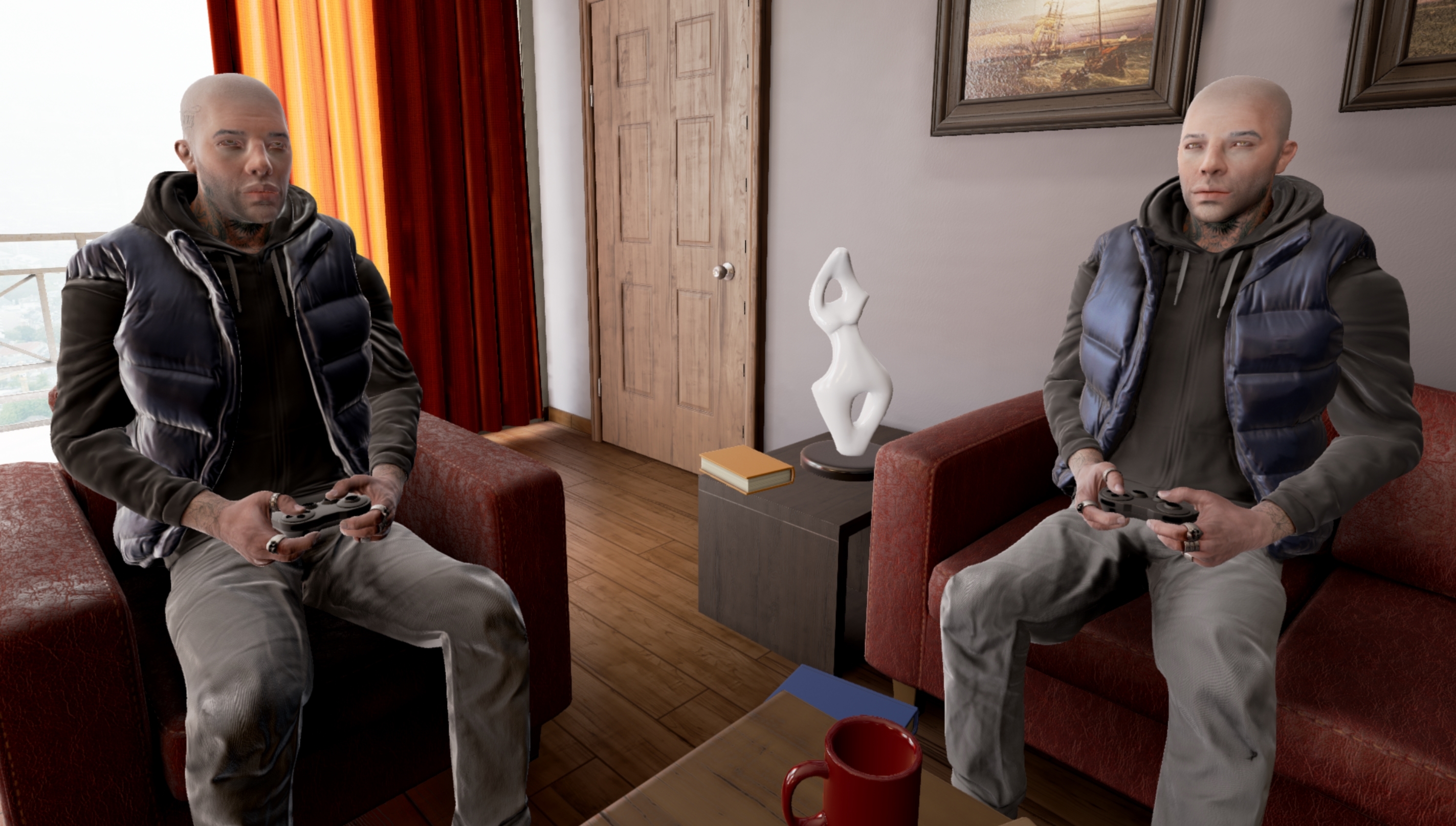
guess this is how epic sees gamers :p

 radiant haven
hm
abstract relic
The back of my eyelids are more interesting than this game
brave widget
I feel like that was the developer after 72 hours of non-stop work making that 😂
fierce tulip
it gets worse
https://i.gyazo.com/05bd77c5673b7d182fb72c6ac84059ae.gif where did she get stabbed?
 radiant haven
need someones help for some blueprint pickup
stuff in general
grave nebula
Can't unsee that now.
Actually, it is 2020 and in more developed countries 3d modelling should be on the list of jobs for prison labour, shouldn't it ?
honest vale
falcon punch
fierce tulip
@grave nebula thats one way to reduce crunch
grave nebula
You don't have to crunch if there is someone else crunching for you.
fierce tulip
exactly
and since they are in prison, they get both a work mentality, and a better job once their time is done
grave nebula
Charge people with illegal content possession, asset theft, cheating and send them to modelling and texturing camps.
tawdry storm
As of 2016, 2.3 million people were incarcerated in the United States
that's a lot of low wage manpower that can crunch your 3D Models out
fierce tulip
"blizzard fired all developers, hires prisoners instead"
"prisoners demand union due to inhuman working conditions"
tawdry storm
when prisoners have more rights than gamedevs 😦
fierce tulip
"Prisoners made a prison escape simulation, actually works"
tawdry storm
"Prisoners mod Prison Architect to suggest better prison to warden"
fierce tulip
"Prisoner X is finally free, studios around the world cry"
- He was the fastest modeler we ever had, said Todd.
tawdry storm
"Florida Man Sentenced to Death Was Set Free After Being Hired by Blizzard"
aw we had the same idea 😄
 vast fossil
sure
just get more ram in ur pc then 8gig
I have 8 ram and its always getting full
cloud cobalt
The amount of VRAM in your GPU is not a great metric of performance
vast fossil
ye thatll do it
 viral sluice
Can someone help me with animation blend problems? I have 3 montages (reaching the sheathed sword with hand to unsheathe, charging the sword for a charged attack and slash with the sword).
What I want is a smooth transition between these montages, but what I get is: Reaching weapon is played, when it ends it blends with idle and idle blends with charging, when charging montage is going to end, it blends with idle and again idle blends with slashing montage.
vast fossil
@viral sluice maybe post the state machine nodes here so ppl can see whats going on
 robust tree
it is not released @fierce tulip
fierce tulip
you "released" a new video
fierce tulip
thanks :)
viral sluice
https://i.imgur.com/jLjgjAe.png
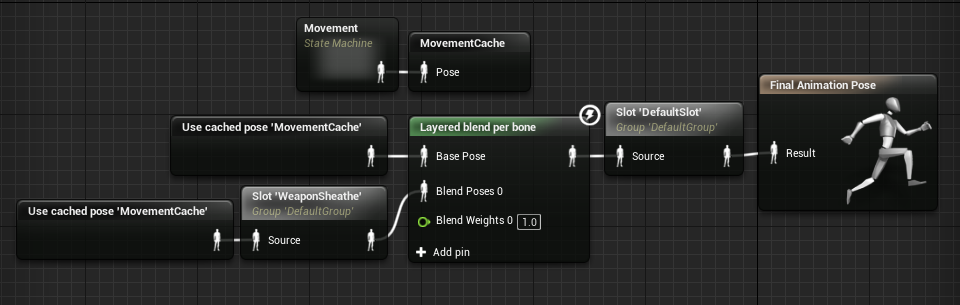
This is the animgraph, the state machine only has walk/run/idle and walk/run/idleweapon, I'm playing the attack montages in the weapon blueprint, I can upload it as well if you need it (the attack anims are defaultslot)



 radiant haven
Could SOmeone helpe me avoiding this wiggle (rotation is static so no rotation while in hand
 rapid stratus
Ok - I am having major issues with 4.24 - just want to know If I am the only one - cause then I have look ijnto other causes. Everytime I bring another app in focus and leave UE4 run in background for about a minute - it feezes up and I have force-quit it. Its almost every time. Logs are clear - it's like there are no errors it just freezes and nothing happens
honest vale
maybe it's related to the "reduce UE 4 priority in background" setting or whatever it was? 🤔
rapid stratus
I tried setting it to high and even realtime(I know - not recomended) but that doesn't solve it
honest vale
I mean in the editor settings
honest vale
I think there is, at least it reduces viewport rendering speed
so that the FPS is something like 1 or so 😄
rapid stratus
False
Sorry
tried to copy the setting name - use less CPU when in background
I will try to disable that and see what happens
Thanks
 cosmic panther
@rapid stratus Im having that issue too. and also to launch the game i have to bring something else into focus while it loads then i can go back and play, but when package the game its fine
rapid stratus
I guess we'll need to wait for an update. That CPU option didn't resolve it
just froze again
plush yew
Is there a way to keep the camera on a ArchVis character from moving up and down as you look around while moving -- pan / tilt is ok, change of elevation of the camera is not
rapid stratus
@plush yew you mean like head movement?
Or just limit player from moving up and down completelly
plush yew
ya, head movement is great, but when i look down while walking, I dont want to end up looking at peoples knees etc
player does need to be able to go up and down stairs etc
rapid stratus
C++ or blueprints?
rapid stratus
Anyway - I would suggest clamping the pitch angle
plush yew
Ok, thanks
rapid stratus
And suggest writing it in #blueprint channel
plush yew
No wo+rries, thanks