#ue4-general
1 messages · Page 628 of 1
 kindred viper
 worn granite
BindUFunction performs a text lookup by name
kindred viper
hmm doesn't even come up on the delegates page. I guess the weak ref is the key. UObject is the object, UFunction is the function with the scope
worn granite
incidentally, script delegates wanna always do text lookup IIRC
kindred viper
hmm I always use (this, &MyStaticRef::MyFunc) which I guess is the named version rather than the scoped version?
worn granite
Don't understand?
So, AddDynamicUnique, AddDynamic, and the like use a macro that converts the standard syntax to a string
kindred viper
myDelegate.BindUObject(this, &MyClass::MyFunc);
worn granite
you can do &MyClass::Function or just Function.... AFAIK
kindred viper
ahh didnt know
worn granite
BindUObject is actually a member function pointer.
kindred viper
yeah the terminology on the epic site makes it sound like BindUObject keeps a weak ref to the object whereas UFunction would only keep a function ptr ref?
 rigid ocean
God, i want to practice some world building but im not sure i got content for it
kindred viper
@rigid ocean there is a crapload of free assets in the launcher alone
worn granite
DelegateSignatureImpl.inl for more detail
rigid ocean
yeah, need to dig through them
kindred viper
I have more assets than I can eat, but I never seem to do anything with them.
 swift spindle
a glut of tools / assets can be problematic... it's good to have a vision and not get distracted from it..
this can be hard... this is where it helps to have a project that's very well defined or have people that you work with that define this for you
or you could just be a digital hoarder 😛
 dawn ether
So I am looking to render a dataset in VR as a big 3d graph consisting of points connected by lines. What would be the best path to accomplish this? I feel like having a separate sphere / cylinder mesh for each point / line would be wasteful.
swift spindle
would also be easy to instance however
dawn ether
True
kindred viper
@dawn ether Kantann charts is probably useful
dawn ether
But I was also hoping to allow zooming in on parts of the data, but I would prefer the lines / points to maintain the same screen space size (so it would just look like all the points were getting further apart)
Begining google for "Kantann charts"
kindred viper

Kantan Charts is a package of simple to use UMG chart widgets.
kindred viper
well you can put that UMG in the world as a 3d widget
dawn ether
Yeah, but can it do a 3d scatter chart? Where points are arrayed allong x, y, and z axis?
not from waht I am reading
kindred viper
I dunno. if you can't see it whilst reading, I guess that answers it. Maybe there is another more suitable for your niche
dawn ether
I am happy to program everything myself, I am just trying to figure the best approach for rendering
kindred viper
you could use splines. That gives you options for spline meshes too. For scatter, I guess that just placing items in the relative location
dawn ether
I was thinking of something like a billboard, except only turning to face you along one axis.
I guess my question is if having my lines made of 2 triangle semi-billboards would be more performant than using 16 tri cylinder meshes that don't need to rotate (goal is to render around 10k lines)
 swift hull
I saw this image in the docs
Does Epic keep a repository of sample maps like this anywhere?
 abstract relic
You can find them in the learn tab, marketplace (free and publish by them), some are posted in the forums
kindred viper
that is Highrise so can search it by that
swift hull
I wonder if I can reuse components from there in an unreal engine map
 brave widget
Oh, right 🤦 😂 Found it.
Its called "Shooter Game" on my Launcher
 normal burrow
Putt putt golf?
swift hull
afaik there are some limitations to the sort/format of assets that the Unreal Tournament editor can allow for import
normal burrow
Afaik you can upgrade them. Have not tried
Doesn’t mean you’d have rights to use them though
Not sure what defined mod use includes
swift hull
wasnt intended to be sold or anything. I'm working on a map for the Blitz game mode in UT4
normal burrow
Ah into ut4
swift hull
The highrise map, i've only been able to track down a .pak file for. The editor cant reverse it from that to an editable project can it
normal burrow
Not backwards compatible afaik yeah
But @manic pawn was saying pack files are zips
So maybe that’s all you need if it’s of a similar version format. Not sure
 rigid comet
Question: Is there a way to completely remove all building and compiling for certain platforms beyond the tick boxes in the project settings? When I rebuild from source UE4 I will never build for IOS, ever. I will never build for xbox or PS4. If some of my build time is being used on this, id rather completely eliminate its support.
 gilded plinth
Hey All, I'm in need of advice. I'm days away from finishing a character facial animation system in UE4 that i'd like to sell in the Marketplace. Right now it's 100% blueprints, but i could transfer a lot of it to C++ if needed. Either/or way, what I'm wondering is... is there any way to protect myself from somebody simply copying the blueprints and making their own version that they could sell?
And to that point, is it possible/helpful to copyright this kind of thing?
brave widget
I think thats a million dollar question for any original works/products/services people create is how to protect them. Anything you create is automatically copyrighted, the question is on how to enforce it. If someone does copy it and sell, you can do to take down notices, contact the marketplace managers, contact lawyers, etc
kindred viper
@rigid comet manually. Just go through all the plugins and modules. There isn't that many (laughs and runs away)
gilded plinth
oh, that's not great news for me hehe
I think what i created is quite clever, but it's also quite simple so if somebody wanted to, it wouldn't be hard to steal most of it
brave widget
lagauche, honestly, if someone wants to copy something bad enough, there is really nothing you can do to stop them.
gilded plinth
Considering porting it to C++ just to obfuscate what's going on
kindred viper
there is a Fortnite clone you can download. If Epic can't stop it.... jeez we have no chance :p
@gilded plinth thats not going to work. I find it easier to read C++ than Blueprints
rigid comet
You're not going to be able to protect it any better with C++
You just need to understand your risk, have an expectation of acceptable risk and move forward
You can mitigate some of that risk IF you find violations.
gilded plinth
Basically right now you just have to go into Class Defaults of an Anim BP I created and change the Skeleton to make my system work. If I port it to C++ I'd make a c++ Anim Instance class and then, the user would just have to reparent their Anim BP to my custom anim instance
or they could do the first step all the same
kindred viper
wait.. .you want to stop people stealing your idea, but then you tell us? :p /starts coding
gilded plinth
lol
brave widget
lmao 😂
gilded plinth
no this will all be in the manual i'm writing : )
 silver crown
Obfuscating will just be a bummer for legit users
rigid comet
Is your value return worth that time though.
silver crown
Ppl who want to steal will always do so
brave widget
I think you'd be alienating some of the customer base though. Considering the demographic, people generally want to get an asset to start from and modify it for their purposes. If I didn't have full control over an asset I was going to purchase, I'd pass on it
rigid comet
TBH when it comes to rapid prototyping, C++ doesn't add any value.
kindred viper
yeah thats why I dont release anything. Wait... why am I broke?
silver crown
I'd say best to focus your time on make the product for the actual users
rigid comet
With the exception to certain flexibility with other 3rd party tools
kindred viper
(just a joke, released my last plugin for free :p )
rigid comet
@silver crown has the right answer
kindred viper
I say use Denuvo in your marketplace items :p
gilded plinth
I don't know if any of you happened to notice, but a lot of facial animation systems have Unity plugins and no UE4 plugin. I wanted UE4 to have something elegant and professional - something that is better than the UE4 Kiteboy Facial Anim sample project, so I made it.
So my worry is that all these companies with their Unity plugins will just make one for UE4 based on mine
kindred viper
if you love something, set it free
brave widget
If they want to, they will regardless of how much "copy protection" you make
rigid comet
Yeah but I watch unity plugins and assets get stolen all the time.
Like you can count stolen shaders like currency
kindred viper
to be fair, most shader code looks the same
I reckon we move to "always online plugins". They phone home every launch to verify legitimacy within the editor environment. No internet, no work.
of course I know thats impractical. but if game studios can force it on us for single player games, then shit son...
gilded plinth
Hmm, my system isn't even a "plugin" just a project. I'll have to look into creating plugins incase that makes any sense
was important to me to make the whole system free of any 3rd party tools
kindred viper
I used to be like that. Now i'm like "where can I find a lib to do this?"
reinventing the wheel can often cost you more than it would make in sales
silver crown
I'd love to be able to phone home with my plugin heh
gilded plinth
ya, well iz already done so no worries on spending more time without third party tools hehe
But nice thing is no one has to worry about new version incompatibilities etc
 gilded plinth
that's always the only/main fear... that and packaging
kindred viper
honestly, updating plugins per version isn't a bad thing. I think people are just confused or lazy. All it takes is a quick compile.
gilded plinth
i feel you but just about every plugin i've ever used has at some point or another just stopped being updated sigh
the latest one is the Midi plugin on the marketplace which stopped at 4.23
silver crown
Updating is very often a lot more trickier than a quick compile sadly
Unreal is a fast moving boy
Especially lately
gilded plinth
i think after a few years many devs just naturally move on
kindred viper
never had an issue really. Only the odd time like when they added IWYU or around 4.13 time when things were a bit sketchy
gilded plinth
even UE4s built in tools/plugins stop working. Like Cloth painting with their pre 4.24 tool
silver crown
Guess it depends on what you're doing heh
gilded plinth
It's totally broken!
kindred viper
true
gilded plinth
sigh....
brave widget
Perfect example @gilded plinth. Imagine one day you move on to something new. And someone who purchased your asset is out of luck now because they can't modify what you created 😉
kindred viper
encrypt it all in a savegame object and only access it when you need. Just for the giggles :p
gilded plinth
haha is that actually possible @kindred viper ?
can you save an anim bp to a saved game that's accessible dynamically at run-time?
i don't even know if that question makes sense : P
kindred viper
technically, I think its possible, but if it would work in the "out of the box" SGO, I dunno. I know it has encryption and it already serializes, so if it can hold all your preferences in a struct, dont see why not
@gilded plinth see the new anim system solves that problem
silver crown
Meh just  it
it
and just store a TArray<uint8> in the save game
That tarray being an encrypted .uasset
that you decrypt at startup
kindred viper
sounds like blueprint only to me. Got any real code solutions? 😛
 keen shell
Why i cannot see github for ue? Page no found.
kindred viper
just check out Save Game Object
@keen shell you need to login to github and be associated with Epic Games github
kindred viper
yeah
https://www.unrealengine.com/en-US/ue4-on-github @keen shell
might redirect you obviously
gilded plinth
i dunno, docs seem a little thin so far on SGOs. They talk about setting variables, but I need to store and thereby encrypt a whole bp in it lol
kindred viper
well @gilded plinth Phy eloquently told you how to. That was some prime info by the way
gilded plinth
what did the brain emoji mean? : )
kindred viper
it will send you down a rabbit hole but enjoy 🙂
big brain. using it to solve the issue
silver crown
Means it's an overly complex solution that's totally working
But very complex for not much in the end
gilded plinth
k so Tarray with a uasset and then decrypt it
kindred viper
and you never mentioned the dynamic asset loading on the fly
keen shell
Oh can thanks @kindred viper for help
kindred viper
which is another learning curve that I kind of liked tbh
silver crown
Just extract the uasset in the content folder
And let UE do the job of detecting it
kindred viper
yeah but if you were to do this only at runtime tho
kindred viper
I did not know that, but then it will lead to physical asset on disk that can be read. Isn't it safer in memory alone?
kindred viper
yeah fun times though 🙂
silver crown
And with possible unpredicted side effects
kindred viper
mind you, the SGO is a physical asset on disk really, so eventually it would get owned. Still. great idea for some purposes
silver crown
Well
If you're silly enough with the encryption
It'd require some hacking to find how to decrypt it
gilded plinth
hmm, well food for thought for sure. thnx for the ideas... will check out this rabbit hole
kindred viper
You could use a One-time pad on it, that would probably work
 forest tree
I had the player possess a static character, is that not allowed? I don't want to be able to move this character so it's intentional but I keep getting warnings spammed
kindred viper
its a player that has a controller (hence possess) so its bound to move. It doesn't have to. But it does have to be moveable
 gilded lichen
Hello, I have an issue with a wave mechanic I'm implementing. Not all enemies are spawning (a video will help with this). I put a print string on the spawn function with a interger to show that it is firing that certain about of times.
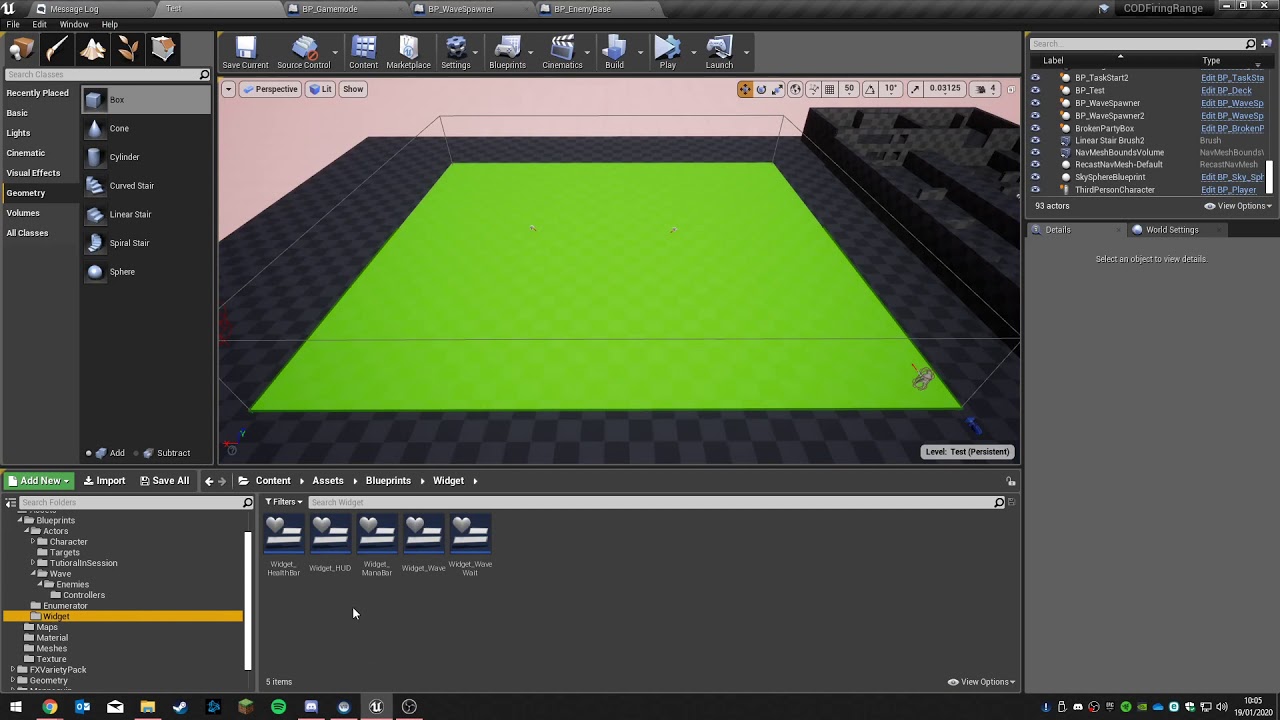
it looks like it skips the spawning of some of the enemies but I dont know why?
forest tree
Got it, thanks @kindred viper 🙂
 plush yew
I am building UE4 with source code, in setup.bat it's showing
Updating dependencies : (0/59544), 0.8/11077.8 | 0.7MiB/s```
Can anyone help me how much it will downloadIs it pausable
???
brave widget
At roughly 700 kilobytes per second, I think you need to think about an internet upgrade. Are you on dial up? 😖
If my numbers are correct, that's gonna take about 10 days to download
plush yew
Ya
 manic pawn
yes it can be paused
simply close the cmd window
files that have been fully downloaded will not be re-downloaded
 torn burrow
Hi! My unreal editor is incredibly laggy but it is smooth when I play, why does this happen?
plush yew
@torn burrow Maybe likely debug symbols? PIE is slower with debug symbols, as opposed to shipping which has optimizations. But maybe other reasons, I may be wrong...
 scarlet birch
Anyone know anything about validated gets starting to through infinite loop warning in a BP? I have a
Bp that every validated get is now throwing an error.
torn burrow
@@plush yew Sorry, have no idea what you mean... I'm just using unreal to make a level and I don't have a lot of blueprints or any code
 brazen hull
do you need a bp for a model to use it as a playermodel? Is bp where you connect the anims to the model or can you connect it in the skeletal mesh itself
plush yew
@torn burrow If you're not using Visual Studio and C++, my explanation is likely wrong, I can't think of anything else at the moment
torn burrow
Ah okay, well thanks anyway 👍
 sudden barn
May I ask the people the people that I was discussing with yesterday - was I painted to be some sort of insolent bad guy?
Well, don't need a C&D as proof of wrong doing. C&D isn't always justified
- @normal burrow
I totally get what was spoken about, and it seems as if I was painted to be this wall of imbecile character
I just want the ones from yesterday to realize that what was noted before is something I am clearly aware of, and that the only reason I went into details was because I felt like giving a bit if information in the situation we were in. Instead of taking it into consideration, it was taken in as a ‘response to an argument’ and somehow made you guys feel the need to go on as if I was trying to argue against very plain and simple facts out there.
I just felt like that conversation was left very uncomfortably
And I really felt bad and as if I had commit a HUGE crime when all my intention was and is was to make sense of why we were doing the indie-project. I just feel screwed over, and had to quickly express that.
It’s quite weird that people read it as quickly as they did yesterday/judge, but rn, I am getting shunned.
I really just want closure from, what felt like; character assasination from yesterday.
——
Sorry in advance for going on about this but I feel like this wasn’t resoluted well enough.
abstract relic
Random pat ping +1
 exotic thicket
I saw the conversation and frankly I'm pretty sure most people would have forgotten about it in a week :D
abstract relic
Most forgot about it within a few hours
scarlet birch
For my question the error just pointed to the wrong thing. I have no idea why it was flagging the get nodes but there was an error that should have kept it from working from the get go. I have no idea why it worked for so long before flagging it.
abstract relic
What was the error in particular
scarlet birch
A BP started flagging all the validadated get nodes as infinite loops. If I removed one node the error just moved to the next validated get node in the bp.
sudden barn
Sorry @abstract relic. Just felt like expressing that. And the quote was mentioned by pat, which was why I tagged him
scarlet birch
There was an infinite recursion error between that BP and another, but none of the nodes it was flagging where in the execution of it.
sudden barn
Idk why but that just bugged me quite a lot for some reason.
scarlet birch
Once I fixed that the errors went away
sudden barn
And I felt like giving a last expression before going on. It may just have to do with the mere fact that I deeply care about the intellectual property of others and the overall laws internationally, and it felt like I was portrayed in a negative and reverse-way
scarlet birch
As long as you don't act in a pattern people tend to move on pretty quick
abstract relic
Are you able to reproduce it Mike? Let’s say in a fresh project. I’m curious if it’s the case of an odd infinite loop check. Something worth reporting if so
scarlet birch
I doubt I could reproduce it. I mean I could try. The BP should have never worked to begin with due to the recursion error but it was working for some time.
abstract relic
People felt that the conversation was going in a loop. Nothing more Karam
sudden barn
It wasn’t really something about a heated argument, but I just felt uneasy ‘bout how I was portrayed, and now I feel unjustified and unresoluted (very uncomfortable and without closure) on how it all ended without a last quick, mutual understanding
Yeah, same
That may have been why the impact feels so heavy on my side I guess
I am so weird I know
Sorry in advance
exotic thicket
lol you worry too much :)
abstract relic
Consider it a reset. Work towards the future 🙂
sudden barn
I just care too much about adhering (to any rules and respecting them accordingly) and being perfectly well with everyone
Idk, I just felt very-not in myself, and yeah
I do worry too much
scarlet birch
It might be an unusual situation. I have "room controllers", spawn triggers, spawners and other BPs that interact with each other to manage mobs, hazards etc.. a trigger and a room controller were calling each others reset interface in an infinite loop.
sudden barn
Thanks for quickly giving me a Lil reply y’all
I guess that’s enough closure for an off-topic spammer.

Now, I’ll shut it and let @scarlet birch get on with his on-topic stuff
scarlet birch
nah, I don't have anything useful to add. It was a stupid error in logic
I think I understand why it was doing it. Rather than going to the specific get node that was being called within the loop clicking on the link in the error log was taking it to the oldest get node in the BP. Probably something with the search fucntion. Looking at the callstack it points right to where the error was.
 rancid lynx
if i walk EAST inside a BOX Collision, it triggers Overlap, if i walk WEST while INSIDE the box collision, it triggers end overlap. . . . as shown in this video. why. what the hell https://www.youtube.com/watch?v=2NW4FF0aiPc&feature=youtu.be

view direction doesnt effect anything, only movement direction. what the trash ue4fk
do 5k collision boxes just suck like that?
well, actually, its a plane with collision enabled, not a box. maybe ill test that and rule that fail out
yea. the issue was, plane collision. trash. changed to box collision, works fine.
 rotund scroll
@rancid lynx have you debugged it to see why it is happening?
rancid lynx
i dont know how to debug that, other than using prints to see what triggers stuff, but i already know whats triggering and when
i dont know how to debug. but, plane collisions had the bug, box collisions do not. so thats at least a for- now- hack.
how could i debug it? id love to know why.
--- New Question. Timelines are much cheaper than ticks right? ? i mean, if i do math inside the timeline, why would that be cheaper than a tick? shouldnt it update every frame both ways ? so shouldnt it be the same as a tick ?
plush yew
how do i check if a hit was the ground? for some reason it doesnt think it's a valid actor as it isnt a bp
ground is box brush
rotund scroll
@plush yew what is your class that you're using to check the ground?
scarlet birch
@rancid lynx It's not about the operation itself being cheaper. It's that tick always runs and timers/timelines etc.. can be set to only operate when needed.
 upbeat tendon
Are there any guides on how to use EOS with UE4?
 whole quarry
Step 1: make a image with an arrow that will be the cursor
Step 2: make a widget, add image, set image to your cusor image
Step 3: add widget to viewport
Step 4: done.
Pls tell how to do it then
Seems like you already know it and like to play trivia
Intersting gameplay
You need a fake cursor
Just make a widget that holds the fake cursor image and use linetracing for your clicky gameplay
Imagine if the cursor changes to a hand when you hover over an interactable object
 jaunty quest
Has anyone noticed problems with character/font encoding in 4.24?
My project was in 4.20 and I was using the font Myriad. Everything worked fine, specific characters, ASCI characters like "→", localization characters like chinese, russian, spanish, etc.
But after switching to 4.24, the font does not handle any of those characters
whole quarry
why are you setting it to x 0,5 y 0,5 ?
i just awnsered your question >.>
why do you need the mouse in the middle?
 twilit grail
Hi sorry for this weird question but, if one where to add a new module onto a custom plugin. Is there a way to add them similar to a c++ class or would you build the file structure manually?
whole quarry
why do you need to show the mouse at all?
normal burrow
Ever opened a window and it randomly centers the mouse?
whole quarry
what?
mouse is center when you do that
you'll have to make it..?
👀
easy, that was like 30 sec work
what thing?
what do you have?
lmao
thats a shitty way to do it though
unfunctional
 weak sorrel
hey there. I know UE4 is suitable to make browser based game. But is it possible that the game is responsive so you can also connect from a tablet/smartphone web browser and play it (without having to export it as a native app)
whole quarry
afaik HTML5 has been discontinued
weak sorrel
I thought that the community is taking it back
whole quarry
that is new to me
weak sorrel
that Epic jsut gave it to the community so we can continue
exotic thicket
I would assume that being responsive in browser would effectively just mean having a different resolution
weak sorrel
Developing games for the HTML5 platform.
exotic thicket
So if you resize your browser and the game still functions, that'd probably work on mobile then
weak sorrel
thats awesome
weak sorrel
@whole quarry I also thought for a while that it was discontinued until I saw this in the doc
whole quarry
im happily suprised by it, definitly going to take a look at it
 wary wave
I mean, that description basically says it's discontinued
weak sorrel
yeahhh I'm so happy they did that. It's going to be much easier to accept PRs now for sure
well discontinued by Epic
but the community can still work on it. I hope there will be osme traction
 shell jetty
i got like bad blood from it
manic pawn
translation: html5 is dead
shell jetty
nothing is dead when someone use it
shell jetty
wait for HTML7
 dim plover
Would people even use HTML6+?
shell jetty
well if UE4 WebGL could be better right?
normal burrow
Idvc: Final Fantasy Seven
Are there more than ff7?
Are you referring to fan things?
Shrug
upbeat tendon
@lapis vine any eos tutorials you might recommend?
 lapis vine
No, that what I wrote, just below my reply to you :)
I think I did before few, but don't remember anything. Guess you will be fine with whatever you land on 👍
upbeat tendon
fair enough
weak sorrel
@shell jetty do you think UE4 isn't really suitable for browser based games ?
shell jetty
@weak sorrel it depends but signal what that html5 thing send is not sogood but I guess itwas better if it was WebGL as one platform so html5 for community then comes good
exotic thicket
curious to see whether further WebAssembly support will improve performance further, I've seen some pretty fancy WebGL demos already
shell jetty
now that webassembly is officially fourth language for web dev
wary wave
given the size of packaged games, UE4 is terrible for browser games
normal burrow
browser may be terrible for games too.
I am surprised at how fast things change in browser world though. web assembly is a thing
exotic thicket
It's been for a while, I think stuff that cross compiles to browsers like Emscripten has used it for years now
normal burrow
maybe two years exactly hah
exotic thicket
for example DOSBox has been compiled to run in the browser using Emscripten, which is what I believe archive.org is using to run DOS games
You can also run Windows 3.1 or even Windows 95 in browser using it lol
normal burrow
yeah emscripten has been around for a long while, but web assembly makes your c++ -> js not 80mb
exotic thicket
yeah
upbeat tendon
how alpha is EOS?
i just tried to add another account to my organisation and it keeps telling me the token is out of date
shell jetty
have you seen diablo game in browser?
 hidden heart
wasm is indeed cool https://medium.com/wasmer/wasmer-io-devices-announcement-6f2a6fe23081

Medium
We are excited to give a sneak preview into an experimental feature we are working on, called I/O Devices!
 opal ocean
My navmesh wont rebuild >_< I deleted a temp BSP brush, and its still there in the nav data. Plus I made it bigger and it wont rebuild
Clicked on Build, and still nothing
restarting editor got it to rebuild navigation..
brazen hull
How can I use a skeletal mesh as a actor without bp? Atm its just posing and dosent wanna play any animations
 worthy flame
im not sure how this is called on the right side, there is a drop down menu, like if you create variables but you have drop down and you can select something and it stays there. does anyone know what this is
I dont know how to explain it better
normal burrow
Details tab?
worthy flame
yes
like this for example
but I will add the selected things under it
I dont know how this is called so dont know how to search on google
 uncut vigil
Enum variables?
worthy flame
yes
yup figured how to do it, thanks @uncut vigil
how would I make a if BP with enums? if this is selected then do this.? @uncut vigil sorry for ping
uncut vigil
yeah
worthy flame
ok thanks
 autumn wind
how much ram do i need to run unreal
i have 8 gigs
and it crashes
with memory error
normal burrow
depends on how much you plan on doing with it
wouldn't go lower than 16gb though
if your using integrated graphics, that'll chew into your memory
 grim ore
@autumn wind you need as much memory as your project needs, there is no hard answer. UE4 wil run on 4gb but that doesn't mean much
You can have a decorator on your main loop (assuming you are using a BT) to check for the player being alive and have it turn it's mode back to whatever you want. You could have the decorator on most of your nodes so it aborts the current action when the player dies for example
brave widget
@thin stag #gameplay-ai
brazen hull
trying to use skeletal mesh as playable character without bp. But anims doesnt wanna link
they play on base mannequin skeletal mesh but not on custom
wary wave
"trying to use skeletal mesh as playable character without bp" - what?
brazen hull
Apprently there is a way I can use it as a actor without a thirdperson character bp
wary wave
if you want a controllable character, use the character BP
brazen hull
because there is a character selection system where I can only use skeletal mesh as option it works on the mannequin
grim ore
the animations are linked to a skeleton, is this skeletal mesh using the same skeleton as the animations are using?
brazen hull
The model uses same skeleton as mannequin
I can test and preview etc and all that in ue4
grim ore
so when you double click the animation you want to play it opens the animation window and it shows it playing on that mesh?

 grim ore
ok, on your skeletal mesh actor in the world what are you telling it to play?
grim ore
well how are you trying to tell it to use those animations?
its in the animation section in the details panel on the mesh
brazen hull
 grim ore
ok so are you trying to get it to play an animation while it is in the world?
brazen hull
while I use it yes
grim ore
I think the reason someone mentioned you need it to be a character earlier is they assumed you wanted it to be a character but perhaps we are missing something. What are you trying to do.
 karmic cloak
Anyone got a realistic wolf pack + attack black board?
brazen hull
Got a model selection system. In the system you can only use skeleton mesh and I am trying to make this skeleton mesh work but it doesnt play the animation.
The mannequin aka base selection model does work
grim ore
ok in the details panel is a section called animation
in there you set the animation mode and what it should use for animation
either an individual animation asset or a full blueprint graph
brazen hull
in the details panel of the skeletal mesh?
grim ore
no
brazen hull
o
grim ore
Skeletal Mesh is not the same as a Skeletal Mesh Actor
thats why I was asking if it was in the world. The Skeletal Mesh Actor is in the world and it contains information on the mesh to draw (the skeletal mesh) and other settings such as the animation to use
brazen hull
It is not in the world before I change the model in the menu.
grim ore
ok so then we have no idea how this pack you are using does this, how does it do it for the default mannequin?
there might be code somewhere that is setting up the animation when you change the mesh
brazen hull
I tried doing the same as mannequin but it work either
replaced mesh directly same thing
which is what I dont understand
grim ore
each skeletal mesh will have a skeleton linked to it. Each animation will have a skeleton linked to it. You don't have the same skeleton being used for the mannequin and your custom mesh so telling it to use the animations for the mannequin on the custom mesh is why its not working
you need to find where its setting the animation to go along with the skeletal mesh and swap it out
 tender flume
@grim ore Do you know how to fix the LNK error?
grim ore
but we dont see your code or what you are using
abstract relic
Having fun MathewW? 😜
tender flume
LNK1181
brazen hull
ok ill do some testing
 thin stag
@grim ore How do i do that? I cant call functions in decorators
grim ore
@tender flume paste the entire error log on somewhere like pastebin so we can try and help you
thin stag
right now i only have one function in the decorator,which is Perform condition check ai,
 open eagle
 open eagle
grim ore
open eagle
grim ore
@thin stag why cant you call functions? You can call pretty much any code from there to do your check. I dont know how you deterine if your player is alive but you can certainly check for that during the decorator perform condition check
open eagle
grim ore
@tender flume error log or nothing, we dont know what error you get or what causes it because we arent you and cant see what you see.
 normal burrow
@open eagle squigglies == ignore
tender flume
2 errors actually
This is for the LNK error.
Top is not that necessary i think, i only encounter this error now
 fierce forge
hello , how i can reduce shadow quality of a mesh ?
normal burrow
Shin-kun i take it your trying to install a plugin?
tender flume
Yes
grim ore
@tender flume the error is your plugin is not compiling
normal burrow
yes but it does not have everything in it.
or instructions on installation are wrong
tender flume
Uh, the instructions is
Use the normal plugin version
then take the Source folder
from the UE4 access-only github page
but i only have it in the project folder
Should I place it back to UE4 plugins?
normal burrow
plugins belong in project folder unless they are bad,
normal burrow
this plugin requires something that you don't have or it did not come with
abstract relic
random pat ping +1: 2
tender flume
"Module was mostly likely not flagged"
grim ore
tender flume
Thanks @grim ore and @normal burrow for trying to help.
The github had tiny info on what to do
normal burrow
assimp is what you need, some library for it.
grim ore
ignoring this issue, this is concerning lol "Compiling D:\Softwares\Epic Games\UE_4.23\UE_4.22\Engine\Intermediate\Build\BuildRules\UE4Rules.dll:"
it looks like you installed an engine inside an engine
normal burrow
D:\Softwares\Epic Games\MyProjects\SevenTsu422\SevenTsu\Plugins\VRM4U\ThirdParty\assimp\lib\x64\Release\assimp-vc141-mt.lib'
it looks there
it do not find.
grim ore
did you click the link I gave you, it tells you where to get the code you want for releases/packaging
grim ore
I would assume all inside the VRM4U directory and that would go into plugins folder just like the repo shows. The folder has the thirdparty/assimp stuff that is missing in your error log
 normal burrow
it happens
grim ore
plugins suck is why lol
normal burrow
yea that too gg.
every plugin is like: put me to program files unreal engine (where you should be like, no)
rotund scroll
does anyone know if there is a class that can implement a utlity event like OnAnimChanged?
tender flume
Oh so I have to transfer all
To where?
The project folder?
Or UE engine plugins?
 normal burrow
wait
grim ore
@open eagle based on this https://docs.unrealengine.com/en-US/Programming/UnrealArchitecture/Reference/Functions/Specifiers/index.html i dont think you need _implementation for implementable events is the issue
tender flume
4/23 now.
9/23
So this is not an engine issue?
I downgraded till UE 4.22 just to attempt to fix it
And even to the lower after UE 4.22
normal burrow
wait for 23/23
normal burrow
then it worked, i don't think it would be an engine issue
abstract relic
He is
grim ore
there is no way to know since it's a plugin. Something might have changed recently but the fact its a source plugin is atleast a better chance it works
tender flume
What about 4.23 then?
normal burrow
lol
tender flume
A much better option?
grim ore
doesnt matter what version you just have to ^^
grim ore
just delete the intermediate and binaries, make a copy of the project if you can, right click the .uproject and change it to the next version, open it up and let it compile, and pray. repeat for each version
tender flume
That means it has a backup yes?
normal burrow
i've found praying to not be the most effective thing with vs
grim ore
if you make a copy and only update the copy then yes you have a backup to go back to in case it fails
tender flume
I've got a question then why does VRM have 2 versions
One for public. One for UE4 github private only page?
If public cant compile at all
Why is it even there in the first place?
grim ore
you cant share the private UE4 stuff outside of the locked ue4 repo
so maybe for someone to look at/examine/test
tender flume
Oo
grim ore
and the other stuff requires you agreed to the UE4 license which is a requirement for sharing the code
tender flume
Anyways thats a nice profile pic.
normal burrow
its not open source yeah
tender flume
I'm glad you didnt see my 4.2x folder yet
The older versions were installed in:
4.23/4.22/newversion/4.2x
One more thing
Then how do people view the maps in the plugin itself? Theres maps.
normal burrow
@open eagle need a compile error then, there be nothing i can understand from those screenshots alone
grim ore
turn on the plugin content, view options in the bottom right. you also might need to enable the engine content checkbox as well
normal burrow
ah gotcha, yeah hard to know if thats compiler or intellisense errors but glad you got it
open eagle
I just didn't know that BlueprintImplementableEvents can not have the _Implementation at the end in the .cpp
tender flume
Question.
How were you both able to tell it didnt compile?
It didnt mention anything related to compiling. There was no keyword
normal burrow
you sent us a log file
tender flume
But that was a log file only
normal burrow
it stated why it failed to compile inside.
tender flume
Oh.
normal burrow
grim ore
the link error was related to a missing file during compiling (making the .exe)
grim ore
yep so its missing
normal burrow
missing would be the assumption yea
tender flume
Not that the file broke?
grim ore
thats what it means when you get used to it 🙂
grim ore
not likely the file broke, if it did it would give another error
but yeah if something didnt compile earlier to make the lib, or the lib was missing that would be the erorr
grim ore
no idea honestly, never used the plugin but that makes sense
normal burrow
a conversation to have with the people who make the plugin and license its use to you.
tender flume
Oh lol
grim ore
linker errors are when it takes all the small parts of the source code and tries to put it all together
grim ore
so the error was because it was missing one of the small parts
no idea on that one, have to try to find out or just stick to what it says
tender flume
Alright
But what are necessaries to compile code with?
Earlier I had several errors till I ticked NET.
NET,Game Development and C#/C++ in Visual Basic Installer.
 vital jackal
so my character t-poses when pressing play yet in previews it's all correct and shows its animations, anyone knows what might be causing this?
tender flume
Are these 3 necessary?
normal burrow
vs2019 will work, if they say it won't its because they don't give you the library files for it. so stick on 2017 if thats the case.
tender flume
But it doesnt work without the NET and C#/C++ ticked.
I followed that setup and it gave me several errors
Only after ticking then it fixed?
normal burrow
Yea your right. I think they started requiring that and nuget in 4.23
tender flume
Is it normal for it to compile really long if its compiling 9k shaders?
normal burrow
yeah
tender flume
Alright
Thanks
@normal burrow
Can I install Visual Basic to Drive D?
Instead of Drive C?
grim ore
@vital jackal is it using the same character? is it auto possess or using a player start
normal burrow
shin-kun does it allow you to?
vital jackal
@grim ore it's an enemy using the same skeleton and anim bp, it's always worked fine and now for some reason it just t-poses
very weird
 next badger
@tender flume why do You even ask about Visual Basic?
next badger
It's preferrably to install to C, cause part of files still will be on C, no matter what
normal burrow
yeah, would be preferable. but if it allows you to, you could. I wouldn't be surprised if it don't though
grim ore
@vital jackal my only thought at first is you are doing some check for the actual class and it's failing, the preview might be using the valid check in the editor which is why it's working but in game its failing when trying to cast and its causing it to not run
otherwise try getting out of the editor while its playing and check the enemy to see if it's using the correct animation setup (shift-f1 to escape) and also check out the debug instance of that anim bp to see why it might be failing at runtime
vital jackal
found it!
thanks mate, I undid a node I had and it worked
this was running on beginplay
I'm guessing it's the target I'm using
grim ore
well yay for it working again
abstract relic
Whoops. Missed it. Random pat ping +1: 3
normal burrow
I think matheww is in the lead though.
vital jackal
everything works now, cheers! @grim ore
abstract relic
I can’t keep track of that. He gets too many pings throughout the day
normal burrow
aye lol 😄
rotund scroll
is there a way to limit how much IK can push an animation to bend?
perhaps even in limiting which bones it uses?
normal burrow
yeah
grim ore
yay it works 🙂
rotund scroll
@normal burrow do tell if you know the answer 😉
normal burrow
that red area is a no go.
foot can't go there.
pretend those circles are centered on the leg points
so if you don't put the ik point near that impossible radius, it wont bend all the way.
normal burrow
as far as a literal limit, there is no such setting in two bone ik node.yeah space is irrelevant really
just length of one bone to next bone, red redius is longer bone - shorter bone
rotund scroll
I'm just trying to make the knees not flip back into the body if the anim goes too low
normal burrow
then you'd need to lift the pelvis or put foot through floor, or move it yeah
rotund scroll
lifting the pelvis is an option
so essentially perhaps it is the distance (long bone - short bone) I need to use to readjust the pelvis if it is above a certain limit?
that was badly written
normal burrow
its right but yeah, exactly on the red line would be 0 degree angle at knee
so you probably want some distance away from that figure yeah
rotund scroll
if(dist(long, short) < LIMIT) {//lift pelvis by formula}
normal burrow
yeah
just, don't use the bone position from last frame to do it probably. like pick a point that generally represents the pelvis to find distance to the ik target
normal burrow
well if you just state 40 cm off the ground 0, 0 is pelvis home
you could do it in event graph that way. you don't want exact precision unless you've got one node doing both feet (and you likely don't want 0 degree angle either, so just some tolerance is probably ideal)
rotund scroll
I would need to find the pelvis per animation as well right?
since the center of gravity per anim might be different
normal burrow
depends on how wildly your pelvis location changes in them
i assume this lift may be something you'd only need in a crouch but idk
rotund scroll
no more than stand/crouch
where crouch is about stand/2
could be, that's true
I didn't consider that
fierce forge
how i can put on my game steam workshop support and a mod just change some settings (the mod will not add maps or models) ?
forest tree
Is there a way to have complex collision calculations (per poly) for characters, like we have for other static meshes?
I can't seem to enable it on the skeletal mesh
normal burrow
want to say there is no way of doing this
You could read up on how doom 3 does hit detection
but otherwise no not really built in by any means
forest tree
Hmm, I got very inspired by how The Isle is now incorporating physics into their animations and it seemed like the parts of the skeleton were colliding individually
normal burrow
doom 3 also doesn't do it for like, collisions. more just gun shots
forest tree
For example, a tail being dragged along a wall
Not precisely the same thing, but doesn't it imply there is support for such a thing?
normal burrow
no such support
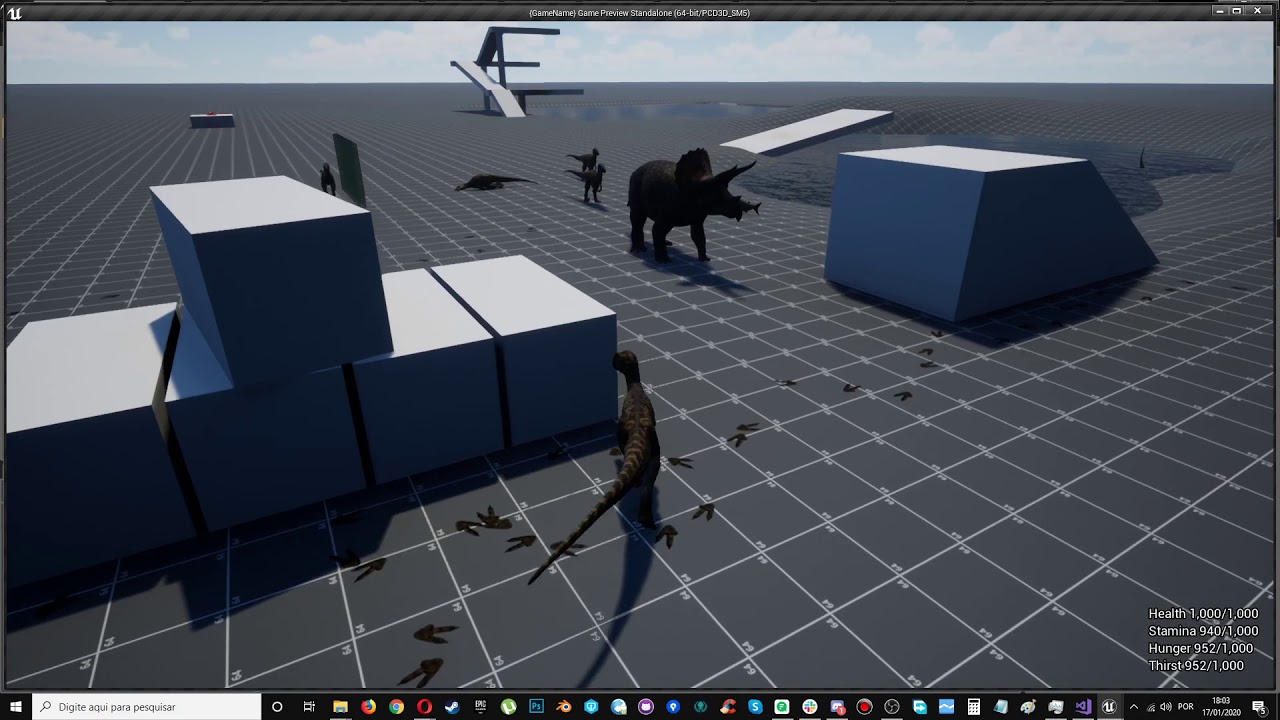 normal burrow
couldn't tell you exactly what they are doing, but i suspect a physics asset and or long chain of nodes
forest tree
But that is not a system that replaces the CapsuleComponent, if I understand correctly?
normal burrow
last thing i would expect would be using the triangles on the mesh really. but anything is possible
wouldn't assume they are using any capsule there
but the skeletal mesh collides through its physic assets regularly
forest tree
I mean to say, those are different systems, right? One does not replace the other?
Different use-case
normal burrow
correct
things that can collide in the engine are referred to as primitives (primitive components). Capsule is a primitive component, so is skeletal mesh
 brittle gulch
Do we really need to bother with HISM now after 4.22? Since there's auto-instancing
normal burrow
would look into the extents of auto instancing. believe there is still purpose to manual use of ism
forest tree
things that can collide in the engine are referred to as primitives (primitive components). Capsule is a primitive component, so is skeletal mesh
Doesn't that imply I can handle collision on the skeletal mesh instead of on the capsule?
brittle gulch
Yeah maybe there is, but if we talk about simple level design? Like creating building and such. @normal burrow
normal burrow
you could dean, but character movement component wouldn't do anything for you without the capsule
you can do whatever you'd like but it becomes less understandable to have it be a Character dean
fierce forge
hello , how i can add workshop support in my game ?
forest tree
I see, gotcha. Thanks @normal burrow
normal burrow
MaxParata, I think as far as things that are placed in the level and do not move, auto instancing may be enough but i'm not entirely sure tbh. I dunno how it works with lightmapping for one
you'd really want to read somewhere the limitations on auto instancing and how it works i guess MaxParata. Not just for when it works but when it does not work etc.
rotund scroll
@normal burrow I figured the distance, it's basically the trace distance I use for IK. I'm not sure how I can get the rotations of each bone to affect this distance however
normal burrow
can't really calculate a rotation on event graph with accuracy regardless cranz. You just want to find some factor of distance to the red zone that properly lifts the pelvis by some amount fuzzily
brittle gulch
yes, that's right. I'll try to get more info about that. BTW, how does HISM work with lightmapping?
normal burrow
I expect that it does not.
It may though, I really am not sure
query #graphics max. you'll likely get an instant answer
brittle gulch
Alright, thanks for helping, I'll jump over there
rotund scroll
@normal burrow roger, thanks my dude
forest tree
@normal burrow If I may clarify the reason for my question a little further: these are seemingly somehow the collision capsules Unreal uses.
Which is quite far off.
I think I'm probably doing something fundamentally wrong 😛
normal burrow
The thing is, the top is a physics asset i'm assuming and the bottom is a capsule component.
forest tree
It's the same character
normal burrow
The movement code for characters, rely on the capsule component
forest tree
Just one in the blueprint viewport, other in the PIE
normal burrow
yeah i understand they are the same mesh
but the Character blueprint is more than the mesh alone.
You shoot the mesh, move across land with the capsule
they serve different purposes
 fresh fractal
Hey, how do you unlock files ue4? ( svn source contrôle )
rotund scroll
@normal burrow unfortunately it seems like the distance used for pelvis will just cancel out the IK to some degree, so one foot might not touch the ground if the ground is uneven between feet
I suppose it's bordering on an impossible problem to do by distance since you either get incorrect results or the IK corrects too many bones
normal burrow
Yeah, may want to make a curve asset or something to resample the amount. but it'd be hard to address generically.
rotund scroll
to be fair I did do it by just moving the capsule instead of the root bone
but I'm not sure that would even change anything
normal burrow
pelvis would be the one to move yeah, the capsule is the actor location itself
since its the root component
rotund scroll
I would have to balance the IK between both legs essentially to let one leg pick up the slack of the other leg, if the other leg is too tight
normal burrow
yeah its complicated for sure
rotund scroll
@normal burrow ah right I remember the issue. I can't actually set the root bone in event graph
but I suppose I could transform it in animgraph
open eagle
this seems like a really dumb question but, how can I switch text based on a bool
Like, spit out one string if the value is true and spit out another if it is false
brave widget
Branch node 🤔
open eagle
I know that,
normal burrow
select string/text?
open eagle
I mean just two different strings
oh yeah
I forgot about that
is there a way to switch on actor class
rotund scroll
@open eagle there isn't. enums come close, but if you're switching on actors there might be better ways to achieve what you want to achieve
open eagle
like, if my hit result is a pawn, spit out one string and if it is a static mesh then spit out another
rotund scroll
is it like a for bullet decal
open eagle
no it's for my reticle color
because I am line tracing on tick
so if my trace returns a pawn, make the reticle green, if the trace returns a static mesh, make the reticle blue
rotund scroll
do you need to recognize anything but pawns?
open eagle
nope
many things
certain kinds of pawns, water actors
I just want the variability beyond a bool
rotund scroll
select nodes are the usual go to for stuff like this, but you cannot use those in the case of a class
I think collision presets have an enum you could do a select on, if you update them in your project
that's probably the closest thing
 marsh swallow
On a scale of 0-2400 for time, how do i extract the current Hour/Minute?
I am trying this but that does not seem to work
marsh swallow
very random times. lol
rotund scroll
ok but the structure works?
rotund scroll
@hushed hare is it inheriting from the SaveGame class?
rotund scroll
try to breakpoint it and see what happens
 fallen marten
Put is valid before the cast to check it. It it's false print some text
Could be a null input reference
 hushed hare
so like this
fallen marten
Yup
hushed hare
it failed bruh
fallen marten
So your load slot is empty then
rotund scroll
if you do a breakpoint you can see what's happening real time since you can read the values
swift spindle
anyone know why "new plugin" only shows Content only ?
fallen marten
Check the name input
hushed hare
so if its not valid should i create a new save game?
fallen marten
Yes
hushed hare
to avoid name input troubles i set it to a variable
 jovial pollen
anyone know how tf you fix this?
I need to get this build of the game out today and I dont know what the problem is
swift spindle
looks like you have some material issues
fallen marten
You just have to follow the error trail
swift spindle
or your cache is busted
fallen marten
Find whatever the errors reference and double check them or recompile them in the engine
No quick fix here bud
jovial pollen
its the fuckin shadercompileworking thing
ive had a problem with this when importing a mesh
how do I fix?
brb I think I might have an idea
the mesh is still in the engine
ima go delete that
alrighty I deleted the engine but it seems that everything is gone now
jkjk im not that stupid
so far so good
no that didnt fix it
dawn ether
I am still a bit confused about the difference between transform vector and transform position
 limpid surge

Anyone know if there's a setting or a way for me to achieve the camera behavior on the right rather than the UE4-default camera behavior on the left when resizing a game window?
normal burrow
@dawn ether a location is the difference. transform position will take a point in space and turn it inot a point in another space
transform vector will take a direction, and move it to another space
dawn ether
My billboard thing that only rotates around the local X axis is working, but now I want to scale it and things are going wonky. Nothing happens if I try to scale along the x axis in the material, though it works fine if I scale the mesh along the x axis. But if I try to scale along either other axis in either the material or the mesh, the width of the billboard will change based on its rotation instead of being a constant.
Oh, an the mesh I am using is a 2 tri square with the pivot in the center
fierce forge
why is this blendspace animation so suddenly ?
fallen marten
There are a couple ways to smooth it. Either make a state machine that has a walk to idle animation play when your speed is almost zero, and then transition to idle, or you could ease your speed to zero through code. Really, a bit of trial and error will Inevitably give you the result you want
 brave lark
I've seen that incredibuild can speed up shader compile times by distributing the tasks across some network devices. Are there any alternatives to incredibuild for this. It's way too much money
 royal cobalt
anyone know why i always have to connect to source control manually each time i open the engine?!? D:
dawn ether
Ok, my brain meats are exhausted. Here is the material I have been working on. Let me know if you know what I am doing wrong with my scaling.
normal burrow
should be using transform position on a position ciber
dawn ether
I have used every combination of transforms that I can think of
none of them be working
normal burrow
what did the working but not scalable material look like?
dawn ether
exactly the posted blueprint
it just wierds out when scaled
I know its got somthing to do with the way I have things plugged into "RotateAboutAxis"
I have tried doubling the x axis both before and after the rotation, but it has no effect
rotund scroll
does anyone here have some experience with event dispatchers in blueprint not working when used from a variable? the variable has the "Add Event" and creates a physical event in the event graph, but that event never gets triggered
grim ore
can you show how you have that set up?
rotund scroll
@grim ore
grim ore
ah so it's an on clicked event, not an event dispatcher?
I mean it's a built in event on the object
rotund scroll
@grim ore it's an event dispatcher from a variable
the same thing happens with any other delegate/dispatcher from another variable
grim ore
I think I am just confused on what you were trying to do
rotund scroll
I have a delegate in one class
grim ore
which blueprint is that event in?
grim ore
so you have a custom player controller correct?
grim ore
a custom one called On Clicked?
rotund scroll
I am implementing said dispatcher in the character
OnClicked is just an example, it could be any dispatcher
grim ore
I ask because that event is part of the controller so you cant make a custom one, hence the confusion
rotund scroll
it's the same for all dispatchers
grim ore
my only thought then is your variable is invalid before you attempt to bind the event to it.
rotund scroll
the point is, as in the image, you can see that when hovering over the variable
you get the events in green, with a plus on
that is supposed to be a shortcut to create dispatcher events, and I have several dispatchers like that setup
unfortunately they do not seem to function
I'm not binding it manually though, I'm binding it through the shortcut
but I do agree that it's likely an invalid variable
I don't know if I can pass the reference to the player character directly upon spawning the character so I avoid these shenanigans?
grim ore
ok I see what you are saying and I beleive what you are trying is not going to work/intended way of working. those event would have to be inside the actor itself to be called as they are events inside the actor and without binding to them you won't be able to get a callback to this third party
rotund scroll
if it's not intended then why is it available? when I select the variable in the blueprint outliner all the events, including dispatched events, show up
if you do have the editor open I encourage you to try it as well
grim ore
I do and did I just tested everything I said
which is why I said it's not the way you want it to work
rotund scroll
well again then why is it there in the first place?
why do I have the option to create these shortcuts event bindings when they are non functional?
I think it is intentional
grim ore
they are functional inside of the items they are intended to work in
rotund scroll
but that it likely requires the variable to be not null at beginplay
plush yew
is ShooterGame a item based on blueprint
grim ore
well if you try doing it to something that exists on level load, like a mesh in a level, inside the level BP it's still invalid
rotund scroll
@grim ore well it seems they are intended to work within other blueprint classes as well, seeing that they are available as an event on a variable of that type
grim ore
yep I take that back, if you set it at design time it works fine
I've just never had a reason to do this so the actual reason process behind it was confusing
rotund scroll
it prevents a lot of rewiring and using bind event functionality
makes the blueprints super readable
anyway so my follow up question is
can I pass a controller reference to my character at editor time or at any time before begin play?
grim ore
at editor time no, it wouldn't be valid
but at this point I could be wrong on that one as well lol
I can see your issue now but I can't think of a way to get around it, even the internet is confused
rotund scroll
I figure that the controller spawns before the character spawns
ah
I suppose if I spawn the character manually it would work
grim ore
but even then that sounds like a bad idea hoping it works rather than having it do it at the correct time
rotund scroll
then I can just expose the variable and the controller can spawn and parse itself to the character
it's a workaround but it stays within good practices
even if I agree I shouldn't have to do it like this
because it essentially means that the PlayerStart actor is useless
normal burrow
@plush yew heard its mostly cpp
plush yew
I want to make a blueprint inventory system
example i have my BLueprrint item called TestItem_BP
idk if its possible
ive heard ARK and ATLAS does it
and they used shootergame
Proof 😛
^ They do
grim ore
@rotund scroll does the game mode determine what spawns on start and if player starts are used? I would assume at that point you could override the spawning and do your spawning in there with a valid controller to pass in
rotund scroll
@grim ore game mode determines what to spawn, but I'm not sure it determines where to spawn them. I could be wrong though, I haven't dug through much of the cpp. I feel like I saw an option for controllers to not attach to a character automatically, which allows for manual possession, and hopefully by extension, manual spawning
so I'm going to try and look into that
grim ore
yeah this is a weird problem with a weird solution i think 😦
yeah the choose player start lets you override where they start but at this point they are already spawned, need to find the "pick what to spawn" and override it lol
worn granite
You're looking for GetDefaultPawnClass I think
grim ore
yeah was just looking at GetDefaultPawnClassForController
yeah that returns the class but it's not the actual spawning event
rotund scroll
I figured
grim ore
man I really need to spend a day on the game mode and just go thru it all lol
rotund scroll
but you're right, the game mode should have some way of modifying this in blueprint
grim ore
well I can modify the start spot, and I can override the start class, just need to override the spawning event
rotund scroll
is there a hierarchical order that we can assert some of the classes to be instantiated in?
worn granite
I find that game mode is quite BP friendly
 thick herald
These are the sort of conversations that I love. I'm following it sort of. Being somewhat new to UE in general, and also forgotten much of my coding knowledge through time 😄 Inspires one to get the old brain cells working and try a bit of C++ learning 🙂
rotund scroll
@worn granite oh for sure, in most cases it is fine. in this particular case it seems there a missing underlying design to support functionality that is implemented
rotund scroll
manual spawning for instance
which seems to be the only solution to the issue at hand
worn granite
You can do manual spawning though
rotund scroll
in the case of no PlayerStart yes?
worn granite
Are they not BlueprintCallable?
Well see
you need the player to have some initial pawn
Unless the scene is completely occuded by a menu
rotund scroll
I could understand if you said controller, but I'm not sure why you'd always need a pawn
worn granite
I mean you could push a view target
or set it up so origin + zero rot is a decent view
fallen marten
One of my game modes, I just get all player starts with tag and decide which one I want to spawn a pawn at and possess
worn granite
either of those are workable solutions without a pawn
rotund scroll
but also equally uncallable in blueprint
fallen marten
Mine is a bp
rotund scroll
so which is the option that allows you to manually spawn a pawn?
worn granite
If you return nullptr for class selection it shouldn't default to spectator pawn
if you return nullptr for spawn point it should also abort
fallen marten
On begin play, if level equals whatever , get all actors with tag (player start) and get it's transform, spawn a pawn there and possess it
grim ore
@rotund scroll got it, SpawnDefaultPawnFor lets you override what is spawned by spawning your own which is where you can pass in anything on the spawn
rotund scroll
ah cool, so that's a function on the game mode?
grim ore
and if you return back the spawned actor it will handle possessing it for you as well
yep its one of the override functions
grim ore
the only issue I can see, dont know if its a problem for you, but unless you choose the actual class in the spawn node it won't expose the exposed variable in the constructor node 😦
rotund scroll
yeah I don't see the choice of class exposed
fallen marten
You can get a player controller reference and have a spawning pawn class variable you can plug into the game mode
So if you want to swap pawns mid game you can do it via variable
grim ore
this worked for me but you can't just use the default pawn on the game mode or it wont show the exposed variable because thats how that node works
grim ore
and it does seem to work. i exposed a static mesh actor variable in my chararacter and bound the on clicked to it from the variable to just print string. If I Being play -> get all static mesh actors -> and set the variable it doesnt bind
rotund scroll
and it does
grim ore
I am hoping you can pass the variable after the spawn becauise I dont like it hard coding the class lol
so to the blueprints!
rotund scroll
now I'll have to go through the override functionality of game mode to see if there's more to be plucked from there
grim ore
and it doesnt like i expected so yeah you need to pass in that object in the construction part (the spawn actor node) or else it's not valid for the binding
rotund scroll
yeah I figured that
grim ore
which means hard coding the class instead of using default pawn but I guess you can get around that by getting the default pawn and selecting then using multiple spawn actor nodes lol
rotund scroll
but it makes sense, it's just weird that this is the only way to actually control which parameters you pass to your player character
grim ore
lol I was going to do my daily MMO quests and hour ago but got side tracked, new stuff to learn but man this was a weird one
well it makes sense in the fact its mimicing the constructor basically
rotund scroll
pretty much
grim ore
Im guessing the way you are trying to bind it is just something epic does as a conveinence during object creation
grim ore
not one I had ever thought of as I try, even if it's messier, to keep things in a logical order to me but it does make sense
it seems like epic should have some sort of breakdown of the game mode somewhere tho for order of operation
I mean there is a page for it but it's not "clear"
 obsidian lily
I have what I think is probably a simple question -- I have a third person character iwith a standard cameraboom type setup using a springamr component. the arm rotates with the mouse. Suppose I wanted to temporarily take away control from the mouse, and rotate the boom suchthat it was directly behind the pawn?
grim ore
good question, You can override the controller class being used in the GM
rotund scroll
well say I wanted to pass the controller the reference of the same spawned character
unless that is handled automatically
grim ore
it must be because that code I snipped as long as you return the pawn you spawn the next part does the auto possess for you which assigns that pawn to the controller and then at that point the controller knows its controlled pawn
rotund scroll
I get that, but it's only cast as a pawn at that point
grim ore
ah if you want it to know it's exact class? well no reason you cant tell it directly after you spawn the actor just cast the controller and set the variable
rotund scroll
whereas I'd love to cast it as a character for instance
grim ore
I would be curious if in the PC if it has an event, which I bet the possess event is it, to know when it controls something and then you could do your whatevering in it
plush yew
Hello guys ! I have a question : If I buy an asset on the UE marketplace (I'm interested by a pack of 3D models), could I modify the models or/and use in my game(s) then sell this game(s) ?
grim ore
yep in the PC you have On Possess you can override
obsidian lily
ah, just bUsePawnControlRotation = false and setting the boom rotation directly seems to do the trick, great
grim ore
@obsidian lily You can call disable input to disable input, or you could use a boolean setup to check if you allow mouse after the mouse input events. The nyou can do whatever you want to the camera or springarm
rotund scroll
@grim ore yeah that works, thanks!
grim ore
yay we learned about the game mode today lol 🙂
dawn ether
Is local space relative to the mesh pivot?
grim ore
@plush yew when you buy the models you are allowed to use them in your project as long as you do not redistribute the models themselves. IF it's going to be in a finished project that is what they are intended for
dawn ether
I am trying to rotate about the objects local x axis, but instead this is rotating about the world x axis
grim ore
Depnding on what you are doing you have the set relative rotation node which should let you set the current rotation relative to it's parent
grim ore
ah
plush yew
@grim ore And so I can sell the finished game containing the purchased assets, right ? I just can resell the assets itself, alone ? Did I understand good ?
( even if the models are modified by me )
grim ore
yes, that is also in the FAQ and EULA for the marketplace.
Customers are free to modify any product they purchase from the Marketplace, but they may not transfer or sublicense those products for further distribution on the Marketplace or any other online store.```yeah, i've just read it but I was not sure to understand well as I'm not english
but it's clear
thank you very much @grim ore
grim ore
yep just common sense basically, You buy it to use not to resell