#ue4-general
1 messages · Page 616 of 1
 viral flame
goddamn it
 spark sonnet
Create widget -> select widget -> add to viewport @viral flame
 zealous spear
Yes add to viewport... It wasn't going trough my brain
 mossy nymph
you can start it with -log, which will open a command prompt window that prints out the logs
or you can check the log file in /Saved
spark sonnet
"Create widget -> select widget -> add to viewport @viral flame "
spark sonnet
You need to make that in a different blueprint. The widget cant make itself. You can just use the level blueprint to test
mossy nymph
"full path to your UEEditor.exe" "full path to your .uproject file" -game-log - make a windows shortcut
its equivalent of right click .uproject -> launch but with arguments
viral flame
i made a hud blueprint and then i tried to repeat what you showed and it didnt work either
 stark marsh
viral flame
stark marsh
viral flame
cant create the add to viewportt node
zealous spear
@viral flame I can help you tomorrow if you can't do it
stark marsh
let me try and convert the video to mp4 so you dont kave to download it
viral flame
goddamn it im so dumb
spark sonnet
You need your animation to have rootmotion @stark marsh
viral flame
its such a simple task and yet i cannot make it
stark marsh
how?
zealous spear
I think? Idk what is going on.. on your screen
Try it
If is not working mention me tomorrow, I will help you
viral flame
well i did exactly that
stark marsh
@spark sonnet how would that be done?
viral flame
i made a hud blueprint
spark sonnet
Where did you get the animation form @stark marsh ?
zealous spear
Because you had a few problems today
viral flame
and tried to do stuff in it to display the hud in the viewport
stark marsh
mixamo i got all the animations and the character from
viral flame
goddamn it i feel so exhausted and dumb
viral flame
this is a simple task anyone on this planet would have completed in minutes
zealous spear
Don't need to add
stark marsh
its until i get good at blender and am able to create my own characters and animations one day
viral flame
oh fuck i did it anyway
stark marsh
until then ill just try to learn the engien and use stuff others have made
stark marsh
oh
viral flame
can someone help me right now
stark marsh
i didnt think that changed the actual file
spark sonnet
It does
viral flame
can someone help me do a simple task any other human being even unexperienced with ue4 would have done by now
spark sonnet
Whats the task @viral flame ?
viral flame
NOPE STILL CANT FUCKING ADD IT TO THE VIEWPORT CAUSE THAT FUCKING NODE REFUSES TO SHOW UP
GOD FUCKING DAMN IT
spark sonnet
Which node?
viral flame
add to viewport
 hollow lake
is there a way so I can fix the collision box?
sorry if I might seem dumb I just started today
spark sonnet
That node is called Create widget @viral flame
The widget you select is the widget you made
 grim ore
so much of this could be answered if you tried to learn. When you are trying to create the "Add to Viewport" node are you selecting the white execute wire and dragging off it, or off the blue output Return Value node?
viral flame
i cant fucking change it to the widget
i swear to fucking god i changed outer to the widget
yet it still says NONE
jesus christ why
grim ore
it kinda sucks that epic doesnt even provide anything regarding UMG on their online learning portal... oh wait......
viral flame
its a pain
spark sonnet
Open the static mesh and scroll down to the collision tab and on Collision Complexity choose this @hollow lake
zealous spear
I wasn't expecting something more difficult than this.. unreal engine is painful haha lel
viral flame
it justt hurts my brain 24/7 trying to figure out anything
hollow lake
How might I find the static mesh?
grim ore
@viral flame you are trying to create the widget in a place you should not be, and the 2nd thing is you are using context sensitive for the search and not using it correctly.
hollow lake
nvm
grim ore
I think you are about 1 post away from being ignored in here 😦
not a good start when trying to get help
viral flame
then WHERE do i create a widget
spark sonnet
An example of how to create, display, and remove UI elements from the screen during gameplay.
 plush yew
why in the fuck unreal engine project crashes when i try to start PIE with any 3rd person character?
viral flame
i tried makingg it in a hud blueprint
spark sonnet
Try googling stuff
viral flame
when i tried to google it i didnt get what i want
zealous spear
Shadept, go to sleep and I will show you tomorrow
hollow lake
I cant find the Collision Complexity Tab
grim ore
HUD works fine if you know what you are doing
spark sonnet
Have you opened the static mesh @hollow lake ?
viral flame
finally goddamn it FINALLY
hollow lake
Found it.
grim ore
What is the name of the UMG Widget (Widget Blueprint) that you created that has the image in it @viral flame
spark sonnet
No. You need to open this
viral flame
"HUD"
spark sonnet
I have sent the link that shows you step by step how to do it @viral flame 👍
plush yew
DEGastToday at 11:47 PM
why in the fuck unreal engine project crashes when i try to start PIE with any 3rd person character?
How can i even check whats wrong?
debug?
grim ore
@viral flame where/what blueprint are you trying to create the UMG Widget in?
viral flame
the world blueprint
stark marsh
ive downlaoded the animations again but i cant put them into my blendspace
grim ore
the Level Blueprint?
viral flame
yea
stark marsh
its just stood T posed
grim ore
delete everything in there, right click and type event begin play, and add that node to the blueprint
drag off the white execute wire with the left mouse button to the right and let go, type in create widget in the search box, and add that node
click on the drop down where it says Class (select class) and choose your HUD (it should be in the list)
once this is done it should say Create HUD Widget at the top and if so we can move on
zealous spear
Told him to use HUD
grim ore
he doesnt know what the hud class is, he called his UMG widget HUD
viral flame
i already got it to work
plush yew
DEGastToday at 11:53 PM
DEGastToday at 11:50 PM
DEGastToday at 11:47 PM
why in the fuck unreal engine project crashes when i try to start PIE with any 3rd person character?
How can i even check whats wrong?
how to debug this?
viral flame
i just followed the tut
grim ore
@plush yew "crashes" can mean a few things. more info? or you just want to keep repeating
plush yew
LoginId:700189e24d650cf2decea6a0d9c81d36
EpicAccountId:ba167d7955814663867bda39f01ddaf3
Assertion failed: UniformExpressionCache.bUpToDate && UniformExpressionCache.UniformBuffer [File:D:/Build/++UE4/Sync/Engine/Source/Runtime/Renderer/Private/ShaderBaseClasses.cpp] [Line: 383
grim ore
is this a blank project you added custom classes to, the default third person template without changes? etc.
plush yew
u talkin ta me?
this is my project working on 3 months now it just doenst work
i htought its my als character
but no
i put default also
grim ore
have you tried deleting the DDC cache and your intermediate folder?
plush yew
actually everything 3rd person crashes
ddc yes
so i can delete intermediate whole folder?
grim ore
yes that is a temp folder. Any plugins installed? Internets say substance can cause this issue
plush yew
yes sorry subs is installed
grim ore
but if it happened suddenly then that sounds like a temp issue
hollow lake
You guys know how in the 3d preset thing, You can push boxes with the gun. How might I add the ability to be pushed onto a cube?
grim ore
are you using substance? if not try disabling it and see if it goes away
plush yew
ok
deleted everytthing
nothing works
trying subs now
nope
did not work
how can i access some info on my project what keeps it crashing?
grim ore
besides doing a full source build and debugging it i dont think there is much
plush yew
fuck my life
grim ore
@light lintel he simply called his widget HUD
plush yew
is this normal for people
viral flame
im using a widget
plush yew
that projects just fuck up?
viral flame
i just renamed the widget to "HUD"
cause im brainless
i have no idea
yes thats what i used
 jolly slate
Typically we don't refer to widget blueprints as HUDS, as a HUD class is an entirely different thing in unreal.
viral flame
grim ore
yep it's just a name in this case, he could have called it Uranus and it would still work
plush yew
its weird i can start the game standalone but not in pie
grim ore
no issues now
viral flame
how can i make jumping quicker
like to make the player accelerate quicker when he jumps
jolly slate
That's exactly what it was, it was a separate class blueprint meant to contain variables and such for your UI.
However it's pointless these days.
grim ore
the HUD class itself still makes a good global that you can use to manage your UI plus it's client only in multiplayer
jolly slate
Tidiii that depends entirely on how you intend to use the mesh in the engine
viral flame
do i change the jump velocity?
jolly slate
There isn't a global "one way" to do it
grim ore
@light lintel most of the time no as you want them separate with separate materials (hair/etc) might have opacity while the body itself is opaque
viral flame
cause i want to get my player jump way quicker
jolly slate
A series of meshes that have been merged together can still contain several different materials.
grim ore
that's up to your bone and rig setup pretty much
viral flame
hello?
jolly slate
So unless you're planning to do something specific with the mouth and eye stuff as separate pieces in the engine, you may as well merge
viral flame
how can i make my player jump quicker
spark sonnet
Google @viral flame
zealous spear
@spark sonnet go to DM for a sec
jolly slate
Yeah then you're fine
jolly slate
There is no option for "How fast it jumps"
You change the velocity to a higher value
If that makes your character jump too high, you change the gravity
viral flame
yeah but that only makes the character jump higher
jolly slate
So change the gravity
jolly slate
Okay, good, so change that.
viral flame
on another note
how can i get a smooth animation for crouching and uncrouching
im familiar with blender animation in one way or another
jolly slate
Mate, you'otta start googling stuff ^^ There's a million threads on the forums about that
 gilded lichen
Why doesnt my widget show in the viewport, but shows in the blueprint editor?
nvm
grim ore
it could be, it could not be
 normal burrow
to be? or not to be?
 still schooner
well i have a video texture applied on a plane
but on the rendered video it plays faster than it should be
in viewport its fine
i matched all the fps setting with video's
grim ore
using sequencer to record it out?
still schooner
yes
plush yew
https://www.youtube.com/watch?v=ovNdg_RTjHA&t=384s followed this tutorial to about 6:50 and the volumetric material for the particles don't seem to show anything at all, anyone tried something like this? I have the volumetric height fog set up too still nada, using 4.24

How to create localized volumetric fog in Unreal Engine 4. Topics covered: Material graphs, material instancing, sphere mask, particle systems, volumetric fog, lighting, post processing.
LINKS:
Texture Pack - https://gumroad.com/l/cdba
Rainbow Map - https://i.imgur.com/rBX60...
grim ore
@still schooner hmm.. Assuming you are playing it back in a media track and rendering it out at the video fps it should be synced. faster or slower? does it seem like it goes up/down to a fixed frame rate
still schooner
dont mind the plane's transform animation. just the video.
grim ore
when you export out in the render movie settings have you tried use custom frame rate and locking it to the rate you expect? that is the one that matters in the end
still schooner
yes
grim ore
Damn I have no other ideas. I can say that I tried a sample file in .24, set it to render out at 29.97fps to match the video and it played as expected. I set the frame rate to 120fps and it played it 4 times speed as expected 😦
using a sequencer with a camera track and a media track in it, with the media track playing the sample media source and texture
still schooner
if i set half of it then video will be like clay animation
dx12 wouldn't cause it right?
grim ore
it might but I can check here
grim ore
well I mean I tested with dx11 as the default, swapping to dx12 and trying again
still schooner
ah okay
grim ore
have you tried it without the path tracer turned on to see if that is the issue
still schooner
plane is invisible with path tracer
so only ray tracing
there is nothing about this issue on forums
still schooner
"Setting playback rate works. Event tick > set rate is working for my purpose ... need to record a small movie of a flyaround."
found something like this
but no idea what is this
Unreal Engine Forums
Animation discussion, including Animation Blueprint, Persona, Skeletal Meshes, and more.
grim ore
well I know what they mean but I would guess they are playing the media back outside of the sequencer
grim ore
are you playing back your media player in the sequencer or outside of it?
grim ore
yeah
still schooner
should i do a sequencer blueprint?
grim ore
that doesnt seem to help much and you can't really tick in the sequencer effectively
what they are saying is after you start playing your media player
in the event tick set the rate to your playback rate every frame basically
 jovial pollen
any ideas on how to fix you flying when you grab a sword in VR?
 upper heart
It is giving me a timeline with times, but no details
jovial pollen
I tried removing its collision but then I couldnt pick it up
any other ways I should try?
 timid jacinth
Does anyone know anything about implementing LUA into unreal
jovial pollen
wtf is LUA
upper heart
It's a scripting language
jovial pollen
nvm
oh
you cant use any other language except C++ or blueprint
from my experience
 exotic thicket
You would probably have to integrate Lua using C++
jovial pollen
any ideas on how to fix you flying when you grab a sword in VR?
I tried removing its collision but then I couldnt pick it up
any other ways I should try?
exotic thicket
ah, yeah the wiki page pretty much says the same :)
grim ore
@still schooner something like the bottom part is what they are suggesting in that thread
still schooner
let me check
timid jacinth
Or on dedicated servers
exotic thicket
You would have to look at what sort of C API Lua provides
If you build some UE C++ code that embeds the Lua parser and interpreter, then it would make it so that you can run Lua code at runtime
timid jacinth
Ah thanks, I only want lua to add support like Garry's mod did
Oohhh
So I just create a .lua file or something
When I implement it
And I can just use it
exotic thicket
The wiki page that was linked seems to show something along those lines, or at least something you could modify to do that
timid jacinth
Ahh thanks

Also

How do I avoid this client lag on networking
Only when they move left or right, not forward
still schooner
@grim ore still was same but the delta seconds did something
jovial pollen
any ideas on how to fix you flying when you grab a sword in VR?
I tried removing its collision but then I couldnt pick it up
any other ways I should try?
still schooner
when i connected to set rate
grim ore
@jovial pollen you have collision channels when working with collisions. You could set the sword to ignore the players collision channel but still listen for the channel you are using for looking to pick it up. Alternately after you do the event to pick it up you could disable the collision before moving it to the player
still schooner
lol
jovial pollen
aaah ok
still schooner
that one did the trick
jovial pollen
thanks
still schooner
thank you so much @grim ore
grim ore
so it's playing back at 4x speed? that is weird
still schooner
very
grim ore
but a fix is a fix
jovial pollen
@grim ore where do I set the ignore player collision?
 marsh swallow
Okay... serious question here because i feel almost crazy asking this.... does anyone else have issues clicking on actors when you apply a transparent material to the mesh? Its like you can no longer click on it view port.
grim ore
it's not a button to set, you would have to figure out which collision channel the player is on and then set up a custom channel for the other item or change it's existing collision settings to ignore the channel the player is on https://www.unrealengine.com/en-US/blog/collision-filtering @jovial pollen
still schooner
now i have to get rid of this pixelated edges on the video texture :(
grim ore
@marsh swallow you can also check it here
still schooner
@grim ore do you know if can we use dither temporal node for chroma keying?
grim ore
I do not, Art is not something I am good at 😦
still schooner

marsh swallow
Art != Coding.
 hollow wave
well that doesnt make sense
(Art != coding) would make sense with just slang. But programming whise. if they are bools maybe or floats,etc.... but in this case to say what you're trying to say. then you would type ((Art == Coding) = false(. But even this wouldnt make sense since we arent specifying what type they are
xD sorry just thought i wanted to spark a nerdy argument
marsh swallow
xD
grim ore
lol
exotic thicket
pretty sure they would both be monads
hollow wave
😂 the hell is monads
exotic thicket
monad is just a monoid in the category of endofunctors
functional programming stuff lol
plush yew
got anything on volumetric fog? trying to get one to be a local instance in a scene
hollow wave
im a c# guy. that might just be a c++ thing. My studio is concidering switching to UE4 so im trying to start getting involved in the UE4 community,etc....
plush yew
whats the best channel for volumetrics?
exotic thicket
It's Haskell stuff mostly :)
grim ore
switch to UE4 and don't use C++. Win Win lol
exotic thicket
I guess F# might have some concepts like that but I haven't really used that
hollow wave
f# isnt really that loved xD
yea thats what im thinking of doing mathew. im a env artist so programming isnt something i do all the time at my studio. Only some times when the programmers need some help to hit a dead line or fix a bug. But still then im thinking of just using blueprints xD
The only annoying thing im noticing right now is how the hell well we make procedural physical animations with UE4 if our animator never done that in UE4 xD
grim ore
lots of nodes
 kindred viper
not that many if you setup the right conduits
grim ore
well lots for me is more than 0 so....
kindred viper
hah 😄
 thin tendon
I want to create a shimmer effect on interact-able items within my game. I just don't know what its called so I can google. Can anyone help me out?
kindred viper
with all the stuff inside UE4, if you know what you are aiming for, it will be fairly straight forward. It's one of the better non-animation animation tools I've used
 next current
yo how could i use a boolean from a widget blueprint in a hud class
grim ore
@thin tendon shimmer or an outline?
like toss an example of you want in here or #graphics and someone can help
thin tendon
I would prefer a shimmer I think it looks nicer
kindred viper
@next current when the widget is created, keep a reference to the widget. Or get the widget and cast it to your widget class, then pull the bool off from that
thin tendon
Thanks
next current
uhhh how would i do that lol
kindred viper

Announce Post: https://forums.unrealengine.com/showthread.php?101051
This Training Stream takes a look at Blueprint Communication. We find that Unreal Developers of all levels can sometimes struggle through the concepts behind moving data between objects. So in this video we...
next current
i thought it casted all of the variables from the widget blueprint as an array
guess not lol
timid jacinth
Casting is used to get variables and stuff from another class
You'd wanna drag out of as mainmenuhudclass and get an array, and add it
My explaining isn't the best sorry
kindred viper
@next current That video I posted is just over 2 hours. Some of it you can skim. But it will save you more hours than you will spend figuring it out that is for sure. I would take a timeout to walk through it
next current
@timid jacinth @kindred viper thank you :)
what part should i go to?
wait nvm i found it lol
kindred viper
All of it. It's widely considered one of the more vital tutorials to get started
 weak harness
Anyone know if Epic is doing the monthly assets in 2020?
 maiden swift
Yes, until at least October 2020.

Unreal Engine
More free resources are now available to empower Unreal Engine developers and help advance their projects.
grim ore
Appurently it is the 1st tuesday of the month now "Going forward, new featured free Marketplace content will be released on the first Tuesday of every month, and the catalog of permanently free assets will also continue to grow."
weak harness
@maiden swift Thanks for the link. The blog isn't working for me.
I couldn't find it myself.
maiden swift
No worries.
What Mathew said, too. It used to come out on the first day of the month; now it's the first Tuesday of the month.
weak harness
Weird that they changed it.
kindred viper
Hi have you met the engine? :p
timid jacinth
I really hope this months assets are really good
I need some sort of buildings or houses for my game
kindred viper
City Builder on the marketplace is kinda neat
timid jacinth
Lemme check it out
Nah I'm talking about free
And my game is tps so that city builder wouldn't look very nice in thirsperson xdd
kindred viper
 exotic thicket
Hum, is Player State not always available in Begin Play? Kind of seems that way
timid jacinth
Looking for something that fits graphics like this
 dim plover
The PlayerState has to replicate down to the client, if that's what you mean.
exotic thicket
Yeah I'm guessing that's what's going on... I was storing it into a variable in my HUD so I can display info from it, but looks like I need to do something else
dim plover
There might be an OnRep_PlayerState.
exotic thicket
Hmm, will have to check, thanks
If not there's probably something in the game mode that I could use as an event to tell the player to do some kind of init logic like setting up the HUD
dim plover
GameMode isn't replicated. So if your clients are relying on that to create the HUD, well...
kindred viper
server only
exotic thicket
Yeah but it has those events for PostLogin and such
so I could do an RPC to the PlayerController or such from it
dim plover
This init stuff is actually one of the more annoying parts of multiplayer at first.
exotic thicket
well, considering how straightforward it seems to be otherwise it seems like fairly minor inconvenience :D
kindred viper
you say that, then you get into it and everything starts getting way complex 😄
exotic thicket
yeah that's entirely possible, although the local client / remote server execution model reminds me a lot of working with Elixir which has a similar architecture for many of its moving parts
kindred viper
the core fundamentals of mp in UE are amazingly simple. I was surprised. But then I've never really done anything complicated with it either besides some login authentication and level streaming stuff
Cedric's compendium should go in the UE hall of fame for documentation alongside all the WTF? videos
exotic thicket
UPROPERTY(replicatedUsing = OnRep_PlayerState, BlueprintReadOnly, Category=Controller)
looks like Floss is right... I wonder how do I access this from a BP...
Well, it won't let me declare a function in the BP called OnRep_PlayerState so I guess I might have to do this in C++ :D
 dawn hedge
 harsh tiger
could someone tell me what this is? i looked on the ue4 docs but didnt find anything for this specific setting
they cant connect together, so im left wondering what it even does and if its important
ah never mind
found this on answer hub
maiden swift
Indeed, and you can create concurrency settings as separate assets, allowing for multiple "presets". That's what you select in that dropdown.
grim ore
@dawn hedge IF you install the debugging files from the launcher (click the drop down next to the version, options) you can crash it again and get more detailed info
harsh tiger
@maiden swift if i leave it blank like it is by default, will it use a pre built one in the engine?
turning on "show engine content" doesnt show one
maiden swift
If you leave that dropdown blank, it will use the concurrency settings configured for the sound that's being played.
Which may be either in a SoundCue or SoundWave.
maiden swift
Those grayed out settings are the defaults.
harsh tiger
perfect. thanks
 celest creek
Hey all, I'm wondering if there's a way to create a DOF function that allows everything to be in focus in a distance from 0 to X meters, and only after X meters will things go out of focus?
 weary basalt
Cant you do that with the Camera controls for DOF?
Surely thats entirely possible with the settings already there.
celest creek
Oh really.. I kind of assumed it would have things in front of and beyond the focus point always out of focus
I'll check it out! Thanks
 clear bay
Forgot the fix for this but my montages are not working, whats the fix for this
I tried all montage node variants and I changed the slot specific for it as well.
 pure glen
When modeling for UE4 in Blender, is it better to use one mesh or multiple meshes for the same model?
 fierce tulip
depends on the model
pure glen
So like a gun for an FPS game
Im assuming more detailed, do seperate, less detail, do the same
 elfin ridge
do I need anything else installed other than the Epic Games launcher and up to date windows before I install UE4.24 ?
I keep getting a corrupt install message after install \ =
even formatted..
 swift spindle
HDD issues ?
elfin ridge
UE4.24 Download would Verify and then just keep Looping back to install never would actually install - checked the C: drive and it had lots of room left, checked the Epic Games/UE4/Folder was at about 30-31gb so I think it was fully there
What drivers should I definitely have updated?
.NET Framework should be updated with Windows Automatic update right? or am I mistaken..
normal burrow
Not necessarily, but video card drivers. All drivers really if you just installed windows
elfin ridge
Ok, I just did another fresh install I will make sure all my drivers are updated & I read somewhere maybe disabling Windows Defender during download might make a difference?
normal burrow
Hm I haven’t heard of that being necessary but could try it
Could also install visual studio 2019 community which will install other things you’d need to package later
Would not expect that to have any affect on the installation process, but maybe
 fringe salmon
Hi everyone..This is my first post here, in next couple of days I'll be getting a topic for my University game project..So I was researching and came across damage skin effect that I should put in my game..can anyone tell how can I get it done in UE4..Also can anyone tell is this Render Target?
elfin ridge
Ok, I will throw Visual Studio on here too - any tips are greatly appreciated, thank-you p@t
@fringe salmon Is that your character?
fringe salmon
@Xpressd I wish..its Smoke from Mortal Kombat
elfin ridge
oh.. hah..
@fringe salmon - If you don't have any experience creating 3d models and rigging them up you should check out Mixamo, they have a bunch of characters you can use for free (or at least they used to have some free characters)
https://www.mixamo.com/#/?page=1&type=Character
Here are some tutorials for UE4 + Mixamo:
https://www.youtube.com/results?search_query=ue4+mixamo+
Easier to learn with mixamo first then try out your own models
Enjoy the videos and music you love, upload original content, and share it all with friends, family, and the world on YouTube.
fringe salmon
I'm familar with character modelling and stuff..its just a concept that I wanted to show what I want for my game..The idea is upon getting shot by the player the enemy's endoskeleton will be exposed..That's what I'm trying to achive in UE4
elfin ridge

Project Files : https://www.patreon.com/posts/26148170
Support my work on Patreon : https://www.patreon.com/CodeLikeMe
in this episode, I will show you how to add blood splatters and wounds on the character body in the melee combat system we have developed in unreal engine 4....
fringe salmon
Lovely..Thanks :)
 hidden aurora
Does anyone here knows how to use physics constraints?
 calm widget
Yes
 honest glade
is there any section i can pay someone to help me fix a project?
honest glade
@normal burrow thx
 gilded plinth
Anyone have any luck with 4.24 control rigs? everything is renamed and the main control unit node was deprecated : p i have 4.24 kinda working now, but it's not right. I'm thinking ik bones play a more important role now
 grave osprey
Is there tutorial to make chess game in UE 4 m
 trim steeple
@grave osprey Just type Chess tutorial Unreal engine on google
 alpine peak
Hi there. New-ish to UE. Is there a channel for asking beginner level questions?
 lapis vine
All channels major beginner's questions. Just ask.
alpine peak
I'm going through the first person tutorial to get an idea of how the engine works and I cleared the mesh for my player character. However when I "play" the mesh re-appears and is listed in the world outliner.
I've tried rebuilding everything etc but can't seem to shake it
lapis vine
How did you cleared that mesh? I think by default Play does create one for you anyway. Otherwise you have nothing to actually play with. You can replace the mesh instead within the blueprint (I guess, not familiar with that tutorial).
... Also there are different "Play" options, some of them does not spawn mesh or so, e.g. Simulate
alpine peak
okay I think I've figured it out
I have a player character actor in the world
but that seems to be distinct from the blueprint base if that makes sense
so the blueprint was still using the 3d mesh.
I think I'm confused because when I start, I think it creates a new player character from my view point
lapis vine
Yes, there is even such option in Editor/Project settings - spawn from current POV
lapis vine
No problem, I think you have figured it out by yourself anyway 👍
alpine peak
haha yeah, gotta rubber duck sometimes though.
lapis vine
Quack 🦆
alpine peak
I'm a dotnet/azure developer by trade but figured I'd do some hobby stuff in unreal engine to hone my actual programming chops.
used to mess around with maps back in ut99 and 2k4 days. The engine has become so much more intense than I remember haha
 abstract relic
Are we including spaghetti chops
abstract relic
You are doing a great service. Consume those noodly fiend.
alpine peak
haha I was just eating dry noodles before
lapis vine
Doing my best 💪
exotic thicket
I remember making maps for Duke Nukem 3D... yeah we've come some distance since then 🤔
actually Wolf 3D too probably!
alpine peak
haha the ole WAD files?
alpine peak
ahh
I kinda assumed those engines were all based on the same thing
I only ever really played with old unreal and source
exotic thicket
Not quite, Wolfenstein 3D was made by Id but a lot more primitive, Duke Nukem 3D used the Build engine from Ken Silverman
alpine peak
oh cool just looking it up now
 exotic otter
guys i have a collider on 1 object and a collider on another
and they should only obverlap wioth each other
but other colliders still trigger
these are the other collider settings
they still overlap wity each other


 tame delta
Is there any way to build the engine using Visual Code instead of Visual Studio?
 cloud cobalt
Sure, though you'll need VS installed anyway
tame delta
I do have VS installed, but I guess my trial period has ended (never used it 🤷♂️ )
cloud cobalt
What trial period ?
tame delta
Could you give me pointers on where to go after generating the .sln?
No idea, apparently there's a 30 days trial period for Visual Studio. I'm only used to Code though
cloud cobalt
If your company makes less than a million $ in revenue or something you can use Community forever
tame delta
That's 1M in revenue regardless of the field?
I'm the only software developer here, is why i'm asking
cloud cobalt
Total yearly gross revenue
tame delta
I mean either way as I said I'm used to Code, I assume there's not a huge difference, but if the setup isn't too complicated I'd like to try
cloud cobalt
Which is a moot point for you, because you'll need Visual to actually compile, while using VS Code as a code editor
tame delta
Is this not only for using Code with a project?
I meant specifically to set it up to build the engine
I'm already successfuly using Code with my project with the visual studio build tools
cloud cobalt
Ah, sorry, not sure about that, though it's very likely possible
You probably need to investigate how project files are generated
And try to do the same in the engine sources
tame delta
@cloud cobalt I'll experiment, see if I can get something to work, thanks 🙂
 upbeat tendon
are there any guides on how to install a minimal vs2019 setup for ue4? i really wish i didn't need need this mssql stuff
cloud cobalt
You basically only need the Win10 SDK and the compiler.
upbeat tendon
i seem to have way too many win10 SDKs
cloud cobalt
You only need one
upbeat tendon
the latest?
cloud cobalt
Whichever really but yeah
upbeat tendon
do i need incredibuild? i am only one man on his laptop
upbeat tendon
i tried to remove c# and visual basic and it wants to remove ue
cloud cobalt
You can basically just tick the "desktop dev with C++" box and untick everything else
cloud cobalt
Don't have anything .NET here.
upbeat tendon
nice
i think when i build myself a new rig later this year, i am going to be super careful what i install
cloud cobalt
More like get yourself 4TB of storage
upbeat tendon
i will do that too
i just had to delete 120gb of cached textures as my drive filled up
thanks, i got a good amount of space back on my only fast drive
 zealous cloak
is there a way to get stereoscopic 3d in unreal?
 dark stag
anyone mess with OSC yet?
 vital plinth
Good day gents, I am rendering a video with a media player in the background. When I record in unreal the media player is moving much faster then the actual render. Any idea how i can sync it with the render? Would really appreciate a hand with this.
upbeat tendon
only 10
 rotund scroll
what do you need that much space for
 hasty pewter
Demos with megascans can get pretty heavy
upbeat tendon
pr0n
rotund scroll
lol, I can't imagine using all of the megascans in one project
hasty pewter
Just for storage
upbeat tendon
i will probably be good with 1tb of fast storage and 2tb of slower storage
rotund scroll
or why you'd want to keep them downloaded instead of just getting them as needed
hasty pewter
Internet problem
upbeat tendon
i don't use megascans
upbeat tendon
but damn 120gb of derived cache made me sad
hasty pewter
It's pretty
rotund scroll
yeah maybe if you live in a part of the world that doesn't have anything above ADSL 256kb/s speeds
rotund scroll
but most of us live in places where 30-50 mbit is available
upbeat tendon
i am a cowboy, i just use free assets
rotund scroll
just because it's free doesn't mean it's worth using
upbeat tendon
but that brushy person has made me such lovely assets
rotund scroll
especially if you have something like megascans, because you are forcing the art direction of your game to conform to the megascans
hasty pewter
Brushify?
rotund scroll
instead of the other way around
hasty pewter
To reality
upbeat tendon
yes brushify
rotund scroll
and if you're a solo dev, good luck getting in on photogrammetry because that's what you'll need to reach that level of realism
upbeat tendon
if i made my own graphics they would look worse than minecraft
rotund scroll
it's really easy making everything plain color
upbeat tendon
i've never got into blender and i've been trying on and off for years
hasty pewter
In mid jan i think
rotund scroll
but in either case your art direction is going to suffer if you don't think about the assets that you use
upbeat tendon
personally i've i build something that works and doesn't look like complete rubbish i will be happy
hasty pewter
If only Maya indie would become official
You can do it
Check out the steam version of painter and designer @upbeat tendon
They cost around 40 dollars each here
rotund scroll
@upbeat tendon mismatching assets are worse than an art direction that is simple
upbeat tendon
i am such a novice!
you aren't wrong @rotund scroll
i found stuff that looks ok together
rotund scroll
I'm just saying art requires more thought than just downloading different assets and putting them into a scene
upbeat tendon
i didn't disagree
my stick men have issues
i will just figure out what i can get away with and what i can't
 whole quarry
But what if your art piece consists of many different art styles?
upbeat tendon
then it will look like garbage 🙂
whole quarry
Garbage can be art tho
upbeat tendon
i am still not really sure what i am creating
whole quarry
So you're in to abstract?
upbeat tendon
i am like a child with some paints, brushes and a table, i am throwing stuff at the paper and i will see what sticks
if anything
 shell jetty
when art its self is a beautiful
rotund scroll
I'm no artist, but even I can make shit look good with materials
not everything needs to be realistic
whole quarry
From my own experience, brushes dont tend to stick well on paper when throwing the brush at it
Never tried to throw a table to paper tbh
upbeat tendon
i think i've found a few packs of free that that look ok together
shell jetty
marketplace extravaganza?
upbeat tendon
i like the brushify landscape, the seaside town assets, still looking at which nature pack works
the matermill looked promising, but is a little cartoony to work with the other assets
and ultra dynamic sky
i am such a pro
 timber minnow
Hi everybody, i'm trying world composition with unreal 4.24 and wanted to test layer sculpting on it but i can't find the option to enable . does anyone knows if we can mix world compostion and layer ?
upbeat tendon
@timber minnow not tried that yet, what would this do for you?
timber minnow
here is a landscape i've created in unreal , and i can check the option to edit layers
and here is the landscape i've created with world composition
and there is not the option i needed to sculpt and edit my huge landscape by layer
upbeat tendon
you are going to sculpt landscape by hand?
timber minnow
not rly , i create the first pass in houdini, then export it to unreal with world composition , then our level builder artist needs to changes some things by sculpting it .
and i want to be able to change the first pass without erasing the work from the level builder . that's why i needed those edit layer
then i will apply erosion with houdini
 ocean crystal
Let's say I create a cube and I set it's scale to 50 on all (XYZ). My question is: What is that 50 measured in? Is it meters like in Unity or is it something else? Thanks!
timber minnow
@ocean crystal yep Meter
for my problem above , should i ask on the forum ?
@blissful trail you should put that in work in progress
ocean crystal
Ah, good to know. So max level size without "hacks" is 21 km in UE4 then. As for hacks...I refer to World Composition and World Origin Rebasing.
 blissful trail
cloud cobalt
blissful trail
cloud cobalt
@ocean crystal The size of the cube would be the size of the mesh times 50
UE4 units are centimeters
If it's 100 wide, that's one meter
ocean crystal
So, UE4 default Cube that is scaled to 1 (default) what is an exact measurement of it then?
cloud cobalt
If the cube is exactly 1m
timber minnow
obviously ....
 native adder
I have a basic blueprint script that enables me to move my character forward by pressing my left mouse, but dunno how to make my character rotate to the mouse
cloud cobalt
What I'm saying is, you need to open the mesh to check its size
Scale is a multiplier
ocean crystal
I think you are right Kolio because that capsule is usually between 1.8-2 m
cloud cobalt
Scale 1 means 1x larger than the mesh size
timber minnow
yeah and stranger is right too but it's not what you were looking for i think
ocean crystal
Stranger, how do I check the size of the cube, I opened it?
cloud cobalt
"UE4 default Cube that is scaled to 1 (default) what is an exact measurement of it then ?"
-> Answer is : open the mesh in the static mesh editor window and check its size
It should be displayed on the top left corner
"Approx size"
cloud cobalt
Yes
upbeat tendon
@timber minnow i tried enabling layers, now i have 38k shaders to render
see ya tomorrow
timber minnow
you had the option to enable the layer ? with world composition ?
upbeat tendon
yes
upbeat tendon
i just imported a tiled terrain in from worldmachine, i clicked layer editing, it said i won't be able to undo, now i have to wait while shaders compile
ocean crystal
Under "Basic" under "Place" tab I can see Cube but it says "None" and I cannot drag it. I created a new project but it is missing. Anyone know how to restore it all to default?
upbeat tendon
yep
timber minnow
can you show me where the option is located ?
upbeat tendon
i would apart from my system is now almost frozen due to WM building me another set of tiles
timber minnow
shit ^^
ocean crystal
I am verifying my files hope that fix it.
Does any of you know if full size earth like planet is possible in UE4 with some tricks that has gravity and you can "land" or "depart" the planet like you would in other space games? I heard that large areas are not possible in UE4 because UE4 does not support that 64 precision (double precision) but I also heard that there are hacks for that such as: World Composition and World Origin Rebasing.
cloud cobalt
Astroneer is made with UE4, so clearly some nice things are possible, but "full Earth size" makes little sense
ocean crystal
I know for gravity most likely I would use "kinematic" and make my own custom one rather than using built it because it always points down. I also heard that Pawn is the only thing that can do it and not character controller/actor.
exotic thicket
I'd say nearly every question in programming that involves "is it possible" - the answer is yes... but being possible does not mean easy lol
ocean crystal
Why you think full size makes no sense?
cloud cobalt
Because you're not going to have Earth-sized levels
So some context on your game is important
ocean crystal
Well, I am not trying to build the game but rather the planet itself. If I was creating a game it would be space game. So, having ship to explore a planet that does not support like in real life would not make sense but people want to do it. So, making a game to give that kind of feeling might be good. I mean people like space games and if I was to create I would try to create small game but more of a simulator to "show" how it might be in real life. Hope you understand what I am trying to say but that is my point of view.
*life
cloud cobalt
No, I can't say I understand a lot. Are you creating a game, or not ?
ocean crystal
No.
exotic thicket
No Man's Sky planets are pretty big so I mean it's not a ridiculous stretch to think about even bigger
cloud cobalt
Are you creating an asset pack ?
What are you creating ?
Because there is a shitload more than one answer on how to make game planets
ocean crystal
No. I just want to learn how it is done. What it could turn into in the future I do not know. For now, no plans for any of that.
cloud cobalt
What you're asking about is extremely dependent on the game itself
Astroneer, Kerbal Space Program, No Man's Sky or Star Citizen, for example, all work very differently on their planets
Because the gameplay is different
ocean crystal
Well, I understand if I create one planet I might be able to reproduce it and make a star system (small) and call it a game but that is not everything. To make the game I would need a lot more. As for the games you lister Star Citizen might be what i would shoot for because I find it the most realistic but that is juts me.
*listed
cloud cobalt
Can you walk on the planet ? Can you dig in the planet ? Can you orbit around the planet ? Can you land anywhere on the planet ? How high, how low can you orbit the planet ? Do other people also walk on the planet ? Can people create their own planet ?
it depends on the game
There is no such thing as "planet for space game"
ocean crystal
Stranger, I understand what you saying but I am not creating a game. All I wanted or asked if a planet that size can be done and if the gravity can be done. That is all. I did not ask about digging, other players, quests, mesh deformation or so on. Just two simple things. Size and gravity.
cloud cobalt
There is no simple answer
Because it depends on the game
It depends a whole lot
Gravity is a trivial problem
exotic thicket
I think the answer is "yes it can be done" :)
but the answer to "how can it be done" is "it depends"
cloud cobalt
I wouldn't be so sure, really
ocean crystal
Zomg, that answer sounds good but is that true reality for UE4.
cloud cobalt
it depends on the game
exotic thicket
Off the top of my head I'd say you could in theory support infinite sized worlds
But you would have to jump through all kinds of hoops to make sure it works
cloud cobalt
Planetary systems like Kerbal Space Program does would not be easy to bring to UE4, at all, rendering-wise
exotic thicket
I don't think KSP like systems are very easy in Unity either, their system seems extremely complicated
cloud cobalt
I mean, I shipped a space game with UE4 so I've thought about this stuff once
It's just not that simple
And it heavily depends on your scope
 sly coyote
Quick question, how do you guys deal with creative blocks? I have all these wonderful assets but when i sit down to make something, i cant seem to get any real traction, like something is blocking my creativity... any tips would be welcomed....
cloud cobalt
"I want to have one planet seen from orbit with 7 unique landing sites" is not the same thing as "I want to fly around and land anywhere" and you would build your technology in completely different ways
abstract relic
Make something else
ocean crystal
It might not be simple but might be possible. even if it is not possible maybe there are other tricks. Why I want to create a full size planet? Well, why some people think that Earth is flat? Because it is a huge planet and you need to go up very far away from earth in 1000s of KM to be able to see it bent a little (no fish eye bs). So, it is all about emersion. Other trick could be to make it sphere but as you get closer kind of "unfold" it so that it gives an illusion that is very big size and "flat" like. And yes you are right Stranger, that would be two different ways of doing it. My was "land anywhere".
exotic thicket
Off the top of my head, if you had some kind of a definition of the planet's topography, you could scale that up for some kind of an estimation of what would be in any point of it on a realistic scale
no other parts of it would necessarily have to exist except in the immediate vicinity of the player
ocean crystal
True
exotic thicket
of course I'm quite heavily simplifying but I think some kind of idea along those lines could work
ocean crystal
Well, for that size I think it would have to be because doing it by hand would be a big no no (I could be wrong) but I am not interested in that but rather pure sphere at full size and gravity flat surface as possible.
cloud cobalt
You're not interested in how you will design your Earth-sized planet ?
exotic thicket
yeah you could probably do that if you had a topography definition which could parametrize the generation
essentially you'd map that into a sphere, and when the user is placed on the sphere, you'd take that point of the topography map and generate a slice of the world
ocean crystal
I think you missed the point Stranger. When you say planet you think full size with mountains, rocks, oceans and so on. I am thinking sphere and nothing on it. I am trying to understand those two before I go into an issue how to place other assets on to of it.
I see what you are saying Zomg
*top
tame delta
What's the process after submitting a bug report? Will I get a mail or something telling me if the bug has been accepted, replicated...etc?
Didn't get any on submission, just hoping submitting it does something in the end
dim plover
So... should I be using Artv1/2 if I want to do Maya animation stuff with the UE4 Mannequin? Would I be completely small brain to animate by hand with no fancy IK stuff?
 tawdry lily
@sly coyote for me it works best if I'm bored. Go sit on the couch and stare at a wall and let your mind go. It's hard at first, but after a while your brain will start entertaining itself... see where it takes you.. (I think this is pretty personal, maybe other people have different experiences)
gilded lichen
Hello, Im trying to get a widget to interact with the player in VR. But I cant activate the 'On Clicked' or 'On Pressed' event on the widget blueprint. I have the Widget Interaction on my player and the widget is in a actor blueprint.
It does both 'On Hovered' and 'On Unhovered' fine but not 'On Clicked'
exotic thicket
you'll have to call the pointer click methods on the widget interaction component
only the hovering stuff works automatically
sly coyote
@tawdry lily thanks :) ill give it a try , yeah, ill be working on a little city map and be like ok lets make some modular blueprint tools to make roads, make bp tool for making procedural buildings, make bps for npc spawns......but then...
Nothing...the actual creation of a small city never gets going even though i just finished all the tools to speed up creation...
gilded lichen
I was using the wrong nodes for the pointer key on BP_MotionController
thanks anyway
 slow scarab
Hey there, is it possible to make UE4 support PS4 controllers by default? Without using any third party software. For example, the end-user would download a game I made with Unreal, they would plug in a DS4 and it would work seamlessly, without any software like DS4Windows or InputMapper. Is it possible? If so, how?
cloud cobalt
No, it's not
You can try making DS4Windows into a library
Depending on the license
But mostly I wouldn't worry - people who have a Dualshock on want to use it on PC will use DS4W
Most pad players use XBox pads
 regal yoke
long snake

 wet berry
sequences are your friend.
plush yew
what should i plug into impulse dir?
 wary wave
the direction of the impulse to apply to the destructible
plush yew
@wary wave hit impact normal?
wary wave
more likely the direction the hit came from
plush yew
but which of the on component hit nodes equates to the direction the hit came from?
or none and i should calculate it manually?
wary wave
calculate it
hollow lake
How can I update my unreal engine?
I'm still on 4.18.3 I downloaded it awhile ago
nvm
whole quarry
Lol
 boreal topaz
trying to have a boxtrigger play the matinee when i click on it.. seems to only work when OnActorBeginOverlap
am i missing something?
celest creek
Is it possible to make a mesh that sits below a scene component react to collisions?
I have it like this, and move/rotate the Scene1:
Scene1
--- StaticMesh
..which kills my onComponentHit(staticMesh)
I if I remove the Scene1 and move/rotate the StaticMesh it works fine.
Is it possible to have a hierarchy above the mesh you want to use collisions on?
tame delta
Wait what am I supposed to build to get the engine? https://i.imgur.com/1SnWwK6.png
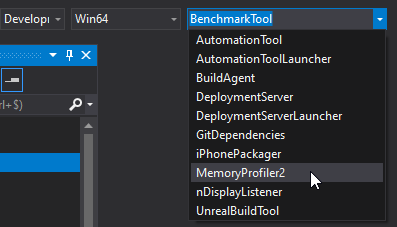
I think I just spent most of the day compiling some benchmark
 bronze bloom
Compiling Unreal Engine from source.
plush yew
Does anyone have any advice on how I can make a pyshics constraint attach one end at a point gotten from a ray-cast? I am trying to make a grappling hook that will let the character swing kind of like Spiderman, but from a position gotten from a ray-cast rather than predetermined positions.
dark stag
this OSC plugin really needs a way to just, get packets, sort, and output by index.
thats all.
for the love of god theres no way to just pull a tag by a specified address without a 4 page long filter
 misty stone
So when building lighting I get this error
Lightning build failed. Swarm failed to kick off. Compile Unreal Lightmass.
Anyone know how to solve it or what unreal lightmass is?
grim ore
is this a source build? if so compile lightmass
misty stone
it's not a source build
grim ore
and lightmass is the software used to build out your light maps when using static lighting
misty stone
or I don't think it's a source build at least
the stuff I've seen on forums is all using visual studio or smth but I'm using blueprints
grim ore
check in your install folder (UE_4.24\Engine\Binaries\Win64) folder for UnrealLightmass.exe
if it's there you might have told it to not have access to networking when it first started but that should be another error
if it's not, reinstall the engine?
misty stone
I'll look for the file. I'm currently verifying the engine but if that doesn't work I'll try reinstall
so I ran the file, it showed some cmd stuff then closed, should I try building now?
 sour tinsel
Hello! I am making a racing road system in Unreal by following a tutorial. I am having an issue in regard to the "Smooth Interp Roll Scale". I am literally copying 1:1 this tutorial: https://youtu.be/wR0fH6O9jD8?t=2165. But whenever it comes time to check this option, it makes no difference after compiling. (The edges do not smooth). I have attached a picture of the result with the function checked. It looks exactly the same without it. Do you have any idea why that might be happening? And if for one reason or another this function doesn't work, is there a way to mimic it somehow?
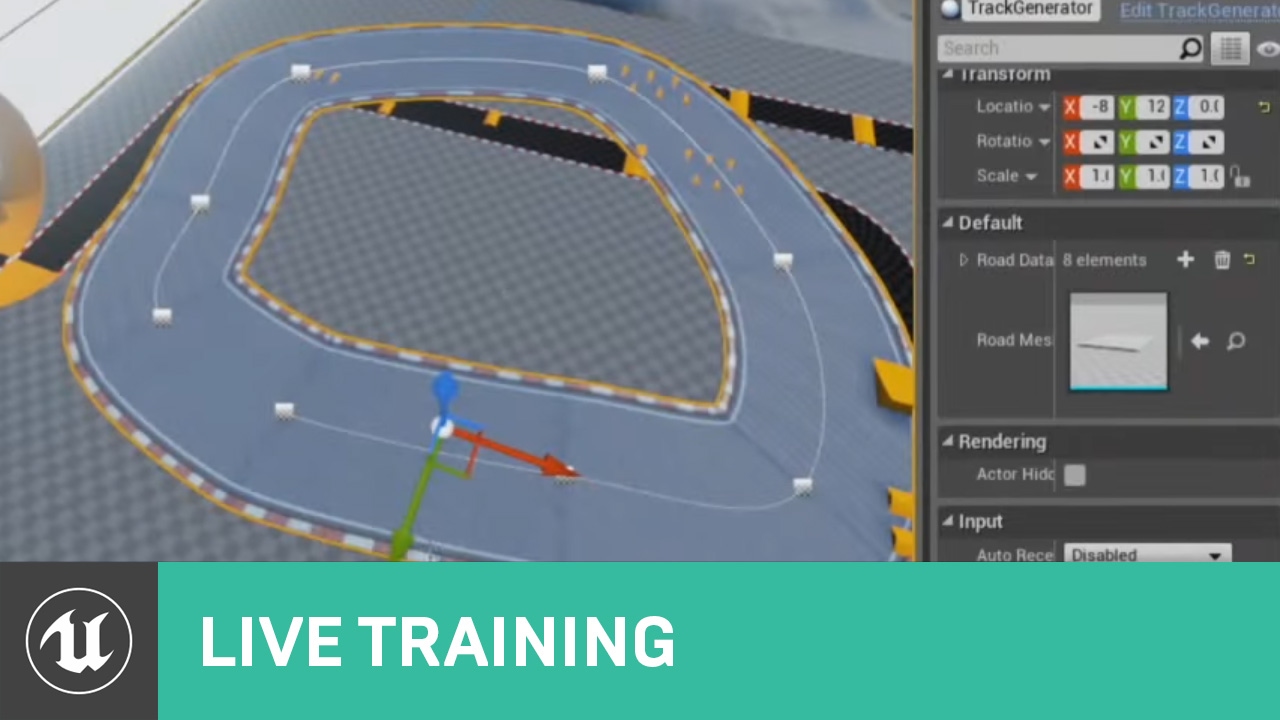
In this Livestream Tutorial we'll show how to use both Spline and Spline Mesh Components to construct an easy-to-use racetrack generator tool in UE4. Viewers will learn about custom structs, functions with local variables, using for loops, and much more!
[00:00:45] - Google ...
grim ore
if the file was there then you have some other issue
check for any other errors in the log
misty stone
alright I'll check
 fervent sigil
how can I get the camera scale of world scale to it?
that is, for a perspective camera looking down with 1.0 fov and aspect ratio of 1, which is positioned at the center of a cube (of 100x100x100) (XY), what value the Z needs to be to exactly fill the entire cube to the entire camera?
grim ore
besides that is this a new blank project or have you done stuff to it? If it's not a new one you can make a new blank project then hit build and see what happens. If that works then something is corrupted in your original project (mesh/material) and you have to try and find it
misty stone
I've done stuff to the project so I'll try everything else suggested then try that
grim ore
@sour tinsel What does the mesh look like you are using, does it have enough vertices to allow it to bend to the spline?
sour tinsel
No, because I completely forgot about that... Thank you very much! Haha. I am sorry for the silly question in that case.
grim ore
not silly, took me a few minutes to figure it out 🙂
do you have an example? it sounds like you are not using blend spaces or the built in blending system if that happens
yes you should be using animation blueprints to handle your animation
 keen oasis
Thanks
grim ore
#looking-for-talent - Jobs looking for people``` scenic hatch
how do you ungroup objects you have previously grouped?
grim ore
You can also look at changing these settings in your anim montage https://i.imgur.com/b51ph0G.png
and yes anim graph, an animation blueprint
shift-G to ungroup or right click on one of the grouped items and go down to group->ungroup @scenic hatch
try changing the blend time for the blend out to a larger number
same with the trigger time
or switch to a full animation blueprint
celest creek
Is it possible or to get collisions from a mesh to trigger if it’s not the top component (I have a scene component as the root)?
stark marsh
help ive done everything he has done in this video but my jump animation wont play when i hit space bar?! https://www.youtube.com/watch?v=RxPSvjg5OC8
Project Files : https://www.patreon.com/CodeLikeMe/posts?tag=source code
Support my work on Patreon : https://www.patreon.com/CodeLikeMe
in this video, I'll demonstrate how to make the character jump with animation montage. Animation montage will have 3 sections namely jump...
grim ore
since you are using montages are the slots set up corretly?
both in the anim montage and in the anim graph to use it
still schooner
truesky doesn't work with ray tracing?
 turbid wave
in version 4.23 i have following bug with point lights if world composition is enabled
stark marsh
all i need to do was set the target to mesh
 wispy raven
hey there, i have a simple question, how do i get the Interact value?
abstract relic
How do you mean? When key is pressed?
wispy raven
i just want to put the binded key (in this case E) on a gui without putting it manually
(also ignore the gamepad)
 wary wing
@wispy raven Haven't tested it, but I think you'll need something along these lines
 steel lily
It's my first time using unreal engine,is there a way to have a debug view while still playing the game? like a second viewport?
cloud cobalt
Nope
steel lily
Not even see the scene from debug view after pausing the game?
I don't know exactly how everything behaves yet so I have no clue how to fix my issues rn
whole quarry
You can break the player view when playing in the main viewport
 placid locust
does anyone know why the hair dosen't look good - UE 4.23, directx 12 nvidia 1060 (driver v440)
 hard quarry
Has anyone of you ever hosted your finished unreal engine server inside a docker container?
 crude vessel
With the new terrain blueprints, could you do destructible terrain by adding negative heightmap crater's or such?
 subtle bloom
Does anyone know how to fix the degenerate polygon error when bring in fbx files?
abstract relic
You’ll need to open it in blender, may, 3dstudios, or other 3D editing tool of your choice and fix the mesh in there. Check to make sure all polys have 3 or 4 vertices and that the edges do not overlap, causing degenerated tangents
 copper elk
why does this not print a string?
this is in a player controller that is used in the level being played
grim ore
F9 to set a breakpoint on the print string to make sure it's actually being called
copper elk
grim ore
yep hit play and then press your key and see if it stops there
grim ore
the game will literally stop playing and pause on that node while it waits for you to do something
copper elk
nothing happens I can still play just fine after pressing the button
grim ore
then the key input is not being read. Is that input anywhere else?
and are you pressing the correct key
grim ore
for example if you have that same node somewhere else and it's set to take the input (consume input on the node itself) it will stop others from seeing it
since this is on the player controller it should automatically accept input and you probably have other keys taking input as well so that should not be an issue
grim ore
you have other input on this player controller working yes?
grim ore
ah, are you sure the player controller is working then?
copper elk
yes
grim ore
is this one of the templates that you are using or custom?
hollow wave
Hi. Any of you got any tips or advice for me to notice and or check out cause they might be a better workflow than mine for creating Redwood trees. Then please @ me with what you think,etc....
copper elk
custom
grim ore
your game mode is showing your player controller you created and the pawn its controlling as the defaults?
copper elk
yes
grim ore
does your character move? is all your input in the controller and not working or just the input in the controller
copper elk
I can move and everything but the input from the player controller doesnt
wok
work*
grim ore
all I can think of is the player controller is not assigned to the pawn 😦 I tested and even if you block input on the player the controller is above it and accepts it
how are you testing that the player controller is working?
copper elk
I just made another key function for creating a widget and it doesnt do it
grim ore
no I mean you said the player controller is working and being used, how do you know this?
copper elk
well umm I thought that it was
grim ore
you can delete it, it will remake it
copper elk
but I guess it isnt
 bitter iris
what is it lol
grim ore
that sounds like your game mode is set to the incorrect player controller then
its cached versions of files/shaders that the engine uses
grim ore
it gets bloated between engine versions if you stop using older ones so every couple versions it can't hurt to clean it up
bitter iris
right now its only quite low, im just saving space on my main drive
was a bad idea to put it on it
grim ore
the DDC will still be there unless you change it even if your engine is on another drive
bitter iris
is it possible to move the vault to adifferent drive
grim ore
you can change the vault location from the launcher options (bottom left), you will have to move existing items to the new location afterwards
bitter iris
ahh gotcha cheers dude


 abstract relic
That is quite a big array
 static flicker
yeah
kindred viper
what I wanna know is... why are you running vbs scripts from your game?
static flicker
im not
kindred viper
its an app?
kindred viper
im confused. Is it part of your UE4 game that uses a standalone exe to fire up the msgbox and you call the exe from UE4?
grim ore
@odd yarrow Try clearing out your cache first to see if it happens again https://forums.unrealengine.com/development-discussion/architectural-and-design-visualization/1421354-lightmass-crashing-array-index-out-of-bounds
kindred viper
sorry no my family is in the room
grim ore
I think he just pasted the wrong image first
abstract relic
I would recommend not pretending to attack someone’s computer. Even if in jest
kindred viper
did you know you can call Windows msgbox dialogs from UE4?
grim ore
the only way without you going thru your code is to hook up a debugger to the project while its running and see what crashes it in the call stack
static flicker
how? i use bp
grim ore
yep you can still hook up the visual studio debugger to it. otherwise look thru your code to see if you are using arrays anywhere. if you are not start commenting out stuff or disconnecting blueprints or loading blank levels to start tracking down the issue
it's a really generic error so I don't think anyone here can go "ah hah do this to fix it"
kindred viper
needs a call stack to see that error
abstract relic
Click on the project file >> generate visual studio file >> you get a .sin >> open it and run your project in debug mode
normal burrow
I agree with HighTide
steel lily
Is there a way to hook a string to a text renderer?
grim ore
@steel lily you can sure, there is string -> text conversion nodes
 midnight gate
help pls
 odd yarrow
@grim ore I did delete the cash, I still get the error
grim ore
@odd yarrow if you create a new level, and build lightmass does it do it? if not something in your level is bad (too large, not enough memory, no lightmass volume) and you have to start guessing
odd yarrow
I will try, cuz it used to work, and 30 min ago I did some changes, added new lights and now I can't balke anymore
steel lily
I've seen about the conversion node,but I don't know how to make the text render itself change itself to the text [first time using UE4 btw]
grim ore
yep your new lights are causing it then 😦
sly coyote
Hey guys im working on a modular building bp and i want to hide the options for the 2nd and 3rd floor unless i set it to have those floors... for example currently i see all my bools like "show windows" "broken window" ect..
For all 3 floors even when i only have 1 floor set in my modular bp "num floors" variable...i want it to only show when i have the correct number of floors...this is in editor only...not a game feature
odd yarrow
why would they
grim ore
@steel lily there is probably a set text node you would use on the text renderer to change it when you want it changed
some bad setting, not enough memory, no lightmass volume, etc.. @odd yarrow
kindred viper
ToText is the conversion node. Its not the usual one as its got to allow for localization I guess
sly coyote
Is there a "switch" that acts like the one with in material editor that only shows options when checked
?
grim ore
@sly coyote if you are talking about the details panel then right now no 😦 If you use an editor widget then you can create something like that. This is for BP only, in C++ you have properties to control editable
sly coyote
Urgh, any way to add variables dynamically in cpp?
kindred viper
did they update anything to allow Widget Utility to extend beyond the Editor yet?
 silent harbor
I have a question. If unreal engine culls objects not visible by itself, is there need to stream levels?
kindred viper
@sly coyote depends how you want it scoped
sly coyote
I mean i can deal with it but kind of dumb that it exist as a thing for material editor but not bp editor
grim ore
@sly coyote if you are using C++ you can use properties to disable the ones you want disabled https://forums.unrealengine.com/development-discussion/c-gameplay-programming/25256-how-do-i-enable-disable-controls-in-my-blueprint-details-panel-via-c I just assumed you were working in BP lol
sly coyote
I can do either :)
kindred viper
yeah detail panel customisation is the way to do it
static flicker
: Display: STEAM: Loading Steam SDK 1.42
LogPlayLevel: Warning: LogOnline: Warning: STEAM: Steamworks: SteamUtils() failed!
LogPlayLevel: Warning: LogOnline: Warning: STEAM: Steamworks: SteamUser() failed!
LogPlayLevel: Warning: LogOnline: Warning: STEAM: Steamworks: SteamFriends() failed!
LogPlayLevel: Warning: LogOnline: Warning: STEAM: Steamworks: SteamRemoteStorage() failed!
LogPlayLevel: Warning: LogOnline: Warning: STEAM: Steamworks: SteamUserStats() failed!
LogPlayLevel: Warning: LogOnline: Warning: STEAM: Steamworks: SteamMatchmakingServers() failed!
LogPlayLevel: Warning: LogOnline: Warning: STEAM: Steamworks: SteamApps() failed!
LogPlayLevel: Warning: LogOnline: Warning: STEAM: Steamworks: SteamNetworking() failed!
LogPlayLevel: Warning: LogOnline: Warning: STEAM: Steamworks: SteamMatchmaking() failed!
kindred viper
I've used DPC's to associate vars with classes without extending the class before. Its hacky but it works
sly coyote
Matthew as always a wealth of knowledge, ty sir
kindred viper
just needs manual serialization
static flicker
?
sly coyote
Yeah its an ocd thing...cause it doesnt hurt to have a bunch of bools shown when they dont effect things...but when i see it my ocd ticks
silent harbor
Sorry to ask this again
I have a question. If unreal engine culls objects not visible by itself, is there need to stream levels?
Does someone know?
sly coyote
Like why is it showing 2 and 3 floor options on setting for 1
grim ore
@static flicker Those are just warnings, they should not cause crashes
silent harbor
Im trying to understand why I should be streaming levels when unreals culls automatically
grim ore
welp I guess it must be it
kindred viper
@silent harbor yes because a ULevel is a container within a UWorld. If it becomes invisible, everything in it just goes poof !
silent harbor
Can you explain in different words? Thanks I didnt quite understand
grim ore
@static flicker you might have to try and get support where you got the template from 😦 I would assume if Steam was required they would have instructions on adding it
in order to cull you have to process data, if you are using streaming levels and the level is not streamed in it has to process no data. win?
kindred viper
ok the whole UE thing starts with a World. or UWorld. Inside that, we can add our level. Now in order for your game to do anything, things are put into the ULevel. If you were to cull a level, everything without a hard ref elsewhere would unload, any AI would break (perhaps disappear too), a lot of game logic relevancy would falter without a proper cleanup. So in streaming terms, levels are distance culled but you have to order it properly with appropriate care. Otherwise you end up in the void
the frustrum culling of objects via the camera is a different matter. That is merely a rendering cull I believe
 jaunty cedar
Why is it that having a reference to an actor of a type adds the whole size of that type to my sizemap?
grim ore
yeah I was assuming he meant frustrum culling lol
silent harbor
Yea frustrum culling
Mathew when are you continuing wtf is 😛
Your videos are the best!
jaunty cedar
For example, my reference to my gun is a simple actor reference, yet the entire gun class is present in the size map of my character, which is pretty annoying