#ue4-general
1 messages · Page 613 of 1
 interpreter manually written in assembly
 lapis vine
Yeah, well consider theirs more versatile/proven in practice? With awful syntax.
... and language.
bleah
 manic pawn
it's for an in game visual script language actually
lapis vine
They also have no ints? If I remember correctly, so they might as well sum floats here, lol
manic pawn
and making this thing is very fun
lapis vine
Fun has no price, go wild 💪
manic pawn
I've not yet found anything that is faster than the luajit interpreter
anything actually using jit doesn't count
lapis vine
Its precompiler to C or what btw?
lapis vine
Hmm...
I see... Was writing before years something along the lines.
But it was full instruction set simulator.
manic pawn
currently the ui part of it doesn't exist, so we made up this  assembly language to test the vm
this implements that bench above
lapis vine
Polish notation... Well, its kinda expected that yours is fast as its all cached. Likely the others do many other stuff in general.
manic pawn
yeah
it builds a stack frame for the function much like a real compiler would with all the locals in it
the idea being to keep it as close to the native code as possible so it later use things like TArray directly without much effort
lapis vine
Ideally, I will advise you to mimic an existing language so to have less of burden to everybody, but you know what you seek. Anyway, enjoy 🙂
manic pawn
the ui in game will look somewhat similar to scratch so people should be able to easily pick it up
lapis vine
Huh? Scratch, wtf is that? Guess I'm no UI dev, lol
manic pawn
no one will see how much we over engineered it behind the scenes :(
guess people will notice when you can do an unreasonable amount of stuff without dropping your fps
lapis vine
Likely not. If something is missing, as it is supposed to be (lags) its rarely noticed. Same with clean house, warm meal, money in wallet, etc.
manic pawn
luajit interpreter actually generates fairly similar instructions for the vm
but they have fixed variable slots and slightly more efficient code
Likely the others do many other stuff in general. also yeah, only "do other stuff" is what I'd consider "pointless overhead to be eliminated"
have plans for this to efficiently read/write fields on objects like players aswell
lapis vine
You need no convincing 😄
manic pawn
it's interesting how bp follows the same basic design (with the precomputed stack frame and fixed offsets) but they just proceed to completely fail to use it efficiently
lapis vine
Man... could be that... Could be that everybody else is doing it wrong?!
manic pawn
luajit at the very least is doing it even better 
 civic otter
Hey guys. I have a question about how to optimize a level that was built almost entirely in blender. Essentially what I'm doing is loading a quake map into blender, then exporting through gltf into UE4. Large maps with lots of materials are incredibly laggy. Should I break the mesh apart so that there's only one material per mesh? What tips do you guys have?
manic pawn
assuming you currently have literally one mesh, splitting the map into smaller meshes will improve culling efficiency significantly
also make sure to use material instances as much as possible - swapping out a texture slot is far less expensive than swapping out the shader
civic otter
Yeah I'm definitely using material instancing.
 dim merlin
anyone knows its possible to update a runtime virtual texture at runtime? (thats not why its called 'runtime' i guess)?
 timber minnow
Hi, since i've updated unreal to 4.23 my game scene seems to crash when i open it. the causes seems to be a decal material . does anyone had the same issue with uprading to 4.23 version ? thanks
 alpine zephyr
for shader compiling, multithreading or performance per thread ?
dim merlin
@manic pawn sounds good, so the issue i might see is that its being cached at somewhere on begin play, but it wont update when e.g. move a actor that writes to RVT
 forest tree
Hey guys, how do you handle animation state machines across multiple different skeletons? Seems impossible to re-use them, I'll have to duplicate them?
 fallen marten
Easy , just setup a bone rig in the skels so they can share animations, or at least duplicate and retarget, and then right click the anim BP, duplicate retarget to the new skel you want to use @forest tree
forest tree
The problem then becomes that if the animation statemachine describes a similar character type (with a different skeleton), updating one will lead me to having to manually update the other @fallen marten
My usecase seems to demand multiple different skeletons as the anatomy of the characters differs, but they have the same sort of logic as far as the animation state machine goes
fallen marten
The use child anim bps where you can use the logic but swap out animations in each state machine to suit your skel
forest tree
That is only within one single skeleton, not multiple different ones.
There doesn't seem to be a way to achieve the same thing for different skeletons, but indeed, that was also the direction I was trying to go in.
I just feel like I'm missing something here. This can't be a problem only I am facing.
Have got to be people out there who have the same issue, and are managing it somehow.
If I have to duplicate them it's going to lead to an unmaintainable mess of unique statemachines that all do the same thing
fallen marten
I dont quite follow what you are trying to achieve
forest tree
Imagine 3 characters, they have mostly the same animations and state machine logic to transition between their states. However, their anatomy differs substantially thus they have different skeletons
fallen marten
I have a few different skels, that all use the same anim BP but in those anim bps they use their own skel specific animations
forest tree
Wait, you have different skeletons using the same animation blueprint?
fallen marten
Yep - hence using retargeted anim bps
forest tree
duplicate retarget to the new skel you want to use
This gives them a copy, no?
fallen marten
Yep
 plush yew
lol
forest tree
But it's not the same if it's a copy.
forest tree
I mean @fallen marten , if it's a copy, and I edit the original, the duplicate is not modified
Which is what I want
Imagine I have 20 skeletons, 20 animation state machines
Now I want to update one thing
But I have to update it 20 times
fallen marten
Then use a child anim BP, and just modify the master
forest tree
Yeah but you can't use a child anim BP with different skeletons AFAIK
fallen marten
The master will update all the children
forest tree
It needs to be the same skeleton
 wary wave
I think you're going to need different anim BPs
fallen marten
You can retarget a child BP to your skel
 real pasture
Question, has anyone here done the Learning Path on the Unreal website?
fallen marten
And it'll still get updated by the master. It's simple inheritance
wary wave
since they're different skeletons, and different animations, they're technically totally different even if the BP graph is the same
forest tree
Original Anim BP -> Child it -> Retarget it -> Update parent -> Child is updated?
Like that?
@wary wave That was what I was thinking too 😦
fallen marten
Well try it and see. It'll either work or it won't
plush yew
fallen marten
And yes that pattern is how it works. Change the master, the child updates
fallen marten
Hmm
fallen marten
Set it with a hard value instead of the timeline and see if it gets brighter
fallen marten
Yeah, maybe the timeline isn't setting a high enough value
forest tree
Tried it, doesn't work. Parent -> Child creates a child, retargetting the child gives you a copy of the original parent and then retargets based on the copy.
plush yew
yea when i removed it the lights where bright
forest tree
So you end up with 2 parents (one for the original skeleton, one for the new), and a child based on the copy.
fallen marten
Open your timeline and set a higher value
fallen marten
Stop simulating
plush yew
?
fallen marten
Your pic has simulating on it. Press the stop button
fallen marten
Lol ok... Then I have no idea why it's locked
plush yew
I'm confused
fallen marten
@forest tree sorry that didn't work, I'll look into it for you
fallen marten
Nice work man 👍
plush yew
i had to drag them up
fallen marten
Yep thought so
plush yew
Thanks for your help
fallen marten
Anytime bud 🙂
civic otter
Hey guys, I'm still having some issues with a complex scene imported from gltf causing UE4 to lag immensely. The scene is a level ripped from a quake mod, loaded into blender, then exported as gltf for use in UE4. I've tried breaking the level geometry apart for proper culling but it isn't making a difference. My frame rates are still sub 10 fps for some fairly basic geometry.
forest tree
Np, thanks @fallen marten
fallen marten
@civic otter it's hard to troubleshoot without seeing. Maybe you need to break the geometry into smaller sections, give them lod, and reduce the texture quality
plush yew
Me again, with my view cone dilemma
I'm using procedural mesh with simple line trace to re-create the effect for a view cone from shadow tactics. But I don't know if I should consider other approach?
If the video doesn't move, try to download a local copy and play it
fallen marten
Hmm not something I've tried yet. I'll have a think about it
wary wave
procedural mesh is probably the most sensible solution
plush yew
I found an EQS Based tutorial, but my Occam's razor bells started ringing, so I came up with this approach, but still not sure if it's the best...
wary wave
you'd still need a way to visualise the EQS results
plush yew
This is my code. I'm using a timeline on a camera for panning left and right
If anyone can give me feedback on the actual video that would be great
for some reason the video doesn't play in the browser, but plays fine as a Local downloaded copy
civic otter
@fallen marten This is a shot of what the map looks like. Had to set it to unlit just to be able to even use UE4. Currently there's zero collision as well, since I broke the level geometry up into so many tiny pieces (one mesh per texture instance) to try and reduce both the texture swaps, and to give the engine the ability to cull geometry properly but it's acting like it's not culling any geometry at all. FYI I have very little experience with UE4, but it feels like the best option for what I'm hoping to accomplish with this project.
Messing with precomputed visibility currently to see if that helps.
fallen marten
Perhaps each floor level could be streamed
plush yew
@civic otter What are your computer specs? also it may be worth looking into Level streaming and split your scene into several floors that are being streamed as the player approaches them
civic otter
streaming is something I have currently zero knowledge about. But sounds like something worth having in my final project. One of the important requirements for this project is to have retro aesthetic level design. The level you see here is not mine, it's just something i'm using to test out a workflow. Basically i'm loading maps made using a quake map editor into UE4
My specs are not amazing, but I have a gtx 1070, a competent-ish cpu, and 16gb ram.
fallen marten
Your lighting will make a big hit on fps too. Try use static lighting and make sure to build lighting. Dynamic lights do use more fps
Also try to set low quality shadows
Basically nerf it all
plush yew
@civic otter Level streaming is very simple, don't be deterred by your current lack of knowledge. Just imagine your character starts on second floor. There is a third-floor and the first floor
Once again thank you @fallen marten
as your character starts on the second floor there is no need to have all the objects from third-floor or first floor in the world
just stream them in as you approach the stairway to either floor
civic otter
Yeah, that's something I plan to have in the actual project. I'm just trying to sort out the workflow, and determining if my current method is even worth continuing to experiment. I could buy an asset for UE4 that loads quake style maps natively, or I could use blender to do it for free.
wary wave
given the size of the level, streaming is probably not going to gain much tbh, except for hitching anyway
plush yew
Although camera frustum should also take care of a lot of culling, So I may be wrong....
wary wave
not unless you're expecting very high res lightmaps
civic otter
I'd like to have decent resolution lightmaps. I eventually want to implement ray tracing into the project as well
civic otter
I'd like there to be the ability for the player to choose which version of the game to play.
wary wave
that could be a streaming level
not sure what the performance impact is of having RTX enabled but no dynamic lights
I suspect negligible, though it would still probably require RTX hardware
civic otter
I'm going to try building the lighting and just see if that helps for the time being.
plush yew
Like Confucius says (😄 ), Try Static lighting if not already
civic otter
Yeah I'm going to look into that.
 grave nebula
@plush yew Stencil shadows are generally the most sensible solution, where procedural mesh stops being viable.
plush yew
@grave nebula Awesome , thanks!
plush yew
hey
can some one please show me the best car games asset for ue4 ?
Hhi folks: Im curious, whats the approved / more or less production ready solution for exporting assets from blender to UE4?
 arctic notch
Hello fellow devs, i have a question for you: Do you know a way to get the path of dragged objects from explorer (windows is enough) to the packaged game and do stuff with it? I searched quite a bit and didnt find any solution for this, if you could even point out a direction that would be really helpful, thanks in advance ❤️
 hearty walrus
hahahahahahahahhahahahahah lol help me
hearty walrus
w/ ray tracing
down to 3k now
1k
compiled!
Also, can I insert a character from another file w/ properties from said character, e.g. GUIs into another scene? If so, how?
 midnight gate
how to play particle effect when on hit collision actor ue4
 thick herald
 halcyon crystal
Guys! Does anyone know how to fix overdraw issues when it comes to foliage rendering?
 rotund scroll
maybe merge actors? dunno
 fierce tulip
use masked instead of transparency, cut away anything mesh thats not visible trough masking.
 steep ferry
@midnight gate Oh hey
after your character gets hit or whatever
just add node called
spawn emmiter at location
midnight gate
yes thank you it worked
dim merlin
So guys, runtime virutal textures says it runtime, but why cant the actor be movable ?
its cached at begin play or so?
wary wave
presumably because it's tied to the world coordinate system
dim merlin
its movable with any setting? would be a great thing
wary wave
I doubt it can be moved
dim merlin
yeah, me2
wary wave
if it were to be moved, anything drawn to it from other actors would now be incorrect
dim merlin
i think its cached right?
actually trying to invent a road tool (spline decal) using RVT
(at runtime)
😐
 timid jacinth
https://gyazo.com/bbfd0980c1e264c96fea84206494f2b6 What does this error mean?

 slender mist
I have added a widget component to my FPS character and am displaying it in world space so other people can see it
The widget looks significantly lighter than it actually is and I think its being affected by the lighting from the world
how do I prevent this? The Material is already set to unlit: https://i.imgur.com/ggojXPy.png
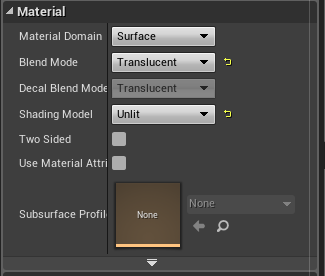
 verbal oar
Hi all, Happy new year! Just a quick question if someone knows: Can you use a fracture mesh as a pickup like you would a weapon, etc.?
timid jacinth
@slender mist
If the shading model is unlit then it wont have lighting
Make the shading model something else
slender mist
i dont want it to have lighting, thats the point
but it still looks lighter than it should be
 honest vale
modify the material's brightness
slender mist
how do I do that?
https://i.imgur.com/hxVeVEI.png
left is how it looks in the browser, right is how it looks through the web browser widget in game
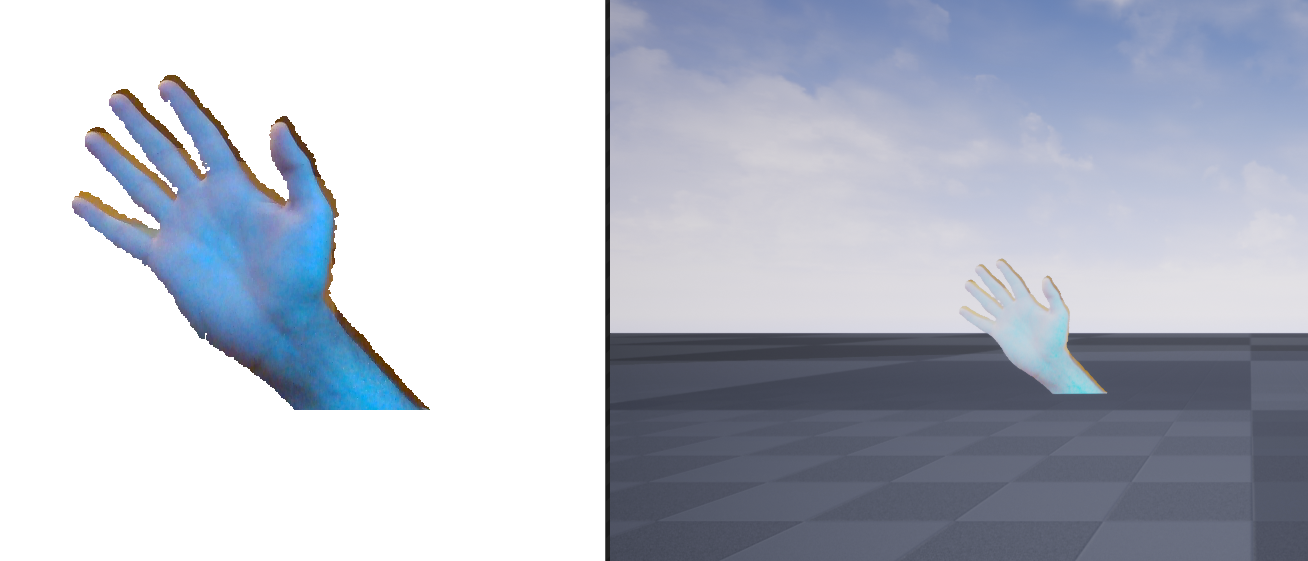 verbal oar
you can add a post process to encapsulate the pickup, would be ghetto-rigged but if static and small enough, would allow adjustment of brightness, etc.
or the hand (pickup)
io'm guessing the directional light is too bright
or masterial isnt setup for something
slender mist
i actually deleted everything light-related from the world and it still looks like that
halcyon crystal
@fierce tulip Yeah I use only masked with dithering. it's not that big of an issue, everything else is optimized. It's just annoying when I check shader complexity to see the white spots.
honest vale
@slender mist multiply the colour output by something lower than 1

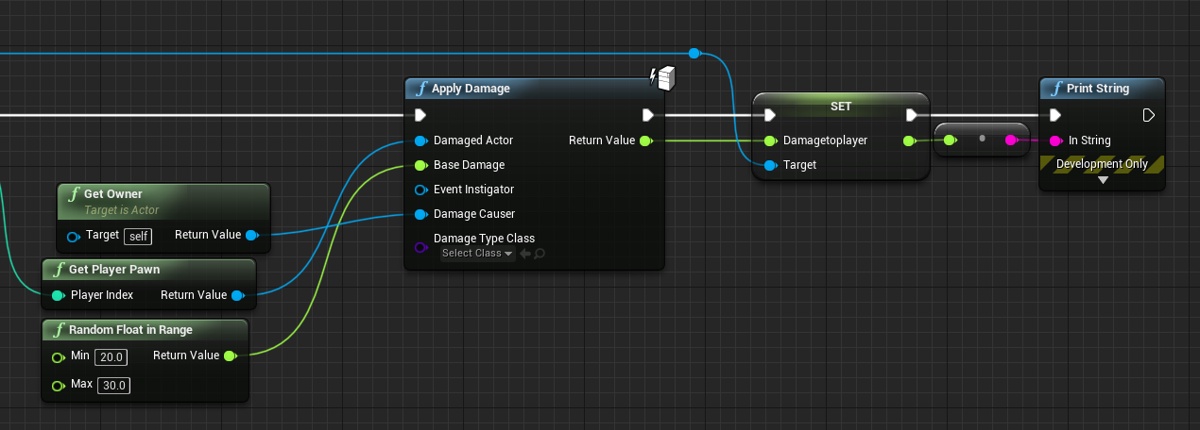
 normal burrow
Health isn’t a thing until you add it
Believe your are supposed to return health loss after armor or whatever
 normal burrow
Then you need to deduct from it inside overwrite of applydamage
timid jacinth
yeah but
normal burrow
And return the health loss
normal burrow
Is apply damage something you can override in functions list?
normal burrow
That’s where the health changes should happen
Inside that function overwrite
Otherwise every take damage node would include a subtraction you’d require (immediately following them)
timid jacinth
yeah thanks
 hidden aurora
https://gyazo.com/933a77c61513704352c6251f65028e59 Since when that is possible lol
 plush yew
paid steam submission fee today
turns out my keyboard decided to give up
and forgot my boiler for 6 hours
1 good 2 bads,sounds like my life
 open eagle
hey could someone help me in #source-control
normal burrow
There is nothing there from you
 regal yoke
How do i change blueprints mesh inside the game
Now i just use thing that changes visibility of meshes in that blueprint
but there is so much meshes now and its starting to take much time to do this
open eagle
why is there a question mark on all my assets for source control
wary wave
could mean any number of things, hover over it and it will probably tell you more
 exotic thicket
I had some issues like that when I first started with UE, now I just spam ctrl+s even though the editor has been very stable since :P
hidden aurora
Im fucking tired of crashes i lose loads of things
steep ferry
Thats why you should use save all
 jade hawk
Does anyone know of any good courses to learn more about the optimization tools in UE4? I am struggling with some performance issues on my VR project and am not very proficient with the built in optimization tools ue4 provides.
steep ferry
mastermind
@jade hawk Maybe try to set the graphic settings to the ones that your game is working fine with
hidden aurora
Crashed again
open eagle
is there any way I can have 1 way transparency
steep ferry
wdym @open eagle
jade hawk
We need to go way more in-depth that that which is why I ask. We have created a system inside unreal which loads and unloads all of our assets in real-time. Creating and destroying entire game worlds around you without a loading screen. Currently it runs at a smooth 90 frames and has 80% headroom on a regular higher spec VR pc. We plan to release to Oculus though which requires us to hit 90+ frames on an AMD 290 min spec machine. In order to accomplish this I will need to locate the specific assets causing the frame drops and space them out a bit with async tasking to keep the frames up.
open eagle
@steep ferry I want to have my material be opaque on one side and be translucent on the other
steep ferry
Oh damn
 wary wing
@open eagle how are you defining "other side"? As in the back face of a two-sided material, or something to do with the mesh it is applied to?
open eagle
Like on a flattened cube or something
wary wing
So the cube only has one material applied (affecting all 6 sides) and you want to be able to see through one or more sides?
@open eagle Like this?
 slim sand
Hey there everyone, I need a bit of help. Is there any place where I can effectively learn blueprint? I have done quite a lot of tutorials and they simply just hold your hand and dont actually teach you anything, so I was asking whether there was something you guys could recommend.
exotic thicket
Why did I think it was a good idea to make things that can be disassembled... I think I must have temporarily forgotten I'm not very good at 3D modeling
slim sand
Alright, will do.
open eagle
@wary wing Let me show you what scenario i'm in
I want it to be harder to see the ocean floor from the top
wary wing
Ah! So if you're looking directly down it should be more opaque than from an angle?
Oh! I see
open eagle
and make it easier to see outside from under the ocean
the mesh is just a flattened cube
wary wing
Oh I see ok
Could you use two planes instead and put different materials on top from bottom?
open eagle
I guess
plush yew
How could I develop a Cross-Section plane to make invisible what is on the other side of a vertical plane?
 mint sequoia
I notice 'new content' on marketplace is a bit different.. only showing a very few items
regal yoke
Is there way to add integer to name
like name+ integer
i need it to open different levels
wary wing
@plush yew Like an x-ray view kinda thing?
normal burrow
CSG is the term you'd be looking for on google 4edu
believe nothing like this is built in beyond the ancient and decrepit bsp support
wary wing
Well it can subtract just fine, but you'd have to make your mesh with BSP and that doesn't seem practical
wary wing
It's there to mock out maps with these days
normal burrow
its pretty much the most broken and unmaintained thing though. Only brought it up because it seemed relevant, but would never recommend using it
the normals it makes on hit results are frustratingly bad
wary wing
@plush yew I think you can probably do something similar to that with a masked material and maybe the stencil buffer
normal burrow
I am a person that would love to see a better bsp editor in ue4 though
wary wing
I miss the days when BSP was a first class feature heh... but that was UE2, not so much 4
normal burrow
ikr? we old haha
placing models everywhere seems imprecise and without portals lol
wary wing
I could actually make geometry back then hah
normal burrow
word, times change
wary wing
Indeed they do
plush yew
ok thanks!! 🙂
wary wing
The new static mesh editor seems to be trying to emulate those heady times for us, but with meshes instead of BSP blocks
normal burrow
@dim plover mentioned that to me earlier too, I've not looked at it, but any csg features would be well welcomed
wary wing
I have heard that it supports the same sorts of operations as we have for BSP, though I haven't tried it myself yet
 gilded lichen
Hello, how would I lock a object's location but not its rotation?
normal burrow
is it a physics simulated thing?
gilded lichen
no
normal burrow
are you the one moving it? or what moves it uncontrollably that you'd need to lock it?
gilded lichen
what I've got is the VR template and I want a bar that the player needs to hold to then rotate a maze that has a ball in it to then reach a goal (A task I've been set)
like this
but a large bar on one side
so I was thinking to lock the location so when the player interacts with it, it doesnt move. But when there rotate it will rotate
 abstract relic
That’s definitely a job for physic simulation
normal burrow
Yeah agreed. Though I'm a bit confused on what the question is or what you mean by needing to lock things though. Idea is to have the motion controller tilt rotate the game but not move it?
abstract relic
Going to assume the bar just needs a interaction function
 upper heart
Why does only gamepad input have to be multiplied by delta time and not mouse input?
exotic thicket
I think mouse input is usually treated as an absolute value?
It probably depends somewhat on what you're doing
upper heart
Just basic fps controls of a character. Looking up/down and side to side
normal burrow
think of how you have to hold a joystick to the direction erebel
exotic thicket
it's kinda like this... mouse input is an absolute change, if I move my mouse from 0 to 100, I want it to be reflected exactly like that
but game pad input is more like holding down a key, it's not an absolute input between two points, it's a modifier on motion
steep ferry
Hey guys i wanted to ask for fix for my problem
its the particles , well currently my smoke particles are full bright and act like unlit when i'd want them to react to lighting
upper heart
Is the material you have applied to the particle unlit?
steep ferry
I'll check it out
upper heart
upper heart
Are you sure the particle system isn't using multiple materials?
steep ferry
Well im closely checking that is every material default lit
Well every material in my particle emmiter is set to default lit :/
upper heart
Can you post a screenshot of the particle system?
 digital anchor
and using base color - not emissive
upper heart
And the material?
upper heart
The brightness you are seeing is emissive
normal burrow
@gilded lichen how far are you on it?
steep ferry
@upper heart So i need to change the particle system from emmisive?
I mean material-
upper heart
Yeah, hook the emissive into base color instead
gilded lichen
I've not started just thinking on how to do it
steep ferry
@upper heart Hello, thank you for your help! Everything works fine now
upper heart
No problem 🙂
 fierce forge
hello when i launch a standalone game in ue4 the game look different , it's not like in viewport , that's in viewport :
that's in standalone game :
and i can't move or do anything
steep ferry
maybe there's some error
which makes you unable to do anything
launch the game in viewport
and screw around
then click esc and see that arent there any error messages on bottom right
fierce forge
😦
upper heart
Are you testing as a client or server when launching the game in viewport?
You are likely playing as the server when testing standalone
So that would explain the difference
 hoary socket
Hi I'm having a bit of a problem, I'm new to UE and I'm trying to render a short clip using the sequencer
I'm trying to export this view out of the Camera
But ends up rendering not out of the camera ... at the 0,0,0 location I believe...
fierce forge
@upper heart i just restarted the project and now work , tnx anyway
open eagle
can anyone help me with this replication problem
normal burrow

open eagle
So basically, I have a weapon that has sphere bounds, and whenever a player overlaps those bounds, the weapon casts to the player and sets a variable that contains the current weapon that the player is overlapping and can equip
So I have this
This is in the weapon class
this is in the playerController
and this is in the weapon class for equipping
When I equip a weapon, I can see that I have equipped it but others can not
open eagle
So where should I put the pickup logic
Wont server RPCs get dropped if they get called on an actor they do not own
upper heart
Character would suffice
 fallen scarab
Hey guys, can you give a name of a method that gets executed once per frame (UE4)?
 versed spear
Like event tick?
plush yew
Can somebody help me with this problem: When I open a new material the "compiling shaders" is not working
 lusty flame
@next badger i've compiled epic leaderboard for 4.24, can grab it here : https://gofile.io/?c=yGzCNX

Gofile is a free and anonymous file-sharing platform. You can store and share data of all types (files, images, music, videos etc...). There is no limit, you download at the maximum speed of your connection and everything is free.
 next badger
huh?
@plush yew there are settings on top of the material editor toolbar, to update the preview etc...if that's the case of your question
 prisma spindle
Does anyone know best practices for showing controller-specific prompts (through UMG etc.) based on the currently used gamepad? I can handle this fine on consoles where it knows the controller at build-time and run-time, but it doesn't look like detection of the controller type is existing functionality for Windows.
I've been looking at Steam Input API for this, but wondering if it's overkill. Is there a simpler solution that other devs are using these days? Is it standard to just always assume Xbox iconography for PC games?
plush yew
did they change the data table editor or something I cant seem to find the buttons anymore to move rows and also the field to enter the name
seems as if you can do drag n drop now
ok changing row name is f2 whatever
@next badger i mental that when i make a new material there is konstant compiling shaders (190) and Idee dies not go down to 0
next badger
well, that happens, you may try to restart
 stark marsh
im trying to make a healthbar and ive set it to fill from center but it get thinner horizontally and i dont want that
i only want it to get thinner getting smaller from both sides not go downwards aswell
 paper dust
I want to download the sources for UE 4.23 from GitHub.
Can I safely assume that the '4.23' tag has all the bugfixes and patches that happened after the 4.23 release?
digital anchor
yep
 noble barn
How do I apply the subtractive brush to a bsp mesh
 kindred viper
you export the bsp you already have as a static mesh, then import it into Blender, then model it properly 😉 Seriously though there should be a button for it on the modes panel I think?
because I had to check its been so long
 scarlet birch
subtractive brushes depend on brush order.
You should be able to right click it and select make static mesh
noble barn
that didn't work like I expected
I guess I'll merge everything, export it to blender and do all the Boolean there
scarlet birch
What's the issue?
noble barn
it just disappeared when I converted to static mesh
scarlet birch
you might have to select both brushes when you do it.
noble barn
I'm already past that lol
scarlet birch
I don't recall exactly. Brush order was always the issue whenever I had problems with it.
gilded lichen
bit of noob, what does the isvalid node do? I read the tooltip to be makes sure the object is valid but what does that mean?
digital anchor
that the pointer points to something, and that something is not being destroyed
a pointer can also points to nothing, nullptr
gilded lichen
Im confused about the node Inverse Transform location?
as the tooltip just confuses me more
 pseudo grotto
Good, to send a question related to lighting, which topic is better?
digital anchor
blue is (1,0) in local space (but 3,4 in world space), purple is (1,0) in world space
 runic iron
digital anchor
runic iron
digital anchor
transform location and inverse transform location can change the coordinates between one and another, with i.e players transform
pseudo grotto
okey! Thanks @runic iron
 rancid lynx
While playing my game in the UE4 editor, LOADLEVEL Node was an instand reload (Teleport to origin) in 4.22, but after 4.24 and steam integration, LOADLEVEL is instant the first first time, third time, fifth time, seventh time I use the function, but the second fourth and sixth times, etc etc, all require the game to lockup for 15 seconds while an oculus loading icon spins. WTF is this.
loadlevel works instantly every other use, and locks up the system for 10-14 seconds every other use.
anyone know why ?
 fervent sigil
Anyone ever had an issue where after saving a level it still has an asterisk next to it, showing it has pending changes?
abstract relic
I can link you blender’s official server maybe-possibly-probably get an infraction for it
normal burrow
hard to say lol
abstract relic
I wish I had the power to mind read too
normal burrow
It would help with a lot of the questions lol
fierce forge
hello , why i see the foliage like this ?
stark marsh
I need some help with a death system, i have a health variable and an object that damages the player
The players health goes down to zero but nothing happens and you can still play normally, i even have a death function which i know that it works as i have an object that kills the player upon touching it
But i just dont k know how to make the death function happen when the players health reavhes zero or below, can anyone help me?
 pliant yoke
@fierce forge looks like your foliage is floating above the surface of the terrain
did you try adjusting the Z placement offset
fervent sigil
I'm looking into creating a long line of trees that when looked from afar can still be seen (probably more like a green line than a line of trees, since it's gonna be far).
What would be a good way to do it?
stark marsh
Could anyone help me with the death system?
plush yew
@stark marsh Typically you need some sort of global variable to keep an eye on that impacts various systems in your design approach. For example, a global variable would be a bool bDead. If it's false, Play your main game loop. If it's true, don't play your main game loop, and play your death animation
this bDead variable can impact animation blueprint, Game abilities system, and so on
And simply you set it to true when health reaches zero. And that's mostly it 🙂
ideally when the health reaches zero you broadcast an event EVENT_DEAD For example that various systems listen to. So you broadcast this event once, and all the necessary systems in your design will act accordingly
stark marsh
Where would i make this bDead variable in?
And where would i put the code of if bDead is true play death animation, display death screen etc
plush yew
My recommendation would be to get familiar with the basic framework, in particular game instance class, game mode class, game state class
it will become much clear which class handles which type of code once the knowledge sets in
exotic thicket
Huh, I just made a system where I can pick up and move objects around simply by parenting the object into the player character and disabling its physics
For some reason I was under the impression this was going to be more complicated lol
 dim plover
I've never done anything like that, but you might want to attach it to a spring arm component.
So that the object never intersects like a wall or something.
exotic thicket
Oh that's a good idea, I was just thinking about how to make sure it doesn't go crazy if it collides with something :) Thanks for the tip!
 plain tinsel
Hi I'm having some problems with physics, when the character crouch jumps on a corner of a box that is physics simulating and uncrouches as soon as he lands, both the box and the character get launched to sky
exotic thicket
@dim plover hmm I'm not entirely sure if the spring arm actually works with anything else than cameras... all the settings are camera this, camera that, and although the actor will attach to it, the collision checks don't seem to actually work
dim plover
I think it should work. The docs say it prevents its children fromcolliding.
Did you try changing the ProbeSize and ProbeChannel?
Because with the UpdateDesiredArmLocation(), it doesn't really do camera specific things.
exotic thicket
yeah I tried making the probe bigger and using WorldDynamic instead of Camera
the object I'm testing with is definitely set to block on that channel
dim plover
Did you set this to true? bDoCollisionTest
/** If true, do a collision test using ProbeChannel and ProbeSize to prevent camera clipping into level.  */
    UPROPERTY(EditAnywhere, BlueprintReadWrite, Category=CameraCollision)
    uint32 bDoCollisionTest:1;
Yeah
(this is with blueprint tho but I think that should correspond to Do Collision Test in the BP)
I might actually have the arm positioned incorrectly now that I actually looked at what it looks like in the viewport mode... lemme see if I can tweak that and if that fixes it
I was under the assumption it would project forwards from its position to the arm length but actually it kind of looks like it might be the reverse of that :P
No idea tbh, I rotated it so it seems like it should have the right orientation but nope
Oh wait I think it's doing something... but it's pushing the player character around instead of moving the held actor lol
dim plover
Maybe set the object you're holding to have no collision. That's probably pushing you back.
If not, 🤷 .
exotic thicket
I'll give that a go, if it doesn't work then it's fine - it was a good idea anyway and maybe I can use the code to set up my own thing that works better :)
Yep that actually works now, needs a bit of tweaking but at least it does the basic thing correctly now
 jolly stratus
id like to make my game for both steam and mobile. are there any key things i should do to make it easier to take it from one platform to the next? or just have to like make everything twice cuz separate platforms?
 gray jetty
heyo
can someone teach me unreal engine overall im trying to make a fps survival game
plush yew
@gray jetty Study these to your heart content
https://www.tomlooman.com/tag/survivalgame/
https://www.youtube.com/watch?v=p4vLt7bClDk&list=PLrRmsT-jf_qrIfYcHG0DdexKqoWFYHktb
https://github.com/tomlooman/EpicSurvivalGameSeries

Tom Looman

A preview for a new feature coming to the freely available SurvivalGame Sample project made in Unreal Engine 4. Info on the project: https://forums.unrealengine.com/showthread.php?63678-Ongoing-C-Gameplay-Example-Series-Making-a-Survival-Game
It's similar to Half Life 2's Gr...

GitHub
Third-person Survival Game for Unreal Engine 4. Contribute to tomlooman/EpicSurvivalGameSeries development by creating an account on GitHub.
exotic thicket
I think I jinxed myself... I was saying earlier that the editor's been really stable... and now it's just been doing nothing but crashing doing really basic things like moving things around... 🤦
civic otter
So I discovered yesterday that baking the lighting on my imported quake maps basically solved the frame rate issues, but the baked lighting itself was basically shit lol. Huge chunks of the level we're blacked out. I'm going to experiment with materials and lightning generation to see what I can do about this.
fallen marten
@exotic thicket just add a socket to your mesh and use attach to actor node, and type the socket name in. Change the collision settings of your held object to ignore the parent mesh and that's it - super simple.
exotic thicket
Yeah I mean it works, Floss was just trying to help me make it work better so the held actor won't clip through stuff :)
I might need to look at your socket suggestion if I end up making this multiplayer at some point though
 forest totem
I have a problem with my editor. after rotating an object the pivot does not rotate with the object. before it rotated.
fallen marten
It's the way I do it and mine is multiplayer
You can stop it clipping just by adjusting collision
Add extra channels if you have to
exotic thicket
yeah in my case I want the player to have some control over the held item so currently it just follows your crosshair around :)
fallen marten
You should be able to, I have baseball bats and axes that physically hit the enemy and don't clip, well, I did until I had to change the system to a sphere trace instead of physical hits, otherwise it was hitting the enemy a billion times before the bat stop stopped touching
dim plover
I also had that problem with the billion hits.
When a static/skeletal mesh overlaps with a static/skeletal mesh.
But I just put a collision comp over the mesh.
There's probably something broken with how static/skeletal meshes fire their overlaps. Worth looking into, imo.
exotic thicket
I was about to ask how to align a text render component with a mesh but that's probably also easily done using sockets :P
fallen marten
Yeah you just parent it to whatever you want
 ornate forge
Is EQS really still experimental? Weird
The documentation is telling me not to ship anything with it
I guess I'm gonna live dangerously lol
plush yew
How do I remove this?
https://i.gyazo.com/24ea70b99ebf6626ea08c69b5852d2e8.png

This square shit keeps forcing me to restart the editor as I can not remove it.
I know not how it even triggers.
dim plover
Drag a tab over it.
It's from relocating a tab over an area and the UI didn't remove itself.
plush yew
Wow. That worked fast. Weird. Epic needs to fix this.
dim plover
It's been like this for a long time and will probably never be fixed. It's not really a meaningful issue.
normal burrow
never ran into that, wonder what causes it
dim plover
Really? It's pretty common. It's just from dragging a tab over things. Maybe if you really quickly hover-drag over several windows.
 autumn elbow
Im so confused with how UMG works
dim plover
What part? Maybe try Slate then 😂.
autumn elbow
i set the resolution to 1920x1080... and it shows as a super small squre
am i missing something ?
dim plover
Can I see the properties on the Size Box?
 next current
this might be a very broad question, but how could i make my game accept an avatar file of some sort, then use it in-game? could i do it with a zip containing mesh+skeleton, animations and the anim bp?
ive been trying to replicate how vrchat does its avatars, where you can upload one, and then use it in-game and have everyone else see it correctly too.
would having the game upload it to the server on a different port for ftp or something work?
exotic thicket
you would need to have some way of loading a model file at runtime... not really sure if there's an easy way to do that
I know it's possibly in Unity based games to both load assets and C# code at runtime, which I believe is how VRChat works
plush yew
@next current Philosophically speaking You need a mechanism in place to add additional data both to your server and clients that can be consumed by them
one way to do it is implemented DLC mechanism and the other one is modding mechanism
This way you can add additional data on top of your base packed and shipped product
autumn elbow
@dim plover i fixed it! Silly me.. i didnt scale the main hud widget to content lol
 red schooner
Is there a way to create a page to change game keybinds
 sturdy schooner
hey guys, can anyone else confirm (or deny) that traces cannot hit GeometryCache assets?
 lyric canopy
Released a game that was in the top releases on steam of 2019 ama
 fickle warren
can't log in
plush yew
@fickle warren over VPN?
plush yew
It happens to me all the time over VPN
try again in 30 minutes or more
they have a timeout, after that you can try again
plush yew
other possible explanations: are you are in an Internet café?
or in some unfortunate country that is notorious for spammers?
fickle warren
Nope. Home PC. No VPN.
plush yew
usually is just a built-in blacklist, that all the routers are using around the world
fickle warren
Could be the hacker thing but I have received no login attempts for my account.
plush yew
Yes, that too. But again there is a timeout, so just try again later
fickle warren
hmm, Steam is working so can't be a blacklist. I will try again later, thanks.
sturdy schooner
@lyric canopy are your parents proud
lyric canopy
Reasonably yeah. But Probably prouder of other accomplishments
lyric canopy

GENERALHide or Die is a large scale multiplayer horror game set in a world corrupt with darkness. Dozens of players take the role as survivors, hiding out in remote bunkers, clinging to their last bits of resources. They must gear up, locate abandoned extractors, re-activate ...
Price
$24.99
Recommendations
745
full launching her in q1
sturdy schooner
lol i love the aliens motion tracker
lyric canopy
heavy inspiration
sturdy schooner
i actually worked on aliens colonial marines so im glad to see at least one motion tracker reached steams top lol
lyric canopy
Gearbox is a ten minute drive from me
sturdy schooner
did you attend that one college next to legacy village?
i ask cause ive worked with some people from there and they always were like 'oh shit we lived in the same place', saying their gd courses were aight
lyric canopy
No no no. I am originally from Wisconsin, undergrad in managerial accounting, moved away to South Korea, did some vr programming for samsung, royal caribbean, shell oil, bt, etc while I was in Singapore, and then moved back to states after a successful kickstarter
 silk ivy
sorry to interrupt the conversation, what's the best channel to get some help on lighting bake?
sturdy schooner
haha thats awesome, i lived in seoul for like 5 years myself
lyric canopy
Oh wow, small world. I was there 2.5 years. 2014- mid 2016
silk ivy
thx
lyric canopy
Banghwa, dongdaemun, gangdong
Met my wife there actually
5 years here this summer
fantastic country
exotic thicket
Some of those Steam reviews sound pretty rough, hope you guys get things sorted cos that looks kinda cool
 dim arch
uh, so my machine BSOD'd and corrupted the engineinstall
I am getting a crash at 18%
tried verifying install, but it passess - and then still crashes
is there anything I can do?
I also did a windows SFC which passed
Assertion failed: SerializeNum >= 0 [File:d:\build\++ue4\sync\engine\source\runtime\core\public\Containers/Array.h] [Line: 1079]
plush yew
@dim arch Perhaps you can try to fully uninstall and reinstall?with a reboot in between?
gray jetty
how do you work with other people in the same UE4 project?
plush yew
@gray jetty Use source control, and have in place valid change control policies. I know, I answered like an engineer.:-)
gray jetty
i dont know what any of that is im extremely new to the engine
plush yew
@gray jetty My answer is not specific to the engine, is specific to working in a team
gray jetty
im trying to make a fps survival game but idk how to do anything lol
dim arch
@plush yew I was hoping to find a way to fix it without downloading the engine again, I am going to install 4.24 and if that crashes on boot then there's probably a corrupt dependency
@gray jetty maybe you should start with the fornite creative mode?
plush yew
@gray jetty I already gave you some links for you to review and learn from a few hours ago
gray jetty
yeah but thats 3rd person and also i dont know C++
dim arch
well, if you have no idea how game systems work, you have a lot of reading to do, its a lot easier now than it used to be
just buy some asset packs and learn blueprint
gray jetty
yeah...
i wanted to look for a dude to go through and teach me at a decent pace
but yeah
dim arch
honestly all you need to know is available in the documentation + unreal youtube channel
it just requires effort
gray jetty
yeah true
 full cradle
@gray jetty
I think a valid option is to get some courses on it, they will walk you through the first steps with support and you can continue on learning after that (Udemy has some very cheap ones to get you started)
Learning on youtube and with documentation is also an option but its not very well structured because youtube tutorials are short and the documentation doesn't fully explain things like a tutorial because it expects some basic understanding
gray jetty
yeah ok thanks
 whole wave
hello all. anyone getting continous crash in 4.24 after stopping play session in bp editor? i googled but couldn't find anything
full cradle
I'm not having any issues like that
whole wave
actually it's not even a crash. editor stops responding :/ very weird
full cradle
it only happens when you stop in the bp editor?
does the same thing happen in other projects?
whole wave
i mostly press play button in bp editor, and when i press esc to quit playing, play session ends but yellow outline and simulating text doesn't change on editor and it stops responding
yes it happens on all projects, i started this project on 4.23 and didn't have this issue before
full cradle
oh thats really weird, if you print something to the console does it continue to print after you quit playing?
whole wave
cant check that because editor also freezes and cant do anything :/
full cradle
its like the bp still running
whole wave
yea but normally editor ui responds
but it freezes like this, also i can see editor does not respond on task manager, and it doesn't crash even though i wait for minutes
full cradle
I can see the stop button on top so it is running... strange
whole wave
maybe it's nvidia driver issue mentioned here: https://issues.unrealengine.com/issue/UE-74575
full cradle
can you check windows task manager to see if the game is still running?
whole wave
yep i checked and it does not. now i'm trying to reproduce same error while keeping unreal insights open to check if any error message drops there
whole wave
ohh i didn't, i'll do it now
thanks for your help btw
nice to see helpful people around
full cradle
sincerely I don't know how to solve this as I never saw it happening XD but we can at least try to narrow it down
if you think its a driver issue are you already on the latest driver?
but even then you should probably report this bug in the forums, maybe someone from Epic knows how to properly deal with it.
install older versions of the engine to see if it still happens (just to narrow down the problem),
maybe something went wrong during the update.
 humble ridge
Anyone know if there is a way to get anim notifier events directly on a character bp
whole wave
im not on latest driver version but i'll also try to change it. and if i cant find another person has this problem, i'll report it for sure
@humble ridge as long as you get notifies on animbp, you can call an interface on your character. it will be probably most performant way since it doesn't make any cast
also interfaces are very cool to make your blueprints or animbps dependant since you dont make any casting to specific class. so your animbp can be usable on any character with that interface implemented
humble ridge
Yeah that makes sense although i use 1 master character for pretty much everything other then my players
Is casting really that detrimental to performance?
to the point where you should add an interface ?
exotic thicket
Doesn't an interface function call require a cast (to the interface) as well? It's just not shown that way at least in BPs?
Or maybe it works differently behind the scenes, not sure :)
whole wave
When you cast to x class, engine creates a new x class object and compares if its same then deletes it. Your x class can have lots of hard referenced data on it, like meshes materials, textures. You can see how much runtime data has any class by right clicking and choosing size map. On size map window you will see both storage and runtime data references.
Interface doesn't require any casting since it calls that function if its implemented on that class, if it doesn't implemented nothing happens.
full cradle
It all depends on the project and what you are doing, sometimes being slower or faster doesn't matter that much.
Unreal Engine Forums
Hi everyone I am looking at tutorials on BP Interfaces and I am just wondering which is faster in terms of engine overhead Casting or Interfaces?
Something
there is a post in the forums asking this I think its good to read
"Kind of already stated - but a huge benefit of interfaces over casting is the decoupling of dependencies it provides.
A lot of casting can result in a hierarchy of dependencies that must be resolved when that asset is loaded. This directly impacts load times and memory footprints.
....
....
"
it really depends tho XD
whole wave
Yea it's one of the ways to decouple your classes. You can also bind your character events to animbp events to reduce coupling.
You can think an interface like "use" button on games. Every object behaves different on use. Using TV opens or closes it, using lamp enables light, using a vehicle makes your character to enter inside. It does require to implement for each object.
exotic thicket
interesting, I was under the impression that behind the scenes the interface call would effectively do (MyInterface)blah->functionCall()... although I have no idea if that even makes sense in C++, I'm super rusty lol
dim plover
The way BPs handle interfaces is pretty weird.
It probably does do the cast, but maybe not.
whole wave
it's also very good to use interfaces in inheritance trees where you have b,c,d,e classes inherited from a class and needs different operations on function call. you dont need to cast your object to each to find which function you should call.
so for your question it's better to bind your events on character to animbp events or using interfaces. casting to your character and calling specific event makes your animbp fully coupled to your specific character class. with other ways you can use your animbp with any character or enemy
full cradle
^ thats what I would do as well
humble ridge
Yeah nice totally seems the way to go then
 remote roost
i appreciate the speed of working with blueprint but i always find myself having to write everything out in c++/pseudocode before hand to really lay out things properly in blueprint. guess im just conditioned to writing lines of code
plush yew
Hey, guys, does anyone know a way to copy/paste the location and rotation of an object in the scene to another in the editor?
humble ridge
Seriously though ... i'm going to have to submit a PR to add a hotkey to the reroute node
scrap that
you can add it yourself
awesome!
remote roost
or you can just double click on the node line
humble ridge
yeah but the issue is
you have to have the spline in place first
yuck no thanks let me drive
be way faster to letter click
which i can now do anyway by adding it to the ini
also added print string
full cradle
@remote roost BP are cool but not for everything, these past months I have been sharing this with people who make everything in BP
https://youtu.be/2edoacF53F0?t=1201
This practical discussion led by Senior Dev Rel Tech Artist Zak Parrish presents an overview of common issues that arise during a studio’s first six months on a UE4 project, focusing on solutions. Topics include general best practices, optimization guidelines, and how to av...
humble ridge
faster iteration is the key there
You can always develop something entirely in bp and then fill it in with cpp later
remote roost
i've been using UE4 for a long time and i'm quite well versed in C++
a lot of clients want blueprint only work though so i train with blueprint a lot more
i havent had a single client ask me for C++ work actually
its not very popular among indie devs
full cradle
I understand that, you mentioned before that you lay it out in C++ before making it BP, thats why Im showing you that video.
 runic fern
great day guys
in Advanced Steam Session im getting 9,999ms Ping
how can i fix this issue ?
humble ridge
get better internet 😛
runic fern
i already have good internet for this lobby
and im connecting 2 pcs on the same internet so the ping must be 10 or less
and when im sending the game to my friend on other country we cant see our lobby
Ok now I got it
" Because normal steam lobbies don't support pinging, you have to manually ping them. Dedicated servers on the other hand DO return the ping in steam. "
full cradle
@remote roost Basically that part of the video shows why clients shouldn't want everything in BP, and thats one of the reasons I have been sharing that video with a lot of people, people say stuff like "but Fortnite uses BP" but they don't understand that Fortnite doesn't use it in the way they think its used..
humble ridge
humbug build your entire game in bps and nativize it
unless of course its a mobile game
then dont
full cradle
I rather properly write in C++ tho and leave in BP things that make sense to be BP
 atomic onyx
is 4.24 buggy and crashes often for anyone else?
full cradle
I'm not having issues but some people have mentioned problems, serhatergen mentioned some weird issues.
atomic onyx
my window keeps shaking on the new version?
and many black screens
never had this before with older versions
full cradle
drivers were mentioned before so make sure you have the latest driver for your GPU and verify your installation.
other than that I'm not sure about the proper way to fix that kind of issue, I usually have a backup of the project before updating to avoid problems
but if you continue to have these issues report it in the forums and someone more knowledge might be able to help, also other people might be experiencing the same.
atomic onyx
thank you, ill have a look
full cradle
let me know if these starting steps can fix it, Im also curious to why of those bugs
atomic onyx
ill try verifying and updating drivers as I think they are a little outdated but not that much
fierce forge
hello , it's hard to turn a singeplayer game in a co op one ?
 austere scroll
how do you import fonts ?
plush yew
@fierce forge Not at all, once you understand how replication works 🙂
plush yew
@austere scroll https://docs.unrealengine.com/en-US/Engine/UMG/UserGuide/Fonts/HowTo/ImportingFonts/index.html
This how-to will guide you through importing your Font assets for use in Unreal Engine 4.
austere scroll
thx 😄
plush yew
@fierce forge That's the spirit!
fierce forge
😄
 patent jolt
hi everybody
i came here to ask you something
so i tried packaging my project
a few times
but i managed to fix something and this error came right after
this is the log
what do i have to do to fix this cook failed error
 wary wave
because the hit actor isn't a thirdpersoncharacter
timid jacinth
Im shooting a thirdpersoncharacter though
wary wave
well you're not hitting one
timid jacinth
wary wave
that video is pointless - if the cast is failing, you are not hitting a thirdpersoncharacter
wary wave
have you considered checking what you are hitting?
timid jacinth
Ill try that now
wary wave
ah, there we go, yes, you're not hitting your character, you're hitting something in the background
timid jacinth
Weird, its hitting the landscape
Do I need to add some sort of collision to the player
wary wave
I would assume the player already has collision
wary wave
the problem is almost certainly your trace
 wary wave
ignore self should be there
timid jacinth
didnt work
wary wave
you have a problem between your trace and your collision somewhere, you're just going to have to debug it
 tulip helm
you try putting a print on that hitactor, to see wtf it's hitting?
wary wave
you have a problem between your trace and your collision somewhere - you already know what the problem is, you need to work out where it is
like, where actually is the player collision? are the collision channels set up properly? etc
 wary wave
collision channels, yeah, classic
austere scroll
@timid jacinth use a software called lightshot for screenshots its muchbetter
patent jolt
ok so i tried something but didnt work
timid jacinth
ew lightshot
 ocean wind
 wary wave
@patent jolt: it's in the log;
UATHelper: Packaging (Windows (64-bit)): CookResults: Error: Couldn't save package, filename is too long: F:/Unreal Engine Projects/PlayerBuildSystem/Saved/Cooked/WindowsNoEditor/PlayerBuildSystem/Content/Marvelmaster_infinite_reactive_water/ThirdPersonBP/Mannequin/Character/Materials/MaterialLayers/ML_Plastic_Shiny_Beige_LOGO.uasset
patent jolt
so i have to move it somewhere else
wary wave
you need shorter file paths
 uncut vigil
any idea guys? sockets that I add in 3dsmax are always offset by some random values when imported in UE
tulip helm
what do you mean by sockets?
wary wave
mesh sockets
tulip helm
aren't UE4's sockets different from DCC sockets?
uncut vigil
@tulip helm you can add them in DCC per the documentation (named SOCKET_name) and link them to the mesh
and it works
but they're always offset
tulip helm
i thought UE4's sockets are derived from the rig of an asset. Cool thx! @uncut vigil
I use blender only. Lots of issues happen if scale isn't applied. Might that be possible with yours?
uncut vigil
hmm the scale is fine and they're close to the correct position but in the wrong place
reimporting the same fbx in 3dsmax shows them fine
so it's something with UE I imagine
tulip helm
i assume u already tried navigating the import dialog for some related checkbox, yeah?
uncut vigil
yeah I tried
tulip helm
like "[] auto-eff imported sockets"
 shrewd gust
can the new skyatmosphere be used for dynamic day/night cycles?
tulip helm
by default, it supports that I believe. I just messed with it for a couple minutes. Moving the sun around changed the environmental lighting (default skybox color and stuff) globally.
timid jacinth

This only applies damage when called by the server
So when I shoot the player while im the server it kills them but if im the client it doesnt kill them
nvm got it to work
had to cast
 regal yoke
So i have this actor that has meshes. When i change number it changes mesh that it shows but problem is that i have to do set visibility, set visibility to every fk mesh manually. Is there way to do it so that it sets one mesh visible and others invisible without million different SET VISIBILITY notes
timid jacinth
holy spaghetti
regal yoke
Lol
And there is coming more and more these meshes that i have to do this so is there way to like put targets to like "target branch"
there notes will dublicate in day if i dont do something
austere scroll
so i have this bullet FBX model, with it came its texture but in a SPP file format . it wont import it and wont turn it into a jpg
austere scroll
idk how to , can you help me ?
 tulip helm
@regal yoke You must be able to put that into a loop. Screen resolution is too low to see exactly what you're changing, but I'd bet/hope there's a way you could change some of those objects into arrays and loop them.
regal yoke
does this work too?
it puts everything else invisible and then shows matador spaceship
tulip helm
No idea how the actor is set up just by looking at the nodes.
It's not gonna do anything without connecting the beginning to something. Once you connect that first one, since the first set visibility has nothing specified, it'll set the root/base object (self) of the blueprint it's in to invisible, and then set whatever Matador is to visible.



 fallen elbow
👀
tulip helm
I'm not sure if set visibility works on children. Like if you set the parent invisible it'll set all the children invisible. I know collision works like that though. If you disable collision on the parent it'll disable collision for all collision on the children.
regal yoke
So blueprint works
but it doesnt work in unreal engines opinion
what did i do wrong
tulip helm
read the error message. says you're trying to get something from nothing in that get_array node.
dim plover
The collision on children thing is a little more strange than that.
tulip helm
I was afraid someone was gonna say something like that.
tulip helm
That was what i concluded after encountering some collision issues.
regal yoke
help to fix
dim plover
I think the main takeaway is, if the parent component's collision settings don't block a specific collision type, none of the children can either even if they're supposed to block.
tulip helm
A cool. That's not strange. You just mean it's a channel/trace-specific thing, yeah?
dim plover
Overlaps will fire regardless of the parent's response, I think.
tulip helm
ah
dim plover
Yeah, just block stuff. It's actually pretty annoying. I think it's why some games have problems with players being able to clip through walls (through vehicles).
tulip helm
gtk. i thought it was the same issue with overlaps. i'll be cautious when i get back around to collision. thx for the clarification! not many had talked about that stuff when i ran into issues about 1.5 years ago.
@regal yoke No idea what the problem is or what you're trying to do. But i suggest you look into changing most of that stuff into arrays to make it more manageable.
stark marsh
i need help with setting up a healthbar
in game it shows it as if ive lost all my health when i start the game
even though it should show it as full
fervent sigil
Is there a way to debug tessellation? I'm using it on a landscape which doesn't seem to work, but I use the same logic & properties (almost same nodes) on a simple plane and it does work
plush yew
is there a way i can do abort self only if both decorators are no longer true instead of if only one of them?
 coral talon
hey boiz, the free content on marketplace comming on the tuesday?
stark marsh
help my healthbar in game is shown as if i have 0 health
even though nothing has happend to bring my health down
tulip helm
@coral talon I believe so. They said the first Tuesday of every month.
@stark marsh Where's your UI BP. Are you sure you set the health variable to 1 and that same health variable is bound to the health bar.
 tiny coyote
The rotation of an object in combination with a find look at node is wrong. It is rotated by 90 degrees in the wrong direction. How can I fix this?
Or can I rotate an object without changing the rotation value?
plush yew
Is there a convention or prefered way to name the actors in the level?
stark marsh
guys on 3d sidescroller whats the defualt name for the firs tlevel?
oh its side scroller exampel map
timid jacinth
This happens with use controller rotation yaw
When i move left, back or right
How do i make it smooth?
 atomic forge
@stark marsh string to text converter
fierce forge
hello , why i can't see any widget in standalone ?
 whole quarry
How did you make it? @fierce forge
Inside the PC or Pawn? Are you spawning in the right pawn when you start the game standalone?
Many more questions before anyone can awnser your 1 question :)
stark marsh
ive got a fire obstacle in my game that damages the player but i want to make some sort of power up thats makes it so he cant get hurt by it for a short amount of time, does anyone know how i could do this?
fierce forge
@whole quarry it is inside character
whole quarry
So are you spawning that character BP ?
fierce forge
it is in game mode
bp
and i use this game mode base in this level
i can see the widget in viewport but not in standalone
abstract relic
Isn’t game mode server side only?
fierce forge
i'm talking about this :
whole quarry
And you set that GM in the level settings?
 fiery scroll
Hi mates! 🙂 Does anyone know how I get Permission to post in the Jobs Section? 🙂
fierce forge
yes
whole quarry
Is the game starting with that level?
fierce forge
yes
whole quarry
You sure?
fierce forge
very sure
abstract relic
Yeah it’s server side only. There’s your problem
whole quarry
Did you set that level in the game project settings?
 spark sonnet
@fiery scroll Talk to the UnrealBot to post in that section
fierce forge
yes
abstract relic
Server doesn’t update client side unless you tell it to
fierce forge
what server ?
abstract relic
Exactly
fierce forge
?
abstract relic
Don’t use game mode
abstract relic
For character hud? Set it in the character bp
spark sonnet
I think you just message him work to post in the #looking-for-work section and type talentto post in the #looking-for-talent section. @fiery scroll
fiery scroll
Okay - got it thanks Sebb - I have to PM my Job add to the Bott. I read the Pinned Message for the channel.
abstract relic
Still needs to have a pawn
fiery scroll
Thanks for the help Sebb 🙂 much appreciated!
spark sonnet
Np!
abstract relic
Otherwise it will never receive input
pliant yoke
are you spawning the correct pawn in-game @fierce forge? sorry it would help if you could explain what you've already tried, bugfixing is like that
normal burrow
Gamer Liber again, game mode does not run on the computers with the widgets and ui.
So you've got to do thoses sorts of things as replicated outside of it
fierce forge
so , i have a level , in this level i have a character , in character bp is this , why is this not working ?
is it working just on viewport
not on standalone
pliant yoke
I think what they are saying @fierce forge is that when you run UE4 in game mode, it simulates the game as a serverside client, not a player client
they are not the same
the you have the server creating and adding the HUD, but not replicating that event to the clients, you're not going to see anything
fierce forge
this is what i see on viewport after pressing enter :
pliant yoke
see the "replication" settings toward the bottom of certain elements?
you're gonna have to play with those
fierce forge
yes
pliant yoke
I'm not a good multiplayer dev yet though so I can't help beyond that
fierce forge
this is not a mp game
pliant yoke
yes but UE4 still treats all games as having server/client functionality
abstract relic
More importantly, you really need to understand the difference between client side and server side if you’re going this route
fierce forge
so , i changed the replication and not working
normal burrow
gamer liber, you are checking the log file in the packaged game yeah?
normal burrow
if your running standalone, it is packed likely in your saved folder
normal burrow
when stuff just doesn't work there is usually a log message about it
fierce forge
i got the log
normal burrow
where was it?
fierce forge
in saved
i think i finded the problem
[2020.01.04-12.15.51:049][ 0]LogSlate: InvalidateAllWidgets triggered. All widgets were invalidated
normal burrow
don't think that's it. You want to find the logs folder of the standalone
fierce forge
ok
normal burrow
if it was in Saved/Logs that should be the editor
fierce forge
ok
normal burrow
I cannot remember the name of the packaged builds dir in saved atm
normal burrow
it wouldn't be one of these folders in Saved. Do you have more folders than these folders?
normal burrow
are there any folder names that don't appear there in my picture? It could be Builds
hm okay
normal burrow
https://forums.unrealengine.com/development-discussion/c-gameplay-programming/20451-where-are-the-logs-for-play-in-standalone-mode-located looks like it would be in the Saved/Logs folder for the standalone logs
any of your log files have Win64 in them?
fierce forge
nope
when i open standalone it is renaming
and it is named myproject11_2
and if i open in viewport it is named myproject11
normal burrow
yeah i guess just read through all logs that are very recent
fierce forge
it will take 10 days 😄
normal burrow
that many errors?