#ue4-general
1 messages · Page 608 of 1
 light coyote
 digital anchor
i dont believe hes talking about graphics..
light coyote
@digital anchor i dont either, but is worth a try
 plush thicket
hey all!
trying to access an object in another blueprint
but I can't use "GetPlayerCharacter" because my object isn't a "character"
normally i would use "get player character", but in this case i can't do that
 kindred viper
what is it you are trying do?
plush thicket
I'm trying to set up a "lookatpoint" thing for my game
it's REALLY fucking complicated to explain the system, but to sum it down
I'm attaching an object in one blueprint to another blueprint in the world
it'll be a hidden object, but I'm using it for tracking movement stuffs
I'm trying to access that object that's in a seperate blueprint in the character blueprint
those are basically two different blueprints
I'm just trying to ask
for casting to the other blueprint, what function should I use if I can't use GetPlayerController?
is there a function for like
"GetActor"
kindred viper
why not use an Interface?
kindred viper
Reference to creating and implementing interfaces.
you can check against implements interface to get a list of objects for one. You can have an interface send back references around the place to save casting everything everywhere and storing references too

What is a Blueprint Interface in Unreal Engine 4 Blueprints?
Source Files: https://github.com/MWadstein/wtf-hdi-files
plush thicket
there's gotta be a way for me to just use a "getactor" function while I'm already here
I've already used casting in my other blueprint
to reference the character
kindred viper
well you can learn good methods, or bad ones. Its upto you
plush thicket
how would I create a blueprint interface for referencing an object?
this video only talks about referencing events
 plush yew
hey
is hotfix 1 out ?
oh nice
@plush yew 4.24.1 yes
i saw it , so is it stable ?
Works for me for what I need so far 🙂
Alright, downloading now via launcher while having a hair cut 😉
plush thicket
@kindred viper isn't blueprint interface only for calling functions from one blueprint to another
would it work for trying to reference a physical object from one blueprint to another
 hoary locust
you could just make a function that returns the object you want referenced?
plush thicket
that seems like a 3 way step solution to a 2 step problem
instead of just referencing an object from one blueprint to another, create a separate blueprint interface to return an object, to then reference that object from one blueprint to another
i can't use this
this would solve my problem
but idk what that means
kindred viper
usual method of getting references and interface method of getting references are just a clean code issue really. They do the same thing. If you are spawning an actor, its just as easy to set a ref here and there when that occurs. Or save the ref and store a pointer somewhere else. Or even have an interface return it for you. But where I find most use is when you dont have access to the object, and you haven't spawned it (its in level), or you don't have the code setup to deal with it on spawn. Then you can use Interfaces to do the work. It gives you everything as long as things are implemented.
plush yew
anyone have spline blueprint ?
kindred viper
@plush thicket that error means you need to set it on an instance, not the actual class default object
plush yew
for moving object
kindred viper
I couldn't tell you. I haven't seen any of your code
kindred viper
blueprints are still code
semantics aside, I think people who do blueprints deserve that label of coders
plush thicket
Basically my issue here is
 mint sequoia
My computer froze and corrupted all my work, first time in a long time source control has saved me 😄
kindred viper
gg
plush thicket
I'm setting a variable in this "PlayerCharacter" blueprint to reference an object in the "LookAtPoint" blueprint
but I need to set that variable
because right now it's giving me an error of "accessed none trying to access property LookAtPointRef"
which means i need to set it
but when I cast to the other blueprint
I can't just do what I'd do for my other blueprint
I can't use the "Get Player Character" function
because the "LookAtPoint" blueprint isn't a "Character" type blueprint
ot
it's an Actor
kindred viper
cast it as an actor then
plush thicket
yes that's my question, what's the function for doing that?
kindred viper
same one. Cast<>()
plush thicket
no for blueprints
kindred viper
Cast To Actor
kindred viper
that isn;t the right input object
plush thicket
Get Actor
kindred viper
What you need to do here, is Get Player Character. Then drag from that to get the look at point object. Then cast that and store it
or if you are storing it on the character. You need to get a reference to the Look At Point actor in the world, then cast to your character as usual, and store it on a variable you have setup in your character
plush thicket
The LookAtPoint object isn't in my Character blueprint
it's in an entirely different blueprint
kindred viper
yeah that second part covers that
plush thicket
i already have it stored as a variable in my CHARACTER blueprint
and it's already referenced correctly
kindred viper
instance editable
plush thicket
yeah but i can't edit it in game
i can't set it to the proper object
because i'm using PlayerStart
and it's only when I hit play
that it shows up
im able to set it in game, but the second I stop playing
it resets
and forgets that reference
kindred viper
so on Begin Play, get the LookAtPointRef actor ref. Then GetPlayerCharacter, cast to your character, store LookAtPointRef in your char
yeah its an instance. Do you want to set it in editor?
kindred viper
then you need the reference from the level blueprint
plush thicket
but it spawns it in as "MannequinCharacter"
and THERE i can edit it
and it works
kindred viper
ok then it doesnt exist in editor
plush thicket
yeah that's my problem
 short trout
Hello guys i started with multiplayer and changed some things in Mannequin character (I changed max walk speed to 150 and added control to run od left shift) but when i turn on te multiplayer the Client 2 is just walking even if press left shift , but the client 1 is perfectly running and walking
Can somebody tell me whats wrong
plush thicket
@kindred viper solved my issue, thank you for the help ❤️
short trout
the first one is for multiplayer
plush thicket
sorry for being bothersome
it was really hard to communicate my problem through words
with no visual examples
but the issue boiled down to:
no reference in the world of the character
i swapped my player-start with my default character
and it works now
plush yew
Hi, I'd like to change some parameters of the HDRI in runtime. This is my actual BP (see the enlightened nodes) :
 short trout
Jorickan do you maybe know how to fix my problem
plush yew
The cinematic does play but the HDRI doesn't change. Why ? 🙁
kindred viper
@plush thicket its ok glad you fix it.
plush yew
@short trout Sorry bro I'm not into multiplayer yet
short trout
oh okay
kindred viper
@short trout try #multiplayer
plush thicket
what did i just press for this to be showing up
this weird "X" thing
i can't do anything
kindred viper
looks like its trying to offer an Anchor for another window
plush yew
how do I do that
I can't even find Steamworks.build.cs
anyone have spline patch script for object ?
kindred viper
@plush yew that is an engine plugin in your Engine/Source/ThirdParty folder
 brisk osprey
🤠
kindred viper
Sure I will. Perhaps at the chance I might get royalties if you aren't a complete charlatan too? Any job benefits like aquiring my own software and feeding my own family on thin air I can get whilst I'm at it 😄
 shell jetty
@kindred viper like royalty share lets say 50/50?
 amber harness
Hi are you a programmer because I need someone to program the characters in because I want to make a game like with call of duty and sonic character those are my favorite games but it will be a fighting game except the sonic characters are fast and the call of duty characters are good at shooting
brisk osprey
ngl this is pretty cute tho 😭
amber harness
No it’s more tough it will be a boys game
kindred viper
50/50 sounds a bit too balanced to me. how about seeing as I didn't come up with the idea, I take a 10% cut, which is unfortunately required as part of the "self-investment" programme I donate 10% to feel better about myself
amber harness
With fighting
brisk osprey
I am not sure if you are trolling or a kid
brisk osprey
hahah got us tho
amber harness
I was probably about to get a lot of DMs asking if I’m single
kindred viper
not me. blatent is blatent. and blatent was returned 😄
amber harness
Sike
kindred viper
*psyche
amber harness
Nah it’s sike lol look up the slang
kindred viper
I won't
amber harness
Old person
brisk osprey
Boooomeeer
kindred viper
yeah you say old, I say survivor
amber harness
I say i3 professor
Processor
Ewwwww
So what do you guys do?
Don’t tell me you’re a jack of all trades who takes five years to make a game that a team could make in one
 thorny perch
in general or in ue4? 😄
kindred viper
a bit of everything and help others when I'm feeling lazy or compiling
thorny perch
I am a jack of all trades
amber harness
Oh no
thorny perch
😄
thorny perch
i dont even work with 3D but good at it 🙂
kindred viper
nothing wrong with not specializing. Jack of all trades is a worthy trait in this game. If you aren't working for AAA factory farmed gamedev
thorny perch
packaging enginner at heart, doing 3Dpackaging renders is a new hobby
now i want to take it further
amber harness
AAA pays an actual salary instead of pennies a day
amber harness
It’s about money not passion
kindred viper
for what? to be part of a machine of scumbag endeavours?
amber harness
Look at indie developers making nothing
brisk osprey
He is trolling again
thorny perch
byebye for 1 minute when I kill my questionable POE
kindred viper
I used to have aspirations to work in AAA, until it turned into a normalised mess of MTX based output. Now I would feel happier having less money and sitting in the bleachers watching it all crash :p
plush thicket
does anyone know how I can get rid of this weird stutter?
if you look really closely, the ball is like
jerkin around a little bit
could it be from me using Event Tick?
and constantly setting the location of that ball to the player's location
 abstract marsh
I ain't a blueprinter, sorry mister.
plush yew
@plush thicket In your design is the ball supposed to be always of the same distance away from the player? If yes perhaps you can attach it to an arm similar to the camera component? just brainstorming, not sure if it works like this...
plush thicket
yes
it's supposed to be fixed, because I'm using that ball as a reference point for where the camera should be looking
it makes as a good automation point for certain parts of my game where I want to control where the camera is looking
the ball will be hidden in game obviously, but you can see it micro-stuttering a bit
I tried attaching it to a spring arm, and tried messing around with the "lag" settings but that didnt seem to do anything
the issue seems to be more with me using EventTick I think
plush yew
Oh yes it make sense...
plush thicket
it's getting overloaded or something with having to constantly update the location again and again and again
I'm just asking if there's a better way to go about this without using something as heavy as EventTick
or using EventTick, but just prevent the stutter
plush yew
@plush thicket I would probably look into converting the ball into a secondary camera component
because it's so convenient the arm that the camera attaches to
and it does all the logic of updating location for you
plush thicket
wdym secondary camera component?
I like having an object in the world to give me full control over where exactly the camera is looking
plush yew
I philosophically tend to separate the how it looks from the how it works, which usually ends up muddying the waters 🙂
let me try and explain a bit, hopefully I would not rumble too much
out of the box you have a character template with a side scrolling camera component attached, at least that's how it looks to me
your goal is to have a mechanism, not visual, but functional, so that the side scrolling camera component looks at, Or you do other stuff with, or what ever
the key requirement is that the functional mechanism needs to be at any given time at the same distance from your visual character
 junior scroll
is there a way to disconnect the camera from the character actor?
plush yew
one of the things I was thinking of was to look into creating a camera component, attach it to the character, and use it as a target for the primary camera
the advantage would be that a secondary camera component doesn't need to manually worry about same distance from the character, because the arm that the camera attaches takes care of all that
plush thicket
@plush yew keep in mind this point will move, it’s not permanently fixed
My idea was that when the character moves right, the ball is shifted right to show more of where you’re going
When you move left, same thing
Ball on left
plush yew
Then apparently I don't understand what's happening, please ignore me 🙂
@junior scroll You can, but why?:-)
junior scroll
i want a top down static camera
im using the top down template, but it's angled and it follows the character
plush yew
@junior scroll There are several ways, primarily you can create a new camera actor In the world, and update the player controller camera manager to use it completely disconnected from any character
I guess you just need to create the reference to the newly created camera, so you can access it across your world... @junior scroll
When combat starts, I do exactly that, spawn a new camera actor, independent of any character @junior scroll
plush yew
does floating pawn component have any move to functions or similar?
 sage wharf
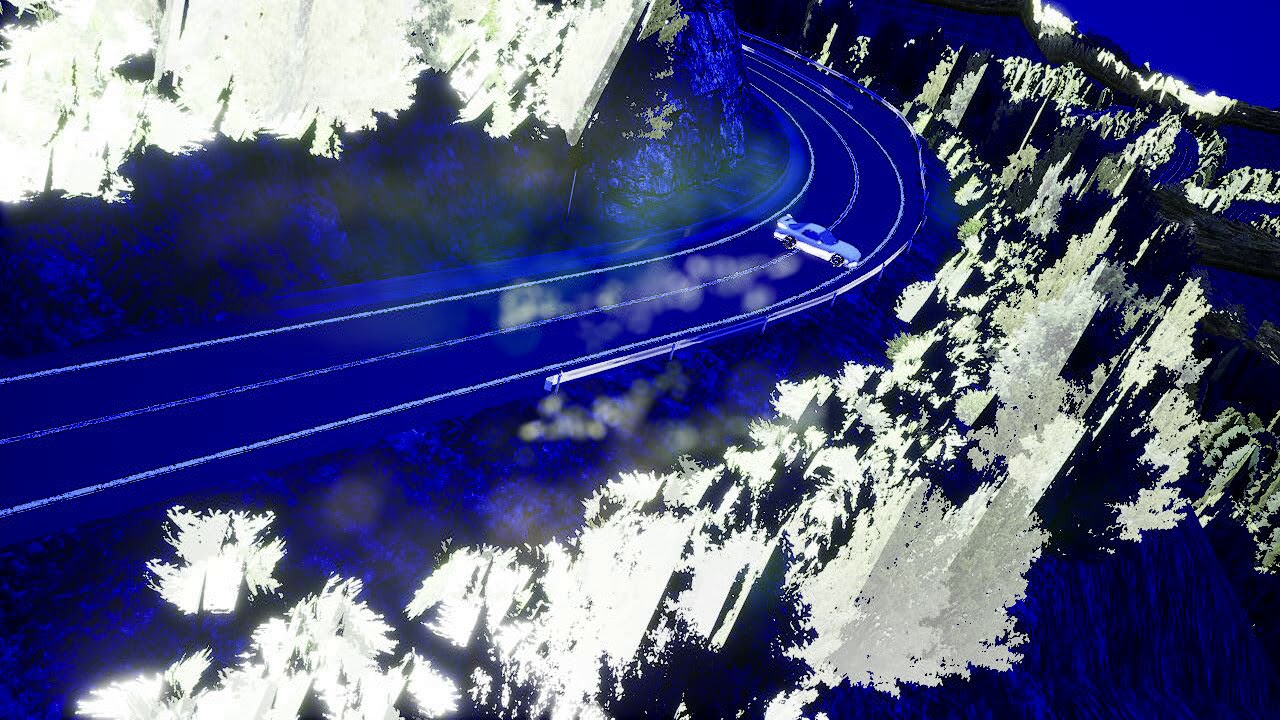
whenever i turn on dx-12 the editor crashes note : raytracing is disabled
 unborn furnace
Random question but how hard is it to make a VR game without any actual VR
Never actually tried VR in Unreal Engine so excuse my ignorance
 vital cosmos
Apparently adding the First Person Content pack is broken in 4.24.1
how else do you add it
hoary locust
migrate it?
vital cosmos
can you migrate c++ classes
 cloud cobalt
Not really. You can move the C++ source files to another project, regenerate the solution, compile it, and you should have the classes available, though with a new game prefix.
 ruby folio
Anyone else experiencing crashes a lot in 4.23?
 cosmic matrix
Hello,
I override the foliage type instanced static mesh class in BP.
But impossible to use it in the foliage editor.
When i create child of my new class there arn t shown in the explorer.
Anyone got a solution or the reason of the problem?
 normal burrow
@ruby folio i get crashes on compile button with niagara systems on 4.23.0
but I do have some data interfaces for niagara which could be culprit. otherwise retargeting will crash
and have ran out of video memory randomly (11gb)
 spare kernel
 flat scroll
Any way to make static shadows sharper? Dynamic shadows have the Shadow Filter Sharpen, is there something similar for static shadows?
cloud cobalt
Higher lightmap resolution
flat scroll
Ah I see, Shadow Filter Sharpen works on static meshes shadows when the light is set to movable
cloud cobalt
Movable lights work very differently
flat scroll
Yeah. Sadly the with movable lights the resolution of the sahdow goes down and when sharpened using a filter the character shadow becomes very blobby
 dark rune
I use this for a simple day/night cycle. How do I determine when the light has completed 1 full rotation so that i know that a virtual 24 hrs has passed?
 midnight gate
HEY I NEED HELP anybody knows how can i set up a material values to change depending on an integer variable?
flat scroll
@dark rune Might be stupid idea, but you could have an actor that acts like a clock with uses the tick to accumulate the delta seconds and once it reaches the number of seconds in 24 hours it resets. Then you can use an interface so the sun can "ask" the clock what time is it.
Having clock as separate actor would let you set custom tick interval, so it can tick like once every second, for better performance.
dark rune
@flat scroll alright ill try
i cant set custom tick interval in level blueprint? this is the only thing i use the lvl BP event tick for, so if possible I would like to keep it there for less complexity
nvm u can
 supple totem
@midnight gate search for Material Instance Dynamic there's a lot of tutorials out there
midnight gate
thanks i will look that up
rn i found material parameter stuff it seems to be juts what im looking for
midnight gate
yea it works but my math is off i need help
i need a mathematician to help me fix my code
 gray shale
Greetings, i m trying to make a Game like pokemon, but idk how i just make the Grass Encounter.... somone can help me?
plush yew
Im trying to work with materials, I am coming from blender -- The materials were properly applied in blender, but when I arrived in UE4 via FBX export, one of the materials stayed properly applied, the other 2 didnt. So I want to edit one of the ones that didnt
heres a screenshot of the material
its a standing seam metal roof -- green in color, what I cant find is where I go to attach the photo texture
 solemn siren
Hi everyone!
Is it possible to show a graph inside a game in UE4? I want to show a graph on the screen of an equipment inside the game which will depend on the inputs given by the player. If yes, how to do it?
 dim plover
Is it your game? If so, I don't see why not.
 abstract relic
@plush yew get texture sample node or just drag the texture from your content browser to the material graph
abstract relic
The material graph is the screenshot you displayed
plush yew
Ok, cool
@abstract relic how do I add a content browser to the material editor window?
abstract relic
Description and rundown of the user interface for the Content Browser.
plush yew
Excellent thank you
solemn siren
@dim plover how to make the functions and show the graphs?
 royal sluice
When creating a Media Player in my Movies folder, I am only seeing Video output Media Texture asset option. What might be the reason I don't see the Audio output Sound Wave asset option?
midnight gate
@gray shale make a colision object that when you step on it the pokemon appears but at a random chance to it so its not a 100 that you step on it
 open eagle
why is my fbx importing a ton of pieces
If i open it in any other program, it is all assembled and fine
midnight gate
@gray shale also youre making a Pokémon game? ill need to know how you code the batling system cuz i have a similar game idea but i cant find anything about the battle
open eagle
but UE4 separates it in to 100+ pieces
midnight gate
@open eagle you can have multiple objects in fbx files and unreal engine likes to seperate them you should merge your objects into one object in your program and then export and import
gray shale
@midnight gate Alright i will try my best but first i m trying to compreend something in a Paper 2d video tutorial...
that I can't understand why my Unreal doesn't have the same conditions
royal sluice
@midnight gate @gray shale I would think it would be something like a collision object where you set a condition so that WHILE inside the collision object's bounds, any movement action taken will have a % chance to encounter enemy
gray shale
@royal sluice Alright, i will try that
midnight gate
yup thats what i said
 steep ferry
cosmic matrix
steep ferry
cosmic matrix
Hello,
I override the foliage type instanced static mesh class in BP.
But impossible to use it in the foliage editor.
https://cdn.discordapp.com/attachments/225448446956404738/660144601268486204/unknown.png
When i create child of my new class there arn t shown in the explorer.
Anyone got a solution or the reason of the problem?
https://cdn.discordapp.com/attachments/225448446956404738/660146716883943434/unknown.png
Only basics class are shown

 plush yew
hello, does pivot point matter when it comes to lods? since they screen size based I'd assume you don't need pivots to be in the exact center of your mesh right?
jak to cie kurwa
w domu nie ma
no nie ma kurwa no
to bądź kurwa
 exotic cave
Hey everyone!
Is there any way to make a material get its textures per-instance instead of per-material?
plush yew
I have the feeling that with the 24 update the editor doesnt suggest to reopen assets anymore that have been open before closing, is it a toggable feature now?
@exotic cave for static materials use material instances with a texture sample parameter 2D node, for dynamic materials you can make dynamic material instances in the blueprints
yeah the editor doesnt restore open tabs on restart anymore, I also toggled it in the preferences, any idea what causes this?
google knows nothing about this
midnight gate
@exotic cave material parameter collection might work
 dense gate
Is there any way to detect what causes "Fatal error!" crashes?
I've tried using VS debugging but it doesn't point to anything
 grim ore
make sure the debug libraries are installed and it hopefully crashes with a traceable error, otherwise nope compile from source and attach the debugger and see what happens in the trace
there are usually logs as well in the saved folder so that can be looked at
dense gate
I already use a build that's compiled from source, 4.23.1 with Chaos
Error tends to happen right after I hit PIE
grim ore
then yep crash and watch the stack trace
dense gate
Welp, after crashing it 5 times to no avail, last hope I have is disabling some plugins
cosmic matrix
Anyone got answer for my question?
dense gate
@cosmic matrix is your class based on InstancedFoliage or Actor?
If it's the former, it's a StaticMesh foliage
When you do either, on the Component Class of your new foliage, select your proper class you've created
cosmic matrix
@dense gate hey, on foliage
cosmic matrix
I undestand but what i need is to and a property like in mesh section
Need to add a string value
I can t create one comp class by foliage i want
i need a custom foliage type with this value added
dense gate
Create a child BP based on your foliage class?
cosmic matrix
yep
Foliageclass->myClass->X children I need
Cause in the pic upward you can see that s work well in the BP editor but after i can t select anywhere my class
😦
I tried to restart the engine but nothing more
dense gate
Select StaticMesh foliage as a start
Then try to find your class in Component Class
In here, if you need extra details
dense gate
Aight me lad, so
I'd assume you have your "parent" foliage as something that's a child of "Foliage Instanced Static Mesh Component"
Children of your parent class are the ones I assume you want to use
cosmic matrix
No not component
dense gate
If it's not based on the component, you can't have Static Mesh foliage
cosmic matrix
I need to add a property in the foliage type class
cosmic matrix
Yes
Cause i see 2 class like actor and foliage static mash but i want to create "min?" custom class based on foliage static mesh with a string property added to that one.
dense gate
Saving strings per instance would be very costly to performance, are you sure?
cosmic matrix
Don t no if i m clear with my explainaisons
not per instance
per foliage type
like the mesh or component class
royal sluice
Can someone take a image snippet of the pop up they see when selecting to create a media player in their Movies folder? I'm wondering if they removed the Audio output option in a recent version of UE 4.
 narrow oxide
Hey guys, where do i post to ask for a bit of help please?
 misty creek
@narrow oxide Depends on what you need help with try reading the #more-resources
narrow oxide
Thanks
plush yew
Posted an answerhub thread related to the "Restore assets on open editor" not working thing. https://answers.unrealengine.com/questions/940892/ue-85908-restore-open-assets-tabs-on-restart-doesn.html
@royal sluice
royal sluice
@plush yew Thanks. Looks like they did remove the Audio output asset there. I guess now you have to create a sound media controller and hook it up through a blueprint.
What is strange is that I don't hear the audio from the media player running PIE, but I do when I Launch. I'm wondering if creating the sound media controller will double the audio when using Launch
plush yew
I really dont have much experience with media assets
 opal berry
hello
I am going to be switching linux but what is currently stopping me is ue4
I just dont understand why Mr.Timmy
hates
Linux
grim ore
because everyone hates linux
cloud cobalt
He probably does not
normal burrow
there is a 1 % yeah
cloud cobalt
UE4 is however not a tool mostly used by Linux users, because most of a game development team usually doesn't run it
So you can build it yourself because other Linux programmers support it
And you can target it as a platform
dim plover
Doesn't UE4 actually support Linux development pretty decently?
There was one guy doing a tutorial while running Linux.
cloud cobalt
It supports Linux as a target platform pretty well
Working from Linux works, but you don't have access to marketplace or prebuilt engine.
dim plover
You think so? I hear the "Trying to support the 5% of people using OS X or Linux for 50% more problems". Not sure if that was referring to Unity or UE4.
That's why I kind of disregarded supporting non-Windows.
cloud cobalt
We shipped regular Helium Rain updates for Linux users, got about 12% of lifetime sales there, and I think we used something like 5 major versions of the engine
Depends on your market
dim plover
Hmm, I guess I'll look into supporting it.
Anyway, @opal berry looks like you can use Linux and UE4 fine.
cloud cobalt
We did get a lot of platform-specific stuff there but mostly from very patient people who provided very in-depth information
grim ore
rotate the referenced directional light to point up (so the sun would be below your world) and hit refresh material on the skysphere
steep ferry
hey guys, i have a question. What are your ideas for making a Moon in game?
 next badger
@grim ore remember the mass rename blutility thing you've been working on? afaik it's not public yet, can i find some other resource to read/watch?
steep ferry
ooooooooooooooooooooooooooooooooooooooooooh
i totally didnt thought about doing that
Thanks bud!
steep ferry
yeah i was experimenting with adding a sphere with a glow effect
Tho it gave a very very weird effect
Oh hey it now works properly, anyways thanks for help @plush yew
 night bridge
i still dont quite understand how to make it night mode
steep ferry
well i made an additive material
added a material to a sphere and located the sphere far far away
 unique kraken
Does anyone have the proper export setting for blender to Ue4?
Also does anyone have a video/information how to quickly put my character in ue4 with the basic Ue4 skeleton and animations.
steep ferry
if i understood correctly
you want to put your character
and give it basic ue4 skeleton
?
steep ferry
well im pretty sure
night bridge
nvm
night bridge
i just rotated with the lightsource a bit
steep ferry
oh
unique kraken
@steep ferry Okey yes but also want to export it back and just replace the current 3d person mesh with mine
 weak perch
ofcourse
steep ferry
it hurts my eyes ngl
unique kraken
💩
weak perch
before building:
steep ferry
@unique kraken Well it's uhh...pretty much impossible if im not wrong? You should first give your model in blender that ue4 skeleton so you should first export a basic manequin mesh, get it's skeleton and attach it to your model
if im not wrong ofc
weak perch
weak perch
after building:
i have increased the lightmap res of the floor
and it doesnt help
steep ferry
hmmm
oh you mean that
well i think i know what you mean
tho i dont really know how to fix that , and im really sorry. I wish i could help you
unique kraken
I do get that bcs it needs to creat the vertex grps. But then I want to replace the current mesh. Since the grps will have the same names that should work. And I'm just asking if someone has recourse on that or can find one since I don't know all the right terms for ue4
steep ferry
Hmm
unique kraken
That would also allow me to creat a skeleton* in ue4 work with it and bind meshes to it later
A skeleton * in ue4
Sry
weak perch
steep ferry
you need to add that light bounds or whatever its called @unique kraken
Oh sorry wrong ping
@weak perch *
weak perch
oke i try dat ty
hasnt worked
😦
lighting is on production
lightmaps are 128 res
steep ferry
 iron kelp
does anyone know how to get the file path for saved games ?
to be clearer I need to get the path in C++ so I can copy/rename various save files
grim ore
@weak perch 128 is very small for a lightmap if you want crisper lightmap shadows
 fallen wing
hey guys, i really want to be an amazing coder. i try and find tutorials to help me get started but they never get me anywhere, anyone who's a great coder please tell me where you started and steer me in the right direction. Thank you
next badger
How long it's been there?
plush yew
@iron kelp maybe FPaths::ProjectSavedDir ?
iron kelp
testing that now but not sure if that will work on a standalone build
plush yew
@fallen wing Standard C++ basics https://www.youtube.com/watch?v=1MKhigIml3E&list=PLmpc3xvYSk4wDCP5zjt2QQXe8-JGHa4Kt
Unreal C++ https://unrealcpp.com/

More courses! Free C++ course: https://www.udemy.com/course/free-learn-c-tutorial-beginners/?referralCode=66F2A2A36BD6D304C9D9
Make a social network with Spring Boot: https://www.udemy.com/course/java-spring-social-network/?referralCode=4C26D3598A4B1A5746FB
Learn about MySQL ...
A tutorial site dedicated to using C++ in Unreal Engine 4. This site is meant for game developers wanting to learn how to begin using c++ in UE4.
fallen wing
thank you :)
iron kelp
@plush yew That gives me what I need for now, will need to test on a standalone build
thanks
plush yew
@iron kelp All the save related paths
iron kelp
@plush yew cheers, what you gave me should work
plush yew
@fallen wing these too For Unreal C++ https://www.tomlooman.com/ and https://www.orfeasel.com/

Tom Looman
Unreal Engine 4 Tutorials and Game Development Blog
iron kelp
most stuff i can do in blueprints but copying files isnt possible without some c++ which I have now 1.5 days experience with
EngineSaveDir and GameSaveDir gives the same result so i guess I could use either
fallen wing
thank you so much guys
plush yew
heey guys is t here any channel where i am allowed to share my vr packaged game that i am working on ? 🙂 i would love to hear opinions
its on google drive btw
#work-in-progress
thanks! 🙂
 rancid lynx
how can i change zenith sky color, without the blue also being applied to all my terrains and meshes? i want to change sky color, but if i make it a deep blue, its making my entire level drastically blue.
plush yew
I am looking for instructions on how to create a door animation that opens and closes when approached. I found how to do it using the matinee editor, However the note on the page says that matinee is being discontinued and we should be using sequencer but it does NOT explain how to make a door work using the sequencer -- whats the appropriate solution?
royal sluice
@plush yew https://www.youtube.com/watch?v=mUpSAxrj_EM

In this Unreal Engine 4 tutorial, we'll look at how to easily create a door that automatically opens and closes when the Player enters a trigger box. The animation of the door is done with the cinematics sequencer. The sound effects and wall assets are available here: https:/...
plush yew
Thank you so much
cosmic matrix
Hello,
I override the foliage type instanced static mesh class in BP.
But impossible to use it in the foliage editor.
https://cdn.discordapp.com/attachments/225448446956404738/660144601268486204/unknown.png
When i create child of my new class there arn t shown in the explorer.
Anyone got a solution or the reason of the problem?
https://cdn.discordapp.com/attachments/225448446956404738/660146716883943434/unknown.png
Only basics class are shown
gray shale
Someone can help me with Paper 2D NPC Animation Movement? idk how to make
plush yew
am I correct that blueprints are things you can set up and use over and over?
normal burrow
yes
plush yew
cool -- thanks
rancid lynx
learn all you can about blueprints. they are amazing.
is it possible to change zenith color inside skylights without that color also applying to all meshes in the map? i want a flat white light from skylight and i want a deep blue sky, but changing the zenith to blue also transfers the blue onto all meshes. i understand the generic idea of skylight is to apply skys light to everything.. but that shouldnt be tied directly to zenith X_x.... it should be two completely different colors
 fathom glade
I'm still doing these tutorials for blueprints and man... It's so much work to just change the color or material of things through this "logicBP".
 hallow compass
Hi all, is creating a multiplayer game with p2p servers still a thing? I hear that dedicated servers cost a lot of money to run
normal burrow
you can do player hosted games yeah
plush yew
@hallow compass There are ways to make P2P Connections. LAN connections are very easy, if you know some basic networking. As for the WAN connections over the public Internet, you may need to play with some NAT rules and/or port forwarding
hallow compass
@plush yew that doesn't sound very easy at all haha. I am a newbie to game dev / unreal so I have a plan in mind for what I want to create but in terms of multiplayer I am unable to find any easy tutorials. I am guessing dedicated servers are very expensive then?
plush yew
@hallow compass no idea how expensive dedicated servers are, I don't use them. But look into what @normal burrow Said about player hosted games. My answer was theoretical related to networking only, not specific to unreal
abstract relic
don't touch multiplayer with a 30ft pool until you have a stand alone ready
hallow compass
Is it best to create the game for single player purposes and then work the multiplayer in last if possible? Or does it need to be done during the gameplay functions are made? Just trying to find a workflow as I am a level designer more than a coder
plush yew
@hallow compass https://www.udemy.com/course/unrealengine-cpp/
Udemy
Unleash the power of C++ and Blueprint to develop Multiplayer Games with AI in this Epic Games-approved course.
hallow compass
Do I have to use c++ I have been using blueprints as that is easier to me
normal burrow
Rarely ever a best way to go after anything, but like HighTide said, your much better off having working examples to bring to multiplayer
Don't need c++ afaik
plush yew
@hallow compass C++ is not required for multiplayer, I just don't use blueprints, that's way I mentioned the C++ multiplayer course
hallow compass
Ah right thanks. I think I will create the game single player first and then see about getting multiplayer working afterwards if possible. Now... could anyone point me in the right direction for ball physics hahaha 🙂
 marsh swallow
Is the Overall resolutions = size? Meaning this would be a 1.7km map?
normal burrow
there is a marble template game tommow
but sphere collision component will be your friend with ball related things
is that a land scape darinius?
marsh swallow
yeah
i am exporting our maps to send to our WorldCreator guy to make them look much more realistic.
looking up the math calculations in the forums, no-one seems to really know the correct answer to get the km.
dim plover
I don't think that 1 resolution = 1uu. That would mean each quad is 1 uu.
Maybe, though. 🤷 You can try the ruler tool and roughly measure. Or make a 1.786km cube.
marsh swallow
im sorry... the what now?
i have been working in UE4 for 4 years....
what RULER!
abstract relic
lol
marsh swallow
😂
dim plover
You can middle mouse click or something(right mouse button?) in any ortho view to make a ruler.
If you hold middle mouse button and drag in orthographic views it starts to measure from one point to the next in Unreal units.
hallow compass
anyone know the difference between tesselation and no tesselation? I cant see any difference
abstract relic
it's ok, I only discovered that you can set folder colour a few days ago...
marsh swallow
I would die without my folder colors
dim plover
One pretty prominent person here only learned that you can have multiple content browsers recently.
normal burrow
every unreal dev needs a ruuler
marsh swallow
apparently 3.5km
normal burrow
i think folder colors beat out multiple content browsers though
abstract relic
Don't touch my secret content browser you dirty designers
normal burrow
I like my exactly 4 content browsers too.
marsh swallow
Its honestly crazy how you can work with this tool for years and not know 1/2 of it
and i dont mean the basics but REALLY know the itty bitty parts of modules.
dim plover
For 3D modeling, it seems like a lot of the cool stuff or even just using out-of-the-box tools are like secret, specific techniques.
normal burrow
such as folder colors
hallow compass
is world creator 2 worth the money? I am thinking about getting it as the game I want to make involves big landscapes
dim plover
I learned like an hour ago that you can color your anim notifies.
normal burrow
this almost makes anim notifies worth it lol
find them not real reliable, but wish there were more pretty organizing techniques in general
dim plover
What's the alternative to them?
Also... you know you can make the top bar of the UE editor any color, and even gif you want?
abstract relic
What
dim plover
dim plover
It's not actually completely useless as he states in the video. It can be used to more clearly make sure you're using the right engine version.
And I've seen people use custom images for the UE4 Editor opening prompt/popup.
normal burrow
(but anim notifies for foot steps and stuff can be done based on just syncing time on the animations and putting in rules of when the foot hits the ground instead of emitting events from the animation itself)
dim plover
You should briefly watch that video.
dim plover
Uh... besides the stuff in that video, which I don't even particularly care for, I don't think I know anything else.
I mostly know a bunch of bugs, though. 😦
normal burrow
This video is pretty nuts
normal burrow
easy enough to test
plush yew
@hallow compass I remember some pretty good things about this too https://www.unrealengine.com/marketplace/en-US/product/interactive-open-world-foliage

This asset will give you the opportunity to fill your ground with dense foliage with minimal loss of performance.
but I mainly use the one from the open world demo
 blissful willow
Does anyone know the difference between Action and Axis mappings? Are Axis just for controllers
normal burrow
button v. trigger
hallow compass
So that interactive foliage isn't compatible with the latest engine version
@plush yew this is what the Interactive Foliage looks like for me. absolutely horrible lol
blissful willow
@normal burrow I'm still not quite following
I thought both "triggered" an action using a button
normal burrow
er i mean like triggers on a game pad (for accelerating in car games and what not)
or axes on a joystick
Action is something that goes on and off where an axis has a float number on it
rancid lynx
how can i manually set my zenith skylight color, without that same color flooding every mesh in my map ? i want white light from the sky light everywhere, but i want the sky to be blue. why the fffffx would they not be seperate settings.
 surreal heron
hey newbie question, is Flex Nvidia the only softbody/ cloth solution in Unreal?
normal burrow
to get flex you need a custom engine build iirc
surreal heron
I see that i need a Github integration, is there any other solution to use?
surreal heron
thats fair, real time cloth stuff is intense even in 3d programs, Just looked really exciting, but i should learn Unreal before wrapping my hear around this 🙂 thanks
(only a month in)
hallow compass
I am trying to create a golf course and failing so hard
Trying to create something like this, seems impossible with the toolset provided lol
rancid lynx
yea. the light engine in ue4 is rediculous
hallow compass
I mean does the entire thing need to be rendered in realtime? I don't understand how you can get 60 FPS with draw distances like that
hallow compass
Not sure about all that stuff yet. All I know is I have imported the open world demo grass and it's waving as if there is a hurricane about... what on earth is going on lol
now I am getting like 10 fps. Jeeeeez
plush yew
@hallow compass wind Settings
Open world demo comes with a wind directional source, just play with it settings
hallow compass
Dont have that option in my vieport. I had to go into the actual material bp to remove the pins that control the wind
But now the bigger concern is I am getting less than 10 fps
hallow compass
So I have the cull distance maxed out but it still doesn't render grass in the far distance . And the grass isn't that dense yet I can't even get 10 FPS. Damit this is hard
LOD is presetip from epic games
pre-setup
plush yew
@hallow compass This is my scene With grass
hallow compass
How on earth have you managed that. This is the LOD settings I think
 humble ridge
Anyone know much about level set collision on geometry collections?
trying to work out why its not surrounding my static mesh correctly
marsh swallow
@dim plover we actually have a custom open engine splash screen and top bar setup. 😂 im a sucker for customization whitelabeling stuff. ^_^
 jovial pollen
hey I keep getting this error when packaging my build any help fixing it?
pls help :c
anyone :c
 wary wing
Is your icon file in the right format?
jovial pollen
let me check
wary wing
Is it an ico file, and will other tools read it ok?
jovial pollen
where do I check it?
wary wing
I can't tell from the stack trace. What's the file extension of your icon file?
wary wing
Find the file in file explorer?
jovial pollen
ok
wary wing
Oh actually I think if you just delete the secon from your project's DefaultEngine.ini then it will revert to default
What's in there now?
jovial pollen
the one its using is the default mac icon
wary wing
Oh so you haven't changed it at all?
jovial pollen
no
jovial pollen
UE4.icns
wary wing
I presume something in [Engine Directory]/Build/Mac/Resources?
(I'm on Windows so can't actually check)
jovial pollen
its using the UE4.icns
wary wing
Can you see that file on disk?
wary wing
Hmm
So your stracktrace was moaning about loading an ico file
GroupIconResource.FromIco
wary wing
Huh
wary wing
What did you change?
wary wing
Those errors in the project settings are a bit of a red herring :/
I'm glad you got it sorted 🙂
jovial pollen
me too :)
 crude vessel
How can I scale a character's bones to change their appearance (for NPC randomizer)
royal sluice
This is just for a question (my code doesn't look like this) Are these equally efficient?
 merry geode
Yes
royal sluice
Thanks. I have a media player variable that is just all over the place, so creating multiples should clean the blueprint up a bit
merry geode
Exactly.
 tulip wind
my game start keeps spawning my actor away from the camera view
 chrome cedar
can anyone tell me where I can get high quality indoor plants for unreal? thanks in advance! 🙂
abstract relic
Visit the Unreal Engine Marketplace for free and paid assets to power your next project.

INTERIOR PLANTS includes 40 realistic 3D plant models for 3Ds Max, CINEMA 4D, LightWave, MODO, FBX, OBJ supporting various renderers.
chrome cedar
ty! 🙂
 weak granite
Hey sorry this is a random question but is it common for there to be programmers asking about details before working with them? They are asking a lot about the game before I purchased the package on the website, I don't know if that is suspicious or just normal in the UE4 forums. Lol maybe I'm just on edge
abstract relic
Of course
wary wing
A package of programming?
As a programmer I'd say it's 100% super normal to ask a whole heap of questions
abstract relic
Assuming you are contracting
wary wing
^
We all have this estimator in our brains that we use to work out how long things will take and if they're even possible, and it likes to be fed information. Lots of information
They're probably trying to get a feel for the technical difficulty of your project, not trying to steal your game idea
abstract relic
Be suspicious if they don’t ask you for details
wary wing
^ Oh yeah, that!
abstract relic
You can’t expect an architect to work before scouting the landscape so to speak. The contractor needs information to provide reliable estimates, plan of action, make sure you are a good client, etc
weak granite
That makes a lot more sense thank you @wary wing @abstract relic
hoary locust
in general I think it's pretty safe to assume that no one is looking to steal anyone's idea for games, movies, or books. It's the execution that matters, not the idea.
 edgy moat
How can i add a value to a integer overtime, and stop adding if it reaches a certain number?
 exotic thicket
Depending on what you're doing, you could do max(yourInteger, maximumValue)
midnight gate

In this video, we discuss blending physics and animation. We also cover some more advanced options in constraints.
A link to the wiki for further notes is available here -
https://wiki.unrealengine.com/Physics_Asset_Tool_Tutorial:_Animation_Blending_and_Spring_Constraints
how do i do this
abstract relic
Follow the tutorial
midnight gate
I CANT EVEN ACCES THIS WINDOW
light coyote
@edgy moat you can use the ++ node wich is cool because it sets the var after adding 1,,, you would use a branch, wich is an IF condition, and plug to it the condition of equsl or greater to,,, just an example
edgy moat
Yes i have done something similar, thanks!
midnight gate
how the fuck do i do boob jigles
theres not a single tutorial for it
cloud cobalt
Careful animation work & physics interaction
Character art is one of the most complex gamedev topics so it's something you usually spend years in schools to learn
midnight gate
i need jiggly bones
i have a chracter with rly long horns and it would be amazing if they could jigle
you can go only so far with animation
light coyote
@midnight gate you can check an external program, it is for sure the most apropiate way if you need realistic physics
Computing realistic physics is an intense task,, so having an external program specialized on that and make an animation from it instead of computing it on runntime is the key
 magic hawk
Hello gentle folks, currently I am on UE4.20 source and I was wondering how can I add UClass class under UE4/Source/Runtime/Engine/Classes/GameFramework, my issue is myclassname.generated.h file is not being generated, do I need to modify any .cs or .ini file in order to create the .generated.h file?
light coyote
And blend each one correspondingly
wary wing
@midnight gate that tutorial is super, super old, and the engine looks quite different now. I can't even find the "Selected Simulation" button anymore. I think I would look at these https://docs.unrealengine.com/en-US/Engine/Animation/NodeReference/SkeletalControls/RigidBody/index.html, which might do what you want and you should find plenty of tutorials for
light coyote
@midnight gate check on google best physics simulator to animation or something along those lines and make uour mind up with what to use
magic hawk
@midnight gate u can achieve that using material as well, I am sure there are some tutorials out there on the topic
midnight gate
i know what physics to use but i cant find anywhere how to do them
i juts need bones w physics on them
cloud cobalt
The easiest is to create a jiggle animation and drive it from the anim blueprint.
Actual physics are unpredictable and create inconsistent results
cloud cobalt
You can blend the results of physics-based animations to ragdoll your characters.
midnight gate

Mature Content
In this tutorial I show all of you fellow UE4 Indie Developers how to create Spring Joints for characters. In my experience just recently Unreal PHaT is not the tool you want to use for this purpose because nothing you do in Unreal PHaT saves correctly.
If ...
i tried this
 cyan robin
Hey guys, i have a problem. I want to hit a flying actor but i'm using SetActorLocation and it's like doesn't have collision, any idea?
 whole quarry
Give it a collision?
blissful willow
This seems like a really stupid question, but I'm making a character blueprint from scratch, and I cannot for the life of me figure out how to spawn as it in world
Can somebody give me a hand?
plush yew
does anybody have there xbox license?
@blissful willow i'd recommend reading up on the documentation
https://docs.unrealengine.com/en-US/Engine/Blueprints/index.html
Overview of using the Blueprint visual scripting system for gameplay.
blissful willow
I already know plenty about blueprinting, I just can't get this one specific thing to work
Even though I have it marked in Game Mode and everything
That's why I'm confused
plush yew
okay have you tried googling it? cause to me it sounds like your world settings and game mode settings aren't correct
blissful willow
Ah, you know what, I was just being stupid lol
I set everything up right, but forgot to mark that Game Mode
Thanks 👍
 odd yarrow
Guys can I sculpt side ways on terrains?
something like this
where you have a gap between the mountain and the ground
sort of a tunel.
 wary wave
no.
odd yarrow
So how would I create that?
wary wave
static meshes
 fierce forge
Why is this not working ? (the destructible mesh)
 dusky inlet
realistic boob physics right here: https://gyazo.com/60e9f101a21448f0f79ef492bbc5dc42

(if this is against rules already I'll remove it)
exotic thicket
... :D
rancid lynx
when you drag and drop a mesh onto terrain, it uses the origin or 3dcursor to auto snap allign to the ground floor. but if you move it and press END it uses first contact of collision to allign "I.E Trash". how can i force a mesh to origin align to terrain instead of collision snap ?
besides deleting and manually dragging 40000 bullshits
wow... maybe "allign pivot to floor worked for multipul meshes. i thought it didnt before.
yea... fuckingtrash... align to floor and snap to floor only works with 1 selection at a time, if you try to select 2 meshes, they all snap to the first mesh
fffkn surel ythere is a way to span 2 pivots to the floor at once, instead of manually placing 900000 trees
------- How can I align-snap multipul selected meshes to the floor ? surely i dont need to manually select 52 rocks and snap them
thank crackhead god. if you goto the world outliner, at least you can shorten the pain by pressing DOWN alt End down alt end down alt end down alt end 500000 times, instead of mouse click 5 times per actor
surely im missing something.
magic hawk
I hope someone can answer my question
 leaden dust
I just bought a laptop to upgrade from my crappy and old 960m
Are these specs enough for UE4?
CPU: i7-9750h
GPU: rtx 2070 max q
RAM: 16 GB 2x8 2666Mhz
Storage: 256GB SK hynix pcie nvme m.2 ssd
and a 1TB HDD
normal burrow
Those are great specs for ue4
odd yarrow

baking shadow gets me these
round shadows
from the point light
how to get rid of them
crude vessel
 scarlet birch
@plush yew You can try adjusting the shadow bias a bit. I keep this page (and a few others) open whenever I start working on lighting. https://www.tomlooman.com/lighting-with-unreal-engine-jerome/

Summary of the Unreal Engine 4 Lighting Masterclass by Jerome. Learn the tricks for lightmass to get better static lighting for your scenes.
 cosmic veldt
guys is there a way to change the sorting order of the clear coat layer?
clear coat material on cars looks so cool but when i add the damage decals they look like they are under the clearcoat is there any solution for that?
Non-clear coat vs clear coat notice the decal on top of the car
plush yew
can anyone tell me if raytracing is good for a 2d hand drawn game or what even is it?
 violet cove
2d isnt exactly what raytracing should be used for
Has anyone run into this issue when building lighting that not all objects can be built?
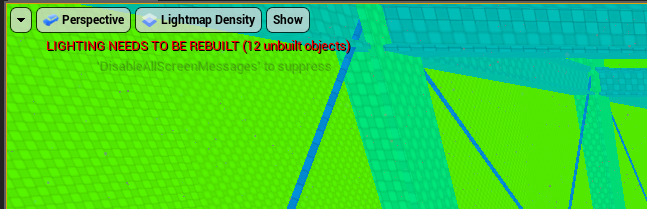
Its an issue with instanced foliage
kindred viper
@plush yew pre-rendered raytracing is awesome for 2d. If you want realtime, its overkill. Although its the same implementation if you are simply fixing a camera angle. ie. pseudo-2d, so its no different than 3d in that sense.
fathom glade
Some of these tutorials are very strange... Why doesn't the instructor duplicate repeated text boxes? He keeps re-making the exact same text box for a good 2 minutes straight.
plush yew
@kindred viper thanks for telling me!
marsh swallow
When switching between pawns, we dont use a camera manager, how could i set the new pawns camera location to the same location as the current pawn? SetRelative and World does not work. lol
I am able to set the socket offset and arm length no problem.
 upper heart
@open eagle Please only post your question in one channel
open eagle
sorry, that channel was just kinda slow
odd yarrow
People, my LOD's don't change, even they are all set up and saved. When I go from a distance the LOD doesn't change
help pls
Ok fixed it.
 untold crag
Hi, so I'm not very smart and just played around with UE4 before learning anything. I've managed to delete my sphere and cube from "basic shapes" of every project as I dragged it into the content browser of one of my scenes then deleted that scene. Is there any way to get this back?
fathom glade
You can get a sphere, or any of the basic shapes from the Modes Panel. If you mean trying to get back something you deleted.. I don't think so, I'm a noob too though so idk
ctrl+z is the only other way I think?
untold crag
Oh gosh. Then I'm screwed :D I'll have to import an fbx of a sphere from somewhere else I guess
fathom glade
idk I don't think it's possible to delete things from the modes panel like that, but who knows 😮
exotic thicket
There's a reset button for the editor layout somewhere in the menus, maybe give that a go
 west jewel
Would an asset pack from the market place that only lists up to 4.20 Supported Engine Versions work in 4.23? Its mostly meshes I think "Medival Crafting Tools"
 oak linden
It should
Meshes tend to transfer over without a hitch unless they use some super fancy shaders
west jewel
ok thank you
oak linden
For some reason, applying cloth data messes up the normals
anyone knows why this happens?
hitting my head against the desk here 😬
 karmic tiger
hello guys i need to know how i can get my character to aim his weapon (go into iron sight ) while i am standing still and press the right mouse button and when i release the right mouse bitton the weapon goes back to rifle hip base pose
 candid stratus
dont know how to fix error
 dark depot
@candid stratus that last pin isnt alpha but RGBA so your feeding in 4 channels into the height channels
 rugged siren
anyone's 4.24.0 or 4.24.1 freezing pretty often when finishing PIE or closing editor? I think there's a thread deadlock somewhere in audio code
maybe it's just my project
candid stratus
@dark depot thanks
open eagle
is it that bad if I make an RPC to the server on event blueprint update animation in my AnimBP for some replicated variables
 atomic forge
 blissful trail
hallow compass
blissful trail
hallow compass
Has anyone shipped any games yet?
blissful trail
its not rly workin :/
abstract relic
You need [current hp]/[max hp]
blissful trail
any tutorial on it ?
normal burrow
i'm confused where is the question potato god? lol
blissful trail
on the current hp/max hp thingy
normal burrow
psychic lol
abstract relic
They’re trying to get percentage for health bar or something. But didn’t set up any math to get percentage
normal burrow
oof yea i didn't look at the function name
 naive comet
Hello i have a glitch that i want to play a sound when the player jumps and then i want it to wait 1 second before it can play that sound again?
normal burrow
btw potato god, you should have a return on the cast failed.
naive comet
srry im new to this
normal burrow
do you have the sound playing?
normal burrow
add a variable and do one of those. then check if its <= 0.0f
and when you play the sound, set it to 1.0
naive comet
thanks
abstract relic
What is that spaghetti Pat


 grave nebula
It is ticking even there, through the screen. brrrr
normal burrow
a -= node would be nice
jovial pollen
does anyone know how to fix a shitty collision system?
normal burrow
fire
normal burrow
what is shitty about it?
grave nebula
You can keep it as it is, being shitty, but pretend that it is nice instead. Has same effect.
 manic pawn
you can just make a -= node like they have a -- node as a macro
jovial pollen
I am making a VR game and I have sticks and little rocks that you can pick up BUT when they get too close to the player (anywhere where your arm isnt fully extended) the player starts flying n shit and I dont want that to happen
normal burrow
jovial pollen
I am making a VR game and I have sticks and little rocks that you can pick up BUT when they get too close to the player (anywhere where your arm isnt fully extended) the player starts flying n shit and I dont want that to happen
 thick herald
No need to repeat the question @jovial pollen. Try disabling physics on them when you pick them up
jovial pollen
ill see if that works, I tried doing CanPlayerStepUpToThisComponent false and making it a character mesh and it still collided with the player even though doing that on other things such as the houses (to walk into them) the player cant collide with them
so in the pickup cube BP I should set simulate physics to false?
thick herald
From what you've described, yes. It sounds like physics is going a bit mental 😄
jovial pollen
ok thx for the help
btw
do you know how to make a inventory system that sits on the waist of the player or can be opened by looking at the wrist?
thick herald
Nope
jovial pollen
oof ok
candid stratus
is their a way that i can make it so i can select a different actor or mesh but still see the view from my camera?
jovial pollen
I dont think so
vital cosmos
Is there a way in the staticmesh asset viewer you can change the scale of your object so that 1,1,1 would be that new scale
 gentle jasper
@candid stratus I don't know what do you mean exactly but you can display the selected camera view in the viewport by clicking Ctrl+Maj+P and then select differents actor or mesh still see the view from the camera 🙂
Maybe a not so important question but I'm currently modeling 3d platforms into Blender for a little game. I was wondering if it's better to modeling the platforms in little separated blocks then assembling them in UE4 or can I modeling some big groups of platforms with all the walls and floor attached together and then export it ready in UE4 ?
plush yew
@gentle jasper It's up to you and what you need, I've seen it done either way...
normal burrow
Anyone know of using multiple lightmaps for different times of day without reauthoring or copying the map?
manic pawn
light scenarios
create sublevels and then tick the light scenario box in the levels window
normal burrow
oof, thanks zeb
manic pawn
there's probably a docs page
manic pawn
yes, we have a thing that changes it in game, though I wasn't the one who made it so I don't know how
it's an instant change (no transition)
plush yew
I am trying to replicate my pawn movement, it is done already but when I play from the virtual joystick, in the client it always controls player 1 (who is the server) even in the second tab? What am I doing wrong?
In the second tab, I am moving my player 2's controller to left but player 1 fires
Player 2 must fire when I move the controller from second tab
I cant find any replication in joystick's editor
Here is the blueprint
 tawdry heath
what is "Can't Play in Editor when performing Edit Rate Scale operation"?
fallen wing
hey guys! does anyone know a tutorial on how to switch out the third person grey mannequin to your custom fbx? thanks! (i'm in blueprint mode)
plush yew
@fallen wing You don't need a tutorial :-). Opened the third person blueprint, click on mesh on the left side. And select your mesh on the right side, ideally you already have an animation blueprint available for your custom mesh
fallen wing
thanks! i'm a somewhat beginner so how do i replace custom animations?
plush yew
if you don't have an animation blueprint. Is just gonna sit in whatever pose you Imported
fallen wing
thanks :)
it does this? sorry for being annoying, is it because the scaling's messed up or is it for another common reason? thanks! :)
plush yew
any tips for changing instance foilage actors into a static mesh or multiple static meshes?
@fallen wing Perhaps you forgot to attach a picture?
fallen wing
oh! yeah sorry
 left citrus
When parsing an array by reference to a function, how do you add a value to that array?
plush yew
Camera is placed on the character's feet
fallen wing
thanks but i can't move it because it disappears?
plush yew
No it is another problem but I think is happens because of your camera and spring arm not placed properly
Spring arm = CameraBoom
And check your character's scale
Maybe it is too big or too small
Grid isn't visible in the screenshot
fallen wing
thank you so much i'm pretty sure it's scale
plush yew
That explains why camera is below 😄
By the way, scaling down is not always healthy for Unreal
I assume this is a fbx
You can adjust your fbx import settings in your modelling software
But I'm not an expert about this things
You can research it
 solar swift
is there a way i can detect if a specific actor has overlapped my collider components?
plush yew
fallen wing
thank you so much guys it's working!
plush yew
@solar swift Yes, in C++ is easy, Unfortunately I don't know blueprints :(. It should be similarly easy, assuming set up is correct
solar swift
ah okay thanks
plush yew
@solar swift And assuming I understood your question 🙂
solar swift
So something weird has happened, my actor is no longer visible from my viewport anyone know why?
plush yew
@solar swift press F I think it should focus The view on your character assuming it's still in the scene, just outside the camera
plush yew
Yeah I just tested it, I was wrong
@solar swift Close the window and open the window? it worked for me, the character was back in the view
plush yew
click mesh on the left side, and make sure there is a mesh assigned on the right side
solar swift
yeah, it shows the details like normal
plush yew
I'm out of ideas 😕
left citrus
Is it possible to change the direction of the curve editor? so that the time runs vertically?
just in terms of visualization in the editor
 late verge
anyone know why my rail looks like an empty actor?
it seems anything i drag from Modes looks like this
plush yew
@solar swift check the visibility in the right
solar swift
where? i dont see that
normal burrow
Waiting
open eagle
How can I make certain actors have no physical effect on others
normal burrow
Set the primitives on them to NoCollision
open eagle
No,
I still want it to have collision and simulate physics
but do not let other actors push it around
only let it fall
normal burrow
mass
i don't think there's another way to do it. things with higher mass are harder to push
abstract relic
Can’t you set it to ignore pawns though?
normal burrow
I think they are saying they want some things to collide but be simulated but not respond to other things?
tawdry heath
When my character jumps, the jump animation keeps looping until he lands. How can I fix this?
abstract relic
Yeah, there’s a list under physics tab
tawdry heath
normal burrow
Hm maybe I’m misunderstanding @open eagle
tawdry heath
that was very useless picture lol
open eagle
transition between walk and jump
abstract relic
normal burrow
Yeah that is prolly what you want XZ
abstract relic
You need jump start, jump loop, and jump end by the way
open eagle
it still responds to pushes from other actors
normal burrow
Nah XZ they will pass through, just have to be mindful of what object types things are
abstract relic
There’s also a present to ignore only pawn
 pulsar kraken
Has anyone here successfully made a successful multiplayer game in unreal?
By success I mean players actually playing it and still playing it.
exotic cave
@pulsar kraken : I mean, Unreal is called Unreal because it powers a series of network-based shooters that are legendary in the industry to this day. So yeah. 🙂 Epic certainly has.

Unreal is a series of first-person shooter video games developed by Epic Games. The series is known for its exhibition of the Unreal Engine that powers the games and is available for other developers to license. As a result of Epic's focus on the engine technology, much of th...
Smite is built in Unreal Engine as well: https://en.wikipedia.org/wiki/Smite_(video_game)
Smite is a free-to-play, third-person multiplayer online battle arena (MOBA) video game developed and published by Hi-Rez Studios for Microsoft Windows, macOS, PlayStation 4, Nintendo Switch, and Xbox One. In Smite, players control a god, goddess, or other mythological figure...
Millions of players.
If what you're really asking is how to get good at it, or expressing that you're frustrated because you're having trouble with networked features, that's a different thing though 😄
Ooooh, you said "anyone here". Sorry, my misread
abstract relic
There are epic staff here
exotic cave
That's awesome actually
abstract relic
And several unlabeled staff
normal burrow
It’s just like god right? (She’s listening right?)
pulsar kraken
I am more interested in successful indie developers that are here. Mostly interested in speaking with them on roadmap, advertising, what I should prioritize and what I should avoid.
Currently, I am headed the steam route. It seems the most probable.
normal burrow
Well there are a few that come to mind yeah
pulsar kraken
A good example would be spellbreak maybe.
normal burrow
There are multiple people anyways
pulsar kraken
thanks @normal burrow good to know.
exotic cave
Does anyone have any good links/tutorials on grass?
UE seems capable of some incredible fidelity grass but it also seems to require some intense setup inside the landscape material, right?
Also, just a shout out to the engine here, the innate rendering is crazy good. I just noticed, for example, that the engine will actually lens flare the reflected light beam of the sun from highly metallic/shiny surfaces.
How is that even possible? Does UE do some minor raycasting or tracing just within the internals?
royal sluice
I'm noticing an odd issue. Playing (PIE) a media player video through a Level Blueprint causes the video to loop, but playing outside of that Level Blueprint does not cause it to loop. Looping is not set in the Media Player object (I don't even think that does anything anymore in the current version of UE).
plush yew
@exotic cave Some goodies here https://www.youtube.com/watch?v=FzoY062kY1s

Wiktor Öhman demonstrates how you can create a realistic forest environment with Unreal Engine 4 and Megascans. Learn about basic layout, composition, detailing, lighting and post-processing in this 1 hour tutorial.
For more on Megascans: http://www.megascans.se
Ground Mat...