#ue4-general
1 messages · Page 597 of 1
 left ridge
hidden in game is not checked - there's 100s of them that just suddenly went missing
I went to the main level where this is used as a streaming level and they were suddenly invisible - opened this level again on it's own and they're gone
 rich rose
If particular assets don't allow to be added to 4.24. Is there any idk risk or drawback of just adding them to 4.23 and then migrating them to 4.24 ?
 plush yew
how would i make an enemy with AI spawn and slowly rise out of the ground? do i need to temporarily disable, gravity, collision and behaviour tree or is there a better way?
 copper flicker
this also doesn't work
but ideally.. it would be great to read from a folder, and make the array at run time
only I don't understand how to work with these soft refs
 thick herald
Reading from a folder may require you to do some funky stuff with C++ to expose what you need to BP. There was a free marketplace pack that did allow this, but it is no longer updated. MJ's something or other.
 cloud cobalt
"reading from a folder" in UE4 is using the Asset Manager
You would typically use that to discover content dynamically
You can then proceed to load objects
You will also need to ensure the assets are properly packaged
thick herald
One of many aspects of UE I'm not familiar with, is Asset Manager. Are the official docs useful to a layman, or are there any good learning resources on that?
 river fox
Hi. I am trying to create a new C++ project, but I get this:
The project could not be compiled. Would you like to open it in Visual Studio?

Running M:/Epic Games/UE_4.22/Engine/Binaries/DotNET/UnrealBuildTool.exe Development Win64 -Project="M:/CMP/Test/Test.uproject" -TargetType=Editor -Progress -NoHotReloadFromIDE
Creating makefile for TestEditor (no existing makefile)
@progress push 5%
Parsing headers for TestEditor
  Running UnrealHeaderTool "M:\CMP\Test\Test.uproject" "M:\CMP\Test\Intermediate\Build\Win64\TestEditor\Development\TestEditor.uhtmanifest" -LogCmds="loginit warning, logexit warning, logdatabase error" -Unattended -WarningsAsErrors -installed
Reflection code generated for TestEditor in 6.4357572 seconds
@progress pop
Using Visual Studio 2019 14.23.28105 toolchain (M:\Visual Studio 2019\VC\Tools\MSVC\14.23.28105) and Windows 10.0.18362.0 SDK (C:\Program Files (x86)\Windows Kits\10).
ERROR: System.ComponentModel.Win32Exception (0x80004005): The system cannot find the file specified
          at System.Diagnostics.Process.StartWithCreateProcess(ProcessStartInfo startInfo)
          at UnrealBuildTool.XGE.ExecuteTaskFile(String TaskFilePath, DataReceivedEventHandler OutputEventHandler, Int32 ActionCount) in D:\Build\++UE4\Sync\Engine\Saved\CsTools\Engine\Source\Programs\UnrealBuildTool\Executors\XGE.cs:line 493
I never had that problem and I did not touch the unreal or visual studio installation
cloud cobalt
@thick herald We used it extensively in Helium Rain so you can check the code, even though I've made this stuff massively simpler and shorter in my new project that I haven't published yet
But it's rather simple to use
thick herald
It's something I've been meaning to research but lacked a basis on which to start looking
cloud cobalt
What I do with the asset manager is rather simple - I just ask the engine to get me a list of every instance from a class
That's basically 5 lines of C++
thick herald
I'm not a C++ guy, been over 20 years since I last coded 😄
copper flicker
@cloud cobalt thx, I'll take a look
thick herald
some of it at least. I know I need to learn how to expose some things to BP that I want though (not necessarily asset management) I know Mathew did a vid on something similar for realtime data reading
anyway. Thanks for the information, real life calls.
copper flicker
mmm... a bit complicated for me, and I can't find any tutorials, I kinda need to see someone applying this stuff in practice, the manual is just dry info
cloud cobalt
What do you actually want to do here ?
copper flicker
I mean I have no idea how to apply that
so... 2 things
1, I want to load some.. 100+ meshes from and selection of 5000+ meshes
from a selection *
I do that right now with spawn actor that sets mesh
and inside the actor I have a bunch of meshes
in an array
part 2... is where it gets more problematic
I want more than just 1 array
I want the actor to chose/load a mesh based on context
meaning on an island ground can be sand, but on a mountain ground can be gtravel
it's all atm coming from the same 1 big actor
that contains a ton of sand and gravel and whatnot
in fact, I'm not sure... I'm in the middle of doing this
I just made the ssytem work for 1 world. aka - island
cloud cobalt
What the asset manager is good at is
- discovering content from a particular class or folder
- loading content that was packaged but isn't actively referenced by anyone yet
copper flicker
yeah that sounds all good, but how does it work? what exactly is this asset manager?
 wary wave
...it manages assets 😄
cloud cobalt
Well you can't expect tutorials for advanced features
copper flicker
so if this is C++ crazyness.... I don't speak that language
ok, maenwhile I tried with soft refs, and nothing loads
I guess there's more to soft refs than just creating a soft ref aarray
and set mesh
 edgy moat
My Widget Blueprint is not displaying what it shows on the editor onto the screen. İts opacity isnt working, the circular throbber is being very glitchy and everything just messed up all of a sudden
 ember cypress
The Doc article on the Asset manager might be useful, if you haven't looked at it yet.
cloud cobalt
GetAssetsByClass is a Blueprint-exposed method so that does exist for Blueprint.
copper flicker
I looked at it alright........................
cloud cobalt
Try GetAssetsByPath, GetAssetsByClass on the asset registry
edgy moat
Bottom left corner. The circular throbbers duplicate and dont act how they used to
İt is supposed to have reduced opacity(not working) and the circular throbber was just 3 circles before, now its just madness
cloud cobalt
@copper flicker That's for discovering which assets exist in your game content (provided they were packaged which is another issue entirely).
 thorny locust
Is there a way to make the grass render in no matter what distance as it renders out quite close to the camera, this is just for a scene not for a level design so performance isn't an issue
edgy moat
This is what its supposed to look like
edgy moat
@thorny locust find the foliages static mesh and set its lod group to foliage
thorny locust
@edgy moat thanks I'll look now
edgy moat

thorny locust
@edgy moat is this where your talking about?
edgy moat
yes
 hard quarry
When I start my game inside the editor with the VR Preview, the Landscape Material does not get shown. Any Idea why?
ember cypress
When you say "not get shown" do you mean it's invisible (but the mesh is still there) or it's the gray texture?
ember cypress
Is the collision still there?
hard quarry
Yes, I can navigate on it
ember cypress
@edgy moat you need to properly bind the variable type.
hard quarry
When I use the "Simulate" option, (not VR) than everything is fine
thorny locust
@edgy moat thank you bro got it
ember cypress
Which headset?
hard quarry
HTC Vive
 glacial pecan
what's the setting in unreal to stop ALL level sequences from resetting to the first frame at the end?
I think it was an editor setting but I can't remember it now
edgy moat
@hard quarry try clickin gon the landscape and settimng its max lod level to 0 or 1
ember cypress
Either that or your material isn't playing well with something.
 regal mulch
Does anyone remember a plugin or so that allowed printing stuff to the Message Log?
edgy moat
Do you mean the output log?
regal mulch
No, that's why I said Message Log (:
edgy moat
Oh, İ dont know then...
hard quarry
@ember cypress I removed now the material completely and set it to "none" but not even the grid gets shown ingame or when using "Game View"
Mhm It seems that the whole Landscape just disappears, when I enable the wioreframe there is none
plush yew
there's a run behaviour tree but is there a stop behaviour tree?
 oblique tangle
Yo can someone give me some advice/opinions on why this seems so responsive and smooth? Is it just a case of good animations, or does it seem like there is more to it?
hard quarry
I think the character itself looks so smooth because the other targets arent really smooth
rich rose
If particular assets don't allow to be added to a project that is v4.24. Is there any idk risk or drawback from just adding them to a project v4.23 and then migrating them to 4.24 ?
hard quarry
@rich rose I dont think there is a drawback, I already did this several times , it allways worked like a charm
That said I only migrated meshes and no blueprints
rich rose
Ah ok. Atm I only need meshes so thats good news. Thanks @hard quarry and @plush yew
hard quarry
Is there any risk if I remove the "LandscapeGizmoActiveActor" or can I simple delete it?
plush yew
Hello there! Is someone aware of the quickest method to create a visible "flow effect" on 3D wires (as if a flow of energy was going inside the wire/ cable itself, from one end to the other)?
 fallen goblet
Hello everyone, I was trying to create a medium scale level with 3 villages, and each village has almost 80-110 AI Characters. And altogether the load on CPU is getting heavy. I used the Cull Distance Volume but it's only culling Static mesh.
I was wondering how to cull and disable AI and other Actor_BP when the player is far away. Can you tell me any solution?
 nimble moat
would there be any reason why my character randomly gets deleted while playing?
its so random too, some times it happens sometimes it doesnt but ill just be playing then all of a sudden my third person character turns into (Deleted actor)
 neat forge
Im trying to make an aimoffset but everytime I move the animation how I want it and click apply and save, when I close it it resets to how it was before
Am I missing something?
hard quarry
@neat forge You have to save it under another name, I had the same problem. It seems like you cannot overwrite an existingh animation
fallen goblet
What function/code should I run on Tick?
As the problem isn't with complex AI, It's because of too many AI in a single level getting processed. @plush yew
neat forge
Oh okay! Thank you
@fallen goblet maybe you can make the tick duration longer, like .5 instead?
 blissful willow
In a multiplayer game, is there a way I can do something on one person's client but not another's? I'd like to make it so that each individual person can customize what other players look like in their environment without changing what their actual avatar is
 steep garnet
Can someone help me with this issue, please? https://answers.unrealengine.com/questions/938792/run-steam-on-game-launch.html
fallen goblet
@neat forge Just tried it and didn't help much, as all the AI are always remains active and staying in the level.
I actually need a culling system for the AI/Character.
Can Level Streaming fix this issue???
 flat idol
can help yes, however initializing 100 ai (and some more content) at once can be quite overwhelming for engine loop and cause significant stuttering.
 edgy halo
@blissful willow not sure what the best way to do it is, some people have a different mesh non replicated for the player (arms / or whats visible to them) and a different replicated avatar for everyone else to see
flat idol
also in case of ai you're not only processing the brain but the actual character itself, which is add to your perf costs. you can experiment with disabling both animation and certain aspects of ai logic from distance, then just destroy them when afar
blissful willow
@edgy halo Since it's a question of replication, would it have to be a static mesh variable somehow, where one person can change it, but it only happens on theirs?
edgy halo
im not really experienced in replication, however maybe a function that is only shown to the player calling it and not replicating?
maybe ask #multiplayer
fallen goblet
@flat idol Thanks, I think that may help but also can make unexpected issues,
Isn't there any other out of the box solution in UE4 for culling/completely stopping an Actor_BP? Rather than spawning and destroying them?
flat idol
you can try network relevancy, but its for multiplayer only and only the clients use this feature
server wont cull actors
fallen goblet
And will it still get heavier on Server?
flat idol
unexpected issues, i actually believe an automated solution can cause you more issues, whereas a self written code does just exactly what you expect it to do :)
yes, server doesnt receive such optimizations, you must do it all on your own
flat idol
you can try experimenting with oc/quadtrees etc for culling the world as you see ift
fallen goblet
@flat idol Net relevancy is the thing I'd have been looking for only if it'd also work on server.
Ok I'll try that out.
flat idol
no it does not, also net relevancy is quite heavy, therefore epic added replication graph, cpp only feature for auto-culling network channels. it won't cull actors, they remain 100% active, just replicate easier
repgraph use a sort of spatial tree for this purpose, which you could potentially exploit (and extend on) but its a lot of adventure getting there
fallen goblet
Thanks @flat idol ,
I've heard about RepGraph before but never tried it, and thanks for making it clear that it wont cull Actors.
flat idol
repgreph works by default and initial settings are good for most cases
epic shootergame example has a repgraph extension you can read
nimble moat
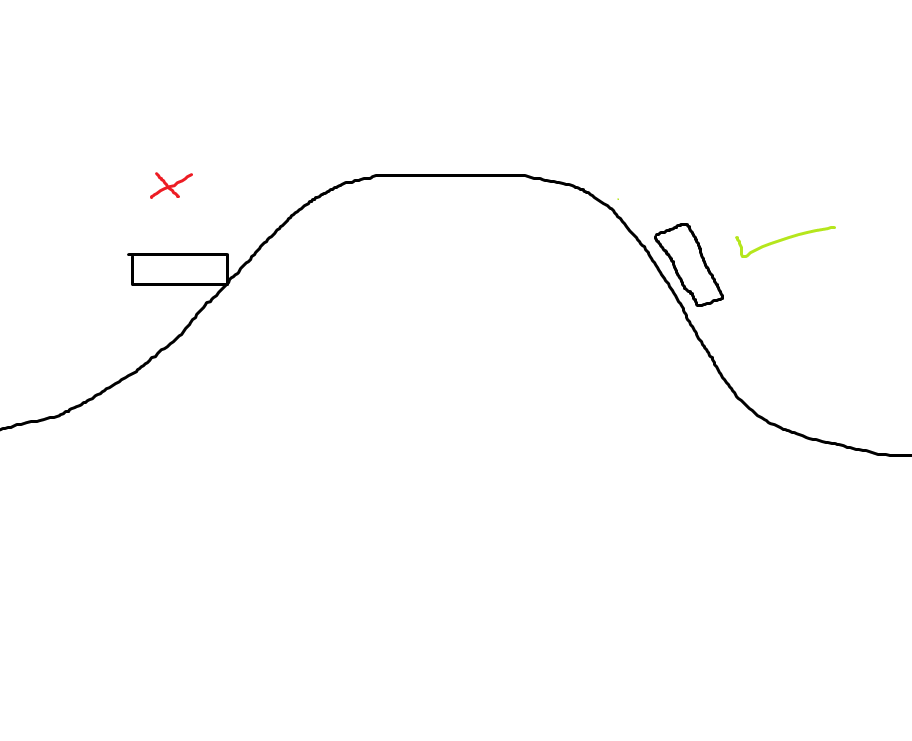
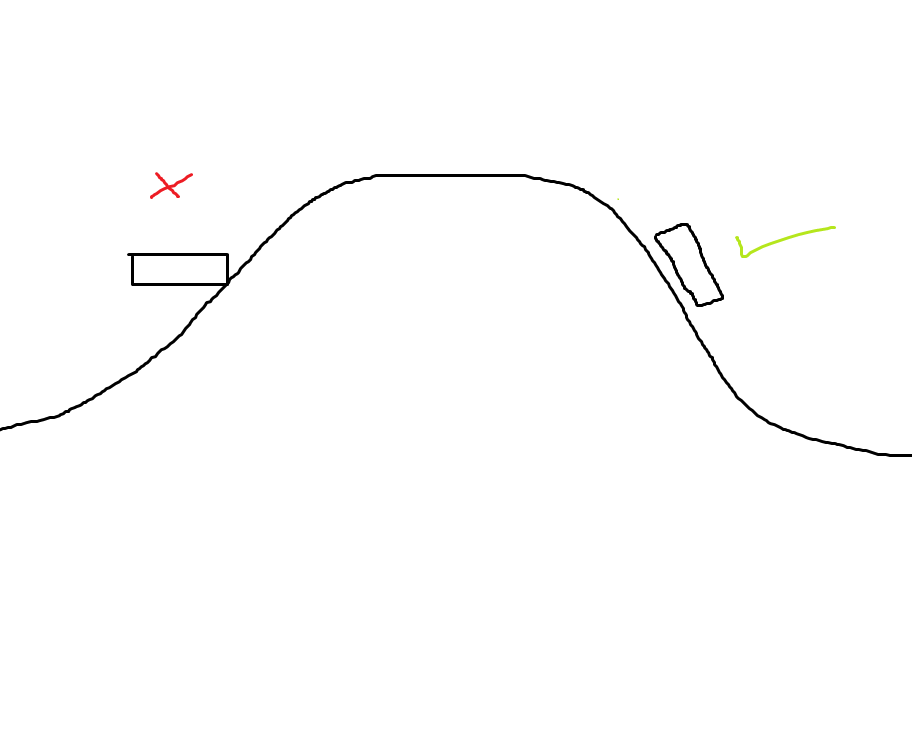
https://i.gyazo.com/9003bcb172a0ce36a6fff7c399dec314.png
how could i acheive this, current my "character" is a box however its going up hills wrong (like the photo)
 fallen goblet
@flat idol Ok I'll check that out. Thanks again.
glacial pecan
how do I actually start a swam render?
having the swarm controller running isn't enough for me
 vital cosmos
I have a night sky with white objects, but you can see the white objects from a distance away, is there an outdoor ambience colour setting in unreal
 pearl sonnet
so weird to see my wifi SSID in chat
 kindred viper
@nimble moat you trace down from the box to the ground, get the angle of difference between the normals and adjust the rotation based on the calculated direction vector
hard quarry
@nimble moat Make a Raycast at the front and at the bottom, than you have the height difference and you can rotate the box as you wish
nimble moat
ill look into it thanks guys
pearl sonnet
2 days ago someone mentioned the same,
you're not alone
kindred viper
I don't mean to presume you don't understand how to use raytracing, but I have to ask, did you mess around with the Denoiser to improve quality or just test it "out of the box"? Because it's meant to have flickering/artifacts without some tweaking
feels horrible to ask that, but I've seen people who don't realise such things
pearl sonnet
guy i mentioned had flickering outside of UE
ie. discord
kindred viper
huh thats odd
glacial pecan
anyone have any experience with swarm agents being available, pingable, but not actually building any lighting? logs empty
nimble moat
what would cause an actor to delete? for some REALLY bizarre reason my thirdperson character is getting randomly deleted when im going down a ramp
 grim ore
@nimble moat is the ramp below the world kill Z? check your world settings for that map and adjust it or disable it then test.
nimble moat
wow thank you, that weird bug has been bothering me for hours
 runic iron
Epic Games Japan released some great slides about Localization. In JP as always but tons of great images, it's quite understandable https://www.slideshare.net/EpicGamesJapan/ue4-ue4-localization-deep-dive-191115517

 obsidian nimbus
quite understandable if u read japanese i guess 😛
for me not so understandable 😛
runic iron
At the beginning there's quite some text yeah lol but it's better after that
That's a pity, so many great slide presentations available and no translation
obsidian nimbus
ohh, than its fine, i allways jump straight to the end 😄
runic iron
They're good to get a rough idea imo
obsidian nimbus
well i could have google translate it for me, but ill be fine 🙂
hard quarry
Is it possible to make a meaterial for a static mesh which is arround the mesh, like a sphere?
 abstract relic
Yeah. Look into parallax occlusion, bump offset, world position offset, pixel depth offset. But for your example, I’d either make a sphere mesh or use particles.
 shell jetty
how much your UE 4.24.0 needed
 grave osprey
Where to see all blueprint reference ?
 frozen pond
hello guys, fast question, how to make my NPC pick random task from possible tasks ?
 sleek spear
where is this new 4.24 feature? where can i find it? https://www.youtube.com/watch?v=vc5Jg-iqPgk
Enjoy the videos and music you love, upload original content, and share it all with friends, family, and the world on YouTube.
its the material layers feature
grave osprey
So many question left unaswered.
runic iron

Made another useful addition to the behavior tree! A Sequence Loop and a Select Random composite node. This way you can do one specific sequence x times before completion and select a random sub-tree each iteration. Gives openings to more easily randomized AI behavior. #Ue4

 Twitter
edgy halo
Twitter
edgy halo
Hey im trying to make a physics constraint between two meshes, i have a Lantern staticmeshcomponent, and a LanternTop that should be constrained but how do i refer to the Staticmeshcomponent in the physics constraint?
the first component should be my lantern staticmeshcomponent, but because its a parent to the physics handle i cant really figure it out, do i have to rearrange the hierachy?
runic iron
@sacred crater Do you plan to update your plugin to 4.24 by any chance ? Seems like @frozen pond needs it 😄
shell jetty
I cant seems to install it as it need 69gigs space
 midnight bolt
does anyone know how to get rid of black surface like here? its two-sided, and the extra side that is rendered is always dark. im using all baked in lighting. i already tried settings like two sided foliage, but nothing really helped. i appreciate any insight
 autumn trout
How can I check the compatibility of the game with the required device?
 next badger
doesn't matter
 summer verge
Are Force Deletes freezing up 4.24 for anyone else?
 sacred crater
@runic iron @frozen pond I do intend to update it but our project that uses it is still on 4.23 and haven't even downloaded 4.24 yet. I'll tweet out when it's updated :)
 shell jetty
@next badger well I cant even download or install it as unexpected more space needed than 23.1
might be that my old preview for 24 bugged it or something
next badger
 lavish reef
hey guys, anybody knows how to export xgen grooms for new ue4 alembic feature? i can't get it working
shell jetty
launcher say i need 69gig space
next badger
@shell jetty try do delete preview
 wispy zinc
Hi, where do I post feedback for ue?
wispy zinc
You mean the forums are not super useful for that?
If that's the case, will it be seen if I post here instead?
 umbral monolith
Does anyone else have issues with the whole computer freezing if you try to build lighting with very high settings?
(Quality is set to Production)
If I try to build lighting with this, the entire PC freezes, only able to restart with the button
kindred viper
pretty much everyone yeah. It's kind of how lighting works. If there is more than you can process, it will use it all.
umbral monolith
So this is extreme overkill in terms of lighting settings?
kindred viper
its compiling a tonne of shaders that are getting stored in a cache for later usage, so its gonna take processing for each one. Check your Task Manager when it happens. You should see ShaderCompileWorker using most, if not all, of your cores and processing
this is why RTX is a godsend. Cheap dynamic GI for testing 🙂
umbral monolith
Is there any way to limit that so it can get through?
kindred viper
you can limit the number of cores the engine uses. I cant remember the exact location, its in an xml
there is a wiki page on it
Unreal Engine\UnrealBuildTool\BuildConfiguration.xml <ProcessorCountMultiplier>2</ProcessorCountMultiplier>
wispy zinc
@gleaming narwhal it would be awesome if the epic games launcher could be updated so that ue4 resources could be separated in library by category- plugin, project template, assets, materials, etc...
And if there were an option to show updated library content at the top of the library, or else a separate library category.
Right now, it kind of gets pretty cluttered.
umbral monolith
@kindred viper Thank you! I'll try to test it out
edgy moat
İf i am using the 'On component hit' function, how can i only call that function if the object is hit BY A SPECİFİC actor?
Not just if it gets hit
Only if it gets hit by a specific object...
grim ore
object or class?
and you would either cast to the correct class type using the hit actor in the hit result or use some other method to test for the correct item such as an interface
more than likely what you are asking is using the cast to XXX version where XXX is the class you want to test against (only hit by player for example)
edgy moat
object
grim ore
if it's a specific object out of many in the world then you have more work to do
edgy moat
The object that is being hit already has a blueprint, i just want the players bullet to call the 'On HİT' function...not if it just gets hit
grim ore
ok let step back. this component hit node is in which blueprint?
edgy moat
The thing that is being hit
grim ore
doesnt really help. so like a wall?
edgy moat
a gas canister, i want to destroy actor, add impulse and play particle effect after it is hit by THE PLAYERS BULLET not just anything ONLY THE PLAYERS BULLET
grim ore
ok so this node is on the canister and the bullet should be hitting it?
edgy moat
yes
grim ore
ok so does the bullet have a specific class? is it a blueprint
grim ore
Then you would use the cast to bullet class pulled from the other actor
well it's not an actor, it's parent might be an actor but it should be it's own class
grim ore
drag out of the other actor, this is the item that hit this item and started the event, and use the cast to bullet node
then it will be true if the other actor, the item that hit this item, is a bullet or false if it is not
grim ore
once you get this working you might want to look into using blueprint interfaces to clean this up (instead of the cast to XXX) as it will allow you to haver more than just that one bullet explode this barrel and it will not lead to hard referencing the bullet into memory for all canisters
edgy moat
it works
grim ore
yes, that is asking if the other actor that hit this item is of that bullet class and if so do something
edgy moat
this was so simple, i feel retarted... thanks so much dude
Would'nt i just use a sequence then, if i wanted more than 1 bullet?
grim ore
you can but then in the future you would need another cast to and another cast to and another for every bullet type
edgy moat
İ see
grim ore
or you use one interface check node and anything flagged with that interface just works
edgy moat
Wouldnt an alternate for that also be 'get all actors by tag'
grim ore
plus hard vs soft reference, right now your canister knows about the bullet since you use the cast node so it has to load the bullet into memory when it loads the canister. If you did this for 10 bullets you now have all 10 loaded with the canister
edgy moat
Hmm
grim ore
no get all actors by tag would not work for this as it would check all actors in the world for the tag. You could do a has tag on the item but then you are required to make sure the tag is spelled correctly on every item you add this to
edgy moat
But if i did it accurately... it would work?
grim ore
yes but if you ever need to talk to the item, like the bullet that hit the canister, you would have to still cast to it
edgy moat
Yes
grim ore
using an interface you could go "hey are you allowed to blow me up? ok cool. I will blow up and do some stuff why don't you play some stuff as well like particle effects"
and it wouldnt care if the item that hit it was a bullet or a bomb or a flying pig
grim ore
yep yep
 amber tangle
Quick question - if I pass in the console command (from blueprint) for r.DetailMode=0 - that would be the correct syntax and such, right?
I thought it was, but the output log complains
grim ore
normally its command space value so r.DetailMode 0
 silver magnet
hello i have a problem with my terrain material, the terrain has the compiling texture but its already compiled, i cant remove this grey texture, why?
my material look like this
grim ore
click on each texture, go to the sampler source for each texture in the details panel, and changed to shared
silver magnet
wrap or clamp?
grim ore
yes. Depends on the texture. More than likely I would say wrap
silver magnet
ok
 sonic pagoda
how would i fix this so it accounts for the offset of the actor's world rotation ?
right now the z value changes as i rotate the character
ive tried subtracting, and adding the actors world rotation, but the value still changes in an unexpected way... keeping both arrow5 and motion controller L in the same spot and rotating still produces a completely difference Yaw value when rotating
also tried reversing start and target pins
silver magnet
oh yeah it works thanks !
amber tangle
Thanks @grim ore, that was what I was missing. No "=" lol
plush yew
I'm still trying to figure out how I can adjust my character's "direction" variable based on pelvis offset. If I have an animation that rotates my character's pelvis 90 degrees then the legs will also rotate 90 degrees, but animate as if they're walking forward. What I've been trying to do is find away to have the legs animate as if they've been turned 90 degrees. Right now I think the next thing I'm going to try is to have two skeletons per character that are animated exactly the same, but one won't be able to blend with attack animations. Then I'll calculate the difference in pelvis rotation between the two skeletons and use the difference to influence the direction float on my 2d blend space for my walk cycles
but that seems expensive. If there was a way for me to get the rotation of a cached bone I could do it that way
 plush thicket
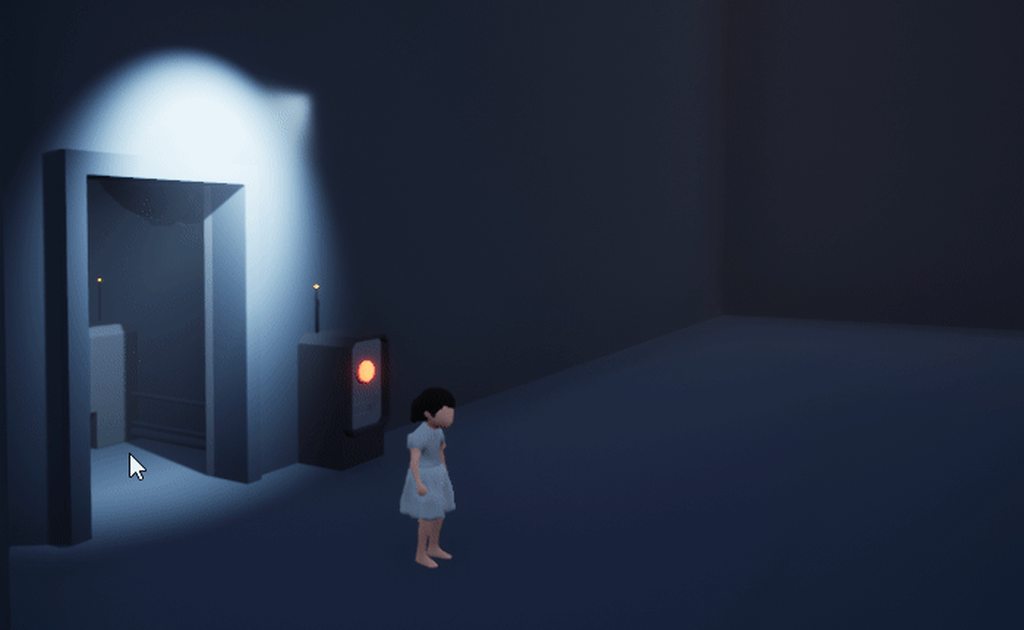
anyone know what's causing the cloth simulation to do this when walking up a ramp?
only when the player is on a ramp
pearl sonnet
perv trying to look under skirt
expected result: steam achievment: IT WAS AN ACCIDENT
 sharp crest
 normal burrow
is it apex/nvcloth @plush thicket ?
plush thicket
no
normal burrow
what is it then
normal burrow
ah yea thats nvcloth internally iirc
are you providing a physics asset to it for cloth?
if not, you should make one. only put physics bodies in that affect the cloth
plush thicket
it's weird
i just swapped the ramp again
and it suddenly stopped doing that
would anyone know a fix to a different issue?
when I drag-and-drop an asset into the editor
it always makes the spawn location of that asset at like 1500x
like waaaay below my map
river fox
Hello, I have a question. Can anyone recommend a great book/tutorial series for learning Unreal Engine with C++(Or in general, but I know C++ already and want to learn the unreal side of things)? I will follow along and practice, but want to find some big guide instead of watching scraps about specifics
normal burrow
If you know C++ already, you just need to be introduced to UHT
And the documentation does ample job of explaining this part
UHT is this thing that reads your code in a really invasive and dumbed down way
the headers rather
and then it makes codes for you
UPROPERTY(EditAnywhere,BlueprintReadWrite)
float Number;
shell jetty
@next badger seems like that did it
normal burrow
UPROPERTY is just
#define UPROPERTY(...)
but UHT reads the content inside of it, and generates the code to register your number into reflection
river fox
Yeah I get the UPROPERTY stuff, been using it, although I just randomly run into issues that make no sense to me and I kinda just wanna start from the beginning and learn all the ins and outs, since there is no time pressure on me, I am not learning it(currently) for a specific reason
I am just having trouble finding some good guide that focuses on the C++ side of things, it's mostly blueprints which I find easy
I like reading a book or two from time to time, dunno if there is anything good about unreal
Although I can imagine that it might be hard to find a good book, as the engine is constantly updated and changed
normal burrow
hmm i think that might be asking a lot of a book too when you could just read the code
if you wanted a c++ side of explaination i mean
river fox
hmmm, yeah
normal burrow
A book on blueprints could serve beneficial here to explain how the engine is supposed to work
river fox
I guess I will just sit down and start trying things out
normal burrow
thats what i'd recommend, but if there is such a book go for it
 pine mulch
does anyone know how to move a landscape up or down on the Z axis when using tiled landscapes with world composition?
the Z 0.0 coordinate is like halfway up the mountains
I know the exact value that I have to shift it up but I can't find the option and the transform tools are greyed out
 thin tendon
My project that was working perfectly fine last night. Is now crashing at 95% on start up this morning. What folders do I need to delete to make it rebuild without loosing all my settings?
thin tendon
Thanks
 swift spindle
may I also sugest investing in a source control system if you don't have one for peace of mind
thin tendon
I don't use source. I just back my project up at the end of each day to an external hard drive
normal burrow
source control is like git
daily backups work, but you could have finer control over things
don't need source code to use it though
swift spindle
source control is worth the effort to set up
next badger
have anyone tried to use git for ue4 assets?
normal burrow
would recommend svn over git for so much binary stuff
grim ore
I used git and git-lfs for smaller projects and no real issues
swift spindle
seen nothing but nightmares with git-lfs =/
 sweet relic
normal burrow
sweet relic
normal burrow
does git lfs store revisions matheww?
swift spindle
I find the branching / extra gui that you can get for git real nice.. but when it comes to binary stuff.... it just falls flat...
Perforce looks a bit old
but works mostly well
next badger
i wonder how fast git grows in size
next badger
many my projects are 20-50 Gb in size
swift spindle
it's not as bad as people think it is
normal burrow
svn is old, but not nutty with licensing
swift spindle
p4 is free for a small team
and even on a larger team.. you can get away with about 1800 a year
normal burrow
you have to stay on top of what you can and can't do with p4 either way
even if you run the server yourself
swift spindle
this is true
grim ore
@normal burrow I honestly have no idea, I would assume so
swift spindle
but in my personal experiance.. lost a lot less time dealing with p4 over git issues
normal burrow
I heard it doesn't.. but i really dunno either
grim ore
but again I only ever tried it on smaller projects over time
normal burrow
cool cool
grim ore
yep the actual repo has some issues regarding lfs large file revisions but the actual "details" about lfs don't seem to indicate it
pine mulch
Sorry to repeat myself but does anyone know how to move a landscape up or down when using world composition? The transform tools are locked
normal burrow
sounds trendy lol
swift spindle
I keep a perforce server on my nas and I use Vhdx (virtual hdd) that's downloaded to my work system each day and put back up on the server once I'm done with it
next badger
yeah, developed by MS
normal burrow
yea, svn is just an apache plugin
most web servers wil run it. so it can be cheap, and it delta compresses everything with zip so the server actually is pretty tight
its probably older than p4, but tortoise svn for windows works alright. Unreal does support it out of the box however
next badger
main issue of p4 is that it's remote only
swift spindle
what u mean ?
next badger
in git you have local repo, you commit there, then to remote...but in p4, all actions like checkin, checkout, add, remove...all should be made remotely
swift spindle
right... got ya
next badger
i'm working on several projects, and one is just so slow for me...every action is like 30s...and 10 files checkout may last few minutes
swift spindle
I mostly removed my brain of git shit...
I've not had any speed issues with p4 personally
used an AWS repo version and a local... it was pretty fast even with hundreds or thousands of files
next badger
well, it depends on your and server's locations
swift spindle
AWS server to NZ and to Canada was about the same. We had people in brazil also.. same there
 normal burrow
pat is surprised this is a thing
 trim granite
yeah, it's locked by default. Took me a while to figure out be since then never forgot it.
normal burrow
iterating all those actors? lol
vital cosmos
I have a weird issue after building lighting
stuff that was lighted before now appears black
abstract relic
Adjust your skylight. Either you didn't put one in the scene or the value is too low
vital cosmos
@abstract relic what value is too low
in the skylight options there are several values
abstract relic
Intensity scale
pine mulch
Thank @trim granite! That worked 🙂
okay well at least I thought it did hahas
it keeps snapping back to 0
ah I got it now, had to do it on the actual landscape, not the proxies, duh
 quiet rampart
Hey hi!... is someone aware of the bug that when i click on packaging for windows 64... it open the documentation on google chrome.... is there something that i miss or.... ?
 quiet rampart
nope
 polar hawk
DitherTemporalAA doesn't work on the pixel shader? iunno
 gleaming narwhal
@wispy zinc There's work being done to improve the experience of the Vault, but we have no announcements as to when it will be released. We all want it 🙂
The forums are the best place for feedback, it allows us to link to the feedback when we bring it back to the devs
We don't always respond, but we read them (when we're not playing game jam games...)
 frigid trellis
@polar hawk I removed dither and got this
polar hawk
iunno man its fucked
normal burrow
patchzy
see what the defaults are for that node
DitherTemporalAA
double click it i
 grave nebula
You are doing something real shady with that tessellation
frigid trellis
I just copy pasted the material into a new one and it worked 🤔
plush yew
 hi patchzy
frigid trellis
will, why are you everywhere 😳
plush yew
hehe
thin tendon
Hey guys. How much work is actually involved to move my project to the latest version of UE4. I'm currently on 4.21
next badger
c++ ?
thin tendon
Nah Blueprint and I'm only using 2 plugins if that helps
plush yew
if the plugins are supported for .24 then you can just migrate right ?
thin tendon
I would think so. I checked and they both have new versions for 4.24
plush yew
yea go for it should work
thin tendon
And updating won't delete stuff or cause stuff to not work?
plush yew
no thats only if you migrate to an older version
thin tendon
ohh cool
thin tendon
ok thanks I'll give it a crack
next badger
you can't migrate to older version...like...impossible
most plugins have source code, so can be compiled by ue4 itself (need to make c++ project just for compiling)
 harsh tiger
does anyone know why im getting these errors? i just want a simple float that is defaulted to 1
grim ore
@vital cosmos if that does not work there is a good chance if they are black after building your lightmaps for those meshes are bad. Dynamic lighting does not use them so it would look fine until you built lighting and it tried to use them.
harsh tiger
if i comment out MeshSize = 1.0f; then it complies. i just dont see whats wrong with what i have
grim ore
you are trying to set a variable in a header would be my guess
harsh tiger
can that only be done in the cpp?
next badger
you can set a variable in a header, but he's setting it before declaration
harsh tiger
the comment says // Sets default values for this actor's properties above
grim ore
that was my second guess, I never set variables in headers lol
can he just do the assigning in the declaration below?
harsh tiger
i moved it below an got the same thing
grim ore
can do you do float MeshSize = 1.0f;
thats normally how I would assume it would be done but I work in C# land most of the time
harsh tiger
i think thats worked haha
looks like i was over complicating it
perfect! thanks @grim ore
 digital anchor
that comment was for the constructor
grim ore
yep yep I don't actually know if you can assign a value to a variable in a header and I don't really care to find out lol 😛
digital anchor
if you open the constructor, and type the same thing, it will work
you normally use the constructor for stuff that cant be initialized directly
grim ore
^^
 uncut osprey
Unreal, can you wait until I finish writing this comment before you autosave
harsh tiger
is that red part the constructor?
next badger
constructor is the method(function) that has the same name as the class
digital anchor
yes, in the cpp it will be defined as ALiamsTest::ALiamsTest() { //your code here}
harsh tiger
ah i see it now
so if i set the float to 1.0f in the header but then 3.0f in the cpp. would it use the header or cpp value?
i know it doesnt make sense setting it twice, just curious
digital anchor
cpp
harsh tiger
thank you
next badger
it makes sense setting it twice...just for safety reasons...sometimes
harsh tiger
https://www.udemy.com/course/unrealengine-cpp/ im going through this course, just finished the first game so im playing around without a tutorial to see what i can do
Udemy
Unleash the power of C++ and Blueprint to develop Multiplayer Games with AI in this Epic Games-approved course.
noted @next badger
also, any idea why i have them red squiggles? it compiles with no issues
next badger
safety = if variable is uninitialized it can store garbage
grim ore
intellisense = the devil = red squiggles with UE4 codebase
harsh tiger
might be why i've seen some people turn it off
next badger
yeah, VAX works better for ue4 than intellisense
grim ore
most people who invest in UE4 yep use VAX or uh.. the other one
harsh tiger
im using the trail for that plugin
digital anchor
resharper, gotta try it some day
next badger
@grim ore resharper?
digital anchor
looks fancier than vax
grim ore
I was gonna say resharper yeah but never used it for C++
next badger
it hang for me on source build
grim ore
I know resharper is great for Unity
next badger
cause way more less code there exposed
harsh tiger
im thinking on buying VAX
 marsh swallow

Just how common is this?! I have found about 50 articles online about it.
and i have maybe 1 in 5 people that report this to me
however not 1 of those articles have anything remotely related to knowing where to start looking. lol
 molten path
@marsh swallow ive personally never experienced that
although I'm not that experienced
marsh swallow
yes we do @normal burrow
plush yew
Every time i try to open up my copy of a project in 4.24 it crashes my computer, yokes
marsh swallow
not a TON but a couple plugins, Articy integrated, TrueSKY, Loading Screen. about 10 or so of our own for our login system and whatnot
normal burrow
do you do lots of crazy stuff with rendering in c++?
marsh swallow
structs and stuff but nothing too crazy
i think the only thing would be TrueSKY with anything that touches rendering
we use the Binary version of it, thinking about going to source
normal burrow
can you reproduce it?
normal burrow
for people it happens to is it frequent?
marsh swallow
and only about 1/5 players report it out of about 50 testers.
its unplayable. they crash only after a few minutes usually
normal burrow
do you have logs?
marsh swallow
Now that said i am working with one just now who lowered his graphics all to Low
and hes playing
but he has NO sky
soooo.... we may have a TrueSKY issue
(he also JUST imformed about the sky issue a few seconds ago.)
i have not had to collect logs on a package build. Are they stored in Saved?
normal burrow
should be yes
wouldn't assume its truesky but it could be. would look at the logs for sure though
marsh swallow
im having him grab them now
Its definitely having a render issue with TrueSKY in one way or another but it may not be their issue is what you mean?
 somber badge
hello everyone. I am new to unreal and i have installed everything but when i try to create a project it does not work. Please help.
Running C:/Program Files/Epic Games/UE_4.24/Engine/Binaries/DotNET/UnrealBuildTool.exe Development Win64 -Project="C:/Users/Admin/Documents/Unreal Projects/MyProject6/MyProject6.uproject" -TargetType=Editor -Progress -NoHotReloadFromIDE
Creating makefile for MyProject6Editor (no existing makefile)
@progress push 5%
Parsing headers for MyProject6Editor
Running UnrealHeaderTool "C:\Users\Admin\Documents\Unreal Projects\MyProject6\MyProject6.uproject" "C:\Users\Admin\Documents\Unreal Projects\MyProject6\Intermediate\Build\Win64\MyProject6Editor\Development\MyProject6Editor.uhtmanifest" -LogCmds="loginit warning, logexit warning, logdatabase error" -Unattended -WarningsAsErrors -installed
Reflection code generated for MyProject6Editor in 25.8317467 seconds
@progress pop
Building MyProject6Editor...
Using Visual Studio 2019 14.24.28314 toolchain (C:\Program Files (x86)\Microsoft Visual Studio\2019\Community\VC\Tools\MSVC\14.24.28314) and Windows 10.0.16299.0 SDK (C:\Program Files (x86)\Windows Kits\10).
Distributing 15 actions to XGE
Fatal Error: Failed to open/create session data
Failed to open/create session data: STATUS_ACCESS_DENIED
marsh swallow
I got the crashes. there is a dump file and an XML but they dont seem to tell me anything more about what exactly hung it up
normal burrow
no text file log?
thin tendon
So I want to upgrade my project to 4.24. But a plugin I use called Save extension hasn't been updated since 4.21. How could I make it work with 4.24 myself?
 hidden aurora
Is there a way to make 90 ° angles in splines?
 past pilot
This release has to be the worst release i have ever seen lol. Now i cant even open a menu and hover a pop out without the editor vanishing into the ether.
@thin tendon i wouldnt upgrade to 4.24 atm... wait for .1 or .2. Also sometimes just copying the plugin over will cause the editor to recompile it and work in my experience. Not always though if it contains depreciated code.
thin tendon
So to copy it over. I would go into my 4.21 folder. Find the plugin and copy paste it into the same place but for 4.24?
past pilot
yea
thin tendon
ok thanks
plush yew
well
 limpid surge
Anyone run into this assert on startup when trying to migrate a source-built project to 4.24?
Fatal error: [File:XXX/Engine/Source/Runtime/Core/Private/Internationalization/ICUInternationalization.cpp] [Line: 153]
ICU data directory was not discovered:
../../../MyPlugin/Content/Internationalization
../../../Engine/Content/Internationalization
```C++ project builds fine, but fails with this error (and others) on startup when I go to launch it.you could just right click the level and select migrate ?
thin tendon
I don't know if right clicking a level would work for my project. I have 2 main levels and one of those has 121 sublevels
 potent quartz
i'm having some odd errors with UE 4.24
any time a tool tip would pop up, the screen bugs out and turns black
this is on a quadro box
 dark rune
is there an Anim Starter pack in UE4 but for FPS?
sleek spear
how do i get rid of this jagged thing? i m using a texture to blend landscape textures. is there any way to make it smooth or add noise to it or something?
sleek spear
anyone?
potent quartz
blur
 errant tundra
after upgrading to 4.24, all my animations, timelines, etc..all run REALLY fast. Is there a quick way to prevent this? Anyone else getting this? When I play, it seems like everything is playing on fast-forward lol
 honest vale
@sleek spear use the paint tools
there's a brush for smoothing
or blur it in photoshop/gimp
sleek spear
@honest vale what do i do when i want to use masks exported from world machine? blurring in photoshop but keeping the resolution the same will reduce the blocky effect?
honest vale
yes
that should do it
landscape layer weight textures are tied to landscape resolution
and sadly it's not possible to uncouple them :\
 carmine garnet
how the fuck would i go about making a thing i wanna makle
its like
so complicated
if i want to make him hold and swing an axew
in first person
do i need to know any programming?
what would i need to know programmming for
cloud cobalt
Well, programming is translating ideas into programs
cloud cobalt
Blueprint is very much programming
carmine garnet
okay, so do io need to know c++
cloud cobalt
No, you do not
carmine garnet
good cuz i dont
sleek spear
@honest vale i see, thanks
 tough lantern
Hello everyone, New to UE4 here
Can someone tell me how how to access the edit static mesh option ?
got some pb with the smoothing group i would like to fix but cannot find the option
 fierce tulip
unless something changed, you generally do that in a 3d application like 3dsmax, maya, blender
 robust void
hi im with a group of people working on a game and theyre having issues launching a game and this is the error they get when they try to launch it
[2019.12.12-08.35.14:082][134]LogWindows: Error: begin: stack for UAT
[2019.12.12-08.35.14:082][134]LogWindows: Error: === Critical error: ===
[2019.12.12-08.35.14:082][134]LogWindows: Error:
[2019.12.12-08.35.14:082][134]LogWindows: Error: Fatal error: [File:D:\Build++UE4\Sync\Engine\Source\Runtime\RenderCore\Private\RenderingThread.cpp] [Line: 1121]
[2019.12.12-08.35.14:082][134]LogWindows: Error: GameThread timed out waiting for RenderThread after 120.00 secs
[2019.12.12-08.35.14:082][134]LogWindows: Error:
[2019.12.12-08.35.14:082][134]LogWindows: Error:
[2019.12.12-08.35.14:082][134]LogWindows: Error: [Callstack] 0x00007ff807269129 UnknownFunction []
[2019.12.12-08.35.14:082][134]LogWindows: Error:
[2019.12.12-08.35.14:082][134]LogWindows: Error: end: stack for UAT
the cooker goes idle and times out
weve tried googling it but no help was wonderig nif anyof you gusy can help
tough lantern
i would like to have acces to these tools please : https://docs.unrealengine.com/en-US/Engine/Content/Types/StaticMeshes/HowTo/ModifyStaticMeshGeometry/index.html
Describes how to use the Edit Mode controls in the Static Mesh Editor to change the geometry of a Static Mesh Asset.
but i cannot find it
fierce tulip
@robust void
"2) You can also use three backticks to create multiline code blocks,"
makes it easier to read
@tough lantern it clearly states "In order to edit Static Mesh geometry in the Static Mesh Editor, you must enable the Polygon Editing Plugin for your Project."
robust void
@fierce tulip what do you mean by easier to read
tough lantern
yep but it not there
tough lantern
i am using 4.23 and nothing appear when i type polygon editing in the search bar
fierce tulip
plugin menu
robust void
@fierce tulip ill let thier coder/programmer know thanks for the help
fierce tulip
@robust void lol, what I mean is that if you write three backticks in front of, and behind your post...
you get this
which makes it easier to read
<_<
robust void
ahh
fierce tulip
@tough lantern currently no 4.23 installed to verify
rich rose
There is always something so satisfying and calming when starting on a new project which I guess is a dangerous thing to enjoy 😅
cloud cobalt
It is
"I'm tired of this project I spent 6 months on, let's try a new project from start..."
glacial pecan
shouldn't the volumetric lightmap density volume box have a lot of colored dots in it? and perhaps a slider for... well... density?
tough lantern
@fierce tulip it is present 4.24 thx
fierce tulip
@tough lantern hehe aww, just when I installed 4.23 to check
tough lantern
thanks mate . have a look anyway. my project is on 4.23
 hot thistle
Ait so I did an oopsie.
I moved a bunch of assets from multiple folders to a single folder, and deleted the old folders. As stupid as I am I force deleted ignoring the reference warnings.
So now a bunch of assets are missing from my levels, and my question is, can I reverse this in any way? Like update the references or something?
cloud cobalt
Revert your changes in version control !
Or fix every asset manually if you don't have version control, which you should
hot thistle
How would I do that?
hot thistle
Which is true
cloud cobalt
Then you'll need to fix every asset manually
And then you can get version control so that it only happens to you once
cloud cobalt
Find every level object with an empty mesh/material/etc and pick the asset it should use
hot thistle
I see, thanks
 swift heart
Hello guys! Can you help me please. I trying to upload to ue4 RGB targa image with one fabric pattern in the each RGB channel. UE4 sees this format as B8G8R8A8 and after compression desrtuct shapes of the pattern. Why is it not regular DXT1 ?
wary wave
you can choose the compression format in the texture settings
swift heart
yes I can. but anyway why ue4 sees file as B8G8R8A8 and why it destruct the original shapes of the channels on DXT1
and also is it ok to use BC7 DX11 format compression for the game (ps4 gen)?
wary wave
it usually picks compression settings based on naming conventions
as for Ps4 related questions, you should ask those in an appropriate place
fierce tulip
unless you go uncompressed, there will always be a little bit of compression artifacts when packing RGB.
and uncompressed should only be used sparingly
fierce tulip
that only disables srgb, nothing more
fierce tulip
i wish
it does it very poorly
near if not exactly identical to regular compression
cloud cobalt
Sure about that ? I used hundreds of masked textures with completely independent information in every channel
fierce tulip
I did extensive testing of every compression setting (pre-4.16) and masks literally only seems to disable srgb
never looked under the hood though, but visually it was just as artifacted
swift heart
@wary wave Thanks, now I understood how ue4 select the format
@fierce tulip yes it disable srgb
cloud cobalt
Okay I just tried and indeed, it still has crosstalk
Which is incredibly fucking weird
fierce tulip
ikr, you'd expect it to be better
which is why I kinda moved away from packed content where I can
cloud cobalt
No I mean I'm positive it worked before
fierce tulip
i never seen it work, but i wish it would
 zealous cloak
One of the most essential questions of all time, when to use cpp and when BPs?
I try to break it down from my perspective
wary wave
whenever one suits you more than the other
zealous cloak
Easy simple projects where performance doesn't matter are doable in BPs only
wary wave
I use BP a lot when I want to iterate fast, that's my main use case
cloud cobalt
Performance is not really the main concern most of the time.
Tracking of changes should be your first concern
wary wave
aye, if you're running into performance issues in BP, it's usually a technique, not a language issue
zealous cloak
Cpp is more convenient compared to spaghetti
wary wave
well organised BP is no worse than C++
zealous cloak
Readable?
next badger
we need a "tick" emoji
zealous cloak
So it's just c++ myth?
wary wave
I actually find well organised BP easier to read than C++, you just get less on the screen
zealous cloak
That it's better and should always be preferred if possible
cloud cobalt
If you're going to write complex logic that you may want to maintain for a long time, or even reuse in another project - C++ might be a much better bet if only for its text nature.
wary wave
it's not strictly a myth, a lot of people who work in BP fail to organise their code
fierce tulip
but there are also coders who fail to organize or comment their code :p
wary wave
also true, but it's less obvious
can't just take a screenshot of technicolor spaghetti madness
fierce tulip
until your client hires a new coder, and the previous coders name will be used whenever a bug or problem is encountered :p
wary wave
hehe
zealous cloak
I'm in BP hell at the moment
Have to fix stuff from another person
The level blueprint is empty
next badger
i'm in discord hell atm...vertically oriented photo of a bp
cloud cobalt
Basically, the more specific a task is, the more Blueprint is ideal. Unique character or level logic ? That's really where Blueprint shines.
Specific game feature that you won't reuse in another game ? Probably Blueprint works too, unless it's big, multiplayer-supported, and hard to get right.
zealous cloak
So highly capsuled functions
cloud cobalt
Technology or general-purpose class ? Pretty much C++
zealous cloak
Things a level designer would need to use
next badger
BP still related on c++...if something not implemented - you have to use c++
zealous cloak
This button does this , when this happens then do this ... That o would do in BP
next badger
steam api, custom libs all that
cloud cobalt
Just ask yourself how easily you want the thing to be reused in a different game, for example.
If your answer is "not possibly ever", C++ probably doesn't bring much to the table
zealous cloak
So you say there is no lack in BP, if the node exists
I just always have the discussion cpp is much better than BP
next badger
I can't understand why Epic decided to make type conversion in MATH class.
cloud cobalt
The three main concerns of Blueprint are
- needing a particular feature (random library that you added to your project and has no existing Blueprint interface)
- heavily performance-sensitive work (lots of calculation over a lot of units)
- needing reusability and change-tracking at scale over multiple years
This is where C++ can do better
If none of these are a concern, Blueprint is probably just as good if not better
next badger
- Need to change render pipeline

cloud cobalt
Do note that C++ performance gains are nowhere near automatic
People rightly say that C++ is faster, it really is
When you're decent at writing C++ and know what to optimize
next badger
never used nativization, is it good?
plush yew
once again a level in composition has tramautized my whole my game plaese help and help me to get rid of such a big level that is supose to be only 1 little square
 dim plover
I think general consensus was that nativization is too crash-prone to used.
 hasty osprey
how do i delete the objectredirector?
abstract relic
Filter > developers (going off memory here) > show redirectors > right click on the redirector > fix up
fierce tulip
never just delete object redirectors.
next badger
i'm not sure you can
hasty osprey
my issue got fixed anyway
fierce tulip
there is one show redirectors that only shows redirectors, and one that shows em always. the latter is best to always have active. (imho)
 fervent sigil
@abstract relic you mean Right Click => Fix Up Redirectors In Folder ?
(not related): I would like to create a widget over a character. I'm doing it every few seconds, each time for different characters (npcs).
how can I do that without adding a widget component to each one of them?
wary wave
Spawning is one of the worst parts of UE4
it needs an overhaul
even if an actor fails to spawn, you still get the performance hit as if it did
obsidian nimbus
yea pooling actors saves a lot
wary wave
pooling is basically necessary for any serious game
if a complex pawn fails to spawn because of collision, it still actually spawns the actor in order to test the collision
it just deletes it afterwards when it fails
grave nebula
Why unreal does not have stock system for that though?
wary wave
now imagine iterating over spawn points in BP to find a valid one -_-
hot thistle
I have a bunch of levels, but only 2 active. But when I render they all become visible.. how do I disable certain levels?
grave nebula
cascade particle system pooling works okey. Wish there was stock framework for pooling any actor.
obsidian nimbus
wary wave
yeah, both actor spawning and component creation need generic pooling frameworks
 cinder iron
 remote flame
Not sure if that's the right place but I'm completely lost when it comes to character spawning in the level. I have just migrated to UE4 and trying to learn the ropes. I have a huge problem with spawning my character when trying to investigate the level I'm working on. My character keeps spawning in the default blueprint box instead of the viewport camera location. How do I solve that?
If that is not the right place to ask, feel free to remove the post 🙂
 mossy nymph
right click on the level in viewport -> play from here
remote flame
nope, keeps spawning in the same, default place
mossy nymph
well, someone might had fucked up overriding Find/ChoosePlayerStart in GameMode
remote flame
it's pretty much a completely fresh project
just added a level from heightmap, materials and that's it
 frosty bloom
Check your world outliner for "PlayerStart" and remove it
remote flame
Still nothing keeps spawning me there lol
remote flame
it's really infuriating as I see people spawning wherever they have the viewport set to in every video lol
frosty bloom
Do you have a character in the world before you press play?
If so it's probably set to Auto Possess upon play
Simply remove that one too
remote flame
huh. That worked. So do I constantly remove the old character or is there a way around it?
frosty bloom
If you want said behavior, you'd have to do the same process again unfortunately
remote flame
Yeah that's one thing that will be annoying me as I'm used to just pressing a key bind and having my character spawn wherever the viewport camera is located
But thank you for help! Greatly appreciated!
honest vale
there's an option on the character regarding auto possession iirc
remote flame
any more info on that?
hot thistle
I have a bunch of levels, but only 2 active. But when I render they all become visible.. how do I disable certain levels?
Can't use ''select streaming method''
frosty bloom
@remote flame Pawns and Characters have a Tab called "Pawn", within this tab there is an Auto Possess Player option, if you set it to Player 0.. That's the problem you previously had. Setting it to disabled simply means it will just stand there and you'll spawn at camera location
remote flame
It seems that I'm also having a problem with getting to far away from the "original" spawn location? If I'm too far away and try to spawn -> I spawn at the box. When i'm remotely close to it, I can spawn wherever I click "play from here"
plush yew
is there a way to possess another character without changing the camera?
the character doesnt even have a camera attached to it
next badger
@grim ore how so, 4.24 release has no option to disable VR on project creation?
iirc it was in preview
 atomic hull
I cant run an installed-build.
``
ERROR: Unable to find installation of PDBCOPY.EXE, which is required to strip symbols. This tool is included as part of the 'Windows Debugging Tools' component of the Windows 10 SDK (https://developer.microsoft.com/en-us/windows/downloads/windows-10-sdk).
   while executing task <Strip Platform="Win64" BaseDir="E:\UnrealEngine" Files="#UE4Editor Win64 Unstripped" OutputDir="E:\UnrealEngine\Engine\Saved" Tag="#UE4Editor Win64 Stripped" />

   at Engine\Build\InstalledEngineBuild.xml(138)

   (see E:\UnrealEngine\Engine\Programs\AutomationTool\Saved\Logs\Log.txt for full exception trace)
AutomationTool exiting with ExitCode=1 (Error_Unknown)
BUILD FAILED
``
where is PDBCopy.exe ? I installd all Windows sdk
next badger
@atomic hull it's not used by packaging anymore, it's a part of Windows Debugging kit
atomic hull
@next badger
where is that. I installed WinDbg Preview. but still cant find PDBCopy.exe in my machine
plush yew
so to set this variable to false: https://docs.unrealengine.com/en-US/API/Runtime/Engine/GameFramework/APlayerController/AutoManageActiveCameraTarget/index.html
If bAutoManageActiveCameraTarget is true, then automatically manage the active camera target.
what line to write where in which script?
zealous cloak
is there a way to open more than one window in a built ?
having the right eye one the right monitor and the left on the left side
 atomic ivy
[QUESTION] Having trouble path finding to any location synchronously besides the starting path point. I'm using 4.23.1. Any ideas?
Seemingly no path points exist to location. I am using Dynamic update at run-time on the navigational mesh
zealous cloak
how can i render to different windows?
i want the left and right eye to be in an extra window?
atomic ivy
@zealous cloak Can you explain more? Sounds like VR or splitscreen?
zealous cloak
@atomic ivy its for stereoscopic 3d
basically need 2 windows one for each eye in VR
i would need additional cameras and 1 additional window
dont know if sucha thing is possible with unreal
atomic ivy
Hm, I have yet to experiment fully with VR. I image you could potentially make a splitscreen where each player is a camera separated like the eyes and a separate image with some work. As my understanding of VR is that the engine will sort of handle that for you so you're looking at the same thing with one camera.
zealous cloak
i still have to output it to a new window
atomic ivy
Alternatively is this a static image? You could make it in the UMG itself and just go 'into VR' for the effect? I don't quite know how stereoscopic 3d imaging works.
zealous cloak
nah its for shutter glasses
atomic ivy
I won't be of much help. From some search looks like "Stereo Panoramic Plugin" (https://youtu.be/VfuQv_5RDRA) might be related.
 pastel glen
@zealous cloak https://www.unrealengine.com/en-US/vr



 vale silo
I generated 10 km^2 terrain in World Machine, saved heightmap, brought it into UE4 and created landscape. It doesn't look like 10 km^2 landscape :/ How can I make sure the Landscape made with heightmap in UE4 is of the same size as it was generated in World Machine ?
 vivid narwhal
There seems to be some sort of hard limit of ForLoops I can put in a construction script?
mossy nymph
@vale silo doesn't look like or isn't? it should be a square with the side roughly 300k UU long
vale silo
it looks smaller than 10 km^2
I guess I'll measure the side in the top down view 🙂
but, if it's smaller than that, what do I do ?
next badger
if you need resolution change that's another matter
 tacit chasm
Hi, not sure if this is the right channel but I have a question about ue4 "LOD Groups". Normally if I change the triangle percentage of an LOD level within a static mesh I have to hit "apply" and it rebuilds the static mesh generating that new LOD and then I have to save it. What if I change those percentages for an "LOD Group" globally in project settings files and have hundreds of static meshes in that group? Does it rebuild all of those meshes the next time I launch UE4? Or do I have to go to each mesh and click apply and save one by one? (The ultimate goal I'm trying to acheive is to be able to globally change the triangle percentages on LODs without having to touch each asset.)
 sick escarp
Does the order of which I bind functions to delegates guarantee the order in which they are called?
 dry sierra
Hi Guys,
I'm following this tutorial on game controlled camera's:
https://docs.unrealengine.com/en-US/Programming/Tutorials/AutoCamera/index.html
Now, in the end, im supposed to fill the variables in the Camera Director instance in the editor, but somehow my variables are not showing up in my Camera Director instance :O
I've created an cpp Actor Class and added declared the variabled inside the CameraDirector class in CameraDirector.h
        AActor* CameraOne;

    UPROPERTY(EditAnywhere)
        AActor* CameraTwo;```

This should make them visible in the Unreal editor right? 😮In what way do you mean?
sick escarp
Might need BlueprintReadWrite or BlueprintReadOnly as well
There's a thing called EditDefaultsOnly as well and I don't know if that is what you are trying to do
dry sierra
excuse me alot for my Newbism, what is that EditDefaultsOnly?
Ah i see Uprop parameter
I see, i am not looking for the EditDefaultsOnly tho
sick escarp
I've never really worked with in level actors in the editor as my game doesn't use any at all
 hoary locust
defaults = edit the archetype only, anywhere = both archetype and instance
you don't need BlueprintReadWrite
dry sierra
Allrighty, if im understanding it right, just with that EditAnyWhere, it should show up for editing right?
hoary locust
yup, in the BP class you created from the C++ class
dry sierra
Weird
dry sierra
So strange, UPROPERTY Specified with SimpleDisplay and EditAnywhere still doesnt make the variable visible in the details of the Camera Director instance
grim ore
so a silly question but you did make these public right?
mossy nymph
@sick escarp there is no guarantee of order whatsoever
sick escarp
Okay, thanks
dry sierra
Yes i did @grim ore
My complete CameraDirector.h script:
// Fill out your copyright notice in the Description page of Project Settings.

#pragma once

#include "CoreMinimal.h"
#include "GameFramework/Actor.h"
#include "CameraDirector.generated.h"

UCLASS()
class MYPROJECT2_API ACameraDirector : public AActor
{
    GENERATED_BODY()

public:
    // Sets default values for this actor's properties
    ACameraDirector();

protected:
    // Called when the game starts or when spawned
    virtual void BeginPlay() override;

public:
    // Called every frame
    virtual void Tick(float DeltaTime) override;

    UPROPERTY(SimpleDisplay, EditAnywhere)
        AActor* CameraOne;

    UPROPERTY(SimpleDisplay, EditAnywhere)
        AActor* CameraTwo;

    float TimeToNextCameraChange;

};
yep something definitely is silly with yours 😦 Worked out of the box here on .24
grim ore
you also don't seem to have collision like I do. Your parent class was an actor right?
dry sierra
Yeah i created a CPP clas derived from an actor indeed
grim ore
yep even creating a blueprint from it my first options are the 2 cameras. Even tried it with and without SimpleDisplay 😦
I did not create the .cpp part yet, just the header
dry sierra
Well, the header should be enough to have it visible in the instance details right?
grim ore
yep yep the code just does stuff which I don't care about for testing
no reason it should be causing it to not show up
grim ore
uh where did you compile it at? in editor or in VS?
dry sierra
I use the compiler from the editor
grim ore
and live coding disabled or enabled? I assume disabled and default compiling
dry sierra
Disabled indeed and i think default compiling as well
grim ore
yep it should just work 😦
dry sierra
i dont recognize changing stuff for compiling 😛
grim ore
I tried it here and removed the EditAnywhere from one of the 2 and hit compile in editor and it removed it from the details panel as expected
my only thought is yours is not seeing the property and is not really compiled right now
dry sierra
Hmm, wouldnt there be any compiling issue's if so
grim ore
there should be if it wasnt using cached stuff. I assume you have restarted the editor?
dry sierra
Not yet, but now i did something stupid i think
i triggered a hot reload
or something
grim ore
it should do that when you hit compile yes
dry sierra
even after restart of the editor there is nothing xD
grim ore
if the code is correct, and it looks correct, my other thought would be to delete the binaries and intermediate folder in the project. open the project back up and it should complain about missing binaries and it should force a clean recompile
if it's still missing then uh
dry sierra
Im gonna update Unreal for a moment
and start with a clean sleeve
Thankyou very much for thinking along and testing 😄
i was getting a headache already, as i was reading the documentation of UPROPERTY and was like, this doesnt make sense, it should work correct xD
Oh god dang
it's there
grim ore
lol
dry sierra
I tought, im gonna safe all from VStudio, close it then safe the project and close everything down
grim ore
13th time is the charge?
dry sierra
i guess so xD
grim ore
wow I have no idea what I wrote
maybe you never actually saved the files in visual studio
dry sierra
then i might wanna check my ctrl + s
xD
as i bash it profoundly when attempting to safe
save*
grim ore
hopefully it keeps working lol
dry sierra
xD
 pulsar badge
omg I am about to go crazy
Why is it keep saying out of memery and my UE4 shuts down
grim ore
what is your current system memory and GPU memory?
grim ore
ok so specifically GPU memory
grim ore
oh thats weird. Might just be what you are doing then 😦
pulsar badge
O_o
normal burrow
in task manager are you looking at GPU shared and dedicated memory?
pulsar badge
dry sierra
as the notification says as well like "Out of video memory trying to allocate a rendering source", texture or something sounds quite logical
pulsar badge
trying to figure out what triggered it
grim ore
you would havd to look at the GPU memory not the system memory based on the error
grim ore
i know someone mentioned the latest Nvidia driver had an issue with raytracing so maybe it's more than that if you are current
dry sierra
whats your driver version?
pulsar badge
ummm
normal burrow
troy, also keep in mind video memory is not system memory
pulsar badge
Version 441.41
nimble moat
Is it possible to change a material on an object even if the object has multiple materials applied and you only wanna change one?
I only know how to do it if 1 material covers the entire object
grim ore
you can change materials in just one slot yes
nimble moat
could you give me any info to research it? specific node maybe
grim ore
just a normal Set Material node, it has the index as an option
nimble moat
so it does, thank you
 fresh geode
hey guys, can someone help me pls? https://cdn.discordapp.com/attachments/578941816825446434/653619501669023784/unknown.png

the colors appear way brighter than the actual image does..
 devout locust
@maiden swift Im HolyMemeLord from twitch I was the team leader for Cosmo and Yuuko the honorable mention
 maiden swift
Welcome. 😄
Posting the winners and honorable mentions momentarily in #unreal-news. Just compiling the list now.
devout locust
thanks so much
I linked mine in game jams so you can take it from there if ya dont wanna search for link
 unreal comet
Somehow I changed my asset preview windows skybox and lighting and It's a sunset and dark. How do I get it back to normal?
fresh geode
would be nice, if someone knows the solution to my problem!
normal burrow
at the top whippy
under window make sure preview scene settings is showing
if it is, then its the tab of same name
cube map is in side the environment drop down
fresh geode
there you can better see it, the image in the material editor appears way brighter than the actual texture
 short plaza
Is there any reason why unreal does not expose File/Folder functions to Blueprint? Like CreateFolder/WriteStringToFile
unreal comet
@normal burrow Thank you so much! That was driving me crazy. It changed when I imported a new level lol. Thanks again. 🙂
fierce tulip
probably because its not srgb @fresh geode
normal burrow
@fresh geode i would recommend not worrying on things like that. would pay closer attention to the output of the material.
But that said, it could be because the sample type is linear color. This does not mean either of these two displays are more correct though
fierce tulip
hehe
normal burrow
ye ditto lol
grim ore
@fresh geode double click the texture to load the texture editor, check the SRGB button and save, profit?
not saying it's the correct fix but that should darken it in the preview like you are expecting
normal burrow
yeah thats kinda what i meant too. don't trust either of these
epic for whatever reason wants srgb on roughness maps for marketplace
grim ore
@short plaza because reasons? No one knows why but it's on the list of stuff people would like. You can spend a bit of time exposing the existing file helper stuff to a blueprint library or use a free plugin like Rama's that does that. ETA for it being native? none
fresh geode
@grim ore where should i check the srgb?
normal burrow
grim ore
in the details panel under padding color
normal burrow
was it checked phrox?
short plaza
@grim ore We already have. Still... We updated to 4.23 3 weeks ago, and found lots of new functions in utilities|path, but the use of it is quite limited without beeing actualy able to work on the file system
fresh geode
nope it was unchecked
i changed the material to color in the editor
but still it is way to bright, even in the viewport
normal burrow
then i wouldn't expect a difference in preview if it was unchecked
 fading yoke
hello guys when i open a map or delete a folder in ue4 4.24 my pc is freezes. Do yu guys have this problem
grim ore
@short plaza yep no idea why it's not exposed. Not a high priority for the blueprint team unfortunately 😦
fresh geode
any other ideas guys? :/
grim ore
did you check the checkbox and save?
fresh geode
yes I did
grim ore
if you did that would fix the material preview "issue". After that it's up to the way your material is designed and the lighting in the level
fresh geode
somehow when I press play the texture seems ok and then it starts to brigthen up ?!
sorry I am a total beginner in unreal
grim ore
that would be eye adaption or auto exposure
the camera is opening up to allow more light in basically until it hits a certain expected level
so you can disable that in the preferences, set up a post process volume to disable it, or correct the lighting in the level so it does not happen.
fresh geode
thank you! that helped and did the trick
maybe you can help me once more? when I paint with one of my 3 layers, one quad of the landscape turns into the gray begining texture...
 crude vessel
Are we gonna make Minecraft but 10x better?
Or a scientifically accurate dragon MMORPG
fresh geode
so this happens, the other textures work fine
fierce tulip
@autumn trout please read the #old-rules
frosty bloom
Here comes the pitch
fierce tulip
#old-rules buddy
 loud valve
Flormtuk has been banned
fierce tulip
yea no time for this.
polar hawk
oh hey i missed it
 warped tangle
There was a troll on the interwebs. You missed nothing.
normal burrow
we all did lol, super speed
grim ore
@fresh geode go to the texture samples in the material, go to the sampler source and change it to one of the shared options
 copper elk
not appearing
any suggestions?
Its just an animation where an image appears and changes its opacity
and thats it
but it doesnt show up, every widget is remove but the image isnt visible
copper elk
it definitely is
as later on I have Quit Game
and it quits
at Construct I have this
and it works
so Im not sure
also my entire widget seems to disappear from me hiding one widget which doesnt have any children
in the widget the anim seems fine but when played in game it breaks everything
 rocky radish
Maybe try removing the doOnce node
copper elk
@rocky radish I did, but nothing